

Gestionar la atención al cliente puede resultar abrumador. Quieres soluciones rápidas y eficientes para tu equipo, pero las opciones pueden ser difíciles de evaluar. El software de mesa de ayuda SaaS ayuda a mejorar la productividad de tu equipo y la satisfacción de los clientes.
Llevo años probando y analizando software de forma independiente para que puedas confiar en mis opiniones. Me comprometo a ofrecer análisis imparciales y bien documentados de las principales opciones de software de mesa de ayuda SaaS disponibles.
En esta lista encontrarás mis principales recomendaciones de software de mesa de ayuda SaaS, cada una elegida por sus ventajas únicas. Tanto si tienes una pequeña empresa como una gran compañía, aquí encontrarás algo adecuado para cada equipo.
Por qué confiar en nuestras recomendaciones de software
6,700+
Reviews
20
Industry experts
16+
Evaluation factors
14
Years
Nuestro equipo lleva probando y evaluando software desde 2012. Como líderes tecnológicos, sabemos lo difícil —y lo importante— que es elegir el software adecuado.
Para esta guía, evaluamos las herramientas mediante pruebas prácticas e investigación independiente, puntuando las herramientas según nuestros criterios de selección.
Nuestras reseñas reflejan nuestro criterio editorial humano, no un discurso de ventas.
Revisores expertos:
- Paulo Gardini MiguelDirector técnico
 Tim FisherVP de IA
 Gabriel RosasTech Lead y arquitecto de software
 Christhian GruhnTech Lead y arquitecto de plataforma

Tabla comparativa del software de mesa de ayuda SaaS
Esta tabla comparativa resume los detalles de precios de mis principales selecciones de software de mesa de ayuda SaaS:
| Tool | Best For | Trial Info | Price | ||
|---|---|---|---|---|---|
| 1 | Ideal para la gestión de servicios de TI mejorada con IA | Prueba gratuita de 14 días + demo gratuita disponible | Desde $19/agente/mes (facturado anualmente) | Website | |
| 2 | Ideal para configurar una mesa de ayuda impulsada por IA | Prueba gratuita de 14 días + plan gratuito + demostración gratuita | Desde $16/usuario/mes (facturado anualmente) | Website | |
| 3 | Mejor para integraciones nativas de marketplaces | Prueba gratuita de 14 días | Desde $39/agente/mes | Website | |
| 4 | Mejor para mantener interacciones personales con clientes | Prueba gratuita disponible | Desde $25/usuario/mes (facturado anualmente) | Website | |
| 5 | Mejor para la integración de PSA y RMM | Prueba gratuita de 21 días + demo gratis disponible | Desde $149/técnico/mes (facturado anualmente) | Website | |
| 6 | Mejor para soporte omnicanal | Prueba gratuita de 14 días + demo gratuita disponible | Desde $19/agente/mes (facturado anualmente) | Website | |
| 7 | Ideal para crear chatbots personalizados con IA | Plan gratuito disponible | Desde $32/mes (facturado anualmente) | Website | |
| 8 | Mejor para capacidades impulsadas por IA | Prueba gratuita de 7 días + plan gratuito disponible | Desde $24.17/mes (facturado anualmente) | Website | |
| 9 | Ideal por su interfaz fácil de usar | Plan gratuito + demo gratis disponible | Desde $29/usuario/mes | Website | |
| 10 | La mejor para soporte en comercio electrónico | Prueba gratuita de 7 días + demo gratis disponible | Desde $10/mes | Website |


Análisis del mejor software de mesa de ayuda SaaS
A continuación encontrarás mis resúmenes del mejor software de mesa de ayuda SaaS que llegó a mi selección. Estos análisis cubren las características principales, las ventajas y desventajas, las integraciones y los casos de uso ideales de diversas soluciones de mesa de ayuda, para ayudarte a encontrar la opción más adecuada.
 Ideal para la gestión de servicios de TI mejorada con IA
- Prueba gratuita de 14 días + demo gratuita disponible
- Desde $19/agente/mes (facturado anualmente)
Visit WebsiteCustomer Rating:4.6/5
Freshservice usa IA para automatizar la gestión de tickets y agilizar el soporte de TI. Para las empresas que buscan mejorar la gestión de servicios de TI, Freshservice ofrece una solución sofisticada que agiliza las operaciones y reduce las ineficiencias. Diseñada para empresas de todos los sectores, esta plataforma integra capacidades de IA para abordar desafíos como altos costos operativos y una gestión ineficiente de tickets. Freshservice destaca por su habilidad de unificar TI, RRHH, finanzas y operaciones, convirtiéndose en una opción ideal para organizaciones que desean optimizar sus procesos de entrega de servicios.
Por qué elegí Freshservice
Elegí Freshservice por su capacidad única de integrar IA en la gestión de servicios de TI, una función crucial para las empresas que buscan aumentar la eficiencia y reducir los costos operativos. La funcionalidad de gestión de incidentes de la plataforma permite a tu equipo manejar y resolver problemas rápidamente, minimizando el tiempo de inactividad. Además, su sistema de gestión del conocimiento ayuda a crear un repositorio centralizado de información, facilitando que los usuarios encuentren soluciones sin asistencia externa. Estas características, sumadas a su cumplimiento de los estándares ITIL, hacen de Freshservice una opción atractiva para organizaciones enfocadas en optimizar sus procesos de gestión de servicios.
Funciones clave de Freshservice
Además de sus capacidades de IA y el cumplimiento de ITIL, Freshservice ofrece:
- Catálogo de servicios: Esta función permite a tu equipo solicitar y acceder fácilmente a los servicios disponibles, mejorando la eficiencia operativa.
- Análisis avanzado: Obtén información sobre el desempeño de tus servicios de TI con herramientas de informes completas, lo que te ayuda a tomar decisiones informadas.
- Gestión de activos de TI: Haz un seguimiento de todos tus activos de TI para asegurar que estén alineados con los objetivos de tu negocio.
- Herramientas de colaboración: Facilita la comunicación y colaboración entre diferentes departamentos, mejorando la entrega de servicios en general.
Integraciones de Freshservice
Las integraciones incluyen Microsoft Teams, Slack, Jira, Google Workspace, Azure AD, Salesforce, Trello, Dropbox y GitHub.
Pros and Cons
Pros:
- Permite el seguimiento de SLA y la diferenciación de políticas
- Flujos de trabajo sólidos alineados con ITIL para una entrega de servicio estructurada
- Vistas centralizadas de tickets que mejoran la coordinación del equipo
Cons:
- La gestión de activos puede volverse costosa a medida que escalas
- La app móvil tiene funcionalidad limitada para algunos usuarios
Learn more about Freshservice: Ideal para configurar una mesa de ayuda impulsada por IA
- Prueba gratuita de 14 días + plan gratuito + demostración gratuita
- Desde $16/usuario/mes (facturado anualmente)
Visit WebsiteCustomer Rating:4.6/5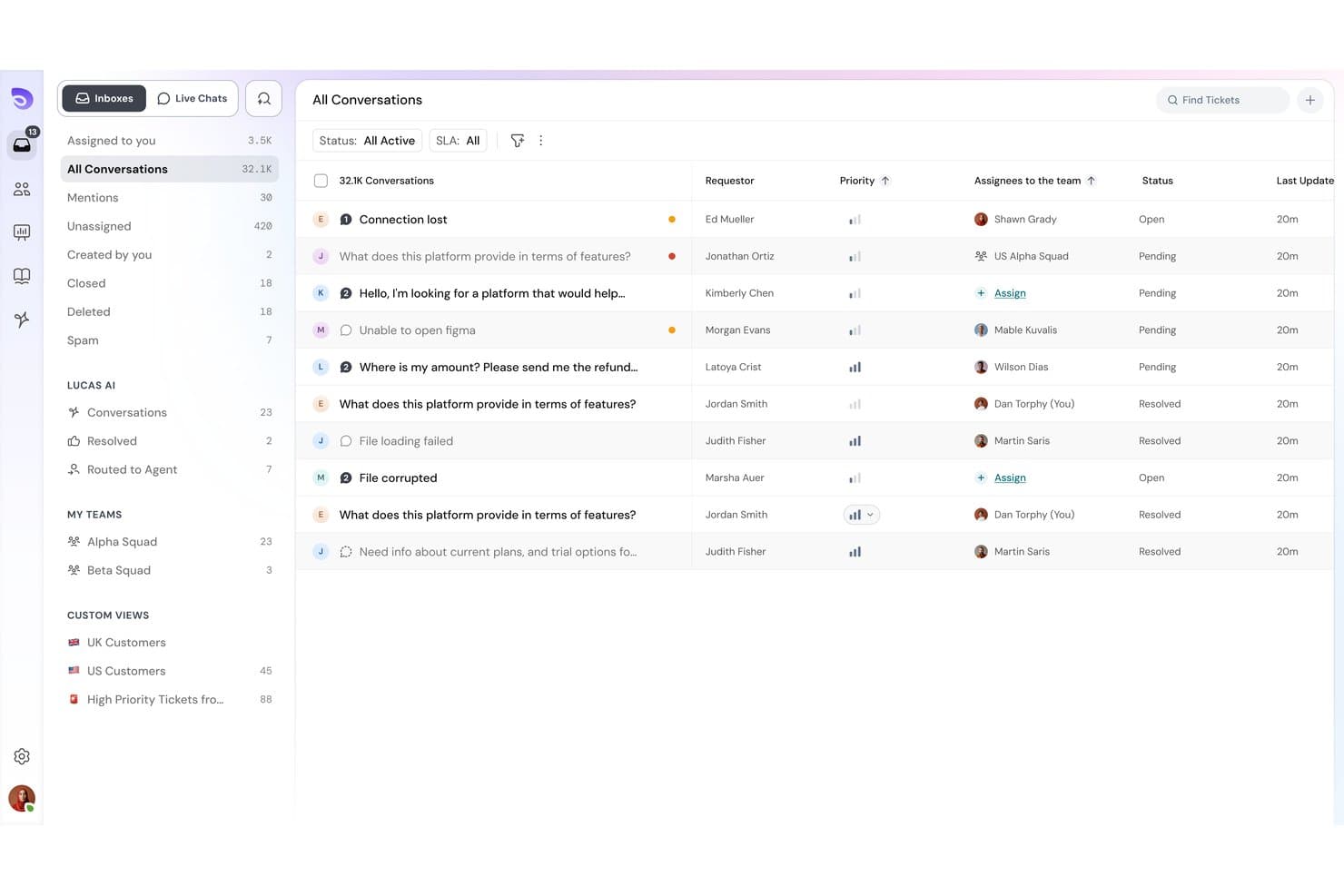
SparrowDesk ofrece una bandeja de entrada omnicanal con todas las conversaciones, niveles de prioridad, responsables y seguimiento del estado en una única vista unificada. SparrowDesk es una plataforma de mesa de ayuda impulsada por IA que combina un agente de IA autónomo con un copiloto para agentes humanos, integrando la gestión omnicanal de tickets, una base de conocimientos que se actualiza automáticamente y la automatización de flujos de trabajo sin código en un solo sistema.
¿Para quién es más adecuado SparrowDesk?
SparrowDesk es adecuado para empresas en crecimiento y equipos de atención al cliente medianos que necesitan ampliar la gestión de tickets sin aumentar su plantilla.
Por qué elegí SparrowDesk
SparrowDesk ocupa un lugar en mi lista de favoritos por la rapidez con la que realmente puedes ponerlo en marcha. Me encanta que Zoona AI se entrene directamente a partir de archivos PDF existentes, documentos de políticas o URL de sitios web, sin necesidad de crear la base de conocimientos manualmente. La base de conocimientos que se actualiza automáticamente es lo que realmente lo distingue: Zoona detecta las lagunas que no puede responder y se actualiza automáticamente, por lo que mi equipo no tiene que mantenerla constantemente entre actualizaciones de productos o cambios en las políticas.
Características principales de SparrowDesk
- Bandeja de entrada omnicanal: Gestiona los mensajes de asistencia por correo electrónico, chat en directo, WhatsApp y Slack desde una única cola unificada.
- Automatización personalizada de flujos de trabajo: Crea automatizaciones sin código para dirigir tickets, establecer SLA y asignar tareas según reglas definidas.
- Seguimiento de acuerdos de nivel de servicio: Define y supervisa objetivos de SLA con notificaciones automáticas de incumplimiento para los tiempos de respuesta y resolución.
- Compatibilidad con varias marcas y portales: Aloja varios centros de ayuda públicos y gestiona flujos de trabajo de asistencia independientes para diferentes marcas o productos.
Integraciones de SparrowDesk
SparrowDesk ofrece integraciones nativas con Shopify, WhatsApp, Linear, Slack y Gmail, además de una API para integraciones personalizadas.
Pros and Cons
Pros:
- Zoona AI se entrena al instante a partir de documentos existentes
- La base de conocimientos que se actualiza automáticamente reduce el mantenimiento
- Configuración de flujos de trabajo sin código disponible
Cons:
- Profundidad limitada en los informes
- Producto más reciente con una comunidad de usuarios más pequeña
Learn more about SparrowDesk: Mejor para integraciones nativas de marketplaces
- Prueba gratuita de 14 días
- Desde $39/agente/mes
Visit WebsiteCustomer Rating:4.4/5
eDesk centraliza los tickets de soporte para ecommerce con clasificación IA y bandeja de entrada inteligente. ¿Está navegando por las complejidades del soporte al cliente en ecommerce y busca una solución que se integre con sus operaciones? eDesk podría ser la herramienta que necesita, gracias a sus integraciones nativas con marketplaces que conectan su soporte directamente con plataformas como Amazon y eBay. Aborda los desafíos del soporte al cliente multicanal con funciones como una bandeja de entrada unificada y automatización por IA, ayudando a reducir los tiempos de respuesta y manteniendo organizada la comunicación con el cliente.
Por qué elegí eDesk
Elegí eDesk por sus integraciones nativas con marketplaces, que conectan su soporte directamente con plataformas como Amazon y eBay y mantienen los datos de clientes y pedidos en un solo lugar. Su bandeja de entrada inteligente unificada centraliza todos los mensajes con el contexto completo del pedido, lo que ayuda a su equipo a responder de forma rápida y precisa. Además, la automatización impulsada por IA gestiona consultas rutinarias de los clientes, reduciendo el trabajo manual y mejorando la eficiencia diaria del soporte.
Funciones clave de eDesk
Además de las integraciones nativas con marketplaces, eDesk ofrece:
- Soporte de chatbot 24/7: Esta función brinda asistencia en tiempo real a los clientes, convirtiendo a los visitantes del sitio web en posibles compradores.
- Herramientas de gestión de opiniones: Estas herramientas permiten a su equipo recopilar y analizar reseñas de clientes y valoraciones de vendedores, mejorando la calidad del producto y del servicio.
- Informes y análisis en tiempo real: Con esta función, puede acceder a información basada en datos para optimizar sus operaciones de soporte y mejorar la toma de decisiones.
Integraciones de eDesk
Las integraciones incluyen Amazon, eBay, Walmart, Etsy, Shopify, WhatsApp, Facebook, Instagram, Magento y BigCommerce.
Pros and Cons
Pros:
- Integra datos enriquecidos de pedidos para un mejor servicio al cliente
- Las automatizaciones por IA reducen tareas de soporte repetitivas
- Diseñado para gestionar grandes volúmenes de consultas de ecommerce
Cons:
- La personalización de informes es limitada para análisis complejos
- Pensado principalmente para ecommerce, menos flexible para otros sectores
Learn more about eDesk: Mejor para mantener interacciones personales con clientes
- Prueba gratuita disponible
- Desde $25/usuario/mes (facturado anualmente)
Visit WebsiteCustomer Rating:4.5/5
La función de detección de colisiones de Help Scout previene respuestas duplicadas Help Scout es una mesa de ayuda SaaS para equipos de soporte que necesitan un servicio personalizado y humano a gran escala. Centraliza los mensajes y el contexto del cliente para que los agentes puedan responder rápidamente sin perder el detalle individual. Es ideal para empresas que buscan una solución de software que combine eficiencia con un toque personal. Ayuda a abordar desafíos comunes como la gestión de altos volúmenes de consultas de clientes y la optimización de los procesos de trabajo.
Por qué elegí Help Scout
Elegí Help Scout porque su bandeja de entrada compartida asocia el historial del cliente con notas privadas y asignaciones, brindando a los equipos el contexto completo de cada conversación. Eso permite que los equipos colaboren sin perder el tono personal que los clientes esperan. Beacon amplía esto al insertar artículos de ayuda y mensajería directamente en tu sitio, para que los clientes puedan encontrar respuestas o contactar con soporte sin salir de la página. También es lo suficientemente simple para que los equipos de ventas y producto puedan ayudar sin capacitación.
Funciones clave de Help Scout
Además de su bandeja de entrada compartida y Beacon, Help Scout ofrece muchas otras funciones útiles para los equipos de atención al cliente:
- Base de conocimientos: La documentación integrada permite a los clientes encontrar respuestas por sí mismos, integrada con Beacon para sugerencias de artículos en tiempo real.
- Herramientas de IA: Automatiza el soporte con funciones impulsadas por IA como AI Summarize para resúmenes rápidos de conversaciones y AI Assist para redactar respuestas.
- Gestión de clientes: Ofrece una barra lateral con perfiles de clientes, que incluye interacciones pasadas y propiedades personalizadas, lo que mejora el contexto para los equipos de soporte.
- Automatización de flujo de trabajo: Utiliza flujos de trabajo basados en reglas para optimizar procesos y mejorar la eficiencia del equipo.
Integraciones de Help Scout
Las integraciones incluyen Salesforce, HubSpot, Jira, Slack, Shopify, Mailchimp, WooCommerce, Stripe, Trello y Google Apps. Los usuarios también pueden crear aplicaciones e integraciones personalizadas utilizando la API de Help Scout.
Pros and Cons
Pros:
- La detección de colisiones previene respuestas duplicadas
- Los informes muestran tendencias en los tiempos de respuesta a lo largo del tiempo
- Rápido de implementar y capacitar a nuevos agentes
Cons:
- El precio aumenta a medida que crecen los buzones
- Las automatizaciones avanzadas requieren más tiempo de configuración
Learn more about Help Scout: Mejor para la integración de PSA y RMM
- Prueba gratuita de 21 días + demo gratis disponible
- Desde $149/técnico/mes (facturado anualmente)
Visit WebsiteCustomer Rating:4.6/5
El panel de tickets de SuperOps.ai muestra solicitudes de servicio agrupadas por prioridad, incluyendo tickets críticos, altos, medios y bajos con actualizaciones de estado en tiempo real. SuperOps está diseñado para Proveedores de Servicios Gestionados (MSP) y equipos de TI que buscan una plataforma unificada para gestionar operaciones de TI de manera eficiente. Con sus herramientas impulsadas por IA, SuperOps optimiza la prestación de servicios, automatiza tareas rutinarias y mejora la gestión de endpoints. Esto lo convierte en una opción atractiva para organizaciones que desean mejorar la velocidad de resolución de tickets y la eficiencia operativa, al mismo tiempo que garantizan una gestión de activos y seguridad robustas.
Por qué elegí SuperOps
Elegí SuperOps por su capacidad única para integrar la Automatización de Servicios Profesionales (PSA) con las herramientas de Monitoreo y Gestión Remota (RMM), lo cual es crucial para soluciones de mesa de ayuda SaaS. Esta integración permite a tu equipo automatizar la gestión de tickets y los flujos de trabajo de servicio, reduciendo el tiempo dedicado a procesos manuales. Además, los análisis impulsados por IA de SuperOps ofrecen soporte proactivo, asegurando que los problemas se aborden antes de que se agraven. Estas características en conjunto mejoran la prestación de servicios y la eficiencia operativa, convirtiéndolo en una herramienta valiosa para equipos de TI y MSPs.
Principales características de SuperOps
Además de su integración de PSA y RMM, también encontré valiosas las siguientes características para tu equipo:
- Sistema de tickets unificado: Optimiza el proceso de gestión de solicitudes de servicio centralizando la creación, asignación y resolución de tickets.
- Gestión de dispositivos móviles: Proporciona herramientas para gestionar y asegurar dispositivos móviles en varias plataformas, garantizando cumplimiento y seguridad.
- Gestión automatizada de SLA: Controla y gestiona los acuerdos de nivel de servicio automáticamente, ayudando a tu equipo a cumplir con las expectativas y plazos de los clientes.
- Funcionalidades de seguridad: Incluye listas blancas de IP y autenticación de dos factores para fortalecer la seguridad de tus operaciones de TI.
Integraciones de SuperOps
Las integraciones incluyen Splashtop, Teamviewer, Quickbooks, Microsoft Office 365, Slack, PandaDoc, Dialpad, Google Workspace Admin, Microsoft Outlook y Airtable.
Pros and Cons
Pros:
- Gestión de parches incorporada
- Automatización de flujos de trabajo impulsada por IA
- Plataforma integrada de PSA y RMM
Cons:
- Opciones de integración nativa limitadas
- Modelo de precios por técnico
Learn more about SuperOps: Mejor para soporte omnicanal
- Prueba gratuita de 14 días + demo gratuita disponible
- Desde $19/agente/mes (facturado anualmente)
Visit WebsiteCustomer Rating:4.4/5
Freshdesk permite a los agentes gestionar tickets, colaborar internamente y rastrear el estado de los tickets desde un panel de control centralizado. Freshdesk es un software de atención al cliente basado en la nube diseñado para ayudar a las empresas a gestionar tickets, automatizar flujos de trabajo y mejorar los tiempos de respuesta en múltiples canales de soporte. Creado tanto para equipos pequeños como para organizaciones empresariales, proporciona un sistema de mesa de ayuda centralizado para atender consultas por correo electrónico, chat, teléfono y redes sociales desde un solo espacio de trabajo. Con funciones como automatización de tickets, gestión de SLA, herramientas de base de conocimientos y paneles de informes, Freshdesk ayuda a reducir los tiempos de resolución, mejorar la productividad de los agentes y ofrecer experiencias de servicio al cliente consistentes.
Por qué elegí Freshdesk
Elegí Freshdesk por su característica destacada de soporte omnicanal, que permite a tu equipo gestionar las interacciones con los clientes de manera fluida a través de correo electrónico, chat, teléfono y redes sociales desde una sola plataforma. Esta integración simplifica la comunicación y garantiza que ninguna consulta de cliente quede sin respuesta. Además, sus capacidades de automatización, incluyendo la gestión de tickets basada en IA y la automatización de flujos de trabajo, ayudan a reducir el trabajo manual de tu equipo, permitiéndoles centrarse en tareas más complejas. Estas funciones hacen de Freshdesk una solución práctica para quienes buscan aumentar la satisfacción del cliente y la eficiencia operativa.
Funciones clave de Freshdesk
Además de su soporte omnicanal y capacidades de automatización, Freshdesk ofrece varias otras funciones que pueden beneficiar a tu equipo:
- Base de conocimientos: Proporciona un portal de autoservicio para los clientes, reduciendo la carga de trabajo de tu equipo de soporte.
- Herramientas de colaboración en equipo: Permite la comunicación interna a través de comentarios y etiquetas, facilitando el trabajo en equipo sin interrupciones.
- Panel personalizable: Permite adaptar la interfaz a las necesidades de tu equipo, mejorando la navegación y la accesibilidad.
- Análisis e informes: Ofrece información sobre el rendimiento del equipo y la satisfacción del cliente, ayudando a tomar decisiones basadas en datos.
Integraciones de Freshdesk
Las integraciones incluyen Slack, Microsoft Teams, Shopify, Google Workspace, Atlassian Jira, Mailchimp, HubSpot, Salesforce, Zapier y Trello. También se dispone de una API para integraciones personalizadas.
Pros and Cons
Pros:
- Ticketing multi-canal por correo y redes sociales
- Despacho de tickets automatizado incluido
- Portal de base de conocimientos incorporado
Cons:
- Capacidades de IA no completamente gratuitas
- Personalización limitada en planes inferiores
Learn more about Freshdesk: Ideal para crear chatbots personalizados con IA
- Plan gratuito disponible
- Desde $32/mes (facturado anualmente)
Visit WebsiteCustomer Rating:4.4/5
El panel de Chatbase muestra registros de chat de chatbots con filtros, historial de conversaciones, puntajes de confianza y una opción de exportar para analizar interacciones con IA. Chatbase es un constructor de chatbots con IA que te permite crear, entrenar y gestionar múltiples chatbots para soporte al cliente y participación en sitios web desde un panel centralizado.
¿Para quién es mejor Chatbase?
Chatbase es ideal para pequeñas y medianas empresas y equipos SaaS que desean implementar chatbots impulsados por IA para atención al cliente sin una gran carga de desarrollo.
Por qué elegí Chatbase
Elegí Chatbase como uno de los mejores por el nivel de control que ofrece sobre el proceso de creación del chatbot. Entrenas a los agentes directamente con los datos de tu empresa, ya sean documentos, artículos de la base de conocimientos o datos conectados de CRM y helpdesk, por lo que el bot realmente responde a preguntas específicas sobre tu producto y clientes. También me gusta la función de comparación de modelos de IA, donde puedes probar diferentes configuraciones de LLM una al lado de otra para encontrar la mejor opción para tu caso de uso en soporte. Además, las barreras de seguridad en lenguaje natural mantienen las respuestas en el tema, lo cual es muy importante al implementar un bot que representa a tu marca.
Funciones clave de Chatbase
- Escalamiento inteligente: Establece instrucciones en lenguaje natural para indicar cuándo el agente IA debe transferir la conversación a un agente humano mediante chat en vivo o un ticket de helpdesk.
- Soporte multilingüe: Detecta y responde automáticamente en más de 80 idiomas usando IA generativa, sin configuración manual.
- Despliegue omnicanal: Despliega tu chatbot en chat de sitio web, WhatsApp, Slack y correo electrónico desde una sola plataforma.
- Reportes avanzados: Haz seguimiento a la analítica de conversaciones y al rendimiento de los agentes para identificar brechas y mejorar tu chatbot con el tiempo.
Integraciones de Chatbase
Chatbase ofrece integraciones nativas con Make, Zendesk, Notion, Slack, Stripe, Salesforce y más. También está disponible una API para integraciones personalizadas.
Pros and Cons
Pros:
- El widget de chat se integra fácilmente en cualquier sitio web
- Soporta controles de acceso basados en roles de forma granular
- Ofrece búsqueda completa de transcripciones de chat y exportación
Cons:
- No incluye transferencia a agentes humanos en vivo incorporada
- El branding personalizado solo está disponible en los planes de pago
Learn more about Chatbase: Mejor para capacidades impulsadas por IA
- Prueba gratuita de 7 días + plan gratuito disponible
- Desde $24.17/mes (facturado anualmente)
Visit WebsiteCustomer Rating:4.7/5
Vista de la bandeja de entrada de Tidio mostrando conversaciones en vivo, detalles de tickets y barra lateral con datos de clientes. Tidio es una versátil solución de software de helpdesk SaaS diseñada para mejorar la experiencia de servicio al cliente. Resulta especialmente atractiva para pequeñas y medianas empresas que buscan reducir los tiempos de respuesta y aumentar la interacción con los clientes. Con funciones como agentes impulsados por IA y chat en vivo, Tidio responde a la necesidad de un soporte eficiente en tiempo real, convirtiéndose en una opción atractiva para propietarios de negocios y responsables de atención al cliente.
Por qué elegí Tidio
Elegí Tidio porque sus capacidades impulsadas por IA destacan en el ámbito del software de helpdesk SaaS. El agente Lyro AI es especialmente notable, ya que gestiona consultas complejas con un toque humano, lo que puede mejorar significativamente los índices de resolución de tu equipo. Además, la función de chat en vivo de Tidio garantiza interacciones rápidas con los clientes, ayudando a mantener altos niveles de satisfacción. Estas funciones se adaptan perfectamente a las necesidades de los negocios que buscan optimizar sus operaciones de soporte.
Funciones clave de Tidio
Además de sus capacidades de IA y chat en vivo, también encontré:
- Soporte multicanal: Esta función consolida las comunicaciones de varias plataformas en una sola bandeja de entrada, asegurando que ningún mensaje de cliente quede sin respuesta.
- Widgets de chat personalizables: Puedes adaptar la apariencia de los widgets de chat para que coincidan con la estética de tu marca, mejorando la interacción con el cliente.
- Integración de correo electrónico: Permite una transición fluida entre el chat y el correo electrónico, proporcionando una experiencia de soporte cohesionada.
- Seguimiento de visitantes: Ofrece información sobre el comportamiento de los visitantes en tu sitio, permitiendo una interacción proactiva con potenciales clientes.
Integraciones de Tidio
Las integraciones incluyen Salesforce, Zendesk, Shopify, Intercom, WordPress, Instagram, Messenger, WhatsApp, HubSpot y Zapier.
Pros and Cons
Pros:
- El chatbot de IA resuelve consultas rutinarias automáticamente
- Soporta más de 120 integraciones incluyendo Shopify y HubSpot
- La bandeja de entrada multicanal centraliza chat, correo electrónico y redes sociales
Cons:
- Se aplican límites de uso de IA en los planes de nivel inferior
- El precio puede ser alto para empresas con grandes volúmenes de conversaciones
Learn more about Tidio: Ideal por su interfaz fácil de usar
- Plan gratuito + demo gratis disponible
- Desde $29/usuario/mes
Visit WebsiteCustomer Rating:4.6/5
HelpDesk organiza las colas de soporte de manera clara y estructurada para equipos en crecimiento. HelpDesk es un software de soporte diseñado para equipos que buscan una interfaz fácil de usar. Atiende a empresas de todos los tamaños proporcionando una gestión de tickets sencilla y funciones de atención al cliente claras.
Por qué elegí HelpDesk: Su interfaz intuitiva lo hace accesible para equipos que desean simplificar los flujos de trabajo de soporte. El sistema de tickets es sencillo y las funciones básicas de automatización ayudan a reducir tareas repetitivas. La interfaz mantiene la navegación simple para equipos nuevos y en crecimiento.
Funciones destacadas e integraciones:
Funciones incluyen una herramienta de informes integrada con métricas básicas de rendimiento, un módulo de base de conocimiento para contenido de autoservicio y opciones de colaboración en tickets para compartir contexto entre los miembros del equipo.
Integraciones incluyen Slack, Jira, Zapier, Salesforce, Google Workspace, Microsoft Teams, Trello, Mailchimp y Shopify.
Pros and Cons
Pros:
- Control fluido de colisión entre agentes
- Codificación clara de tickets por colores
- Configuración sencilla de acciones predefinidas
Cons:
- Seguimiento SLA limitado
- Pocos tipos de reglas condicionales
Learn more about HelpDesk: 10La mejor para soporte en comercio electrónico
Gorgias
- Prueba gratuita de 7 días + demo gratis disponible
- Desde $10/mes
Visit WebsiteCustomer Rating:4.6/5
Gorgias proporciona herramientas a los equipos de comercio electrónico para gestionar interacciones con clientes a través de múltiples canales. Gorgias es una plataforma de soporte al cliente creada para negocios de comercio electrónico. Proporciona herramientas para gestionar interacciones con clientes a través de correo electrónico, chat, canales sociales e integraciones con tiendas en línea.
Por qué elegí Gorgias: Está diseñada específicamente para flujos de trabajo de comercio electrónico y centraliza la comunicación con clientes a través de la tienda y los canales de soporte. Las integraciones con las principales plataformas de comercio electrónico hacen que los datos de pedidos y clientes sean accesibles durante las interacciones de soporte. Gorgias también incluye herramientas de automatización para manejar consultas habituales.
Funciones e integraciones destacadas:
Funciones incluyen un panel centralizado para ver las interacciones con los clientes, macros para crear respuestas reutilizables y análisis para revisar la actividad de soporte.
Integraciones incluyen Shopify, Adobe Commerce, BigCommerce, WooCommerce, Slack, Mailchimp, Klaviyo, Instagram, Facebook y Gmail.
Pros and Cons
Pros:
- Fuerte contexto de pedidos
- Acceso rápido a datos de la tienda
- Buenos flujos de trabajo en la tienda
Cons:
- Lógica de flujo de trabajo limitada para múltiples pasos
- Uso limitado fuera de tiendas
Learn more about Gorgias:
Otro software de mesa de ayuda SaaS
Estas son algunas opciones adicionales de software de mesa de ayuda SaaS que no llegaron a mi selección, pero que aún puede ser útil analizar:
- 11HappyFoxMejor para personalización
- 12PylonIdeal para colaboración en tiempo real
- 13IntercomIdeal para la interacción con clientes
- 14KayakoMejor para la personalización
- 15FrontIdeal para la colaboración en equipo
- 16Salesforce Service CloudMejor para integración con CRM
- 17Help ScoutMejor para pequeñas empresas
- 18JitbitIdeal por su simplicidad
- 19SAAS FirstMejor para startups
- 20LiveAgentMejor para funciones de chat en vivo
- 21ZendeskMejor para grandes equipos
- 22Zoho DeskMejor para integración con IA
Cómo evalúo el software de mesa de ayuda SaaS
Divido cada evaluación en dos capas: la base que toda mesa de ayuda de TI necesita—gestión de tickets, seguimiento de SLA—y los diferenciadores que hacen destacar a las herramientas para equipos DevOps o proveedores de servicios gestionados (MSP).
Funcionalidad principal (Requisitos imprescindibles para esta lista)
Cuando selecciono herramientas para mi lista, califico cada una en una escala de 0 (no ofrece la funcionalidad) a 5 (sobresale en este aspecto) para cada funcionalidad principal que se detalla a continuación. Luego, calculo la puntuación total de la herramienta como un porcentaje. Cada herramienta necesita lograr una puntuación total mínima del 65% para ser considerada para su inclusión.
- Sistema de gestión de tickets: Evalúo cómo cada herramienta gestiona todo el ciclo de vida del ticket—asignación, fusión, etiquetado de prioridad—y si los agentes pueden vincular incidentes relacionados durante una interrupción importante.
- Soporte multicanal: Cada plataforma debería unificar solicitudes de correo electrónico, chat, portal e idealmente teléfono o redes sociales en una sola cola para que los agentes no tengan que alternar entre bandejas de entrada desconectadas.
- Automatización y reglas de flujo de trabajo: Busco enrutamiento basado en reglas, disparadores de escalamiento y condiciones basadas en el tiempo—como asignar automáticamente solicitudes de hardware a un equipo específico o escalar tickets incumplidos.
- Seguimiento y cumplimiento de SLA: La herramienta debería permitir definir políticas de SLA por prioridad o nivel de cliente, enviar alertas de incumplimiento y considerar el horario laboral para que los tickets nocturnos no sean marcados injustamente.
- Base de conocimientos de autoservicio: Una base de conocimientos (KB) buscable y categorizada donde los usuarios finales puedan resolver problemas comunes—restablecimiento de contraseñas, configuración de VPN—antes de enviar un ticket, lo que reduce significativamente el volumen de la cola.
- Informes y analítica: Los paneles deberían cubrir tendencias de volumen de tickets, carga de trabajo de agentes, tasas de cumplimiento de SLA y puntuaciones de satisfacción del cliente (CSAT) para que los líderes de TI puedan detectar cuellos de botella y planificar el personal adecuadamente.
Una vez que tengo una lista de herramientas que cumplen con estos criterios, considero qué distingue a cada plataforma.
Factores diferenciadores (Qué distingue a los proveedores)
Así es como comparo y contrasto diferentes proveedores:
Características destacadas
Busco funciones potenciadas por IA como la resumen de tickets y respuestas sugeridas, que ayudan a los agentes a gestionar colas de alto volumen. Las integraciones con DevOps también son importantes—las herramientas que se sincronizan de forma bidireccional con Jira o GitHub permiten a los equipos de soporte involucrar a los ingenieros en errores sin salir de la mesa de ayuda. La gestión de activos y configuraciones es otro diferenciador. Vincular un ticket a un portátil o servidor específico da a los agentes el contexto para resolver problemas más rápido. Los módulos de gestión de cambios e incidentes alineados con ITIL también destacan para equipos que gestionan operaciones de TI estructuradas.
Más allá de las características
Las credenciales de seguridad y cumplimiento son una prioridad—verifico SOC 2 Type II, ISO 27001, soporte para SSO/SAML y registro de auditoría, especialmente cuando los equipos manejan datos sensibles de infraestructura. El ecosistema de integraciones también es relevante. Una mesa de ayuda que se conecta de forma nativa con Okta, Datadog, Slack y Teams se integra en pilas de TI existentes sin desarrollo personalizado. Evalúo la escalabilidad observando si una plataforma puede crecer desde un pequeño equipo interno de TI hasta una implementación en varios departamentos sin forzar una migración disruptiva a un producto de nivel superior.
Cómo elegir un software de mesa de ayuda SaaS
Es fácil perderse entre largas listas de características y estructuras de precios complejas. Para ayudarte a mantener la concentración mientras avanzas en tu proceso particular de selección de software, aquí tienes una lista de factores que debes tener en cuenta:
| Factor | Qué debes tener en cuenta |
|---|---|
| FactorEscalabilidad | Qué debes tener en cuenta¿Puede el software crecer junto con tu empresa? Comprueba si admite un aumento del volumen de tickets y usuarios adicionales sin incrementos significativos de costes ni una degradación del rendimiento. |
| FactorIntegraciones | Qué debes tener en cuenta¿Se conecta con tus herramientas actuales? Comprueba la compatibilidad con tu CRM, tus plataformas de correo electrónico y otro software esencial para evitar interrupciones en los flujos de trabajo. |
| FactorPersonalización | Qué debes tener en cuenta¿Puedes adaptarlo a tus necesidades? Busca opciones para personalizar los flujos de trabajo, los campos de los tickets y los paneles de control para que coincidan con los procesos de tu equipo. |
| FactorFacilidad de uso | Qué debes tener en cuenta¿Es intuitivo para tu equipo? Evalúa la curva de aprendizaje y la interfaz de usuario para asegurarte de que tu equipo pueda adoptarlo rápidamente sin una formación extensa. |
| FactorImplementación e incorporación | Qué debes tener en cuenta¿Qué tan fluida es la transición? Evalúa los recursos proporcionados para la incorporación, como tutoriales y asistencia, para garantizar una configuración rápida y sin complicaciones. |
| FactorCoste | Qué debes tener en cuenta¿Cómo se ajustan los precios a tu presupuesto? Compara los modelos de precios y considera el coste total de propiedad, incluidas las tarifas ocultas o los complementos necesarios. |
| FactorMedidas de seguridad | Qué debes tener en cuenta¿Están protegidos tus datos y la información de tus clientes? Busca cifrado, cumplimiento de la normativa de protección de datos y actualizaciones de seguridad periódicas. |
| FactorDisponibilidad de asistencia | Qué debes tener en cuenta¿Hay ayuda disponible cuando la necesitas? Ten en cuenta el horario, los canales y la capacidad de respuesta del servicio de asistencia del proveedor para asegurarte de que puedas recibir ayuda rápidamente cuando sea necesario. |
¿Qué es el software de mesa de ayuda SaaS?
El software de mesa de ayuda SaaS es una herramienta basada en la nube que gestiona los tickets y las comunicaciones de atención al cliente. Generalmente lo utilizan los equipos de atención al cliente, el personal de asistencia informática y los profesionales de soporte técnico para mejorar los tiempos de respuesta y la calidad del servicio. Las funciones de gestión de tickets, asistencia multicanal y elaboración de informes ayudan a organizar las consultas, ofrecer un servicio coherente y analizar el rendimiento. En general, estas herramientas mejoran la satisfacción del cliente y la eficiencia del equipo al centralizar y simplificar los procesos de asistencia.
Características del software de mesa de ayuda SaaS
Al seleccionar un software de mesa de ayuda SaaS, presta atención a las siguientes características clave:
- Gestión de tickets: Organiza las consultas de los clientes en un sistema centralizado, lo que facilita que tu equipo haga un seguimiento y resuelva los problemas de forma eficiente.
- Asistencia multicanal: Permite gestionar las comunicaciones de plataformas como el correo electrónico, el chat y las redes sociales desde un mismo lugar, garantizando un servicio coherente.
- Automatización basada en IA: Automatiza las tareas y respuestas repetitivas, liberando a tu equipo para que se centre en problemas más complejos de los clientes.
- Flujos de trabajo personalizables: Te permiten adaptar los procesos y los campos de los tickets a las necesidades específicas de tu equipo.
- Colaboración en tiempo real: Permite que los miembros del equipo trabajen juntos en los problemas de los clientes, mejorando los tiempos de respuesta y la calidad del servicio.
- Informes y análisis: Proporciona información sobre el rendimiento del equipo y la satisfacción de los clientes, ayudándote a tomar decisiones basadas en datos.
- Portal de autoservicio: Permite que los clientes encuentren respuestas de forma independiente, reduciendo la carga de trabajo de tu equipo de asistencia.
- Medidas de seguridad: Garantiza la protección de los datos de los clientes mediante el cifrado y el cumplimiento de las normativas de protección de datos.
- Capacidades de integración: Se conecta con herramientas existentes, como CRM y plataformas de correo electrónico, para evitar interrupciones en los flujos de trabajo.
- Paneles personalizables: Te permiten mostrar las métricas y la información clave de la forma que mejor se adapte a las necesidades de tu equipo.
Ventajas del software de mesa de ayuda SaaS
La implementación de un software de mesa de ayuda SaaS ofrece varias ventajas para tu equipo y tu empresa. Estas son algunas de las que puedes esperar:
- Mayor eficiencia: La automatización de tareas repetitivas con herramientas basadas en IA permite que tu equipo se centre en resolver problemas complejos con mayor rapidez.
- Mayor satisfacción del cliente: La asistencia multicanal garantiza respuestas coherentes y oportunas, lo que se traduce en clientes más satisfechos.
- Mejor colaboración: Las herramientas de colaboración en tiempo real ayudan a los miembros del equipo a trabajar juntos de forma eficaz, mejorando la calidad del servicio.
- Información basada en datos: Los informes y análisis proporcionan métricas de rendimiento valiosas que te ayudan a tomar decisiones fundamentadas.
- Más opciones de autoservicio: Un portal de autoservicio permite que los clientes encuentren soluciones de forma independiente, reduciendo la carga de trabajo de tu equipo de asistencia.
- Mayor protección de datos: Las medidas de seguridad garantizan que los datos de los clientes se mantengan protegidos, generando confianza entre tus usuarios.
- Flujos de trabajo personalizados: Adaptar los procesos a las necesidades de tu equipo mejora la eficiencia y alinea las operaciones de asistencia con los objetivos empresariales.
Costes y precios del software de mesa de ayuda SaaS
Seleccionar un software de mesa de ayuda SaaS requiere comprender los distintos modelos de precios y planes disponibles. Los costes varían en función de las características, el tamaño del equipo, los complementos y otros factores. La siguiente tabla resume los planes estándar, sus precios medios y las características habituales incluidas en las soluciones de software de mesa de ayuda SaaS:
Tabla comparativa de planes de software de mesa de ayuda SaaS
| Tipo de plan | Precio medio | Características habituales |
|---|---|---|
| Tipo de planPlan gratuito | Precio medio$0 | Características habitualesGestión básica de tickets, asistencia por correo electrónico e informes limitados. |
| Tipo de planPlan personal | Precio medio$5-$25/usuario/mes | Características habitualesGestión de tickets, asistencia multicanal y automatización básica. |
| Tipo de planPlan empresarial | Precio medio$30-$60/usuario/mes | Características habitualesAutomatización avanzada, flujos de trabajo personalizables e informes y análisis. |
| Tipo de planPlan para empresas | Precio medio$70-$120/usuario/mes | Características habitualesFunciones basadas en IA, medidas de seguridad avanzadas y asistencia prémium para clientes. |
Preguntas frecuentes sobre el software de mesa de ayuda SaaS
Estas son algunas respuestas a preguntas frecuentes sobre el software de mesa de ayuda SaaS:
¿Qué riesgos de migración de datos debe prever al cambiar de sistema de mesa de ayuda?
Cambiar de herramienta puede provocar la pérdida del historial de tickets, desajustes en las cuentas de usuario o fallos en las integraciones. Es fundamental comprobar cómo se trasladarán los datos antiguos al nuevo sistema y si es necesario reconstruir las automatizaciones. Pregunte al proveedor por las herramientas de importación, los formatos compatibles y cualquier límite sobre los datos históricos. Una migración más lenta y por fases también puede reducir el riesgo de problemas inesperados.
¿Qué métricas indican que la mesa de ayuda se está convirtiendo en un cuello de botella para su crecimiento?
Preste atención al aumento de la acumulación de tickets, a las respuestas más lentas o a que los agentes gestionen demasiadas solicitudes. Si la calidad de la asistencia se deteriora a medida que aumenta el volumen, es posible que el sistema no pueda escalar para satisfacer sus necesidades. Realice un seguimiento periódico de las tendencias para identificar los problemas con antelación. La mesa de ayuda debe adaptarse a medida que crece, no limitar sus procesos.
¿Qué costes ocultos o condiciones de licencia pueden sorprenderle después de la implementación?
Algunas herramientas aumentan el precio cuando añade agentes, canales o funciones de automatización. Otras requieren actualizar el plan para acceder a análisis o flujos de trabajo avanzados. Revise detenidamente las condiciones para conocer cualquier restricción basada en el nivel contratado. Solicite una lista completa de los complementos antes de comprometerse.
¿Cómo se puede evaluar si una herramienta de mesa de ayuda gestiona permisos de equipo complejos?
Algunos sistemas solo ofrecen roles básicos, mientras que otros admiten controles más detallados. Si gestiona varios equipos o departamentos, compruebe cómo están estructurados el acceso a los tickets, los grupos y los roles. Pruebe los cambios de permisos durante el periodo de prueba para entender qué posibilidades existen. Unos controles de acceso sólidos pueden reducir los errores más adelante.
¿Qué carencias en los informes debe comprobar antes de contratar un software de mesa de ayuda SaaS?
Los paneles básicos pueden no incluir toda la información necesaria para la planificación o las previsiones. Compruebe si se pueden crear informes personalizados sin exportar los datos. Busque las métricas en las que se basa su equipo, como las tendencias de carga de trabajo o el origen de los tickets. Los informes deben respaldar la toma de decisiones, no complicarla.
¿Cómo encajará la mesa de ayuda en mis procesos actuales de aprobación o escalado?
Algunas herramientas admiten escalados en varias etapas, mientras que otras mantienen flujos más básicos. Si utiliza aprobaciones de responsables o revisiones de especialistas, pruebe cómo funcionan esos procesos durante el periodo de prueba. Intente recrear un caso real de escalado para comprobar si la herramienta cumple sus requisitos.