

Las plataformas de programación colaborativa ayudan a los desarrolladores a trabajar en el mismo código en tiempo real, tanto si están al otro lado de la mesa como al otro lado del mundo.
Estas herramientas se vuelven esenciales cuando compartir la pantalla no es suficiente, el control de versiones se vuelve complicado o pierdes tiempo intentando depurar problemas por chat. La edición en tiempo real, los terminales compartidos y la colaboración desde el navegador facilitan la resolución conjunta de problemas sin tener que cambiar constantemente de contexto ni sufrir confusiones.
He trabajado con equipos que utilizan estas herramientas para todo tipo de tareas, desde revisiones entre compañeros y procesos de incorporación hasta sesiones completas de depuración de aplicaciones de pila completa. Esta guía se basa en esa experiencia y está aquí para ayudarte a elegir una plataforma que se adapte a la forma en que tu equipo escribe y entrega código.
Por qué confiar en nuestras recomendaciones de software
6,700+
Reviews
20
Industry experts
16+
Evaluation factors
14
Years
Nuestro equipo lleva probando y evaluando software desde 2012. Como líderes tecnológicos, sabemos lo difícil —y lo importante— que es elegir el software adecuado.
Para esta guía, evaluamos las herramientas mediante pruebas prácticas e investigación independiente, puntuando las herramientas según nuestros criterios de selección.
Nuestras reseñas reflejan nuestro criterio editorial humano, no un discurso de ventas.
Revisores expertos:
- Paulo Gardini MiguelDirector técnico
 Tim FisherVP de IA
 Gabriel RosasTech Lead y arquitecto de software
 Christhian GruhnTech Lead y arquitecto de plataforma

Tabla comparativa de plataformas de programación colaborativa
Esta tabla comparativa resume los detalles de precios de mi selección de las mejores plataformas de programación colaborativa:
| Tool | Best For | Trial Info | Price | ||
|---|---|---|---|---|---|
| 1 | Mejor para la gestión de tareas de equipos remotos | No | $10.99/usuario/mes (facturado anualmente) | Website | |
| 2 | La mejor opción para compartir y almacenar archivos de forma segura | No | $5/user/month | Website | |
| 3 | La mejor para compartir conocimientos de equipo de forma centralizada | No | $5/usuario/mes (facturado anualmente) | Website | |
| 4 | Ideal para la evaluación y capacitación de habilidades de codificación | No | $35/user/month | Website | |
| 5 | Ideal para integrar la documentación del código con las tareas de desarrollo | No | $20/user/month | Website | |
| 6 | Ideal para una base de conocimientos técnicos interna | No | $10/usuario/mes | Website | |
| 7 | Ideal para sesiones de programación colaborativa en directo | No | $9.90/usuario/mes (facturado anualmente) | Website | |
| 8 | El mejor para la lluvia de ideas visual y el mapeo de conceptos | No | $8/usuario/mes (facturado anualmente) | Website | |
| 9 | Ideal para la planificación y asignación de recursos de proyectos mediante IA | No | $8/usuario/mes (facturado anualmente) | Website | |
| 10 | La mejor para una comunicación y colaboración fluida en equipos | No | $18.95/usuario/mes (facturado anualmente) | Website |


Reseñas de las mejores plataformas de programación colaborativa
 Mejor para la gestión de tareas de equipos remotos
- No
- $10.99/usuario/mes (facturado anualmente)
Visit WebsiteCustomer Rating:4.4/5
Mis tareas de Asana es tu punto único para ver y priorizar todo el trabajo asignado a ti. Asana es una herramienta de gestión de tareas y proyectos que ayuda a los equipos a organizar, seguir y gestionar su trabajo. Es fundamental en entornos de trabajo remoto, donde coordinar tareas y mantener la visibilidad de los proyectos puede resultar muy desafiante.
Por qué elegí Asana:
La capacidad de Asana para facilitar la gestión de tareas en equipos remotos se hizo evidente al considerar diversas herramientas. Su conjunto de funciones completo, combinado con una interfaz intuitiva, la hace destacar frente a la competencia. Elegí Asana porque cierra la brecha en comunicación y supervisión de proyectos que suelen experimentar los equipos remotos, por lo que es la mejor opción para este caso.
Funciones destacadas e integraciones:
Asana ofrece varias funciones, como vistas de línea de tiempo, dependencias de tareas y campos personalizados para añadir detalles específicos de cada proyecto. Además, proporciona tableros Kanban para una gestión visual de proyectos. Asana se integra muy bien con numerosas aplicaciones de terceros como Slack, Google Drive y Zoom, aumentando su utilidad en un entorno típico de trabajo remoto.
Pros and Cons
Pros:
- Gestión avanzada de tareas con funciones como dependencias y campos personalizados
- Opciones de visualización versátiles, incluyendo listas, tableros y líneas de tiempo
- Gran variedad de integraciones con terceros
Cons:
- Puede ser abrumador para nuevos usuarios debido a la cantidad de funciones.
- Funcionalidad limitada en el plan gratuito
- Las funciones avanzadas como carga de trabajo y objetivos solo están disponibles en el plan empresarial.
Learn more about Asana: 2La mejor opción para compartir y almacenar archivos de forma segura
Box
- No
- $5/user/month
Visit WebsiteCustomer Rating:4.3/5
Mantén la proactividad con el aprendizaje automático de Box Shield y la capacidad de establecer políticas que detecten amenazas. Protege tus archivos con funciones nativas de seguridad y cumplimiento en la nube como controles de acceso detallados, marcas de agua y clasificación. Box es una herramienta de almacenamiento y colaboración basada en la nube que permite a los usuarios guardar, compartir y acceder a archivos en línea de forma segura. Sus funciones de seguridad avanzadas la convierten en una opción ideal para empresas que buscan compartir archivos y datos confidenciales de manera segura, haciéndola especialmente adecuada para el intercambio y almacenamiento protegido de archivos.
Por qué elegí Box:
Durante mi proceso de selección, escogí Box por su dedicación a la seguridad de los datos y su facilidad de uso. Es una solución esencial de almacenamiento y una plataforma integral que ofrece un cifrado robusto de datos y controles de acceso detallados. Box es la mejor opción para compartir y almacenar archivos de forma segura debido a su firme compromiso con la protección de los datos.
Características destacadas e integraciones:
Box ofrece colaboración en tiempo real, sincronización automática de archivos e historial de versiones. Pero lo que realmente la distingue son sus características de seguridad, incluyendo controles de acceso detallados, cifrado avanzado y cumplimiento de diversas normativas mundiales de privacidad. Box también se integra bien con muchas aplicaciones empresariales, incluidas Office 365, G Suite, Salesforce y Slack.
Pros and Cons
Pros:
- Las sólidas funciones de seguridad ofrecen una fuerte protección de datos.
- Se integra con una amplia variedad de aplicaciones de terceros
- Colaboración en tiempo real en documentos
Cons:
- La interfaz de usuario puede resultar confusa para quienes la usan por primera vez.
- El límite de tamaño de archivo en el plan básico
- La funcionalidad de búsqueda podría mejorarse para facilitar su uso.
Learn more about Box: La mejor para compartir conocimientos de equipo de forma centralizada
- No
- $5/usuario/mes (facturado anualmente)
Visit WebsiteCustomer Rating:4.3/5
Con Confluence puedes crear cualquier cosa, desde planes de proyectos y campañas de marketing hasta requisitos de productos y más. Confluence es una robusta plataforma de software colaborativo diseñada para centralizar el intercambio de conocimientos del equipo. Es un espacio de trabajo digital donde los equipos también pueden crear, compartir y colaborar en proyectos en un solo lugar accesible.
Por qué elegí Confluence:
La capacidad de Confluence para fomentar un espacio unificado de intercambio de conocimientos llamó mi atención al evaluar múltiples plataformas colaborativas. No se trata solo de crear y editar documentos, sino de la manera en que Confluence hace que el conocimiento sea accesible y esté organizado para cada miembro del equipo. La particularidad de la plataforma radica en su capacidad para cerrar brechas de información dentro de un equipo, lo cual justifica por qué la considero la mejor para compartir conocimientos centralizados en equipos.
Funciones destacadas e integraciones:
La estructura de páginas y espacios de Confluence ayuda a los equipos a organizar de manera efectiva su trabajo y conocimiento. La plataforma también ofrece una potente funcionalidad de búsqueda, garantizando que la información crítica siempre esté disponible. En cuanto a integraciones, Confluence funciona bien con herramientas como Jira, Trello, Slack y muchas otras, facilitando un flujo de trabajo fluido con el conjunto de herramientas que ya utilizas.
Pros and Cons
Pros:
- Proporciona una plataforma centralizada para el intercambio de conocimientos del equipo
- Sólida funcionalidad de búsqueda para acceder rápidamente a la información
- Excelente integración con otros productos de Atlassian y una gran variedad de herramientas externas
Cons:
- La curva de aprendizaje puede ser pronunciada para usuarios sin conocimientos técnicos.
- La interfaz de usuario podría beneficiarse de una renovación de diseño.
- Las opciones de personalización pueden resultar limitadas para necesidades de proyectos complejos.
 Ideal para la evaluación y capacitación de habilidades de codificación
- No
- $35/user/month
Visit WebsiteCustomer Rating:4.4/5
El generador de evaluaciones de Coderbyte facilita a los usuarios no técnicos la creación de una evaluación relevante Coderbyte es una plataforma basada en la web diseñada para ayudar a las personas a mejorar sus habilidades de programación mediante la práctica y la evaluación. Con una extensa colección de desafíos de programación y cursos preparatorios para entrevistas técnicas, es especialmente beneficiosa para la evaluación y capacitación de habilidades.
¿Por qué elegí Coderbyte?
Al elegir una plataforma para evaluaciones y capacitación en habilidades de programación, Coderbyte me pareció la opción natural. Además, su amplia biblioteca de desafíos de programación con distintos niveles de dificultad la hace destacar. El hecho de que estos desafíos abarquen diferentes lenguajes de programación refuerza mi convicción de que Coderbyte es la mejor plataforma para evaluaciones y capacitación en habilidades de codificación.
Características destacadas e integraciones:
Las características clave de Coderbyte incluyen una variedad de desafíos de programación, un editor de código integrado para practicar y soluciones aportadas por la comunidad. También ofrece soluciones oficiales y una guía en video para algunos de sus desafíos, lo que facilita una mejor comprensión. Aunque las integraciones directas son limitadas, soporta varios lenguajes de programación, permitiendo a los usuarios practicar y aprender en el idioma de su preferencia.
Pros and Cons
Pros:
- Amplia variedad de desafíos de programación
- Soporta múltiples lenguajes de programación
- Hay soluciones de la comunidad y guías en video disponibles
Cons:
- Integraciones directas limitadas
- Precio inicial alto para usuarios individuales
- La interfaz podría mejorar para una mejor experiencia de usuario.
Learn more about Coderbyte: Ideal para integrar la documentación del código con las tareas de desarrollo
- No
- $20/user/month
Visit WebsiteCustomer Rating:4.4/5
Con Swimm, documenta flujos complejos que abarcan múltiples archivos y repositorios con contenido enriquecido que interactúa directamente con el código y se actualiza automáticamente a medida que tu código cambia. Swimm es una herramienta que garantiza que la documentación se mantenga sincronizada con tu base de código. Proporciona un entorno para redactar y gestionar documentos, y permite a los desarrolladores vincular partes de sus textos con fragmentos de código relevantes. Esta característica única posiciona a Swimm como una herramienta fantástica para integrar la documentación del código con las tareas de programación.
Por qué elegí Swimm:
Swimm destacó al seleccionar herramientas para esta lista gracias a su enfoque innovador para mantener la documentación del código actualizada, un reto frecuente en entornos de desarrollo dinámicos. Además, valoro cómo Swimm crea una simbiosis entre el código y la documentación, lo que lo convierte en la elección ideal para integrar la documentación del código con las tareas de desarrollo.
Características destacadas e integraciones:
Las funciones clave de Swimm también incluyen su sincronización automática entre la documentación y la base de código, la capacidad de redactar pruebas unitarias en la documentación y la creación de materiales de aprendizaje interactivos. En cuanto a integraciones, Swimm funciona bien con Github, permitiendo una conexión fluida con tus repositorios.
Pros and Cons
Pros:
- El código y la documentación se mantienen sincronizados.
- La posibilidad de escribir pruebas unitarias en la documentación
- Permite la creación de materiales de aprendizaje interactivos
Cons:
- Precio inicial más alto en comparación con algunos competidores
- Una pequeña curva de aprendizaje para miembros no técnicos del equipo
- Número limitado de integraciones directas
Learn more about Swimm:

Con Stack Overflow for Teams, es posible la integración con Slack. Stack Internal es una plataforma interna de intercambio de conocimientos y colaboración dirigida principalmente a equipos técnicos. Funciona como un espacio privado y seguro donde los compañeros pueden hacer preguntas y obtener respuestas, lo que la convierte en una herramienta ideal para crear una base de conocimientos técnicos interna.
Por qué elegí Stack Internal:
Elegí Stack Internal para esta lista debido a su sólida reputación a la hora de facilitar el intercambio eficiente de conocimientos dentro de los equipos técnicos. Además, lo que la diferencia es su conocido formato de preguntas y respuestas, al que tantos desarrolladores y miembros del personal técnico están acostumbrados, lo que aumenta las tasas de adopción y utilización. Por estas razones, determiné que Stack Internal es la mejor herramienta para crear una base de conocimientos técnicos interna.
Características e integraciones destacadas:
Stack Internal ofrece funciones como etiquetado, búsqueda instantánea y una interfaz integrada, lo que hace que la acumulación y recuperación de conocimientos sean rápidas y eficientes. Sus integraciones con herramientas de uso diario, como Slack y Microsoft Teams, garantizan que las actualizaciones y conversaciones esenciales no pasen desapercibidas.
Pros and Cons
Pros:
- Formato conocido de preguntas y respuestas fácil de adoptar
- Sistema eficiente de búsqueda y etiquetado para facilitar la recuperación de información
- Integraciones valiosas con herramientas como Slack y Microsoft Teams
Cons:
- El coste podría resultar prohibitivo para equipos pequeños.
- Menos adecuado para equipos no técnicos
- No hay opción de un plan para un solo usuario
Learn more about Stack Internal: Ideal para sesiones de programación colaborativa en directo
- No
- $9.90/usuario/mes (facturado anualmente)

Ejecuta pruebas y depura con el ejecutor de pruebas y el depurador de GUI integrados, y utiliza el terminal incorporado mientras Code With Me actúa como un IDE de JetBrains completo para tus proyectos remotos. Code With Me es un servicio de JetBrains que permite a los desarrolladores compartir el proyecto de su IDE con otras personas, facilitando la programación conjunta en tiempo real.
Por qué elegí Code With Me:
Code With Me destacó al seleccionar las herramientas para esta lista porque lleva la colaboración en la programación al siguiente nivel con sus sesiones de programación en directo. La posibilidad de compartir un proyecto desde el IDE en tiempo real lo diferencia de otras herramientas de colaboración. Dadas estas características únicas, he determinado que Code With Me es la mejor opción para las sesiones de programación colaborativa en directo.
Características e integraciones destacadas:
Entre las funciones fundamentales de Code With Me se incluyen la edición colaborativa simultánea, el chat de voz y vídeo integrado y una función para seguir a los participantes que permite ver las acciones de otra persona en tiempo real. La integración con IDE populares como IntelliJ IDEA, PyCharm, WebStorm y otros supone una ventaja significativa, ya que permite a los desarrolladores trabajar en un entorno con el que están familiarizados.
Pros and Cons
Pros:
- La programación colaborativa en tiempo real es posible.
- Chat de voz y vídeo integrado para una mejor comunicación
- Integración con IDE populares de JetBrains
Cons:
- Podría ser demasiado para tareas colaborativas sencillas.
- Se necesita cierto tiempo de aprendizaje para utilizarlo de manera eficiente.
- El precio podría ser un obstáculo para los equipos pequeños.
Learn more about Code With Me: 8El mejor para la lluvia de ideas visual y el mapeo de conceptos
Miro
- No
- $8/usuario/mes (facturado anualmente)
Visit WebsiteCustomer Rating:4.8/5
Con Miro se pueden explicar procesos y sistemas complejos mediante mapeo visual y diagramación. Miro es una plataforma interactiva de pizarra en línea que potencia la colaboración y la creatividad en equipo. Es un lienzo digital donde los equipos pueden hacer lluvias de ideas, organizar conceptos y convertirlos en acciones tangibles.
Por qué elegí Miro:
La capacidad de Miro para fomentar la lluvia de ideas visual y el mapeo de conceptos destacó en mi proceso de selección. Además, su habilidad para incentivar la creatividad y la colaboración en un entorno virtual lo hace único dentro de un grupo de herramientas similares. Miro es especialmente eficaz para transformar conceptos abstractos en representaciones visuales explícitas, por lo que lo considero el mejor para la lluvia de ideas y el mapeo visual.
Características destacadas e integraciones:
Miro ofrece numerosas plantillas, como lluvias de ideas, diagramas de flujo y mapas mentales, facilitando la generación eficiente de ideas. El lienzo infinito puede albergar ideas expansivas sin restricciones. Miro también se integra fácilmente con aplicaciones como Google Drive, Dropbox, Slack e incluso herramientas más especializadas como Jira y Sketch, permitiendo un flujo de trabajo cohesivo.
Pros and Cons
Pros:
- Lienzo infinito para la generación y mapeo de ideas sin límites
- Amplia selección de plantillas para diferentes casos de uso
- Integraciones fluidas con varias herramientas de productividad
Cons:
- La interfaz puede resultar abrumadora para nuevos usuarios.
- La colaboración en tiempo real puede ser lenta con un gran número de participantes.
- Las funciones avanzadas están bloqueadas en planes superiores
Learn more about Miro: Ideal para la planificación y asignación de recursos de proyectos mediante IA
- No
- $8/usuario/mes (facturado anualmente)
Visit WebsiteCustomer Rating:4.6/5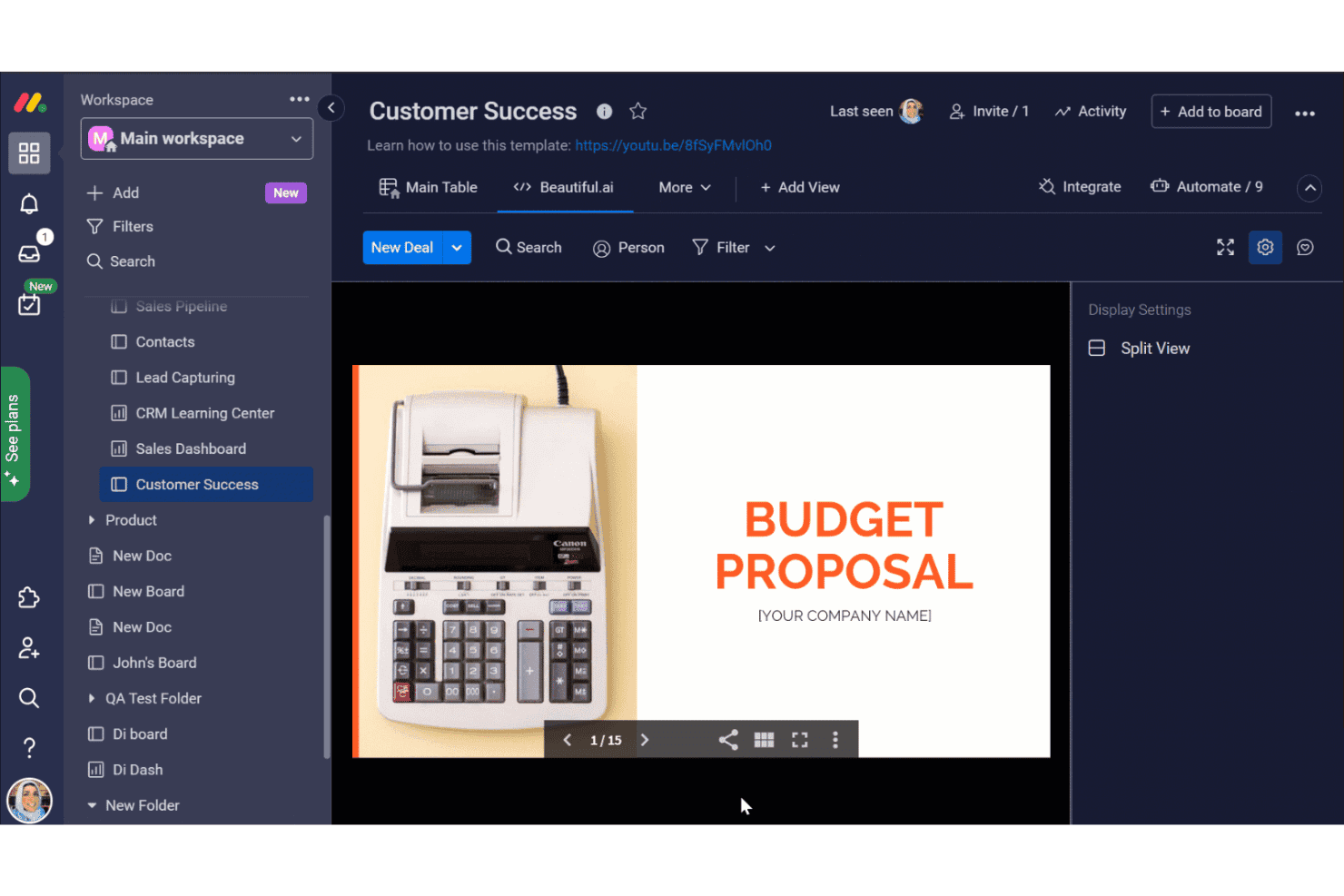
monday.com ofrece una integración con Beautiful.ai dentro de su tablero de Éxito del cliente, lo que permite a los usuarios insertar y ver presentaciones de Propuestas presupuestarias directamente en el espacio de trabajo. Monday AI Workspace es una plataforma de gestión del trabajo impulsada por IA que combina la planificación de proyectos, el seguimiento de sprints, la asignación de recursos y las integraciones con la cadena de herramientas de desarrollo, incluidos GitHub y GitLab, en un espacio de trabajo unificado para equipos de ingeniería y equipos multifuncionales.
¿Para quién es más adecuado Monday AI Workspace?
Es una opción especialmente adecuada para equipos de ingeniería medianos y empresariales que necesitan planificación de sprints asistida por IA y visibilidad de proyectos multifuncionales junto con sus herramientas de desarrollo existentes.
Por qué elegí Monday AI Workspace
Monday AI Workspace se ha ganado un lugar en mi lista de opciones principales porque me encanta cómo su IA gestiona la planificación de sprints y equilibra la carga de recursos sin intervención manual. Cuando asigno un sprint, la IA muestra los conflictos de capacidad y recomienda reasignaciones basadas en datos históricos de velocidad. También considero realmente útil la detección de riesgos identificados por la IA: señala los cuellos de botella de las dependencias antes de que descarrilen un ciclo de lanzamiento.
Características principales de Monday AI Workspace
- Integración con GitHub y GitLab: Vincula solicitudes de incorporación de cambios, confirmaciones y detalles de repositorios directamente con los tableros de proyectos para obtener visibilidad del flujo de trabajo.
- Tableros de gestión de sprints: Organiza, prioriza y realiza el seguimiento de las tareas de los sprints con vistas de tableros ágiles personalizables.
- Generador de automatizaciones personalizadas: Configura automatizaciones del flujo de trabajo que activen actualizaciones, notificaciones o recordatorios según la actividad del tablero.
- Mapeo de dependencias: Visualiza y gestiona las dependencias entre tareas para identificar bloqueos y secuenciar el trabajo de manera eficiente.
Integraciones de Monday AI Workspace
Monday AI Workspace ofrece cientos de integraciones nativas mediante sus integraciones integradas y su mercado, incluidas GitHub, GitLab, Jira, Slack, Microsoft Teams, Google Workspace, Salesforce y Zapier. También hay una API disponible para integraciones personalizadas.
Pros and Cons
Pros:
- La IA asigna tareas según la capacidad del equipo
- Vistas nativas de planificación de sprints integradas en los tableros
- Visibilidad de la carga de trabajo en tiempo real en todos los equipos de ingeniería
Cons:
- No está diseñado para la edición de código en tiempo real
- No incluye ejecución de código ni terminal integrados
Learn more about monday AI Workspace: 10La mejor para una comunicación y colaboración fluida en equipos
Nextiva
- No
- $18.95/usuario/mes (facturado anualmente)
Visit WebsiteCustomer Rating:4.5/5
Los usuarios pueden gestionar fácilmente su pipeline de ventas y realizar un seguimiento de las oportunidades, utilizando la función de vista de pipeline de Nextiva. Importe contactos fácilmente. Registre información tras cada interacción. Nextiva es una plataforma de comunicaciones unificadas que combina servicios telefónicos VoIP, mensajería para equipos, videoconferencias y herramientas de gestión de clientes. Dada su completa suite de comunicación que facilita la colaboración fluida entre los miembros del equipo, se ajusta perfectamente a la necesidad de comunicación y colaboración en equipos.
Por qué elegí Nextiva:
Elegí Nextiva para esta lista debido a su funcionalidad versátil que abarca varios aspectos de la comunicación empresarial. Cuenta con una amplia gama de funciones que contribuyen a su distinción, desde el servicio telefónico en la nube hasta el chat para equipos y las herramientas de atención al cliente. Gracias a su extenso conjunto de capacidades de comunicación y colaboración, considero que Nextiva es una herramienta ideal para la comunicación en equipo.
Características destacadas e integraciones:
Algunos elementos clave de Nextiva incluyen servicios telefónicos VoIP, mensajería para equipos, videoconferencias y herramientas de gestión de relaciones con clientes. Sus análisis avanzados y la generación de informes potenciados mejoran aún más su utilidad para las empresas. Nextiva se integra bien con herramientas empresariales comúnmente utilizadas como Microsoft Teams, Google Workspace, Salesforce y Zendesk.
Pros and Cons
Pros:
- Una suite integral de herramientas de comunicación
- Análisis e informes avanzados
- Integración fluida con muchas aplicaciones empresariales de terceros
Cons:
- La estructura de precios puede ser compleja para los nuevos usuarios.
- Requiere conexión a internet de alta velocidad para un rendimiento óptimo
- La configuración puede ser un poco complicada para usuarios sin conocimientos técnicos.
Learn more about Nextiva:
Otras plataformas de programación colaborativa
A continuación encontrarás una lista de plataformas de programación colaborativa adicionales que incluí en mi selección, pero que aún no han llegado a las 10 mejores. Merece la pena echarles un vistazo.
- 11LucidsparkMejor para lluvias de ideas colaborativas en tiempo real
- 12Zoho ProjectsMejor para la gestión de proyectos a gran escala
- 13BOASTBueno para operaciones empresariales todo en uno y gestión de proyectos
Reseñas de otras plataformas de programación colaborativa
- Software de desarrollo web
- Software de desarrollo de aplicaciones
- Software de desarrollo de aplicaciones móviles
- Plataformas de desarrollo en la nube
Comment j'évalue les plateformes de codage collaboratif
Que j'évalue des outils pour des sessions de programmation en binôme ou des entretiens techniques en direct, je répartis mon évaluation entre les exigences de base et les facteurs différenciateurs qui démarquent réellement les plateformes.
Fonctionnalités de base (critères minimums pour cette liste)
Lorsque je sélectionne des outils pour ma liste, j'attribue à chacun une note de 0 (ne propose pas la fonctionnalité) à 5 (excellent dans ce domaine) pour chaque fonctionnalité de base ci-dessous. Ensuite, je convertis le score total de l’outil en pourcentage. Chaque outil doit obtenir un score total minimum de 65 % pour être pris en considération.
- Co-édition en temps réel : Je recherche une édition fluide à plusieurs curseurs, où deux développeurs ou plus peuvent écrire dans le même fichier simultanément, comme lors d’une session de pair programming en direct avec un collègue à distance.
- Prise en charge de plusieurs langages : La plateforme doit gérer la coloration syntaxique et l’exécution pour les langages réellement utilisés par mon équipe, que ce soit Python, JavaScript, Go ou Rust.
- Exécution de code intégrée : Je vérifie si les développeurs peuvent exécuter et tester le code directement dans la session, afin qu’une équipe déboguant un test unitaire défaillant n’ait pas à changer de contexte vers un terminal local.
- Espace de développement partagé : Un espace de travail cloud avec système de fichiers et terminal est primordial ici, surtout pour l’intégration des nouveaux arrivants qui ont besoin d’un environnement de projet prêt à l’emploi dès le premier jour.
- Intégration au contrôle de version : J’évalue comment chaque plateforme se connecte aux fournisseurs Git tels que GitHub, GitLab ou Bitbucket pour committer, créer des branches et pousser les changements depuis l’éditeur.
- Communication en session : Un chat intégré, la voix ou la vidéo gardent les collaborateurs dans la même fenêtre, ce que je considère essentiel lorsqu’il s’agit de guider un collègue à travers un conflit de fusion complexe.
Une fois que j’ai une liste d’outils répondant à ces critères, j’examine ce qui démarque chaque plateforme.
Facteurs différenciateurs (ce qui distingue les fournisseurs)
Voici comment je compare et distingue les différents fournisseurs :
Fonctionnalités remarquables
L’assistance au codage par IA est un facteur différenciateur majeur. Je privilégie les plateformes où les suggestions en ligne et les explications d’erreur accélèrent le débogage collaboratif sans casser le rythme de la session. L’enregistrement des sessions compte aussi, surtout pour les responsables techniques qui souhaitent revoir le déroulement d’une session de mob programming ou rejouer un entretien technique pour un comité de recrutement. Pour les équipes menant des évaluations de codage en direct, les outils d’entretien intégrés comme la notation des candidats et les banques de questions évitent d’avoir à utiliser plusieurs plateformes séparées.
Au-delà des fonctionnalités
La sécurité et la conformité sont ici prioritaires. Je vérifie la présence de la certification SOC 2, la prise en charge SSO/SAML et les journaux d’audit, car les équipes d’achats en entreprise refuseront l’adoption sans ces garanties. L’intégration à l’écosystème pèse aussi beaucoup : une plateforme qui s’intègre à votre pile existante—GitHub pour le contrôle de version, Slack pour les notifications, Jira pour le lien des tickets—réduit grandement les frictions de workflow. J’évalue aussi la flexibilité tarifaire, notamment si un fournisseur propose des forfaits distincts pour un usage dédié aux entretiens versus la collaboration totale de l’équipe, afin de ne pas payer pour des fonctionnalités dont vous n’avez pas besoin.
Cómo elegir una plataforma de programación colaborativa
Es fácil perderse entre largas listas de funciones y complejas estructuras de precios. Para ayudarte a mantener la concentración mientras avanzas en tu proceso único de selección de software, aquí tienes una lista de factores que debes tener en cuenta:
| Factor | Qué debes tener en cuenta |
|---|---|
| FactorEscalabilidad | Qué debes tener en cuenta¿Puede la plataforma crecer junto con tu equipo? Considera si admite un número cada vez mayor de usuarios y proyectos sin problemas de rendimiento. |
| FactorIntegraciones | Qué debes tener en cuenta¿Se conecta con otras herramientas que utilizas? Comprueba su compatibilidad con tu conjunto de software actual, como las herramientas de gestión de proyectos o de CI/CD. |
| FactorPersonalización | Qué debes tener en cuenta¿Puedes adaptarla a tus flujos de trabajo? Busca plataformas que permitan realizar ajustes para adaptarse a las prácticas y preferencias de programación específicas de tu equipo. |
| FactorFacilidad de uso | Qué debes tener en cuenta¿Es intuitiva la plataforma? Asegúrate de que tenga una interfaz fácil de usar que reduzca el tiempo de aprendizaje y mantenga la productividad de tu equipo. |
| FactorImplementación e incorporación | Qué debes tener en cuenta¿Qué fluidez tiene la transición? Evalúa los recursos disponibles para la incorporación, como materiales de formación y asistencia al cliente durante la configuración. |
| FactorCoste | Qué debes tener en cuenta¿Se ajusta a tu presupuesto? Compara los planes de precios, considera los costes adicionales y busca una solución que ofrezca la mejor relación calidad-precio para tu inversión. |
| FactorMedidas de seguridad | Qué debes tener en cuenta¿Están protegidos tus proyectos? Verifica las medidas de seguridad de la plataforma, incluido el cifrado de datos y los controles de acceso, para mantener tu código a salvo. |
¿Qué es una plataforma de programación colaborativa?
Una plataforma de programación colaborativa es una herramienta que permite a varios desarrolladores escribir, editar y depurar código juntos en tiempo real. La utilizan ingenieros de software, equipos remotos e instructores de programación que necesitan trabajar juntos sin estar en el mismo lugar.
Funciones como los terminales compartidos, la edición de código en directo y el chat integrado ayudan a resolver errores más rápidamente, revisar el código en grupo y mantenerse coordinados. Estas herramientas facilitan la escritura conjunta de código sin ralentizarse unos a otros.
Características
Al seleccionar una plataforma de programación colaborativa, presta atención a las siguientes características clave:
- Colaboración en tiempo real: Permite que varios desarrolladores trabajen simultáneamente en la misma base de código, mejorando la comunicación y la eficiencia del equipo.
- Integración con el control de versiones: Se conecta con sistemas de control de versiones como Git, lo que permite realizar un seguimiento sencillo de los cambios y del historial del código.
- Proceso de revisión del código: Facilita la revisión entre compañeros del código, garantizando la calidad y la coherencia en toda la base de código antes de la implementación.
- Compatibilidad con varios lenguajes: Ofrece compatibilidad con diversos lenguajes de programación, lo que la hace versátil para distintos proyectos y equipos.
- Funciones de entorno de desarrollo integrado (IDE): Ofrece herramientas y editores de programación integrados para agilizar el proceso de desarrollo.
- Programación asistida por IA: Sugiere finalizaciones y optimizaciones de código, ayudando a los desarrolladores a escribir código más rápido y con menos errores.
- Flujos de trabajo personalizables: Permite a los equipos adaptar la plataforma a sus prácticas de programación específicas y a las necesidades del proyecto.
- Capacidades de edición sin conexión: Permite a los desarrolladores trabajar en el código sin conexión a Internet, garantizando la productividad en cualquier situación.
- Medidas de seguridad avanzadas: Protege el código y los datos mediante cifrado y controles de acceso, garantizando la seguridad del proyecto.
- Recorridos interactivos del producto: Ofrece recorridos guiados para los nuevos usuarios, simplificando el proceso de incorporación y reduciendo el tiempo de aprendizaje.
Ventajas
La implementación de una plataforma de programación colaborativa ofrece varias ventajas para tu equipo y tu empresa. Estas son algunas de las que puedes esperar:
- Mejora de la colaboración: Las funciones de colaboración en tiempo real permiten que tu equipo trabaje conjuntamente de forma más eficaz, reduciendo los malentendidos y aumentando la productividad.
- Mayor calidad del código: Los procesos de revisión del código garantizan que todo el código se compruebe en busca de errores y coherencia, lo que da lugar a software de mayor calidad y más fiable.
- Mayor flexibilidad: La compatibilidad con varios lenguajes permite que tu equipo trabaje en proyectos diversos sin verse limitado por las restricciones de los lenguajes de programación.
- Flujos de trabajo optimizados: Los flujos de trabajo personalizables permiten a tu equipo adaptar la plataforma a sus necesidades específicas, mejorando la eficiencia general en la gestión de proyectos.
- Desarrollo más rápido: La programación asistida por IA acelera el proceso de programación al proporcionar sugerencias y automatizar tareas repetitivas, permitiendo que tu equipo se centre en la innovación.
- Mayor seguridad: Las medidas de seguridad avanzadas protegen tu código y tus datos, ofreciéndote tranquilidad sobre la seguridad del proyecto.
- Incorporación sencilla: Los recorridos interactivos del producto y los recursos ayudan a los nuevos usuarios a ponerse al día rápidamente, reduciendo el tiempo de inactividad y mejorando la productividad del equipo.
Costes y precios
Seleccionar una plataforma de programación colaborativa requiere comprender los distintos modelos de precios y planes disponibles. Los costes varían en función de las características, el tamaño del equipo, los complementos y otros factores. La siguiente tabla resume los planes habituales, sus precios medios y las características típicas incluidas en las soluciones de plataformas de programación colaborativa:
Tabla comparativa de planes para plataformas de programación colaborativa
| Tipo de plan | Precio medio | Características habituales |
|---|---|---|
| Tipo de planPlan gratuito | Precio medio$0 | Características habitualesColaboración básica, almacenamiento limitado y asistencia de la comunidad. |
| Tipo de planPlan personal | Precio medio$5-$25/usuario/mes | Características habitualesHerramientas de colaboración mejoradas, más almacenamiento e integraciones básicas. |
| Tipo de planPlan empresarial | Precio medio$25-$50/usuario/mes | Características habitualesIntegraciones avanzadas, funciones de seguridad ampliadas y asistencia prioritaria. |
| Tipo de planPlan para empresas | Precio medio$50-$100/usuario/mes | Características habitualesSoluciones personalizables, gestión de cuentas dedicada y asistencia para empresas. |
Preguntas más frecuentes sobre la plataforma de programación colaborativa (preguntas frecuentes)
¿Puedes describir tu experiencia con entornos de programación colaborativa o proyectos grupales?
En los proyectos de programación colaborativa, los miembros del equipo contribuyen a crear y revisar el código. Trabajar en parejas o equipos suele dar como resultado menos errores, una mayor calidad del código y una finalización más rápida de los proyectos. Este enfoque aprovecha diversas habilidades y perspectivas, lo que mejora el proceso general de desarrollo.
¿Cómo gestionas los conflictos en la programación colaborativa?
La gestión de conflictos requiere un control de versiones eficaz y una comunicación clara. Herramientas como Git ayudan al permitir que los miembros del equipo fusionen cambios y resuelvan conflictos de forma sistemática. Las reuniones periódicas del equipo y una documentación clara también desempeñan un papel crucial a la hora de minimizar los malentendidos.
¿Por qué es importante el control de versiones en la programación colaborativa?
El control de versiones es fundamental porque realiza un seguimiento de los cambios, mantiene el historial del proyecto y permite que varios miembros del equipo trabajen en la misma base de código sin sobrescribir el trabajo de los demás. Garantiza que las versiones anteriores puedan restaurarse cuando sea necesario, proporcionando una red de seguridad para los equipos de desarrollo.