

Coderbyte Review: Pros, Cons, Features and Pricing
Coderbyte stands out for offering unlimited assessments and admins on any plan, providing great value for teams of all sizes.

We review tools independently, and commissions help fund our testing. See our transparency policy, our methodology, or suggest a tool.
Coderbyte is a CTO code review tool built for screening and evaluating developer candidates through structured coding assessments. It's worth considering if your team needs to assess technical skills at volume and wants more control over how those assessments are built. Compared to HackerRank, Coderbyte gives you more flexibility to customize challenge libraries around your actual tech stack and hiring criteria, rather than relying on a standardized question set that may not reflect your real engineering environment.
Coderbyte Evaluation Summary

4.4/5
- From $199/user/month
- Free trial available
Why Trust Our Software Recommendations
6,700+
Reviews
20
Industry experts
16+
Evaluation factors
14
Years
Our team has been testing and reviewing software since 2012. As tech leaders ourselves, we know how difficult—and important—it is to choose the right software.
For this guide, we evaluated tools using hands-on testing and independent research, scoring tools using our selection criteria.
Our reviews reflect our human editorial judgment, not a sales pitch.
Expert reviewers:
- Paulo Gardini MiguelTech Director
 Tim FisherVP of AI
 Gabriel RosasTech Lead & Software Architect
 Christhian GruhnTech Lead & Platform Architect

Coderbyte Overview
In my opinion, Coderbyte is a solid choice for tech teams looking for an effective code review tool. Its fixed-price licensing model, which includes unlimited assessments and unlimited admin seats, removes the financial unpredictability that often comes with usage-based tools. The UI is not flashy, but the ease of use and ATS connectivity give it real operational value.
While its ease of use and onboarding are commendable, Coderbyte could improve its integrations. It's best suited for small to medium-sized tech companies or departments needing a straightforward tool for evaluating coding skills. If you're considering a tool that's easy to implement and offers great support, Coderbyte should be on your list.
Pros
- Unlimited coding assessments and admin seats under a flat-rate plan.
- Extensive library of ready-to-use challenges.
- Onboarding and ATS integration is quick and easy for new users.
Cons
- It lacks extensive integration and deep, custom API support.
- The user interface could be more intuitive for beginners.
- Reporting is limited to basic pass or fail decisions.
Is Coderbyte Right For Your Needs?
Who Would be a Good Fit for Coderbyte?
Coderbyte is ideal for tech companies and development teams needing a tool for coding assessments and skill improvement. It's great for businesses looking to hire and train developers efficiently. With its wide range of coding challenges and unlimited assessments, your team can focus on enhancing skills and evaluating candidates. If you're in IT or software development, Coderbyte's ease of use and quick onboarding make it a smart choice.
- Tech StartupsCoderbyte helps you assess coding skills quickly, essential for fast-paced growth environments.The fixed-cost model makes it the budget-friendly backbone for vetting a large funnel of candidates quickly.
- Software Development FirmsYour team can benefit from the vast collection of coding challenges to upskill developers.
- IT DepartmentsIT teams can use the extensive challenge library to evaluate and train your technical staff on new languages and frameworks.
- Recruitment AgenciesSimplifies high-volume technical hiring with instant, unlimited assessment deployment that supports fast candidate progression and consistent skills testing.
- Educational InstitutionsCoderbyte is perfect for teaching coding skills through practical challenges and assessments.
- Small to Medium BusinessesTake advantage of its user-friendly interface for onboarding and skill evaluation within your tech team.
Who Would be a Bad Fit for Coderbyte?
Coderbyte may not suit large corporations needing extensive integrations with other enterprise software. If your team relies heavily on seamless data flow between multiple tools, Coderbyte's limited integration options could be a drawback. Additionally, companies requiring detailed reporting and analysis might find its reporting features lacking. It's also not ideal for non-tech businesses where coding assessments aren't a priority.
- Large EnterprisesYou might struggle with Coderbyte's limited integration capabilities with your existing systems. The limited proctoring and anti-cheating controls are not strong enough for high-stakes, unsupervised coding assessments at FAANG/large-sized enterprises.
- Non-Tech IndustriesIf coding assessments aren't part of your core operations, Coderbyte won't add much value.
- Finance DepartmentsCoderbyte's focus on coding challenges makes it irrelevant for your financial analysis needs.
- Marketing TeamsYour work doesn't involve coding assessments, making Coderbyte unnecessary for your department.
- Healthcare OrganizationsIf your primary focus isn't on coding skills, Coderbyte won't meet your operational needs.
- Legal FirmsYour team won't find value in Coderbyte, as it doesn't align with legal work functions.
Our Review Methodology
How We Test & Score Tools
We’ve spent years building, refining, and improving our software testing and scoring system. The rubric is designed to capture the nuances of software selection and what makes a tool effective, focusing on critical aspects of the decision-making process.
Below, you can see exactly how our testing and scoring works across seven criteria. It allows us to provide an unbiased evaluation of the software based on core functionality, standout features, ease of use, onboarding, customer support, integrations, customer reviews, and value for money.
Core Functionality (25% of final scoring)
The starting point of our evaluation is always the core functionality of the tool. Does it have the basic features and functions that a user would expect to see? Are any of those core features locked to higher-tiered pricing plans? At its core, we expect a tool to stand up against the baseline capabilities of its competitors.
Standout Features (25% of final scoring)
Next, we evaluate uncommon standout features that go above and beyond the core functionality typically found in tools of its kind. A high score reflects specialized or unique features that make the product faster, more efficient, or offer additional value to the user.
We also evaluate how easy it is to integrate with other tools typically found in the tech stack to expand the functionality and utility of the software. Tools offering plentiful native integrations, 3rd party connections, and API access to build custom integrations score best.
Ease of Use (10% of final scoring)
We consider how quick and easy it is to execute the tasks defined in the core functionality using the tool. High scoring software is well designed, intuitive to use, offers mobile apps, provides templates, and makes relatively complex tasks seem simple.
Onboarding (10% of final scoring)
We know how important rapid team adoption is for a new platform, so we evaluate how easy it is to learn and use a tool with minimal training. We evaluate how quickly a team member can get set up and start using the tool with no experience. High scoring solutions indicate little or no support is required.
Customer Support (10% of final scoring)
We review how quick and easy it is to get unstuck and find help by phone, live chat, or knowledge base. Tools and companies that provide real-time support score best, while chatbots score worst.
Customer Reviews (10% of final scoring)
Beyond our own testing and evaluation, we consider the net promoter score from current and past customers. We review their likelihood, given the option, to choose the tool again for the core functionality. A high scoring software reflects a high net promoter score from current or past customers.
Value for Money (10% of final scoring)
Lastly, in consideration of all the other criteria, we review the average price of entry level plans against the core features and consider the value of the other evaluation criteria. Software that delivers more, for less, will score higher.
Core Features
Unlimited Assessments
You can create as many coding assessments as your team needs, letting you evaluate a large pool of candidates without constraints. This flexibility is especially valuable for growing teams that need to scale quickly.
Coding Challenges
Coderbyte features a continuously updated, vast library of coding challenges and interview questions, covering key languages and popular data structures for effective screening.
Skill Evaluations
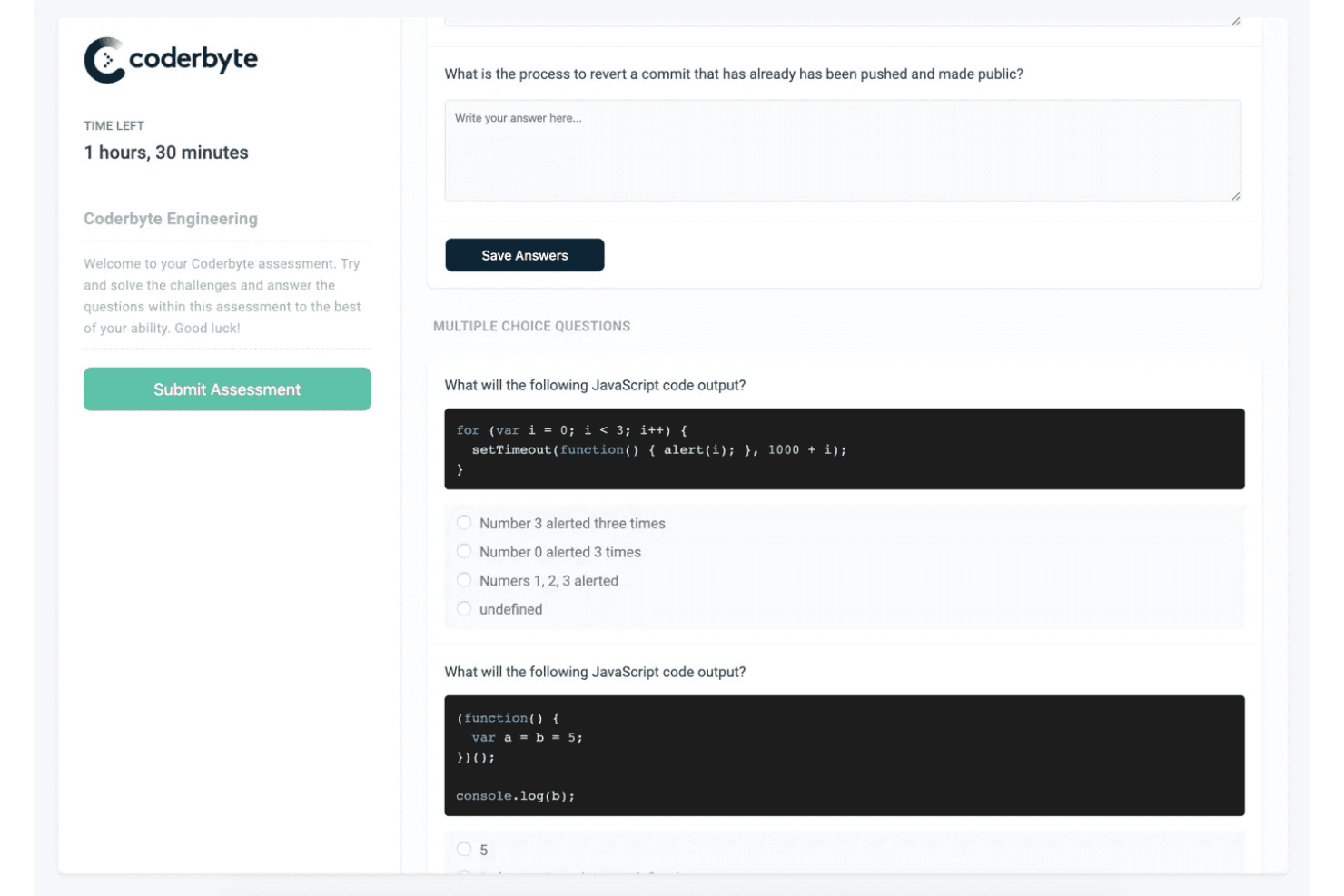
You can assess different skill levels with Coderbyte's tailored evaluations. Recruiters can combine challenges, multiple-choice questions, and timed prompts to create evaluations that map directly to the specific technical requirements of a role.
Customizable Tests
Create tests that fit your team's specific needs with Coderbyte's customizable test options. This ensures you evaluate the exact skills that are relevant to your work.
Real-Time Feedback
Provides immediate scores and solution feedback to candidates and recruiters. Includes a video playback feature to review the candidate's exact code-writing process for integrity checks.
Standout Features
Unlimited Admin Access
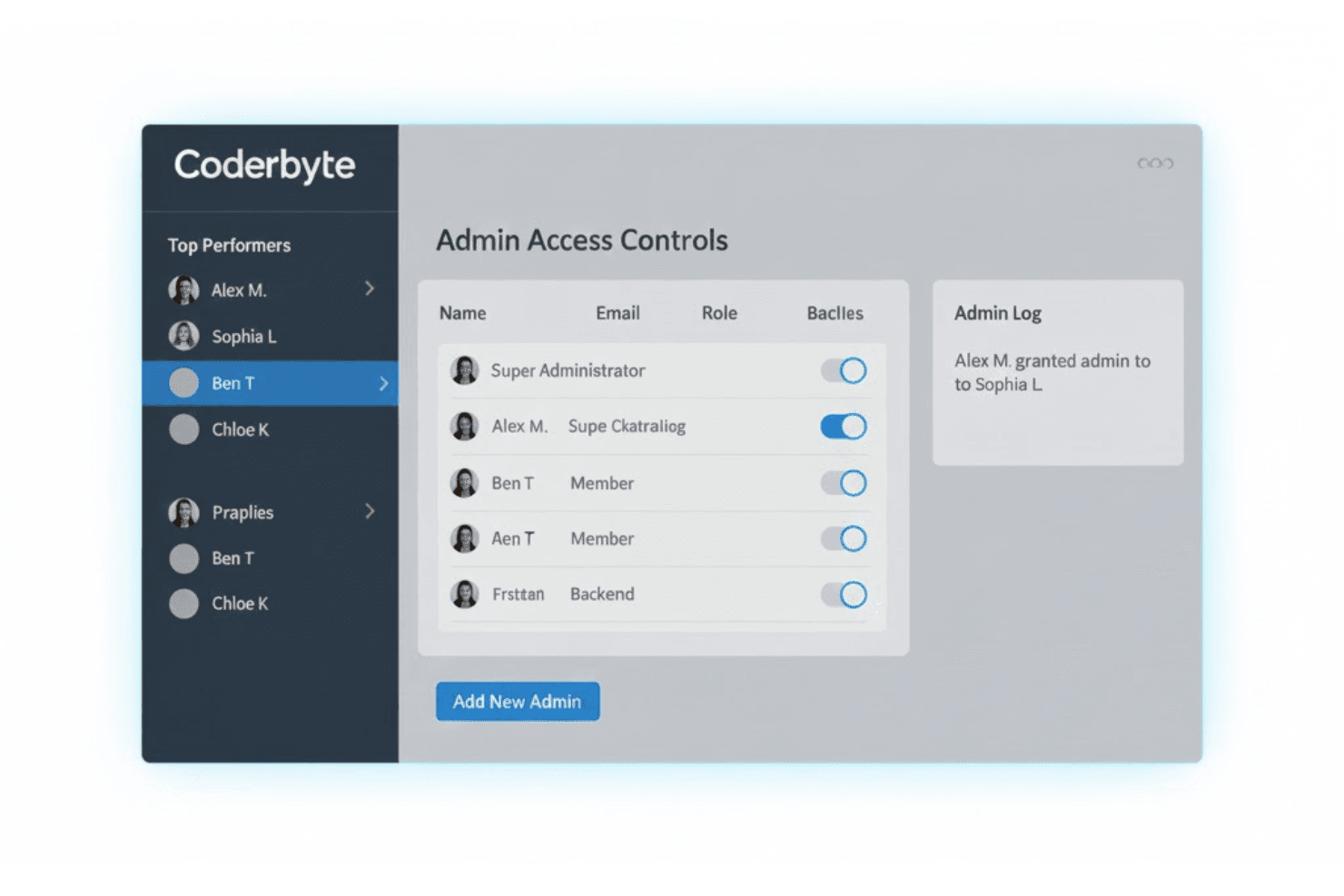
Unlike many competitors, Coderbyte allows unlimited admin access to entire Talent Acquisition departments or hiring managers to access and manage assessments without per-seat licensing cost hurdles.
Extensive Challenge Library
Coderbyte provides a broad mix of front-end, algorithmic, and database-focused challenges, giving teams more variety than most platforms. This makes it easy to keep assessments fresh and skills development well rounded.
Ease of Use
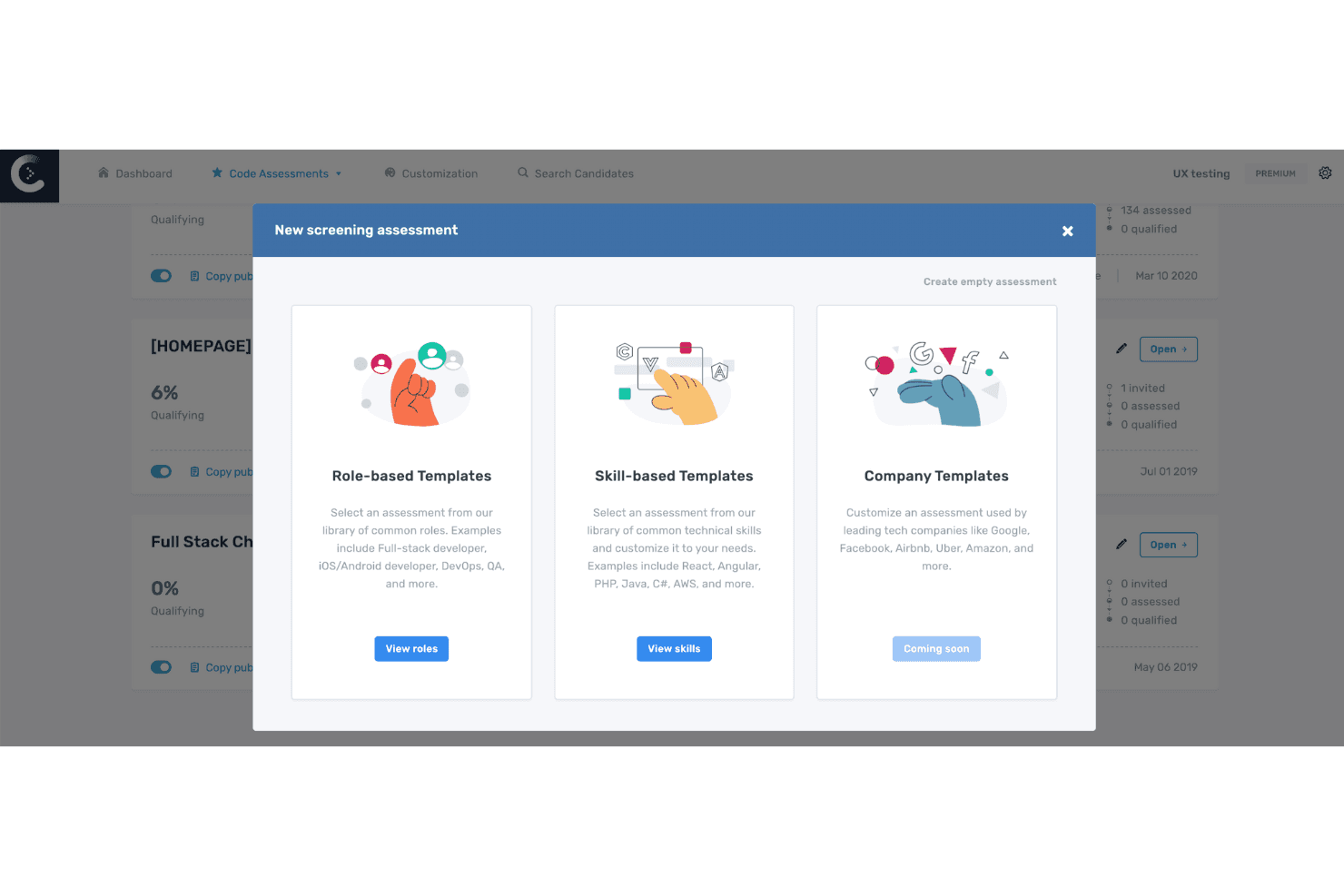
Coderbyte is user-friendly, making it easy for your team to dive into coding assessments without a steep learning curve. The UI is built for speed rather than visual polish. It lets recruiters launch assessments and track results quickly, making it easier to handle large candidate pipelines without unnecessary friction.
Onboarding
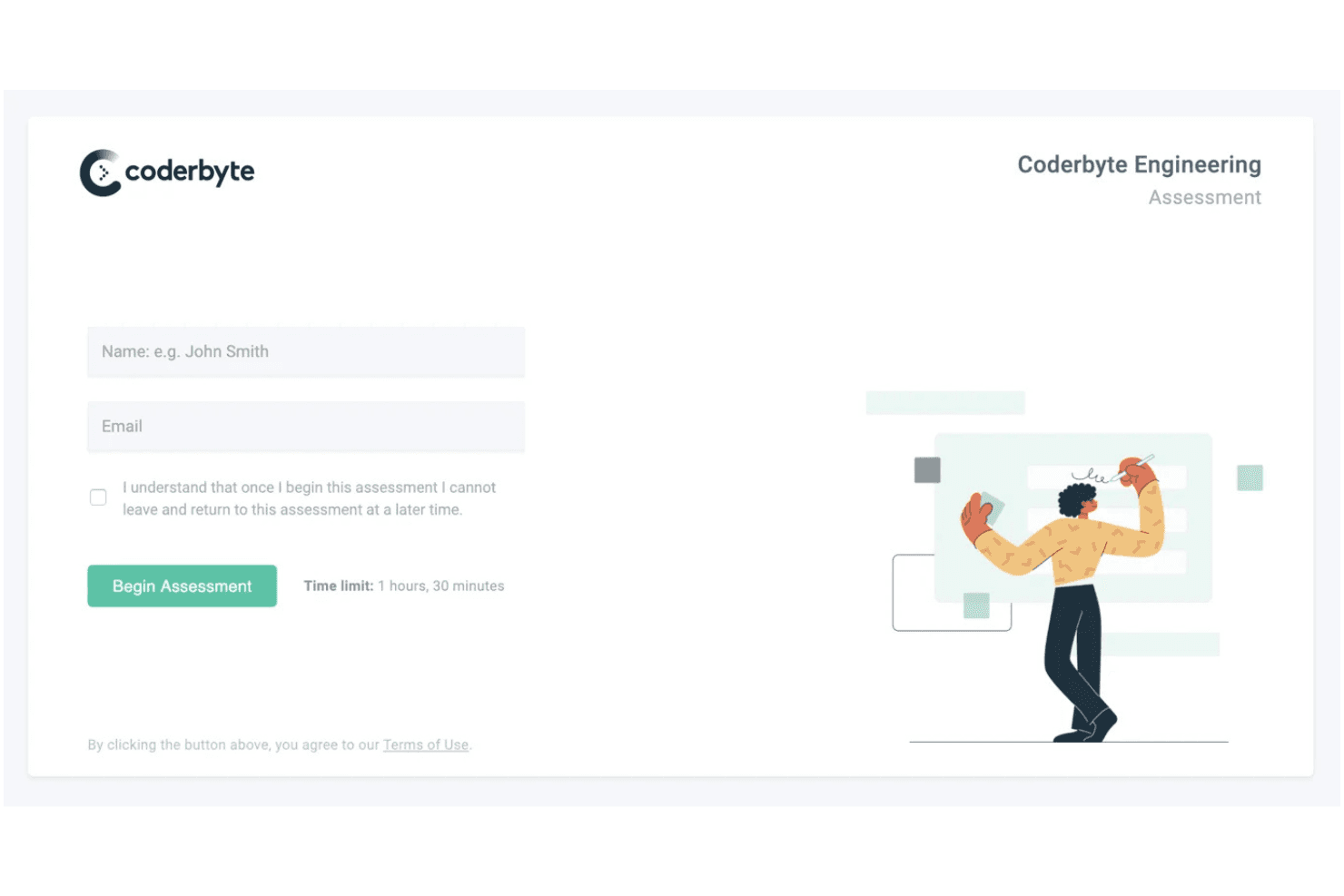
The platform offers one of the fastest onboarding experiences in its category. Recruiters can deploy assessments almost immediately thanks to its minimal configuration and simple ATS connectivity. New users do not need ongoing IT assistance to operate the system.
Customer Support
Coderbyte's customer support is highly rated, with users praising the responsiveness and helpfulness of the support team. You can access assistance through support tickets, email and live chat for prompt resolution. The availability of comprehensive resources and responsive support helps your team resolve problems quickly, minimizing downtime. Compared to tools with less accessible support, Coderbyte ensures you get the help you need to keep your assessments running smoothly.
Integrations
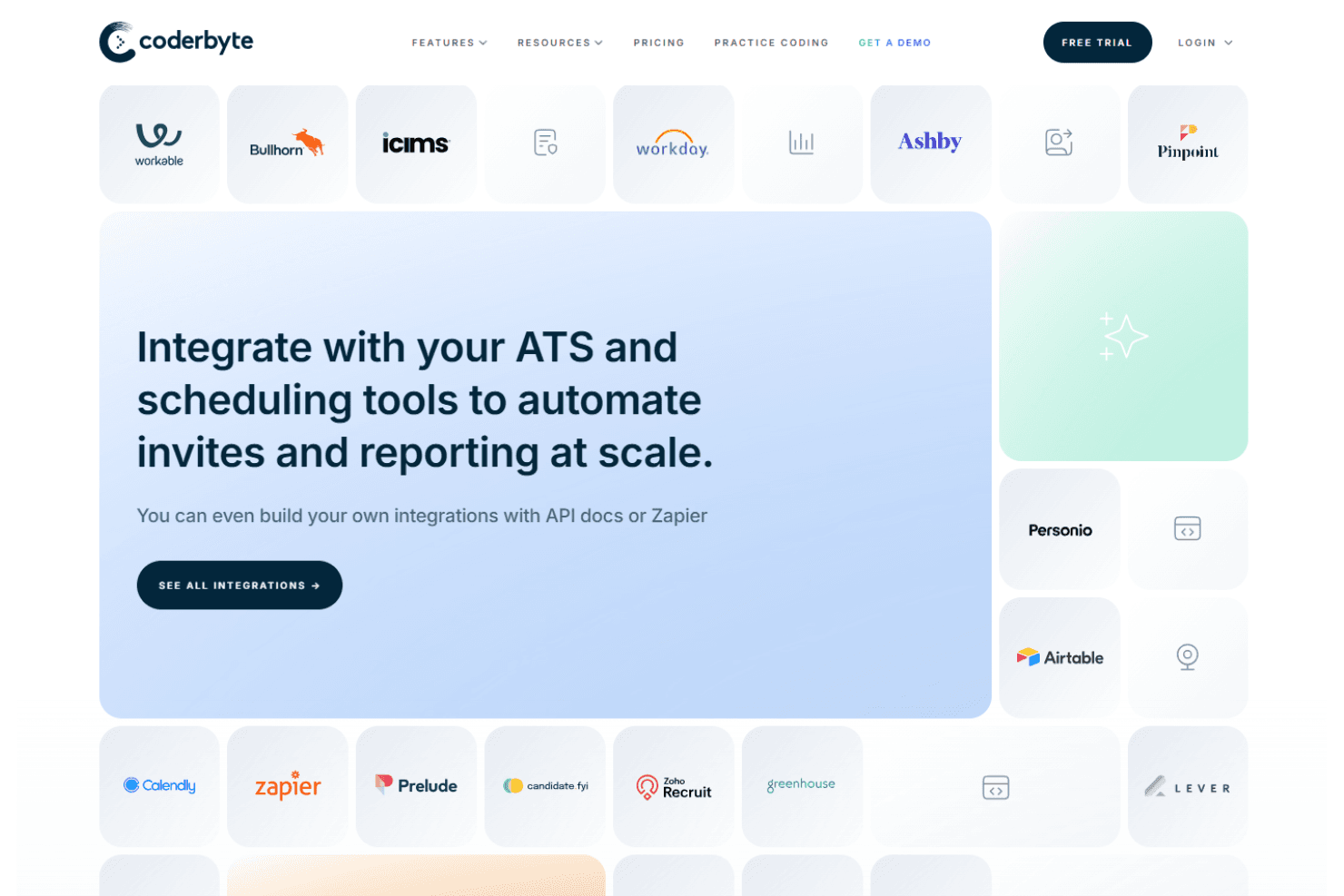
Coderbyte integrates with Greenhouse, Lever, Workable, SmartRecruiters, Ashby, Bullhorn, TeamTailor, Recruitee, Jira Software Server, and Slack. Coderbyte also offers an API and connects with third-party integration tools like Zapier.
Value for Money
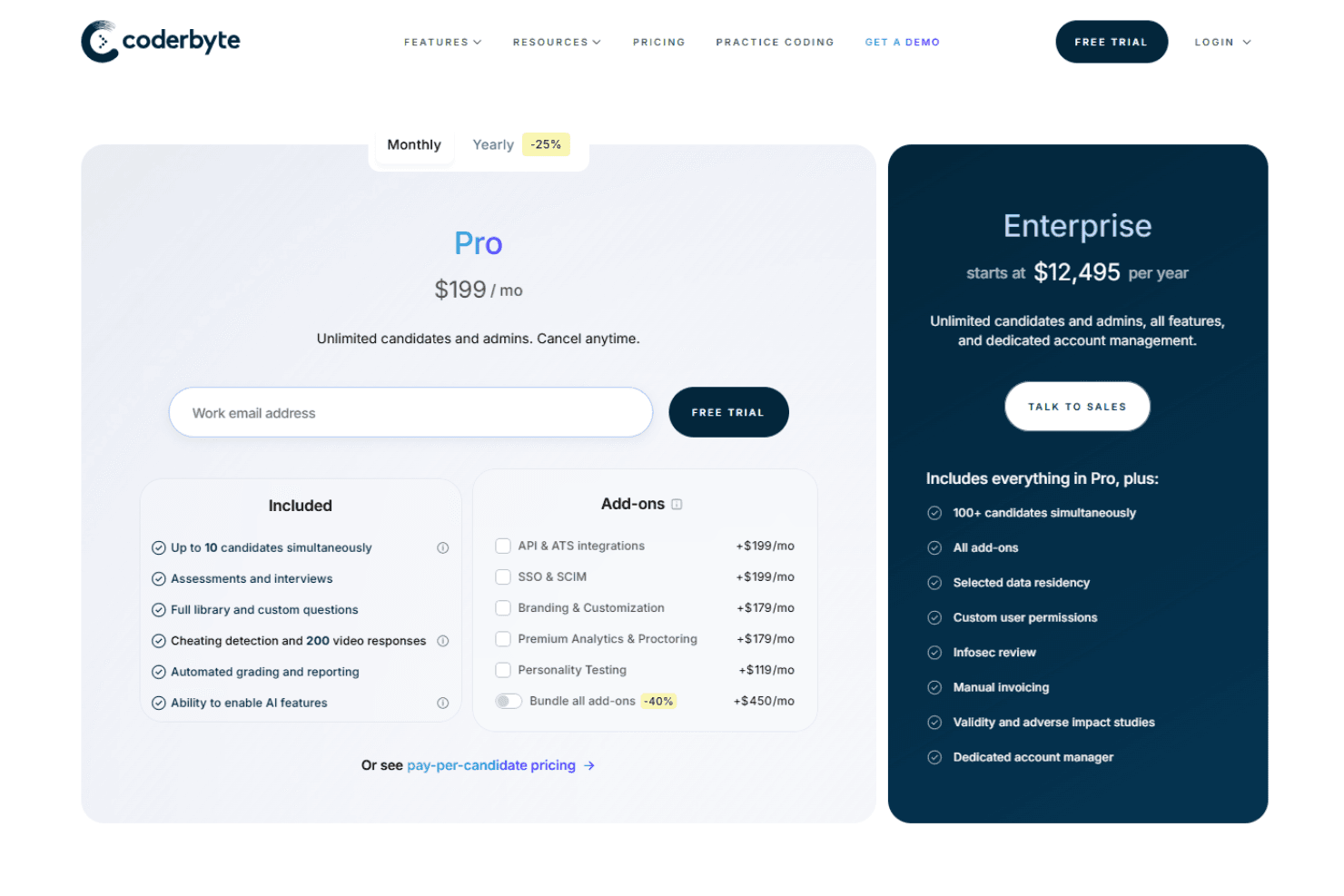
With flat-rate pricing at $199 per month, Coderbyte offers predictable costs and exceptional ROI for teams that run frequent assessments. It removes the budget friction created by per-test pricing models. The plan includes unlimited access to coding challenges, interview prep kits, video tutorials, mock interviews, faster compilers, and algorithm runtime analysis.
The review tool has also introduced an annual enterprise plan for $12,495 which comes with unlimited candidates, and dedicated account manager.
For seasonal hiring, Coderbyte offers a “pay per candidate” option. Pricing starts at $350 for up to 30 candidates, or around $500 for 50 candidates annually. This plan is ideal for short recruitment spikes and includes assessment interviews, automated scoring, and built-in cheating detection.
Coderbyte Specs
- 2-Factor Authentication: No
- 360 Degree Feedback: Yes
- API: Yes
- Application Tracking: Yes
- Attendance Tracking: Yes
- Batch Permissions & Access: Yes
- Compliance Tracking: Yes
- Dashboard: No
- Data Export: Yes
- Data Import: Yes
- Data Visualization: Yes
- Employee Database: Yes
- Employee Engagement: Yes
- Employee Incentive Management: Yes
- Employee Onboarding: Yes
- Employee Training: Yes
- Expense Tracking: No
- External Integrations: Yes
- Feedback Management: No
- Multi-User: No
- Notifications: No
- Payroll: No
- Performance Appraisal: Yes
- Scheduling: No
- Time Management: Yes
- Timesheets: No
- Travel Management: No
- Vacation & Absence Calendar: No
Coderbyte FAQs
Coderbyte Company Overview & History
Coderbyte, headquartered in New York City, was founded in 2012 by Daniel Borowski. It provides a platform for practicing coding and technical skills, with a focus on talent evaluation for coding, data science, and technical roles. The company is known for offering a variety of code challenges and web development courses to help individuals prepare for job interviews. Coderbyte doesn't publicly disclose detailed financial information, but it has a competitive presence in the tech assessment space.
Coderbyte Major Milestones
- 2012: Founded by Daniel Borowski in New York City.
- 2020: Reached a milestone of helping over 500,000 developers.
- 2025: Continues to expand its offerings in coding assessments and technical interview preparations.