

Los 10 mejores servicios de cifrado de correo electrónico de 2026

10 Lista de los mejores servicios de cifrado de correo electrónico


Al explorar el ámbito de los clientes de correo electrónico, desde Apple Mail hasta Yahoo, me he dado cuenta de la importancia de la ciberseguridad en dispositivos Android, iOS y Windows. No se trata únicamente de protegerse contra los piratas informáticos, sino de garantizar que los correos electrónicos —ya sean para uso personal o estén sujetos a las directrices de HIPAA— se cifren mediante seguridad de la capa de transporte (TLS) y una criptografía sólida.
El servicio de correo electrónico seguro ideal ofrece almacenamiento en la nube, una libreta de direcciones integrada e incluso dominios personalizados, además de valorar la facilidad de uso. Con el creciente énfasis en las leyes de privacidad, resulta fundamental utilizar claves privadas y públicas conjuntamente con una VPN. En este contexto, no se puede pasar por alto el atractivo de un plan gratuito de un proveedor de correo electrónico seguro. ¿El objetivo? Una herramienta que combine privacidad y funcionalidad, mantenga las comunicaciones protegidas y garantice que los usuarios sigan cumpliendo la normativa.
¿Qué es un servicio de cifrado de correo electrónico?
Los servicios de cifrado de correo electrónico son herramientas especializadas diseñadas para proteger el contenido de los mensajes y archivos adjuntos de correo electrónico frente al acceso no autorizado. Estos servicios codifican el contenido del correo electrónico, de modo que solo pueda leerlo el destinatario previsto que disponga de la clave de descifrado necesaria.
Aunque cualquier persona con una cuenta de correo electrónico puede beneficiarse de estas herramientas, son especialmente utilizadas por empresas, profesionales que gestionan datos confidenciales y personas preocupadas por la privacidad. Su objetivo principal es proteger la información frente a posibles ciberamenazas, filtraciones de datos o interceptaciones no deseadas, garantizando la confidencialidad e integridad de las comunicaciones electrónicas.
Por qué confiar en nuestras recomendaciones de software
Nuestro equipo lleva probando y evaluando software desde 2012. Como líderes tecnológicos, sabemos lo difícil —y lo importante— que es elegir el software adecuado.
Para esta guía, evaluamos las herramientas mediante pruebas prácticas e investigación independiente, puntuando las herramientas según nuestros criterios de selección.
Nuestras reseñas reflejan nuestro criterio editorial humano, no un discurso de ventas.
Resumen de los mejores servicios de cifrado de correo electrónico
| Service | Best For | Trial Info | Price | ||
|---|---|---|---|---|---|
| 1 | Ideal para el envío seguro de correos electrónicos con base en Suiza | Prueba gratuita de 14 días | Desde $4/usuario/mes (facturado anualmente) | Website | |
| 2 | Ideal para fusionar correo electrónico y chat en una sola plataforma | Plan gratuito disponible | Desde $7.99/usuario/mes (facturación anual) | Website | |
| 3 | Ideal para prueba legal de entrega de correo electrónico cifrado | Demostración gratuita disponible | Precio a consultar | Website | |
| 4 | Mejor para la seguridad del correo electrónico de grandes empresas | Prueba gratuita de 30 días + demo sin coste disponible | Desde $3/usuario/mes (mínimo 50 usuarios) | Website | |
| 5 | Mejor para protección avanzada contra amenazas | Demostración gratuita disponible | Precios bajo solicitud | Website | |
| 6 | Mejor para defensa en capas contra amenazas transmitidas por correo electrónico | Prueba gratuita de 14 días | Desde $0.98/usuario/mes (mínimo 10 usuarios) | Website | |
| 7 | Mejor para buzones cifrados de extremo a extremo | Not available | Desde $1.34/usuario/mes (facturado anualmente) | Website | |
| 8 | Ideal para la protección de datos en redes | Not available | Desde $5/usuario/mes (facturado anualmente) | Website | |
| 9 | La mejor opción para cifrado PGP en Gmail | Not available | Desde $5/usuario/mes (facturado anualmente) | Website | |
| 10 | Mejor para cifrado de email basado en políticas | Not available | Precio a consultar | Website |
Análisis de los mejores servicios de cifrado de correo electrónico

Ideal para el envío seguro de correos electrónicos con base en Suiza
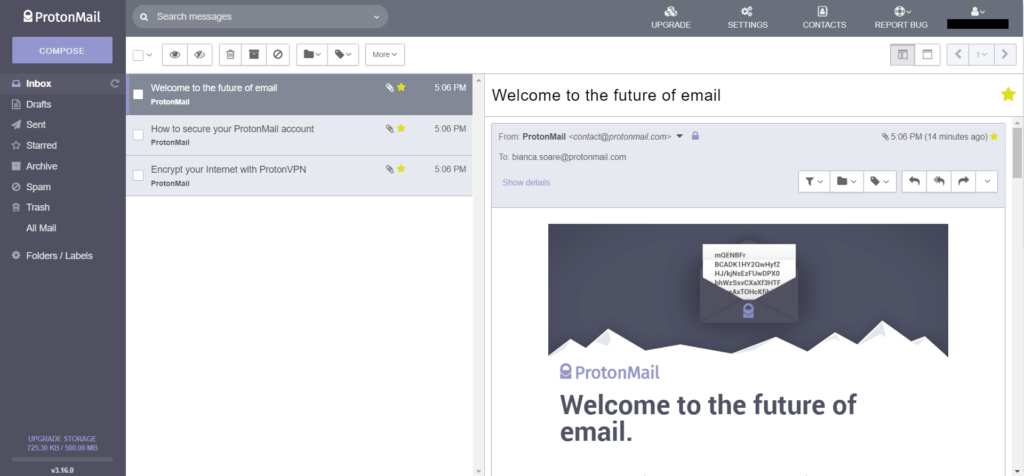
ProtonMail es un servicio de correo electrónico enfocado en la seguridad ubicado en Suiza, conocido por sus sólidas leyes de protección de datos. Aprovechando la fortaleza de la regulación suiza, ofrece una plataforma para enviar correos electrónicos seguros sin comprometer los datos del usuario.
Por qué elegí ProtonMail: Al comparar plataformas de correo electrónico conocidas por su seguridad, ProtonMail siempre aparecía en los primeros lugares. Es su base suiza la que le da una ventaja, diferenciándolo de sus competidores. En mi opinión, quienes buscan la garantía de seguridad suiza en el correo electrónico no deben buscar más allá de ProtonMail.
Funciones destacadas e integraciones:
ProtonMail ofrece cifrado de extremo a extremo, garantizando que los correos permanezcan confidenciales. La función de mensajes autodestructivos aumenta aún más la privacidad. Sin embargo, para mantener su enfoque en la seguridad, ProtonMail ofrece integraciones limitadas con terceros.
Pros and Cons
Pros:
- Cifrado de extremo a extremo
- Se beneficia de las leyes de protección de datos suizas
- Función de correo electrónico autodestructivo
Cons:
- Opciones de integración limitadas
- La versión gratuita tiene limitaciones de almacenamiento
- Sin soporte para POP3, solo IMAP

Spike
Ideal para fusionar correo electrónico y chat en una sola plataforma
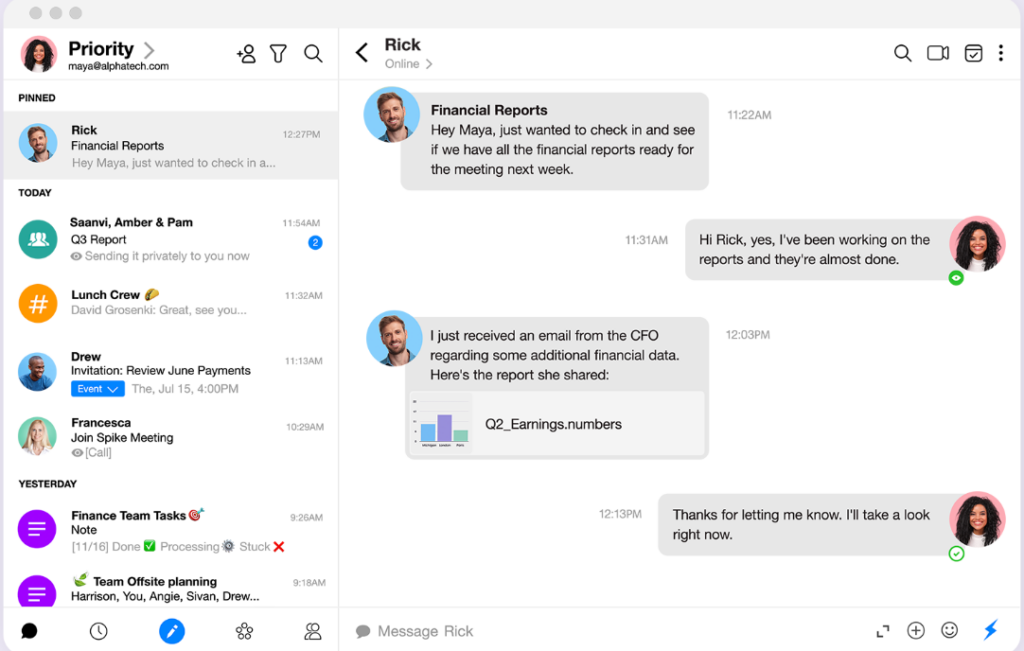
Spike presenta un enfoque innovador para la comunicación, fusionando la estructura formal del correo electrónico con la inmediatez del chat. Su diseño único está pensado para quienes desean la fluidez del chat, pero no pueden prescindir de la necesidad de enviar correos electrónicos.
Por qué elegí Spike: Tras evaluar una gran cantidad de herramientas de correo electrónico, Spike captó mi atención por su propuesta distintiva. Lo elegí porque, en mi valoración, cubre una necesidad que muchos ni siquiera reconocían. La convergencia entre chat y correo electrónico en Spike resuelve el constante vaivén entre dos plataformas, convirtiéndose en la solución que consideré mejor para una experiencia de comunicación unificada.
Funciones destacadas e integraciones:
En esencia, Spike funciona gracias al 'Correo electrónico conversacional', que transforma la percepción e interacción con los correos, traduciéndolos en un formato similar al chat. La Bandeja de Prioridad es otro de sus puntos fuertes, ya que organiza los correos según su relevancia para filtrar el ruido. En el apartado de integraciones, Spike colabora con servicios populares como Google Drive, Dropbox y OneDrive, cerrando la brecha entre comunicación y compartición de archivos.
Pros and Cons
Pros:
- Una combinación única de chat y correo electrónico en una sola plataforma
- La Bandeja de Prioridad categoriza eficazmente los correos entrantes
- Herramientas integradas como calendarios y tareas para una gestión integral
Cons:
- Puede resultar poco convencional para algunos usuarios tradicionales de correo electrónico
- Las funciones premium están restringidas al modelo de suscripción
- La ausencia de un espacio de chat dedicado puede no gustar a todos

RMail
Ideal para prueba legal de entrega de correo electrónico cifrado
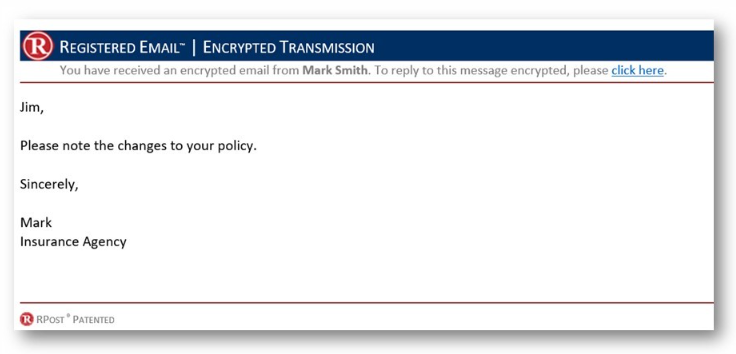
RMail está diseñado para ofrecer servicios de correo electrónico seguro y cifrado con una ventaja adicional: prueba legal de entrega. Esto lo convierte en una opción principal para profesionales que requieren evidencia de que sus correos electrónicos cifrados no solo fueron enviados, sino también entregados y abiertos.
Por qué elegí RMail: En mi proceso de selección de plataformas de correo electrónico para casos de uso específicos, RMail sobresalió por su oferta única. No solo fue el cifrado lo que me impresionó, sino la provisión de prueba legal de entrega. Considero que RMail es la mejor opción para quienes trabajan en profesiones donde tal evidencia es crucial.
Funciones destacadas e integraciones:
El elemento central de RMail es su tecnología Registered Email™ que proporciona prueba legal tanto de entrega como de contenido. Además, RMail ofrece firmas electrónicas y envío de archivos grandes. Se integra adecuadamente con plataformas populares como Outlook, lo que lo convierte en una elección idónea para muchas empresas.
Pros and Cons
Pros:
- Proporciona prueba legal de entrega de correo electrónico cifrado
- Función de firma electrónica
- Se integra con plataformas de correo populares
Cons:
- Los precios no son transparentes
- Puede ser excesivo para usuarios ocasionales
- La interfaz podría ser más intuitiva

Mimecast
Mejor para la seguridad del correo electrónico de grandes empresas
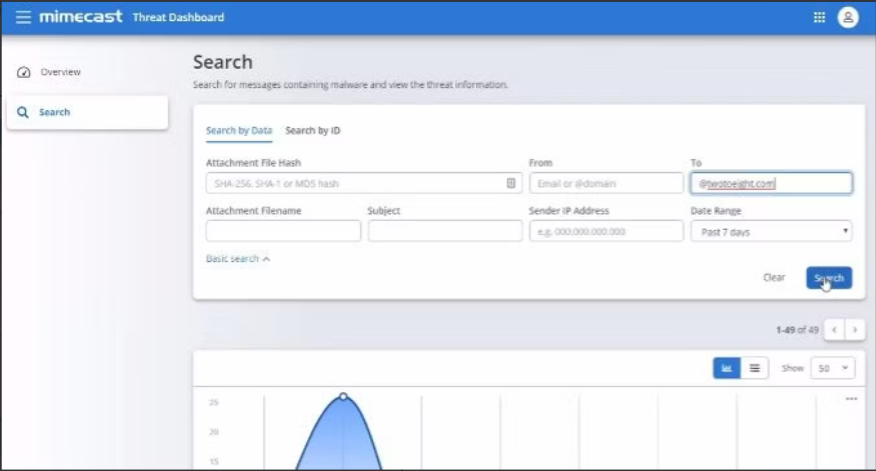
Mimecast se destaca como una solución integral para la seguridad del correo electrónico, especialmente diseñada para grandes empresas. Dada su escalabilidad y enfoque completo, es una opción ideal para negocios con redes extensas que necesitan protección robusta.
Por qué elegí Mimecast: Al evaluar varias soluciones de cifrado de nivel empresarial, Mimecast apareció constantemente en la parte superior de mi lista. Lo elegí por su excelente reputación y su capacidad para gestionar las complejidades de operaciones a gran escala. En mi opinión, Mimecast es la mejor opción para las empresas que exigen la máxima seguridad en el correo electrónico.
Características destacadas e integraciones:
Mimecast ofrece un enfoque de múltiples capas en la seguridad del correo electrónico, abarcando protección contra malware, phishing y ataques de suplantación de identidad. Además, proporciona soluciones de continuidad para garantizar el acceso ininterrumpido al correo electrónico. Sus capacidades de integración se extienden a diversas suites de software empresarial, aumentando su valor en ecosistemas de gran escala.
Pros and Cons
Pros:
- Protección integral a nivel empresarial
- Enfoque multicapa frente a amenazas
- Gran variedad de integraciones con soluciones empresariales
Cons:
- Puede ser excesivo para pequeñas empresas
- La complejidad requiere personal de TI dedicado
- Algunas funciones pueden no ser usadas por todas las organizaciones

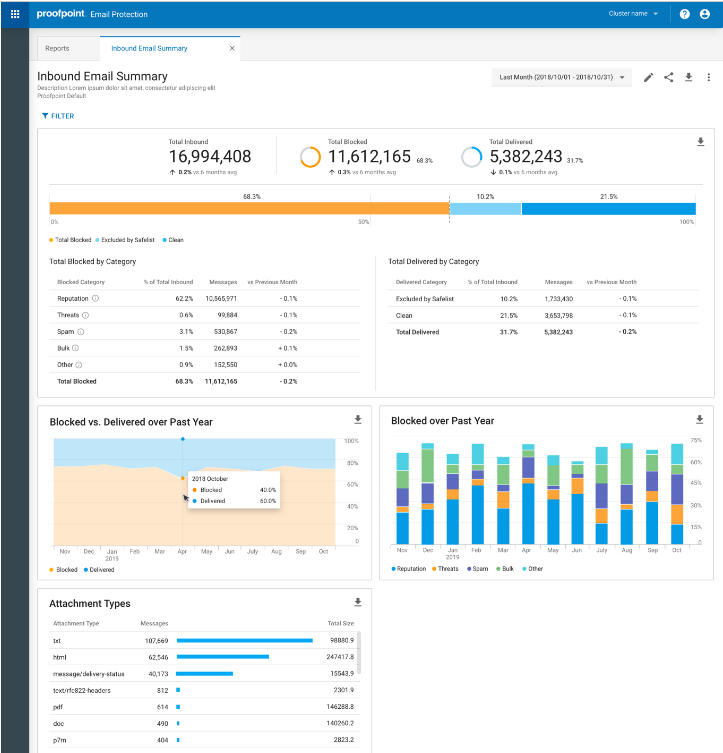
Proofpoint Email Protection es una solución enfocada en la seguridad, diseñada para proteger a las organizaciones de amenazas por correo electrónico. Su sólido marco destaca en mantener alejados a los actores maliciosos, especialmente en escenarios de amenazas avanzadas.
Por qué elegí Proofpoint Email Protection: Durante mi búsqueda de soluciones de seguridad de correo electrónico, Proofpoint Email Protection destacó constantemente debido a su cobertura integral contra amenazas avanzadas. Lo que diferencia a esta herramienta es su enfoque detallado y por capas para detectar y combatir ataques sofisticados. En mi evaluación, para las organizaciones interesadas en asegurar una defensa de primer nivel contra amenazas avanzadas por correo electrónico, Proofpoint sigue siendo insuperable.
Características destacadas e integraciones:
Proofpoint ofrece análisis dinámico de correos electrónicos, controles de filtrado granulares e inteligencia sobre amenazas. Se integra perfectamente con muchos sistemas empresariales, asegurando que la protección vaya de la mano con las operaciones diarias.
Pros and Cons
Pros:
- Protección avanzada contra amenazas muy completa
- Información detallada sobre inteligencia de amenazas
- Se integra fácilmente con sistemas empresariales
Cons:
- El precio puede no ser transparente
- Puede ser complejo para organizaciones pequeñas
- Requiere personal capacitado para un uso óptimo

Mejor para defensa en capas contra amenazas transmitidas por correo electrónico

Barracuda defiende un enfoque multifacético para la seguridad del correo electrónico. Al ofrecer múltiples capas de defensa contra diversas amenazas de correo, es la solución ideal para empresas que desean un escudo integral contra actores maliciosos.
Por qué elegí Barracuda: Mi decisión, después de una comparación exhaustiva de plataformas de seguridad de correo electrónico, se inclinó consistentemente hacia Barracuda debido a su defensa integral en capas. Considero que destaca al proteger contra una variedad de amenazas transmitidas por correo electrónico. Para las organizaciones que buscan una suite holística de protección de correo electrónico, Barracuda es mi principal recomendación.
Funciones destacadas e integraciones:
Barracuda ofrece protección contra phishing, malware y ransomware mediante su enfoque multinivel. No solo filtra amenazas entrantes, sino que también educa a los usuarios a través de simulaciones para que reconozcan posibles riesgos. Sus capacidades de integración son amplias, cubriendo una gran variedad de soluciones empresariales para garantizar operaciones fluidas.
Pros and Cons
Pros:
- Defensa integral contra diversas amenazas
- Capacitación de concienciación para usuarios a través de simulaciones
- Extensas posibilidades de integración
Cons:
- Algunas funciones pueden superponerse con herramientas existentes
- Requiere personal dedicado para máxima eficiencia
- La configuración inicial puede ser compleja

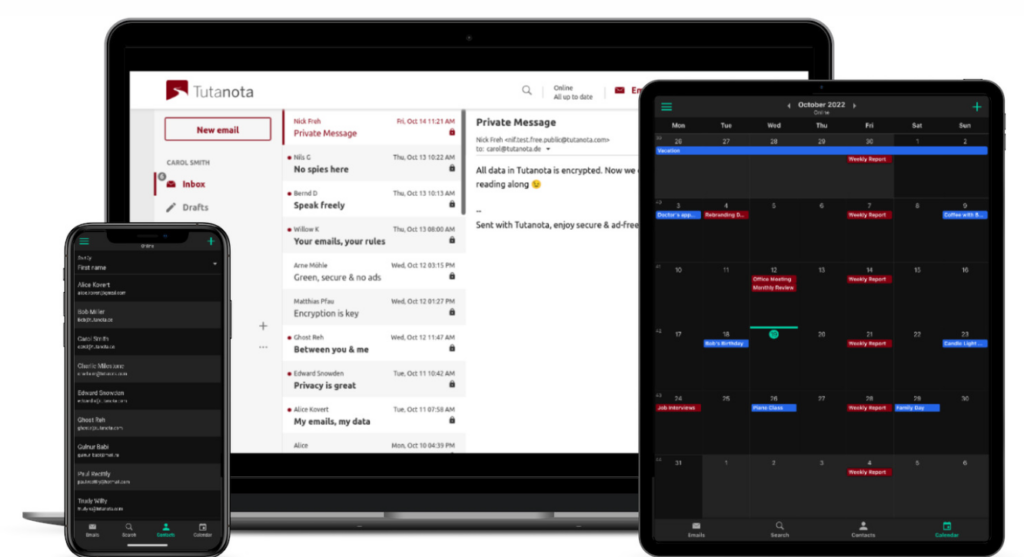
Tutanota es un servicio de correo electrónico innovador que ofrece cifrado total para los buzones de los usuarios. Al priorizar la seguridad y la privacidad, se posiciona como una de las mejores opciones para quienes desean una protección completa de sus correos electrónicos de principio a fin.
Por qué elegí Tutanota: Durante el proceso de determinar qué servicios de correo electrónico ofrecen mejores características de seguridad, Tutanota captó repetidamente mi atención. Lo que realmente lo distingue es su firme compromiso con el cifrado de extremo a extremo. Estoy convencido de que, para quienes valoran los buzones cifrados por encima de todo, Tutanota es la opción óptima.
Características destacadas e integraciones:
Tutanota sobresale por su cifrado automático de extremo a extremo para correos electrónicos, incluyendo incluso los archivos adjuntos y los calendarios. Los usuarios no necesitan compartir ni intercambiar claves, ya que la plataforma gestiona esto de forma interna. Aunque principalmente es un servicio independiente, ofrece integración con varias aplicaciones de terceros para mejorar la experiencia del usuario.
Pros and Cons
Pros:
- Cifrado completo de extremo a extremo
- Calendario cifrado incluido
- El código de fuente abierta garantiza transparencia
Cons:
- Integraciones limitadas en comparación con la competencia
- La interfaz puede resultar sencilla para algunos
- La migración desde otras plataformas puede ser tediosa


Virtru enfatiza el intercambio seguro de datos sensibles a través de varias redes sin comprometer la privacidad ni el cumplimiento. Esta herramienta ha sido diseñada para garantizar que, dondequiera que viajen los datos, permanezcan protegidos.
Por qué elegí Virtru: En mi búsqueda de soluciones que ofrezcan una protección impecable de datos a través de las redes, Virtru surgió como un fuerte candidato. La decisión se basó en su capacidad única para cifrar los datos en tránsito, en reposo e incluso cuando se comparten externamente. Para cualquier organización que comparta datos con frecuencia a través de diferentes redes y desee la mejor seguridad, considero que Virtru es la elección adecuada.
Funciones destacadas e integraciones:
Las características clave de Virtru incluyen protección persistente de datos, revocación de acceso y reenvío seguro. Se integra de manera eficiente con plataformas como Gmail y Microsoft Outlook, lo que la hace más adaptable a diferentes entornos empresariales.
Pros and Cons
Pros:
- Protección persistente de datos, incluso para el intercambio externo
- Fácil de usar con cifrado sencillo
- Se integra con las principales plataformas de correo electrónico
Cons:
- Funciones avanzadas limitadas en el precio base
- El proceso de incorporación podría requerir una curva de aprendizaje leve
- La experiencia móvil puede no ser tan pulida

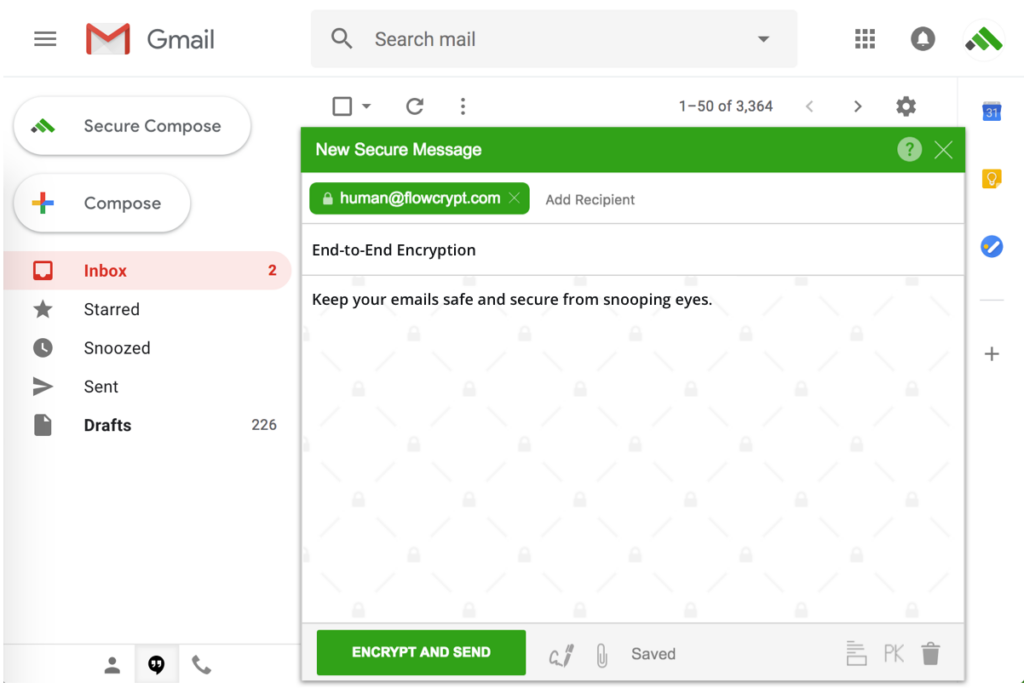
FlowCrypt simplifica el concepto de cifrado PGP para los usuarios de Gmail. Con un enfoque en la facilidad de uso, sirve de puente entre la seguridad avanzada del correo electrónico y las comunicaciones cotidianas en Gmail.
Por qué elegí FlowCrypt: La belleza de FlowCrypt radica en su simplicidad, y tras comparar varias soluciones PGP, ésta me pareció la más accesible. Valoro la forma en que se integra con Gmail, lo que la convierte en la herramienta que considero ideal para quienes quieren iniciarse en el mundo PGP sin sumergirse en complejidades técnicas.
Funciones destacadas e integraciones:
En esencia, FlowCrypt se trata de habilitar el cifrado PGP directamente en la interfaz de Gmail. Los usuarios pueden cifrar, descifrar, firmar y verificar correos electrónicos fácilmente. Si bien está pensado principalmente para Gmail, su compatibilidad se extiende a Google Workspace, permitiendo que las empresas se beneficien del cifrado PGP sin las complicaciones habituales.
Pros and Cons
Pros:
- Cifrado PGP intuitivo dentro de Gmail
- Compatible con Google Workspace
- Garantiza comunicaciones cifradas de extremo a extremo
Cons:
- Limitado al ecosistema de Gmail
- Los usuarios avanzados pueden buscar controles más granulares
- Los equipos grandes pueden precisar configuración adicional

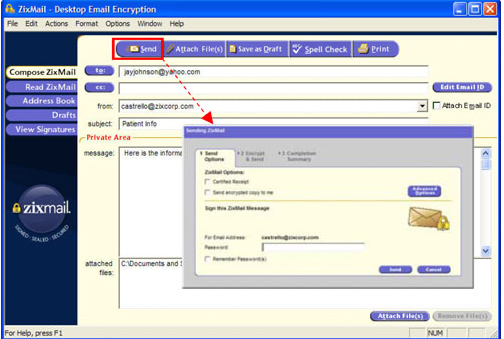
Zix es un referente en el ámbito del cifrado de correo electrónico, centrándose específicamente en soluciones impulsadas por políticas. Atendiendo a empresas que requieren flexibilidad para establecer reglas de cifrado, Zix es la opción ideal para quienes priorizan los controles basados en políticas.
Por qué elegí Zix Email Encryption: Tras comparar varias plataformas de cifrado de correo electrónico, seleccioné Zix principalmente por sus sólidas características basadas en políticas. Su capacidad para permitir que las empresas definan sus estándares de cifrado es inigualable. Considero que Zix es el líder para las organizaciones interesadas en dictar sus propias políticas de cifrado.
Características destacadas e integraciones:
Zix cuenta con un mecanismo de cifrado basado en políticas que permite a las empresas decidir cuándo y cómo se cifran los correos electrónicos. La herramienta también ofrece escaneo automático de los correos salientes para garantizar el cumplimiento normativo. Además, se integra con muchas suites de software empresarial, lo que la convierte en una herramienta versátil en el entorno corporativo.
Pros and Cons
Pros:
- Controles avanzados de cifrado basados en políticas
- Escaneo automático para el cumplimiento
- Amplias capacidades de integración
Cons:
- La información sobre precios no es transparente
- Podría ser demasiado complejo para pequeñas empresas
- La configuración inicial puede llevar tiempo
Otros servicios destacados de cifrado de correo electrónico
- NeoCertified
Mejor para APIs integradas de correo electrónico seguro
- OnDMARC
Ideal para protocolos unificados de cifrado de correo electrónico
- LuxSci Email and Web Security
Bueno para una seguridad integral del correo electrónico y la web


Criterios de selección para elegir un servicio de cifrado de correo electrónico
Tras profundizar en el mundo de las soluciones de correo electrónico seguro, he evaluado más de 20 herramientas. La variedad era amplia, pero buscaba especialmente soluciones de correo electrónico seguro que ofrecieran una seguridad inigualable sin comprometer la experiencia del usuario. Esto es lo que realmente tuve en cuenta:
Funcionalidad principal
En cualquier solución de correo electrónico seguro, las funciones principales deben incluir:
- Software de cifrado de correo electrónico de extremo a extremo: Garantiza que los correos electrónicos se cifren desde el remitente hasta el destinatario, sin descifrarse durante el trayecto.
- Autenticación y verificación: La herramienta debe permitir a los usuarios confirmar la identidad del remitente y garantizar que el correo electrónico no haya sido manipulado.
- Archivos adjuntos seguros: No solo el correo electrónico, sino también los archivos adjuntos deben estar cifrados y protegidos.
- Protección contra el phishing y el malware: Una capa de defensa activa contra las amenazas maliciosas.
Características principales
Al comparar herramientas de correo electrónico seguro, estas características destacaron como particularmente críticas:
- Firmas digitales: Esto verifica la identidad del remitente, añadiendo una capa de confianza.
- Arquitectura de acceso cero: Garantiza que ni siquiera el proveedor del servicio pueda acceder al contenido de tus correos electrónicos.
- Correos electrónicos autodestructivos: Correos que se eliminan después de un periodo establecido o tras ser leídos, lo que aumenta la seguridad.
- Mensajes protegidos con contraseña: Una capa adicional en la que los destinatarios necesitan una contraseña para acceder al contenido del correo electrónico.
- Autenticación de dos factores (2FA): Una medida de seguridad adicional en la que los usuarios deben proporcionar dos tipos de identificación para acceder a su cuenta.
Usabilidad
En el caso de las soluciones de correo electrónico seguro, es fundamental que una mayor seguridad no implique una experiencia de usuario deficiente. Esto es lo que significaba la usabilidad en este contexto:
- Diseño intuitivo: En cualquier herramienta de correo electrónico seguro, los usuarios no deberían tener que superar obstáculos para enviar un mensaje cifrado. El proceso de cifrado debería integrarse de forma natural en el proceso de redactar y enviar correos electrónicos.
- Configuración e incorporación sencillas: Para quienes son nuevos en el correo electrónico cifrado, el proceso de incorporación debería ser sencillo y guiar a los usuarios en la configuración de las claves de cifrado y la comprensión de las funciones esenciales.
- Atención al cliente accesible: Dada la naturaleza técnica del correo electrónico seguro, los usuarios pueden tener dudas. La herramienta debería ofrecer asistencia rápida y competente.
- Acceso basado en roles: Especialmente en las soluciones empresariales, es fundamental poder definir quién tiene acceso a cada elemento. Los administradores deberían poder determinar los roles fácilmente y especificar qué puede ver o modificar cada rol.
Preguntas más comunes sobre el servicio de cifrado de correo electrónico (FAQ)
¿Cuáles son los beneficios de utilizar herramientas de cifrado de correo electrónico?
El uso de servicios de cifrado de correo electrónico ofrece múltiples ventajas:
- Seguridad mejorada: Garantizan que la información confidencial permanezca privada y la protegen contra accesos no autorizados.
- Protección contra amenazas cibernéticas: Defienden activamente contra amenazas maliciosas como el phishing, el malware y los ataques de intermediario.
- Cumplimiento normativo: Muchos sectores cuentan con normativas que exigen la protección de datos confidenciales. El uso del correo electrónico cifrado ayuda a las empresas a cumplir estos requisitos.
- Generación de confianza: Los correos electrónicos cifrados, especialmente aquellos con firmas digitales, muestran a los destinatarios que el remitente prioriza la seguridad, lo que fomenta la confianza.
- Archivos adjuntos seguros: Además del contenido del correo electrónico, todos los archivos adjuntos se cifran, lo que garantiza una protección completa.
¿Cuánto cuestan estos servicios de cifrado de correo electrónico?
El costo de las herramientas de cifrado de correo electrónico varía considerablemente según el conjunto de funciones, el tipo de usuarios previstos (particulares o empresas) y otros factores.
¿Cuáles son los modelos de precios habituales de estas herramientas?
La mayoría de los servicios de cifrado de correo electrónico funcionan mediante un modelo de suscripción y cobran a los usuarios mensual o anualmente. Algunos ofrecen precios escalonados según las funciones o el número de usuarios, mientras que otros tienen una tarifa fija. También hay servicios que cobran según el volumen de correos electrónicos enviados o el almacenamiento utilizado.
¿Cuál es el rango de precios habitual de estas herramientas?
Los precios pueden comenzar desde $2/user/month y llegar hasta $50/user/month o más en el caso de servicios empresariales prémium con funciones avanzadas.
¿Cuál es el software más barato y cuál es el más caro?
Aunque los precios cambian y las promociones son frecuentes en el sector, normalmente herramientas como Posteo se encuentran entre las opciones más económicas, mientras que soluciones como Symantec Email Security pueden situarse en el extremo más caro del espectro.
¿Existen opciones de herramientas gratuitas para el cifrado de correo electrónico?
Sí, hay opciones gratuitas disponibles. Mailvelope, por ejemplo, ofrece una extensión de navegador gratuita para el cifrado de extremo a extremo, aunque puede carecer de algunas de las funciones avanzadas que se encuentran en los servicios de pago.
¿Todas las herramientas de cifrado de correo electrónico ofrecen el mismo nivel de seguridad?
No necesariamente. Aunque la mayoría de las herramientas ofrecen un nivel de seguridad sólido, los métodos y protocolos utilizados pueden variar. Algunas pueden emplear cifrado AES, mientras que otras podrían utilizar RSA. Es esencial elegir un servicio que cumpla con estándares de seguridad reconocidos.
¿Puedo utilizar el correo electrónico cifrado con mi dirección de correo actual?
Algunas herramientas exigen que los usuarios creen una nueva dirección de correo electrónico dentro de su dominio. Sin embargo, muchos servicios permiten utilizar las direcciones de correo electrónico existentes mediante la integración del servicio de cifrado con proveedores de correo electrónico populares.
Otras reseñas de software de sistemas de seguridad
- Software de seguridad del correo electrónico
- Software de cifrado
- Software de gestión de claves de cifrado
Resumen
Explorar el mundo de los servicios de cifrado de correo electrónico y las soluciones de software DMARC es fundamental, especialmente en la era digital actual, en la que las filtraciones de datos y las amenazas cibernéticas son frecuentes. Esta guía te ha proporcionado información sobre la gran variedad de herramientas de cifrado disponibles, las características distintivas que hacen única a cada una y los aspectos que debes tener en cuenta al seleccionar la opción adecuada para tus necesidades específicas.
Conclusiones clave
- Elección guiada por el propósito: Antes de analizar las opciones, define claramente tus necesidades. Tanto si eres una persona que protege sus comunicaciones personales como si eres una empresa que garantiza el cumplimiento normativo, tu propósito determinará tu elección.
- Funciones frente a facilidad de uso: Aunque la variedad de funciones es fundamental, no se puede pasar por alto la facilidad de uso de la herramienta. La mejor herramienta de cifrado no solo debe ser sólida en cuanto a funcionalidad, sino también fácil de usar para garantizar su adopción.
- Precio frente a valor: No te fijes únicamente en el coste; considera el valor que estás obteniendo. A veces, invertir un poco más puede ofrecer una seguridad y unas funciones mejoradas que proporcionen mayor tranquilidad y protección.
¿Qué opinas?
Aunque esta guía pretende ser lo más completa posible, el mundo en constante evolución del cifrado de correo electrónico puede haber hecho que algunas herramientas destacadas se nos hayan escapado. Valoro sinceramente las aportaciones de la comunidad y el conocimiento colectivo. Por eso, si utilizas un servicio de cifrado de correo electrónico que, en tu opinión, merece un lugar en esta lista, no dudes en compartirlo. Tus ideas y recomendaciones son siempre bienvenidas y pueden ayudar a otras personas en su búsqueda de la herramienta perfecta. Colaboremos para mantener esta guía lo más actualizada y útil posible.

