
21 Beste Webserver-Software-Optionen 2026

Bestes Webserver-Software-Shortlist
Hier ist meine Shortlist der besten Webserver-Software:


Die Verwaltung eines Webservers kann anstrengend sein, besonders angesichts der ständigen Anforderungen an Schnelligkeit und Sicherheit. Sie benötigen zuverlässige Software, die die Anforderungen Ihres Teams erfüllt, ohne zusätzlichen Stress zu verursachen.
Nach meiner Erfahrung hat das Testen und Bewerten verschiedener Softwarelösungen gezeigt, dass die richtige Webserver-Software einen gewaltigen Unterschied machen kann. Sie hilft Ihnen, Traffic-Spitzen zu bewältigen, Ihre Daten zu schützen und sicherzustellen, dass Ihre Anwendungen reibungslos laufen.
In diesem Artikel finden Sie unabhängige und gründlich recherchierte Bewertungen der besten Webserver-Software. Ich begleite Sie durch die besten Optionen und konzentriere mich dabei auf das, was für Sie und Ihr Team am wichtigsten ist. Lassen Sie uns die Herausforderungen gemeinsam angehen und die perfekte Lösung für Ihre Anforderungen finden.
Why Trust Our Software Reviews
Zusammenfassung der besten Webserver-Software
Diese Vergleichstabelle fasst die Preisinformationen meiner Top-Auswahl an Webserver-Software zusammen, um Ihnen bei der Suche nach der besten Option für Ihr Budget und Ihre geschäftlichen Anforderungen zu helfen.
| Tool | Best For | Trial Info | Price | ||
|---|---|---|---|---|---|
| 1 | Best for speed with HTTP/3 support | Not available | From $14/user/month (billed annually) | Website | |
| 2 | Best for handling high traffic with load balancing | Offers a free open-source version | From $22/user/month | Website | |
| 3 | Best for scalable enterprise applications | Not available | From $56/user/month (billed annually) | Website | |
| 4 | Best for flexibility with a wide range of modules | Free of charge as an open-source tool | Pricing upon request | Website | |
| 5 | Best for Java servlet and JSP processing | Open-source product | Pricing upon request | Website | |
| 6 | Best for enterprise Java EE applications | Not available | From $45/user/month (billed annually) | Website | |
| 7 | Best for integration with Windows environments | Not available | From $25/user/month (billed annually) with additional costs for other services or features. | Website | |
| 8 | Best for automatic HTTPS configuration | Not available | From $10/user/month (billed annually) | Website | |
| 9 | Best for lightweight web server needs | An open-source web server software | From $2/user/month | Website | |
| 10 | Best for Java application hosting | Not available | From $12/user/month (billed annually) | Website |
-

Site24x7
Visit WebsiteThis is an aggregated rating for this tool including ratings from Crozdesk users and ratings from other sites.4.6 -
Docker
Visit WebsiteThis is an aggregated rating for this tool including ratings from Crozdesk users and ratings from other sites.4.6 -
Pulumi
Visit WebsiteThis is an aggregated rating for this tool including ratings from Crozdesk users and ratings from other sites.4.8





Bewertungen der besten Webserver-Software
Nachfolgend finden Sie meine ausführlichen Zusammenfassungen der besten Webserver-Software, die es auf meine Shortlist geschafft haben. Meine Bewertungen geben einen detaillierten Einblick in die wichtigsten Funktionen, Vor- & Nachteile, Integrationen und ideale Anwendungsfälle jedes Tools, damit Sie die beste Lösung für sich finden.


LiteSpeed Web Server is a high-performance web server designed to serve web content with minimal latency. Its focus on optimization and support for the latest protocols, including HTTP/3, makes it one of the fastest options available in the market. This commitment to speed and HTTP/3 support makes LiteSpeed the best choice for those looking for high-speed delivery and modern protocol support.
Why I Picked LiteSpeed Web Server: I chose LiteSpeed Web Server after evaluating various web servers, and what caught my attention was its exceptional speed and the incorporation of HTTP/3 support. This selection was determined based on its unique architecture, which provides accelerated content delivery, making it stand out among competitors.
Given its exceptional speed and cutting-edge protocol support, I determined that LiteSpeed Web Server is best for those in need of speed with HTTP/3 support.
Standout Features & Integrations:
LiteSpeed Web Server features an event-driven architecture, allowing for high performance, even with many simultaneous connections. Its compatibility with Apache, including the use of .htaccess files, is a standout feature, allowing for a smoother transition from Apache web servers.
Integration with popular control panels like cPanel and Plesk makes management easier for administrators.
Pros and Cons
Pros:
- Integrations with popular control panels for simplified management
- Compatibility with Apache allows for an easier transition
- Excellent speed with HTTP/3 support
Cons:
- Limited to no community support for the free version
- Some learning curve if transitioning from other non-Apache servers
- Higher pricing compared to some competitors


Nginx is an open-source web server that also serves as a reverse proxy, load balancer, and HTTP cache. Known for its high performance and ability to handle large volumes of traffic, Nginx is particularly effective for websites or applications that experience high levels of concurrent users.
Its standout capability in handling high traffic through efficient load balancing makes it the best choice for this specific requirement.
Why I Picked Nginx: I chose Nginx for its reputation for managing large-scale web traffic with effective load balancing. Through careful comparison and evaluation of various web servers, I determined that Nginx's lightweight architecture and robust load-balancing mechanisms were unmatched.
Its ability to distribute traffic across multiple servers ensures stability and performance, which is why I judged it as the best for handling high traffic with load balancing.
Standout Features & Integrations:
Nginx offers a wide range of features including HTTP/2 and IPv6 support, SSL termination, and powerful caching capabilities. Its ability to act as both a load balancer and reverse proxy adds to its versatility. It is available on both Linux and Nginx Windows Server.
Integrations with various monitoring tools, cloud platforms, and support for popular programming languages like PHP, Perl, JavaScript, and Python make it adaptable to different environments.
Pros and Cons
Pros:
- Strong community support and extensive documentation
- Flexible as both a web server and load balancer
- Highly efficient in handling large traffic volumes
Cons:
- Lack of built-in GUI for administration and management
- Some advanced features are only available in the paid version
- May require expertise to configure optimally

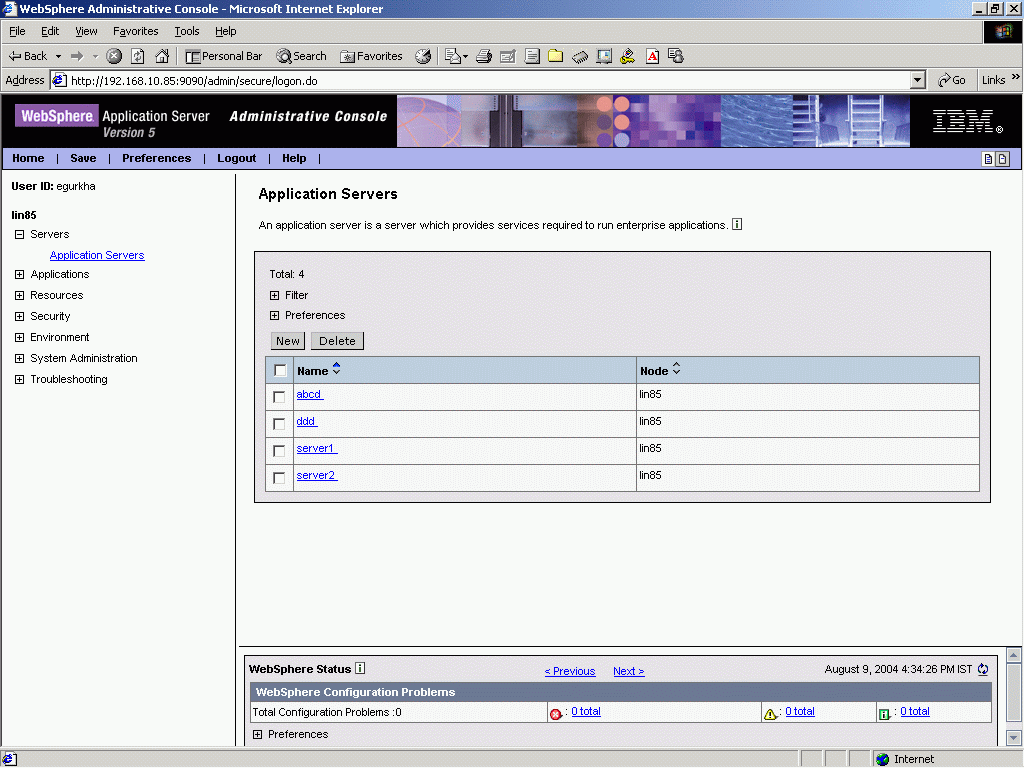
IBM WebSphere Application Server is a software framework and middleware that hosts Java-based web applications. It is designed to create, run, integrate, and manage applications across various computing platforms. The tool's robustness and scalability in managing enterprise applications make it particularly suitable for large-scale organizations, aligning it as the best for scalable enterprise applications.
Why I Picked IBM WebSphere Application Server: I picked IBM WebSphere Application Server after carefully judging and comparing various platforms for their ability to scale with enterprise needs. IBM's long-standing reputation in the tech industry and the server's ability to integrate with various enterprise systems made it stand out from the rest.
I determined that it's the best for scalable enterprise applications due to its support for extensive customizations, security features, and scalability.
Standout Features & Integrations:
IBM WebSphere's most valuable features include its support for Java EE, microservices architecture, and a wide array of application development frameworks. Its strong integration capabilities with other IBM products, third-party databases, and enterprise resource planning (ERP) systems make it highly adaptable in various business environments.
Pros and Cons
Pros:
- Robust security and monitoring features
- Strong integration with other IBM solutions and third-party systems
- Highly scalable to suit growing enterprise needs
Cons:
- The initial learning curve for non-experts
- Might be overkill for small or medium-sized businesses
- Can be complex to configure and manage


Apache HTTP Server is one of the most widely used web server platforms in the world. It serves as a robust foundation for websites and web applications, providing the ability to handle requests and serve files over HTTP. Its extensible design with a plethora of modules makes it best for flexibility, catering to various unique requirements and functionalities.
Why I Picked Apache HTTP Server:
I chose Apache HTTP Server because of its unparalleled flexibility and vast array of modules that enable customization. In judging its capabilities, I compared it with other servers and found its open-source nature and active community support to make it stand out.
It's "Best for flexibility with a wide range of modules" since it can easily adapt to different use cases, thanks to its modular architecture.
Standout Features & Integrations:
Apache's most useful features include its modular design, allowing administrators to tailor the server to their needs by enabling or disabling specific modules. These modules can provide additional functionalities like URL rewriting, caching, or authentication.
The software is written in C language and is compatible with any operating system like Linux, Apache Windows, Novell Netware, Mac OS X, Solaris, OS/2, Unix-like, FreeBSD, etc. Apache integrates well with various programming languages, databases, and other web technologies, making it a versatile option for various web environments.
Pros and Cons
Pros:
- Compatible with various operating systems and technologies
- Strong community support and extensive documentation
- Highly customizable with a wide range of modules
Cons:
- Some users may find performance tuning to be challenging
- Lacks enterprise support in the base offering
- Configuration can be complex, especially for newcomers


Apache Tomcat is an open-source implementation of the Java Servlet and JavaServer Pages (JSP) technologies. Specifically designed to serve Java applications, it has become a preferred choice for developers looking to deploy Java-based web applications, making it best for Java servlet and JSP processing.
Why I Picked Apache Tomcat: I chose Apache Tomcat due to its reputation as a reliable, efficient solution for Java application hosting. Selecting this tool from the available options, I determined that its focus on providing a robust environment for Java servlets and JSPs sets it apart.
This specialty aligns with its recognition as the best for Java servlet and JSP processing, catering to those in need of a Java-centric server environment.
Standout Features & Integrations:
Apache Tomcat offers features like a flexible connector architecture and lightweight memory utilization, which helps in maintaining a responsive server. The ability to integrate with the larger Apache Jakarta ecosystem opens up various extensions and plugins that can be used within the Tomcat environment.
Also, its integrations with popular Java IDEs like Eclipse and IntelliJ IDEA facilitate smoother development workflows.
Pros and Cons
Pros:
- Integrates well with popular Java development tools
- Flexible connector architecture
- Strong support for Java servlets and JSPs
Cons:
- Requires in-depth Java knowledge for optimization and troubleshooting
- Limited official documentation for advanced configurations
- Might be overcomplicated for simple web applications

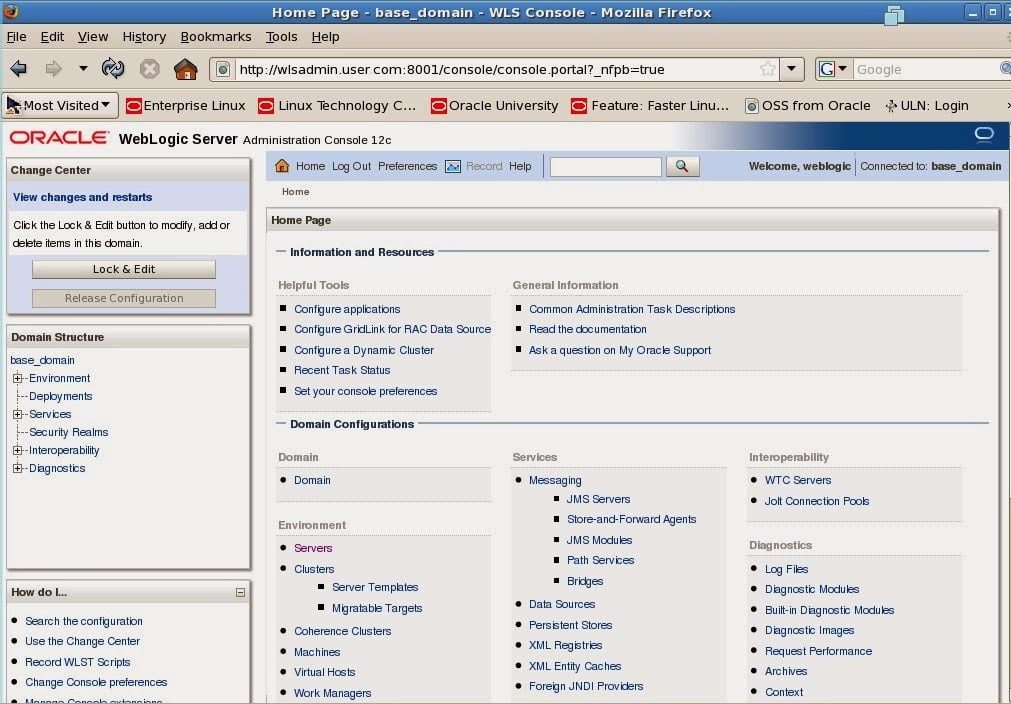
Oracle WebLogic Server is an application server designed for building and deploying enterprise Java EE applications. It offers a robust and scalable environment to run large-scale applications, particularly those requiring high availability and reliability. This suitability for complex, enterprise-level Java EE applications is what sets Oracle WebLogic Server apart as the best choice for this specific use case.
Why I Picked Oracle WebLogic Server: I chose Oracle WebLogic Server after a comprehensive analysis of different application servers, focusing on their ability to support enterprise-level Java EE applications. Oracle WebLogic Server's stability, high performance, and extensive support for Java EE features were the determinants in my selection.
I found it to be the best tool for enterprise Java EE applications due to its robust architecture, reliable support, and alignment with large-scale business needs.
Standout Features & Integrations:
Oracle WebLogic Server is known for its strong clustering support, enabling high availability and failover capabilities. Its integration with Oracle's own database products, as well as support for JMS, JTA, and other Java EE standards, makes it a comprehensive solution for enterprise applications.
Integrations with other Oracle middleware solutions and compatibility with popular development frameworks ensure a development and deployment experience.
Pros and Cons
Pros:
- Integration with Oracle databases and other middleware solutions
- High availability through clustering
- Strong support for Java EE standards
Cons:
- Limited community support compared to some open-source alternatives
- May be expensive for small to medium-sized businesses
- Can be complex to configure and manage

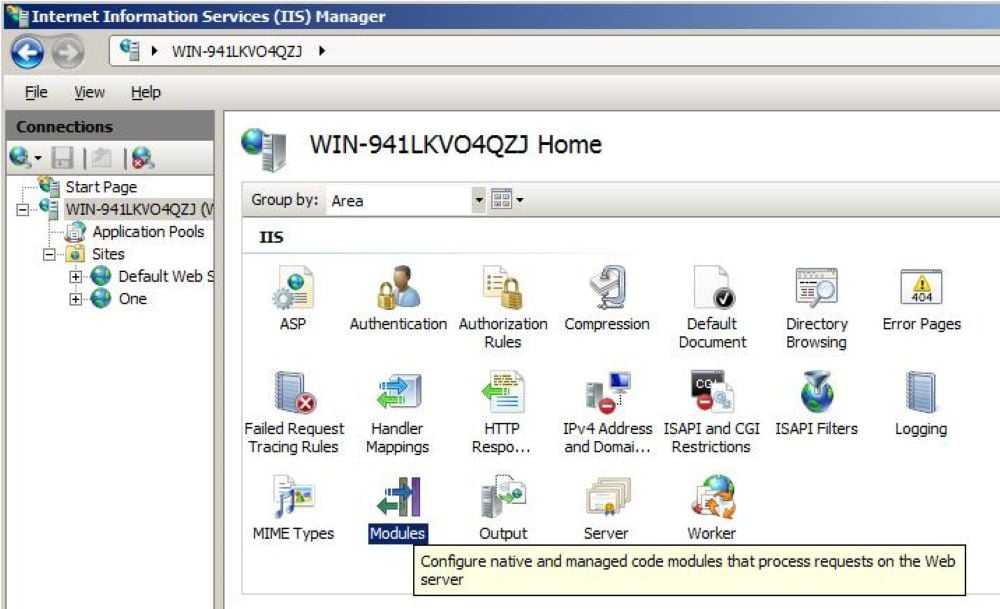
Microsoft IIS (Internet Information Services) Web Server is a web server developed by Microsoft, specifically designed for use with the Windows operating system. It allows for the hosting and management of websites, applications, and services, offering integration with other Microsoft products.
This strong integration with Windows environments justifies its position as the best choice for businesses or developers using a Windows-based stack.
Why I Picked Microsoft IIS Web Server: I picked Microsoft IIS Web Server after carefully comparing various web server options. What makes it stand out is its deep integration with Windows, making it an ideal choice for those who heavily rely on Microsoft products. In my judgment, the way it integrates with Windows environments, the support for ASP.NET, and its compatibility with other Microsoft services are the factors that make it the best tool for integration with Windows environments.
Standout Features & Integrations:
Microsoft IIS Web Server offers robust security features, including automatic application isolation and extensive authentication configurations. Its support for ASP.NET enables smoother development and deployment of web applications.
Integration with other Microsoft services like Active Directory, SQL Server, and SharePoint provides a unified and coherent environment, aligning with various Windows-centric workflows.
Pros and Cons
Pros:
- Comprehensive security features
- Strong support for ASP.NET applications
- Excellent integration with Windows and other Microsoft services
Cons:
- Complexity in configuration and management for those unfamiliar with the Microsoft ecosystem
- Might require additional licensing for full-feature access
- Limited compatibility with non-Windows platforms


Web server software varies in its intricacy and capabilities, and Caddy stands out for its emphasis on simplifying HTTPS configurations. As the digital age intensifies its focus on data security, a web server that prioritizes HTTPS is pivotal. Caddy meets this expectation with grace, proving its worth for businesses and individuals who prioritize secure web traffic.
Why I Picked Caddy:
I selected Caddy after careful comparison with numerous other web servers, primarily because of its straightforward approach to HTTPS. Many web servers tend to complicate the HTTPS configuration process, but Caddy simplifies it, making it a tool I highly recommend.
In my opinion, it is undeniably the best for automatic HTTPS configuration, ensuring users benefit from a safer and more secure browsing experience.
Standout Features & Integrations:
Caddy's automated TLS (Transport Layer Security) setup eliminates the need for manual certificate handling, streamlining website security. Moreover, it boasts an extensible modular architecture, allowing developers to customize and add functionalities as needed. Caddy is compatible with both Linux and Windows OS.
It also supports macOS, Solaris, and BSD. In terms of integrations, Caddy interfaces well with the most common web technologies and platforms, ensuring a smooth web hosting process.
Pros and Cons
Pros:
- Efficiently interfaces with common web technologies
- Modular design for easy customization
- Automated HTTPS configuration
Cons:
- Limited community support compared to some larger platforms
- Premium features come at an additional cost
- Steeper learning curve for new users


OpenLiteSpeed is a powerful, open-source web server designed with an emphasis on lightweight and efficient performance. It offers an adaptable solution for users seeking a streamlined server, aligning perfectly with its title as best for lightweight web server needs.
Why I Picked OpenLiteSpeed: I chose OpenLiteSpeed for its commitment to delivering a fast and efficient web server experience. By focusing on lightweight operations, this tool provides a valuable option for those looking to run websites with lower resource consumption. The decision to recognize it as best for lightweight web server needs stems from its impressive speed, responsiveness, and compatibility.
Standout Features & Integrations:
OpenLiteSpeed comes with a user-friendly administration interface that simplifies management tasks. Its Event-Driven architecture ensures efficient resource utilization. Additionally, it supports common scripting languages like PHP and Ruby.
For integrations, OpenLiteSpeed is fully compatible with popular Content Management Systems (CMS) like WordPress and Joomla, and its API allows for a wide array of custom plugins.
Pros and Cons
Pros:
- Open-source with affordable commercial support
- Broad CMS compatibility including WordPress and Joomla
- Fast and lightweight design
Cons:
- Some compatibility limitations with .htaccess configurations
- Limited official support for free version
- May require technical expertise for complex configurations


Resin Web Server has carved a niche for itself in the space of Java application hosting. Tailored specifically to cater to the needs of Java developers, it optimizes the performance and efficiency of Java applications. Its specialty in Java makes it the go-to server for hosting Java apps, validating its status as the best option for this requirement.
Why I Picked Resin Web Server: In selecting the tools for this list, I weighed various factors and Resin Web Server's proficiency in Java application hosting emerged as distinct. Its performance, robustness, and dedicated focus on Java applications set it apart from the rest.
I determined that it is best for Java application hosting, as it provides a specialized environment, improving both development and deployment.
Standout Features & Integrations:
Resin Web Server's features are tailored to support Java applications efficiently, including fast servlet execution and easy integration with popular Java frameworks.
The platform offers rich support for JavaServer Pages (JSP), and its integration with databases and Java EE containers makes it highly versatile. Additionally, its compatibility with monitoring tools ensures streamlined operations.
Pros and Cons
Pros:
- Easy integration with popular Java frameworks and databases
- Rich support for JavaServer Pages (JSP)
- Specialized for Java application hosting
Cons:
- Some advanced features may require additional investment
- Less community support compared to some other platforms
- Limited use outside Java environments
Weitere Webserver-Software
Hier sind einige weitere Webserver-Software-Optionen, die es nicht auf meine Shortlist geschafft haben, aber trotzdem einen Blick wert sind:
- Mongoose
For embedded web server functionality
- Server Monkey
For server hardware solutions
- Jetty
Forscalable Java-based web applications and microservices
- Gunicorn
Forserving Python web applications
- NaviServer
Forextensibility and integration with AOLserver
- Lighttpd
Forspeed with a low memory footprint
- Cherokee
Forease of use with a graphical configuration interface
- Tengine Web Server
Forhigh concurrency and low latency requirements
- MochiWeb
Forbuilding lightweight Erlang-based applications
- Hiawatha
Foradvanced security features
- Swamp Servers
Forcommunity-driven gaming experiences


Verwandte Bewertungen von Webserver-Software
Wenn Sie hier noch nicht das Gewünschte gefunden haben, sehen Sie sich auch diese eng mit Webserver-Software verwandten Tools an, die wir getestet und bewertet haben.
- Beste IT-Infrastruktur-Software
- Beste IT-Management-Software
- Beste DevOps-Tools
- Beste Cybersecurity-Software
- Beste Cloud-Service-Provider
Auswahlkriterien für Webserver-Software
Bei der Auswahl der besten Webserver-Software für diese Liste habe ich typische Anforderungen und Herausforderungen der Käufer einbezogen, wie Skalierbarkeit und Sicherheit. Außerdem habe ich das folgende Bewertungsraster verwendet, um meine Evaluation strukturiert und fair zu halten:
Kernfunktionen (25% der Gesamtbewertung)
Um in diese Liste aufgenommen zu werden, musste jede Lösung diese typischen Anwendungsfälle erfüllen:
- Auslieferung von statischen und dynamischen Inhalten
- Gleichzeitige Bearbeitung mehrerer Anfragen
- Unterstützung der Protokolle HTTP/HTTPS
- Lastverteilung und Ausfallsicherheit
- Protokollierung und Überwachung
Zusätzliche besondere Funktionen (25% der Gesamtbewertung)
Zur weiteren Eingrenzung der Auswahl habe ich nach besonderen Funktionen gesucht, zum Beispiel:
- Integrierte Sicherheitsfunktionen
- Unterstützung für HTTP/3
- Erweiterte Caching-Mechanismen
- Integration mit Cloud-Diensten
- Anpassbare Serverkonfigurationen
Benutzerfreundlichkeit (10% der Gesamtbewertung)
Um einen Eindruck von der Benutzerfreundlichkeit der einzelnen Systeme zu gewinnen, habe ich Folgendes berücksichtigt:
- Intuitive Benutzeroberfläche
- Klare Dokumentation
- Einfache Konfigurationsmöglichkeiten
- Responsives Design
- Barrierefreiheitsfunktionen
Onboarding (10 % der Gesamtwertung)
Zur Bewertung des Onboarding-Erlebnisses jeder Plattform habe ich Folgendes berücksichtigt:
- Verfügbarkeit von Trainingsvideos
- Interaktive Produkttouren
- Schritt-für-Schritt-Anleitungen
- Zugang zu Vorlagen
- Webinare und Tutorials
Kundensupport (10 % der Gesamtwertung)
Um die Supportleistungen der einzelnen Softwareanbieter zu bewerten, habe ich Folgendes berücksichtigt:
- 24/7 Supportverfügbarkeit
- Mehrere Kontaktmöglichkeiten
- Reaktionszeit
- Zugang zur Wissensdatenbank
- Community-Foren
Preis-Leistungs-Verhältnis (10 % der Gesamtwertung)
Um das Preis-Leistungs-Verhältnis zu beurteilen, habe ich Folgendes berücksichtigt:
- Wettbewerbsfähige Preise
- Flexible Abonnementmodelle
- Funktionsumfang im Verhältnis zu den Kosten
- Verfügbarkeit einer kostenlosen Testphase
- Rabatte für langfristige Verträge
Kundenbewertungen (10 % der Gesamtwertung)
Um einen Eindruck von der allgemeinen Kundenzufriedenheit zu bekommen, habe ich beim Lesen von Bewertungen Folgendes berücksichtigt:
- Benutzerzufriedenheits-Bewertungen
- Häufig erwähnte Vorteile und Nachteile
- Häufigkeit von Updates
- Kundentreue
- Feedback zum Support-Erlebnis
Wie man Webserver-Software auswählt
Es ist leicht, sich in langen Funktionslisten und komplexen Preisstrukturen zu verlieren. Damit Sie bei Ihrem individuellen Auswahlprozess fokussiert bleiben, finden Sie hier eine Checkliste mit Faktoren, die Sie im Hinterkopf behalten sollten:
| Faktor | Worauf zu achten ist |
|---|---|
| Skalierbarkeit | Kann die Software Ihr zukünftiges Wachstum bewältigen? Achten Sie auf maximale Benutzerzahlen und mögliche Besucherströme. Bedenken Sie, ob sich die Software ohne große Änderungen erweitern lässt. |
| Integrationen | Lässt sich die Software mit Ihren bestehenden Tools verbinden? Prüfen Sie die Kompatibilität mit Datenbanken, CMS und anderen täglich verwendeten Programmen. |
| Anpassbarkeit | Können Sie die Software auf Ihre Arbeitsabläufe zuschneiden? Stellen Sie sicher, dass sie eigene Module oder Plugins für Ihre spezifischen Anforderungen ermöglicht. |
| Benutzerfreundlichkeit | Ist die Software einfach zu bedienen? Prüfen Sie, ob Ihr Team sie ohne umfangreiche Schulungen nutzen kann oder die Oberfläche im Alltag intuitiv genug ist. |
| Einführung und Onboarding | Wie rasch können Sie starten? Suchen Sie nach Schnellstart-Anleitungen, Unterstützung bei der Migration und verfügbaren Schulungsressourcen. |
| Kosten | Passen die Preise zu Ihrem Budget? Bewerten Sie die Gesamtkosten, einschließlich versteckter Gebühren oder Zusatzkosten für Mehrfunktionen. |
| Sicherheitsvorkehrungen | Gibt es starke Sicherheitsmaßnahmen? Achten Sie auf Verschlüsselung, Zugriffskontrollen und die Einhaltung von Standards wie DSGVO oder HIPAA. |
Trends bei Webserver-Software
Im Jahr 2025 dreht sich bei Webserver-Software alles darum, Websites schneller, sicherer und intelligenter zu machen. Beim Blick auf aktuelle Updates und Neuigkeiten führender Webserver-Tools fallen mir einige richtungsweisende Trends auf:
Weiterentwickelte Funktionen und Eigenschaften
- Einsatz von Edge Computing: Es findet ein Wandel hin zu Edge Computing statt, um Latenzzeiten zu verringern und Geschwindigkeiten zu erhöhen. Dieser Trend bedeutet, dass Daten näher beim Nutzer verarbeitet werden. Das senkt Ladezeiten und verbessert das Nutzererlebnis, besonders bei inhaltsreichen Anwendungen.
- Nachhaltigkeit im Fokus: Der grüne Fokus der Tech-Branche zeigt sich in der Entwicklung energieeffizienter Webserver-Lösungen. Durch diese umweltfreundlichen Funktionen wird der ökologische Fußabdruck digitaler Prozesse reduziert, ohne dass die Performance leidet.
- Erweiterte Echtzeitanalysen: Die Funktionen für Echtzeitanalysen und Monitoring in Webserver-Software werden immer ausgefeilter. Sie bieten Einblicke in Serverbetrieb, Nutzerinteraktionen und mögliche Probleme. Diese unmittelbaren Analysen sind äußerst wertvoll, um Webressourcen proaktiv zu verwalten und zu optimieren.
Über diese Trends informiert zu bleiben ist entscheidend. Nur so können Sie zukünftigen Herausforderungen optimal begegnen und eine leistungsfähige, reaktionsschnelle Web-Infrastruktur sicherstellen.
Was ist Webserver-Software?
Webserver-Software ist ein Werkzeug, das Webinhalte über das Internet an Nutzer ausliefert. IT-Fachleute, Entwickler und Systemadministratoren nutzen diese Tools in der Regel, um das Hosting von Websites zu verwalten und den Webverkehr effizient zu steuern. Lastverteilung, Sicherheitsfunktionen und Integrationsmöglichkeiten unterstützen die Verwaltung des Verkehrs, die Sicherung von Daten und die Anbindung an bestehende Systeme. Insgesamt ermöglichen diese Werkzeuge eine zuverlässige und effiziente Bereitstellung von Webinhalten für Anwender.
Funktionen
Achten Sie bei der Auswahl von Webserver-Software auf folgende Schlüsselfunktionen:
- Lastverteilung: Verteilt den Datenverkehr gleichmäßig auf mehrere Server, um Überlastungen zu verhindern und eine reibungslose Performance sicherzustellen.
- Sicherheitsfunktionen: Schützt Daten durch Verschlüsselung und Zugangskontrollen, um die Einhaltung von Standards wie der DSGVO zu gewährleisten.
- Integrationsmöglichkeiten: Verbindet mit Datenbanken, CMS und anderen Tools für einen nahtlosen Arbeitsablauf.
- Skalierbarkeit: Passt sich wachsendem Datenverkehr und Nutzeranforderungen an, ohne große Änderungen zu erfordern.
- Anpassbarkeit: Ermöglicht die individuelle Gestaltung der Software an spezifische Arbeitsabläufe durch eigene Module oder Plugins.
- Benutzerfreundlichkeit: Bietet eine intuitive Bedienoberfläche, die nur minimale Einarbeitung für effiziente Nutzung benötigt.
- Protokollierung und Überwachung: Erfasst Serveraktivitäten und Leistung zur Fehlerbehebung und Optimierung.
- HTTP/HTTPS-Unterstützung: Gewährleistet sichere und zuverlässige Kommunikation über das Internet.
- Caching-Mechanismen: Verbessert Ladezeiten und Effizienz durch Speicherung häufig genutzter Daten.
- Benutzerverwaltung: Steuert Zugriff und Berechtigungen verschiedener Nutzer zur Sicherstellung von Schutz und Organisation.
Vorteile
Die Implementierung von Webserver-Software bringt zahlreiche Vorteile für Ihr Team und Ihr Unternehmen mit sich. Hier sind einige, auf die Sie sich freuen können:
- Verbesserte Leistung: Lastverteilung und Caching-Mechanismen sorgen für schnellere Ladezeiten und eine effiziente Handhabung des Webverkehrs.
- Erhöhte Sicherheit: Eingebaute Sicherheitsfunktionen wie Verschlüsselung und Zugangskontrollen schützen sensible Daten und unterstützen die Einhaltung von Vorschriften.
- Skalierbarkeit: Passt sich unkompliziert an steigende Nutzerzahlen und Datenverkehr an, ohne größere Anpassungen und unterstützt so das Unternehmenswachstum.
- Einfache Integration: Läuft reibungslos mit bestehenden Datenbanken und Tools, erleichtert Arbeitsabläufe und das Datenmanagement.
- Anpassbarkeit: Bietet Flexibilität, um die Software mittels benutzerdefinierter Module an spezielle Anforderungen und Arbeitsabläufe anzupassen.
- Benutzerfreundliche Oberfläche: Minimiert die Einarbeitungszeit durch ein intuitives Design, sodass Ihr Team schnell produktiv wird.
- Zuverlässige Verfügbarkeit: Sorgt für eine konstante Bereitstellung von Webdiensten, minimiert Ausfallzeiten und erhält die Zufriedenheit der Nutzer aufrecht.
Kosten und Preise
Bei der Auswahl von Webserver-Software ist es wichtig, die verschiedenen Preismodelle und Tarife zu verstehen. Die Kosten variieren je nach Funktionsumfang, Teamgröße, Zusatzmodulen und mehr. Die folgende Tabelle fasst gängige Tarife, ihre Durchschnittspreise und typische Merkmale zusammen, die in Webserver-Softwarelösungen enthalten sind:
Tarifvergleichstabelle für Webserver-Software
| Tarifart | Durchschnittlicher Preis | Typische Funktionen |
|---|---|---|
| Gratis-Tarif | $0 | Basis-Hosting, eingeschränkter Support und Community-Foren. |
| Persönlicher Tarif | $5-$25/user/month | SSL-Unterstützung, grundlegende Sicherheitsfunktionen und eingeschränkte Anpassbarkeit. |
| Business-Tarif | $50-$100/user/month | Erweiterte Sicherheit, Integrationsoptionen und priorisierter Support. |
| Unternehmens-Tarif | $200-$500/user/month | Umfassende Anpassung, dedizierter Support und umfassende Sicherheitsmaßnahmen. |
FAQs zur Webserver-Software
Hier finden Sie Antworten auf häufige Fragen zur Webserver-Software:
Wie funktioniert Webserver-Software?
Webserver-Software verwaltet Anfragen von Browsern über HTTP. Wenn ein Browser eine Datei anfordert, sucht die Serversoftware das Dokument und sendet es über HTTP zurück. Dieser Prozess stellt sicher, dass Benutzer schnell und effizient auf Webinhalte auf ihren Geräten zugreifen können.
Was sind die vier Arten von Webservern?
Die vier Haupttypen sind Apache HTTP Server, Nginx, Microsoft IIS und LiteSpeed. Jeder bietet einzigartige Funktionen und Leistungsmerkmale. Bei der Auswahl sollten Sie Ihre spezifischen Anforderungen berücksichtigen, wie z. B. die Bewältigung von Traffic, Integration mit anderen Systemen und die Unterstützung verschiedener Programmiersprachen.
Was ist die Regel eines Webservers?
Webserver-Regeln steuern, wie der Server Anfragen bearbeitet. Sie übernehmen Aufgaben wie das Weiterleiten von URLs, das Laden von Bildern und das Ausgeben von Fehlermeldungen. Das Verständnis dieser Regeln hilft Ihnen, die Interaktion der Benutzer mit Ihrer Website gezielt zu steuern und kann die Leistung sowie die Sicherheit der Seite verbessern.
Welche Software nutzen Webserver?
Webserver nutzen Software wie Apache, Nginx und Microsoft IIS. Jede dieser Lösungen hat unterschiedliche Stärken, etwa die Verarbeitung großer Besucherzahlen oder die Integration mit bestimmten Betriebssystemen wie Windows. Die richtige Wahl hängt von den Anforderungen Ihres Servers, den erwarteten Besucherzahlen und der Kompatibilität mit Ihrem Technologie-Stack ab.
Wie wähle ich die richtige Webserver-Software aus?
Berücksichtigen Sie Faktoren wie Skalierbarkeit, Sicherheit und Integrationsmöglichkeiten. Bewerten Sie das technische Know-how Ihres Teams sowie die spezifischen Funktionen, die Sie benötigen. Testen Sie verschiedene Softwarelösungen, um herauszufinden, welche am besten zu Ihrem Arbeitsablauf und Budget passt, bevor Sie eine endgültige Entscheidung treffen.
Kann ich mehrere Websites auf einem Webserver betreiben?
Ja, Sie können mehrere Websites auf einem einzigen Webserver mit sogenannten Virtual Hosts betreiben. Dies ermöglicht eine effiziente Nutzung und Verwaltung der Ressourcen. Stellen Sie sicher, dass Ihr Server über genügend Ressourcen verfügt und dass die Webserver-Software Virtual Hosting unterstützt, damit mehrere Seiten gehostet werden können.
Wie geht es weiter?
Wenn Sie gerade Webserver-Software recherchieren, verbinden Sie sich mit einem SoftwareSelect-Berater für kostenlose Empfehlungen.
Sie füllen ein Formular aus und führen ein kurzes Gespräch, in dem Ihre spezifischen Anforderungen besprochen werden. Anschließend erhalten Sie eine Shortlist an Softwareoptionen zur Überprüfung. Die Berater unterstützen Sie sogar während des gesamten Kaufprozesses, einschließlich Preisverhandlungen.