

10 Beste Tools Zur Nachverfolgung Der Softwareentwicklung Im Jahr 2026

10 Beste Tools zur Nachverfolgung der Softwareentwicklung – Shortlist
Here's my pick of the 10 best software from the 13 tools reviewed.


In der schnelllebigen Welt der Softwareentwicklung kann es eine echte Herausforderung sein, den Überblick über alle Projekte zu behalten. Sie und Ihr Team jonglieren vermutlich mit mehreren Aufgaben, Fristen und Kommunikationskanälen. Genau an dieser Stelle kommen Tools zur Nachverfolgung der Softwareentwicklung ins Spiel und bringen Ordnung ins Chaos.
Mit diesen Tools organisieren Sie Ihre Projekte, verwalten die Arbeitslast Ihres Teams und sorgen dafür, dass alle auf dem gleichen Stand sind. Nach meiner Erfahrung kann das passende Tool entscheidend dafür sein, Ihre Ziele zu erreichen und Stress zu reduzieren.
In diesem Artikel stelle ich meine Top-Auswahl für Tools zur Nachverfolgung der Softwareentwicklung vor. Ich habe jedes Werkzeug unabhängig getestet und überprüft, damit Sie eine objektive Einschätzung erhalten und das für Ihr Team am besten passende Tool finden.
Table of Contents
Why Trust Our Software Reviews
We’ve been testing and reviewing software since 2023. As tech leaders ourselves, we know how critical and difficult it is to make the right decision when selecting software.
We invest in deep research to help our audience make better software purchasing decisions. We’ve tested more than 2,000 tools for different tech use cases and written over 1,000 comprehensive software reviews. Learn how we stay transparent & our software review methodology.
Vergleich: Die besten Tools zur Nachverfolgung der Softwareentwicklung
Diese Vergleichstabelle fasst die Preisinformationen meiner ausgewählten Top-Tools zur Nachverfolgung der Softwareentwicklung zusammen, damit Sie das passende Tool für Ihr Budget und Ihre geschäftlichen Anforderungen finden.rn
| Tool | Best For | Trial Info | Price | ||
|---|---|---|---|---|---|
| 1 | Am besten für visuelle Entwicklungs-Workflows | Kostenloser Plan verfügbar | Ab $9/Nutzer/Monat (jährlich abgerechnet) | Website | |
| 2 | Am besten geeignet für Planung, Organisation und Durchführung von Projekten mit Gantt-Diagrammen | 14-tägige kostenlose Testversion + kostenlose Demo verfügbar | $45/Monat für unbegrenzt viele Benutzer | Website | |
| 3 | Am besten geeignet für Projektmanagement mit Fokus auf Zusammenarbeit und Teamharmonie | 30-tägige kostenlose Testphase + kostenloser Plan + kostenlose Demo verfügbar | $10/Benutzer/Monat (mindestens 5 Nutzer) | Website | |
| 4 | Am besten für Teams, die eine schlanke Aufgabenverwaltung in einem schönen Interface suchen | Kostenloser Plan verfügbar | $8/Nutzer/Monat (jährliche Abrechnung) | Website | |
| 5 | Am besten geeignet für umfassendes Projektmanagement mit funktionsreicher Ausstattung | 14-tägige kostenlose Testphase + kostenloser Plan verfügbar | $5/Nutzer/Monat | Website | |
| 6 | Am besten geeignet für DevOps-Teams, die eine End-to-End-Lösung zum Planen, Entwickeln, Ausliefern und Betreiben suchen | Kostenlose Demo verfügbar | $6/user/month | Website | |
| 7 | Meilleures fonctionnalités d'automatisation | Démo gratuite disponible | Tarification sur demande | Website | |
| 8 | Am besten geeignet, um Code-Diskussionen direkt in Ihre IDE zu integrieren | Not available | $8/user/month | Website | |
| 9 | Am besten geeignet für Softwareentwicklungsprojekte mit leistungsstarker Fehler- und Aufgabenverfolgung | 14-tägige kostenlose Testversion + kostenloser Plan verfügbar | $7/user/month | Website | |
| 10 | Am besten geeignet für umfassende Projektverfolgung mit Zeiterfassung | 14-tägige kostenlose Testversion | $3/Benutzer/Monat (jährliche Abrechnung) | Website |
-

Site24x7
Visit WebsiteThis is an aggregated rating for this tool including ratings from Crozdesk users and ratings from other sites.4.7 -
GitHub Actions
Visit WebsiteThis is an aggregated rating for this tool including ratings from Crozdesk users and ratings from other sites.4.8 -
Docker
Visit WebsiteThis is an aggregated rating for this tool including ratings from Crozdesk users and ratings from other sites.4.6





Bewertungen der besten Tools zur Nachverfolgung der Softwareentwicklung
Nachfolgend finden Sie meine ausführlichen Zusammenfassungen der besten Tools zur Nachverfolgung der Softwareentwicklung, die es auf meine Shortlist geschafft haben. Meine Bewertungen geben Ihnen einen detaillierten Einblick in die wichtigsten Funktionen, Vor- u0026 Vorteile, Integrationen und idealen Einsatzbereiche jedes Tools, damit Sie die beste Lösung für sich finden.

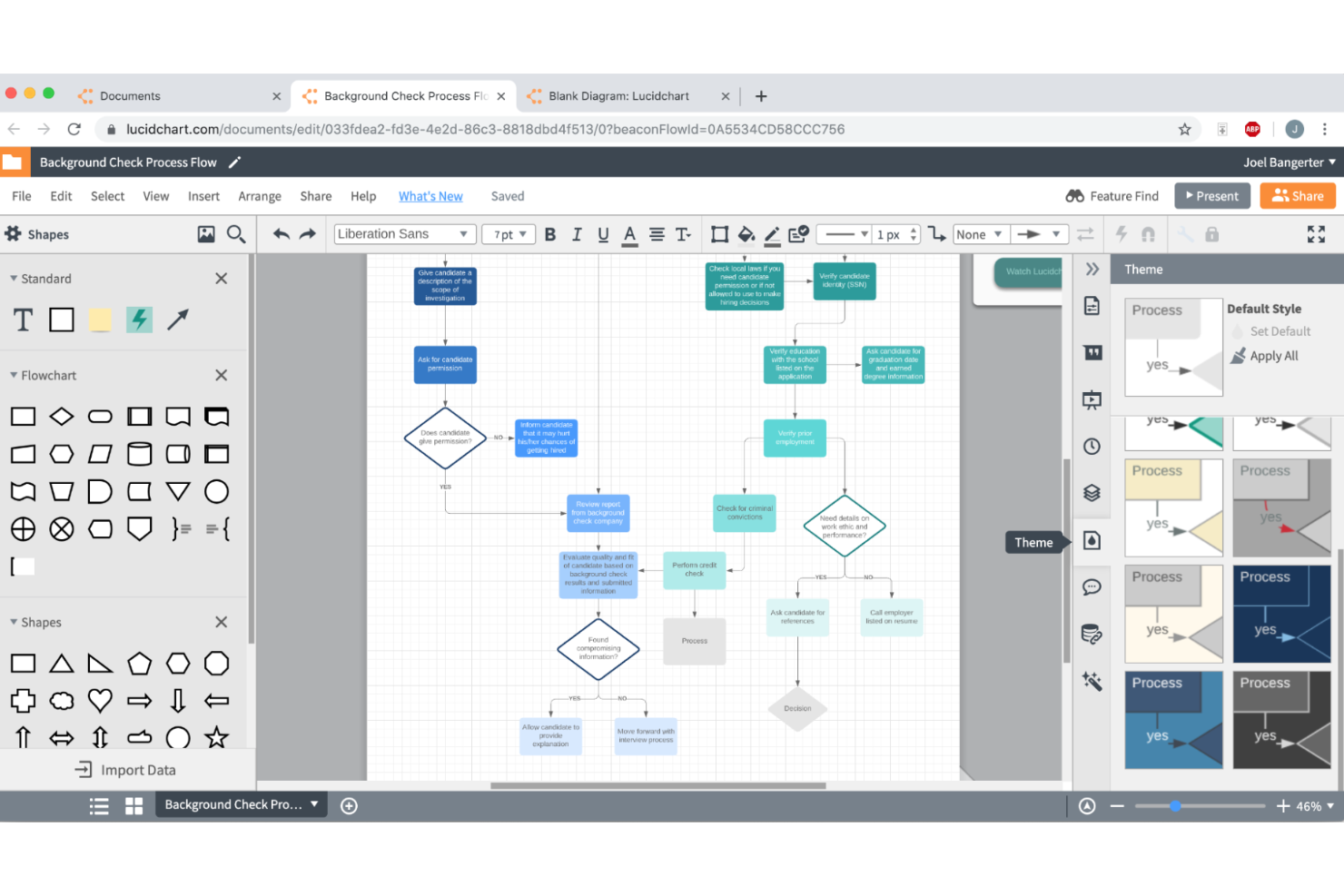
Lucidchart bietet eine dynamische Lösung für Teams in der Softwareentwicklung, indem es visuelle Kollaborationswerkzeuge bereitstellt, die das Projektmanagement und die technische Diagrammerstellung verbessern. Mit Echtzeit-Zusammenarbeit und KI-generierten Diagrammen spricht es IT-, Ingenieur- und Projektmanagement-Fachleute an, die ihre Dokumentation organisiert und aktuell halten müssen. Lucidchart begegnet der Herausforderung, Klarheit und Effizienz bei der Visualisierung komplexer Systeme sowie bei der Nachverfolgung von Entwicklungsetappen zu wahren.
Warum ich Lucidchart gewählt habe
Ich habe Lucidchart wegen seiner einzigartigen Fähigkeit gewählt, Projektmanagement-Prozesse zu zentralisieren, was für die Softwareentwicklung entscheidend ist. Die Echtzeit-Kollaborationsfunktion ermöglicht es Ihrem Team, gemeinsam zu arbeiten, sodass alle auf dem gleichen Stand bleiben. Die Plattform bietet die Möglichkeit, detaillierte Produkt-Roadmaps und Prozessabläufe zu erstellen und zu teilen, was einen strukturierten Ansatz zur Nachverfolgung des Entwicklungsfortschritts ermöglicht. Die Integration von Lucidchart mit Plattformen wie Jira erhöht den Nutzen zusätzlich und stellt eine umfassende Lösung für das Management von Softwareprojekten bereit.
Lucidchart Hauptmerkmale
Neben seinen Projektmanagement-Fähigkeiten bietet Lucidchart mehrere Funktionen, die es zu einer überzeugenden Wahl für Werkzeuge zur Nachverfolgung der Softwareentwicklung machen.
- KI-generierte Diagramme: Automatisierte Diagrammerstellung auf Basis Ihrer Dateneingaben, was Zeit spart und manuelle Fehler reduziert.
- UML-Markup: Unterstützung der Unified Modeling Language (UML) zur Gestaltung und Visualisierung von Software-Architekturen.
- Datenanbindung: Verknüpft Ihre Diagramme mit Live-Datenquellen, damit Ihre Visualisierungen stets aktuell sind.
- Bedingte Formatierung: Hervorhebung wichtiger Datenpunkte innerhalb Ihrer Diagramme, damit wichtige Informationen ins Auge fallen.
Lucidchart-Integrationen
Integrationen umfassen Google Drive, Google Meet, Jira, Asana, BambooHR, Box, Azure, Brandfetch, Canvas und Cisco Interactive Whiteboards.
Pros and Cons
Pros:
- Leistungsstarke Echtzeit-Kollaborationswerkzeuge
- Flexible Diagrammtypen für Entwickler
- Nützliche Agile-Planungsvorlagen
Cons:
- Begrenztes integriertes Aufgabenmanagement
- Von Benutzern berichtete Preiserhöhungen

ProofHub
Am besten geeignet für Planung, Organisation und Durchführung von Projekten mit Gantt-Diagrammen
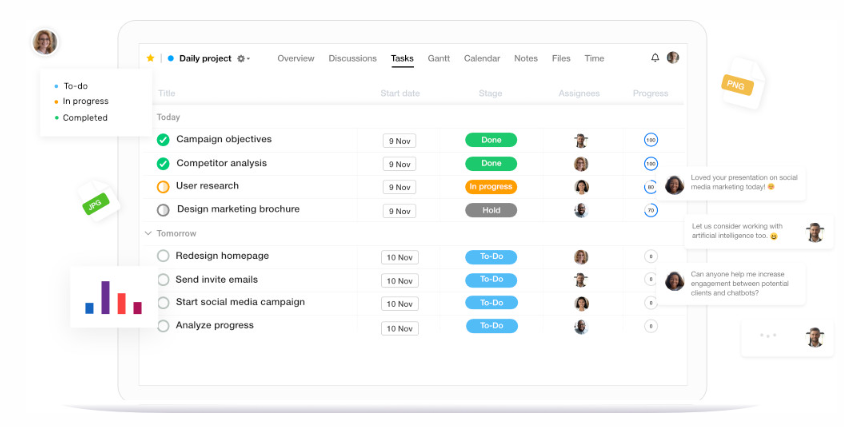
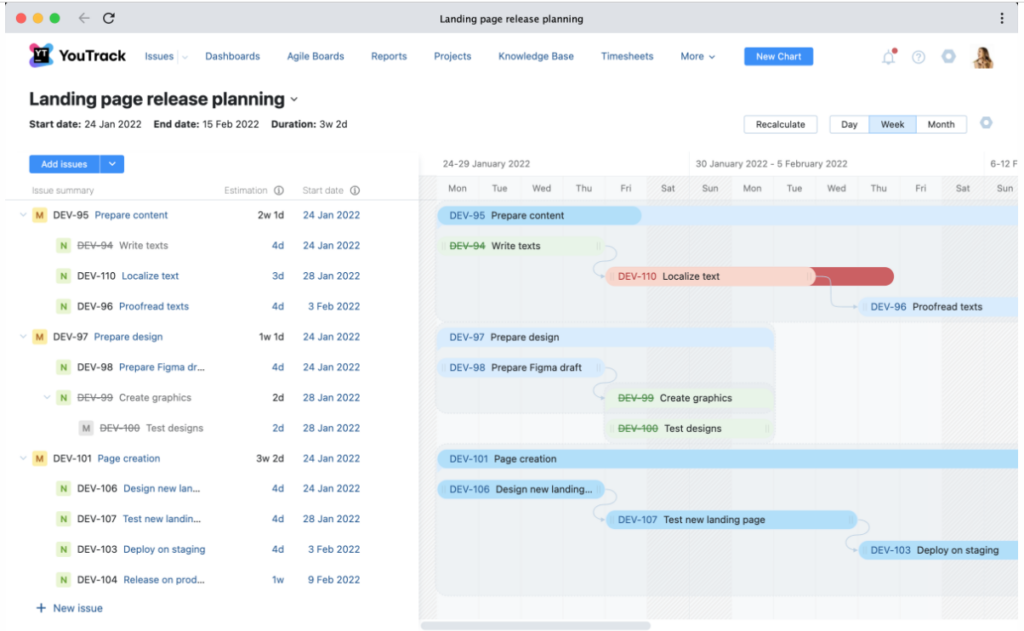
ProofHub ist ein vielseitiges Projektmanagement-Tool, das sich durch seine Fähigkeiten in der Planung, Organisation und Durchführung von Projekten auszeichnet. Besonders hervorzuheben sind die leistungsstarken Gantt-Diagramme, die ProofHub ideal für Teams machen, die sich bei ihrer Arbeit auf visuelle Projektzeitpläne verlassen.
Warum ich ProofHub ausgewählt habe: Ich habe ProofHub für diese Liste gewählt, weil es robust und flexibel ist. Das Gantt-Diagramm von ProofHub ist wirklich außergewöhnlich und bietet ein Maß an Detailgenauigkeit und Klarheit, das von anderen Tools nicht erreicht wird. Für Teams, die stark auf visuelle Projektplanung und -terminierung angewiesen sind, ist ProofHub die beste Wahl.
Herausragende Funktionen & Integrationen:
ProofHub ist vollgepackt mit Funktionen, die das Projektmanagement vereinfachen, darunter Aufgabenmanagement, Zeiterfassung und Berichterstattung. Die Gantt-Diagramme bieten einen detaillierten Überblick über den Projektfortschritt und ermöglichen das einfache Verwalten von Aufgabenabhängigkeiten und Terminänderungen. Bei den Integrationen arbeitet ProofHub mit Anwendungen wie FreshBooks, Google Kalender, iCal, Box, Dropbox, Google Drive und OneDrive und erweitert so seine Funktionalität und Benutzerfreundlichkeit.
Pros and Cons
Pros:
- Außergewöhnliche Gantt-Diagramm-Funktionen
- Bietet einen Festpreis für unbegrenzt viele Benutzer
- Integriert sich mit vielen Drittanbieter-Anwendungen
Cons:
- Die Benutzeroberfläche erfordert möglicherweise etwas Eingewöhnung
- Keine kostenlose Version verfügbar
- Fortgeschrittene Funktionen können für kleine Projekte zu viel sein

Am besten geeignet für Projektmanagement mit Fokus auf Zusammenarbeit und Teamharmonie

Teamwork.com ist ein Projektmanagement-Tool, das darauf ausgelegt ist, die Zusammenarbeit im Team zu verbessern. Durch die Zentralisierung aller Projektaktivitäten und die Förderung der Kommunikation zwischen Teammitgliedern steigert es Produktivität und Harmonie im Team. Der Grund, warum Teamwork.com am besten für Projektmanagement mit Fokus auf Zusammenarbeit und Teamharmonie geeignet ist, liegt im starken Schwerpunkt auf Kommunikation und teamweiter Transparenz der Aufgaben.
Warum ich Teamwork.com gewählt habe: Teamwork.com hat es auf meine Liste geschafft, weil es umfassende und kollaborative Möglichkeiten bietet. Mit Funktionen, die darauf ausgelegt sind, Transparenz zu erhöhen und sicherzustellen, dass jedes Teammitglied auf dem gleichen Stand ist, übertrifft es viele Alternativen. Wenn es darum geht, Teamharmonie durch effektive Zusammenarbeit zu fördern, ist Teamwork.com tatsächlich die richtige Wahl.
Herausragende Funktionen & Integrationen:
Teamwork.com bietet Aufgabenverteilung, Zeiterfassung und Gantt-Diagramme, um Projektzeitpläne effizient zu steuern. Es beinhaltet außerdem ein zentrales Datei-Repository für alle projektrelevanten Dokumente. Die Integration mit einer Vielzahl von Software, darunter Google Drive, Dropbox, Microsoft Office, HubSpot, QuickBooks und mehr, sorgt für eine umfassende, integrierte Arbeitsumgebung.
Pros and Cons
Pros:
- Umfangreiches Set kollaborativer Funktionen
- Integration mit einer Vielzahl von Software
- Fokus auf Teamharmonie und Kommunikation
Cons:
- Erfordert mindestens 5 Nutzer für den Startpreis
- Kann für kleinere Teams überwältigend sein
- Kein kostenloser Plan für Startups und Kleinunternehmen

Linear
Am besten für Teams, die eine schlanke Aufgabenverwaltung in einem schönen Interface suchen
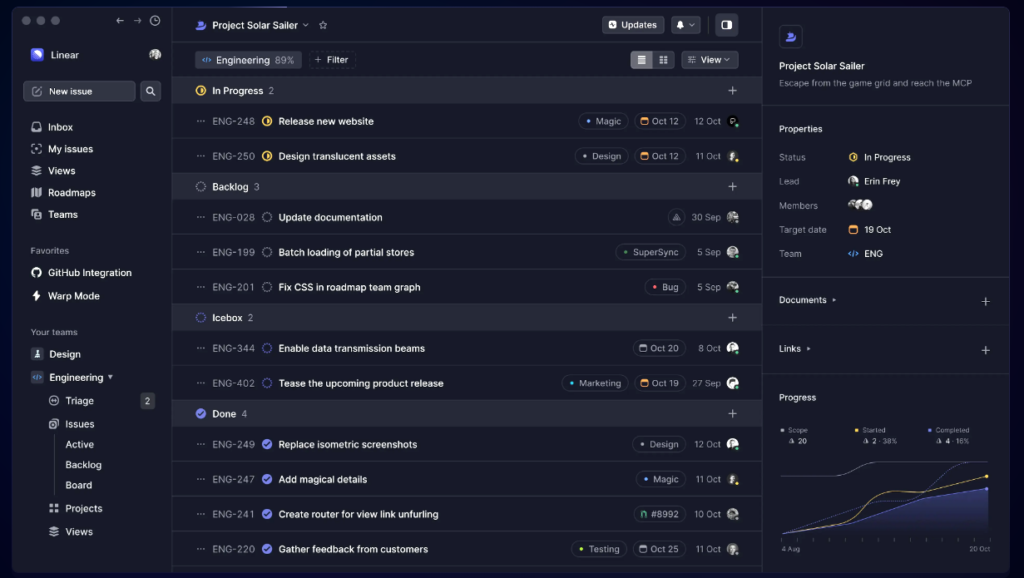
Linear ist ein Software-Tool für Projektmanagement, das darauf ausgelegt ist, Einfachheit und Effizienz in die Fehler- und Aufgabenverfolgung zu bringen. Mit einer optisch ansprechenden Oberfläche und einem intuitiven Design wird das Tracken von Aufgaben zu einer angenehmen Erfahrung. Dank seines Fokus auf Benutzerfreundlichkeit und einfacher Navigation ist Linear die beste Wahl für Teams, die eine schlanke Aufgabenverwaltung in einem schönen Interface suchen.
Warum ich Linear gewählt habe: Ich habe Linear ausgewählt, weil das Tool kompromisslos auf Design und Benutzerfreundlichkeit setzt. In einem Markt, der von komplexen und unübersichtlichen Interfaces geprägt ist, hebt sich Linear mit seiner klaren, modernen Ästhetik deutlich ab. Mein Fazit ist, dass Linear besonders für Teams geeignet ist, die sowohl funktionale als auch ästhetische Aspekte eines Werkzeugs schätzen und eine benutzerfreundliche, optimierte Lösung für Aufgabenverfolgung suchen.
Herausragende Funktionen & Integrationen:
Zu den herausragenden Funktionen von Linear zählen Aufgaben- und Fehlerverfolgung, Projektzeitpläne und detaillierte Berichte – all das in einer klaren und einfachen Oberfläche. Es bietet zudem eine einfache Priorisierung von Aufgaben und Gruppierung von Issues für effizientes Projektmanagement. Linear lässt sich mit beliebten Tools wie GitHub, Slack, Figma und Sentry integrieren und erhöht damit seinen Nutzwert und die Interoperabilität.
Pros and Cons
Pros:
- Schöne und benutzerfreundliche Oberfläche
- Effektive Funktionen für Aufgabenverfolgung und Priorisierung
- Integration mit einer Vielzahl beliebter Tools
Cons:
- Fehlen erweiterter Projektmanagement-Funktionen
- Nicht geeignet für große oder komplexe Projekte
- Begrenzte Anpassungsmöglichkeiten

ClickUp
Am besten geeignet für umfassendes Projektmanagement mit funktionsreicher Ausstattung
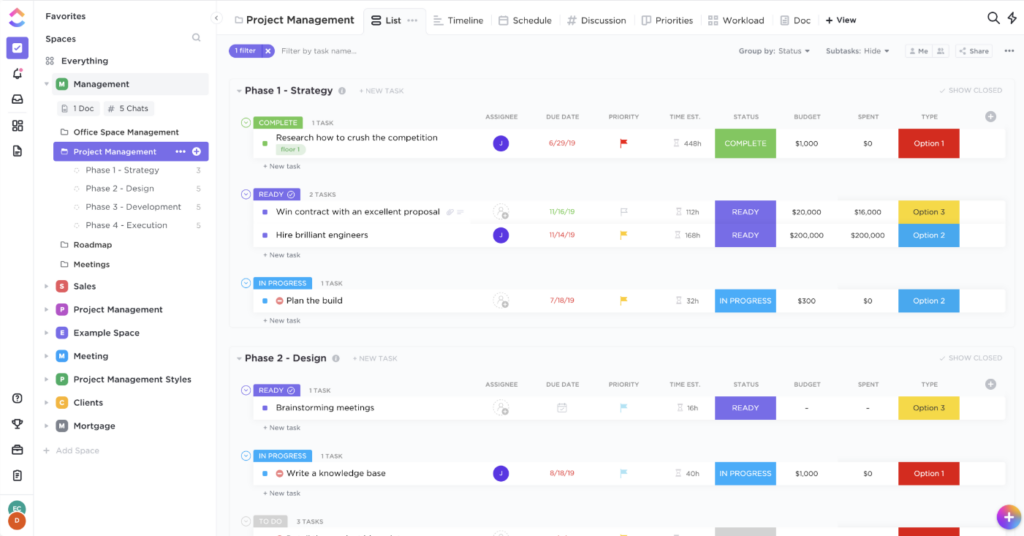
ClickUp ist ein Projektmanagement-Tool, das umfassende Funktionen für Planung, Organisation und Nachverfolgung von Aufgaben sowie Projekten bietet. Dank seiner All-in-One-Fähigkeit stellt es Teams die notwendigen Werkzeuge zur Verfügung, um Projekte unterschiedlichster Größe und Komplexität zu managen; daher eignet es sich für Teams, die eine funktionsreiche Projektmanagement-Lösung suchen.
Warum ich ClickUp ausgewählt habe: Ich habe ClickUp für diese Liste ausgewählt, weil es über ein umfangreiches Funktionspaket verfügt und einen All-in-One-Ansatz im Projektmanagement verfolgt. Im Vergleich zu anderen Tools bietet es eine größere Bandbreite an Funktionen, die in einer einzigen Plattform integriert sind. Ich halte es für die beste Wahl für Teams, die auf der Suche nach einem umfassenden, funktionsreichen Projektmanagement-Tool sind.
Herausragende Funktionen & Integrationen:
ClickUp ist bekannt für seine Aufgabenverwaltung, Dokumentenzusammenarbeit, Zielverfolgung und Zeiterfassung und bietet Teams alles, was sie zur Verwaltung eines Projekts in einem einzigen Tool benötigen. Was die Integrationen betrifft, so lässt sich ClickUp mit einer Vielzahl externer Tools wie Slack, Trello, Google Kalender, GitHub, Dropbox und vielen weiteren verbinden, sodass Teams ihre Arbeitsabläufe effektiv optimieren können.
Pros and Cons
Pros:
- All-in-One-Projektmanagement-Lösung
- Integriert sich mit zahlreichen externen Tools
- Bietet umfassende Funktionen für das Projektmanagement
Cons:
- Kann aufgrund der Vielzahl an Funktionen überwältigend sein
- Benötigt Zeit, um alle Funktionen vollständig zu erlernen und zu verstehen
- Anpassungsmöglichkeiten könnten intuitiver sein

Am besten geeignet für DevOps-Teams, die eine End-to-End-Lösung zum Planen, Entwickeln, Ausliefern und Betreiben suchen
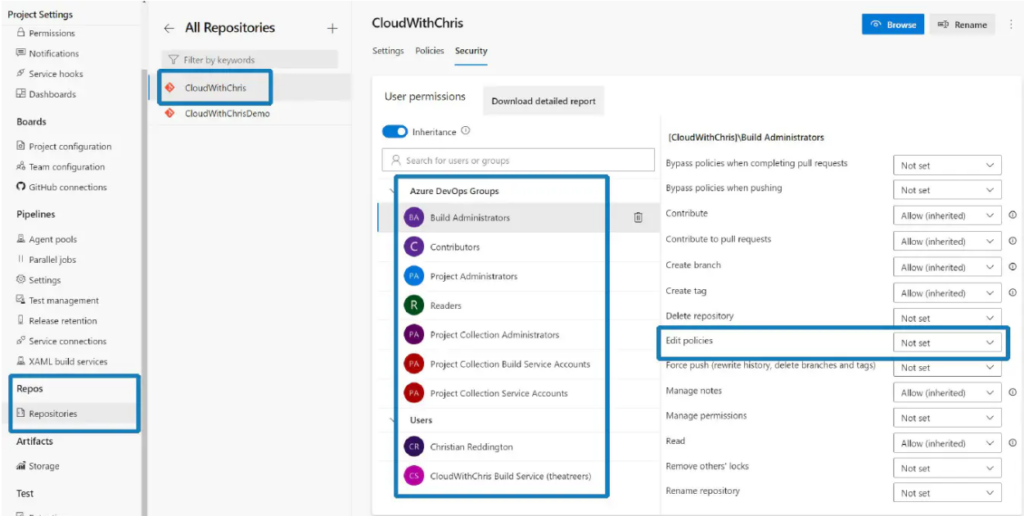
Azure DevOps ist eine leistungsstarke Suite von Tools, die den gesamten Lebenszyklus der Softwareentwicklung unterstützt, von der Planung bis zum Betrieb. Sie ist speziell für DevOps-Teams konzipiert, die eine integrierte Plattform zur umfassenden Verwaltung ihrer Projekte benötigen.
Warum ich Azure DevOps ausgewählt habe: Ich habe Azure DevOps wegen seines umfassenden Funktionsumfangs ausgewählt, der den gesamten DevOps-Lebenszyklus unterstützt. Diese Suite überzeugt, weil sie verschiedene Aspekte der Softwareentwicklung auf einer einheitlichen Plattform zusammenführt – darunter Planung, Codierung, Build-Prozesse, Tests und Bereitstellung. In meinem Vergleich ist Azure DevOps somit das beste Tool für DevOps-Teams, die eine Komplettlösung für die Planung, Entwicklung, Auslieferung und den Betrieb ihrer Softwareprojekte suchen.
Hervorstechende Funktionen & Integrationen:
Azure DevOps bietet Funktionen wie Azure Boards für die Aufgabenverfolgung, Azure Pipelines für CI/CD und Azure Repos für Code-Repositories. Außerdem sorgen Azure Test Plans für umfassende Tests und Azure Artifacts für Paketverwaltung dafür, dass sich Azure DevOps von der Konkurrenz abhebt. Die Lösung lässt sich nahtlos in zahlreiche Tools integrieren, darunter GitHub, Slack, Teams, Jira und viele andere, und passt sich so problemlos in bestehende Workflows ein.
Pros and Cons
Pros:
- Unterstützt den gesamten DevOps-Lebenszyklus auf einer einzigen Plattform
- Lässt sich mit einer Vielzahl von Tools gut integrieren
- Bietet eine kostenlose Stufe für kleine Teams
Cons:
- Die Vielzahl der Funktionen kann für neue Nutzer überwältigend sein
- Für größere Teams möglicherweise nicht so kosteneffizient
- Die Einarbeitung kann aufgrund der Vielfalt der Plattform anspruchsvoll sein

Red Hat Virtualization (RHV) est une solution de virtualisation basée sur Red Hat Enterprise Linux. Elle prend en charge les applications, processus et ressources conteneurisés et natifs du cloud.
Pourquoi j'ai choisi Red Hat Virtualization : J'ai opté pour RHV en raison de la facilité avec laquelle il se connecte à Ansible, un outil d'automatisation de Red Hat. À partir de là, j'ai pu définir des règles et des structures clés, puis mettre en place une automatisation de bout en bout. Cela m'a permis de faire évoluer mon système avec plusieurs nouvelles machines virtuelles sans avoir à craindre de perdre le contrôle.
Fonctionnalités qui m'ont séduit chez RHV : il est basé sur KVM, ce qui permet de créer facilement plusieurs machines virtuelles isolées sous Linux. Outre l'isolation, il améliore la sécurité en tirant parti de technologies telles que Secure Virtualization (sVirt) de Red Hat et Security-Enhanced Linux (SELinux).
Intégrations disponibles nativement avec d'autres produits Red Hat, notamment Ansible Automation Platform, OpenStack, OpenShift et Enterprise Linux. Une API REST est également disponible pour créer des intégrations personnalisées.
Pros and Cons
Pros:
- API pour solutions personnalisées
- Fonctionnalités d'automatisation évolutives avec Ansible
- Open source
Cons:
- Performances instables
- Courbe d'apprentissage abrupte

Am besten geeignet, um Code-Diskussionen direkt in Ihre IDE zu integrieren
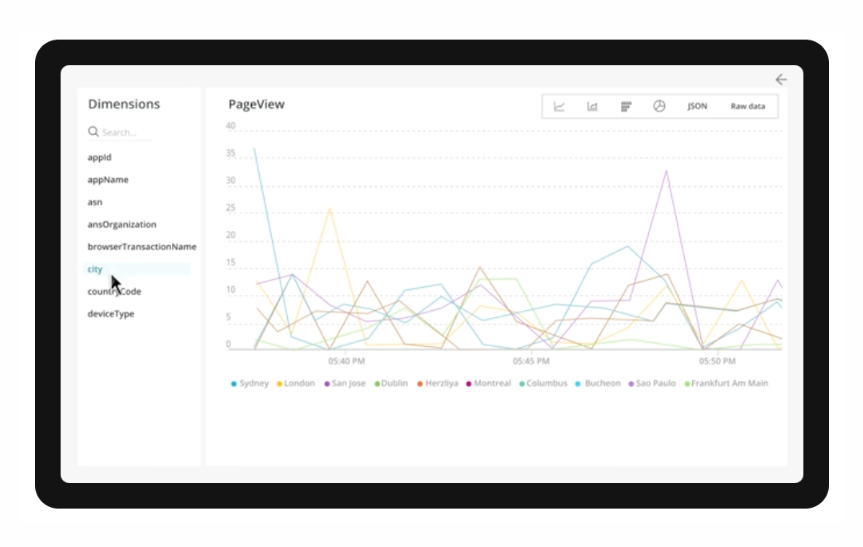
New Relic CodeStream ist eine Entwicklungsplattform, die die Lesbarkeit und das Verständnis von Code verbessert, indem sie Inline-Code-Diskussionen direkt in Ihrer IDE ermöglicht. Sie erlaubt kontextbezogene Diskussionen und macht Code-Reviews zum Bestandteil Ihres täglichen Workflows, sodass ein Wechsel zwischen Fenstern oder Plattformen überflüssig wird. Dadurch hebt sich CodeStream als bestes Tool hervor, um Code-Diskussionen direkt in Ihre IDE zu integrieren.
Warum ich CodeStream gewählt habe: Bei der Bewertung von Tracking-Tools fiel meine Wahl auf CodeStream, weil der Fokus auf die Verbesserung der Kommunikation zwischen Entwicklern im Code bleibt. Die Fähigkeit des Tools, Code-Anmerkungen und Gespräche direkt neben dem eigentlichen Code bereitzustellen, hebt es von anderen ab. Ich habe CodeStream gewählt, weil es Code-Reviews und -Diskussionen erheblich vereinfacht und sich durch die direkte Integration dieser Diskussionen in die IDE auszeichnet.
Hervorstechende Funktionen & Integrationen:
CodeStream bietet Code-Anmerkungen, mit denen Entwickler direkt im Code Notizen und Einsichten hinterlassen können. Zudem stellt es ein integriertes System für Code-Reviews zur Verfügung, was den Review-Prozess vereinfacht und regelmäßige Begutachtungen fördert. CodeStream unterstützt viele beliebte IDEs, darunter Visual Studio Code, Atom und IntelliJ, und lässt sich problemlos in bestehende Workflows integrieren.
Pros and Cons
Pros:
- Ermöglicht kontextbezogene Code-Diskussionen
- Unterstützt eine Vielzahl von IDEs
- Fördert regelmäßige Code-Reviews
Cons:
- Könnte mehr Integrationen mit Projektmanagement-Tools bieten
- Höhere Lernkurve für nicht-technische Teammitglieder
- Keine erweiterten Reporting-Funktionen

Jira
Am besten geeignet für Softwareentwicklungsprojekte mit leistungsstarker Fehler- und Aufgabenverfolgung
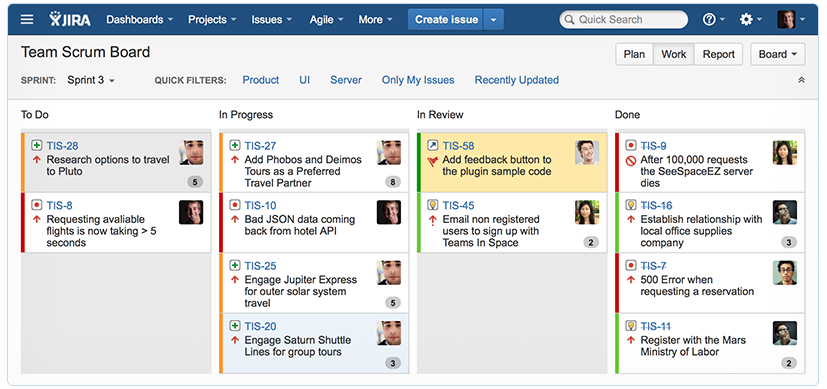
Jira ist ein Projektmanagement-Tool, das sich besonders durch seine leistungsstarken Funktionen zur Verwaltung und Nachverfolgung von Softwarefehlern und Aufgaben auszeichnet. Aufgrund seines umfassenden Ansatzes für das Management und die Lösung von Softwareproblemen eignet es sich besonders für Softwareentwicklungsteams, die robuste Funktionen zur Fehler- und Aufgabenverfolgung benötigen.
Warum ich Jira ausgewählt habe: Ich habe Jira aufgrund seines umfassenden Ansatzes für das Softwareprojektmanagement und der Leistungsfähigkeit seiner Fehler- und Aufgabenmanagementsysteme ausgewählt. Im Vergleich zu anderen Tools zeigt Jira ein tiefes Verständnis für die Anforderungen an Softwareentwicklungsprojekte, was es besonders hervorhebt. Meiner Einschätzung nach ist Jira am besten für Softwareentwicklungsprojekte geeignet, da es umfassende Funktionen für die Nachverfolgung von Fehlern und Aufgaben bietet.
Herausragende Funktionen & Integrationen:
Jira punktet mit Funktionen wie anpassbaren Workflows, Scrum- und Kanban-Boards sowie detaillierten Berichten, die Teams die nötige Flexibilität und Transparenz bieten, um ihre Softwareprojekte effizient zu steuern. Darüber hinaus sind die leistungsfähigen Fehler- und Aufgabenverfolgungsfunktionen für Softwareentwicklungsteams von unschätzbarem Wert. Bei den Integrationen arbeitet Jira mit zahlreichen Tools wie Confluence, Bitbucket und verschiedenen anderen Entwicklungswerkzeugen zusammen und stellt so eine umfassende Lösung für Softwareteams bereit.
Pros and Cons
Pros:
- Umfassende Funktionen zur Nachverfolgung von Fehlern und Aufgaben
- Anpassbare Workflows, die sich an Ihre Projektanforderungen anpassen
- Große Auswahl an Integrationen mit Entwicklungstools
Cons:
- Die Benutzeroberfläche kann für neue Nutzer komplex sein
- Die Preisgestaltung kann für größere Teams teuer sein
- Einige erweiterte Funktionen erfordern einen zusätzlichen Kauf

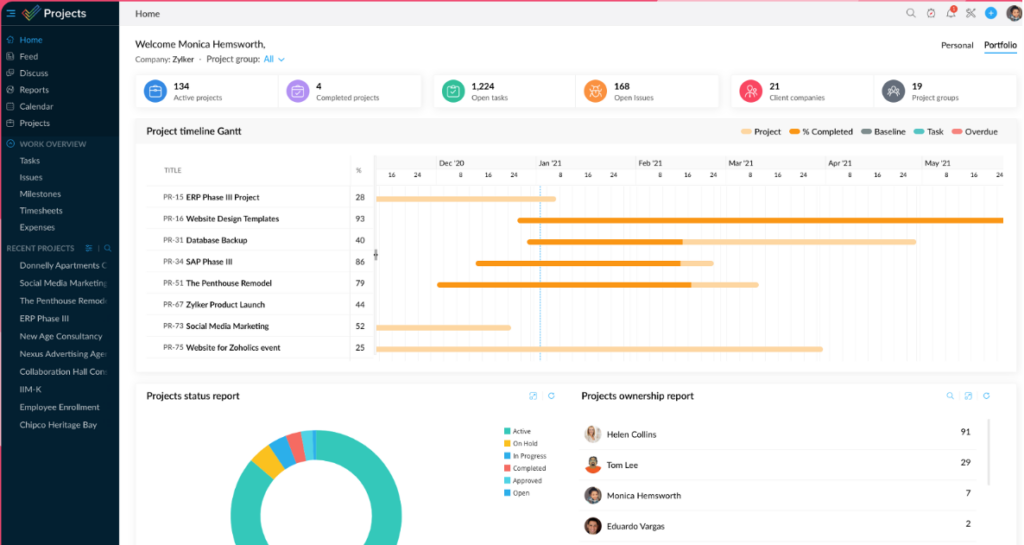
Zoho ist ein vielseitiges Projektmanagement-Tool, das sich durch eine detaillierte Verfolgung von Projekten und eine wertvolle Zeiterfassungsfunktion auszeichnet. Die Fähigkeit zur umfassenden Nachverfolgung in Verbindung mit Zeiterfassung macht es ideal für Organisationen, die eine sorgfältige Kontrolle über den Projektfortschritt anstreben.
Warum ich Zoho gewählt habe: Ich habe Zoho in diese Liste aufgenommen wegen seiner detaillierten Nachverfolgungsmöglichkeiten und der herausragenden Zeiterfassungsfunktion. Zoho hebt sich von vielen Mitbewerbern ab, indem es diese beiden entscheidenden Aspekte des Projektmanagements kombiniert. Ich halte es für die beste Wahl für Teams, die eine komplexe Projektverfolgung und Zeiterfassung benötigen, da diese Komponenten integriert werden.
Herausragende Funktionen & Integrationen:
Zoho bietet Aufgabenlisten, Gantt-Diagramme und Zeiterfassungs-Tools, die Teams vollständige Kontrolle und Transparenz über ihre Projekte ermöglichen. Die Zeiterfassungsfunktion ist besonders nützlich für genaue Abrechnungen, Produktivitätsanalysen und das Workload-Management. Zoho lässt sich zudem mit anderen Zoho-Produkten und externen Plattformen wie Google Workspace, Microsoft Office 365 und Slack integrieren, wodurch sämtliche Arbeit auf einer zentralen Plattform gebündelt wird.
Pros and Cons
Pros:
- Detaillierte Projektverfolgungsfunktionen
- Integrierte Zeiterfassung für verbesserte Produktivitätsanalysen
- Große Auswahl an Integrationen
Cons:
- Die Benutzeroberfläche kann für Neueinsteiger überwältigend sein
- Monatliche Kosten können sich für größere Teams summieren
- Jährliche Abrechnung ist nicht für alle Organisationen praktisch
Weitere Tools zur Nachverfolgung der Softwareentwicklung
Hier sind einige zusätzliche Optionen für Tools zur Nachverfolgung der Softwareentwicklung, die es nicht auf meine Shortlist geschafft haben, aber dennoch einen Blick wert sind:
- monday.com
Am besten geeignet für flexible Projektvisualisierung und anpassbare Workflows
- ManageEngine ServiceDesk Plus
Am besten geeignet für IT-Service-Desk-Management mit ITIL-Bereitschaft
- Wrike
Ideal für mehrstufiges Projektmanagement mit detaillierter Nachverfolgung


Auswahlkriterien für Tools zur Nachverfolgung der Softwareentwicklung
Bei der Auswahl der besten Tools zur Nachverfolgung der Softwareentwicklung für diese Liste habe ich die häufigsten Anforderungen und Probleme potenzieller Käufer berücksichtigt, etwa Teamzusammenarbeit und Fristüberwachung. Für eine strukturierte und faire Bewertung habe ich zudem folgendes Rahmenwerk verwendet:
Kernfunktionen (25 % der Gesamtbewertung)
Damit ein Tool in diese Liste aufgenommen werden konnte, musste es folgende typische Anwendungsfälle abdecken:
- Aufgabenmanagement
- Projektzeitplan-Verfolgung
- Teamzusammenarbeit
- Berichtswesen und Analysen
- Integration mit anderen Tools
Zusätzliche herausragende Funktionen (25 % der Gesamtbewertung)
Um die Auswahl weiter zu verfeinern, habe ich nach besonderen Funktionen gesucht, wie zum Beispiel:
- Anpassbare Dashboards
- Automatisierte Workflows
- Zeitverfolgungsfunktionen
- Erweiterte Berichtsmöglichkeiten
- Verfügbarkeit einer mobilen App
Benutzerfreundlichkeit (10 % der Gesamtbewertung)
Für eine Einschätzung der Benutzerfreundlichkeit habe ich auf Folgendes geachtet:
- Intuitive Benutzeroberfläche
- Einfache Navigation
- Minimale Einarbeitungszeit
- Responsives Design
- Barrierefreiheitsfunktionen
Onboarding (10 % der Gesamtbewertung)
Um das Onboarding-Erlebnis jeder Plattform zu bewerten, habe ich Folgendes berücksichtigt:
- Verfügbarkeit von Schulungsvideos
- Interaktive Produkttouren
- Umfassende Vorlagen
- Zugang zu Webinaren
- Hilfreiche Chatbots
Kundensupport (10 % der Gesamtbewertung)
Um die Kundensupportleistungen der einzelnen Softwareanbieter zu bewerten, habe ich Folgendes berücksichtigt:
- 24/7 Erreichbarkeit
- Multikanal-Supportoptionen
- Reaktionszeit
- Kompetentes Personal
- Verfügbarkeit eines Hilfezentrums
Preis-Leistungs-Verhältnis (10 % der Gesamtbewertung)
Um das Preis-Leistungs-Verhältnis jeder Plattform zu bewerten, habe ich Folgendes berücksichtigt:
- Wettbewerbsfähige Preisgestaltung
- Funktionsumfang im Verhältnis zu den Kosten
- Flexible Preispläne
- Verfügbarkeit einer kostenlosen Testphase
- Rabattoptionen für Jahrespläne
Kundenbewertungen (10 % der Gesamtbewertung)
Um einen Eindruck von der allgemeinen Kundenzufriedenheit zu erhalten, habe ich bei der Analyse von Kundenbewertungen auf Folgendes geachtet:
- Allgemeine Zufriedenheitsbewertungen
- Häufig genannte Vor- und Nachteile
- Häufigkeit von Updates oder Verbesserungen
- Benutzerfeedback zum Kundensupport
- Wertwahrnehmung durch Nutzer
Wie wähle ich ein Tool zur Nachverfolgung von Softwareentwicklungsprojekten aus?
Es ist leicht, sich in endlos langen Feature-Listen und komplexen Preisstrukturen zu verlieren. Damit Sie bei Ihrer individuellen Softwareauswahl den Fokus behalten, finden Sie hier eine Checkliste mit wichtigen Faktoren, die Sie im Auge behalten sollten:
| Faktor | Worauf achten? |
|---|---|
| Skalierbarkeit | Kann das Tool mit Ihrem Team wachsen? Überprüfen Sie, ob es eine steigende Anzahl von Projekten und Nutzern bewältigt, ohne die Leistung zu beeinträchtigen. Achten Sie auf flexible Preispläne, die skalieren. |
| Integrationen | Lässt es sich mit Ihrer bestehenden Software verbinden? Prüfen Sie die Kompatibilität mit Tools wie GitHub, Slack oder anderen essenziellen Plattformen, die Ihr Team täglich nutzt. |
| Anpassbarkeit | Können Sie das Tool an Ihre Arbeitsabläufe anpassen? Überprüfen Sie, ob individuelle Felder, Workflows und Dashboards möglich sind, die zu den Prozessen Ihres Teams passen. |
| Benutzerfreundlichkeit | Ist die Benutzeroberfläche intuitiv? Stellen Sie sicher, dass sie für alle Teammitglieder einfach zu handhaben ist, damit die Einarbeitungszeit kurz bleibt und der Schulungsaufwand gering ist. |
| Implementierung und Onboarding | Wie schnell kann Ihr Team mit dem Tool starten? Prüfen Sie verfügbare Ressourcen, wie Schulungsvideos und Support, um einen reibungslosen Übergang zu gewährleisten. |
| Kosten | Passt das Tool in Ihr Budget? Vergleichen Sie die Preise mit den Funktionen und beachten Sie auch langfristige Kosten, einschließlich möglicher Upgrades oder versteckter Gebühren. |
| Sicherheitsvorkehrungen | Sind Ihre Daten geschützt? Achten Sie darauf, dass das Tool Branchenstandards wie Verschlüsselung erfüllt und Features wie Zwei-Faktor-Authentifizierung anbietet. |
| Compliance-Anforderungen | Erfüllt das Tool Ihre branchenspezifischen Vorschriften? Prüfen Sie, ob es Compliance-Anforderungen wie DSGVO oder HIPAA unterstützt, je nach Bedarf Ihres Unternehmens. |
Was sind Tools zur Nachverfolgung von Softwareentwicklungsprojekten?
Tools zur Nachverfolgung von Softwareentwicklungsprojekten sind digitale Lösungen, die Teams bei der effektiven Verwaltung und Überwachung ihrer Softwareprojekte unterstützen. Entwickler, Projektmanager und andere IT-Fachleute nutzen diese Tools in der Regel, um Aufgaben, Fristen und die Zusammenarbeit im Team im Blick zu behalten. Aufgabenmanagement, Verfolgung von Projektzeitplänen und Integrationsmöglichkeiten helfen, Arbeitsabläufe zu organisieren, die Kommunikation zu verbessern und Projektziele zu erreichen. Insgesamt bieten diese Tools eine essenzielle Unterstützung dabei, Softwareprojekte auf Kurs zu halten und die Effizienz des Teams sicherzustellen.
Funktionen
Beim Auswählen von Tools zur Softwareentwicklung sollten Sie auf folgende wichtige Funktionen achten:
- Aufgabenmanagement: Hilft dabei, Aufgaben zu organisieren und Teammitgliedern zuzuweisen, sodass jeder seine Verantwortlichkeiten und Fristen kennt.
- Projektzeitachse verfolgen: Ermöglicht Teams, den Fortschritt von Projekten zu überwachen und Zeitpläne bei Bedarf anzupassen, um Fristen einzuhalten.
- Integrationsmöglichkeiten: Verbindet sich mit anderen Tools wie GitHub oder Slack, um Arbeitsabläufe zu optimieren und die Teamkommunikation zu verbessern.
- Anpassbare Dashboards: Bietet Teams die Möglichkeit, Dashboards individuell auf ihre spezifischen Arbeitsabläufe und Präferenzen zuzuschneiden.
- Automatisierte Workflows: Reduziert manuelle Arbeit, indem automatische Aufgabenverteilung und Benachrichtigungen auf Basis bestimmter Auslöser eingerichtet werden.
- Zeiterfassungsfunktionen: Ermöglicht Teams die Überwachung, wie Zeit für Aufgaben und Projekte aufgewendet wird, was die Ressourcenverwaltung und Planung unterstützt.
- Verfügbarkeit einer mobilen App: Bietet unterwegs Zugriff auf Projektinformationen und Updates, sodass Teammitglieder unabhängig vom Standort informiert bleiben.
- Erweiterte Berichtsfunktionen: Erstellt detaillierte Berichte zur Projektleistung, damit Teams fundierte Entscheidungen treffen und Prozesse verbessern können.
- Benutzerfreundliche Oberfläche: Gewährleistet eine einfache Bedienung durch ein intuitives Design, das für alle Teammitglieder zugänglich ist.
- Sicherheitsmaßnahmen: Schützt vertrauliche Projektdaten durch Funktionen wie Verschlüsselung und Zwei-Faktor-Authentifizierung.
Vorteile
Die Implementierung von Tools zur Nachverfolgung der Softwareentwicklung bietet Ihrem Team und Ihrem Unternehmen mehrere Vorteile. Hier sind einige, auf die Sie sich freuen können:
- Verbesserte Organisation: Aufgabenmanagement-Funktionen helfen dabei, Projekte zu organisieren, indem Verantwortlichkeiten und Fristen klar definiert werden.
- Stärkere Zusammenarbeit: Integrationsmöglichkeiten mit Tools wie Slack fördern eine bessere Kommunikation und Teamarbeit.
- Erhöhte Effizienz: Automatisierte Workflows reduzieren manuelle Aufgaben und ermöglichen es Ihrem Team, sich auf wichtigere Arbeit zu konzentrieren.
- Besseres Zeitmanagement: Zeiterfassungsfunktionen geben Einblicke, wie Zeit genutzt wird, und unterstützen eine effektivere Planung und Ressourcenzuteilung.
- Größere Transparenz: Anpassbare Dashboards bieten einen klaren Überblick über den Projektfortschritt und ermöglichen rechtzeitige Anpassungen und fundierte Entscheidungen.
- Zugänglichkeit: Die Verfügbarkeit einer mobilen App stellt sicher, dass Teammitglieder auch unterwegs auf dem Laufenden bleiben und informiert sind.
- Datensicherheit: Sicherheitsmaßnahmen schützen vertrauliche Informationen und geben die Gewissheit, dass Ihre Projektdaten sicher sind.
Kosten & Preise
Die Auswahl von Tools zur Nachverfolgung der Softwareentwicklung erfordert ein Verständnis der verschiedenen verfügbaren Preismodelle und -pläne. Die Kosten variieren je nach Funktionen, Teamgröße, Zusatzoptionen und mehr. Die folgende Tabelle fasst gängige Tarife, deren durchschnittliche Preise und typische enthaltene Funktionen in Lösungen zur Nachverfolgung der Softwareentwicklung zusammen:
Tarifvergleichstabelle für Tools zur Nachverfolgung der Softwareentwicklung
| Tariftyp | Durchschnittlicher Preis | Übliche Funktionen |
|---|---|---|
| Gratis-Tarif | $0 | Basis-Aufgabenmanagement, eingeschränkte Integrationen und einfache Berichte. |
| Persönlicher Tarif | $5-$25/user/month | Aufgabenmanagement, Verfolgung der Projektzeitachse, Integrationen mit beliebten Tools und anpassbare Dashboards. |
| Business-Tarif | $30-$60/user/month | Erweiterte Berichterstattung, automatisierte Workflows, verbesserte Sicherheitsfunktionen und Team-Kollaborationswerkzeuge. |
| Enterprise-Tarif | $70+/user/month | Vollständige Integrationsmöglichkeiten, dedizierter Support, umfangreiche Sicherheitsmaßnahmen und umfangreiche Anpassungsoptionen. |
FAQs zu Tools zur Nachverfolgung der Softwareentwicklung
Hier finden Sie Antworten auf häufig gestellte Fragen zu Tools zur Nachverfolgung der Softwareentwicklung:
Was ist der Unterschied zwischen Projektmanagement- und Tools zur Nachverfolgung der Softwareentwicklung?
Projektmanagement-Tools konzentrieren sich auf die Planung und Durchführung von Projekten in verschiedenen Branchen, während Tools zur Nachverfolgung der Softwareentwicklung speziell für den Softwareentwicklungsprozess entwickelt wurden. Sie bieten Funktionen wie Code-Integration, Fehlerverfolgung und Versionskontrolle. Wenn Ihr Team Software entwickelt, bieten diese spezialisierten Tools relevantere Funktionen, die besser zu Ihrem Arbeitsablauf passen.rn
Können Tools zur Nachverfolgung der Softwareentwicklung auch von nicht-technischen Teams genutzt werden?
Ja, auch nicht-technische Teams können diese Tools nutzen, insbesondere wenn sie benutzerfreundliche Oberflächen und anpassbare Funktionen bieten. Viele Tools ermöglichen vereinfachte Ansichten und Aufgabenmanagement, wovon beispielsweise Marketing-, Design- oder Operationsteams profitieren können. Es ist sinnvoll, ein Tool zu wählen, das an verschiedene Teamanforderungen angepasst werden kann.rn
Gibt es Bedenken hinsichtlich der Datensicherheit bei der Nutzung von Tools zur Nachverfolgung der Softwareentwicklung?
Ja, Datensicherheit ist ein wichtiger Aspekt. Achten Sie auf Tools, die Verschlüsselung, Zwei-Faktor-Authentifizierung und die Einhaltung von Branchenstandards wie der DSGVO bieten. Es ist entscheidend, sicherzustellen, dass das gewählte Tool über robuste Sicherheitsmaßnahmen verfügt, um vertrauliche Projektdaten zu schützen.
Wie geht es weiter:
Wenn Sie gerade Tools zur Nachverfolgung der Softwareentwicklung recherchieren, verbinden Sie sich mit einem SoftwareSelect-Berater für kostenlose Empfehlungen.
Sie füllen ein Formular aus und führen ein kurzes Gespräch, in dem sie auf Ihre spezifischen Anforderungen eingehen. Danach erhalten Sie eine Vorauswahl an Software, die Sie prüfen können. Sie begleiten Sie sogar durch den gesamten Kaufprozess, einschließlich Preisverhandlungen.