

15 beste Regressionstest-Tools im Test für 2026

15 Die besten Tools für Regressionstests: Kurzliste
Hier ist meine Kurzliste der besten Tools für Regressionstests:


Regressionstests können für Ihr Team zur Herausforderung werden, vor allem, wenn Sie mehrere Projekte parallel betreuen und enge Deadlines einhalten müssen. Fehler schleichen sich schnell wieder in den Code ein. Hier kommen Tools für Regressionstests ins Spiel, die helfen, Probleme frühzeitig aufzudecken, bevor sie sich ausweiten.
Meiner Erfahrung nach macht das richtige Tool den entscheidenden Unterschied. Ich habe die führenden Optionen am Markt unabhängig getestet und geprüft, worauf es wirklich für Ihre Arbeitsabläufe und Ziele ankommt.
In diesem Artikel stelle ich meine objektiven Empfehlungen für die besten Regressionstest-Tools vor. Sie erhalten Einblicke in Funktionen, Benutzerfreundlichkeit und die Alleinstellungsmerkmale jedes Tools. Lassen Sie uns gemeinsam das passende Tool für Ihr Team finden.
Why Trust Our Software Reviews
We’ve been testing and reviewing software since 2023. As tech leaders ourselves, we know how critical and difficult it is to make the right decision when selecting software.
We invest in deep research to help our audience make better software purchasing decisions. We’ve tested more than 2,000 tools for different tech use cases and written over 1,000 comprehensive software reviews. Learn how we stay transparent & our software review methodology.
Zusammenfassung der besten Tools für Regressionstests
Diese Vergleichstabelle fasst die Preisdetails meiner Top-Auswahl an Regressionstest-Tools zusammen, damit Sie die passende Lösung für Ihr Budget und Ihre Geschäftsanforderungen finden.
| Tool | Best For | Trial Info | Price | ||
|---|---|---|---|---|---|
| 1 | Best for AI-driven automation | Free plan available | From $3,600/year | Website | |
| 2 | Best for expert-led regression testing | Free demo available | Pricing upon request | Website | |
| 3 | Best for organizing your test cases in one visual editor | Free trial available + free demo | Pricing upon request | Website | |
| 4 | Best for checklist-based manual test management | 30-day free trial | From $49/month (billed annually) | Website | |
| 5 | Best suite of flexible and on-demand testing solutions | Not available | Pricing upon request | Website | |
| 6 | Best for CI/CD tool integration | 14-day free trial | From $212/month | Website | |
| 7 | Best to convert manual tests into automated tests | Free open source access available + 14-day free trial | Pricing upon request | Website | |
| 8 | Best full toolkit for complete test coverage | Free plan available + free demo | From $183/user/month | Website | |
| 9 | Best for synthetic testing | Free trial + free demo available | Pricing upon request | Website | |
| 10 | Best for release validation | No free trial available | Pricing upon request | Website | |
| 11 | Best for AI-driven test maintenance | Free plan available | From $99/month (billed annually) | Website | |
| 12 | Best to simplify test virtualization & editing using screenshots | Free demo available | Pricing upon request | Website | |
| 13 | Best for developers testing UI performance and functionality | Free plan available | Free To Use | Website | |
| 14 | Best UI-driven testing solution for regression & functional tests | 14-day free trial | Pricing upon request | Website | |
| 15 | Best to build processes visually for non-technical team members | Free trial available + free demo | Pricing upon request | Website |
-

Site24x7
Visit WebsiteThis is an aggregated rating for this tool including ratings from Crozdesk users and ratings from other sites.4.7 -
GitHub Actions
Visit WebsiteThis is an aggregated rating for this tool including ratings from Crozdesk users and ratings from other sites.4.8 -
Docker
Visit WebsiteThis is an aggregated rating for this tool including ratings from Crozdesk users and ratings from other sites.4.6





Tests und Bewertungen der besten Regressionstest-Tools
Nachfolgend finden Sie meine ausführlichen Zusammenfassungen der besten Tools für Regressionstests, die es auf meine Kurzliste geschafft haben. Meine Bewertungen bieten einen detaillierten Einblick in die wichtigsten Funktionen, Vor- und Nachteile, Integrationen sowie ideale Einsatzbereiche jedes Tools, um Ihnen bei der Auswahl zu helfen.

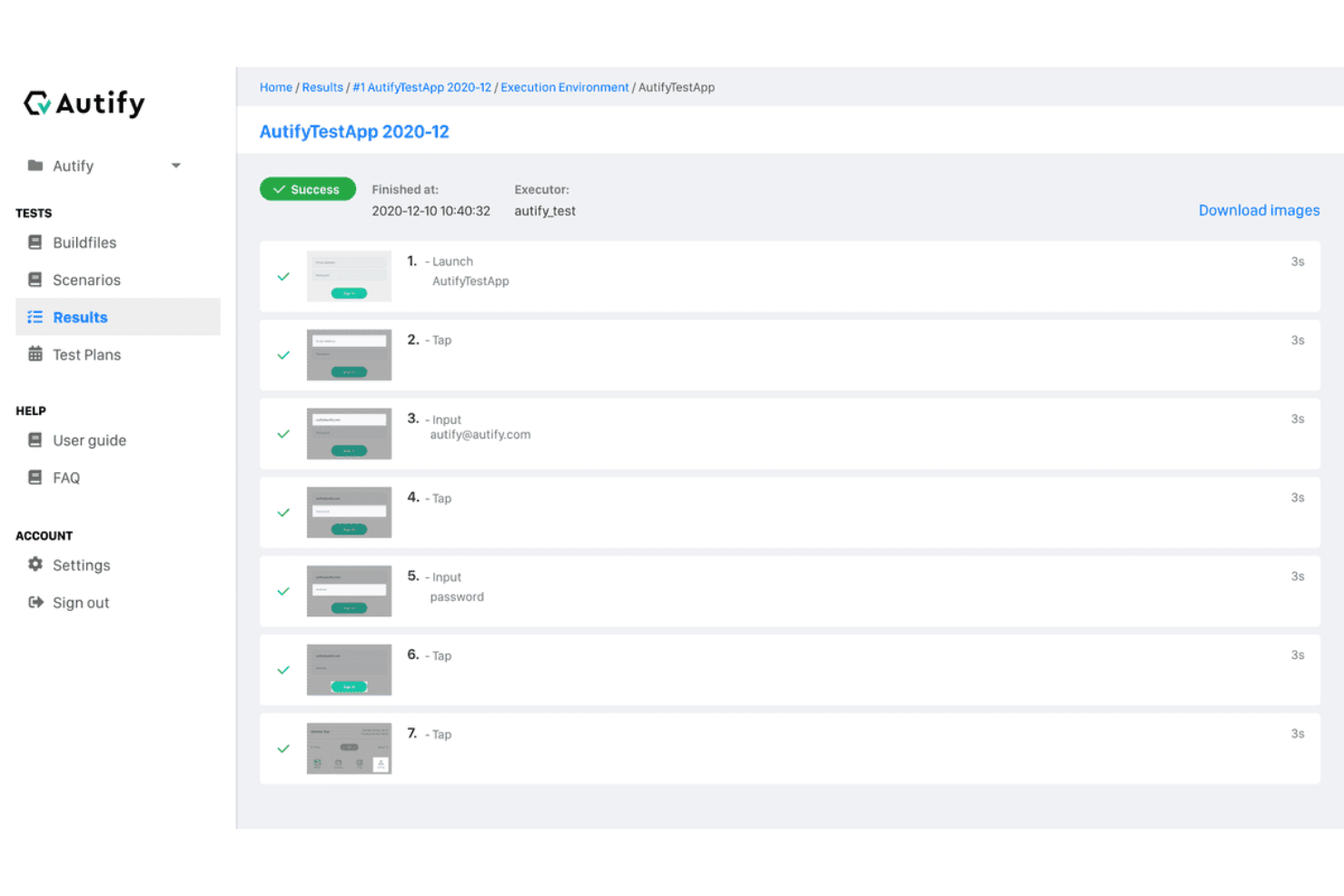
For teams seeking a regression testing solution, Autify Aximo offers a unique blend of AI-driven automation that simplifies the testing process across web, mobile, and desktop applications. This tool is particularly appealing to businesses that value efficiency and accuracy in their testing processes, as it allows users to create test scenarios in plain English, eliminating the need for complex scripting. By minimizing maintenance efforts and reducing failures due to UI changes, Autify Aximo addresses the challenges faced by development teams in maintaining software quality.
Why I Picked Autify Aximo
I picked Autify Aximo for its capability to automate regression testing through AI, allowing your team to focus on more strategic tasks. Its ability to execute test scenarios described in plain English sets it apart, as this feature reduces the dependency on technical scripting skills, making it accessible to wider teams. Additionally, its cross-platform compatibility with iOS, Android, Windows, and macOS ensures that your applications are thoroughly tested across various environments, addressing the critical need for comprehensive coverage in regression testing.
Autify Aximo Key Features
In addition to its AI-driven automation, I also found several features that enhance its utility for regression testing:
- Cross-Platform Support: Autify Aximo is compatible with iOS, Android, Windows, and macOS, ensuring your applications perform consistently across different environments.
- No-Code Interface: The tool allows users to create test scenarios without the need for coding, broadening accessibility to team members without technical backgrounds.
- Visual Regression Testing: It automatically detects UI discrepancies, helping maintain visual consistency after code changes.
- Integration with CI/CD Pipelines: This feature facilitates integration with your development workflow, allowing for continuous testing and timely feedback.
Autify Aximo Integrations
Native integrations are not currently listed by Autify Aximo.
Pros and Cons
Pros:
- Supports web, mobile, desktop
- CI/CD pipeline integrations available
- AI-driven automated test creation
Cons:
- Limited traditional scripting control
- Pricing not publicly available

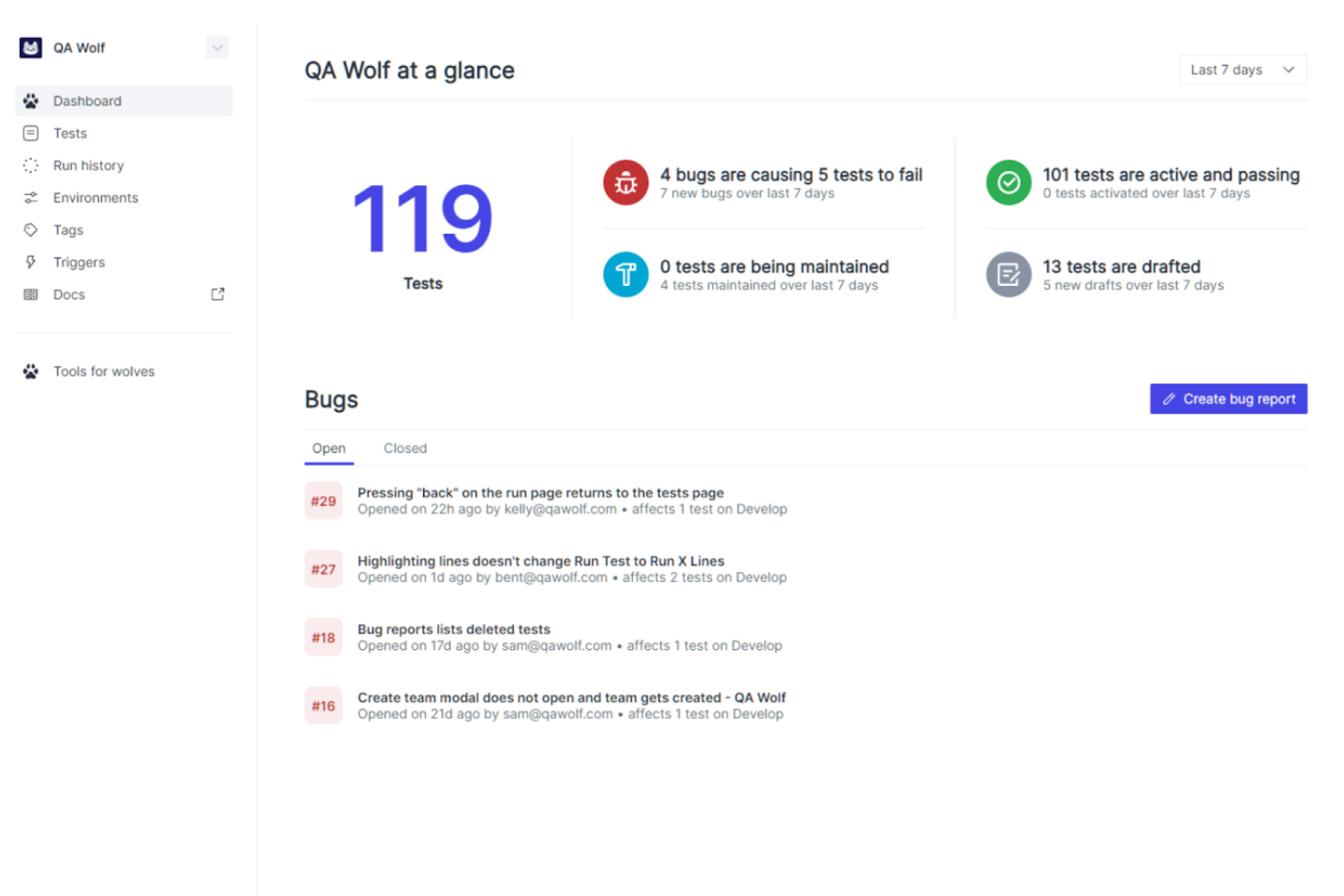
QA Wolf is an automated testing platform designed for developers and QA teams. Unlike traditional tools, QA Wolf is a platform-enabled service that leverages a team of expert QA engineers to handle the creation, execution, and management of all your automated tests. This approach simplifies the testing process and consistently keeps your critical tests maintained and up-to-date, allowing your team to focus on building and improving applications while ensuring new updates in code do not produce any issues.
One of the unique features of QA Wolf that makes it ideal for regression testing is its provision of human-verified bug reports. This ensures that any identified issues are thoroughly vetted by QA experts, minimizing false positives and providing clear, actionable feedback. QA Wolf also offers unlimited test runs, allowing teams to run regression tests as often as needed without worrying about additional costs.
QA Wolf integrates with GitHub, CircleCI, GitLab, Travis CI, Vercel, and Slack. Pricing is available upon request with a free demo available.
New Product Updates from QA Wolf

QA Wolf Adds Android Emulator Infrastructure for Device Testing
QA Wolf introduces Android emulator infrastructure with expanded device and OS testing support. These updates enable teams to test across real-world device conditions and improve test coverage. For more information, visit QA Wolf’s official site.
 .
.
Best for organizing your test cases in one visual editor

Testim Automate is an automated testing platform for fast authoring of AI-powered stable tests and tools to help you scale quality. The tool uses AI to identify and lock-in visual elements, allowing you to increase test stability of UI functional tests. Your tests can be extended with custom JavaScript that can run in or out of the browser.
Testim tests are recorded and then edited in its visual editor, allowing you to better organize your test cases. The tool offers AI-based locators that automatically lock-in elements, and test steps are discrete objects that can be configured, shared, grouped and parameterized, providing you and your team with the means to streamline your processes within your application lifecycle. Testim also helps keep tests clean by identifying duplicate test steps to be replaced by shared objects.
The cost of Testim begins at $1000 per month. The tool also offers a free version with up to 1000 test runs per month.
New Product Updates from Tricentis Testim

Testim's Agentic Test Automation for Salesforce
Testim introduces agentic test automation for Salesforce, simplifying test creation with natural language. For more information, visit Tricentis Testim's official site.


Testpad is a manual test management tool designed for QA teams and software testers who want a flexible, checklist-driven approach to organizing and running regression tests without the complexity of traditional test case management systems.
Who Is Testpad Best For?
QA leads and software teams at startups or SMBs who want a straightforward way to manage and execute manual regression tests.
Why I Picked Testpad
I picked Testpad as one of the best because its checklist-based approach makes it easy for my team to organize and execute manual regression tests. I like that we can quickly create, update, and reuse test checklists for each release cycle. The ability to structure tests as simple, readable lists helps us catch regressions without getting bogged down in complex test case management.
Testpad Key Features
- Guest tester access: Invite external testers to participate without requiring them to create accounts.
- Real-time progress tracking: Monitor test execution status and results as they happen.
- Bulk test editing: Update multiple test items at once to save time during test maintenance.
- CSV import/export: Move test data in and out of Testpad for easier integration with other tools.
Testpad Integrations
Integrations include GitHub, NVIDIA, Bell, Digital Genius, Ideas2Executables, Legrand, Foxhole QA, TestLauncher, OpenROV, and Numed Healthcare. An API is also available for custom integrations.
Pros and Cons
Pros:
- Provides real-time progress tracking for test runs
- Offers CSV import and export for test data
- Enables live editing of tests during execution
Cons:
- Does not support test parameterization
- Limited reporting and analytics features

Testlio is an automated regression testing tool that primarily provides managed application testing. The tool provides a robust suite of flexible and on-demand testing solutions such as end-to-end testing, functional testing and localization testing. Testlio also offers a support team and expert QA resources, allowing easy implementation within your team.
Testlio offers an abundance of features, including detail oriented test plans, which allow you to review the device information, tester information and test criteria. The tool also provides exploratory testing and livestream testing, allowing you and your team to test your applications in real-time, as well as review the bugs identified on the tool’s dashboard. Finally, Testlio allows you access to all devices within your system without the need to build labs.
Testlio provides integrations with project management tools such as Aana and Jira, as well as IDE’s such as Visual studio.
Testlio offers flexible customized pricing upon request.


Reflect is a regression testing platform that helps you automate end-to-end tests without writing any code. It’s built around AI prompts, so you can describe a test in plain English and have Reflect turn it into executable steps. I liked how quickly you can build and run regression suites without touching selectors or scripting frameworks.
I picked Reflect because it removes the complexity from regression testing. Instead of writing and maintaining brittle code, it generates tests by simply typing what you want to happen. Reflect also automatically handles UI changes—tests adapt when the app evolves, which means fewer false positives and less upkeep. I also appreciate the visual diffs and video recordings of test runs, which made debugging faster and clearer.
Reflect supports visual checks, cross-browser runs, parallel execution, and API+UI testing in the same flow. It integrates with CI/CD tools like GitHub, Jenkins, and Jira, lets you schedule tests, and notifies you of failures instantly. You can also use parameterized inputs and isolate test data to cover different scenarios.

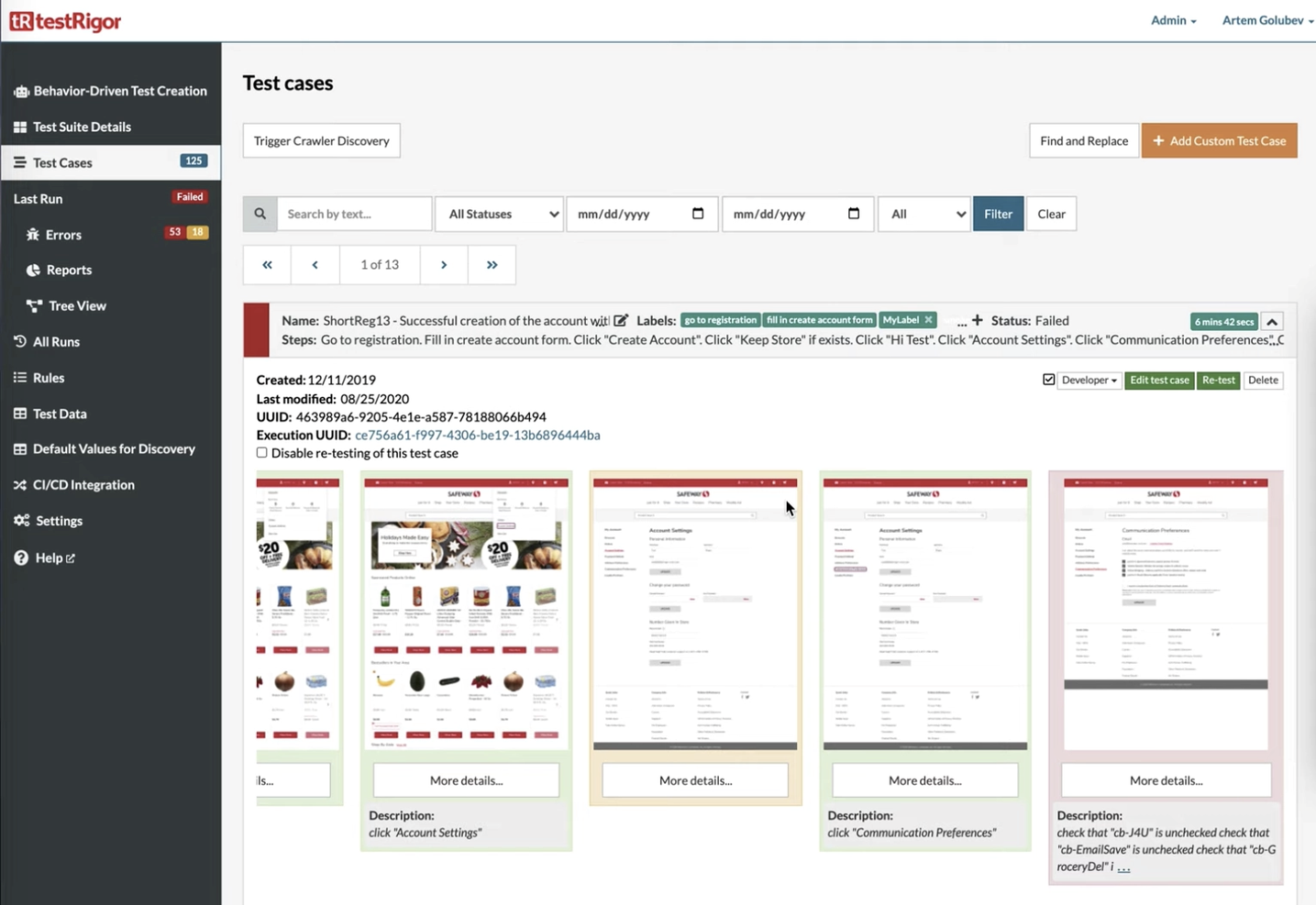
testRigor is a regression testing tool that stands out when it comes to the new era of AI-based automation tools. The tool allows you to create tests in plain English, with elements being referenced from a human perspective. testRigor analyzes all possible parameters behind the scenes to use the most useful ones, which results in ultra-reliable tests.
testRigor allows you to dramatically decrease your test maintenance, by allowing you and your team to spend 95% less time on it on average. Instead, the tool allows you to seamlessly build new tests and increase test coverage. testRigor makes the process of converting existing manual test cases into automated tests very straightforward, and users can also define and customize their own wording if they desire.
The cost of testRigor starts at $300 per month and can be tailored to your specific needs. There is a free 14-day trial with no credit card information required upfront.

Katalon Studio is an all-in-one regression testing platform for simplified web, mobile, API and desktop (Windows, Linux and Mac OS) test automation, and is the alternative to building traditional frameworks with open-source libraries. Katalon Studio offers built-in features such as Object Spy, Debugging UI, Test Artifact Sharing, Retry Failed Tests, Smart Wait, Self-Healing and analytics for test reporting, which provides you complete test coverage from within the toolkit alone.
Katalon Studio provides you with all critical capabilities and stability for functional and end-to-end automated testing, providing your team with a robust testing grid for your application lifecycle. The tool allows you to cycle through every step in weeks instead of months by applying low-code methods for test creation, execution, maintenance, and reporting.
Katalon offers integration with CI/CD tools such as Jenkins, BitBucket, Azure DevOps, VCS platforms such as Git, Github, Azure DevOps Repos, and DevOps tools such as Docker.
The cost of Katalon Studio starts from $69 per user per month. The tool also offers a free version, as well as a 30-day trial to test out all premium features for first-time users.

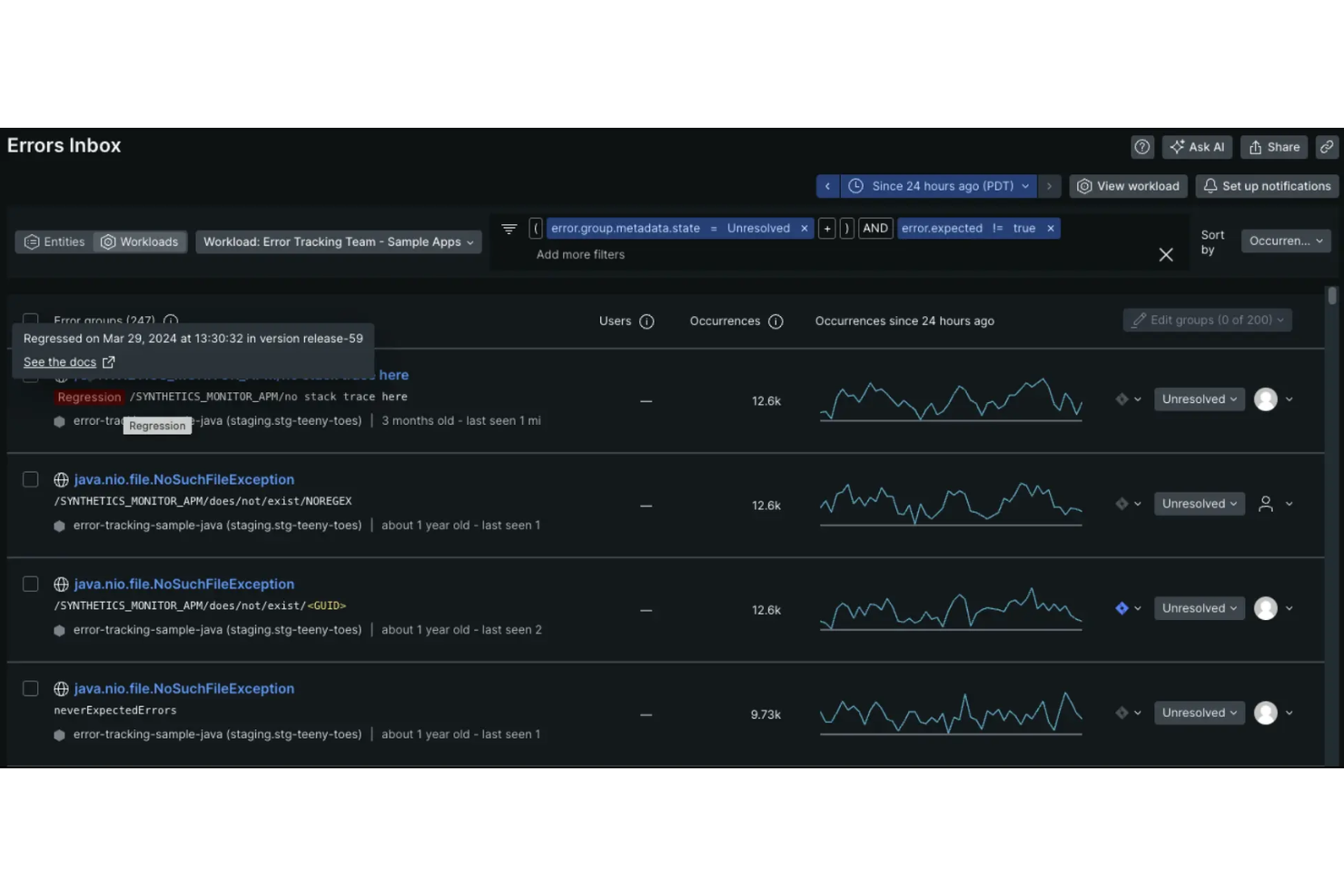
New Relic is an observability platform that helps you monitor and improve your software's performance. Through its synthetic monitoring, you can proactively keep tabs on your applications by simulating user interactions. It helps you identify issues before your users do, ensuring a smooth experience.
I like that it offers the ability to create scripted browser monitors. These monitors allow you to simulate complex user interactions, such as navigating through different pages or submitting forms, which is essential for testing critical user flows after code changes. By mimicking real user behavior, you can ensure that new deployments haven't introduced any unexpected issues.
Another valuable feature is the comparative charting between synthetic and real user monitoring data. This lets you directly compare page load times and other performance metrics between your automated tests and actual user experiences. Such insights help you understand if a regression affects all users or is isolated to specific scenarios.


QA.tech is an AI-driven testing tool designed for teams that need reliable regression testing. It’s aimed at software development teams and QA professionals focused on improving product quality and speeding up release cycles. By automating repetitive tests and supporting end-to-end testing, QA.tech reduces manual effort, helps identify bugs earlier, and allows teams to spend more time on meaningful product improvements, resulting in a more consistent user experience.
Why I Picked QA.tech
I chose QA.tech for its ability to automate and simplify regression testing using AI-based features. A key strength is its support for end-to-end testing across multiple platforms, which helps maintain a consistent user experience. QA.tech also integrates with tools like GitHub and Slack, making it easier to fit testing into existing workflows. Together, these capabilities support faster, more efficient testing without sacrificing quality.
QA.tech Key Features
In addition to its robust automation capabilities, I also found several other features that enhance its value as a regression testing tool:
- Mobile Testing: Provides extensive support for testing mobile applications, ensuring functionality across various devices and operating systems.
- Instant Feedback: Offers real-time insights into code and product quality, allowing teams to address issues promptly.
- Multiple Test Runs: Minimizes flaky tests by executing user journeys multiple times to ensure reliability.
- Integration Capabilities: Seamlessly connects with APIs and other tools to test complex user journeys effectively.
QA.tech Integrations
Integrations include GitHub, Slack, APIs for custom integrations, and support for testing complex user journeys through various platforms.
Pros and Cons
Pros:
- Autonomous AI test case generation
- CI/CD and collaboration integrations supported
- Real-time defect feedback and reports
Cons:
- Pricing available upon request only
- AI may miss edge cases


Autify is an AI-powered, no-code test automation platform designed to help teams create, execute, and maintain automated tests for web and mobile applications.
I picked Autify because of its AI-powered maintenance and cross-environment testing support. Its AI automatically updates test scenarios when UI changes occur, reducing the need for manual maintenance and helping your team keep regression tests accurate over time. You can also run the same tests across multiple browsers and devices without rewriting them, making it easier to catch regressions in different environments and ensure consistency across platforms.
Integrations include Bitbucket Pipelines, GitHub Actions, CircleCI, Jenkins, GitLab CI/CD, Azure Pipelines, AWS CodeBuild, Autify Connect, Bitrise, API integration, Command Line Interface (CLI), and Slack.

Best to simplify test virtualization & editing using screenshots

IBM Rational Functional Tester is a web automation tool that is written in pure Java and provides an array of features. The tool is beneficial to teams who use .Net, Java and C# in their development lifecycle.
IBM Rational Functional Tester allows you to create and prepare test data for manual testers as well as write and run test cases for automated testing. The tool simplifies test visualization and editing using rendered screenshots. IBM Rational Functional Tester also provides intelligent script maintaining capabilities, allowing you to successfully automate functional and regression testing.
IBM Rational Functional Tester integrates with platforms such as Jenkins, Apache Maven and QuickTest.
IBM Rational Functional Tester offers customized pricing upon request.


Selenium is a test automation framework that encapsulates an array of tools and libraries that enable web browser automation. The tool offers easy interaction and manipulation of HTML elements, allowing you to tweak and customize your tests the way you want to write them. Selenium also provides ease of infrastructure management by providing the test environment to your team.
Selenium interacts with your applications via desktop and mobile browsers, allowing you to execute Javascript code, making it easier to test the dynamic components of your DOM. In addition to Javascript, you can use multiple programming languages such as C#, Python, Ruby and Java with Selenium. This allows for easier implementation within development teams as any developer with expertise in any coding language can use the tool.
Selenium is fully open source and free to use.


Rainforest QA is a no-code regression testing solution that provides a building block approach for creating tests and processes. The tool allows you to set up a repeatable testing environment, so you and your team are able to streamline your test process within this environment as often as you need. Rainforest QA also allows you to easily shift between parallel and sequential testing so you are able to keep pace with the development environment, and reduce time between sprints.
Rainforest QA’s intuitive and simple user interface enables you to better organize your test cases by allowing you and your team to tag cases so you can group them, as well as assign and monitor said test cases which are all managed from a single dashboard. The tool allows you to execute cross browser testing (Internet Explorer, Chrome, Edge), as well as access various systems (such as Windows and Linux), providing you extensive test coverage of your application. Rainforest QA also has the results arriving as tests within a suite are still being executed.
Rainforest QA provides integration with notification platforms such as Slack and Microsoft Teams, as well as continuous integration platforms such as Github and CircleCI.
Rainforest QA is free to use for the Professional tier, and offers customized pricing for their Enterprise tier. The tool also offers a 14-day free trial.


Leapwork is a no-code regression testing tool that allows your team to create and execute tests across a variety of environments without the need to have coding experience. The tool is cloud-based, and offers testing in both web and desktop application environments within the same workflow. Leapwork is simple to implement within your team, and provides a growing base of written documentation, videos and articles.
Leapwork provides an array of features such as debugging, parallelization, compliance management, approval process control and recurring tests. The tool allows you to record processes and test cases in context, validate the test steps and input data. Leapwork will then build the processes in a graphical flowchart with logic, making it easy for the non-technical members of your team to review and take action.
Leapwork integrates with platforms such as Microsoft Azure DevOps, Jenkins and TeamCity.
Leapwork provides customized pricing upon request.
Weitere Tools für Regressionstests
Hier finden Sie weitere Optionen für Regressionstest-Tools, die es zwar nicht auf meine Kurzliste geschafft haben, aber trotzdem einen Blick wert sind:
- Argos
For testing visual elements
- Watir
For executing tests on browsers
- Micro Focus Unified Functional Testing (UFT)
For automating Windows applications
- BugBug
For low-code test automation
- Appsurify TestBrain
For AI-driven test optimization


Auswahlkriterien für Regressionstest-Tools
Bei der Auswahl der besten Regressionstest-Tools für diese Liste habe ich gängige Anforderungen und Problemstellungen wie die Integration in bestehende Arbeitsabläufe und die Bedienfreundlichkeit für Teammitglieder berücksichtigt. Außerdem habe ich zur strukturierten und fairen Bewertung folgendes Schema genutzt:
Kernfunktionen (25% der Gesamtbewertung)
Um in diese Liste aufgenommen zu werden, musste jede Lösung folgende Anwendungsfälle abdecken:
- Erkennung von Software-Regressionsfehlern
- Automatisierte Testdurchführung
- Integration mit CI/CD-Pipelines
- Unterstützung mehrerer Testumgebungen
- Detaillierte Testberichte erstellen
Weitere besondere Funktionen (25% der Gesamtbewertung)
Um die Auswahl weiter einzuschränken, habe ich auch nach Alleinstellungsmerkmalen gesucht, wie zum Beispiel:
- KI-basierte Testgenerierung
- Fähigkeiten für Cross-Browser-Tests
- Echtzeit-Kollaborationstools
- Erweiterte Analysen und Auswertungen
- Anpassbare Test-Dashboards
Benutzerfreundlichkeit (10% der Gesamtbewertung)
Um die Bedienbarkeit jedes Systems einzuschätzen, habe ich Folgendes berücksichtigt:
- Intuitive Benutzeroberfläche
- Einfache Navigation
- Geringe Einarbeitungszeit
- Responsives Design
- Anpassbare Einstellungen
Onboarding (10 % der Gesamtbewertung)
Um die Onboarding-Erfahrung für jede Plattform zu bewerten, habe ich Folgendes berücksichtigt:
- Verfügbarkeit von Schulungsvideos
- Interaktive Produkttouren
- Zugriff auf Vorlagen
- Unterstützende Webinare
- Verfügbarkeit von Chatbots
Kundensupport (10 % der Gesamtbewertung)
Um die Supportleistungen jedes Softwareanbieters zu beurteilen, habe ich Folgendes berücksichtigt:
- Verfügbarkeit von 24/7-Support
- Zugriff auf eine Wissensdatenbank
- Reaktionszeit auf Anfragen
- Qualität des technischen Supports
- Verfügbarkeit von Live-Chat
Preis-Leistungs-Verhältnis (10 % der Gesamtbewertung)
Um das Preis-Leistungs-Verhältnis der einzelnen Plattformen zu bewerten, habe ich Folgendes berücksichtigt:
- Wettbewerbsfähige Preisgestaltung
- Flexible Abonnement-Modelle
- Verfügbarkeit von kostenlosen Testversionen
- Funktionsumfang im Verhältnis zu den Kosten
- Rabattoptionen für Teams
Kundenbewertungen (10 % der Gesamtbewertung)
Um einen Eindruck von der allgemeinen Kundenzufriedenheit zu erhalten, habe ich beim Lesen von Kundenbewertungen Folgendes beachtet:
- Allgemeine Nutzerzufriedenheit
- Feedback zur Benutzerfreundlichkeit
- Kommentare zur Zuverlässigkeit
- Berichte zum Kundensupport
- Häufigkeit positiver Updates
So wählen Sie Regressionstest-Tools aus
Man kann sich leicht in langen Funktionslisten und komplexen Preisstrukturen verlieren. Damit Sie während Ihres individuellen Auswahlprozesses den Überblick behalten, finden Sie hier eine Checkliste mit Faktoren, die Sie beachten sollten:
| Faktor | Was zu beachten ist |
|---|---|
| Skalierbarkeit | Wächst das Tool mit den Anforderungen Ihres Teams? Berücksichtigen Sie zukünftige Projektgrößen und Nutzerzahlen. Achten Sie darauf, dass das Tool auch bei steigender Belastung zuverlässig arbeitet. |
| Integrationen | Funktioniert das Tool mit Ihren aktuellen Anwendungen? Prüfen Sie die Kompatibilität mit CI/CD-Pipelines und anderer bereits genutzter Software, um Störungen im Arbeitsablauf zu vermeiden. |
| Anpassbarkeit | Lässt sich das Tool auf Ihre Prozesse zuschneiden? Stellen Sie sicher, dass Sie Workflows und Berichte an die spezifischen Anforderungen und Präferenzen Ihres Teams anpassen können. |
| Benutzerfreundlichkeit | Ist das Tool für alle Teammitglieder einfach zu bedienen? Achten Sie auf eine intuitive Benutzeroberfläche und geringen Schulungsaufwand, damit alle schnell einsatzbereit sind. |
| Implementierung und Onboarding | Wie reibungslos ist der Einrichtungsprozess? Bewerten Sie den Zeit- und Ressourcenaufwand für die Implementierung und Schulungen. Achten Sie auf Tools mit klaren Anleitungen und Support. |
| Kosten | Passt die Preisgestaltung zu Ihrem Budget? Vergleichen Sie die Abo-Modelle und achten Sie auf versteckte Gebühren. Stellen Sie sicher, dass Preis und Leistung im guten Verhältnis stehen. |
| Sicherheitsmaßnahmen | Wie schützt das Tool Ihre Daten? Suchen Sie nach Verschlüsselung, Zugriffskontrollen und der Einhaltung relevanter Standards, um sensible Informationen zu sichern. |
| Support-Verfügbarkeit | Ist Hilfe verfügbar, wenn Sie sie brauchen? Berücksichtigen Sie die Supportzeiten des Anbieters, Reaktionszeiten und verfügbare Ressourcen wie Chat oder Telefonsupport. |
Was sind Regressionstest-Tools?
Regressionstest-Tools sind Softwarelösungen zur Automatisierung von Tests, um sicherzustellen, dass kürzliche Codeänderungen keine bestehenden Funktionen beeinträchtigen. Diese Tools führen eine Reihe von Tests an vorher funktionierender Software durch, nachdem Änderungen wie Updates oder Fehlerbehebungen vorgenommen wurden. So wird gewährleistet, dass neue Änderungen keine neuen Fehler oder Rückschritte im bestehenden System verursachen.
Sie stellen eine umfassende Testabdeckung sicher und verringern das Risiko, dass Fehler in veröffentlichte Versionen gelangen. Visuelle Regressionstest-Tools sind besonders effektiv bei der Erkennung von UI-Änderungen und Layoutproblemen.
Funktionen
Beim Auswählen von Regressionstest-Tools sollten Sie auf folgende Schlüsselfunktionen achten:
- Automatisierung: Automatisiert wiederkehrende Testfälle, spart Zeit und reduziert manuelle Fehler.
- Integrationsfähigkeit: Verbindet sich mit bestehenden CI/CD-Pipelines, um sich nahtlos in Ihren Entwicklungsworkflow einzufügen.
- Anpassbare Berichte: Bietet detaillierte Einblicke in Testergebnisse, um Teams bei fundierten Entscheidungen zu unterstützen.
- Cross-Browser-Tests: Stellt sicher, dass Software auf verschiedenen Webbrowsern und Geräten konsistent funktioniert.
- KI-gesteuerte Testentwicklung: Nutzt maschinelles Lernen, um Testfälle effizient zu erstellen und zu optimieren.
- Echtzeit-Zusammenarbeit: Ermöglicht es Teammitgliedern, gemeinsam zu arbeiten und während des Testprozesses Rückmeldungen auszutauschen.
- Skalierbarkeit: Passt sich wachsenden Projektgrößen und einer größeren Teamanzahl an, ohne die Leistung zu beeinträchtigen.
- Sicherheitsvorkehrungen: Schützt sensible Daten mit Verschlüsselung und Zugriffskontrollen, um die Compliance zu gewährleisten.
- Benutzerfreundliche Oberfläche: Bietet ein intuitives Design, das die Einarbeitungszeit für neue Nutzer minimiert.
- Schulungs- und Supportressourcen: Bietet Zugang zu Tutorials, Webinaren und Kundensupport, um beim Onboarding und bei der Fehlerbehebung zu unterstützen.
Vorteile
Der Einsatz von Regressionstest-Tools bietet Ihrem Team und Ihrem Unternehmen eine Reihe von Vorteilen. Hier sind einige, auf die Sie sich freuen können:
- Zeiteinsparungen: Automatisierung beschleunigt den Testprozess und ermöglicht es Ihrem Team, sich auf strategischere Aufgaben zu konzentrieren.
- Verbesserte Softwarequalität: Regelmäßige Tests entdecken Fehler frühzeitig, sodass Ihre Software stabil und zuverlässig bleibt.
- Kosteneffizienz: Frühes Erkennen von Problemen reduziert die Kosten für Fehlerbehebungen im späteren Entwicklungszyklus.
- Erweiterte Zusammenarbeit: Funktionen für die Zusammenarbeit in Echtzeit ermöglichen es Teammitgliedern, schnell Erkenntnisse und Rückmeldungen zu teilen.
- Skalierbarkeit: Die Fähigkeit, größere Projekte und wachsende Teams ohne zusätzliche Belastung zu bewältigen, unterstützt das Geschäftswachstum.
- Höhere Genauigkeit: Automatisierte Tests beseitigen menschliche Fehler und liefern konsistentere und zuverlässigere Ergebnisse.
- Datensicherheit: Integrierte Sicherheitsvorkehrungen schützen Ihre sensiblen Informationen während des Testprozesses.
Kosten & Preise
Die Auswahl von Regressionstest-Tools erfordert ein Verständnis der verschiedenen Preismodelle und verfügbaren Pakete. Die Kosten variieren je nach Funktionen, Teamgröße, Erweiterungen und mehr. Die nachstehende Tabelle fasst gängige Pakete, deren Durchschnittspreise und übliche Funktionen zusammen, die in Lösungen für Regressionstest-Tools enthalten sind:
Paketvergleichstabelle für Regressionstest-Tools
| Pakettyp | Durchschnittspreis | Übliche Funktionen |
|---|---|---|
| Gratis-Paket | $0 | Grundlegende Testautomatisierung, begrenzte Integrationen und Community-Support. |
| Persönliches Paket | $5-$25/Benutzer/Monat | Testautomatisierung, einfache Berichte, Integration mit gängigen Tools und E-Mail-Support. |
| Business-Paket | $30-$75/Benutzer/Monat | Erweiterte Berichte, Cross-Browser-Tests, priorisierter Support und Kollaborationstools. |
| Enterprise-Paket | $100-$250/Benutzer/Monat | Anpassbare Workflows, dedizierter Account Manager, erweiterte Sicherheitsfunktionen und vollständige Integrationsmöglichkeiten. |
Regressionstest-Tool FAQs
Beim Schreiben sind mir einige grundlegende Fragen und Antworten eingefallen, die neuen Nutzern hier beim Einstieg helfen könnten.
Können Regressionstest-Tools verschiedene Benutzerumgebungen simulieren?
Ja, Regressionstest-Tools können verschiedene Benutzerumgebungen simulieren, um sicherzustellen, dass Anwendungen auf unterschiedlichen Plattformen, Browsern und Geräten konsistent funktionieren. Diese Tools können verschiedene Betriebssysteme, Browserversionen, Netzwerkgeschwindigkeiten und mehr nachbilden, um das Verhalten der Anwendung unter unterschiedlichen Bedingungen zu validieren.
Wie stellen Regressionstest-Tools die Vollständigkeit der Testabdeckung sicher?
Regressionstest-Tools gewährleisten die Vollständigkeit der Testabdeckung, indem sie Funktionen bieten, die Tests mit Anforderungen verknüpfen, ungetestete Teile der Anwendung erkennen und zusätzliche Testfälle vorschlagen. Sie verfügen häufig über Analyse- und Berichtsfunktionen, die helfen, Abdeckungslücken zu erkennen und Testfälle nach Risiko und Auswirkung zu priorisieren.
Wie verwalten Regressionstest-Tools große Testdatensätze?
Regressionstest-Tools verwalten große Testdatensätze, indem sie Funktionen wie Datenvirtualisierung, Testdatenmanagement und datengetriebene Tests anbieten. Sie ermöglichen es Testern, Testdaten effizient zu erstellen, zu importieren und zu verwalten, sodass die Tests sowohl umfassend als auch relevant für die getesteten Anwendungsszenarien sind.
Welche Arten von Regressionstesting-Software gibt es?
Regressionstesting-Software ist unerlässlich, um sicherzustellen, dass neue Codeänderungen die bestehende Funktionalität von Softwareanwendungen nicht beeinträchtigen. Diese Tools gibt es in verschiedenen Formen, die jeweils auf unterschiedliche Testbedürfnisse, Umgebungen und Methoden zugeschnitten sind. Das Verständnis der verschiedenen Arten von Regressionstesting-Software hilft Teams und Organisationen, die am besten geeigneten Tools für ihre individuellen Anforderungen auszuwählen.
Hier sind die wichtigsten Arten von Regressionstesting-Software:
Automatisierte Regressionstest-Tools: Diese Tools automatisieren die Durchführung von Regressionstests und reduzieren so den Zeit- und Arbeitsaufwand erheblich. Automatisierte Tools eignen sich besonders für Projekte mit großen Codebasen oder solchen, die häufige Änderungen durchlaufen, da sie umfassende Testabdeckung ohne manuellen Aufwand ermöglichen.
Testmanagement-Tools: Obwohl sie nicht ausschließlich für Regressionstests gedacht sind, helfen Testmanagement-Tools dabei, Testfälle – einschließlich Regressionstests – zu organisieren und zu verwalten. Sie verfügen oft über Funktionen zum Planen, Ausführen und Nachverfolgen des Testfortschritts und sind daher wertvoll für die Koordination von Regressionstests im Rahmen größerer QA-Prozesse.
Continuous Integration (CI)-Tools: CI-Tools integrieren sich mit Regressionstesting-Software und führen Tests automatisch als Teil des Software-Entwicklungszyklus aus. Diese Integration ist für Agile- und DevOps-Praktiken unerlässlich, da Teams so schnell Regressionen erkennen und beheben können, sobald neuer Code integriert wird.
Codelose Regressionstest-Tools: Diese Tools richten sich an Teams mit begrenzten Programmierkenntnissen und bieten eine benutzerfreundliche Oberfläche zum Erstellen und Ausführen von Tests ohne Programmierung. Solche Tools nutzen GUI-basierte Interaktionen und machen Regressionstests auch für nicht-technische Teammitglieder zugänglich.
Leistungsbezogene Regressionstest-Tools: Diese Tools konzentrieren sich auf die Erkennung von Regressionen, die die Performance der Anwendung beeinflussen, wie etwa Ladezeiten und Reaktionsgeschwindigkeit. Leistungstests sind besonders für Anwendungen wichtig, bei denen die Benutzererfahrung stark von Geschwindigkeit und Effizienz abhängt.
Cloud-basierte Regressionstest-Plattformen: Cloud-Plattformen bieten die Flexibilität, Regressionstests auf zahlreichen Umgebungen und Geräten auszuführen, ohne physische Infrastruktur zu benötigen. Diese Art ist besonders nützlich, um Anwendungen auf verschiedenen Betriebssystemen, Browsern und Mobilgeräten zu testen.
Open-Source-Regressionstest-Tools: Open-Source-Tools bieten die Flexibilität zur Anpassung und sind oft kostenlos erhältlich. Zwar erfordern sie in der Regel mehr Einrichtung und Wartung als kommerzielle Tools, eignen sich jedoch gut für Teams mit den technischen Fähigkeiten, die Tools auf die eigenen Bedürfnisse zuzuschneiden.
Cros-Browser- und Cross-Plattform-Test-Tools: Solche Tools stellen sicher, dass Anwendungen wie erwartet auf verschiedenen Browsern und Plattformen funktionieren – essenziell für Web- und Mobile-Anwendungen. Teams können damit Tests auf unterschiedlichen Kombinationen von Browser und Betriebssystem automatisieren und so Kompatibilität und konsistente Benutzererfahrung sicherstellen.
Jede Art von Regressionstesting-Software bietet eigene Funktionen, Vorteile und Einschränkungen. Die Auswahl des passenden Tools hängt von verschiedenen Faktoren ab, darunter die Projektgröße und -komplexität, das technische Know-how des QA-Teams und die spezifischen Ziele des Regressionstest-Prozesses.
Durch eine sorgfältige Bewertung dieser Aspekte können Teams die geeignetste Regressionstesting-Software auswählen, um qualitativ hochwertige Software-Releases sicherzustellen.
Wie integrieren sich Regressionstest-Tools in CI/CD-Pipelines?
Diese Tools automatisieren den Testprozess und lassen sich nahtlos in CI/CD-Pipelines integrieren, indem sie Tests bei jedem Code-Commit automatisch auslösen. Dies sorgt für schnelles Feedback und hilft, stetige Softwarequalität zu gewährleisten.
Wie geht es weiter
Wenn Sie nach Tools für Regressionstests suchen, vernetzen Sie sich mit einem SoftwareSelect-Berater für kostenlose Empfehlungen.
Sie füllen ein Formular aus und führen ein kurzes Gespräch, in dem Ihre individuellen Anforderungen besprochen werden. Anschließend erhalten Sie eine Vorauswahl geeigneter Software zur Prüfung. Sie werden sogar während des gesamten Kaufprozesses unterstützt, inklusive Preisverhandlungen.