

10 beste Programmierprogramme für Windows im Jahr 2026

Beste Coding-Software für Windows – Shortlist
Here's my pick of the 10 best software from the 20 tools reviewed.


Bei so vielen verschiedenen Coding-Softwares für Windows ist es schwierig, herauszufinden, welche für dich die richtige ist. Du möchtest die Softwareentwicklung auf Windows-Betriebssystemen erleichtern, weißt aber noch nicht, welches Tool am besten geeignet ist.
Ich helfe dir weiter! In diesem Beitrag mache ich dir die Entscheidung leicht, indem ich meine persönlichen Erfahrungen mit Dutzenden verschiedener Coding-Tools für Windows in unterschiedlichen Teams und Projekten teile – inklusive meiner Favoriten als beste Coding-Software für Windows.
Why Trust Our Software Reviews
We’ve been testing and reviewing software since 2023. As tech leaders ourselves, we know how critical and difficult it is to make the right decision when selecting software.
We invest in deep research to help our audience make better software purchasing decisions. We’ve tested more than 2,000 tools for different tech use cases and written over 1,000 comprehensive software reviews. Learn how we stay transparent & our software review methodology.
Beste Coding-Software für Windows – Zusammenfassung
Diese Vergleichstabelle fasst die Preisinformationen meiner Top-Auswahl an Coding-Software für Windows zusammen, damit du die beste Lösung für dein Budget und deine Anforderungen findest.
| Tool | Best For | Trial Info | Price | ||
|---|---|---|---|---|---|
| 1 | Best for built-in hosting | Free plan available | From $160/month (billed annually) | Website | |
| 2 | Best for context-aware auto-complete | Free download available | From $99/license | Website | |
| 3 | Best for building responsive web pages | 7-day free trial available | From $22.99/month (billed annually) | Website | |
| 4 | Best for syntax coloring and full Unicode support | Free plan available | Free | Website | |
| 5 | Best for built-in Git commands | Free, open-source | Free to use | Website | |
| 6 | Best for editing files from remote locations | Not available | Free to use | Website | |
| 7 | Best for multi-language support | Free plan available | From $8 per month | Website | |
| 8 | Best for high execution speed and small program size | Not available | Free to use | Website | |
| 9 | Best for providing an extensive plugin system | Free plan available | Free and open-source software | Website | |
| 10 | Best for code refactoring | Not available | Open source project and Available for free | Website |
-

Site24x7
Visit WebsiteThis is an aggregated rating for this tool including ratings from Crozdesk users and ratings from other sites.4.7 -
GitHub Actions
Visit WebsiteThis is an aggregated rating for this tool including ratings from Crozdesk users and ratings from other sites.4.8 -
Docker
Visit WebsiteThis is an aggregated rating for this tool including ratings from Crozdesk users and ratings from other sites.4.6





Beste Coding-Software für Windows – Review
Unten findest du meine ausführlichen Zusammenfassungen der besten Coding-Software für Windows, die es auf meine Shortlist geschafft haben.
Meine Reviews bieten einen detaillierten Blick auf die wichtigsten Funktionen, Vorteile & Nachteile, Integrationen und ideale Einsatzbereiche jedes Tools, damit du das für dich passende findest.


Base44 is a coding platform for Windows that combines a code editor, integrated development tools, and built-in hosting to support web and software projects.
Who Is Base44 Best For?
Base44 suits indie developers and small teams who want to build and deploy web apps without managing separate hosting infrastructure.
Why I Picked Base44
Base44 earns its spot as one of the best on my shortlist because of how tightly its built-in hosting is woven into the development workflow. Deploying an app requires a single command—
npx base44 deploy
—and includes CDN hosting, custom domains, and HTTPS. There's no separate hosting provider to configure or billing account to manage. The one-command deployment pairs well with Base44's GitHub integration, which lets me manage the codebase directly and fine-tune app logic without leaving the platform.
Base44 Key Features
- AI builder chat: Use natural language prompts to describe what you want to build, and Base44 generates the app structure, backend, and frontend.
- Version control: Every change is tracked, allowing rollback to any previous version of your app or code.
- Testing management dashboard: A centralized dashboard tracks bugs, QA results, and testing progress across your app.
- Real-time collaboration: Multiple team members can work on the same app, with live syncing of changes.
Base44 Integrations
Base44 offers native integrations with GitHub and supports custom integrations through its API.
Pros and Cons
Pros:
- Built-in hosting facilitates
- Full-stack AI generation
- Ideal for building MVPs, internal tools, and prototypes
Cons:
- Integrated database may complicate future migrations and poses vendor lock-in risks
- Limited visual control and basic designs may not suit all users
New Product Updates from Base44
Base44 Launches Mobile App Publishing
Base44 introduces mobile app publishing to Apple App Store and Google Play. This update enables users to turn their projects into fully published mobile apps with a streamlined process. For more information, visit Base44’s official site.
 .
.
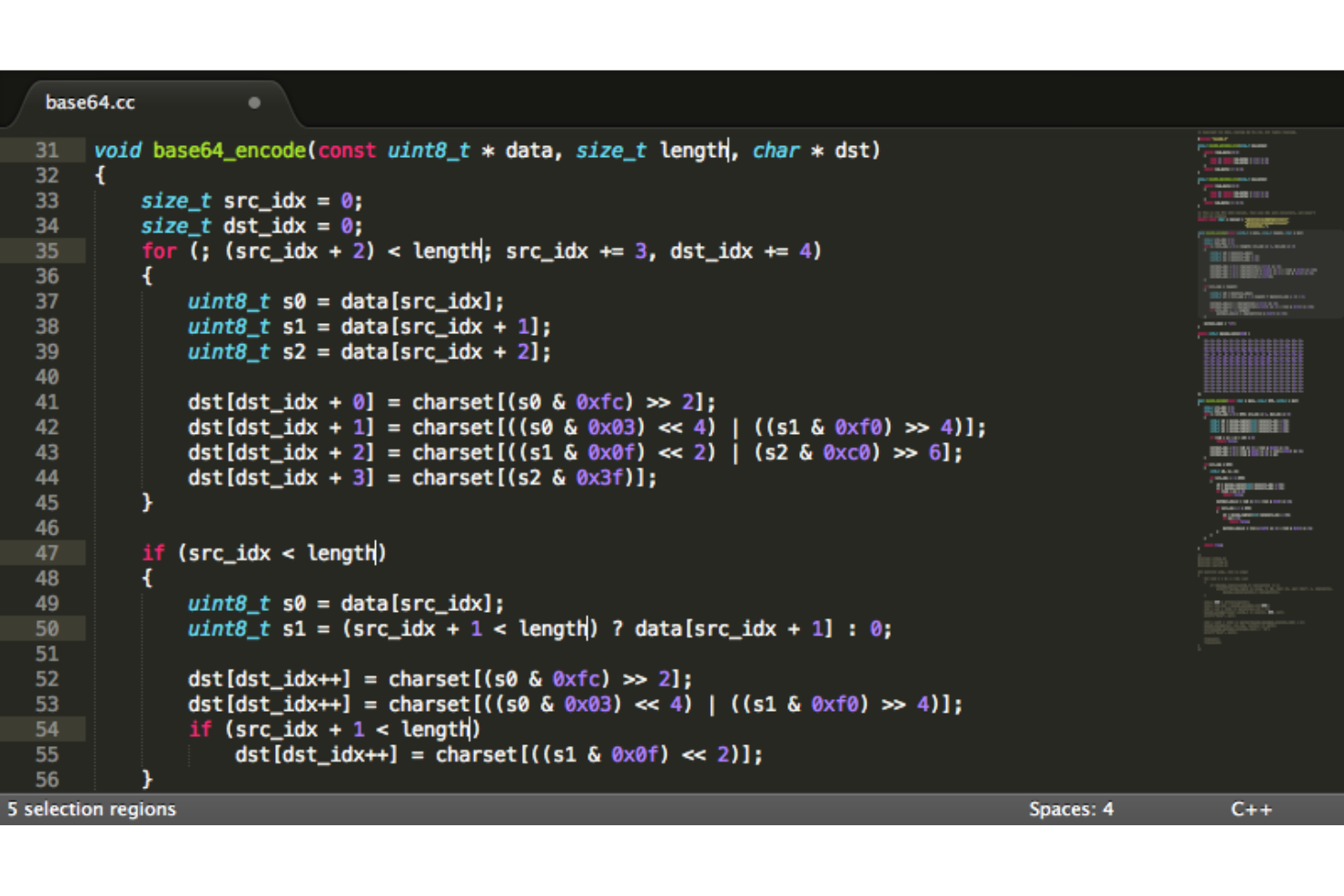
Sublime Text is a cross-platform code editor for Windows that supports syntax highlighting, multi-language editing, split editing, and a wide range of customization through plugins and themes.
Who Is Sublime Text Best For?
Sublime Text is a good fit for individual developers and programmers who want a fast, lightweight code editor without the overhead of a full IDE.
Why I Picked Sublime Text
I picked Sublime Text as one of the best because its context-aware auto-complete engine is genuinely impressive. In Sublime Text 4, the auto-complete system was fully rewritten to generate smart completions based on existing code across your entire project—not just the current file. I also like that when an auto-complete suggestion is a symbol with a definition, I can hit F12 or click the Definition link to open it in a side-by-side view without losing my place. That kind of inline code exploration, combined with suggestions that include kind metadata, makes it much faster to work through unfamiliar codebases or large projects.
Sublime Text Key Features
- Multiple selections: Select and edit multiple instances of a variable or string at once using Ctrl+D to select the next occurrence, letting you rename or modify them all simultaneously.
- Tab multi-select: Split the editor interface into multiple panes by using a modifier key when opening tabs, with support across the side bar, tab bar, and Goto Anything.
- GPU rendering: Sublime Text uses your GPU to render the interface on Windows, delivering a fluid UI at resolutions up to 8K.
- Superpowered syntax highlighting: The syntax engine handles non-deterministic grammars, multi-line constructs, and syntax inheritance across a wide range of languages.
Sublime Text Integrations
Native integrations are not currently listed.
Pros and Cons
Pros:
- Enables faster coding with auto-complete
- Flexible pricing
- Free trial available
Cons:
- Difficulty in installing plugins
- More responsive customer support required

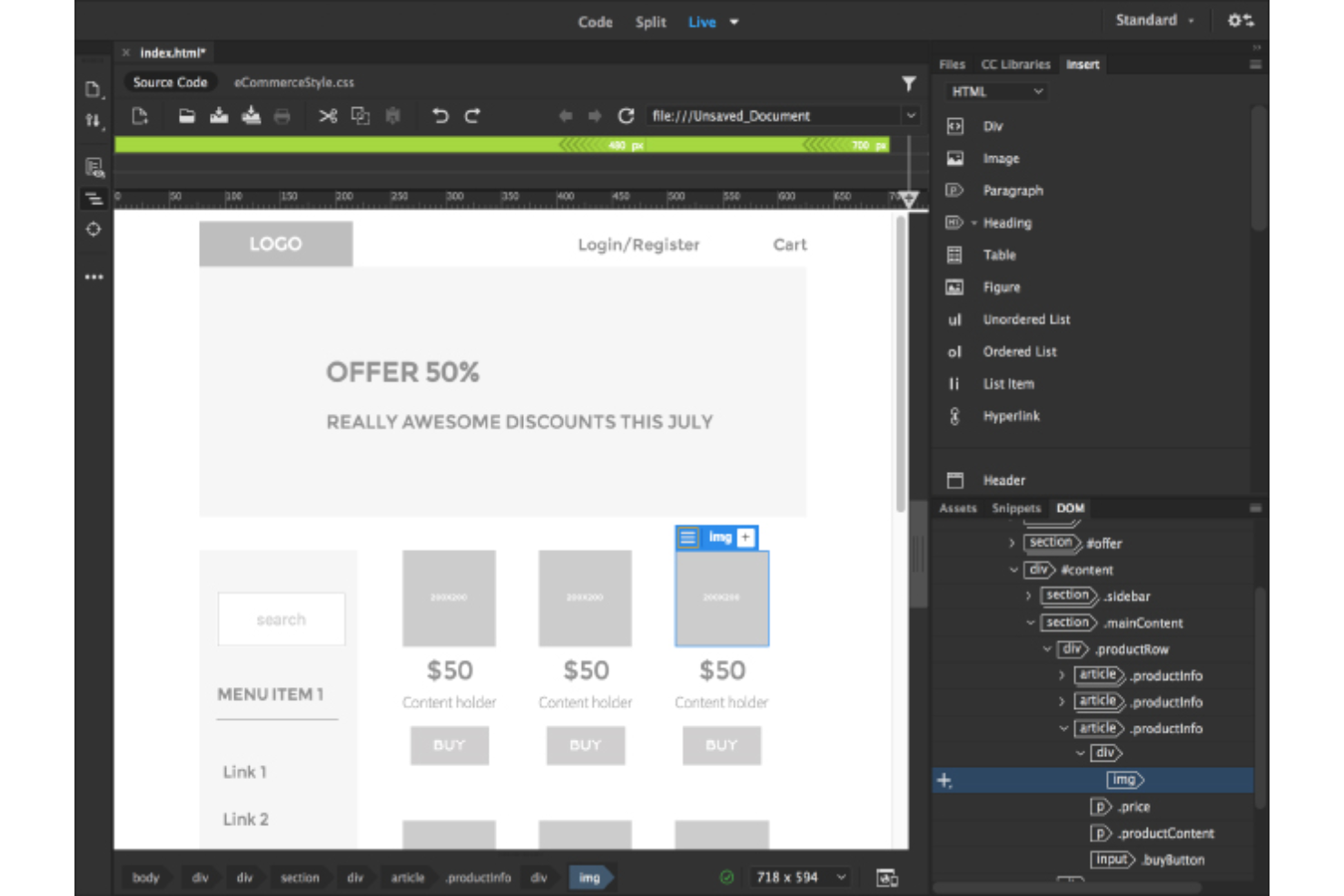
Dreamweaver is a Windows-based coding software from Adobe that combines a code editor with a visual design interface, supporting HTML, CSS, JavaScript, and integrated site management tools.
Who Is Dreamweaver Best For?
Dreamweaver is a good fit for web designers and front-end developers who work across both visual design and hand-coded workflows.
Why I Picked Dreamweaver
Dreamweaver earns its spot on my shortlist because of how well it handles responsive web design directly within the coding environment. I like that the Live View editing feature lets me see exactly how a page renders across different screen sizes in real time, without switching between modes or external browsers. I also use the starter templates regularly—they give me a solid, pre-structured foundation for building responsive HTML pages, which cuts down setup time significantly. The multi-monitor support on Windows is a practical bonus that lets me keep my code on one screen and the live preview on another.
Dreamweaver Key Features
- Code hints and autocompletion: Dreamweaver surfaces context-aware code hints for HTML, CSS, and other web standards as you type, helping you write and edit code faster.
- Git panel: Manage source code and perform common Git operations—commits, pushes, and pulls—directly within Dreamweaver without switching to an external tool.
- Customizable workspace UI: Tailor your coding environment by showing only the panels and tools you need, keeping your workspace focused and uncluttered.
- Creative Cloud Libraries integration: Pull in assets from your Creative Cloud Libraries and Adobe Stock directly into your projects without leaving the editor.
Dreamweaver Integrations
Native integrations are not currently listed.
Pros and Cons
Pros:
- Step-by-step tutorials
- Easy collaboration
- Starter templates available
Cons:
- It only runs on computers with certain specifications
- Not very easy to learn

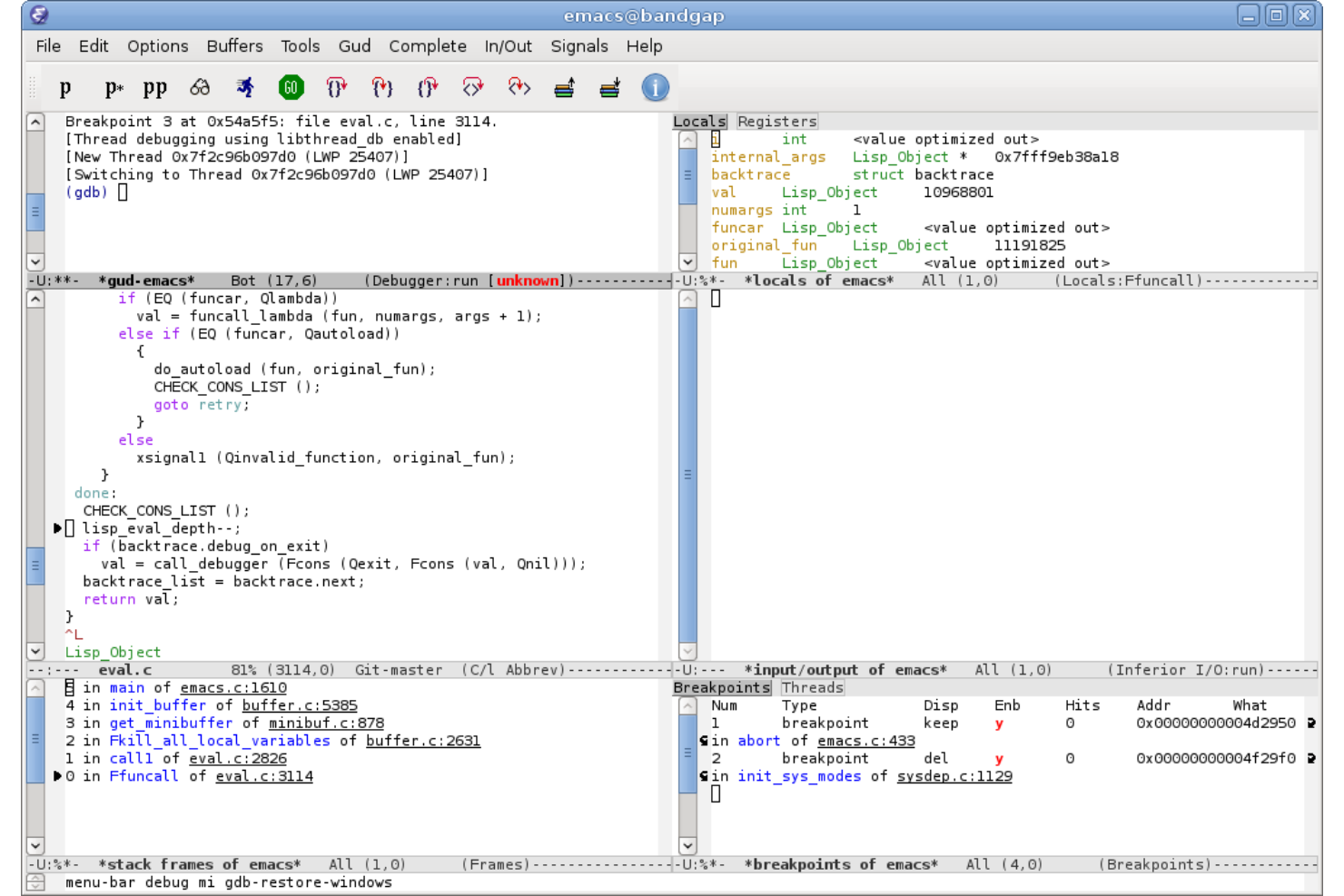
Emacs is an extensible, open-source text editor for Windows that supports advanced code editing, syntax highlighting, and customization for a wide range of programming languages.
Who Is Emacs Best For?
Emacs is a strong fit for developers and power users who work across multiple programming languages and need deep editor customization.
Why I Picked Emacs
I chose Emacs because its content-aware editing modes handle syntax coloring across a wide range of file types. When I'm switching between Python, Lua, and HTML in the same session, Emacs keeps syntax highlighting accurate for each one without any manual configuration. I rely on its full Unicode support, which covers nearly all human scripts — useful when working with internationalized codebases or files that mix multiple character sets. Tree-Sitter integration, added in recent versions, improves syntax parsing and makes highlighting more precise than regex-based approaches.
Emacs Key Features
- Emacs Lisp interpreter: Customize and extend editor behavior by writing or loading Emacs Lisp scripts directly within the editor.
- Built-in Eglot LSP client: Connect to language servers for code completion, diagnostics, and go-to-definition support across many programming languages.
- Integrated debugger: Run and step through code using Emacs's built-in debugging interface without leaving the editor.
- Package system via ELPA: Download and install extensions from the GNU Emacs Lisp Package Archive to add new language modes, tools, and workflows.
Emacs Integrations
Native integrations are not currently listed. However, the tool supports integrations via its Emacs Lisp API and package system for custom workflows and extensions.
Pros and Cons
Pros:
- Very customizable
- Tutorials for new users
- Good documentation
Cons:
- It takes time to master
- Documentation is not detailed
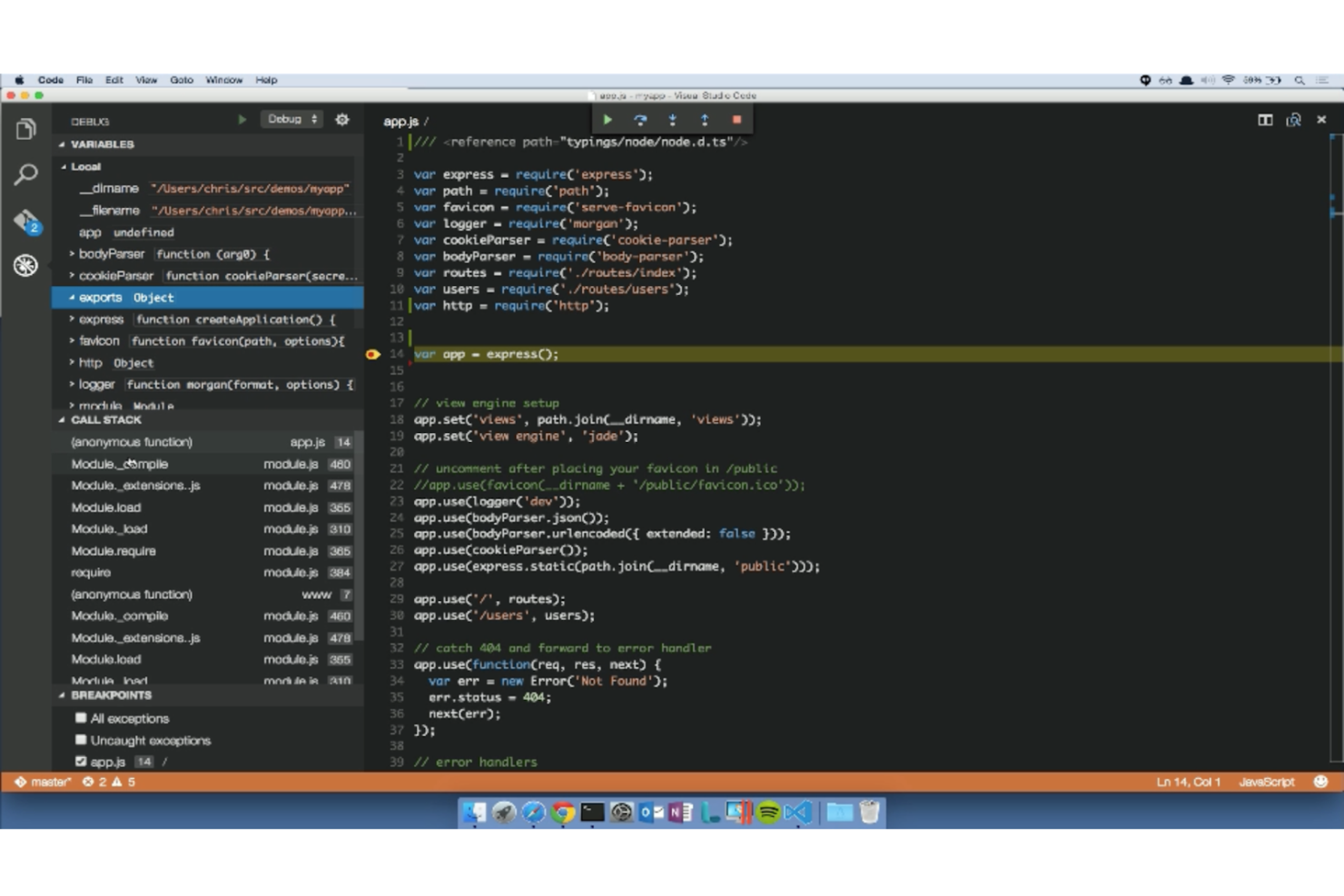
Visual Studio Code is a code editor for Windows that supports syntax highlighting, debugging, source control, and a wide range of programming languages through extensions.
Who Is Visual Studio Code Best For?
Visual Studio Code is a good fit for individual developers and engineering teams who work across multiple programming languages and need a flexible, extensible editor.
Why I Picked Visual Studio Code
Visual Studio Code earns its spot on my shortlist because of how well its built-in Git commands are woven directly into the editor. I use the Source Control view to stage individual lines of code, write commit messages, and push changes without opening a terminal. I rely on the 3-way merge editor regularly—it gives a side-by-side view of conflicting changes and the final merge result, making conflict resolution less error-prone. I also like the Source Control Graph, which visualizes branch structure and commit history so I can track incoming and outgoing commits at a glance.
Visual Studio Code Key Features
- IntelliSense: Provides context-aware code completions, parameter hints, and signature help across JavaScript, TypeScript, Python, and many other languages.
- Integrated terminal: Run shells like PowerShell, Git Bash, or WSL directly inside the editor without switching windows.
- Extensions marketplace: Access over 80,000 extensions to add language support, linters, debuggers, and MCP servers to your environment.
- Multi-language debugging: Set breakpoints, inspect variables, and step through code for languages including Python, C++, and JavaScript without leaving the editor.
Visual Studio Code Integrations
Visual Studio Code offers native integrations with GitHub, Azure Repos, and Bitbucket for source control management. An API is available for custom integrations, and thousands of extensions in the marketplace add support for additional tools and languages.
Pros and Cons
Pros:
- Customizable and extensible
- Seamless integrations
- Streamlined source code management
Cons:
- It gets heavy while installing extensions for each language
- Complex configurations for beginners

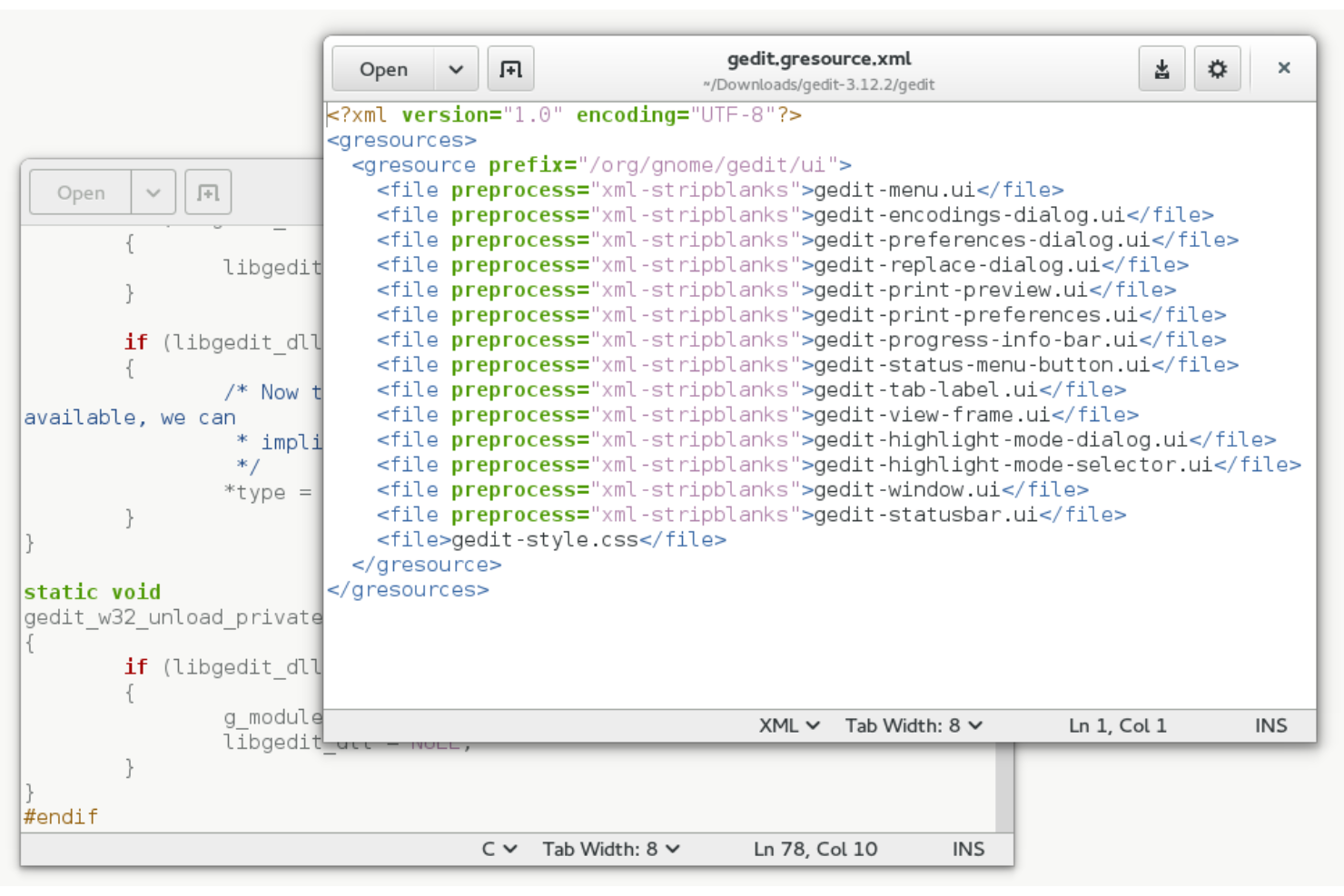
gedit is a lightweight, open-source text editor for Windows that supports syntax highlighting, remote file editing, and plugin extensions for coding in multiple languages.
Who Is gedit Best For?
gedit is a good fit for developers and IT professionals who need a no-frills code editor with remote file access capabilities.
Why I Picked gedit
gedit earns its spot as one of the best on my shortlist because of how well it handles editing files from remote locations. I like that it uses GNOME's virtual file system (GVfs) to open and edit files over protocols like SFTP, FTP, and SSH directly within the editor—no separate file transfer step needed. In practice, that means my team can pull up a config file on a remote server, make edits, and save it back without ever leaving the editor. The plugin system also lets you extend that workflow further, adding things like file browsing and terminal access to keep everything in one place.
gedit Key Features
- Syntax highlighting: gedit supports syntax highlighting across a wide range of programming languages, making it easier to read and navigate code at a glance.
- Code snippets plugin: The snippets plugin lets you define reusable text templates with tab triggers, so you can expand frequently used code blocks without retyping them.
- External tools plugin: Run shell commands, scripts, or build tools like
makedirectly from the editor interface, with configurable input/output handling per tool. - Multi-tab document management: Open and manage multiple files simultaneously across tabs, with support for reopening recently closed tabs via keyboard shortcuts.
gedit Integrations
Native integrations are not currently listed. An API is available for custom integrations.
Pros and Cons
Pros:
- Free code editor
- Good user manual
- Very flexible
Cons:
- Product info isn’t detailed
- Sophisticated configurations

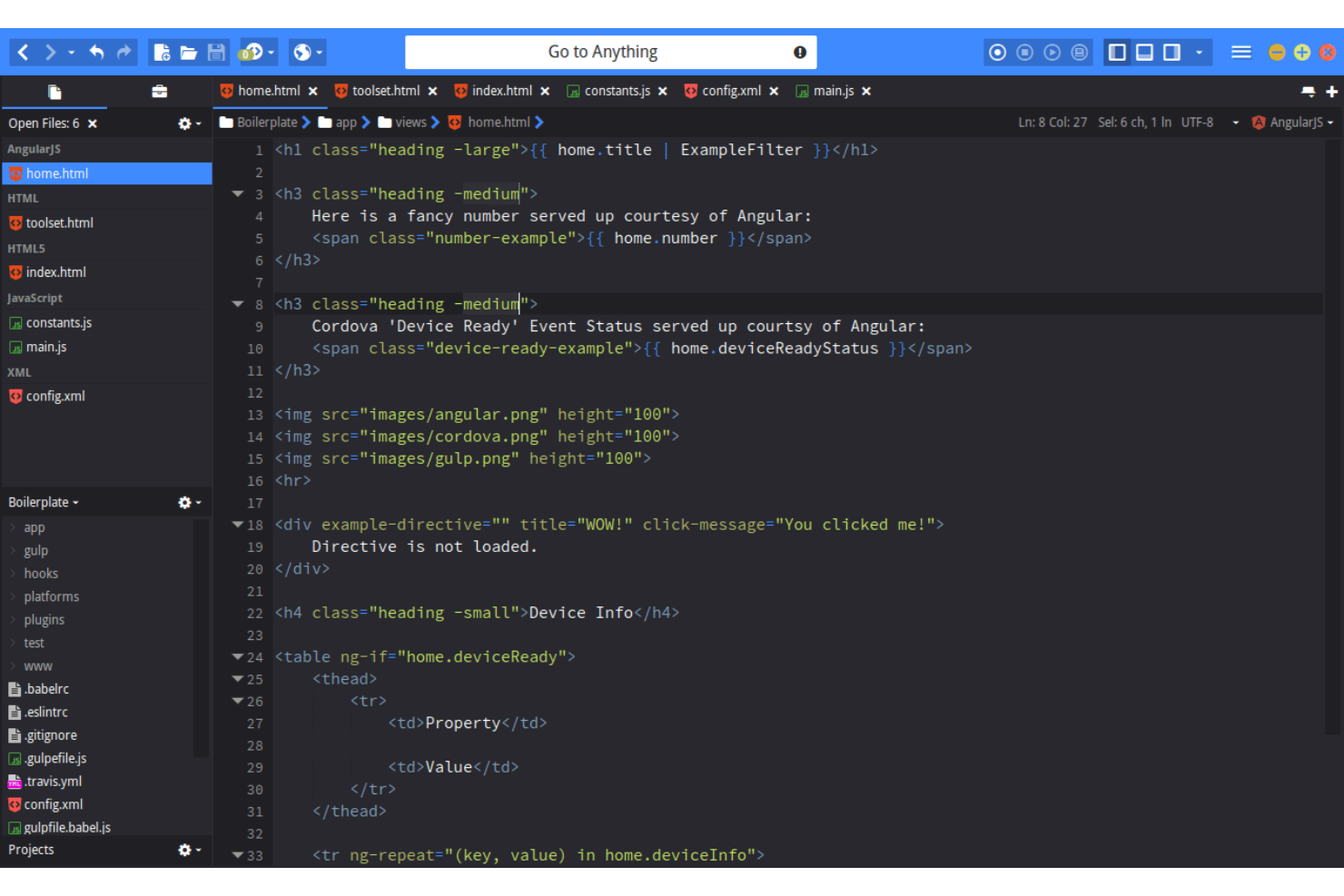
Komodo Edit is a Windows-based code editor that supports multiple programming languages, syntax highlighting, code folding, and a customizable interface for developers who need a flexible editing environment.
Who Is Komodo Edit Best For?
Komodo Edit is a good fit for individual developers and small teams who work across multiple programming languages and want a free, lightweight code editor.
Why I Picked Komodo Edit
I picked Komodo Edit as one of the best because of how well it handles multi-language file support. When you're working on a project that mixes Python, PHP, JavaScript, and HTML in the same file, Komodo Edit applies syntax coloring per language within that single file—something many lightweight editors don't. I also like the autocomplete and calltips, which activate according to the language you're writing in rather than applying a generic suggestion engine across the board. Find in Project and Replace in Files let you search an entire codebase when refactoring across multiple language files.
Komodo Edit Key Features
- Code folding: Collapse and expand blocks of code to keep large files navigable without losing context.
- Source code control integration: Connect directly to Git, Mercurial, Subversion, and Perforce without leaving the editor.
- Toolbox: Store and access reusable code snippets, macros, and custom commands from a dedicated side panel.
- Regex toolkit: Build, test, and debug regular expressions directly inside the editor using a built-in regex tool.
Komodo Edit Integrations
Native integrations are not currently listed.
Pros and Cons
Pros:
- Get started for free
- Smart code suggestions
- Support for many languages
Cons:
- More customization features required
- The product website needs more content

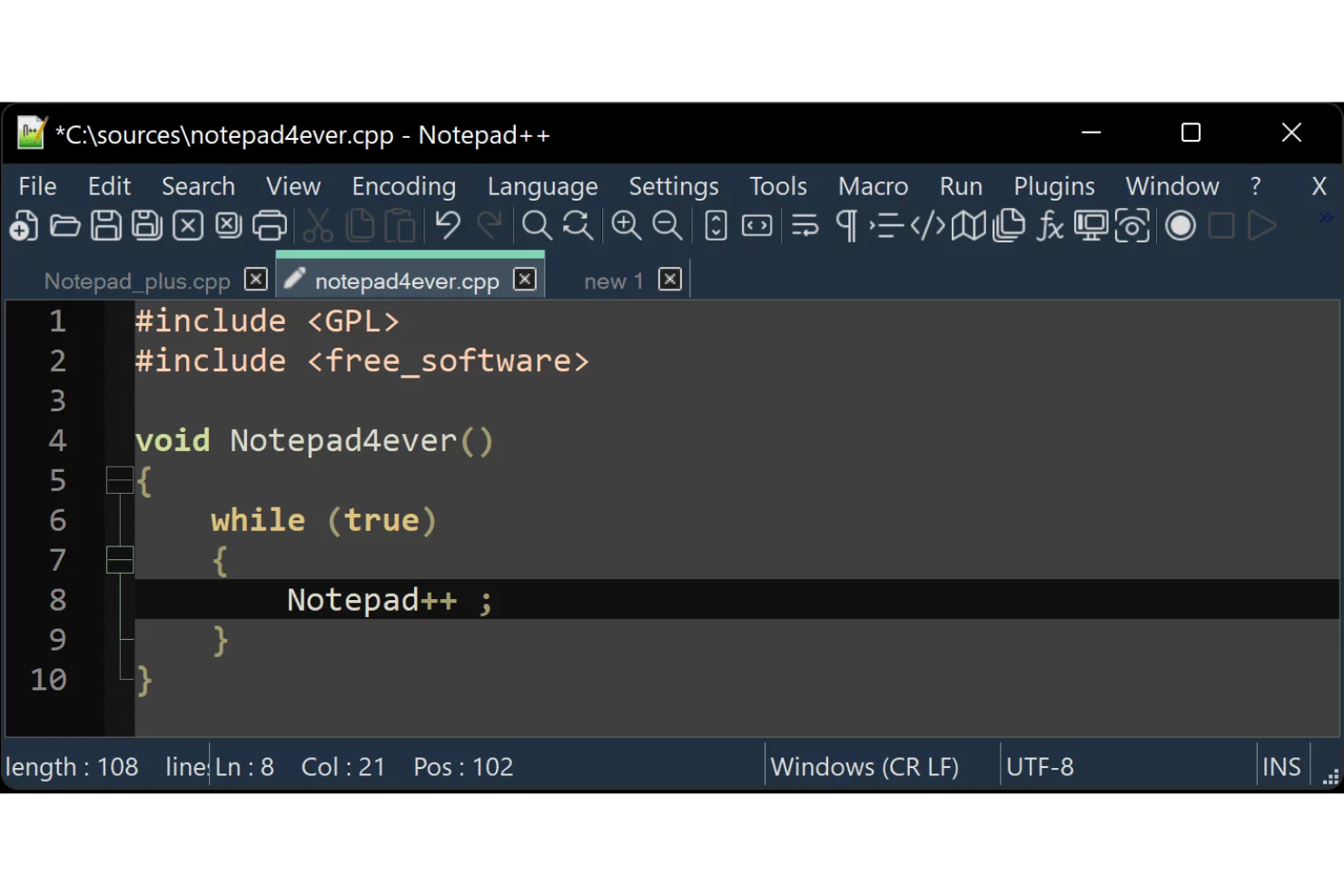
Notepad++ is a Windows-based source code editor that supports syntax highlighting, code folding, and multi-language development with a customizable interface and plugin system.
Who Is Notepad++ Best For?
Notepad++ is a strong fit for developers, sysadmins, and IT professionals who need a fast, no-frills code editor for Windows without the overhead of a full IDE.
Why I Picked Notepad++
Notepad++ earns its spot on my shortlist because it's built in C++ using pure Win32 API and STL, giving it fast startup and a small program footprint. I've opened Notepad++ on machines where heavier editors take 10–20 seconds to load; Notepad++ starts almost instantly. It's built on the Scintilla editing component, which handles syntax highlighting and code folding without the memory overhead you'd expect from a full IDE. I also like that it reduces CPU usage when idle instead of consuming resources in the background.
Notepad++ Key Features
- Multi-language syntax highlighting: Notepad++ supports syntax highlighting for over 80 programming and scripting languages, including Python, JavaScript, HTML, and SQL.
- Macro recording and playback: Record a sequence of editing actions and replay them once or across an entire document, with the option to save macros and assign keyboard shortcuts.
- Find in Files: Search and replace text across multiple files in a directory in one action, with support for regex, filters, and subfolder recursion.
- User Defined Language (UDL): Create custom syntax highlighting rules for languages not natively supported, including custom folding, keywords, and operators.
Notepad++ Integrations
Native integrations are not currently listed. Notepad++ supports integrations via plugins and offers an API for custom integrations.
Pros and Cons
Pros:
- Customizable features
- High execution speed
- Get started for free
Cons:
- Hard to master by beginners
- Limited to Windows


VIM is a configurable text editor for Windows that offers modal editing, keyboard-driven navigation, and support for multiple programming languages through a wide range of plugins.
Who Is VIM Best For?
VIM is a strong fit for developers and system administrators who prefer a keyboard-driven, highly customizable coding environment over traditional GUI-based editors.
Why I Picked VIM
I picked VIM because its plugin system is unmatched among text editors. With nearly 6,000 scripts available on vim.org alone, I can extend VIM to handle syntax highlighting, spell checking, IDE-style macros, and language-specific indenting without switching tools. Plugins install directly into VIM's directory structure, so you don't need a separate package manager. The Vim9 scripting language also makes writing your own plugins more approachable, with support for enums, generic functions, and tuples added in the 9.2 release.
VIM Key Features
- Modal editing: Switch between insert, normal, and visual modes to navigate and edit code without lifting your hands from the keyboard.
- Macro recording: Record and replay sequences of commands to repeat complex edits across multiple lines or files.
- Split windows: Open multiple files side by side in horizontal or vertical splits within a single VIM session.
- Regex-based search and replace: Run pattern-based find-and-replace operations across single files or entire project directories.
VIM Integrations
Native integrations are not currently listed.
Pros and Cons
Pros:
- Support for many languages
- Open-source with an active community
- Seamless integrations
Cons:
- The GUI needs to be updated
- Setting up plugins can be time consuming


Apache NetBeans is an open-source integrated development environment for Windows that supports multiple programming languages, advanced code editing, debugging, and project management features.
Who Is Apache NetBeans Best For?
Apache NetBeans is a good fit for Java developers and students who need a free, full-featured IDE with strong language support and built-in project tooling.
Why I Picked Apache NetBeans
Apache NetBeans earns its spot on my shortlist because of how well its Inspect and Transform feature handles code refactoring at scale. I use it to run batch inspections across entire packages or projects at once, which saves a lot of time compared to manually hunting down issues file by file. I particularly like the predefined JDK migration configurations—when I need to modernize a Java codebase to JDK 7 or JDK 8 syntax, NetBeans previews every proposed change before applying it, so nothing gets updated blindly. You can also build custom inspections using its hint scripting language, which lets my team enforce project-specific code patterns across the whole codebase.
Apache NetBeans Key Features
- Multi-language editor: Write and edit code in Java, PHP, HTML5, C/C++, and more with syntax highlighting and code completion built in.
- Integrated debugger: Debug multi-threaded Java applications using the visual debugger, which lets you track variable values and thread states in real time.
- JUnit test integration: Write and run JUnit tests directly inside the IDE without switching to an external tool.
- GUI builder: Design Java Swing interfaces visually using the drag-and-drop GUI builder, with a GridBag customizer for precise layout control.
Apache NetBeans Integrations
Native integrations are not currently listed.
Pros and Cons
Pros:
- Available for free
- Support for many languages
- Write once, run anywhere
Cons:
- Steep learning curve
- More information needed on the product website
Weitere Coding-Software für Windows
Hier sind noch einige weitere Coding-Programme für Windows, die es zwar nicht auf meine Shortlist geschafft haben, aber dennoch einen Blick wert sind:
- Geany
For built-in support for many programming languages
- BlueGriffon
For WYSIWYG authoring
- WeBuilder
For syntax highlighting and code intelligence
- IntelliJ IDEA
For remote development teams
- Microsoft Visual Studio
IDE for .NET and C++ developers on Windows
- Light Table
For embedding anything you want, from graphs and games to running visualizations
- UltraEdit
Text editor for large files
- Brackets
Open-source code editor with inline editors and live preview capability
- Eclipse
For multiple language support and unlimited customization
- SnipAway
For running code folding and multiline selection


Auswahlkriterien für Coding-Software unter Windows
Bei der Auswahl der besten Coding-Software für Windows auf dieser Liste habe ich gängige Anforderungen und Probleme von Käufern berücksichtigt, wie die Kompatibilität mit verschiedenen Programmiersprachen und die einfache Integration mit bestehenden Tools.
Um meine Bewertung strukturiert und fair zu halten, habe ich außerdem folgenden Bewertungsrahmen verwendet:
Kernfunktionalität (25% der Gesamtwertung)
Um in diese Liste aufgenommen zu werden, musste jede Lösung folgende Anwendungsfälle abdecken:
- Code-Editor
- Syntaxhervorhebung
- Integration von Versionskontrolle
- Debugging-Unterstützung
- Unterstützung mehrerer Programmiersprachen
Zusätzliche herausragende Funktionen (25% der Gesamtwertung)
Um die Auswahl weiter einzugrenzen, habe ich nach besonderen Features gesucht, wie zum Beispiel:
- Echtzeit-Zusammenarbeit
- Cloud-basierter Zugriff
- Erweiterte Code-Refaktorierung
- Eingebautes Terminal
- Anpassbare Themes
Benutzerfreundlichkeit (10% der Gesamtwertung)
Um das Nutzererlebnis jedes Systems zu beurteilen, habe ich auf folgende Punkte geachtet:
- Intuitive Benutzeroberfläche
- Einfache Navigation
- Responsives Design
- Geringe Lernkurve
- Klare Dokumentation
Onboarding (10% der Gesamtwertung)
Um das Onboarding-Erlebnis jeder Plattform zu bewerten, habe ich Folgendes betrachtet:
- Verfügbarkeit von Schulungsvideos
- Interaktive Produkttouren
- Zugriff auf Vorlagen
- Live-Webinare
- Hilfreiche Chatbots
Kundensupport (10 % der Gesamtwertung)
Um die Kundensupportleistungen jedes Software-Anbieters zu bewerten, habe ich Folgendes berücksichtigt:
- Rund-um-die-Uhr-Verfügbarkeit
- Mehrere Supportkanäle
- Schnelle Reaktionszeiten
- Kompetentes Personal
- Community-Foren
Preis-Leistungs-Verhältnis (10 % der Gesamtwertung)
Zur Bewertung des Preis-Leistungs-Verhältnisses jeder Plattform habe ich Folgendes beachtet:
- Konkurrenzfähige Preise
- Verfügbarkeit einer kostenlosen Testversion
- Flexible Abonnementpläne
- Inklusive Funktionen
- Upgrade-Optionen
Kundenbewertungen (10 % der Gesamtwertung)
Um einen Eindruck von der allgemeinen Kundenzufriedenheit zu erhalten, habe ich bei der Durchsicht von Kundenbewertungen Folgendes berücksichtigt:
- Gesamtzufriedenheit in Bewertungen
- Häufig genannte Vor- und Nachteile
- Feedback zu Funktionsweise und Effektivität
- Empfehlungen von Nutzern
- Regelmäßigkeit von Updates und Verbesserungen
So wählen Sie Coding-Software für Windows aus
Es ist leicht, sich in langen Funktionslisten und komplexen Preisstrukturen zu verlieren. Um Ihnen bei Ihrem individuellen Auswahlprozess zu helfen, finden Sie hier eine Checkliste mit Faktoren, die Sie im Auge behalten sollten:
| Faktor | Worauf achten? |
|---|---|
| Skalierbarkeit | Wächst die Software mit Ihrem Team? Prüfen Sie, ob sie eine steigende Nutzerzahl oder größere Projekte problemlos bewältigt. |
| Integration | Lässt sie sich mit Ihren aktuellen Tools verbinden? Achten Sie auf Kompatibilität mit bestehenden Workflows und Systemen. |
| Anpassbarkeit | Können Sie die Software auf Ihre Bedürfnisse zuschneiden? Suchen Sie nach Anpassungsmöglichkeiten der Einstellungen oder nach Erweiterungen durch Plugins. |
| Benutzerfreundlichkeit | Ist sie für Ihr Team leicht bedienbar? Bewerten Sie die Benutzeroberfläche und wie einfach die Einarbeitung ist. |
| Implementierung und Onboarding | Wie schnell können Sie starten? Berücksichtigen Sie den Aufwand für die Einrichtung und das anfängliche Training. |
| Kosten | Passt sie in Ihr Budget? Vergleichen Sie Preispläne und achten Sie auf versteckte Gebühren oder langfristige Bindungen. |
| Sicherheitsvorkehrungen | Sind Ihre Projekte geschützt? Prüfen Sie Verschlüsselungen, Zugriffskontrollen und Möglichkeiten zur Datensicherung. |
| Verfügbarkeit von Support | Bekommen Sie Hilfe, wenn sie nötig ist? Achten Sie auf 24/7-Support, Antwortzeiten und vorhandene Kontaktkanäle. |
Was ist Coding-Software für Windows?
Coding-Software für Windows ist ein Tool, das Entwicklern das Schreiben, Bearbeiten und Verwalten von Code auf Windows-Betriebssystemen ermöglicht. Diese Tools werden in der Regel von Softwareentwicklern, Programmierern und IT-Fachleuten genutzt, um die Produktivität und Effizienz bei Programmieraufgaben zu steigern.
Syntax-Hervorhebung, Integration von Versionskontrollen und Debugging-Funktionen helfen bei der Fehlerreduktion, beim Projektmanagement und einer effizienten Programmierung. Insgesamt vereinfachen diese Tools den Programmierprozess und steigern die Entwicklungseffizienz.
Funktionen
Beim Auswählen einer Coding-Software für Windows sollten Sie auf folgende Hauptfunktionen achten:
- Code-Bearbeitung: Ermöglicht Entwicklern, Code einfach zu schreiben und zu ändern, was die Produktivität verbessert.
- Syntaxhervorhebung: Unterscheidet Code-Elemente durch Farben, womit das Lesen und Debuggen erleichtert wird.
- Integration von Versionskontrolle: Hilft, Änderungen nachzuverfolgen und mit anderen zusammenzuarbeiten, um ein reibungsloses Teamwork zu gewährleisten.
- Debugging-Unterstützung: Erkennt und behebt Fehler schnell, wodurch der Aufwand für Problemlösungen reduziert wird.
- Mehrsprachige Unterstützung: Ermöglicht das Programmieren in verschiedenen Programmiersprachen und bietet so Flexibilität für Entwickler.
- Echtzeit-Zusammenarbeit: Erlaubt mehreren Nutzern, gleichzeitig an einem Projekt zu arbeiten, und steigert so die Teamproduktivität.
- Anpassbare Benutzeroberfläche: Nutzer können die Software an ihre eigenen Vorlieben anpassen und so ein persönlicheres Erlebnis schaffen.
- Integriertes Terminal: Bietet Zugriff auf die Befehlszeile innerhalb der Software und optimiert somit Arbeitsprozesse.
- Cloud-basierter Zugriff: Ermöglicht das ortsunabhängige Arbeiten, indem Entwickler von überall aus auf Projekte zugreifen können.
- Sicherheitsvorkehrungen: Schützt Code und Daten durch Verschlüsselung und Zugriffsbeschränkungen und gewährleistet dadurch die Sicherheit des Projekts.
Vorteile
Die Implementierung von Coding-Software für Windows bietet Ihrem Team und Ihrem Unternehmen zahlreiche Vorteile. Hier sind einige, auf die Sie sich freuen können:
- Gesteigerte Produktivität: Funktionen wie Code-Bearbeitung und Syntaxhervorhebung beschleunigen das Programmieren und verringern Fehler.
- Verbesserte Zusammenarbeit: Echtzeit-Zusammenarbeit und Integration von Versionskontrolle ermöglichen effizientes Arbeiten im Team.
- Flexibilität: Mehrsprachige Unterstützung erlaubt es Entwicklern, in ihren bevorzugten Programmiersprachen zu arbeiten.
- Fehlerreduktion: Debugging-Unterstützung erkennt und behebt Probleme schnell, wodurch Ausfallzeiten minimiert werden.
- Anpassung: Eine anpassbare Benutzeroberfläche ermöglicht es Nutzern, die Software individuell auf ihre Bedürfnisse abzustimmen, was die Nutzerzufriedenheit erhöht.
- Remote-Zugriff: Cloud-basierter Zugriff stellt sicher, dass Entwickler von überall arbeiten können und schafft damit maximale Flexibilität.
- Sicherheit: Sicherheitsvorkehrungen schützen Ihre Projekte und Daten und geben Ihnen ein beruhigendes Gefühl.
Kosten und Preise
Die Auswahl von Coding-Software für Windows erfordert ein Verständnis der unterschiedlichen Preismodelle und angebotenen Pläne. Die Kosten variieren je nach Funktionsumfang, Teamgröße, Erweiterungen und mehr.
Die folgende Tabelle fasst gängige Pläne, deren durchschnittliche Preise und typische Merkmale von Coding-Software für Windows-Lösungen zusammen:
Vergleichstabelle für Pläne von Coding-Software für Windows
| Plan-Typ | Durchschnittlicher Preis | Gemeinsame Funktionen |
|---|---|---|
| Gratis-Plan | $0 | Basis-Code-Bearbeitung, Syntaxhervorhebung und eingeschränkte Sprachunterstützung. |
| Persönlicher Plan | $5-$25/user/month | Erweiterte Code-Bearbeitung, mehrsprachige Unterstützung und grundlegende Versionskontrolle. |
| Business-Plan | $30-$60/user/month | Team-Kollaborationstools, erweiterte Sicherheitsfunktionen und Cloud-basierter Zugriff. |
| Enterprise-Plan | $70-$150/user/month | Individuelle Integrationen, priorisierter Support und umfassende Sicherheitsvorkehrungen. |
FAQs zu Coding-Software für Windows
Hier finden Sie Antworten auf häufig gestellte Fragen zur Coding-Software für Windows:
Kann ich Coding-Software für Windows auch auf anderen Betriebssystemen verwenden?
Ja, viele Coding-Software-Lösungen für Windows sind plattformübergreifend und können auch auf anderen Betriebssystemen wie macOS und Linux verwendet werden. Überprüfen Sie die Spezifikationen der Software, um die Kompatibilität zu bestätigen. Diese Flexibilität ist hilfreich, wenn Ihr Team verschiedene Endgeräte nutzt oder Sie zwischen unterschiedlichen Betriebssystemen wechseln.
Wer nutzt Coding-Software für Windows?
Webentwicklungsingenieure, Webdesigner und Entwickler im Allgemeinen nutzen Code-Editoren für Windows, um Produkte zu erstellen. Zusätzlich zur Softwareentwicklung ermöglichen einige Texteditor-Software auch nicht-technischen Anwendern das Erstellen von normalen Texten. Wenn Coding-Software Debugging- oder Testfunktionen beinhaltet, kann sie auch von QA-Profis genutzt werden.
Welche Software brauche ich zum Programmieren?
Welche Software Sie benötigen, hängt von der Programmiersprache und dem Typ der gewünschten Programmierung ab. Hier sind einige gängige Softwaretools, die Sie eventuell brauchen:
- Texteditor: Ein Texteditor ist ein Softwaretool, mit dem Sie Code schreiben und bearbeiten können. Die meisten Computer verfügen über einen einfachen Texteditor wie Notepad (für Windows) oder TextEdit (für macOS). Diese Editoren bieten allerdings nicht die vielen nützlichen Funktionen von texteditoren, die speziell für das Programmieren entwickelt wurden.
- Integrierte Entwicklungsumgebung (IDE): IDE-Software sind Anwendungen, die umfassende Werkzeuge für die Softwareentwicklung bereitstellen. Sie beinhalten in der Regel einen Code-Editor, einen Compiler oder Interpreter, einen Debugger sowie weitere Tools.
- Compiler: Ein Compiler ist ein Softwaretool, das Code aus einer Programmiersprache in eine andere, meist Maschinencode, übersetzt. Compiler werden genutzt, um ausführbare Dateien zu erstellen, die auf einem Computer laufen können.
- Versionskontrollsystem: Ein Versionskontrollsystem hilft Ihnen, Änderungen an Ihrem Code über die Zeit nachzuverfolgen. Es ermöglicht die Zusammenarbeit mit anderen Entwicklern, das Zurücksetzen auf frühere Versionen und das Verwalten verschiedener Versionen Ihres Codes.
- Debugging-Tools: Debugging-Tools unterstützen Sie beim Auffinden und Beheben von Fehlern in Ihrem Code. Sie erlauben es, den Code Zeile für Zeile durchzugehen, Haltepunkte zu setzen und Variablen zu inspizieren.
- Bibliotheken und Frameworks: Bibliotheken und Frameworks sind vorgefertigte Codes, die Sie nutzen können, um den Entwicklungsprozess zu beschleunigen. Sie stellen gängige Funktionalitäten zur Verfügung, die Sie in Ihrem eigenen Code weiterverwenden können.
Es ist wichtig zu beachten, dass die benötigten Softwaretools von der gewünschten Programmiersprache und dem Einsatzzweck abhängen. Ein guter Texteditor und ein Versionskontrollsystem sind jedoch grundlegende Werkzeuge für jeden Programmierer.
Wie geht es weiter:
Wenn Sie gerade Coding-Software für Windows recherchieren, lassen Sie sich kostenlos von einem SoftwareSelect-Berater Empfehlungen geben.
Sie füllen ein Formular aus und führen ein kurzes Gespräch, in dem Ihre Anforderungen erfragt werden. Anschließend erhalten Sie eine Vorauswahl an Software zum Prüfen. Sie werden sogar durch den gesamten Beschaffungsprozess begleitet – einschließlich Preisverhandlungen.