

10 Beste Netzwerksicherheits-Software 2026

10 Bestes Netzwerk-Sicherheitssoftware-Shortlist
Here's my pick of the 10 best software from the 22 tools reviewed.


Die Sicherung Ihres Netzwerks gehört zu den größten Herausforderungen, denen sich Organisationen stellen müssen. Cyberangriffe werden zunehmend ausgeklügelter, egal ob es sich um Malware, Phishing oder gezielte Angriffe handelt – und bereits eine einzige Schwachstelle kann verheerende Folgen haben. Wenn Sie bereits damit zu kämpfen hatten, sensible Daten zu schützen, weitläufige IT-Systeme zu verwalten oder neuen Bedrohungen immer einen Schritt voraus zu sein, wissen Sie, wie entscheidend zuverlässige Netzwerk-Sicherheitssoftware ist.
Die richtigen Netzwerk-Sicherheitstools blockieren nicht nur unbefugten Zugriff – sie überwachen aktiv Schwachstellen, verhindern Angriffe und geben Ihnen die Sicherheit, dass Ihre Systeme geschützt sind. Im Laufe der Jahre habe ich mit einer Vielzahl von Sicherheitslösungen in unterschiedlichen Branchen gearbeitet und Teams dabei unterstützt, von reaktiver Problemlösung zu proaktiver Verteidigung überzugehen. In diesem Leitfaden habe ich die beste Netzwerk-Sicherheitssoftware bewertet und ihre Funktionen und Stärken aufgeschlüsselt, damit Sie die Lösung finden, die am besten zu Ihrer individuellen Umgebung passt.
Why Trust Our Software Reviews
We’ve been testing and reviewing software since 2023. As tech leaders ourselves, we know how critical and difficult it is to make the right decision when selecting software.
We invest in deep research to help our audience make better software purchasing decisions. We’ve tested more than 2,000 tools for different tech use cases and written over 1,000 comprehensive software reviews. Learn how we stay transparent & our software review methodology.
Bestes Netzwerk-Sicherheitssoftware Zusammenfassung
Diese Vergleichstabelle fasst die Preisinformationen meiner Top-Auswahl an Netzwerk-Sicherheitssoftware zusammen, damit Sie die beste Lösung für Ihr Budget und Ihre Geschäftsbedürfnisse finden.
| Tool | Best For | Trial Info | Price | ||
|---|---|---|---|---|---|
| 1 | Best for continuous scans | 30-day free trial | From $119.99/year (billed annually) | Website | |
| 2 | Best for zero trust access | 14-day free trial + free demo available | From $7/user/month (billed annually) | Website | |
| 3 | Best for DNS security and threat hunting | Free trial + free demo available | Pricing upon request | Website | |
| 4 | Best for real-time network alerts | Free demo + 30-day free trial available | From $9/month (billed annually) | Website | |
| 5 | Best for secure network access | 30-day free trial | From $10/user/month | Website | |
| 6 | Best for individual users and home environments | 30-day free trial | From $211/year | Website | |
| 7 | Best comprehensive security services | 30-day free trial | From $15/user/month | Website | |
| 8 | Best for advanced security analytics | Free trial + free demo available | From $0.07/GB data ingested | Website | |
| 9 | Best for privacy-focused individuals and organizations | free plan available | From $53.33/year | Website | |
| 10 | Best for cloud-based threat detection | 14-day free trial | From $23.99 for 1st year (1 device) | Website |
-

Site24x7
Visit WebsiteThis is an aggregated rating for this tool including ratings from Crozdesk users and ratings from other sites.4.6 -
GitHub Actions
Visit WebsiteThis is an aggregated rating for this tool including ratings from Crozdesk users and ratings from other sites.4.8 -
Docker
Visit WebsiteThis is an aggregated rating for this tool including ratings from Crozdesk users and ratings from other sites.4.6




Bestes Netzwerk-Sicherheitssoftware Bewertungen
Im Folgenden erkläre ich die Funktionen, Integrationen und Preise jeder Lösung, damit Sie die passende für Ihre Netzwerk-Sicherheitsanforderungen auswählen können.

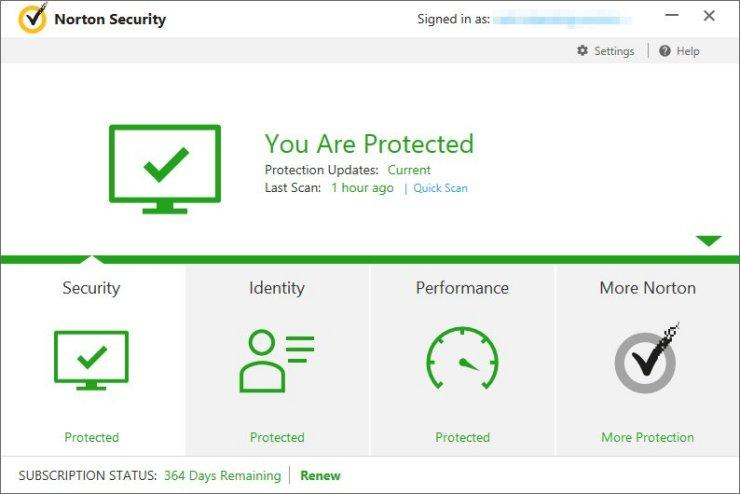
Norton is built for the network security needs of small businesses, offering broad protection for devices and sensitive data. It focuses on defending against common cyber threats while keeping systems secure and operational. Features such as real-time threat monitoring and a secure VPN help protect daily business activity and reduce exposure to online risks.
Why I Picked Norton
I chose Norton primarily for its real-time threat protection, a core requirement for effective network security. It continuously scans for malware and ransomware, helping prevent data loss and system compromise. Norton’s secure VPN adds encrypted connections for team members, supporting safe remote and online work. Together, these features cover essential security needs for businesses looking to protect their network and data.
Norton Key Features
In addition to the standout features, Norton offers an array of functionalities to enhance your team's security infrastructure.
- Cloud Backup: Provides 500 GB of secure cloud storage to protect critical business data from loss due to theft or failures.
- Password Manager: Offers encrypted storage for sensitive credentials, ensuring that passwords remain secure and accessible only to authorized users.
- Dark Web Monitoring: Alerts you if your personal information is found on the dark web, helping to prevent identity theft.
- Driver Updater: Automatically updates outdated or vulnerable drivers, maintaining your system's security and performance.
Norton Integrations
Native integrations are not currently listed by Norton.
Pros and Cons
Pros:
- Cloud backup supports data recovery
- Includes VPN and firewall security
- Strong real time malware protection
Cons:
- Fewer native business integrations
- Limited device cap for teams


NordLayer is a cloud-based network security platform tailored for businesses, providing secure access to corporate resources and safeguarding sensitive data.
Why I picked NordLayer: I like its implementation of Zero Trust Network Access (ZTNA). This approach ensures that only authorized users can access specific resources, minimizing the risk of unauthorized entry. Another feature that stands out is NordLayer's threat protection measures. It includes tools like DNS filtering and web protection to prevent access to malicious websites, safeguarding your team from potential online threats.
NordLayer Standout Features and Integrations:
Standout features include multi-factor authentication, which adds an extra layer of security by requiring users to provide multiple forms of verification before accessing company resources. Additionally, NordLayer offers a cloud firewall that monitors and controls incoming and outgoing network traffic based on predetermined security rules, providing a barrier against potential threats. The platform also supports site-to-site connections, allowing secure communication between different office locations or networks.
Integrations include Entra ID, Okta, OneLogin, JumpCloud, Google Workspace, Google Cloud, IBM Cloud, and AWS.
Pros and Cons
Pros:
- Provides robust VPN support
- Security measures like AES-256 encryption and multi-factor authentication
- Utilizes a zero-trust framework
Cons:
- Server setup can be complex
- Number of available server locations could be expanded


In the realm of cybersecurity, Heimdal offers a versatile platform designed to meet the demands of businesses seeking to safeguard their network environments. With a comprehensive suite of features, it appeals to industries ranging from healthcare to education, aiming to address challenges such as unauthorized access, data breaches, and compliance with standards like ISO 27001 and HIPAA. For those prioritizing a solution that integrates DNS security, threat hunting, and endpoint protection, Heimdal stands out as a compelling choice.
Why I Picked Heimdal
I picked Heimdal for its unique approach to network security, notably its combination of DNS security and threat hunting capabilities. These features allow your team to stay ahead of potential threats by intercepting and analyzing suspicious network activity in real-time. Additionally, Heimdal's Extended Detection and Response (XDR) platform provides enhanced threat detection across multiple environments, offering a comprehensive view of your network's security posture. For organizations that need to ensure compliance and protect sensitive data, Heimdal's managed services offer 24/7 support to maintain robust security.
Heimdal Key Features
Aside from its standout features, Heimdal offers additional functionalities that enhance its network security capabilities.
- Vulnerability Management: Automates the process of identifying and addressing vulnerabilities within your network, reducing the risk of exploitation.
- Unified Endpoint Management: Provides tools for remote desktop access and privileged access management, ensuring secure control over endpoint devices.
- Email & Collaboration Security: Protects against email threats and fraud, safeguarding communication channels from phishing attacks.
- Ransomware Encryption Protection: Offers advanced protection against ransomware threats, preventing unauthorized data encryption.
Heimdal Integrations
Native integrations are not currently listed by Heimdal; however, the platform supports API-based custom integrations.
Pros and Cons
Pros:
- Detailed asset and license visibility
- Strong vulnerability and threat detection
- Automates patching across endpoints
Cons:
- Interface requires onboarding time
- No native integrations available


Site24x7 is a cloud-based network monitoring tool designed to help you track the health and performance of your network infrastructure. It offers visibility into various network components, including devices, interfaces, and traffic patterns.
Why I picked Site24x7: I picked Site24x7 because it includes several features that directly support network security efforts. Its network configuration management lets you detect unauthorized device changes and stay compliant with security policies, helping prevent misconfigurations that could be exploited. The traffic analysis tools, which support NetFlow, sFlow, and J-Flow, give you visibility into bandwidth usage and potential malicious activity by highlighting traffic anomalies.
Site24x7 Standout Features and Integrations:
Standout features include real-time alerts that ensure you’re immediately notified of changes or threats across your infrastructure. The tool also offers automated compliance audits, continuously checking your network devices against industry standards and internal policies to ensure adherence.
Integrations include AWS, Microsoft Azure, Google Cloud Platform, VMware, Amazon EventBridge, Zoho Analytics, Moogsoft, Jira, ConnectWise, PagerDuty, Microsoft Teams, and Slack.
Pros and Cons
Pros:
- Automated compliance audits
- Real-time alerts for immediate issue detection
- Comprehensive network monitoring capabilities
Cons:
- Excessive alerts can be overwhelming for users
- Lacks more robust security features, like threat detection
New Product Updates from Site24x7

Site24x7 Enhances Network Monitoring With Device and Visibility Updates
Site24x7 introduces proactive hardware health monitoring, expanded device support, centralized network controls, and enhanced SD-WAN visualization to improve network monitoring and management. For more information, visit Site24x7’s official site.
 .
.

Perimeter 81 is a network security software focusing on secure remote access and cloud security. It provides a secure VPN, multi-factor authentication, and network segmentation to protect remote workers and cloud resources.
Why I picked Perimeter 81: I picked Perimeter 81 for its zero-trust network architecture and granular access controls, which provides me with secure connectivity for the distributed workforce. The user-centric design and seamless integration with existing infrastructure have simplified the remote access process, allowing employees to work from anywhere securely.
Perimeter 81 Standout Features and Integrations:
Standout Features that I thought were useful include secure network access and a user-centric design prioritizing ease of use and accessibility. It has a Software-Defined Perimeter (SDP) and Zero Trust Network Access (ZTNA) architecture, which drastically reduces the risk of unauthorized access and strengthens overall network security while allowing approved users to connect securely. Perimeter 81 also offers device management, traffic inspection, and secure web gateways.
Integrations include native integration with popular identity providers (e.g., Active Directory, Azure AD, Okta) and cloud providers (e.g., AWS, Azure)
Pros and Cons
Pros:
- Offers granular access control and auditing capabilities
- Centralized management and policy enforcement
- Provides secure access to on-premises and cloud resources from anywhere
Cons:
- Integration with some legacy systems may require additional configuration
- Limited customization options for VPN protocols and settings


ESET Internet Security provides comprehensive solutions with features like advanced threat detection, firewall, anti-phishing, and secure browsing. Its lightweight and efficient design makes it a reliable choice for protecting against cyber threats.
Why I picked ESET Internet Security: I consider this tool the best for individual users and home environments because it offers comprehensive protection, including firewall, email scanning, and web browsing for up to 10 of your devices. ESET also has a long-standing reputation in the cybersecurity industry, known for its consistent and reliable security solutions across multiple platforms and devices.
ESET Internet Security Standout Features and Integrations:
Features I appreciated most in ESET Internet Security include a Device Control System that lets you choose the devices that can connect to your PC. I also liked how the Network Inspector let me track my network by receiving notifications when new unregistered devices connect. ESET also offers advanced threat detection, firewall protection, ransomware shield, anti-phishing, anti-spam, and secure payment protection to provide a safe browsing environment for online shopping and banking.
Integrations include Splunk, ServiceNow, Cisco Umbrella, IBM QRadar, McAfee ePO, and SolarWinds MSP RMM. It also integrates natively with other ESET technologies, including Secure VPN, Anti-Theft, SysInspector, Secure Authentication, and Cloud Administrator.
Pros and Cons
Pros:
- Minimal impact on system performance
- Excellent mobile security app for Android
- Offers anti-theft features for stolen devices
Cons:
- Multi-device protection is expensive
- No iOS support


McAfee+ offers a robust suite of security tools, including antivirus, firewall, identity theft protection, and secure VPN. Its AI-powered threat intelligence, with real-time scanning and automatic updates, provides proactive protection against malware, ransomware, and other cyber threats.
Why I picked McAfee+: As someone who values comprehensive security, McAfee+ has been my go-to solution for protecting my personal and business data. Its antivirus, firewall, and identity theft protection feature have a repetition for effectiveness, giving me peace of mind that my digital assets are properly safeguarded.
McAfee+ Standout Features and Integrations:
Standout Features include real-time scanning and threat intelligence features to detect and remove malware, as well as a firewall to prevent unauthorized network access. The identity theft protection component safeguards personal information, including credit card details and Social Security numbers, providing an extra layer of security.
Integrations include native integrations with McAfee MVISION Cloud and McAfee ePO and pre-built integrations with third-party tools like North Star, Trellix, D3 Security, Aruba Networks, and tray.io.
Pros and Cons
Pros:
- Strong customer support
- Provides multi-device protection across different platforms
- User-friendly interface
Cons:
- The initial installation process can be lengthy and resource-intensive
- High system resource usage


Elastic offers a range of solutions for security analytics, log management, and SIEM, leveraging its Elasticsearch, Logstash, and Kibana (ELK) stack. The platform's ability to adapt to meet any organization's security needs makes it an ideal solution for detecting and responding to security incidents.
Why I picked Elastic: Elastic's security analytics and SIEM solutions have been instrumental in detecting and responding to security incidents in my organization. The scalability and flexibility of the platform have allowed me to handle large volumes of log data and perform real-time analysis, enabling proactive threat mitigation.
Elastic Standout Features and Integrations:
Standout Features include advanced capabilities for security analytics, log management, and SIEM. It allows me to collect, analyze, and visualize security-related log data from multiple sources in a unified location. The platform's scalability provides efficient handling of large volumes of data, while its flexible architecture allows for customization and integration with existing security tools and workflows.
Integrations include native integration with Elastic Agent and pre-built connectors for third-party tools like Google Cloud, AWS, Microsoft Azure, Red Hat OpenShift, IBM Cloud, Oracle, Splunk, Webroot, and VMware.
Pros and Cons
Pros:
- Large and active community
- Powerful search and visualization capabilities
- Scalable and flexible platform
Cons:
- Resource-intensive deployment, particularly for larger-scale implementations
- Setting up and configuring the Elastic stack may require technical expertise


Avira Prime is a comprehensive network security software package that includes antivirus and anti-malware protection, real-time scanning, web protection, password management, and system optimization tools.
Why I picked Avira Prime: I found Avira Prime to be ahead of the curve when it comes to privacy. The VPN feature gave me an added layer of security and anonymity for browsing, while the password manager streamlined my login credentials across platforms. I also appreciated the combination of antivirus and system optimization utilities.
Avira Prime Standout Features and Integrations:
Standout Features that I noticed most include Avira’s anti-malware protection and Virtual Private Network (VPN), which routes your internet traffic through a private network to provide anonymous browsing, protecting user privacy. It also offers multi-platform compatibility for extensive coverage, as well as device cleanup utilities to enhance performance and privacy by removing unnecessary files and optimizing system settings.
Integrations include Avira Connect and pre-built integrations with ThreatSync, DNS Watch, Barracuda, and TeamViewer.
Pros and Cons
Pros:
- Robust antivirus and anti-malware protection with regular updates
- Strong customer support
- Multi-platform compatibility across Windows, Mac, Android, and iOS devices
Cons:
- Limited customization options compared to some other security software
- System performance impact can be noticeable during resource-intensive operations


Webroot is a lightweight security software that provides cloud-based antivirus and anti-malware protection. It offers real-time scanning, web protection, firewall monitoring, and threat intelligence, and its cloud-based approach guarantees efficient scanning while minimizing system resource usage.
Why I picked Webroot: the aspect of Webroot I love most is its lightweight cloud-based architecture, making it easy and speedy to use. I like that it offers behavior-based malware detection in the background and rollback capabilities for restoring infected files.
Webroot Standout Features and Integrations:
Standout Features include cloud-based endpoint protection that applies behavior-based malware detection and offers minimal system impact. Its intelligent scanning technology enables quick scans without compromising the thoroughness of the process. You can also select a plan with additional features such as DNS security, email protection, and password management.
Integrations include built-in integrations with best-in-class vendors in remote monitoring and management, like Datto, Atera, BreightGuage, and ConnectWise.
Pros and Cons
Pros:
- Integration with remote monitoring and management (RMM) tools for centralized administration
- A wide variety of features and plans for both individual and business needs
- Real-time updates and threat intelligence
Cons:
- The user interface could benefit from a more modern and intuitive design
- Limited customization options
Weitere Netzwerk-Sicherheitssoftware-Optionen
Sie haben immer noch nicht das perfekte Netzwerk-Sicherheitstool für sich gefunden? Hier sind noch ein paar Tools, die es nicht in meine Top-Liste geschafft haben, aber für andere Anwendungsfälle einen Blick wert sind:
- Commvault
For robust data protection and backup solutions
- Astra Pentest
For comprehensive vulnerability scanning
- ManageEngine Log360
For centralized log management
- Acunetix
For tailored network security solutions
- CrowdStrike
For AI-driven endpoint protection
- NordVPN
VPN for personal use
- Cloudflare
For web app security and performance optimization
- Snort
For real-time network intrusion detection and prevention
- pfSense
Open-source solution for robust network security
- Palo Alto Network
For security orchestration, automation, and response (SOAR)
- Cisco
For network access control and identity management
- WatchGuard Network Security
For network visibility and unified threat management (UTM)


Auswahlkriterien für Netzwerk-Sicherheitssoftware
Bei der Auswahl der besten Netzwerk-Sicherheitssoftware für diese Liste habe ich die gängigen Bedürfnisse und Schmerzpunkte von Käufern wie den Schutz vor Datenverlust und die Einhaltung von Sicherheitsvorschriften berücksichtigt. Außerdem habe ich folgendes Bewertungsraster genutzt, um meine Analyse strukturiert und fair zu gestalten:
Kernfunktionen (25% der Gesamtbewertung)
Damit eine Lösung in dieser Liste berücksichtigt wird, musste sie folgende typische Anwendungsfälle abdecken:
- Schutz vor unbefugtem Zugriff
- Erkennung von Netzwerk-Intrusionen
- Überwachung des Netzwerkverkehrs
- Verwaltung von Sicherheitsrichtlinien
- Sicherstellung der Datenverschlüsselung
Zusätzliche besondere Features (25% der Gesamtbewertung)
Um die Auswahl weiter einzugrenzen, habe ich außerdem nach einzigartigen Merkmalen gesucht, zum Beispiel:
- Erweiterte Bedrohungsinformationen
- Automatisierte Reaktion auf Sicherheitsvorfälle
- Integration mit IoT-Geräten
- Echtzeit-Analytik-Dashboard
- Tools für Compliance-Management
Benutzerfreundlichkeit (10% der Gesamtbewertung)
Um die Bedienbarkeit jeder Lösung einschätzen zu können, habe ich folgende Faktoren berücksichtigt:
- Benutzerfreundliche Navigation
- Intuitives Oberflächendesign
- Anpassbare Dashboards
- Geringer Schulungsaufwand erforderlich
- Benutzerfreundliche Berichtswerkzeuge
Onboarding (10 % der Gesamtbewertung)
Um das Onboarding-Erlebnis jeder Plattform zu bewerten, habe ich Folgendes berücksichtigt:
- Verfügbarkeit von Schulungsvideos
- Interaktive Produkttouren
- Zugang zu Webinaren und Workshops
- Umfassende Dokumentation
- Dedizierte Onboarding-Betreuung
Kundensupport (10 % der Gesamtbewertung)
Um die Supportdienste der Softwareanbieter zu beurteilen, habe ich Folgendes berücksichtigt:
- Rund-um-die-Uhr-Support
- Live-Chat und telefonischer Support
- Zugang zu einer Wissensdatenbank
- Schnelle Reaktionszeiten
- Verfügbarkeit von Support-Foren
Preis-Leistungs-Verhältnis (10 % der Gesamtbewertung)
Zur Bewertung des Preis-Leistungs-Verhältnisses jeder Plattform habe ich Folgendes berücksichtigt:
- Konkurrenzfähige Preismodelle
- Verfügbarkeit von kostenlosen Testphasen
- Preis im Verhältnis zum Funktionsumfang
- Flexible Abonnementpläne
- Rabatte bei langfristigen Verträgen
Kundenbewertungen (10 % der Gesamtbewertung)
Um einen Eindruck der allgemeinen Kundenzufriedenheit zu bekommen, habe ich bei der Auswertung der Kundenbewertungen Folgendes berücksichtigt:
- Zufriedenheitsbewertungen insgesamt
- Feedback zur Benutzerfreundlichkeit
- Kommentare zur Funktionalität der Features
- Berichte über Erfahrungen mit dem Kundensupport
- Wahrgenommener Gegenwert für das Geld
Wie wähle ich eine Netzwerksicherheitssoftware aus?
Es ist leicht, sich von langen Funktionslisten und komplexen Preisstrukturen überwältigen zu lassen. Damit Sie bei der Auswahl der passenden Software fokussiert bleiben, finden Sie hier eine Checkliste wichtiger Faktoren, die Sie im Blick behalten sollten:
| Faktor | Worauf ist zu achten? |
|---|---|
| Skalierbarkeit | Wächst die Software mit Ihrem Unternehmen mit? Berücksichtigen Sie mögliche Expansionen und ob das Tool steigende Daten- und Nutzerzahlen ohne größere Upgrades bewältigen kann. |
| Integrationen | Ist sie mit Ihren vorhandenen Tools kompatibel? Prüfen Sie die Anbindung an Ihre bestehenden Systeme wie CRM, ERP oder Cloud-Dienste, um reibungslose Arbeitsabläufe zu sichern. |
| Anpassbarkeit | Können Sie sie an Ihre Bedürfnisse anpassen? Achten Sie darauf, ob sich Einstellungen, Berichte und Alarme an Ihre betrieblichen Anforderungen individualisieren lassen. |
| Benutzerfreundlichkeit | Ist die Bedienung einfach? Berücksichtigen Sie die Lernkurve für Ihr Team. Eine einfache Oberfläche spart Zeit und reduziert Schulungskosten. |
| Implementierung und Onboarding | Wie schnell können Sie starten? Bewerten Sie den Einrichtungsaufwand und die benötigten Ressourcen, einschließlich der Verfügbarkeit von Support während der Übergangsphase. Für Unternehmen aus Illinois kann die Zusammenarbeit mit einem Cybersecurity-Unternehmen in Chicago persönliche Vorteile beim Aufbau bieten. |
| Kosten | Passt sie in Ihr Budget? Vergleichen Sie Preismodelle und achten Sie auf versteckte Kosten. Prüfen Sie, ob es Rabatte für Jahresabos oder größere Teams gibt. |
| Sicherheitsmaßnahmen | Entspricht sie Ihren Sicherheitsanforderungen? Achten Sie auf Verschlüsselung, Multi-Faktor-Authentifizierung und weitere Sicherheitsfunktionen zum Schutz Ihrer Daten. |
| Compliance-Anforderungen | Entspricht sie den Branchenstandards? Stellen Sie sicher, dass die Software die relevanten Vorschriften wie GDPR, HIPAA oder PCI DSS für Ihre Branche erfüllt. |
Was ist Netzwerksicherheitssoftware?
Netzwerksicherheitssoftware ist darauf ausgelegt, Ihre IT-Infrastruktur zu stärken und sensible Daten zu schützen. Das geschieht durch Werkzeuge wie Antivirensoftware, Systeme zur Erkennung und Verhinderung von Eindringversuchen (IDS/IPS), Verschlüsselung und Sicherheitsprotokolle. Netzwerksicherheitssoftware schützt sowohl vor externen Bedrohungen wie Phishing und Malware als auch vor internen Gefahren wie unbefugtem Zugriff auf Ressourcen im Netzwerk. Unified-Thread-Management-Plattformen bieten einen umfassenden Schutz über mehrere Angriffsvektoren hinweg.
Durch den Einsatz von Netzwerksicherheitssoftware können Dienstleister, Institutionen und Organisationen Cyberrisiken verringern und eine Echtzeit-Erkennung von Bedrohungen erreichen, um die Zuverlässigkeit der Netzwerkinfrastruktur aufrechtzuerhalten. Organisationen sollten außerdem spezialisierte Firewall-Audit-Software in Betracht ziehen, um sicherzustellen, dass ihre Perimeterverteidigung ordnungsgemäß konfiguriert und konform ist.
Funktionen
Achten Sie bei der Auswahl von Netzwerksicherheitssoftware auf die folgenden Schlüsselfunktionen:
- Angriffserkennung: Überwacht den Netzwerkverkehr auf verdächtige Aktivitäten und warnt Administratoren bei potenziellen Bedrohungen.
- Bedrohungsüberwachung: Analysiert kontinuierlich das Netzwerk auf Schwachstellen und Anzeichen von Cyberangriffen, um Sicherheitsverletzungen zu verhindern.
- Verschlüsselung: Schützt sensible Daten durch Codierung, sodass nur autorisierte Benutzer Zugriff auf die Informationen haben.
- Multi-Faktor-Authentifizierung: Erfordert mehrere Verifizierungsschritte, bevor der Zugang gewährt wird, und erhöht somit die Sicherheit durch Verringerung unbefugter Anmeldungen.
- Compliance-Management: Unterstützt Organisationen bei der Einhaltung branchenspezifischer Vorschriften wie DSGVO oder HIPAA durch die Bereitstellung erforderlicher Sicherheitskontrollen.
- Echtzeit-Analysen: Liefert sofortige Einblicke in die Netzwerkaktivität, sodass schnell auf potenzielle Sicherheitsvorfälle reagiert werden kann.
- Automatisierte Reaktion auf Vorfälle: Bietet automatisierte Maßnahmen zur Eindämmung von Bedrohungen und minimiert so Schaden und Ausfallzeiten.
- Integrationsfähigkeit: Stellt Kompatibilität mit bestehenden Schutztools wie Internet-Sicherheitssoftware sicher und fördert eine nahtlose Sicherheitsstrategie.
- Anpassbare Benachrichtigungen: Ermöglicht es Benutzern, spezifische Kriterien für Warnungen festzulegen, sodass relevante und zeitnahe Hinweise bereitgestellt werden.
- Benutzerfreundliche Oberfläche: Vereinfacht Verwaltung und Überwachung der Netzwerksicherheit und reduziert die Einarbeitungszeit für IT-Teams.
Vorteile
Die Implementierung von Netzwerksicherheitssoftware bringt verschiedene Vorteile für Ihr Team und Ihr Unternehmen mit sich. Hier sind einige, auf die Sie sich freuen können:
- Verbesserter Datenschutz: Verschlüsselung und Multi-Faktor-Authentifizierung tragen dazu bei, sensible Daten vor unbefugtem Zugriff zu schützen.
- Proaktives Bedrohungsmanagement: Angriffserkennung und Bedrohungsüberwachung durch Firewall-Software ermöglichen die frühzeitige Erkennung und Abwehr potenzieller Gefahren.
- Erfüllung gesetzlicher Vorgaben: Compliance-Management-Funktionen unterstützen die Einhaltung von Branchenstandards und senken das Risiko rechtlicher Sanktionen.
- Weniger Ausfallzeiten: Automatisierte Reaktionen auf Vorfälle minimieren die Auswirkungen von Sicherheitsverletzungen und sichern die Geschäftskontinuität.
- Verbesserte Entscheidungsfindung: Echtzeit-Analysen bieten Einblicke in die Netzwerkaktivitäten und ermöglichen fundierte Entscheidungen zu Sicherheitsstrategien.
- Effizientere Abläufe: Integrationsfähigkeiten sorgen dafür, dass die Software gut mit bestehenden Systemen funktioniert und das Netzwerkmanagement insgesamt vereinfacht wird.
- Größeres Nutzervertrauen: Eine benutzerfreundliche Oberfläche erleichtert IT-Teams die Verwaltung der Sicherheit und stärkt das Vertrauen in deren Fähigkeit, das Netzwerk zu schützen.
Kosten und Preise
Die Auswahl von Netzwerksicherheitssoftware erfordert ein Verständnis der verschiedenen verfügbaren Preismodelle und -pläne. Die Kosten variieren je nach Funktionen, Teamgröße, Zusatzfunktionen und mehr. Die nachfolgende Tabelle fasst gängige Pläne, deren Durchschnittspreise und typische enthaltene Merkmale von Netzwerksicherheitslösungen zusammen:
Vergleichstabelle für Netzwerksicherheitssoftware
| Tariftyp | Durchschnittlicher Preis | Häufige Funktionen |
|---|---|---|
| Kostenloser Tarif | $0 | Grundlegende Bedrohungsüberwachung, eingeschränkter Support und Community-Zugang. |
| Persönlicher Tarif | $5-$25/user/month | Bedrohungserkennung, grundlegende Verschlüsselung und begrenzte Integrationen. |
| Business-Tarif | $30-$75/user/month | Fortschrittliches Bedrohungsmanagement, Multi-Faktor-Authentifizierung und Compliance-Tools. |
| Enterprise-Tarif | $100-$200/user/month | Vollständige Verschlüsselung, automatisierte Vorfallreaktion und dedizierter Support. |
Häufig gestellte Fragen
Hier sind einige häufig gestellte Fragen zu Netzwerksicherheitssoftware, die Ihnen helfen können, eine praktischere Entscheidung zu treffen, die Ihren Sicherheitsbedürfnissen entspricht:
Wie funktioniert Netzwerksicherheitssoftware?
Was ist der Unterschied zwischen Netzwerksicherheitssoftware und Incident-Response-Software?
Was sind die grundlegenden Prinzipien der Netzwerksicherheit?
Wie geht es weiter?
Wenn Sie gerade auf der Suche nach Netzwerksicherheitssoftware sind, kontaktieren Sie einen SoftwareSelect Berater für kostenlose Empfehlungen.
Sie füllen ein Formular aus und führen ein kurzes Gespräch, in dem auf Ihre spezifischen Anforderungen eingegangen wird. Anschließend erhalten Sie eine Auswahlliste an Softwarelösungen zur Überprüfung. Die Berater unterstützen Sie außerdem während des gesamten Kaufprozesses, einschließlich Preisverhandlungen.