
Entdecken Sie die 10 besten Netzwerk-Sicherheitsaudit-Tools von 2026

10 Beste Tools für Netzwerk-Sicherheitsaudits im Überblick
Here's my pick of the 10 best software from the 23 tools reviewed.


Wenn es darum geht, das Netzwerk Ihrer Organisation zu schützen, suchen Sie bestimmt nach mehr als nur grundlegenden Sicherheitsfunktionen. Tools zum Netzwerk-Sicherheitsaudit agieren als Wachhund Ihrer IT-Infrastruktur und überwachen Schwachstellen sowie unerkannte Änderungen.
Ihr Hauptvorteil ist, dass diese Tools Licht ins Chaos der Netzwerksicherheit bringen: Sie bieten Einblicke in Echtzeit und handlungsorientierte Empfehlungen. Sie lösen wichtige Herausforderungen wie blinde Flecken in Sicherheitsrichtlinien, undurchsichtige Compliance-Anforderungen und fehlende zeitnahe Schwachstellenbewertungen.
Table of Contents
Why Trust Our Software Reviews
Zusammenfassung: Die besten Tools für Netzwerk-Sicherheitsaudits
Diese Vergleichstabelle fasst die Preisinformationen meiner Top-Auswahl an Netzwerk-Sicherheitsaudit-Tools zusammen und hilft Ihnen, die beste Lösung für Ihr Budget und Ihre geschäftlichen Anforderungen zu finden.
| Tool | Best For | Trial Info | Price | ||
|---|---|---|---|---|---|
| 1 | Best for cloud-based security and compliance | 30-day free trial + free demo available | Pricing upon request | Website | |
| 2 | Best for data-centric vulnerability assessment | Not available | Pricing upon request | Website | |
| 3 | Best for comprehensive web vulnerability testing | Free plan available | From $475/user/year | Website | |
| 4 | Best for configuration change detection | Free demo available | From $7/node/month | Website | |
| 5 | Best for continuous vulnerability insight | Not available | From $3/user/month (billed annually) | Website | |
| 6 | Best for risk-based vulnerability management | Not available | Pricing upon request | Website | |
| 7 | Best for broad vulnerability detection | 7-day free trial + free demo | From $4,390/license/year | Website | |
| 8 | Best for detecting web app vulnerabilities | Not available | Free to use | Website | |
| 9 | Best for visibility into digital ecosystems | Not available | Customized price upon request | Website | |
| 10 | Best for real-time network traffic analysis | Free plan available | From $9/user/month (billed annually) | Website |
-

Site24x7
Visit WebsiteThis is an aggregated rating for this tool including ratings from Crozdesk users and ratings from other sites.4.6 -
GitHub Actions
Visit WebsiteThis is an aggregated rating for this tool including ratings from Crozdesk users and ratings from other sites.4.8 -
Docker
Visit WebsiteThis is an aggregated rating for this tool including ratings from Crozdesk users and ratings from other sites.4.6





Bewertungen: Die besten Tools für Netzwerk-Sicherheitsaudits
Im Folgenden finden Sie meine ausführlichen Zusammenfassungen der besten Netzwerk-Sicherheitsaudit-Tools aus meiner Shortlist. Die Bewertungen liefern einen detaillierten Einblick in die wichtigsten Funktionen, Vor- und Nachteile, Integrationen und Einsatzbereiche jedes Tools, damit Sie die passende Lösung finden.


Qualys is a leading cloud-based security and compliance solution, adept at identifying and mitigating threats. Given its cloud-centric foundation, it's tailored for organizations keen on leveraging cloud infrastructure without compromising security or compliance.
Why I Picked Qualys:
While determining the best tools, Qualys emerged as a frontrunner because of its dedicated cloud-based approach to security and compliance. Judging by its feature set and comparing it with other platforms, it's clear that Qualys has carved a niche with its integrated cloud-first offerings. I chose it not just for its cloud capabilities, but also for its holistic approach to security that fits into modern IT ecosystems, aligning with the need for cloud-based security and compliance.
Standout Features and Integrations:
Qualys offers a comprehensive suite that includes firewall management, vulnerability detection, and security policies enforcement, ensuring that IP addresses and endpoints remain shielded from potential hackers. Notably, its templates are easy to deploy and customize, making it simpler to adhere to security standards. Integration-wise, Qualys links with Windows server environments and can be used alongside on-premises systems, improving its versatility.
Pros and Cons
Pros:
- Versatile integrations with both cloud and on-premises environments.
- Easily customizable templates to match security requirements.
- Robust cloud-based security solutions with wide-reaching functionalities.
Cons:
- Some users might experience a steep learning curve to fully exploit its potential.
- Pricing model lacks transparency which can be a hurdle for budgeting.
- Its vast suite of tools might be overwhelming for newcomers.

Best for data-centric vulnerability assessment

IBM Security Guardium Vulnerability Assessment (VA) delves deep into data infrastructures to identify vulnerabilities. With a focus on data protection, it offers comprehensive scans and analyses to detect weak points within data repositories.
Why I Picked IBM Security Guardium Vulnerability Assessment:
After judging and comparing numerous vulnerability assessment tools, IBM Security Guardium VA made the cut due to its data-centric approach. While many tools focus on network peripheries, Guardium VA's emphasis on data makes it stand out. Based on my assessment, I chose it as the "Best for data-centric vulnerability assessment."
Standout Features and Integrations:
Guardium VA provides deep visibility into databases, data warehouses, and big data environments, ensuring thorough assessments. Real-time alerts, extensive risk assessment algorithms, and customizable reports are among its hallmark features. Integration-wise, Guardium VA connects with other IBM Security solutions and popular network security audit tools.
Pros and Cons
Pros:
- Customizable reports cater to specific organizational needs.
- Real-time alerts ensure immediate response capabilities.
- Detailed vulnerability scans for databases and data warehouses.
Cons:
- Potential for false positives, requiring manual verification.
- Learning curve might be steep for those unfamiliar with IBM interfaces.
- Requires a more extensive setup process.


Burp Suite is a recognized toolkit specifically tailored for web security testing. Designed to probe web applications for vulnerabilities, its comprehensive approach to web security underpins its classification as the premier choice for thorough web vulnerability assessments.
Why I Picked Burp Suite:
When determining which tools to include on this list, Burp Suite consistently rose to the forefront due to its comprehensive set of features and extensive capabilities. The process of comparing and judging led me to acknowledge Burp Suite's unique approach to web vulnerability testing. I chose Burp Suite mainly because of its meticulous and in-depth testing methods, cementing its position as the best for comprehensive web vulnerability examinations.
Standout Features and Integrations:
Burp Suite is equipped with a range of tools, from scanners to intercepting proxies, ensuring a thorough pentest. The software is customizable, enabling testers to adapt to various web structures and environments. Moreover, Burp Suite's extensibility means it can be integrated with a plethora of other testing tools, optimizing its use in different security scenarios.
Pros and Cons
Pros:
- Supports integration with a variety of other security and testing tools.
- Customizable configurations cater to unique testing scenarios.
- Comprehensive toolset ensures detailed web vulnerability assessments.
Cons:
- Continuous use requires periodic updates for the latest security threats.
- The free version lacks many of the advanced features present in the paid versions.
- Might be overwhelming for beginners due to its extensive feature set.


SolarWinds Network Configuration Manager (NCM) is a powerful tool designed to detect and manage changes in network configurations effectively. By offering real-time monitoring and alerts, NCM excels at identifying and rectifying any undesired configuration changes, ensuring network security and performance.
Why I Picked SolarWinds Network Configuration Manager:
In determining the most effective solution for configuration change detection, SolarWinds NCM emerged at the top of my list after comparing several tools. I formed an opinion that SolarWinds NCM, with its unique combination of features, stands out from the crowd, particularly when it comes to detecting configuration changes. Therefore, I chose this tool since it genuinely meets the mark of being the "Best for configuration change detection."
Standout Features and Integrations:
SolarWinds NCM boasts an array of features like automated configuration backups, vulnerability assessments, and compliance reporting, which collectively improve its prowess in detecting configuration changes. The tool also offers integration with other SolarWinds products and solutions like ManageEngine, further elevating its network security audit capabilities.
Pros and Cons
Pros:
- Integration with other SolarWinds products and ManageEngine.
- Comprehensive compliance reporting capabilities.
- Robust real-time monitoring for instant change detection.
Cons:
- Dependency on additional SolarWinds products for extended features.
- Might be considered overkill for very small networks.
- Initial setup can be somewhat complex.


Tenable Vulnerability Management is designed to offer in-depth vulnerability assessments for diverse IT infrastructures. This tool's prowess lies in its ability to provide ongoing insights into potential security threats, justifying its position as the best choice for continuous vulnerability insight.
Why I Picked Tenable Vulnerability Management:
When comparing and determining the most proficient tools for vulnerability management, I found Tenable stood out in delivering continuous insights. It's not just about detecting vulnerabilities; it's about continuously monitoring and updating one's defense mechanisms. I judged that this tool's focus on continuous insight rather than sporadic checks aligns best with modern cybersecurity demands.
Standout Features and Integrations:
Tenable brings to the table advanced vulnerability scanner capabilities and audit report features that are pivotal for a thorough assessment. Furthermore, it boasts integration with various operating systems, including Linux and Windows, ensuring wide-ranging compatibility. Its automation capabilities also streamline many of the tasks for IT security professionals.
Pros and Cons
Pros:
- Automation capabilities to reduce manual interventions.
- Integration with major operating systems ensuring adaptability.
- Comprehensive vulnerability scanner that covers a wide range of potential security threats.
Cons:
- Pricing might be steep for businesses on a tight budget.
- Primarily focuses on larger enterprises, potentially leaving out smaller organizations.
- Can be complex for new users unfamiliar with advanced IT security tools.


Nexpose, developed by Rapid7, is a robust vulnerability management solution that aids in identifying, quantifying, and mitigating risks. Its risk-based approach ensures that vulnerabilities are prioritized based on their potential impact, making it particularly suited for risk-focused vulnerability management.
Why I Picked Nexpose:
While selecting tools for this compilation, Nexpose repeatedly caught my attention due to its holistic take on risk-based vulnerability management. In my judgment, after comparing multiple platforms, Nexpose's capacity to integrate risk assessments with vulnerability data truly sets it apart. I chose Nexpose because its risk-centric method aids in better resource allocation and prioritization, underlining its suitability for managing vulnerabilities based on associated risks.
Standout Features and Integrations:
Nexpose boasts a dynamic asset discovery feature, ensuring that every endpoint in the network is identified and assessed. It's not just about identifying vulnerabilities; Nexpose also provides detailed remediation recommendations. The tool integrates with active directory, allowing for detailed user account and permission insights, and aligns with compliance reporting requirements, such as HIPAA, ISO, PCI DSS, and GDPR.
Pros and Cons
Pros:
- Robust compliance auditing capabilities, including HIPAA and GDPR alignments.
- Offers actionable remediation advice, not just vulnerability identification.
- Comprehensive asset discovery captures every network device and endpoint.
Cons:
- Might be perceived as resource-intensive for smaller network environments.
- Pricing opacity can make budget planning challenging.
- The interface may require a learning curve for some users.


Nessus is a prominent vulnerability scanning solution that assists enterprises in discovering weaknesses across their networks. With its extensive scan capabilities, it's uniquely positioned to detect vulnerabilities over a wide spectrum of assets.
Why I Picked Nessus:
When it came to selecting a tool equipped for wide-ranging vulnerability detection, Nessus was at the forefront. By comparing various tools and judging their capabilities, it became evident that Nessus possesses a unique blend of features and integrations that many of its peers lack. I chose Nessus because its broad-based detection methods are unparalleled, reinforcing its title as the "Best for broad vulnerability detection."
Standout Features and Integrations:
Nessus has built its reputation with a comprehensive set of features that cater to both simple and complex IT environments. One of its standout attributes is the integration with audit software, allowing for a streamlined workflow when conducting security checks. Furthermore, its compatibility with routers ensures that network infrastructure is thoroughly audited, providing a holistic overview of risk management and security posture.
Pros and Cons
Pros:
- Advanced scanning options are suitable for both novice and experienced users.
- Integration with prominent audit software solutions.
- Comprehensive vulnerability scanning covering diverse IT assets.
Cons:
- Occasional false positives might necessitate manual verification.
- Configuring custom scans might require advanced knowledge.
- The user interface can be daunting for beginners.


The Zed Attack Proxy (ZAP) is a widely-acknowledged tool, specifically engineered to seek out vulnerabilities in web applications. Its prowess in uncovering security risks in web applications and its comprehensive features validate its reputation as the prime choice for detecting web app vulnerabilities.
Why I Picked ZAP:
In my journey of selecting network security audit tools, ZAP continuously emerged as a top contender in the realm of web app vulnerability detection. Through a careful comparison and judgment of various tools, it was evident that ZAP offers a distinctive blend of features tailored to discover web app flaws. I chose ZAP because of its specialized ability to systematically scrutinize web applications and identify potential security risks, making it aptly suitable for detecting web app vulnerabilities.
Standout Features and Integrations:
ZAP stands out with its customizable scanners, offering pentest capabilities tailored for different web app structures. The tool provides comprehensive compliance reporting, essential for GDPR and SOX regulations, ensuring applications adhere to critical compliance mandates. Furthermore, ZAP integrates efficiently with a variety of testing tools and platforms, improving its utility in diverse IT environments.
Pros and Cons
Pros:
- Provides detailed compliance reporting for key regulations like GDPR and SOX.
- Offers a comprehensive set of features tailored for detecting web app vulnerabilities.
- Open-source nature ensures continuous updates and a vibrant community support.
Cons:
- Dedicated support, unlike commercial counterparts, can be a bit limited.
- While the tool itself is free, certain plugins or extensions might come at a cost.
- Being feature-rich, there might be a learning curve for newcomers.

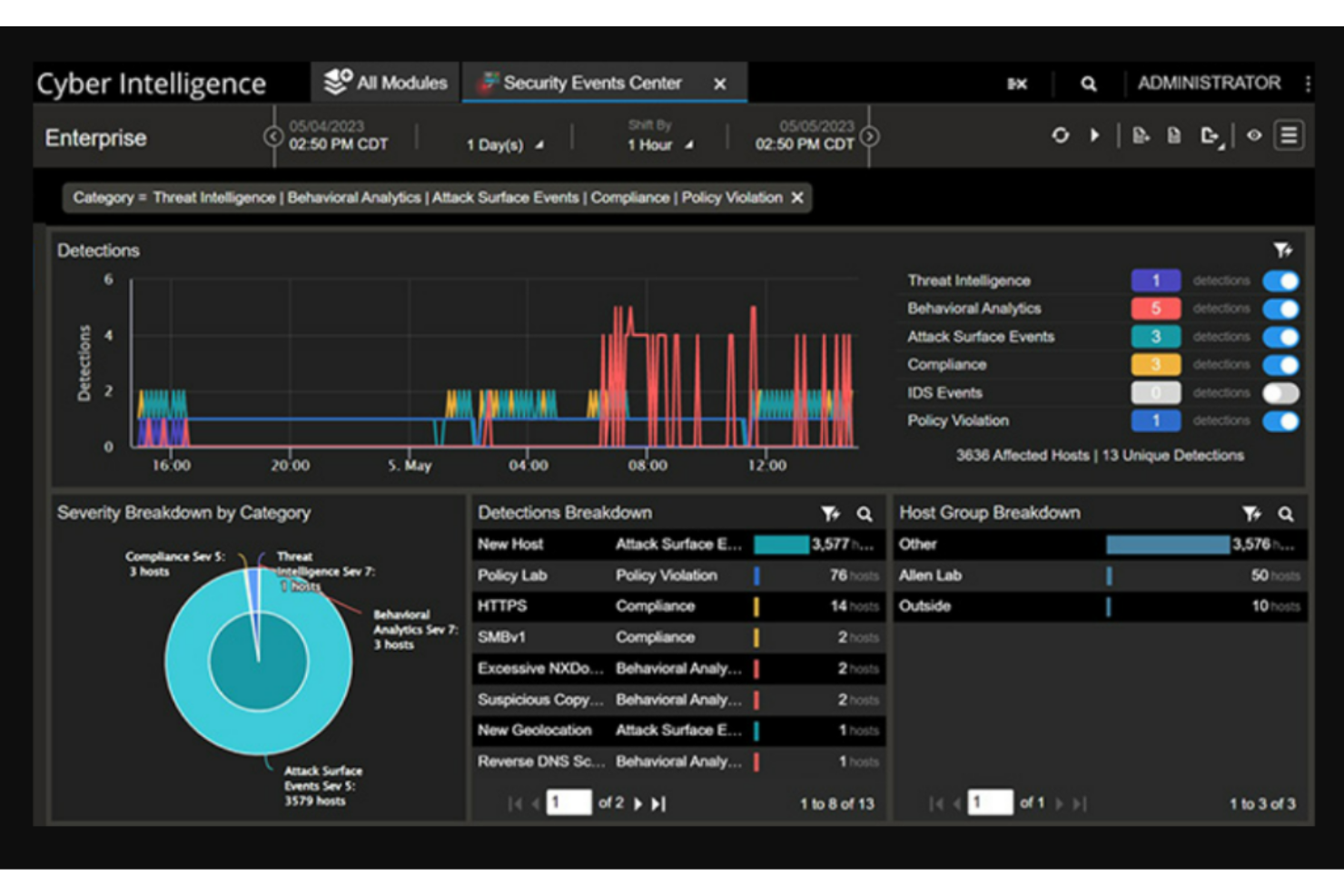
NETSCOUT Omnis Network Security is a comprehensive tool designed to offer in-depth insights into digital ecosystems, ensuring robust network security. Its capabilities extend beyond mere detection, providing unparalleled clarity and control over intricate digital environments.
Why I Picked NETSCOUT Omnis Network Security:
In the process of selecting a solution offering profound visibility into digital ecosystems, NETSCOUT's Omnis Network Security emerged as a clear front-runner. I determined its superiority by comparing its features with other tools and judging their relevance to the modern digital landscape. I chose this tool because it not only provides the necessary visibility but also improves the depth of understanding about digital interactions, making it the "Best for visibility into digital ecosystems."
Standout Features and Integrations:
NETSCOUT Omnis Network Security is equipped with a suite of features that enables real-time monitoring and threat detection. This tool provides a granular view of network interactions, ensuring that potential risks are identified promptly. Furthermore, its integration capabilities with tools like ManageEngine add an extra layer of versatility, improving its network security audit capabilities.
Pros and Cons
Pros:
- Advanced threat detection capabilities.
- Integration with leading solutions like ManageEngine.
- Comprehensive monitoring and visualization of digital interactions.
Cons:
- Customization might require specialized expertise.
- The user interface may have a steeper learning curve for some.
- Might be overwhelming for smaller organizations.


Zeek offers a deep dive into the intricate world of network traffic, breaking it down in real time for precise analysis. Its specialty is dissecting live network traffic, aligning perfectly with its accolade as the top pick for real-time analysis.
Why I Picked Zeek:
When determining which tools to spotlight, Zeek's prowess in real-time network traffic analysis immediately stood out. I chose it after meticulous comparison with other network security audit tools, and my judgement consistently led back to Zeek due to its distinctiveness in providing live insights. This unique capability to analyze network traffic as it happens is precisely why it's unmatched for real-time analysis.
Standout Features and Integrations:
Zeek is renowned for its scriptable interface, allowing admins to customize the tool according to their unique requirements. It not only uncovers network vulnerabilities but can also detect malware and cyberattacks with its deep inspection capabilities. The tool integrates well with SIEM solutions, improving its value for security teams needing a broader view of their IT infrastructure.
Pros and Cons
Pros:
- Integration with various SIEM solutions.
- Accurate detection of malware and potential cyberattacks in real-time.
- Scriptable interface offers a high degree of customization.
Cons:
- Pricing transparency could be better, as direct rates aren't readily available on their website.
- Being an open-source tool, it may lack the polish of commercial alternatives.
- Might have a steep learning curve for those unfamiliar with scripting.
Weitere Tools für Netzwerk-Sicherheitsaudits
Im Folgenden finden Sie eine zusätzliche Liste von Netzwerk-Sicherheitsaudit-Tools, die ich in die nähere Auswahl gezogen habe, die es aber nicht in die Top 10 geschafft haben. Ein Blick lohnt sich trotzdem.
- Security Onion
For intrusion detection and forensics
- Acunetix
For web application scanning
- N-able
Good for MSP-friendly network audits
- Aircrack-ng
Good for WiFi network security testing
- NMap
Good for detailed network discovery
- Wireshark
Good for deep packet inspection
- Snort
Good for signature-based intrusion detection
- Suricata
Good for high-performance IDS, IPS, and NSM
- OpenVAS
Good for open-source vulnerability scanning
- Arctic Wolf
Good for managed security awareness training
- QualysGuard
Good for integrated vulnerability management
- Nanitor
Good for compliance-driven vulnerability audits
- Ivanti Neurons for RBVM
Good for risk-based vulnerability management


Auswahlkriterien für Netzwerk-Sicherheitsaudit-Tools
Bei der Auswahl der besten Tools für Netzwerk-Sicherheitsaudits, die ich in diese Liste aufgenommen habe, habe ich auf die Bedürfnisse und Herausforderungen von Käufern geachtet – wie das Auffinden von Schwachstellen und die Einhaltung gesetzlicher Anforderungen. Außerdem habe ich folgendes Bewertungsschema angewendet, um die Analyse nachvollziehbar und fair zu gestalten:
Kernfunktionen (25 % der Gesamtbewertung)
Zur Aufnahme in diese Liste musste jede Lösung die folgenden Anforderungen erfüllen:
- Erkennung von Netzwerkschwachstellen
- Regelmäßige Sicherheitsüberprüfungen durchführen
- Einhaltung von Standards und Richtlinien gewährleisten
- Überwachung des Netzwerkverkehrs
- Ausgabe detaillierter Sicherheitsberichte
Herausragende Zusatzfunktionen (25 % der Gesamtbewertung)
Um die Auswahl weiter einzugrenzen, habe ich außerdem auf besondere Merkmale geachtet, zum Beispiel:
- Echtzeit-Bedrohungswarnungen
- Anpassbare Dashboards
- Automatisierte Handlungsempfehlungen zur Fehlerbehebung
- Integration mit Drittanbieter-Tools
- Fortschrittliche Datenverschlüsselung
Benutzerfreundlichkeit (10 % der Gesamtbewertung)
Um das Nutzererlebnis der einzelnen Systeme einzuschätzen, habe ich Folgendes betrachtet:
- Intuitive Benutzeroberfläche
- Einfache Navigation
- Geringe Einarbeitungszeit
- Übersichtliche Dokumentation
- Responsives Design
Onboarding (10 % der Gesamtbewertung)
Um die Qualität der Einführung bei jeder Plattform zu beurteilen, habe ich Folgendes berücksichtigt:
- Verfügbarkeit von Schulungsvideos
- Schritt-für-Schritt-Einrichtungsanleitungen
- Interaktive Produkttouren
- Zugang zu Webinaren
- Hilfreiche Chatbots
Kundensupport (10 % der Gesamtbewertung)
Um die Kundensupport-Leistungen jedes Software-Anbieters zu bewerten, habe ich folgende Kriterien berücksichtigt:
- Rund-um-die-Uhr-Erreichbarkeit
- Verschiedene Support-Kanäle
- Reaktionszeit
- Kompetentes Personal
- Umfassende FAQs
Preis-Leistungs-Verhältnis (10 % der Gesamtbewertung)
Um das Preis-Leistungs-Verhältnis jeder Plattform einzuschätzen, habe ich folgende Aspekte beachtet:
- Wettbewerbsfähige Preisgestaltung
- Flexible Abonnementpläne
- Verfügbarkeit einer kostenlosen Testversion
- Kosten im Verhältnis zu den gebotenen Funktionen
- Rabatte bei langfristiger Nutzung
Kundenbewertungen (10 % der Gesamtbewertung)
Um einen Eindruck von der allgemeinen Kundenzufriedenheit zu gewinnen, habe ich beim Lesen von Kundenbewertungen auf Folgendes geachtet:
- Allgemeine Zufriedenheitsbewertung
- Feedback zur Wirksamkeit von Funktionen
- Kommentare zur Benutzerfreundlichkeit
- Erfahrungen mit dem Support
- Wahrnehmung des Preis-Leistungs-Verhältnisses
Wie wählt man ein Tool für die Netzwerksicherheitsaudits aus?
Lange Funktionslisten und komplizierte Preisstrukturen können schnell überfordern. Damit Sie beim Auswahlprozess für Ihre individuelle Softwarelösung den Überblick behalten, finden Sie hier eine Checkliste der wichtigsten Faktoren:
| Faktor | Worauf achten? |
|---|---|
| Skalierbarkeit | Kann das Tool mit Ihrem Unternehmen wachsen? Berücksichtigen Sie die Anzahl der zu unterstützenden Geräte und Nutzer – jetzt und in Zukunft. Wählen Sie Lösungen, die skalierbare Pläne anbieten. |
| Integrationen | Funktioniert das Tool mit Ihrer aktuellen IT-Landschaft? Prüfen Sie die Kompatibilität mit bestehenden Systemen wie SIEM, Ticketing- oder Cloud-Lösungen. Meiden Sie Tools, die aufwändige, eigene Integrationen verlangen. |
| Anpassbarkeit | Lässt sich das Tool an Ihre Arbeitsabläufe anpassen? Achten Sie darauf, ob Benachrichtigungen, Berichte und Dashboards konfigurierbar sind und individuelle Bedürfnisse erfüllen. Vermeiden Sie unflexible Lösungen. |
| Benutzerfreundlichkeit | Ist es für Ihr Team einfach zu bedienen? Testen Sie die Oberfläche auf intuitive Navigation. Komplexe Tools, die viel Schulung benötigen, sollten vermieden werden. |
| Implementierung und Onboarding | Wie schnell kann das Tool in Betrieb genommen werden? Berücksichtigen Sie Zeit- und Ressourcenaufwand für die Einrichtung. Bevorzugen Sie Lösungen mit klaren Anleitungen und Unterstützung beim Einstieg. |
| Kosten | Passen die Kosten in Ihr Budget? Vergleichen Sie Preismodelle und die Gesamtbetriebskosten, inklusive versteckter Gebühren. Suchen Sie nach kostenlosen Testphasen oder Demos, um den Wert zu prüfen. |
| Sicherheitsmaßnahmen | Erfüllt das Tool Ihre Sicherheitsanforderungen? Bewerten Sie Verschlüsselung, Datenschutz und Einhaltung von Vorschriften. Bevorzugen Sie Lösungen, die Sicherheit in den Mittelpunkt stellen. |
| Compliance-Anforderungen | Erfüllt es Ihre Compliance-Vorgaben? Stellen Sie sicher, dass das Tool branchenspezifische Regulierungen wie DSGVO oder HIPAA unterstützt. Vermeiden Sie Tools, denen notwendige Compliance-Funktionen fehlen. |
Was ist ein Tool für die Netzwerksicherheitsaudit?
Ein Tool für die Netzwerksicherheitsaudit ist eine spezialisierte Softwarelösung, die entwickelt wurde, um den Sicherheitsstatus der digitalen Infrastruktur eines Unternehmens zu prüfen, zu überwachen und zu verbessern. IT-Fachkräfte, Netzwerkadministratoren sowie Sicherheitsspezialisten nutzen diese Tools, um Schwachstellen, Fehlkonfigurationen und potenzielle Bedrohungen im eigenen Netzwerk zu erkennen.
Mit diesen Instrumenten können Unternehmen Sicherheitslücken erkennen, bevor sie von Angreifern ausgenutzt werden, und so sowohl die Datenintegrität als auch die Betriebskontinuität gewährleisten. Dazu zählt auch die umfassende Prüfung von Netzwerkgrenzen mithilfe spezieller Firewall-Audit-Software.
Funktionen
Bei der Auswahl eines Tools für die Netzwerksicherheitsaudit sollten Sie besonders auf folgende Schlüsselfunktionen achten:
- Schwachstellen-Scan: Identifiziert automatisch potenzielle Sicherheitsrisiken innerhalb Ihres Netzwerks, damit Sie Prioritäten bei der Behebung setzen können.
- Verkehrsüberwachung: Überwacht und analysiert den Datenfluss, um ungewöhnliche Muster oder potenzielle Bedrohungen in Echtzeit zu erkennen.
- Compliance-Prüfungen: Stellt sicher, dass Ihr Netzwerk branchenspezifischen Vorschriften wie DSGVO oder HIPAA entspricht, um Strafen zu vermeiden.
- Anpassbare Dashboards: Ermöglichen es Ihnen, die Oberfläche individuell zu gestalten, um die für Ihre Anforderungen relevantesten Informationen anzuzeigen.
- Integrationsfähigkeit: Verbindet sich nahtlos mit anderen Tools in Ihrer Technologielandschaft wie SIEM- oder Ticketsystemen, um die Gesamtfunktionalität zu verbessern.
- Echtzeit-Bedrohungsalarme: Liefert sofortige Benachrichtigungen über potenzielle Sicherheitsvorfälle, sodass Sie schnell reagieren und Gegenmaßnahmen einleiten können.
- Automatisierte Berichte: Erstellt detaillierte Sicherheitsberichte, um Schwachstellen zu verfolgen und Compliance-Bemühungen zu belegen.
- Benutzerzugriffssteuerungen: Verwalten, wer Netzwerk-Einstellungen sehen oder ändern darf, und bieten so eine zusätzliche Sicherheitsebene für Ihr Unternehmen.
- Datenverschlüsselung: Schützt sensible Informationen innerhalb Ihres Netzwerks vor unbefugtem Zugriff und Datenverstößen.
- Interaktive Onboarding-Guides: Bieten Schritt-für-Schritt-Anleitungen und Ressourcen, damit neue Nutzer das Tool schnell verstehen und einsetzen können.
Vorteile
Der Einsatz von Netzwerk-Sicherheitsaudit-Tools bringt zahlreiche Vorteile für Ihr Team und Ihr Unternehmen. Hier sind einige der Vorteile, auf die Sie sich freuen können:
- Verbesserte Sicherheitslage: Regelmäßige Schwachstellen-Scans und Echtzeit-Bedrohungsalarme helfen Ihnen, Sicherheitsrisiken proaktiv anzugehen.
- Regulatorische Compliance: Compliance-Prüfungen sorgen für die Einhaltung von Branchenstandards und reduzieren das Risiko von Geldstrafen.
- Effiziente Ressourcennutzung: Automatisierte Berichte und anpassbare Dashboards liefern Einblicke, die helfen, Sicherheitsmaßnahmen gezielt zu priorisieren.
- Erhöhter Datenschutz: Funktionen wie Datenverschlüsselung und Benutzerzugriffskontrollen schützen sensible Daten vor unberechtigtem Zugriff.
- Steigerung der operativen Effizienz: Integrationsmöglichkeiten ermöglichen eine nahtlose Zusammenarbeit mit bestehenden Tools und optimieren das Workflow-Management.
- Schnelle Reaktion auf Vorfälle: Echtzeit-Alarme und Verkehrsüberwachung ermöglichen eine zügige Erkennung und Behebung potenzieller Bedrohungen.
- Benutzerfreundliches Onboarding: Interaktive Anleitungen und anpassbare Benutzeroberflächen erleichtern Teams den Einstieg und die effektive Nutzung des Tools.
Kosten und Preise
Die Auswahl eines Netzwerk-Sicherheitsaudit-Tools erfordert ein Verständnis der verschiedenen verfügbaren Preisstrukturen und -modelle. Die Kosten variieren je nach Funktionsumfang, Teamgröße, Zusatzoptionen und mehr. Die folgende Tabelle fasst gängige Tarife, ihre durchschnittlichen Preise und typische Funktionen von Netzwerk-Sicherheitsaudit-Tool-Lösungen zusammen:
Tarifvergleichstabelle für Netzwerk-Sicherheitsaudit-Tools
| Tarifart | Durchschnittlicher Preis | Typische Funktionen |
|---|---|---|
| Gratis-Tarif | $0 | Grundlegender Schwachstellen-Scan, eingeschränkte Verkehrsüberwachung und Community-Support. |
| Personal-Tarif | $10-$30/user/month | Erweiterte Scan-Optionen, anpassbare Dashboards, Netzwerk-Mapping-Tools und E-Mail-Support. |
| Business-Tarif | $50-$100/user/month | Umfassende Compliance-Prüfungen, Integrationsmöglichkeiten, Echtzeit-Bedrohungsalarme und automatisierte Berichte. |
| Enterprise-Tarif | $150-$300/user/month | Vollumfängliche Datenverschlüsselung, dedizierter Account-Manager, priorisierter Kundensupport und maßgeschneiderte Onboarding-Services. |
FAQs zu Tools für Netzwerksicherheitsaudits
Hier finden Sie Antworten auf häufig gestellte Fragen zu Tools für Netzwerksicherheitsaudits:
Wie oft sollten Netzwerksicherheitsaudits durchgeführt werden?
Netzwerksicherheitsaudits sollten regelmäßig durchgeführt werden, oft vierteljährlich oder halbjährlich – je nach Größe und Risikolevel Ihres Unternehmens. Durch regelmäßige Audits bleiben Sie möglichen Schwachstellen einen Schritt voraus und stellen die Einhaltung von Branchenstandards sicher. Berücksichtigen Sie bei der Planung der Audit-Häufigkeit die Komplexität Ihres Netzwerks und eventuelle Änderungen.
Was sind die größten Herausforderungen bei der Nutzung von Netzwerksicherheitsaudit-Tools?
Typische Herausforderungen sind das Management von Fehlalarmen, die Komplexität der Einrichtung und die Sicherstellung, dass das Tool alle Aspekte Ihres Netzwerks abdeckt. Es ist wichtig, ein Tool zu wählen, das eine klare Dokumentation und Support bietet, um diese Herausforderungen wirksam zu bewältigen.
Brauchen Tools für Netzwerksicherheitsaudits spezielle Schulungen?
Während einige Tools benutzerfreundlich sind, erfordern andere tatsächlich spezielle Schulungen für eine effektive Nutzung. Achten Sie auf Tools mit umfassenden Onboarding-Ressourcen wie Schulungsvideos und interaktiven Anleitungen, damit Ihr Team schnell auf den aktuellen Stand kommt.
Was tun, wenn ein Netzwerksicherheitsaudit-Tool eine Schwachstelle identifiziert?
Wird eine Schwachstelle gefunden, priorisieren Sie deren Behebung nach Risikostufe. Nutzen Sie die Reporting-Funktionen des Tools, um die Auswirkungen zu verstehen und entsprechende Maßnahmen zu ergreifen. Arbeiten Sie eng mit Ihrem IT-Team zusammen, um Korrekturen umzusetzen und die Situation weiterhin zu überwachen.
Wie geht es weiter:
Wenn Sie gerade nach einem Tool für Netzwerksicherheitsaudits recherchieren, können Sie sich kostenlos an einen SoftwareSelect-Berater wenden und Empfehlungen erhalten.
Sie füllen ein Formular aus und führen ein kurzes Gespräch, in dem die Berater auf Ihre spezifischen Anforderungen eingehen. Danach erhalten Sie eine engere Auswahl an Softwarelösungen zur Überprüfung. Die Berater unterstützen Sie sogar durch den gesamten Kaufprozess, einschließlich Preisverhandlung.