

Ihr Leitfaden zu den 10 besten IoT-Softwares im Jahr 2026

10 Beste IoT-Software Shortlist
Here's my pick of the 10 best software from the 12 tools reviewed.


IoT-Software hilft Ihnen, Geräte zu verbinden und zu verwalten, damit Sie Daten sammeln, Prozesse automatisieren und Ihr Unternehmen effizienter steuern können.
Viele Teams suchen nach solchen Tools, wenn sie sich über lückenhafte Daten, unsichere Geräte oder die Herausforderung bei der Aktualisierung von Firmware ärgern. Ohne eine klare IoT-Plattform können vernetzte Systeme schnell chaotisch und kostspielig in der Wartung werden.
Ich habe mit Startups zusammengearbeitet, um IoT-Systeme aufzubauen, die Gerätemanagement, Datenpipelines und Sicherheit in realen Anwendungen meistern. Dieser Leitfaden basiert auf diesen Erfahrungen, um Ihnen bei der Auswahl der passenden Software zu helfen und vernetzte Geräte optimal für Sie zu nutzen.
Why Trust Our Software Reviews
We’ve been testing and reviewing software since 2023. As tech leaders ourselves, we know how critical and difficult it is to make the right decision when selecting software.
We invest in deep research to help our audience make better software purchasing decisions. We’ve tested more than 2,000 tools for different tech use cases and written over 1,000 comprehensive software reviews. Learn how we stay transparent & our software review methodology.
Beste IoT-Software Zusammenfassung
Diese Vergleichstabelle fasst die Preisinformationen meiner wichtigsten IoT-Software-Auswahlen zusammen, damit Sie die beste Lösung für Ihr Budget und Ihre geschäftlichen Anforderungen finden können.
| Tool | Best For | Trial Info | Price | ||
|---|---|---|---|---|---|
| 1 | Am besten geeignet für sichere IoT-Gerätekommunikation | Kostenlose Testversion verfügbar | Ab $10/Benutzer/Monat | Website | |
| 2 | Am besten für cloud-native IoT-Konnektivität | 30-tägige kostenlose Testversion + kostenlose Demo verfügbar | Preis auf Anfrage | Website | |
| 3 | Am besten für die Integration von mobilen Apps mit IoT | Kostenloser Tarif verfügbar | Ab $4.99/Nutzer/Monat (mindestens 5 Nutzer) | Website | |
| 4 | Am besten geeignet für Echtzeitdatenvisualisierung | Kostenloser Plan verfügbar | Ab $10/Nutzer/Monat (mindestens 5 Plätze) | Website | |
| 5 | Am besten für IoT-Management mit Cloud-Unterstützung | Kostenlose Stufe verfügbar | Startpreis beträgt $0.008 pro Million gesendeter Nachrichten | Website | |
| 6 | Am besten für die IoT-Lösungsentwicklung im Microsoft-Ökosystem geeignet | Not available | Der Einstiegspreis für die Standardstufe beträgt $0,50 pro Gerät und Monat (jährliche Abrechnung) | Website | |
| 7 | Am besten für IoT-API-Integration | Kostenlose Testversion verfügbar | Preis auf Anfrage | Website | |
| 8 | Am besten für die IoT-Hardwareentwicklung geeignet | Kostenloser Plan verfügbar | Ab $2/Nutzer/Monat (jährlich abgerechnet) | Website | |
| 9 | Am besten für vollständiges IoT-Plattformmanagement | Not available | Ab $15/Nutzer/Monat | Website | |
| 10 | Am besten geeignet für anpassbare IoT-Anwendungen | Not available | Preise auf Anfrage | Website |
-

Site24x7
Visit WebsiteThis is an aggregated rating for this tool including ratings from Crozdesk users and ratings from other sites.4.6 -
GitHub Actions
Visit WebsiteThis is an aggregated rating for this tool including ratings from Crozdesk users and ratings from other sites.4.8 -
Docker
Visit WebsiteThis is an aggregated rating for this tool including ratings from Crozdesk users and ratings from other sites.4.6





Beste IoT-Software Bewertungen
Im Folgenden finden Sie meine ausführlichen Zusammenfassungen der besten IoT-Software, die es in meine Shortlist geschafft haben. Meine Bewertungen geben einen detaillierten Einblick in die wichtigsten Funktionen, Vor- u0026 Nachteile, Integrationen und idealen Einsatzszenarien jedes Tools, damit Sie die beste Lösung für sich finden können.

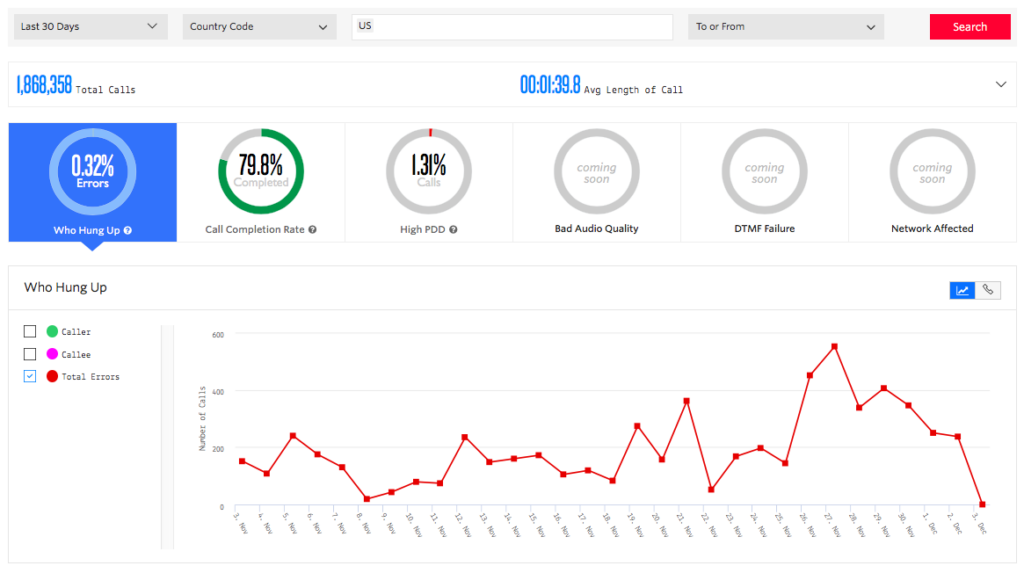
Twilio bietet eine IoT-Plattform, die sich auf sichere und zuverlässige Kommunikation zwischen Geräten konzentriert. Ein umfassender Satz von APIs und eine skalierbare Infrastruktur ermöglichen es Unternehmen, vernetzte Geräte in einer sicheren Umgebung zu entwickeln und zu verwalten. Damit eignet sich Twilio besonders für eine geschützte Kommunikation von IoT-Geräten.
Warum ich Twilio ausgewählt habe: Ich habe Twilio wegen seines Engagements für Sicherheit und Zuverlässigkeit in der Kommunikation von IoT-Geräten ausgewählt. Twilio hebt sich durch seine globale Reichweite, vielseitigen APIs und robusten Sicherheitsfunktionen hervor, die eine sichere Datenübertragung gewährleisten. Ich bin zu dem Schluss gekommen, dass diese Merkmale Twilio zur besten Wahl für alle machen, die sichere Kommunikation zwischen IoT-Geräten priorisieren – unabhängig davon, ob im kleinen oder großen Maßstab.
Hervorstechende Funktionen & Integrationen:
Zu den wichtigsten Funktionen von Twilio gehören Ende-zu-Ende-Verschlüsselung, starke Geräteauthentifizierung und ein flexibler Satz an Kommunikations-APIs für Messaging-, Sprach- und Video-Interaktionen. Es lässt sich mit verschiedenen Programmiersprachen und Frameworks wie Python, Java und Node.js integrieren und bietet Kompatibilität mit vielen führenden Cloud-Plattformen, einschließlich AWS, Azure und Google Cloud.
Pros and Cons
Pros:
- Starke Sicherheitsfunktionen gewährleisten eine sichere Datenübertragung
- Vielseitige APIs ermöglichen eine breite Palette an Kommunikationsoptionen
- Kompatibilität mit gängigen Programmiersprachen und Cloud-Plattformen bietet Flexibilität
Cons:
- Könnte für Nutzer ohne Entwicklungserfahrung komplexer sein
- Die Kosten können bei umfangreicher Nutzung steigen
- Eventuell mehr Funktionen als für sehr einfache IoT-Kommunikationsaufgaben benötigt

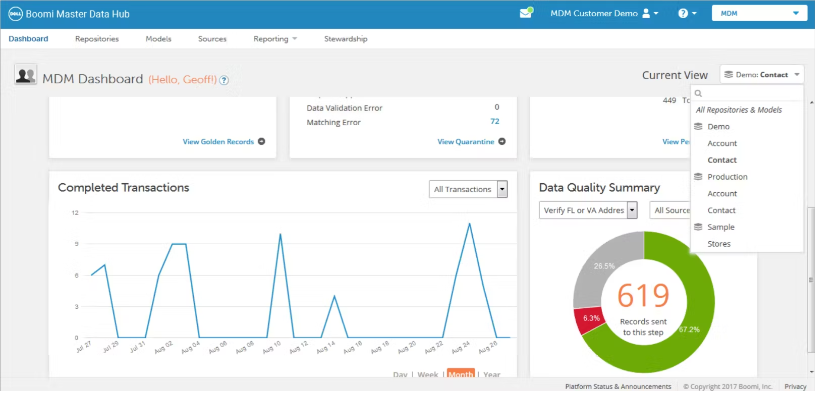
Boomi ist eine führende Integration Platform as a Service (iPaaS), die sich auf cloud-native Integrationen spezialisiert hat, einschließlich der Verbindung von IoT-Geräten mit Cloud-Umgebungen. Durch den Fokus auf zuverlässige, skalierbare cloudbasierte Verbindungen für IoT-Ökosysteme ist sie besonders geeignet für cloud-native IoT-Konnektivität.
Warum ich Boomi gewählt habe: Ich habe mich für Boomi entschieden, weil es speziell auf cloud-native Integrationen ausgerichtet ist, was in der heutigen datengetriebenen Welt eine zentrale Rolle spielt. Beim Vergleich und Bewerten verschiedener Tools ist mir Boomi durch seine Spezialisierung auf die Integration von Cloud- und lokalen Anwendungen besonders aufgefallen. Die Fähigkeit, die Kluft zwischen IoT-Geräten und Cloud-Plattformen zu überbrücken, hebt Boomi von anderen Anbietern ab und macht es für mich zur besten Wahl für cloud-native IoT-Konnektivität.
Herausragende Funktionen & Integrationen:
Boomi bietet eine intuitive Drag-and-Drop-Oberfläche, die die Entwicklung von Integrationsflüssen zwischen Cloud- und lokalen Endpunkten vereinfacht. Die AtomSphere-Plattform innerhalb von Boomi ermöglicht die Bewegung von Daten zwischen verschiedenen Umgebungen und stellt sicher, dass IoT-Daten dort verfügbar sind, wo sie benötigt werden. Die Integrationen mit führenden Cloud-Anbietern wie AWS, Azure und Google Cloud erlauben eine reibungslose Konnektivität zwischen IoT-Geräten und Cloud-Diensten.
Pros and Cons
Pros:
- Starker Fokus auf cloud-native Integrationen ermöglicht flexible Vernetzung von IoT-Geräten
- Benutzerfreundliche Oberfläche, die die Einarbeitung für neue Nutzer erleichtert
- Breite Kompatibilität mit führenden Cloud-Anbietern
Cons:
- Preisinformationen sind nicht transparent, was die Budgetplanung erschweren kann
- Für manche komplexe Integrationen sind technische Kenntnisse erforderlich
- Begrenzte Dokumentation und Community-Unterstützung im Vergleich zu einigen anderen Plattformen

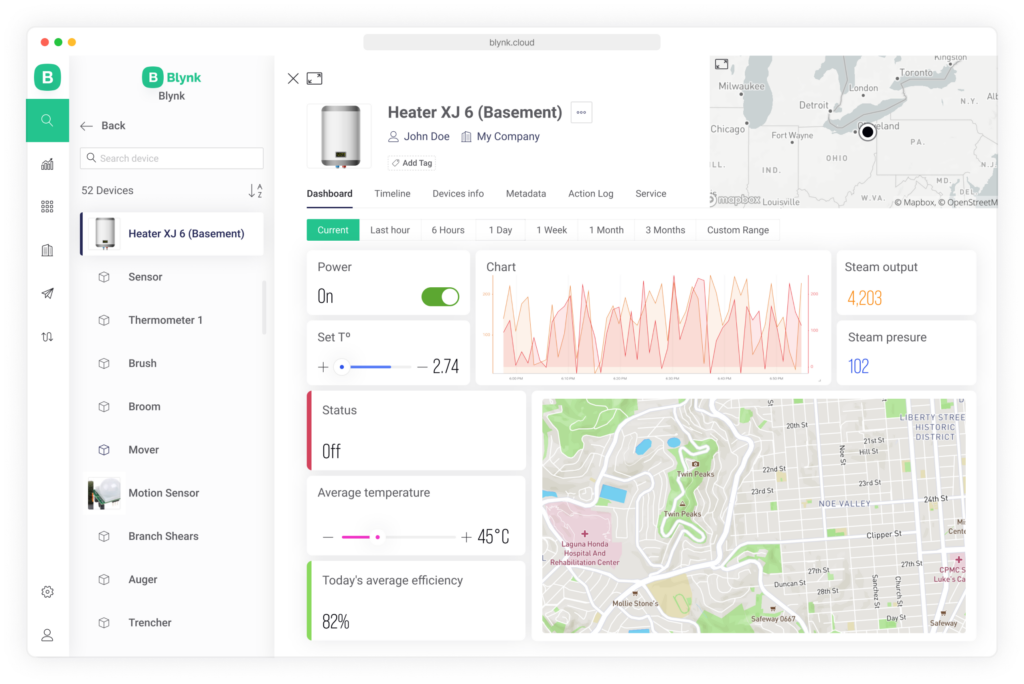
Blynk verbindet IoT-Geräte und mobile Apps für eine einfache Integration und ist daher eine beliebte Wahl, um IoT-Projekte durch die Interaktion mit mobilen Apps zu verbessern.
Warum ich Blynk gewählt habe: Ich habe Blynk ausgewählt, weil es sich auf die Integration mobiler Apps mit IoT-Geräten konzentriert. Während meines Auswahlprozesses habe ich mehrere Plattformen verglichen, aber die dedizierten mobilen App-Bibliotheken und Vorlagen von Blynk hoben sich von den anderen ab. Die Möglichkeit, benutzerdefinierte mobile Anwendungen zu erstellen, die direkt mit IoT-Geräten interagieren ohne umfangreiche Programmierung, ist der Grund, warum ich Blynk als die beste Lösung für die mobile App-Integration mit IoT bewertet habe.
Hervorstechende Funktionen & Integrationen:
Blynk bietet eine Drag-and-Drop-Oberfläche zur Erstellung mobiler Apps, die speziell auf IoT-Geräte zugeschnitten sind. Diese Funktion ermöglicht es Entwicklern, individuelle Schnittstellen zu entwerfen, die mit ihrer Hardware kommunizieren, ohne umfangreichen Code schreiben zu müssen. Zu den wichtigsten Integrationen zählen die Unterstützung einer Vielzahl von Hardware-Plattformen wie Arduino, Raspberry Pi und ESP8266 sowie die Kompatibilität mit Android und iOS zur Bereitstellung der Apps.
Pros and Cons
Pros:
- Benutzerfreundliche Oberfläche zur Erstellung mobiler Apps, die auf IoT-Geräte zugeschnitten sind
- Umfangreiche Unterstützung beliebter Hardware-Plattformen
- Bietet sowohl Cloud- als auch On-Premises-Bereitstellungsoptionen
Cons:
- Kann für Entwickler, die komplexere, codeintensive Lösungen suchen, einschränkend sein
- Mindestens 5 Nutzer könnten für kleinere Teams oder Einzelanwender hinderlich sein
- Begrenzte Funktionalitäten über die mobile App-Integration hinaus, für umfassende IoT-Entwicklung könnten zusätzliche Tools erforderlich sein

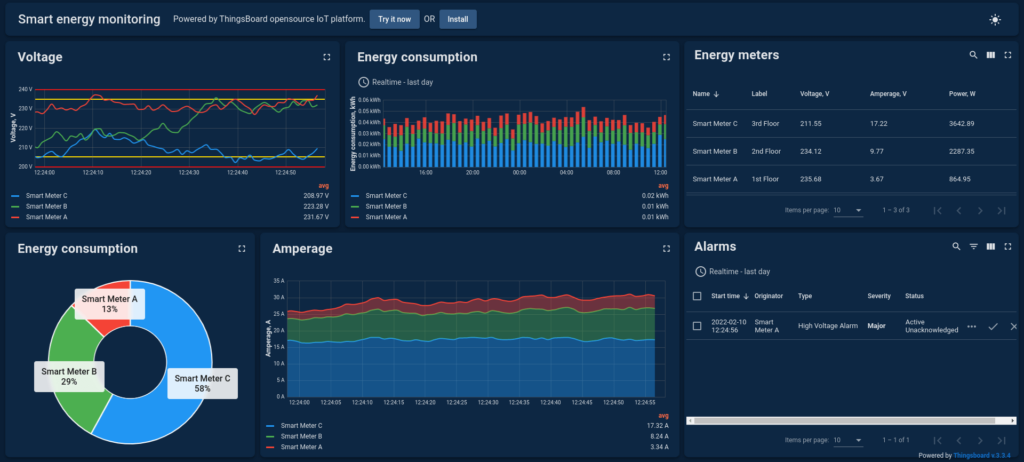
ThingsBoard ist eine Open-Source-Plattform, die sich auf das Management von Geräten, Assets und die komplexe Verarbeitung sowie Visualisierung von Echtzeitdaten konzentriert. Sie bietet Dashboards, Analysen und Funktionen, die explizit auf die Visualisierung von Daten in Echtzeit zugeschnitten sind und somit das bevorzugte Tool für alle darstellen, die sofortige Einblicke in ihre IoT-Daten benötigen.
Warum ich ThingsBoard gewählt habe: Ich habe ThingsBoard auf diese Liste gesetzt, da die Plattform einen einzigartigen Schwerpunkt auf die Visualisierung von Echtzeitdaten legt. Nach dem Vergleich mehrerer Tools habe ich festgestellt, dass insbesondere die Fähigkeit, Daten direkt visuell zu verarbeiten, ThingsBoard von der Konkurrenz abhebt. Der Fokus auf unmittelbare visuelle Einblicke macht ThingsBoard zur besten Wahl für alle, die auf Echtzeitdatenvisualisierung angewiesen sind – besonders in Branchen, in denen schnelle Entscheidungen notwendig sind.
Herausragende Funktionen & Integrationen:
Zu den besonderen Merkmalen von ThingsBoard zählen eine große Auswahl an Widgets zur Erstellung individuell anpassbarer Dashboards, Echtzeit-Analysefunktionen und eine Regel-Engine zur Automatisierung. Die Integrationen umfassen verschiedene Datenübertragungsprotokolle wie MQTT, HTTP, CoAP sowie gängige Datenbanken und stellen so die Kompatibilität mit unterschiedlichen Datenquellen und Formaten sicher.
Pros and Cons
Pros:
- Anpassbare Widgets ermöglichen individuelle Visualisierungen
- Echtzeitanalysen liefern sofortige Einblicke
- Breite Palette an Integrationen mit beliebten Datenbanken und Protokollen
Cons:
- Es sind mindestens fünf Plätze erforderlich, wodurch ThingsBoard für kleinere Betriebe weniger geeignet ist
- Für Anwender ohne Vorkenntnisse in Datenvisualisierung könnte die Lernkurve steil sein
- Für größere Teams könnten die Kosten abschreckend sein

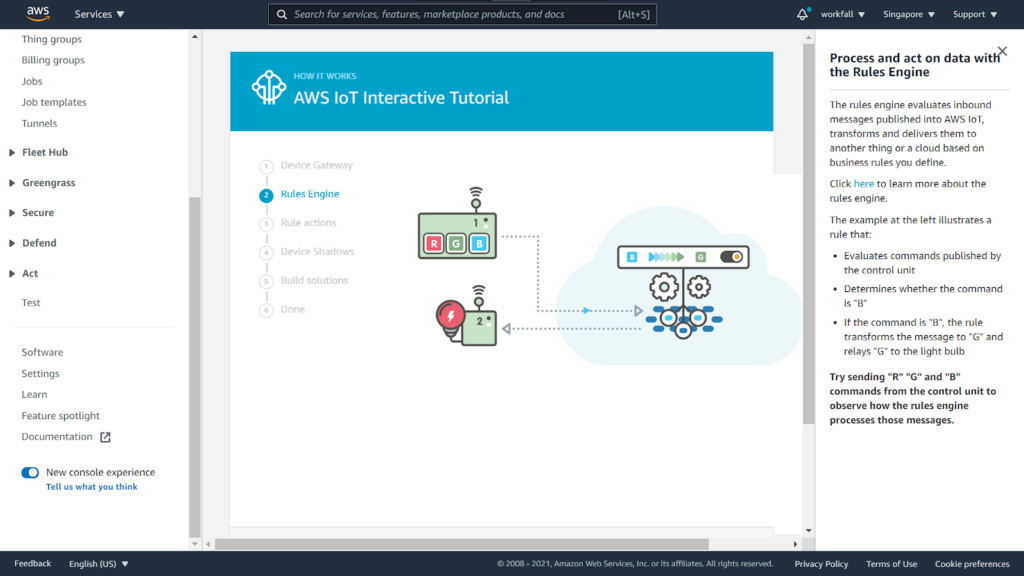
AWS IoT Core ist ein verwalteter Cloud-Service von Amazon Web Services, der es verbundenen Geräten ermöglicht, einfach mit Cloud-Anwendungen und anderen Geräten zu interagieren. Er bietet eine umfassende Lösung zum Sammeln, Verarbeiten, Analysieren und Reagieren auf Daten, die von verbundenen Geräten generiert werden. Besonders vorteilhaft ist dieser Service für diejenigen, die eine leistungsstarke Cloud-Unterstützung für das IoT-Management benötigen.
Warum ich AWS IoT Core gewählt habe: Ich habe AWS IoT Core nach sorgfältigem Vergleich und Bewertung verschiedener IoT-Management-Plattformen ausgewählt, wobei ich besonders auf deren Cloud-Unterstützungsfunktionen geachtet habe. AWS IoT Core überzeugte durch die tiefe Integration mit anderen AWS-Diensten sowie die leistungsstarken Werkzeuge zur Verwaltung, Analyse und Verarbeitung von Gerätedaten. Die Kombination aus Skalierbarkeit, Zuverlässigkeit und funktionsreicher Cloud-Unterstützung macht es am besten für IoT-Management mit Cloud-Unterstützung geeignet.
Hervorstechende Funktionen & Integrationen:
AWS IoT Core bietet Funktionen wie Device Shadow, das eine dauerhafte Repräsentation von Geräten in der Cloud ermöglicht, sowie Unterstützung für das MQTT-Protokoll für effiziente Kommunikation. Die Integration mit anderen AWS-Diensten wie AWS Lambda, Amazon Kinesis, Amazon S3 und Amazon SageMaker erlaubt es Nutzern, hoch skalierbare und individuell angepasste IoT-Anwendungen zu erstellen.
Pros and Cons
Pros:
- Hohe Skalierbarkeit mit Unterstützung für viele Geräte
- Tiefe Integration in das umfassende AWS-Ökosystem
- Starke Sicherheitsfunktionen, einschließlich Ende-zu-Ende-Verschlüsselung
Cons:
- Das Preismodell auf Nachrichtenbasis kann für intensive Nutzung komplex und teuer werden
- Könnte für einfache oder kleine IoT-Projekte überdimensioniert sein
- Einarbeitungszeit für Nutzer, die mit AWS-Services und Architektur nicht vertraut sind

Am besten für die IoT-Lösungsentwicklung im Microsoft-Ökosystem geeignet
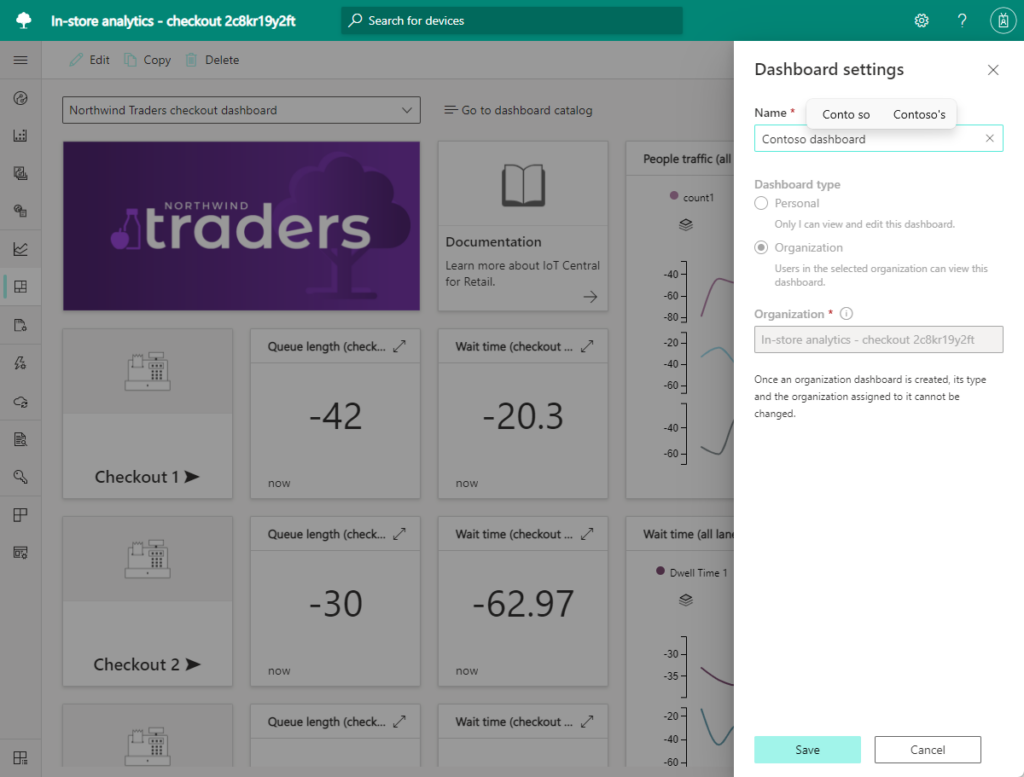
Azure IoT Central ist eine verwaltete Plattform, die das Verbinden und Verwalten von IoT-Geräten vereinfacht. Sie ist in Microsoft integriert und ideal für Unternehmen, die bestehende Technologien ergänzen möchten.
Warum ich Azure IoT Central ausgewählt habe: Ich habe mich für Azure IoT Central aufgrund seiner Stärken bei der effizienten Entwicklung von IoT-Lösungen innerhalb des Microsoft-Ökosystems entschieden. Nach der Ermittlung der Anforderungen und dem Vergleich verschiedener Plattformen wurde deutlich, dass Azure IoT Central durch die Integration mit den vielfältigen Microsoft-Tools und -Services einen Vorteil bietet. Die enge Verknüpfung mit anderen Microsoft-Produkten macht es zur besten Wahl für die IoT-Lösungsentwicklung im Microsoft-Ökosystem.
Hervorstechende Funktionen & Integrationen:
Azure IoT Central stellt Funktionen wie Echtzeitanalysen, Gerätetemplates sowie die Erstellung von Regeln und Aktionen basierend auf Gerätedaten zur Verfügung. Die Integrationen sind innerhalb des Microsoft-Umfelds umfassend und beinhalten wichtige Microsoft-Dienste wie Azure Active Directory, Power BI, Dynamics 365 und mehr. Diese Integrationen ermöglichen einen nahtlosen Workflow in verschiedenen Phasen der IoT-Entwicklung.
Pros and Cons
Pros:
- Vereinfachte Entwicklung innerhalb des Microsoft-Ökosystems
- Bietet vorgefertigte Templates, um IoT-Anwendungen schnell zu erstellen
- Unterstützt eine große Bandbreite an IoT-Geräten und -Protokollen
Cons:
- Die Preisstruktur kann bei steigendem Datenverbrauch komplex werden
- Weniger geeignet für technologieferne Microsoft-Stacks
- Einige Nutzer benötigen bei fortgeschrittenen Funktionen eine gewisse Einarbeitungszeit

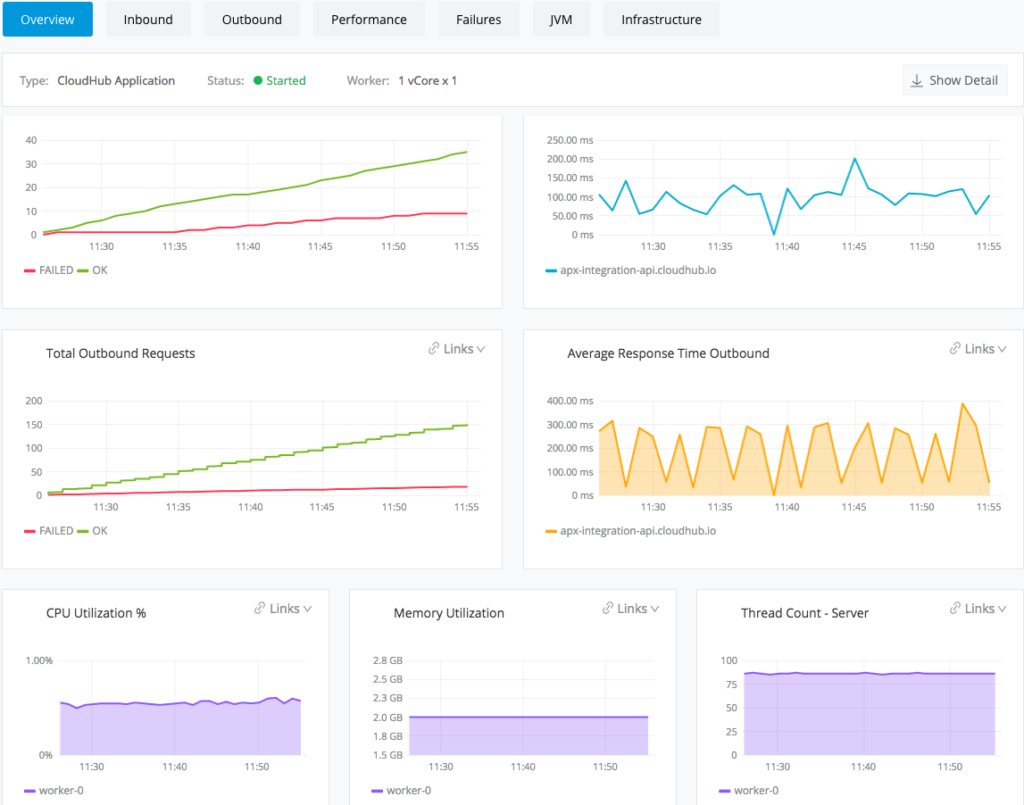
MuleSoft bietet eine Integrationsplattform zum Verbinden verschiedener Anwendungen, Datenquellen und Geräte. Die vollständige Vernetzung von IoT-Geräten und bestehenden Systemen über APIs macht es zu einer ausgezeichneten Wahl für das Management komplexer IoT-Integrationen und rechtfertigt seine Position als beste Lösung für IoT-API-Integration.
Warum ich MuleSoft gewählt habe: Ich habe mich für MuleSoft entschieden, da es eine zuverlässige Erfolgsbilanz bei effizienter und skalierbarer API-Integration auf verschiedenen Plattformen vorweisen kann. Die Fähigkeit, getrennte Systeme und IoT-Geräte zu verbinden, ist beeindruckend und macht MuleSoft zur idealen Wahl für die Handhabung komplexer Integrationen. Nach sorgfältiger Überlegung bin ich überzeugt, dass diese Eigenschaften MuleSoft zur besten Option für IoT-API-Integration machen – besonders für Unternehmen, die IoT-Daten in mehreren Anwendungen nutzen wollen.
Herausragende Funktionen & Integrationen:
Zu den herausragenden Funktionen von MuleSoft zählt die Anypoint Platform, mit der sich APIs auf einer einheitlichen Plattform entwickeln, bereitstellen und verwalten lassen. Dadurch ist die reibungslose Kommunikation zwischen verschiedenen IoT-Geräten möglich. MuleSoft lässt sich mit vielen bekannten Systemen wie Salesforce, SAP, Microsoft Dynamics und weiteren integrieren, wodurch ein freier Informationsfluss zwischen diesen Plattformen und IoT-Geräten gewährleistet ist.
Pros and Cons
Pros:
- Umfassende Integrationsplattform ermöglicht die Konnektivität zwischen verschiedenen Anwendungen und Geräten
- Bietet eine große Auswahl an vorgefertigten Integrationen mit beliebten Plattformen
- Starke Unterstützung und Community mit umfangreichen Ressourcen
Cons:
- Für Personen ohne Integrationserfahrung kann die Einrichtung komplex sein
- Preisgestaltung ist nicht transparent und könnte für kleine Unternehmen im oberen Bereich liegen
- Begrenzte Anpassungsmöglichkeiten bei einigen vorgefertigten Integrationen könnten zusätzliche Entwicklungsarbeit erfordern

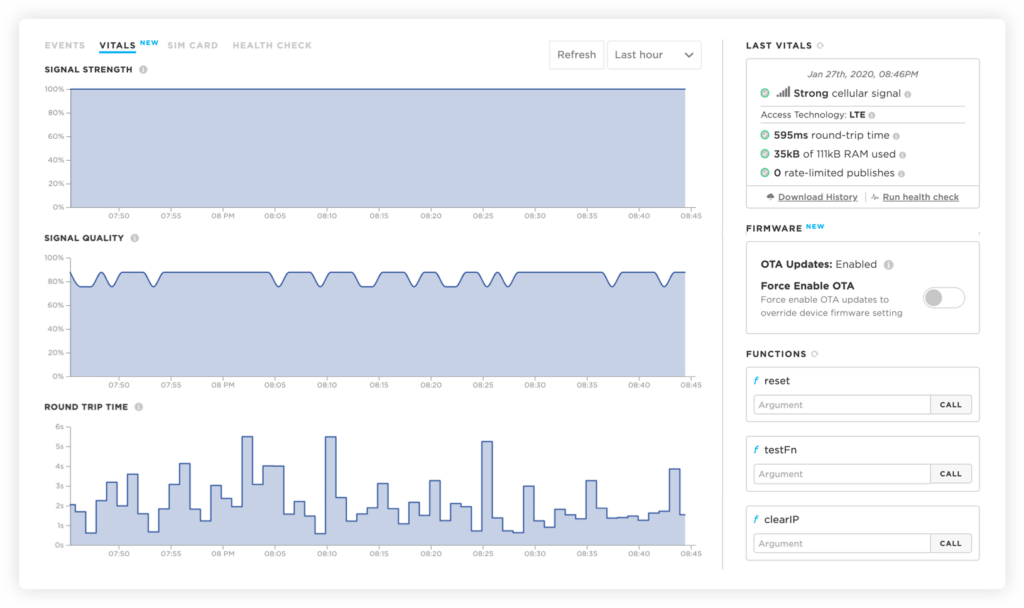
Particle ist eine umfassende Plattform, die den gesamten Lebenszyklus der IoT-Hardwareentwicklung unterstützt – von der Prototypenerstellung bis zur Produktion. Sie bietet Hardware-Module und Software-Tools, die speziell auf IoT-Hardwareentwickler ausgerichtet sind, was sie zur besten Lösung für die IoT-Hardwareentwicklung macht.
Warum ich Particle gewählt habe: Ich habe Particle nach sorgfältigem Vergleich verschiedener Plattformen ausgewählt, die die Entwicklung von IoT-Hardware unterstützen. Der doppelte Fokus auf Hard- und Softwareaspekte der IoT-Entwicklung hebt sie hervor und bietet Entwicklern eine einheitliche Umgebung. Die Integration verschiedener Hardware-Komponenten, Tools und die Unterstützung von Cloud-Konnektivität machen sie besonders geeignet für die Entwicklung von IoT-Hardware – das Gebiet, in dem ich sie für am besten halte.
Hervorstechende Funktionen & Integrationen:
Particle bietet eine Auswahl an Mikrocontroller-Modellen für IoT-Anwendungen sowie eine Cloud-Plattform zur Verwaltung von Geräten. Die Hardware wird vom Device OS von Particle unterstützt, einem leistungsstarken Betriebssystem für IoT-Geräte. Zu den notwendigen Integrationen gehören die Kompatibilität mit gängigen Entwicklungsumgebungen, IoT-Protokollen und Drittanbieter-Cloud-Diensten wie AWS, Azure und Google Cloud.
Pros and Cons
Pros:
- Umfassende Plattform, die sowohl Hard- als auch Softwareaspekte der IoT-Entwicklung abdeckt
- Unterstützung beliebter Cloud-Plattformen erweitert die Konnektivitätsoptionen
- Breites Ökosystem an Tools, einschließlich einer vielseitigen Entwicklungsumgebung für Codierung und Debugging
Cons:
- Die Plattform könnte für Hobbyisten oder Einsteiger zu komplex sein
- Eingeschränkte Unterstützung für Hardware von Drittanbietern kann einige Projekte behindern
- Jährliche Abrechnung ist möglicherweise nicht für diejenigen geeignet, die flexiblere Zahlungsoptionen suchen

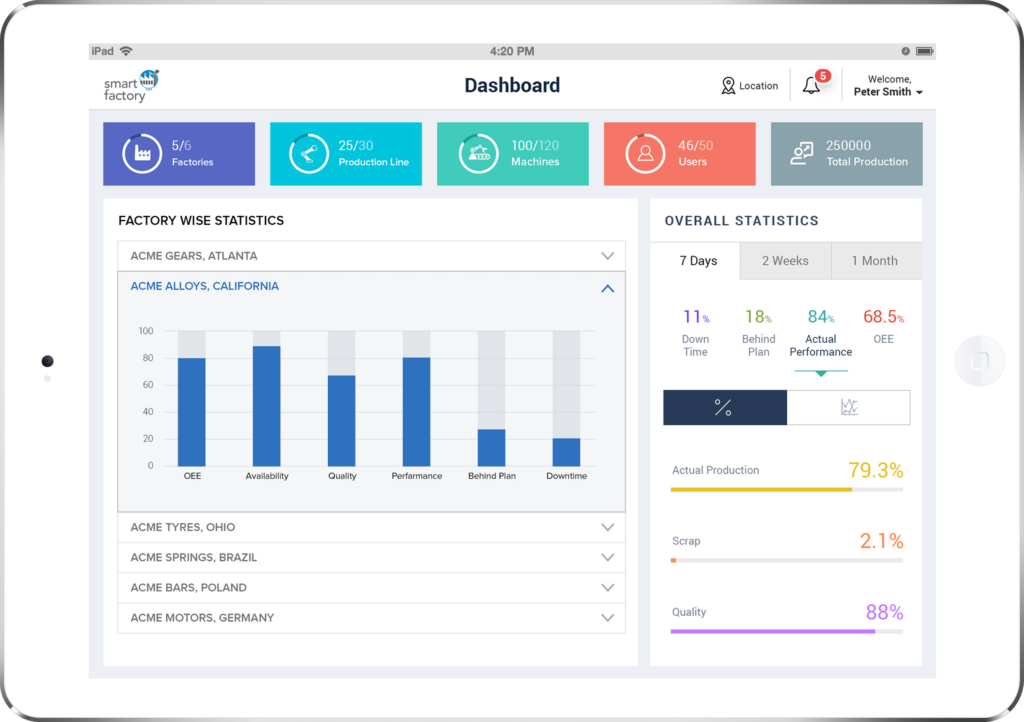
IoTConnect bietet eine umfassende Lösung, die den gesamten Bereich des IoT-Plattformmanagements abdeckt. Ob Gerätesteuerung, Datenanalyse oder Sicherheitsverwaltung – alle notwendigen Werkzeuge sind in einer einzigen Plattform vereint, was sie zur optimalen Wahl für das vollständige Management von IoT-Plattformen macht.
Warum ich IoTConnect ausgewählt habe: Ich habe IoTConnect nach einem gründlichen Vergleich verschiedener Plattformen ausgewählt, wobei der Fokus auf der Fähigkeit lag, eine vollständige Suite von Verwaltungswerkzeugen bereitzustellen. Der All-in-One-Ansatz hebt die Plattform hervor, da sie eine einheitliche Lösung für unterschiedlichste IoT-Management-Aufgaben bietet. Diese umfassende Funktionalität machte es deutlich: IoTConnect ist am besten für das vollständige Management von IoT-Plattformen geeignet, da es alles von der Geräteanbindung bis zur Dateninterpretation abdeckt.
Herausragende Funktionen & Integrationen:
Zu den Funktionen von IoTConnect gehören Gerätemonitoring, Datenanalyse, Workflow-Automatisierung und leistungsstarke Sicherheitskontrollen. Es lässt sich mit gängigen Plattformen wie AWS, Azure und Google Cloud integrieren, sodass Unternehmen ihr IoT-Management nahtlos mit bestehender Cloud-Infrastruktur verbinden können. Diese Integrationen sind entscheidend für die Fähigkeit, ein konsistentes Management-Erlebnis über verschiedene IoT-Bereiche hinweg zu bieten.
Pros and Cons
Pros:
- Umfassendes Plattformmanagement über ein zentrales Dashboard
- Leistungsstarke Integrationen mit großen Cloud-Anbietern
- Enthält Funktionen für Gerätemonitoring, Analyse und Sicherheit
Cons:
- Für neue Benutzer könnte eine Einarbeitungszeit erforderlich sein
- Das umfangreiche Funktionsangebot kann für kleine Anwendungen überwältigend sein
- Preisgestaltung könnte für sehr kleine Unternehmen oder Einzelanwender zu hoch sein

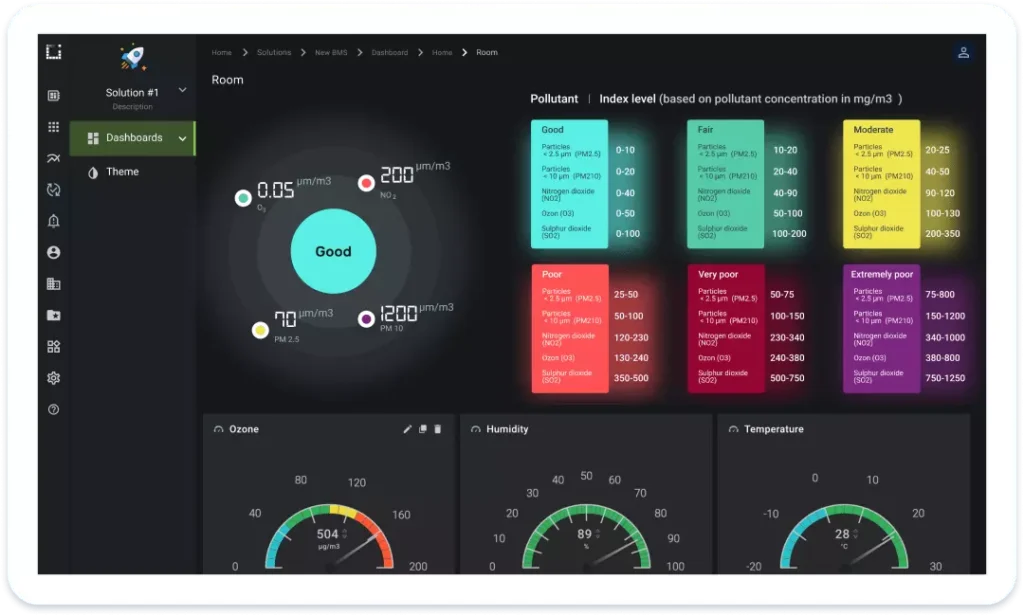
Die KaaIoT Plattform ist darauf ausgelegt, eine flexible Umgebung für den Aufbau hochgradig anpassbarer IoT-Anwendungen zu bieten. Ihre offene Architektur und anpassungsfähigen Werkzeuge sind ideal für Anwender, die maßgeschneiderte Lösungen benötigen, und machen sie zur erstklassigen Wahl für die Entwicklung von IoT-Anwendungen mit spezifischen Anpassungsanforderungen.
Warum ich die KaaIoT Plattform gewählt habe: Ich habe mich für die KaaIoT Plattform entschieden, nachdem ich ihre Anpassungsfähigkeit und ihr Potenzial zur Individualisierung gründlich analysiert habe. Sie hebt sich von anderen Tools ab, indem sie eine außergewöhnlich offene und flexible Plattform für umfangreiche Anpassungen bietet. Dieses Maß an Anpassbarkeit bestätigt, dass die KaaIoT Plattform besonders geeignet ist für alle, die IoT-Anwendungen mit bestimmten Anforderungen, Features oder Verhaltensweisen entwickeln müssen.
Hervorstechende Funktionen & Integrationen:
Zu den wichtigsten Funktionen von KaaIoT gehören eine flexible, offene Architektur, benutzerfreundliche Anwendungsvorlagen und umfangreiche APIs für Integrationen. Es gibt Anbindungen an diverse Datenverarbeitungstools und Kommunikationsprotokolle wie MQTT, CoAP und HTTP. Dies erleichtert die Verbindung zu bestehenden Systemen und Tools und steigert die Fähigkeit, hochgradig angepasste Lösungen zu entwickeln.
Pros and Cons
Pros:
- Hohes Maß an Anpassbarkeit durch offene Architektur
- Große Auswahl an Integrationen mit beliebten Datenverarbeitungstools
- Anwendungsvorlagen erleichtern eine schnellere Entwicklung
Cons:
- Könnte für Neueinsteiger in der individuellen IoT-Entwicklung komplex sein
- Keine transparente Preisgestaltung könnte einige Nutzer abschrecken
- Für spezialisierte Umsetzungen kann zusätzliche Unterstützung oder Fachwissen erforderlich sein
Weitere IoT-Software
Nachfolgend finden Sie eine Liste weiterer IoT-Software, die ich in meine Shortlist aufgenommen habe, die es aber nicht in die Top 10 geschafft haben. Auf jeden Fall einen Blick wert.


IoT-Software Auswahlkriterien
Bei der Auswahl der besten IoT-Software für diese Liste habe ich typische Käuferbedürfnisse und Probleme wie Skalierbarkeit und Gerätemanagement berücksichtigt. Außerdem habe ich das folgende Framework verwendet, um meine Bewertung strukturiert und fair zu gestalten:
Kernfunktionen (25 % der Gesamtbewertung)
Um in die Auswahl aufgenommen zu werden, musste jede Lösung diese typischen Anwendungsfälle abdecken:
- Geräte-Konnektivität
- Datenerfassung
- Echtzeit-Überwachung
- Datenanalyse
- Fernverwaltung von Geräten
Spezielle Zusatzfunktionen (25 % der Gesamtbewertung)
Um die Auswahl weiter einzugrenzen, habe ich außerdem nach besonderen Merkmalen gesucht, wie zum Beispiel:
- Vorausschauende Wartung
- Multi-Protokoll-Unterstützung
- Edge-Computing-Fähigkeiten
- Anpassbare Dashboards
- Erweiterte Sicherheitsmaßnahmen
Benutzerfreundlichkeit (10 % der Gesamtbewertung)
Um ein Gefühl für die Benutzerfreundlichkeit der einzelnen Systeme zu bekommen, habe ich Folgendes berücksichtigt:
- Intuitive Benutzeroberfläche
- Einfache Navigation
- Geringe Lernkurve
- Anpassungsmöglichkeiten
- Ästhetisches Design
Onboarding (10 % der Gesamtbewertung)
Zur Bewertung der Onboarding-Erfahrung für jede Plattform habe ich Folgendes berücksichtigt:
- Verfügbarkeit von Schulungsvideos
- Interaktive Produkttouren
- Vorlagen für das Onboarding
- Zugang zu Webinaren
- Reaktionsschnelle Chatbots
Kundensupport (10 % der Gesamtbewertung)
Um die Kundensupport-Dienste jedes Softwareanbieters zu bewerten, habe ich Folgendes berücksichtigt:
- 24/7 Verfügbarkeit
- Mehrkanal-Support
- Kompetentes Personal
- Schnelle Reaktionszeiten
- Umfassendes Hilfezentrum
Preis-Leistungs-Verhältnis (10 % der Gesamtbewertung)
Um das Preis-Leistungs-Verhältnis jeder Plattform zu bewerten, habe ich Folgendes betrachtet:
- Konkurrenzfähige Preise
- Funktionsumfang im Verhältnis zu den Kosten
- Flexible Preismodelle
- Rabatte bei jährlicher Abrechnung
- Verfügbarkeit einer kostenlosen Testphase
Kundenbewertungen (10 % der Gesamtbewertung)
Um ein Gefühl für die allgemeine Kundenzufriedenheit zu erhalten, habe ich bei der Auswertung von Kundenrezensionen Folgendes berücksichtigt:
- Benutzerzufriedenheitsbewertungen
- Häufig gemeldete Probleme
- Lob für bestimmte Funktionen
- Feedback zum Kundenservice
- Vergleich mit Wettbewerbern
So wählen Sie IoT-Software aus
Es ist leicht, sich in langen Funktionslisten und komplexen Preisstrukturen zu verlieren. Damit Sie bei Ihrem individuellen Auswahlprozess den Überblick behalten, finden Sie hier eine Checkliste mit Faktoren, auf die Sie achten sollten:
| Faktor | Worauf zu achten ist |
|---|---|
| Skalierbarkeit | Kann die Software mit Ihrem Unternehmen wachsen? Prüfen Sie, ob sie mit einer Zunahme von Geräten und Daten im Zuge Ihrer Expansion umgehen kann. |
| Integrationen | Lässt sich die Software mit Ihren bestehenden Systemen integrieren? Überprüfen Sie die Kompatibilität mit Ihrem aktuellen Software-Stack, um Betriebsunterbrechungen zu vermeiden. |
| Anpassbarkeit | Können Sie die Software auf Ihre spezifischen Anforderungen zuschneiden? Achten Sie auf Optionen zur Anpassung von Dashboards, Berichten und Benachrichtigungen zur Unterstützung Ihrer Geschäftsprozesse. |
| Benutzerfreundlichkeit | Ist die Benutzeroberfläche für Ihr Team intuitiv? Stellen Sie sicher, dass Ihr Team die Software ohne umfassende Einarbeitung oder Frustration bedienen kann. |
| Implementierung und Einführung | Wie schnell sind Sie startklar? Bewerten Sie den Zeit- und Ressourcenaufwand für die Einrichtung, einschließlich der Verfügbarkeit von Hilfsmaterialien wie Tutorials und Anleitungen. |
| Kosten | Passen die Preise zu Ihrem Budget? Berücksichtigen Sie sowohl die anfänglichen als auch die langfristigen Kosten, einschließlich versteckter Gebühren oder Zusatzkosten für weitere Funktionen. |
| Sicherheitsvorkehrungen | Sind Ihre Daten und Geräte geschützt? Achten Sie darauf, dass die Software Verschlüsselung, Zugangskontrolle und VPN-Software bietet, um sich gegen Bedrohungen abzusichern. |
| Support-Verfügbarkeit | Haben Sie bei Bedarf Zugang zu Hilfe? Prüfen Sie, ob und wie schnell Sie Kundensupport erreichen können, damit Unterstützung jederzeit verfügbar ist. |
Was ist IoT-Software?
IoT-Software ist eine Sammlung von Werkzeugen, die dabei helfen, internetverbundene Geräte zu verbinden, zu verwalten und Daten daraus zu analysieren. Diese Tools werden in der Regel von IT-Fachleuten, Entwicklern und Unternehmen eingesetzt, die ihre Abläufe optimieren und mit Hilfe ihrer IoT-Netzwerke wertvolle Einblicke gewinnen möchten. Funktionen wie Geräte-Konnektivität, Datenanalyse und Fernverwaltung unterstützen einen effizienten Betrieb der Geräte sowie datenbasierte Entscheidungen durch umfassende IoT-Testwerkzeuge. Insgesamt verbessern diese Werkzeuge die Fähigkeit, IoT-Geräte effektiv zu überwachen und zu steuern.
Funktionen
Achten Sie bei der Auswahl von IoT-Software auf die folgenden wichtigen Funktionen, die IoT-Analyseplattformen sinnvoll ergänzen:
- Gerätekonnektivität: Ermöglicht es Geräten, sich im IoT-Netzwerk zu verbinden und zu kommunizieren, was einen reibungslosen Datenaustausch und die Steuerung fördert.
- Echtzeitüberwachung: Bietet aktuelle Einblicke in die Geräteleistung und den Status, sodass schnell auf Veränderungen oder Probleme reagiert werden kann.
- Datenanalyse: Analysiert gesammelte Daten, um umsetzbare Erkenntnisse zu gewinnen und Unternehmen dabei zu unterstützen, fundierte Entscheidungen zu treffen.
- Fernverwaltung: Ermöglicht es Benutzern, Geräte aus der Ferne zu steuern und zu konfigurieren, was einen effizienten Betrieb und Wartung sicherstellt.
- Sicherheitsmaßnahmen: Schützt Daten und Geräte durch Verschlüsselung und Zugriffskontrollen und gewährleistet so Privatsphäre und Sicherheit.
- Anpassbare Dashboards: Erlaubt Nutzern, die Datenvisualisierung und Berichte individuell anzupassen, um spezifische Anforderungen zu erfüllen und Klarheit sowie Fokus zu erhöhen.
- Vorausschauende Wartung: Nutzt Datenmuster, um Geräteausfälle vorherzusagen, wodurch Ausfallzeiten und Wartungskosten reduziert werden.
- Unterstützung mehrerer Protokolle: Ermöglicht die Nutzung verschiedener Kommunikationsprotokolle und sichert die Kompatibilität mit verschiedensten Geräten.
- Edge-Computing-Funktionen: Verarbeitet Daten in der Nähe des Entstehungsortes, um Latenzzeiten zu reduzieren und die Effizienz zu steigern.
- Skalierbarkeit: Unterstützt das Wachstum von Gerätzahlen und Datenvolumen und ermöglicht es, das Netzwerk nach Bedarf zu erweitern.
Vorteile
Die Implementierung von IoT-Software bietet Ihrem Team und Ihrem Unternehmen zahlreiche Vorteile. Hier sind einige, auf die Sie sich freuen können:
- Verbesserte Effizienz: Automatisiert Prozesse und liefert Echtzeitdaten, damit Ihr Team effizienter arbeitet und schneller reagieren kann.
- Kosteneinsparungen: Vorausschauende Wartung und Datenanalyse helfen, Betriebskosten durch minimale Ausfallzeiten und optimierte Ressourcennutzung zu senken.
- Verbesserte Entscheidungsfindung: Bietet Einblicke durch Datenanalyse, was fundierte Entscheidungen ermöglicht, um den Unternehmenserfolg zu fördern.
- Skalierbarkeit: Unterstützt das Wachstum Ihres IoT-Netzwerks, sodass Sie mehr Geräte hinzufügen und ein erhöhtes Datenaufkommen bewältigen können, wenn Ihr Unternehmen wächst.
- Bessere Sicherheit: Bietet Sicherheitsmaßnahmen wie Verschlüsselung und Zugriffskontrollen, um Ihre Daten und Geräte vor möglichen Bedrohungen zu schützen.
- Fernzugriff: Ermöglicht die Fernverwaltung von Geräten, sodass Ihr Team Vorgänge von überall aus überwachen und steuern kann.
- Individualisierung: Anpassbare Dashboards und Berichte ermöglichen es Ihnen, die Software an Ihre spezifischen Bedürfnisse anzupassen, was die Benutzerfreundlichkeit und Relevanz erhöht.
Kosten & Preise
Die Auswahl einer IoT-Software erfordert das Verständnis der verschiedenen verfügbaren Preismodelle und -pläne. Die Kosten variieren je nach Funktionen, Teamgröße, Zusatzoptionen und mehr. Die folgende Tabelle fasst gängige Pläne, deren Durchschnittspreise und die typischen enthaltenen Features von IoT-Softwarelösungen zusammen:
Vergleichstabelle für IoT-Software-Pläne
| Plan-Typ | Durchschnittlicher Preis | Übliche Features |
|---|---|---|
| Gratis-Plan | $0 | Grundlegende Geräteverbindung, eingeschränkte Datenanalyse und Community-Support. |
| Persönlicher Plan | $5-$25/user/month | Erweitertes Gerätemanagement, Echtzeitüberwachung, anpassbare Dashboards und E-Mail-Support. |
| Geschäftsplan | $30-$75/user/month | Erweiterte Datenanalyse, Mehrprotokoll-Unterstützung, Sicherheitsmaßnahmen und bevorzugter Kundensupport. |
| Unternehmensplan | $100+/user/month | Vollständige Skalierbarkeit, vorausschauende Wartung, dedizierter Account-Manager und 24/7 Premium-Support. |
FAQ zu IoT-Software
Hier finden Sie Antworten auf häufig gestellte Fragen zur IoT-Software:
Wie integriert sich IoT-Software in bestehende Systeme?
IoT-Software bietet in der Regel APIs und Integrationswerkzeuge, mit denen Sie eine Verbindung zu bestehenden Systemen wie ERP oder CRM herstellen können. Es ist wichtig, die Kompatibilität mit Ihrem aktuellen Technologiestack zu prüfen, um einen reibungslosen Übergang zu gewährleisten und Störungen zu vermeiden. Achten Sie darauf, dass die Software die von Ihren Systemen verwendeten Protokolle und Standards unterstützt.
Welche Sicherheitsbedenken gibt es bei IoT-Software?
Sicherheit ist ein zentrales Thema bei IoT-Software, da Daten über Netzwerke übertragen werden. Stellen Sie sicher, dass die Software Verschlüsselung, sichere Zugriffskontrollen und regelmäßige Updates bietet, um sensible Informationen zu schützen. Prüfen Sie zudem, ob sie ggf. branchenspezifische Standards wie GDPR oder HIPAA einhält.
Wie skalierbar ist IoT-Software?
Die Skalierbarkeit hängt vom Anbieter ab. Berücksichtigen Sie daher Ihre Wachstumspläne. Prüfen Sie, ob die Software ein Wachstum der Geräteanzahl und des Datenvolumens bewältigen kann, ohne die Leistung zu beeinträchtigen. Cloud-basierte Lösungen bieten oft flexible Ressourcen und können sich Ihren geschäftlichen Anforderungen anpassen.
Lässt sich IoT-Software anpassen?
Anpassungsmöglichkeiten sind wichtig, um die Software an Ihre Geschäftsprozesse anzupassen. Prüfen Sie, wie viele Individualisierungen von Dashboards, Berichten und Benachrichtigungen möglich sind. Vorteilhaft ist es, wenn Sie eigene Workflows erstellen oder die Software mit spezifischen Business-Anwendungen integrieren können.
Welche Art von Support kann ich erwarten?
Der Support variiert je nach Anbieter, deshalb sollten Sie Verfügbarkeit und Qualität des Kundendienstes prüfen. Gibt es beispielsweise 24/7-Support, einen festen Ansprechpartner oder eine Community? Zuverlässiger Support kann die Einführung und die laufende Nutzung der IoT-Software erheblich erleichtern.
Wie geht IoT-Software mit Datenanalysen um?
IoT-Software sollte Analysewerkzeuge bereitstellen, mit denen Sie aus erfassten Daten Erkenntnisse gewinnen können. Achten Sie auf Funktionen wie Echtzeitverarbeitung, prädiktive Analysen und anpassbare Berichte. Solche Tools unterstützen Ihre Entscheidungsfindung und verbessern die operative Effizienz durch das Aufzeigen von Trends und Auffälligkeiten.
Wie geht es weiter:
Wenn Sie sich gerade über IoT-Software informieren, nehmen Sie Kontakt zu einem SoftwareSelect Berater auf und erhalten Sie kostenlose Empfehlungen.
Sie füllen ein Formular aus und führen ein kurzes Gespräch, in dem Ihre individuellen Anforderungen besprochen werden. Anschließend erhalten Sie eine Shortlist mit geeigneter Software zur Auswahl. Außerdem begleiten die Berater Sie während des gesamten Kaufprozesses – auch bei Preisverhandlungen.