

10 DBeaver-Alternativen für die Datenbankverwaltung im Jahr 2026

Kurze Liste der DBeaver-Alternativen


Eine gute DBeaver-Alternative bietet umfassende Datenbankkompatibilität, flexible Abfragewerkzeuge und eine Benutzererfahrung, die sowohl die routinemäßige Verwaltung als auch komplexe Fehlerbehebungen unterstützt. Obwohl DBeaver ein beliebtes quelloffenes Datenbankverwaltungstool ist, prüfen viele Teams sowohl quelloffene als auch kommerzielle Datenbanktools, wenn sie nach Alternativen suchen.
Abhängig von Ihrem Arbeitsablauf benötigen Sie möglicherweise besseren Support für bestimmte Datenbankplattformen, fortschrittlichere Funktionen zur SQL-Bearbeitung oder eine andere Art von Benutzeroberfläche zur Verwaltung mehrerer Datenbanken. Einige Entwickler bevorzugen schlanke SQL-Clients, während andere eine voll ausgestattete Datenbank-IDE mit fortschrittlicher Automatisierung, Schemadesign oder Werkzeugen zur Leistungsanalyse wünschen.
Diese Liste umfasst eine Mischung aus quelloffenen und kommerziellen DBeaver-Alternativen und hilft Ihnen dabei, verschiedene Datenbankverwaltungstools anhand von Kompatibilität, Benutzerfreundlichkeit und Funktionsumfang zu vergleichen, damit Sie die beste Option für Ihren Arbeitsablauf finden.
Was ist DBeaver?
DBeaver ist ein quelloffenes Datenbankverwaltungstool, das eine große Bandbreite relationaler und nicht relationaler Datenbanken unterstützt. Es bietet eine einheitliche Benutzeroberfläche zum Verbinden mit, Abfragen und Verwalten von Datenbanken wie MySQL, PostgreSQL, Oracle, SQL Server und weiteren.
DBeaver ist bei Datenbankadministratoren, Entwicklern und Analysten aufgrund seiner plattformübergreifenden Unterstützung, seines visuellen Abfragegenerators und seiner Funktionen beliebt, die routinemäßige Datenbankaufgaben vereinfachen.
Vergleichstabelle der DBeaver-Alternativen
Diese Vergleichstabelle fasst die Preisdetails meiner Auswahl der besten DBeaver-Alternativen zusammen:
| Tool | Best For | Trial Info | Price | ||
|---|---|---|---|---|---|
| 1 | Am besten für eine intuitive Gestaltung der Benutzeroberfläche | Kostenlose Testversion verfügbar | Ab 79 $/Monat | Website | |
| 2 | Am besten für intelligente Codevervollständigung geeignet | 30-tägige kostenlose Testversion + kostenloser Tarif + kostenlose Demo verfügbar | Ab $10.90/Monat (jährlich abgerechnet) | Website | |
| 3 | Am besten mit der Integration in Microsoft SQL Server | Kostenloser Tarif verfügbar | Kostenlos nutzbar | Website | |
| 4 | Optimal für die unkomplizierte MySQL-Verwaltung | Kostenloser Tarif verfügbar | Kostenlos nutzbar | Website | |
| 5 | Am besten für visuelles Schemadesign geeignet | Kostenloser Tarif verfügbar | Ab $19.6/Benutzer/Monat | Website | |
| 6 | Am besten für die Erweiterbarkeit durch Plugins | Kostenloser Tarif verfügbar | Kostenlos | Website | |
| 7 | Am besten für Datenbankautomatisierungsfunktionen geeignet | Kostenlose Testversion verfügbar | Preis auf Anfrage | Website | |
| 8 | Am besten für plattformübergreifendes Datenbankmanagement geeignet | 14-tägige kostenlose Testversion | Ab $1,599/Benutzer (unbefristete Lizenz) | Website | |
| 9 | Am besten für die gemeinsame Bearbeitung von SQL | Kostenloser Tarif verfügbar und 14-tägige kostenlose Testversion | Ab $9/Benutzer/Monat (jährlich abgerechnet) | Website | |
| 10 | Am besten für Verbindungen mit mehreren Datenbanken | Kostenloser Tarif verfügbar und 30-tägige kostenlose Testversion | Ab $12/Monat | Website |
Warum Sie unseren Software-Empfehlungen vertrauen können
Unser Team testet und bewertet Software seit 2012. Als Tech-Führungskräfte wissen wir selbst, wie schwierig – und wichtig – es ist, die richtige Software auszuwählen.
Für diesen Leitfaden haben wir Tools mithilfe von praktischen Tests und unabhängiger Recherche bewertet und dabei unsere Bewertungskriterien angewendet.
Unsere Bewertungen spiegeln unser menschliches redaktionelles Urteilsvermögen wider, keine Verkaufsstrategie.
Expertenprüfer:
Die besten DBeaver-Alternativen im Test
Nachfolgend finden Sie meine ausführlichen Zusammenfassungen der besten DBeaver-Alternativen, die es auf meine Auswahlliste geschafft haben. Meine Bewertungen bieten einen detaillierten Einblick in die Funktionen, Möglichkeiten und besten Einsatzbereiche jedes Tools, damit Sie das für Sie beste Tool finden.

Am besten für eine intuitive Gestaltung der Benutzeroberfläche
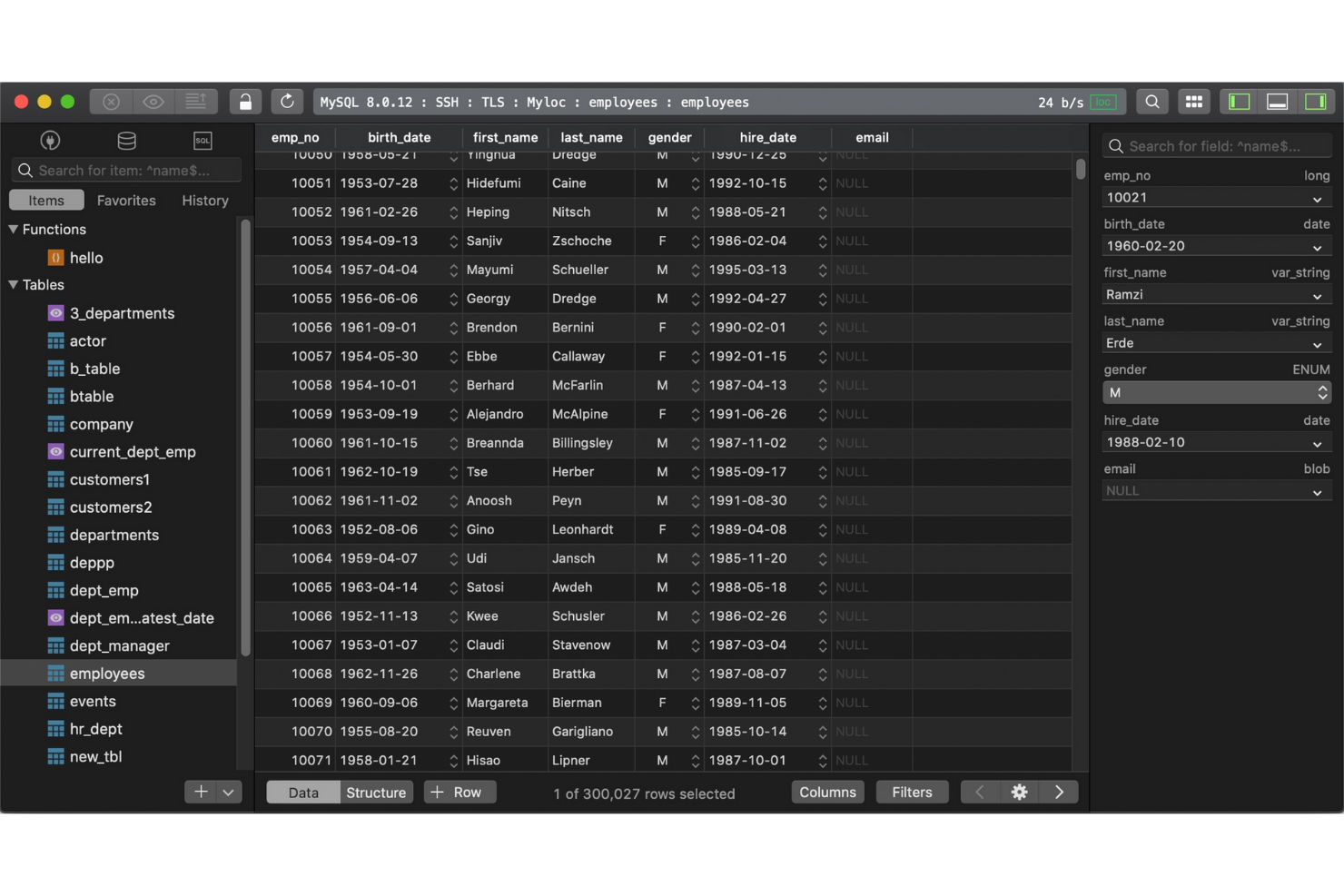
Wenn Sie nach einem Datenbankverwaltungstool mit Schwerpunkt auf Geschwindigkeit und Einfachheit suchen, ist TablePlus eine Überlegung wert. Es wurde für IT-Spezialisten und Entwickler entwickelt, die eine übersichtliche, moderne Oberfläche zur Verwaltung mehrerer Datenbanken ohne unnötige Ablenkungen wünschen. TablePlus hebt sich von DBeaver und den meisten Open-Source-Optionen ab, indem es intuitive Navigation und schnellen Zugriff auf wichtige Funktionen priorisiert. Dadurch lassen sich routinemäßige Datenbankaufgaben einfacher erledigen.
Warum TablePlus eine gute DBeaver-Alternative ist
Für IT-Teams, die ein schnelles und visuell übersichtliches Datenbankverwaltungstool wünschen, ist TablePlus eine starke Option. Ich habe es ausgewählt, weil die Oberfläche darauf ausgelegt ist, Ablenkungen zu minimieren, mit anpassbaren Registerkarten und einem Fokusmodus, der Ihnen hilft, sich ganz auf die aktuelle Aufgabe zu konzentrieren. TablePlus bietet außerdem die direkte Bearbeitung und sofortige Ergebnisvorschauen, sodass Sie Änderungen vornehmen und deren Auswirkungen ohne zusätzliche Schritte sehen können. Diese Funktionen machen das Tool für Nutzer attraktiv, die einen übersichtlichen Arbeitsbereich und effiziente Arbeitsabläufe gegenüber den komplexeren Layouts mit mehreren Bereichen bevorzugen, wie sie in DBeaver zu finden sind.
Wichtige Funktionen von TablePlus
Zu den weiteren attraktiven Funktionen von TablePlus gehören:
- Unterstützung mehrerer Datenbanken: Stellen Sie über eine einzige App Verbindungen zu MySQL, PostgreSQL, SQLite, SQL Server und weiteren Datenbanken her und verwalten Sie diese.
- Integrierte SSH- und TLS-Verschlüsselung: Sichern Sie Ihre Datenbankverbindungen mit integrierter Unterstützung für SSH und TLS.
- Erweiterte Filter- und Suchfunktionen: Finden Sie Tabellen, Datensätze oder Abfragen mithilfe leistungsfähiger Such- und Filterwerkzeuge schnell.
- Pluginsystem: Erweitern Sie die Funktionen von TablePlus mit einer wachsenden Bibliothek von Plugins, die von Nutzern beigesteuert werden.
TablePlus-Integrationen
Zu den Integrationen gehören MySQL, PostgreSQL, Microsoft SQL Server, SQLite, Redis, MariaDB, Amazon Redshift, MongoDB, CockroachDB und Oracle.
Pros and Cons
Pros:
- Benutzerfreundliche Oberfläche für eine schnelle Datenbanknavigation
- Unterstützt mehrere relationale Datenbanken in einem einzigen Arbeitsbereich
- Sichere Verbindungen mit integrierter SSH- und TLS-Verschlüsselung
Cons:
- Eingeschränkte Funktionen für Datenbankmodellierung und ER-Diagramme
- Kleineres Plugin-Ökosystem als bei vielen Datenbankverwaltungstools


DataGrip wurde von JetBrains entwickelt und ist ein Datenbankverwaltungstool für IT-Fachkräfte und Entwickler, die eine umfassende Codeunterstützung benötigen. Es hebt sich von DBeaver und anderen Open-Source-Optionen durch intelligente Codevervollständigung, kontextbezogene Vorschläge und eine sofortige Analyse von SQL-Abfragen ab. DataGrip ist besonders nützlich für Teams, die komplexen Datenbankcode plattformübergreifend schreiben, überarbeiten und Fehler beheben müssen.
Warum DataGrip eine gute DBeaver-Alternative ist
Wenn Sie nach einem Datenbankverwaltungstool suchen, das sich durch Codevervollständigung auszeichnet, ist DataGrip einen genaueren Blick wert. Ich habe es ausgewählt, weil seine intelligente Codevervollständigungs-Engine die Datenbankstruktur und den Kontext versteht und beim Schreiben von SQL präzise Vorschläge liefert. DataGrip hebt außerdem Fehler in Echtzeit hervor und bietet schnelle Korrekturen, wodurch sich Fehler reduzieren und die Entwicklung von Abfragen beschleunigen lässt. Diese Funktionen machen DataGrip zu einer überzeugenden Wahl für IT-Fachkräfte, die komplexen SQL-Code mit weniger Unterbrechungen schreiben und verwalten möchten.
Die wichtigsten Funktionen von DataGrip
Zu den weiteren Funktionen, die DataGrip attraktiv machen, gehören:
- Integration der Versionskontrolle: Stellen Sie direkt über die Benutzeroberfläche eine Verbindung zu Git, Mercurial und anderen Versionskontrollsystemen her.
- Anpassbare Datenansichten: Erstellen und speichern Sie benutzerdefinierte Tabellenansichten, um Daten effizienter zu organisieren und zu analysieren.
- Unterstützung mehrerer Datenbanken: Verwalten Sie MySQL, PostgreSQL, Oracle, SQL Server und andere Datenbanken in einem einzigen Arbeitsbereich.
- Schemanavigation: Wechseln Sie mithilfe eines intuitiven Navigationsbereichs schnell zwischen Tabellen, Ansichten und Prozeduren.
DataGrip-Integrationen
Zu den Integrationen gehören PostgreSQL, MySQL, Oracle, Microsoft SQL Server, MongoDB, Redis, Azure SQL, Amazon Redshift, Amazon DynamoDB und SQLite.
Pros and Cons
Pros:
- Intelligente SQL-Codevervollständigung auf Grundlage der Datenbankstruktur
- Echtzeit-Erkennung von Abfragefehlern und Werkzeuge zur Codeüberarbeitung
- Direkte Integration in Versionskontroll-Workflows
Cons:
- Höherer Ressourcenverbrauch als bei schlanken SQL-Clients
- Erfordert eine kostenpflichtige Lizenz ohne kostenlosen Tarif

Am besten mit der Integration in Microsoft SQL Server
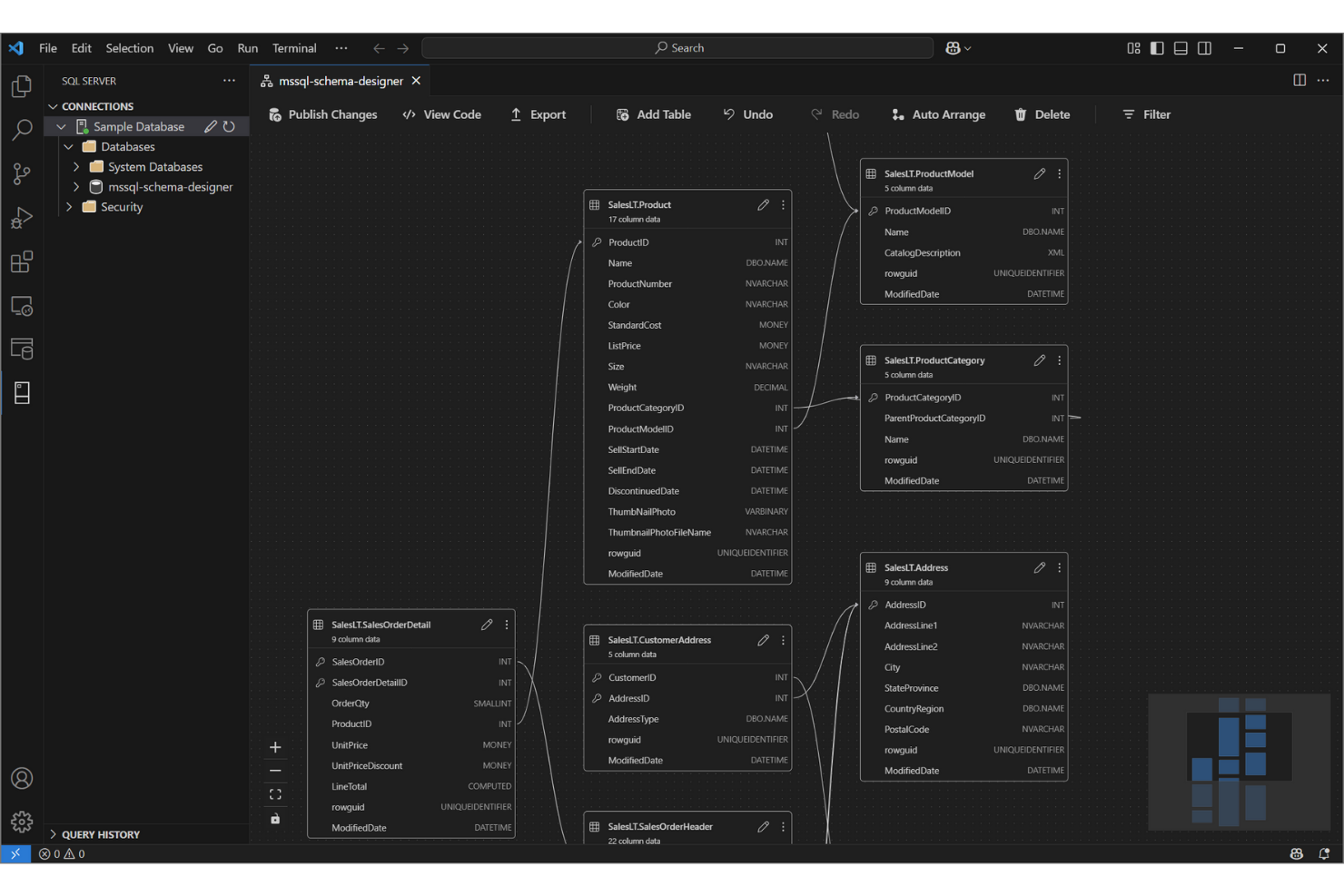
Für IT-Teams, die intensiv mit Microsoft SQL Server arbeiten, bietet SQL Server Management Studio (SSMS) eine speziell entwickelte Umgebung zum Verwalten, Konfigurieren und Entwickeln von SQL Server-Datenbanken. Im Gegensatz zu DBeaver und anderen Open-Source-Tools bietet SSMS eine tiefgreifende Integration in das Datenbankökosystem von Microsoft, einschließlich Funktionen für erweiterte Sicherheit, Leistungsoptimierung und Automatisierung. Es ist besonders nützlich für Datenbankadministratoren und Entwickler, die direkten Zugriff auf SQL Server-spezifische Tools und Arbeitsabläufe benötigen.
Warum Microsoft SQL Server Management Studio eine gute DBeaver-Alternative ist
Wenn Sie ein eng in Microsoft SQL Server integriertes Tool benötigen, ist SQL Server Management Studio eine herausragende Wahl. Ich habe es ausgewählt, weil es direkten Zugriff auf erweiterte SQL Server-Funktionen wie die Verwaltung von Agent-Aufträgen, die Datenbankspiegelung und integrierte Tools zur Leistungsoptimierung bietet.
SSMS unterstützt außerdem Skripterstellung und Automatisierung über SQL Server Agent und PowerShell, was für IT-Spezialisten bei der Verwaltung großer oder komplexer SQL Server-Umgebungen von großem Wert ist. Diese Funktionen machen es zu einer überzeugenden Wahl für Teams, die die Leistungsfähigkeit der Datenbankplattform von Microsoft vollständig nutzen möchten.
Wichtige Funktionen von Microsoft SQL Server Management Studio
Zu den weiteren Funktionen, die SSMS für Datenbankexperten wertvoll machen, gehören:
- Grafischer Abfrage-Designer: Erstellen und visualisieren Sie komplexe Abfragen, ohne SQL manuell schreiben zu müssen.
- Datenbankdiagramme: Erstellen und bearbeiten Sie Datenbankdiagramme, um Beziehungen innerhalb des Schemas abzubilden.
- Assistenten zum Exportieren und Importieren: Verschieben Sie Daten mithilfe schrittweiser Assistenten zwischen SQL Server und anderen Quellen.
- Integrierte Sicherheitsverwaltung: Konfigurieren und verwalten Sie Benutzerrollen, Berechtigungen und Sicherheitsrichtlinien direkt im Tool.
Integrationen von Microsoft SQL Server Management Studio
Zu den Integrationen gehören SQL Server, Azure SQL Database, Azure SQL Managed Instance, SQL-Datenbank in Microsoft Fabric, Azure Synapse Analytics, Azure Data Studio, PowerShell, Visual Studio, Active Directory und Microsoft Purview.
Pros and Cons
Pros:
- Tiefe Integration in die Verwaltungsfunktionen von Microsoft SQL Server
- Integrierte Tools zur Abfrageoptimierung und Leistungsüberwachung
- Kostenloses Datenbankverwaltungstool für SQL Server-Umgebungen
Cons:
- Eingeschränkte Unterstützung für Datenbanksysteme anderer Anbieter
- Die Benutzeroberfläche wirkt im Vergleich zu modernen Datenbanktools veraltet

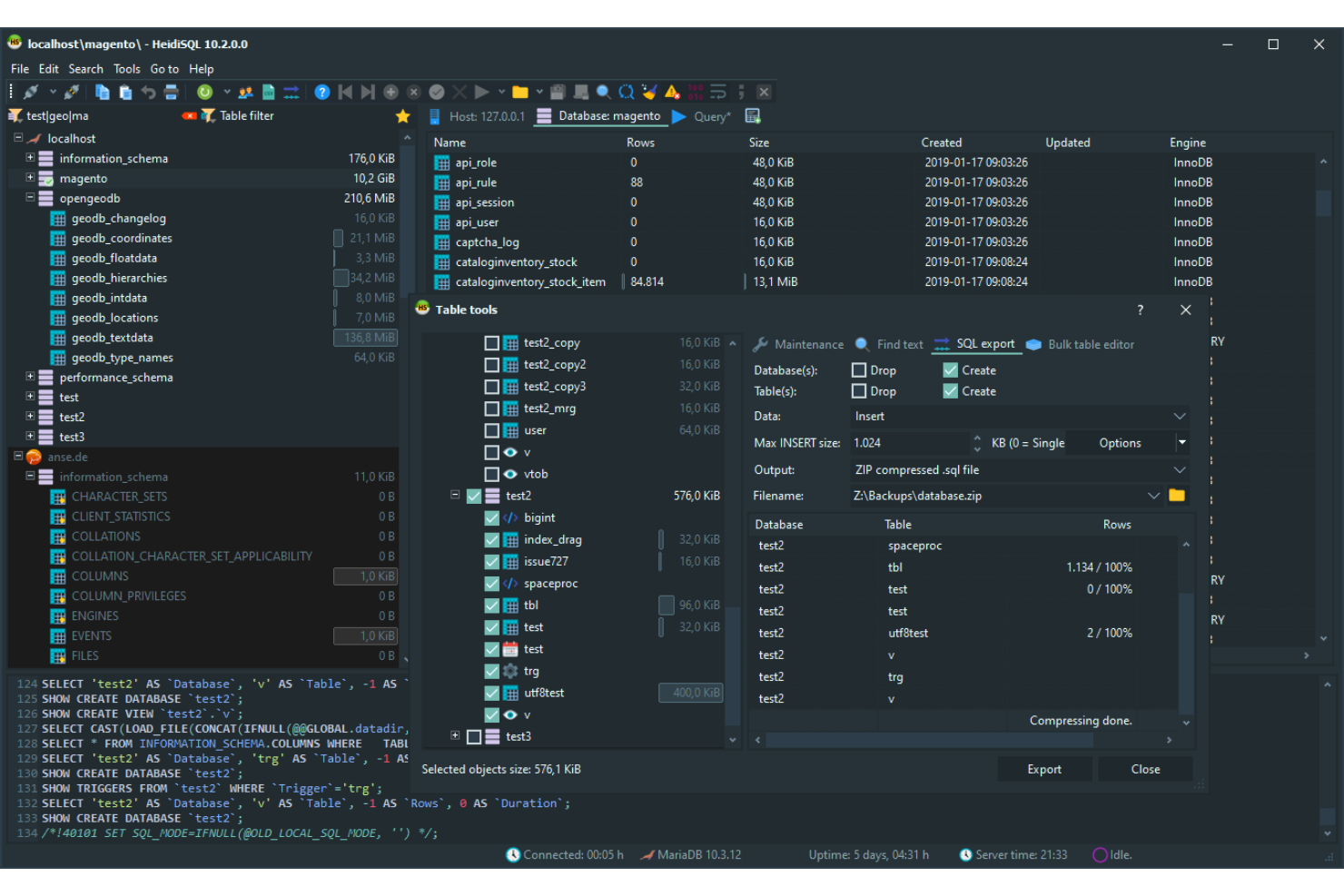
HeidiSQL zeichnet sich für IT-Spezialisten und Datenbankadministratoren aus, die eine leichte, unkomplizierte Lösung zur Verwaltung von MySQL- und MariaDB-Datenbanken suchen. Es ist besonders nützlich für Teams, die schnelle Verbindungen, einfache Datenexporte und die direkte Ausführung von Abfragen ohne den Aufwand größerer Tools wie DBeaver benötigen. Der Fokus von HeidiSQL auf Geschwindigkeit und minimale Ressourcennutzung macht es zu einer praktischen Wahl für alle, die mit kleineren Datenbanken oder auf Systemen mit begrenzten Ressourcen arbeiten.
Warum HeidiSQL eine gute DBeaver-Alternative ist
Wenn Sie nach einem Tool suchen, das leichtgewichtig und fokussiert bleibt, ist HeidiSQL eine überzeugende Wahl für die MySQL-Verwaltung. Ich habe mich dafür entschieden, weil es schnell startet, nur minimale Systemressourcen verwendet und direkten Zugriff auf MySQL- und MariaDB-Datenbanken ohne zusätzlichen Aufwand bietet.
Funktionen wie der stapelweise Datenexport, die direkte Tabellenbearbeitung und die schnelle Abfrageausführung machen es ideal für IT-Spezialisten, die effizient auf ihre Datenbanken zugreifen und sie wieder verlassen möchten. Für Teams, die weder die Unterstützung mehrerer Datenbanken noch die erweiterten Visualisierungstools von DBeaver benötigen, ist der schlanke Ansatz von HeidiSQL eine praktische Lösung.
Wichtige Funktionen von HeidiSQL
Zu den weiteren Funktionen, die HeidiSQL attraktiv machen, gehören:
- Sitzungsmanager: Verbindungen zu mehreren Servern an einem Ort organisieren und speichern.
- Benutzerberechtigungseditor: Datenbankbenutzerkonten und Berechtigungen über eine grafische Benutzeroberfläche verwalten.
- Import- und Exporttools: Daten mithilfe integrierter Assistenten zwischen SQL-Dateien, CSV und anderen Formaten verschieben.
- Benutzerdefinierte Abfragebausteine: Häufig verwendete SQL-Codebausteine speichern und wiederverwenden, um Abfragen schneller zu erstellen.
HeidiSQL-Integrationen
Zu den Integrationen gehören MySQL, MariaDB, Microsoft SQL Server, PostgreSQL, SQLite, Interbase und Firebird.
Pros and Cons
Pros:
- Leichtgewichtiges Datenbankverwaltungstool mit minimalen Systemanforderungen
- Open-Source-SQL-Client zur Verwaltung von MySQL- und MariaDB-Datenbanken
- Schneller Datenimport, -export und Tabellenbearbeitung für relationale Datenbanken
Cons:
- Windows-exklusiver SQL-Client ohne native Version für macOS oder Linux
- Eingeschränkte Unterstützung für NoSQL-Datenbankplattformen

DbSchema
Am besten für visuelles Schemadesign geeignet
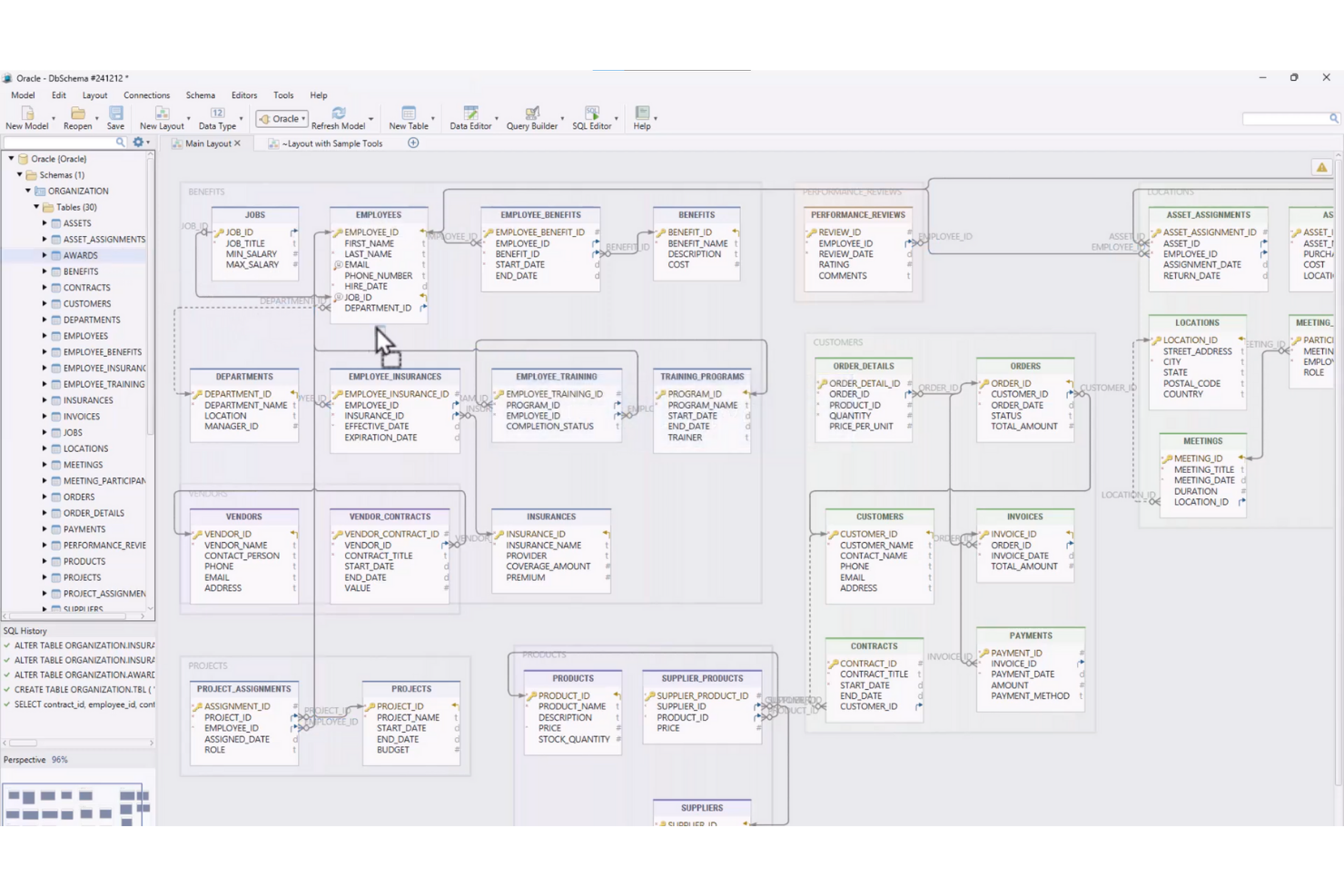
Wenn Ihr Team fortschrittliche Funktionen für das visuelle Schemadesign benötigt, bietet DbSchema einen einzigartigen Ansatz für die Datenbankmodellierung und -verwaltung. Es ist besonders nützlich für IT-Spezialisten und Datenarchitekten, die komplexe Datenbankstrukturen visuell über mehrere Plattformen hinweg entwerfen, dokumentieren und bereitstellen möchten. Im Gegensatz zu DBeaver und anderen Open-Source-Tools legt DbSchema den Schwerpunkt auf interaktive Diagramme und eine kollaborative Schemaverwaltung, wodurch sich große oder verteilte Datenbanken leichter verwalten lassen.
Warum DbSchema eine gute DBeaver-Alternative ist
Für Teams, die visuelles Schemadesign bevorzugen, bietet DbSchema eine Reihe von Funktionen, die über das hinausgehen, was DBeaver bietet. Ich habe es ausgewählt, weil die interaktiven ER-Diagramme das visuelle Entwerfen, Dokumentieren und Ändern von Datenbankstrukturen ermöglichen, sogar bevor eine Verbindung zu einer aktiven Datenbank hergestellt wird.
DbSchema unterstützt außerdem die Synchronisierung und Versionierung von Schemata, wodurch sich Änderungen in verteilten Umgebungen verwalten lassen. Diese Funktionen machen das Tool zu einer guten Wahl für IT-Spezialisten, die an komplexen Datenbankprojekten zusammenarbeiten und eine übersichtliche Dokumentation pflegen müssen.
Wichtige Funktionen von DbSchema
Zusätzlich zu seinen Stärken beim visuellen Schemadesign sind mir auch die folgenden Funktionen aufgefallen:
- Explorer für relationale Daten: Durchsuchen und Bearbeiten von Daten in verbundenen Tabellen über eine interaktive Benutzeroberfläche.
- SQL-Editor mit automatischer Vervollständigung: Schreiben und Ausführen von SQL-Abfragen mit Syntaxhervorhebung und Codevervollständigung.
- Datengenerator: Erstellen von Beispieldatensätzen für Tests und Entwicklung direkt im Tool.
- Offline-Schemadesign: Entwerfen und Ändern von Datenbankschemata ohne eine aktive Datenbankverbindung.
Integrationen von DbSchema
Zu den Integrationen gehören MySQL, PostgreSQL, MongoDB, SQL Server, Oracle, SQLite, Amazon Redshift, Google BigQuery, Snowflake und Cassandra.
Pros and Cons
Pros:
- Tool für visuelles Schemadesign zur Modellierung und Dokumentation relationaler Datenbanken
- Datenbankverwaltungstool mit Unterstützung für relationale und NoSQL-Datenbankplattformen
- Tools zur Schemasynchronisierung für die Verwaltung von Datenbankänderungen in verschiedenen Umgebungen
Cons:
- Für den vollständigen Funktionsumfang ist eine kostenpflichtige Lizenz erforderlich
- Die Benutzeroberfläche wirkt weniger modern als bei einigen Datenbankverwaltungstools

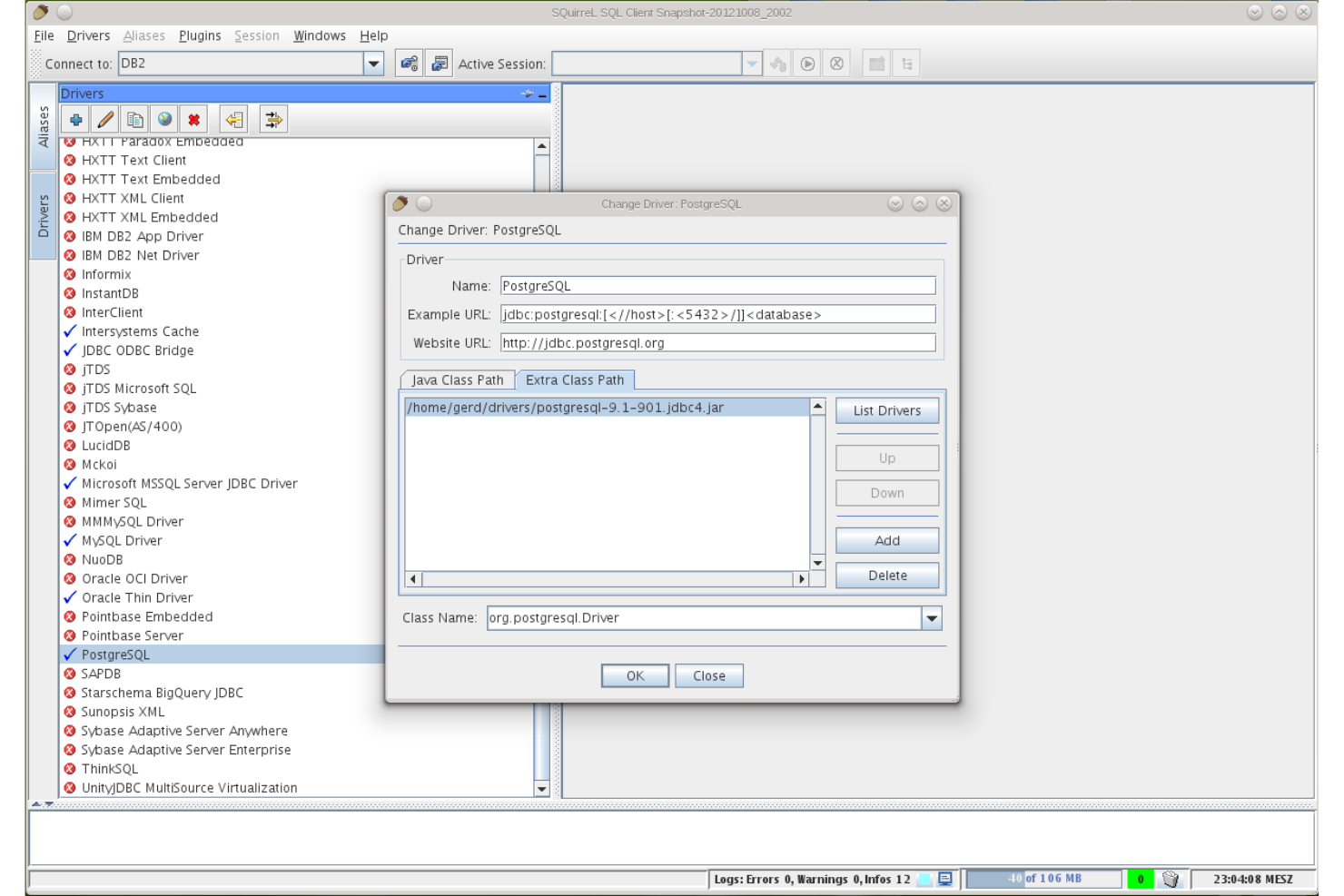
SQuirreL SQL ist eine gute Wahl für IT-Teams und Datenbankfachleute, die einen hochgradig anpassbaren, quelloffenen SQL-Client suchen. Die Plugin-basierte Architektur ermöglicht es, das Tool an bestimmte Arbeitsabläufe, Datenbanktypen oder erweiterte Funktionen anzupassen, die in DBeaver standardmäßig nicht verfügbar sind. Wenn Sie eine flexible Umgebung benötigen, die sich an einzigartige oder sich weiterentwickelnde Anforderungen bei der Datenbankverwaltung anpasst, bietet SQuirreL SQL ein Maß an Erweiterbarkeit, das hervorsticht.
Warum SQuirreL SQL eine gute DBeaver-Alternative ist
Für Teams, die ihr Datenbankverwaltungstool an spezifische Anforderungen anpassen möchten, ist die Erweiterbarkeit durch Plugins von SQuirreL SQL ein großer Vorteil. Ich habe es ausgewählt, weil Sie Plugins hinzufügen oder entfernen können, um neue Datenbanktypen, erweitertes Scripting oder individuelle Verbesserungen von Arbeitsabläufen zu unterstützen, wenn sich Ihre Umgebung verändert. Der integrierte Plugin-Manager erleichtert das Auffinden, Installieren und Aktualisieren von Erweiterungen ohne manuelle Konfiguration. Wenn Sie nach einem Tool suchen, das mit Ihrer Datenbanklandschaft wächst und sich an sie anpasst, ist der modulare Ansatz von SQuirreL SQL kaum zu übertreffen.
Hauptfunktionen von SQuirreL SQL
Zusätzlich zu seinem erweiterbaren Plugin-System sind mir auch diese Funktionen erwähnenswert:
- SQL-Editor mit Syntaxhervorhebung: Schreiben und bearbeiten Sie SQL-Abfragen mit farbcodierter Syntax für bessere Lesbarkeit.
- Sitzungsdiagramme: Visualisieren Sie Datenbanksitzungen und ihre Beziehungen mithilfe integrierter Diagrammwerkzeuge.
- Lesezeichenverwaltung: Speichern und organisieren Sie häufig verwendete SQL-Anweisungen für schnellen Zugriff.
- Tabellendaten-Editor: Bearbeiten Sie Tabelleninhalte direkt in der Benutzeroberfläche, ohne manuelle Abfragen auszuführen.
Integrationen von SQuirreL SQL
Zu den Integrationen gehören MySQL, PostgreSQL, Oracle, Microsoft SQL Server, SQLite, Firebird, Sybase, DB2, HSQLDB und Apache Derby.
Pros and Cons
Pros:
- Anpassbarer SQL-Client mit erweiterbarer Plugin-Architektur
- Datenbankverwaltungstool zur Unterstützung mehrerer relationaler Datenbanken über JDBC
- Quelloffener SQL-Client mit einer aktiven Entwicklergemeinschaft
Cons:
- Das Design der Benutzeroberfläche wirkt im Vergleich zu modernen Datenbanktools veraltet
- Begrenzte integrierte Funktionen für Schemadesign und Visualisierung

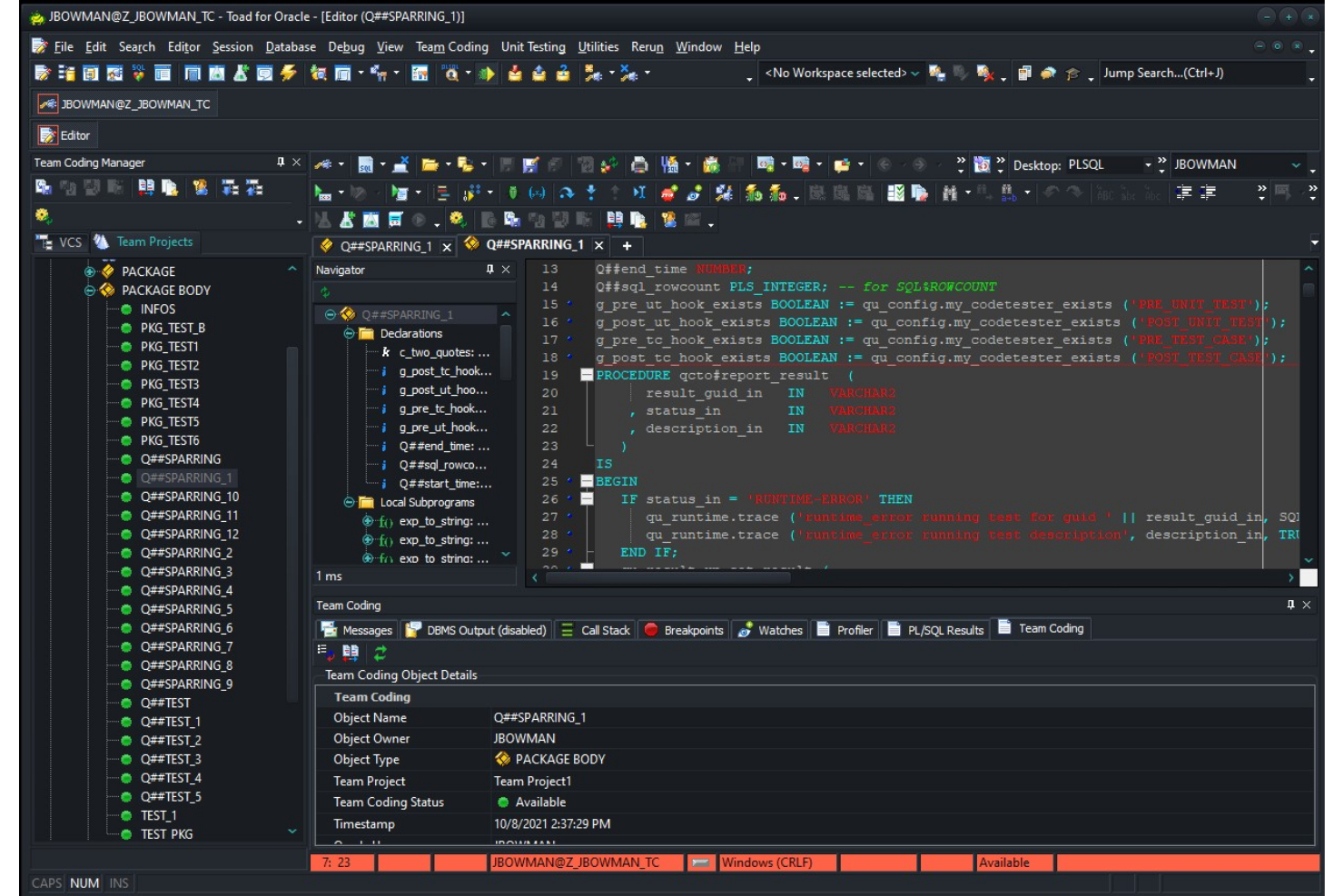
Toad ist eine herausragende Lösung für IT-Spezialisten und Datenbankadministratoren, die erweiterte Automatisierung in ihren Datenbankverwaltungs-Workflows benötigen. Im Gegensatz zu den meisten Open-Source-Tools bietet Toad integrierte Automatisierung für Routineaufgaben, Codeprüfungen und Leistungsoptimierung. Wenn Ihr Team komplexe oder umfangreiche Umgebungen verwaltet, können die Automatisierungsfunktionen von Toad dazu beitragen, den manuellen Aufwand zu reduzieren und die Konsistenz zu verbessern.
Warum Toad eine gute DBeaver-Alternative ist
Wenn Sie nach einem Datenbankverwaltungstool suchen, bei dem die Automatisierung im Vordergrund steht, ist Toad eine Überlegung wert. Ich habe Toad ausgewählt, weil Sie damit sich wiederholende Aufgaben wie Datenbanksicherungen, Codeanalysen und Datenvergleiche direkt innerhalb der Plattform planen und automatisieren können.
Mit der Funktion zur Automatisierungsentwicklung können Sie komplexe Workflows ohne manuelles Eingreifen erstellen und verwalten. Für Teams, die den manuellen Aufwand bei der Datenbankwartung minimieren und einheitliche Prozesse durchsetzen möchten, heben sich die Automatisierungsfunktionen von Toad von den meisten Open-Source-Optionen ab.
Wichtige Funktionen von Toad
Zu den weiteren Funktionen, die mir besonders aufgefallen sind, gehören:
- Code-Debugger: Durchlaufen Sie gespeicherte Prozeduren und Skripte schrittweise, um Fehler zu identifizieren und zu beheben.
- Schemavergleich: Vergleichen und synchronisieren Sie Datenbankschemata in verschiedenen Umgebungen.
- SQL-Optimierungstools: Analysieren und optimieren Sie SQL-Abfragen für eine bessere Leistung.
- Datenmodellierung: Entwerfen und visualisieren Sie Datenbankstrukturen mit integrierten Modellierungswerkzeugen.
Toad-Integrationen
Zu den Integrationen gehören Oracle, IBM DB2, Microsoft SQL Server, MySQL, PostgreSQL, SAP ASE, Amazon Redshift, Snowflake, MongoDB und SQLite.
Pros and Cons
Pros:
- Datenbankverwaltungstool mit Automatisierung für sich wiederholende Datenbankaufgaben
- Erweiterte Debugging- und SQL-Abfragewerkzeuge zur Leistungsoptimierung
- Funktionen zum Schemavergleich für die Verwaltung von Datenbankänderungen
Cons:
- Für die Preisangabe ist eine direkte Anfrage beim Anbieter erforderlich
- Höhere Nutzung von Systemressourcen in großen Datenbankumgebungen

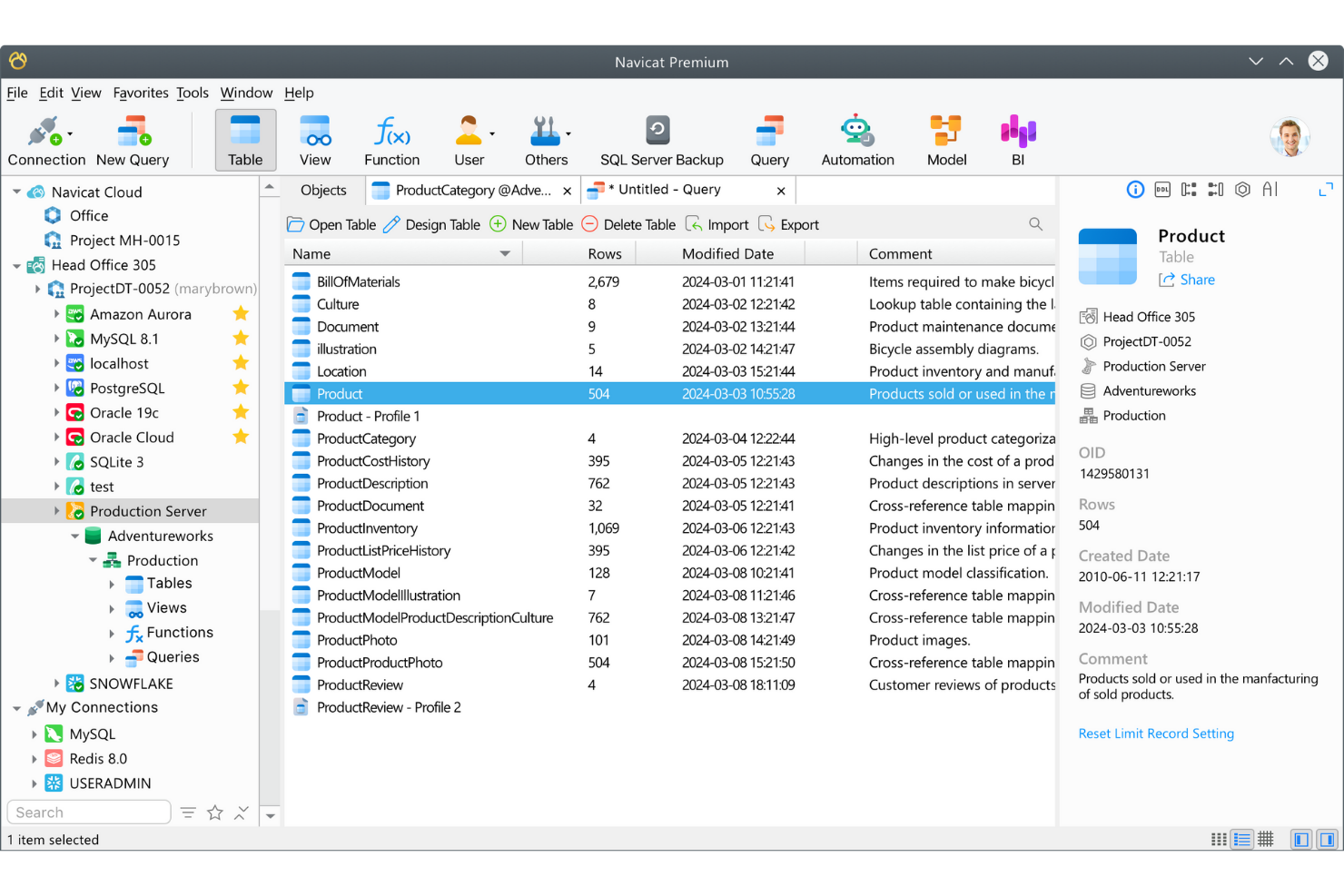
Für IT-Teams, die mehrere Datenbanktypen auf verschiedenen Plattformen verwalten, bietet Navicat Premium einen einheitlichen Arbeitsbereich für die Verbindung mit und die Arbeit an unterschiedlichen Datenbanken. Im Gegensatz zu DBeaver und den meisten Open-Source-Tools unterstützt es gleichzeitige Verbindungen zu MySQL, PostgreSQL, Oracle, SQL Server und weiteren Datenbanken innerhalb einer einzigen Oberfläche. Dies ist besonders nützlich für Unternehmen, die hybride oder Multi-Cloud-Umgebungen verwalten und datenbankübergreifende Vorgänge optimieren müssen.
Warum Navicat Premium eine gute DBeaver-Alternative ist
Navicat Premium zeichnet sich für Teams aus, die mehrere Datenbanktypen über eine einzige Anwendung verwalten müssen. Ich habe es ausgewählt, weil Sie damit gleichzeitig eine Verbindung zu MySQL, PostgreSQL, Oracle, SQL Server und weiteren Datenbanken herstellen und mit ihnen arbeiten können – alles innerhalb einer einzigen Oberfläche.
Dank seines plattformübergreifenden Designs können Sie es unter Windows, macOS oder Linux ausführen, ohne Funktionalität einzubüßen. Dies macht es zu einer guten Wahl für IT-Spezialisten, die Daten und Arbeitsabläufe in hybriden oder Multi-Cloud-Umgebungen koordinieren müssen.
Hauptfunktionen von Navicat Premium
Zu den weiteren Funktionen, die Navicat Premium auszeichnen, gehören:
- Tool zur Datenmodellierung: Entwerfen und visualisieren Sie Datenbankstrukturen mit einem integrierten Editor für ER-Diagramme.
- Automatisierte Sicherung und Zeitplanung: Richten Sie wiederkehrende Datenbanksicherungen ein und automatisieren Sie routinemäßige Wartungsaufgaben.
- Datensynchronisierung: Vergleichen und synchronisieren Sie Daten zwischen verschiedenen Datenbanken oder Servern.
- Bibliothek für SQL-Codeausschnitte: Speichern Sie häufig verwendete SQL-Codeausschnitte und verwenden Sie sie für eine schnellere Abfrageerstellung wieder.
Integrationen von Navicat Premium
Zu den Integrationen gehören MySQL, PostgreSQL, SQL Server, Oracle, SQLite, MariaDB, MongoDB, Redis, Snowflake und Amazon RDS.
Pros and Cons
Pros:
- Plattformübergreifendes Datenbankverwaltungstool mit Unterstützung für mehrere Datenbanktypen
- Integrierter Designer für ER-Diagramme und Funktionen zur Datenmodellierung
- Tools zur Datensynchronisierung für die Verwaltung von Umgebungen mit mehreren Datenbanken
Cons:
- Hohe Lizenzkosten im Vergleich zu vielen DBeaver-Alternativen
- Proprietäre Plattform mit begrenzten Möglichkeiten zur Anpassung durch die Community

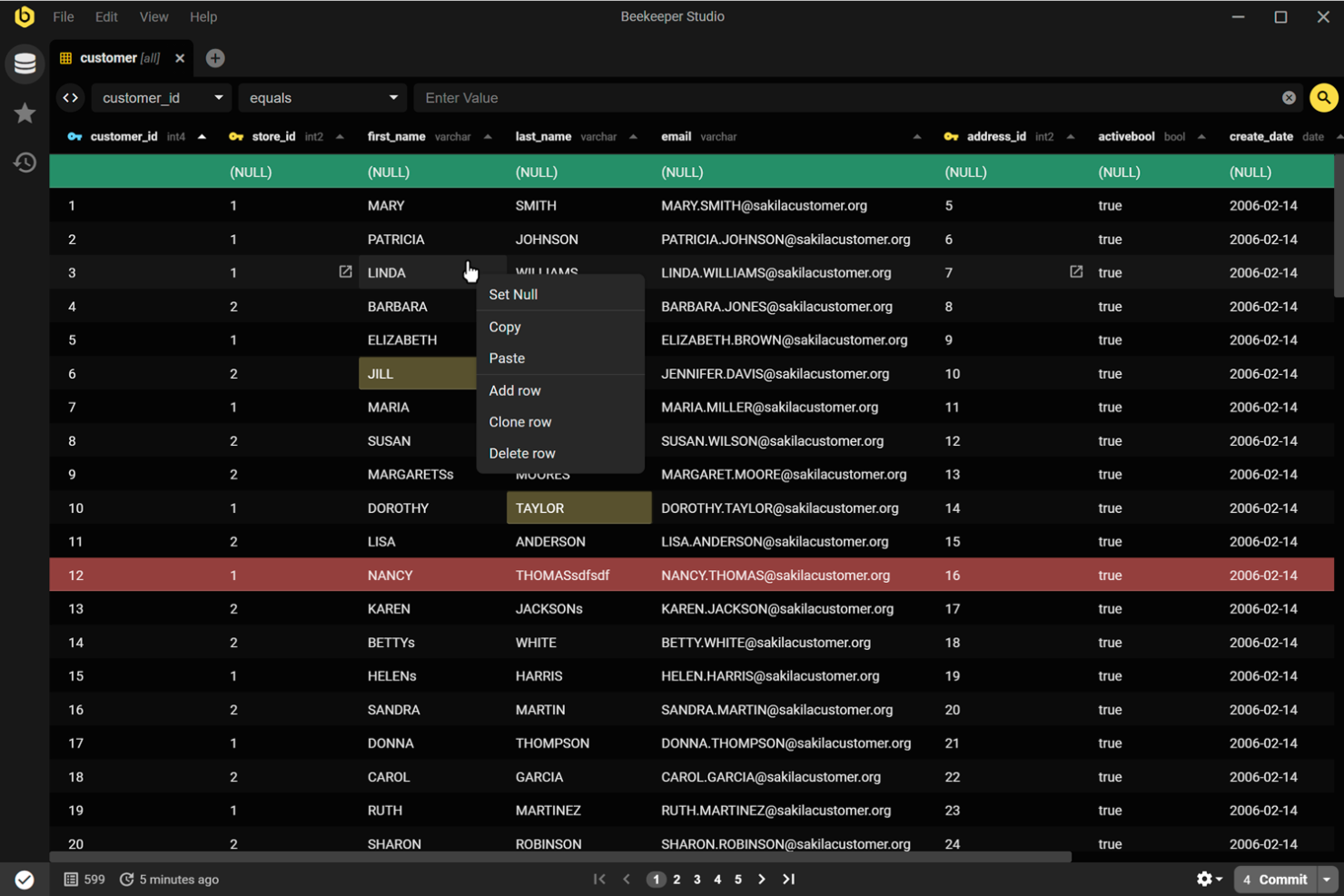
Beekeeper Studio ist ein Open-Source-Datenbankverwaltungstool für Teams, die in Echtzeit gemeinsam an SQL-Abfragen arbeiten müssen. Es zeichnet sich durch integrierte Funktionen zum Teilen von Abfragen und Bearbeiten von Sitzungen aus und ist damit eine gute Wahl für Datenteams und Entwickler, die gemeinsam an Datenbankprojekten arbeiten. Wenn Sie nach einem Tool suchen, das kollaborative Arbeitsabläufe gegenüber der alleinigen Datenbankverwaltung priorisiert, bietet Beekeeper Studio im Vergleich zu DBeaver einen einzigartigen Ansatz.
Warum Beekeeper Studio eine gute DBeaver-Alternative ist
Was Beekeeper Studio von DBeaver unterscheidet, ist der Fokus auf die gemeinsame Bearbeitung von SQL. Ich habe es für Teams ausgewählt, die Abfragen teilen und in Echtzeit zusammenarbeiten müssen – etwas, das DBeaver nicht standardmäßig unterstützt. Funktionen wie das Teilen von Abfragen in Echtzeit und die sitzungsbasierte Bearbeitung machen es mehreren Benutzern leicht, zum selben Datenbankprojekt beizutragen. Dieser Ansatz hilft Teams, Versionskonflikte zu vermeiden, und sorgt dafür, dass während der Datenbankentwicklung alle auf dem gleichen Stand bleiben.
Wichtige Funktionen von Beekeeper Studio
Einige weitere Funktionen machen Beekeeper Studio zu einer flexiblen Wahl für Datenbankexperten:
- Registerkartenbasierter Abfrageeditor: Arbeiten Sie mithilfe einer Oberfläche mit Registerkarten gleichzeitig an mehreren Abfragen und behalten Sie Ihren Arbeitsbereich übersichtlich.
- Verbindungsverschlüsselung: Sichern Sie Ihre Datenbankverbindungen mit integrierten Optionen für SSL- und SSH-Tunneling.
- Plattformübergreifende Unterstützung: Führen Sie Beekeeper Studio unter Windows, macOS und Linux ohne Kompatibilitätsprobleme aus.
- Bearbeitung von Tabellendaten: Bearbeiten Sie Tabellendaten direkt in der Oberfläche mit Unterstützung für die direkte Bearbeitung und Massenaktualisierungen.
Integrationen von Beekeeper Studio
Zu den Integrationen gehören MySQL, PostgreSQL, SQLite, SQL Server, MongoDB, Oracle, MariaDB, Amazon Redshift, Google BigQuery und Redis.
Pros and Cons
Pros:
- Teilen von Abfragen und optimierte Teamarbeitsabläufe
- Open-Source-Datenbankverwaltungstool mit aktiver Entwicklung durch die GitHub-Community
- Benutzerfreundliche Oberfläche zur Verwaltung von Abfragen und Bearbeitung von Tabellendaten
Cons:
- Weniger fortgeschrittene Funktionen zur Datenbankverwaltung als bei einigen DBeaver-Alternativen
- Eingeschränkte Funktionen für ER-Diagramme und die visuelle Schemagestaltung
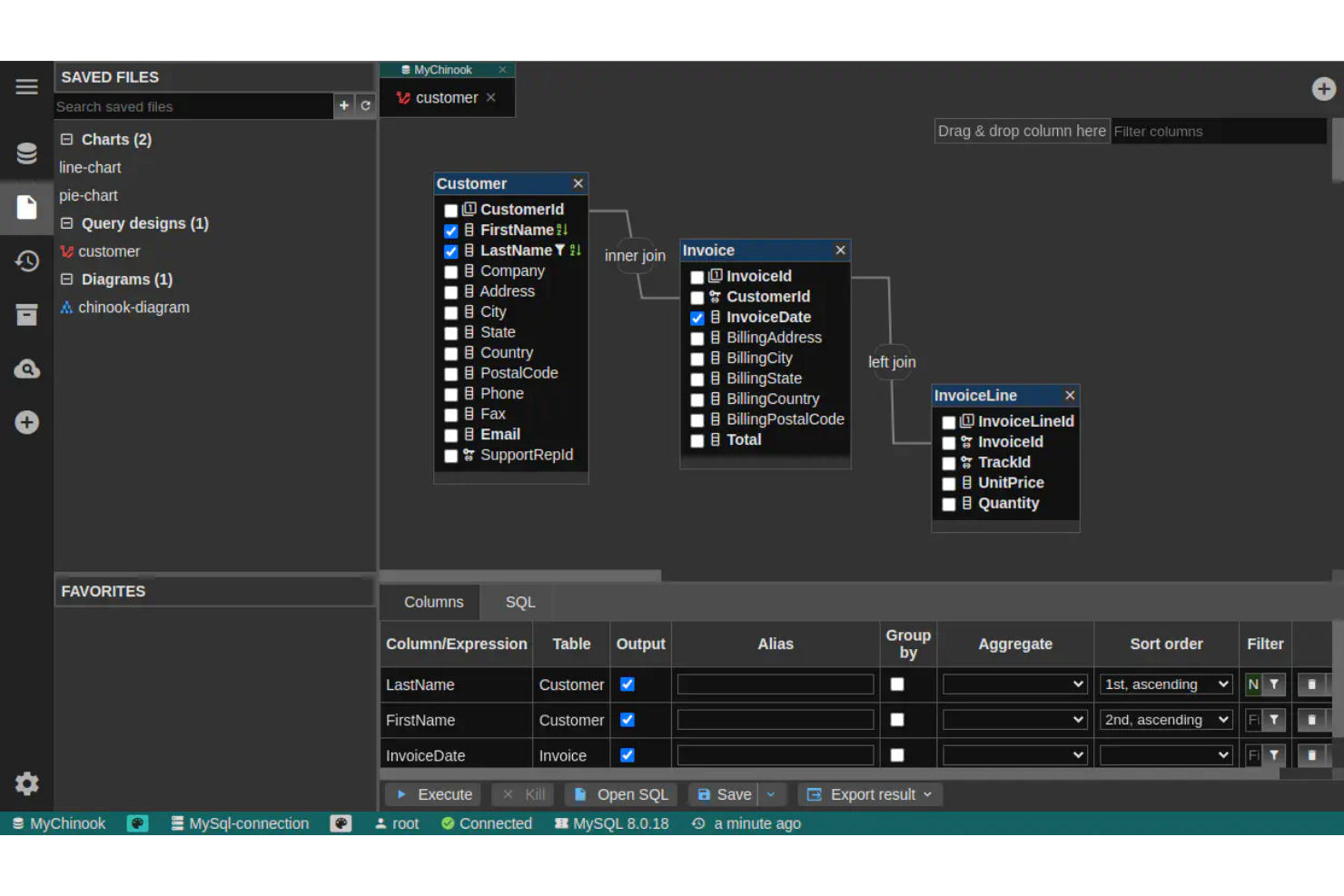
DbGate wurde für Datenbankfachleute entwickelt, die mehrere Datenbanktypen über eine einzige Oberfläche verwalten und abfragen müssen. Im Gegensatz zu DBeaver legt DbGate den Schwerpunkt auf nahtlose Verbindungen zwischen SQL- und NoSQL-Datenbanken und eignet sich daher besonders gut für Teams, die mit vielfältigen Datenquellen arbeiten. Wenn Ihr Arbeitsablauf den Wechsel zwischen verschiedenen Datenbank-Engines umfasst, hilft DbGate dabei, diesen Prozess zu zentralisieren und zu vereinfachen.
Warum DbGate eine gute Alternative zu DBeaver ist
DbGate zeichnet sich durch seine Fähigkeit aus, mehrere Datenbank-Engines innerhalb eines einzigen Arbeitsbereichs zu verbinden. Ich habe es für Benutzer ausgewählt, die SQL- und NoSQL-Datenbanken nebeneinander verwalten müssen, was besonders für Teams nützlich ist, die mit gemischten Datenumgebungen arbeiten.
Funktionen wie die einheitliche Abfragebearbeitung und die datenbankübergreifende Datenübertragung erleichtern die Verwaltung komplexer Arbeitsabläufe mit mehreren Datenbanken. Dieser Ansatz hilft Ihnen, den Aufwand zu vermeiden, für jeden Datenbanktyp zwischen verschiedenen Tools wechseln zu müssen.
Die wichtigsten Funktionen von DbGate
Zusätzlich zu seinen Möglichkeiten zur Verbindung mit mehreren Datenbanken bietet DbGate verschiedene weitere nützliche Funktionen:
- Visueller Abfrage-Designer: Erstellen und ändern Sie SQL-Abfragen über eine Drag-and-Drop-Oberfläche.
- Werkzeuge zum Importieren und Exportieren von Daten: Verschieben Sie Daten zwischen Datenbanken oder Dateiformaten wie CSV und Excel.
- Plugin-System: Erweitern Sie die Kernfunktionen mit Plugins für zusätzliche Datenbanktypen oder Funktionen.
- Tabellendaten-Editor: Bearbeiten Sie Tabelleninhalte direkt in der App mit Unterstützung für Änderungen direkt in der Tabelle.
Integrationen von DbGate
Zu den Integrationen gehören MySQL, PostgreSQL, Oracle, SQL Server, MongoDB, SQLite, CockroachDB, MariaDB, Redis und CosmosDB.
Pros and Cons
Pros:
- Unterstützt SQL- und NoSQL-Datenbankverbindungen in einem Arbeitsbereich
- Open-Source-Tool zur Datenbankverwaltung mit erweiterbarer Plugin-Architektur
- Visueller Abfrage-Builder vereinfacht die Erstellung von SQL-Abfragen
Cons:
- Weniger ausgereifte Dokumentation und Community-Ressourcen
- Funktionen zur Schemavisualisierung und für ER-Diagramme sind eingeschränkt
Weitere DBeaver-Alternativen
Hier sind einige weitere DBeaver-Alternativen, die es nicht auf meine Auswahlliste geschafft haben, aber dennoch einen Blick wert sind:
- SQL Workbench/J
Ideal für skriptbasierte SQL-Workflows
- DbVisualizer
Am besten für fortschrittliches visuelles Erstellen von Abfragen
- pgAdmin
Am besten für die umfassende PostgreSQL-Administration geeignet


Wie ich DBeaver-Alternativen bewerte
Ich bewerte diese Tools in zwei Ebenen: Grundanforderungen, die jede Option erfüllen muss – Unterstützung mehrerer Datenbanken, SSH-Tunneling, Schema-Browsing – und Unterscheidungsmerkmale, die die besten Tools hervorheben.
Kernfunktionalität (Mindestanforderungen für diese Liste)
Wenn ich Tools für meine Liste auswähle, bewerte ich jedes einzelne auf einer Skala von 0 (bietet die Funktionalität nicht) bis 5 (hervorragend in diesem Bereich) für jede der unten aufgeführten Kernfunktionen. Dann berechne ich die Gesamtpunktzahl des Tools in einen Prozentsatz um. Jedes Tool muss eine Mindestgesamtpunktzahl von 75 % erreichen, um berücksichtigt zu werden.
- Unterstützung mehrerer Datenbanken: Ich prüfe, wie viele Datenbank-Engines ein Tool abdeckt – von PostgreSQL und MySQL bis zu MongoDB, Snowflake und Redshift – sodass Sie über Ihren gesamten Stack hinweg arbeiten können.
- SQL-Editor mit IntelliSense: Ein guter SQL-Editor braucht kontextbezogene Autovervollständigung, Syntax-Hervorhebung und Formatierung. Ich schaue, wie gut er mit komplexen Abfragen über verschiedene SQL-Dialekte hinweg zurechtkommt.
- Datenanzeige und -bearbeitung: Ich bewerte, ob Sie Tabellendaten direkt in einer Rasteransicht filtern, sortieren und bearbeiten können – nützlich, wenn Sie Datensätze prüfen oder eine fehlerhafte Zeile schnell beheben möchten.
- Schema- und ERD-Visualisierung: Die Möglichkeit, Objektbäume zu durchsuchen und ER-Diagramme zu erzeugen, ist wichtig, wenn Sie sich in unbekannten Datenbanken einarbeiten oder Tabellenbeziehungen überprüfen.
- Datenimport/-export-Funktionen: Ich achte auf Unterstützung gängiger Formate wie CSV, JSON, SQL und XML sowie auf Datenübertragung zwischen Datenbanken, etwa für den Umzug zwischen Staging- und Produktionsumgebungen.
- Sichere Verbindungsverwaltung: Tools sollten SSH-Tunneling, SSL/TLS und verschlüsselte Zugangsdaten unterstützen. Ich bewerte, wie jedes Tool gespeicherte Verbindungen über mehrere Umgebungen hinweg handhabt.
Sobald ich eine Liste von Tools habe, die diese Kriterien erfüllen, werte ich aus, was jede Plattform besonders macht.
Unterscheidungsmerkmale (Was Anbieter unterscheidet)
So vergleiche und kontrastiere ich verschiedene Anbieter:
Herausragende Funktionen
KI-gestützte Abfrageunterstützung ist ein großes Unterscheidungsmerkmal – ich prüfe, ob ein Tool SQL aus natürlicher Sprache generieren oder Optimierungsvorschläge machen kann, was beim Schreiben komplexer Joins in unbekannten Schemas echte Zeit spart. Teamzusammenarbeitsfunktionen sind ebenfalls wichtig, insbesondere gemeinsame Abfragebibliotheken und geteiltes Verbindungsmanagement, da die Arbeit an Datenbanken meist zwischen Entwicklern und DBAs weitergegeben wird. Bei verteilten Teams prüfe ich, ob ein Tool Cloud-native oder browserbasierte Zugriffe bietet, damit Entwickler ohne lokale Installation arbeiten können.
Über die Funktionen hinaus
Lizenzierung spielt in diesem Bereich eine große Rolle. Ich prüfe, ob ein Tool eine kostenlose oder Open-Source-Version anbietet, da viele DBAs und Entwickler sofortigen Zugriff ohne Beschaffungsprozesse benötigen. Flexibilität beim Deployment ist ebenfalls entscheidend – einige Teams benötigen On-Premises- oder Self-Hosting-Installationen, um interne Sicherheitsrichtlinien einzuhalten, während andere einen SaaS-Ansatz bevorzugen. Ich bewerte außerdem Ökosystem-Integrationen, insbesondere mit Git für versionierte Schemaänderungen und CI/CD-Pipelines, da das Datenbankmanagement selten isoliert vom gesamten DevOps-Workflow stattfindet.
Warum nach einer DBeaver-Alternative suchen?
Obwohl DBeaver ein leistungsfähiges quelloffenes Datenbankverwaltungstool ist, passt es nicht zu jedem Arbeitsablauf. Einige Teams bevorzugen je nach den verwendeten Datenbanken, ihrer Infrastruktur oder der Art der von ihnen ausgeführten Datenbankverwaltungsaufgaben einen anderen SQL-Client oder eine andere IDE.
Sie suchen möglicherweise aus folgenden Gründen nach einer DBeaver-Alternative:
- Sie benötigen fortgeschrittene Skripterstellung, Automatisierung oder SQL-Workflows über die Befehlszeile
- Sie wünschen sich eine schlankere SQL-IDE mit geringeren Systemanforderungen
- Sie bevorzugen eine native Desktopanwendung für macOS oder Linux
- Sie benötigen eine bessere Unterstützung für bestimmte Datenbanken wie MSSQL, Postgres oder Oracle-Datenbanken
- Ihr Team ist für den Fernzugriff auf eine webbasierte Oberfläche zur Datenbankverwaltung angewiesen
- Sie wünschen sich einen spezialisierten Frontend-Datenbankclient für Entwickler
- Sie benötigen Tools, die sich in API-gesteuerte Workflows oder DBaaS-Umgebungen integrieren lassen
Einige Teams bevorzugen außerdem Tools mit einer starken Community-Edition oder einem Open-Source-Ökosystem, während andere unternehmensorientierte SQL-Entwicklungsumgebungen priorisieren.
Wenn Ihnen eines dieser Szenarien bekannt vorkommt, können Sie durch die Suche nach Alternativen ein Datenbankverwaltungstool finden, das besser zu Ihrem Workflow, Ihrer Infrastruktur oder Ihrer bevorzugten Entwicklungsumgebung passt.
Wichtige Funktionen von DBeaver
Hier sind einige der wichtigsten Funktionen von DBeaver, damit Sie die Angebote alternativer Lösungen gegenüberstellen und vergleichen können:
- Verwaltung von Verbindungen zu mehreren Datenbanken
- Visuelles ER-Diagramm und Schema-Designer
- SQL-Editor mit Syntaxhervorhebung und automatischer Vervollständigung
- Import und Export von Daten in mehreren Formaten
- Bearbeitung und Filterung von Tabellendaten
- Integrierte Tools für die Datenbankverwaltung
- Unterstützung für JDBC-kompatible Datenbanken
- Erweiterte Datenvisualisierung und Diagrammerstellung
- Verlauf der SQL-Ausführung und Lesezeichen für Abfragen
- Plugin-Architektur zur Erweiterung der Funktionalität
Wie geht es weiter:
Wenn Sie gerade nach DBeaver-Alternativen suchen, wenden Sie sich an einen SoftwareSelect-Berater und erhalten Sie kostenlos Empfehlungen.
Sie füllen ein Formular aus und führen ein kurzes Gespräch, in dem die spezifischen Anforderungen Ihres Unternehmens besprochen werden. Anschließend erhalten Sie eine Auswahlliste von Software, die Sie prüfen können. Die Berater unterstützen Sie sogar während des gesamten Kaufprozesses, einschließlich der Preisverhandlungen.