
Leitfaden zu den 10 besten Bilderkennungssoftwares 2026

10 Beste Bilderkennungstools – Shortlist
Here's my pick of the 10 best software from the 27 tools reviewed.


Bilderkennungssoftware hilft Ihnen dabei, visuelle Daten zu identifizieren, zu klassifizieren und zu analysieren, sodass Sie Bilder in nützliche Informationen verwandeln können.
Viele Teams beginnen mit der Suche nach solchen Tools, wenn sie mit großen Datensätzen, langsamer oder ungenauer Klassifizierung oder der Integration von Bildanalyse in bestehende Anwendungen zu kämpfen haben. Ohne das passende System vergeudet man schnell Zeit oder verpasst wichtige Muster, die in Bildern verborgen sind.
Ich habe mit Teams zusammengearbeitet, um Bilderkennungslösungen auf unterschiedlichen Plattformen zu entwickeln und einzuführen und dabei gesehen, was wirklich funktioniert und was nicht. Dieser Leitfaden basiert auf diesen Erfahrungen und soll Ihnen helfen, eine Lösung auszuwählen, die zu Ihrem Projekt passt und visuelle Daten bedeutsamer macht.
Why Trust Our Software Reviews
Zusammenfassung der besten Bilderkennungssoftware
Diese Vergleichstabelle fasst die Preisinformationen meiner Top-Auswahl an Bilderkennungssoftware zusammen, damit Sie das passende Tool für Ihr Budget und Ihre geschäftlichen Anforderungen finden.
| Tool | Best For | Trial Info | Price | ||
|---|---|---|---|---|---|
| 1 | Best for teams prioritizing precise image annotations | Not available | From $20/user/month (billed annually) | Website | |
| 2 | Best for enhancing e-commerce with visual search capabilities | Not available | Customized price upon request | Website | |
| 3 | Best for GPU-accelerated deep learning training | Not available | Pricing upon request. | Website | |
| 4 | Best for enterprises requiring robust and scalable vision solutions | Not available | From $1/user/month (billed annually) | Website | |
| 5 | Best for integrating video and image analysis into AWS workflows | Not available | From $1/user/month | Website | |
| 6 | Best for businesses needing automated content moderation | Not available | From $1/user/month | Website | |
| 7 | Best for developing custom machine learning models for image recognition | Not available | Customized price upon request | Website | |
| 8 | Best for open-source software enthusiasts seeking advanced image processing | Not available | Open source project and Available for free | Website | |
| 9 | Best for AI teams requiring efficient annotation workflows | Not available | From $49/user/month | Website | |
| 10 | Best for businesses looking to automate visual tasks in retail | Free demo available | From $200/user/month | Website |
-

Site24x7
Visit WebsiteThis is an aggregated rating for this tool including ratings from Crozdesk users and ratings from other sites.4.6 -
GitHub Actions
Visit WebsiteThis is an aggregated rating for this tool including ratings from Crozdesk users and ratings from other sites.4.8 -
Docker
Visit WebsiteThis is an aggregated rating for this tool including ratings from Crozdesk users and ratings from other sites.4.6





Bewertungen der besten Bilderkennungstools
Im Folgenden finden Sie meine ausführlichen Zusammenfassungen der besten Bilderkennungssoftware, die es auf meine Shortlist geschafft haben. Meine Bewertungen bieten einen detaillierten Einblick in die wichtigsten Funktionen, Vor- & Vorteile, Integrationen und optimale Anwendungsfälle jedes einzelnen Tools, damit Sie das passende für Ihre Anforderungen finden.


SuperAnnotate is a comprehensive platform designed to expedite the process of image annotation for machine learning projects. It excels in providing precision, making it a prime choice for teams prioritizing accuracy in image annotations for their data training needs.
Why I Picked SuperAnnotate:
SuperAnnotate caught my attention due to its focus on precision in image annotation, which sets it apart in the field. I concluded that its superior accuracy and a broad range of annotation tools make it best for teams that place a premium on precise image annotations.
Standout features and integrations:
SuperAnnotate's features include Pixelwise Annotation, Smart Annotation, and Automated Quality Assurance. As for integrations, it supports major machine learning platforms such as TensorFlow, PyTorch, and others, facilitating a smoother workflow for developers.
Pros and Cons
Pros:
- Strong integration with major ML platforms
- Extensive range of annotation tools
- High precision in image annotations
Cons:
- Requires a minimum of five seats
- Annual billing may not be preferable for all users
- Higher starting price compared to some other tools


Syte is an AI-powered visual search platform that enhances the e-commerce shopping experience. Allowing shoppers to search using images instead of keywords improves product discoverability and aids in conversion, making it an asset to e-commerce platforms prioritizing visual search capabilities.
Why I Picked Syte:
Syte became my selection for this list due to its impressive application of AI in the e-commerce space. Its visual search functionality stands out in a sea of text-based search platforms, offering a unique and valuable service to e-commerce platforms. I tagged it as best for enhancing e-commerce with visual search capabilities because of its proven ability to increase conversion rates and improve customer experience.
Standout features and integrations:
Key features of Syte include visual search and product discovery, automated product tagging, and personalization, all powered by AI. Additionally, it integrates with most e-commerce platforms, allowing for easy implementation without disrupting existing workflows.
Pros and Cons
Pros:
- Automation of product tagging reduces manual work
- Easy integration with existing e-commerce platforms
- Offers a unique visual search feature to improve product discoverability
Cons:
- Requires substantial data collection for personalized shopping experiences
- The success of visual search is contingent on high-quality images
- Pricing is only available upon request, which lacks transparency

Best for GPU-accelerated deep learning training
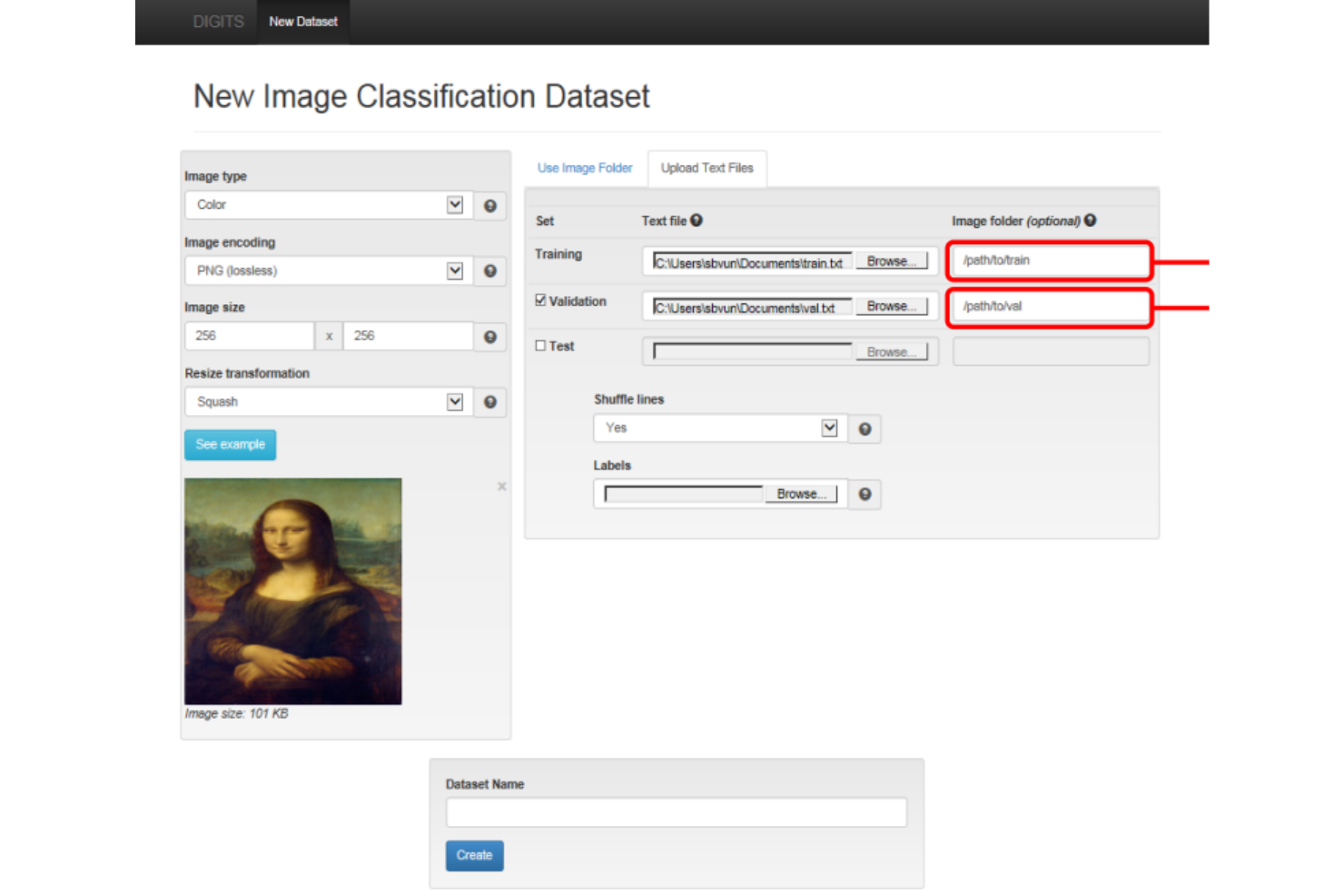
NVIDIA DIGITS is a potent tool for harnessing the power of NVIDIA GPUs for accelerated deep-learning training. It simplifies the complex process of training deep neural networks, which makes it highly effective for GPU-accelerated tasks.
Why I Picked NVIDIA DIGITS:
I chose DIGITS for its power, accessibility, and NVIDIA's leadership in the GPU space. Its standout attribute is the ability to deliver advanced image recognition capabilities at scale while providing a visual interface to monitor the training process, justifying its reputation as best for GPU-accelerated deep learning training.
Standout features and integrations:
NVIDIA DIGITS offers user-friendly features like a visual interface for network design and monitoring, the ability to manage datasets, and an integrated training system that speeds up the process. As for integrations, it works with popular deep learning frameworks like Caffe, Torch, and TensorFlow, and can utilize any NVIDIA GPU.
Pros and Cons
Pros:
- Supports popular deep-learning frameworks
- Provides a visual interface for training
- High performance on GPU-accelerated tasks
Cons:
- Hardware requirements may be prohibitive for some users
- Primarily uses a command-line interface
- May have a steep learning curve for beginners

Best for enterprises requiring robust and scalable vision solutions

Microsoft Computer Vision API is a cloud-based service offering advanced algorithms designed to analyze visual data and generate valuable insights. Developers can use tools to extract valuable info from images.
Why I Picked Microsoft Computer Vision API:
I picked Microsoft Computer Vision API for its comprehensive features and the robustness that large-scale enterprises need. This tool stands out with its scalability and ability to handle big visual data streams. It's backed by Microsoft's infrastructure, making it reliable for enterprise vision solutions.
Standout features and integrations:
Microsoft Computer Vision API provides features like image tagging, object detection, and optical character recognition, allowing for a wide range of applications. It's easily integrated into other Microsoft Azure services, and its robust API can be incorporated into various applications, enabling data flow.
Pros and Cons
Pros:
- Integration with other Azure services
- High scalability suitable for large enterprises
- Extensive features for image analysis
Cons:
- Dependent on the Azure ecosystem
- Pricing may not be suitable for smaller projects
- Might be complex for beginners to handle


Amazon Rekognition uses deep learning to analyze images and videos. It's great for face identification, object tagging, and activity detection. Plus, it integrates easily with other AWS services.
Why I Picked Amazon Rekognition:
I chose Amazon Rekognition due to its deep integration with AWS workflows and services. The decision was based on its ability to provide video and image analysis services directly within AWS applications, reducing the need for third-party solutions. Given this, Amazon Rekognition stands out as the best choice for those aiming to incorporate visual analysis into AWS workflows.
Standout features and integrations:
Amazon Rekognition excels in image and video analysis with features like object and scene detection, facial recognition, and inappropriate content detection. Its integration with other AWS services, like Amazon S3 and AWS Lambda, enables efficient data and task management within the AWS ecosystem.
Pros and Cons
Pros:
- Scalable according to the workload
- Excellent integration with AWS services
- Provides comprehensive video and image analysis
Cons:
- Limited utility outside the AWS ecosystem
- The pricing model can be complicated due to additional charges
- Might be challenging for non-AWS users


Microsoft Azure's Content Moderator uses machine learning to automate content moderation for businesses with large amounts of user-generated content.
Why I Picked Azure Content Moderator:
Azure Content Moderator stood out in my selection process due to its robust content moderation capabilities and integration within the Microsoft Azure ecosystem. I assessed that its proficiency in automating moderation tasks, such as filtering offensive or unwanted content, qualifies it as the best tool for businesses that require automated content moderation.
Standout features and integrations:
Key features of Azure Content Moderator include text moderation, image moderation, video moderation, and optical character recognition (OCR). The tool integrates well with other Azure services, such as Azure Logic Apps and Azure Functions, allowing a harmonious workflow within the Microsoft ecosystem.
Pros and Cons
Pros:
- High level of customization in moderation rules
- Strong integration with the Microsoft Azure ecosystem
- Comprehensive content moderation across different formats
Cons:
- Could be less effective outside of the Microsoft Azure ecosystem
- Initial setup may require technical expertise
- The pricing model may be complex due to its dependency on the volume and type of content

Best for developing custom machine learning models for image recognition

Google Cloud AutoML Vision lets users create custom machine-learning models for image recognition without needing deep knowledge in the field.
Why I Picked Google Cloud AutoML Vision:
In selecting Google Cloud AutoML Vision for the list, I considered its ability to facilitate the creation of custom models, an aspect where it truly stands out. Its easy-to-use interface and powerful Google ML technology make it ideal for organizations looking to develop their own machine-learning models for image recognition.
Standout features and integrations:
Google Cloud AutoML Vision's core features include powerful image recognition, custom model creation, and robust labeling tools. It also integrates with other Google Cloud services, providing an end-to-end data storage, processing, and model deployment solution.
Pros and Cons
Pros:
- Backed by Google's advanced ML technology
- Strong integration with other Google Cloud services
- Simplifies the process of creating custom ML models
Cons:
- Overkill for simple image recognition tasks
- The learning curve for users new to the Google Cloud platform
- Pricing can be complex and unpredictable due to the pay-as-you-go model

Best for open-source software enthusiasts seeking advanced image processing

Scikit-image simplifies advanced image processing tasks with algorithms for segmentation, transformation, and analysis. It's open-source and great for Python enthusiasts and scientists.
Why I Picked scikit-image:
I chose scikit-image because it's one of the most comprehensive image-processing libraries available in the Python ecosystem. This open-source model offers advanced image processing capabilities and benefits from a global community of developers and scientists. Ideal for open-source software enthusiasts.
Standout features and integrations:
Scikit-image features cover image filtering, morphology, segmentation, transformation, and measurement. Tutorials and examples are available to help you use these features. It integrates well with other scientific Python tools like NumPy, SciPy, and matplotlib, building upon existing knowledge and tools.
Pros and Cons
Pros:
- Strong integration with the scientific Python ecosystem
- Comprehensive functionality for image processing
- Open-source with a large community support
Cons:
- Lacks a graphical user interface
- Documentation can be complex for beginners
- Requires a good understanding of Python and scientific computing


V7 is a data annotation platform designed to streamline the creation of training data for machine learning models. It's particularly efficient in managing complex annotation workflows, making it an ideal tool for AI teams looking to expedite the process.
Why I Picked V7:
V7 piqued my interest because of its robust annotation capabilities. Its unique edge is in its advanced workflow management system, which can significantly accelerate annotation processes. V7 streamlines complex annotation workflows for AI teams with effective distribution and quality control.
Standout features and integrations:
V7's features revolve around providing a complete data annotation solution. It offers high-quality labeling across multiple data types, intricate workflow management, quality control mechanisms, and advanced collaboration tools for team-based projects. V7 integrates with major machine learning platforms, enabling data transfer and collaboration between different tools in a team's tech stack.
Pros and Cons
Pros:
- Integrations with major machine learning platforms
- A broad range of data annotation tools
- Advanced workflow management features
Cons:
- Requires a learning curve to fully leverage all features
- Pricing can be high for smaller teams
- Can be complex for beginners


Vue.ai is an Artificial Intelligence platform designed to help retail businesses automate various visual tasks. It uses image recognition and machine learning to process and analyze visual data, boosting efficiency in the retail sector.
Why I Picked Vue.ai:
I chose Vue.ai for its specialized focus on retail automation. Its AI-driven capabilities to interpret visual data and transform it into actionable insights set it apart. The tool excels in automating visual tasks such as cataloging, product tagging, and personalizing customer experiences. Its aptness for retail-oriented jobs positions it as the best tool for businesses aiming to modernize their visual processes in retail.
Standout features and integrations:
Vue.ai offers a range of impressive features that are key to retail business automation. It can automate product tagging, generate smart catalogs, and even deliver personalized shopping experiences based on user behavior. The tool integrates with most e-commerce platforms, making it easy to incorporate into existing digital retail ecosystems.
Pros and Cons
Pros:
- Easy integration with e-commerce platforms
- Personalized customer experience
- Specialized in retail automation tasks
Cons:
- May take some time to train the AI for specific needs
- Steep pricing for small businesses
- Might be over-featured for non-retail uses
Weitere Bilderkennungssoftware
Nachfolgend finden Sie eine Liste weiterer Bilderkennungssoftware, die ich in die engere Auswahl genommen habe, die es aber nicht in die Top 10 geschafft hat. Ein Blick lohnt sich sicherlich.
- DataLoop
For organizations requiring end-to-end data management for AI
- DeepSignals
For transforming insights with visual AI technology
- Clarifai
Good for multi-language AI model training and deployment
- Encord
Good for safety managers needing real-time safety analysis on construction sites
- ParallelDots ShelfWatch
Good for retailers requiring shelf monitoring solutions
- NoahFace
Good for businesses looking for fast and accurate facial recognition systems
- Kili
Good for AI and ML teams needing effective data annotation tools
- Azure Custom Vision Services
Good for developers needing to build, deploy, and improve custom image classifiers
- IBM Watson Visual Recognition
Good for businesses that need to analyze visual data on a large scale
- OpenCV
Good for real-time computer vision applications
- Azure Face API
Good for detecting, recognizing, and analyzing human faces in images
- Microsoft Video API
Good for extracting insights from videos
- Deepdream
Good for artists looking to use AI in their creation process
- SimpleCV
Good for beginners in computer vision due to its simplicity
- DeepPy
Good for Python users working on deep learning projects
- Face++
Good for developers needing comprehensive face-related functionalities
- Anyline
Good for organizations looking for mobile OCR solutions


Auswahlkriterien für Bilderkennungssoftware
Bei der Auswahl der besten Bilderkennungssoftware für diese Liste habe ich gängige Bedürfnisse und Herausforderungen wie die Genauigkeit der Bildanalyse und die einfache Integration in bestehende Systeme berücksichtigt. Zudem habe ich folgendes Bewertungsschema verwendet, um die Beurteilung strukturiert und fair zu gestalten:
Grundfunktionen (25% der Gesamtbewertung)
Um in diese Liste aufgenommen zu werden, musste jede Lösung diese typischen Anwendungsfälle abdecken:
- Bilderklassifizierung
- Objekterkennung
- Gesichtserkennung
- Texterkennung
- Inhaltsmoderation
Besondere Zusatzfunktionen (25% der Gesamtbewertung)
Zur weiteren Eingrenzung habe ich auch nach einzigartigen Features Ausschau gehalten, etwa:
- Echtzeit-Videoanalyse
- Augmented-Reality-Tools
- Individualisierbare Modellerstellung
- Mehrsprachige Unterstützung
- Automatische Annotationsfunktionen
Benutzerfreundlichkeit (10% der Gesamtbewertung)
Um die Bedienbarkeit des jeweiligen Systems zu bewerten, habe ich Folgendes berücksichtigt:
- Intuitive Benutzeroberfläche
- Einfache Navigation
- Geringe Einarbeitungszeit
- Anpassbare Workflows
- Barrierefreiheitsfunktionen
Onboarding (10% der Gesamtbewertung)
Zur Bewertung des Onboarding-Erlebnisses jeder Plattform habe ich Folgendes betrachtet:
- Verfügbarkeit von Schulungsvideos
- Interaktive Produkttouren
- Umfassende Dokumentation
- Zugang zu Webinaren
- Onboarding-Vorlagen
Kundensupport (10 % der Gesamtbewertung)
Um die Supportleistungen der jeweiligen Softwareanbieter zu beurteilen, habe ich Folgendes berücksichtigt:
- 24/7 Support-Verfügbarkeit
- Live-Chat-Optionen
- Dedizierte Kundenbetreuer
- Effizienz der Antwortzeiten
- Ressourcen in der Wissensdatenbank
Preis-Leistungs-Verhältnis (10 % der Gesamtbewertung)
Um das Preis-Leistungs-Verhältnis jeder Plattform zu beurteilen, habe ich Folgendes berücksichtigt:
- Konkurrenzfähige Preisgestaltung
- Funktionen im Verhältnis zu den Kosten
- Flexibilität bei den Preismodellen
- Rabatte für Langzeitnutzung
- Verfügbarkeit von kostenlosen Testphasen
Kundenbewertungen (10 % der Gesamtbewertung)
Um ein Gefühl für die allgemeine Kundenzufriedenheit zu bekommen, habe ich bei der Auswertung von Kundenbewertungen Folgendes beachtet:
- Zufriedenheitsbewertungen der Nutzer
- Häufig genannte Probleme
- Lob für bestimmte Funktionen
- Feedback zu Supportleistungen
- Wahrgenommener Gesamtwert
Wie wählt man eine Bilderkennungssoftware aus?
Lange Funktionslisten und komplexe Preisstrukturen können schnell überwältigend wirken. Damit Sie bei Ihrer individuellen Softwareauswahl den Überblick behalten, finden Sie hier eine Checkliste mit wichtigen Kriterien:
| Faktor | Worauf Sie achten sollten |
|---|---|
| Skalierbarkeit | Kann die Software mit Ihrem Unternehmen wachsen? Überprüfen Sie, ob höhere Datenmengen und Nutzerzahlen ohne Leistungseinbußen verarbeitet werden können. |
| Integrationen | Ist sie mit Ihren bestehenden Tools kompatibel? Stellen Sie die Kompatibilität mit Ihrer aktuellen Systemlandschaft sicher, um teure Umgehungslösungen zu vermeiden. |
| Anpassbarkeit | Wie stark lässt sich die Software individualisieren? Achten Sie auf Möglichkeiten, Arbeitsabläufe flexibel an Ihre Anforderungen anzupassen. |
| Benutzerfreundlichkeit | Ist die Oberfläche für Ihr Team intuitiv? Eine benutzerfreundliche Gestaltung verringert Schulungsaufwand und steigert die Produktivität. |
| Implementierung und Einführung | Wie lange dauert die Einrichtung? Prüfen Sie, ob der Anbieter Ressourcen wie Tutorials und Support zur Verfügung stellt, um den Übergang zu erleichtern. |
| Kosten | Ist das Preismodell transparent? Vergleichen Sie die Kosten mit Ihrem Budget und achten Sie auf versteckte oder langfristige Gebühren. |
| Sicherheitsmaßnahmen | Entspricht die Software Ihren Sicherheitsanforderungen? Achten Sie auf Konformität mit Branchenstandards und Schutz sensibler Daten. |
| Support-Verfügbarkeit | Haben Sie bei Bedarf Zugang zu Hilfe? Suchen Sie Anbieter mit 24/7-Support und mehreren Kommunikationswegen. |
Was ist Bilderkennungssoftware?
Bilderkennungssoftware ist ein Tool, das dabei hilft, den Inhalt von Fotos oder Videos zu erkennen, zu beschriften und zu verstehen. Sie wird von Entwicklern, Datenwissenschaftlern und Produktteams genutzt, die Erkenntnisse aus großen Mengen visueller Daten gewinnen müssen. Funktionen wie Objekterkennung, Gesichtserkennung und Musterabgleich helfen, Bilder zu sortieren, Duplikate zu finden und Inhalte zu analysieren. Diese Werkzeuge sparen Zeit und erleichtern die Bearbeitung von Bildern in Anwendungen und Geschäftsprozessen – ähnlich wie fortschrittliche Spracherkennungssoftware Aufgaben der Audioverarbeitung automatisiert.
Funktionen
Achten Sie bei der Auswahl einer Bilderkennungssoftware auf die folgenden Schlüsselfunktionen:
- Bildklassifizierung: Kategorisiert Bilder in vordefinierte Klassen und hilft so, Sortier- und Organisationsaufgaben zu automatisieren.
- Objekterkennung: Identifiziert und lokalisiert Objekte innerhalb von Bildern, nützlich für Anwendungen, die eine detaillierte Analyse erfordern.
- Gesichtserkennung: Erkennt und verifiziert Gesichter auf Bildern und wird häufig in Sicherheits- und Benutzerüberprüfungssystemen eingesetzt.
- Texterkennung: Extrahiert Text aus Bildern für eine einfache Datenverarbeitung und Analyse und unterstützt die Digitalisierung von Dokumenten.
- Inhaltsmoderation: Filtert unangemessene Inhalte, um die Einhaltung von Gemeinschaftsstandards und Vorschriften zu gewährleisten.
- Echtzeit-Videoanalyse: Verarbeitet Videoinhalte unmittelbar und unterstützt Anwendungen, die sofortige Einblicke erfordern.
- Automatische Annotation: Beschleunigt den Beschriftungsprozess, verringert den manuellen Aufwand und erhöht die Genauigkeit der Daten.
- Individuelles Modelltraining: Ermöglicht es Nutzern, Modelle auf spezifische Bedürfnisse abzustimmen und erhöht so die Relevanz der Analyse.
- Werkzeuge für Augmented Reality: Verbessert die Produktvisualisierung, besonders im Einzelhandel und Marketing nützlich.
- Leistungsbewertung: Bietet Tools zur Bewertung der Modellgenauigkeit und hilft, die Ergebnisse zu verfeinern und zu verbessern.
Vorteile
Die Implementierung von Bilderkennungssoftware bietet mehrere Vorteile für Ihr Team und Ihr Unternehmen. Hier sind einige, auf die Sie sich freuen können:
- Höhere Effizienz: Automatisiert sich wiederholende Aufgaben wie Bildsortierung und Texterkennung und verschafft Ihrem Team mehr Zeit für strategischere Arbeiten.
- Verbesserte Genauigkeit: Erhöht die Präzision bei Datenanalyse und -verarbeitung und reduziert menschliche Fehler durch Funktionen wie Objekterkennung und Gesichtserkennung.
- Erhöhte Sicherheit: Stärkt die Sicherheitsmaßnahmen mit Gesichtserkennungsfunktionen und ermöglicht eine zuverlässige Benutzerverifizierung und Zugangskontrolle.
- Bessere Entscheidungsfindung: Bietet Einblicke durch Echtzeit-Videoanalyse und Inhaltsmoderation, um schnelle und fundierte Entscheidungen zu unterstützen.
- Kosteneinsparungen: Reduziert den manuellen Arbeitsaufwand und damit verbundene Kosten durch Automatisierung von Annotation und Datenverarbeitung.
- Skalierbarkeit: Unterstützt Wachstum, indem größere Datenmengen und Benutzerlasten ohne Leistungseinbußen bewältigt werden.
- Individualisierung: Ermöglicht maßgeschneiderte Lösungen durch individuelles Modelltraining und stellt damit sicher, dass die Software den spezifischen Geschäftsanforderungen entspricht.
Kosten & Preise
Die Auswahl einer Bilderkennungssoftware erfordert ein Verständnis der verschiedenen verfügbaren Preis- und Tarifmodelle. Die Kosten variieren je nach Funktionsumfang, Teamgröße, Zusatzmodulen und mehr. Die folgende Tabelle fasst gängige Tarife, deren durchschnittliche Preise und typische enthaltene Features von Bilderkennungssoftware-Lösungen zusammen:
Tarifvergleichstabelle für Bilderkennungssoftware
| Tarifart | Durchschnittspreis | Übliche Funktionen |
|---|---|---|
| Free Plan | $0 | Grundlegende Bildklassifizierung, begrenzter Speicherplatz und Community-Support. |
| Personal Plan | $10-$30/user/month | Bildklassifizierung, Objekterkennung und grundlegende Texterkennung. |
| Business Plan | $50-$100/user/month | Erweiterte Objekterkennung, Gesichtserkennung und Echtzeit-Videoanalyse. |
| Enterprise Plan | $200-$500/user/month | Individuelles Modelltraining, API-Zugang, dedizierter Support und umfassende Datenverarbeitungsmöglichkeiten. |
Häufig gestellte Fragen zur Bilderkennungssoftware
Hier finden Sie Antworten auf häufig gestellte Fragen zur Bilderkennungssoftware:
Was sind die Systemanforderungen für Bilderkennungssoftware?
Die Systemanforderungen variieren je nach Software, umfassen aber im Allgemeinen einen modernen Computer mit angemessenem Prozessor und ausreichend RAM. Einige Tools benötigen für eine schnellere Verarbeitung eine GPU. Prüfen Sie die Dokumentation der Software auf spezifische Anforderungen, um sicherzustellen, dass die Kompatibilität mit Ihrer Hardware gewährleistet ist.
Kann Bilderkennungssoftware offline arbeiten?
Einige Bilderkennungssoftwares können offline arbeiten, aber die meisten setzen bei komplexeren Aufgaben auf cloudbasierte Verarbeitung. Falls Offline-Fähigkeit für Ihr Team entscheidend ist, suchen Sie nach Lösungen, die lokale Verarbeitung oder hybride Modelle mit sowohl lokaler als auch cloudbasierter Funktionalität bieten.
Wie geht Bilderkennungssoftware mit dem Datenschutz um?
Bilderkennungssoftware beinhaltet häufig Datenschutzmaßnahmen wie Verschlüsselung und Zugriffskontrollen. Überprüfen Sie beim Auswählen eines Tools dessen Datenschutzrichtlinien und ob es mit Vorschriften wie der DSGVO konform ist. Achten Sie darauf, dass die Software Ihren unternehmenseigenen Sicherheitsstandards entspricht, um sensible Informationen zu schützen.
Wie misst man die Genauigkeit von Bilderkennungssoftware?
Sie können die Genauigkeit messen, indem Sie die Ergebnisse der Software mit bekannten Ergebnissen vergleichen. Achten Sie auf Metriken wie Präzision, Recall und F1-Score zur Bewertung der Leistung. Eine regelmäßige Aktualisierung Ihres Modells mit neuen Daten hilft ebenfalls, eine hohe Genauigkeit beizubehalten.
Wie geht es weiter:
Wenn Sie gerade dabei sind, sich über Bilderkennungssoftware zu informieren, nehmen Sie Kontakt mit einem SoftwareSelect-Berater auf und erhalten Sie kostenlose Empfehlungen.
Sie füllen ein Formular aus und führen ein kurzes Gespräch, in dem Ihre Anforderungen im Detail besprochen werden. Im Anschluss erhalten Sie eine Auswahlliste an Software, die Sie prüfen können. Während des gesamten Kaufprozesses – einschließlich Preisverhandlungen – erhalten Sie zudem Unterstützung.