
Ranking der 26 besten Big-Data-Softwarelösungen 2026

10 Bestes Big Data Software Kurzliste
Here's my pick of the 10 best software from the 26 tools reviewed.


Die Navigation in der Welt von Big Data kann einschüchternd sein. Als Technikexperte stehen Sie vor Herausforderungen wie der Bewältigung riesiger Datenmengen und der Gewinnung aussagekräftiger Einblicke. Genau hier setzt Big Data Software an und macht Ihre Aufgaben handhabbarer und effizienter.
Aus eigener Erfahrung weiß ich: Die Wahl des richtigen Tools kann die Arbeit mit Daten in Ihrem Team grundlegend verändern. Ich habe zahlreiche Softwarelösungen getestet und bewertet, um Ihnen eine objektive Übersicht über die besten verfügbaren Optionen zu bieten.
In diesem Artikel führe ich Sie durch meine persönlichen Favoriten, stelle deren Funktionen und Vorteile vor und gehe gezielt auf Ihre Anforderungen ein. Ganz gleich, ob Sie die Datenanalyse verbessern oder bessere Entscheidungen treffen möchten – ich habe die passende Software für Sie. Tauchen wir gemeinsam in die besten Big Data Software Lösungen auf dem Markt ein.
Why Trust Our Software Reviews
Big Data Software Zusammenfassung
| Tool | Best For | Trial Info | Price | ||
|---|---|---|---|---|---|
| 1 | Best for automated data transformation | Free demo available | Pricing upon request | Website | |
| 2 | Best for data discovery and compliance | Free demo available | Pricing upon request | Website | |
| 3 | Best for interactive big data visualization | Free demo available | From $75/user/month (billed annually) | Website | |
| 4 | Best for real-time search and analytics | Free trial available | Pricing upon request | Website | |
| 5 | Best for serverless and highly-scalable data warehousing | Free plan available | Pricing upon request | Website | |
| 6 | Best for large-scale data processing tasks | Not available | Free to use | Website | |
| 7 | Best for real-time data processing and analytics | Not available | Pricing upon request | Website | |
| 8 | Best for enterprise-level data analysis and insights | Not available | Pricing upon request | Website | |
| 9 | Best for mathematical computing with big data | Free trial available | From $1,050/individual license/year | Website | |
| 10 | Best for relational database management | Free demo available | From $10.001/device/month | Website |
-

Site24x7
Visit WebsiteThis is an aggregated rating for this tool including ratings from Crozdesk users and ratings from other sites.4.6 -
Docker
Visit WebsiteThis is an aggregated rating for this tool including ratings from Crozdesk users and ratings from other sites.4.6 -
Pulumi
Visit WebsiteThis is an aggregated rating for this tool including ratings from Crozdesk users and ratings from other sites.4.8





Big Data Software Bewertungen


Adverity is a data platform that helps businesses connect, transform, and manage their marketing data. It allows teams to automate data collection and processing, making it easier to analyze and share insights.
Why I Picked Adverity: I picked Adverity because it helps your team integrate, transform, and manage big data efficiently. Its automated transformations—like smart naming conventions and currency conversions—make it easy to standardize large datasets. You can also use its AI-powered transformation copilot to prep data using simple text prompts instead of code. Plus, its data conversations feature lets non-technical users access insights using natural language.
Standout Features & Integrations:
Other features include data quality monitoring, which implements quality checks to validate your data and maintain both cleanliness and completeness. The platform also offers a data dictionary that catalogs everything for you, removing the need for your own data documentation.
Integrations include Google, Meta, TikTok, Google BigQuery, Looker Studio, Facebook Ads, Amazon Advertising, Hubspot, Salesforce, Amazon S3, Snowflake, and Microsoft Azure.
Pros and Cons
Pros:
- Provides the ability to create personalized dashboards
- Can harmonize data from various sources
- Automated data quality monitoring
Cons:
- The initial setup can be time-consuming
- Certain configurations may require technical knowledge
New Product Updates from Adverity
Adverity Introduces Brandwatch and Kakao Connectors
Adverity introduces the Brandwatch Measure and Kakao Moment connectors. These updates expand data integration capabilities, enabling more comprehensive social media and regional marketing analysis. For more information, visit Adverity’s official site.
 .
.

OneTrust provides a platform focused on data discovery, privacy, security, and third-party risk. In today's stringent regulatory environment, its commitment to ensuring data compliance stands tall, thus validating its positioning as the best tool for data discovery and compliance.
Why I Picked OneTrust: Navigating the crowded space of data management tools, OneTrust immediately captured my attention. The tool's dedication to integrating both data discovery and compliance resonated with the emerging challenges of modern businesses.
Through meticulous comparison and judgment, I discerned that OneTrust offers an unmatched equilibrium between discovering hidden data and ensuring its compliance.
Standout Features & Integrations:
OneTrust boasts features like automated data discovery, a central repository for all data-related assets, and assessment automation which are pivotal for businesses dealing with intricate data ecosystems.
On the integration front, OneTrust collaborates effortlessly with various enterprise tools and platforms, making it a cinch for businesses to weave into their existing infrastructures.
Pros and Cons
Pros:
- Wide-ranging integrations with major enterprise tools
- Emphasis on compliance aligns with global regulations
- Comprehensive data discovery mechanisms
Cons:
- The multitude of features might be overwhelming for new users
- Requires a level of expertise for optimal use
- Can be complex for smaller organizations


Tableau stands as a powerhouse in the realm of data visualization, allowing users to turn raw data into intuitive, interactive visualizations and dashboards. Its prowess in providing an immersive data exploration experience underscores its acclaim as the best tool for interactive big data visualization.
Why I Picked Tableau: In my quest to find the pinnacle of visualization tools, Tableau continually emerged at the forefront. I chose it not merely for its popularity but for its undeniable capability to breathe life into big data, offering visuals that both inform and engage. Its reputation for crafting interactive data stories solidified my belief that it truly is the best for this unique endeavor.
Standout Features & Integrations:
Tableau excels with its drag-and-drop functionality, enabling users, regardless of their technical expertise, to create intricate visualizations with ease. Its real-time data analytics and collaborative features provide a holistic view, ensuring that insights are not only insightful but also actionable.
Beyond these features, Tableau boasts integrations with a multitude of data sources, from traditional databases to cloud services.
Pros and Cons
Pros:
- Extensive integration capabilities with varied data sources
- Real-time analytics ensure timely insights
- Intuitive drag-and-drop interface facilitates easy visualization creation
Cons:
- Some advanced features may require scripting knowledge
- Licensing costs can accumulate for larger teams
- May have a steeper learning curve for beginners compared to other platforms


Elasticsearch is an open-source, search, and analytics engine that allows for real-time data exploration and visualization. With the capability to handle large volumes of data on the fly, it facilitates quick insights into complex datasets, making it ideal for real-time search and analytics.
Why I Picked Elasticsearch: I chose Elasticsearch for this list because of its exceptional ability to deliver real-time analytics, its robustness, and its extensive community support. In comparing various tools, Elasticsearch stood out for its integration with diverse data types and its flexible querying options.
I determined that it's best for real-time search and analytics due to its fast indexing and search capabilities, allowing users to access insights instantly.
Standout Features & Integrations:
Elasticsearch excels in full-text search capabilities, and its distributed nature makes it highly scalable. Its real-time indexing allows for instantaneous data processing and insight extraction. Important integrations include those with Kibana for visualization, Logstash for data collection, and Beats for data shipment, forming a robust Elastic Stack.
Pros and Cons
Pros:
- Scalable and adaptable to various business needs
- Extensive analytics capabilities
- Open-source with a strong community
Cons:
- Complexity in managing and configuring the system
- May require substantial hardware resources for extensive datasets
- Steeper learning curve for beginners


Google Cloud BigQuery provides a multi-cloud solution tailored for analyzing vast datasets in real-time. Its serverless architecture ensures scalability and simplicity, making it especially adept for those aiming to leverage data warehousing without the complexities of server management.
Why I Picked Google Cloud BigQuery: After a rigorous assessment of various tools, I determined that BigQuery's serverless approach and its robust scaling mechanisms set it apart. I chose this tool because it eliminates the server management hassle while still providing a power-packed performance.
For businesses aiming to scale their data warehousing needs without diving deep into server intricacies, BigQuery is arguably the best choice.
Standout Features & Integrations:
BigQuery's real-time analytics capability enables businesses to make data-driven decisions promptly. Its automatic backup and easy-to-restore options ensure data safety and continuity. Integration-wise, BigQuery ties well with various Google Cloud services such as Dataflow, Pub/Sub, and AI Platform, giving users a holistic cloud experience.
Pros and Cons
Pros:
- Easy integration with other Google Cloud services
- Real-time analytics empowers timely business decisions
- Serverless nature provides hands-free scalability
Cons:
- Certain complex queries might demand optimization for cost and performance
- Learning curve for those unfamiliar with Google Cloud Platform
- Can become pricey for very high query volumes


Apache Spark is an open-source distributed computing system tailored to handle a vast range of data processing tasks with a focus on speed and ease of use. The platform caters to organizations needing to process enormous datasets, justifying its aptness for large-scale data processing tasks.
Why I Picked Apache Spark: When I sought a framework to manage mammoth data processing tasks, Apache Spark consistently proved to be a prominent choice. Its distinction lies in its in-memory computation capabilities, which considerably expedite large-scale data tasks. Given its proven efficiency and wide-scale industry adoption, I'm convinced that Spark is the top pick for large-scale data processing endeavors.
Standout Features & Integrations:
Apache Spark offers impressive features like in-memory processing which helps in reducing the time data spends on disks. Additionally, it boasts a unified platform, allowing users to combine SQL, streaming, and complex analytics. Spark’s ability to integrate with popular data storage tools, like HDFS and Apache Cassandra, and data processing tools like Apache Kafka, makes it versatile for diverse tasks.
Pros and Cons
Pros:
- A rich set of developer libraries and APIs to extend its capabilities
- Versatility in handling various tasks like batch processing, machine learning, and graph processing
- Unparalleled speed due to in-memory processing
Cons:
- Configuring and tuning Spark for optimal performance might be challenging
- The learning curve can be steep for newcomers
- May require significant memory for certain tasks, leading to higher operational costs


Apache Flink stands as a powerful, open-source stream processing framework. With its prowess in real-time data processing and analytics, it facilitates turning vast streams of data into actionable insights swiftly and efficiently.
Why I Picked Apache Flink: In the process of determining the ideal tool for real-time analytics, Apache Flink consistently emerged at the forefront of my comparisons. Its distinctive stream-processing capabilities combined with its proven performance in complex data ecosystems made my decision clear.
For organizations that prioritize real-time insights and dynamic responses to data, Apache Flink presents an optimal solution.
Standout Features & Integrations:
Apache Flink boasts a fault-tolerant streaming model, ensuring data reliability and consistency. It supports event time processing, providing accurate results even when data arrives out of order. Flink integrates smoothly with popular data storage systems like Apache Kafka, Apache Cassandra, and AWS S3, offering flexibility in data sources.
Pros and Cons
Pros:
- Rich integration capabilities allow connection with various data storage systems
- Efficient event time processing handles out-of-order data with precision
- Strong fault tolerance ensures data integrity during the processing
Cons:
- As an open-source tool, commercial support options might be limited
- Scalability, while robust, may demand intricate tuning in massive-scale deployments
- Setup and configuration might require a steep learning curve for newcomers


IBM Big Data Analytics is an integrated platform provided by IBM that is tailored to empower enterprises with the tools they need to derive actionable insights from their vast data repositories. With its sophisticated capabilities tailored to enterprises, it's the perfect fit for those seeking a comprehensive solution for data analysis and insights at a larger scale.
Why I Picked IBM Big Data Analytics: When I delved into tools for enterprise-level data analysis, IBM Big Data Analytics emerged as a strong contender. I chose this platform due to its reputation for reliability and the vast suite of features it offers tailored for larger corporations.
This robust tool, combined with IBM's legacy in the tech industry, assured me that it is ideally suited for enterprise-level data analysis and insights.
Standout Features & Integrations:
IBM Big Data Analytics boasts a plethora of tools that allow for advanced predictive analytics, ranging from data exploration to machine learning. It incorporates AI-driven insights to make predictions more accurate and integrates with IBM's other data solutions.
Additionally, its compatibility with tools like Hadoop and Spark, as well as integration capabilities with many third-party platforms, further improves its value proposition.
Pros and Cons
Pros:
- Reliable support and resources available given IBM’s reputation
- Robust integration capabilities with both IBM and third-party solutions
- Comprehensive suite of analytics tools that cater to a variety of needs
Cons:
- Cost may be prohibitive for smaller organizations
- Deployment and setup might be more involved compared to other tools
- Can be complex for those unfamiliar with IBM's ecosystem

MATLAB, produced by MathWorks, is a high-performance language for technical computing. Geared towards functions like algorithm development, data visualization, and numerical computation, its design is prime for those seeking powerful mathematical computing in the realm of big data.
Why I Picked MATLAB: When I dove into the world of big data software, choosing MATLAB was inevitable. Its reputation in the scientific and engineering communities precedes it. The sheer power it brings to mathematical computations, especially when handling big data, distinguishes it.
In my opinion, when comparing various tools, MATLAB firmly stands as the best for complex mathematical operations within the big data environment.
Standout Features & Integrations:
MATLAB is renowned for its toolbox, which contains a vast array of functions for signal processing, machine learning, and more. Its Simulink feature allows for model-based designs, enhancing the simulation and model-testing process. MATLAB integrates with many third-party environments and tools, including C/C++, Java, .NET, and Python, ensuring smooth workflows across different platforms.
Pros and Cons
Pros:
- Robust integration capabilities with other languages and platforms
- Facilitates both basic and advanced mathematical computations
- Extensive toolbox with diverse functionalities
Cons:
- Licensing structure can be complex for larger teams
- Relatively steep learning curve for those unfamiliar with its language
- Might be overkill for simpler tasks

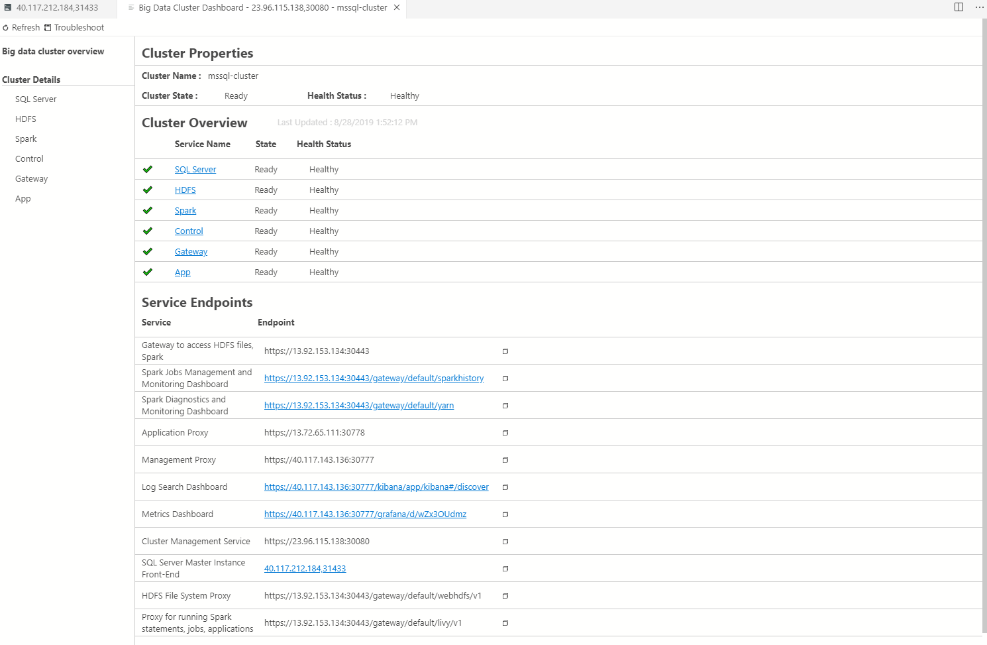
Microsoft SQL Server is a venerable product in the database domain, offering comprehensive tools for the storage, retrieval, and management of structured data. Its robust performance and reliability in handling relational databases make it a clear choice for organizations seeking effective relational database management.
Why I Picked Microsoft SQL Server: Throughout my comparisons, I was drawn to Microsoft SQL Server primarily because of its consistency in delivering top-tier database solutions. I chose it for its deep integration with other Microsoft products, which streamlines many operational processes. Moreover, its historical track record and continuous advancements in relational database management techniques rendered it unparalleled in this domain.
Standout Features & Integrations:
Microsoft SQL Server is renowned for its high performance and security features, ensuring data remains both accessible and protected. Additionally, its Always On Availability Groups provide high availability and disaster recovery capabilities. Integration-wise, it syncs with other Microsoft products like Azure, Power BI, and Microsoft Office, fostering a harmonious data ecosystem.
Pros and Cons
Pros:
- Smooth integration with a wide range of Microsoft products
- High availability with disaster recovery options through Always On Availability Groups
- Sturdy security features ensure data protection
Cons:
- Resource-intensive, necessitating strong server hardware
- Licensing model can be complex for some enterprises
- Might pose challenges for beginners unfamiliar with Microsoft's ecosystem
Weitere Big Data Software
Im Folgenden finden Sie eine Liste weiterer Big Data Software, die ich ebenfalls geprüft habe, die es jedoch nicht in die Top 10 geschafft haben. Sie sind definitiv einen Blick wert.
- Apache Kafka
For real-time data streaming platforms
- Qubole
For scalable cloud-native big data analytics
- Explorium
For external data platform integration
- Alteryx
Good for data blending and advanced analytics
- Snowflake
Good for scalable cloud data warehousing
- Apache NiFi
Good for automating and managing data flows
- Apache Cassandra
Good for high-availability distributed databases
- Minitab
Good for statistical analysis and process improvement
- MongoDB
Good for flexible NoSQL document storage
- Oracle Database
Good for robust enterprise data management
- Apache Hive
Good for SQL-like querying on Hadoop data
- Azure Databricks
Good for cloud-native Apache Spark integration
- Databricks Lakehouse
Good for combining data lakes and data warehouses
- SAS Visual Analytics Software & Analysis Tools
Good for interactive data visualization
- Apache HBase
Good for large-scale columnar storage
- Impala
Good for real-time querying in Hadoop


Ähnliche Rezensionen
- Datenbank-Design-Tools
- Data Masking Software
- Datenintegrationstools
- Desktop Datenbanksoftware
- Datenreplikationssoftware
Auswahlkriterien für Big Data Software
Bei der Auswahl der besten Big Data Software für diese Liste habe ich gängige Käuferbedürfnisse und Herausforderungen wie Skalierbarkeit und Integrationsmöglichkeiten berücksichtigt. Für eine strukturierte und faire Bewertung habe ich zudem folgendes Framework verwendet:
Kernfunktionen (25% der Gesamtwertung)
Um in diese Liste aufgenommen zu werden, musste jede Lösung die folgenden Anwendungsfälle abdecken:
- Datenspeicherung und Datenmanagement
- Datenverarbeitung und -analyse
- Integration in bestehende Systeme
- Echtzeit-Datenverarbeitung
- Skalierbarkeit der Datenoperationen
Zusätzliche herausragende Funktionen (25% der Gesamtwertung)
Um die Auswahl weiter einzugrenzen, habe ich auch auf besondere Merkmale geachtet, zum Beispiel:
- Funktionen für maschinelles Lernen
- Erweiterte Datenvisualisierungstools
- Automatische Datenbereinigung
- Prädiktive Analytik
- Anpassbare Dashboards
Benutzerfreundlichkeit (10% der Gesamtwertung)
Um die Benutzerfreundlichkeit jeder Lösung einzuschätzen, habe ich unter anderem folgendes betrachtet:
- Intuitive Benutzeroberfläche
- Einfache Navigation
- Anpassungsoptionen
- Lernkurve
- Nutzerfeedback und Bewertungen
Onboarding (10% der Gesamtwertung)
Um das Onboarding jeder Plattform zu bewerten, habe ich folgende Kriterien herangezogen:
- Verfügbarkeit von Schulungsvideos
- Interaktive Produkttouren
- Zugang zu Vorlagen
- Webinare und Workshops
- Reaktionsfähigkeit von Chatbots
Kundensupport (10 % der Gesamtbewertung)
Um die Kundensupport-Dienste jedes Softwareanbieters zu bewerten, habe ich Folgendes berücksichtigt:
- Verfügbarkeit von 24/7-Support
- Reaktionszeit auf Anfragen
- Zugang zu einer Wissensdatenbank
- Qualität der Support-Dokumentation
- Nutzerforen der Community
Preis-Leistungs-Verhältnis (10 % der Gesamtbewertung)
Um das Preis-Leistungs-Verhältnis jeder Plattform zu bewerten, habe ich Folgendes berücksichtigt:
- Vergleich der Preismodelle
- In jedem Paket enthaltene Funktionen
- Flexibilität der Abonnements
- Rabatte für langfristige Verträge
- Kundenfeedback zur Preisgestaltung
Kundenrezensionen (10 % der Gesamtbewertung)
Um einen Eindruck von der allgemeinen Kundenzufriedenheit zu gewinnen, habe ich bei der Lektüre von Kundenrezensionen Folgendes berücksichtigt:
- Gesamtzufriedenheitsbewertungen
- Häufig erwähnte Vor- und Nachteile
- Häufigkeit von Updates und Verbesserungen
- Feedback zu Supporterfahrungen
- Langfristige Nutzererfahrungen
So wählen Sie Big Data Software aus
Man kann sich leicht in langen Funktionslisten und komplexen Preismodellen verlieren. Damit Sie beim Auswahlprozess nicht den Überblick verlieren, finden Sie hier eine Checkliste mit wichtigen Faktoren, auf die Sie achten sollten:
| Faktor | Worauf achten |
|---|---|
| Skalierbarkeit | Kann die Software Ihr Datenwachstum bewältigen? Prüfen Sie, ob sie eine steigende Datenmenge und -komplexität ohne Leistungsverlust unterstützt. |
| Integrationen | Passt sie zu Ihren bestehenden Tools? Überprüfen Sie, ob eine nahtlose Integration in Ihre aktuell verwendeten Systeme, wie Cloud-Speicher und Data Fabric Software, möglich ist. |
| Anpassbarkeit | Lässt sie sich auf Ihre Anforderungen zuschneiden? Überlegen Sie, ob sich die Software individuell an spezifische Geschäftsanforderungen und -prozesse anpassen lässt. |
| Benutzerfreundlichkeit | Ist sie anwenderfreundlich? Bewerten Sie die Lernkurve und wie leicht Ihr Team die Software effektiv übernehmen und nutzen kann. |
| Implementierung und Einführung | Wie schnell können Sie starten? Prüfen Sie den Zeit- und Ressourcenaufwand für die Einrichtung und Schulung sowie, ob Unterstützung im Prozess angeboten wird. |
| Kosten | Bleiben sie im Budget? Vergleichen Sie Preismodelle und die Gesamtkosten einschließlich versteckter Gebühren und langfristiger Ausgaben. |
| Sicherheitsmaßnahmen | Sind Ihre Daten geschützt? Stellen Sie sicher, dass die Software Ihre Sicherheitsstandards erfüllt und die notwendigen Datenschutzfunktionen bereitstellt. |
| Compliance-Anforderungen | Entspricht sie den Vorschriften? Überprüfen Sie, ob die Software branchenspezifische Compliance-Standards und rechtliche Anforderungen für Ihr Unternehmen erfüllt. |
Was ist Big Data Software?
Big Data Software ist ein Werkzeug, das dazu entwickelt wurde, große Datenmengen effizient zu verarbeiten, zu analysieren und zu verwalten. Datenwissenschaftler, Analysten und IT-Fachleute nutzen diese Tools in der Regel, um Erkenntnisse zu gewinnen und datenbasierte Entscheidungen zu treffen. Datenspeicherung, Echtzeitverarbeitung und Integrationsfähigkeit unterstützen dabei, komplexe Datenprozesse zu steuern und Unternehmensanforderungen zu erfüllen. Für Unternehmen, die verschiedene Optionen prüfen, kann es hilfreich sein, Databricks oder Databricks-Alternativen zu vergleichen, um Einsichten in unterschiedliche Plattformen zu gewinnen. Diese Tools bieten einen enormen Mehrwert, indem sie große Datenmengen in umsetzbare Erkenntnisse verwandeln.
Funktionen
Achten Sie bei der Auswahl von Big Data Software auf folgende Schlüsselfunktionen:
- Datenspeicherung: Verarbeitet große Datenmengen effizient und sorgt für zuverlässigen Zugriff und Verwaltung.
- Echtzeitverarbeitung: Ermöglicht schnelle Analyse eingehender Daten und damit zeitnahe Entscheidungen.
- Integrationsfähigkeit: Verbindet sich nahtlos mit bestehenden Systemen und Tools und steigert so die Effizienz der Arbeitsabläufe.
- Skalierbarkeit: Unterstützt wachsende Datenanforderungen, ohne die Leistung zu beeinträchtigen, und begleitet das Unternehmenswachstum.
- Daten-Beobachtungs-Tools: Bietet eine visuelle Darstellung von Datenerkenntnissen und erleichtert das Verständnis komplexer Informationen.
- Anpassbarkeit: Ermöglicht die individuelle Anpassung der Software an spezifische Geschäftsanforderungen und -prozesse.
- Sicherheitsvorkehrungen: Schützt sensible Daten mit robusten Sicherheitsmaßnahmen und stellt Compliance und Vertrauen sicher.
- Unterstützung für maschinelles Lernen: Erleichtert fortgeschrittene Analysen und prädiktive Modellierungen, um datengestützte Strategien zu verbessern.
- Benutzerfreundliche Oberfläche: Vereinfacht die Navigation und Bedienung und reduziert die Einarbeitungszeit.
- Automatisierte Datenbereinigung: Verbessert die Datenqualität durch automatische Erkennung und Korrektur von Fehlern.
Vorteile
Die Implementierung von Big-Data-Software bietet zahlreiche Vorteile für Ihr Team und Ihr Unternehmen. Hier sind einige, auf die Sie sich freuen können:
- Verbesserte Entscheidungsfindung: Echtzeitverarbeitung und Datenvisualisierung helfen, Trends schnell zu erkennen und fundierte Entscheidungen zu treffen.
- Höhere Effizienz: Integrationsfähigkeiten und Automatisierung reduzieren manuelle Aufgaben, sodass Ihr Team sich auf strategische Tätigkeiten konzentrieren kann.
- Skalierbarkeit: Passt sich wachsenden Datenanforderungen leicht an und stellt sicher, dass Ihre Software mit dem Unternehmenswachstum Schritt hält.
- Erhöhte Datensicherheit: Schutzmechanismen sichern sensible Informationen, gewährleisten Compliance und schaffen Vertrauen.
- Bessere Einblicke: Unterstützung für maschinelles Lernen und fortschrittliche Analysen ermöglichen ein tieferes Verständnis und bessere Prognosen für künftige Strategien.
- Kosteneinsparungen: Effizientes Datenmanagement senkt operative Kosten, indem Ressourcen optimiert und Verschwendung minimiert werden.
Kosten & Preise
Die Auswahl von Big-Data-Software erfordert ein Verständnis der verschiedenen Preismodelle und verfügbaren Tarife. Die Kosten variieren je nach Funktionen, Teamgröße, Zusatzfunktionen und mehr. Die folgende Tabelle fasst gängige Tarife, deren Durchschnittspreise und typische enthaltene Funktionen von Big-Data-Softwarelösungen zusammen:
Vergleichstabelle für Big-Data-Software-Tarife
| Tarifart | Durchschnittspreis | Häufige Funktionen |
|---|---|---|
| Kostenloser Tarif | $0 | Grundlegende Datenspeicherung, eingeschränkte Verarbeitungskapazitäten und Community-Support. |
| Persönlicher Tarif | $10-$30/user/month | Erweiterte Datenvisualisierung, Integration mit gängigen Tools und E-Mail-Support. |
| Business-Tarif | $50-$100/user/month | Fortschrittliche Analysen, Echtzeitverarbeitung und dedizierter Kundendienst. |
| Enterprise-Tarif | $150-$300/user/month | Individuell anpassbare Lösungen, Unterstützung für maschinelles Lernen, umfassende Sicherheit und 24/7-Support. |
| Ich konnte keine spezifischen FAQs aus den Suchergebnissen finden. Basierend auf allgemeinem Branchenwissen folgen jedoch einige fortgeschrittene FAQs zu Big-Data-Software: |
Die häufigsten Fragen zu Big Data Software
Kann Big Data Software die Entscheidungsfindung verbessern?
Ja, Big Data Software kann die Entscheidungsfindung erheblich verbessern, indem sie Echtzeit-Einblicke und Analysen bietet. Sie hilft Ihnen, Trends, Muster und Anomalien in Ihren Daten zu erkennen. Mit fortschrittlichen Analyse- und Visualisierungstools kann Ihr Team fundierte Entscheidungen auf Basis genauer und umfassender Daten treffen.
Was sind die häufigsten Herausforderungen bei der Implementierung von Big Data Software?
Zu den häufigsten Herausforderungen gehören die Datenintegration, die Sicherstellung der Datenqualität und das Management der Datensicherheit. Es kann schwierig sein, die Software auf wachsende Datenmengen zu skalieren. Eine angemessene Schulung und ein durchdachtes Change Management sind entscheidend, damit Ihr Team die Software effektiv nutzen kann.
Wie wichtig ist Datensicherheit bei Big Data Software?
Datensicherheit ist bei Big Data Software von größter Bedeutung, da oft sensible Informationen verarbeitet werden. Achten Sie darauf, dass die Software über starke Sicherheitsmechanismen wie Verschlüsselung, Zugangskontrollen und die Einhaltung branchenüblicher Standards verfügt. Der Schutz Ihrer Daten schafft Vertrauen bei den Beteiligten und minimiert rechtliche Risiken.
Wie geht es weiter?
Wenn Sie sich gerade über Big Data Software informieren, kontaktieren Sie einen SoftwareSelect-Berater für kostenlose Empfehlungen.
Sie füllen ein Formular aus und führen ein kurzes Gespräch, in dem Ihre spezifischen Anforderungen besprochen werden. Anschließend erhalten Sie eine Auswahlliste von Softwarelösungen, die Sie bewerten können. Die Berater begleiten Sie sogar durch den gesamten Kaufprozess, einschließlich Preisverhandlungen.