

10 beste BetterCloud Alternativen für 2026

Bessere Alternativen zu BetterCloud
Hier ist meine Auswahlliste von BetterCloud-Alternativen:


Eine überzeugende Alternative zu BetterCloud bietet Ihrem Team zentrale Verwaltung von SaaS-Anwendungen, granulare Zugriffskontrollen und automatisierte Workflows für Onboarding, Offboarding und Compliance. Wenn Sie nach einer Alternative zu BetterCloud suchen, stehen Sie wahrscheinlich vor Herausforderungen wie zunehmender SaaS-Ausbreitung, manueller Benutzerbereitstellung oder Lücken bei Übersicht und Sicherheit in Ihrem SaaS-Ökosystem.
Die passende Lösung hilft Ihnen, komplexe Anwendungsumgebungen zu verwalten, Risiken zu minimieren und mit den sich wandelnden Anforderungen Ihres Unternehmens Schritt zu halten. In dieser Liste finden Sie geprüfte Optionen, die diese Prioritäten abdecken – so können Sie Funktionen, Integrationen und Stärken vergleichen, um die beste Lösung für Ihre IT-Umgebung auszuwählen.
Was ist BetterCloud?
BetterCloud ist eine SaaS-Managementplattform, die die Kontrolle über Cloud-Anwendungen zentralisiert, Aufgaben im Benutzerlebenszyklus automatisiert und Sicherheitsrichtlinien in Ihrem Unternehmen durchsetzt.
IT-Teams nutzen BetterCloud, um Onboarding, Offboarding, Berechtigungen und Compliance für mehrere SaaS-Tools über ein zentrales Dashboard zu steuern. Das reduziert manuellen Aufwand, verbessert die Übersicht und sorgt dafür, dass Sicherheitsstandards beim Wachstum Ihrer SaaS-Umgebung eingehalten werden.
Zusammenfassung der besten BetterCloud-Alternativen
Diese Vergleichstabelle fasst die Preisinformationen meiner besten BetterCloud-Alternativen zusammen, damit Sie die passende Lösung für Ihr Budget und Ihre Geschäftsanforderungen finden.
| Tool | Best For | Trial Info | Price | ||
|---|---|---|---|---|---|
| 1 | Best for unified device and user management | 30-day free trial + free demo available | From $9/user/month (billed annually) | Website | |
| 2 | Best for secure single sign-on integration | 30-day free trial + free demo available | From $6/user/month (billed annually) | Website | |
| 3 | Best for vendor contract optimization | Free 15-day trial available | Pricing upon request | Website | |
| 4 | Best for enterprise workflow integration | Free demo available | Pricing upon request | Website | |
| 5 | Best for automated SaaS lifecycle management | Free demo available | Pricing upon request | Website | |
| 6 | Best for identity governance controls | Free demo available | Pricing upon request | Website | |
| 7 | Best for SaaS spend visibility | Free demo available | Pricing upon request | Website | |
| 8 | Best for SaaS procurement management | Free demo available | From $250/month | Website | |
| 9 | Best for SaaS discovery and usage tracking | Free 14-day trial available | Pricing upon request | Website | |
| 10 | Best for access request automation | Free 7-day trial available | Pricing upon request | Website |
Why Trust Our Software Reviews
We’ve been testing and reviewing software since 2023. As tech leaders ourselves, we know how critical and difficult it is to make the right decision when selecting software.
We invest in deep research to help our audience make better software purchasing decisions. We’ve tested more than 2,000 tools for different tech use cases and written over 1,000 comprehensive software reviews. Learn how we stay transparent & our software review methodology.
-

Site24x7
Visit WebsiteThis is an aggregated rating for this tool including ratings from Crozdesk users and ratings from other sites.4.6 -
GitHub Actions
Visit WebsiteThis is an aggregated rating for this tool including ratings from Crozdesk users and ratings from other sites.4.8 -
Docker
Visit WebsiteThis is an aggregated rating for this tool including ratings from Crozdesk users and ratings from other sites.4.6





Rezensionen zu BetterCloud-Alternativen
Nachfolgend finden Sie meine detaillierten Zusammenfassungen der besten BetterCloud-Alternativen, die es auf meine Auswahlliste geschafft haben. Meine Rezensionen bieten einen ausführlichen Überblick über die Funktionen, Integrationen und wichtigsten Anwendungsfälle jeder Plattform, damit Sie die beste Lösung für sich finden.

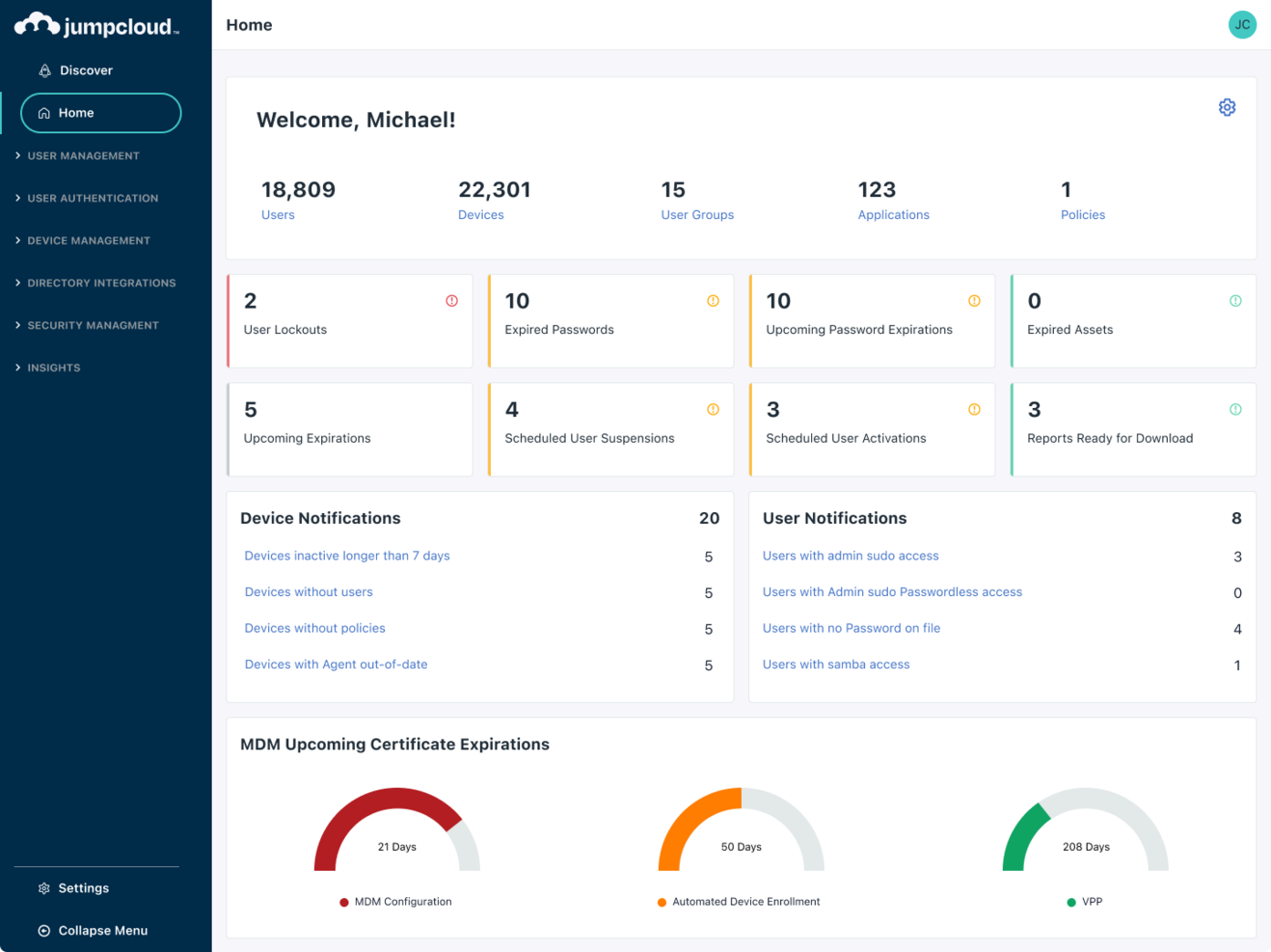
Managing both devices and user identities from a single platform is where JumpCloud stands out. IT teams looking for a BetterCloud alternative use JumpCloud to unify directory services, device management, and access control across Windows, Mac, and Linux environments. This approach helps organizations simplify endpoint security and user lifecycle management without juggling multiple tools.
Who is JumpCloud Best For?
IT administrators in small to mid-sized organizations globally overseeing unified device and user management.
Why I Picked JumpCloud
If you need unified control over both devices and user identities, JumpCloud offers a combination that BetterCloud doesn’t provide. I picked JumpCloud because it lets you manage directory services, device security policies, and user authentication from a single admin console. The platform supports cross-platform device management for Windows, Mac, and Linux, so you can enforce security standards regardless of your hardware mix. For IT teams that want to reduce tool sprawl and centralize endpoint and identity management, JumpCloud brings these capabilities together in one place.
JumpCloud Key Features
Some other JumpCloud features can help your team cover more IT management needs:
- Cloud LDAP and RADIUS: Provides cloud-based LDAP and RADIUS services for secure network and application access.
- Multi-Factor Authentication (MFA): Enforces MFA for both device logins and application access.
- Policy Management: Lets you create and deploy security policies to groups of devices.
- Single Sign-On (SSO): Supports SSO integration with a wide range of cloud applications.
JumpCloud Integrations
Integrations include Google Workspace, Microsoft 365, Okta, Salesforce, Slack, GitHub, Workday, BambooHR, and more.
Pros and Cons
Pros:
- Provides built-in multi-factor authentication for device and app access
- Offers cloud-based directory services with LDAP and RADIUS support
- Manages user identities and devices across Windows, Mac, and Linux
Cons:
- Device management for mobile platforms is less comprehensive than desktop
- Lacks deep SaaS application management and automation features

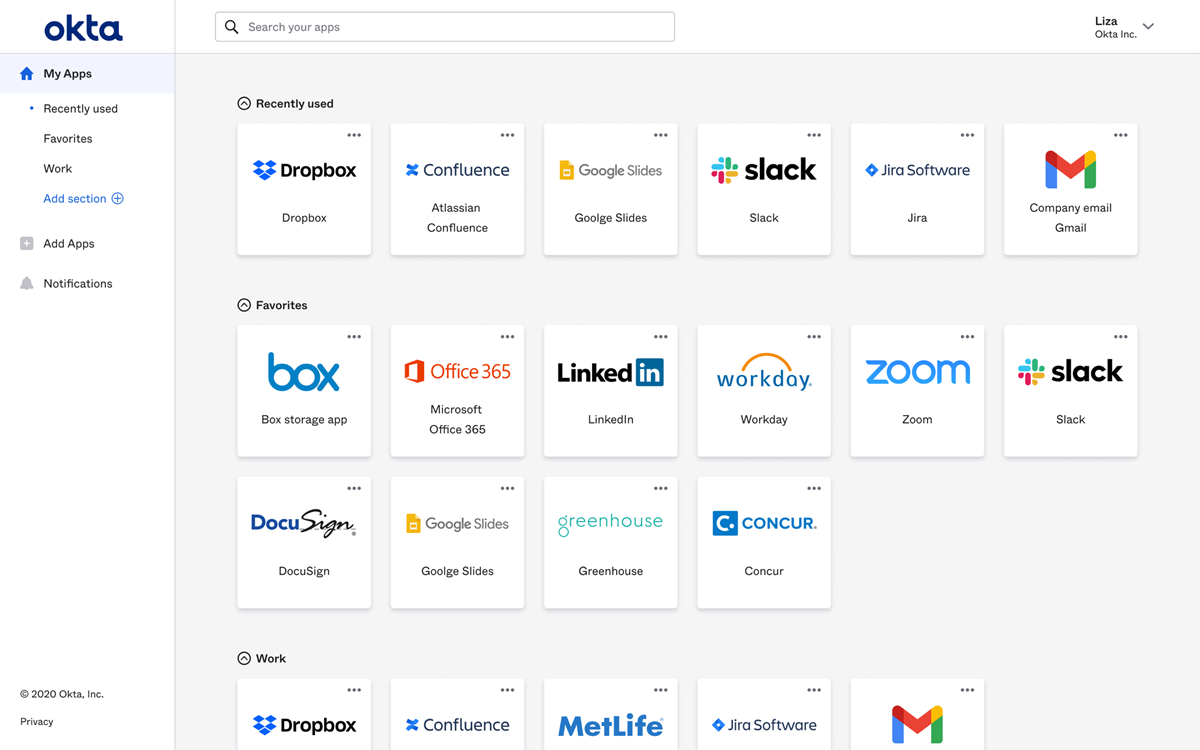
If your team needs secure, centralized access management, Okta delivers a dedicated platform for single sign-on and identity control. IT administrators and security leads use Okta to unify authentication across cloud and on-premises apps, reducing password sprawl and access risks. Unlike BetterCloud, Okta specializes in identity and access management, making it a strong fit for organizations prioritizing secure user authentication and streamlined app access.
Who is Okta Best For?
IT and security teams in small to large enterprises worldwide deploying secure single sign-on and identity management solutions.
Why I picked Okta
When secure single sign-on is your top priority, Okta offers a focused solution that BetterCloud doesn’t match. I picked Okta because it provides centralized authentication and granular access controls for all your cloud and on-premises applications. The platform supports adaptive multi-factor authentication, letting you enforce security policies based on user context and risk. If your organization needs to reduce password fatigue and strengthen identity security, Okta’s single sign-on features are purpose-built for that challenge.
Okta Key Features
Some other Okta features can help your team manage identity and access more effectively:
- Lifecycle Management: Automates user provisioning and deprovisioning across connected applications.
- Universal Directory: Stores and manages user profiles and attributes in a centralized directory.
- API Access Management: Secures APIs with OAuth and custom access policies.
- Self-Service Password Reset: Allows users to reset their own passwords without IT intervention.
Okta Integrations
Integrations include Microsoft 365, Google Workspace, Salesforce, Slack, Zoom, AWS, ServiceNow, Box, Workday, and more.
Pros and Cons
Pros:
- Provides automated user provisioning and deprovisioning workflows
- Offers adaptive multi-factor authentication for enhanced security policies
- Supports single sign-on across hundreds of cloud and on-premises apps
Cons:
- Lacks granular SaaS usage analytics
- Does not provide SaaS operations automation or file security monitoring

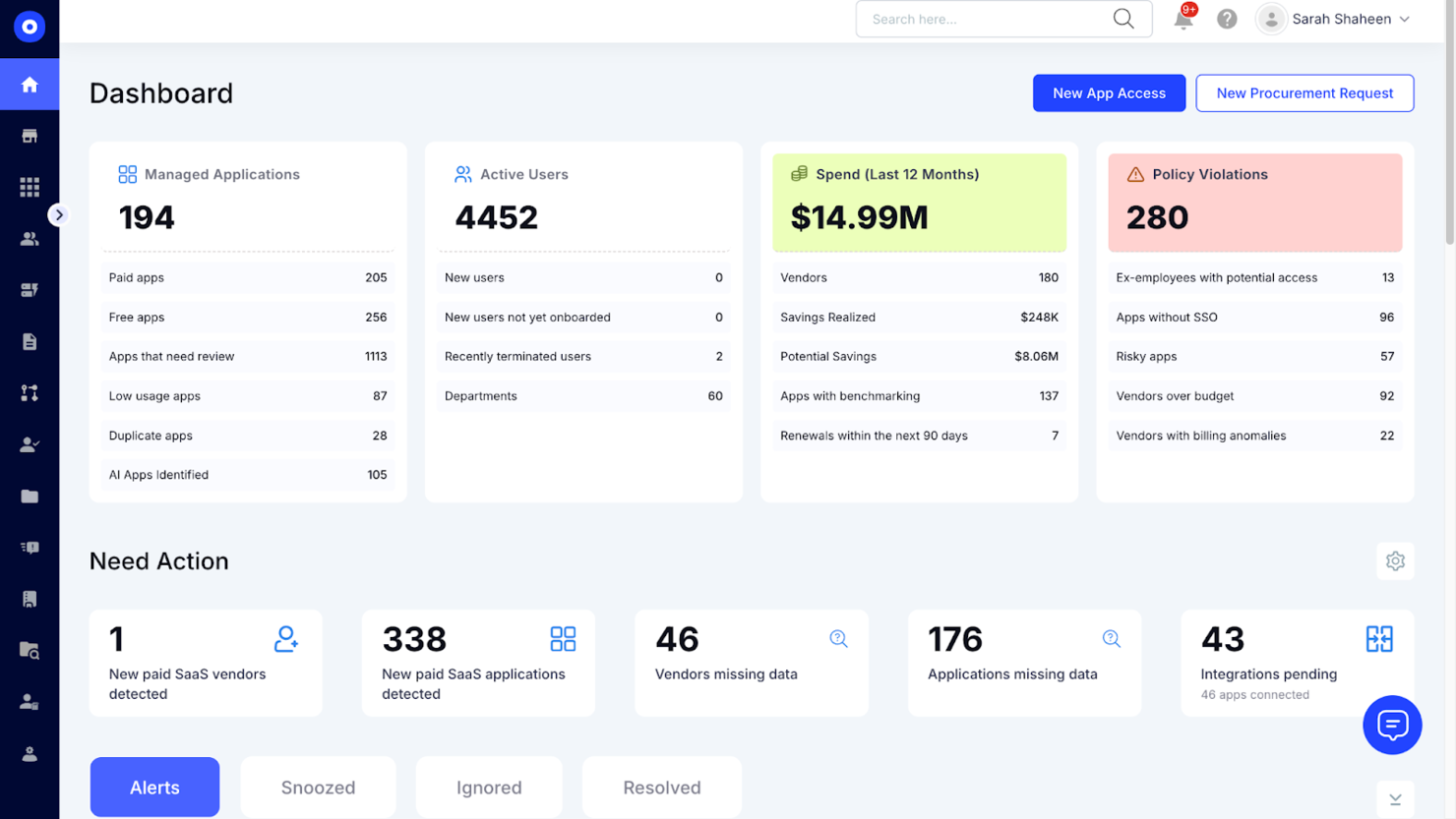
CloudEagle.ai is built for IT, procurement, and finance teams that need to optimize SaaS vendor contracts and renewals. Unlike other BetterCloud alternatives, it combines contract management with spend analytics and renewal workflows in one platform. This approach helps you gain visibility into contract terms, avoid surprise renewals, and negotiate better pricing with vendors.
Who is CloudEagle.ai Best For?
Finance and IT leaders in mid-sized to large enterprises globally optimizing vendor contracts and controlling SaaS expenditures.
Why I Picked CloudEagle.ai
For IT and procurement teams focused on vendor contract optimization, CloudEagle.ai offers a set of features that go beyond what you’ll find in BetterCloud. I picked CloudEagle.ai because it centralizes contract storage, tracks renewal dates, and supports spend optimization with automated reminders to help you avoid missed deadlines. The platform also analyzes contract terms and spend data, giving key stakeholders stronger leverage in negotiations and more comprehensive visibility into your SaaS portfolio. If you want to reduce wasted spend and improve vendor management, CloudEagle.ai’s contract-focused approach is a strong fit.
CloudEagle.ai Key Features
Some other features in CloudEagle.ai can help you manage your SaaS stack more strategically:
- Automated SaaS Discovery: Detects and catalogs all SaaS applications in use across your organization.
- Spend Analytics Dashboard: Visualizes SaaS spend by department, vendor, or user for better budget oversight.
- User Access Reviews: Allows you to audit and manage user access to SaaS tools from a single interface.
- Renewal Workflow Automation: Streamlines the process of reviewing, approving, and executing SaaS renewals.
CloudEagle.ai Integrations
Integrations include Okta, Microsoft Active Directory, Google Workspace, NetSuite, QuickBooks, Sage Intacct, Salesforce, Slack, and more.
Pros and Cons
Pros:
- Offers automated reminders for upcoming contract renewals and expirations
- Provides spend analytics to identify unused or underutilized licenses
- Centralizes SaaS contract storage and renewal tracking for IT teams
Cons:
- Feature set is focused on contract management, not broader SaaS operations
- Reporting customization options may be less advanced than competitors

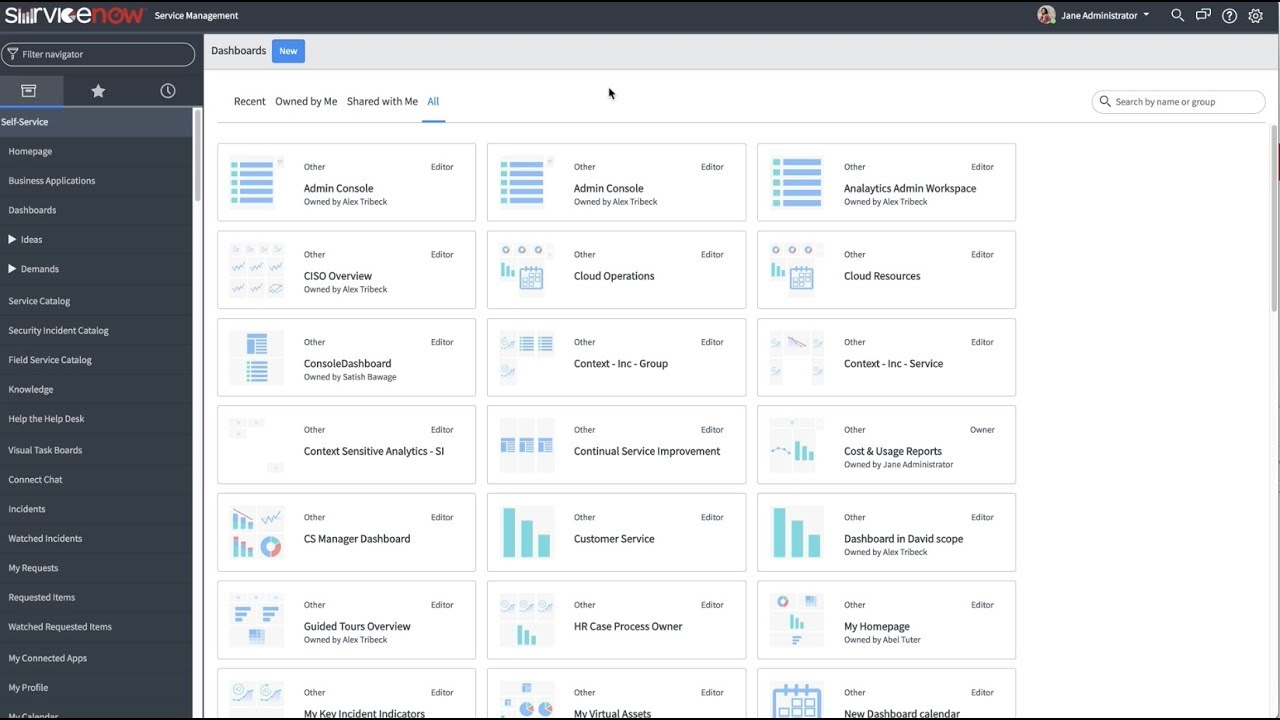
ServiceNow stands out for IT leaders and enterprise teams that need to connect complex workflows across departments and systems. The platform goes beyond SaaS management by offering deep automation, service management, and integration capabilities for large organizations. If you’re looking for a BetterCloud alternative that can unify IT, HR, and business processes on a single platform, ServiceNow is built for that scale and flexibility.
Who is ServiceNow Best For?
IT and operations executives in large enterprises worldwide integrating workflows across IT service management and business functions.
Why I Picked ServiceNow
When you need to integrate workflows across multiple enterprise systems, ServiceNow offers capabilities that go far beyond what BetterCloud provides. I picked ServiceNow because it lets you design, automate, and monitor end-to-end automated workflows that span IT, HR, security, and business operations, while supporting a zero-trust approach to access and governance. The platform’s workflow engine and low-code tools rely on extensive connectors to help you link processes and data between different departments, reducing silos and manual work. For organizations that want to unify service management and automation at scale, ServiceNow delivers the depth and flexibility needed.
ServiceNow Key Features
Some other features in ServiceNow can help you manage enterprise technology environments more effectively:
- Incident Management: Tracks, prioritizes, and resolves IT incidents from a centralized dashboard.
- Asset Management: Monitors hardware and software assets throughout their lifecycle.
- Service Catalog: Lets users request IT and business services through a customizable portal.
- Change Management: Controls and documents changes to systems and infrastructure to reduce risk.
ServiceNow Integrations
Integrations include Microsoft Teams, Slack, Jira, GitHub, Salesforce, SAP, Oracle, Microsoft Dynamics 365, Okta, and more.
Pros and Cons
Pros:
- Provides low-code tools for building custom enterprise applications
- Offers granular incident, asset, and change management capabilities
- Supports complex workflow automation across IT, HR, and business functions
Cons:
- Customization often needs specialized ServiceNow development expertise
- Implementation and configuration require significant time and technical resources

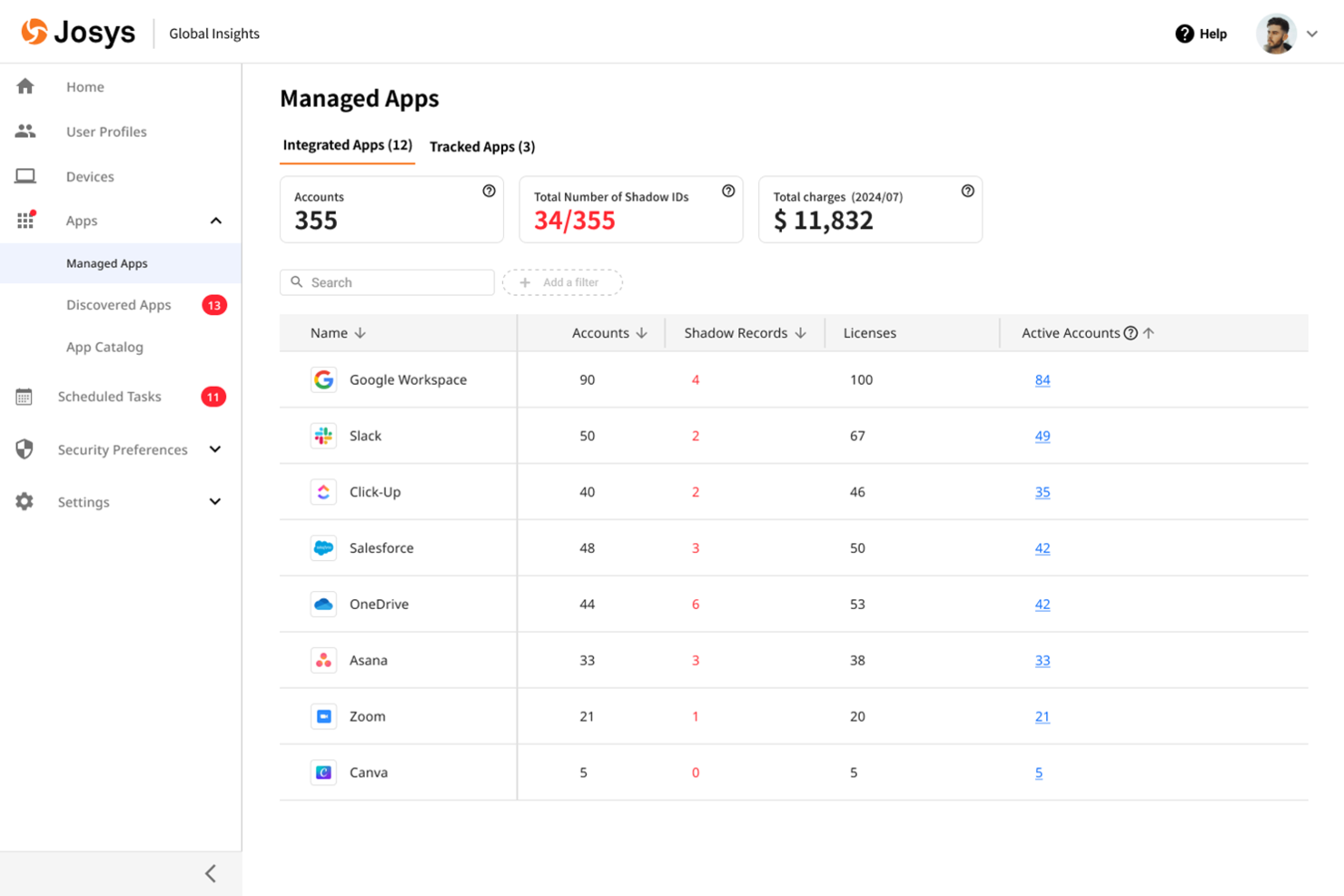
Josys offers automated SaaS lifecycle management designed for IT teams handling complex app environments. If you need to streamline onboarding, offboarding, and app provisioning across multiple cloud tools, Josys centralizes these processes in one platform. Its automation focus helps reduce manual work and minimize errors compared to other BetterCloud alternatives.
Who is Josys Best For?
IT operations and procurement teams in mid-sized organizations in North America and Europe automating SaaS lifecycle management across departments.
Why I Picked Josys
Josys stands out for its focus on automating the entire SaaS lifecycle, which is a key need for IT teams managing a growing SaaS ecosystem of cloud apps. I picked Josys as a BetterCloud alternative because it functions as a centralized SaaS management tool that lets you automate onboarding, offboarding, and app provisioning from a single dashboard. The platform’s workflow automation uses built-in connectors to reduce manual steps and ensure consistent policy enforcement across your SaaS stack. If you’re looking to minimize errors and save time on repetitive user management tasks, Josys offers targeted automation that goes beyond what many other platforms provide.
Josys Key Features
Some other features in Josys can help you manage SaaS environments more efficiently:
- License Management: Track and manage SaaS license usage across your organization to avoid waste and ensure compliance.
- Audit Logging: Maintain detailed logs of user actions and changes for security reviews and compliance audits.
- Role-Based Access Controls: Assign granular permissions to users and admins based on roles and responsibilities.
- Automated App Discovery: Identify and catalog all SaaS applications in use, including those added without IT approval.
Josys Key Integrations
Integrations include Microsoft Entra ID, Google Workspace, BambooHR, Workday, Slack, Zoom, Asana, Jira, AWS, and more.
Pros and Cons
Pros:
- Offers granular role-based access controls for IT administrators
- Centralizes SaaS license management and usage tracking in one dashboard
- Automates onboarding and offboarding workflows for multiple SaaS apps
Cons:
- Limited public documentation makes feature evaluation more difficult
- Custom workflow options may be less flexible than BetterCloud’s

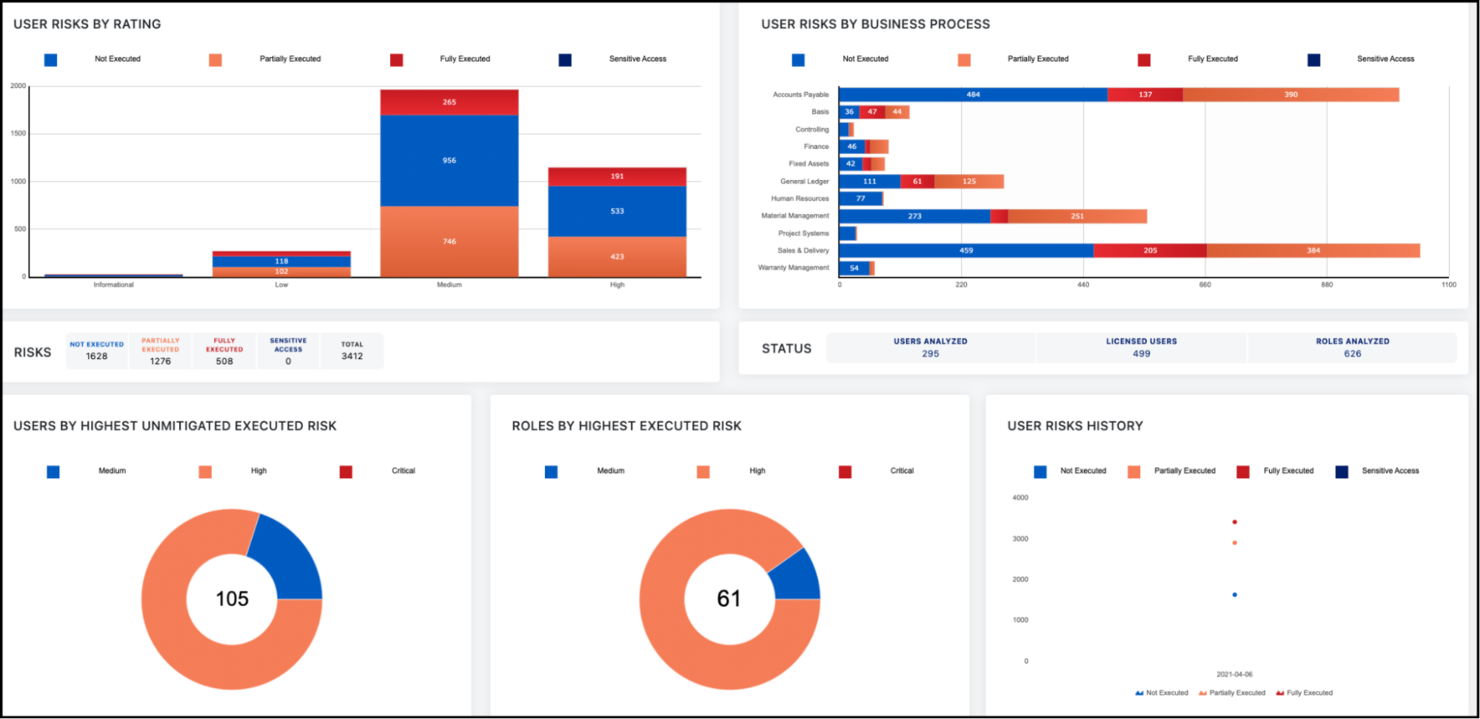
For organizations that need advanced identity governance, SailPoint offers a focused approach to access control and compliance. Security teams and IT leaders use SailPoint to automate identity lifecycle management and enforce granular access policies across complex environments. Unlike BetterCloud, SailPoint specializes in deep governance controls, making it a strong fit for regulated industries and enterprises with strict compliance needs.
Who is SailPoint Best For?
Security and compliance leaders in large enterprises globally implementing identity governance and access controls.
Why I Picked SailPoint
If your organization needs more advanced identity governance than what BetterCloud provides, SailPoint is worth considering. I picked SailPoint because it offers automated access certifications and policy-based access controls, which help enforce compliance in highly regulated environments. The platform also supports detailed audit trails and reporting, making it easier to demonstrate compliance during security reviews. For IT and security teams focused on identity lifecycle management and governance, SailPoint delivers controls that go beyond standard SaaS management.
SailPoint Key Features
Some other SailPoint features can help your team strengthen identity management and security:
- Role-Based Access Modeling: Lets you define and manage user roles to simplify access assignments.
- Password Management Tools: Provides self-service password reset and synchronization across systems.
- Separation of Duties Policies: Detects and prevents conflicting access rights within your environment.
- Cloud and On-Premises Application Support: Manages identities across both cloud-based and legacy on-premises applications.
SailPoint Integrations
Integrations include AWS, SAP, Microsoft Active Directory, Oracle, Salesforce, ServiceNow, Box, Epic Systems, and more.
Pros and Cons
Pros:
- Manages identities across both cloud and on-premises systems
- Supports granular policy enforcement for identity governance controls
- Automates access certifications for compliance-driven organizations
Cons:
- User interface is less modern compared to some SaaS competitors
- Reporting features may require customization for specific compliance needs

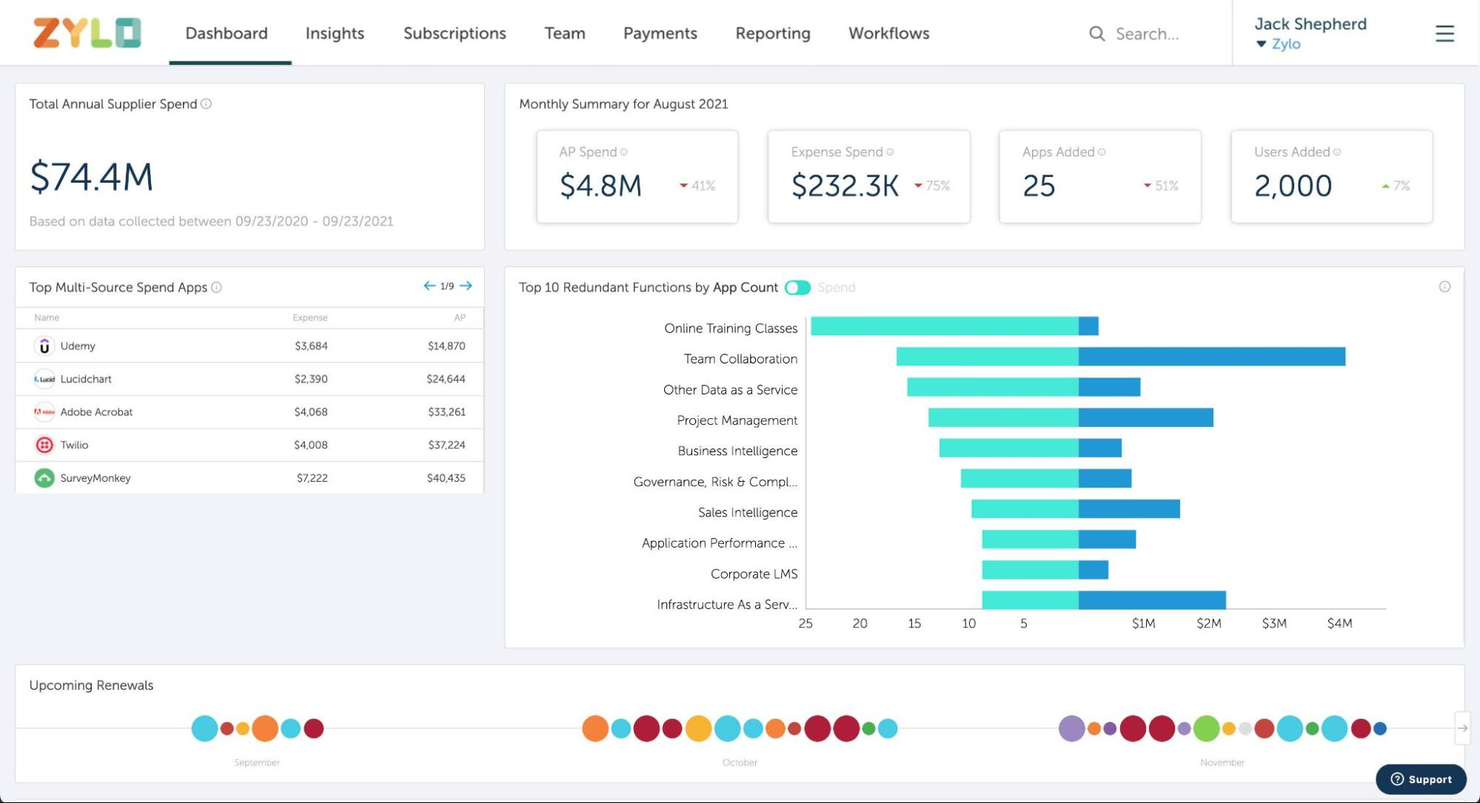
If your team needs a clear view of SaaS spending and usage, Zylo is built for that purpose. The platform is designed for IT, procurement, and finance professionals who want to track, analyze, and optimize SaaS costs across the business. Unlike BetterCloud, Zylo specializes in surfacing detailed spend data and uncovering unused or redundant subscriptions.
Who is Zylo Best For?
IT asset and finance managers in mid-sized to large organizations in North America and Europe seeking visibility into SaaS spend and usage.
Why I Picked Zylo
For organizations that need to get a handle on SaaS spend, Zylo offers visibility that goes deeper than what BetterCloud provides. I picked Zylo because it automatically discovers all SaaS applications in use and tracks spending at both the organizational and user level. The platform’s analytics highlight underused licenses and duplicate subscriptions, making it easier to identify cost-saving opportunities. If your priority is understanding and controlling SaaS expenses, Zylo’s spend visibility features are a strong fit.
Zylo Key Features
Some other features in Zylo can help you manage your SaaS environment more thoroughly:
- Contract Management: Centralizes SaaS contracts and renewal dates for easier tracking.
- Usage Analytics: Provides detailed reports on application usage across departments.
- License Optimization: Recommends adjustments to license counts based on real usage data.
- SaaS Vendor Insights: Offers benchmarking and insights on SaaS vendors to support negotiations.
Zylo Key Integrations
Native integrations are not currently publicly listed.
Pros and Cons
Pros:
- Offers detailed usage analytics for better SaaS governance
- Centralizes contract and renewal management for SaaS vendors
- Tracks SaaS spend across all departments and business units
Cons:
- Does not support direct SaaS app configuration or policy enforcement
- Lacks granular user lifecycle management and automation features

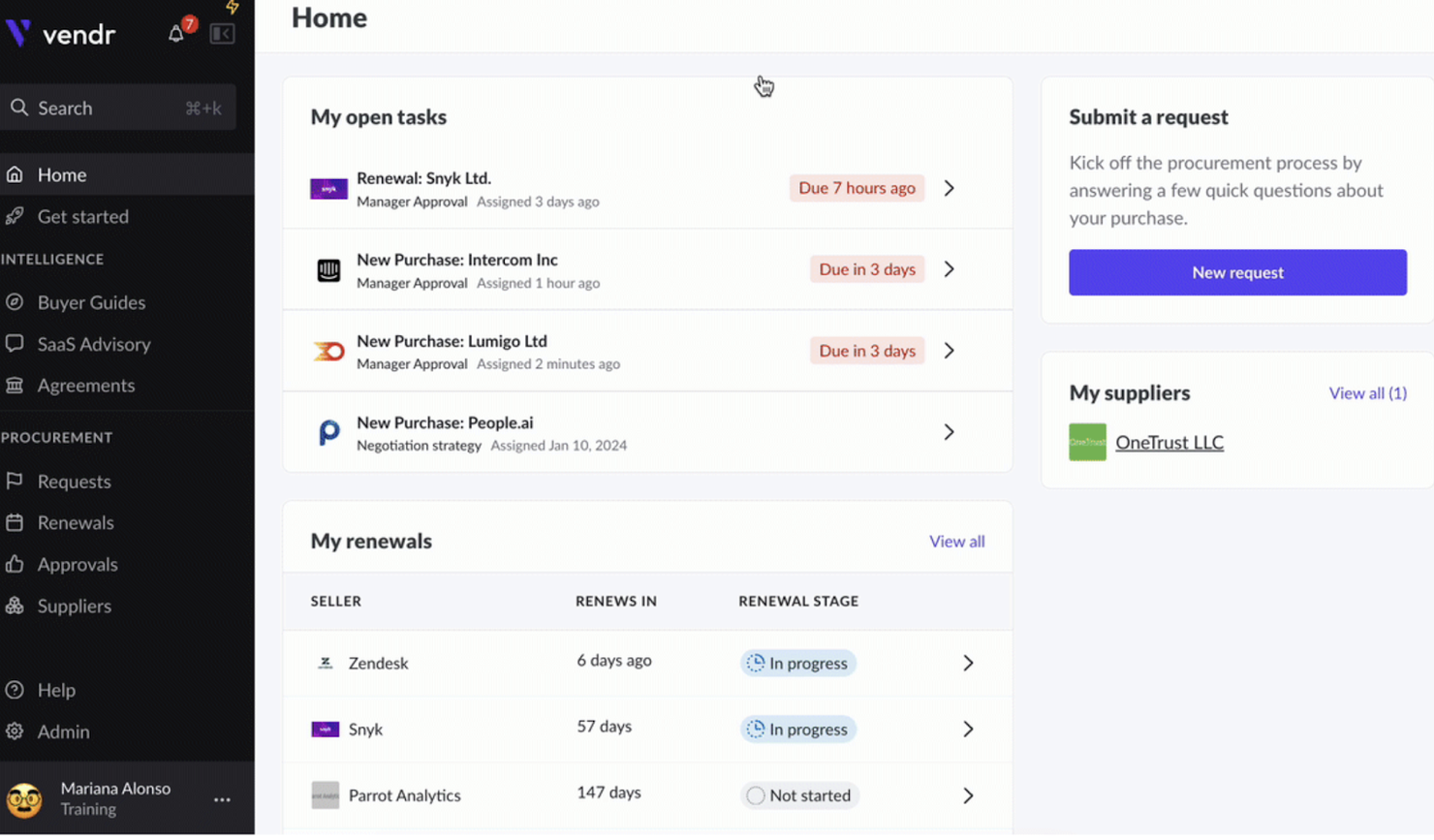
When your team needs to get control over SaaS procurement, Vendr offers a dedicated platform for managing software purchases and renewals. Procurement leads and IT asset managers use Vendr to centralize vendor negotiations, track contract terms, and optimize SaaS spending. Unlike BetterCloud, Vendr focuses on the full procurement lifecycle, making it a strong choice for organizations looking to standardize and automate how they buy and manage SaaS tools.
Who is Vendr Best For?
Procurement and finance teams in mid-sized to large organizations in North America managing SaaS procurement and vendor negotiations.
Why I Picked Vendr
For organizations that want to bring structure and visibility to SaaS procurement, Vendr offers a focused solution that BetterCloud doesn’t address. I picked Vendr because it centralizes contract management and automates renewal tracking, which helps IT and procurement teams avoid missed deadlines and surprise costs. The platform also provides vendor negotiation support, giving your team access to market insights and benchmarks during the buying process. If you need to manage the entire SaaS procurement lifecycle, Vendr delivers features that go beyond standard SaaS management.
Vendr Key Features
Some other Vendr features can help your team manage SaaS procurement more efficiently:
- SaaS Spend Analytics: Tracks and visualizes software spending across your organization.
- Approval Workflow Automation: Routes purchase requests through customizable approval chains.
- Vendor Database Access: Provides searchable information on thousands of SaaS vendors and products.
- Renewal Calendar: Displays upcoming contract renewals in a centralized dashboard.
Vendr Integrations
Integrations include Okta, Azure AD, Google Workspace, NetSuite, QuickBooks, Workday, BambooHR, Ironclad, Slack, and more.
Pros and Cons
Pros:
- Automates renewal reminders to help prevent missed deadlines
- Offers vendor negotiation support with market pricing benchmarks
- Centralizes SaaS contract data for improved procurement visibility
Cons:
- Focuses on procurement, not on SaaS operations or automation
- Lacks direct user lifecycle management or access controls

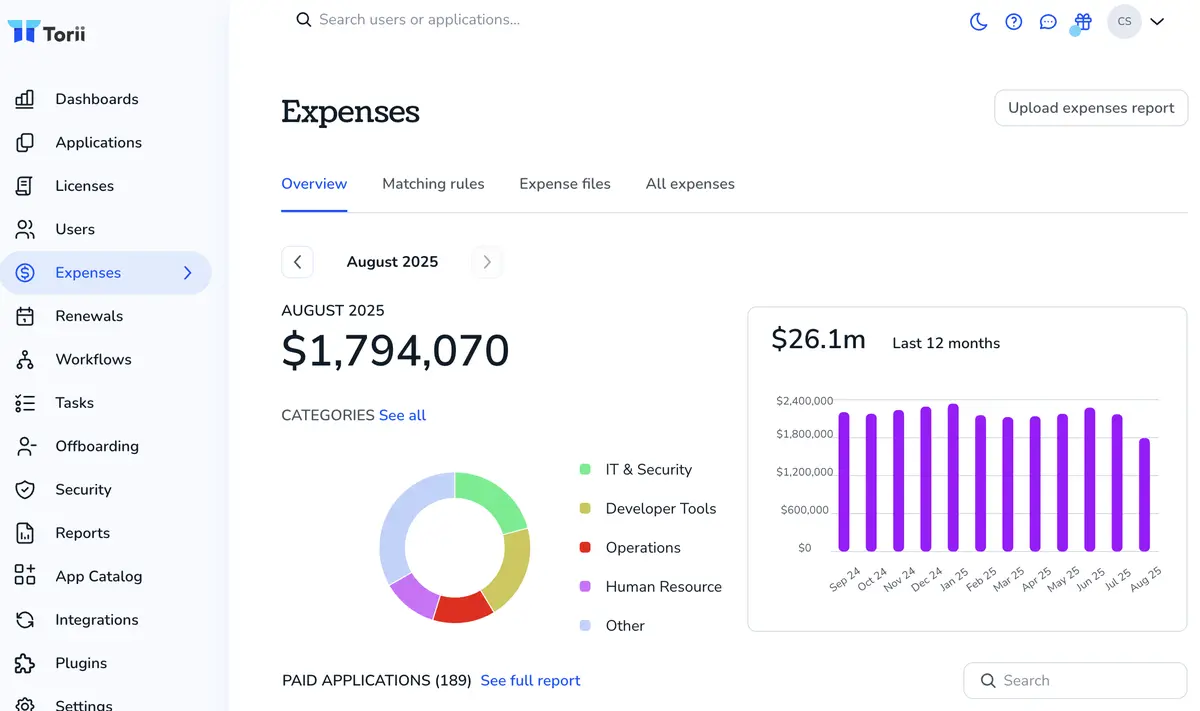
If you need deep visibility into SaaS usage across your organization, Torii is built for you. IT teams and procurement leads use Torii to automatically discover, track, and analyze every SaaS app in use—including shadow IT. Unlike BetterCloud, Torii specializes in surfacing usage patterns and spend data to help you optimize your SaaS portfolio.
Who is Torii Best For?
IT operations and SaaS administrators in mid-sized companies worldwide discovering shadow IT and tracking software usage.
Why I Picked Torii
When it comes to uncovering and tracking SaaS usage, Torii offers a level of visibility that BetterCloud doesn’t match. I picked Torii because it automatically discovers all SaaS apps in your environment, including those not managed by IT, which helps you address shadow IT risks. The platform also tracks license utilization and spend, so you can identify underused subscriptions and optimize costs. For IT teams focused on SaaS management and spend analysis, Torii brings discovery and usage tracking to the forefront.
Torii Key Features
Some other features in Torii can help your team manage SaaS operations more effectively:
- Automated Onboarding and Offboarding: Streamlines user provisioning and deprovisioning across connected SaaS apps.
- Custom Workflow Builder: Lets you design and automate IT processes for app management.
- Renewal Management Dashboard: Tracks upcoming contract renewals and sends alerts to avoid missed deadlines.
- Policy Enforcement Engine: Applies usage and security policies automatically to discovered SaaS applications.
Torii Integrations
Integrations include Okta, Google Workspace, JumpCloud, SAP SuccessFactors, ADP Workforce Now, NetSuite, Expensify, AWS, and more.
Pros and Cons
Pros:
- Offers workflow automation for onboarding and offboarding processes
- Tracks license utilization and spend for all connected SaaS tools
- Automatically discovers both managed and unmanaged SaaS applications in use
Cons:
- Lacks granular access management features found in BetterCloud
- Public documentation and support resources are less extensive

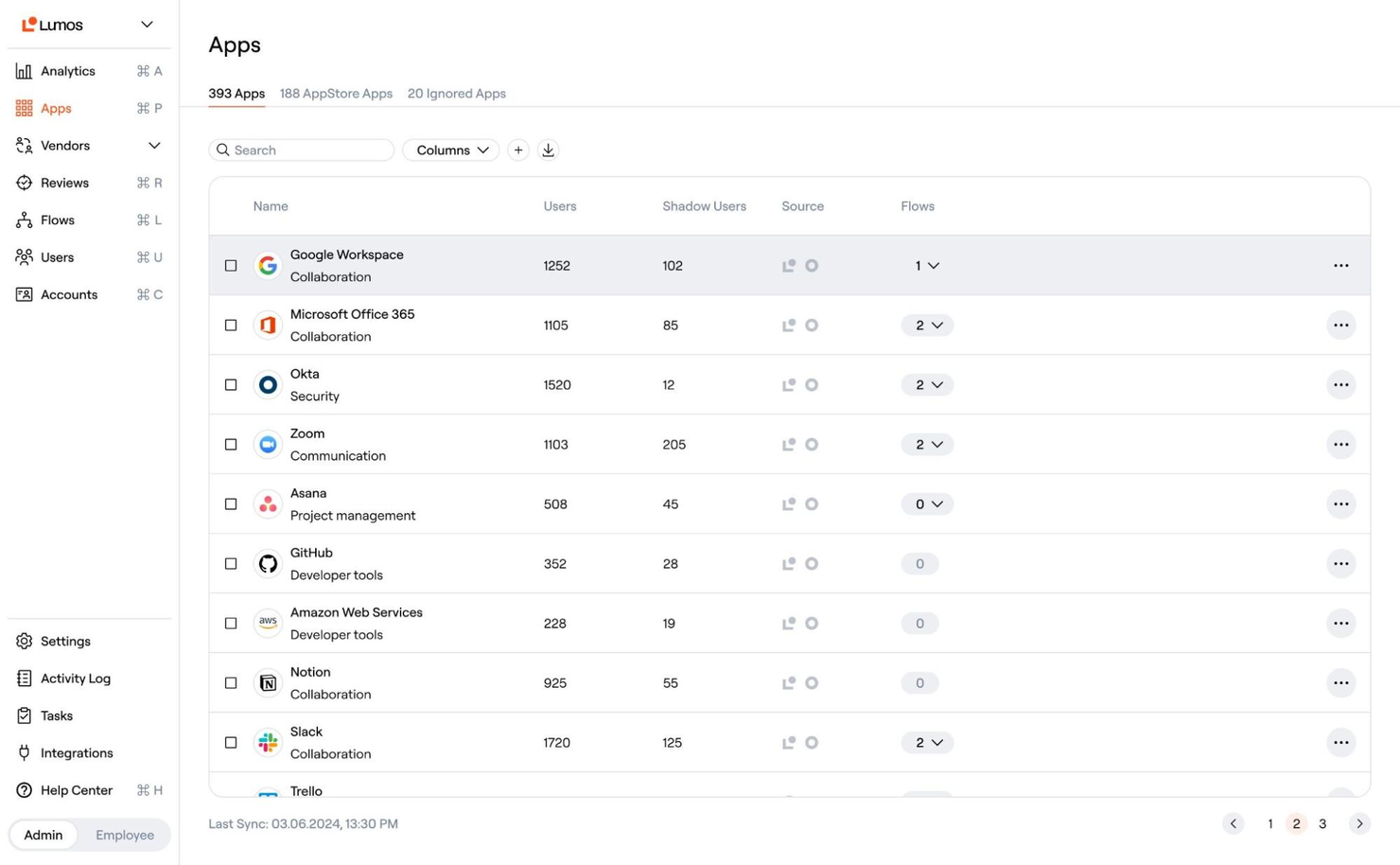
Lumos takes a workflow-driven approach to automating access requests and approvals for SaaS and internal apps. It’s a strong fit for IT and security teams in organizations with strict compliance needs or high volumes of access changes. Unlike BetterCloud, Lumos centralizes access governance and lets you build custom approval flows that reduce manual ticket handling.
Who is Lumos best For?
IT and security teams in mid-sized organizations in North America and Europe automating employee access requests and approvals.
Why I Picked Lumos
For teams that need to automate and control access requests, Lumos offers a focused solution that stands apart from BetterCloud. I picked Lumos because it lets you build custom approval workflows for SaaS and internal app access, reducing the need for manual IT intervention. The platform also provides centralized dashboards for tracking requests and enforcing compliance policies. If your organization faces frequent access changes or strict audit requirements, Lumos brings automation and visibility to the process.
Lumos Key Features
Some other features in Lumos can help your team manage access and compliance more efficiently:
- Automated Access Reviews: Schedules and manages periodic access certifications for all connected apps.
- Role-Based Access Controls: Assigns permissions based on user roles to standardize access across departments.
- Audit Trail Reporting: Captures detailed logs of all access requests, approvals, and changes.
- Self-Service Access Catalog: Lets users browse and request access to approved apps from a centralized portal.
Lumos Integrations
Integrations include Okta, Azure AD, Google Workspace, Salesforce, Slack, GitHub, 1Password, Adobe, ADP, and more.
Pros and Cons
Pros:
- Provides detailed audit trails for all access changes and approvals
- Centralizes access governance for both cloud and on-premises resources
- Automates multi-step access request and approval workflows for SaaS apps
Cons:
- Limited public documentation makes technical evaluation more difficult
- Smaller community presence compared to more established alternatives
Weitere Alternativen zu BetterCloud
Hier sind einige weitere BetterCloud-Alternativen, die es zwar nicht auf meine Auswahlliste geschafft haben, die aber dennoch einen Blick wert sind:
- Zluri
For employee app provisioning
- DoControl
For granular data access controls
- Cledara
For centralized SaaS purchasing
- Freshservice
For ITSM integration with SaaS management
- 1Password
For workflow automation in SaaS governance
- Mimecast
For advanced email security controls
- Spendflo
For vendor contract lifecycle tracking
- Productiv
For app engagement analytics
- Nightfall DLP
For sensitive data discovery in SaaS apps
- Zenphi
For Google Workspace process automation
- Tropic
For procurement workflow customization
- Netskope One
For real-time cloud data protection


Auswahlkriterien für BetterCloud-Alternativen
Bei der Auswahl der besten BetterCloud-Alternativen für diese Liste habe ich typische Anforderungen und Herausforderungen von Käufern berücksichtigt, wie das Erzwingen granulärer SaaS-Datenzugriffskontrollen und die Automatisierung von SaaS-Sicherheitsrichtlinien. Zudem habe ich das folgende Schema genutzt, um meine Bewertung strukturiert und fair zu halten:
Kernfunktionen (25% der Gesamtbewertung)
Um in diese Liste aufgenommen zu werden, musste jede Lösung die folgenden alltäglichen Anwendungsfälle abdecken:
- Verwaltung von SaaS-Benutzerzugriffen und -Berechtigungen
- Automatisierung von Onboarding- und Offboarding-Prozessen
- Überwachung von SaaS-App-Nutzung und -Aktivität
- Durchsetzung von Sicherheits- und Compliance-Richtlinien
- Erstellung von Prüfprotokollen und Berichten
Besondere Zusatzfunktionen (25% der Gesamtbewertung)
Um die Auswahl weiter einzugrenzen, habe ich außerdem nach einzigartigen Funktionen gesucht, zum Beispiel:
- Dateiebene-Zugriffssteuerung und Fehlerbehebung
- Automatisierte Erkennung von Drittanbieter-Apps
- Echtzeit-Alarmierung bei Richtlinienverstößen
- Anpassbare Workflow-Automatisierung
- Tiefe Integration mit Cloud-Produktivitätssuiten
Benutzerfreundlichkeit (10% der Gesamtbewertung)
Um einen Eindruck von der Benutzerfreundlichkeit jedes Systems zu gewinnen, habe ich Folgendes berücksichtigt:
- Einfache und intuitive Benutzeroberfläche
- Übersichtliche Navigation und Dashboard-Struktur
- Wenige Klicks zur Erledigung gängiger Aufgaben
- Kontextbezogene Hilfen und Tooltips verfügbar
- Responsives Design für verschiedene Endgeräte
Onboarding (10% der Gesamtbewertung)
Zur Bewertung der Onboarding-Erfahrung für jede Plattform habe ich folgende Punkte berücksichtigt:
- Schritt-für-Schritt-Einrichtungsanleitungen oder Assistenten
- Verfügbarkeit von Trainingsvideos und Dokumentation
- Zugang zu interaktiven Produkttouren oder Demos
- Vorgefertigte Vorlagen für gängige Workflows
- Live-Chat oder Onboarding-Webinare für neue Benutzer
Kundensupport (10% der Gesamtbewertung)
Um die Kundensupportdienste jedes Softwareanbieters zu bewerten, habe ich Folgendes berücksichtigt:
- Mehrere Support-Kanäle, einschließlich Chat und E-Mail
- Schnelle Reaktionszeiten auf Supportanfragen
- Zugang zu einer durchsuchbaren Wissensdatenbank
- Verfügbarkeit von dedizierten Customer Success Managern
- Community-Foren oder Benutzergruppen für Peer-Support
Preis-Leistungs-Verhältnis (10% der Gesamtbewertung)
Um das Preis-Leistungs-Verhältnis jeder Plattform zu bewerten, habe ich Folgendes berücksichtigt:
- Transparente und flexible Preispläne
- Enthaltene Funktionen auf jeder Preisstufe
- Keine versteckten Gebühren oder Überraschungskosten
- Rabatte für jährliche oder volumenbasierte Verträge
- Verfügbarkeit von kostenloser Testversion oder Demo
Kundenbewertungen (10% der Gesamtbewertung)
Um ein Gefühl für die allgemeine Kundenzufriedenheit zu bekommen, habe ich beim Lesen von Kundenbewertungen Folgendes beachtet:
- Positives Feedback zur Kernfunktionalität
- Berichte über zuverlässige Leistung und Verfügbarkeit
- Kommentare zur einfachen Einrichtung und täglichen Nutzung
- Erfahrungen mit der Qualität des Kundensupports
- Vorschläge für Verbesserungen oder fehlende Funktionen
Warum nach einer BetterCloud-Alternative suchen?
Auch wenn BetterCloud eine gute Wahl als Alternative ist, gibt es eine Reihe von Gründen, warum manche Nutzer nach anderen Lösungen suchen. Möglicherweise suchen Sie nach einer BetterCloud-Alternative, weil …
- Sie granulare Dateiebene-Zugriffskontrollen benötigen
- Ihr Team eine stärkere Automatisierung für SaaS-Sicherheits-Workflows möchte
- Sie Integrationen mit SaaS-Anwendungen benötigen, die BetterCloud nicht unterstützt
- Ihr Unternehmen mehr Transparenz oder flexiblere Preisgestaltung benötigt
- Sie ein Tool mit stärkeren Compliance-Reporting-Funktionen suchen
- Sie Unterstützung für globale oder Multi-Tenant-Umgebungen benötigen
Wenn einer dieser Punkte auf Sie zutrifft, sind Sie hier genau richtig. Meine Liste enthält mehrere BetterCloud-Alternativen, die für Teams mit diesen Herausforderungen besser geeignet sind und als Alternative in Frage kommen.
BetterCloud – zentrale Funktionen
Hier sind einige der wichtigsten Funktionen von BetterCloud, damit Sie vergleichen können, was alternative Lösungen bieten:
- Automatisierte Workflows für Benutzer-Onboarding und -Offboarding
- Zentralisierte Verwaltung von SaaS-App-Berechtigungen und Zugriffen
- Richtlinienbasierte Automatisierung für Sicherheits- und Compliance-Aufgaben
- Echtzeitüberwachung von SaaS-Aktivitäten und Konfigurationsänderungen
- Individuell einstellbare Warnmeldungen für verdächtiges oder riskantes Nutzerverhalten
- Sammelaktionen zur Verwaltung von Nutzern, Gruppen und Lizenzen
- Detaillierte Prüfprotokolle und Berichte für Compliance-Anforderungen
- Integration mit wichtigen SaaS-Plattformen wie Google Workspace und Microsoft 365
- Delegierte Administration für verteilte IT-Teams
- Vorgefertigte Workflow-Vorlagen für gängige IT-Prozesse
Wie es weitergeht:
Wenn Sie gerade auf der Suche nach einer BetterCloud-Alternative sind, verbinden Sie sich mit einem SoftwareSelect-Berater für kostenlose Empfehlungen.
Sie füllen ein Formular aus und führen ein kurzes Gespräch, in dem Ihre spezifischen Anforderungen besprochen werden. Anschließend erhalten Sie eine Auswahlliste an Software, die Sie prüfen können. Sie werden sogar während des gesamten Kaufprozesses unterstützt, einschließlich Preisverhandlungen.