
Über das Gewöhnliche hinaus: 10 beste Benutzerbereitstellungssoftwares von 2026

Beste User Provisioning Software Shortlist
Hier ist meine Shortlist der besten User Provisioning Software:


Die Verwaltung von Benutzerzugängen kann für jedes IT-Team eine echte Herausforderung sein. Es gilt sicherzustellen, dass alle die passenden Berechtigungen haben, ohne die Sicherheit zu beeinträchtigen. Genau hier kommt User Provisioning Software ins Spiel. Sie hilft, das Benutzer-Management zu automatisieren und zu vereinfachen – das spart Zeit und verringert Fehler.
Durch meine Tests und Bewertungen dieser Tools habe ich einige herausragende Lösungen gefunden, die das Leben leichter machen. Die Recherche habe ich bereits übernommen, damit du das nicht tun musst. Dieser Listicle führt dich durch die beste User Provisioning Software, stellt Funktionen, Stärken und Schwächen übersichtlich vor.
Du bekommst einen unvoreingenommenen Blick auf jedes Tool und findest so die beste Lösung für die Anforderungen deines Teams. Tauchen wir gemeinsam in die Welt der User Provisioning Software ein und finden die richtige Option für dich.
Why Trust Our Software Reviews
Beste User Provisioning Software Zusammenfassung
Diese Vergleichstabelle fasst die Preisinformationen meiner Top-Auswahl an User Provisioning Software zusammen, damit du die beste Lösung für dein Budget und deine geschäftlichen Anforderungen findest.
| Tool | Best For | Trial Info | Price | ||
|---|---|---|---|---|---|
| 1 | Best for global user provisioning for physical assets | Free demo available | from $5/person/month | Website | |
| 2 | Best for automated user provisioning | Free trial available | From $8/user/month (billed annually) | Website | |
| 3 | Best for streamlined Active Directory management | 30-day free trial | From $7/user/month (min 5 seats) | Website | |
| 4 | Best for directory-as-a-service capabilities | 30-day free trial + free demo available | From $9/user/month (billed annually) | Website | |
| 5 | Best for risk-based authentication | Not available | Pricing upon request | Website | |
| 6 | Best for secure enterprise identity verification | 30-day free trial available | From $6/user/month (billed annually) | Website | |
| 7 | Best for adaptive workforce authentication | 30-day free trial + free demo available | From $6/user/month (billed annually) | Website | |
| 8 | Best for open-source identity and access management | Not available | From $20/user/month (billed annually) | Website | |
| 9 | Best for SaaS operations management | Free trial + free plan available | Pricing upon request | Website | |
| 10 | Best for energy-efficient IT solutions | Free 7-day trial available | Pricing upon request | Website |
-

Site24x7
Visit WebsiteThis is an aggregated rating for this tool including ratings from Crozdesk users and ratings from other sites.4.6 -
GitHub Actions
Visit WebsiteThis is an aggregated rating for this tool including ratings from Crozdesk users and ratings from other sites.4.8 -
Docker
Visit WebsiteThis is an aggregated rating for this tool including ratings from Crozdesk users and ratings from other sites.4.6





Beste User Provisioning Software im Test
Im Folgenden findest du meine ausführlichen Zusammenfassungen der besten User Provisioning Software, die es auf meine Shortlist geschafft haben. Die Reviews bieten einen genauen Blick auf die wichtigsten Funktionen, Vorteile & Nachteile, Integrationen sowie die besten Einsatzszenarien und helfen dir, die passende Lösung zu finden.


Deel is a global leader in payroll, HR, and IT management, offering a wide range of solutions that empower businesses to manage distributed teams in over 130 countries. With a strong focus on supporting global operations, Deel provides tools for handling everything from equipment delivery to workforce management, ensuring compliance.
Why I Picked Deel: Deel IT automates key workflows, such as onboarding and offboarding, enabling businesses to set up new hires with pre-configured devices, complete with all necessary apps and security settings. The platform’s global reach ensures that the provisioning of physical assets is not limited by geographic barriers—equipment and user accounts can be activated quickly, no matter where your employee is located.
Standout features & integrations:
Other standout features include its 24/7 global support and real-time visibility into all IT assets, enabling businesses to track, update, and manage devices across different regions efficiently. The platform also supports device recovery and reuse, ensuring optimal use of physical resources. Deel integrates with systems like Apple Business Manager, Windows Autopilot, Okta, BambooHR, Rippling, and Workday.
Pros and Cons
Pros:
- Can combine HR and IT asset management in one
- Helps automate asset workflows
- Supports equipment deployment in over 130 countries
Cons:
- Doesn't offer features beyond device management, like network and server management
- May not be ideal for teams with very complex IT asset needs


Rippling IT is a comprehensive platform designed to help businesses manage their IT infrastructure efficiently, with tools for device management, identity and access management, and inventory management. Amy Mortlock, VP of Marketing at ShadowDragon, shared: “The automated device management is impressive. When someone joins, leaves, or changes jobs, Rippling handles device setup, software installation, and security settings automatically—no manual IT work required.”
Why I Picked Rippling IT: It offers automated user provisioning. When you hire a new employee, the system automatically sets up their user accounts across all necessary applications based on predefined roles and departments. For instance, if you onboard a new sales representative, Rippling will create their accounts and grant them access to all sales-designated apps without manual intervention.
Standout features & integrations:
Other features include app-specific configuration, which allows you to set provisioning rules tailored to each application. This means that different roles within your company can have customized access to the tools they need. The platform also offers detailed audit trails and reporting, providing visibility into user activities and aiding in compliance efforts. Some integrations include Slack, Microsoft Teams, Zoom, Asana, Jira, Salesforce, Hubspot, Google Workspace, Microsoft 365, GitHub, Datadog, and Checkr.
Pros and Cons
Pros:
- Remote device lock and wipe capabilities
- Support for onboarding and offboarding employees and their devices
- Customizable workflow automation
Cons:
- Can be complex to set up initially
- Not all features may be necessary for smaller operations

Best for streamlined Active Directory management

ManageEngine ADManager Plus provides an extensive platform designed to manage and maintain Active Directory domains efficiently. Focusing on making Active Directory operations more intuitive, it ties directly into our rationale for being the best tool for streamlined Active Directory management.
Why I Picked ManageEngine ADManager Plus: I chose ManageEngine ADManager Plus after comparing various tools for Active Directory management. Its focus on providing a streamlined user experience and rich features made it stand out. When judging its ability to simplify complex AD tasks, it became evident that it truly was the best for those looking for a tool that offers a straightforward approach to Active Directory management.
Standout features & integrations:
ManageEngine ADManager Plus boasts an array of features catering to novice and expert administrators. Its bulk user management capabilities, combined with the detailed reports, make day-to-day operations efficient. Furthermore, it has vital integrations with various apps and on-premises systems, allowing for a more unified IT management experience.
Pros and Cons
Pros:
- Provides a self-service portal for end-users
- Integrated reporting system
- Comprehensive Active Directory management capabilities
Cons:
- Lacks some advanced automation features
- User interface could be more modern
- Steeper learning curve for beginners


JumpCloud provides a centralized platform to manage user identities across various IT resources. Businesses can achieve unified identity management through their directory-as-a-service capabilities, thus fulfilling complex access requests in today's heterogeneous IT environments.
Why I Picked JumpCloud: In the vast landscape of IT tools, selecting the right one often boils down to specific needs and standout features. When determining the best fit for directory services, JumpCloud immediately surfaced as a top contender due to its robust capabilities in handling user identities. I chose this tool because it effectively blends automated user processes with intricate directory functionalities, marking it as the best for directory-as-a-service capabilities.
Standout features & integrations:
JumpCloud excels in managing and automating user identities, ensuring that access requests are processed efficiently. The platform's comprehensive API further augments its directory functionalities, facilitating intricate integrations and custom workflows. As for integrations, JumpCloud has built partnerships with various IT platforms, allowing businesses to maintain cohesion in identity management across diverse ecosystems.
Pros and Cons
Pros:
- Efficient handling of access requests
- Advanced API for custom integrations and workflows
- Comprehensive management of user identities
Cons:
- Integrations, while vast, may not cover niche industry tools
- Some advanced features could require technical expertise
- Might be overwhelming for smaller organizations

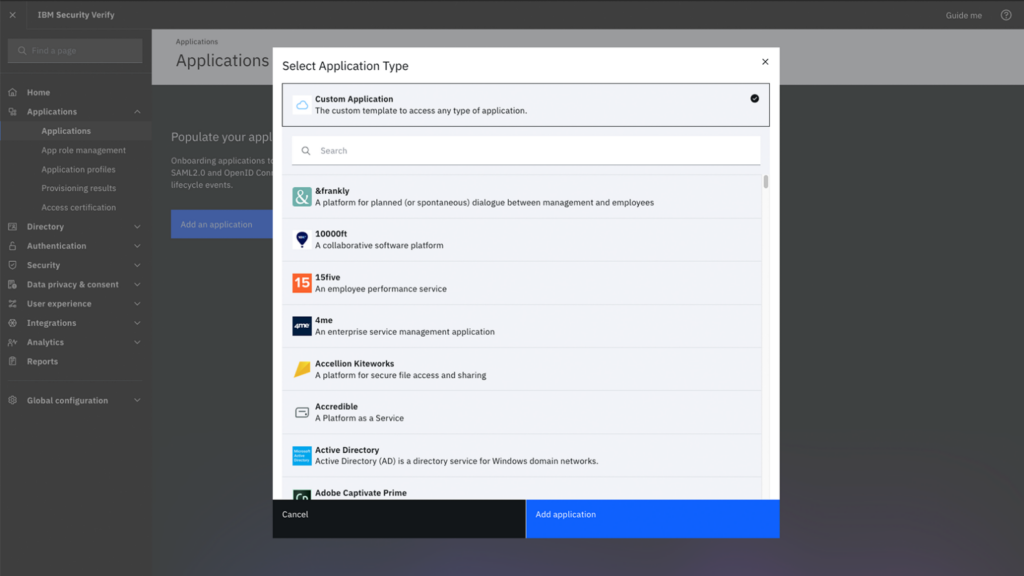
IBM Security Verify is a comprehensive access management solution emphasizing risk-based authentication, ensuring users are granted access based on contextual risks. This approach balances security and user convenience, aligning perfectly with the rising demands of modern digital businesses.
Why I Picked IBM Security Verify: In choosing and comparing various tools, IBM Security Verify particularly caught my attention due to its unique approach to authentication. The tool's emphasis on a risk-based method, which is different from traditional authentication strategies, piqued my interest. Hence, I am of the opinion that for organizations looking to pivot towards a more contextual and dynamic authentication system, IBM Security Verify is best for risk-based authentication.
Standout features & integrations:
IBM Security Verify is an account provisioning tool and a complete identity solution. Its risk-based authentication mechanism evaluates numerous parameters before granting access, adding an extra layer of security. Integration-wise, IBM Security Verify is compatible with various enterprise applications and systems, ensuring consistent identity practices regardless of the underlying platform.
Pros and Cons
Pros:
- Wide compatibility with numerous enterprise applications and systems.
- Comprehensive user provisioning tool ensuring efficient account management.
- Advanced risk-based authentication for improved security.
Cons:
- As with many IBM solutions, it may come with a steeper learning curve for some users
- Integration with certain legacy systems might require additional effort
- Might be perceived as complex for smaller organizations


Microsoft Entra ID is a tool designed to provide businesses with a robust mechanism for identity verification. As enterprises grow and navigate through complex hybrid environments, a secure and reliable identity verification becomes indispensable. Microsoft Entra ID squarely focuses on this, ensuring that enterprise identities are verified with utmost security.
Why I Picked Microsoft Entra ID: I picked Microsoft Entra ID as my top choice for identity verification tools. It's great for the enterprise sector, especially those in hybrid environments. After comparing it to other options, I found that it excels at providing secure identity verification. This makes it easy for the IT department to handle and authenticate users with confidence.
Standout features & integrations:
Microsoft Entra ID boasts of features that are tailored for today's complex business infrastructures. It's highly adaptive to hybrid environments, ensuring absolute identity verifications across both on-premise and cloud platforms. Furthermore, its deep integration with Microsoft 365 means that businesses can maintain a consistent identity verification method across the suite of Microsoft applications.
Pros and Cons
Pros:
- Deep integration with Microsoft 365 ensures a streamlined experience for the IT department.
- Extensive function in hybrid environments, balancing both on-premise and cloud.
- Tailored for enterprises, addressing specific challenges they face in identity verification.
Cons:
- The complexity may require dedicated IT personnel for setup and maintenance
- Businesses not invested in the Microsoft ecosystem might find some features redundant
- May be perceived as intricate for small businesses without hybrid infrastructures


Okta Workforce Identity is a renowned tool in the cybersecurity realm that focuses on providing robust identity solutions for the modern workforce. Its main thrust is adaptive authentication, tailoring access requirements based on varying user contexts and scenarios, which is essential for today's diverse and dynamic work environment.
Why I Picked Okta Workforce Identity: I have found that Okta Workforce Identity is a top choice for adaptive authentication. This tool stands out due to its ability to adjust access protocols based on user behavior and context. After comparing various options, I am confident that Okta Workforce Identity is the ideal solution for adaptive workforce authentication. It is particularly useful for businesses with constantly changing dynamics and security requirements.
Standout features & integrations:
Okta Workforce Identity is more than just an authentication tool. It offers advanced compliance reporting features, helping businesses meet their compliance requirements without hassles. Furthermore, Okta integrates with a multitude of enterprise applications, enhancing its adaptability and ensuring consistent identity practices across various platforms.
Pros and Cons
Pros:
- Extensive integrations with a myriad of enterprise tools, making it versatile in diverse IT environments.
- In-depth compliance reporting assists businesses in meeting stringent compliance requirements.
- Comprehensive adaptive authentication caters to varying workforce needs.
Cons:
- As a comprehensive tool, setup and initial configuration might be extensive
- Certain advanced features might require a steeper learning curve
- Might be perceived as overkill for very small businesses


WSO2 Identity Server offers a comprehensive solution for identity management, ensuring real-time and secure access to applications and services. As an open-source platform, it caters to organizations prioritizing flexibility, customization, and transparency in their identity and access management strategies.
Why I Picked WSO2 Identity Server: After evaluating various tools, I found that the open-source WSO2 Identity Server was the best option for identity and access management. Its transparency and flexibility make it the top choice.
Standout features & integrations:
WSO2 Identity Server prides itself on an efficient provisioning process, ensuring timely and accurate user data management. The platform supports Single Sign-On (SSO) and Multi-Factor Authentication (MFA) mechanisms, reinforcing its commitment to secure access. In integrations, WSO2 connects with a range of enterprise tools, ensuring consistent identity management across diverse business systems.
Pros and Cons
Pros:
- Wide-ranging integrations support uniform identity practices across tools.
- Efficient provisioning process enhances the user data management experience.
- Open-source nature ensures transparency and customization options.
Cons:
- Potential for complexities when integrating with proprietary systems
- Requires dedicated resources for optimal customization and deployment
- Might pose a steeper learning curve for those unfamiliar with open-source platforms

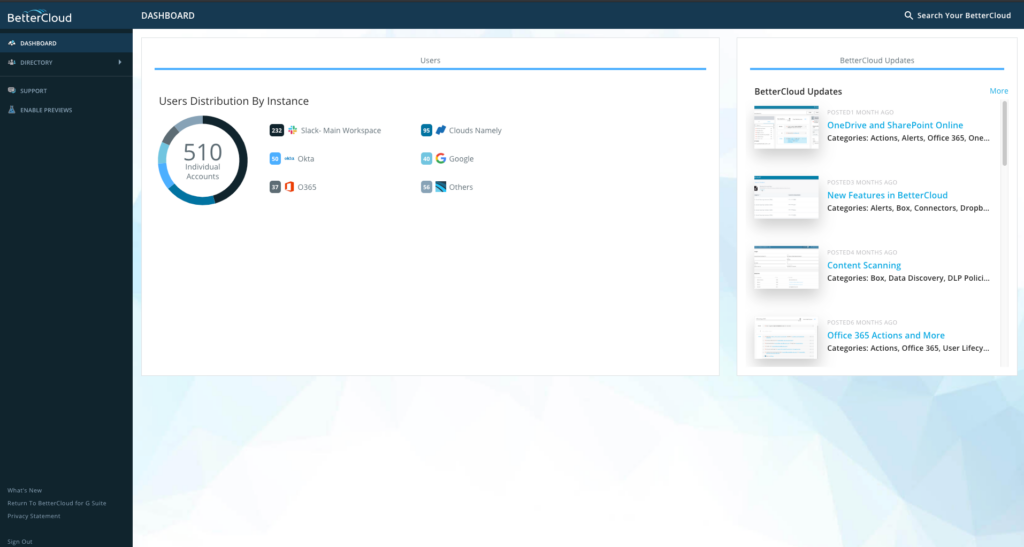
BetterCloud is a cloud-based platform tailor-made for IT professionals, offering extensive SaaS management tools to ensure efficient and secure operations. Its excellence in overseeing multiple SaaS environments ties in directly with our earlier declaration of its prowess in SaaS operations management.
Why I Picked BetterCloud: When selecting tools for the list, BetterCloud caught my attention because of its unique approach to managing diverse SaaS ecosystems. In comparing various platforms, it became evident that BetterCloud had a distinct edge, especially in centralizing the management of SaaS applications. Given its adeptness in offering granular controls over various SaaS apps, it is best for those keen on robust SaaS operations management.
Standout features & integrations:
BetterCloud flourishes with features such as advanced audit trails, multi-factor authentication, and automated deprovisioning to secure and optimize SaaS applications. Furthermore, it provides crucial integrations with prominent SaaS applications like Slack, Google Workspace, and Dropbox, making the management process coherent and integrated.
Pros and Cons
Pros:
- Efficient deprovisioning of user accounts
- Incorporates multi-factor authentication for added security
- Comprehensive cloud-based SaaS management tools
Cons:
- Pricing structure could be more transparent
- Might be overkill for small businesses
- Can be complex for beginners

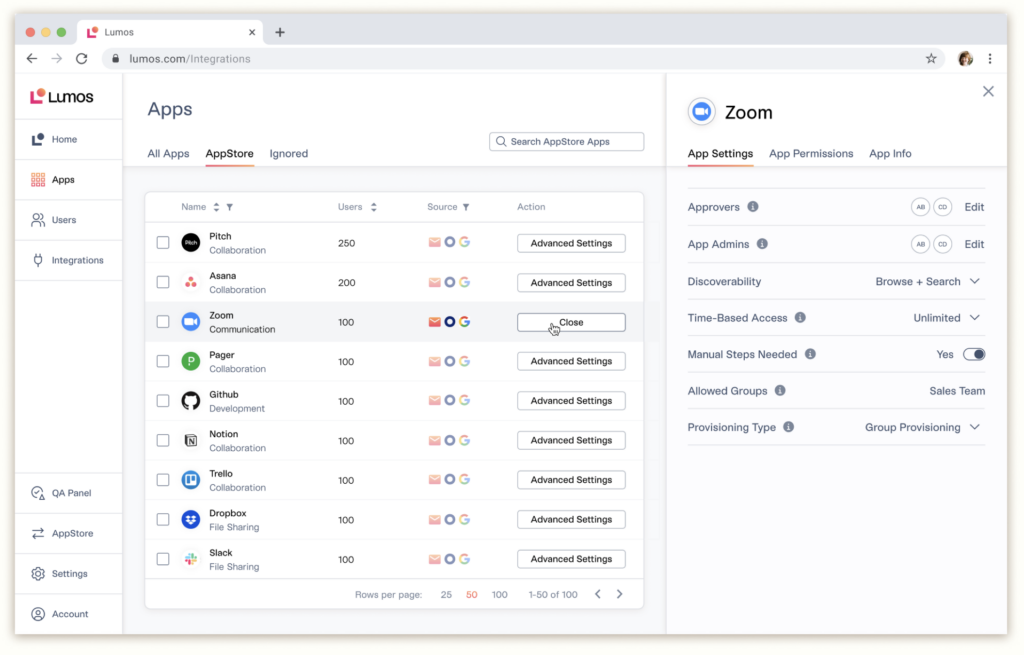
Lumos is an avant-garde IT platform centered around delivering energy-efficient solutions. Its eco-friendly approach not only aids businesses in being environmentally responsible but also connects directly to its prowess in energy-efficient IT solutions.
Why I Picked Lumos: While evaluating numerous platforms, Lumos distinctly caught my eye due to its rare blend of IT capabilities, emphasizing energy efficiency. Lumos's commitment to combining lifecycle management with energy savings was unparalleled in determining and judging the tools. This, along with its facility to effortlessly handle new user integrations, made me confident in my opinion that Lumos truly stands out as the best for energy-conscious IT solutions.
Standout features & integrations:
Lumos offers a comprehensive lifecycle management feature, ensuring that every aspect of your IT resources is optimized for performance and energy consumption. Furthermore, its efficient single sign-on (SSO) capability streamlines access for new users, making onboarding swift and secure. For integrations, Lumos connects with many leading IT applications, ensuring a flow of information and a unified user experience.
Pros and Cons
Pros:
- Efficient single sign-on for new users
- Comprehensive lifecycle management capabilities
- Emphasis on energy-efficient IT solutions
Cons:
- Custom integrations might need additional setup
- Not as widely recognized as some competitors
- Might require a learning curve for some users
Weitere User Provisioning Software
Hier sind einige weitere User Provisioning Software Optionen, die es nicht auf meine Shortlist geschafft haben, aber dennoch einen Blick wert sind:
- Jamf connect
For Apple device identity management
- SailPoint
Good for comprehensive identity governance
- Auth0
Good for customizable identity authentication
- CyberArk Identity
Good for secure remote workforce connectivity
- Coreview
Good for Microsoft 365 management and insights
- Fastpath
Good for compliance and audit readiness
- Opal Security
Good for API security and policy enforcement
- Teleport
Good for secure infrastructure access
- PingFederate
Good for scalable enterprise federation and single sign-on
- Avigilon ACM
Good for on-premise access control


Auswahlkriterien für User Provisioning Software
Für die Auswahl der besten User Provisioning Software in dieser Liste habe ich typische Käuferbedürfnisse und Probleme wie Sicherheitsfragen und Integrationsfähigkeit berücksichtigt. Außerdem habe ich das folgende Bewertungsraster genutzt, um fair und strukturiert zu bewerten:
Kernfunktionen (25 % der Gesamtwertung)
Um in diese Liste aufgenommen zu werden, musste jede Lösung die folgenden gängigen Anwendungsfälle abdecken:
- Benutzerzugänge verwalten
- Automatisierte Benutzeranlagen
- Integration mit bestehenden Systemen
- Detailliertes Reporting bereitstellen
- Einhaltung von Vorschriften sicherstellen
Weitere besondere Funktionen (25 % der Gesamtwertung)
Um die Auswahl zusätzlich einzugrenzen, habe ich auch auf besondere Features geachtet, wie zum Beispiel:
- Erweiterte Sicherheitsprotokolle
- Anpassbare Workflows
- Echtzeit-Analysen
- Mehrfaktor-Authentifizierung
- Self-Service-Portale
Benutzerfreundlichkeit (10 % der Gesamtwertung)
Um die Benutzerfreundlichkeit jeder Lösung zu beurteilen, habe ich Folgendes einbezogen:
- Intuitives Oberflächendesign
- Einfache Navigation
- Geringe Einarbeitungszeit
- Reaktionsschnelle Performance
- Klar verständliche Dokumentation
Onboarding (10 % der Gesamtbewertung)
Um das Onboarding-Erlebnis jeder Plattform zu bewerten, habe ich Folgendes berücksichtigt:
- Verfügbarkeit von Trainingsvideos
- Interaktive Produkttouren
- Zugriff auf Vorlagen
- Hilfreiche Chatbots
- Informationsreiche Webinare
Kundensupport (10 % der Gesamtbewertung)
Um den Kundensupport der jeweiligen Softwareanbieter zu beurteilen, habe ich Folgendes berücksichtigt:
- Verfügbarkeit von 24/7-Support
- Reaktionszeit auf Anfragen
- Zugang zu einer Wissensdatenbank
- Persönliche Unterstützung
- Community-Foren
Preis-Leistungs-Verhältnis (10 % der Gesamtbewertung)
Zur Bewertung des Preis-Leistungs-Verhältnisses jeder Plattform habe ich folgende Punkte betrachtet:
- Konkurrenzfähige Preisgestaltung
- Funktionen in Basisplänen enthalten
- Skalierbarkeit der Preismodelle
- Transparenz der Kosten
- Rabatte bei jährlicher Abrechnung
Kundenbewertungen (10 % der Gesamtbewertung)
Um einen Eindruck von der allgemeinen Kundenzufriedenheit zu gewinnen, habe ich bei der Durchsicht von Kundenbewertungen Folgendes beachtet:
- Allgemeine Zufriedenheitsbewertungen
- Feedback zur Wirksamkeit von Funktionen
- Erkenntnisse zur Benutzerfreundlichkeit
- Kommentare zum Kundensupport
- Meldungen zu Zuverlässigkeit und Stabilität
Wie wähle ich eine User-Provisioning-Software aus?
Es ist leicht, sich in langen Funktionslisten und komplexen Preisstrukturen zu verlieren. Damit Sie bei Ihrem individuellen Auswahlprozess fokussiert bleiben, hier eine Checkliste mit Faktoren, die Sie berücksichtigen sollten:
| Faktor | Worauf achten? |
|---|---|
| Skalierbarkeit | Kann die Software mit Ihrem Unternehmen mitwachsen? Berücksichtigen Sie zukünftige Anforderungen und prüfen Sie, ob das Tool mehr Nutzer ohne zusätzliche Kosten oder Leistungseinbußen bewältigen kann. |
| Integrationen | Verbindet sie sich mit Ihren bestehenden Systemen? Überprüfen Sie die Kompatibilität mit Ihrer aktuellen IT-Landschaft, um teure Umgehungslösungen oder Einschränkungen zu vermeiden. |
| Anpassbarkeit | Können Sie das Tool auf Ihre Arbeitsabläufe zuschneiden? Bewerten Sie, wie einfach sich Einstellungen und Berechtigungen an Ihre Prozesse anpassen lassen. |
| Benutzerfreundlichkeit | Ist die Benutzeroberfläche für Ihr Team intuitiv? Sie sollte keine umfassende Schulung erfordern oder den Arbeitsalltag verlangsamen. |
| Implementierung und Onboarding | Wie schnell kann der Einstieg erfolgen? Schauen Sie sich Installationsprozess, erforderliche Ressourcen und Unterstützung während der Einführung an, um Verzögerungen zu vermeiden. |
| Kosten | Wie passt die Preisgestaltung zu Ihrem Budget? Vergleichen Sie die Kosten im Verhältnis zu Funktionen und Skalierbarkeit. Achten Sie auf versteckte Gebühren oder unflexible Preismodelle. |
| Sicherheitsmaßnahmen | Sind Datenschutzmaßnahmen vorhanden? Prüfen Sie Verschlüsselung, Zugriffskontrollen und Einhaltung von Branchenstandards zum Schutz sensibler Informationen. |
| Support-Verfügbarkeit | Welchen Support bietet der Anbieter? Achten Sie auf 24/7-Erreichbarkeit, Reaktionszeiten und die Qualität von Ressourcen wie Anleitungen oder Community-Foren, damit Sie beim Auftreten von Problemen Hilfe bekommen. |
Was ist eine User-Provisioning-Software?
User-Provisioning-Software ist ein Werkzeug, das Unternehmen dabei unterstützt, zu steuern, wer auf ihre Systeme, Anwendungen und Daten zugreifen darf. Sie sorgt für Ordnung, indem jeder Person die passenden Zugriffsrechte entsprechend ihrer Rolle vergeben werden.
Anstatt Nutzer manuell hinzuzufügen oder zu entfernen, übernimmt die Software dies automatisch, wenn jemand ins Unternehmen eintritt, die Position wechselt oder ausscheidet. So bleibt der Zugriff stets aktuell und Fehler werden vermieden.
Funktionen
Achten Sie bei der Auswahl einer User-Provisioning-Software auf folgende Schlüsselfunktionen:
- Automatisierte Benutzererstellung: Richtet neue Benutzerkonten automatisch ein, spart Zeit und reduziert Fehler im Onboarding-Prozess.
- Zugriffsverwaltung: Steuert Benutzerberechtigungen und Zugriffsrechte, um Sicherheit und Compliance zu gewährleisten.
- Compliance-Berichterstattung: Erstellt Berichte, die Unternehmen dabei helfen, regulatorische Anforderungen und Prüfungsbedarfe zu erfüllen.
- Identity Federation: Verbindet mehrere Identitätssysteme und ermöglicht nahtlosen Zugang über verschiedene Plattformen hinweg.
- Single Sign-on (SSO): Ermöglicht den Zugriff auf mehrere Anwendungen mit einem einzigen Satz von Zugangsdaten und vereinfacht so den Anmeldeprozess.
- Multi-Faktor-Authentifizierung: Fügt eine zusätzliche Sicherheitsebene hinzu, indem über Passwörter hinaus weitere Verifizierungen erforderlich sind.
- Richtlinienbasierte Verwaltung: Setzt Regeln für Benutzerkonten und Gruppenmitgliedschaften durch, um die Verzeichnisstruktur sauber zu halten.
- Aktivitätsprotokolle: Verfolgt Benutzeraktivitäten und Änderungen, sorgt für Transparenz und unterstützt bei der Fehlersuche.
- Anpassbare Workflows: Ermöglicht es Unternehmen, die Software an ihre spezifischen Prozesse und Anforderungen anzupassen.
- Integrationsmöglichkeiten: Verbindet sich mit bestehenden Systemen und Anwendungen, um Funktionalität und Effizienz zu steigern.
Vorteile
Die Implementierung von Benutzerbereitstellungssoftware bietet Ihrem Team und Ihrem Unternehmen mehrere Vorteile. Auf diese können Sie sich freuen:
- Zeitersparnis: Automatisiert die Benutzeranlage und Zugriffsverwaltung, reduziert manuelle Arbeit und beschleunigt das Onboarding.
- Erhöhte Sicherheit: Funktionen wie Multi-Faktor-Authentifizierung und Zugriffskontrollen schützen sensible Daten vor unbefugtem Zugriff.
- Compliance-Sicherheit: Erstellt Compliance-Berichte und Aktivitätsprotokolle, was das Erfüllen regulatorischer Anforderungen erleichtert.
- Verbesserte Genauigkeit: Automatisierung reduziert Fehler bei der Benutzerbereitstellung und stellt korrekte Zugriffsrechte sicher.
- Betriebliche Effizienz: Durch Integrationsmöglichkeiten kann die Software mit bestehenden Systemen zusammenarbeiten und den Gesamtworkflow verbessern.
- Skalierbarkeit: Unterstützt wachsende Organisationen, indem sie steigende Benutzerzahlen ohne zusätzlichen Verwaltungsaufwand bewältigt.
- Vereinfachte Verwaltung: Zentralisiert das Benutzermanagement und erleichtert die Übersicht und Anpassung von Rollen und Berechtigungen.
Kosten & Preise
Die Auswahl von Benutzerbereitstellungssoftware erfordert das Verständnis verschiedener Preismodelle und -pläne. Die Kosten variieren je nach Funktionsumfang, Teamgröße, Add-ons und weiteren Faktoren. Die folgende Tabelle fasst gängige Pläne, ihre Durchschnittspreise und typische Funktionen von Benutzerbereitstellungssoftware zusammen:
Vergleichstabelle der Pläne für Benutzerbereitstellungssoftware
| Plan-Typ | Durchschnittspreis | Typische Funktionen |
|---|---|---|
| Free Plan | $0 | Grundlegende Benutzerverwaltung, eingeschränkte Integrationen und Community-Support. |
| Personal Plan | $5-$25/user/month | Benutzerbereitstellung, Basisberichte und E-Mail-Support. |
| Business Plan | $25-$50/user/month | Erweiterte Integrationen, Compliance-Berichte und telefonischer Support. |
| Enterprise Plan | $50-$100/user/month | Individuelle Workflows, ein dedizierter Account Manager und Premium-Supportdienste. |
FAQs zur Benutzerbereitstellungssoftware
Hier finden Sie Antworten auf häufig gestellte Fragen zur Benutzerbereitstellungssoftware:
Was ist der Unterschied zwischen Bereitstellung und Außerbetriebnahme von Benutzern?
Die Bereitstellung von Benutzern beinhaltet das Einrichten von Benutzerkonten und Berechtigungen, wenn jemand Ihrem Unternehmen beitritt. Bei der Außerbetriebnahme hingegen wird der Zugriff entfernt, wenn diese Person das Unternehmen verlässt. Beide Prozesse sind essenziell für die Aufrechterhaltung der Sicherheit. Durch Automatisierungen sparen Sie Zeit, vermeiden Fehler und stellen sicher, dass Nutzer immer die passenden Berechtigungen haben – weder zuviel, noch zu wenig.
Kann Benutzerbereitstellungssoftware in bestehende IT-Systeme integriert werden?
Ja, die meisten Benutzerbereitstellungslösungen lassen sich in bestehende IT-Systeme integrieren. Dazu zählen Verzeichnisse wie Active Directory und Cloud-Dienste wie Google Workspace. Diese Integration sorgt für Konsistenz zwischen den Plattformen und reduziert manuelle Anpassungen. Überprüfen Sie vor dem Kauf die Kompatibilität mit Ihren aktuellen Systemen, um Probleme zu vermeiden.
Wie erhöht Benutzerbereitstellungssoftware die Sicherheit?
Benutzerbereitstellungssoftware erhöht die Sicherheit, indem sie Zugriffsrechte automatisiert und die Einhaltung von Compliance-Regeln erleichtert. Sie hilft, Sicherheitsrichtlinien wie Passwortänderungen und Multi-Faktor-Authentifizierung durchzusetzen. Durch die Verwaltung korrekter Benutzerdaten und Berechtigungen verringert sich das Risiko für unbefugte Zugriffe. Regelmäßige Audits und Berichte unterstützen zusätzlich die Sicherheitsmaßnahmen.
Ist eine Schulung für die Nutzung von Benutzerbereitstellungssoftware erforderlich?
Ja, in der Regel ist eine gewisse Schulung erforderlich, um die Benutzerbereitstellungssoftware effizient zu nutzen. Der Umfang hängt von der Komplexität des Tools ab. Viele Anbieter stellen Schulungsmaterialien wie Videos, Webinare und Dokumentationen zur Verfügung. Zeit in Schulungen zu investieren, hilft Ihnen und Ihrem Team, die Möglichkeiten der Software voll auszuschöpfen und eine reibungslose Einführung zu gewährleisten.
Wie geht es weiter:
Wenn Sie aktuell Benutzerbereitstellungssoftware recherchieren, können Sie sich kostenlos an einen SoftwareSelect-Berater wenden und Empfehlungen erhalten.
Sie füllen ein Formular aus und führen ein kurzes Gespräch, in dem Ihre Anforderungen präzise ermittelt werden. Anschließend erhalten Sie eine Liste passender Softwareoptionen zur Überprüfung. Die Berater begleiten Sie sogar durch den gesamten Kaufprozess, einschließlich Preisverhandlungen.