

Die 10 besten Tools für agiles Testmanagement im Test

10 Die besten Tools für agiles Testmanagement – Vorauswahl


Die Welt der Tools für agiles Testmanagement zu navigieren, kann überwältigend sein. Sie möchten eine Lösung, die den individuellen Anforderungen Ihres Teams entspricht, ohne zusätzlichen Aufwand. Meiner Erfahrung nach kann die Wahl des richtigen Tools Ihren Arbeitsablauf entscheidend verbessern oder beeinträchtigen.
Tools für agiles Testmanagement helfen Ihnen dabei, Ihren Testprozess effizient zu verfolgen, zu organisieren und zu verwalten. Ganz gleich, ob Sie ein kleines Start-up oder ein Großunternehmen sind – diese Tools können die Probleme manueller Tests verringern und die Zusammenarbeit innerhalb Ihres Teams verbessern.
In diesem Artikel stelle ich Ihnen meine Favoriten vor und biete Ihnen eine unvoreingenommene, gründlich recherchierte Bewertung. Sie finden Informationen zu Funktionen, Benutzerfreundlichkeit und den Besonderheiten der einzelnen Tools, sodass Sie selbstbewusst die beste Lösung für Ihr Team auswählen können.
Warum Sie unseren Software-Empfehlungen vertrauen können
Unser Team testet und bewertet Software seit 2012. Als Tech-Führungskräfte wissen wir selbst, wie schwierig – und wichtig – es ist, die richtige Software auszuwählen.
Für diesen Leitfaden haben wir Tools mithilfe von praktischen Tests und unabhängiger Recherche bewertet und dabei unsere Bewertungskriterien angewendet.
Unsere Bewertungen spiegeln unser menschliches redaktionelles Urteilsvermögen wider, keine Verkaufsstrategie.
Expertenprüfer:
Zusammenfassung der besten Tools für agiles Testmanagement
Diese Vergleichstabelle fasst die Preisinformationen meiner Auswahl der besten Tools für agiles Testmanagement zusammen und hilft Ihnen dabei, die beste Lösung für Ihr Budget und Ihre geschäftlichen Anforderungen zu finden.
| Tool | Best For | Trial Info | Price | ||
|---|---|---|---|---|---|
| 1 | Am besten geeignet, um die Zusammenarbeit in Echtzeit zwischen agilen Teams zu fördern | Kostenloser Plan verfügbar | Ab $15.42/Nutzer/Monat (jährliche Abrechnung) | Website | |
| 2 | Am besten geeignet für checklistenbasierte, manuelle Testplanung | 30-tägige kostenlose Testphase | Ab $49/Monat (jährliche Abrechnung) | Website | |
| 3 | Am besten für KI-gesteuerte Testgenerierung | Kostenloser Plan + kostenlose Testphase + kostenlose Demo verfügbar | Ab $12/Nutzer/Monat | Website | |
| 4 | Am besten für integriertes Anforderungs- und Risikomanagement | 14-tägige kostenlose Testversion | Ab $36/Benutzer/Monat | Website | |
| 5 | Am besten geeignet für unbegrenzte parallele Testläufe | Kostenlose Demo verfügbar | Preis auf Anfrage | Website | |
| 6 | Am besten geeignet, um Benutzertests und Problemverfolgung zu skalieren | Kostenlose 15-tägige Testversion | Ab $45/Monat | Website | |
| 7 | Am besten geeignet für Agile- und DevOps-Workflows | 14-tägige kostenlose Testversion + kostenlose Demo | Preise auf Anfrage | Website | |
| 8 | Am besten geeignet, um Projektübersicht zu gewinnen und Teststatusberichte in Echtzeit zu erhalten | Kostenlose Demo + 14-tägige kostenlose Testphase verfügbar | Ab $8/Nutzer/Monat (jährlich abgerechnet) | Website | |
| 9 | Bestes Testmanagement-Tool zur Steigerung der Wiederverwendbarkeit | 15-tägige kostenlose Testversion | Preis auf Anfrage | Website | |
| 10 | Bestes Testfall-Management-Tool für kontinuierliche Verifizierung und Validierung | 30-tägige kostenlose Testphase | Ab $12/Nutzer/Monat | Website |
Bewertungen der besten Tools für agiles Testmanagement
Nachfolgend finden Sie meine ausführlichen Zusammenfassungen der besten Tools für agiles Testmanagement, die es in meine Vorauswahl geschafft haben. Meine Bewertungen bieten einen detaillierten Einblick in die wichtigsten Funktionen, Vor- & Nachteile, Integrationen und idealen Anwendungsfälle jedes Tools, damit Sie die beste Lösung für sich finden.
Testiny
Am besten geeignet, um die Zusammenarbeit in Echtzeit zwischen agilen Teams zu fördern
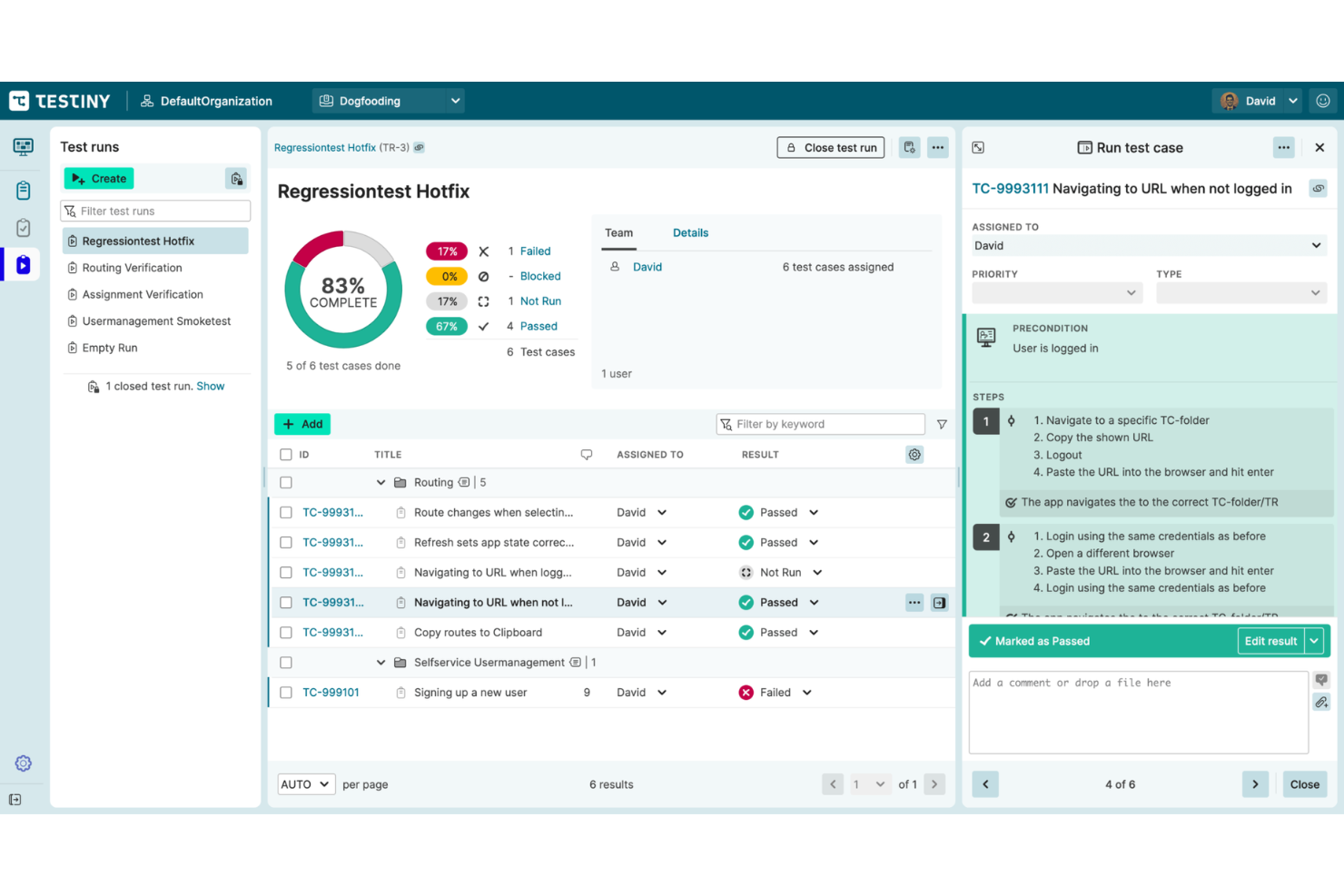
Dies ist ein vollständiges Testmanagement-System für manuelle und automatisierte Tests. Testiny ermöglicht agilen Testteams das Erstellen, Ausführen und Analysieren von Tests mit erweiterten Testmanagement-Funktionen.
Warum ich Testiny gewählt habe: Ich habe mich wegen seiner modernen Funktionen für das Testfallmanagement für Testiny entschieden. Mit diesem System können Sie ganz einfach Testfälle mit einem branchenüblichen Editor erstellen, bearbeiten und organisieren. Sie können vorhandene Testfälle importieren, Drittanbieter-Frameworks integrieren und den Prozess mit anpassbaren Testfallvorlagen optimieren.
Testiny bietet flexibles Management von Testdurchläufen. Es ermöglicht Ihnen, Testdurchläufe zu organisieren, Ihre Tests auszuführen, anpassbare Berichte zu erstellen, zu analysieren und Testergebnisse zu teilen. Es gibt eine Drag-and-Drop-Bearbeitungsfunktion, mit der Sie Ihre Testdurchläufe flexibel zusammenstellen können. Sie können Testfälle mühelos hinzufügen oder entfernen.
Testiny – Herausragende Funktionen und Integrationen
Herausragende Funktionen umfassen Testiny Runner und Zusammenarbeit in Echtzeit. Es gibt einen leistungsstarken Runner, mit dem Sie Testdurchläufe ausführen, nachverfolgen, überprüfen und Ihre Ergebnisse diskutieren können. Dieses Tool ist darauf ausgelegt, die Zusammenarbeit in Echtzeit zwischen Teams unabhängig vom Standort zu ermöglichen. Mehrere Testmanager können gleichzeitig am selben Projekt arbeiten und in allen Browsern Echtzeit-Updates erhalten.
Ein weiteres tolles Feature, das ich nicht unerwähnt lassen möchte, ist die leistungsstarke REST-API von Testiny. Die APIs ermöglichen es Entwicklern, Tests zu automatisieren oder eigene Erweiterungen zu erstellen.
Integrationen umfassen eine native Jira-Integration sowie die Anbindung an andere Tools von Drittanbietern. Es sind Integrationen mit GitHub, GitLab, Jenkins, CircleCI, TeamCity und Automatisierungs-Frameworks über die REST-API verfügbar.
Pros and Cons
Pros:
- Flexibles und faires Preismodell
- Schnelle Benutzeroberfläche
- Sehr offen für Feedback und Produktvorschläge
Cons:
- Benötigt mehr Anpassungsmöglichkeiten
- Dokumentation ist nicht ausführlich genug
New Product Updates from Testiny
Testiny Adds Notifications and Webhooks
Testiny adds configurable notifications, team messaging alerts, and custom webhooks for test activity. This gives teams more control over how updates are delivered across their workflows. For more information, visit Testiny’s official site.
 .
.
Testpad
Am besten geeignet für checklistenbasierte, manuelle Testplanung
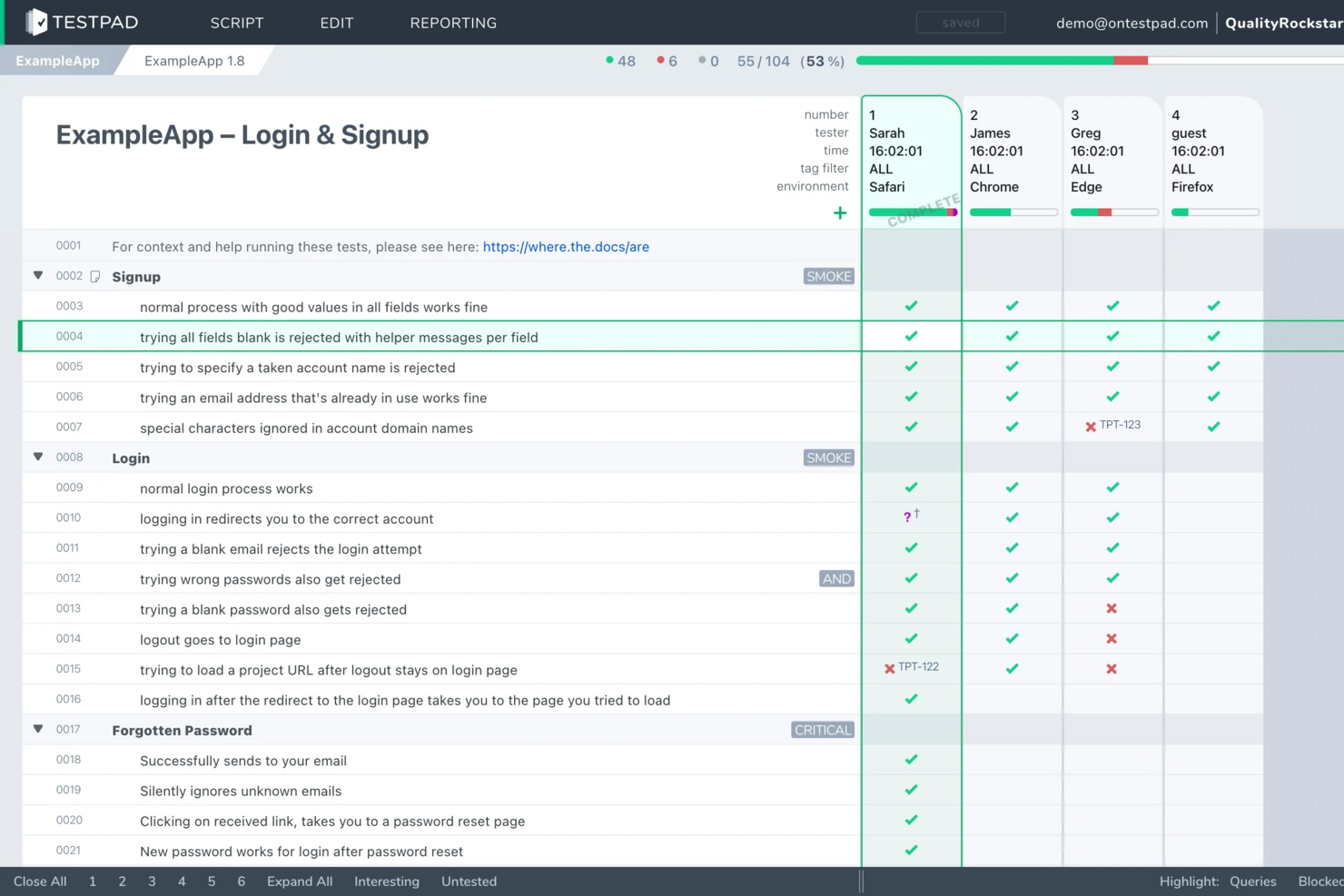
Testpad ist ein manuelles Testmanagement-Tool, das für agile Teams entwickelt wurde, die einen flexiblen, checklistenbasierten Ansatz für die Planung und Verfolgung von Softwaretests bevorzugen, ohne den Aufwand traditioneller Testfallverwaltung.
Für wen eignet sich Testpad am besten?
QA-Leads und agile Teams in Softwareunternehmen, die einen unkomplizierten, manuellen Ansatz für das Testmanagement möchten.
Warum habe ich Testpad gewählt?
Ich habe Testpad ausgewählt, weil der checklistenbasierte Ansatz meinem Team ermöglicht, manuelle Testpläne schnell zu skizzieren und anzupassen, ohne starre Testfallstrukturen. Mir gefällt, wie wir Tests als einfache Checklisten organisieren können, was es erleichtert, Fortschritte und Abdeckung in schnellen Sprints nachzuverfolgen. Mein Team nutzt Testpad, um komplexe Features in umsetzbare Schritte zu unterteilen, was uns hilft, während jedes Release-Zyklus fokussiert und flexibel zu bleiben.
Wichtige Funktionen von Testpad
- Gastzugang für Tester: Externe Tester können eingeladen werden, ohne Accounts zu erstellen.
- Echtzeit-Updates von Testsitzungen: Sehen Sie Testfortschritt und Änderungen live während der Sitzungen.
- Massenimport und -export: Testpläne und Ergebnisse können schnell importiert und exportiert werden.
- Tagging und Filterung: Tests lassen sich mit anpassbaren Tags und Filtern organisieren und auffinden.
Testpad-Integrationen
Integrationen umfassen GitHub und eine REST API für individuelle Integrationen mit CI/CD-Pipelines.
Pros and Cons
Pros:
- Erlaubt die sofortige Teilnahme von Gast-Testern über Links
- Ermöglicht Massenimport von Testfällen aus Tabellen
- Bietet einfache, übersichtliche Nachverfolgung des Testfortschritts
Cons:
- Keine integrierte Anforderungen-Rückverfolgbarkeitsmatrix
- Unterstützt keine Testfall-Parametrisierung

Kualitee
Am besten für KI-gesteuerte Testgenerierung
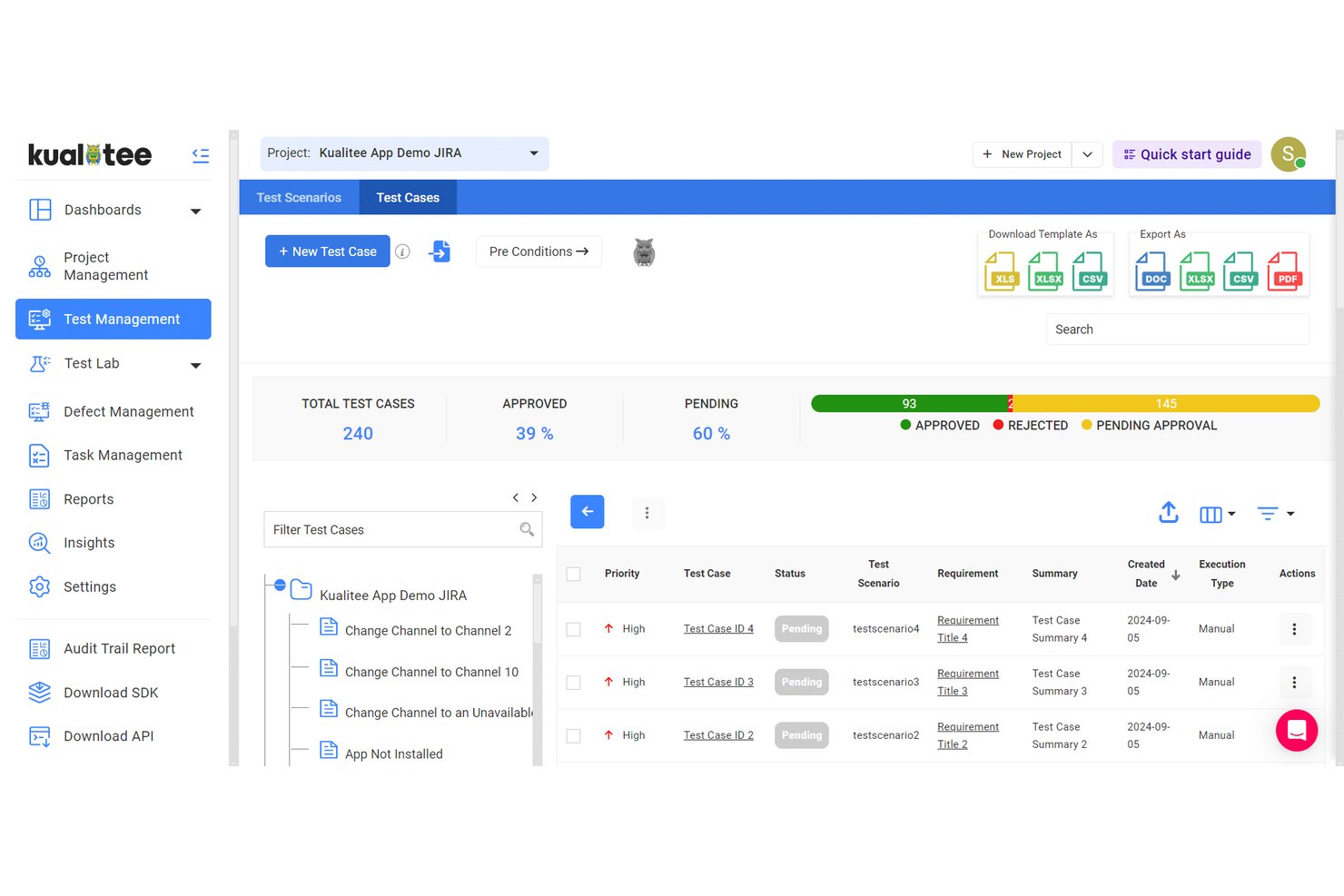
Kualitee ist eine agile Testmanagement-Plattform, die für QA-Teams entwickelt wurde, die ein umfassendes Testfallmanagement, Integrationen mit agilen Projekttools, Anforderungsnachverfolgung, Koordination automatisierter und manueller Tests sowie ausführliche Berichtsfunktionen benötigen.
Für wen ist Kualitee am besten geeignet?
QA-Manager und agile Teams in mittelgroßen bis großen Unternehmen, die ein zentrales Testmanagement und umfassende Tool-Integrationen benötigen.
Warum ich Kualitee ausgewählt habe
Ich habe Kualitee als eine der besten Lösungen ausgewählt, weil es sich mit einer Vielzahl von Entwicklungs- und Testtools verbindet und meinem Team ermöglicht, Tests mit Jira, Azure DevOps und GitHub zu synchronisieren. Ich kann Testfälle direkt an agile Workflow-Elemente knüpfen und Echtzeit-Updates über alle Systeme hinweg einsehen.
Kualitee Hauptfunktionen
- Testfall-Versionierung: Verfolgen Sie Änderungen an Testfällen im Zeitverlauf und stellen Sie bei Bedarf frühere Versionen wieder her.
- Explorative Testsitzungen: Erstellen Sie Ad-hoc-Testläufe mit spontaner Dokumentation und Ergebniserfassung.
- Anforderungs-Nachverfolgungsmatrix: Visualisieren Sie die Verknüpfung zwischen Anforderungen, Testfällen, Durchläufen und Defekten.
- Anpassbare Dashboards: Erstellen Sie Berichte über Sprintfortschritt, Fehlerkennzahlen und Release-Bereitschaft mit konfigurierbaren Widgets.
Kualitee Integrationen
Kualitee bietet native Integrationen mit Jira, Azure DevOps, GitHub, Bitbucket, Jenkins, Trello, ClickUp, Redmine und Slack. Eine API steht für benutzerdefinierte Integrationen zur Verfügung.
Pros and Cons
Pros:
- Unterstützt explorative Testsitzungen mit Dokumentation
- Bietet eine Anforderungs-zu-Fehler-Nachverfolgungsmatrix
- Ermöglicht Versionskontrolle und Prüfprotokolle für Testfälle
Cons:
- Die Erstkonfiguration kann zeitaufwendig sein
- Erweiterte Automatisierung erfordert manuelle API-Einrichtung

Am besten für integriertes Anforderungs- und Risikomanagement
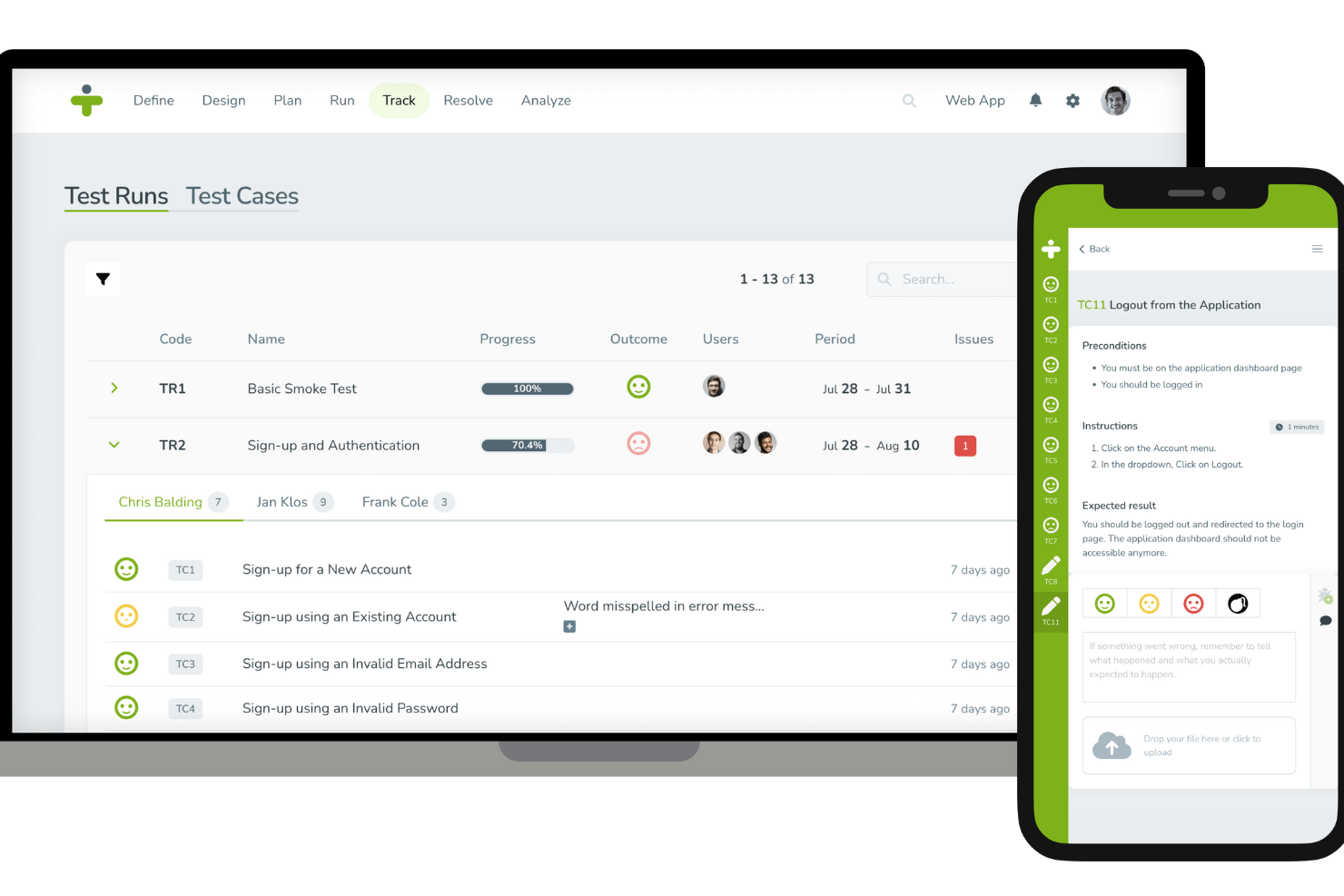
TestMonitor ist eine umfassende Testmanagement-Software, die den Softwaretestprozess in verschiedenen Branchen optimiert. Sie bietet wichtige Funktionen wie Anforderungs- und Risikomanagement, Testfallverwaltung, Meilensteinplanung und Fehlerverfolgung.
Warum ich TestMonitor gewählt habe: Es bietet eine intuitive Testfallverwaltung, die die Erstellung, Organisation und Speicherung von Testfällen vereinfacht. Zusätzlich zu diesen zentralen Testmanagement-Funktionen bietet TestMonitor auch Möglichkeiten zum Anforderungs- und Risikomanagement, die sicherstellen, dass die Software den festgelegten Anforderungen entspricht und helfen, potenzielle Risiken frühzeitig im Entwicklungszyklus zu identifizieren und zu minimieren, was einen agileren Ansatz ermöglicht.
TestMonitor – Herausragende Funktionen & Integrationen
Herausragende Funktionen umfassen Meilensteinplanung, Fehlerverfolgung, Testdurchführungen und -verfolgungen sowie integrierte Berichtsfunktionen, die umfassende Einblicke in Testergebnisse bieten. So können Teams die Leistung überwachen und datenbasierte Entscheidungen treffen.
Integrationen umfassen Jira, ClickUp, DoneDone, Asana, MantisBT, Azure DevOps, TOPdesk, Slack, Zoho Sprints, Trello, GitHub, Jenkins, Forecast, UXsniff, Google Sheets, Microsoft Teams und Zapier.
Pros and Cons
Pros:
- Gute Reporting-Tools zur Verfolgung des Testfortschritts und der Testergebnisse
- Geeignet für agile sowie klassische Projektmanagement-Methoden
- Effiziente Erstellung, Duplizierung und Verwaltung von Testfällen
Cons:
- Möglicherweise nicht geeignet für sehr komplexe Testumgebungen
- Benachrichtigungsfunktionen könnten verbessert werden

QA Wolf
Am besten geeignet für unbegrenzte parallele Testläufe
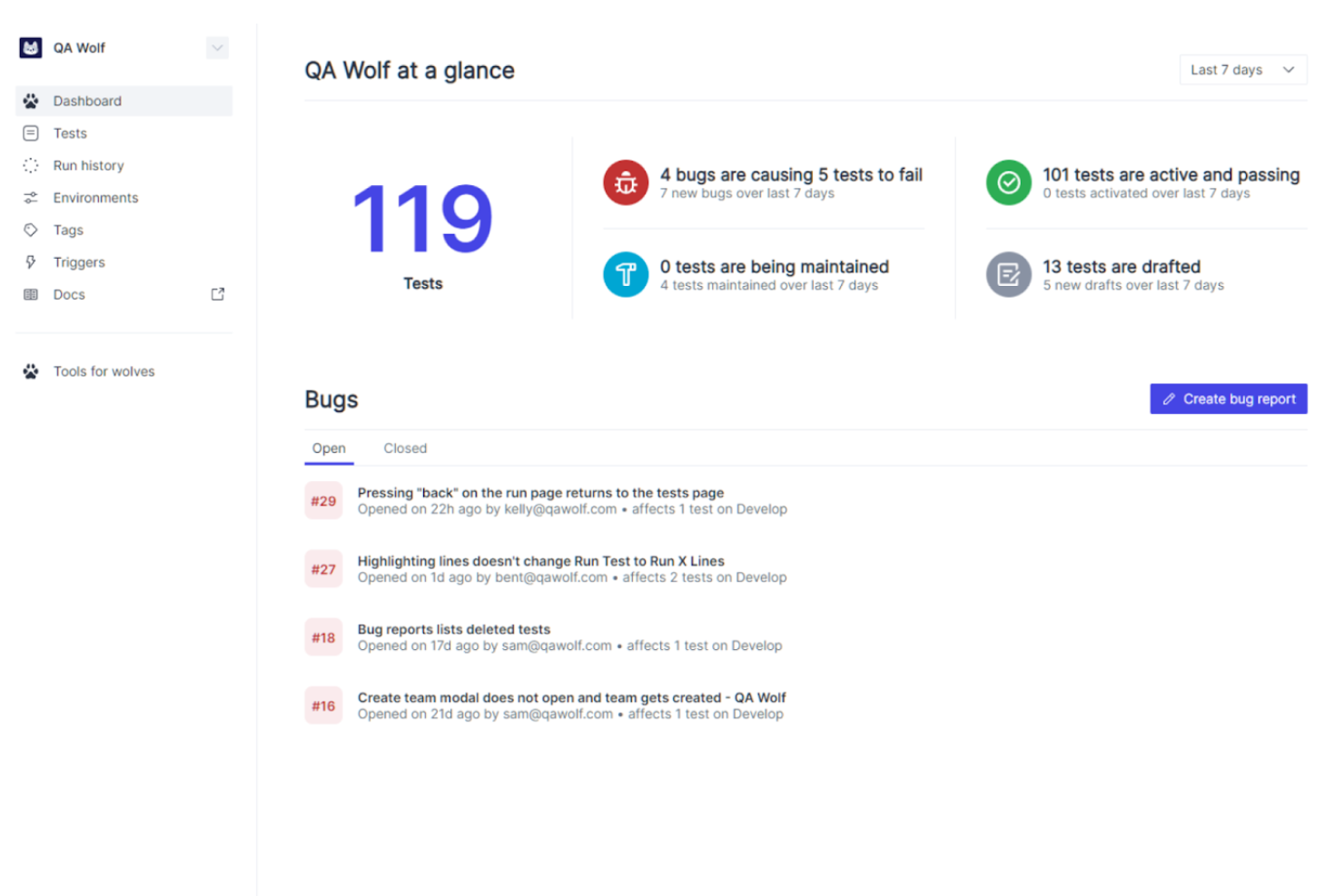
QA Wolf ist eine umfassende Plattform für automatisierte Tests, die den QA-Prozess für Webanwendungen vereinfacht und verbessert. Sie konzentriert sich auf automatisierte End-to-End-Tests, um sicherzustellen, dass Anwendungen durch die Simulation realer Benutzerinteraktionen korrekt funktionieren. Durch detaillierte Fehlerberichte und Echtzeitergebnisse unterstützt QA Wolf Teams dabei, während des gesamten Entwicklungszyklus hohe Qualitätsstandards zu halten.
Warum ich mich für QA Wolf entschieden habe: QA Wolf unterstützt das schnelle, iterative Arbeiten in der agilen Entwicklung, indem kontinuierliches Testen und eine nahtlose Integration ermöglicht werden. Die Funktion für unbegrenzte parallele Testausführungen sorgt für zügige Testzyklen und liefert schnelles Feedback zu Codeänderungen. Die detaillierten Berichte und die Fehlerverfolgung der Plattform stellen sicher, dass Probleme frühzeitig erkannt und umgehend behoben werden, was dem agilen Grundsatz der kontinuierlichen Verbesserung entspricht.
QA Wolf – Hervorstechende Funktionen & Integrationen
Hervorstechende Funktionen umfassen die automatisierte Erstellung und Ausführung von Tests, dedizierte QA Wolf-Ingenieure für die Wartung und Aktualisierung der Tests rund um die Uhr an fünf Tagen die Woche, umfassende Berichte mit Videos, Screenshots und Trace-Logs sowie von Menschen verifizierte Fehlerberichte.
Integrationen beinhalten GitHub, GitLab, Jenkins, CircleCI, Travis CI, Vercel, Slack, Jira, Asana und Microsoft Teams.
Pros and Cons
Pros:
- Kontinuierliche Tests und Überwachung durch Experten
- Unbegrenzte parallele Testläufe
- Einfache, direkte Kommunikation mit dem QA Wolf-Team
Cons:
- Weniger Flexibilität zur individuellen Anpassung des Testprozesses
- Nicht ideal für Teams, die völlige Kontrolle über die Tests wünschen
New Product Updates from QA Wolf

QA Wolf Adds Real Media Testing for iOS Apps
QA Wolf introduces real media testing for iOS apps using camera and microphone inputs. This update improves test reliability for real-world use cases. For more information, visit QA Wolf’s official site.
 .
.
Usersnap
Am besten geeignet, um Benutzertests und Problemverfolgung zu skalieren
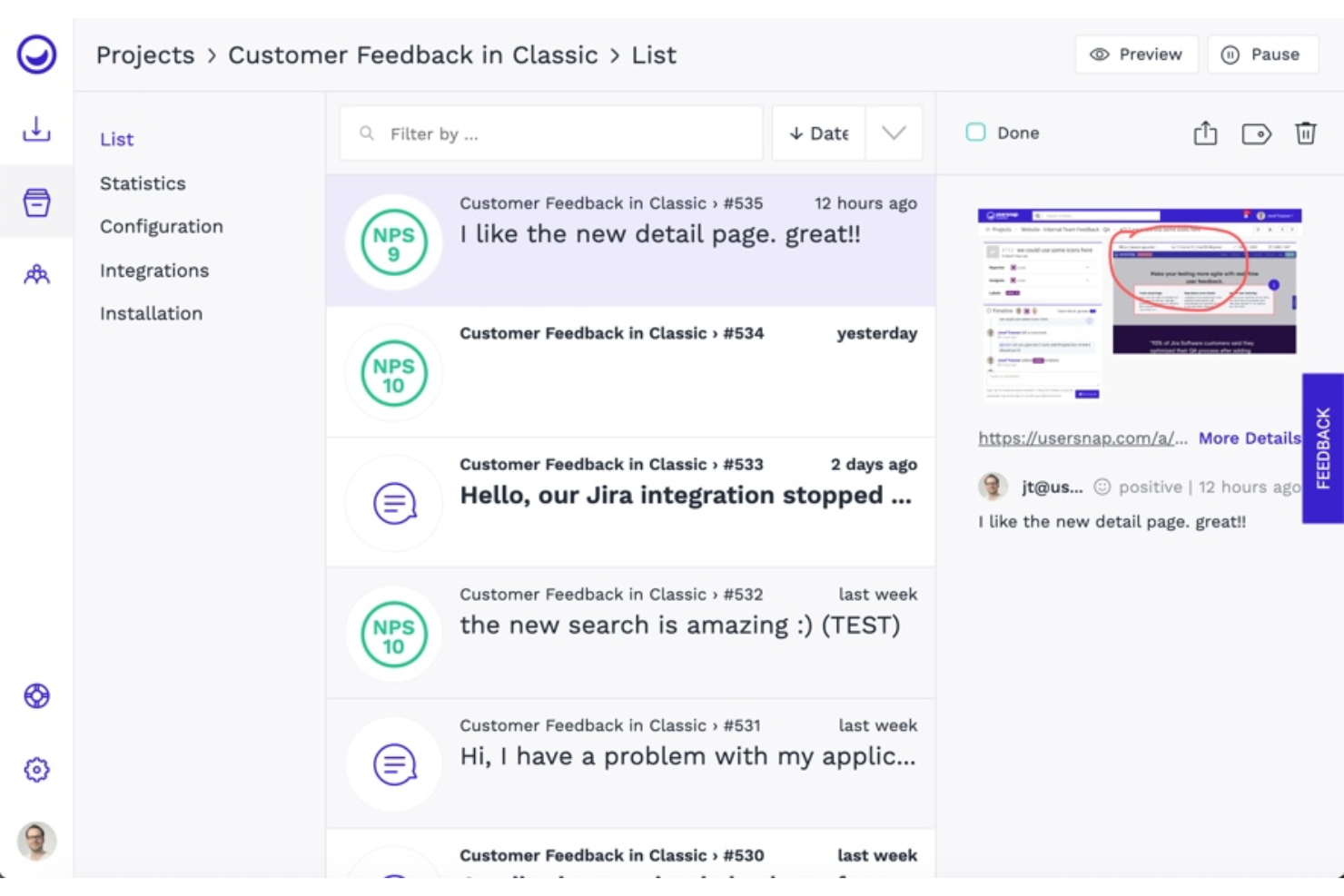
Vertraut von über 20.000 Websites ist Usersnap eine Feedback-Software, mit der Sie Benutzer-Tests und Bug-Tracking verwalten können. Sie ermöglicht es Ihnen, Benutzerfeedback in einer einzigen Lösung zu erfassen, zu organisieren, darauf zu reagieren und es zu skalieren.
Warum ich Usersnap ausgewählt habe: Diese Software hilft Ihnen dabei, bessere Produkte zu entwickeln, indem sie In-App-Feedback-Tools bereitstellt, mit denen Sie Benutzertests und Problemerfassung skalieren können. Ich habe dieses Tool in meine Liste aufgenommen, weil es Ihnen ermöglicht, die Stimme Ihrer Kunden bei Entscheidungen zum Produkttest zu berücksichtigen. Mit Usersnap können Sie Pop-ups mit NPS, CSAT, CES oder anderen Bewertungssystemen versenden, um die Leistung Ihres Produkts zu bewerten und zu erfahren, was Ihre Kunden denken.
Hervorstechende Funktionen und Integrationen von Usersnap
Hervorstechende Funktionen sind visuelles Bug-Tracking und Feature-Validierung. Das Bug-Tracking-Feature von Usersnap ermöglicht es Ihnen, Probleme zu verfolgen, indem Bildschirmaufnahmen gesammelt werden, um die Herausforderungen der Nutzer schneller zu verstehen. Die Funktion zur Feature-Validierung hilft Ihnen herauszufinden, was verbessert oder als Nächstes entwickelt werden sollte, indem Sie neue Produkte testen und die Stimmung der Nutzer messen.
Mit Usersnap können Sie Feedback-Widgets und Umfragen an die Bedürfnisse Ihres Teams oder Ihrer Kommunikationskanäle anpassen.
Integrationen umfassen Slack, Jira Cloud, Asana, Microsoft Teams, Basecamp, Trello, monday.com, Teamwork, Azure DevOps und GitLab. Usersnap integriert sich mit Zapier, wodurch Sie mehr als 2.000 Integrationen und Apps verbinden können.
Pros and Cons
Pros:
- Verbesserte Zusammenarbeit über Teams hinweg
- Stark anpassbar
- Hilfreiches Kundensupport-Team
Cons:
- Begrenzte Formularoptionen
- Einige Bilder werden nicht korrekt angezeigt
Am besten geeignet für Agile- und DevOps-Workflows

Tricentis qTest ist eine einheitliche Testmanagement-Plattform, die auf Agile- und DevOps-Workflows zugeschnitten ist und eine Suite von Tools zur Verwaltung von Testprozessen im Softwareentwicklungszyklus bietet. Sie nutzt KI-gestützte Qualitätsanalysen und lässt sich in weit verbreitete Plattformen wie Jira integrieren, wodurch sie sich als geeignete Lösung für Organisationen positioniert, die effiziente Testabläufe in schnelllebigen Entwicklungsumgebungen aufrechterhalten möchten.
Warum ich Tricentis qTest gewählt habe: Ich habe mich für Tricentis qTest entschieden, weil es eine umfassende Funktionspalette bietet, die verschiedenste Testanforderungen abdeckt, einschließlich Testfallmanagement und Testautomatisierung. Was es besonders macht, sind die starken Integrationsmöglichkeiten mit gängigen Entwicklungs- und Testwerkzeugen, was Agile- und DevOps-Workflows effektiv unterstützt. Ich bin der Meinung, dass Tricentis qTest sich besonders für Agile- und DevOps-Workflows eignet – dank Echtzeit-Einblicken, Kollaborationsfunktionen und Reporting-Möglichkeiten, die in schnellen und flexiblen Softwareentwicklungsteams unerlässlich sind.
Besondere Funktionen & Integrationen von Tricentis qTest
Herausragende Funktionen umfassen agiles und Wasserfall-Testmanagement, exploratives Testen, Testautomatisierung, verhaltensgesteuerte Entwicklung, DevOps-Workflows, individuelle Dashboards sowie Analyse- und Reporting-Tools.
Integrationen beinhalten CA Agile Central Rally, Cucumber, Jenkins, Jira, Selenium und Version One.
Pros and Cons
Pros:
- Benutzerfreundlich
- Gute Integration mit JIRA
- Bietet mehrere Möglichkeiten, Testfälle zu erstellen oder zu importieren
Cons:
- Anwendungs-Updates können zeitaufwendig sein
- Kleinere Fehler beim Speichern von Testskripten wurden gemeldet

Am besten geeignet, um Projektübersicht zu gewinnen und Teststatusberichte in Echtzeit zu erhalten
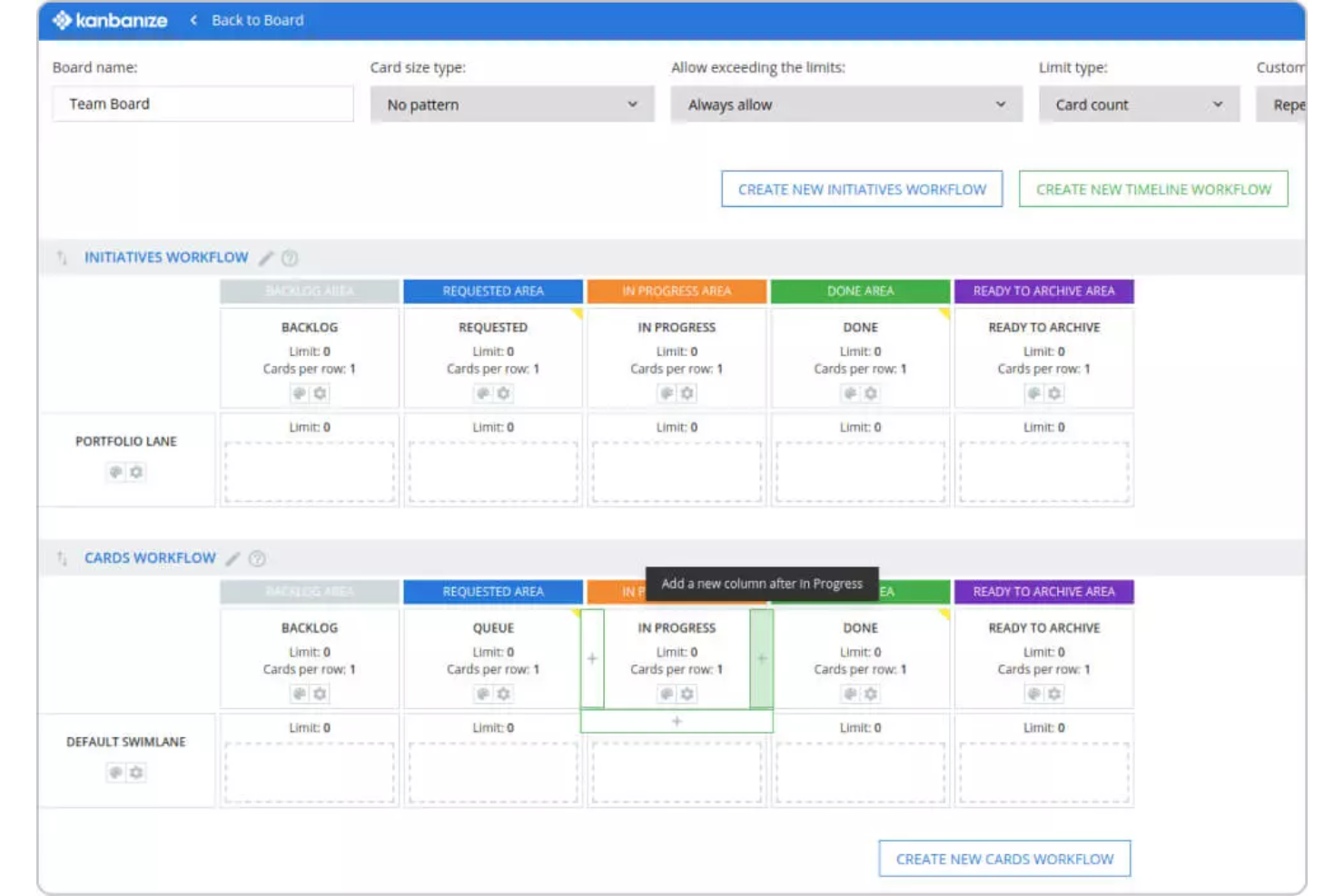
Dies ist eine agile Projektmanagement-Plattform, die Ihnen ermöglicht, einen Überblick über alle QA-Teams zu erhalten. Mit Businessmap können QA-Ingenieure Aufgaben verfolgen und erhalten genaue Statusberichte in Echtzeit.
Warum ich mich für Businessmap entschieden habe: Diese Testmanagement-Plattform verfügt über Kanban-Boards, mit denen Sie Ihre Aufgaben im Blick behalten, Arbeitsabläufe optimieren, Engpässe reduzieren und genaue Berichte in Echtzeit erhalten können. Sie können Ihren Arbeitsablauf visualisieren und volle Transparenz genießen. Alle Arbeits- oder Testobjekte werden als Kanban-Karten visualisiert. Die Karten helfen jedem Teammitglied, den Status jeder Aufgabe zu überwachen.
Businessmap – herausragende Funktionen und Integrationen
Herausragende Funktionen sind unter anderem Workflow-Management, Dashboards und Berichte. Die Workflow-Management-Funktion ermöglicht es Ihnen, Ihre Kanban-Boards individuell an die spezifischen Anforderungen und Vorlieben Ihres Teams anzupassen. Mit den anpassbaren Dashboards und Berichten können Sie Testergebnisse präsentieren, Berichte an einem Ort erstellen und erhalten die Einblicke, die Sie benötigen, um sich auf das Wesentliche zu konzentrieren.
Zusätzlich verfügt Businessmap über ein erweitertes Suchwerkzeug zum Durchsuchen und Filtern von Testobjekten. Diese leistungsstarke Funktion hilft dabei, nach einer bestimmten Suchkategorie zu filtern. Sie können jede spezifische Information aus Ihrem Konto abrufen und durch die Verfeinerung und Konfiguration der benötigten Daten aussagekräftige Berichte erstellen.
Integrationen umfassen Power BI, Google Data Studio, Tableau, Trello, Microsoft Azure, Okta, Dropbox, GitHub, GitLab und Bitbucket.
Pros and Cons
Pros:
- Einfacher Einstieg für Anwender
- Reaktionsschnelles Kundenservice-Team
- Leicht zu implementieren und anzupassen
Cons:
- Einige Konfigurationen sind nicht selbsterklärend
- Hoher Preis für sehr kleine Teams

QMetry
Bestes Testmanagement-Tool zur Steigerung der Wiederverwendbarkeit
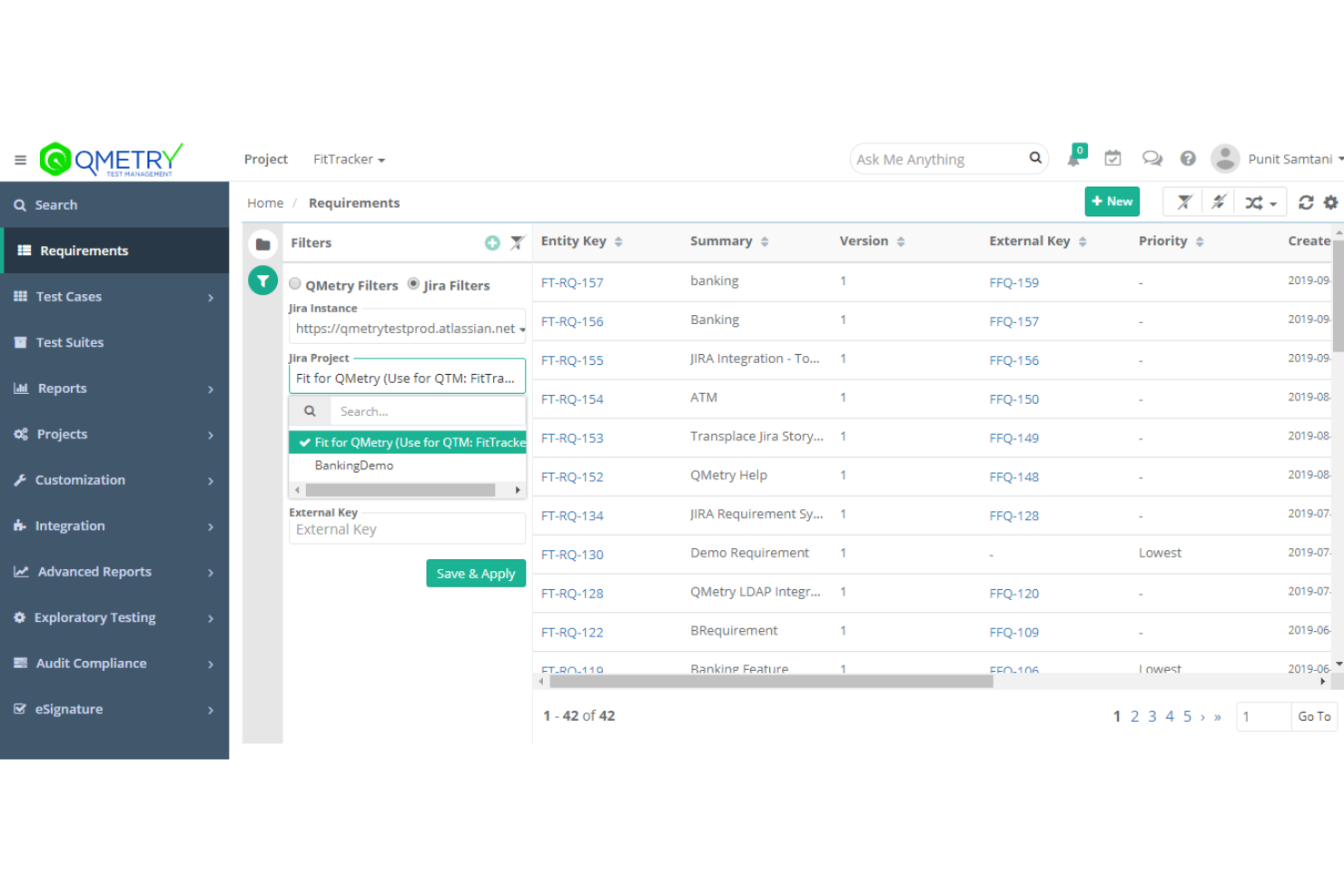
QMetry ist eine Testmanagement-Plattform auf Unternehmensniveau, die agilen Teams hilft, Tests zu planen, zu verfolgen und zu berichten. Sie nutzt künstliche Intelligenz, um Teams eine nahtlose Zusammenarbeit zu ermöglichen, die Testeffizienz zu steigern und die Wiederverwendbarkeit zu erhöhen.
Warum ich QMetry ausgewählt habe: QMetry bietet die QQBot-Funktion, mit der KI eingesetzt wird, um Ihre Testprozesse zu optimieren, indem doppelte Testobjekte entfernt und prädiktive Abdeckungsvorschläge gemacht werden. Diese herausragende Fähigkeit erhöht die Wiederverwendbarkeit, verkürzt die Markteinführungszeit und ermöglicht problemloses Skalieren.
QMetry-Hauptmerkmale und Integrationen
Hauptmerkmale sind intelligente Funktionen zur Testerstellung und Einblicke in Echtzeit. Die Möglichkeiten zur Testgenerierung umfassen BDD-Unterstützung für agile Testautorenerstellung und Funktionen für exploratives Testen. QMetry stellt Berichte und Dashboards bereit, die es Ihnen ermöglichen, intelligente, umsetzbare Erkenntnisse für qualitativ hochwertige Entscheidungen zu gewinnen.
Integrationen umfassen Jira, Azure DevOps, GitHub, Git, Jenkins, GitLab, QF-Test, LT Browser, Progress DataDirect, Rally Software, Bamboo und weitere. Es integriert sich nahtlos mit Continuous Integration/Continuous Deployment-Plattformen, Automatisierungs-Frameworks und Versionskontrollsystemen.
Pros and Cons
Pros:
- Schnellere Markteinführung
- Intuitive Benutzeroberfläche
- Skalierbarkeit
Cons:
- Schwierigkeit beim Austauschen von Testschritten
- Manche Prozesse sind anfangs verwirrend

Jile
Bestes Testfall-Management-Tool für kontinuierliche Verifizierung und Validierung
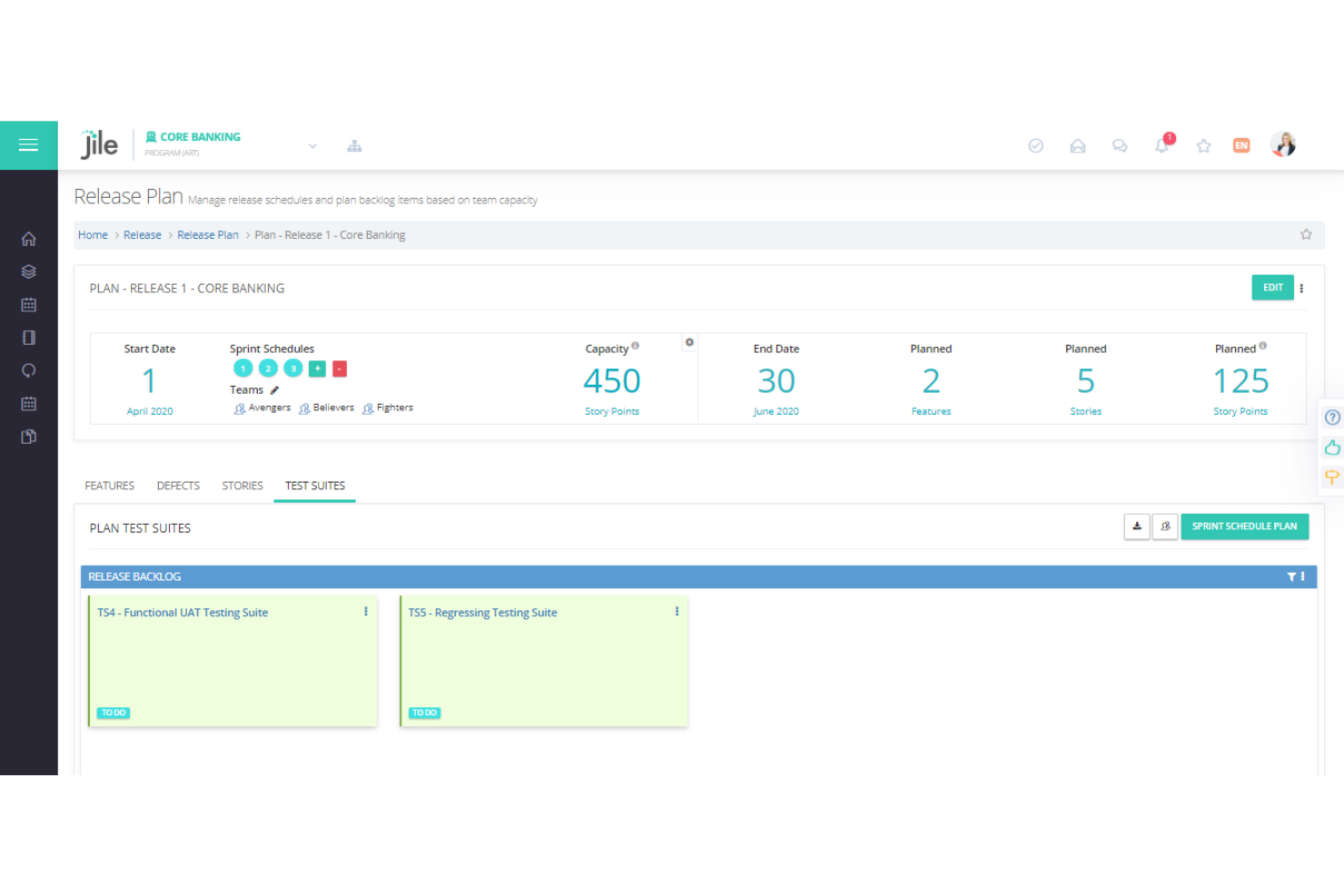
Dieses Tool bietet die Testmanagement-Funktionen, die Sie für alle Testaktivitäten benötigen, wie Testentwurf, Planung, Ausführung und Nachverfolgung. Jile ermöglicht es Ihnen, das agile Testmanagement zu optimieren, indem es eine Suite von Features für kontinuierliche Verifizierung und Validierung bereitstellt.
Warum ich Jile gewählt habe: Ich habe Jile ausgewählt, weil es speziell dafür konzipiert ist, agilen Teams beim Testmanagement zu helfen. Das Tool bietet visuelle Test-Boards, mit denen Sie geplante Tests innerhalb der Iteration ausführen und Testergebnisse effizient verwalten können. Eine weitere interessante Funktion, die das Tool besonders macht, sind die Dashboards für Release- und Iterationsfortschritt. Diese Dashboards ermöglichen es den Nutzern, die Produktqualität auf Iterations- und Releaseniveau zu verfolgen.
Jile – Herausragende Funktionen und Integrationen
Herausragende Funktionen sind unter anderem eine Regressionsbibliothek und Analyse-Dashboards. Die Regressionsbibliothek von Jile hilft Ihnen, wiederverwendbare Tests zu verwalten und Regressionstests für abgeschlossene Stories und Features zu planen und durchzuführen. Mit den Reporting- und Analyse-Dashboards erhalten Sie eine visuelle und interaktive Ansicht der Testaktivitäten, Zugriff auf umfassende Dateneinblicke und vollständige Transparenz. Die Dashboards erlauben Ihnen ebenfalls, stets den Überblick über Teststatus, Release-Fortschritt und Fortschritt der Iterationen zu behalten.
Integrationen umfassen Atlassian Jira, Service Now, Azure DevOps, Salesforce, GitHub, GitLab, Git, Jenkins, Flyway, Cucumber und JUnit.
Pros and Cons
Pros:
- Vereinfacht die Integration von DevOps-Tools
- Intuitive Benutzeroberfläche
- Interaktive Dashboards
Cons:
- Das Onboarding von Nutzern ist manchmal etwas schwierig
- Begrenzte Anpassungsmöglichkeiten
Weitere Tools für agiles Testmanagement
Hier finden Sie einige weitere Optionen für Tools zum agilen Testmanagement, die es nicht in meine Vorauswahl geschafft haben, aber dennoch einen Blick wert sind:
- QAComplete
Am besten geeignet für das Management komplexer Testdurchführungsprozesse
- Appium
Am besten geeignet zur Verwaltung der UI-Automatisierung verschiedenster App-Plattformen
- Apache JMeter
Am besten geeignet für das Management von Lasttests und Performance-Tests von Webanwendungen
- nTask Issue Tracker
Es Tool für durchgängige Nachverfolgung von Problemen
- SpiraTest
Es Testmanagement-Tool für das Tracking von Fehlern mit Echtzeit-Reporting
- Worksoft
Am besten geeignet, um Remote-Tests durchzuführen und zu verwalten, um Fehler abzufangen
- JunoOne
Es agiles Testmanagement-Tool zur Nachverfolgung von Tests mit intelligentem Suchfilter


Wie ich Agile Testmanagement-Tools bewerte
Ich teile meine Bewertung in grundlegende Anforderungen – wie sprint-gebundene Testausführung und Jira-Nachverfolgbarkeit – und die Unterscheidungsmerkmale, die ein gutes Tool vom passenden für Ihr Team trennen.
Kernfunktionalität (Grundvoraussetzung für diese Liste)
Wenn ich Tools für meine Liste auswähle, bewerte ich jedes auf einer Skala von 0 (bietet die Funktionalität nicht an) bis 5 (hervorragend in diesem Bereich) für jede unten aufgeführte Kernfunktion. Dann rechne ich die Gesamtpunktzahl des Tools in einen Prozentsatz um. Jedes Tool muss eine Mindestgesamtpunktzahl von 65 % erreichen, um für die Aufnahme in Betracht zu kommen.
- Testfallverwaltung: Ich prüfe, wie jedes Tool Testfälle organisiert, versioniert und deren Wiederverwendung ermöglicht – zum Beispiel, ob geteilte Schritt-Bibliotheken es Teams ermöglichen, Login- oder Checkout-Flows über mehrere Sprints hinweg nicht zu duplizieren.
- Integration agiler Tools: Hier zählt die bidirektionale Synchronisation mit Plattformen wie Jira oder Azure DevOps – insbesondere die Fähigkeit, Testfälle direkt mit User Stories zu verknüpfen und die Testabdeckung einzusehen, ohne zwischen Tabs zu wechseln.
- Verfolgung der Testdurchführung: Ich achte auf vorhabenbewusste Ausführungsplanung, bei der QA-Leads Durchläufe zuweisen, Pass/Fail-Status in Echtzeit verfolgen und auch explorative Tests neben Skripttests protokollieren können.
- Automatisierung & CI/CD-Unterstützung: Jedes Tool sollte Ergebnisse aus Frameworks wie Selenium, Cypress oder Playwright aufnehmen und an CI/CD-Pipelines wie Jenkins oder GitLab anbinden, um automatisierte Durchläufe auszulösen oder zu berichten.
- Anforderungsnachverfolgbarkeit: Ich prüfe, ob das Tool Beziehungen zwischen User Stories, Testfällen, Durchführungen und Defekten abbildet, sodass Teams ungetestete Anforderungen vor einem Release erkennen können.
- Agile Berichte & Dashboards: Sprint-orientierte Ansichten wie Testabdeckung pro Story, Fehlerdichte-Trends und Zusammenfassungen zur Release-Bereitschaft helfen QA-Managern und Scrum Mastern, fundierte Go-/No-Go-Entscheidungen zu treffen.
Nachdem ich eine Liste von Tools habe, die diese Kriterien erfüllen, schaue ich, was jede Plattform besonders macht.
Differenzierende Faktoren (Was Anbieter unterscheidet)
So vergleiche und kontrastiere ich verschiedene Anbieter:
Herausragende Funktionen
Ich achte auf KI-gestützte Testgenerierung, die Testfälle aus User Stories erstellen kann und QA-Teams hilft, das Tempo schneller Sprints mitzugehen. BDD- und Gherkin-Unterstützung ist ein weiteres Unterscheidungsmerkmal – Teams, die verhaltensgetriebene Entwicklung (Behavior-Driven Development) praktizieren, benötigen eine native Given-When-Then-Syntax, um Tests sowohl für Entwickler als auch Product Owner verständlich zu halten. Funktionen für "Shift-left"-Zusammenarbeit wie Inline-Kommentare, @mentions und Review-Workflows sind ebenfalls relevant, da sie QA früher in die Sprintplanung einbinden.
Mehr als nur Funktionen
Tiefe der Integration ist wichtiger als nur ein Jira-Connector – ich bewerte, ob Tools offene REST-APIs und Webhooks bieten, mit denen Teams eigene Pipelines in ihren bestehenden DevOps-Stack integrieren können. Sicherheit ist ein weiterer wichtiger Aspekt, insbesondere für Teams in regulierten Branchen, bei denen SOC 2- oder ISO 27001-Zertifizierung sowie SSO-/SAML-Unterstützung Mindestanforderungen sind. Außerdem prüfe ich, wie schnell Teams starten können, etwa ob der Anbieter Migrationspfade von Legacy-Plattformen wie HP ALM oder TestRail bereitstellt.
So wählen Sie ein Tool für agiles Testmanagement aus
Es ist leicht, sich in langen Funktionslisten und komplexen Preisstrukturen zu verlieren. Damit Sie sich bei der Bearbeitung Ihres individuellen Auswahlprozesses für Software auf das Wesentliche konzentrieren können, finden Sie hier eine Checkliste mit Faktoren, die Sie berücksichtigen sollten:
| Faktor | Zu beachten |
|---|---|
| Skalierbarkeit | Wächst das Tool mit Ihrem Team? Berücksichtigen Sie zukünftige Anforderungen und die Benutzerkapazität. Stellen Sie sicher, dass es eine steigende Anzahl von Daten und Benutzern ohne zusätzliche Kosten bewältigen kann. |
| Integrationen | Prüfen Sie, ob es sich mit Ihren bestehenden Tools wie CI/CD, Fehlerverfolgungssystemen und ALM-Testsoftware verbinden lässt. Eine nahtlose Integration spart Zeit und Aufwand. |
| Anpassbarkeit | Können Sie das Tool an Ihre Arbeitsabläufe anpassen? Achten Sie auf Optionen zur Anpassung von Feldern, Dashboards und Berichten an Ihre Prozesse. |
| Benutzerfreundlichkeit | Ist die Benutzeroberfläche für alle Teammitglieder intuitiv verständlich? Ein einfaches Design verkürzt die Schulungszeit und steigert die Produktivität. Testen Sie es mit potenziellen Benutzern. |
| Implementierung und Einarbeitung | Wie lange dauert es, bis das Tool einsatzbereit ist? Achten Sie auf schnelle Einrichtungsprozesse und verfügbare Schulungsmaterialien, um die Umstellung zu erleichtern. |
| Kosten | Passt die Preisgestaltung zu Ihrem Budget? Achten Sie auf versteckte Gebühren oder Kosten, die an Benutzerlimits oder zusätzliche Funktionen gebunden sind. Vergleichen Sie das Tool mit ähnlichen Lösungen. |
| Sicherheitsvorkehrungen | Sind Maßnahmen zum Datenschutz vorhanden? Bestätigen Sie die Einhaltung von Branchenstandards und prüfen Sie Verschlüsselung sowie Zugriffskontrollen. |
| Verfügbarkeit des Supports | Wie schnell erhalten Sie Hilfe, wenn Probleme auftreten? Achten Sie auf eine Verfügbarkeit rund um die Uhr und mehrere Supportkanäle wie Chat und Telefon. |
Was sind agile Testmanagement-Tools?
Agile Testmanagement-Tools sind Softwarelösungen, die Teams dabei unterstützen, ihre Testprozesse innerhalb agiler Rahmenwerke zu verwalten und zu organisieren. Diese Tools werden typischerweise von Fachkräften aus der Qualitätssicherung, Entwicklern und Projektmanagern eingesetzt und schaffen einen Mehrwert, indem sie die Zusammenarbeit verbessern und den Testfortschritt effizient verfolgen.
Testfallverwaltung, Fehlerverfolgung und Integrationsfunktionen helfen bei der Organisation von Arbeitsabläufen, der Sicherstellung der Qualität und der Einhaltung von Projektfristen. Die Ergänzung strukturierter Tests durch Tools für exploratives Testen kann die Qualitätssicherungsmaßnahmen zusätzlich verbessern. Insgesamt vereinfachen diese Tools den Testprozess und steigern die Produktivität des Teams.
Funktionen
Achten Sie bei der Auswahl agiler Testmanagement-Tools auf die folgenden wichtigen Funktionen:
- Testfallverwaltung: Organisiert und verwaltet Testfälle effizient, sodass Teams den Fortschritt verfolgen und eine ausreichende Testabdeckung sicherstellen können.
- Fehlerverfolgung: Identifiziert, erfasst und überwacht Fehler, ermöglicht eine schnelle Behebung und erhält die Softwarequalität.
- Integrationsfunktionen: Verbindet sich mit anderen Tools wie CI/CD- und Projektmanagementsoftware, um Arbeitsabläufe zu optimieren.
- Anpassbare Dashboards: Ermöglichen es Benutzern, Dashboards an ihre spezifischen Anforderungen anzupassen und relevante Erkenntnisse auf einen Blick bereitzustellen.
- Zusammenarbeit in Echtzeit: Erleichtert die Kommunikation und Koordination zwischen Teammitgliedern und steigert dadurch die Produktivität.
- Automatisierte Testausführung: Führt Tests automatisch aus, reduziert den manuellen Aufwand und beschleunigt den Testprozess.
- Anforderungsmanagement: Verfolgt und verwaltet Anforderungen, um die Ausrichtung an Projektzielen und Liefergegenständen sicherzustellen.
- KI-gestützte Analysen: Liefert mithilfe von KI Erkenntnisse und Trends, die Teams bei fundierten Entscheidungen unterstützen.
- Plattformübergreifende Kompatibilität: Unterstützt mehrere Plattformen und stellt sicher, dass Tests in verschiedenen Umgebungen ausgeführt werden können.
- Sicherheitsvorkehrungen: Bietet Datenschutzmaßnahmen wie Verschlüsselung und Zugriffskontrollen, um Vertraulichkeit und Integrität zu gewährleisten.
Vorteile
Die Implementierung agiler Testmanagement-Tools bietet Ihrem Team und Ihrem Unternehmen mehrere Vorteile. Auf Folgendes können Sie sich freuen:
- Verbesserte Zusammenarbeit: Kommunikationsfunktionen in Echtzeit stärken die Teamarbeit, indem sie alle auf dem gleichen Stand halten.
- Effiziente Fehlerbehebung: Die Fehlerverfolgung stellt sicher, dass Probleme schnell erfasst und behoben werden, wodurch die Softwarequalität verbessert wird.
- Zeiteinsparungen: Die automatisierte Testausführung reduziert manuelle Arbeit und schafft Zeit für andere Aufgaben.
- Bessere Entscheidungsfindung: KI-gestützte Analysen liefern Erkenntnisse, die Teams bei fundierten Entscheidungen über Teststrategien unterstützen.
- Höhere Flexibilität: Anpassbare Dashboards und Arbeitsabläufe ermöglichen es Teams, das Tool an ihre Prozesse und Anforderungen anzupassen.
- Verbesserte Sicherheit: Integrierte Sicherheitsvorkehrungen schützen sensible Daten und wahren Vertrauen sowie Compliance.
- Optimierte Integration: Einfache Verbindungen mit anderen Tools vereinfachen Prozesse und verringern die Notwendigkeit, zwischen Plattformen zu wechseln.
Kosten & Preise
Bei der Auswahl agiler Testmanagement-Tools ist es wichtig, die verschiedenen verfügbaren Preismodelle und Tarife zu verstehen. Die Kosten variieren je nach Funktionen, Teamgröße, Zusatzoptionen und weiteren Faktoren. Die folgende Tabelle fasst gängige Tarife, deren Durchschnittspreise und typische Funktionen zusammen, die in Lösungen für agile Testmanagement-Tools enthalten sind:
Vergleichstabelle der Tarife für agile Testmanagement-Tools
| Tariftyp | Durchschnittlicher Preis | Übliche Funktionen |
|---|---|---|
| Kostenloser Tarif | $0 | Grundlegende Testfallverwaltung, eingeschränkte Fehlerverfolgung und Community-Support. |
| Persönlicher Tarif | $5-$25/Benutzer/Monat | Erweiterte Testfallverwaltung, grundlegende Integrationen und eingeschränkte Berichterstattung. |
| Geschäftstarif | $30-$50/Benutzer/Monat | Erweiterte Integrationen, anpassbare Dashboards und priorisierter Support. |
| Unternehmenstarif | $60+/Benutzer/Monat | Vollständiger Funktionsumfang, KI-gestützte Analysen, dedizierter Support und Sicherheitsoptionen. |
FAQ zu agilen Testmanagement-Tools
Hier finden Sie einige Antworten auf häufige Fragen zu agilen Testmanagement-Tools:
Wie unterstützen agile Testmanagement-Tools kontinuierliches Testen?
Diese Tools erleichtern kontinuierliches Testen, indem sie sich wiederholende Aufgaben automatisieren, Zusammenarbeit in Echtzeit ermöglichen und in CI/CD-Systeme integriert werden. Sie ermöglichen es Teams, häufig zu testen und sofortiges Feedback zu erhalten, was für die agile Entwicklung entscheidend ist.
Auf welche Sicherheitsfunktionen sollten Sie bei agilen Testmanagement-Tools achten?
Achten Sie auf Funktionen wie Datenverschlüsselung, rollenbasierte Zugriffskontrollen und die Einhaltung von Branchenstandards. Diese stellen sicher, dass Ihre Daten geschützt und nur für autorisierte Benutzer zugänglich bleiben, wodurch vertrauliche Projektinformationen geschützt werden.
Können agile Testmanagement-Tools die Zusammenarbeit von Remote-Teams unterstützen?
Ja, sie bieten häufig Funktionen wie gemeinsam genutzte Dashboards, Aktualisierungen in Echtzeit und Kommunikationstools. Diese Funktionen helfen Remote-Teams, abgestimmt zu bleiben, den Fortschritt zu verfolgen und trotz geografischer Entfernungen effektiv zusammenzuarbeiten.
Wie geht es weiter?
Wenn Sie gerade agile Testmanagement-Tools recherchieren, wenden Sie sich für kostenlose Empfehlungen an einen SoftwareSelect-Berater.
Sie füllen ein Formular aus und führen ein kurzes Gespräch, in dem Ihre spezifischen Anforderungen besprochen werden. Anschließend erhalten Sie eine Auswahlliste von Softwarelösungen zur Prüfung. Sie werden sogar während des gesamten Kaufprozesses unterstützt, einschließlich der Preisverhandlungen.