

Olayları yönetmek, teknoloji ekipleri için gerçekten zorlayıcı olabilir. Beklenmedik bir sorun iş akışınızı aksattığında her saniye önemlidir. İşte olay yönetimi yazılımı burada devreye girerek sorunlarla hızlı ve verimli bir şekilde başa çıkmanıza yardımcı olur.
Deneyimlerime göre doğru aracı bulmak, operasyonlarınızın sorunsuz ilerlemesini sağlamada büyük fark yaratabilir. Kullanabileceğiniz en iyi çözümlerden iyi araştırılmış bir seçki sunmak için çeşitli seçenekleri test edip inceledim.
Bu makalede, en iyi seçimlerimi paylaşacak ve bunların benzersiz özelliklerini ve avantajlarını öne çıkaracağım. Bu araçların ekibinizin yanıt sürelerini iyileştirmesine ve iş birliğini geliştirmesine nasıl yardımcı olabileceği hakkında bilgi edinecek, böylece karşınıza çıkabilecek her duruma hazırlıklı olacaksınız.
Why Trust Our Software Recommendations
6,700+
Reviews
20
Industry experts
16+
Evaluation factors
14
Years
Our team has been testing and reviewing software since 2012. As tech leaders ourselves, we know how difficult—and important—it is to choose the right software.
For this guide, we evaluated tools using hands-on testing and independent research, scoring tools using our selection criteria.
Our reviews reflect our human editorial judgment, not a sales pitch.
Expert reviewers:
- Paulo Gardini MiguelTech Director
 Tim FisherVP of AI
 Gabriel RosasTech Lead & Software Architect
 Christhian GruhnTech Lead & Platform Architect

Olay Yönetimi Yazılımları Karşılaştırma Tablosu
Bu karşılaştırma tablosu, en iyi olay yönetimi yazılımı seçimlerimin fiyatlandırma ayrıntılarını özetlemektedir:
Sorted by: Default
| Tool | Starting Price | Website | |
|---|---|---|---|
Best for business continuity | 4.4 out of 5 | Pricing upon request Free demo available | Website |
Best for automated incident management | 4.6 out of 5 | $19/user/month 14-day free trial | Book Demo |
Best for real-time incident detection | 4.6 out of 5 | $149/user/month Free trial available | Book Demo |
Best for reducing IT workloads with AI | 4.5 out of 5 | $59/user/month Free trial + free demo available | Book Demo |
Best for customer service | 4.4 out of 5 | $75/user/month Free trial available | Website |
Best for compliance needs | 3.5 out of 5 | Pricing upon request Free demo available | Website |
Best for integrating threat hunting | Not rated | Pricing upon request Free trial + free demo available | Website |
Best for switching from PagerDuty or Opsgenie | 4.8 out of 5 | $10/user/month Free plan + 14-day free trial + free demo available | Website |
Best for AI-powered incident resolution | 4.8 out of 5 | $20/user/month Free trial available | Website |
Best for log management | 4.5 out of 5 | Pricing upon request 30-day free trial + free demo | Website |


En İyi Olay Yönetimi Yazılımları İncelemeleri
Aşağıda, kısa listeme giren en iyi olay yönetimi yazılımlarının ayrıntılı özetlerini bulabilirsiniz. İncelemelerim, size en uygun seçeneği bulmanıza yardımcı olmak için her aracın temel özelliklerine, artılarına ve eksilerine, entegrasyonlarına ve ideal kullanım alanlarına ayrıntılı bir bakış sunuyor.
 Best for business continuity
- Free demo available
- Pricing upon request
Visit WebsiteCustomer Rating:4.4/5
Preparis' incident management dashboard provides a detailed overview of incidents across the organization. Preparis is an incident management platform designed for IT teams and business leaders who need to coordinate emergency response, streamline communication, and maintain operational resilience during disruptions.
Who Is Preparis Best For?
Preparis is a strong fit for mid-size to enterprise organizations that need a structured approach to business continuity planning and emergency response coordination.
Why I Picked Preparis
Preparis earns its spot on my shortlist because it's one of the few incident management tools built specifically around business continuity as a discipline, not just as a feature. I like how the Preparis Planner walks teams through building fully customizable continuity plans, including business impact analysis (BIA), risk assessments, and compliance reporting, all in a single guided workflow. When an incident occurs, the Incident Manager module lets my team set up a virtual war room, distribute action lists to stakeholders, and track recovery progress through real-time dashboards. I find the 360° visibility into incident status useful when coordinating responses across multiple teams or locations.
Preparis Key Features
- Bi-directional emergency messaging: Send alerts to employees by location, department, group, or role through their preferred channel, and track responses in a single dashboard.
- Geofence-based location alerting: Draw real-time geofences or use predefined ones to push location-based notifications to employees in the field or working remotely.
- Cloud and offline document sharing: Store and share continuity documents in a way that keeps them accessible even when your building is unavailable or servers are offline.
- Online training and knowledge center: Access over 100 threat-specific training topics and certify crisis teams on emergency response protocols directly within the platform.
Preparis Integrations
Preparis offers native integrations with Everbridge, Alertus, and Singlewire, and provides an API for custom integrations.
Pros and Cons
Pros:
- Emergency notification systems
- Effective crisis management plans
- Intuitive dashboard design
Cons:
- Potential delays in notifications
- Not ideal for small teams
Learn more about Preparis: Best for automated incident management
- 14-day free trial
- From $19/user/month (billed annually)
Visit WebsiteCustomer Rating:4.6/5
Manage incidents from various channels on one dashboard. Freshservice is a cloud-based IT service management platform designed for IT teams in businesses of all sizes who need to centralize incident response, automate workflows, and improve visibility across their IT operations.
Who Is Freshservice Best For?
Freshservice is a strong fit for mid-sized to enterprise IT teams that need a structured, ITIL-aligned approach to managing incidents, service requests, and IT operations in one place.
Why I Picked Freshservice
I picked Freshservice as one of the best for automated incident management because of how far its automation reaches across the incident lifecycle. I like that when an alert comes in, Freddy AI correlates signals from monitoring tools, auto-routes the ticket to the right team based on availability and workload, and can spin up a war room with full context—all without manual intervention. My team uses the no-code workflow builder to set up automated escalations, SLA triggers, and on-call rotations, so the right people are looped in at the right time. AI-generated postmortems after each incident capture root causes automatically, feeding real learnings back into prevention instead of manual reports.
Freshservice Key Features
- SLA management: Create custom SLA policies, auto-escalate priority tickets, and track compliance against service targets.
- Omnichannel support: Manage incidents submitted via email, Slack, Microsoft Teams, or a self-service portal from a single agent view.
- Alert management: Consolidate alerts from multiple monitoring sources into one view and reduce noise using AI-assisted filtering.
- CMDB integration: Link incidents directly to affected assets and configuration items to give responders full infrastructure context.
Freshservice Integrations
Freshservice offers over 1,200 native integrations, including Microsoft Teams, Slack, Jira, Azure AD, TeamViewer, and SecPod, with connector apps, flexible APIs, and low-code tools available for custom integrations.
Pros and Cons
Pros:
- Insightful reports and analytics on incident trends and performance
- Can refer to historical data with its AI engine called Freddy
- Customizable service level agreements (SLAs) and escalation rules
Cons:
- Can get expensive as the number of agents increases
- Steep learning curve
Learn more about Freshservice: Best for real-time incident detection
- Free trial available
- From $149/user/month (billed annually)
Visit WebsiteCustomer Rating:4.6/5
Atera offers ticket automation features to streamline helpdesk operations. Atera is an all-in-one IT management platform built for managed service providers and internal IT teams who need to monitor, detect, and resolve incidents across multiple devices and environments from a single dashboard.
Who Is Atera Best For?
Atera is a strong fit for MSPs and IT departments that manage distributed endpoints and need a unified platform for monitoring, ticketing, and remote support.
Why I Picked Atera
Atera earns its spot on my shortlist because of how tightly its real-time monitoring and alerting capabilities are woven into the incident response workflow. I like that the Atera agent continuously tracks device metrics—CPU, RAM, disk usage, network bandwidth, and Windows events—and fires alerts the moment something crosses a threshold you define. That means my team isn't waiting for a user to call in a problem; we're already looking at it before they notice. The AI Copilot layer takes this further by proactively analyzing those alerts and suggesting resolutions, which cuts the time between detection and action considerably.
Atera Key Features
- Helpdesk and ticketing: Manage, track, and respond to end-user support requests from a centralized ticketing system with AI-powered auto-tagging and ticket automation.
- Patch management: Automate patch deployment for Windows, Mac, and Linux devices across your environment on a defined schedule or on demand.
- Network discovery: Scan your monitored networks to identify all connected devices, open ports, and potential CVEs, including unauthorized assets.
- IT automation: Build automation profiles to handle repetitive tasks—like software installation and onboarding—across newly added or existing devices.
Atera Integrations
Atera offers native integrations with Splashtop, TeamViewer, ScreenConnect, AnyDesk, HubSpot, Slack, WhatsApp, Microsoft Teams, Google (for SSO), Azure Active Directory, and Okta, and provides an API for custom integrations.
Pros and Cons
Pros:
- Pay-per-technician pricing model
- Unified platform for RMM, PSA, and help desk
- Built-in AI support for ticket management and troubleshooting
Cons:
- Mobile app has fewer features than desktop version
- Limited customization of workflows
 Best for reducing IT workloads with AI
- Free trial + free demo available
- From $59/user/month (billed annually)
Visit WebsiteCustomer Rating:4.5/5
SysAid ITSM performance dashboard visualizing ticket volumes, SLA indicators, and MTTR trends across support channels. SysAid is an IT service management platform built for IT teams in midsize to large organizations who need to centralize incident tracking, automate workflows, and manage IT assets to keep systems running smoothly.
Who Is SysAid Best For?
SysAid is a strong fit for midsize to large IT departments that need a structured ITSM platform with built-in automation to handle high volumes of incidents and service requests.
Why I Picked SysAid
I picked SysAid as one of the best because of how far its AI goes in taking work off your team's plate. What I find genuinely impressive is that SysAid's AI agents don't just surface suggestions—they take action. Examples include resolving duplicate tickets, unlocking user accounts, assigning Microsoft 365 licenses, and flagging assets with warranty expirations—all of which happen automatically without manual intervention. SysAid Copilot adds another layer by giving IT agents instant ticket context, AI-drafted replies, and a conversational interface for querying service data—so even complex incidents get moving faster. The platform claims to automatically resolve more than 60% of incidents before they ever become tickets, which, in my experience, is the kind of deflection that changes how a service desk operates day to day.
SysAid Key Features
- Self-service portal: A customizable portal where employees submit tickets, track progress, and search a knowledge base without contacting IT directly.
- No-code workflow builder: A drag-and-drop interface for building multi-step ticket routing, escalation, and approval workflows without writing code.
- ITIL-aligned incident classification: Tickets are automatically categorized using historical data, sentiment analysis, and metadata to route them through structured ITIL workflows.
- SLA-based ticket prioritization: Applies SLA thresholds, urgency scoring, and risk levels to automatically set due dates and reassign tickets before breaches occur.
SysAid Integrations
SysAid offers native integrations across the Microsoft ecosystem, including Microsoft 365 and Azure, as well as integrations with Jira, Slack, Google Workspace, Okta, Salesforce, and Zapier. An API is available for custom integrations.
Pros and Cons
Pros:
- Workflow automation enhances process efficiency
- Real-time analytics improve performance monitoring
- AI automation streamlines ticket handling
Cons:
- Implementation setup process often slow
- Interface design appears slightly outdated


Salesforce Service Cloud is a multifaceted customer service platform integrating AI and omnichannel support. Salesforce Service Cloud is a CRM platform tailored for customer service teams aiming to boost customer satisfaction and loyalty.
Why I picked Salesforce Service Cloud: It's designed for customer service, integrating marketing and sales with service functions to enhance customer interactions. You can manage customer cases efficiently with its case management tools. The platform's knowledge base helps your team resolve issues faster. Its customizable dashboards give you insights into customer service performance, aiding in decision-making.
Standout features & integrations:
Features include case management, which allows you to track and resolve customer issues efficiently, a knowledge base that speeds up issue resolution, and customizable dashboards that provide insights into service performance. The platform also supports multi-channel customer interactions.
Integrations include Slack, Microsoft Teams, Google Workspace, Mailchimp, HubSpot, Zendesk, QuickBooks, Dropbox, DocuSign, and PayPal.
Pros and Cons
Pros:
- Unified platform for customer interactions
- Customizable dashboards
- Multi-channel support
Cons:
- Requires training for new users
- Limited out-of-the-box features
Learn more about Agentforce Service (formerly Service Cloud):

The software allows you to manage incidents and other non-conformities, making the process an integral component of your GRC program. Corporater is a business management platform designed for organizations that prioritize compliance and regulatory adherence.
Why I picked Corporater: It's focused on compliance needs, offering features to manage incidents, audits, and risk assessments. You can align your operations with regulatory requirements using its compliance tracking tools. The platform's risk assessment capabilities help you identify and mitigate potential threats. Customizable dashboards provide insights into compliance performance, aiding in strategic planning.
Standout features & integrations:
Features include compliance tracking that helps your team meet regulatory standards, risk assessment for identifying potential threats, and customizable dashboards for insights into compliance performance. The tool also supports audit management to ensure thorough evaluations.
Integrations include Microsoft 365, Salesforce, SAP, Oracle, Google Workspace, IBM, ServiceNow, Jira, Slack, and Tableau.
Pros and Cons
Pros:
- Effective risk assessment
- Supports audit management
- Tailored for compliance needs
Cons:
- Requires training for new users
- Limited out-of-the-box features
Learn more about Corporater: Best for integrating threat hunting
- Free trial + free demo available
- Pricing upon request

Heimdal provides automated patch management for enhanced security. Heimdal gives IT and security teams a unified platform to detect, respond to, and manage incidents across endpoints and networks, helping organizations reduce risk and automate threat response in complex environments.
Who Is Heimdal Best For?
Heimdal is a strong fit for mid-size to enterprise security and IT operations teams that need a centralized platform to manage threats across complex, multi-layered environments.
Why I Picked Heimdal
Heimdal earns its spot on my shortlist because its Threat-hunting and Action Center (TAC) brings threat hunting directly into the incident management workflow—something most tools treat as a separate process. I like how the TAC uses the Extended Threat Protection (XTP) engine alongside the MITRE ATT&CK framework to detect anomalous behavior at the device level, giving my team real forensic context rather than just raw alerts. The one-click Action Center lets us execute responses like quarantine, scanning, and endpoint isolation without jumping between tools. The built-in User and Entity Behavior Analytics (UEBA) tracks identity-based threats across Microsoft 365, so we're covering both endpoint and user-level incidents from the same platform.
Heimdal Key Features
- Patch & Asset Management: Automatically tests, sanitizes, and deploys OS and third-party patches across Windows, macOS, and Linux for 350+ applications.
- Ransomware Encryption Protection (REP X): Uses four real-time detection engines—encryption, rename, shadow copy, and canary—to block ransomware before file encryption begins.
- Privileged Access Management (PAM): Controls and monitors privileged account access to prevent unauthorized access and lateral movement across your environment.
- DNS security: Blocks web-based threats, malware, and data exfiltration attempts at the network level using AI/ML-powered threat intelligence.
Heimdal Integrations
Heimdal offers native integrations across the Microsoft ecosystem, including Microsoft 365, Azure, and core business applications, as well as integrations with Splunk, ServiceNow, and Zapier. An API is available for custom integrations.
Pros and Cons
Pros:
- Detailed asset and license visibility
- Strong vulnerability and threat detection
- Automates patching across endpoints
Cons:
- Interface requires onboarding time
- No native integrations available
Learn more about Heimdal: Best for switching from PagerDuty or Opsgenie
- Free plan + 14-day free trial + free demo available
- From $10/user/month (billed annually)
Visit WebsiteCustomer Rating:4.8/5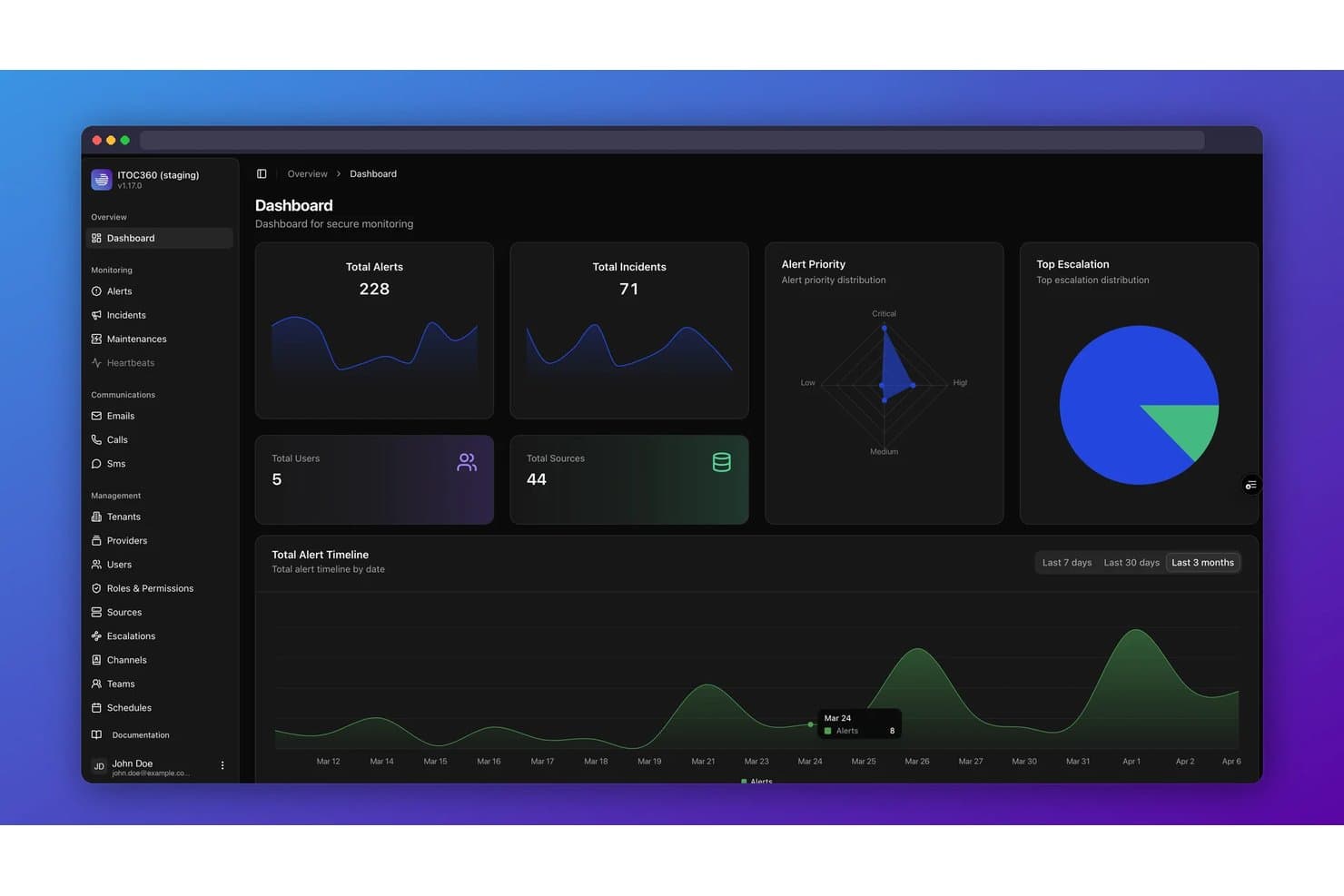
ITOC360 centralizes alert and incident monitoring in one dashboard. ITOC360 is an AI-first incident management platform that collects monitoring alerts, groups duplicates, routes incidents to on-call engineers, and automates escalation across configurable notification channels.
Who Is ITOC360 Best For?
ITOC360 is a strong fit for DevOps and SRE teams ready to leave PagerDuty or Opsgenie behind without rebuilding their on-call workflows from scratch.
Why I Picked ITOC360
I've included ITOC360 in my top picks because it's one of the few platforms I've seen built specifically to make the PagerDuty or Opsgenie exit painless, with dedicated migration support that imports your existing schedules, escalation policies, and routing rules with a named engineer through cutover. I like how its escalation policies support visual AND/OR conditions alongside JSON rules, so the logic your team already uses translates directly rather than needing a full rebuild. One G2 reviewer had their core on-call setup running in about two weeks, which tracks with what the migration assistance is designed to deliver.
ITOC360 Key Features
- Multi-channel alert notifications: Sends alerts through push, SMS, email, automated voice calls, Slack, Microsoft Teams, WhatsApp, and Telegram, with channels configurable by priority and escalation step.
- AI alert grouping: Groups and correlates duplicate alerts and alert storms into single incidents to reduce unnecessary pages.
- Mobile incident response: iOS and Android apps let responders view, acknowledge, escalate, or resolve active incidents with a full escalation timeline.
- Postmortem report generation: Compiles incident timelines, Slack conversations, and APM charts into an exportable report when an incident is resolved.
ITOC360 Integrations
ITOC360 offers 59 native integrations, including Datadog, Prometheus, Grafana, Zabbix, Slack, Microsoft Teams, Jira, and ServiceNow. It also provides a REST API, inbound and outbound webhooks, and Zapier.
Pros and Cons
Pros:
- Timestamped timelines simplify postmortem preparation
- Alert grouping cuts duplicate pages
- Guided PagerDuty and Opsgenie migrations
Cons:
- No native external status page
- Incident lists lack combined filters
Learn more about ITOC360: Best for AI-powered incident resolution
- Free trial available
- From $20/user/month
Visit WebsiteCustomer Rating:4.8/5
Rootly integrates with Slack to automate incident communication and updates. Rootly is an incident management platform built for IT teams and SREs who need to automate response workflows, coordinate across channels, and reduce downtime during service disruptions.
Who Is Rootly Best For?
Rootly is a strong fit for engineering-led organizations and SRE teams at mid-size to enterprise companies that need structured, automated incident response at scale.
Why I Picked Rootly
Rootly earns its spot on my shortlist because of how its AI SRE agent handles root cause analysis. When an incident fires, Rootly's AI cross-references active alerts, recent code changes, and historical incidents to surface probable root causes with confidence scores—so my team isn't starting from scratch at 2 a.m. I also like that it doesn't just tell you what's broken; it shows the reasoning behind its suggestions and offers specific fixes, making it easier to act quickly. On top of that, the Rootly MCP server lets engineers resolve production incidents directly from their IDE in tools like Cursor or Windsurf, cutting the context-switching that slows down response times.
Rootly Key Features
- Automated workflow builder: Build no-code incident response workflows that trigger actions like role assignments, Slack channel creation, and stakeholder notifications the moment an incident is declared.
- Vacation-aware on-call scheduling: Rootly's scheduling engine accounts for PTO and lets engineers request shift coverage in one click, with AI finding and assigning substitutions automatically.
- Automated post-incident retrospectives: Rootly auto-generates incident timelines and structured post-incident review docs, pulling in context from the incident without manual copy-pasting.
- Status page automation: Rootly updates customer-facing status pages in real time as incident severity and status change, without requiring manual updates from the response team.
Rootly Integrations
Rootly offers 70+ native integrations, including Slack, Jira, ServiceNow, PagerDuty, Datadog, AWS CloudWatch, GitHub, Zoom, Microsoft Teams, Google Cloud, and Zapier. An API is also available for custom integrations.
Pros and Cons
Pros:
- Automated retrospectives with AI summaries
- Integrates with Slack and Teams
- AI-driven automation for incident response
Cons:
- Limited integration list publicly available
- Enterprise pricing requires custom quote
Learn more about Rootly: Best for log management
- 30-day free trial + free demo
- Pricing upon request
Visit WebsiteCustomer Rating:4.5/5
ManageEngine EventLog Analyzer's Incident Workbench feature provides a detailed view of incidents, helping in thorough investigation and resolution. ManageEngine EventLog Analyzer is a log management tool designed for IT administrators and security professionals. It helps in monitoring, managing, and auditing network logs to ensure compliance and enhance security.Who Is ManageEngine EventLog Analyzer Best For?
ManageEngine EventLog Analyzer is a strong fit for IT security and compliance teams in midsize to enterprise organizations managing high volumes of log data across distributed infrastructure.
Why I Picked ManageEngine EventLog Analyzer
Log management is where ManageEngine EventLog Analyzer stands out. I like how it centralizes log collection from a wide range of sources—Windows event logs, syslogs, application servers, databases, and perimeter devices—so my team isn't jumping between systems to piece together what happened during an incident. The log forensics feature is particularly useful: when a security breach occurs, I can run correlation reports and trace the root cause directly from the log data, without needing a separate investigation tool. Real-time event correlation and instant alerting via email or SMS mean my team catches anomalies as they happen, not hours later.
ManageEngine EventLog Analyzer Key Features
- Threat intelligence: Detects malicious IP traffic entering your network using real-time updates from a global IP threat database.
- File integrity monitoring: Sends instant alerts when critical changes are made to confidential files and folders.
- Network device monitoring: Tracks web traffic, configuration and rule updates across perimeter devices with pre-built reports.
- Compliance management: Generates audit-ready reports for mandates including PCI DSS, GDPR, FISMA, ISO 27001, and SOX.
ManageEngine EventLog Analyzer Integrations
ManageEngine EventLog Analyzer offers native integrations with ServiceNow, Jira, Splunk, ManageEngine ServiceDesk Plus, ManageEngine OpManager, and an API for custom integration.
Pros and Cons
Pros:
- Extensive reporting capabilities
- Real-time log monitoring
- Customizable alert system
Cons:
- Occasional delays in report generation
- Resource-intensive on large networks
Learn more about ManageEngine EventLog Analyzer:
Diğer Olay Yönetimi Yazılımı Seçenekleri
Kısa listeme girmeyen ancak yine de göz atmaya değer bazı ek olay yönetimi yazılımı seçenekleri şunlardır:
- 11ResolveBest for IT auto-remediation workflows
- 12OpsgenieBest for on-call management
- 13ServiceNowBest for enterprise solutions
- 14AlertOpsBest for real-time alerts
- 15New RelicBest for performance monitoring
- 16BigPandaBest for AIOps capabilities
- 17Jira Service ManagementBest for cross-team incident handling
- 18ClickUpBest for team collaboration tools
- 19incident.ioBest for fast incident response
- 20Mantis Bug TrackerBest for bug tracking
- 21xMattersBest for automated incident response
- 22FireHydrantBest for post-incident reviews
- 23SolarWinds IT Service Desk SoftwareBest for AI-driven service automation
- 24Rippling ITBest for device management integration
- 25ManageEngine ServiceDesk PlusBest for ITIL-aligned processes
- 26Mitratech AlyneBest for compliance-focused teams
- 27LogicGateBest for risk management integration
- 28SquadcastBest for SRE and DevOps teams
- 29MoogsoftBest for AI-driven insights
- 304meBest for enterprise service management
- 31OnPageBest for secure messaging
- 32Splunk On-CallBest for incident alerting
- 33BetterStackBest for monitoring and alerting
- 34Zero Incident FrameworkBest for predictive analytics
How I Evaluate Incident Management Software
I evaluate incident management tools across two layers: the baseline every tool must have—real-time alerting, on-call scheduling—and the differentiators that matter for SRE and DevOps teams.
Core Functionality (Table Stakes For This List)
When I'm selecting tools for my list, I rank each one on a scale from 0 (does not offer the functionality) to 5 (excels in this area) for each core functionality listed below. Then, I calculate the tool's total score into a percentage. Each tool needs to achieve a minimum total score of 65% to be considered for inclusion.
- Real-Time Alerting & Routing: I check whether alerts reach the right responder fast across SMS, push, email, and voice—especially during cascading failures where minutes of delay compound downtime.
- On-Call Scheduling & Escalation: Good tools let you build multi-tier rotations with follow-the-sun coverage, override calendars, and automatic escalations when an acknowledgment window expires.
- Incident Lifecycle Management: I look for structured workflows that move an incident from detection through triage, severity assignment, active response, and resolution with clear status tracking at each stage.
- Collaboration & Communication: Teams need built-in war rooms or bi-directional ChatOps with tools like Slack and Microsoft Teams so responders can coordinate without switching contexts mid-incident.
- Postmortem & Analytics: I evaluate whether the platform supports post-incident timelines, root cause templates, and metrics like MTTA and MTTR that help teams spot recurring patterns across services.
- Tool Integrations: The platform should connect natively with your existing monitoring, APM, logging, and ITSM stack—tools like Datadog, Prometheus, Jira, and ServiceNow are common anchors I expect to see.
Once I have a list of tools that meet this criteria, I consider what sets each platform apart.
Differentiating Factors (What Sets Vendors Apart)
Here's how I compare and contrast different vendors:
Standout Features
AI-powered noise reduction is a big one for me. During a major outage, a single failing service can generate hundreds of duplicate alerts—tools that correlate and suppress that noise let responders focus on the actual problem. I also look for auto-remediation runbooks that can restart services or trigger rollbacks for known failure modes without waiting on a human. Service dependency mapping rounds this out by showing upstream and downstream impact, which helps teams prioritize when multiple services degrade at once.
Beyond Features
Reliability matters more here than in most software categories—your incident management platform can't go down during the outage it's supposed to help you resolve. I check for uptime SLAs backed by multi-region failover and infrastructure independent of major cloud providers. Pricing structure is another area I evaluate closely, since per-responder models scale very differently than per-user or per-incident pricing as your on-call teams grow. For teams in regulated environments, I also look at compliance posture, including SOC 2 Type II, HIPAA, and SSO/SAML support.
Olay Yönetimi Yazılımı Nasıl Seçilir?
Uzun özellik listeleri ve karmaşık fiyatlandırma yapıları içinde kaybolmak kolaydır. Size özgü yazılım seçim sürecinizi yürütürken odağınızı korumanıza yardımcı olmak için göz önünde bulundurmanız gereken faktörleri içeren bir kontrol listesi hazırladım:
| Faktör | Göz Önünde Bulundurulması Gerekenler |
| Ölçeklenebilirlik | Yazılımın ekibinizle birlikte büyüyebildiğinden emin olun. Performanstan ödün vermeden artan kullanıcı ve olay sayılarını karşılayabilen çözümleri arayın. |
| Entegrasyonlar | Yazılımın Slack, Jira veya AWS gibi mevcut araçlarınızla entegre olup olmadığını kontrol edin. Sorunsuz entegrasyon, ekibiniz için zaman kazandırabilir ve manuel çalışmayı azaltabilir. |
| Özelleştirilebilirlik | Aracın iş akışlarını ve uyarıları özel ihtiyaçlarınıza uyacak şekilde düzenlemenize izin verip vermediğini değerlendirin. Bu esneklik, verimliliği ve kullanıcı memnuniyetini artırabilir. |
| Kullanım Kolaylığı | Kullanıcı arayüzünü ve gezinmeyi değerlendirin. Kullanımı kolay bir araç, eğitim süresini kısaltır ve ekibinizin olaylara daha hızlı yanıt vermesine yardımcı olur. |
| Bütçe | Maliyeti bütçenizle karşılaştırın. Farklı fiyat kademelerinde sunulan değeri ve mali durumunuzu etkileyebilecek gizli ücretleri göz önünde bulundurun. |
| Güvenlik Önlemleri | Veri şifreleme ve erişim denetimleri gibi özellikleri arayın. Bu önlemler, olay yönetimi sırasında hassas bilgileri korumak için hayati önem taşır. |
| Destek | Müşteri desteğinin erişilebilirliğini ve kalitesini değerlendirin. Hızlı yardıma ihtiyaç duyduğunuz bir olay sırasında güvenilir destek kritik öneme sahip olabilir. |
| Raporlama | Olay eğilimleri ve ekip performansı hakkında bilgi sağlayan kapsamlı raporlama araçlarını kontrol edin. Bu bilgiler, iyileştirmelere yön verebilir. |
Olay Yönetimi Yazılımlarındaki Eğilimler
Araştırmam sırasında farklı olay yönetimi yazılımı sağlayıcılarının sayısız ürün güncellemesini, basın bültenini ve sürüm günlüğünü inceledim. Takip ettiğim yeni ortaya çıkan eğilimlerden bazıları şunlar:
- Yapay Zekâ Destekli İçgörüler: Günümüzde birçok araç, olay verilerini analiz etmek ve gelecekteki sorunları öngörmek için yapay zekâ kullanıyor. Bu, ekiplerin daha iyi hazırlanmasına ve daha hızlı yanıt vermesine yardımcı olur. Moogsoft gibi sağlayıcılar, öngörücü analiz ve daha akıllı uyarı sistemleri sunmak için yapay zekâyı entegre ediyor.
- Gerçek Zamanlı İş Birliği: Olay yönetimi platformlarına gerçek zamanlı iletişim araçlarının entegre edilmesine yönelik bir geçiş yaşanıyor. Bu eğilim, olaylar sırasında ekip koordinasyonunu geliştiriyor ve daha hızlı çözümler sunulmasını sağlıyor. incident.io gibi araçlar, sohbet özelliklerini doğrudan platformlarına yerleştiriyor.
- Bağlamsal Uyarılar: Yeni BT uyarı yazılımları, ekipleri uyarılarla bombardımana tutmak yerine bağlam açısından zengin bildirimler sunuyor. Bu, ekiplerin en kritik sorunları önce önceliklendirmesine ve ele almasına yardımcı olur. Örneğin Opsgenie, daha hızlı aksiyon alınabilmesi için ilgili olay ayrıntılarını içeren uyarılar sunar.
- Olay Sonrası Analiz: Artık daha fazla araç, kapsamlı olay sonrası inceleme özelliklerine odaklanıyor. Bu özellikler, ekiplerin geçmiş olaylardan ders çıkarmasına ve gelecekteki yanıtlarını geliştirmesine yardımcı olur. FireHydrant, sürekli iyileştirmeyi desteklemek için ayrıntılı olay sonrası raporlar sunar.
- Kullanıcı Odaklı Gösterge Tabloları: Bireysel kullanıcı rollerine uyum sağlayan özelleştirilebilir gösterge tablolarına giderek daha fazla önem veriliyor. Bu, kullanıcıların ilgili verilere hızlıca erişmesini sağlar. ServiceNow gibi sağlayıcılar, kullanıcıların kendi özel ihtiyaçlarına göre düzenleyebileceği gösterge tabloları sunar.
Olay Yönetimi Yazılımı Nedir?
Olay yönetimi yazılımı, kuruluşların olayları verimli bir şekilde izlemesine, yönetmesine ve çözmesine yardımcı olan bir araçtır. BT profesyonelleri, DevOps ekipleri ve müşteri destek personeli, kesinti süresini en aza indirmek ve hizmet güvenilirliğini artırmak için genellikle bu araçları kullanır.
Otomatik iş akışları, gerçek zamanlı iş birliği ve bağlamsal uyarı özellikleri, olaylar sırasında hızlı yanıt verilmesine ve etkili iletişim kurulmasına yardımcı olur. Genel olarak bu siber olaylara müdahale hizmetleri, operasyonel verimliliği artırır ve kesintilerden daha hızlı kurtulmayı sağlar.
Olay Yönetimi Yazılımının Özellikleri
Olay yönetimi yazılımı seçerken aşağıdaki temel özelliklere dikkat edin:
- Otomatik iş akışları: Rutin görevleri otomatikleştirerek olaylara verilen yanıtları kolaylaştırır ve ekibinizin daha karmaşık sorunlara odaklanmasını sağlar.
- Gerçek zamanlı iş birliği: Olaylar sırasında ekip iletişimini geliştirerek herkesin aynı bilgilerden haberdar olmasını ve çözüm sürelerinin kısalmasını sağlar.
- Bağlamsal uyarılar: En kritik sorunların önce önceliklendirilmesine ve ele alınmasına yardımcı olmak için ilgili ayrıntıları içeren uyarılar sunar.
- Olay sonrası analiz: Sürekli iyileştirmeyi ve gelecekte daha iyi yanıtlar verilmesini desteklemek için geçmiş olaylara ilişkin içgörüler sunar.
- Özelleştirilebilir gösterge tabloları: Kullanıcıların en ilgili verilere hızlı ve verimli bir şekilde erişmek için görünümlerini kendi ihtiyaçlarına göre düzenlemesine olanak tanır.
- Yapay zekâ destekli içgörüler: Verileri analiz etmek ve gelecekte ortaya çıkabilecek olayları öngörmek için yapay zekâ kullanarak hazırlık düzeyini artırır.
- Çok kanallı bildirimler: Herkesin haberdar olmasını sağlamak için uyarıların çeşitli iletişim kanalları aracılığıyla ekibinize ulaşmasını sağlar.
- Ölçeklenebilirlik: Performans veya verimlilikten ödün vermeden büyüyen ekipleri ve artan olay sayısını destekler.
- Entegrasyon olanakları: Kuruluşunuz içinde uyumlu bir iş akışı oluşturmak için Slack, Jira ve AWS gibi mevcut araçlara bağlanır.
- Kullanıcı dostu arayüz: Gezinmeyi kolaylaştırır ve öğrenme eğrisini kısaltarak ekiplerin yazılıma hızla uyum sağlamasına yardımcı olur.
Olay Yönetimi Yazılımının Faydaları
Olay yönetimi yazılımının uygulanması, ekibiniz ve işletmeniz için çeşitli faydalar sağlar. Yararlanabileceğiniz birkaç fayda şunlardır:
- Daha hızlı yanıt süreleri: Otomatik iş akışları ve gerçek zamanlı uyarılar, ekibinizin olayları hızla ele almasına ve kesinti süresini en aza indirmesine yardımcı olur.
- Geliştirilmiş iletişim: Gerçek zamanlı iş birliği araçları, olaylar sırasında ekibinizdeki herkesin bilgilenmesini ve koordineli hareket etmesini sağlar.
- Daha iyi önceliklendirme: Bağlamsal uyarılar, ekibinizin önce en kritik sorunlara odaklanmasına yardımcı olarak verimliliği artırır.
- İçgörü sağlayan analiz: Olay sonrası incelemeler, olay eğilimlerine ilişkin değerli içgörüler sunarak sürekli iyileştirmeyi destekler.
- Geliştirilmiş hazırlık: Yapay zekâ destekli içgörüler ve öngörücü analiz, ekibinizin sorunlar ortaya çıkmadan önce bunları öngörmesine yardımcı olur.
- İhtiyaca uygun kullanıcı deneyimi: Özelleştirilebilir gösterge tabloları ve kullanıcı dostu arayüzler, ekibinizin yazılımda gezinmesini ve yazılımı etkili bir şekilde kullanmasını kolaylaştırır.
Olay Yönetimi Yazılımının Maliyetleri ve Fiyatlandırması
Olay yönetimi yazılımı seçmek, mevcut çeşitli fiyatlandırma modellerinin ve planların anlaşılmasını gerektirir. Jira gibi daha büyük isimlerin yanı sıra bütçenize en uygun seçeneği bulmak için Jira hizmet yönetimi alternatiflerini de incelemeyi değerlendirin. Maliyetler özelliklere, ekip büyüklüğüne, eklentilere ve diğer unsurlara göre değişir. Aşağıdaki tablo, olay yönetimi yazılımı çözümlerinde yaygın olarak sunulan planları, ortalama fiyatlarını ve tipik özelliklerini özetlemektedir:
Olay Yönetimi Yazılımı İçin Plan Karşılaştırma Tablosu
| Plan Türü | Ortalama Fiyat | Yaygın Özellikler |
| Ücretsiz Plan | $0 | Temel olay izleme, sınırlı uyarılar ve temel raporlama. |
| Kişisel Plan | $5-$25/kullanıcı/ay | Gelişmiş uyarılar, özelleştirilebilir panolar ve seçili araçlarla entegrasyon. |
| İşletme Planı | $30-$60/kullanıcı/ay | Gerçek zamanlı iş birliği, ayrıntılı analizler ve çok kanallı bildirimler. |
| Kurumsal Plan | $70-$100/kullanıcı/ay | Tam özelleştirme, yapay zekâ destekli içgörüler, olay sonrası analiz ve öncelikli müşteri desteği. |
Olay Yönetimi Yazılımı SSS
Olay yönetimi yazılımı hakkında sık sorulan bazı soruların yanıtlarını burada bulabilirsiniz:
Olay yönetimi yazılımı iş yeri risklerini nasıl azaltabilir?
Olay yönetimi yazılımı, ekibinizin olası riskleri büyümeden önce belirlemesine ve ele almasına yardımcı olabilir. Yazılım, gerçek zamanlı uyarılar ve ayrıntılı raporlar sağlayarak ekibinizin ortaya çıkan sorunlardan haberdar olmasını sağlar. Bu proaktif yaklaşım, daha güvenli bir çalışma ortamının korunmasına yardımcı olur ve aksaklıkları en aza indirir.
Olay yönetimi yazılımı düzenlemelere uyumu nasıl sağlar?
Bu araçlar, uyumluluk son tarihlerini ve gerekliliklerini izleyerek ekibinizin sektör standartlarına uygun hareket etmesine yardımcı olur. Genellikle OSHA gibi düzenlemeler için yerleşik şablonlar ve kontrol listeleriyle birlikte gelirler; bu da ekibinizin uyumluluğu sağlamasını kolaylaştırır. Böylece ceza riskini azaltır ve operasyonlarınızın sorunsuz biçimde yürütülmesini sağlarlar.
Olayların giderilmesini otomatikleştirmek için en iyi araçlar hangileridir?
Olayların giderilmesini otomatikleştirmek ekibinizin zaman kazanmasını ve insan hatalarını azaltmasını sağlayabilir. Bu amaçla genellikle SIEM sistemleri ve SOAR platformları gibi araçlar kullanılır. Bu araçlar, olayları otomatik olarak önceliklendirmeye ve çözmeye yardımcı olarak ekibinizin insan müdahalesi gerektiren daha karmaşık görevlere odaklanmasını sağlar.
Olay yönetimi yazılımı diğer araçlarla nasıl entegre olur?
Çoğu olay yönetimi yazılımı çözümü, Slack, Jira ve AWS gibi popüler araçlarla entegrasyon sunar. Bu entegrasyonlar, ekibinizin iş akışlarını kolaylaştırmasına ve bilgilerin platformlar arasında paylaşılmasını sağlamasına olanak tanır. Bu bağlantı, verimliliği artırır ve tüm ekip üyelerinin aynı bilgiye sahip olmasını sağlar.
Sorun yönetimi ile olay yönetimi arasındaki fark nedir?
Olay yönetimi, hizmeti hızla geri yüklemek için anlık sorunları çözmeye odaklanırken sorun yönetimi, tekrarlanan sorunların temel nedenini belirlemeyi ve gidermeyi amaçlar. Olay yönetimi, ortaya çıkan olaylarla ilgilenen reaktif bir yaklaşımken sorun yönetimi, gelecekteki olayları önleyen proaktif bir yaklaşımdır.
Aynı anda meydana gelen birden fazla olaya nasıl öncelik verirsiniz?
Olaylara öncelik vermek, bunların etkisini ve aciliyetini değerlendirmeyi gerektirir. Olay yönetimi yazılımı, önceden belirlenmiş ölçütlere göre olayları kategorilere ayırmak ve önceliklendirmek için araçlar sağlar. Bu, ekibinizin en kritik sorunları önce ele almasına yardımcı olarak en önemli aksaklıkların hızla giderilmesini sağlar.