

En iyi API test araçları, geliştiricilerin ve kalite güvence ekiplerinin uç noktaları doğrulamasına, entegrasyon sorunlarını tespit etmesine ve API'lerin farklı ortamlarda güvenilir şekilde çalışmasını sağlamasına yardımcı olur. Testleri otomatikleştirmeyi, istek gövdelerini doğrulamayı ve yanıt sürelerini izlemeyi kolaylaştırarak ekiplerin sorunları üretim sistemlerini etkilemeden önce yakalamasını sağlar.
Ekipler genellikle belirsiz yanıt kodlarında hata ayıklarken, aralıklı hataların peşine düşerken veya tutarlı test kapsamı olmadan birden fazla ortamı yönetmeye çalışırken daha iyi API test yazılımları aramaya başlar. Manuel testler ya da eksik otomasyon, çoğu zaman gözden kaçan kusurlara ve geliştirme ile kalite güvence arasındaki geri bildirim döngülerinin uzamasına yol açar.
REST ve GraphQL mimarileri genelinde API test çerçeveleri uygulayan mühendislik ekipleriyle çalıştım; farklı araçların hem çevik hem de kurumsal kurulumlarda otomasyon, raporlama ve CI/CD entegrasyonunu nasıl ele aldığını değerlendirdim.
Bu kılavuzda, manuel çalışmayı azaltmanıza, sürümler arasındaki güvenilirliği artırmanıza ve API'nizin performansı hakkında daha net bilgi edinmenize gerçekten yardımcı olan API test araçlarını öğreneceksiniz.
Why Trust Our Software Recommendations
6,700+
Reviews
20
Industry experts
16+
Evaluation factors
14
Years
Our team has been testing and reviewing software since 2012. As tech leaders ourselves, we know how difficult—and important—it is to choose the right software.
For this guide, we evaluated tools using hands-on testing and independent research, scoring tools using our selection criteria.
Our reviews reflect our human editorial judgment, not a sales pitch.
Expert reviewers:
- Paulo Gardini MiguelTech Director
 Tim FisherVP of AI
 Gabriel RosasTech Lead & Software Architect
 Christhian GruhnTech Lead & Platform Architect

API Test Araçları Karşılaştırma Tablosu
Bu karşılaştırma tablosu, en iyi API test aracı seçimlerim için fiyatlandırma ayrıntılarını özetlemektedir:
Sorted by: Default
| Tool | Starting Price | Website | |
|---|---|---|---|
Best for orchestrating existing test suites | 4.9 out of 5 | $17/month Free plan + free demo available | Book Demo |
Best for dynamic application security testing | 4.3 out of 5 | $300/month Free plan + free demo available | Book Demo |
Best for enterprise codeless test automation | 4.8 out of 5 | Pricing upon request 14-day free trial | Website |
Best with end-to-end testing workflows | Not rated | Pricing upon request Free demo available | Website |
Best for continuous security testing | 4.6 out of 5 | Pricing upon request Free demo available | Website |
Best for AI-driven test creation | 4.5 out of 5 | Pricing upon request Free trial available + free demo | Website |
Best for beginners in testing | 4.4 out of 5 | $180/seat/month Free plan + 30-day free trial + free demo available | Website |
Best for cloud-based testing | 4.3 out of 5 | $39/month 28-day free trial + free demo available | Website |
Best for cross-platform support | 2.0 out of 5 | Pricing upon request Free trial available | Website |
Best for detecting vulnerabilities | 4.2 out of 5 | Pricing upon request Free demo available | Website |


En İyi API Test Aracı İncelemeleri
Aşağıda, kısa listeme giren en iyi API test araçlarının ayrıntılı özetlerini bulabilirsiniz. İncelemelerim, size en uygun aracı bulmanıza yardımcı olmak için her aracın temel özelliklerini, artılarını & eksilerini, entegrasyonlarını ve ideal kullanım alanlarını ayrıntılı şekilde ele alır.
 Best for orchestrating existing test suites
- Free plan + free demo available
- From $17/month (billed annually)
Visit WebsiteCustomer Rating:4.9/5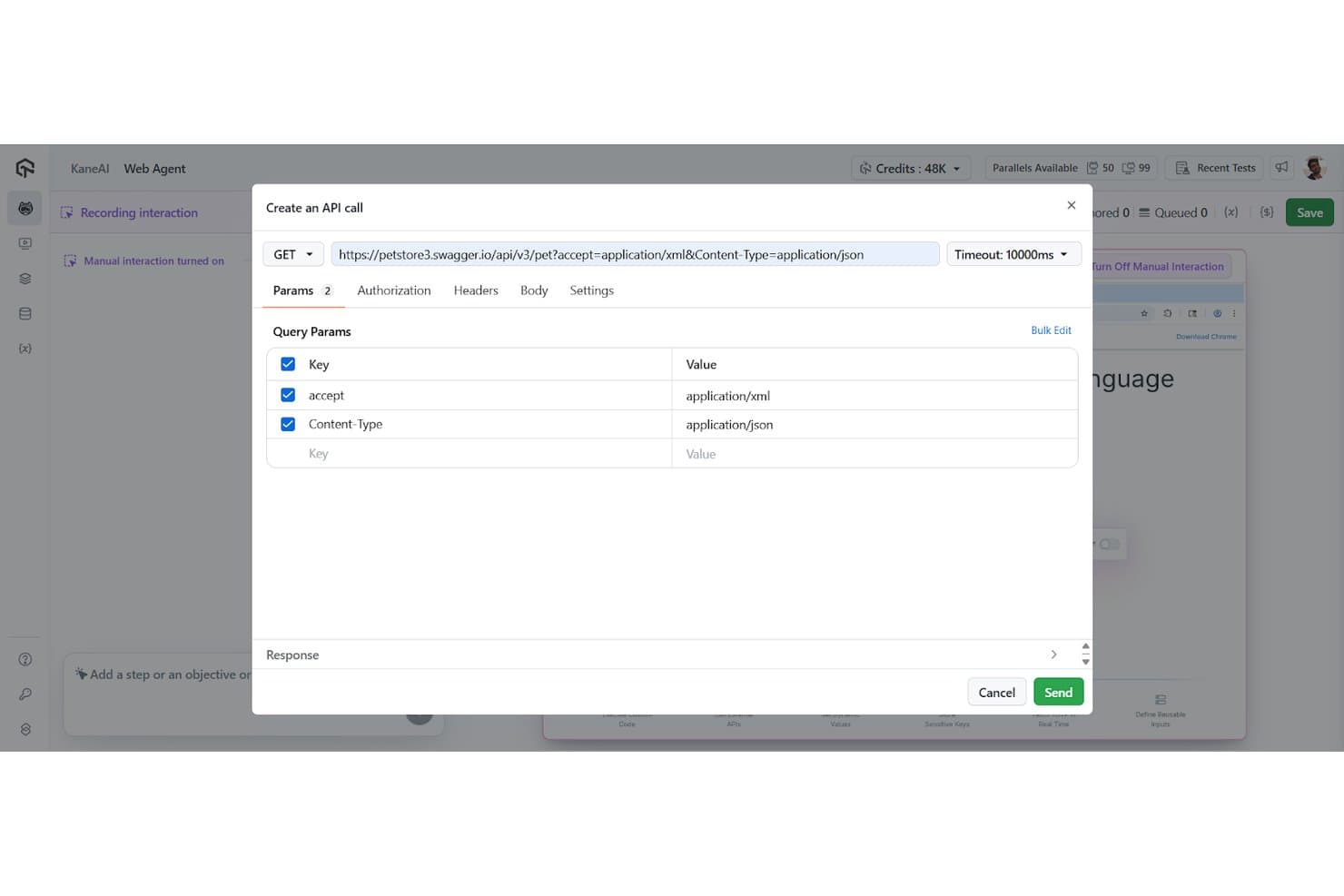
KaneAI lets users configure GET API calls with query params. TestMu AI is an AI-native test orchestration platform that runs API tests—using frameworks like REST Assured and Karate—alongside broader automated test suites, with parallel execution, CI/CD pipeline integration, and JMeter-based performance testing built in.
Who Is TestMu AI Best For?
TestMu AI's HyperExecute is a strong fit for QA engineers and DevOps teams that already have automated test suites built on frameworks like REST Assured, Karate, or JMeter and need to scale execution across parallel environments in CI/CD pipelines.
Why I Picked TestMu AI
I picked TestMu AI as one of the best because it's built specifically for teams that already have test suites in REST Assured, Karate, or JMeter and need to run them faster at scale. HyperExecute's YAML-driven orchestration distributes discovered tests across parallel VMs automatically, so a regression suite that previously blocked a release for hours can run in a fraction of the time. I also like that JMeter and Gatling performance tests run on the same platform, with regional load generation and response-time metrics built in.
TestMu AI Key Features
- AI root cause analysis: Analyzes test logs and the job's Git diff to identify likely failure causes and suggest resolution steps.
- Flaky test detection: Scores tests based on how often their results change across runs to surface unreliable tests in your suite.
- Job secrets vault: Stores credentials and API keys in a write-only vault, making them available only to the specific job execution.
- Private cloud and on-premises deployment: Runs your test infrastructure in your own cloud account (AWS, Azure, or Google Cloud on request) or behind your firewall.
TestMu AI Integrations
HyperExecute integrates with Azure Test Plan, Katalon, qTest, Slack, Testim, Testsigma, Tosca, Zephyr, GitHub, Bamboo, and Travis. It also supports CI/CD workflows through its CLI and YAML configuration, plus a REST API for custom integrations.
Pros and Cons
Pros:
- JMeter and Gatling load tests share orchestration
- Reviewers report faster parallel regression cycles
- Parallelizes REST Assured and Karate suites
Cons:
- No continuous production uptime monitoring
- No documented SOAP or GraphQL testing
Learn more about TestMu AI: Best for dynamic application security testing
- Free plan + free demo available
- From $300/month
Visit WebsiteCustomer Rating:4.3/5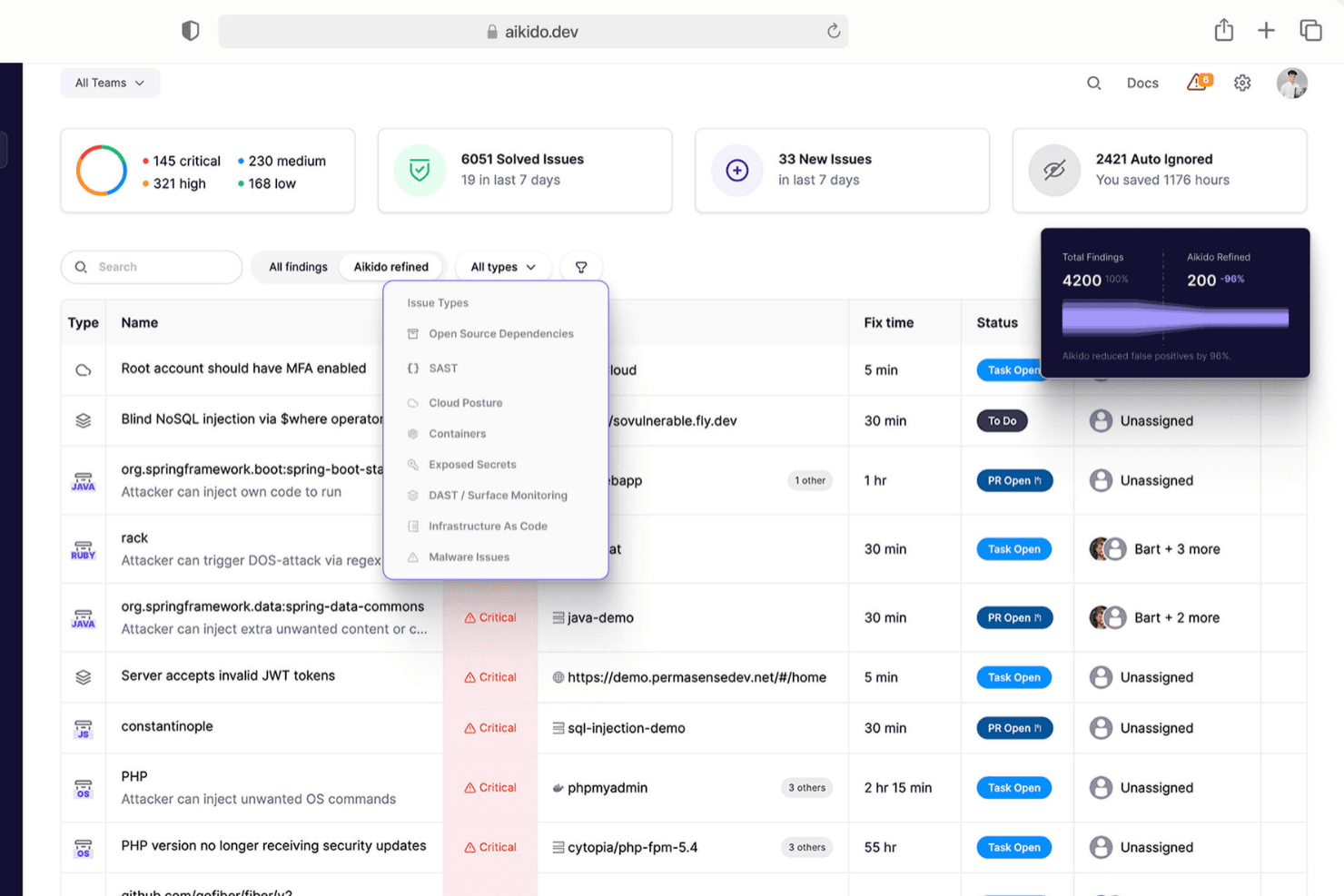
Aikido Security provides a unified dashboard to triage and filter issues by type, severity, and scan source. Aikido Security is a platform designed to protect your code, cloud, and runtime environments with its suite of security features. It offers tools for dynamic application security testing (DAST), API scanning, and other measures to safeguard your applications against vulnerabilities.
Why I Picked Aikido Security: I picked Aikido Security for API testing because of its dynamic application security testing, API scanning, and AI-driven AutoFix feature, which automatically generates pull requests to fix vulnerabilities. This automation saves time and keeps security measures up to date. Aikido also supports custom rule creation, allowing you to filter non-essential paths and focus on critical vulnerabilities, helping you prioritize and secure your API endpoints effectively.
Standout features & integrations:
Features include bulk fix, which allows you to create multiple ready-to-merge pull requests with a single action, streamlining the resolution process. TL;DR summaries provide concise overviews and ticket creation options for complex issues, enhancing management efficiency. Aikido also prioritizes data security through read-only access to repositories, short-lived access tokens, and separate Docker containers for each scan.
Integrations include VSCode, Azure Pipelines, BitBucket Pipes, GitHub, GitLab, Jira, Asana, Monday, ClickUp, YouTrack, Drata, and Vanta.
Pros and Cons
Pros:
- User-friendly interface
- Provides actionable insights
- Offers a comprehensive dashboard and customizable reports
Cons:
- Custom SAST rules must be enabled by Aikido
- Unfixed vulnerabilities excluded by default in ephemeral scans
Learn more about Aikido Security: Best for enterprise codeless test automation
- 14-day free trial
- Pricing upon request
Visit WebsiteCustomer Rating:4.8/5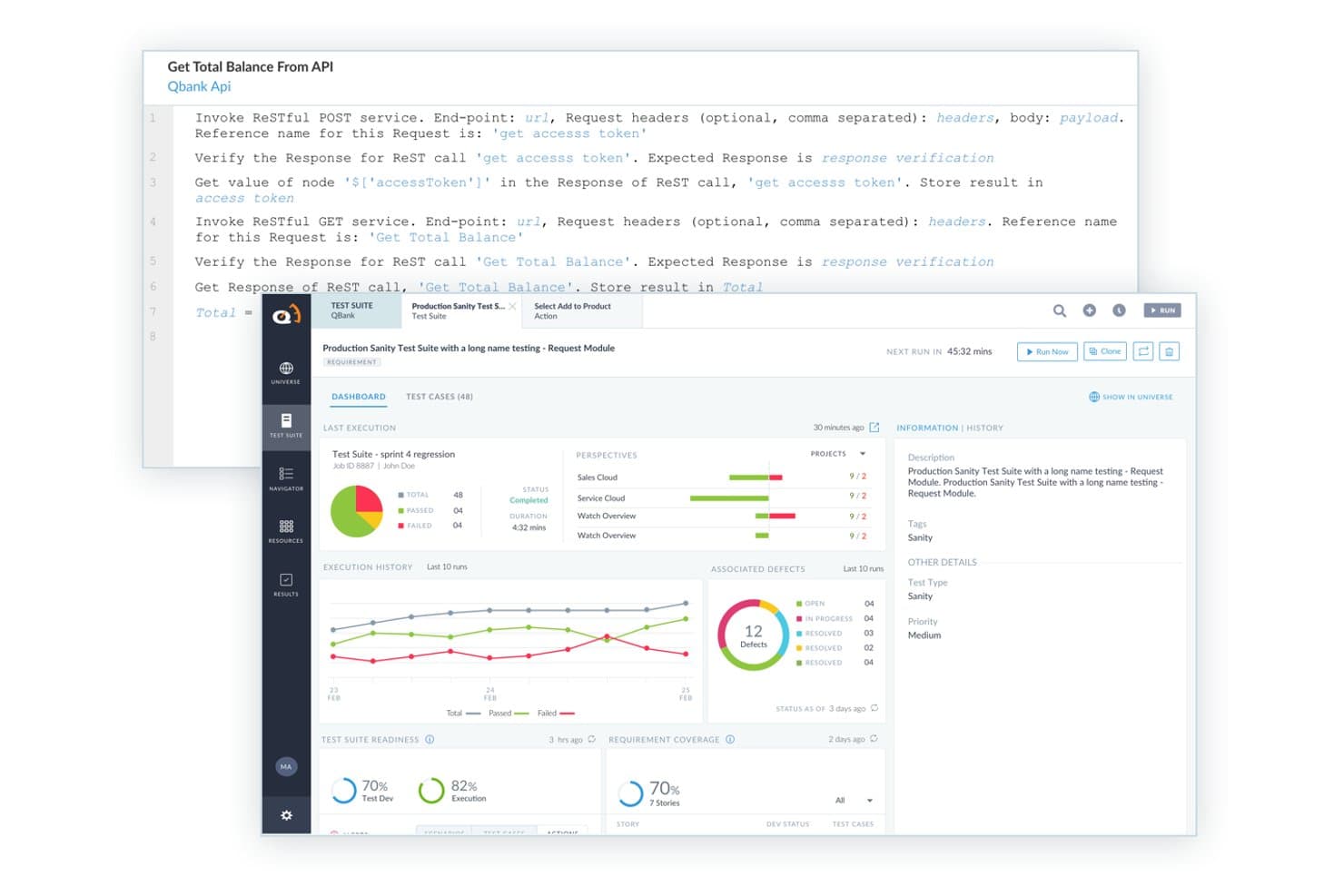
ACCELQ offers a codeless API testing interface with RESTful service invocation, test suite dashboards, execution history, and defect tracking built in. ACCELQ is a cloud-native test automation platform that covers API, web, mobile, and backend testing across REST, SOAP, GraphQL, and messaging protocols using a codeless, AI-assisted authoring environment.
Who Is ACCELQ Best For?
ACCELQ is a strong fit for enterprise QA teams that need to scale test automation across complex application stacks without relying on developer resources.
Why I Picked ACCELQ
I picked ACCELQ as one of the best because its codeless API test authoring genuinely removes the bottleneck of needing developer involvement to build test suites. Using the Business Process Scenario Builder, my team can chain API and UI calls into end-to-end flows without writing a single line of code. I also like the AI-powered self-healing, which automatically updates tests when endpoints change, cutting maintenance time on large regression suites significantly.
ACCELQ Key Features
- Multi-protocol API coverage: Test REST, SOAP, GraphQL, Kafka, MQ, and microservices endpoints from a single interface.
- Environment and variable management: Set up reusable variables, environment-specific configs, and secure authentication for accurate multi-stage testing.
- Service virtualization: Simulate unavailable or evolving APIs with built-in API virtualization for reliable test runs.
- Native CI/CD integrations: Connect directly to Jenkins, Azure DevOps, Bamboo, and TeamCity to automate API tests in every build.
ACCELQ Integrations
ACCELQ offers native integrations with Jenkins, Jira, ClickUp, Bamboo, TeamCity, Slack, and Microsoft Teams, and provides an API for custom integrations.
Pros and Cons
Pros:
- Built-in service virtualization for end-to-end tests
- AI-driven self-healing of test scenarios
- Codeless automation for UI, API, and mobile
Cons:
- Advanced reporting can require additional customization
- No documented support for gRPC or WebSockets
Learn more about ACCELQ: Best with end-to-end testing workflows
- Free demo available
- Pricing upon request

Centralize, connect, and govern your entire API estate with DigitalAPI. DigitalAPI is a flexible platform for teams that need a complete solution for API management and testing. It’s well-suited to industries like healthcare, banking, and insurance, where reliable API operations are essential. With tools for API discovery, governance, and lifecycle management, DigitalAPI supports more consistent workflows and better productivity. Whether the goal is improving API quality or ensuring reliable integrations, the platform is built to address those needs.
Why I Picked DigitalAPI
I chose DigitalAPI for its AI-driven automated test generation, which reduces manual testing work and shortens deployment timelines. The platform offers a solid testing environment that includes load testing and end-to-end testing, helping teams validate API performance under different conditions. Its real-time analytics also allow teams to identify and resolve issues early, making it a strong option for developers and QA teams focused on maintaining API quality.
DigitalAPI Key Features
In addition to its AI-driven test generation, I also found several other features valuable for API testing:
- Load Testing: Simulates peak traffic to identify performance issues and scalability challenges.
- End-to-End Testing: Ensures API functionality within the entire application workflow.
- Security Assessments: Conducts thorough checks to validate API security and data protection.
- Automated Documentation: Streamlines the documentation process, making it easier to maintain and share API specifications.
DigitalAPI Integrations
Native integrations are not currently listed by DigitalAPI.
Pros and Cons
Pros:
- Centralized governance across multiple gateways
- Detailed analytics for API performance
- Helix Gateway supports full lifecycle
Cons:
- No listed native integrations
- Pricing details not publicly available
Learn more about DigitalAPI: Best for continuous security testing
- Free demo available
- Pricing upon request
Visit WebsiteCustomer Rating:4.6/5
Invicti's dashboard shows various metrics and statuses of API tests. Invicti is a comprehensive API security tool tailored for developers and security teams. It automates vulnerability detection and integrates into CI/CD pipelines to enhance security workflows.
Why I picked Invicti: It offers real-time vulnerability detection and zero false positives, which aligns with its USP of continuous security testing. The tool's advanced scanning technology supports REST, SOAP, and GraphQL APIs. Invicti's DAST + IAST approach increases accuracy and identifies more vulnerabilities. It also provides visibility into exposed assets, helping teams manage risks effectively.
Standout features & integrations:
Features include advanced scanning technology for multiple API types, real-time vulnerability detection, and zero false positives. The platform promotes proactive security by helping developers write secure code. Its automation capabilities enhance the software development lifecycle.
Integrations include Jenkins, JIRA, GitHub, Azure DevOps, Bamboo, Bitbucket, GitLab, Slack, ServiceNow, and Microsoft Teams.
Pros and Cons
Pros:
- Automates vulnerability detection
- Supports multiple API types
- Proactive security measures
Cons:
- Pricing not readily available
- May require technical expertise
Learn more about Invicti: Best for AI-driven test creation
- Free trial available + free demo
- Pricing upon request
Visit WebsiteCustomer Rating:4.5/5
Testim validates and protects numerous endpoints to safeguard web services. Tricentis Testim is an AI-powered test automation tool tailored for web, mobile, and Salesforce applications. It's designed for development teams looking to improve testing efficiency and reduce maintenance efforts.
Why I picked Tricentis Testim: This tool focuses on AI-driven test creation with its low-code test authoring and self-healing AI locators. Testim Copilot uses generative AI to speed up test creation and debugging, aligning with its USP of being best for AI-driven test creation. The platform's integrated TestOps feature aids in managing tests effectively, and Testim Mobile provides comprehensive mobile app testing.
Standout features & integrations:
Features include low-code test authoring, self-healing AI locators, and Testim Copilot for faster test creation and debugging. Testim Mobile supports extensive mobile app testing, and Testim Salesforce simplifies testing for Salesforce applications.
Integrations include Jenkins, JIRA, GitHub, Slack, GitLab, Bitbucket, Azure DevOps, CircleCI, Bamboo, and TeamCity.
Pros and Cons
Pros:
- AI-driven test creation
- Low-code authoring
- Self-healing locators
Cons:
- May require technical knowledge
- Steep learning curve
Learn more about Tricentis Testim: Best for beginners in testing
- Free plan + 30-day free trial + free demo available
- From $180/seat/month
Visit WebsiteCustomer Rating:4.4/5
Katalon Studio integrates API test solutions across various test suites and accounts for effective test environments. Katalon Studio is a test automation tool designed for testers and developers. It offers a comprehensive solution for web, API, mobile, and desktop app testing, making it ideal for teams looking to streamline their testing processes.
Why I picked Katalon Studio: It's beginner-friendly, providing an intuitive user interface that simplifies test automation. The tool supports both scriptless and scripting modes, catering to users with varying levels of coding experience. With built-in keywords and templates, it reduces the learning curve for new testers. Additionally, its extensive documentation and community support make it accessible for beginners.
Standout features & integrations:
Features include scriptless test creation, which allows you to build tests without coding. The tool also offers built-in keywords and templates to simplify the process. You can switch between scripting and scriptless modes, giving flexibility to your testing approach.
Integrations include Jenkins, JIRA, Git, TestRail, Slack, qTest, Kobiton, Azure DevOps, Sauce Labs, and BrowserStack.
Pros and Cons
Pros:
- Beginner-friendly interface
- Supports scriptless test creation
- Extensive community support
Cons:
- Limited advanced features
- May require initial setup time
Learn more about Katalon Studio: Best for cloud-based testing
- 28-day free trial + free demo available
- From $39/month (billed annually)
Visit WebsiteCustomer Rating:4.3/5
Use Sauce Labs’s recorder to capture your test efforts. Sauce Labs is a cloud-based testing platform tailored for developers and QA teams. It provides automated testing solutions for web, mobile, and API applications, enabling teams to test across multiple browsers and devices.
Why I picked Sauce Labs: It offers a cloud-based infrastructure, allowing you to run tests without maintaining an in-house setup. This makes it ideal for teams looking to scale testing efforts efficiently. You can perform automated testing across a wide array of devices and browsers, ensuring comprehensive coverage. Sauce Labs real-time analytics and reporting features help your team quickly identify and resolve issues.
Standout features & integrations:
Features include real-time analytics that give you insights into test results. The platform supports a wide variety of browsers and devices, enhancing your testing coverage. Additionally, it offers instant access to a vast infrastructure, eliminating the need for in-house maintenance.
Integrations include Jenkins, JIRA, GitHub, CircleCI, Slack, Bamboo, Travis CI, Bitbucket, TeamCity, and Azure DevOps.
Pros and Cons
Pros:
- Cloud-based infrastructure
- Supports multiple devices
- Real-time analytics
Cons:
- May require advanced technical skills
- Can be costly for small teams
Learn more about Sauce Labs: Best for cross-platform support
- Free trial available
- Pricing upon request
Visit WebsiteCustomer Rating:2/5
Smartbear provides functional, security, and load testing of RESTful, SOAP, and GraphQL web services. SmartBear is a versatile testing tool designed for QA teams and developers. It provides comprehensive testing solutions for web, mobile, and API applications, making it ideal for teams needing cross-platform support.
Why I picked SmartBear: It offers extensive cross-platform compatibility, allowing your team to test on various environments without hassle. The tool supports automated testing for web, mobile, and desktop applications, aligning with its USP of cross-platform support. SmartBear robust reporting features provide insights into your testing efforts. Additionally, SmartBear's flexible scripting options cater to both beginners and experienced testers.
Standout features & integrations:
Features include robust reporting capabilities that offer insights into test results. The tool provides flexible scripting options, catering to testers with different skill levels. Its support for automated testing across web, mobile, and desktop applications enhances your testing coverage.
Integrations include Jenkins, JIRA, GitHub, Azure DevOps, Slack, Bitbucket, TeamCity, Bamboo, qTest, TestRail, and Confluence.
Pros and Cons
Pros:
- Extensive cross-platform compatibility
- Flexible scripting options
- Comprehensive reporting features
Cons:
- Pricing not transparent
- Limited offline support
Learn more about SmartBear: 10Best for detecting vulnerabilities
Acunetix
- Free demo available
- Pricing upon request
Visit WebsiteCustomer Rating:4.2/5
Acunetix's vulnerability scanner dashboard provides an overview of the scan results and detected vulnerabilities. Acunetix is a web application security scanner designed for security teams and developers. It focuses on detecting vulnerabilities in web applications to enhance your security posture.
Why I picked Acunetix: It excels in vulnerability detection with its ability to identify over 7,000 vulnerabilities, which aligns with its USP of being best for detecting vulnerabilities. The tool integrates dynamic and static analysis to cover a wide range of security issues. Acunetix's scanning engine is fast and accurate, providing comprehensive security assessments. It also supports a wide range of technologies, making it versatile for different environments.
Standout features & integrations:
Features include advanced scanning for over 7,000 vulnerabilities, fast and accurate scanning engine, and comprehensive security assessments. The tool supports various technologies, enhancing its versatility. It also provides detailed reports to help you understand and address security issues.
Integrations include Jenkins, JIRA, GitHub, GitLab, Azure DevOps, TFS, Bugzilla, Mantis, ServiceNow, and Slack.
Pros and Cons
Pros:
- Detects over 7,000 vulnerabilities
- Fast scanning engine
- Supports various technologies
Cons:
- Requires technical expertise
- Initial setup complexity
Learn more about Acunetix:
Diğer API Test Araçları
Kısa listeme giremeyen ancak yine de göz atmaya değer bazı ek API test aracı seçenekleri şunlardır:
- 11Astra API SecurityBest for AI-powered vulnerability scanning
- 12SoapUIBest for open-source testing
- 13Apigee EdgeBest for API management
- 14HoppscotchBest for quick API requests
- 15Subject7Best for codeless automation
- 16QA WolfBest for fast test creation
- 17ReflectBest for no-code test automation
- 18Apache JMeterBest for load testing
- 19Parasoft SOAtestBest for service virtualization
- 20SmartBear ReadyAPIBest for end-to-end testing
- 21PostmanBest for collaboration features
- 22TricentisBest for continuous testing
- 23Karate DSLBest for BDD testing
- 24Rest AssuredBest for Java developers
How I Evaluate API Testing Tools
My evaluation has two layers: the baseline a tool must clear to qualify, and differentiators I look for when teams need contract testing, mock servers, or CI/CD-native automation coverage.
Core Functionality (Table Stakes For This List)
When I'm selecting tools for my list, I rank each one on a scale from 0 (does not offer the functionality) to 5 (excels in this area) for each core functionality listed below. Then, I calculate the tool's total score into a percentage. Each tool needs to achieve a minimum total score of 75% to be considered for inclusion.
- Multi-Protocol API Support: I check whether a tool handles REST, SOAP, GraphQL, and newer protocols like gRPC or WebSockets so teams aren't juggling separate tools per service.
- Automated Test Creation & Execution: Tools should support scripted assertions, parameterized runs, and data-driven test suites—think validating a payments endpoint across hundreds of currency inputs.
- CI/CD Integration: I look for native hooks into pipelines like Jenkins, GitHub Actions, or GitLab CI so API tests run automatically on every commit or deploy.
- Environment & Variable Management: Switching between dev, staging, and production configs with reusable tokens and secrets matters, especially when teams share collections across projects.
- Reporting & Analytics: Clear pass/fail results, response validation details, and exportable reports help QA leads and engineering managers track test coverage without digging through logs.
- Mocking & Virtualization: I evaluate whether the tool offers mock servers or service virtualization so teams can test against dependencies that are unstable, rate-limited, or still in development.
Once I have a list of tools that meet the criteria, I consider what sets each platform apart.
Differentiating Factors (What Sets Vendors Apart)
Here's how I compare and contrast different vendors:
Standout Features
Contract and schema testing is a major differentiator—tools that validate endpoints against OpenAPI or AsyncAPI specs catch breaking changes before they hit production. AI-powered test generation also matters here, since auto-generating assertions from an API spec cuts the time it takes to build coverage across large endpoint sets. I look for integrated security scanning that flags OWASP API Top 10 vulnerabilities within existing test runs rather than requiring a separate tool. Performance and load testing built into the same platform rounds things out for teams who want one place to run functional and scalability checks.
Beyond Features
Ecosystem and integration depth matters a lot—I evaluate whether a tool connects natively with source control, CI/CD platforms, and issue trackers like Jira so test results feed into existing workflows. Pricing models also deserve attention, since per-user costs can spike fast when QA, dev, and DevOps teams all need access. I also consider the learning curve: tools like Postman and Insomnia offer large community libraries and public collections that help new team members ramp up quickly, while code-first platforms like Karate or REST Assured assume stronger developer fluency from day one.
API Test Araçları Nasıl Seçilir?
Uzun özellik listeleri ve karmaşık fiyatlandırma yapıları arasında kaybolmak kolaydır. Kendinize özgü yazılım seçimi sürecinizi yürütürken odağınızı korumanıza yardımcı olmak için göz önünde bulundurmanız gereken faktörleri aşağıdaki kontrol listesinde topladım:
| Faktör | Dikkat Edilmesi Gerekenler |
| Ölçeklenebilirlik | Ekip veya projeniz büyüdükçe aracın artan test taleplerini karşılayabildiğinden emin olun. Performans sorunları yaşamadan birden fazla kullanıcıyı ve büyük ölçekli testleri destekleyen çözümleri tercih edin. |
| Entegrasyonlar | Aracın CI/CD işlem hatları, sürüm kontrol sistemleri ve iş birliği araçları gibi mevcut yazılım yığınınızla entegre olup olmadığını kontrol edin. Bu, iş akışı verimliliğini artırabilir ve manuel çalışmayı azaltabilir. |
| Özelleştirilebilirlik | Test süreçlerini ekibinizin özel ihtiyaçlarına uyacak şekilde uyarlamanıza olanak tanıyan araçları tercih edin. Özelleştirilebilir panolar ve test yapılandırmaları üretkenliği ve uygunluğu artırabilir. |
| Kullanım Kolaylığı | Kullanıcı arayüzünü ve genel deneyimi değerlendirin. Gezinmesi kolay olan ve minimum düzeyde eğitim gerektiren bir araç, ekibinizin zaman kazanmasını ve yazılımı öğrenmek yerine testlere odaklanmasını sağlar. |
| Bütçe | Lisans, destek ve olası eklentiler dâhil olmak üzere toplam sahip olma maliyetini göz önünde bulundurun. Aracın, ekibinizin ihtiyaçlarını karşılamaya devam ederken bütçenize de uygun olduğundan emin olun. |
| Güvenlik Önlemleri | Aracın hassas verileri ve test sonuçlarını korumak için yeterli güvenlik önlemleri sunduğundan emin olun. Veri şifreleme, erişim denetimleri ve sektör standartlarına uyumluluk gibi özellikler kritik öneme sahiptir. |
| Destek ve Kaynaklar | Müşteri desteğinin, belgelerin ve topluluk forumlarının kullanılabilirliğini göz önünde bulundurun. Güvenilir destek, uygulama ve sorun giderme sırasında son derece değerli olabilir. |
| Performans | Testleri yürütürken aracın hızını ve güvenilirliğini değerlendirin. Yüksek performanslı bir araç daha hızlı geri bildirim sağlar ve sorunları hızla belirlemenize olanak tanır. |
API Test Araçlarındaki Eğilimler
Araştırmam sırasında farklı API test aracı sağlayıcılarından sayısız ürün güncellemesi, basın bülteni ve sürüm günlüğü topladım. Takip ettiğim yeni trendlerden bazıları şunlar:
- Yapay Zekâ Destekli Test: Yapay zekâ, daha akıllı test süreçleri oluşturmak için giderek daha fazla kullanılıyor. Araçlar, testleri daha verimli hâle getirmek amacıyla tahmine dayalı analizlerden ve otomatik test senaryosu oluşturmadan yararlanıyor. Bazı sağlayıcılar, olası hataları ortaya çıkmadan önce belirlemek için yapay zekâyı entegre ediyor.
- Sola Kaydırılmış Test: Bu trend, geliştirme sürecinin daha erken aşamalarında test yapılmasını içerir. Sorunları daha erken tespit eden ekipler maliyetleri azaltabilir ve yazılım kalitesini iyileştirebilir. Sağlayıcılar, erken test yapılmasını kolaylaştırmak için geliştirme ortamlarıyla entegrasyon sağlayarak araçlarını bu yaklaşımı destekleyecek şekilde geliştiriyor.
- API Güvenlik Testi: Güvenlik daha önemli hâle geldikçe araçlar, API'lerdeki güvenlik açıklarını belirlemeye odaklanıyor. Verileri korumak ve standartlara uyumluluğu sağlamak için gelişmiş güvenlik testi özellikleri entegre ediliyor. Bu trend, veri ihlalleriyle ilgili artan endişeleri ele alıyor.
- Mikro hizmet desteği: Mikro hizmet mimarisinin yükselişiyle birlikte araçlar, bu dağıtık sistemleri etkili bir şekilde test edecek şekilde uyarlanıyor. Bu süreç, karmaşık bağımlılıkların yönetilmesini ve hizmetler arasındaki iletişimin güvenilir olmasını sağlamayı içerir. Sağlayıcılar, araçlarını bu mimarileri destekleyecek şekilde özelleştiriyor.
- Kullanıcı deneyimine odaklanma: Test araçlarının kullanıcı arayüzünü ve deneyimini iyileştirmeye yönelik bir değişim yaşanıyor. Basitleştirilmiş arayüzler ve daha iyi kullanıcı yönlendirmeleri, araçları teknik bilgiye sahip olmayan kullanıcılar için daha erişilebilir hâle getiriyor. Sağlayıcılar, ürünlerini daha sezgisel hâle getirmek için tasarım güncellemelerine yatırım yapıyor.
API Test Araçları Nedir?
API test araçları, geliştiricilerin ve kalite güvence ekiplerinin API'lerin işlevselliğini ve performansını test etmesine, doğrulamasına ve izlemesine yardımcı olan yazılım uygulamalarıdır. API'lerin doğru çalıştığından, uç durumları ele aldığından ve sistemler arasında düzgün bir şekilde iletişim kurduğundan emin olmak için yazılım mühendisleri, test uzmanları ve DevOps profesyonelleri tarafından yaygın olarak kullanılırlar.
Otomatik test betikleri, ortam yönetimi ve ayrıntılı raporlama gibi özellikler daha hızlı hata ayıklamaya, daha kolay entegrasyon testlerine ve ortamlar genelinde daha iyi doğruluğa yardımcı olur. Genel olarak bu araçlar, istikrarlı yazılım teslimini destekleyen güvenilir ve yüksek kaliteli API'lerin bakımını kolaylaştırır.
API Test Araçlarının Özellikleri
API izleme araçlarını seçerken aşağıdaki temel özelliklere dikkat edin:
- Otomasyon özellikleri: Zamandan tasarruf etmek ve manuel çabayı azaltmak için tekrarlanan testleri otomatikleştirerek test sürecindeki verimliliği artırır.
- Güvenlik testi: Verileri korumak ve güvenlik standartlarına uyumluluğu sağlamak için API'lerdeki güvenlik açıklarını belirler.
- Ölçeklenebilirlik: Ekibiniz veya projeniz büyüdükçe performansın tutarlı kalmasını sağlayarak artan test taleplerini etkili bir şekilde karşılar.
- Kullanıcı dostu arayüz: Gezinmeyi basitleştirir ve öğrenme eğrisini azaltarak hem teknik hem de teknik olmayan kullanıcılar için erişilebilirlik sağlar.
- Özelleştirilebilirlik: Test süreçlerini ve panoları belirli ekip ihtiyaçlarına uyacak şekilde düzenleyerek ilgili ve üretken çalışmalar yapılmasını sağlar.
- Gerçek zamanlı analiz: API performansı ve kullanımı hakkında içgörüler sağlayarak sorunların hızlı bir şekilde belirlenmesini ve çözülmesini mümkün kılar.
- Entegrasyon desteği: API entegrasyon araçları, iş akışının verimliliğini artırmak için CI/CD işlem hatları ve sürüm kontrol sistemleri gibi mevcut yazılım yığınlarına bağlanır.
- Mikro hizmet desteği: Dağıtık sistemleri etkili bir şekilde test ederek hizmetler arasında güvenilir iletişim kurulmasını ve karmaşık bağımlılıkların yönetilmesini sağlar.
API Test Araçlarının Faydaları
API test araçlarını uygulamak ekibiniz ve işletmeniz için çeşitli faydalar sağlar. Yararlanabileceğiniz birkaç fayda şunlardır:
- Geliştirilmiş verimlilik: Otomasyon özellikleri manuel test çalışmalarını azaltarak ekibinizin daha karmaşık görevlere odaklanmasını ve geliştirme sürecini hızlandırmasını sağlar.
- Geliştirilmiş güvenlik: Güvenlik testi özellikleri güvenlik açıklarının erken tespit edilmesine yardımcı olarak hassas verileri korur ve sektör standartlarına uyumluluğu sağlar.
- Daha iyi güvenilirlik: Entegrasyon desteği API'lerin diğer yazılım bileşenleriyle sorunsuz çalışmasını sağlayarak hata ve kesinti riskini azaltır.
- Ölçeklenebilirlik: Artan test taleplerini karşılama olanağı, ekibiniz veya projeniz büyüdükçe performansı koruyabileceğiniz anlamına gelir.
- Sorunların hızlı belirlenmesi: Gerçek zamanlı analizler API performansı hakkında içgörüler sağlayarak ekibinizin sorunları hızla tespit edip çözmesine olanak tanır.
- Özelleştirme seçenekleri: Test süreçlerini ekibinizin özel ihtiyaçlarına uyacak şekilde düzenlemek üretkenliği ve uygunluğu artırır.
- Basitleştirilmiş kullanıcı deneyimi: Kullanıcı dostu bir arayüz, hem teknik hem de teknik olmayan kullanıcıların araçta gezinmesini kolaylaştırarak öğrenme eğrisini azaltır.
API Test Araçlarının Maliyetleri ve Fiyatlandırması
API test araçlarını seçmek, mevcut çeşitli fiyatlandırma modellerinin ve planlarının anlaşılmasını gerektirir. Maliyetler özelliklere, ekip büyüklüğüne, eklentilere ve diğer unsurlara göre değişir. Aşağıdaki tablo, API test aracı çözümlerinde yaygın planları, ortalama fiyatlarını ve genellikle sunulan özellikleri özetlemektedir:
API Test Araçları için Plan Karşılaştırma Tablosu
| Plan Türü | Ortalama Fiyat | Yaygın Özellikler |
| Ücretsiz Plan | $0 | Temel test olanakları, sınırlı destek ve topluluk erişimi. |
| Bireysel Plan | $10-$30 /kullanıcı /ay | Otomasyon olanakları, temel entegrasyonlar ve e-posta desteği. |
| İşletme Planı | $50-$100 /kullanıcı /ay | Gelişmiş entegrasyonlar, güvenlik testleri ve öncelikli destek. |
| Kurumsal Plan | $150-$300/kullanıcı /ay | Özelleştirilebilir özellikler, özel hesap yöneticisi ve gelişmiş analizler. |
API Test Araçları Hakkında SSS
API araçları hakkında sık sorulan soruların bazı yanıtları:
API testi için en çok kullanılan araç hangisidir?
Postman, API testi için en yaygın kullanılan araçlardan biridir. Kullanıcı dostu arayüzü ve otomatik test ve iş birliği gibi kapsamlı özellikleri nedeniyle tercih edilir. Ekibiniz API’leri kolayca oluşturabilir, paylaşabilir ve test edebilir; bu da Postman’ı geliştiriciler ve test uzmanları arasında popüler bir seçenek hâline getirir.
API testinde karşılaşılan başlıca zorluklar nelerdir?
Başlıca zorluklardan biri, özellikle hassas verileri yönetirken güvenliğin sağlanmasıdır. Bir diğer zorluk ise farklı API sürümleri arasında veri tutarlılığını korumaktır. Ekibiniz ayrıca testleri ölçeklendirme ve karmaşık veri biçimlerini işleme konusunda da sorunlarla karşılaşabilir. Bu zorlukların üstesinden gelmek, kapsamlı bir planlama ve doğru araçları gerektirir.
API testi gerçekleştirilirken neler kontrol edilmelidir?
API testi gerçekleştirirken, beklendiği gibi çalıştığından emin olmak için uç noktanın işlevselliğini kontrol edin. Yanıtın doğruluğunu ve hata işleme yeteneklerini doğrulayın. Ayrıca JSON veya XML gibi veri biçimlerini test etmek ve API’nin farklı yükler altında iyi performans gösterdiğinden emin olmak da önemlidir.
API'deki üç test türü nelerdir?
API testinin üç temel türü işlevsel test, performans testi ve güvenlik testidir. İşlevsel test, API’nin beklendiği gibi davranmasını sağlar; performans testi hızı ve yük işleme kapasitesini ölçer; güvenlik testi ise güvenlik açıklarını kontrol eder. Her tür, API’nin güvenilirliğini ve güvenliğini korumaya yardımcı olur.
API testlerimin verimliliğini nasıl artırabilirim?
Verimliliği artırmak için manuel test çalışmalarını azaltacak otomasyondan yararlanın. Farklı senaryolarda kullanılabilecek modüler test senaryoları oluşturarak yeniden kullanılabilirliğe odaklanın. Ayrıca test sürecini kolaylaştırmak ve daha hızlı geri bildirim almak için test araçlarını CI/CD işlem hattınızla entegre edin.
Geliştirme sürecinin başlarında API'leri test etmek neden önemlidir?
API’leri erken test etmek, sorunları büyümeden önce tespit etmeye yardımcı olarak zamandan ve kaynaklardan tasarruf sağlar. Ekibinizin hataları çözülmesi daha az maliyetliyken düzeltmesine olanak tanır. Erken testler ayrıca yazılımın genel kalitesini artırarak daha güvenilir ve sağlam bir uygulama ortaya çıkmasını sağlar.