

BT operasyonlarını yönetiyorsanız, yeni teknoloji taleplerine uyum sağlarken sistemlerin sorunsuz çalışmasını sürdürmenin zorluklarını bilirsiniz. Belki ManageEngine kullandınız ancak bazı alanlarda yetersiz kaldığını gördünüz.
Doğru BT yönetim yazılımını bulmak ekibiniz için büyük bir fark yaratabilir. Sistemleri izlemekten cihazları yönetmeye ve uyumluluğu sağlamaya kadar her konuda yardımcı olur.
Deneyimlerime göre alternatifleri araştırmak, özel ihtiyaçlarınızla daha iyi örtüşen bir çözüm bulmanızı sağlayabilir. Piyasadaki en iyi ManageEngine alternatiflerinden bazılarını inceleyecek, her birini farklı kılan özelliklere ve işletmenizin karşılaştığı zorluklara nasıl uyum sağlayabileceklerine odaklanacağım.
Hedeflerinizi gerçekten destekleyen bir çözüm bulabilmeniz için bu seçeneklere birlikte göz atalım.
ManageEngine nedir?
ManageEngine, işletmelerin BT operasyonlarını verimli bir şekilde denetlemesine yardımcı olmak için tasarlanmış bir BT yönetim yazılımıdır. Genellikle karmaşık BT altyapılarını yönetmesi gereken BT profesyonelleri, ağ yöneticileri ve sistem yöneticileri tarafından kullanılır.
Varlık yönetimi, ağ izleme ve yardım masası özellikleri; ekibinizin sistem sağlığını koruma ve sorunları hızla çözme becerisini destekler. Genel olarak ManageEngine, çeşitli BT ihtiyaçlarını yönetmek için merkezi bir çözüm sunarak sistemlerinizi kontrol altında tutmanızı kolaylaştırır.
ManageEngine Alternatifleri Karşılaştırma Tablosu
Bu karşılaştırma tablosu, en iyi ManageEngine alternatifleri seçimlerim için fiyatlandırma ayrıntılarını özetlemektedir:
Sorted by: Default
| Tool | Starting Price | Website | |
|---|---|---|---|
Best for extensive infrastructure visibility | 4.6 out of 5 | $200/month Free plan + 30-day free trial available | Website |
Best for network diagnostic tools | 4.9 out of 5 | $35/month 14-day free trial available | Website |
Best for Microsoft ecosystem integration | 4.7 out of 5 | $60/user/month 90-day free trial | Website |
Best for enterprise workflow tracking | 4.4 out of 5 | Pricing upon request Not available | Website |
Best for customizable asset tracking | 4.2 out of 5 | Pricing upon request 7-day free trial + free demo available | Website |
Best for unified endpoint management | 4.7 out of 5 | Pricing upon request Free trial available | Book Demo |
Best for Apple device lifecycle management | 4.7 out of 5 | $4/device/month 14-day free trial | Website |
Best for workflow automation in service management | 4.6 out of 5 | $19/user/month 14-day free trial | Book Demo |
Best for software asset visibility | Not rated | Pricing upon request Free demo available | Website |
Best for automated self-healing | 4.0 out of 5 | Pricing upon request Not available | Website |


Why Trust Our Software Recommendations
6,700+
Reviews
20
Industry experts
16+
Evaluation factors
14
Years
Our team has been testing and reviewing software since 2012. As tech leaders ourselves, we know how difficult—and important—it is to choose the right software.
For this guide, we evaluated tools using hands-on testing and independent research, scoring tools using our selection criteria.
Our reviews reflect our human editorial judgment, not a sales pitch.
Expert reviewers:
- Paulo Gardini MiguelTech Director
 Tim FisherVP of AI
 Gabriel RosasTech Lead & Software Architect
 Christhian GruhnTech Lead & Platform Architect

En İyi ManageEngine Alternatifleri İncelemeleri
Aşağıda, kısa listeme giren en iyi ManageEngine alternatiflerine ilişkin ayrıntılı özetlerimi bulabilirsiniz. İncelemelerim, size en uygun olanı bulmanıza yardımcı olmak için her aracın temel özelliklerine, artılarına ve eksilerine, entegrasyonlarına ve ideal kullanım alanlarına ayrıntılı bir bakış sunar.
 Best for extensive infrastructure visibility
- Free plan + 30-day free trial available
- From $200/month (billed annually)
Visit WebsiteCustomer Rating:4.6/5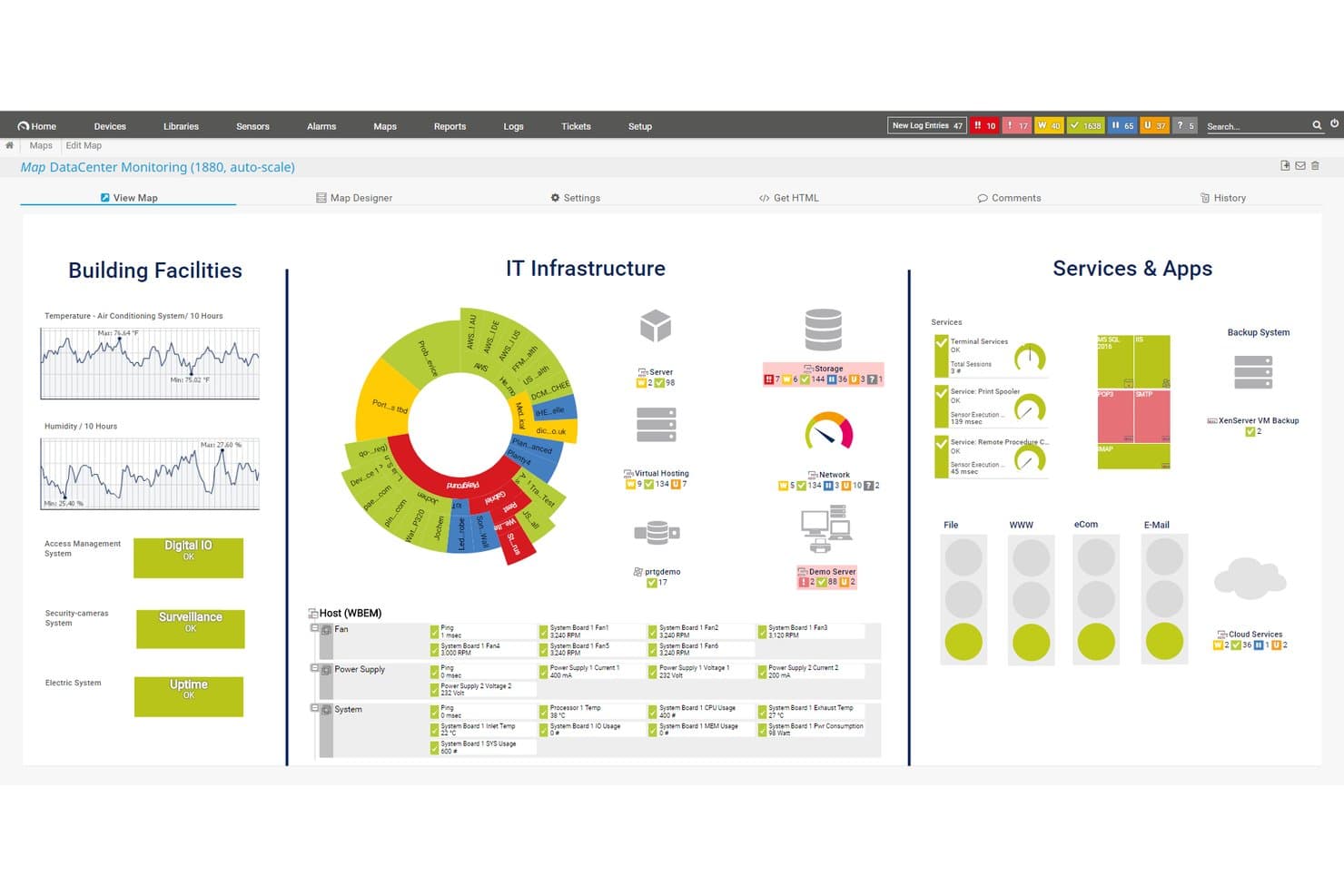
Paessler PRTG offers a customizable data center monitoring map displaying building facilities, IT infrastructure, and services and apps in a unified dashboard view. Paessler PRTG is an agentless infrastructure monitoring platform built for network and systems administrators who need unified visibility across devices, servers, applications, and cloud environments without juggling multiple tools.
Who Is Paessler PRTG Best For?
It's a strong fit for mid-sized to large organizations running complex on-premises or hybrid infrastructure across industries like manufacturing, healthcare, and telecommunications.
Why Paessler PRTG Is a Good ManageEngine Alternative
I've included Paessler PRTG in my top picks because its sensor-based architecture covers network devices, servers, VMs, applications, and OT systems like Modbus and OPC UA from a single console. I particularly like the dependency mapping feature, which shows how devices relate to each other so my team can pinpoint root causes without chasing false alerts. The distributed remote probe model also lets us monitor multiple sites without deploying separate monitoring stacks at each location.
Paessler PRTG Key Features
- Multi-platform probe support: Run distributed probes on Linux, Windows, NAS, or containers for flexible deployment across different environments.
- Customizable map designer: Create real-time, drag-and-drop infrastructure maps and dashboards to visualize status and relationships.
- Audit logging: Track user actions and system events directly in the platform for better compliance evidence and security monitoring.
- API and custom sensors: Extend monitoring with HTTP API access and build custom sensors for unique devices, applications, or protocols.
Paessler PRTG Integrations
Paessler PRTG offers native integrations with AWS, Microsoft Azure, VMware, Siemens Industrial Edge, Cisco Meraki, HPE, Dell EMC, OPC UA, and MQTT. An API is available for custom integrations.
Pros and Cons
Pros:
- Sensor-based architecture scales across environments
- Covers OT and IoT protocols natively
- Reduces endpoint deployment overhead
Cons:
- Sensor count pricing grows costly at scale
- No built-in ticketing or ITSM module
Learn more about Paessler PRTG: Best for network diagnostic tools
- 14-day free trial available
- From $35/month
Visit WebsiteCustomer Rating:4.9/5
Domotz supports remote diagnostics and monitoring to maintain reliable networks Domotz is a network monitoring and management software aimed at managed service providers and IT professionals. It offers tools for network diagnostics, remote monitoring, and troubleshooting to ensure network reliability and performance.
Why it's a good ManageEngine alternative: Domotz provides specialized network diagnostic tools that enhance your ability to monitor and troubleshoot network issues. With real-time alerts, you can quickly respond to any network problems. The platform's remote monitoring capabilities allow you to manage networks from anywhere. Domotz's focus on network diagnostics makes it an effective alternative for those seeking detailed network insights.
Standout features & integrations:
Features include automated device discovery, which helps you easily identify all devices on your network. The platform offers advanced reporting tools, providing insights into network performance and potential issues. Additionally, Domotz supports multi-site management, allowing you to oversee multiple networks from a single interface.
Integrations include Slack, Amazon Alexa, Google Assistant, Control4, Crestron, Sonos, Luxul, Ruckus, Ubiquiti, and Cisco Meraki.
Pros and Cons
Pros:
- Supports multi-site management for scalability and efficiency
- Real-time alert notifications delivered via email, SMS, Slack, or the mobile app
- Detailed, built-in network diagnostic tools for deep analysis
Cons:
- Virtual-agent setup can be inconsistent
- Requires network management knowledge
Learn more about Domotz: Best for Microsoft ecosystem integration
- 90-day free trial
- From $60/user/month (billed annually)
Visit WebsiteCustomer Rating:4.7/5
Microsoft Intune offers a dashboard with device compliance, enrollment, and insights. Microsoft Intune gives you centralized control over device configuration, app management, and endpoint security from the cloud. IT teams who manage Windows, mobile devices, or BYOD environments often use it to enforce compliance, push updates, and secure remote workforces.
Who Is Microsoft Intune Best For?
IT departments managing Windows devices and mobile endpoints across growing or distributed organizations.
Why Microsoft Intune Is a Good ManageEngine Alternative
I picked Microsoft Intune because it fits naturally into environments already running on Microsoft infrastructure. The Conditional Access integration with Microsoft Entra ID is what I find most practical—device compliance state feeds directly into access decisions, so a non-compliant endpoint gets blocked from corporate resources without any manual intervention. I also rely on Windows Autopilot for zero-touch device provisioning, which removes the need to manually configure machines before deployment. For teams managing BYOD alongside corporate devices, the separation between MDM and MAM policies means you can protect work app data in Outlook or Microsoft Teams without touching an employee's personal content.
Microsoft Intune Key Features
- Endpoint analytics: Monitor device health, startup performance, and app reliability across your entire fleet using real-time data.
- App deployment and management: Push, update, and remove applications across managed devices without requiring physical access.
- Endpoint privilege management: Control which users can run specific elevated tasks on Windows devices without granting full local admin rights.
- Security baseline enforcement: Apply pre-configured security policies based on Microsoft's recommended settings for Windows and other managed platforms.
Microsoft Intune Integrations
Microsoft Intune has native integrations across the Microsoft ecosystem, including Microsoft 365 and Azure. An API is available for custom integrations. You can also connect it to data sources like Microsoft Access, SharePoint, SQL Server, Exchange Server, and Microsoft Entra ID.
Pros and Cons
Pros:
- Deep integration with Azure Active Directory
- Automated patching for Windows endpoints
- Built-in compliance policies for Microsoft 365
Cons:
- Reporting customization options are minimal
- Limited support for non-Microsoft operating systems
Learn more about Microsoft Intune: Best for enterprise workflow tracking
- Not available
- Pricing upon request
Visit WebsiteCustomer Rating:4.4/5
ServiceNow simplifies enterprise workflows across IT, HR, and other departments ServiceNow is a cloud-based platform for automating and managing enterprise workflows across departments. It helps organizations handle IT service management, operations management, HR, customer service, and other business processes from a centralized platform.
Why it's a good ManageEngine alternative: ServiceNow is ideal for teams that need unified oversight of many processes and want to manage everything in one place. Its AI-powered workflow automation helps optimize operations, while its customizable and prebuilt workflows let you tailor processes across departments. With a shared workspace for data, tasks, and approvals, teams gain clear visibility into work, requests, and progress across the organization.
Standout features & integrations:
Features include a unified workflow engine that adapts to IT, HR, customer service, security, and operations. Its low-/no-code tools let you build custom forms, workflows, and automation easily. ServiceNow also provides dashboards and a central database so your team can view tasks, requests, and statuses in one place.
Integrations include Slack, Jira, Azure DevOps, GitHub, Microsoft Teams, Splunk, GitLab, Salesforce, Microsoft Dynamics, SAP, Zendesk, Okta, and Datadog.
Pros and Cons
Pros:
- AI-enhanced process automation
- Custom workflows without heavy coding
- Unified cross-department workflows
Cons:
- Reporting module lacks flexibility
- Complex setups require technical expertise
 Best for customizable asset tracking
- 7-day free trial + free demo available
- Pricing upon request
Visit WebsiteCustomer Rating:4.2/5
Asset Panda offers a dashboard with equipment tracking, inventory records, and lifecycle management. Asset Panda stands out for IT teams who want flexible tracking across a wide range of hardware, software, and infrastructure. If you need detailed asset histories, audit trails, or custom workflows for asset management, this platform gives you strong control and transparency.
Who Is Asset Panda Best For?
IT asset managers and facilities teams in mid-sized to large organizations looking for configurable inventory tracking and audit capabilities.
Why Asset Panda Is a Good ManageEngine Alternative
I picked Asset Panda because its customization depth is what separates it from more rigid IT management platforms. You can define custom fields, actions, and workflows for each asset type—so a laptop, a software license, and a piece of field equipment all have their own tailored data structures. I also find the full action history per asset genuinely useful: every check-in, check-out, repair, and status change is logged, which makes compliance audits far less painful. The mobile app with barcode scanning means my team can update records on the floor without returning to a desk.
Asset Panda Key Features
- Maintenance tracking: Schedule and track preventive maintenance tasks with automated notifications before equipment goes out of warranty or past service dates.
- Asset kitting: Bundle multiple assets together so your team can perform actions across a group of equipment in a single step.
- Signature capture: Digitally capture signatures at any point in a workflow to enforce accountability for asset assignments and transfers.
- Roles and permissions: Restrict user access to specific tools, groups, fields, and reports based on each person's job responsibilities.
Asset Panda Integrations
Asset Panda offers more than 20 native integrations with popular business, IT, and productivity platforms. These include Dell, ArcGIS Online, Oracle NetSuite, Hexnode, Dell Warranty, Google Calendar, Microsoft Entra ID, Microsoft Intune, Google Workspace, Zendesk, Freshservice, ServiceNow, Slack, Jira, QuickBooks, Microsoft Teams, and more.
Pros and Cons
Pros:
- Mobile app with barcode scanning included
- Custom fields and workflows available for assets
- Supports asset tracking across unlimited locations
Cons:
- No built-in network device monitoring
- Reporting customization options are limited
Learn more about Asset Panda: Best for unified endpoint management
- Free trial available
- Pricing upon request
Visit WebsiteCustomer Rating:4.7/5
NinjaOne offers a dashboard with monitoring, ticketing, and management insights. NinjaOne is a cloud-native IT management platform built for organizations that need fast, centralized visibility and control across all endpoints. It’s a good choice for IT teams who want automation-driven management, remote monitoring, and streamlined device maintenance for Windows, Mac, and Linux systems.
Who Is NinjaOne Best For?
IT teams at managed service providers and internal IT departments that support diverse device environments benefit most from NinjaOne.
Why NinjaOne Is a Good ManageEngine Alternative
I picked NinjaOne because its endpoint management goes deeper than most platforms at this level. I like how it handles patching across Windows, Mac, and Linux devices from a single dashboard, so I'm not jumping between tools when updates roll out across a mixed environment. My team also uses NinjaOne's remote monitoring and alerting to catch device issues before they become outages. In practice, that means less reactive firefighting and more time spent on proactive infrastructure work.
NinjaOne Key Features
- Native IT documentation: Document processes, credentials, and device relationships directly within NinjaOne without needing a separate documentation tool.
- Auto-remediation: Set condition-based triggers to automatically detect and resolve endpoint issues like stopped services, open ports, or missing applications.
- Warranty tracking: Automate warranty monitoring and alerts across your asset inventory to plan renewals and manage hardware lifecycles.
- Self-service portal: Give end users direct access to remote sessions, file restores, and ticket management without involving a technician.
NinjaOne Integrations
NinjaOne offers native integrations with ConnectWise, Autotask, TeamViewer, Splashtop, Webroot, Bitdefender, Acronis, SentinelOne, Dropbox, and ServiceNow. An API is available for custom integrations.
Pros and Cons
Pros:
- Centralized remote management for distributed endpoints
- Automated device health monitoring with proactive alerts
- Fast agent deployment across Windows, macOS, and Linux
Cons:
- No built-in network asset discovery capabilities
- Reporting customization options are limited
Learn more about NinjaOne: 7Best for Apple device lifecycle management
Jamf
- 14-day free trial
- From $4/device/month
Visit WebsiteCustomer Rating:4.7/5
Jamf offers a dashboard with monitoring, device insights, and security analytics. Jamf is purpose-built for IT teams managing Apple device fleets in education, healthcare, and business. You can automate deployment, enforce security, and support users across macOS, iOS, iPadOS, and tvOS from one platform.
Who Is Jamf Best For?
IT administrators in education, healthcare, or enterprises who need to manage and secure large numbers of Apple devices across multiple sites.
Why Jamf Is a Good ManageEngine Alternative
For teams running Apple-first environments, I'd pick Jamf over ManageEngine every time. ManageEngine covers multi-platform environments broadly, but Jamf goes deep on Apple—its zero-touch deployment lets you provision a new Mac or iPhone straight from the box without any hands-on IT involvement. I also rely on Smart Groups to build dynamic device and user collections that update automatically, so policy enforcement stays accurate without manual maintenance. Together, these features make full Apple lifecycle management something my team can run at scale.
Jamf Key Features
- Device inventory: Automatically collect hardware, software, and configuration details across all enrolled Apple devices.
- Configuration profiles: Push settings for Wi-Fi, VPN, email, and restrictions directly to devices without user action.
- Patch management: Deploy macOS and app updates on a defined schedule to keep devices current.
- Self-Service portal: Let users install approved apps, run troubleshooting scripts, and request IT resources on demand.
Jamf Integrations
Jamf offers native integrations with Apple Business Manager, Apple School Manager, Microsoft 365, Google Workspace, Okta, Azure Active Directory, Google Cloud Identity, Cisco Security Connector, TeamViewer, and SimpleMDM. An API is available for custom integrations.
Pros and Cons
Pros:
- Self-service portal simplifies software distribution
- Granular security controls for macOS and iOS
- Automates Apple device deployment and enrollment
Cons:
- Reporting customization options are minimal
- Limited support for non-Apple devices
Learn more about Jamf: Best for workflow automation in service management
- 14-day free trial
- From $19/user/month (billed annually)
Visit WebsiteCustomer Rating:4.6/5
Freshservice offers a dashboard with analytics, team performance, and SLA tracking. Freshservice brings modern IT service management to teams that want a flexible, cloud-based platform. I think IT admins and service desk managers will appreciate its blend of automation, customizable workflows, and a user-friendly interface for resolving requests quickly.
Who Is Freshservice Best For?
Mid-sized organizations and IT teams that need a cloud-based service management platform with strong automation and workflow capabilities.
Why Freshservice Is a Good ManageEngine Alternative
I picked Freshservice because its no-code workflow automation engine is genuinely one of the best I've used at this price point. I use it to build multi-step approval chains for things like access requests and hardware provisioning, without writing a single line of code. The intelligent ticket routing feature automatically assigns incoming incidents based on agent workload, skills, and availability, so my team isn't manually triaging queues. In practice, that means fewer delays during high-volume periods and faster resolution times across the board.
Freshservice Key Features
- Asset management: Track hardware and software inventory across your environment with auto-discovery and a built-in configuration management database (CMDB).
- SLA management: Set and enforce response and resolution time targets, with automatic escalations when tickets breach defined thresholds.
- Change management: Submit, review, and approve change requests using structured workflows with built-in risk assessment and rollback planning.
- AI-powered virtual agent: Deploy a conversational chatbot that handles common requests and guides users through self-service options directly in Microsoft Teams or Slack.
Freshservice Integrations
Freshservice offers 60+ native integrations, including Jira, Slack, Microsoft Teams, Salesforce, Azure Active Directory, AWS, Google Workspace, Okta, Jamf, and Zoom. An API is available for custom integrations.
Pros and Cons
Pros:
- AI-powered virtual agent for self-service support
- Structured change management with risk assessment tools
- No-code workflow automation for service operations
Cons:
- Asset discovery may miss unmanaged devices
- Reporting customization can be restrictive
Learn more about Freshservice:

Flexera offers a dashboard with technology inventory, lifecycle, and risk analytics. Flexera is a cloud-based platform built for IT professionals who need to monitor and control software assets across complex environments. It appeals to enterprises looking for actionable insights into IT spend, compliance, and usage across data centers and the cloud.
Who Is Flexera Best For?
Global enterprises and IT asset managers who need visibility, optimization, and control over large-scale software portfolios and cloud infrastructure.
Why Flexera Is a Good ManageEngine Alternative
Software asset visibility is where Flexera genuinely pulls ahead of ManageEngine. I rely on Flexera's Software Vulnerability Manager to identify which installed software titles carry known CVEs across my entire estate, so I'm not guessing where exposure lives. I also use its Software Recognition Service, which automatically normalizes and identifies thousands of software titles from raw inventory data—something ManageEngine requires far more manual effort to replicate. For teams managing large, mixed-license environments, that level of automation in asset discovery and compliance tracking makes a real operational difference.
- SaaS management: Track SaaS application usage, identify underutilized licenses, and manage renewals from a single view.
- FinOps visibility: Monitor multi-cloud costs, allocate spend, and surface savings opportunities across cloud environments.
- Application readiness: Package and test applications before deployment to reduce the risk of failed rollouts.
- CMDB automation: Automatically populate and clean CMDB records using normalized, up-to-date hardware and software data.
Flexera Integrations
Flexera offers native integrations with ServiceNow, BMC Helix, Snowflake, Microsoft 365, Azure, AWS, Google Cloud Platform, Tanium, Datadog, VMware vCenter, and SAP, and provides an API for custom integrations.
Pros and Cons
Pros:
- Automated identification of compliance risks
- License reconciliation across hybrid cloud environments
- Deep software normalization and recognition engine
Cons:
- Reporting features are less flexible than competitors
- UI navigation can be unintuitive for new users
Learn more about Flexera:

Ivanti Neurons automates IT operations with incident, asset, and service management tools Ivanti Neurons is an IT service management platform designed for enterprises seeking to enhance their IT operations through automation and intelligent insights. It serves IT departments by providing tools for incident management, asset management, and service automation.
Why it's a good ManageEngine alternative: Ivanti Neurons offers proactive self-healing capabilities that help your team automatically resolve issues before they impact users. Its automation features reduce repetitive manual tasks, allowing your team to focus on strategic initiatives. The platform's intelligent insights provide valuable data to improve decision-making and optimize IT performance. With asset management tools, you can efficiently track and manage IT assets throughout their lifecycle.
Standout features & integrations:
Features include a broad incident management system that helps you quickly resolve IT issues. The platform also offers advanced reporting tools, providing insights into IT service performance and areas for improvement. Additionally, Ivanti Neurons' change management capabilities enable you to plan and implement changes with minimal disruption.
Integrations include Microsoft 365, ServiceNow, Salesforce, Google Workspace, Slack, VMware, Cisco, and Amazon Web Services.
Pros and Cons
Pros:
- Hyper-automation reduces manual IT intervention in routine tasks
- IT asset management and software asset management tools
- Proactive self-healing capabilities
Cons:
- Large data sets can create delayed load times
- Complex automation setup
Learn more about Ivanti Neurons:
Diğer ManageEngine Alternatifleri
İşte kısa listeme girmeyen ancak yine de göz atmaya değer bazı ek ManageEngine alternatifleri:
- 11BMC HelixBest for AI-driven IT service management
- 12Jira Service ManagementBest for ITSM and team collaboration
- 13ZluriBest for SaaS application management
- 14AteraBest for simple remote access setup
- 15ConnectWiseBest for IT automation tools
- 16Action1Best for cloud-based patch management
- 17InvGate Service ManagementBest for a user-friendly service desk
- 18SyncroBest for MSP billing integration
- 19TaniumBest real-time endpoint visibility at enterprise scale
- 20LogMeIn ResolveBest for remote support capabilities
How I Evaluate ManageEngine Alternatives
I split my evaluation into two layers: baseline capabilities a tool must have—ITSM, monitoring, endpoint management—and the differentiators that set the best options apart.
Core Functionality (Table Stakes For This List)
When I'm selecting tools for my list, I rank each one on a scale from 0 (does not offer the functionality) to 5 (excels in this area) for each core functionality listed below. Then, I calculate the tool's total score into a percentage. Each tool needs to achieve a minimum total score of 75% to be considered for inclusion.
- IT Service Management: I look for ITIL-aligned ticketing, incident, problem, and change management—the kind of workflows a service desk team relies on daily to track outages and escalations.
- Endpoint & Asset Management: Automated discovery, inventory, and patching matter here. I check whether a tool can detect new devices on the network and push patches without manual intervention.
- Network & Infrastructure Monitoring: Real-time alerting and performance dashboards for servers, switches, and applications are what I evaluate—especially how quickly a platform surfaces degraded services.
- Remote Support & Control: Whether your techs need to troubleshoot a user's laptop or manage an unattended server, I look at session quality, file transfer, and multi-platform coverage.
- Automation & Workflow Orchestration: I evaluate whether the platform lets you build rule-based automations—like auto-assigning tickets by category or scheduling recurring maintenance tasks across endpoints.
- Reporting & Integrations: Prebuilt connectors to tools like Active Directory, Jira, Slack, and cloud platforms matter. I also check for custom dashboards and API access for pulling data into external systems.
Once I have a list of tools that meet this criteria, I consider what sets each platform apart.
Differentiating Factors (What Sets Vendors Apart)
Here's how I compare and contrast different vendors:
Standout Features
Multi-tenant architecture is a big differentiator—especially for MSPs managing dozens of client environments from one console. I also evaluate whether a platform offers AI-driven operations like predictive alerting or automatic ticket classification, which can cut triage time significantly. A well-built self-service portal matters too. When end users can search a knowledge base or submit requests through a service catalog, your help desk handles fewer repetitive tickets.
Beyond Features
Deployment flexibility is one of the first things I check. Some teams need on-premise hosting for data sovereignty, while others want pure SaaS—tools like NinjaOne and Freshservice take different approaches here. Pricing and licensing models also vary widely. I look at whether a vendor charges per technician, per endpoint, or per module, because a platform that forces you into an all-or-nothing bundle can inflate costs fast. Compliance certifications like SOC 2 and ISO 27001 round out my evaluation, since they signal how seriously a vendor handles security.
Neden bir ManageEngine alternatifi aramalısınız?
ManageEngine tanınmış bir BT yönetim platformu olsa da bazı ekipler, gereksinimleri mevcut özellik setini veya sunum modelini aştığında alternatifleri değerlendirir. Şu durumlarda bir ManageEngine alternatifi arıyor olabilirsiniz:
- Büyüyen bir BT ortamını desteklemek için daha iyi ölçeklenebilirliğe ihtiyacınız varsa
- Kullanım kolaylığı hem BT yöneticileri hem de son kullanıcılar için öncelikliyse
- Kuruluşunuzun daha güçlü MDM veya uzaktan cihaz yönetimi özelliklerine ihtiyacı varsa
- Belirli siber güvenlik, uyumluluk veya SLA gereksinimlerini karşılamanız gerekiyorsa
- Genel bir BT hizmet yönetimi yaklaşımı yerine sektöre özel araçlar istiyorsanız
- Ekibinizin daha esnek bir fiyatlandırma modeline veya daha az eklentiye ihtiyacı varsa
Bu zorluklar size tanıdık geliyorsa alternatif BT hizmet yönetimi, uzaktan izleme ve yönetim veya uç nokta yönetimi araçları, hizmet sunumu ihtiyaçlarınıza daha uygun olabilir.
Özellikler
Alternatif çözümlerin sunduklarını karşılaştırmanıza yardımcı olmak için ManageEngine'in temel özelliklerinden bazıları şunlardır:
- Uç nokta yönetimi: Birden fazla işletim sistemi genelindeki uç noktaları yönetir ve güvenliğini sağlar; şirket içi ve hibrit ortamları destekler.
- Yama yönetimi: Sunucular, masaüstü bilgisayarlar ve uzak cihazlardaki güvenlik açıklarını azaltmak için yama dağıtımını ve düzeltme işlemlerini otomatikleştirir.
- Kimlik ve erişim yönetimi: Kullanıcı erişimini ve izinlerini denetleyerek kuruluşların güvenlik ve uyumluluk gereksinimlerini karşılamasına yardımcı olur.
- BT varlık yönetimi: Donanım ve yazılım varlıklarını yaşam döngüleri boyunca izleyerek yapılandırma yönetimini ve maliyet kontrolünü destekler.
- Güvenlik bilgileri ve olay yönetimi (SIEM): Ekiplerin olası tehditlere daha hızlı yanıt vermesine yardımcı olmak için güvenlik olaylarını ve uyumluluk sinyallerini izler.
- Performans izleme: Sistem durumu ve hizmet performansı hakkında görünürlük sağlayarak BT ekiplerinin SLA beklentilerini karşılamasını destekler.
- Veri koruma: Tehdit algılama, kötü amaçlı yazılımları önleme ve politikaları uygulama araçlarıyla hassas verilerin korunmasına yardımcı olur.
- Bulut maliyeti yönetimi: Birden fazla ortamda bulut harcamalarını izlemek ve optimize etmek için yapay zekâ destekli içgörülerden yararlanır.
- Uygulama denetimi: Riski azaltmak ve uç nokta güvenliğini geliştirmek için uygulama erişimini ve ayrıcalıklarını yönetir.
- Uzaktan erişim: BT ekiplerinin sistemlerde uzaktan sorun gidermesini ve yönetim gerçekleştirmesini sağlayarak dağınık ekipleri ve uzaktan çalışanları destekler.