


monday service vs. Jira Service Management: 2026 Review

We review tools independently, and commissions help fund our testing. See our transparency policy, our methodology, or suggest a tool.
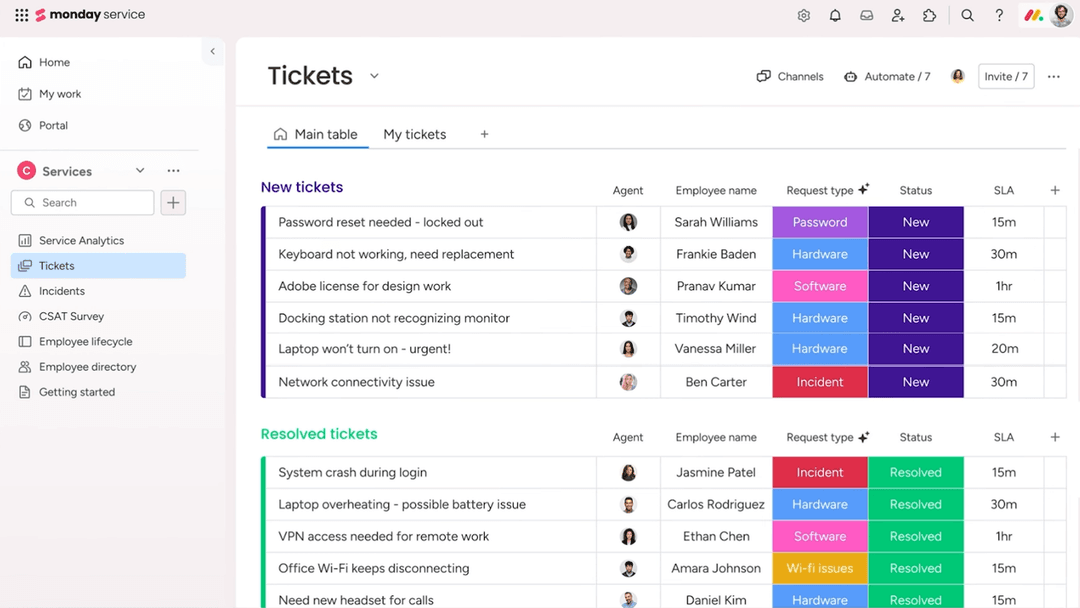
monday service offers a dynamic platform for managing work processes and enhancing team collaboration.
Jira Service Management, on the other hand, is tailored to optimize IT service management and streamline issue resolution.
While both tools provide robust solutions for managing tasks and projects, monday service focuses on flexibility and customization, whereas Jira Service Management excels in IT and service management.
Throughout this article, we'll dive into a detailed comparison of these work management software options, examining their features, pros and cons, and pricing to help you make an informed choice for your team's needs.
monday service
4.6/5
- 14-day free trial
- From $8/user/month (billed annually)
Jira Service Management


4/5
- Free plan available
- From $21.50/user/month
Why Trust Our Software Recommendations
6,700+
Reviews
20
Industry experts
16+
Evaluation factors
14
Years
Our team has been testing and reviewing software since 2012. As tech leaders ourselves, we know how difficult—and important—it is to choose the right software.
For this guide, we evaluated tools using hands-on testing and independent research, scoring tools using our selection criteria.
Our reviews reflect our human editorial judgment, not a sales pitch.
Expert reviewers:
- Paulo Gardini MiguelTech Director
 Tim FisherVP of AI
 Gabriel RosasTech Lead & Software Architect
 Christhian GruhnTech Lead & Platform Architect

| monday service | Jira Service Management | |
|---|---|---|
| Free Trial | 14-day free trial | Free plan available |
| Pricing | From $8/user/month (billed annually) | From $21.50/user/month |
monday service vs. Jira Service Management Pricing & Hidden Costs
monday service pricing operates on a tiered subscription model, which can include additional costs for premium features and integrations.
Jira Service Management pricing also follows a tiered approach, but may incur extra charges for advanced support and add-ons.
As a CTO, evaluate each tool's pricing by identifying your team's specific needs and potential growth to ensure you're selecting a vendor that aligns not just with your current budget, but also with your long-term strategic goals.
With monday service’s integration capabilities, you can minimize context switching by connecting various apps, making it ideal for managing diverse team workflows.
Jira Service Management’s robust road-mapping feature is great for planning and tracking long-term projects, especially in IT service environments.
While monday service excels in flexibility and connectivity, Jira Service Management is unmatched in structured project planning and execution.
| monday service | Jira Service Management | |
|---|---|---|
| Analytics | Yes | Yes |
| API | Yes | Yes |
| Call Integration | No | Yes |
| Chat | No | Yes |
| Contact Management | Yes | Yes |
| CRM Integration | No | Yes |
| Customer Management | Yes | Yes |
| Data Export | Yes | Yes |
| Data Import | Yes | Yes |
| Email Integration | No | Yes |
| External Integrations | Yes | Yes |
| Instant Chat Integration | No | Yes |
| Knowledge Base | Yes | Yes |
| Multi-User | No | Yes |
| Notifications | Yes | Yes |
| Real-time Alerts | Yes | Yes |
| Self-service Portal | Yes | Yes |
| Social Media Integration | No | Yes |
| Support Forum | No | Yes |
| Ticket Management | Yes | Yes |
| Workflow Management | Yes | Yes |
| Integration | monday service | Jira Service Management |
| Slack | ✅ | ✅ |
| Microsoft Teams | ✅ | ✅ |
| Google Workspace | ✅ | ✅ |
| Salesforce | ✅ | ✅ |
| Trello | ✅ | ❌ |
| GitHub | ❌ | ✅ |
| Zendesk | ✅ | ✅ |
| ServiceNow | ❌ | ✅ |
| HubSpot | ✅ | ❌ |
| Asana | ✅ | ❌ |
| API | ✅ | ✅ |
| Zapier | ✅ | ✅ |
With monday service's integration with Trello, you can easily manage and sync tasks across platforms, making it perfect for teams juggling multiple project management tools. Jira Service Management's integration with GitHub is great for development teams, allowing seamless tracking of code changes alongside project issues.
While monday service excels in providing flexibility with tools like Trello, Jira Service Management offers deep integration with development-centric platforms like GitHub.
| Factor | monday service | Jira Service Management |
| Data Privacy | monday service offers GDPR compliance with robust data protection measures like user consent and data encryption. | Jira Service Management ensures data privacy through GDPR compliance and customizable data access controls. |
| Encryption | monday service uses SSL/TLS encryption to protect data in transit and AES-256 encryption for stored data. | Jira Service Management employs SSL/TLS encryption for data in transit and at rest, ensuring secure communication. |
| Regulatory Compliance | monday service complies with standards like ISO 27001, providing a structured approach to data protection. | Jira Service Management meets various compliance standards, including SOC 2 and ISO 27001 for comprehensive security. |
| Reliability | monday service guarantees uptime through redundant systems and real-time monitoring. | Jira Service Management ensures reliability with high availability architecture and continuous monitoring. |
Jira Service Management generally offers more comprehensive compliance certifications compared to monday service.
As a CTO, evaluate each tool by examining its compliance certifications and encryption standards, ensuring they align with your organization's security policies and regulatory requirements.
| Factor | monday service | Jira Service Management |
| User Interface | monday service offers a visually intuitive interface with customizable dashboards and drag-and-drop functionality. | Jira Service Management provides a more complex interface tailored for IT professionals with detailed configuration options. |
| Onboarding Experience | monday service simplifies onboarding with guided tutorials and a user-friendly setup process. | Jira Service Management has a steeper learning curve with extensive documentation and training resources. |
| Setup | monday service allows quick setup with pre-built templates for various workflows. | Jira Service Management requires a more involved setup to customize workflows for IT service management. |
| Support | monday service provides 24/7 support with live chat and an extensive knowledge base. | Jira Service Management offers comprehensive support with detailed documentation and community forums. |
monday service is easier to navigate due to its intuitive design and quick setup, making it ideal for teams seeking simplicity. However, Jira Service Management's detailed configuration and robust support make it better suited for IT teams needing advanced customization and control.
monday service
- You can customize workflows to suit your team's specific needs.
- Visual project tracking makes it easy for your team to stay on top of tasks.
- Automation features save your team time on repetitive tasks.
- The initial setup can be overwhelming if your team isn't tech-savvy.
- Advanced features require a learning curve for your team.
- Some users find the mobile app less intuitive than the desktop version.
Jira Service Management
- Highly customizable workflows, automations, forms, and service processes.
- Deep integration with the Atlassian ecosystem and development tools.
- Strong incident management, on-call scheduling, and alerting capabilities.
- Steeper learning curve for administrators and new users.
- Configuration and ongoing administration can become time-consuming.
- Best experience often depends on broader Atlassian adoption.
monday service
- Tech Startupsmonday service's customizable workflows fit perfectly with your agile project management needs.
- Marketing TeamsVisual boards make tracking campaigns easy for your team, enhancing collaboration and oversight.
- Creative AgenciesAutomation features save your team time on repetitive tasks, allowing more focus on creative work.
- Product DevelopmentYou can manage complex product roadmaps with visual tracking and task dependencies.
- Remote TeamsCentralized communication and task management keep your remote team connected and productive.
- HR DepartmentsStreamlined onboarding processes and workflow automation simplify your team's HR tasks.
Jira Service Management
- Large EnterprisesIt provides the scalability and comprehensive tools needed for managing extensive service operations.
- Atlassian Ecosystem UsersIf you're already using tools like Jira Software, Confluence, or Bitbucket, it integrates seamlessly into your existing workflows.
- On-Premise or Data Center EnvironmentsSupports organizations that require on-premise or self-managed deployments for compliance or infrastructure control.
- DevOps and Engineering TeamsNative connections to Jira Software, Bitbucket, and development workflows help bridge IT operations and software delivery.
- Highly Customizable Workflow Needs (JQL Users)Ideal for teams that need granular control and are comfortable using JQL and advanced configurations to tailor the platform.
- IT DepartmentsYour IT team can leverage its robust incident management features to resolve issues swiftly.
Who Should Use monday service, and Who Should Use Jira Service Management?
In my opinion, monday service or another Jira service management alternative is perfect for creative teams and businesses that value flexibility and a visually appealing interface. It's great for those who need to manage diverse projects without getting bogged down in complexity.
From my perspective, Jira Service Management is the best fit for IT teams and organizations that need robust service management capabilities and detailed workflow customization. If your team is focused on IT service management and needs advanced features, Jira Service Management is the way to go.
| monday service | Jira Service Management | |
|---|---|---|
| Automation | monday service monday service provides simple automation for task management and notifications. | Jira Service Management Jira Service Management offers advanced automation suited for IT operations and incident management. |
| Integrations | monday service monday service excels in integrations with tools like Trello and HubSpot. | Jira Service Management Jira Service Management integrates deeply with development tools like GitHub and ServiceNow. |
| Onboarding | monday service monday service is known for its quick and easy onboarding process with guided tutorials. | Jira Service Management Jira Service Management has a more involved onboarding process with comprehensive documentation. |
| Pricing Model | monday service monday service uses a tiered subscription model with potential additional costs for premium features. | Jira Service Management Jira Service Management also uses a tiered model, but may include extra charges for advanced support. |
| User Interface | monday service monday service offers a visually appealing, intuitive interface with customizable dashboards. | Jira Service Management Jira Service Management provides a more complex interface tailored for detailed IT workflows. |
| Automation | monday service and Jira Service Management both offer automation to streamline repetitive tasks, with monday service providing straightforward task automation and Jira offering more complex automation for IT processes. |
|---|---|
| Collaborative Tools | Both solutions include collaborative features like real-time updates and comments, enhancing team communication, with monday service providing a more visual approach and Jira focusing on IT service collaboration. |
| Customizable Workflows | Both monday service and Jira Service Management allow you to create custom workflows to fit your team's specific needs, with monday service offering visual customization and Jira providing detailed configuration options. |
| Integrations | Both platforms support a wide range of integrations, with monday service focusing on tools like Slack and Google Workspace, while Jira Service Management integrates with IT-focused tools such as Microsoft Teams. |
| Security | monday service and Jira Service Management adhere to high security standards, including data encryption and compliance with international regulations like GDPR, ensuring your data is protected. |