

Open-source SBOM tools are software solutions that let you create, analyze, and manage software bills of materials (SBOMs) using open code you can inspect and adapt. If you’re searching for ways to keep tabs on dependencies, licensing, and vulnerabilities across your software stack, you know just how crucial reliable SBOM tools have become.
In this guide, you’ll find the top open-source SBOM options to help you simplify compliance, monitor risks, and fit SBOM management into your existing workflow—no matter how complex your environment gets.
Why Trust Our Software Recommendations
6,700+
Reviews
20
Industry experts
16+
Evaluation factors
14
Years
Our team has been testing and reviewing software since 2012. As tech leaders ourselves, we know how difficult—and important—it is to choose the right software.
For this guide, we evaluated tools using hands-on testing and independent research, scoring tools using our selection criteria.
Our reviews reflect our human editorial judgment, not a sales pitch.
Expert reviewers:
- Paulo Gardini MiguelTech Director
 Tim FisherVP of AI
 Gabriel RosasTech Lead & Software Architect
 Christhian GruhnTech Lead & Platform Architect

Open-Source SBOM Tools Comparison Table
This comparison table summarizes pricing details for my top open-source SBOM selections:
| Tool | Best For | Trial Info | Price | ||
|---|---|---|---|---|---|
| 1 | Best for continuous license compliance | Free plan | From $20/project/month (billed annually) | Website | |
| 2 | Best for analyzing container image dependencies | Not available | Free forever | Website | |
| 3 | Best for standardizing software package data | Not available | Free forever | Website | |
| 4 | Best for codebase component discovery | 7-days free trial | From €35,000/year (billed annually) | Website | |
| 5 | Best for linking supply chain metadata | Not available | Free forever | Website | |
| 6 | Best for container vulnerability scanning | Not available | Free forever | Website | |
| 7 | Best for real-time risk monitoring | Not available | Free forever | Website | |
| 8 | Best for automated CycloneDX SBOM generation | Not available | Free forever | Website | |
| 9 | Best for generating SPDX SBOMs | Not available | Free forever | Website | |
| 10 | Best for fast software bill of materials creation | Not available | Free forever | Website |


Best Open-Source SBOM Tools Reviews
Below are my detailed summaries of the best open-source SBOM tools that made it onto my shortlist. My reviews offer a detailed look at the features, capabilities, and best use cases of each tool to help you find the best one for you.
 Best for continuous license compliance
- Free plan
- From $20/project/month (billed annually)
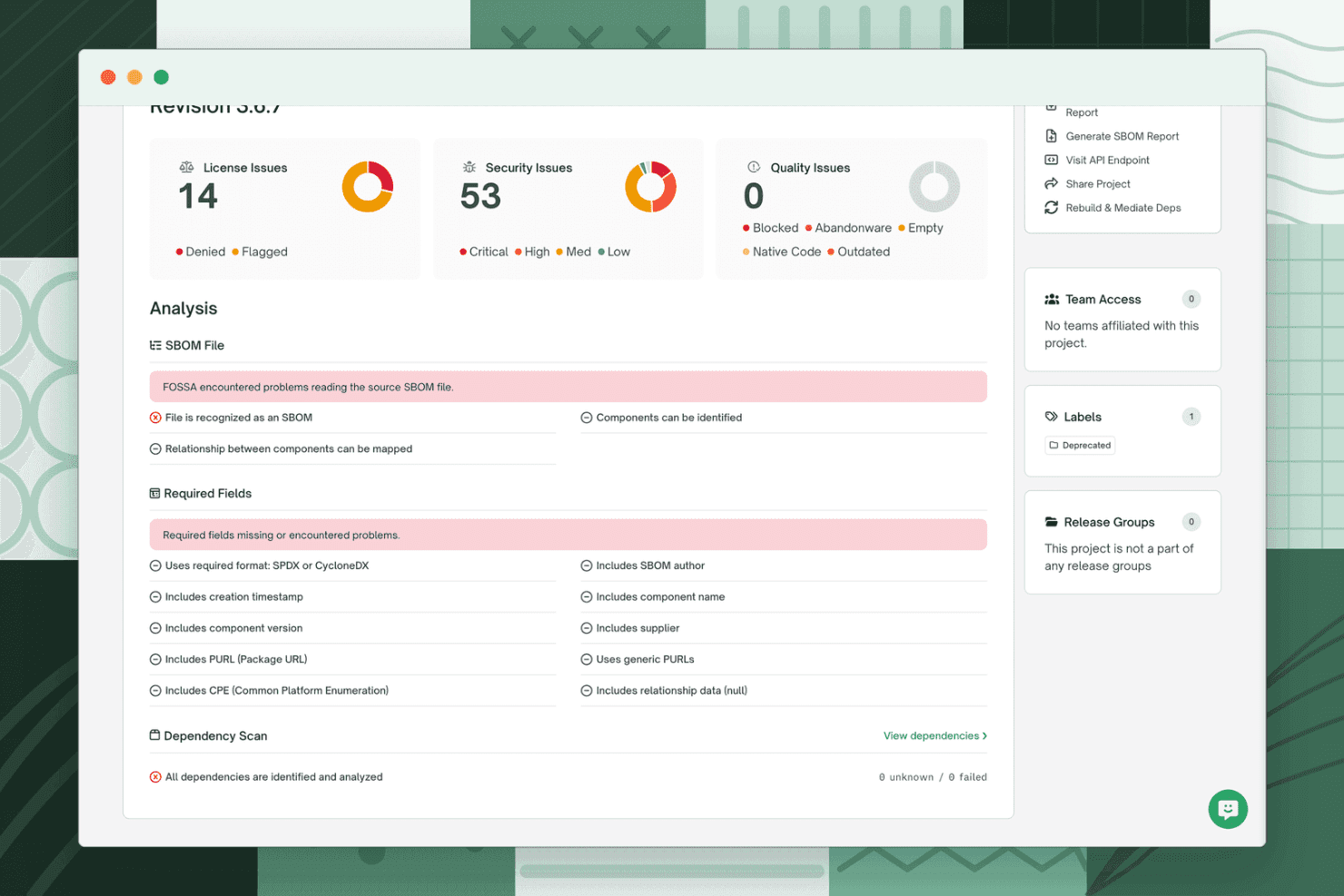
FOSSA displays a project revision dashboard with license, security, and quality issue summaries alongside SBOM file analysis and required fields validation. FOSSA is a software composition analysis platform that combines SBOM generation, open source license scanning, vulnerability detection, and dependency tracking across codebases, containers, and binaries.
Who Is FOSSA Best For?
FOSSA is a strong fit for enterprise engineering and legal teams managing open source license obligations across large, multi-repository codebases.
Why I Picked FOSSA
I've included FOSSA in my top picks because of how it handles license policy enforcement at the PR level. Rather than generating a one-time compliance audit, FOSSA runs automated scans on every code commit and applies configurable license policies that can block non-compliant dependencies before they merge. I also like the attribution notice generation, which automatically compiles legally required open source acknowledgments directly from scan results.
FOSSA Key Features
- Multi-ecosystem scanning: Detects dependencies across 27+ languages, containers, binaries, and package managers.
- SBOM format selection: Exports software bill of materials in both SPDX and CycloneDX formats.
- Third-party SBOM ingestion: Accepts and analyzes external SBOMs for combined portfolio-level risk assessment.
- Automated vulnerability discovery: Identifies open source vulnerabilities and links them to SBOM components.
FOSSA Integrations
FOSSA offers native integrations with GitHub, GitLab, Jenkins, Jira, and Slack, plus provides an API for custom integrations and supports CI/CD workflows through its CLI.
Pros and Cons
Pros:
- Detailed third-party SBOM ingestion support
- Automated generation of compliance and attribution reports
- Deep license and vulnerability scanning coverage
Cons:
- Manual triage often required for complex findings
- Core platform is not fully open source
Learn more about FOSSA:
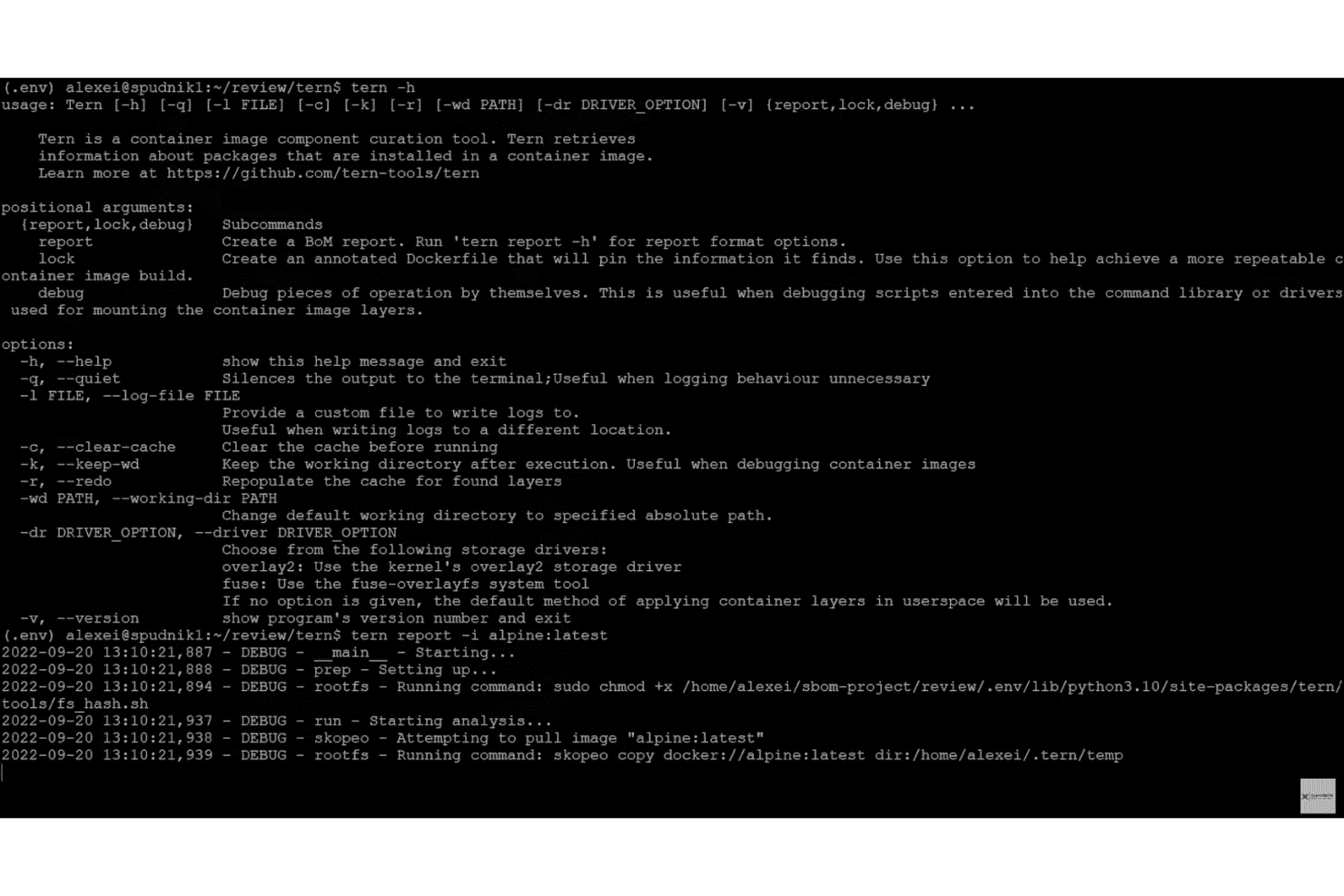
Tern displays its CLI help options and begins analyzing the alpine:latest container image to retrieve package information. Tern is an open-source Python-based SBOM tool that inspects container images and Dockerfiles layer by layer, inventorying OS packages and dependencies with provenance tracking across SPDX and CycloneDX output formats.
Who Is Tern Best For?
Tern is a strong fit for DevSecOps engineers and security teams managing containerized workloads who need detailed, layer-level component visibility.
Why I Picked Tern
Tern earns its spot on my shortlist because of how it traces container packages back to the exact Dockerfile instruction that introduced them. Most SBOM tools tell you what's in a container; Tern tells you how it got there. I also like the locked Dockerfile feature, which pins the base OS and packages, making builds reproducible from a known, documented component state.
Tern Key Features
- Multistage Dockerfile analysis: Analyze and generate SBOMs for each stage in multistage Dockerfiles.
- Multiple SBOM output formats: Output SBOMs in SPDX, CycloneDX, human-readable, JSON, HTML, and YAML formats.
- Official GitHub Action: Run Tern container analysis directly within CI pipelines using a maintained GitHub Action.
- Scancode and cve-bin-tool extensions: Integrate license detection and vulnerability scanning through optional extensions.
Tern Integrations
Tern offers native integrations with GitHub Actions, Skopeo for container registry access, and supports license and vulnerability scanning through native Scancode and cve-bin-tool extensions. It can also be deployed as a Kubernetes Job, and an API is not available for custom integrations.
Pros and Cons
Pros:
- Optional extensions for license and CVE scanning
- Maps packages to Dockerfile instructions
- Provenance tracking for each container layer
Cons:
- Stalled project updates since 2023
- Limited language package ecosystem analysis
Learn more about Tern:

SPDX offers a license list table showing full license names, SPDX identifiers, and FSF/OSI approval status. SPDX is an ISO-ratified open standard and tooling ecosystem, maintained by the Linux Foundation, for generating, validating, and converting SBOM documents across software packages, containers, and supply chain artifacts.
Who Is SPDX Best For?
OSPO leads and software supply chain architects who need a compliance-grade, vendor-neutral SBOM format for legal review, procurement, and regulatory submissions will get the most out of SPDX.
Why I Picked SPDX
SPDX earns its spot on my shortlist because no other open source SBOM format matches its metadata standardization depth. I rely on its distinction between declared and concluded licenses, which is critical when legal review teams need defensible compliance records. Its curated SPDX License List assigns consistent short identifiers across every component, so SBOM documents stay comparable across tools, teams, and organizations regardless of who generated them.
SPDX Key Features
- Multiple document formats: Export SBOMs in JSON, YAML, Tag-Value, or RDF/XML formats for flexible integration into different tools.
- SPDX online tools: Use browser-based utilities for validating, comparing, and converting SBOM files without installing local software.
- Official language libraries: Access and generate SPDX documents programmatically using maintained Java, Python, Go, and JavaScript libraries.
- Maven plugin integration: Automatically generate SPDX SBOMs during Java project builds through an official Maven plugin.
SPDX Integrations
SPDX offers native integrations with GitHub, Maven, Yocto Project, OpenEmbedded, and Kubernetes, and provides official SDKs for Java, Python, Go, and JavaScript. An API is available for custom integrations.
Pros and Cons
Pros:
- Compatible with multiple SBOM formats natively
- Widely adopted across open source ecosystems
- Standardized license and security metadata support
Cons:
- Limited native support for binary analysis
- Interface relies heavily on command-line tools
Learn more about SPDX: Best for codebase component discovery
- 7-days free trial
- From €35,000/year (billed annually)

SCANOSS offers an open source software monitoring dashboard that tracks dependencies, license compliance, vulnerabilities, and dependency drift across teams. SCANOSS is an open source SCA platform that scans source code at the snippet level to generate SBOMs in SPDX and CycloneDX formats, detect license risks, identify vulnerabilities, and map cryptographic usage across codebases and containers.
Who Is SCANOSS Best For?
SCANOSS is a strong fit for DevSecOps teams and OSPOs at mid-sized to enterprise organizations managing open source compliance across large, multi-language codebases.
Why I Picked SCANOSS
SCANOSS earns its spot on my shortlist because of its snippet-level scanning, which goes well beyond manifest-based detection. I've used tools that miss vendored code or copy-pasted functions entirely, but SCANOSS matches source code fragments against over 100 million open source files in the OSSKB. I also like the Geo Provenance Dataset, which surfaces geographic and authorial origins of components, something I haven't seen in other open source SBOM tools.
SCANOSS Key Features
- SBOM Workbench: Visual interface for scanning and auditing source code using the SCANOSS API.
- Encryption Dataset: Identifies cryptographic algorithms and use to support ECCN and compliance audits.
- License Dataset: Maps OSS components to licensing terms and highlights compatibility or policy risks.
- Multi-language SDKs: Provides SDKs for Python, Java, and JavaScript to support diverse development environments.
SCANOSS Integrations
SCANOSS offers native integrations with GitHub Actions, Jenkins, GitLab CI, VS Code, and IntelliJ, and provides SDKs for Python, Java, and JavaScript. An API is available for custom integrations.
Pros and Cons
Pros:
- Cryptographic algorithm identification for compliance
- Captures software geographic and author provenance
- Snippet-level detection of codebase components
Cons:
- Advanced features may require technical setup
- Limited scanning for OS packages and IaC
Learn more about SCANOSS:
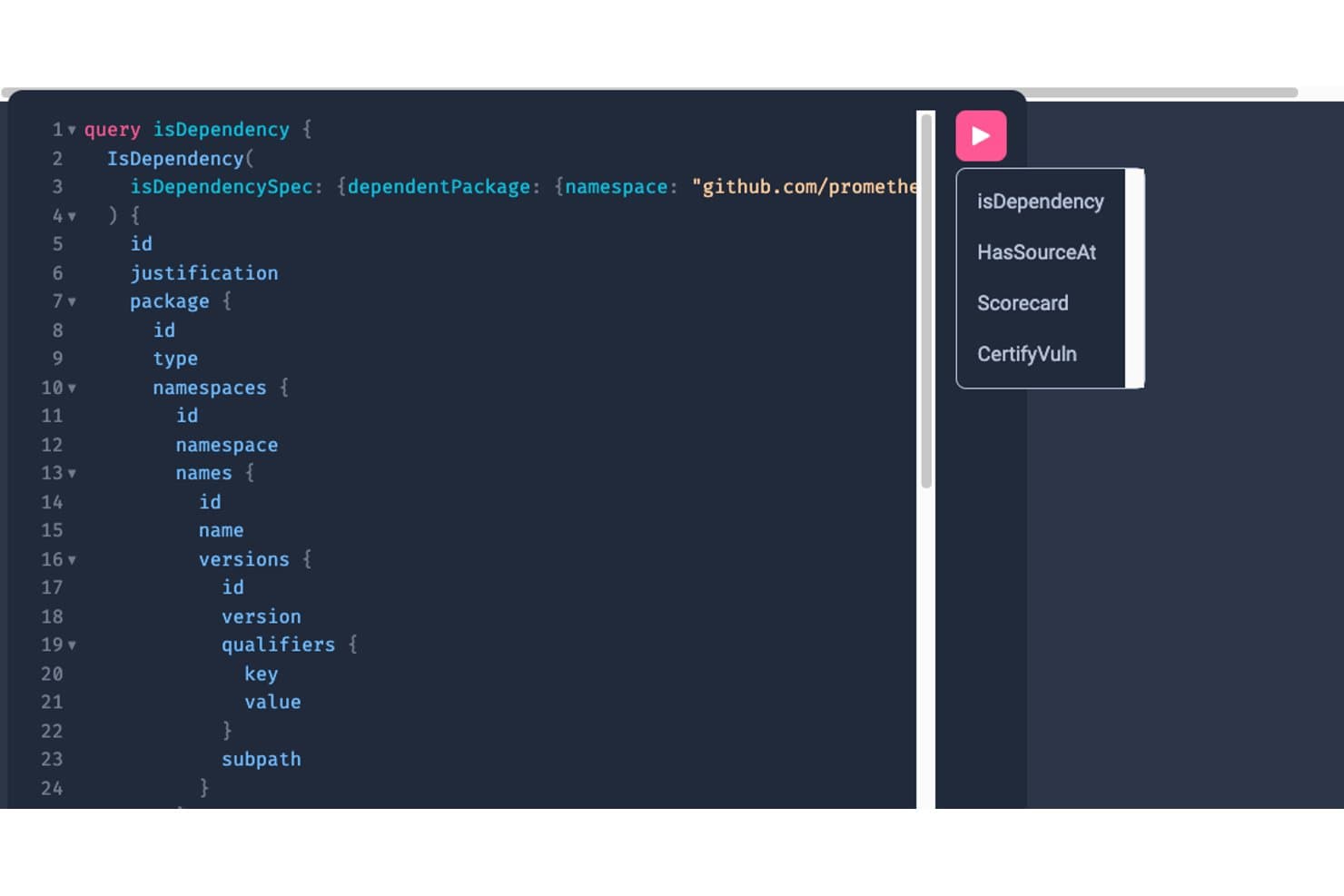
GUAC offers a GraphQL UI for querying software dependency relationships using structured query language. GUAC is an open-source supply chain security tool that ingests SBOMs, vulnerability data, and provenance attestations, then maps relationships between them into a queryable graph database.
Who Is GUAC Best For?
GUAC is a strong fit for security and DevSecOps teams managing large software portfolios who need portfolio-wide supply chain visibility beyond what single-SBOM tools provide.
Why I Picked GUAC
GUAC earns its spot on my shortlist because no other open-source tool links supply chain metadata the way it does. I like that it ingests SBOMs from multiple sources, parses them into a graph database, and lets me query transitive dependencies across my entire portfolio at once. Pulling in enrichment from OSV and deps.dev means the graph surfaces vulnerability exposure that a raw SBOM alone would miss.
GUAC Key Features
- GraphQL and REST APIs: Expose the full metadata graph for querying and integration.
- SPDX and CycloneDX support: Ingest and normalize standard SBOM formats for consistent processing.
- Visualizer interface: Display supply chain relationships and data flow in a navigable web GUI.
- Pluggable backend architecture: Run with in-memory or persistent backends like PostgreSQL for deployment flexibility.
GUAC Integrations
GUAC offers native integrations with Open Source Insights’ deps.dev, Open Source Vulnerabilities (OSV), SPDX, CycloneDX, and ClearlyDefined, and provides both GraphQL and REST APIs for custom integrations.
Pros and Cons
Pros:
- Captures provenance from SLSA attestations
- Ingests both SPDX and CycloneDX SBOMs
- Visualizes cross-project supply chain links
Cons:
- No official plugins for CI/CD pipelines
- Does not generate SBOMs itself
Learn more about GUAC:
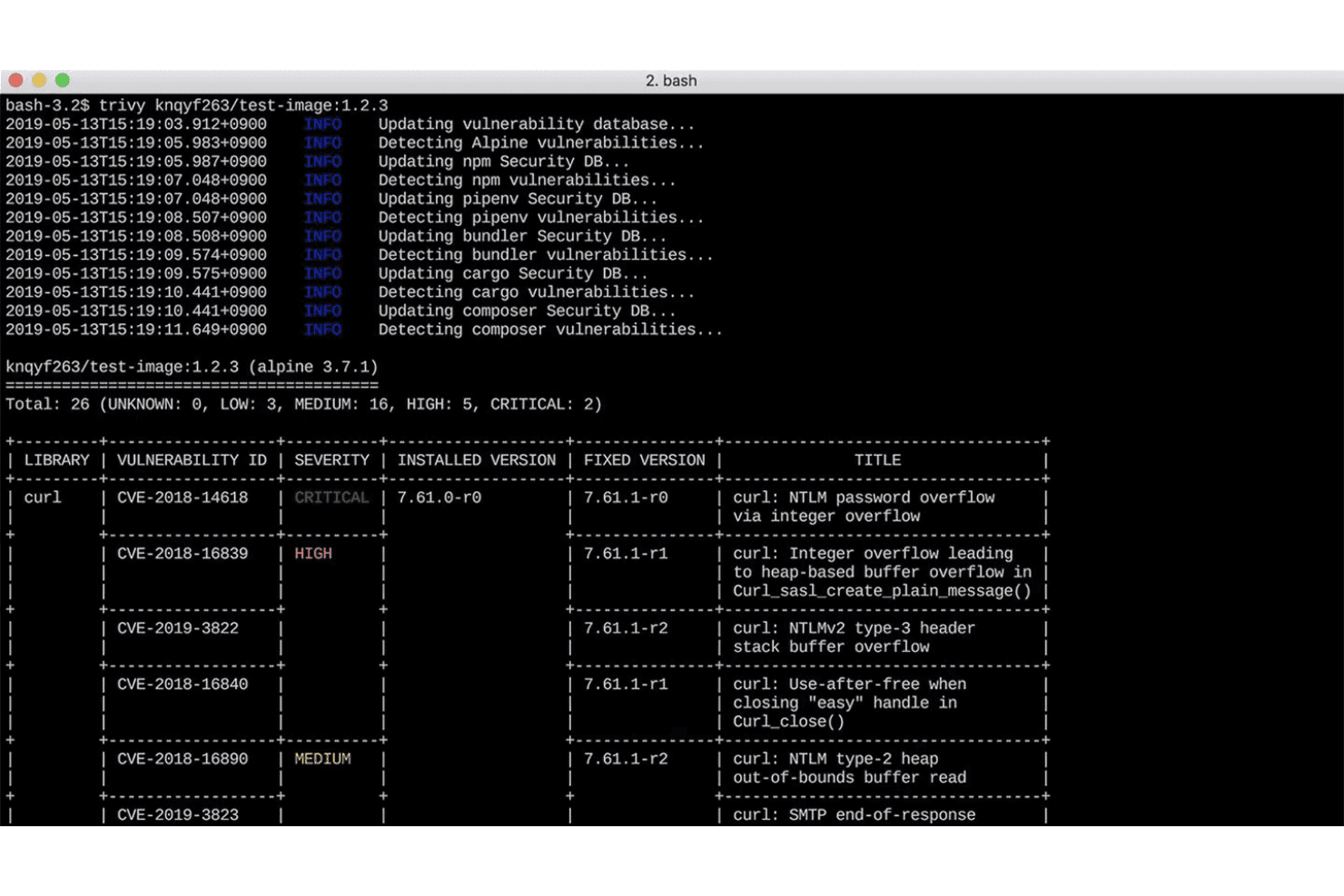
Trivy scans a Docker image and displays 26 vulnerabilities including 2 critical and 5 high severity CVEs in a terminal output. Trivy is an open-source, all-in-one security scanner that generates SBOMs in SPDX and CycloneDX formats while simultaneously scanning for vulnerabilities, misconfigurations, secrets, and license risks across container images, filesystems, Git repositories, and Kubernetes clusters.
Who Is Trivy Best For?
Trivy is a strong fit for DevSecOps engineers and application security teams who need SBOM generation tools and security vulnerability scanning built directly into container and Kubernetes workflows.
Why I Picked Trivy
Trivy earns its spot on my shortlist because it handles container image SBOM generation and vulnerability scanning in a single binary, no separate tooling required. I particularly like its layer-aware scanning: when I scan a container image, Trivy traces CVEs back to the specific image layer that introduced the vulnerable package, making triage faster. It also supports VEX, so I can suppress non-exploitable CVEs tied to specific container components without manual filtering.
Trivy Key Features
- SPDX and CycloneDX SBOM support: Generate SBOMs in both major industry formats directly from the CLI.
- Multi-ecosystem dependency scanning: Analyze components across 13+ programming languages, OS packages, and infrastructure as code files.
- License detection: Identify and classify open-source license information for all discovered packages and dependencies.
- Kubernetes operator integration: Automate vulnerability management and risk scanning inside running Kubernetes clusters with native operator support.
Trivy Integrations
Trivy offers native integrations with GitHub Actions, GitLab CI, CircleCI, Azure DevOps, Bitbucket Pipelines, Kubernetes (via Trivy Operator), AWS Security Hub, and supports cosign, Rekor, and VEX. An API is available for custom integrations.
Pros and Cons
Pros:
- Wide language and OS package coverage
- Layer-aware vulnerability scanner for containers
- Scans infrastructure code alongside containers
Cons:
- Detailed reporting can be resource intensive
- No SWID format support
Learn more about Trivy:
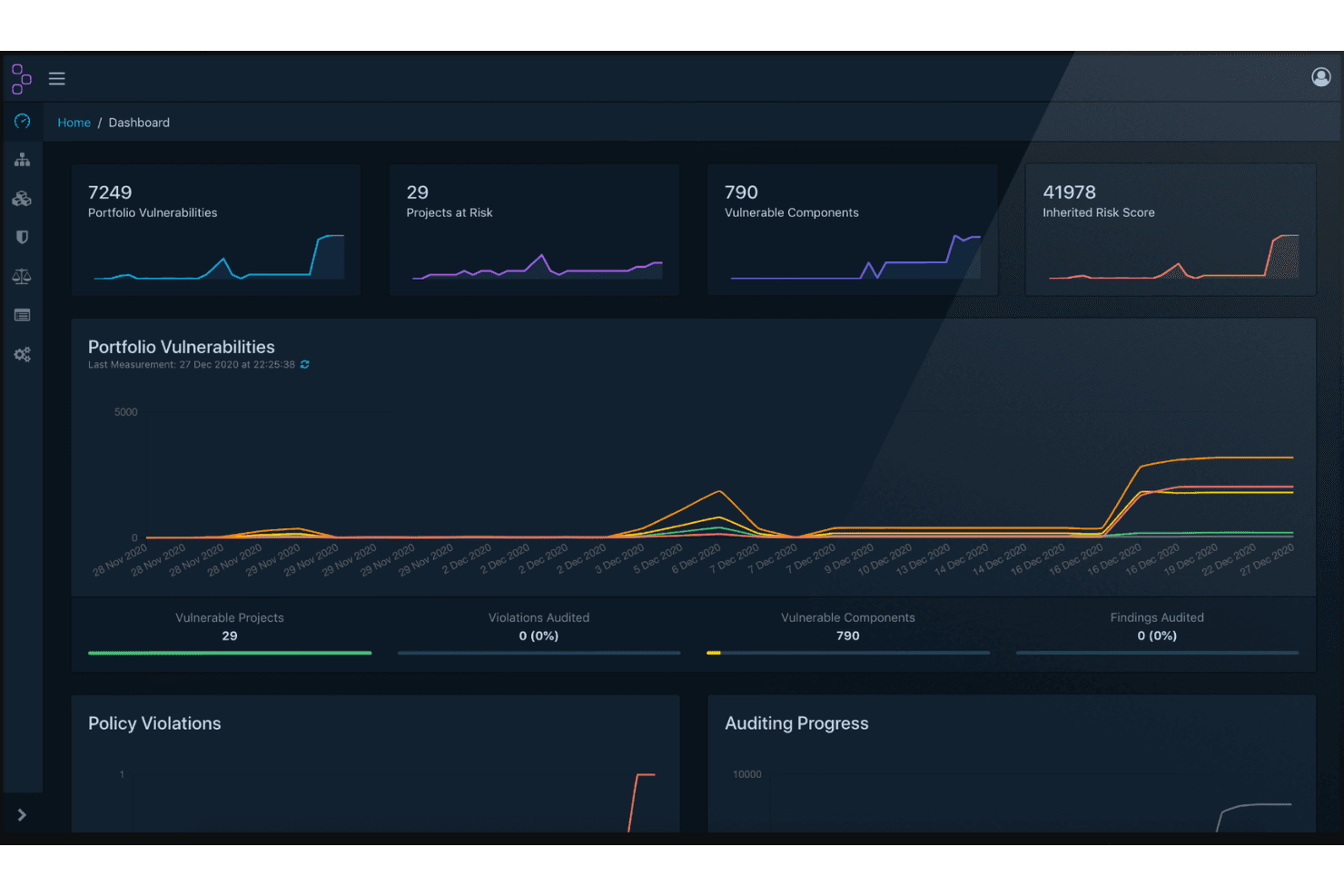
OWASP Dependency-Track displays a security dashboard with portfolio vulnerabilities, projects at risk, vulnerable components, and inherited risk scores. OWASP Dependency-Track is an open-source component analysis platform that ingests CycloneDX SBOMs to inventory software components across projects, detect vulnerabilities, enforce license policies, and monitor software supply chain security at the portfolio level.
Who Is OWASP Dependency-Track Best For?
It's a strong fit for DevSecOps and application security engineers who need portfolio-wide vulnerability monitoring across complex, multi-project software supply chains.
Why I Picked OWASP Dependency-Track
I've included OWASP Dependency-Track in my top picks because no other open-source tool matches its continuous, real-time vulnerability monitoring across a full software portfolio. Rather than scanning on demand, it mirrors feeds from NVD, OSV, and GitHub Advisories, so every component is re-evaluated automatically when new CVEs drop. I also rate its EPSS-based prioritization highly, since it surfaces which vulnerabilities are most likely to be exploited in the wild, not just which ones have the highest CVSS score.
OWASP Dependency-Track Key Features
- Full-stack inventory: Track libraries, containers, operating systems, firmware, hardware, and services across every project version.
- CycloneDX SBOM support: Ingest, analyze, and produce CycloneDX SBOM, HBOM, VEX, and VDR documents.
- Expression-based policy enforcement: Configure advanced access control and policy rules using CEL to automate actions.
- API-first integration: Use the well-documented REST API to connect with CI/CD and automate SBOM ingestion and reporting.
OWASP Dependency-Track Integrations
OWASP Dependency-Track offers native integrations with Slack, Microsoft Teams, Mattermost, GitHub, GitLab, Jenkins, Snyk, Trivy, Sonatype OSS Index, and supports custom integrations through its REST API.
Pros and Cons
Pros:
- Full-stack inventory including hardware and firmware
- Supports CycloneDX SBOM, VEX, and VDR
- Real-time reanalysis with new vulnerability disclosures
Cons:
- No built-in SPDX format support
- Cannot generate SBOMs from source code
Learn more about OWASP Dependency-Track:

cdxgen offers SBOM signing and JWT-based token verification using RS512 algorithm, displaying encoded and decoded CycloneDX payload metadata. cdxgen is an OWASP open-source SBOM generator that produces CycloneDX Bill of Materials documents across 20+ languages, package managers, container images, and artifact types—including cryptography, operations, SaaS, and AI/ML components.
Who Is cdxgen Best For?
cdxgen is a strong fit for DevSecOps engineers and application security teams managing polyglot codebases who need SBOM generation built directly into CI/CD pipelines.
Why I Picked cdxgen
cdxgen earns its spot on my shortlist because it's the reference implementation for CycloneDX SBOM generation, supporting spec versions 1.4 through 1.7 with deep transitive dependency resolution across 20+ ecosystems. What I find genuinely impressive is the reachability analysis via atom, which generates callstack evidence proving whether a vulnerable function is actually reached by your code. I also rely on cdxgen to produce CBOM and OBOM documents alongside standard SBOMs, covering cryptographic inventory and OS-level components in one tool.
cdxgen Key Features
- Native Dependency-Track integration: Automatically submits generated SBOMs to a Dependency-Track server for further analysis.
- Universal SBOM mode: Collects components from all detected manifests in polyglot codebases with a single command.
- RSA BOM signing: Supports cryptographic signing and verification of SBOMs via JSON Web Signatures.
- License and provenance metadata capture: Extracts licenses, PURLs, CPEs, and source evidence for each component.
cdxgen Integrations
cdxgen offers native integrations with OWASP Dependency-Track and OWASP dep-scan, supports GitHub Actions, and provides an API for custom integrations in CI/CD pipelines.
Pros and Cons
Pros:
- Built-in reachability and provenance analysis
- SBOM generation for 20+ ecosystems
- Native CycloneDX support up to 1.7 spec
Cons:
- Limited graphical user interface options
- No native SPDX output available
Learn more about cdxgen:
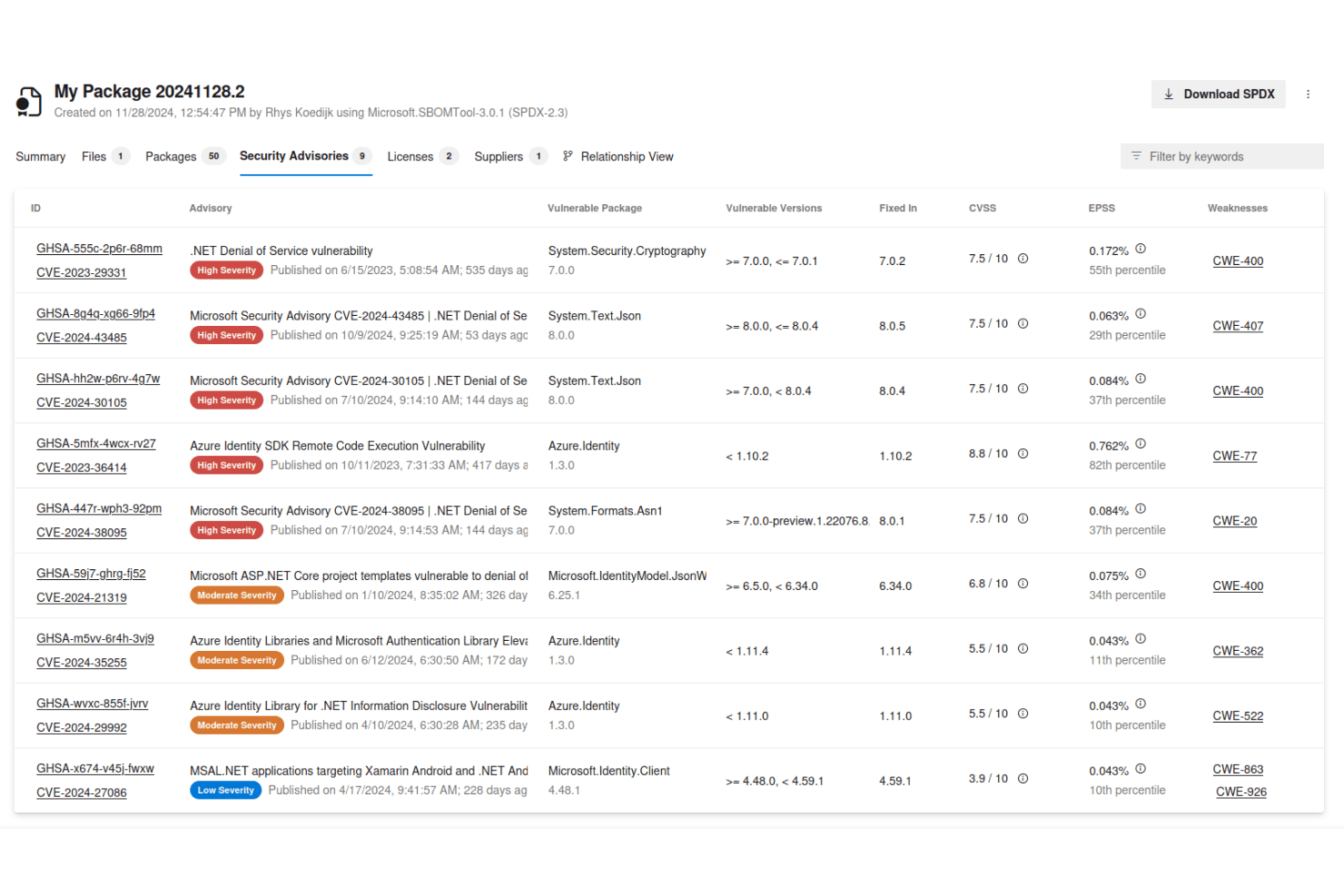
Microsoft SBOM Tool displays a Security Advisories tab listing 9 vulnerabilities with severity ratings, CVSS scores, and affected package details. Microsoft SBOM Tool is an open-source CLI tool that automatically generates SPDX-compatible SBOMs by scanning multi-ecosystem dependencies, capturing component metadata, and validating or redacting SBOM outputs across builds and artifacts.
Who Is Microsoft SBOM Tool Best For?
It's a strong fit for DevSecOps engineers and AppSec teams working in GitHub or Azure DevOps environments who need enterprise-scale SPDX SBOM generation built into their pipelines.
Why I Picked Microsoft SBOM Tool
Microsoft SBOM Tool earns its spot on my shortlist because of its native support for both SPDX 2.2 and SPDX 3.0, which puts it ahead of most open-source alternatives that only target one version. I particularly like the built-in validate and redact commands: validate confirms an existing SBOM against a known drop path, while redact strips file references before external sharing. It's also the same tool Microsoft runs internally across its own software portfolio, which says a lot about its reliability at scale.
Microsoft SBOM Tool Key Features
- Component detection libraries: Scans a wide range of package managers and ecosystems using Microsoft's own component detection engine.
- ClearlyDefined API integration: Enriches SBOM files with license data pulled automatically from the ClearlyDefined API.
- Multi-OS support: Runs on Windows, macOS, and Linux, supporting diverse development and build environments.
- Multiple distribution methods: Available as a WinGet package, Homebrew formula, Docker image, and a global .NET Tool.
Microsoft SBOM Tool Integrations
Microsoft SBOM Tool offers native integrations with GitHub Actions and Azure DevOps Pipelines for automated SBOM generation in CI/CD workflows. An API is available for custom integrations.
Pros and Cons
Pros:
- Includes license data from ClearlyDefined API
- Natively scans multi-ecosystem dependencies
- Generates both SPDX 2.2 and 3.0 SBOMs
Cons:
- Source contribution limited to Microsoft team
- No CycloneDX format support
Learn more about Microsoft SBOM Tool:

Syft generates a human-readable Software Bill of Materials (SBOM) by cataloging 1,045 npm packages from a cloned GitHub repository. Syft is an open-source CLI tool and Go library developed by Anchore that generates SBOMs from container images, filesystems, source code, and archives across 30+ package ecosystems, with output in SPDX, CycloneDX, and Syft JSON formats.
Who Is Syft Best For?
Syft is a natural fit for DevSecOps engineers and application security teams that need to embed SBOM generation directly into CI/CD pipelines.
Why I Picked Syft
Syft earns its spot on my shortlist because no other open-source SBOM tool matches its cataloging depth at this speed. It runs as a single compiled binary with no external dependencies, so I can drop it into any pipeline and start generating SBOMs against container images or filesystems immediately. Its "if it's there, we'll tell you about it" approach captures transitive dependencies across 30+ ecosystems, including Go binaries and Java archives that other tools frequently miss.
Syft Key Features
- SBOM format conversion: Convert generated SBOMs between SPDX, CycloneDX, and Syft JSON formats.
- File-level package discovery: Identify and inventory software components at the file level within images and archives.
- Signed SBOM attestation: Create cryptographically signed SBOM attestations using the in-toto specification.
- Official GitHub Action support: Integrate SBOM generation directly into GitHub workflows with a maintained action.
Syft Integrations
Syft offers an official GitHub Action for native integration with GitHub workflows, supports Docker-based deployment for use with Docker and OCI images, and provides a CLI for use with Jenkins, GitLab, and other CI pipelines. An API and Go library are available for custom integrations.
Pros and Cons
Pros:
- CLI runs in Docker, CI/CD, and locally
- Outputs SPDX, CycloneDX, and Syft JSON
- Handles 30+ ecosystems and formats
Cons:
- Limited Windows package ecosystem support
- No built-in vulnerability scanning
Learn more about Syft:
- 11ProtobomBest for translating between SBOM formats
- 12SW360Best for managing software component lifecycle
- 13Snyk Open SourceBest for tracking open source vulnerabilities
- 14bomctlBest for command-line SBOM management
How I Evaluate Open-Source SBOM Tools
I split evaluation into two layers: baseline SBOM capabilities that get a tool onto the list, and differentiators like VEX support and ecosystem breadth that separate the best.
Core Functionality (Table Stakes For This List)
When I'm selecting tools for my list, I rank each one on a scale from 0 (does not offer the functionality) to 5 (excels in this area) for each core functionality listed below. Then, I calculate the tool's total score into a percentage. Each tool needs to achieve a minimum total score of 65% to be considered for inclusion.
- Open Source License: I check that each tool uses an OSI-approved license and has a publicly accessible repo—source-available but closed-core doesn't qualify.
- SBOM Generation: I look for automated output that captures transitive dependencies, not just top-level manifest entries from a single build target.
- Standard Format Support: Tools should output SPDX or CycloneDX at minimum, since most compliance workflows and downstream consumers expect one or both.
- Multi-Ecosystem Scanning: I evaluate how many package ecosystems a tool covers—npm, Maven, PyPI, Go modules, and container images are a good baseline.
- Component Metadata Capture: Each component entry should include version, license, and identifiers like PURLs or CPEs so you can correlate with vulnerability databases.
- CI/CD Integration: I look for CLI or plugin support that fits into pipelines on platforms like Jenkins, GitHub Actions, or GitLab CI without heavy setup.
Once I have a list of tools that meet the criteria, I consider what sets each platform apart.
Differentiating Factors (What Sets Vendors Apart)
Here's how I compare and contrast different vendors:
Standout Features
Vulnerability correlation matters a lot. I look for tools that connect to databases like NVD and OSV, mapping CVEs directly to SBOM components. VEX document generation takes this further by flagging which vulnerabilities actually affect your shipped product. This cuts alert noise for downstream consumers. I also evaluate container and IaC scanning depth, since transitive dependencies inside images and Kubernetes manifests won't appear in a basic manifest parse.
Beyond Features
Community governance is a big signal for me. Tools backed by foundations like OWASP or the Linux Foundation tend to show healthier commit activity and contributor diversity, which matters when you're betting your compliance workflow on a project long-term. Regulatory alignment is another factor I evaluate—whether outputs meet NTIA minimum SBOM elements and can serve as auditable artifacts for procurement. I also consider extensibility, especially API access and interoperability with platforms like Dependency-Track or GUAC.
How to Choose Open-Source SBOM Tools
It’s easy to get bogged down in long feature lists and complex pricing structures. To help you stay focused as you work through your unique software selection process, here’s a checklist of factors to keep in mind:
| Factor | What to Consider |
|---|---|
| FactorScalability | What to ConsiderWill this tool handle growth in codebases, languages, and teams as your organization scales up? |
| FactorIntegrations | What to ConsiderCan you connect the tool to your CI/CD pipelines, ticketing systems, and existing vulnerability feeds? |
| FactorCustomizability | What to ConsiderHow easily can workflows, policies, or SBOM output formats be tailored to your organization’s needs? |
| FactorEase of use | What to ConsiderWill engineers actually use the tool daily or is the learning curve too steep for fast-moving teams? |
| FactorImplementation and onboarding | What to ConsiderHow long does it take to deploy and start generating meaningful SBOM outputs for your core projects? |
| FactorCost | What to ConsiderAre there infrastructure or support expenses that may arise beyond the open source license? |
| FactorSecurity safeguards | What to ConsiderDoes the tool introduce new attack surfaces, require sensitive credentials, or have a strong update process? |
| FactorCompliance requirements | What to ConsiderCan the tool support evidence and reporting needs for frameworks like EO 14028 or EU CRA out of the box? |
What Are Open-Source SBOM Tools?
Open-source SBOM tools are publicly available software that help you create, manage, and analyze software bills of materials (SBOMs) in your development workflows. These tools let you inventory project dependencies, generate standardized SBOM documents, and integrate with pipelines to support compliance, vulnerability tracking, and license risk management for your software supply chain.
Features
When selecting open-source SBOM tools, keep an eye out for the following key features:
- SBOM generation: Produces an extensive software bill of materials, automatically inventorying software components, dependencies, and versions for each build.
- Standard format support: Outputs SBOMs using widely accepted formats like SPDX or CycloneDX, making them compatible with regulators, customers, and downstream tools.
- Multi-ecosystem scanning: Analyzes source code, binaries, and container images across multiple languages and ecosystems for a complete dependency picture.
- Component metadata capture: Records important details such as version, supplier, licensing, PURLs, and hashes, supporting tracking and compliance use cases.
- Vulnerability correlation: Links component details in the SBOM to public vulnerability databases, helping you find and monitor CVEs tied to your dependencies.
- License compliance analysis: Flags incompatible or high-risk open source licenses, supporting due diligence and legal reviews in software delivery.
- CI/CD integration: Connects directly to your build systems and pipelines using CLI tools, plugins, or APIs, allowing for automation and policy enforcement.
- Container and IaC scanning: Examines container images and infrastructure-as-code files to surface dependencies that might not show up in standard manifests.
- VEX document support: Generates Vulnerability Exploitability eXchange (VEX) documents to clarify which vulnerabilities in your SBOM actually affect your product.
- API access: Lets you automate SBOM management and query component data programmatically, fitting easily into internal security or compliance workflows.
Benefits
Implementing open-source SBOM tools provides several benefits for your team and your business. Here are a few you can look forward to:
- Improved supply chain transparency: Gain a clear, automated view of all software dependencies across projects using SBOM generation and multi-ecosystem scanning.
- Stronger compliance posture: Meet regulatory requirements like EO 14028 or EU CRA by producing standardized, auditable SBOMs and compliance-ready metadata.
- Faster vulnerability response: Correlate component data with vulnerability databases and generate VEX documents to quickly identify, assess, and act on real security risks.
- Reduced license risk: Automatically detect and review open source licenses in your dependencies, helping you avoid copyleft or incompatible components.
- DevSecOps workflows: Integrate SBOM creation and security checks directly into CI/CD pipelines for automated, policy-driven controls.
- Lower operational costs: Use open source and API-accessible tools to avoid proprietary lock-in and keep long-term management costs predictable.
- Better audit readiness: Capture the metadata, provenance, and reporting detail that matter when customers or partners request supply chain assurance.
Costs & Pricing
Selecting open-source SBOM tools requires an understanding of the various pricing models and plans available. Costs vary based on features, team size, add-ons, and more. The table below summarizes common plans, their average prices, and typical features included in open-source SBOM solutions:
Plan Comparison Table for Open-Source SBOM Tools
| Plan Type | Average Price | Common Features |
|---|---|---|
| Plan TypeFree Plan | Average Price$0 | Common FeaturesBasic SBOM generation, standard format support, CLI access, and community documentation. |
| Plan TypePersonal Plan | Average Price$5-$20/user/month | Common FeaturesAdvanced SBOM features, additional language support, limited CI/CD integrations, and priority email support. |
| Plan TypeBusiness Plan | Average Price$20-$50/user/month | Common FeaturesTeam management, policy enforcement, container and IaC scanning, extended API access, and basic reporting. |
| Plan TypeEnterprise Plan | Average Price$50-$100/user/month | Common FeaturesSSO/SAML integration, advanced compliance features, audit logging, premium support, and custom onboarding. |
Open-Source SBOM Tools FAQs
Here are some answers to common questions about open-source SBOM tools:
How do open-source SBOM tools handle new or custom package ecosystems?
Most tools focus on widely used ecosystems, but some allow you to define custom parsers or plugins. If your stack includes niche or in-house packages, check documentation for extension points and active community contributions.
Can I use open-source SBOM tools in air-gapped or highly regulated environments?
Yes, many open-source SBOM tools run completely offline and don’t require external calls. Make sure to verify that all required databases or resources are locally mirrorable for vulnerability and license checking.
Are SBOM outputs from different tools always compatible?
Not always. While SPDX and CycloneDX are standards, each tool may implement them slightly differently. It’s important to validate output with downstream consumers and, if needed, run conversions or post-processing to meet partner requirements.
What is the maintenance overhead for open-source SBOM tools?
Maintenance often involves updating vulnerability feeds, keeping the tool in sync with language ecosystem updates, and periodic configuration reviews. Evaluate project activity and community health before making tools a core dependency.
Can I trust open-source SBOM tools for legal compliance and external audits?
Open-source SBOM can help meet compliance needs if they adhere to regulatory SBOM guidelines. Always confirm outputs cover required elements and consult compliance experts to review documentation before submitting to partners or auditors.