

The strongest Microsoft Project alternatives give you clear timelines, flexible workflows, and the collaboration tools your IT projects demand. If you’re searching for Microsoft Project alternatives, you’re likely dealing with resource constraints or process gaps that classic tools don’t solve—or you want a platform your team will actually use.
This list covers top options handpicked for IT specialists who need visibility, automation, and confidence working across interconnected systems. You’ll find choices that support everything from agile software releases to complex portfolio tracking, so you can pick the approach that matches your team’s reality.
What is Microsoft Project?
Microsoft Project is project management software for planning, scheduling, and tracking tasks, timelines, and resources. IT teams use it to organize deliverables, assign responsibilities, and monitor progress on complex projects. Its features include Gantt charts, resource allocation, and reporting tools designed for both small-scale and enterprise initiatives. Many organizations look for alternatives when they need more flexibility, modern collaboration features, or integration options suited to today’s IT workflows.
Microsoft Project Alternatives Comparison Table
This comparison table summarizes pricing details for my top Microsoft Project alternative selections:
| Tool | Best For | Trial Info | Price | ||
|---|---|---|---|---|---|
| 1 | Best for integrated time and financial tracking | 14-day free trial | From $10/user/month (billed annually) | Website | |
| 2 | Best for teams needing advanced view options | Free plan available | From $7/user/month (billed annually) | Website | |
| 3 | Best for open source scheduling tools | 14-day free trial + free plan available | From $7.25/user/month (billed annually) | Website | |
| 4 | Best for large-scale portfolio scenario planning | Free demo available | Pricing upon request | Website | |
| 5 | Best for customizable workflow automation | 14-day free trial | From $10/user/month (billed annually) | Website | |
| 6 | Best for grid-like planning with flexible views | 30-day free trial | From $12/user/month | Website | |
| 7 | Best for simplified cross-team coordination | Free plan available | From $10.99/user/month (billed annually) | Website | |
| 8 | Best for client collaboration controls | Free plan available; 14-day free trial | From $9.99/user/month (billed annually) | Website | |
| 9 | Best for agile software release planning | Free plan available | From $8.48/user/month | Website | |
| 10 | Best for enterprise program management oversight | Free demo available | Pricing upon request | Website |


Why Trust Our Software Recommendations
6,700+
Reviews
20
Industry experts
16+
Evaluation factors
14
Years
Our team has been testing and reviewing software since 2012. As tech leaders ourselves, we know how difficult—and important—it is to choose the right software.
For this guide, we evaluated tools using hands-on testing and independent research, scoring tools using our selection criteria.
Our reviews reflect our human editorial judgment, not a sales pitch.
Expert reviewers:
- Paulo Gardini MiguelTech Director
 Tim FisherVP of AI
 Gabriel RosasTech Lead & Software Architect
 Christhian GruhnTech Lead & Platform Architect

Best Microsoft Project Alternatives Reviews
Below are my detailed summaries of the best Microsoft Project alternatives that made it onto my shortlist. My reviews offer a detailed look at the features, best use cases, and integrations of each software to help you find the best one for you.
 Best for integrated time and financial tracking
- 14-day free trial
- From $10/user/month (billed annually)
Visit WebsiteCustomer Rating:4.5/5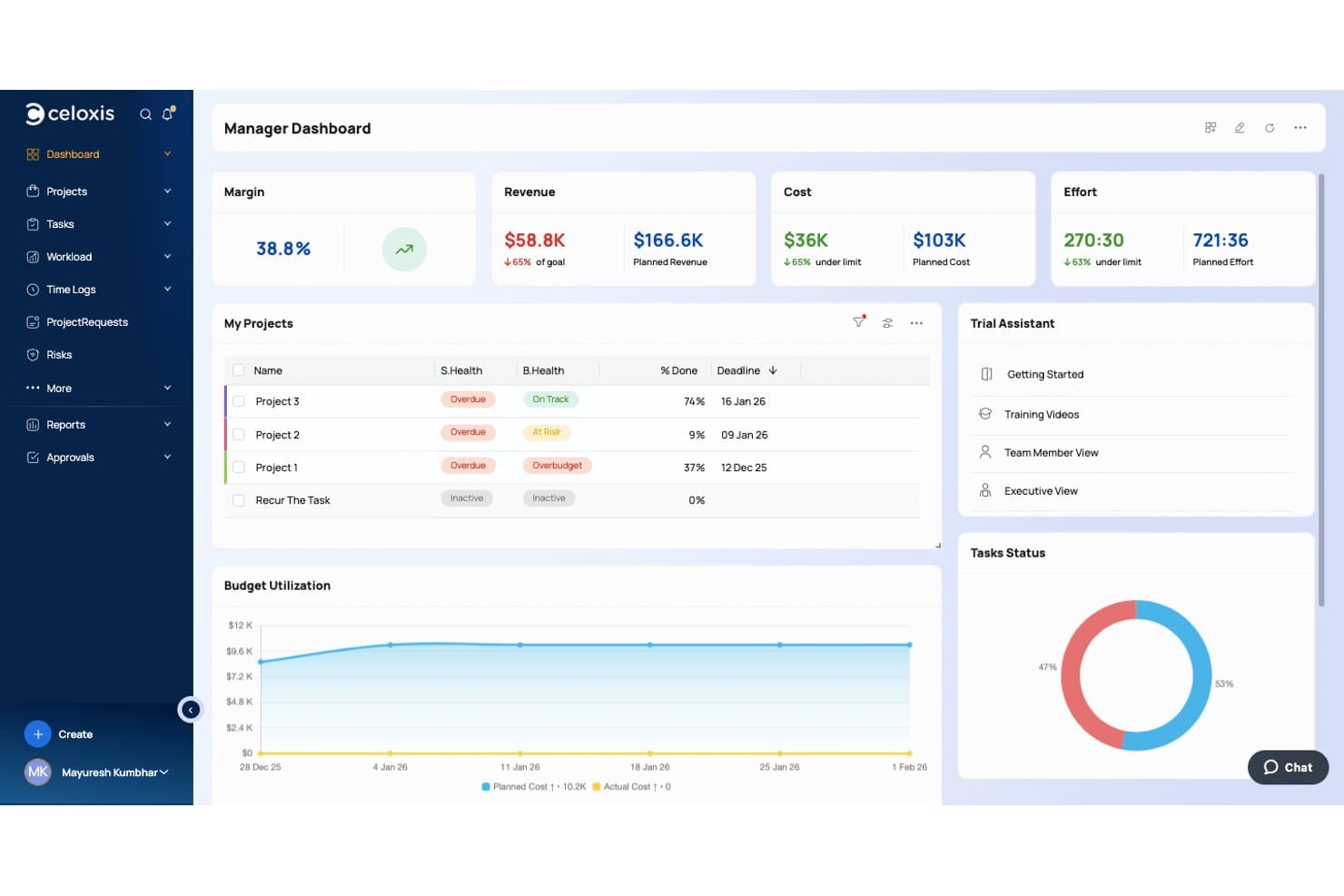
Celoxis offers a Manager Dashboard with project health tracking, budget utilization charts, margin metrics, and task status visuals — making it a strong Microsoft Project alternative. Celoxis is an enterprise project and portfolio management platform built for IT teams and PMOs that need Microsoft Project-level scheduling depth with the added flexibility of cloud deployment, cross-project visibility, and lower licensing costs.
Who Is Celoxis Best For?
Celoxis is a strong fit for mid-size to large organizations running multiple concurrent projects that need portfolio-level oversight alongside granular project financials.
Why Celoxis Is a Good Microsoft Project Alternative
I picked Celoxis as one of the best because its financial tracking goes deeper than any other tool on this list. Every task and resource assignment carries cost data, so budget vs. actual figures update in real time as your team logs hours. You can set billing rates by role, track project expenses, and generate client-facing financial reports, all without routing data through a separate finance tool.
Celoxis Key Features
- Interactive Gantt charts: Visualize project timelines, dependencies, and milestones with advanced scheduling and real-time updates.
- Portfolio dashboards: Monitor multiple projects with drill-down metrics, project prioritization, and strategic scenario planning.
- Custom workflow apps: Design and automate business processes with no-code workflow builders tailored to your team's needs.
- Client portal: Provide external stakeholders controlled access to view project status, tasks, and documents securely.
Celoxis Integrations
Celoxis offers native integrations with Google Drive, Microsoft Project, Excel, Outlook, Salesforce, Jira, Slack, QuickBooks Online, Azure DevOps, and Trello. It also connects with Zapier and provides an API for custom integrations.
Pros and Cons
Pros:
- Auto-scheduling adjusts Gantt charts dynamically
- Real-time budget vs. actual cost tracking
- Directly imports Microsoft Project .MPP files
Cons:
- Complex initial setup for large projects
- UI feels dated versus modern alternatives
Learn more about Celoxis: Best for teams needing advanced view options
- Free plan available
- From $7/user/month (billed annually)
Visit WebsiteCustomer Rating:4.6/5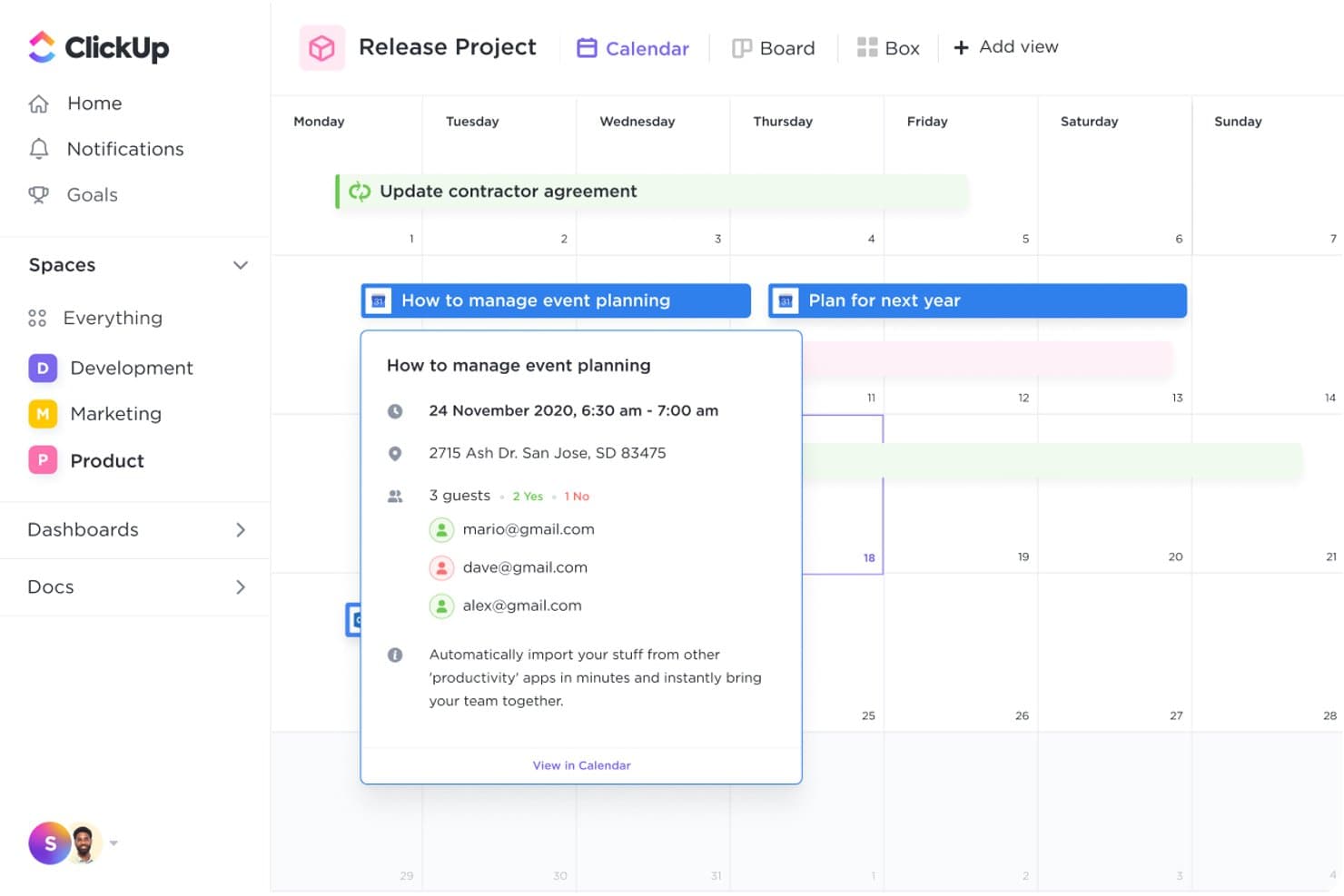
ClickUp offers a Calendar view with event details, guest management, and multi-view options as a Microsoft Project alternative. ClickUp is a flexible, all-in-one project management platform that appeals to IT teams and development leads who need Gantt charts, Agile sprint tools, and cross-team collaboration without the cost or rigidity of traditional enterprise project management tools.
Who Is ClickUp Best For?
ClickUp is a strong fit for mid-sized technical teams that manage multiple project types simultaneously and need one platform to handle both Agile and traditional workflows.
Why ClickUp Is a Good Microsoft Project Alternative
I've included ClickUp in my top picks because no other Microsoft Project alternative gives you this many ways to visualize the same project data. I regularly switch between the Gantt view for dependency mapping, the Timeline view for release planning, and the Everything view to get a cross-workspace snapshot without rebuilding anything. The Mind Map view is particularly useful for mapping out infrastructure dependencies before formalizing them into structured tasks.
ClickUp Key Features
- Automated workflow builder: Set up no-code automations for process steps, recurring tasks, and notifications across projects.
- Native time tracking: Track time spent on tasks directly within the platform for more accurate project reporting.
- Portfolio and program dashboards: View cross-project status, resource allocation, and milestones in a unified dashboard.
- Client and guest collaboration: Invite external users or clients with granular permissions for secure, controlled project access.
ClickUp Integrations
ClickUp offers over 50 native integrations, including Slack, Microsoft Teams, Google Drive, OneDrive, Dropbox, GitHub, GitLab, Bitbucket, HubSpot, and Zoom. It also connects with Zapier and provides an API for custom integrations.
Pros and Cons
Pros:
- No-code automations reduce manual project overhead
- Sprints and Kanban available without add-ons
- 15+ views for visualizing project data
Cons:
- Baseline comparison reporting is not built in
- No native budget or cost tracking
Learn more about ClickUp: Best for open source scheduling tools
- 14-day free trial + free plan available
- From $7.25/user/month (billed annually)
Visit WebsiteCustomer Rating:4.5/5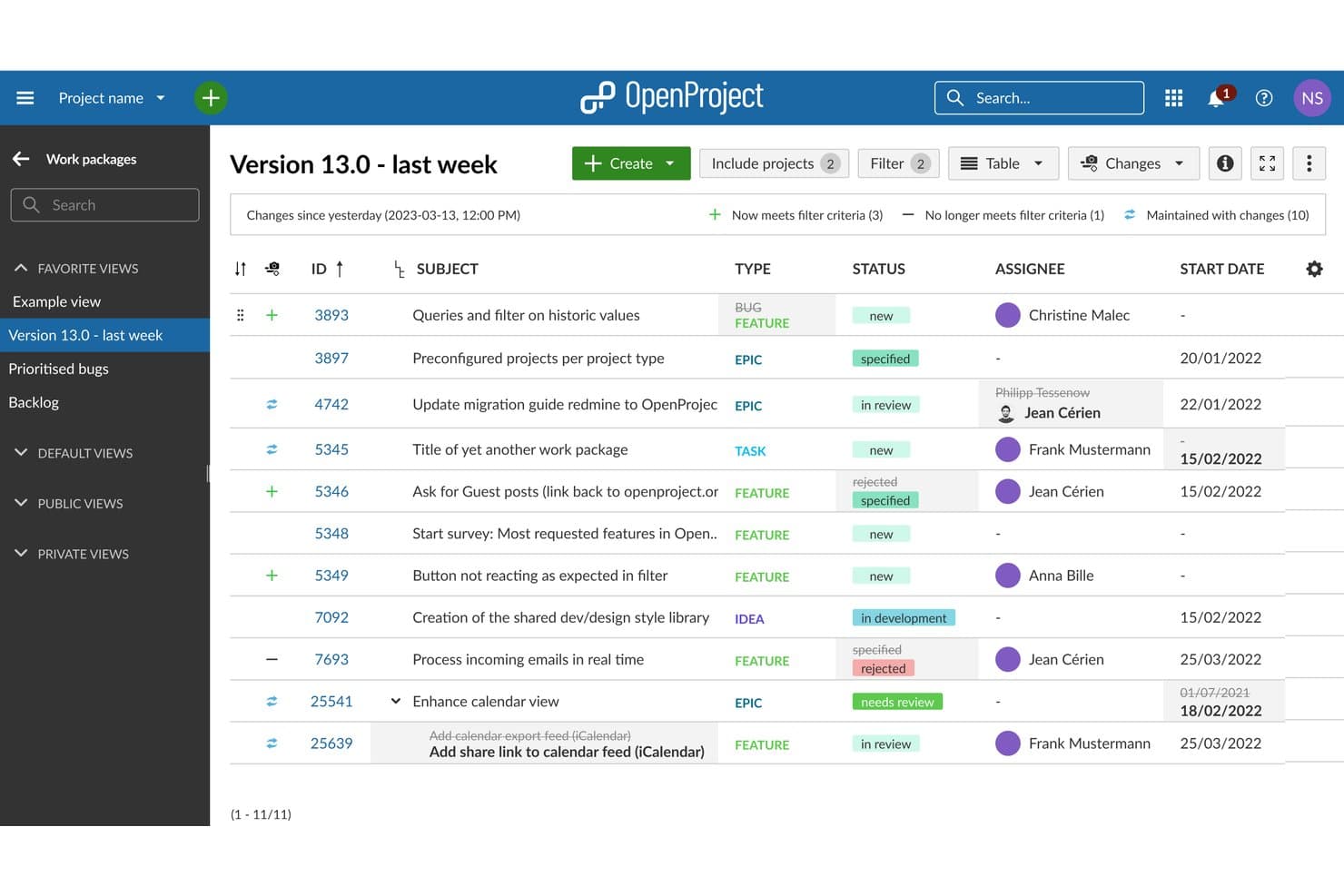
OpenProject offers a baseline comparison mode that highlights work package changes over time, including status updates, assignee changes, and new items added since a selected date. OpenProject is an open source project management platform that gives IT teams, DevOps programs, and engineering leads full control over their project data with self-hosted Gantt scheduling, agile boards, and portfolio management.
Who Is OpenProject Best For?
OpenProject suits teams in regulated industries or public sector organizations that need on-premises deployment and full ownership of their project data.
Why OpenProject Is a Good Microsoft Project Alternative
I've included OpenProject in my top picks because its open source Gantt engine is one of the most capable you'll find without a proprietary license. It supports both automatic and manual scheduling modes, all four dependency types with lag and lead time, and baseline comparison so I can track plan-versus-actual drift across a live project timeline. What makes it a genuine Microsoft Project replacement is that I can self-host the entire instance, keeping project data inside my own infrastructure.
OpenProject Key Features
- Kanban and agile boards: Teams can manage sprints, backlogs, and task status using interactive Kanban and Scrum boards.
- Work packages and hierarchies: Create, nest, and link tasks, milestones, and subprojects with multiple relationship types.
- Wiki and documentation module: Keep project documentation, meeting notes, and process guides connected to your project workspace.
- Time and cost tracking: Log hours and configure rates for each task, with integrated reporting on project expenses and labor effort.
OpenProject Integrations
OpenProject offers native integrations with GitHub, GitLab, Nextcloud, OneDrive, SharePoint, XWiki, and openDesk, and provides an API for custom integrations.
Pros and Cons
Pros:
- Community edition is free and open source
- Gantt and agile boards in one platform
- Full self-hosting option keeps data on-premises
Cons:
- Resource management less mature than desktop alternatives
- Advanced features locked behind Enterprise licensing tiers
Learn more about OpenProject: Best for large-scale portfolio scenario planning
- Free demo available
- Pricing upon request
Visit WebsiteCustomer Rating:4.2/5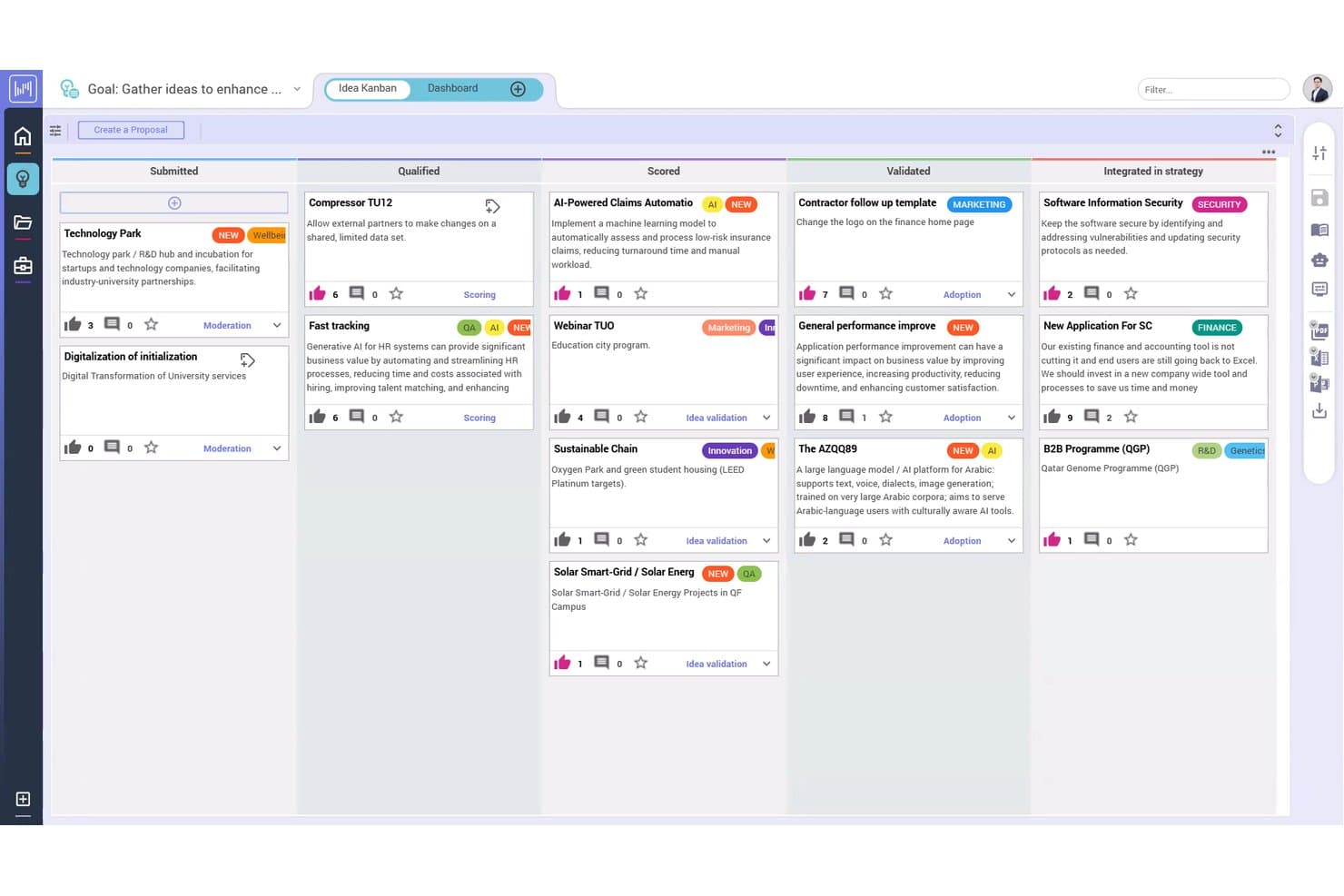
Planisware offers an Idea Kanban board that visually tracks proposals across pipeline stages from Submitted to Integrated in strategy. Planisware is an AI-powered portfolio management platform for large enterprises and IT PMOs that need to connect strategic planning with project execution across complex, multi-project environments.
Who Is Planisware Best For?
It's a strong fit for enterprise PMO directors and IT portfolio managers in industries like life sciences, R&D, and engineering managing high-complexity, multi-portfolio programs.
Why Planisware Is a Good Microsoft Project Alternative
Planisware earns its spot on my shortlist because its AI-driven portfolio optimization does something MS Project simply can't: it runs Particle Swarm Optimization across your entire portfolio in seconds, balancing resources, timing, and constraints simultaneously. I also use its scenario planning tools to model what-if investment decisions before locking in a roadmap. When a new project request comes in, I can immediately see how it reshapes capacity and priorities across every active initiative.
Planisware Key Features
- Multiple view flexibility: Switch between Gantt, Kanban, calendar, and workload views to fit different planning styles.
- Native time tracking: Track project hours directly within tasks for precise resource accounting.
- Automated workflow builder: Set up process automation for tasks, approvals, and notifications without coding.
- Portfolio and program dashboards: Monitor key metrics and dependencies across multiple projects in real time.
Planisware Integrations
Planisware offers over 20 native integrations, including Jira, Microsoft Project, Microsoft Teams, Microsoft SharePoint, Google Docs, Google Sheets, Google Slides, Microsoft 365, Microsoft Power BI, Okta, and SAP. An API is available for custom integrations.
Pros and Cons
Pros:
- Scales across large, complex multi-portfolio programs
- EVM built into core scheduling workflows
- AI-driven optimization balances resources across portfolios
Cons:
- Not suited for small or agile teams
- Steep implementation curve for new administrators
Learn more about Planisware: Best for customizable workflow automation
- 14-day free trial
- From $10/user/month (billed annually)
Visit WebsiteCustomer Rating:4.3/5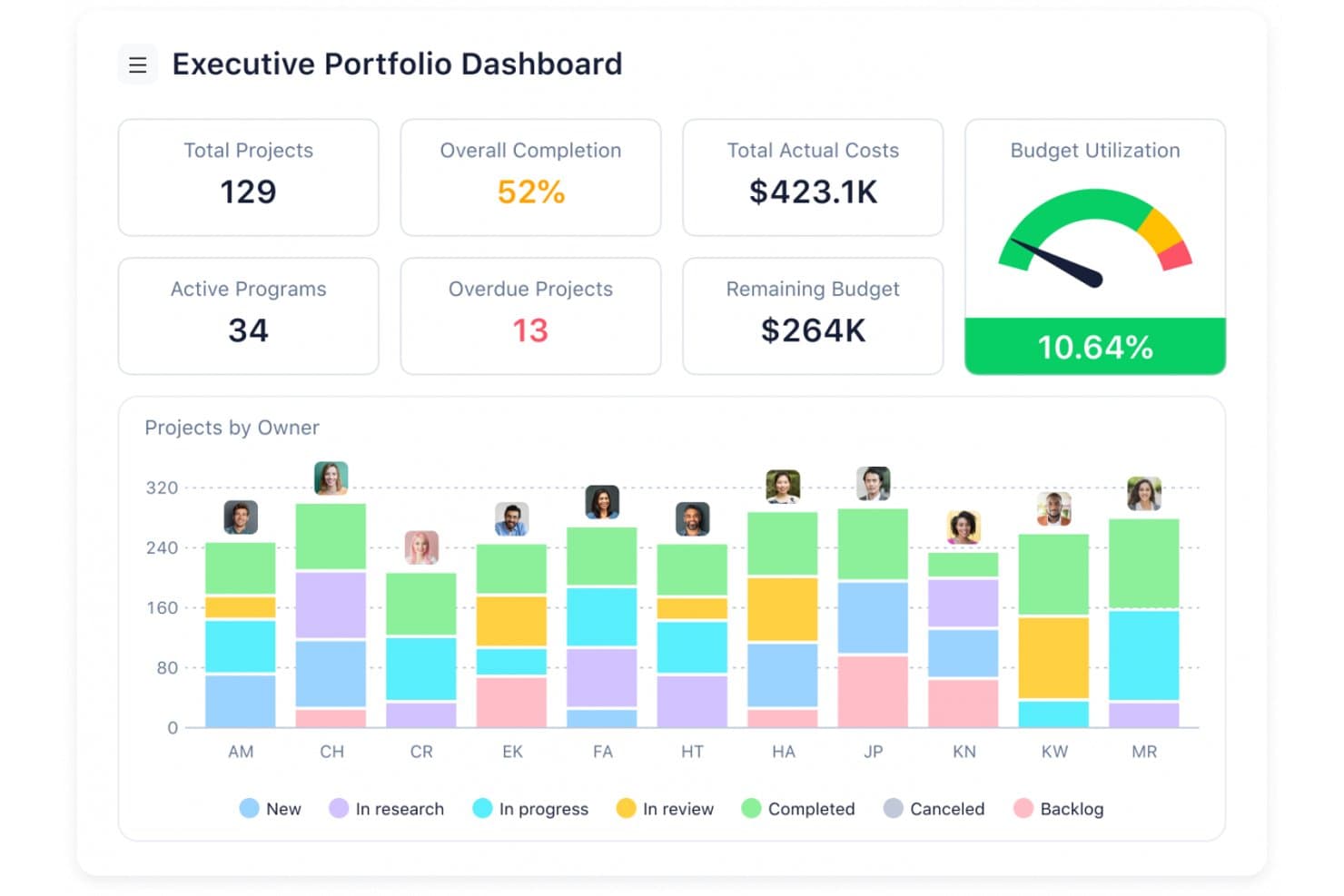
Wrike offers an Executive Portfolio Dashboard that displays project status, budget utilization, costs, and project breakdowns by owner in a visual analytics interface. Wrike is a cloud-based project management platform built for cross-functional teams who need Gantt charts, resource planning, and portfolio visibility without the steep licensing costs and desktop-only constraints of Microsoft Project.
Who Is Wrike Best For?
Wrike fits mid-size to enterprise IT teams and PMOs that manage multiple concurrent projects and need a single platform to coordinate work across departments.
Why Wrike Is a Good Microsoft Project Alternative
Wrike earns its spot on my shortlist because of how far you can push its workflow automation without writing a single line of code. I particularly like the rule-based automation builder, which lets my team trigger status changes, reassignments, and notifications based on custom conditions. Pair that with dynamic request forms that auto-route incoming work into the right project structure, and you get a level of process control that MS Project simply doesn't offer natively.
Wrike Key Features
- Portfolio and program dashboards: Visualize multiple projects and programs with roll-up dashboards and real-time health metrics.
- Native time tracking: Log billable hours or time spent directly on each task and project.
- Multiple views flexibility: Switch between Gantt, Kanban, calendar, and workload views for different team needs.
- Client and guest collaboration: Invite external collaborators with granular permission controls for secure client or partner access.
Wrike Integrations
Wrike offers hundreds of native integrations, including Google Workspace, Microsoft 365, Jira, GitHub, Salesforce, Slack, Adobe Creative Cloud, Box, and Zoom. It also provides an API for custom integrations.
Pros and Cons
Pros:
- Runs natively on Mac, Linux, and browsers
- Real-time portfolio dashboards span multiple projects
- No-code automation reduces manual scheduling overhead
Cons:
- Reporting views lack deep customization options
- Advanced resource planning gated behind premium plans
Learn more about Wrike: Best for grid-like planning with flexible views
- 30-day free trial
- From $12/user/month
Visit WebsiteCustomer Rating:4.4/5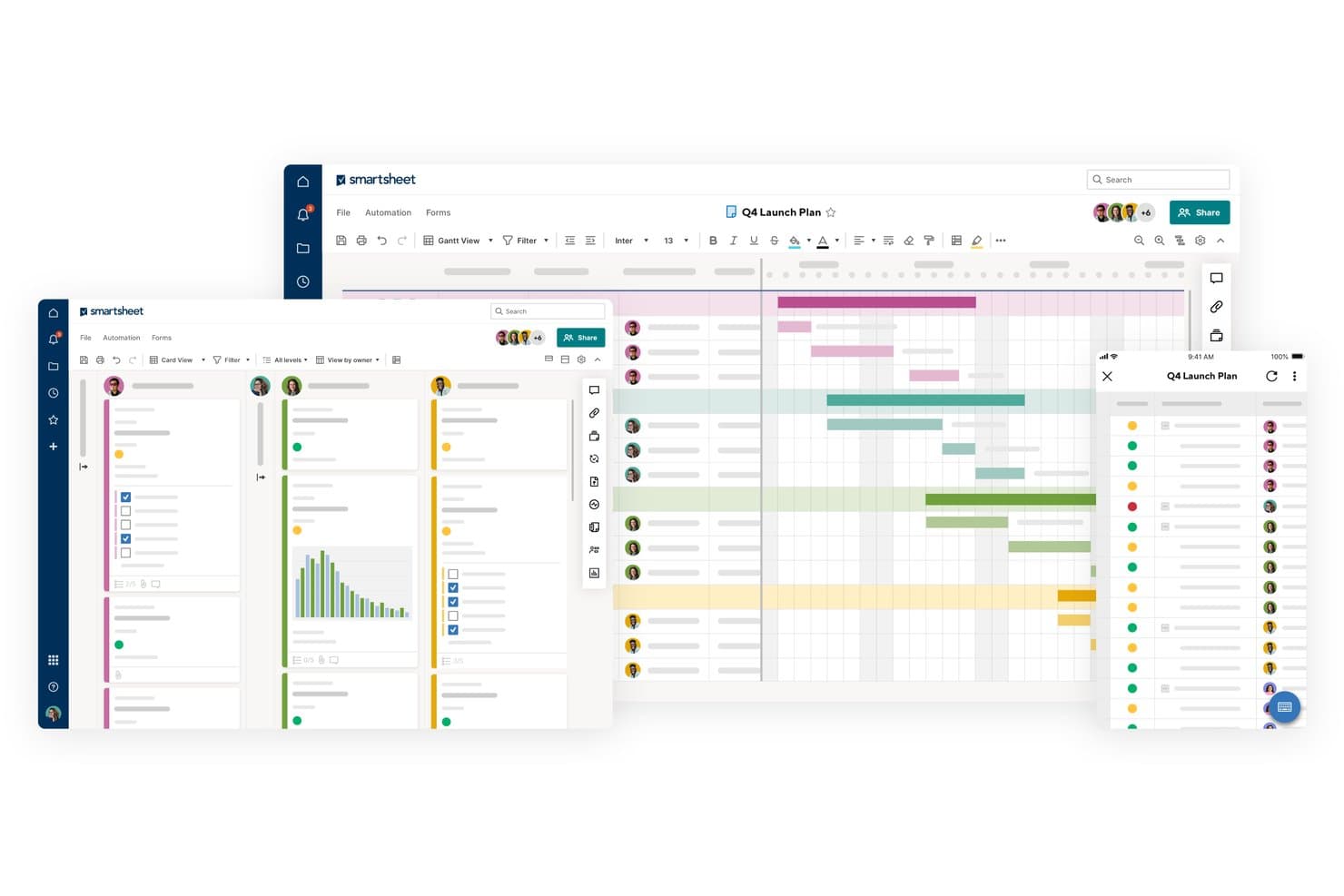
Smartsheet offers multiple project views including Gantt, Card, and mobile views for managing a Q4 Launch Plan with team assignments and task statuses. Smartsheet is a spreadsheet-style work management platform that gives IT project managers and PMO teams a familiar grid-based interface with real-time collaboration, Gantt scheduling, and portfolio-level visibility.
Who Is Smartsheet Best For?
Smartsheet is a strong fit for mid-to-large enterprises running PMO functions that need standardized project templates and portfolio governance across multiple teams.
Why Smartsheet Is a Good Microsoft Project Alternative
I picked Smartsheet for this list because its grid view genuinely replicates the spreadsheet logic IT teams already think in, without locking you into MS Project's rigid file-based structure. You can switch the same project data between Gantt, board, calendar, and timeline views without rebuilding anything. I especially like how Control Center lets PMO teams push template updates across hundreds of active projects simultaneously.
Smartsheet Key Features
- Automated workflow builder: Set up custom notification, approval, and task automation rules without coding.
- Portfolio dashboards: Create roll-up dashboards to monitor project health, status, and budgets across multiple programs.
- Guest collaboration permissions: Invite external stakeholders or clients to collaborate on sheets using granular access controls.
- Native time tracking: Track hours worked directly on tasks and projects for accurate reporting and billing.
Smartsheet Integrations
Smartsheet offers 100+ native integrations, including Microsoft 365, Teams, Outlook, Google Workspace, Slack, Jira, Salesforce, DocuSign, Adobe Creative Cloud, and Box. An API is available for custom integrations.
Pros and Cons
Pros:
- Switches between Gantt, board, and calendar views
- Control Center scales templates across many projects
- Grid view mirrors spreadsheet-style project planning
Cons:
- Budget tracking requires manual formula configuration
- Deep scheduling lacks MS Project's native engine
Learn more about Smartsheet: Best for simplified cross-team coordination
- Free plan available
- From $10.99/user/month (billed annually)
Visit WebsiteCustomer Rating:4.4/5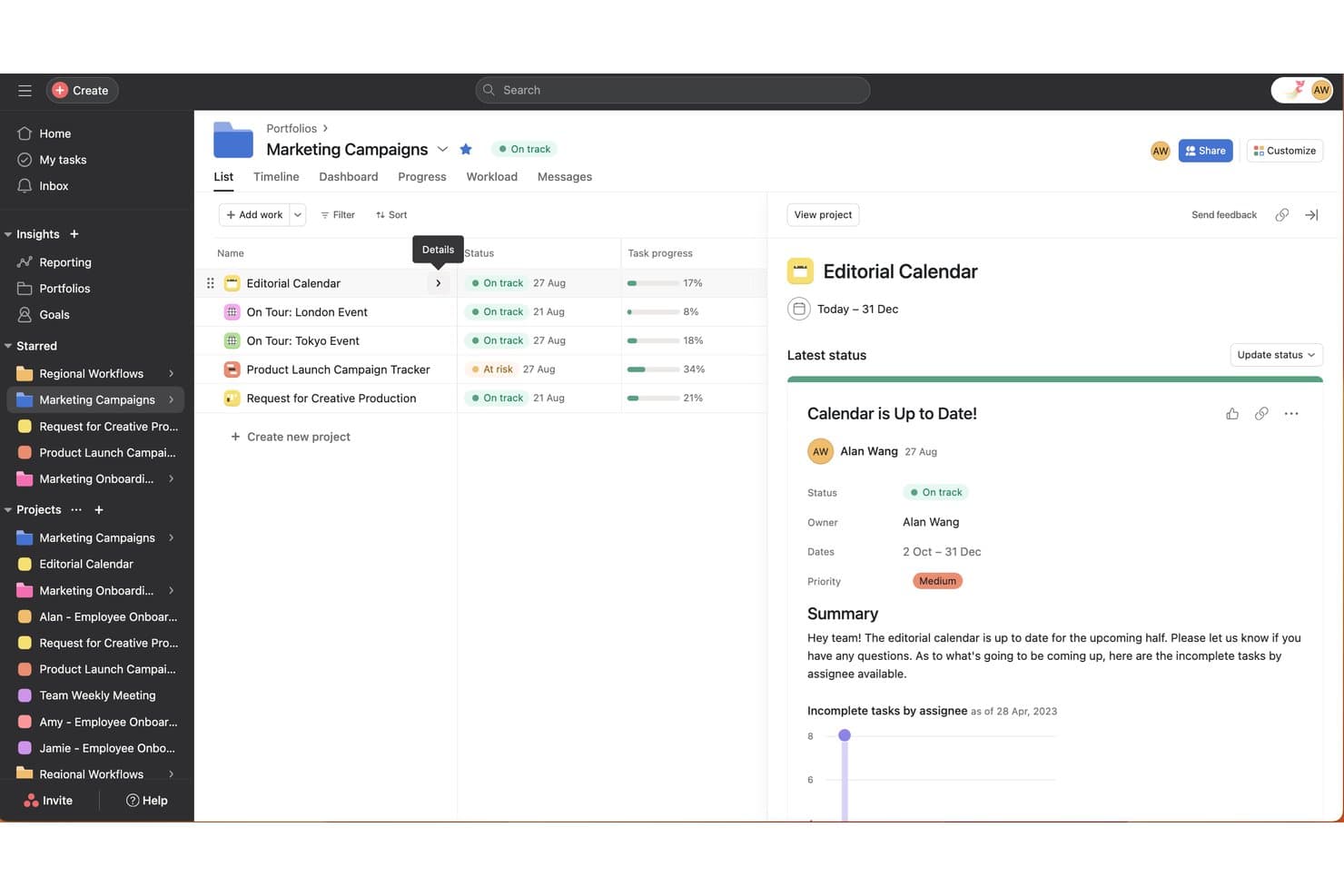
Asana offers a Portfolio view that lets teams track multiple marketing projects, statuses, and progress in one centralized dashboard. Asana is a work management platform built for cross-functional teams that need to coordinate tasks, track project progress, and manage portfolios without the complexity and overhead of traditional project management tools like Microsoft Project.
Who Is Asana Best For?
Asana suits project managers and team leads at mid-size to enterprise organizations who need a collaborative, easy-to-adopt alternative to heavyweight scheduling tools.
Why Asana Is a Good Microsoft Project Alternative
I've included Asana in my top picks because its Portfolios feature gives you a single view across every active project, which is exactly what Microsoft Project lacks for teams juggling multiple workstreams. Multi-home tasks let the same task live in two different projects at once, so handoffs between dev and QA don't create duplicate entries. The no-code Workflow Builder handles cross-team approval routing without any configuration overhead.
Asana Key Features
- Workflow Builder: Create automated processes to standardize project steps without code.
- Native time tracking: Track hours directly within tasks across projects and export time data as needed.
- Portfolio dashboards: View, prioritize, and monitor multiple projects’ health and progress from a central dashboard.
- Universal workload view: Analyze team member capacity and workload across all projects for resource planning.
Asana Integrations
Asana offers over 100 native integrations, including Microsoft 365, Google Workspace, Slack, Zoom, Jira Cloud, Salesforce, Tableau, Power BI, and Adobe Creative Cloud. An API is available for custom integrations.
Pros and Cons
Pros:
- Multiple project views including Gantt and board
- Cross-project portfolio views built in
- No-code workflow automation across projects
Cons:
- Limited dependency types compared to Microsoft Project
- No native project baseline or variance tracking
Learn more about Asana: Best for client collaboration controls
- Free plan available; 14-day free trial
- From $9.99/user/month (billed annually)
Visit WebsiteCustomer Rating:4.4/5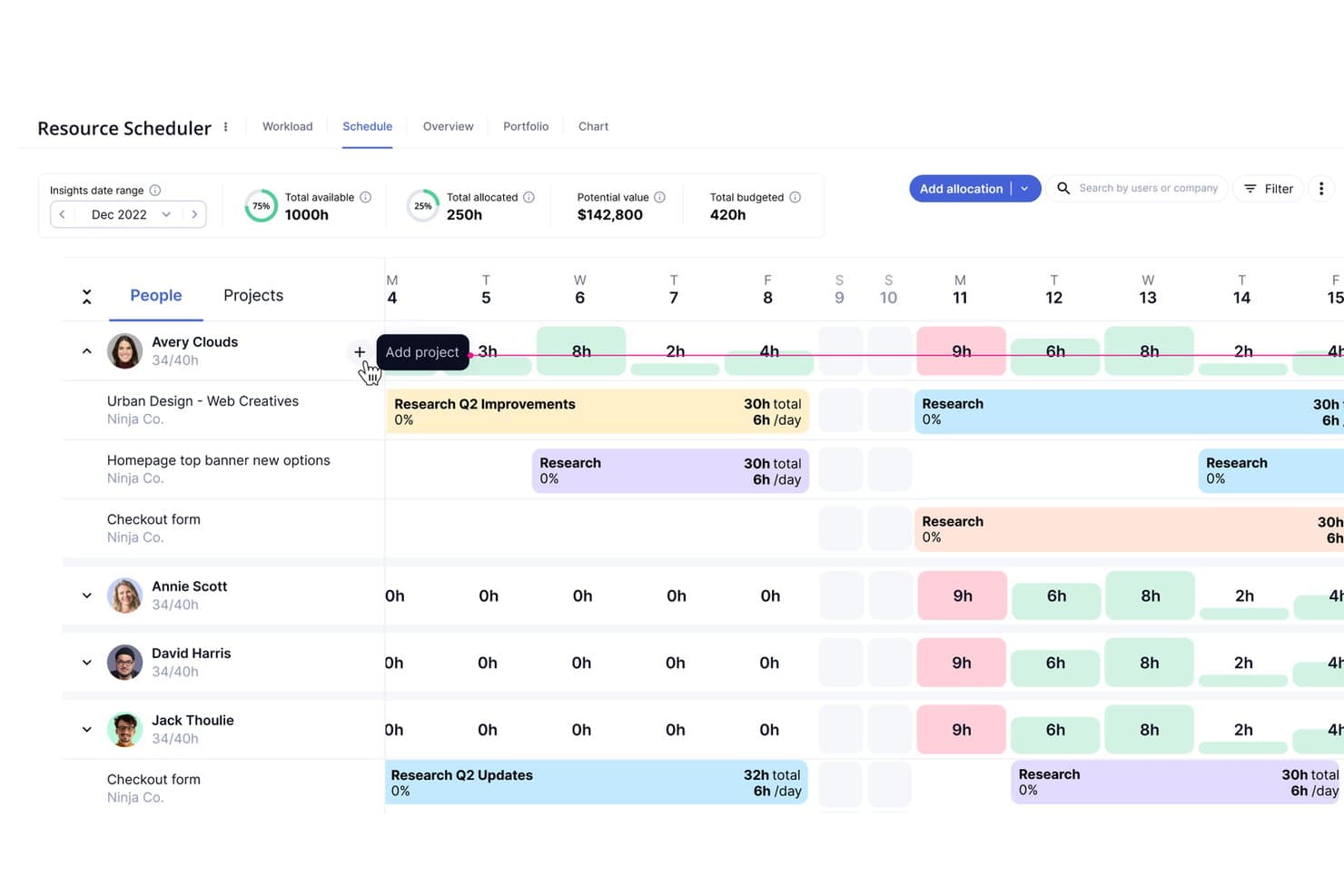
Teamwork.com offers a visual Resource Scheduler with schedule views, workload tracking, and project allocation timelines across team members. Teamwork.com is a project management platform built for client-services teams that need to track billable time, manage budgets, and give clients controlled access to project work—all in one place.
Who Is Teamwork.com Best For?
It's a strong fit for agencies and consultancies that run multiple client projects simultaneously and need visibility into profitability at the project level.
Why Teamwork.com Is a Good Microsoft Project Alternative
I've included Teamwork.com in my top picks because of how precisely it controls what clients see and interact with inside live projects. You can add clients directly to a project, set granular permissions per user, and use the Proofs feature to collect structured feedback on deliverables without opening up your entire workspace. I also appreciate that billable time and budget data stay hidden from client-facing views by default, so there's no awkward oversharing while still keeping clients genuinely in the loop.
Teamwork.com Key Features
- Multi-view project dashboards: Switch between Gantt, Kanban, list, and calendar views to suit different workflows and preferences.
- Native time tracking: Log billable and non-billable hours directly on tasks with integrated timesheets.
- Automated workflow builder: Set up no-code automations for recurring tasks, reminders, and approvals to reduce manual work.
- Portfolio-level reporting: Monitor project health, budget burn, and resource allocation across multiple projects from a centralized dashboard.
Teamwork.com Integrations
Teamwork.com offers 150+ native integrations, including Slack, HubSpot, Salesforce, NetSuite, QuickBooks, Google Drive, Microsoft Teams, Outlook, Dropbox, and Box. It also connects with Zapier and provides an API for custom integrations.
Pros and Cons
Pros:
- Strong budget and profitability tracking built in
- Built-in time tracking tied directly to tasks
- Client permission controls are highly granular
Cons:
- Limited task dependency types versus Microsoft Project
- No formal schedule baseline or EVM support
Learn more about Teamwork.com: 9Best for agile software release planning
Jira
- Free plan available
- From $8.48/user/month
Visit WebsiteCustomer Rating:4.4/5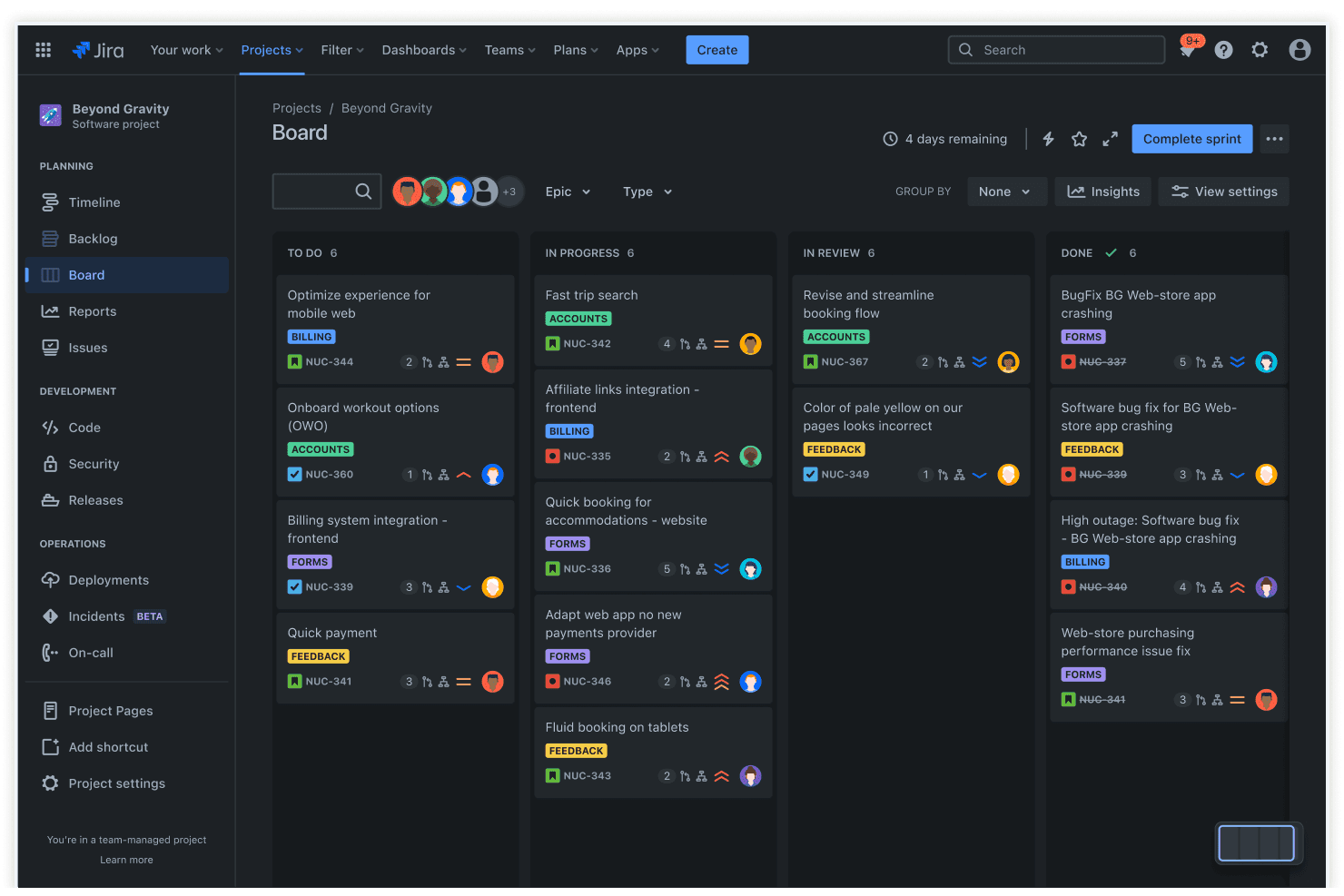
Jira offers a Scrum board view with sprint management, showing tasks organized across To Do, In Progress, In Review, and Done columns with epic and priority labels. Jira is an agile project management platform built for software and engineering teams who need sprint planning, issue tracking, and cross-team dependency management in a single workspace.
Who Is Jira Best For?
Jira is a strong fit for mid-to-large software development organizations running agile workflows across multiple engineering teams.
Why Jira Is a Good Microsoft Project Alternative
I picked Jira as one of the best because its Advanced Roadmaps let my team plan releases across multiple sprints with cross-team dependency mapping. Where Microsoft Project pushes you toward waterfall scheduling, Jira's sprint boards and release versioning let teams manage parallel workstreams without losing visibility. I particularly like how "Fix Version" fields tie individual issues directly to a planned release milestone, keeping sprint goals and shipping dates aligned at all times.
Jira Key Features
- Issue tracking and automation: Log, assign, and track work with workflow automation and custom triggers.
- Customizable Kanban and Scrum boards: Build team-specific boards to visualize and manage live project tasks.
- Marketplace apps integration: Connect with 3,000+ third-party tools for extended resource, finance, or reporting needs.
- Portfolio management dashboards: Gain multi-project visibility with cross-project reporting and configurable dashboards.
Jira Integrations
Jira offers native integrations with Confluence, Bitbucket, Slack, Microsoft Teams, GitHub, GitLab, Google Drive, Outlook, Trello, and Figma. Thousands more integrations are available through the Atlassian Marketplace, and an API is available for custom integrations.
Pros and Cons
Pros:
- Massive app marketplace extends core PM functionality
- Cross-team dependency mapping in Advanced Roadmaps
- Sprint boards built for agile release tracking
Cons:
- True Gantt charts require third-party apps
- No native budget or cost tracking
 Best for enterprise program management oversight
- Free demo available
- Pricing upon request
Visit WebsiteCustomer Rating:4.3/5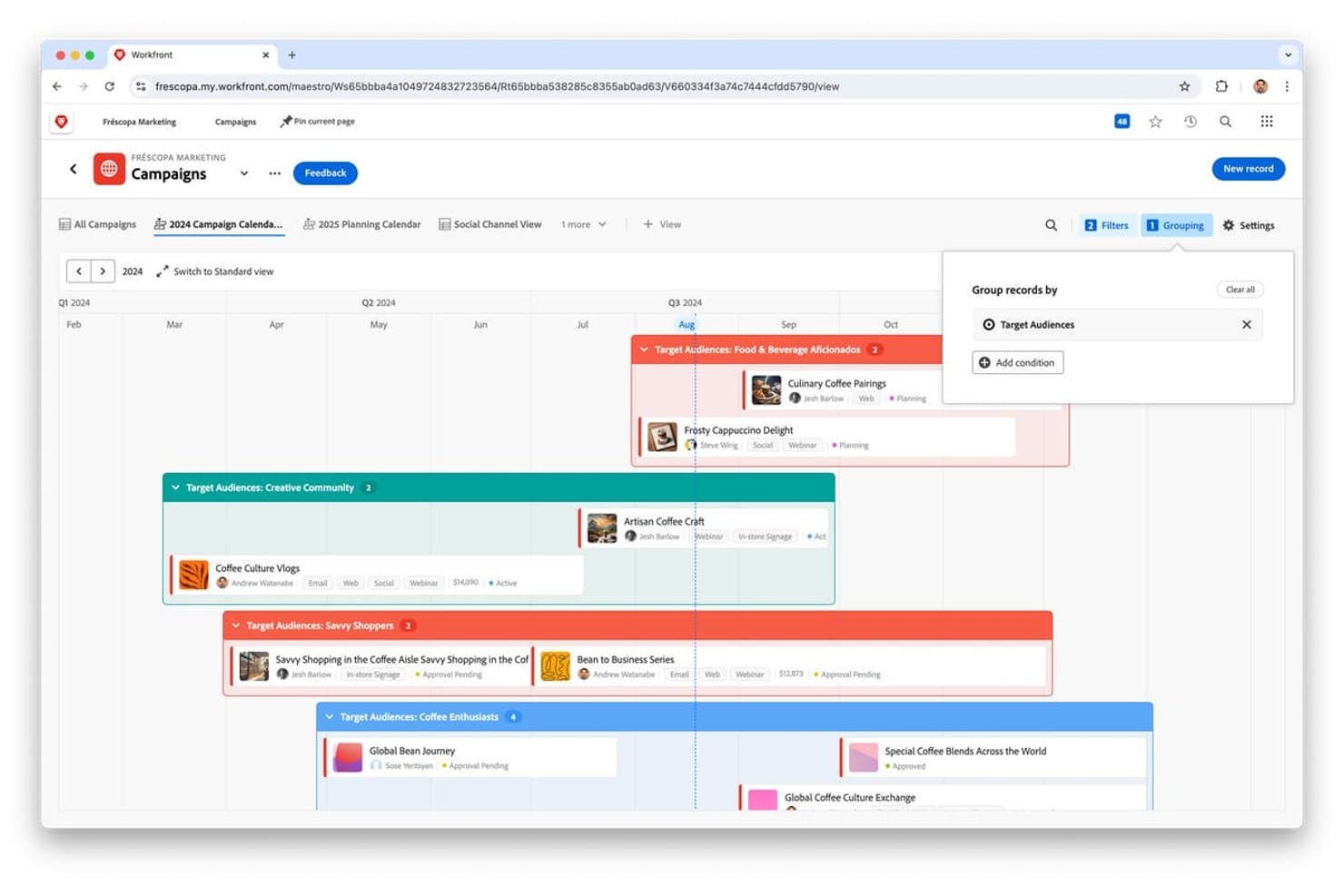
Adobe Workfront offers a visual campaign calendar with timeline grouping by target audiences, showing campaign statuses, assignees, and channels. Adobe Workfront is an enterprise work management platform built for large organizations that need to plan, execute, and track complex programs across cross-functional teams — all within a single, centralized system.
Who Is Adobe Workfront Best For?
Adobe Workfront suits IT PMO directors and enterprise program managers who need structured governance across multiple concurrent, high-complexity projects.
Why Adobe Workfront Is a Good Microsoft Project Alternative
Adobe Workfront earns its spot on my shortlist because portfolio management is genuinely central to how the platform works. I can track multiple concurrent programs through dedicated portfolio dashboards, set project priorities, and model scenarios using Workfront Planning. I also rely on its resource management depth, including workload balancing and capacity forecasting across technical staff, to spot where bottlenecks are forming before they escalate into missed deadlines.
Adobe Workfront Key Features
- Multiple view flexibility: Switch between Gantt, Kanban, calendar, and workload views for different planning and collaboration needs.
- Native time tracking: Log hours directly in tasks to support detailed capacity planning and project accounting.
- Automated workflow builder: Use no-code automations to trigger tasks, route approvals, or send notifications based on rules you set.
- Client and guest collaboration: Provide external users with controlled access so clients or partners can review, comment, and approve work without extra licenses.
Adobe Workfront Integrations
Adobe Workfront offers native integrations with Adobe Creative Cloud, Adobe Experience Manager Assets, Frame.io, Slack, and Microsoft Teams. Additional connections are available through Workfront Fusion, and an API is available for custom integrations.
Pros and Cons
Pros:
- Supports all four task dependency types natively
- Deep resource forecasting across multiple concurrent projects
- Portfolio-level dashboards with scenario planning tools
Cons:
- Reporting flexibility is limited without custom configuration
- Steep configuration process slows initial setup significantly
Learn more about Adobe Workfront:
Other Microsoft Project Alternatives
Here are some additional Microsoft Project alternatives that didn’t make it onto my shortlist, but are still worth checking out:
- 11Zoho ProjectsBest for built-in task time tracking
- 12monday.comBest for visual portfolio dashboards
- 13ProjectManagerBest for live workload and capacity monitoring
- 14GanttPROBest for intuitive drag-and-drop Gantt building
- 15HiveBest for in-app project chat and messaging
- 16BusinessmapBest for advanced workflow analytics
- 17PlanviewBest for configurable project portfolio governance
- 18Oracle Primavera P6Best for large-scale engineering project controls
How I Evaluate Microsoft Project Alternatives
I first check that each tool matches Microsoft Project's core functionality—Gantt charts, dependencies, and resource planning. Then I evaluate differentiators like automation and collaboration that set one platform apart.
Core Functionality (Table Stakes For This List)
When I'm selecting tools for my list, I rank each one on a scale from 0 (does not offer the functionality) to 5 (excels in this area) for each core functionality listed below. Then, I calculate the tool's total score into a percentage. Each tool needs to achieve a minimum total score of 75% to be considered for inclusion.
- Gantt Chart Scheduling: I evaluate whether each tool offers interactive Gantt charts with drag-and-drop editing, critical path visibility, and milestone markers for mapping multi-phase rollouts.
- Resource Management: Teams juggling shared engineers across projects need workload balancing and capacity views, so I check how each platform handles allocation and availability.
- Task Dependencies: I look for support across all four dependency types with automatic schedule adjustments, since a delayed QA phase should ripple forward through staging and release tasks.
- Baseline & Progress Tracking: Comparing planned vs. actual timelines matters when reporting to stakeholders, so I evaluate each tool's baseline snapshots and variance reporting depth.
- Portfolio Management: For PMO directors overseeing dozens of concurrent initiatives, I check whether the platform provides cross-project dashboards, roll-up reporting, and prioritization tools.
- Budget & Cost Tracking: I look at how tightly cost tracking ties to tasks and resources, since IT projects often need to reconcile labor hours against approved budget lines.
Once I have a list of tools that meet the criteria, I consider what sets each platform apart.
Differentiating Factors (What Sets Vendors Apart)
Here's how I compare and contrast different vendors:
Standout Features
No-code workflow automation is a big differentiator. I look for tools that auto-assign tasks or trigger notifications when a sprint moves to QA, cutting down on manual follow-up. Native time tracking tied to tasks matters too. It's useful when your team needs to reconcile logged hours against project budgets without a separate app. View flexibility is another factor—developers often prefer Kanban boards while project managers rely on Gantt charts to interpret the same data.
Beyond Features
Cross-platform accessibility is high on my list. Microsoft Project has historically been Windows-centric, so I check whether alternatives offer true web-native apps with real-time collaboration on Mac, Linux, and mobile. Integration depth matters just as much—your IT team likely runs Slack, GitHub, or Jira alongside any project tool. I evaluate whether connectors are two-way syncs or just one-directional exports. Pricing transparency is another factor I consider, since many teams switch to avoid rigid licensing tiers that lock key features behind enterprise plans.
Why Look for a Microsoft Project Alternative?
While Microsoft Project is a good choice of IT project management software, there are a number of reasons why some users seek out alternative solutions. You might be looking for a Microsoft Project alternative because…
- You want modern collaboration features and chat
- Your team uses Mac, Linux, or mobile devices daily
- The learning curve is too steep for new team members
- Integrations with non-Microsoft tools are essential
- You need a transparent pricing model without enterprise commitments
- Client or guest access is too limited for your workflows
If any of these sound like you, you’ve come to the right place. My list contains several IT project management software options that are better suited for teams facing these challenges with Microsoft Project and looking for alternative solutions.
Microsoft Project Alternatives Key Features
Here are some of the key features of Microsoft Project to help you contrast and compare what alternative solutions offer:
- Gantt chart scheduling: Lets you visualize project tasks, dependencies, and timelines in a dynamic Gantt view, making it easier to manage and adjust complex project plans.
- Resource management: Enables assignment of resources to tasks, tracks team workloads, and balances capacity, so you can prevent burnout and ensure projects stay on track.
- Task dependencies: Supports multiple dependency types—like finish-to-start and start-to-start—so triggered changes in one task automatically shift related timelines.
- Baseline and progress tracking: Allows you to set project baselines and compare planned vs. actual progress, giving teams and stakeholders clear visibility on performance.
- Portfolio management: Supports managing multiple projects at once, with roll-up reporting for resource allocation, status, and prioritization across initiatives.
- Budget and cost tracking: Includes cost estimates, actuals, and budget monitoring tied to specific tasks or phases, which helps maintain oversight of financials throughout the project.
- Reporting and analytics: Offers customizable reports and dashboards that give detailed views into project health, milestones, and bottlenecks for better decision-making.
- Collaboration tools: Provides comments, status sharing, and file attachments on tasks, so project communication stays centralized and accessible to all team members.
- Integration with Microsoft 365: Connects with familiar Microsoft apps like Teams, SharePoint, and Outlook, streamlining workflow for teams already in the Microsoft ecosystem.
- Customizable templates: Supplies a library of project templates that can be tailored to match your team's workflow, speeding up setup for recurring or standard project types.