

Internal developer platforms or IDPs are customizable systems that help you build, test, and ship software faster by standardizing engineering workflows across your tech stack. If you’re looking for ways to reduce manual toil, simplify cloud management, and give your developers smoother environments, these tools are essential.
This list brings you the strongest internal developer platforms for 2026—each one handpicked for their real strengths in deployment, automation, and team productivity. You’ll find the details you need to pick a platform that fits your team’s demands and keeps your projects moving forward.
Why Trust Our Software Recommendations
6,700+
Reviews
20
Industry experts
16+
Evaluation factors
14
Years
Our team has been testing and reviewing software since 2012. As tech leaders ourselves, we know how difficult—and important—it is to choose the right software.
For this guide, we evaluated tools using hands-on testing and independent research, scoring tools using our selection criteria.
Our reviews reflect our human editorial judgment, not a sales pitch.
Expert reviewers:
- Paulo Gardini MiguelTech Director
 Tim FisherVP of AI
 Gabriel RosasTech Lead & Software Architect
 Christhian GruhnTech Lead & Platform Architect

Internal Developer Platforms Comparison Table
This comparison table summarizes pricing details for my top internal developer platforms selections:
| Tool | Best For | Trial Info | Price | ||
|---|---|---|---|---|---|
| 1 | Best feature-rich CI/CD automation solution | Free plan available | Pricing upon request | Website | |
| 2 | Best environment provisioning with cost controls | Free trial available | From $1,500/month | Website | |
| 3 | Best infrastructure automation for dev teams | Free trial available | From $899/month | Website | |
| 4 | Best built-in API and identity governance | Free demo available | From $150/component/month | Website | |
| 5 | Best tool integration visibility at scale | Free plan available | From $7.67/user/month | Website | |
| 6 | Best Kubernetes access management controls | Free plan available | £399/month | Website | |
| 7 | Best integration of cloud and DevOps workflows | Free demo available | From $29/user/month (billed annually) | Website | |
| 8 | Best for rapid microservices deployment | Free plan available | From $6/GB/month | Website | |
| 9 | Best plug-and-play microservices toolkit | Free demo available | Pricing upon request | Website | |
| 10 | Best workflow for full-stack product teams | Free demo available | Pricing upon request | Website |


Best Internal Developer Platforms Reviews
 Best feature-rich CI/CD automation solution
- Free plan available
- Pricing upon request
Visit WebsiteCustomer Rating:4.6/5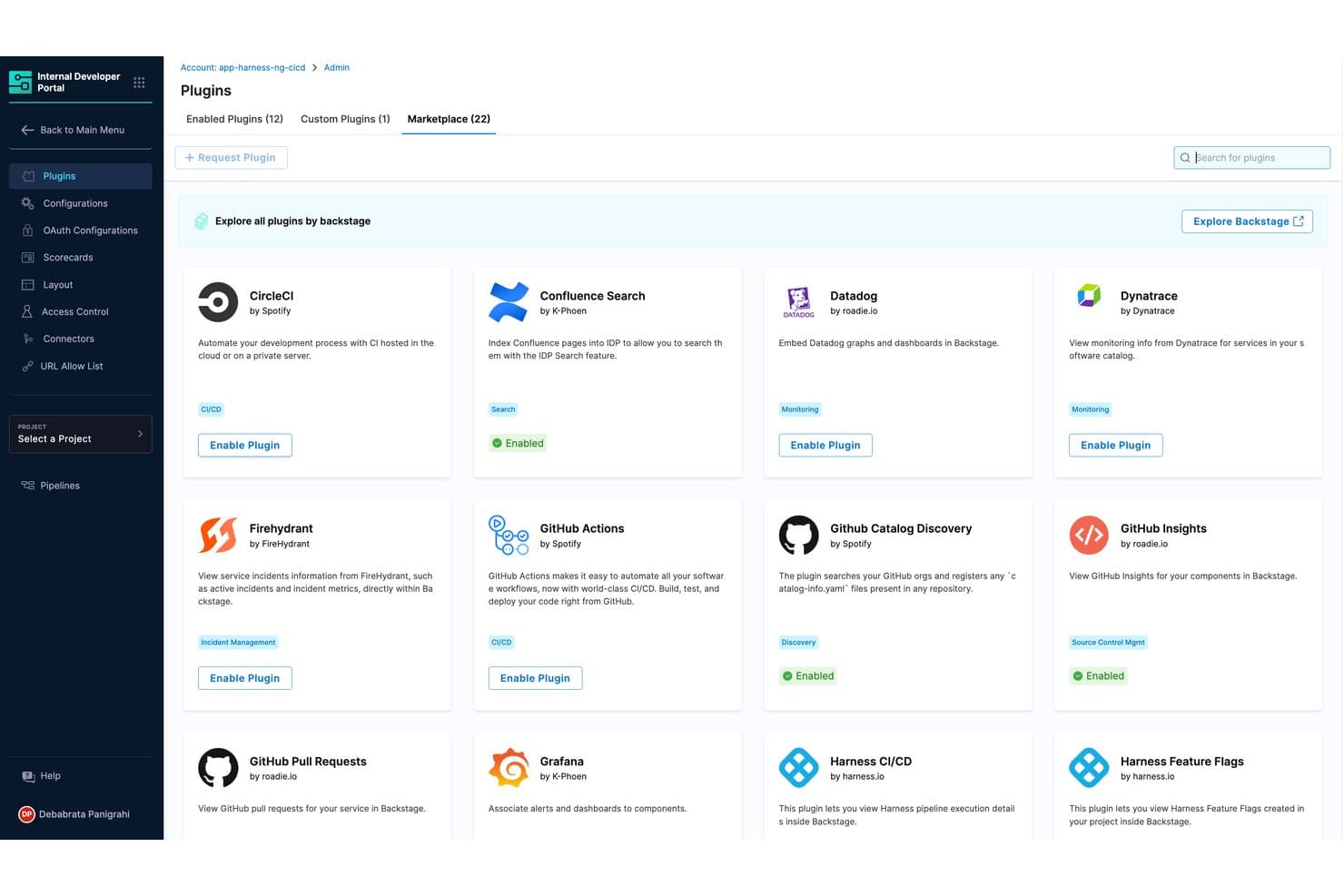
Harness offers a plugin marketplace within its Internal Developer Portal, allowing teams to enable integrations like GitHub Actions, Datadog, and CircleCI directly from a centralized admin interface. Harness is an internal developer platform that brings together advanced CI/CD pipeline automation, cloud infrastructure orchestration, developer self-service, and governance in a single solution.
Who Is Harness Best For?
Harness is a solid choice for platform engineering teams and DevOps leads at mid-size to enterprise organizations seeking to unify and automate software delivery processes.
Why I Picked Harness
I picked Harness as one of the best because I use its feature-rich CI/CD automation to unify deployments, enforce pipelines through policy-as-code, and provide developers with a flexible self-service portal built for modern platform teams.
Harness Key Features
- Environment management: Lets you define, spin up, and control custom environments for development, testing, and production.
- Role-based access control: Offers granular permissions for users, teams, and projects, with support for SSO and audit trails.
- Service catalog: Maintains a centralized inventory of applications, components, ownership, and deployment metadata.
- Cloud cost management: Tracks cloud usage within deployments and provides visibility into infrastructure spending.
Harness Integrations
Harness offers native integrations with GitHub and Jira. An API is available for custom integrations.
Pros and Cons
Pros:
- Supports complex multi-cloud deployment strategies
- Built-in service catalog with ownership tracking
- Granular role-based access controls
Cons:
- Advanced features can require extensive setup
- Software catalog less detailed
Learn more about Harness:
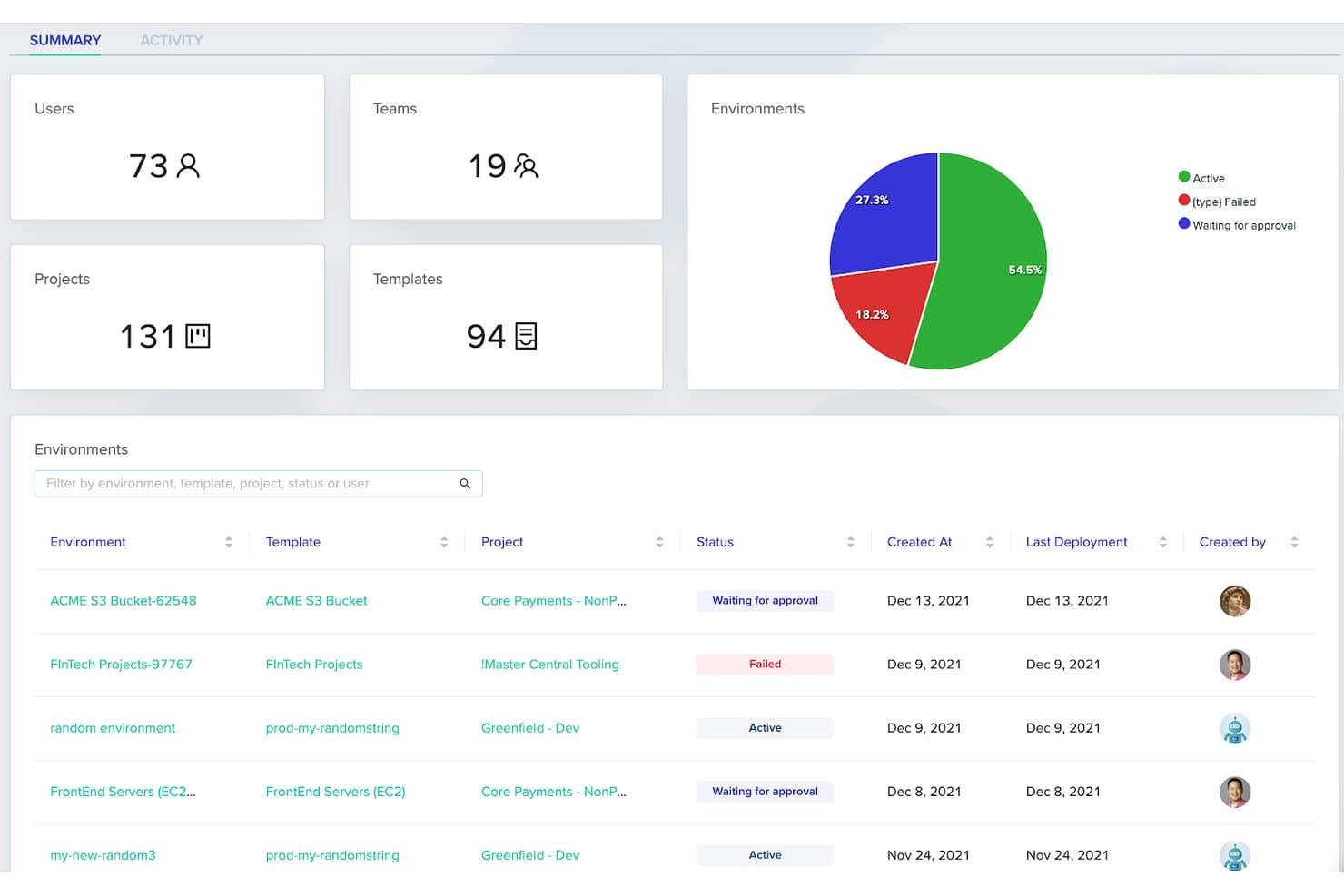
env0 offers a centralized summary dashboard displaying users, teams, projects, templates, and environment deployment statuses with visual breakdowns. env0 or env zero is a cloud infrastructure automation platform designed for internal developer platforms, offering self-service environment provisioning, guardrails, multi-cloud support, policy-as-code, and cost management capabilities.
Who Is env0 Best For?
Platform engineering and DevOps teams at mid-size to large organizations seeking centralized environment automation and policy-driven infrastructure control.
Why I Picked env0
I picked env0 because I can automate environment provisioning through reusable templates and enforce policy-as-code across clouds, all while giving my team full visibility and control over infrastructure spend. The cost controls are unmatched for internal developer platforms.
env0 Key Features
- Multi-IaC workflow support: Run and manage Terraform, OpenTofu, Terragrunt, CloudFormation, and Pulumi in a unified platform.
- Drift detection and remediation: Automatically detect and remediate infrastructure drift across environments.
- Granular role-based access control: Assign permissions at the project, environment, and template levels.
- Integrated approvals and notifications: Configure custom approval flows and notifications for environment actions.
env0 Integrations
env0 offers native integrations with GitHub, GitLab, Bitbucket, Azure DevOps, AWS, Google Cloud Platform, Helm, Okta, and Slack. An API is available for custom integrations.
Pros and Cons
Pros:
- Enforces policy-as-code for deployments
- Automated drift detection and remediation
- Real-time environment cost visibility and guardrails
Cons:
- Workflow complexity for large monorepo projects
- Limited built-in software catalog capabilities
Learn more about env0:
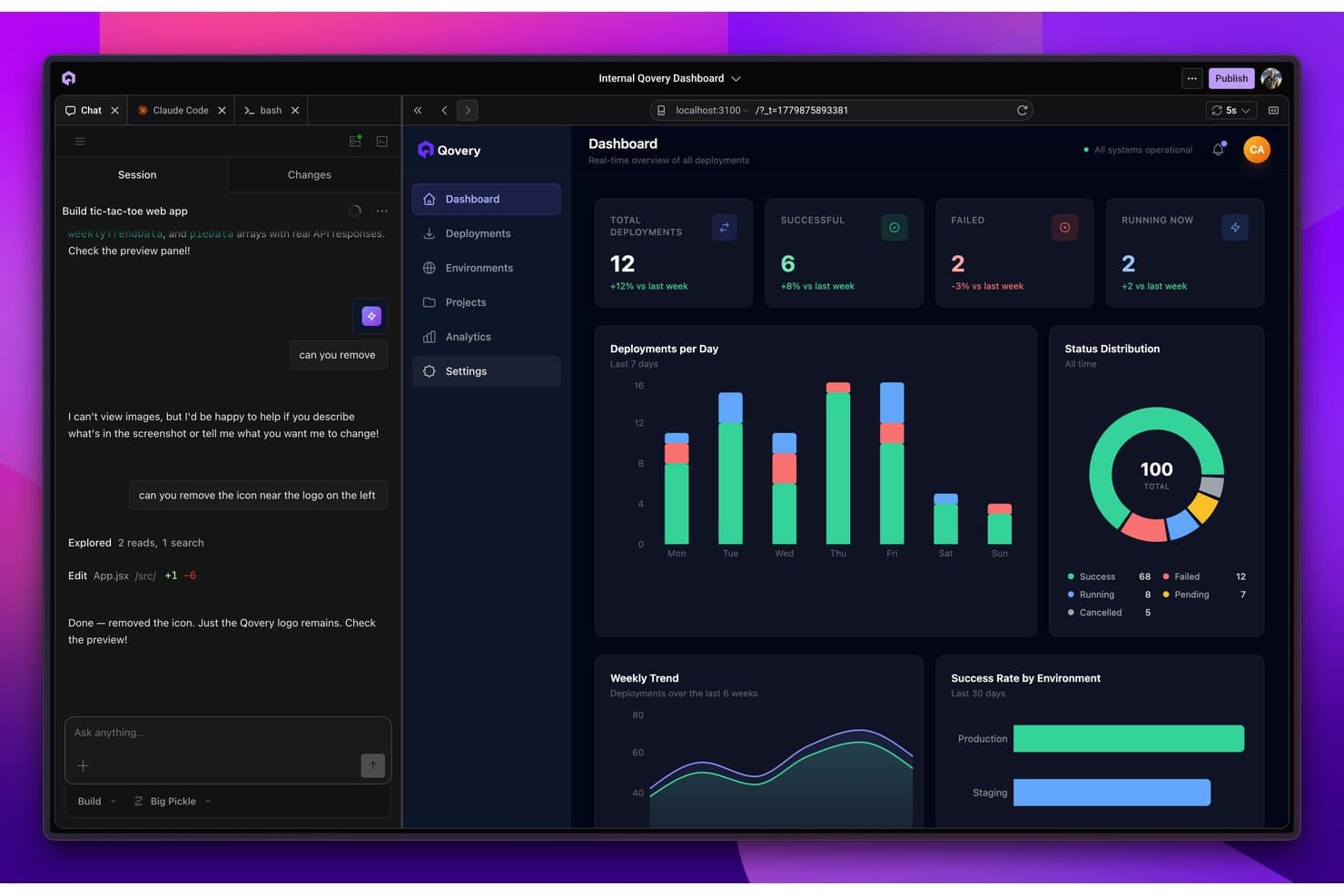
Qovery offers an internal developer platform dashboard with real-time deployment tracking, status distribution, and environment-level success metrics. Qovery is an internal developer platform (IDP) designed for cloud-native teams, delivering unified infrastructure automation, environment provisioning, CI/CD integration, and deep governance in one centralized control plane.
Who Is Qovery Best For?
Platform engineering teams at growing SaaS companies or enterprises building and operating modern, Kubernetes-based cloud infrastructure.
Why I Picked Qovery
I picked Qovery as one of the best internal developer platforms because I can automate multi-cloud Kubernetes infrastructure, enforce detailed RBAC and policy-as-code, and enable developers to self-serve cloud resources directly from a unified portal. Best infrastructure automation for dev teams.
Qovery Key Features
- Ephemeral environments: Quickly spin up and destroy pre-configured, full-stack testing environments for every pull request.
- Native CI/CD integrations: Connect with GitHub Actions, GitLab CI, and other pipeline tools for automated deployments.
- Secrets management: Securely manage, inject, and rotate secrets across applications and environments.
- Real-time activity logging: Monitor live deployment activity, audit trails, and system events within the platform.
Qovery Integrations
Qovery offers an API for custom integrations.
Pros and Cons
Pros:
- Unified control plane for multi-cloud management
- Rapid rollout of ephemeral environments
- Strong RBAC and policy-as-code controls
Cons:
- Can be overkill for non-Kubernetes workloads
- Catalog feature is less advanced than peers
Learn more about Qovery:
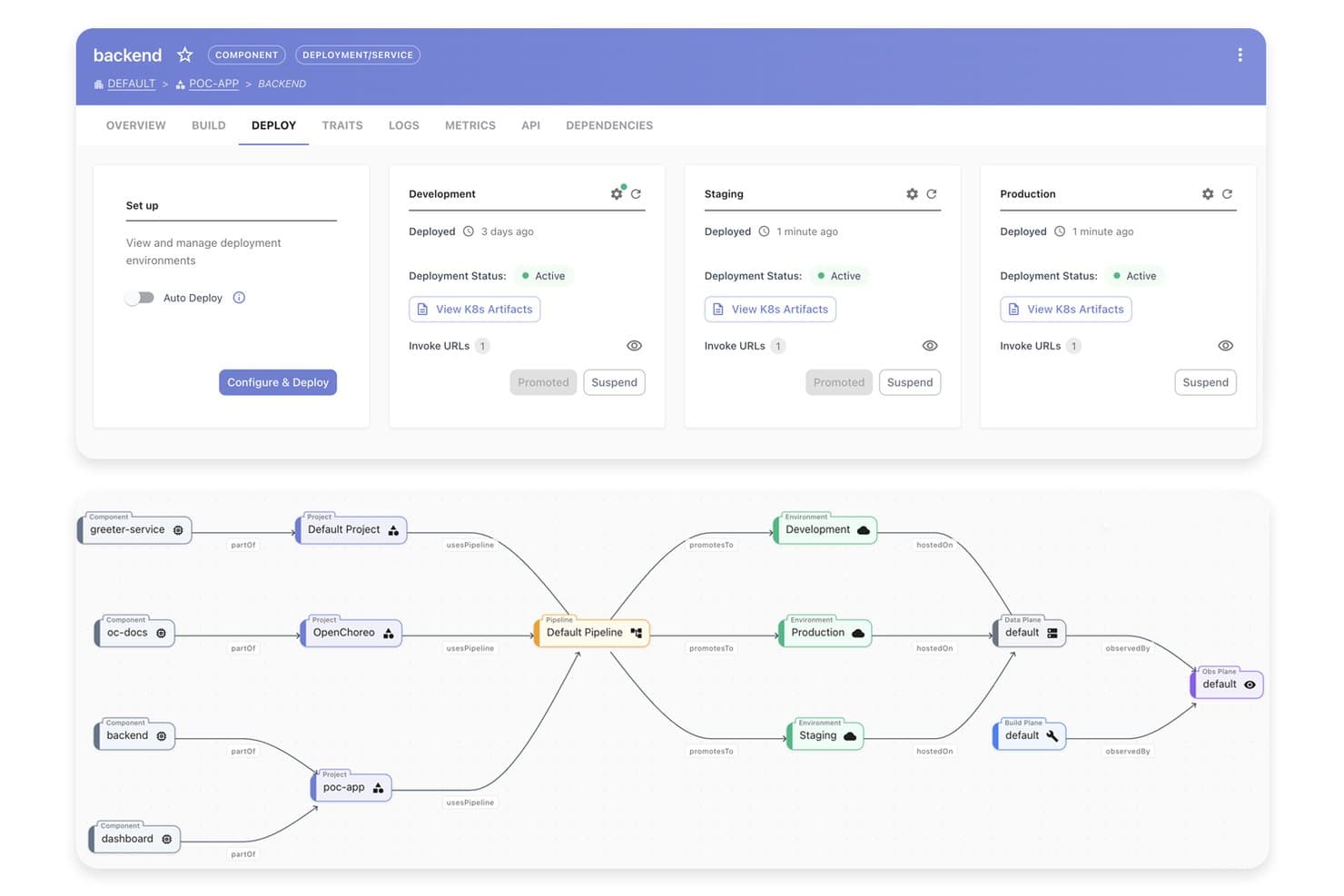
WSO2 offers a visual deployment pipeline dashboard that lets developers manage and promote backend services across Development, Staging, and Production environments from a single interface. WSO2 Developer Platform (formerly known as Choreo) is an internal developer platform that unifies API management, service cataloging, CI/CD integration, infrastructure orchestration, and identity governance in one system.
Who Is WSO2 Best For?
Platform engineering teams and enterprise IT organizations that need unified API, identity, and governance capabilities across their development workflows.
Why I Picked WSO2
I picked WSO2 because I trust its built-in API and identity governance to enforce security policies, manage access with advanced RBAC, and support compliance at enterprise scale. My team uses its centralized portal to track API consumption and automate user provisioning.
WSO2 Key Features
- Kubernetes-native deployment: Deploy and manage services directly on Kubernetes environments.
- Service catalog with versioning: Register, track, and update services with lifecycle state and version control.
- CI/CD pipeline integrations: Connect with Jenkins, GitHub Actions, or Azure DevOps for automated workflows.
- API analytics dashboard: Monitor API usage, errors, and performance metrics from a unified interface.
WSO2 Integrations
WSO2 offers an API to connect with third-party tools.
Pros and Cons
Pros:
- Flexible deployment for hybrid or cloud-native use
- Enterprise-ready identity management integration
- Deep API lifecycle and governance controls
Cons:
- Service catalog focuses mainly on APIs
- Portal design is less visually modern
Learn more about WSO2: Best tool integration visibility at scale
- Free plan available
- From $7.67/user/month
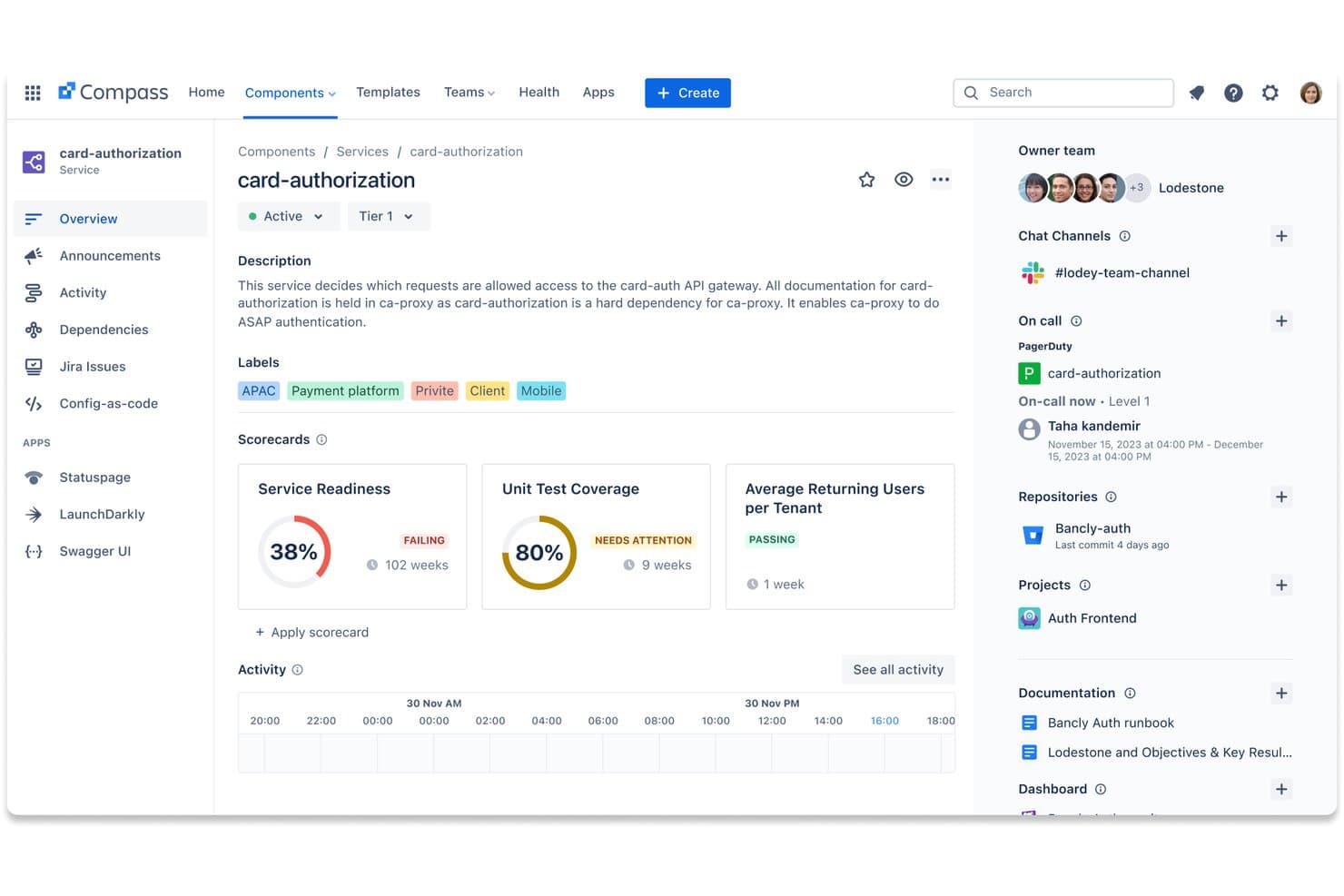
Atlassian Compass offers a centralized service catalog view with scorecards, on-call info, repositories, and team ownership for internal developer platform management. Atlassian Compass is an internal developer platform designed to give engineering teams a unified software catalog, service ownership tracking, and integration visibility across code, tools, and systems.
Who Is Atlassian Compass Best For?
Platform engineering teams at companies already using Atlassian products who want centralized service tracking and integration oversight.
Why I Picked Atlassian Compass
I picked Atlassian Compass because my team gets detailed, live visibility across services and tools. I rely on its unified software catalog and integration health insights to track connections and dependencies at scale. This helps us monitor changes across our cloud ecosystem.
Atlassian Compass Key Features
- Scorecards for service health: Evaluate component reliability with customizable health and operational scorecards.
- DORA metrics tracking: Measure software delivery performance using built-in DORA metrics dashboards.
- Ownership mapping: Assign clear ownership for every service and technical component across teams.
- Component dependency graphs: Visualize technical dependencies and service relationships in the software catalog.
Atlassian Compass Integrations
Atlassian Compass offers native integrations within the Atlassian ecosystem, including Jira, Bitbucket, Confluence, and Statuspage, as well as native integrations with GitHub, GitLab, Jenkins, Datadog, Prometheus, and Opsgenie. An API is available for custom integrations.
Pros and Cons
Pros:
- Fast setup within the Atlassian ecosystem
- Built-in DORA metrics tracking for teams
- Strong visibility into service dependencies
Cons:
- Custom portals lack deep extensibility
- Limited infrastructure orchestration capabilities
Learn more about Atlassian Compass: Best Kubernetes access management controls
- Free plan available
- £399/month
Visit WebsiteCustomer Rating:5/5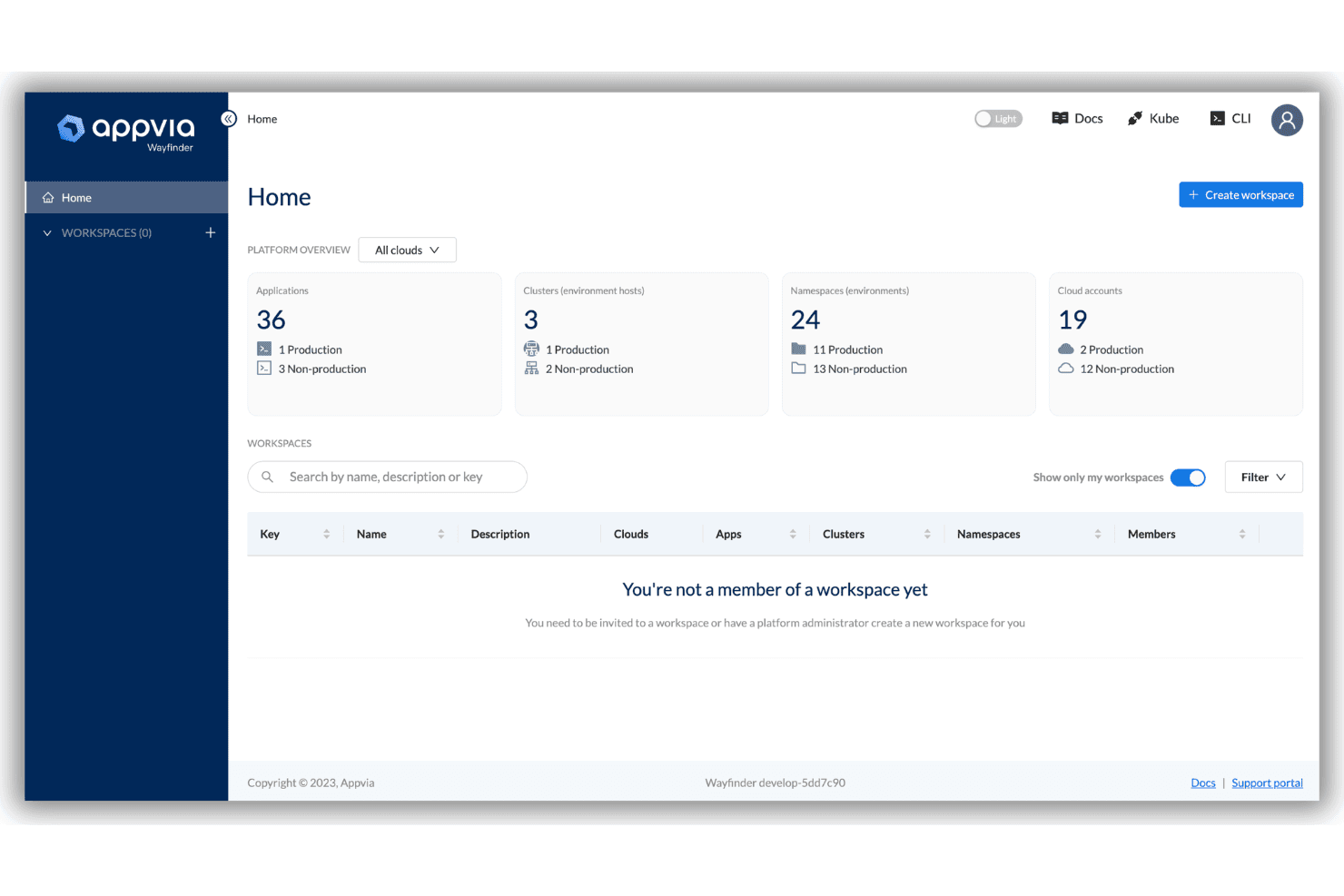
Appvia Wayfinder centralizes Kubernetes self-service and cloud provisioning. Appvia Wayfinder is an internal developer platform focused on Kubernetes and multi-cloud environments, offering a centralized self-service portal, policy-driven infrastructure automation, strong access controls, and cloud-native resource provisioning for enterprise teams.
Who Is Appvia Wayfinder Best For?
Platform engineering teams at enterprises and heavily regulated organizations that need to manage Kubernetes access and infrastructure governance at scale.
Why I Picked Appvia Wayfinder
I picked Appvia Wayfinder because I trust its granular Kubernetes access controls, strong RBAC policy enforcement, and automated guardrails for secure multi-cloud environment management. I use it to define golden paths and secure developer self-service at scale.
Appvia Wayfinder Key Features
- AI-driven infrastructure automation: Uses AI agents to automate environment setup and resource provisioning.
- Service catalog templating: Offers a library of reusable templates for application and cloud resources.
- Drift detection and lifecycle management: Monitors and manages infrastructure for configuration drift across environments.
- Cloud-agnostic provisioning: Supports AWS, Azure, and Google Cloud for multi-cloud workflows and deployments.
Appvia Wayfinder Integrations
Appvia Wayfinder offers native integrations with AWS, Azure, Google Cloud Platform, Kubernetes, and Terraform. An API is available for custom integrations.
Pros and Cons
Pros:
- Policy-driven compliance for regulated industries
- Automated golden path environment provisioning
- Kubernetes RBAC and access auditing
Cons:
- Limited self-serve integrations beyond cloud providers
- Service catalog is less extensible than Backstage
Learn more about Appvia Wayfinder: Best integration of cloud and DevOps workflows
- Free demo available
- From $29/user/month (billed annually)
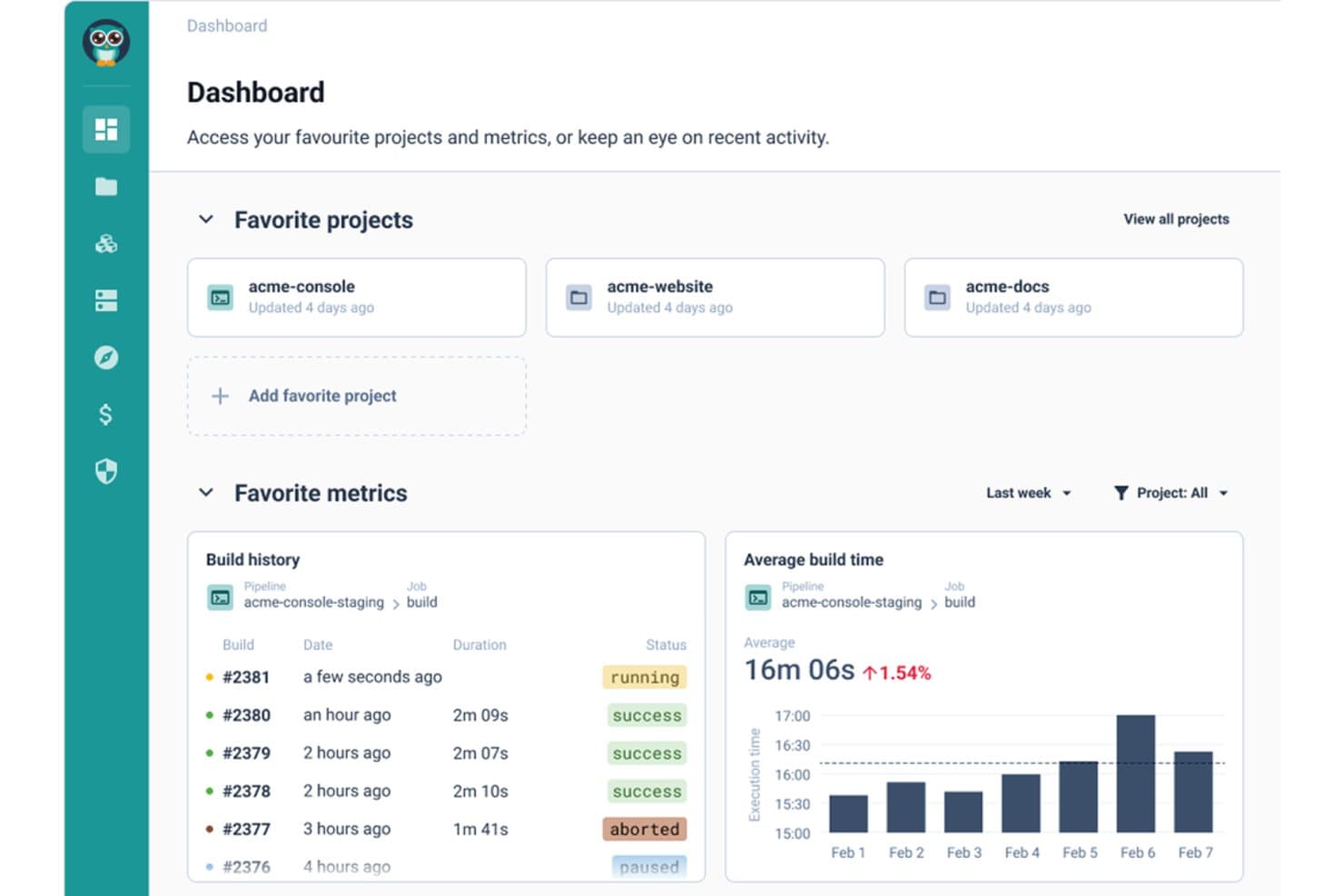
Cycloid offers a developer dashboard with favorite projects, build history tracking, and average build time metrics visualized over time. Cycloid is an internal developer platform that brings together cloud automation, infrastructure orchestration, self-service provisioning, and customizable service catalogs for platform teams managing hybrid and multi-cloud environments.
Who Is Cycloid Best For?
Platform engineering and DevOps teams in midsize to large enterprises managing multi-cloud and hybrid infrastructure.
Why I Picked Cycloid
I picked Cycloid as one of the best because I rely on its seamless integration of multi-cloud and DevOps workflows. My team uses the customizable portal to unify provisioning, infrastructure orchestration, and CI/CD automation across cloud environments.
Cycloid Key Features
- Asset inventory: Tracks ownership, dependencies, and metadata across all deployed services.
- Role-based access control: Supports fine-grained permissions and policy enforcement for platform governance.
- GreenOps and FinOps integrations: Surfaces cloud usage, cost, and carbon impact analytics in the platform UI.
- Stack library: Offers versioned, reusable templates for standardized infrastructure provisioning and service setup.
Cycloid Integrations
Cycloid provides an API for custom integrations.
Pros and Cons
Pros:
- Customizable portal with plugin support
- Built-in asset inventory with dependency mapping
- Hybrid and multi-cloud environment orchestration
Cons:
- Integrations require custom plugin development
- Suited mainly for medium and large teams
Learn more about Cycloid:
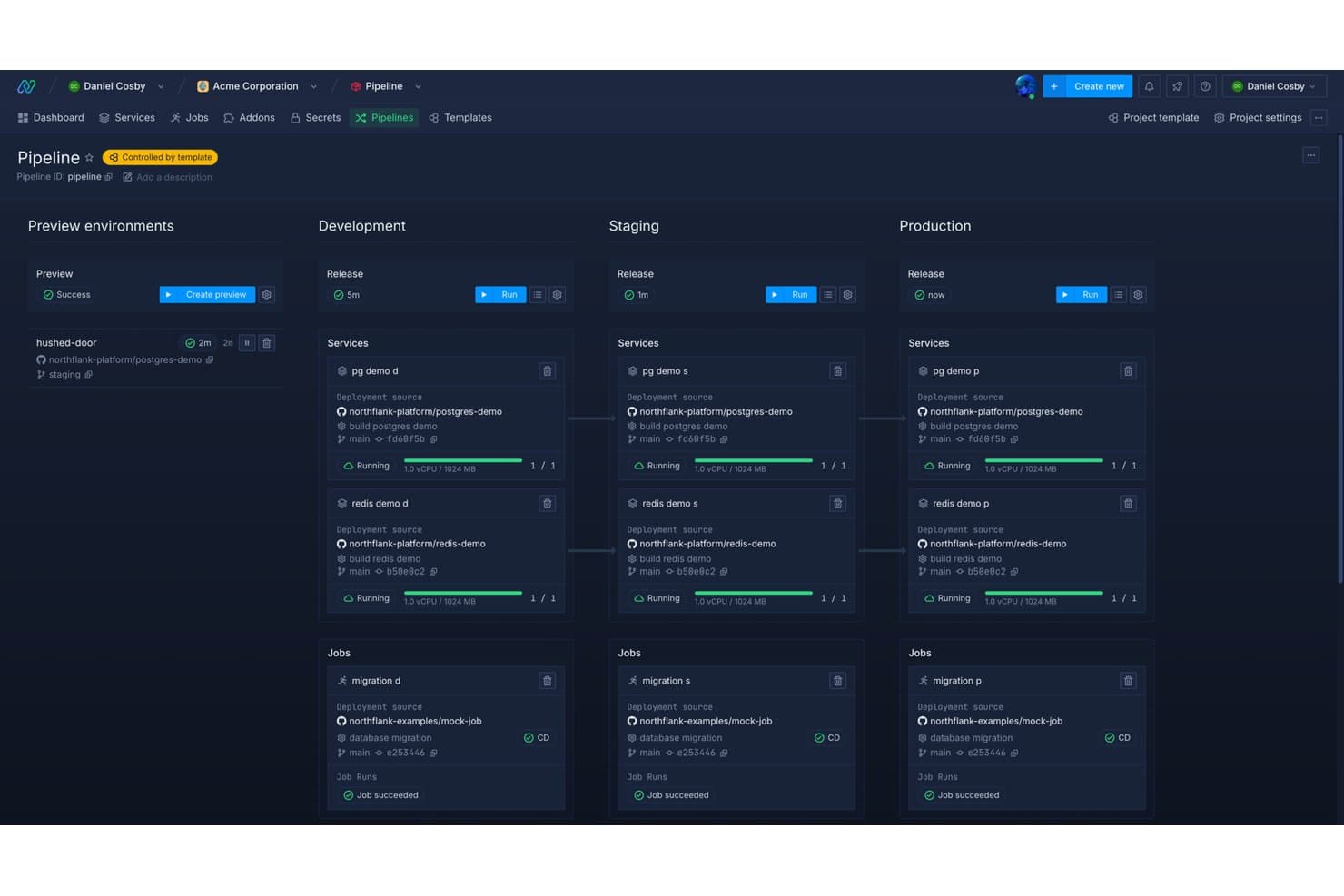
Northflank offers a visual pipeline overview that maps services and jobs across Preview, Development, Staging, and Production environments in a single dashboard. Northflank is an internal developer platform that delivers managed Kubernetes, integrated CI/CD pipelines, developer self-service portals, and environment provisioning tools designed for microservices and cloud-native application teams.
Who Is Northflank Best For?
Platform engineering teams and DevOps leads at startups or scale-ups building cloud-native microservices architectures.
Why I Picked Northflank
I picked Northflank as one of the best because my team can instantly provision managed Kubernetes environments and launch microservices with Git-backed deployments. I love how their platform automates end-to-end CI/CD and supports rapid microservices deployment with prebuilt blueprints.
Northflank Key Features
- Role-based access control: Set permissions for users and teams to manage access across projects and environments.
- Integrated secrets management: Store and manage environment secrets directly within service configurations.
- Auto-provisioned databases: Instantly spin up managed databases like PostgreSQL, MySQL, and MongoDB from the platform interface.
- Service dependency mapping: Visualize and track relationships between microservices and supporting resources.
Northflank Integrations
Northflank offers native integrations with GitHub, GitLab, Bitbucket, and provides an API for custom integrations.
Pros and Cons
Pros:
- Built-in secrets and database management
- Granular RBAC for multi-team environments
- Rapid deployment of container-based microservices
Cons:
- Fewer workflow customization options
- Limited support for on-prem deployments
Learn more about Northflank: Best plug-and-play microservices toolkit
- Free demo available
- Pricing upon request
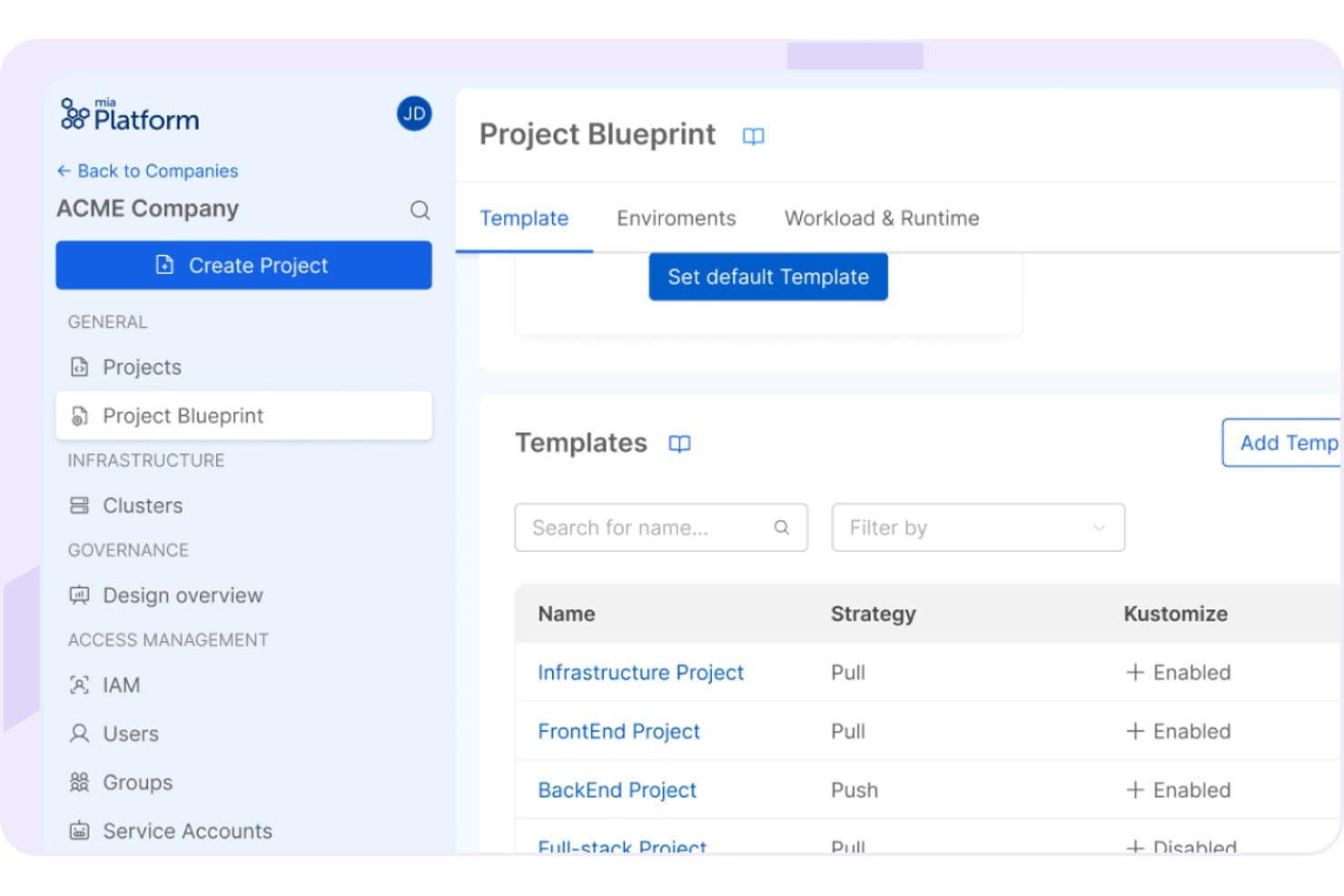
Mia-Platform offers a Project Blueprint section where platform teams can manage and configure project templates with strategy and Kustomize settings. Mia-Platform is an internal developer platform that provides a unified environment for building, deploying, and managing microservices, featuring a modular service catalog, customizable self-service portal, and infrastructure orchestration tools.
Who Is Mia-Platform Best For?
Platform engineering teams and DevOps leads at mid-sized to large enterprises building microservices on Kubernetes.
Why I Picked Mia-Platform
I picked Mia-Platform as one of the best because I can deploy new microservices using its plug-and-play toolkit, launch prebuilt service templates from the marketplace, and manage everything from a customizable self-service portal.
Mia-Platform Key Features
- API gateway management: Centralizes API routing, security policies, and monitoring through a built-in API gateway.
- Real-time service catalog: Automatically tracks services, dependencies, metadata, and ownership for all deployed components.
- Role-based access control: Lets platform teams set granular permissions for users, groups, and resources across environments.
- Audit logging and compliance: Captures detailed change and access history to support governance and regulatory needs.
Mia-Platform Integrations
Mia-Platform offers native integration with GitHub. An API is available for custom integrations.
Pros and Cons
Pros:
- Built-in tools for compliance and audit trails
- Self-service portal for team autonomy
- Easily deployable microservices with prebuilt templates
Cons:
- Most community resources are in European languages
- Platform requires Kubernetes knowledge for setup
Learn more about Mia-Platform: Best workflow for full-stack product teams
- Free demo available
- Pricing upon request
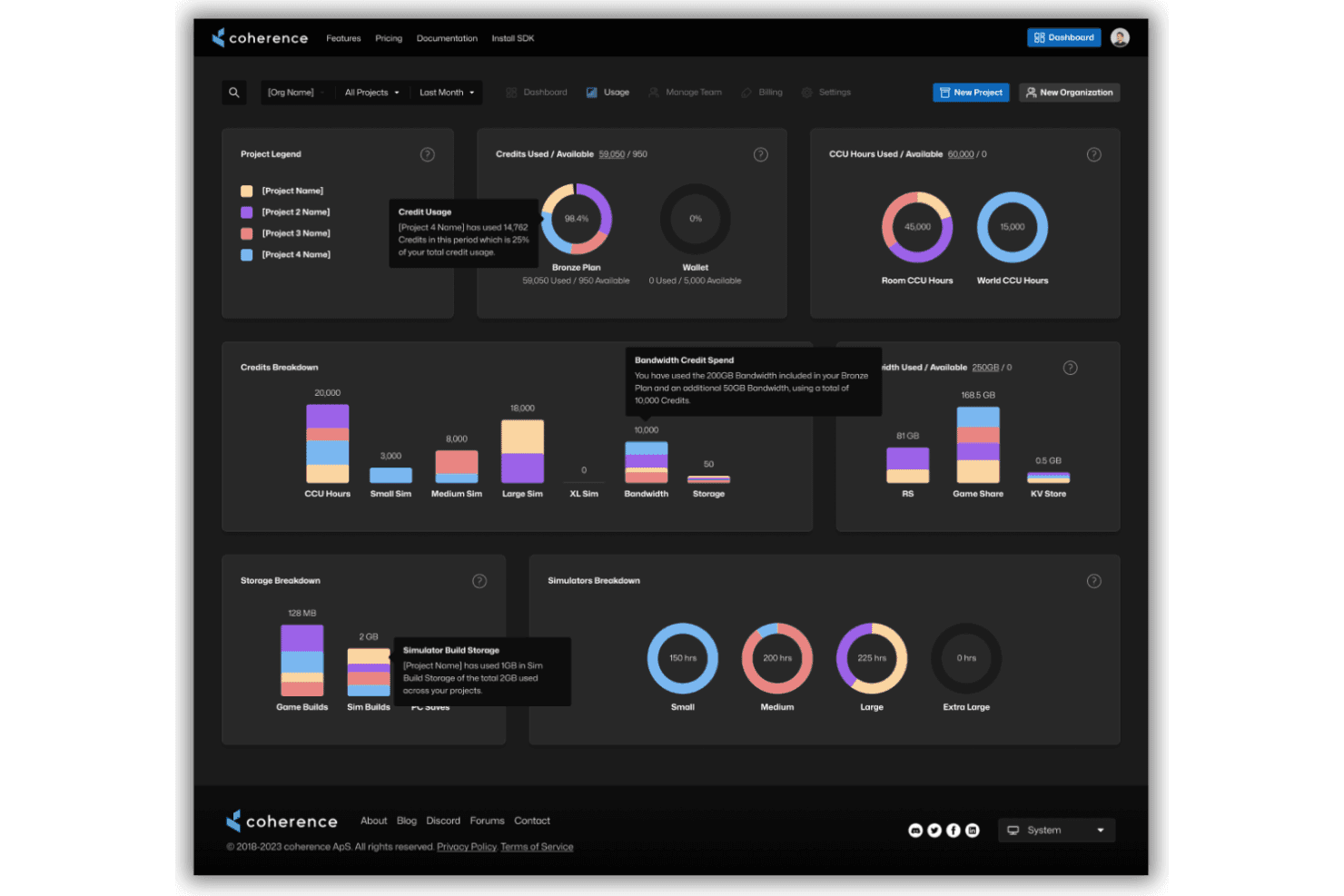
Coherence automates CI/CD, infrastructure, and cloud deployments. Coherence is a cloud-based internal developer platform designed for full-stack product teams, offering automated CI/CD pipelines, self-service infrastructure provisioning, and reusable blueprints for cloud environments.
Who Is Coherence Best For?
Platform engineering teams at technology companies who need to simplify and standardize cloud workflows for full-stack application development.
Why I Picked Coherence
I picked Coherence as one of the best because I can manage full-stack workflows using automated preview environments, reusable infrastructure templates, and a unified developer portal. For product teams, that means everything from provisioning to deployment stays tightly coordinated.
Coherence Key Features
- Role-based access controls: Assign permissions to users and teams for secure environment management.
- Cloud provider integrations: Connect directly with AWS and GCP for automated provisioning.
- Service catalog: Maintain a library of infrastructure blueprints and service templates.
- Environment teardown automation: Remove environments and resources cleanly when they’re no longer needed.
Coherence Integrations
Coherence offers an API for custom integrations.
Pros and Cons
Pros:
- Centralized portal for team collaboration
- Blueprint templates for environment configuration
- Automated cloud resource provisioning workflows
Cons:
- Documentation less detailed than major competitors
- Few options for platform extensibility
Learn more about Coherence:
Other Internal Developer Platforms
Here are some additional internal developer platforms options that didn’t make it onto my shortlist, but are still worth checking out:
- 11NullstoneBest modular blueprint-based cloud setup
- 12SpaceliftBest for policy-driven IaC management
- 13BunnyshellBest environment automation for complex apps
- 14HumanitecBest dynamic environment management tools
- 15Morpheus DataBest for hybrid cloud orchestration capabilities
- 16DuploCloudBest compliance automation for cloud workloads
- 17PortBest customizable developer self-service portal
- 18Encore CloudBest code-centric backend application platform
- 19mogeniusBest simplified containerized deployments
How I Evaluate Internal Developer Platforms
I split my evaluation into two layers: baseline capabilities like self-service provisioning and RBAC, and differentiators like golden path templates and policy-as-code enforcement.
Core Functionality (Table Stakes for This List)
When I'm selecting tools for my list, I rank each one on a scale from 0 (does not offer the functionality) to 5 (excels in this area) for each core functionality listed below. Then, I calculate the tool's total score into a percentage. Each tool needs to achieve a minimum total score of 75% to be considered for inclusion.
- Developer self-service portal: I evaluate whether developers can provision environments, spin up services, and access resources from a single UI without waiting on ops tickets.
- Service catalog and templates: Golden path templates should let teams scaffold new microservices with pre-approved configs, similar to how Backstage or Humanitec handle service creation.
- CI/CD pipeline integration: I check for native connections to tools like GitHub Actions, GitLab CI, Jenkins, or ArgoCD so builds and deployments stay within one workflow.
- Infrastructure orchestration: The platform should abstract Kubernetes clusters, Terraform modules, and cloud resources across multiple environments and providers.
- Software catalog and component tracking: A living catalog that maps service ownership, dependencies, and API relationships helps teams trace issues across distributed architectures.
- Role-based access and governance: I look for RBAC with environment scoping, audit logging, and SSO integration so platform teams can enforce guardrails without blocking developers.
Once I have a list of tools that meet the criteria, I consider what sets each platform apart.
Differentiating Factors (What Sets Vendors Apart)
Here's how I compare and contrast different vendors:
Standout Features
Dynamic environments are a big differentiator—I look for platforms that spin up ephemeral preview environments tied to pull requests so teams can test feature branches in production-like conditions before merging. Policy-as-code guardrails matter just as much, especially when your platform needs to block non-compliant Terraform plans or container images from reaching production using tools like OPA or Sentinel. I also evaluate scorecards that track service maturity and production readiness, which help platform teams spot gaps across dozens of microservices.
Beyond Features
Extensibility is a major factor—I check whether the platform offers a plugin architecture or API-first design that lets your team build custom integrations without vendor lock-in. Deployment flexibility matters too, especially for regulated industries where you need SaaS, self-hosted, or air-gapped options alongside certifications like SOC 2 Type II. I also consider pricing models, since per-developer pricing scales very differently than per-service or consumption-based plans as your engineering org grows.
How to Choose Internal Developer Platforms
It’s easy to get bogged down in long feature lists and complex pricing structures. To help you stay focused as you work through your unique software selection process, here’s a checklist of factors to keep in mind:
| Factor | What to Consider |
|---|---|
| FactorScalability | What to ConsiderWill the platform support your team’s growth from dozens to hundreds of engineers and adapt to new squads, services, or cloud environments? |
| FactorIntegrations | What to ConsiderDoes it connect with your existing CI/CD tools, source control, incident management, and cloud providers, or will you have to rework established pipelines? |
| FactorCustomizability | What to ConsiderCan you tailor workflows, templates, and permissions to match your engineering org’s needs—and does it support plugins or API integrations for custom use cases? |
| FactorEase of use | What to ConsiderIs the platform intuitive for both seasoned DevOps engineers and application developers, or will adoption be hampered by a steep learning curve? |
| FactorImplementation and onboarding | What to ConsiderHow long will it take to roll out—weeks or months? What resources will you need to dedicate to training, migration, or custom development upfront? |
| FactorCost | What to ConsiderAre you paying per developer, per service, or usage-based? Factor in hidden costs from self-hosting requirements or additional platform engineer headcount. |
| FactorSecurity safeguards | What to ConsiderDoes the solution support SSO, RBAC, audit logging, and secrets management to align with your company’s security and governance policies? |
| FactorCompliance requirements | What to ConsiderAre certifications like SOC 2 Type II or ISO 27001 required for your industry, and does the vendor provide documentation for audits and ongoing compliance? |
What Are Internal Developer Platforms?
Internal developer platforms are centralized systems that help your engineering teams automate infrastructure management, standardize workflows, and enable developer self-service for building, deploying, and operating software. These platforms typically unify cloud resources, orchestration, and governance tools, making it easier to enforce best practices and manage complex environments across multiple teams.
Features of Internal Developer Platforms
When selecting internal developer platforms, keep an eye out for the following key features:
- Developer self-service portal: Lets developers provision environments, services, or resources from a centralized interface, reducing wait times and ticket backlogs.
- Service catalog: Organizes reusable service templates, infrastructure blueprints, and golden paths so teams can launch compliant applications faster and with less friction.
- CI/CD pipeline integration: Connects to your source control and deployment tools, automating build, test, and release processes when code changes are committed.
- Infrastructure orchestration: Abstracts and automates provisioning of cloud resources, Kubernetes clusters, and Infrastructure as Code (IaC) across environments.
- Role-based access control: Allows platform teams to set granular permissions and define guardrails, ensuring the right people have access to the right resources.
- Dynamic environments: Enables ephemeral or preview environments for testing new features or pull requests without impacting production systems.
- Audit trails and compliance: Tracks user activity, service changes, and resource usage, which is essential for satisfying regulatory and security requirements.
- Secret management integration: Safeguards credentials, keys, and sensitive configuration data with native or third-party secrets management tools.
- Monitoring and health dashboards: Provides real-time visibility into service uptime, performance, and deployment status, reducing troubleshooting cycles.
- Plugin or API extensibility: Supports custom extensions, advanced workflows, or third-party tool integrations, letting teams adapt the platform to evolving needs.
Benefits of Internal Developer Platforms
Implementing internal developer platforms provides several benefits for your team and your business. Here are a few you can look forward to:
- Faster deployment cycles: Self-service portals and automated CI/CD integrations help teams ship code and features with less manual intervention.
- Reduced cognitive load: Pre-approved templates and golden paths free developers from having to manage complex infrastructure details.
- Improved security and compliance: Built-in policy-as-code, RBAC, and audit trails ensure you meet industry standards and regulatory requirements.
- Consistent workflows: Standardized tooling, templates, and catalogs keep engineering teams aligned across environments and projects.
- Greater resource visibility: Centralized catalogs and monitoring dashboards help you track service ownership, dependencies, and system health.
- Scalability across teams: Features like orchestration and extensibility let your platform adapt as your engineering organization grows and evolves.
- Lower operational overhead: Automated infrastructure management and secrets integration free platform teams from repetitive tasks and reduce maintenance burdens.
Costs and Pricing of Internal Developer Platforms
Selecting internal developer platforms requires an understanding of the various pricing models and plans available. Costs vary based on features, team size, add-ons, and more. The table below summarizes common plans, their average prices, and typical features included in internal developer platforms solutions:
Plan Comparison Table for Internal Developer Platforms
| Plan Type | Average Price | Common Features |
|---|---|---|
| Plan TypeFree Plan | Average Price$0 | Common FeaturesLimited user access, basic service catalog, community support, and core orchestration features. |
| Plan TypePersonal Plan | Average Price$10-$25/user/month | Common FeaturesSingle-user support, self-service portals, template access, basic CI/CD integration, and role-based controls. |
| Plan TypeBusiness Plan | Average Price$30-$70/user/month | Common FeaturesMulti-user access, advanced RBAC, dynamic environments, audit logging, compliance tools, and premium support. |
| Plan TypeEnterprise Plan | Average Price$80-$150/user/month | Common FeaturesUnlimited users and services, dedicated onboarding, custom integrations, air-gapped or self-hosted options, and enterprise SLAs. |
Internal Developer Platforms FAQs
Here are some answers to common questions about internal developer platforms:
How do internal developer platforms support self-service for developers?
Internal developer platforms (IDPs) are designed to dramatically improve the overall developer experience by giving development teams direct control over their development environments. Rather than waiting on bottlenecked operations teams, engineers can provision resources on-demand, deploy code, or access standardized templates.
This self-service approach removes friction from the development lifecycle, boosting overall developer productivity and letting devops principles truly thrive in daily workflows.
What integrations should I expect from an internal developer platform?
Most platforms serve as a centralized internal developer portal, connecting your favorite developer tools under one roof. You should expect integrations with CI/CD pipelines, source code repositories, and major cloud providers.
Additionally, modern IDPs tie directly into observability systems for real-time monitoring, secrets management, and incident response. It is crucial to ensure the platform fits your current stack, shields your underlying infrastructure, and supports future optimization plans.
Are internal developer platforms suitable for smaller engineering teams?
Smaller teams can benefit from these platforms, but the value usually increases as your team and service count grow. For simple software development setups or very small teams, setting up an enterprise-grade platform might initially exceed your immediate developer needs. Many smaller teams start with lightweight, open-source tools before committing to a full-scale platform.
How customizable are internal developer platforms to our workflows?
Most solutions support custom templates, workflows, and permissions, and some offer plugin architectures for deeper customization—enabling you to shape the platform around your processes and compliance needs.
What security features are provided in internal developer platforms?
Look for features like SSO integration, role-based access controls, audit logs, policy-as-code enforcement, and secrets management to help ensure secure, compliant infrastructure operations.