

An endpoint protection platform is a centralized security solution for detecting, preventing, and responding to threats targeting devices across your network. If you’re searching for the best endpoint protection platform for your organization, you’re likely balancing legacy tech, cloud adoption, and non-stop incident response. With attackers moving fast and regulations evolving, gaps in coverage or slow responses can mean lost productivity—or worse.
This guide compares high-performing platforms that combine advanced detection, ransomware rollback, and integration with your wider security ecosystem. Get the insight you need to select tools that actually align with your risks, infrastructure, and global presence.
Why Trust Our Software Recommendations
6,700+
Reviews
20
Industry experts
16+
Evaluation factors
14
Years
Our team has been testing and reviewing software since 2012. As tech leaders ourselves, we know how difficult—and important—it is to choose the right software.
For this guide, we evaluated tools using hands-on testing and independent research, scoring tools using our selection criteria.
Our reviews reflect our human editorial judgment, not a sales pitch.
Expert reviewers:
- Paulo Gardini MiguelTech Director
 Tim FisherVP of AI
 Gabriel RosasTech Lead & Software Architect
 Christhian GruhnTech Lead & Platform Architect

Endpoint Protection Platforms Comparison Table
The table below compares pricing details for my top endpoint protection platform selections.
| Tool | Best For | Trial Info | Price | ||
|---|---|---|---|---|---|
| 1 | Best for enterprise-grade threat hunting at scale | 15-day free trial available | From $7.99/device/month | Website | |
| 2 | Best for multi-layered behavioral analysis | Free demo available | Pricing upon request | Website | |
| 3 | Best for ransomware rollback after an active attack | Free trial available | Pricing upon request | Website | |
| 4 | Best for AI-driven XDR across enterprise endpoints | Free demo available | Pricing upon request | Website | |
| 5 | Best for MSP-ready endpoint security with bundled MDR | Free demo available | Pricing upon request | Website | |
| 6 | Best for multi-layered ransomware rollback and MDR | Free demo available | Pricing upon request | Website | |
| 7 | Best for AI-native autonomous endpoint defense | Free demo available | Pricing upon request | Website | |
| 8 | Best for legacy enterprise endpoints | Free demo available | Pricing upon request | Website | |
| 9 | Best for Microsoft 365-based orgs | Not available | Pricing upon request | Website | |
| 10 | Best for defense with identity context | Free demo available | Pricing upon request | Website |


Endpoint Protection Platforms Reviews
Below are my detailed summaries of the best endpoint protection platforms that made it onto my shortlist. My reviews offer a detailed look at the features, best use cases, and capabilities of each platform to help you find the best one for you.
 Best for enterprise-grade threat hunting at scale
- 15-day free trial available
- From $7.99/device/month
Visit WebsiteCustomer Rating:4.6/5
CrowdStrike Falcon tracks CVE vulnerabilities across endpoints by host and severity. CrowdStrike Falcon is a cloud-native endpoint protection platform that combines next-gen antivirus, EDR, threat intelligence, device control, firewall management, and AI-powered threat hunting across enterprise endpoints.
Who Is CrowdStrike Falcon Best For?
CrowdStrike Falcon is a strong fit for large enterprises and security operations teams managing thousands of endpoints across distributed environments.
Why I Picked CrowdStrike Falcon
CrowdStrike Falcon earns its spot on my shortlist because of Falcon Adversary OverWatch, a managed threat hunting layer that analyzes trillions of events continuously to catch what automated detections miss. I like that OverWatch pairs human hunters with AI-driven detection, so your SOC gets actionable findings rather than raw alerts to sort through. The EDR telemetry feeding into that process gives hunters deep visibility across every endpoint at scale.
CrowdStrike Falcon Key Features
- Falcon Prevent: An AI-powered next-gen antivirus that blocks malware, fileless attacks, and zero-day exploits using machine learning and behavioral analysis—even when endpoints are offline.
- Falcon Insight XDR: Extended detection and response that correlates endpoint telemetry with data from cloud environments, identity systems, and third-party security tools for cross-domain visibility.
- Falcon Firewall Management: Centralized firewall policy enforcement across Windows and macOS devices, with pre-built policies, reusable rules, and role-based access controls.
- Adversary intelligence profiles: Built-in threat intelligence covering 245+ tracked adversary groups, giving your security team context on attacker tactics, techniques, and procedures during investigations.
CrowdStrike Falcon Integrations
CrowdStrike Falcon connects with a large partner ecosystem through the CrowdStrike Marketplace, with documented integrations including AWS, Microsoft Azure, Microsoft Sentinel, ServiceNow, Splunk, Zscaler, Okta, Nutanix, Darktrace, and NinjaOne. Falcon also provides public APIs for custom integrations and SIEM, SOAR, and threat intelligence data connectors.
Pros and Cons
Pros:
- Managed threat hunting operates 24/7
- Endpoint telemetry gives deep investigation visibility
- Human threat hunters analyze live attacks
Cons:
- Advanced settings require skilled security staff
- Requires strong network connectivity for full value
Learn more about CrowdStrike Falcon: Best for multi-layered behavioral analysis
- Free demo available
- Pricing upon request

Symantec Endpoint Protection alerts users to threats via real-time notifications. Symantec Endpoint Protection is an endpoint protection platform that combines malware detection, behavioral analysis, attack surface reduction, endpoint detection and response (EDR), and threat hunting across Windows, Mac, Linux, mobile, and virtual environments.
Who Is Symantec Endpoint Protection Best For?
It's a strong fit for enterprise security teams managing large, mixed-OS environments that need layered threat detection across physical, virtual, and mobile endpoints.
Why I Picked Symantec Endpoint Protection
Symantec Endpoint Protection earns its spot on my shortlist because its SONAR behavioral analysis engine layers heuristics, machine learning, and reputation data together to catch threats that signature-based detection misses entirely. I find the depth here genuinely impressive: it monitors process behavior in real time and cross-references the Global Intelligence Network to flag zero-day activity before it executes. That combination makes it one of the few platforms I trust for environments where unknown and living-off-the-land attacks are a real concern.
Symantec Endpoint Protection Key Features
- Active Directory defense: Monitors and protects Active Directory from credential theft and reconnaissance attacks that precede lateral movement.
- Attack surface reduction: Applies application control, device control, and exploit mitigation to shrink the number of entry points available to attackers.
- AI-guided policy management: Uses AI to recommend and automate policy adjustments, reducing manual configuration burden on security operations teams.
- Single-agent, multi-deployment architecture: Runs one agent across cloud, on-premises, and hybrid environments, managed through a single cloud console.
Symantec Endpoint Protection Integrations
Symantec Endpoint Protection offers native integrations with Symantec Endpoint Protection Manager, Microsoft Active Directory, Microsoft Entra ID, Symantec CloudSOC, Symantec Secure Web Gateway, Symantec Content Analysis, and unified endpoint management providers, plus event streaming to SIEM tools like Splunk and FortiSIEM. It also provides REST APIs through the Broadcom Enterprise Security Group for custom integrations.
Pros and Cons
Pros:
- AI-driven automated policy recommendations
- Active Directory protections built into core agent
- Real-time behavioral monitoring against advanced threats
Cons:
- Policy updates can be slow to sync
- High system resource usage during scans
Learn more about Symantec Endpoint Protection: Best for ransomware rollback after an active attack
- Free trial available
- Pricing upon request

Sophos dashboard gives admins a full view of device compliance. Sophos Endpoint is an endpoint protection platform that combines AI-driven threat detection, behavioral analysis, anti-ransomware technology, and centralized device management across Windows, macOS, and Linux environments.
Who Is Sophos Endpoint Best For?
Sophos Endpoint is a strong fit for IT security teams in mid-to-large organizations that need active ransomware defense with the ability to roll back encrypted files after an attack.
Why I Picked Sophos Endpoint
Sophos Endpoint earns its spot because of CryptoGuard, its behavioral ransomware detection layer that doesn't just block an attack—it rolls back encrypted files to their pre-attack state after the fact. If ransomware slips past earlier defenses and starts encrypting files, CryptoGuard detects the unauthorized encryption in real time and automatically restores affected data. I also like the kernel-level tamper protection, which blocks attackers from killing the endpoint agent before the rollback can trigger.
Sophos Endpoint Key Features
- Deep learning malware prevention: Multiple AI models scan files before execution to detect known malware and zero-day variants, including AI-generated mutations.
- Anti-exploitation controls: Over 60 built-in exploit mitigations block attacker techniques across the attack chain with no per-application configuration needed.
- Peripheral device control: Monitors and blocks access to removable media, Bluetooth devices, and mobile hardware to prevent unauthorized data transfer or malware entry.
- Malicious traffic detection: Analyzes outbound non-browser network traffic to identify communication with attacker command-and-control servers in real time.
Sophos Endpoint Integrations
Sophos Endpoint offers native integrations with Splunk, Microsoft Sentinel, ServiceNow, Jira, PagerDuty, Slack, Microsoft Teams, Okta, Amazon Web Services, and Google Cloud, plus native integrations across the Microsoft ecosystem, including Microsoft 365 and Entra ID. Sophos Central also provides an API for custom integrations and connects with a range of RMM and PSA tools like ConnectWise, Datto, and Kaseya.
Pros and Cons
Pros:
- Blocks over sixty attacker exploit techniques
- Kernel-level tamper protection prevents agent disabling
- Ransomware rollback restores encrypted files fast
Cons:
- Occasional false positives trigger unwanted remediation
- Rollback feature available only on Windows
Learn more about Sophos Endpoint: Best for AI-driven XDR across enterprise endpoints
- Free demo available
- Pricing upon request

Cortex XDR's AI assistant summarizes cases and identifies compromised users instantly. Cortex XDR is an AI-driven extended detection and response (XDR) platform from Palo Alto Networks that covers endpoint protection, threat detection, investigation, and response across endpoints, network, cloud, identity, and email from a single agent and unified data lake.
Who Is Cortex XDR Best For?
Cortex XDR is a strong fit for large enterprises that need unified threat detection and response across endpoints, cloud, network, and identity from a single platform.
Why I Picked Cortex XDR
I've included Cortex XDR in my top picks because its AI-driven detection goes beyond signature-based methods, using behavioral analytics across endpoint, network, cloud, and identity data simultaneously to surface threats that siloed tools would miss. I'm particularly impressed by its Cortex AgentiX AI agents, which automate root cause analysis and can contain an active attack within minutes without manual intervention. The single-agent architecture also handles NG-SIEM, endpoint data loss prevention, and exposure management in one deployment, which cuts the complexity of running separate tools across a large environment.
Cortex XDR Key Features
- Zero-day and fileless malware prevention: Dedicated prevention modules block zero-day exploits, fileless malware, and process-hijacking attacks before they execute on endpoints.
- Managed detection and response: Unit 42 MDR operates directly inside your Cortex XDR tenant to handle proactive threat hunting, monitoring, and remediation on your behalf.
- Managed threat hunting: Unit 42 analysts combine their threat intelligence with Cortex XDR's AI analytics to validate and surface threats earlier than automated detection alone.
- Alert triage and noise reduction: Cortex XDR correlates alerts across data sources and groups related events into incidents, cutting alert volume so your team works fewer, higher-quality cases.
Cortex XDR Integrations
Cortex XDR offers native integrations with Palo Alto Networks Next-Generation Firewalls, Prisma Cloud, Active Directory, AWS, Microsoft Azure, Google Cloud Platform, Okta, Microsoft 365, and ingests data from third-party firewalls like Cisco and Fortinet. It connects to Cortex XSOAR for automated response playbooks and provides a REST API for custom integrations with tools like Splunk, ServiceNow, and Rapid7 InsightIDR.
Pros and Cons
Pros:
- Unit 42 MDR handles proactive threat response
- Behavioral analytics catch fileless and zero-day threats
- AI-driven threat hunting covers endpoints and cloud
Cons:
- High alert volume may still overwhelm small teams
- Incident investigation tools sometimes feel complex
Learn more about Cortex XDR: Best for MSP-ready endpoint security with bundled MDR
- Free demo available
- Pricing upon request

Cynet centralizes threat detection, automation, and remediation in one dashboard. Cynet is an AI-powered endpoint protection platform that unifies EPP, EDR, XDR, identity security, network detection, email security, cloud and SaaS security, and built-in SOAR under a single agent and console.
Who Is Cynet Best For?
Cynet is a strong fit for managed service providers that need a single platform to protect multiple client environments without building out a dedicated security operations team.
Why I Picked Cynet
Cynet earns its spot on my shortlist because the bundled CyOps MDR service is included with the platform, not sold as an add-on, which means MSPs get 24/7 analyst coverage without negotiating a separate contract. I like that a single agent covers EPP, EDR, identity threat detection, network detection, and email security across all client tenants from one console. The one-click CyOps engagement from the dashboard lets MSP analysts escalate to Cynet's SOC in seconds, and automated remediation playbooks handle containment before a human even reviews the alert.
Cynet Key Features
- Cloud and SaaS security posture management: Cynet scans cloud and SaaS environments like AWS, Azure, and Microsoft 365 for misconfigurations, risky permissions, and compliance gaps across NIST, PCI DSS, and HIPAA frameworks.
- Mobile threat defense: The platform detects and blocks device, network, and phishing threats on iOS, Android, and ChromeOS, with on-device automated remediation and MDM/EMM integration.
- CyAI threat prediction engine: Cynet's AI engine continuously learns from real-world attack data to predict and block threats before execution, reducing alert noise for your team.
- RMM and PSA integrations: Cynet connects to 80+ tools including RMM and PSA platforms, letting MSPs pull Cynet data directly into their existing workflows without switching consoles.
Cynet Integrations
Cynet offers 80+ built-in integrations across 50+ ecosystem partners, including ConnectWise RMM, ConnectWise PSA, HaloPSA, Autotask, NinjaOne, Microsoft 365, Google Workspace, AWS, and Azure, with 30+ threat intelligence feeds also supported. Open APIs are available for custom integrations, and the platform ingests telemetry from 50+ sources to feed SOAR playbooks across RMM, PSA, SIEM, and identity tools.
Pros and Cons
Pros:
- Automated playbooks accelerate alert response
- Single agent simplifies multi-tenant deployments
- CyOps MDR service included for all clients
Cons:
- Mobile device management features are fairly basic
- Reporting dashboards have limited customization options
Learn more about Cynet: Best for multi-layered ransomware rollback and MDR
- Free demo available
- Pricing upon request
Visit WebsiteCustomer Rating:4.2/5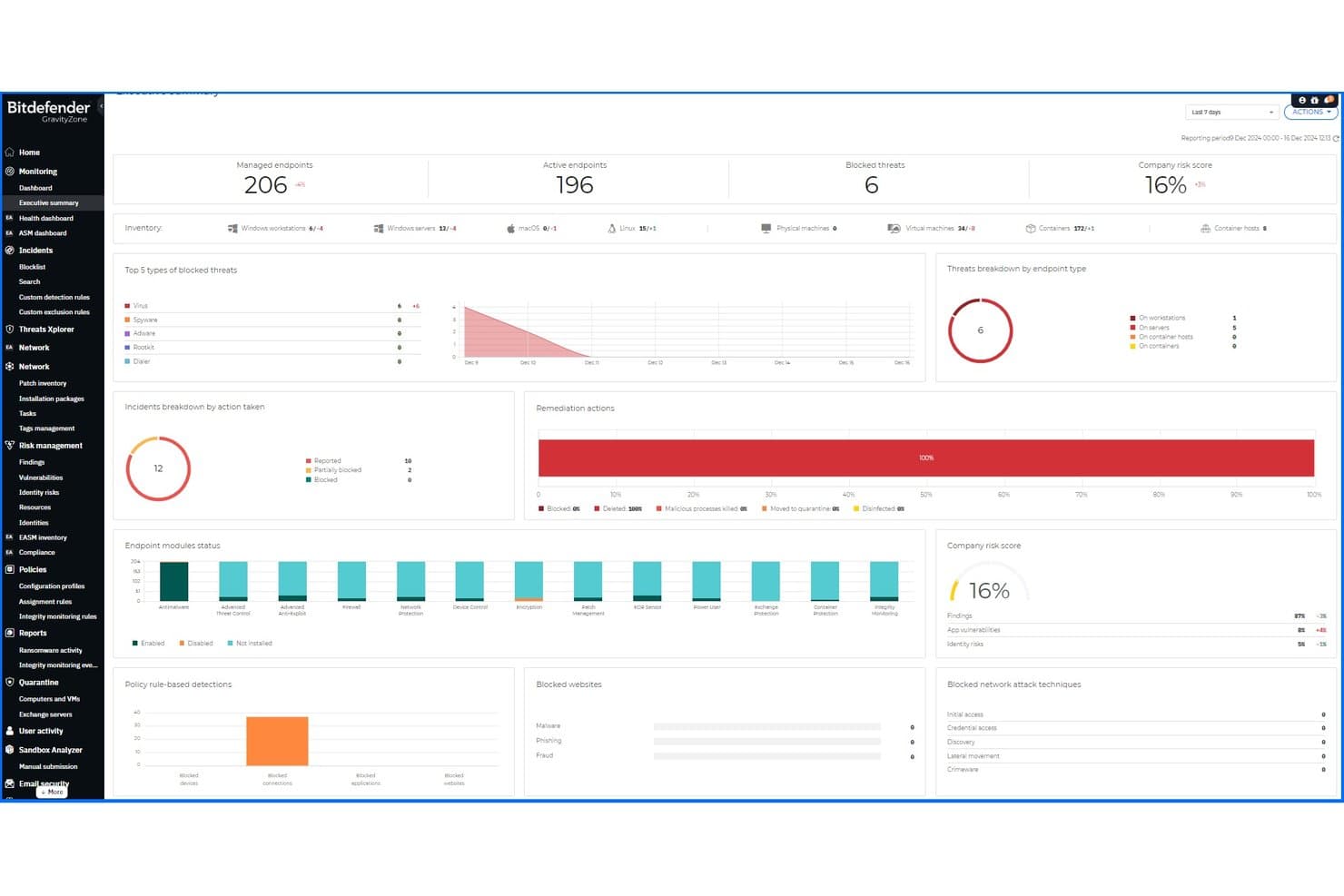
Bitdefender GravityZone provides a unified executive summary dashboard for endpoint security. Bitdefender GravityZone is an endpoint protection platform that combines machine learning, behavioral analysis, network attack defense, risk management, and web content control into a single cloud or on-premise management console for small and medium-sized businesses.
Who Is Bitdefender GravityZone Best For?
GravityZone is a strong fit for SMBs that need enterprise-grade threat detection without a large in-house security team.
Why I Picked Bitdefender GravityZone
I picked Bitdefender GravityZone as one of the best because its ransomware mitigation goes beyond detection. When GravityZone spots abnormal encryption activity, it blocks the process and automatically recovers affected files from backup copies, restoring them to their pre-attack state. Layer that with Bitdefender MDR, which provides 24/7 analyst-led threat monitoring with pre-approved response actions, and you get a platform that can contain active threats without waiting on customer approval.
Bitdefender GravityZone Key Features
- Patch management: Automatically keeps Windows OS and third-party applications up to date across managed endpoints to reduce exposure to known vulnerabilities.
- Email security: Scans and filters inbound and outbound email threats across Microsoft 365, Gmail, and Exchange to block phishing, malware, and spam before they reach users.
- Full disk encryption: Enforces encryption on endpoint storage using native OS tools, ensuring data on lost or stolen devices stays protected.
- Mobile device security: Extends endpoint protection to iOS, Android, and ChromeOS devices, applying threat detection and policy enforcement to mobile endpoints alongside desktops and servers.
Bitdefender GravityZone Integrations
Bitdefender GravityZone offers native integrations with VMware vCenter, Microsoft Active Directory, Microsoft Exchange, Veeam Backup & Replication, Splunk, ConnectWise PSA, HaloPSA, Okta, Jira, and Slack, plus XDR sensor integrations across the Microsoft ecosystem (Microsoft 365, Azure, Azure AD, Intune, Defender), AWS, and Google Workspace. An API is available for custom integrations, and it supports SIEM forwarding via syslog and webhook.
Pros and Cons
Pros:
- Extensive endpoint and mobile device coverage
- 24/7 managed detection and response available
- Automatic ransomware rollback and file recovery
Cons:
- Policy configuration options may overwhelm new admins
- Forensic analysis features can feel basic
Learn more about Bitdefender GravityZone: Best for AI-native autonomous endpoint defense
- Free demo available
- Pricing upon request
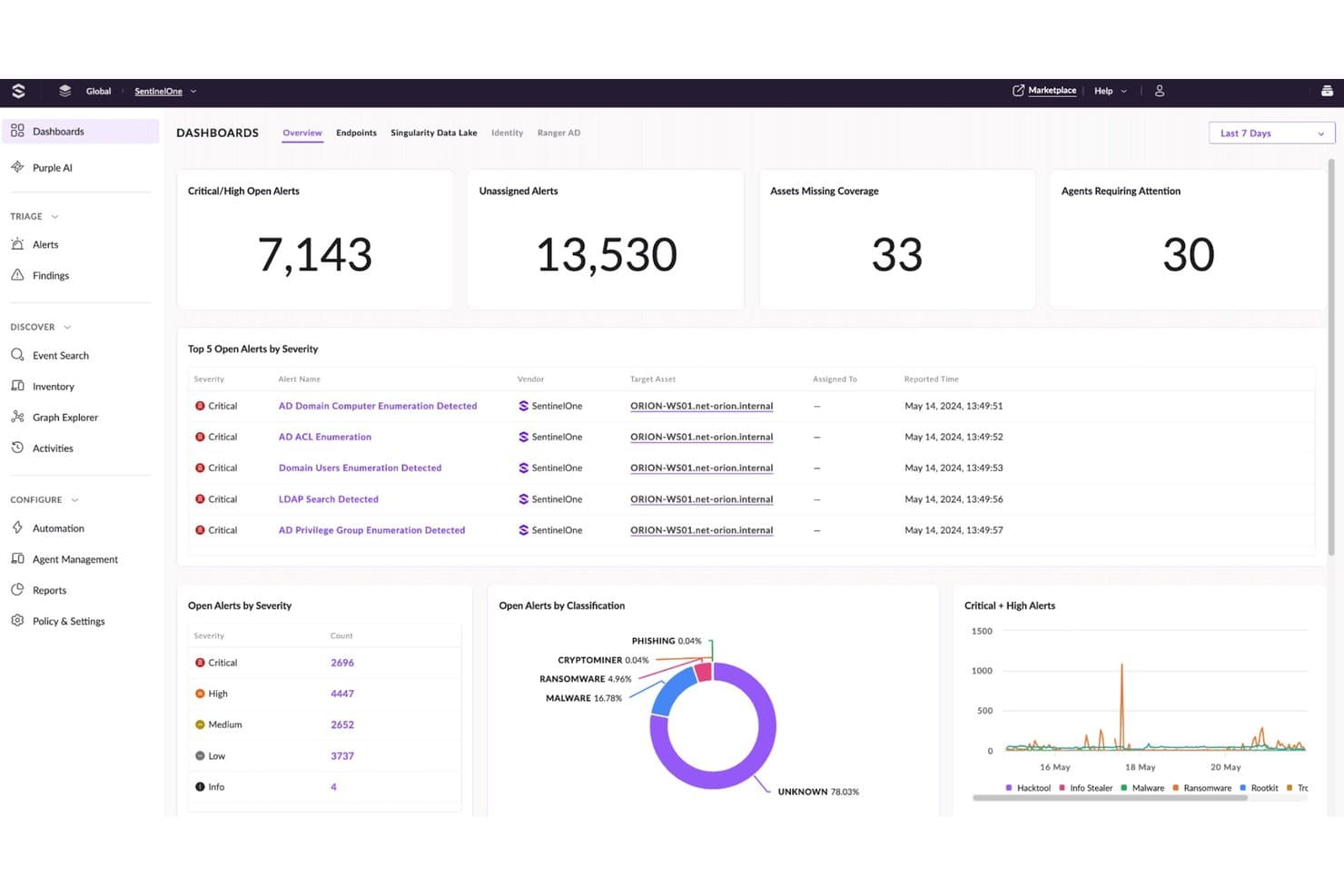
SentinelOne Singularity centralizes critical threat alerts and endpoint coverage metrics. SentinelOne Singularity is an AI-native endpoint protection platform that unifies endpoint, identity, cloud, and mobile security under a single console, with autonomous threat detection and response across ransomware, zero-days, fileless malware, and supply chain attacks.
Who Is SentinelOne Singularity Best For?
SentinelOne Singularity is a strong fit for security operations teams at mid-to-large enterprises that need autonomous threat response across endpoints, cloud workloads, and identity without relying on manual analyst intervention.
Why I Picked SentinelOne Singularity
SentinelOne Singularity earns its spot on my shortlist because its AI-driven Storyline technology automatically correlates related events across endpoints into a single attack narrative, so analysts aren't manually stitching together alerts after the fact. I also like that its ActiveEDR can roll back malicious changes autonomously without waiting for human approval, which is rare at this level of fidelity. The Singularity platform covers endpoints, cloud workloads, and identity under one console, making it a genuinely unified surface for detection and response.
SentinelOne Singularity Key Features
- Purple AI: An agentic AI analyst built into the platform that automates triage, threat hunting, and investigation using natural language queries.
- Singularity Hyperautomation: A no-code interface for building and executing automated response workflows directly inside the Singularity Platform.
- AI SIEM: Ingests and normalizes third-party and native telemetry into a single data layer for unified detection, investigation, and response.
- Singularity Mobile: Extends real-time endpoint protection to mobile devices, blocking phishing, malware, and zero-day exploits on iOS and Android.
SentinelOne Singularity Integrations
SentinelOne Singularity offers one-click integrations through its Singularity Marketplace, including Splunk, IBM QRadar, ServiceNow, Okta, Zscaler, Netskope, Recorded Future, Swimlane, AWS, and Mimecast. An API is also available for custom integrations and automation workflows.
Pros and Cons
Pros:
- ActiveEDR can autonomously roll back ransomware attacks
- Purple AI automates incident triage and hunting
- Storyline technology reconstructs full attack narratives
Cons:
- Some advanced features only in premium tiers
- Requires tuning to reduce initial alert volume
Learn more about SentinelOne Singularity: Best for legacy enterprise endpoints
- Free demo available
- Pricing upon request
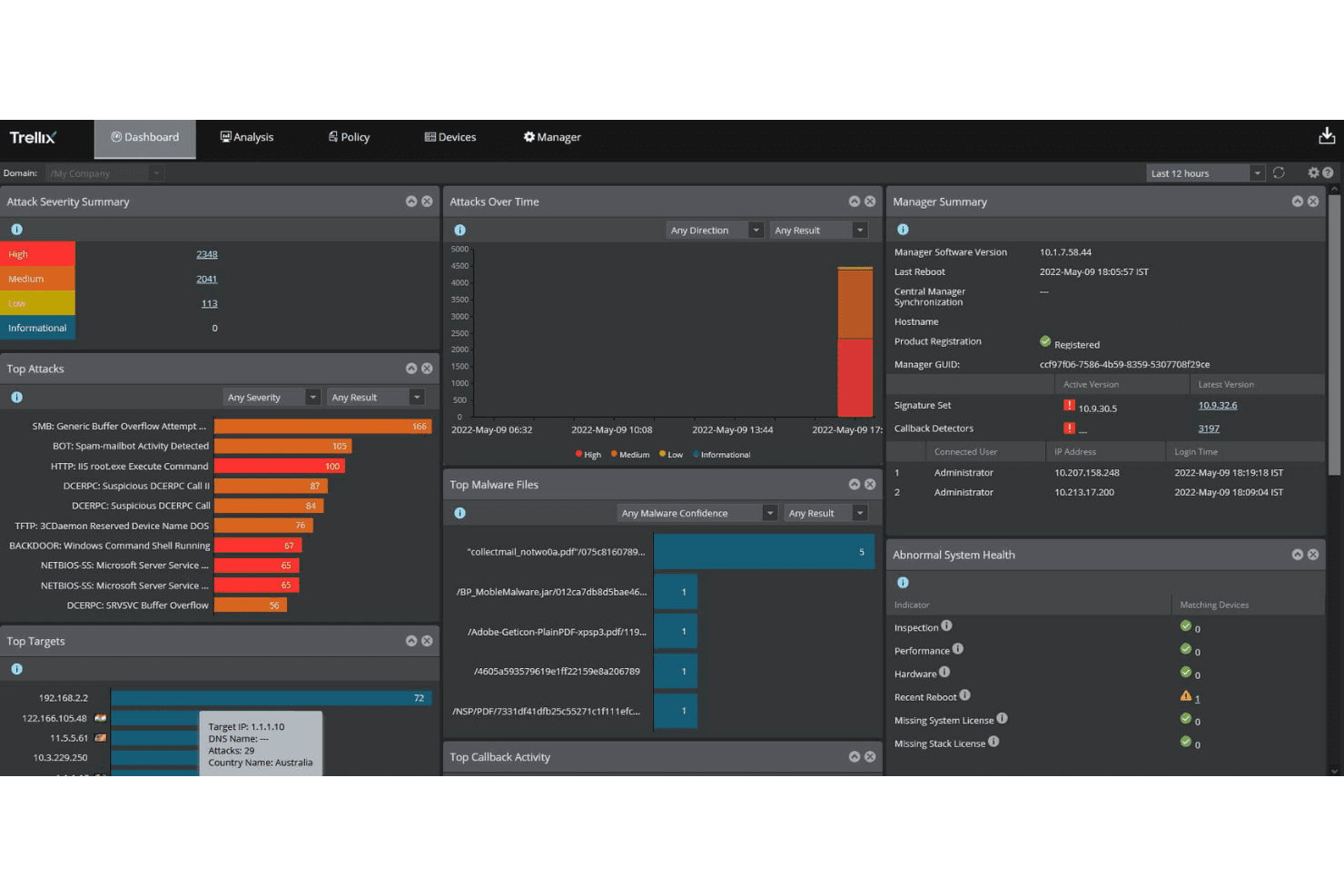
Trellix centralizes threat monitoring across severity, targets, and malware activity. Trellix Endpoint Security is an AI-powered endpoint protection platform that combines threat detection, application control, and cloud workload security across physical, virtual, and hybrid environments using a single agent.
Who Is Trellix Endpoint Security Best For?
Trellix Endpoint Security is a strong fit for large enterprises managing mixed environments that include older operating systems and legacy infrastructure alongside modern endpoints.
Why I Picked Trellix Endpoint Security
Trellix Endpoint Security earns its spot on my list because of how seriously it takes legacy infrastructure, something most modern EPP vendors quietly avoid. Trellix extends support for Windows XP-based systems through December 2028, which is a real differentiator if your environment includes older OT devices, industrial systems, or endpoints that simply can't be upgraded. I also like its Application and Change Control feature, which locks down servers and workstations by allowing only trusted applications to run, a key control for environments where patch cycles are irregular. The single-agent architecture covers on-premises, cloud, and air-gapped deployments without requiring separate tooling.
Trellix Endpoint Security Key Features
- Adaptive threat protection: Uses machine learning and behavioral analysis to detect and block file-based, fileless, and script-based threats in real time.
- Trellix ePolicy Orchestrator (ePO): A centralized management console for configuring, enforcing, and auditing endpoint security policies across on-premises, IaaS, and SaaS deployments.
- Threat Intelligence Exchange (TIE): Shares real-time threat intelligence across endpoints, email gateways, and network sensors so detections on one system inform protection across your entire environment.
- Trellix Wise: An AI-powered investigation engine that correlates alerts across endpoint, email, network, and cloud sources, then generates investigation summaries with containment and remediation recommendations.
Trellix Endpoint Security Integrations
Trellix Endpoint Security connects through Trellix ePolicy Orchestrator (ePO), which integrates with 150+ third-party security and IT tools, including ServiceNow, Splunk, Swimlane, BeyondTrust, MobileIron, IBM Resilient, AWS, and Microsoft Azure, plus Trellix products like EDR, DLP, and Email Security. An API is available for custom integrations, and the Trellix Marketplace hosts additional partner apps for SIEM, SOAR, and threat intelligence workflows.
Pros and Cons
Pros:
- Application and change control for legacy systems
- Single agent covers mixed physical and virtual endpoints
- Extends support for Windows XP environments
Cons:
- Policy configuration complexity frustrates new admins
- Interface feels dated compared to competitors
Learn more about Trellix Endpoint Security: Best for Microsoft 365-based orgs
- Not available
- Pricing upon request
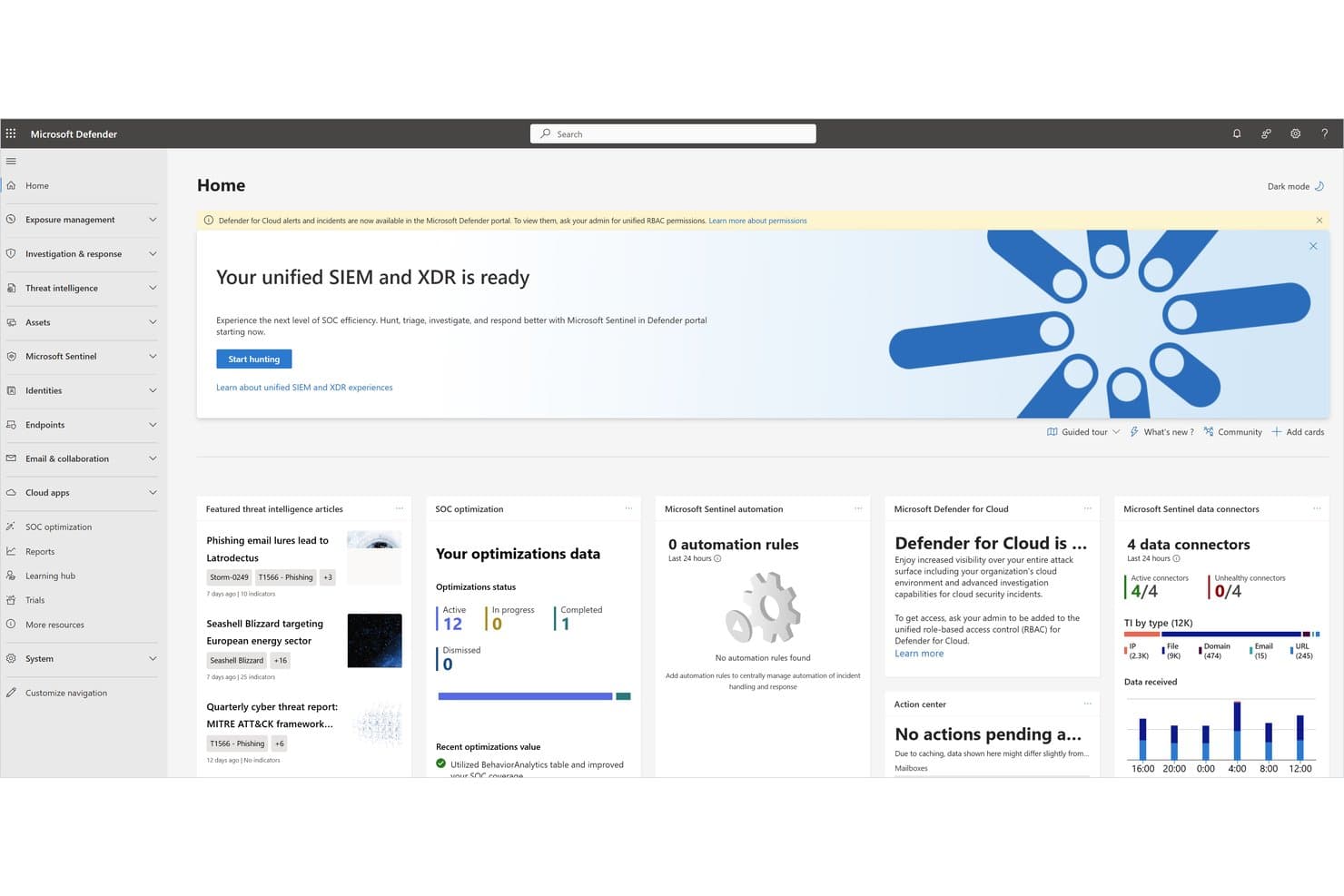
Microsoft Defender for Endpoint unifies SIEM and XDR for streamlined SOC operations. Microsoft Defender for Endpoint is a cloud-native endpoint protection platform that combines threat detection, vulnerability management, attack surface reduction, and extended detection and response (XDR) capabilities across Windows, macOS, Linux, iOS, and Android devices.
Who Is Microsoft Defender for Endpoint Best For?
It's a natural fit for organizations already running Microsoft 365 or Azure, where native integration with the Microsoft security stack removes the need for third-party endpoint agents.
Why I Picked Microsoft Defender for Endpoint
Microsoft Defender for Endpoint earns its spot on my shortlist because it's built directly into the Microsoft ecosystem, which means if your org runs Microsoft 365, you're getting XDR coverage without bolting on a separate agent. I particularly like how its attack surface reduction rules let you lock down specific behaviors, like blocking Office applications from spawning child processes, across your entire device fleet from a single policy. The integration with Microsoft Sentinel also means threat signals from endpoints feed directly into your SIEM without manual connector configuration.
Microsoft Defender for Endpoint Key Features
- Threat and vulnerability management: Continuously scans enrolled endpoint devices to surface misconfigurations, missing patches, and software vulnerabilities ranked by exposure risk.
- Automated investigation and remediation: Automatically triages alerts, traces attack chains, and resolves threats on affected endpoints without requiring manual analyst intervention.
- Live response: Opens a remote shell session to an endpoint so you can collect forensic artifacts, run scripts, and isolate or remediate a device in real time.
- Behavioral blocking and containment: Detects and stops suspicious in-memory and process behaviors on-device, even when malware attempts to evade signature-based detection.
Microsoft Defender for Endpoint Integrations
Microsoft Defender for Endpoint has native integrations across the Microsoft ecosystem, including Microsoft Sentinel, Microsoft Intune, Microsoft Entra ID, Microsoft Defender for Cloud, Microsoft Defender for Identity, Microsoft Purview, and Azure. It also connects with third-party tools like ServiceNow, Splunk, and Jamf Pro, and provides APIs for custom integrations and SIEM connectors.
Pros and Cons
Pros:
- Automated triage reduces manual incident response
- Attack surface reduction applies to entire fleet
- Native integration with Microsoft security stack
Cons:
- Limited support for non-Microsoft environments
- No trial option for hands-on evaluation
Learn more about Microsoft Defender for Endpoint: Best for defense with identity context
- Free demo available
- Pricing upon request
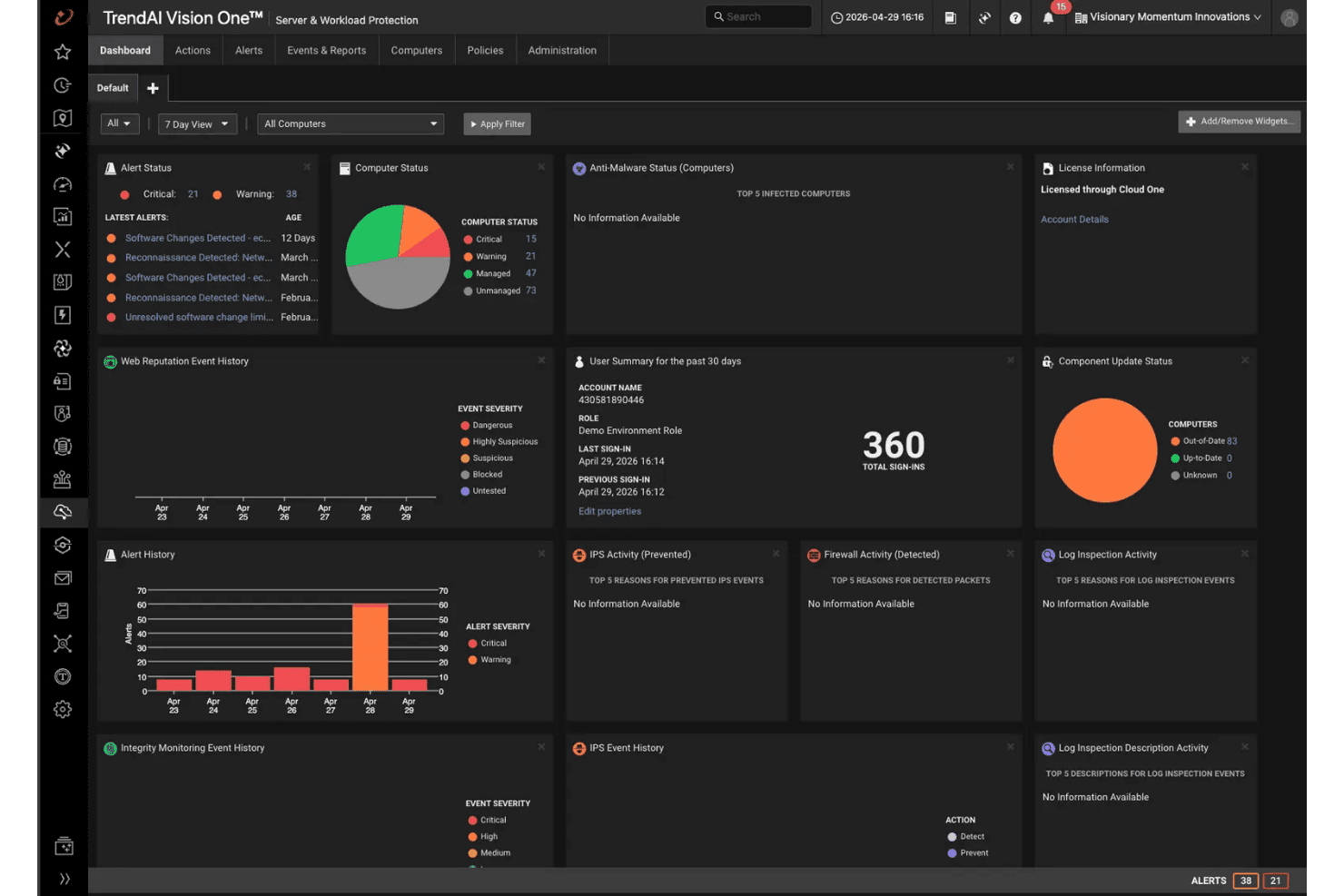
TrendAI Vision One offers security alerts and computer status at a glance. TrendAI Vision One is an AI-powered endpoint protection platform that combines EDR, XDR, automated incident response, and attack surface risk management across endpoints, servers, cloud workloads, and IoT environments from a single console.
Who Is TrendAI Vision One Best For?
TrendAI Vision One is a strong fit for enterprise security teams managing hybrid environments who need endpoint, identity, and XDR threat detection unified in a single console.
Why I Picked TrendAI Vision One
TrendAI Vision One earns its spot on my list because of how it ties identity signals directly into endpoint defense. When an alert fires, the platform automatically enriches it with identity context, asset risk, and exposure data, so analysts aren't chasing answers across disconnected tools. I also like that it accounts for Microsoft Entra ID security defaults when evaluating identity risk, which adds a layer of precision to prioritization. That combination of native XDR telemetry and identity-aware detection is what makes it genuinely useful when investigating lateral movement or compromised credentials.
TrendAI Vision One Key Features
- Virtual patching: Applies protection rules for known vulnerabilities at the network layer before a formal patch is deployed, reducing exposure on unpatched endpoints and servers.
- Behavioral analysis: Monitors process activity and execution patterns in real time to detect ransomware and exploit techniques that signature-based detection alone would miss.
- Automated security playbooks: Lets you configure predefined response actions that trigger automatically when specific threat conditions are met, reducing manual triage time.
- Attack surface risk management: Continuously inventories devices, accounts, and vulnerabilities across your environment and assigns risk scores to help you prioritize remediation.
TrendAI Vision One Integrations
TrendAI Vision One supports native integrations with Active Directory, Microsoft Entra ID, Google Cloud Identity, Okta, Splunk, Azure Sentinel, ServiceNow, AWS S3, QRadar, and Palo Alto Panorama, along with connectors for Cortex XSOAR, Chronicle SOAR, FortiGate, Check Point, Rapid7 Nexpose, Nessus, MISP, and VirusTotal. An API is available for custom integrations, and syslog and TAXII feeds are supported for extending data sharing across your security stack.
Pros and Cons
Pros:
- Automated security playbooks for fast incident response
- Virtual patching protects unpatched endpoints and servers
- Identity context enriches every security alert
Cons:
- Asset inventory can miss some IoT devices
- Advanced features may require additional training
Learn more about TrendAI Vision One :
Other Endpoint Protection Platforms
Here are some additional endpoint protection platform options that didn’t make it onto my shortlist, but are still worth checking out:
- 11FortiClientBest for Fortinet Security Fabric ecosystem protection
- 12Kaspersky NextBest for enterprises outside US-aligned markets
- 13Acronis Cyber Protect CloudBest for backup-native endpoint security built for MSPs
- 14N-ableBest for MSP-native endpoint defense with built-in RMM
- 15Elastic Security Best for unified SIEM, XDR, and endpoint defense
- 16Cybereason EDRBest for operation-centric attack correlation
- 17VMware Carbon Black EndpointBest for deep EDR telemetry in complex enterprise SOCs
- 18Cisco Secure EndpointBest for Cisco-native security ecosystem
- 19WatchGuard EPDRBest for MSPs managing endpoint security at scale
- 20ESET Protect EliteBest for built-in patch management
How I Evaluate Endpoint Protection Platforms
When a ransomware strain bypasses prevention and starts encrypting files, I want to know exactly which tools can stop it, roll it back, and tell me how it got in—so I split my evaluation into baseline criteria every tool must meet and differentiators that separate the best from the rest.
Core Functionality (Table Stakes For This List)
When I'm selecting tools for my list, I rank each one on a scale from 0 (does not offer the functionality) to 5 (excels in this area) for each core functionality listed below. I then calculate the tool's total score into a percentage, using 75% as a benchmark to help assess its overall fit for the list.
- Threat prevention: I evaluate how many detection layers a platform stacks—signatures, behavioral analysis, ML models, and exploit blocking—and whether it holds up against fileless attacks, not just commodity malware.
- Endpoint detection and response: Deep telemetry, root cause analysis, and MITRE ATT&CK mapping matter here. I look for tools that let analysts hunt threats and trace lateral movement across endpoints without jumping between consoles.
- Centralized management console: I check for multi-tenant support, role-based access controls, and real-time visibility across distributed fleets. Platforms like CrowdStrike Falcon and Microsoft Defender for Endpoint both offer cloud-native consoles, but the depth of policy granularity and API access varies.
- Multi-OS endpoint support: Coverage across Windows, macOS, and Linux desktops and servers is baseline. I also evaluate whether mobile and cloud workload agents maintain feature parity with desktop counterparts.
- Automated response and remediation: Playbook-driven containment—endpoint isolation, process kills, file quarantine, and rollback of malicious changes—reduces mean time to respond. I look at how much of that workflow runs without manual intervention.
- Threat intelligence integration: Real-time feeds with contextual enrichment and adversary attribution give SOC teams an edge. I evaluate whether the platform supports third-party feed ingestion alongside its own proprietary intelligence network.
Once I have a list of tools that meet the criteria, I consider what sets each platform apart.
Differentiating Factors (What Sets Vendors Apart)
Here's how I compare and contrast different vendors:
Standout Features
Ransomware rollback is the first thing I check beyond baseline detection. I want to know if a platform can revert encrypted files to a pre-infection state automatically—without depending on external backups. Identity threat protection is equally high on my list. Platforms that tie into Active Directory or Okta to flag credential misuse and privilege escalation give SOC teams visibility that standalone EDR misses. I also evaluate XDR data fabric capabilities, since correlating endpoint, cloud, and email telemetry in one query layer cuts investigation time dramatically during cross-domain incidents.
Beyond Features
I check whether a platform offers open API access and pre-built SIEM connectors—tools like Splunk or Microsoft Sentinel need clean telemetry feeds, and gaps here create blind spots in your SOC workflows. Licensing transparency matters just as much: I evaluate whether EPP, EDR, XDR, and MDR tiers are clearly separated so you're not hit with surprise upsells when you need ransomware rollback or managed hunting. For teams serving regulated industries, I look at compliance-ready reporting for frameworks like HIPAA, PCI-DSS, and NIST 800-171, plus data residency options that support regional obligations.
How to Choose an Endpoint Protection Platform
When your security stack is the backbone of business continuity, how do you make sure the endpoint protection platform you pick can actually deliver on key requirements for detection, response, and operational fit?
| If your priority is... | Look for... |
|---|---|
| If your priority is...Rapid rollback after ransomware | Look for...Built-in, agent-driven file restoration with zero external backup dependency |
| If your priority is...Hybrid or legacy environment support | Look for...Proven deployment guides and supported agents for all needed OS and hardware |
| If your priority is...XDR and SIEM integration | Look for...Open API access and pre-built data connectors for your stack |
| If your priority is...Multi-region compliance requirements | Look for...Vendor documentation of in-region data hosting and regulator audit logs |
| If your priority is...Minimal in-house security overhead | Look for...Bundled managed detection and response options, not just EDR |
How to Vet Your Shortlist
- Run a controlled ransomware simulation: Require full rollback of at least 5 encrypted files in your lab network.
- Test OS agent coverage: Deploy to 2+ legacy or niche endpoints and verify all core features work without manual tuning.
- Request integration documentation: Ask for schema guides or SIEM connector setup docs specific to your required platforms.
- Review compliance linkage: Obtain a written attestation or auditor letter showing regional data residency controls.
- Clarify operational control tradeoff: Decide if you want in-house visibility with tool-based EDR, or prefer hands-off managed detection and response—a key filter as you shortlist options.
What Are Endpoint Protection Platforms?
Endpoint protection platforms are centralized security solutions that detect, prevent, and respond to threats targeting devices across your network. These platforms monitor desktops, laptops, servers, and mobile devices to block malware, ransomware, and unauthorized access. By providing real-time visibility, coordinated response tools, and integration with broader security systems, endpoint protection platforms help IT teams reduce risks, contain incidents, and maintain compliance in complex environments.
Features
When selecting endpoint protection platforms, keep an eye out for the following key features:
- Threat prevention: Identifies and blocks known and unknown malware, ransomware, and exploits using signature-based and behavioral analysis before threats can execute on endpoints.
- Endpoint detection and response: Continuously monitors endpoints, records system activities, and enables incident response teams to investigate threats, trace attack origins, and scope the impact of incidents.
- Centralized management console: Provides a unified web-based dashboard to deploy agents, manage security policies, view alerts, and generate reports across all endpoints from a single place.
- Multi-OS support: Enables protection for devices running different operating systems such as Windows, macOS, and Linux—covering desktops, laptops, servers, and sometimes mobile devices.
- Automated response and remediation: Automatically isolates compromised endpoints, kills malicious processes, quarantines infected files, and rolls back changes from attacks to lower incident response time.
- Threat intelligence integration: Pulls in real-time feeds and indicators of compromise from global sources to stay ahead of emerging threats and enhance detection with context-aware insights.
- Role-based access control: Lets organizations assign permissions and roles to users and administrators, ensuring only authorized staff can manage endpoints, adjust policies, or access sensitive security information.
- Compliance reporting: Generates pre-built and customizable reports tailored to regulatory frameworks, making it easier for security and compliance teams to demonstrate adherence to required standards.
- Cloud and on-premises deployment options: Supports both cloud-hosted and on-premises implementations, offering flexibility for organizations to adopt the model that fits their infrastructure and regulatory requirements.
- Patch management and vulnerability scanning: Monitors endpoints for missing patches, scans for vulnerabilities, and assists IT teams in prioritizing and deploying updates to reduce security risks.
Common AI Features
Beyond the standard endpoint protection platform features listed above, many of these solutions are incorporating AI with features like:
- AI-driven threat hunting: Uses machine learning to automatically analyze endpoint telemetry, identify suspicious patterns, and surface potential threats that human analysts might miss. This helps your team proactively detect advanced attacks before they escalate.
- Automated behavioral analysis: Continuously monitors user and process behavior on endpoints, using AI to flag anomalies that could indicate insider threats, credential misuse, or zero-day exploits. This reduces false positives and helps prioritize real risks.
- Predictive malware detection: Leverages AI models trained on vast datasets to identify and block never-before-seen malware based on code characteristics and execution patterns, not just known signatures.
- Adaptive phishing protection: Uses AI to analyze email content, URLs, and user interactions in real time, blocking phishing attempts and credential harvesting attacks as they evolve.
- AI-powered incident triage: Automatically correlates alerts, assigns risk scores, and recommends response actions, helping your team focus on the most urgent threats and reduce investigation time.
- Natural language threat reporting: Generates plain-language summaries of incidents and attack chains using AI, making it easier for IT and security teams to communicate findings to stakeholders and document response actions.
Benefits
Implementing endpoint protection platforms provides several benefits for your team and your business. Here are a few you can look forward to:
- Threat prevention across devices: Block malware, ransomware, and exploit attacks with signature-based and behavioral detection spanning desktops, laptops, servers, and mobile devices.
- Centralized visibility and control: Use a unified management console to oversee security policies, alerts, and compliance status for every endpoint in your environment.
- Automated response and rapid remediation: Quickly contain threats using playbook-driven actions like endpoint isolation, process termination, file quarantine, and rollback of unauthorized changes.
- Multi-OS and hybrid support: Protect mixed fleets, including Windows, macOS, Linux, and sometimes mobile or cloud workloads, without manual tuning or agent swapping.
- Integrated threat intelligence: Leverage real-time, context-rich threat feeds and adversary insights to enhance detection and investigation workflows.
- Regulatory compliance reporting: Generate built-in or customizable reports mapped to frameworks such as HIPAA, PCI-DSS, and NIST 800-171, helping demonstrate control to auditors and stakeholders.
- Open API and SIEM connector access: Feed clean telemetry to SIEM platforms and automate workflows by connecting seamlessly with security operations and monitoring tools.
Costs and Pricing
Selecting endpoint protection platforms requires an understanding of the various pricing models and plans available. Costs vary based on features, team size, add-ons, and more. The table below summarizes common plans, their average prices, and typical features included in endpoint protection platform solutions:
Plan Comparison Table
| Plan Type | Average Price | Common Features |
|---|---|---|
| Plan TypeFree Plan | Average Price$0 | Common FeaturesBasic malware detection, limited device support, and minimal reporting. |
| Plan TypePersonal Plan | Average Price$3-$10/user/month | Common FeaturesCore threat prevention, real-time protection, multi-device support, and basic centralized management. |
| Plan TypeBusiness Plan | Average Price$15-$35/user/month | Common FeaturesAdvanced endpoint detection and response, policy management, role-based access control, automated remediation, and compliance reporting. |
| Plan TypeEnterprise Plan | Average Price$40-$75/user/month | Common FeaturesMulti-OS support, advanced threat intelligence integration, API and SIEM connectors, ransomware rollback, and premium support services. |
Endpoint Protection Platforms FAQs
Here are some answers to common questions about endpoint protection platforms:
How do endpoint protection platforms handle zero-day threats?
Most endpoint protection platforms use a mix of AI-driven behavioral analysis and real-time threat intelligence to spot and block zero-day threats. Rather than relying only on known malware signatures, these platforms monitor process behavior, network connections, and suspicious files for signs of new or unknown attacks. You can expect tools to isolate or roll back systems if a zero-day exploit is detected, reducing potential damage even before a patch is available.
Can endpoint protection platforms support remote and hybrid work environments?
Yes, most modern endpoint protection platforms are designed to support remote and hybrid work models. Look for cloud-based management consoles and agents that don’t need on-premises connectivity to continuously update policies and monitor devices. This means you can maintain visibility and control across desktops, laptops, and mobile endpoints, no matter where your users are working from.
What’s the difference between EDR and XDR in endpoint protection platforms?
Endpoint detection and response (EDR) focuses on monitoring activity and responding to threats directly on devices like laptops and servers. Extended detection and response (XDR) goes a step further by integrating telemetry from multiple sources—like endpoints, cloud services, email, and identity systems. With XDR, your team can uncover attack patterns that cross platforms or tool boundaries, making it easier to investigate and contain multi-layer threats.
How do I know if an endpoint protection platform meets compliance requirements?
Check vendor documentation for pre-built compliance reports, auditor letters, or certifications tied to standards like HIPAA, PCI-DSS, and NIST 800-171. Most platforms offer reporting tools that map directly to regulatory frameworks. It’s a good idea to request in-region data residency details if your business operates in multiple countries or must follow strict local data laws.
Do endpoint protection platforms impact device performance?
Most endpoint protection platforms aim to minimize resource usage, but some can slow down older devices during scanning or heavy analysis. You should test agents in your environment to see how they affect startup times, CPU, memory, and user workflows. Look for tools with lightweight agents or configurable scan schedules if performance is a top concern for your team.
Can endpoint protection platforms integrate with my SIEM or IT management tools?
Yes, many endpoint protection platforms offer open APIs and built-in connectors for popular SIEM and IT management tools like Splunk, Microsoft Sentinel, and ServiceNow. You’ll want to review API documentation and available integration guides early—solid integrations help you automate workflows, consolidate alerts, and reduce the risk of missing important incidents.