

10 Best AI Hot Desk Booking Software in 2026

Best AI Hot Desk Booking Software Shortlist


AI hot desk booking software uses artificial intelligence to automate and optimize how your team reserves desks in shared workspaces. If you’re searching for the best way to manage hybrid schedules, reduce booking conflicts, and make smarter use of your office, you’re in the right place. In this guide, you’ll find the top AI-powered desk booking platforms, what makes each one unique, and how they can help you keep your workplace flexible and efficient in 2026.
Why Trust Our Software Reviews
We’ve been testing and reviewing software since 2023. As tech leaders ourselves, we know how critical and difficult it is to make the right decision when selecting software.
We invest in deep research to help our audience make better software purchasing decisions. We’ve tested more than 2,000 tools for different tech use cases and written over 1,000 comprehensive software reviews. Learn how we stay transparent & our software review methodology.
AI Hot Desk Booking Software Comparison Table
This comparison table summarizes pricing details for my top AI hot desk booking software selections:
| Tool | Best For | Trial Info | Price | ||
|---|---|---|---|---|---|
| 1 | Best for unified map-based resource booking | 14-day free trial + free plan + free demo available | From $1.90/user/month (billed annually) | Website | |
| 2 | Best for AI-assisted workplace coordination | Free demo available | Pricing upon request | Website | |
| 3 | Best for real-time desk availability mapping | 7-day free trial + free demo available | From $1.79/user/month (billed annually) | Website | |
| 4 | Best with advanced analytics for occupancy | Free demo available | Pricing upon request | Website | |
| 5 | Best for integrated carbon tracking | Free demo available | From $99/month | Website | |
| 6 | Best for Microsoft 365 calendar integration | 30-day free trial + free demo available | From $13.50/month (billed annually) | Website | |
| 7 | Best for privacy-focused desk reservations | 30-day free trial available | From $51/month | Website | |
| 8 | Best for Slack-based desk booking | Free trial + free demo available | From $2.50/user/month (billed annually) | Website | |
| 9 | Best for multi-location desk coordination | 30-day free trial available | From €1.59/resource/month (billed annually) | Website | |
| 10 | Best for flexible booking permissions | Free plan available | From $4/resource/month (billed annually) | Website |
AI Hot Desk Booking Software Reviews
Below are my detailed summaries of the best AI hot desk booking software that made it onto my shortlist. My reviews offer a detailed look at the features, best use cases, and integrations of each platform to help you find the best one for you.

Dibsido
Best for unified map-based resource booking
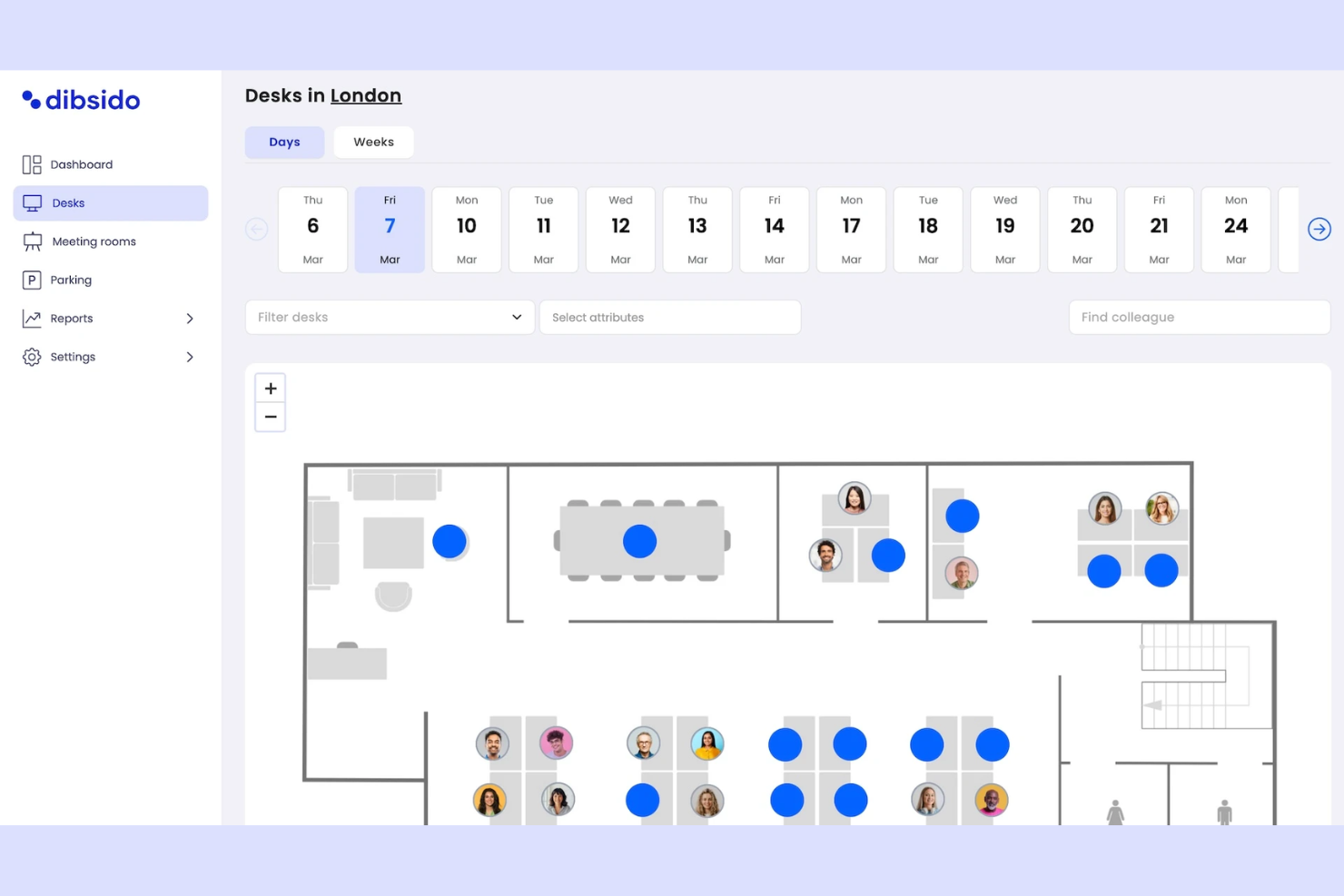
Dibsido is a workplace management platform designed for CTOs seeking AI-enabled hot desk booking software that unifies desk, meeting room, and parking reservations in one app.
Who Is Dibsido Best For?
Facilities teams and office managers at small to midsize organizations that need simple, unified booking for desks, rooms, and parking.
Why I Picked Dibsido
I picked Dibsido as one of the best because it lets my team manage desks, meeting rooms, and parking from a unified map-based interface. I like using a single tool to organize every shared workspace resource right inside the same app.
Dibsido Key Features
- AI floorplan enhancer: Automatically upgrades floor plans for easier space management and booking visualization.
- Advanced booking permissions: Set different access rights for user groups and manage resource control.
- Automated notifications: Sends booking reminders and updates through email or app push notifications.
- Analytics dashboard: Provides insights into office, desk, room, and parking space utilization.
Dibsido Integrations
Integrations include Slack, Microsoft 365, Google Workspace, two-way Google and Outlook Calendar sync, and SSO through Microsoft Entra ID, Google Workspace, and SAML.
Pros and Cons
Pros:
- Includes iOS and Android mobile apps on every plan
- Interactive floor plan maps streamline reservations
- Parking waitlist automatically assigns a spot when one frees up
Cons:
- Lacks advanced automation for large enterprises
- Analytics dashboard offers limited customization

Best for AI-assisted workplace coordination
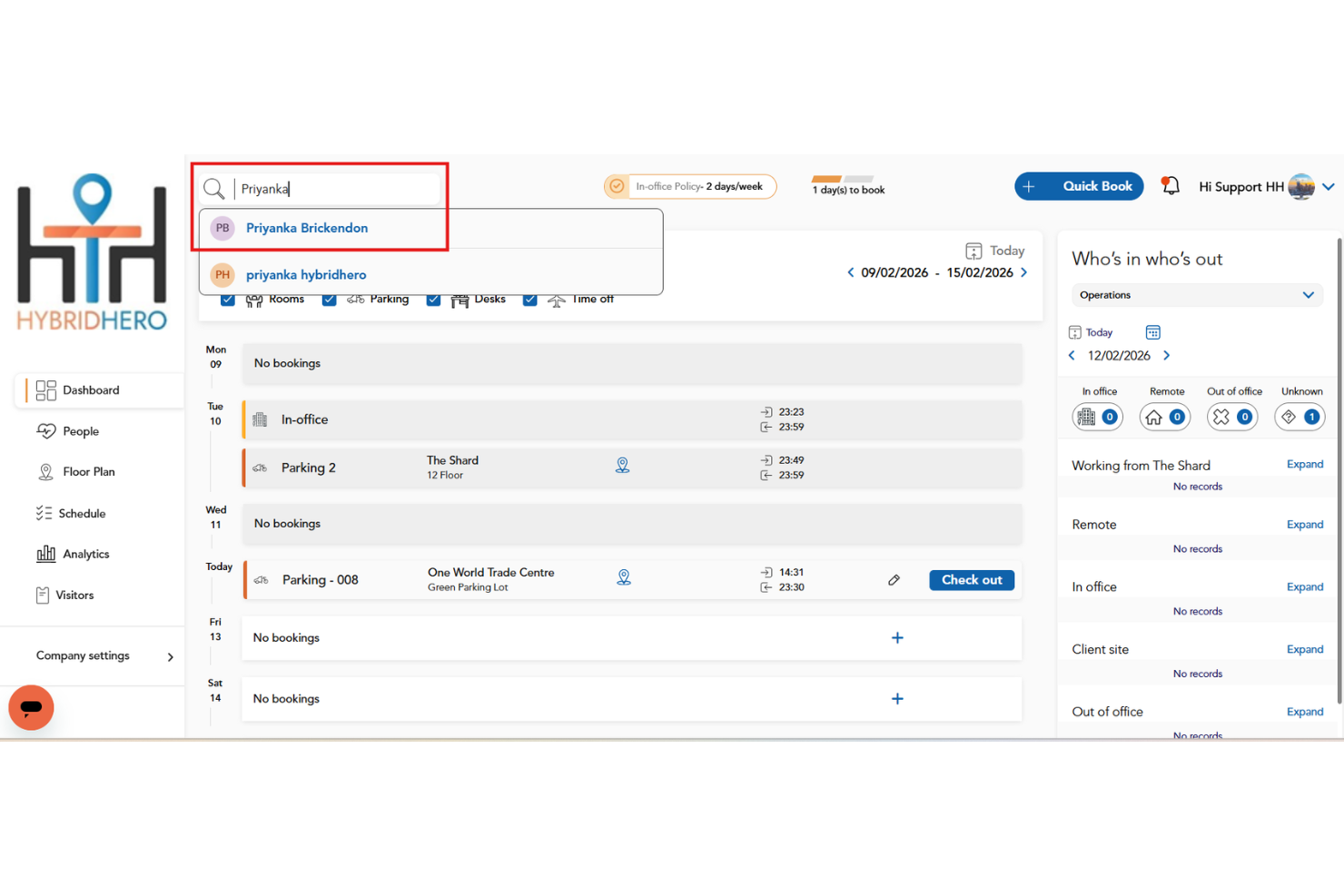
HybridHero is an AI-powered workplace management platform that helps hybrid teams book desks, meeting rooms, parking spaces, and other workplace resources through interactive floor plans, real-time availability, and intelligent booking assistance.
Who Is HybridHero Best For?
HybridHero is a strong fit for mid-sized organizations managing hybrid work schedules that want a smarter way to coordinate desk bookings, workplace attendance, and office utilization.
Why I Picked HybridHero
I picked HybridHero because it makes coordinating office attendance much easier for hybrid teams. Employees can use the AI assistant to book desks, find teammates, and reserve workspaces based on real-time availability, while managers gain visibility into office utilization through live analytics and occupancy data. I also like that QR check-ins and automatic desk releases help reduce unused reservations, making shared workspaces more efficient.
HybridHero Key Features
- HybridHero AI assistant: Book desks using natural language while checking live availability.
- Colleague finder: Locate teammates on interactive floor plans and reserve nearby desks.
- Utilization heat maps: Analyze occupancy trends to improve workplace planning.
- Calendar sync: Connect desk bookings with Microsoft Outlook, Microsoft Teams, and Google Workspace calendars.
HybridHero Integrations
HybridHero integrates with Microsoft Outlook, Microsoft Teams, Google Workspace, Active Directory, Okta, OpenID Connect, ADFS, and Slack. It also provides a REST API and webhooks for custom integrations with HR, access control, and workplace systems.
Pros and Cons
Pros:
- QR check-in with auto-release
- AI-powered desk booking
- Strong workplace analytics
Cons:
- Page loads can be slow
- Occasional mobile app bugs
Best for real-time desk availability mapping

WorkInSync is an AI-powered desk booking software that provides real-time desk availability mapping, workspace scheduling, and centralized management for hybrid offices.
Who Is WorkInSync Best For?
WorkInSync is a good fit for facilities managers and IT teams in mid-size to large hybrid workplaces needing real-time desk mapping.
Why I Picked WorkInSync
I picked WorkInSync as one of the best because I can see real-time desk availability on an interactive floor map, which helps my team quickly find and book open workspaces. I like that I can set up neighborhood zones and manage bookings for different office locations from a single dashboard. My team also uses the mobile app to reserve desks and check in on the go.
WorkInSync Key Features
- AI-powered booking suggestions: Recommends desks based on user preferences and booking patterns.
- Contactless check-in: Lets users check in using QR codes or NFC.
- Automated sanitization workflows: Triggers cleaning requests after each desk booking.
- Integration with access control systems: Syncs desk bookings with physical entry permissions.
WorkInSync Integrations
Native integrations include Google Calendar, Microsoft Teams, Workday, SAP, and Oracle PeopleSoft. An API may be available for custom integrations.
Pros and Cons
Pros:
- Centralized management for multiple office locations
- Contactless check-in with QR code support
- Automated cleaning and sanitization workflows
Cons:
- Reporting features lack advanced customization
- Occasional sync issues with calendar systems

Robin
Best with advanced analytics for occupancy

Robin is a desk booking and workplace management platform that lets you manage desk reservations, interactive floor plans, occupancy analytics, and space usage policies for hybrid offices.
Who Is Robin Best For?
Workplace experience teams and facilities managers in mid-sized and large hybrid organizations who need detailed occupancy analytics.
Why I Picked Robin
I picked Robin as one of the best because I rely on its advanced analytics to track occupancy trends and desk usage patterns across multiple office locations. My team uses its real-time dashboards and custom reporting to make data-driven decisions about space allocation. I also like that Robin lets us visualize floor plans and monitor booking activity at a granular level.
Robin Key Features
- Interactive desk booking map: Users can reserve desks directly from a visual floor plan.
- Mobile app access: Book desks, check availability, and manage reservations from iOS and Android devices.
- Neighborhoods management: Group desks into zones for team-based booking and collaboration.
- Visitor management: Register guests and track visitor flow within the office.
Robin Integrations
Robin offers native integrations with Microsoft Outlook, Microsoft Teams, Google Workspace, Okta, and Slack, and provides an API for custom integrations.
Pros and Cons
Pros:
- Real-time updates reduce double-booking risk
- Automated desk assignments based on usage patterns
- Highlights occupancy and trends
Cons:
- Offline access is limited for mobile users
- Admin dashboard can feel cluttered initially
YAROOMS
Best for integrated carbon tracking

YAROOMS is a workplace management platform for AI-powered hot desk booking that includes desk reservations, space scheduling, occupancy analytics, and resource management features.
Who Is YAROOMS Best For?
Facilities and sustainability managers at mid-sized and large organizations who need integrated desk booking and carbon tracking.
Why I Picked YAROOMS
I picked YAROOMS as one of the best because I can track carbon emissions directly from workspace bookings, which is rare in this category. My team uses its built-in sustainability dashboard to monitor and report on our office’s environmental impact. I also like that I can set carbon reduction targets and see how our desk usage aligns with those goals.
YAROOMS Key Features
- Interactive floor plan booking: Users can select and reserve desks directly from a visual office map.
- Recurring desk reservations: Schedule repeating bookings for desks on a daily, weekly, or custom basis.
- Mobile app access: Book desks, view availability, and manage reservations from iOS and Android devices.
- Role-based access controls: Set permissions for booking, managing, or viewing desks based on user roles.
YAROOMS Integrations
YAROOMS offers native integrations with Microsoft 365, Google Workspace, Okta, and Azure Active Directory, and provides an API for custom integrations.
Pros and Cons
Pros:
- Supports recurring and team-based desk bookings
- Native Microsoft 365 integration
- Built-in carbon tracking for workspace usage
Cons:
- No AI-driven booking recommendations
- Limited visitor management capabilities
Best for Microsoft 365 calendar integration
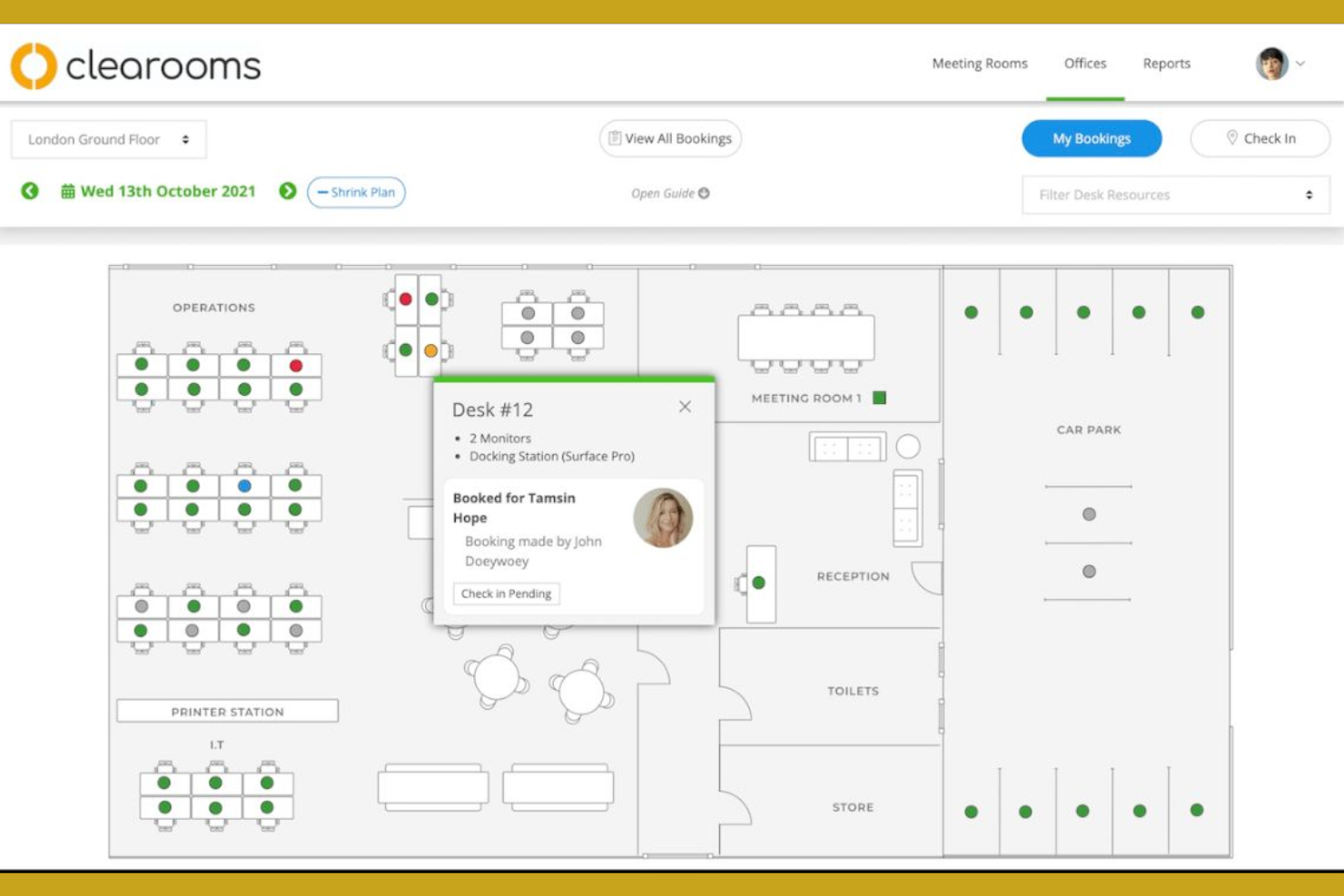
Clearooms is a desk and meeting room booking platform designed for businesses that want to manage workspace reservations, interactive floor plans, and resource scheduling in one system.
Who Is Clearooms Best For?
Clearooms is a strong fit for office administrators and IT teams in organizations that rely on Microsoft 365 for daily operations.
Why I Picked Clearooms
I picked Clearooms as one of the best because I can sync desk and meeting room bookings directly with Microsoft 365 calendars, so reservations show up instantly for everyone. My team uses the interactive floor plan to find and book available desks in real time. I also like that I can set up booking rules and manage resources from a single dashboard without switching between tools.
Clearooms Key Features
- Contactless check-in: Users can check in to desks using QR codes.
- Visitor management: Manage guest access and track visitor activity.
- Customizable booking permissions: Set who can book which desks or rooms.
- Desk utilization reporting: View analytics on workspace occupancy and booking trends.
Clearooms Integrations
Clearooms offers native integrations with Google Workspace, Jumpcloud, Microsoft 365, Microsoft Teams, and Azure Active Directory. An API is available for custom integrations.
Pros and Cons
Pros:
- Displays real-time desk availability
- Desk booking limits can be set by admin
- QR code check-in supports contactless workflows
Cons:
- Mobile app notifications can be inconsistent
- Limited analytics compared to other platforms

Joan
Best for privacy-focused desk reservations
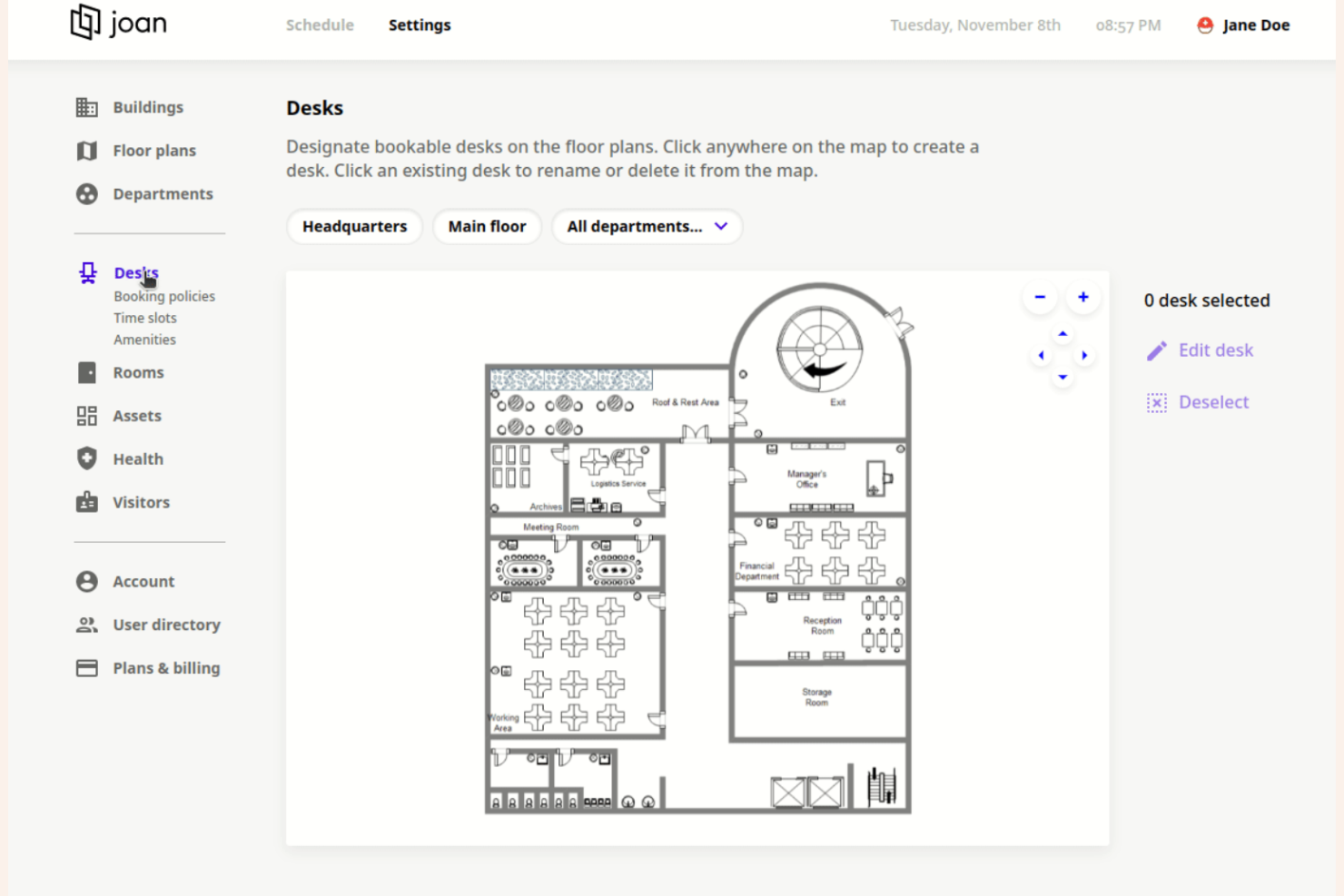
Joan is an AI-powered hot desk booking system that lets you manage desk reservations, set workspace policies, and automate scheduling for flexible office environments.
Who Is Joan Best For?
Privacy-conscious organizations and IT teams that need secure, controlled desk booking in shared office spaces.
Why I Picked Joan
I picked Joan as one of the best because its privacy controls let my team restrict who can see and book desks, which is rare in this space. I like that I can set granular permissions for different departments and anonymize booking data to protect sensitive information. The platform also supports badge-based authentication, so only authorized users can access specific workstations.
Joan Key Features
- Interactive floor plan: Users can select and book desks directly from a visual office map.
- Mobile app booking: Reserve desks and manage bookings from iOS and Android devices.
- Calendar integration: Sync desk reservations with Google Calendar and Microsoft Outlook.
- Real-time availability: Instantly view which desks are open or occupied throughout the day.
Joan Integrations
Joan offers native integrations with Microsoft Active Directory, Google Calendar, Microsoft Teams, and Slack. An API is available for custom integrations.
Pros and Cons
Pros:
- Visual floor plan for intuitive desk selection
- Badge-based authentication for secure access
- Privacy controls for confidential desk bookings
Cons:
- Few native integrations beyond calendars
- Limited analytics for workspace utilization

Officely
Best for Slack-based desk booking
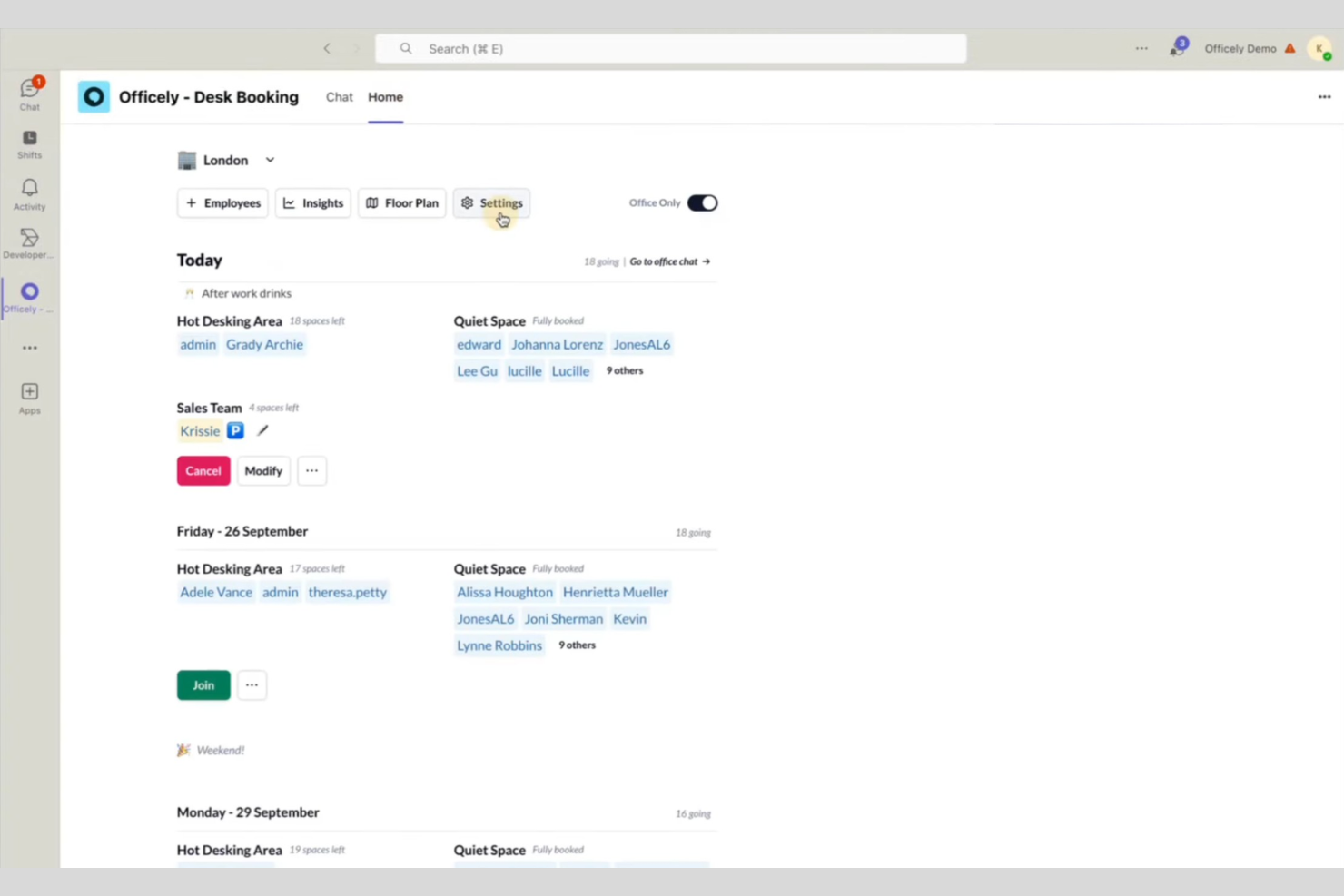
Officely is a desk booking software solution that lets teams manage workspace reservations, office schedules, and desk assignments directly within Slack.
Who Is Officely Best For?
Officely is a great fit for hybrid teams and office managers who already use Slack as their main communication platform.
Why I Picked Officely
I picked Officely as one of the best because I can manage desk bookings, office attendance, and team schedules directly inside Slack without switching apps. My team uses the Slack bot to see who’s coming in, reserve desks, and coordinate in real time. I also like that Officely lets me set up office neighborhoods and manage recurring bookings, all from within our existing Slack workspace.
Officely Key Features
- Health surveys: Collect daily health status from employees before they book a desk.
- Capacity management: Set and enforce office capacity limits for each day.
- Desk check-in reminders: Send automated reminders to confirm desk bookings.
- Visitor management: Track and manage external guests entering the office.
Officely Integrations
Officely offers native integrations with Google Calendar, Microsoft Outlook, and Slack, and provides an API for custom integrations.
Pros and Cons
Pros:
- Supports recurring and group bookings
- Offers daily health check surveys
- Lets you manage office capacity limits
Cons:
- Basic visitor management features
- No mobile app for on-the-go booking

Flexopus
Best for multi-location desk coordination
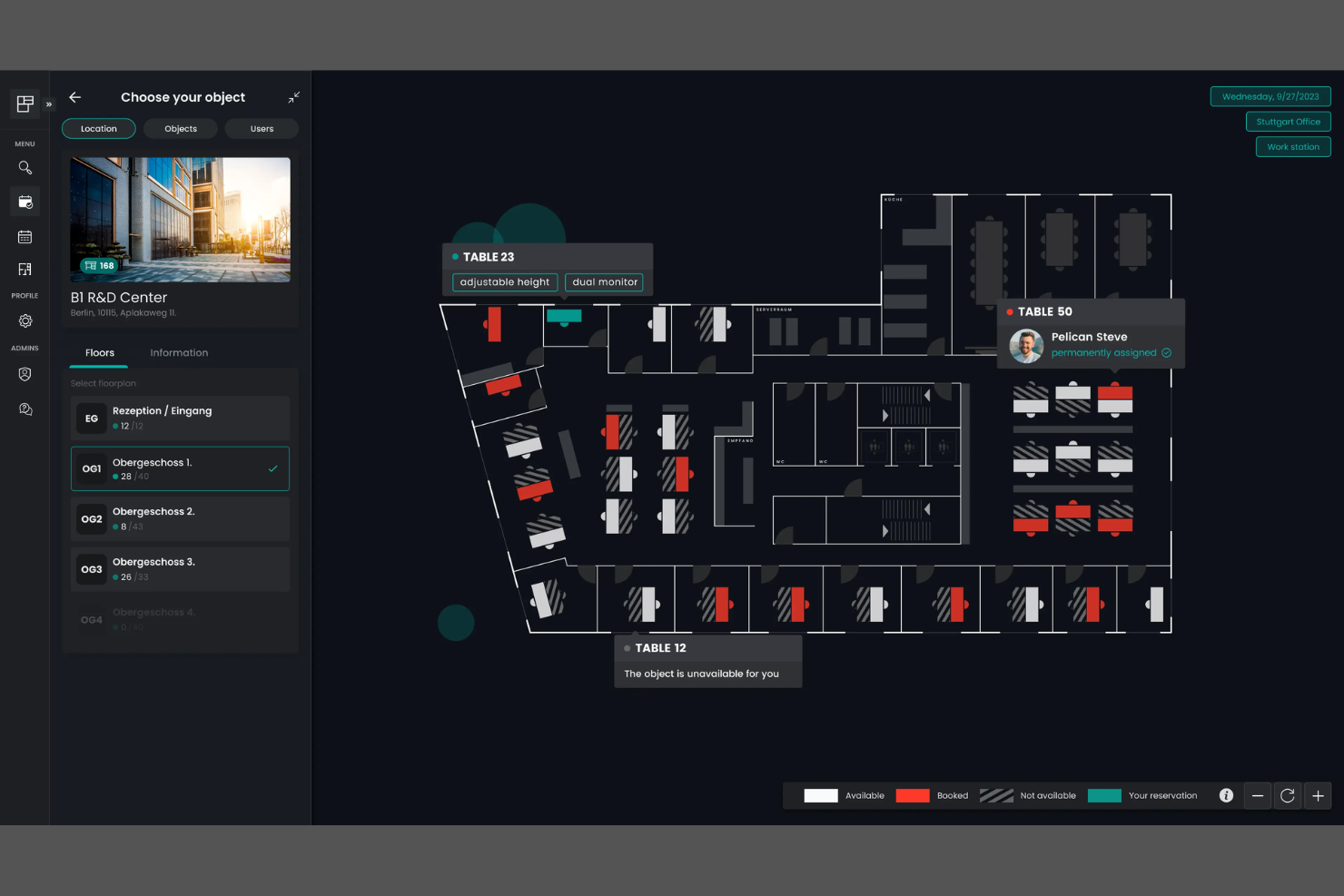
Flexopus is a desk-sharing and AI-powered hot desk booking platform that lets you manage workspace reservations, interactive floor plans, and multi-location coordination from a single dashboard.
Who Is Flexopus Best For?
Flexopus is a good fit for facilities managers and IT teams coordinating desk bookings across multiple office locations.
Why I Picked Flexopus
I picked Flexopus as one of the best because I can coordinate desk bookings across several office locations from a single dashboard. I like that I can set up location-specific rules and permissions for each site. My team uses the interactive floor plans to visualize and manage workspace availability in real time.
Flexopus Key Features
- AI-powered desk assignment: Uses algorithms to suggest optimal desk placements for users.
- QR code desk check-in: Lets users check in to desks by scanning QR codes on-site.
- Calendar integration: Syncs desk bookings with Outlook and Google Calendar.
- Analytics dashboard: Provides workspace utilization and occupancy reports.
Flexopus Integrations
Flexopus offers native integrations with Microsoft 365, Outlook, Google Workspace, and Slack, and provides an API for custom integrations.
Pros and Cons
Pros:
- Provides parking space booking alongside desks
- Offers multilingual user interface
- Supports multiple locations
Cons:
- Lacks built-in facility move management
- No native passive sensor integrations

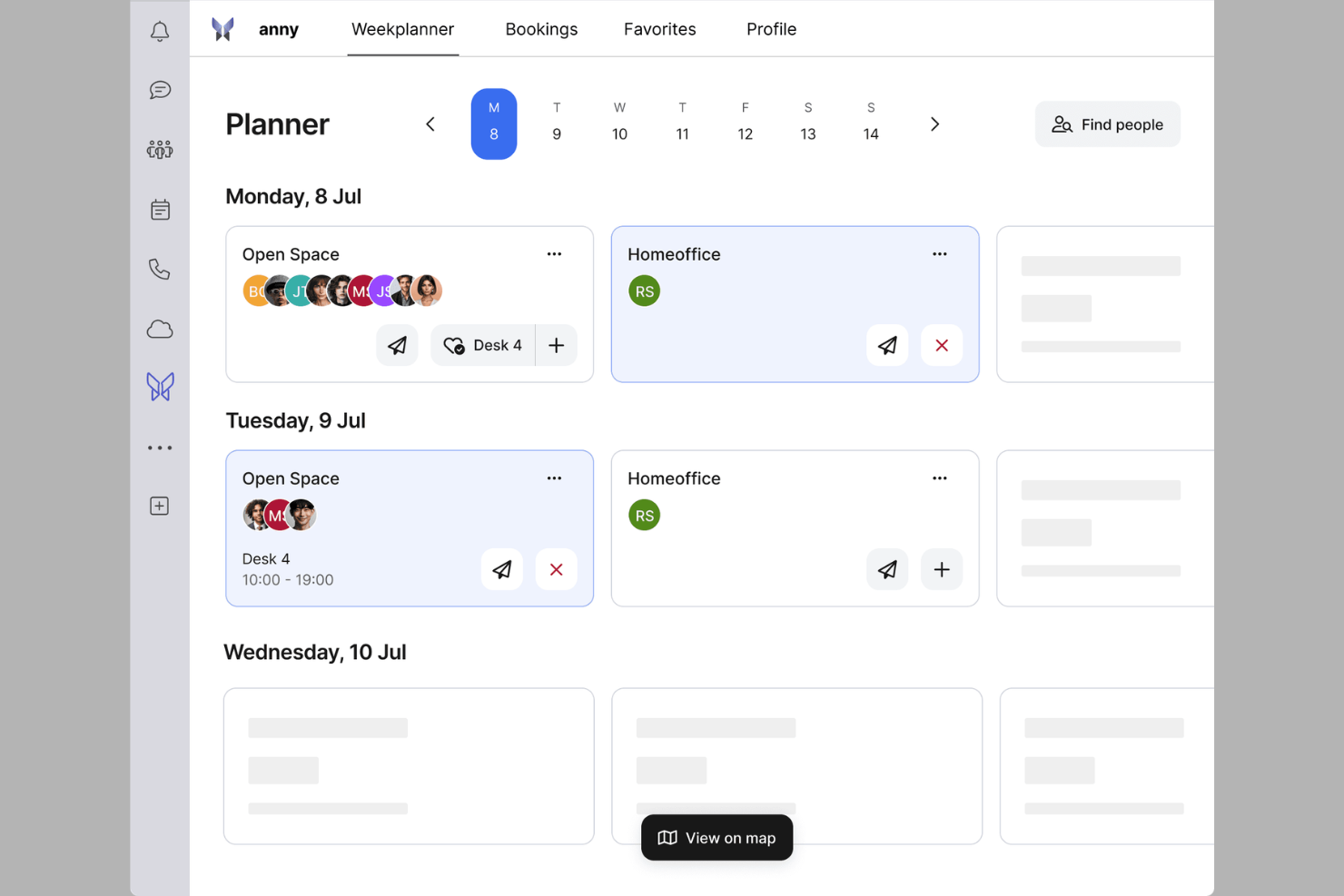
anny is a desk booking platform for hybrid workplaces that offers configurable booking rules, resource management, approval workflows, and analytics for managing shared desks and workspaces.
Who Is anny Best For?
anny is a good fit for office administrators and workplace managers in organizations that need granular control over desk booking permissions.
Why I Picked anny
I picked anny as one of the best because I can set up detailed booking permissions for different user groups, locations, or resources. My team uses approval workflows to manage who can reserve specific desks or areas. I also like that I can automate recurring bookings and restrict access based on department or project needs.
anny Key Features
- Interactive floor plans: Users can view and select available desks on a digital map.
- Calendar integration: Sync bookings with Outlook or Google Calendar.
- Check-in and check-out via QR code: Users confirm desk usage by scanning a code at the workspace.
- Analytics dashboard: Track workspace utilization and booking trends in real time.
anny Integrations
anny offers native integrations with Personio, Google Workspace, Microsoft 365, Outlook, Zoom, Microsoft Teams, and Nuki, with additional support for smart locks, HRIS, payments, SSO, and calendar tools. An API is available for custom integrations.
Pros and Cons
Pros:
- Custom approval workflows for desk reservations
- Supports recurring and multi-day desk bookings
- Flexible booking permissions by user or group
Cons:
- Floor plan editing requires admin intervention
- Limited analytics for occupancy
Other AI Hot Desk Booking Software
Here are some additional AI hot desk booking software options that didn’t make it onto my shortlist, but are still worth checking out:
- Eptura Engage
For mobile-first workplace engagement
- desk.ly
For customizable workspace rules
- OfficeSpace
For interactive floor plan management
- Eden
For automated check-in and check-out
- Skedda
For granular access control settings
- deskbird
For employee self-service booking
- Kadence
For automated neighborhood desk assignments
- Tactic
For interactive booking via floor plans
- Archie
For hybrid work scheduling tools
- Envoy
For visitor management integration
- DeskFlex
For hardware device compatibility
- HybridHero
For occupancy threshold alerts


How I Evaluate AI Hot Desk Booking Software
Every tool here has to prove its AI does something real—like learning booking patterns to seat squads together or predicting no-shows to free up space. I break my evaluation into core functionality a platform must have to qualify and differentiating factors that set one vendor apart from the next.
Core Functionality (Table Stakes For This List)
When I'm selecting tools for my list, I rank each one on a scale from 0 (does not offer the functionality) to 5 (excels in this area) for each core functionality listed below. Then, I calculate the tool's total score into a percentage. Each tool needs to achieve a minimum total score of 65% to be considered for inclusion.
- AI-Driven Desk Recommendations: I look for platforms where the AI actually learns from booking history and team patterns—suggesting desks near collaborators rather than just listing open seats.
- Hot Desk Reservation Engine: Real-time booking across multiple offices matters here, including support for recurring reservations, auto-release on no-shows, and check-in workflows.
- Interactive Floor Plan Views: I evaluate whether maps are dynamic and filterable—showing amenities, neighborhoods, and live availability rather than a static image with pins.
- Predictive Occupancy Analytics: The platform should forecast demand and flag underused zones, giving workspace admins data to act on rather than just historical usage charts.
- Enterprise Tool Integrations: I check for native connections to calendar systems, Slack or Teams, and SSO providers like Okta or Azure AD—the tools IT teams already manage daily.
- Multi-Channel Booking Access: Users should be able to reserve a desk from a mobile app, web portal, calendar invite, or chat interface without losing functionality between channels.
Once I have a list of tools that meet the criteria, I consider what sets each platform apart.
Differentiating Factors (What Sets Vendors Apart)
Here's how I compare and contrast different vendors:
Standout Features
Smart team clustering is a big differentiator—I look for AI that seats sprint teams or project squads near each other based on shared calendars and collaboration signals, not just random open desks. IoT sensor integration adds another layer, letting platforms detect actual occupancy and auto-release desks when someone doesn't show up. I also evaluate automated policy enforcement, where the AI applies hybrid work rules and capacity limits without an admin manually configuring exceptions every week.
Beyond Features
Security and compliance matter a lot here because these platforms handle employee location data daily. I check for SOC 2 Type II certification, GDPR readiness, and data residency controls—especially for multi-region deployments. Deployment architecture is equally important; I evaluate whether a vendor offers open APIs and webhooks so IT teams can connect the platform to internal systems like ServiceNow or custom dashboards. I also consider implementation speed, including how quickly floor maps can be digitized and users provisioned in bulk.
How to Choose AI Hot Desk Booking Software
It’s easy to get bogged down in long feature lists and complex pricing structures. To help you stay focused as you work through your unique software selection process, here’s a checklist of factors to keep in mind:
| Factor | What to Consider |
|---|---|
| Scalability | Will the software handle your current and future headcount, locations, and workspace changes without major upgrades? |
| Integrations | Does it connect natively with your HRIS, calendar, SSO, and building access systems, or will you need custom development? |
| Customizability | Can you tailor booking rules, permissions, and workflows to match your organization’s policies and team structures? |
| Ease of use | Will employees and admins adopt the tool quickly, or will you need to invest in extra training and support to drive adoption? |
| Implementation and onboarding | How long will it take to roll out, migrate data, and get users up and running? Are there resources or services to help with setup? |
| Cost | Are pricing tiers clear and predictable as you scale? Watch for hidden fees, per-user charges, or required add-ons that inflate costs. |
| Security safeguards | Does the platform offer SSO, data encryption, and access controls that meet your organization’s security standards and compliance needs? |
| Support availability | Will you have access to responsive support during your business hours, and are SLAs or escalation paths clearly defined? |
What Is AI Hot Desk Booking Software?
AI hot desk booking software is a digital platform that uses artificial intelligence to automate and optimize workspace reservations in flexible office environments. It helps organizations manage desk assignments, track occupancy, and enforce booking policies. These tools often include features like real-time availability, automated desk suggestions, and integration with calendars or building systems to support hybrid and activity-based work models.
Features of AI Hot Desk Booking Software
When selecting AI hot desk booking software, keep an eye out for the following key features:
- AI-powered desk assignment: Uses algorithms to suggest optimal desks based on user preferences, team proximity, or booking patterns.
- Interactive floor plans: Lets users view and select available desks on a digital map of the workspace.
- Real-time availability tracking: Updates desk status instantly as bookings are made, canceled, or checked in.
- Calendar integration: Syncs desk bookings with tools like Outlook or Google Calendar for scheduling.
- Booking approval workflows: Allows managers to review and approve desk reservations for specific teams or high-demand areas.
- QR code check-in and check-out: Enables contactless confirmation of desk usage by scanning a code at the workspace.
- Usage analytics and reporting: Provides insights into occupancy trends, desk utilization, and booking patterns for data-driven decisions.
- Customizable booking rules: Lets admins set restrictions by user group, department, or time window to enforce workspace policies.
- Integration with building systems: Connects with access control, smart locks, or environmental controls for a unified office experience.
- Mobile app access: Offers on-the-go booking, notifications, and check-in features through a dedicated mobile application.
Benefits of AI Hot Desk Booking Software
Implementing AI hot desk booking software provides several benefits for your team and your business. Here are a few you can look forward to:
- Optimized workspace utilization: AI-driven desk assignments and real-time tracking help you make the most of available office space.
- Improved employee experience: Interactive floor plans and mobile booking make it easy for staff to find and reserve the right workspace.
- Enhanced policy enforcement: Customizable booking rules and approval workflows ensure compliance with your organization’s workspace policies.
- Reduced administrative workload: Automated scheduling, calendar integration, and self-service tools minimize manual coordination for facilities teams.
- Data-driven decision making: Usage analytics and reporting provide actionable insights for planning office layouts and future space needs.
- Increased workplace flexibility: On-demand booking and mobile access support hybrid work and changing team schedules.
- Stronger security and compliance: Integration with access control systems and SSO helps protect sensitive data and manage workspace access.
Costs and Pricing of AI Hot Desk Booking Software
Selecting AI hot desk booking software requires an understanding of the various pricing models and plans available. Costs vary based on features, team size, add-ons, and more. The table below summarizes common plans, their average prices, and typical features included in AI hot desk booking software solutions:
Plan Comparison Table for AI Hot Desk Booking Software
| Plan Type | Average Price | Common Features |
|---|---|---|
| Free Plan | $0 | Basic desk booking, limited users, simple floor plan view, and email support. |
| Personal Plan | $5-$10/user/month | Individual booking, calendar integration, mobile app access, and basic analytics. |
| Business Plan | $10-$25/user/month | Team booking, interactive floor plans, approval workflows, integrations with HRIS, and usage reports. |
| Enterprise Plan | $25-$50/user/month | Advanced security, SSO, custom workflows, API access, priority support, and custom integrations. |
AI Hot Desk Booking Software FAQs
Here are some answers to common questions about AI hot desk booking software:
How does AI improve hot desk booking compared to manual systems?
AI improves hot desk booking by automatically suggesting optimal desks based on user preferences, team proximity, and usage patterns. This enhances the user experience by removing the guesswork of finding flexible seating. By utilizing an AI assistant, the system reduces conflicts, saves time, and helps organizations manage their real estate and workplace needs more efficiently than a permanent desk model.
Can AI hot desk booking software integrate with our existing IT systems?
Yes, most AI hot desk booking software can integrate with tools like HRIS, calendar platforms, SSO, and building access systems. These integrations support a flexible work strategy and can even link with room scheduling software or digital signage to provide real-time updates across the work environment. Always check integration options to ensure compatibility with your current tech stack.
What security measures should I expect from these platforms?
You should expect features like SSO, data encryption, role-based access controls, and audit logs. These safeguards help protect sensitive employee and occupancy data, ensuring compliance with GDPR and other internal or external standards. Maintaining a secure, user-friendly environment is critical when handling data related to in-office attendance.
Is it possible to customize booking rules for different teams or locations?
Yes, most platforms let you set custom booking rules by user group, department, or location. This flexibility allows you to manage desk hoteling policies, enforce specific workspace rules, and adapt to different team requirements. You can also automate settings to handle a no-show by releasing the desk back into the pool for others to use.
How do mobile apps support hot desk booking?
Mobile apps let users book desks, view availability, and check in or out from anywhere. These apps often include wayfinding features to help employees navigate the office and find their assigned flexible seating. This supports hybrid work and makes it easier for employees to manage their workplace needs on the go.
What kind of analytics can I get from AI hot desk booking software?
You can expect analytics on desk utilization, occupancy trends, booking frequency, and user behavior. These insights provide a clear picture of how your real estate is being used, helping you make informed decisions about office layouts and future space planning to better support in-office collaboration.