

AI code assistants are machine learning tools that help you write, analyze, and debug code faster. If you’re searching for the best AI code assistants, you probably want to speed up coding, fix mistakes, and keep up with complex projects. From my experience, knowing what’s out there can make or break your workflow—pick the right assistant and you’ll spend less time stuck and more time shipping quality code. In this guide, I’ll show you exactly which assistants to consider this 2026 and what sets each tool apart, so you can find the one that fits your style and stack.
Why Trust Our Software Recommendations
6,700+
Reviews
20
Industry experts
16+
Evaluation factors
14
Years
Our team has been testing and reviewing software since 2012. As tech leaders ourselves, we know how difficult—and important—it is to choose the right software.
For this guide, we evaluated tools using hands-on testing and independent research, scoring tools using our selection criteria.
Our reviews reflect our human editorial judgment, not a sales pitch.
Expert reviewers:
- Paulo Gardini MiguelTech Director
 Tim FisherVP of AI
 Gabriel RosasTech Lead & Software Architect
 Christhian GruhnTech Lead & Platform Architect

AI Code Assistants Comparison Table
This comparison table summarizes pricing details for my top AI code assistant selections:
| Tool | Best For | Trial Info | Price | ||
|---|---|---|---|---|---|
| 1 | Best for private AI model deployment options | Free demo available | From $39/user/month (billed annually) | Website | |
| 2 | Best for large-scale codebase navigation | Free demo + free trial | From $16,000 | Website | |
| 3 | Best for multi-language code understanding | Free plan available | From $20/user/month (billed annually) | Website | |
| 4 | Best for collaborative team coding workflows | Free plan + free demo available | From $30/user/month (billed annually) | Website | |
| 5 | Best for integration with AWS development tools | Free plan available | From $19/user/month | Website | |
| 6 | Best for real-time code suggestions in editors | Free plan + 30-day free trial available | From $4/user/month | Website | |
| 7 | Best for natural language code generation | Not available | From $20/month | Website | |
| 8 | Best for autocomplete and in-depth code chat | Free plan available | From $20/month | Website | |
| 9 | Best for autonomous software development tasks | Free plan available | From $20/user/month | Website | |
| 10 | Best for Google ecosystem code support | 30-day free trial | From $19/user/month (billed annually) | Website |


Best AI Code Assistants Reviews
Below are my detailed summaries of the best AI code assistants that made it onto my shortlist. My reviews offer a detailed look at the features, capabilities, and integrations of each tool to help you find the best one for you.
 Best for private AI model deployment options
- Free demo available
- From $39/user/month (billed annually)
Visit WebsiteCustomer Rating:4.6/5
Tabnine offers an AI chat assistant within VS Code that refactors code and suggests type-safe reusable functions in real time. Tabnine is an enterprise-focused AI code assistant that delivers context-aware code completions, AI chat, and agentic workflows directly inside your IDE, with flexible deployment options including on-premises and air-gapped environments.
Who Is Tabnine Best For?
Tabnine is a strong fit for engineering teams in regulated or security-conscious industries where code privacy, compliance, and control over AI model deployment are non-negotiable.
Why I Picked Tabnine
I picked Tabnine as one of the best because no other AI code assistant gives you this level of control over where your code goes. You can deploy on-premises or in an air-gapped environment, and bring your own LLM instead of relying on Tabnine's hosted models. The Enterprise Context Engine indexes your full codebase locally, so every suggestion reflects your actual architecture without routing proprietary code to third-party servers.
Tabnine Key Features
- AI-powered chat: Interact with a context-aware AI assistant directly inside your IDE for support across the software development lifecycle.
- Multi-language support: Tabnine works with over 20 programming languages and frameworks including Python, JavaScript, Java, and Go.
- Agentic development workflows: Automate code changes, refactoring, and pull requests using autonomous agents within your own environment.
- Code quality awareness agent: Train a review agent on your organization’s code and pull requests to align AI suggestions with internal standards.
Tabnine Integrations
Tabnine offers native integrations with VS Code, JetBrains IDEs, GitHub, GitLab, Bitbucket, Jira, Confluence, and Perforce Helix Core, and provides an API for custom integrations.
Pros and Cons
Pros:
- Broad IDE and language coverage
- Agentic workflows automate code refactoring
- Private deployment in air-gapped environments
Cons:
- Requires higher local machine hardware
- Free tier limited to small pilots
Learn more about Tabnine:

Sourcegraph's Cody AI assistant generates test code in a split-editor view, showing both the source file and auto-generated unit tests side by side. Sourcegraph is a code intelligence platform with an AI coding assistant (Cody) that uses org-wide semantic code search to power context-aware completions, code generation, and chat across entire multi-repository codebases.
Who Is Sourcegraph Best For?
Sourcegraph is a strong fit for enterprise engineering teams managing large, distributed codebases across many repositories who need AI assistance that scales with that complexity.
Why I Picked Sourcegraph
I picked Sourcegraph as one of the best because Cody's context engine goes further than what most AI assistants can see. Where tools like Copilot work from open files, Cody uses Sourcegraph's org-wide code graph to pull relevant functions, types, and patterns from across hundreds of repositories. I've found this especially valuable on large distributed systems, where a suggestion that ignores how an API is used elsewhere can introduce breaking changes.
Sourcegraph Key Features
- Deep Search: Lets you use AI-powered natural language or regex queries to find code patterns across your organization.
- Batch Changes: Enables automated, multi-repo code modifications and migration management in a single workflow.
- Code Insights: Visualizes trends and tracks code health, migrations, and technical debt over time.
- IDE plugin support: Integrates directly with VS Code, JetBrains IDEs, and Neovim for in-editor AI assistance.
Sourcegraph Integrations
Sourcegraph offers native integrations with GitHub, GitLab, and Bitbucket, and provides a GraphQL API, REST API, and CLI for custom integrations.
Pros and Cons
Pros:
- Supports AI-assisted =test generation
- Shares context between separate projects
- Indexes and searches massive codebases quickly
Cons:
- Slower autocomplete latency
- No support for Visual Studio IDE
Learn more about Sourcegraph: Best for multi-language code understanding
- Free plan available
- From $20/user/month (billed annually)
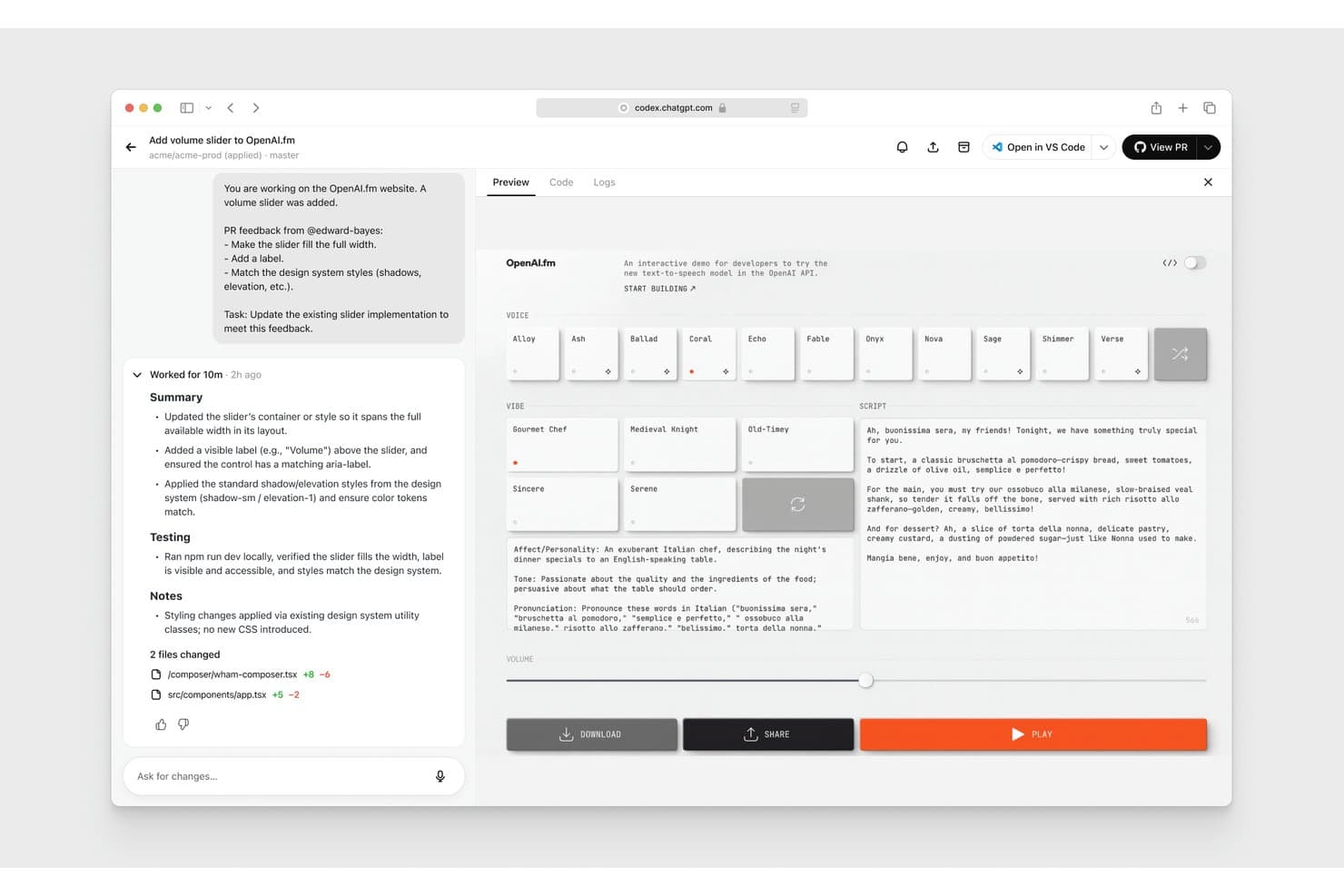
OpenAI Codex offers an AI-powered coding assistant that applies PR feedback, updates UI components, and previews live changes directly in the browser. OpenAI Codex is an agentic AI coding assistant that handles code generation, refactoring, code review, and test writing across 30+ programming languages directly within your IDE, CLI, or a dedicated cloud environment.
Who Is OpenAI Codex Best For?
It's a strong fit for engineering teams at growth-stage and enterprise companies managing large, multi-language codebases where consistent code standards and parallel development matter.
Why I Picked OpenAI Codex
OpenAI Codex earns its spot on my shortlist because of how well it understands code across 30+ languages at the full repository level, not just the open file. I use the Skills feature to encode my team's conventions, so Codex applies them consistently whether it's writing Python backend logic or TypeScript frontend components. In practice, that means it extends our Next.js patterns, respects our Tailwind classes, and maintains export conventions without needing to be reminded each session.
OpenAI Codex Key Features
- Multi-agent workflows: Run multiple agents in parallel across different projects or worktrees.
- Automated code review: Codex reviews pull requests, detects bugs, and highlights backward compatibility issues.
- CLI and IDE extension: Use Codex directly from your terminal or integrate with common developer environments.
- Automations for recurring tasks: Schedule routine work like issue triage, alert monitoring, or CI/CD triggers.
OpenAI Codex Integrations
OpenAI Codex offers native integrations with GitHub, Slack, Vercel, Netlify, Cloudflare, Figma, and Linear, and provides an API and SDK for custom integrations.
Pros and Cons
Pros:
- Automates code review with suggestions
- Supports over 30 languages and frameworks
- Handles large repositories with multi-file context
Cons:
- Can hit usage limits on lower tiers
- No dedicated desktop application
Learn more about OpenAI Codex: 4Best for collaborative team coding workflows
Qodo
- Free plan + free demo available
- From $30/user/month (billed annually)

Qodo provides automated code reviews that surface bugs, rule violations, and requirement gaps with categorized severity levels. Qodo is an AI code quality platform that combines automated PR review, unit test generation, and IDE-based code assistance with full-repository and cross-repo context awareness across the software development lifecycle.
Who Is Qodo Best For?
Qodo is a strong fit for engineering teams at mid-size to enterprise companies where code review quality, test coverage, and cross-team standards are active priorities.
Why I Picked Qodo
Qodo earns its spot as one of the best on my shortlist because its Living Rules system turns a team's own PR history into enforceable coding standards automatically. When my team opens a pull request, specialized agents simultaneously evaluate bugs, security vulnerabilities, quality, and test coverage gaps, posting line-level comments rather than low-signal noise. I also like the cross-repo context engine, which catches breaking changes across multiple repositories before they hit production.
Qodo Key Features
- Agentic PR code review: Provides line-level AI code review with context across files and repositories.
- IDE plugin support: Integrates natively with VS Code, JetBrains, and Visual Studio for code generation and review.
- Zero data retention mode: Analyzes code without retaining data, supporting SOC 2 Type II compliance.
- On-premises and BYOK deployment: Lets teams deploy on-prem or use their own large language model providers for strict control.
Qodo Integrations
Qodo offers native integrations with GitHub, GitLab, Bitbucket, Azure DevOps, Gerrit, VS Code, JetBrains IDEs, and Visual Studio. An API is available for custom integrations and CI/CD workflows.
Pros and Cons
Pros:
- Cross-repo change detection in reviews
- Team-defined coding standard enforcement
- Multi-agent PR analysis for bugs and quality
Cons:
- Lacks instant typing predictions
- Occasional false positives in code review
Learn more about Qodo: Best for integration with AWS development tools
- Free plan available
- From $19/user/month

Amazon Q Developer offers an automated code review feature that detects critical security vulnerabilities like unsanitized input execution (CWE-94) and suggests fixes directly in the IDE. Amazon Q Developer is an AI code assistant from AWS that combines inline code completions, agentic code generation, security scanning, and cloud-native development support across IDEs, CLI, and the AWS Management Console.
Who Is Amazon Q Developer Best For?
It's a natural fit for engineering teams that build, deploy, and operate on AWS and want an AI coding assistant that understands their cloud infrastructure.
Why I Picked Amazon Q Developer
Amazon Q Developer earns its spot on my shortlist because of how deeply it understands AWS services at the code level. When I'm writing a Lambda function or authoring a CloudFormation template, it generates contextually accurate suggestions that reflect real AWS service behavior, not just generic syntax. I also rely on its CLI support, which lets me ask natural language questions and get bash commands directly in the terminal without switching context.
Amazon Q Developer Key Features
- Agentic coding commands: Use slash commands in your IDE to trigger documentation, code reviews, and unit test generation directly from the editor.
- Project-wide security scanning: Analyze your codebase for vulnerabilities, secrets, and infrastructure-as-code issues using integrated SAST and rule-based checks.
- Codebase-aware suggestions: Get code completions and explanations that factor in the broader project context, not just the current file.
- Java and .NET transformations: Automate language upgrades like Java 8 to 17 or porting .NET applications from Windows to Linux.
Amazon Q Developer Integrations
Amazon Q Developer offers native integrations with Visual Studio Code, JetBrains IDEs, Visual Studio, Eclipse, GitHub, GitLab, Slack, Microsoft Teams, AWS Management Console, and JupyterLab. An API is available for custom integrations.
Pros and Cons
Pros:
- Strong security scanning and code review tools
- Project-wide agent tasks via slash commands
- Deep context with AWS infrastructure and APIs
Cons:
- Limited language support compared to some peers
- Occasional latency in code completions
Learn more about Amazon Q Developer: Best for real-time code suggestions in editors
- Free plan + 30-day free trial available
- From $4/user/month
Visit WebsiteCustomer Rating:4.8/5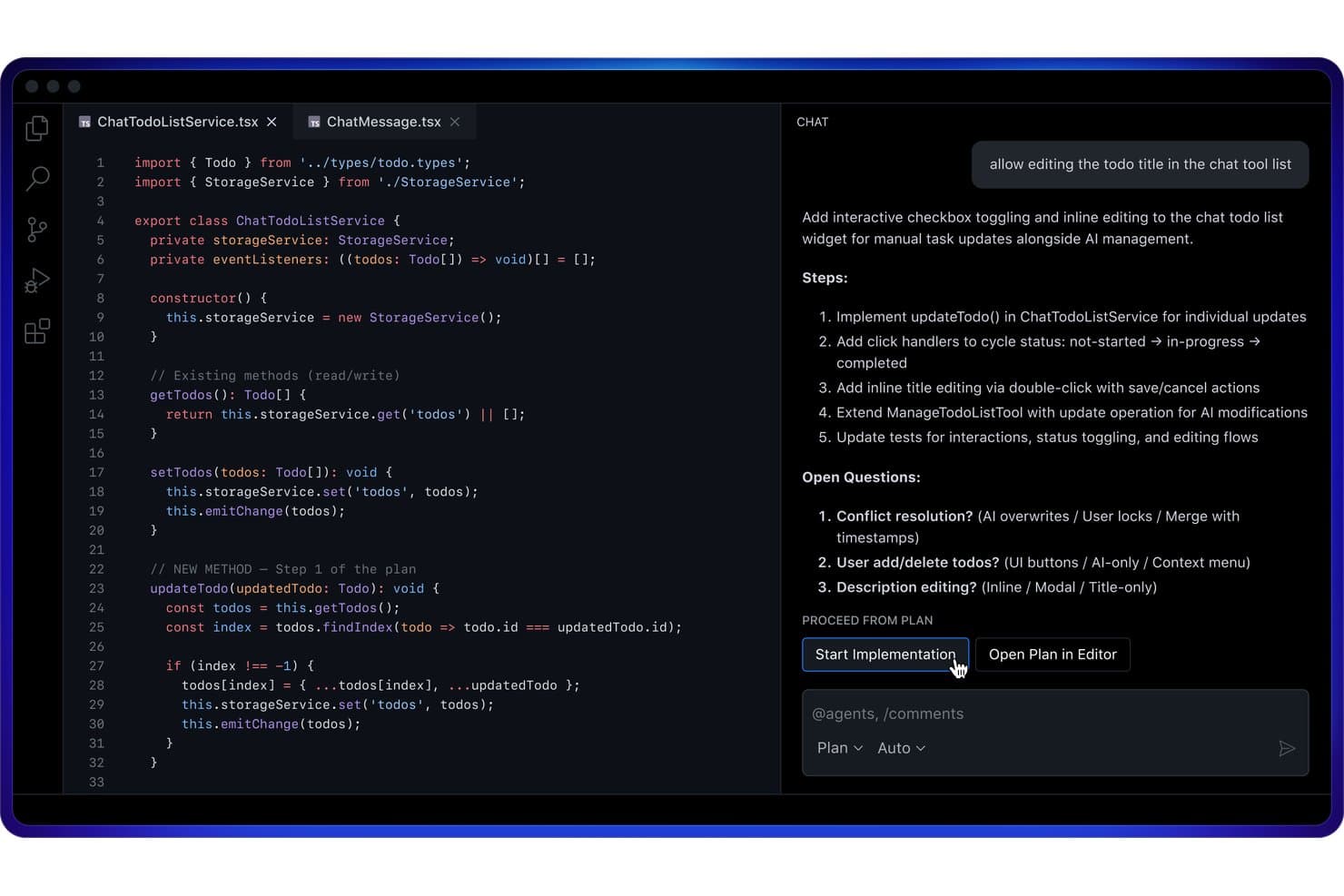
GitHub Copilot offers a Plan Mode in VS Code that outlines implementation steps and open questions before writing code. GitHub Copilot is an AI code assistant built by GitHub that delivers inline code completions, multi-model conversational chat, agentic coding workflows, and automated code review across major IDEs, the CLI, and GitHub.com.
Who Is GitHub Copilot Best For?
GitHub Copilot is a strong fit for individual developers and engineering teams already working within the GitHub ecosystem who want AI assistance embedded directly in their editor.
Why I Picked GitHub Copilot
GitHub Copilot earns its spot as one of the best on my shortlist because its inline completion engine is genuinely in a class of its own. I'm talking whole-function suggestions that appear as I type, with near-zero latency, directly inside VS Code or JetBrains. What really impresses me is the Next Edit Suggestions feature, which anticipates where I'm headed next in the file and surfaces completions proactively, not just at my cursor position.
GitHub Copilot Key Features
- Copilot Chat: Chat directly with the AI in your IDE or on GitHub.com for code explanation and modification.
- Code review agent: Automate pull request reviews and get inline suggestions for improvements across files.
- Multi-model selection: Choose from several AI models, including options from OpenAI, Anthropic, and Google.
- Copilot CLI: Use Copilot features from the command line for agent tasks and code generation beyond the editor.
GitHub Copilot Integrations
GitHub Copilot offers native integrations with Visual Studio Code, Visual Studio, JetBrains IDEs (like IntelliJ and PyCharm), Xcode, Neovim, Eclipse, Raycast, SQL Server Management Studio, Zed, and GitHub.com. An API is available for custom integrations.
Pros and Cons
Pros:
- Broad multi-language and IDE support
- Strong context awareness in large codebases
- Real-time suggestions as you type in editor
Cons:
- No native multi-file refactoring agents
- Lacks local network storage options
Learn more about GitHub Copilot: Best for natural language code generation
- Not available
- From $20/month
Visit WebsiteCustomer Rating:4.3/5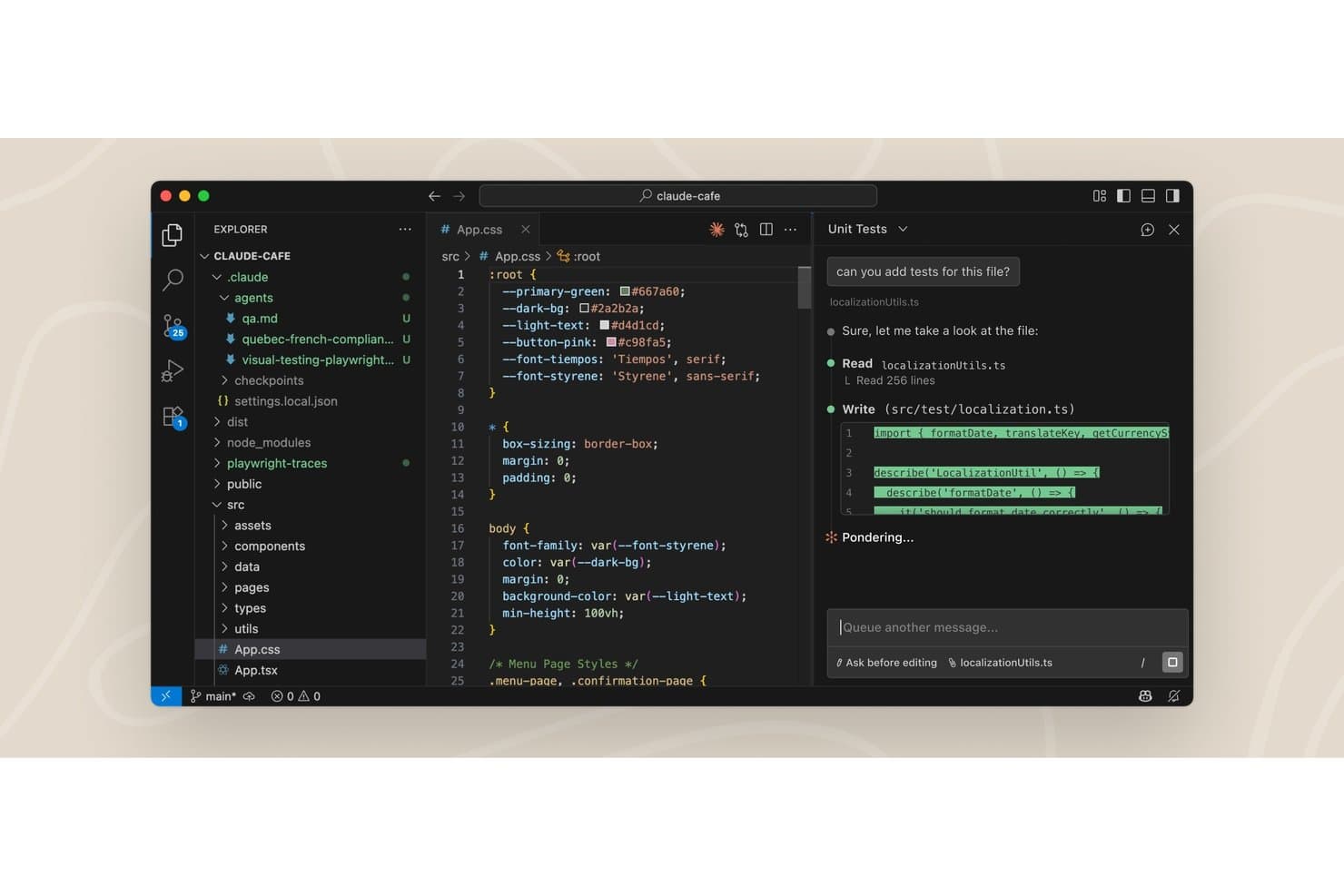
Claude Code offers a VS Code extension with an AI chat panel that reads files and writes unit tests directly in the editor. Claude Code is an agentic AI coding assistant that runs directly in your terminal and IDE, reading your full codebase, editing files across multiple locations, running commands, and submitting pull requests without manual context selection.
Who Is Claude Code Best For?
Claude Code is a strong fit for software engineers and engineering teams working on large, complex codebases where understanding project-wide context is as important as writing new code.
Why I Picked Claude Code
I picked Claude Code as one of the best because of how far its natural language generation actually goes. Describing a feature in plain English doesn't just produce a function: it maps dependencies, edits across multiple files, runs tests, and submits a PR. The codebase onboarding feature is something I use on unfamiliar repos to build a working mental model in seconds, not hours.
Claude Code Key Features
- Agent view: Manage all coding sessions in one interface for organized parallel work.
- Routines: Configure tasks to run on a schedule, via API call, or when events occur.
- Git worktree isolation: Provide isolated repo copies to each session and sub-agent to prevent conflicts.
- MCP connector support: Integrate with deployment, database, monitoring, and custom CLI tools through Model Context Protocol.
Claude Code Integrations
Claude Code offers native integrations with GitHub, Slack, and Chrome, while supporting extended tool connections and IDEs via the Model Context Protocol (MCP) and dedicated CLI platforms. An API is available for custom integrations.
Pros and Cons
Pros:
- Produces detailed code review comments
- Automatically compacts your conversation history
- Handles multi-file and cross-repo edits
Cons:
- Cannot adjust reasoning model thinking levels
- No standalone configuration interface
Learn more about Claude Code: Best for autocomplete and in-depth code chat
- Free plan available
- From $20/month
Visit WebsiteCustomer Rating:5/5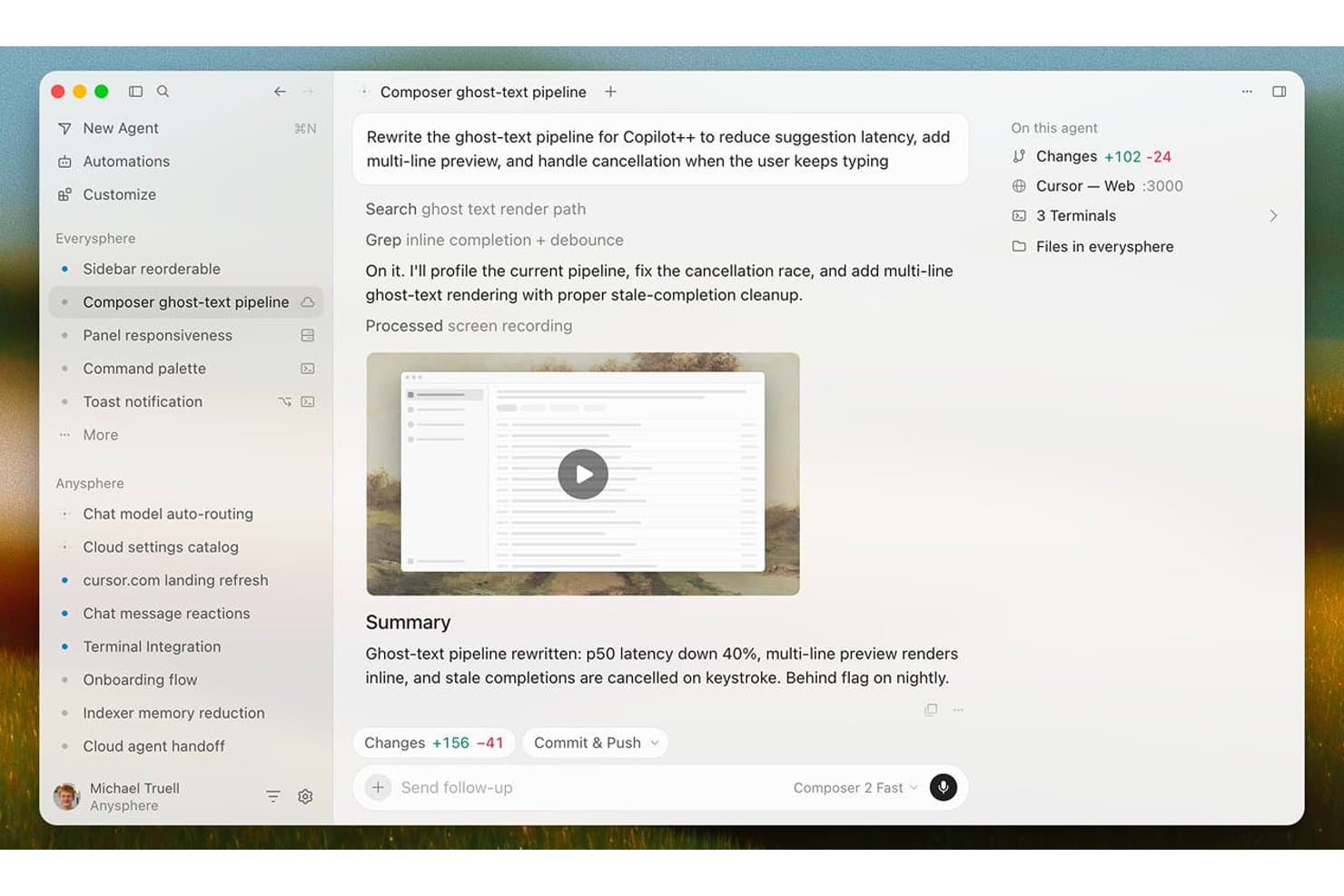
Cursor offers an AI agent interface that rewrites code pipelines, tracks file changes, and summarizes results with latency improvements. Cursor is an AI-native code editor built on VS Code that combines Tab autocomplete, multi-file code generation via Composer, codebase-aware chat, and autonomous coding agents into a single development environment.
Who Is Cursor Best For?
Cursor is a strong fit for software developers and engineering teams who want AI deeply integrated into their daily coding workflow rather than layered on as a separate tool.
Why I Picked Cursor
Cursor earns its spot on my shortlist because its Tab autocomplete is genuinely in a class of its own. Powered by the Supermaven engine, it predicts entire functions and cross-file import paths as you type, not just the next token. What I like even more is the codebase chat: you can ask Cursor why a particular service is structured the way it is, and it pulls context from across your entire indexed repo to give you a real answer.
Cursor Key Features
- Composer multi-file generation: Build out full frameworks and multiple files from natural language prompts inside the editor.
- Agentic code review with Bugbot: Automate pull request review and surface suggested improvements using integrated AI agents.
- MCP (Model Context Protocol) support: Connect to multiple AI models from top providers for flexible code generation and analysis.
- Cloud agents and automations: Deploy always-on agents to handle scheduled or triggered coding tasks directly in your workflow.
Cursor Integrations
Cursor offers native integrations with GitHub, Slack, Okta, Azure Active Directory, Google Workspace, and supports VS Code extensions. An API is available for custom integrations.
Pros and Cons
Pros:
- Deep project context understanding in chat
- Agentic pull request review and bug detection
- Cross-file code generation with Composer
Cons:
- Indexing speeds lower on large repositories
- Requires continuous internet access
Learn more about Cursor: Best for autonomous software development tasks
- Free plan available
- From $20/user/month
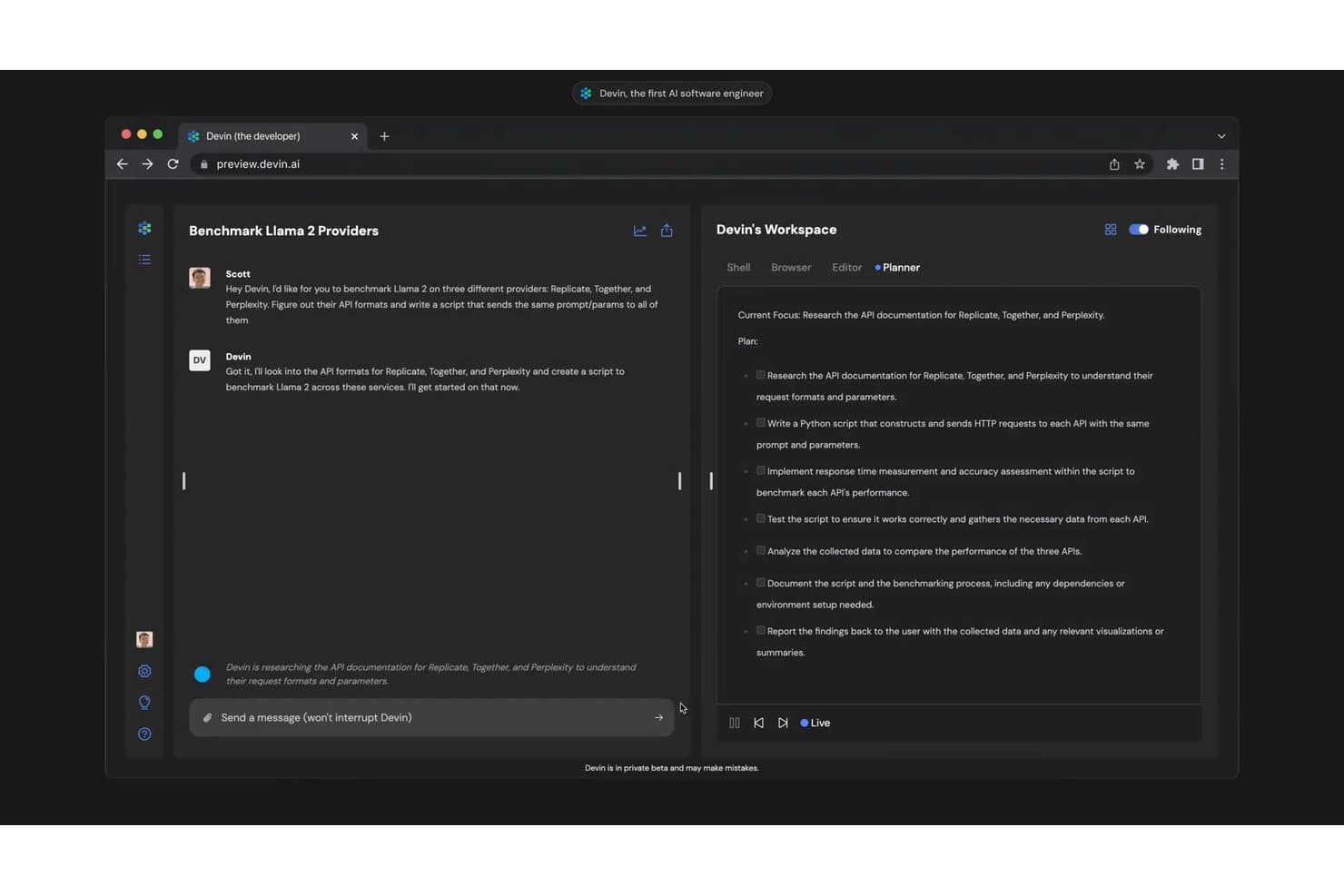
Devin autonomously plans and executes multi-step coding tasks, such as benchmarking Llama 2 across multiple AI providers. Devin is an autonomous AI coding agent that plans, writes, tests, and debugs code end-to-end in a sandboxed cloud environment, submitting pull requests without requiring developer supervision.
Who Is Devin Best For?
Devin is a strong fit for engineering teams at growth-stage and enterprise companies that need to offload repetitive, well-defined development tasks at scale.
Why I Picked Devin
Devin earns its spot as one of the best on my shortlist because it operates at a fundamentally different level than typical AI code assistants. Where most tools suggest the next line, I use Devin to assign an entire GitHub issue and get back a reviewed pull request. Its knowledge base learns my codebase's conventions over time, so output quality improves with repeated use. DeepWiki auto-indexes repositories and generates system diagrams, which I've found invaluable on legacy migration projects.
Devin Key Features
- Devin Cloud: Run autonomous coding agents in a persistent, sandboxed cloud environment.
- Devin Desktop: Use a dedicated desktop app for interacting with Devin’s features and code suggestions.
- Devin Review: Automate pull request reviews to surface code issues and visual QA results.
- Third-party integrations: Connect with tools like Slack, GitHub, Jira, and Linear for workflow automation.
Devin Integrations
Devin offers native integrations with GitHub, GitLab, Bitbucket, Linear, Jira, Notion, Slack, Microsoft Teams, Datadog, and AWS. An API is available for custom integrations.
Pros and Cons
Pros:
- Generates system diagrams and documentation
- Auto-reviews pull requests with AI QA
- Assigns and completes entire tickets autonomously
Cons:
- No offline execution mode
- Limited IDE plugin support compared to rivals
Learn more about Devin: Best for Google ecosystem code support
- 30-day free trial
- From $19/user/month (billed annually)

Gemini Code Assist offers an agent mode with an inline diff view in VS Code, allowing users to review, accept, or decline AI-suggested file changes directly in the editor. Gemini Code Assist is Google's AI code assistant built on the Gemini model family, offering inline code completion, natural language code generation, codebase-aware chat, and automated PR review across major IDEs and the Google Cloud ecosystem.
Who Is Gemini Code Assist Best For?
It's a natural fit for engineering teams already working within the Google Cloud ecosystem, including those building on Firebase, BigQuery, or GCP-hosted infrastructure.
Why I Picked Gemini Code Assist
I picked Gemini Code Assist as one of the best because of how deeply it's embedded in the Google developer surface. When I'm in Firebase, it handles code generation and Crashlytics-driven debugging right inside the console. On BigQuery projects, it generates queries from table metadata, cutting out manual schema lookups. It also connects into Apigee for API spec generation and mock proxy setup.
Gemini Code Assist Key Features
- Whole-function code completion: Delivers multi-line and block-level completions directly in major IDEs.
- IDE chat assistant: Offers natural language chat for code explanations, usage help, and troubleshooting in context.
- Automated pull request reviews: Uses AI agents to summarize and review GitHub pull requests with code suggestions.
- Gemini CLI agent: Provides AI-driven code understanding and task automation right from the command line.
Gemini Code Assist Integrations
Gemini Code Assist offers native integrations with Visual Studio Code, JetBrains IDEs, Android Studio, Cloud Workstations, Cloud Shell, GitHub, Firebase, BigQuery, Apigee, and Application Integration. An API is available for custom integrations.
Pros and Cons
Pros:
- GitHub PR review automations save manual effort
- Suggests code across multiple languages
- Deep understanding of Google Cloud projects
Cons:
- Some advanced features require Enterprise plan
- Code completions sometimes lag during peak hours
Learn more about Gemini Code Assist:
Other AI Code Assistants
Here are some additional AI code assistant options that didn’t make it onto my shortlist, but are still worth checking out:
- 11ClineBest for natural language debugging support
- 12JetBrains AI in IDEsBest for IDE integration across JetBrains suite
- 13ReplitBest for instant cloud-based code execution
- 14ZedBest for multiplayer real-time code editing
- 15AiderBest for in-terminal conversational coding
- 16Augment CodeBest for AI-powered code test generation
- 17GitLab DuoBest for end-to-end DevOps workflow integration
- 18JetBrains JunieBest for AI-guided refactoring insights
How I Evaluate AI Code Assistants
Every tool on this list has to do more than autocomplete—it needs to help you ship better code, catch bugs, and navigate unfamiliar repos faster. I split my evaluation into core functionality every assistant must nail and differentiating factors that separate one tool from another.
Core Functionality (Table Stakes for This List)
When I'm selecting tools for my list, I rank each one on a scale from 0 (does not offer the functionality) to 5 (excels in this area) for each core functionality listed below. Then, I calculate the tool's total score as a percentage. Each tool needs to achieve a minimum total score of 75% to be considered for inclusion.
- Code Completion: I look for accurate, multi-line suggestions that appear in real time as you type—not just single-token predictions that barely save keystrokes.
- Natural Language Generation: Good tools let you describe a function in plain English and get usable code back, not just a rough skeleton you have to rewrite.
- IDE Integration: I check whether the assistant plugs into the IDEs your team actually uses, like VS Code, JetBrains, or Neovim, without a clunky setup.
- Multi-Language Support: I evaluate how well each tool handles the languages and frameworks in your stack, from Python and TypeScript to Go or Rust.
- Codebase Context Awareness: The best assistants index your full repo, so suggestions reflect your project's patterns, not just the file you have open.
- Code Explanation & Refactoring: I look for tools that can walk you through unfamiliar legacy code and suggest concrete refactors or flag potential bugs inline.
Once I have a list of tools that meet the criteria, I consider what sets each platform apart.
Differentiating Factors (What Sets Vendors Apart)
Here's how I compare and contrast different vendors:
Standout Features
Agentic task execution matters here—some assistants can plan and carry out multi-step refactors or bug fixes with minimal input from you, which saves serious time on large codebases. I also look at whether a tool lets you swap between underlying models based on your team's privacy, cost, or performance needs. Inline code review and test generation round things out, especially for teams that want automated PR feedback and vulnerability checks woven into their Git workflow.
Beyond Features
Data privacy is a big deal—I check whether your code is used for model training and if zero-retention or self-hosted deployment options exist for regulated environments. Admin controls and governance matter just as much, especially SSO, audit logs, and the ability to block suggestions that match public code to reduce IP risk. Pricing structure also shapes my evaluation, since per-seat costs can balloon fast on a growing team compared to usage-based models with free tiers for individual developers.
How to Choose AI Code Assistants
It’s easy to get bogged down in long feature lists and complex pricing structures. To help you stay focused as you work through your unique software selection process, here’s a checklist of factors to keep in mind:
| Factor | What to Consider |
|---|---|
| FactorScalability | What to ConsiderWill the tool support your team as you grow? Consider licensing models and whether pricing stays reasonable as headcount increases. |
| FactorIntegrations | What to ConsiderDoes it connect with your core IDEs, Git providers, CI/CD, and other tools? Gaps here can create duplicate work and limit adoption. |
| FactorCustomizability | What to ConsiderCan you tailor the assistant’s behaviour, controls, or model selection for your team’s coding patterns and data privacy needs? |
| FactorEase of use | What to ConsiderHow quickly can engineers get value out of the tool? Complicated setups or unintuitive UI slow down onboarding and reduce team buy-in. |
| FactorImplementation and onboarding | What to ConsiderWhat’s required to roll it out—from access permissions to setup scripts? Look for clear documentation and minimal engineering time to deploy. |
| FactorCost | What to ConsiderAre you comparing per-seat, usage-based, or enterprise plans? Unexpected charges can show up as usage scales, so clarify total cost early. |
| FactorSecurity safeguards | What to ConsiderDoes the platform offer code retention controls, role-based permissions, and support for self-hosted or air-gapped environments? |
| FactorSupport availability | What to ConsiderHow responsive is support if your team hits bugs or has questions? Check for clear SLAs and regional/time zone coverage if needed. |
What Are AI Code Assistants?
AI code assistants are software tools that use machine learning to help developers write, understand, and improve code faster. They offer features like smart code completion, code generation from natural language prompts, automated explanations, and suggestions for refactoring or fixing bugs. These assistants plug into IDEs and development workflows to speed up daily coding tasks and support better code quality across teams.
Features of AI Code Assistants
When selecting AI code assistants, keep an eye out for the following key features:
- Code completion: Delivers context-aware suggestions as you write, helping you finish code lines or blocks quickly without losing focus or context.
- Natural language prompts: Let you describe the code you want in plain language and generate working code or functions based on your instructions.
- IDE integration: Plugs directly into popular development environments, so you can use AI features without leaving your coding workflow.
- Multi-language support: Covers a wide range of programming languages and frameworks, making it useful across different projects and stacks.
- Codebase context awareness: Understands your project’s structure and history, allowing it to generate code or suggestions that fit your specific repo.
- Automated refactoring: Identifies opportunities to restructure or improve existing code for readability, efficiency, or maintainability.
- Bug detection: Flags common issues or errors in your code as you work, offering recommendations to fix them before they become bigger problems.
- Code explanation: Breaks down unfamiliar or complex code, explaining logic and structure so that team members can onboard and contribute more easily.
- Unit test generation: Automatically writes tests to verify your functions work as intended, speeding up test coverage and giving you confidence in your codebase.
- Pull request review: Assists by reviewing changes in pull requests, identifying potential issues, and offering feedback directly in your code review workflow.
Benefits of AI Code Assistants
Implementing AI code assistants provides several benefits for your team and your business. Here are a few you can look forward to:
- Accelerated development: Code completion and generation features help your team ship new functionality and fix issues faster.
- Higher code quality: Automated bug detection, refactoring, and code review tools support more consistent, maintainable code across your projects.
- Faster onboarding: Code explanation and context-aware suggestions allow new developers to ramp up and contribute with less friction.
- Reduced manual work: Features like unit test generation and automated documentation remove repetitive tasks from your team’s plate.
- Improved collaboration: Pull request review and inline feedback capabilities improve review cycles and align team standards.
- Greater language flexibility: Multi-language support makes it easier to manage projects that span several stacks or transition between technologies.
- Enhanced security and compliance: Security safeguards and code privacy controls help you maintain compliance and protect sensitive data in regulated environments.
Costs and Pricing of AI Code Assistants
Selecting AI code assistants requires an understanding of the various pricing models and plans available. Costs vary based on features, team size, add-ons, and more. The table below summarizes common plans, their average prices, and typical features included in AI code assistant solutions:
Plan Comparison Table for AI Code Assistants
| Plan Type | Average Price | Common Features |
|---|---|---|
| Plan TypeFree Plan | Average Price$0 | Common FeaturesBasic code completion, limited language support, basic IDE integration, and basic code explanations. |
| Plan TypePersonal Plan | Average Price$5-$25/user/month | Common FeaturesFull language coverage, enhanced completions, personal test generation, and individual bug detection. |
| Plan TypeBusiness Plan | Average Price$30-$60/user/month | Common FeaturesTeam collaboration tools, code review automation, admin controls, and advanced security options. |
| Plan TypeEnterprise Plan | Average Price$70-$150/user/month | Common FeaturesCustom integrations, SSO/SAML, on-premise deployment, usage analytics, and dedicated support. |
AI Code Assistants FAQs
Here are some answers to common questions about AI code assistants:
Can AI code assistants handle private or proprietary codebases?
Yes, many AI code assistants can work with private or proprietary codebases. Look for solutions that offer clear data privacy policies, code retention controls, or self-hosted deployment so your existing code never leaves your environment. This is a common use case for teams working under strict compliance guidelines.
Do AI code assistants replace the need for code reviews?
No, AI code assistants don’t replace human code reviews but can supplement them. They automate routine checks and highlight potential issues, letting your team focus on architecture and business-critical feedback. Using these AI coding tools helps maintain a consistent coding style across the entire team while boosting overall developer productivity.
How do AI code assistants affect onboarding new developers?
AI code assistants can speed up onboarding since they offer code explanations and context-aware suggestions. A new programmer can get real-time help with problem-solving or viewing code snippets to learn standard patterns, reducing the need for constant mentor support and allowing for quicker iteration during tasks or initial prototype building.
What programming languages do AI code assistants support?
Most AI code assistants support major programming languages like Python, JavaScript, Java, and TypeScript. Some solutions are expanding support for niche languages or frameworks, so check if your stack is fully covered before choosing a code editor to write code and optimize performance.
Are there any risks of exposing sensitive or regulated data?
Yes, risks exist if your code assistant transmits source code externally. Always review the vendor’s privacy terms and look for options like zero-data retention, in-region processing, or on-premise deployment for extra assurance. Many modern setups utilize an open-source LLM locally to ensure complete data security while generating high-quality output for debugging.