

An AI agent builder is a tool that lets you design, manage, and deploy AI-driven agents to automate tasks, workflows, or decision-making. If you need to build reliable AI agents for customer service, IT automation, data processing, or enterprise environments, picking the right platform is crucial. Look for platforms that support flexible API calls for integrations and built-in guardrails to help ensure agents operate safely and within defined policies. With so many options and each offering different features or levels of customization, it can be tough to know where to start. This list breaks down the best AI agent builders so you can compare top choices and find the one that fits your team’s needs—no endless research or trial and error required.
Why Trust Our Software Recommendations
6,700+
Reviews
20
Industry experts
16+
Evaluation factors
14
Years
Our team has been testing and reviewing software since 2012. As tech leaders ourselves, we know how difficult—and important—it is to choose the right software.
For this guide, we evaluated tools using hands-on testing and independent research, scoring tools using our selection criteria.
Our reviews reflect our human editorial judgment, not a sales pitch.
Expert reviewers:
- Paulo Gardini MiguelTech Director
 Tim FisherVP of AI
 Gabriel RosasTech Lead & Software Architect
 Christhian GruhnTech Lead & Platform Architect

Comparison Table: AI Agent Builder
This comparison table summarizes pricing details for my top AI agent builder selections.
| Tool | Best For | Trial Info | Price | ||
|---|---|---|---|---|---|
| 1 | Best for DevOps agent workflows with human approval | Free demo available | From $3,500/month | Website | |
| 2 | Best for flexible automation with built-in support | Free trial available | From €20/month (billed annually) | Website | |
| 3 | Best for visual agent creation with vector data | Free demo available | Pricing upon request | Website | |
| 4 | Best for deployment of enterprise-grade agents | Free plan available | From $59/workspace/month | Website | |
| 5 | Best for advanced retrieval-augmented capabilities | Free plan + free demo available | From $50/month | Website | |
| 6 | Best for hierarchical multi-agent orchestration | Free plan + free trial + free demo available | From $39/user/month | Website | |
| 7 | Best for collaborative autonomous agent teams | Free plan + free trial available | Pricing upon request | Website | |
| 8 | Best for customizable multi-agent scripting | Free to use | Free, open-source | Website | |
| 9 | Best for visual agent workflow design | Free to use | Free, open-source | Website | |
| 10 | Best for no-code LLM tool and API integration | Free plan available | From $35/month | Website |


Best AI Agent Builder Reviews
Below are my detailed summaries of the best AI agent builders that made it onto my shortlist. My reviews offer a detailed look at the features, use cases, and integrations of each platform to help you find the best one for you.
 Best for DevOps agent workflows with human approval
- Free demo available
- From $3,500/month
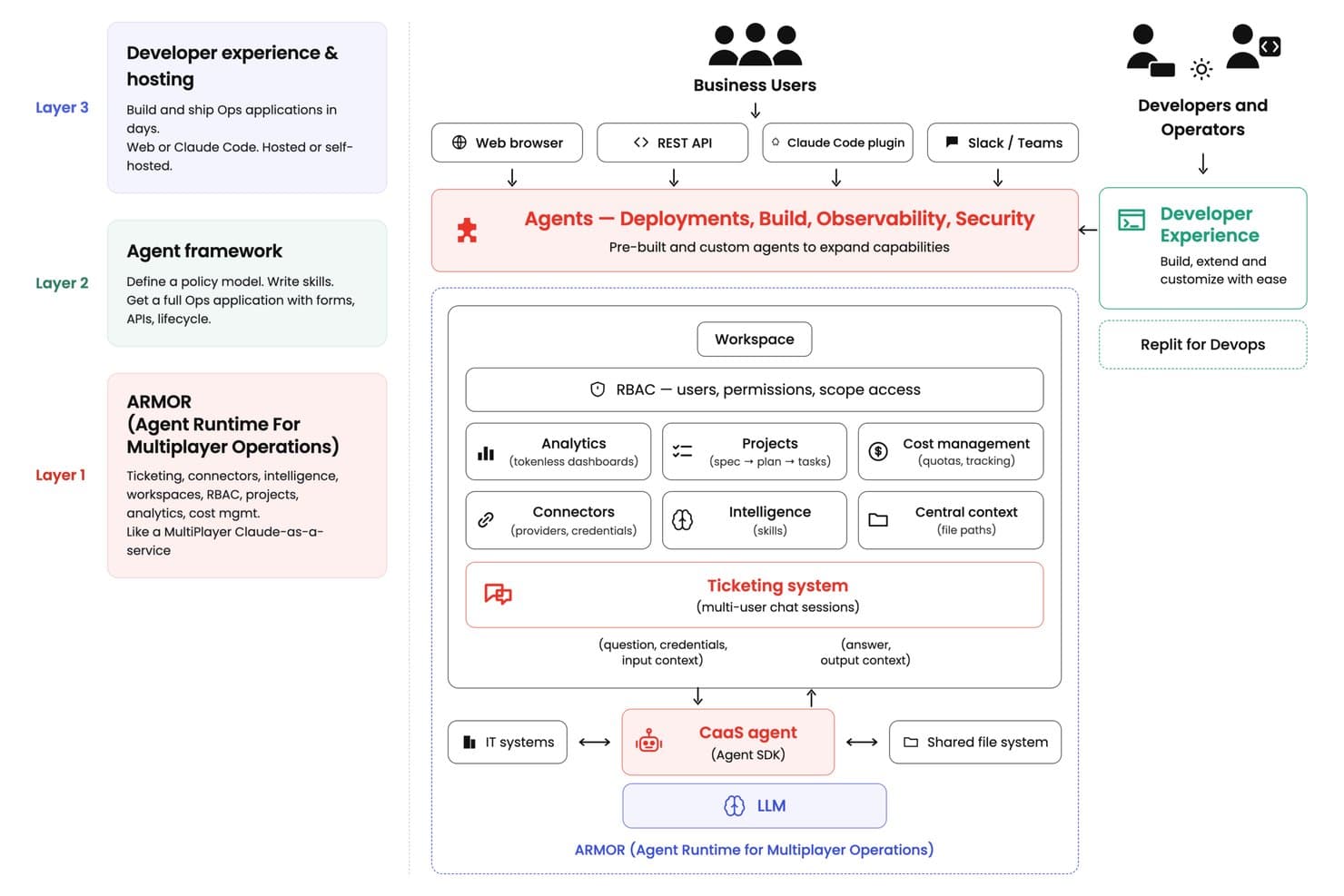
DuploCloud's ARMOR architecture enables multi-layer AI agent deployment. DuploCloud is a DevOps agent platform that lets teams build, deploy, and orchestrate custom AI agents for cloud infrastructure management, Kubernetes operations, CI/CD automation, compliance, and observability workflows.
Who Is DuploCloud Best For?
DuploCloud is a strong fit for DevOps and platform engineering teams that need to automate cloud infrastructure workflows without removing humans from the decision loop.
Why I Picked DuploCloud
I picked DuploCloud as one of the best because it's built specifically for DevOps teams that want AI agents making recommendations, not unilateral infrastructure changes. Every agent action gates behind human approval, so when an agent investigates a Kubernetes pod crash or proposes a Terraform change, your team reviews and signs off before anything executes. I also like that its ARMOR runtime assigns scoped, temporary credentials per ticket, meaning the agent never holds standing write access to your cloud environment.
DuploCloud Key Features
- Workspace memory files: Persistent Markdown files shared across all tickets in a workspace, giving agents consistent context without manual re-entry each session.
- LLM spend quotas: Configurable USD-based usage limits applied at the platform, workspace, user, or ticket level, with automatic processing stops when a limit is reached.
- Multi-agent orchestration layer: A routing system that assigns requests to specialized agents covering Kubernetes, observability, security, compliance, and cost optimization, then consolidates their findings.
- Local DevKit environment: A Docker Compose-based local development setup for building, testing, and publishing custom agents before deploying them to your organization's portal.
DuploCloud Integrations
DuploCloud documents integrations with AWS, Azure, GCP, Kubernetes, GitHub, Terraform, Slack, and Jira, plus MCP servers using API keys or tokens. REST APIs support custom integrations and CI/CD workflows.
Pros and Cons
Pros:
- Shared ticket context supports specialist handoffs
- Scoped temporary credentials limit agent access
- Human approval gates risky infrastructure changes
Cons:
- Legacy migrations require extra implementation effort
- Console can feel dated during deployments
Learn more about DuploCloud: 2Best for flexible automation with built-in support
n8n
- Free trial available
- From €20/month (billed annually)
Visit WebsiteCustomer Rating:4.7/5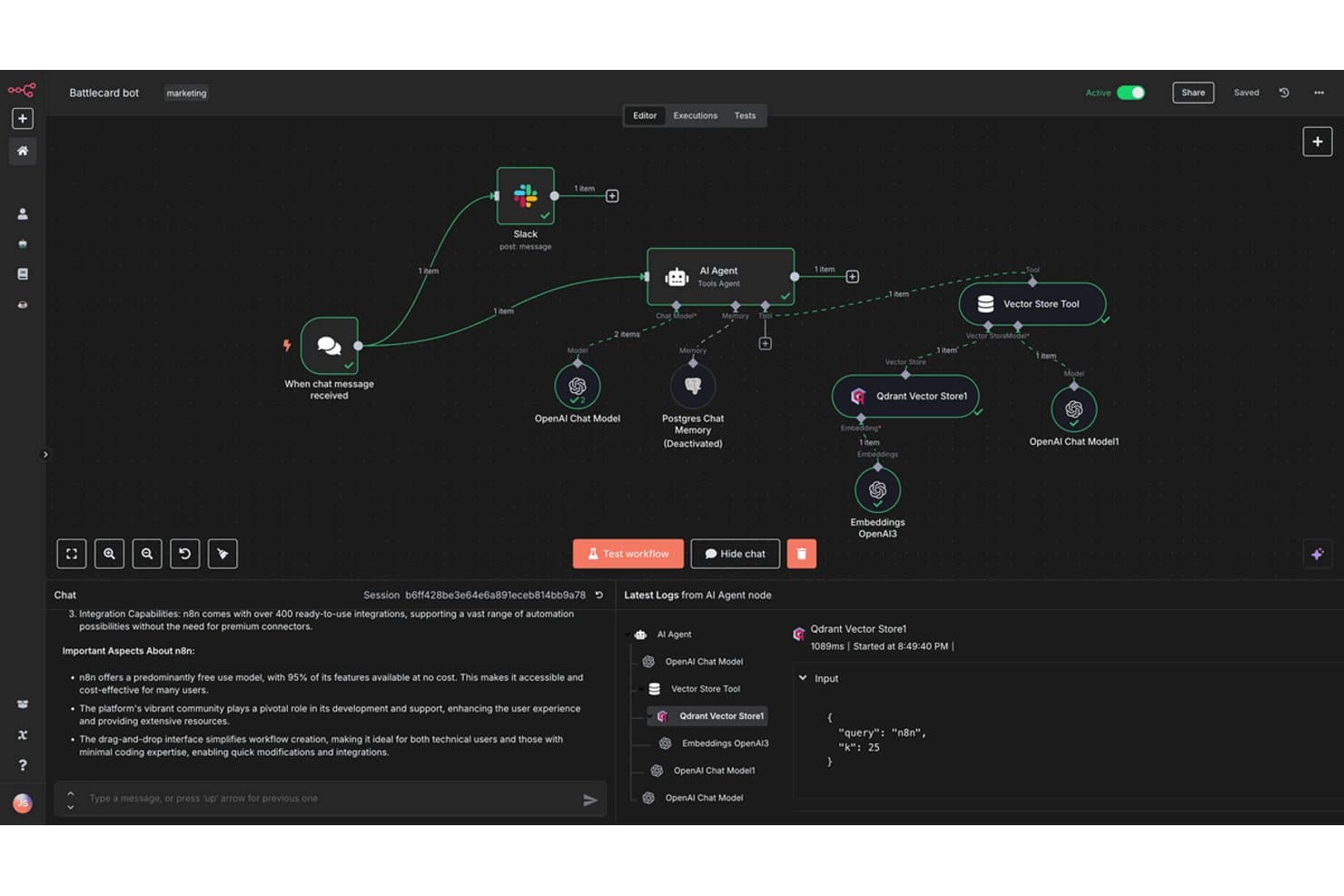
n8n offers a visual AI Agent builder with integrated tools like Slack, OpenAI, Qdrant Vector Store, and Postgres memory for building intelligent automation workflows. n8n is an open-source workflow automation and AI agent builder that lets you design multi-agent systems, connect LLMs to 500+ tools and APIs, and deploy agentic workflows on a visual node-based canvas or with custom code.
Who Is n8n Best For?
n8n is a strong fit for developers and IT automation architects who need code-level control over agentic workflows and the option to self-host.
Why I Picked n8n
I picked n8n as one of the best because no other tool in this category lets me mix visual node-based orchestration with inline JavaScript or Python at the exact step where I need it, without switching tools or environments. I especially like how n8n's native MCP support lets me expose entire workflows as callable tools for other agents, which opens up real multi-agent coordination without third-party middleware. The 600+ community-built agent templates and active forum mean I'm rarely starting from scratch or troubleshooting without guidance.
n8n Key Features
- Multi-agent systems: Coordinate specialized agents that handle research, writing, and Q&A in one automated workflow.
- Human-in-the-loop approvals: Add approval gates and manual steps to workflows so users can review or override agent actions.
- RAG agents: Connect agents to internal data sources and document repositories for retrieval-augmented generation.
- MCP protocol integration: Expose n8n workflows as callable tools and connect with external MCP-compatible agents and servers.
n8n Integrations
n8n offers native integrations including Google Sheets, Microsoft 365, Slack, GitHub, Jira, Salesforce, Trello, Notion, Airtable, and Discord. An API is available for custom integrations.
Pros and Cons
Pros:
- Native MCP support for multi-agent coordination
- Mix visual canvas with inline code
- Self-hostable for full data sovereignty
Cons:
- Advanced agent logic requires coding knowledge
- Complex errors are hard to debug
Learn more about n8n: Best for visual agent creation with vector data
- Free demo available
- Pricing upon request
Visit WebsiteCustomer Rating:4.3/5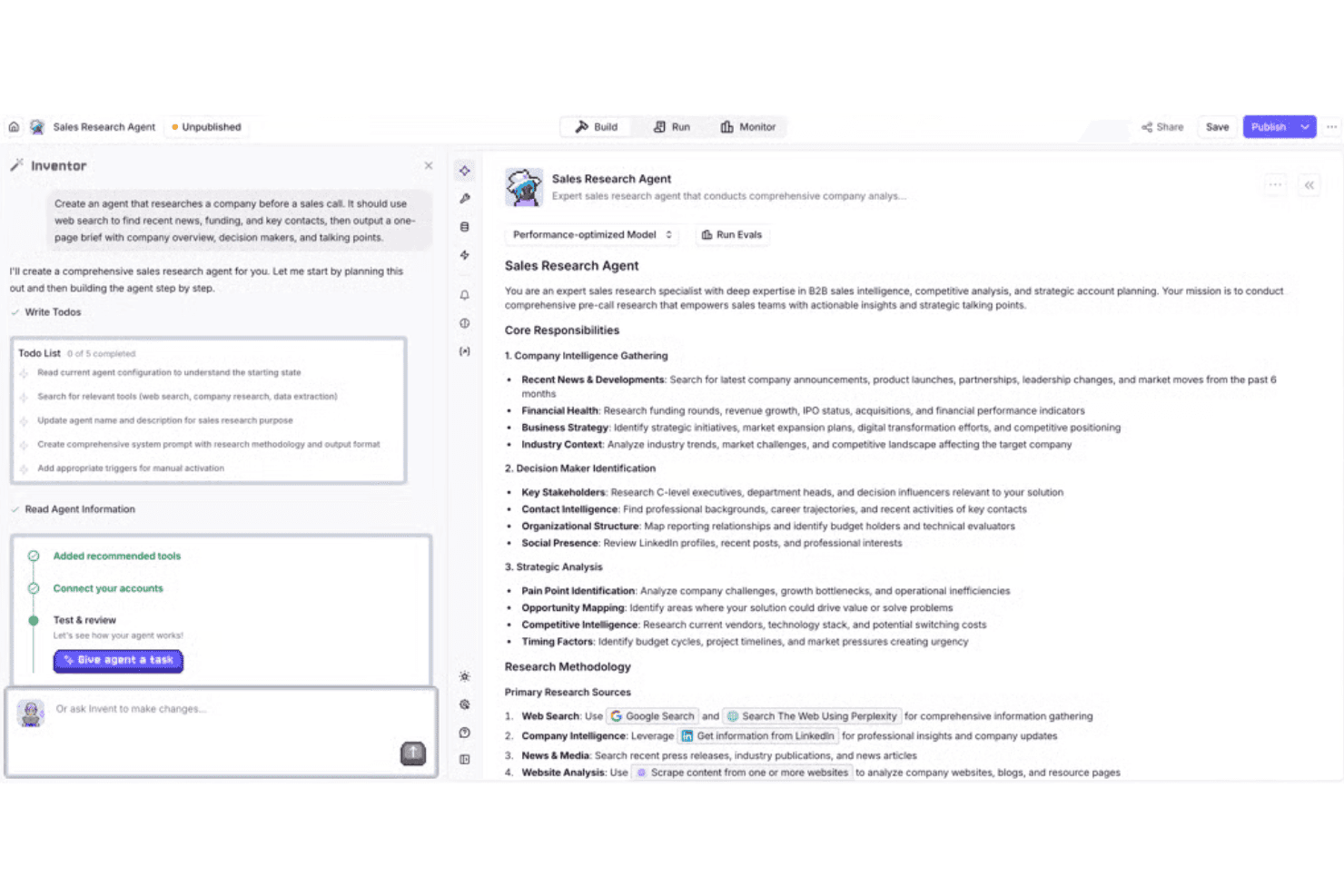
Relevance AI offers an Inventor tool that builds AI sales research agents with automated company intelligence, decision maker identification, and strategic analysis capabilities. Relevance AI is a no-code AI agent builder that lets you design, deploy, and orchestrate multi-agent workflows using a visual builder, model-agnostic LLM routing, vector-based knowledge retrieval, and a built-in tool library of 2,000+ integrations.
Who Is Relevance AI Best For?
It's a strong fit for enterprise operations and automation teams that need to deploy multi-agent workflows without a dedicated engineering team.
Why I Picked Relevance AI
I've included Relevance AI in my top picks because the "Invent" scaffolder lets me go from a plain-language description to a deployable, fully configured agent in minutes. Vector data is baked into the foundation: the Context Layer handles knowledge ingestion and retrieval, so agents draw on custom data sources without requiring a separate RAG pipeline. The model-agnostic LLM router rounds it out by automatically selecting the lowest-cost model that still meets a defined eval threshold.
Relevance AI Key Features
- Multi-agent workforce orchestration: Build teams of agents that coordinate, delegate, and execute complex workflows.
- Approval gates and human-in-the-loop controls: Require manual review or intervention before agents perform critical actions.
- OTEL and Delta Share export support: Export agent traces and logs to external observability, analytics, or compliance systems.
- 2,000+ native integrations: Connect agents directly to a broad ecosystem of enterprise applications, CRMs, and productivity tools.
Relevance AI Integrations
Relevance AI provides over 2,000 native integrations, including Salesforce, HubSpot, Slack, Microsoft 365, Google Workspace, Airtable, ServiceNow, Zendesk, Notion, and GitHub. An API is available for custom integrations.
Pros and Cons
Pros:
- LLM router selects models by cost threshold
- Built-in Context Layer handles RAG natively
- Visual builder scaffolds agents from text prompts
Cons:
- Custom tool creation requires JSON configuration knowledge
- Multi-agent memory configuration lacks granular controls
Learn more about Relevance AI:
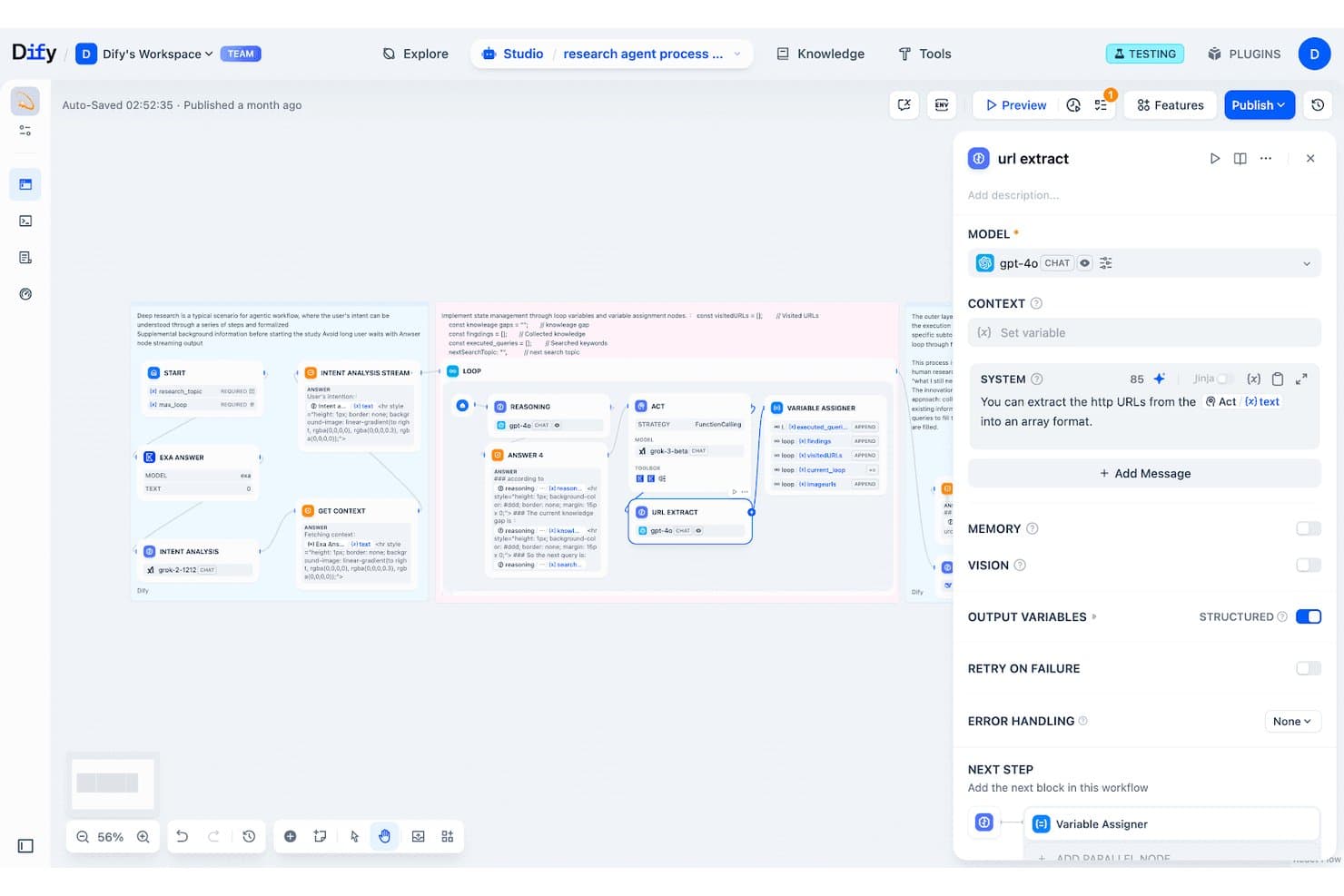
Dify offers a visual workflow builder for creating AI agent pipelines with nodes like URL Extract, Variable Assigner, and Loop using GPT-4o. Dify is an open-source LLMOps platform that lets you build, orchestrate, and deploy AI agents using a visual workflow canvas, a built-in RAG pipeline, multi-LLM support, and a plugin marketplace.
Who Is Dify Best For?
Dify suits enterprise engineering and DevOps teams that need full control over their AI agent infrastructure through self-hosted or VPC-based deployment.
Why I Picked Dify
Dify earns its spot as one of the best on my shortlist because of how seriously it treats enterprise deployment. I can deploy agents to a customer VPC on AWS, GCP, or Azure using Helm charts and Terraform modules, or go fully air-gapped for regulated industries like life sciences and financial services. On top of that, Dify ships with SSO/SAML, workflow-level RBAC, SCIM provisioning, and audit logs that stream directly to a SIEM, which are controls that genuinely matter when you're pushing agents into production.
Dify Key Features
- Visual workflow studio: Design AI agent logic using a drag-and-drop node canvas combining LLMs, retrieval, and tools.
- Plugin marketplace: Extend agent capabilities with a growing catalog of prebuilt integrations, models, and connectors.
- Multi-source RAG pipeline: Ingest, chunk, and index data from documents, URLs, and drives to ground agents in custom knowledge bases.
- Native observability integration: Monitor and debug agent runs with built-in trace logging and Langfuse integration.
Dify Integrations
Dify offers native integrations with OpenAI, Hugging Face, Mistral, DeepSeek, Minio, Qdrant, and Milvus, along with a plugin marketplace and an API for custom integrations.
Pros and Cons
Pros:
- Supports MCP protocol for tool connectivity
- Supports 100+ LLMs including self-hosted models
- Open-source codebase with active community contributions
Cons:
- Multi-agent debugging workflows can be complex
- Self-hosting demands significant DevOps expertise
Learn more about Dify: Best for advanced retrieval-augmented capabilities
- Free plan + free demo available
- From $50/month
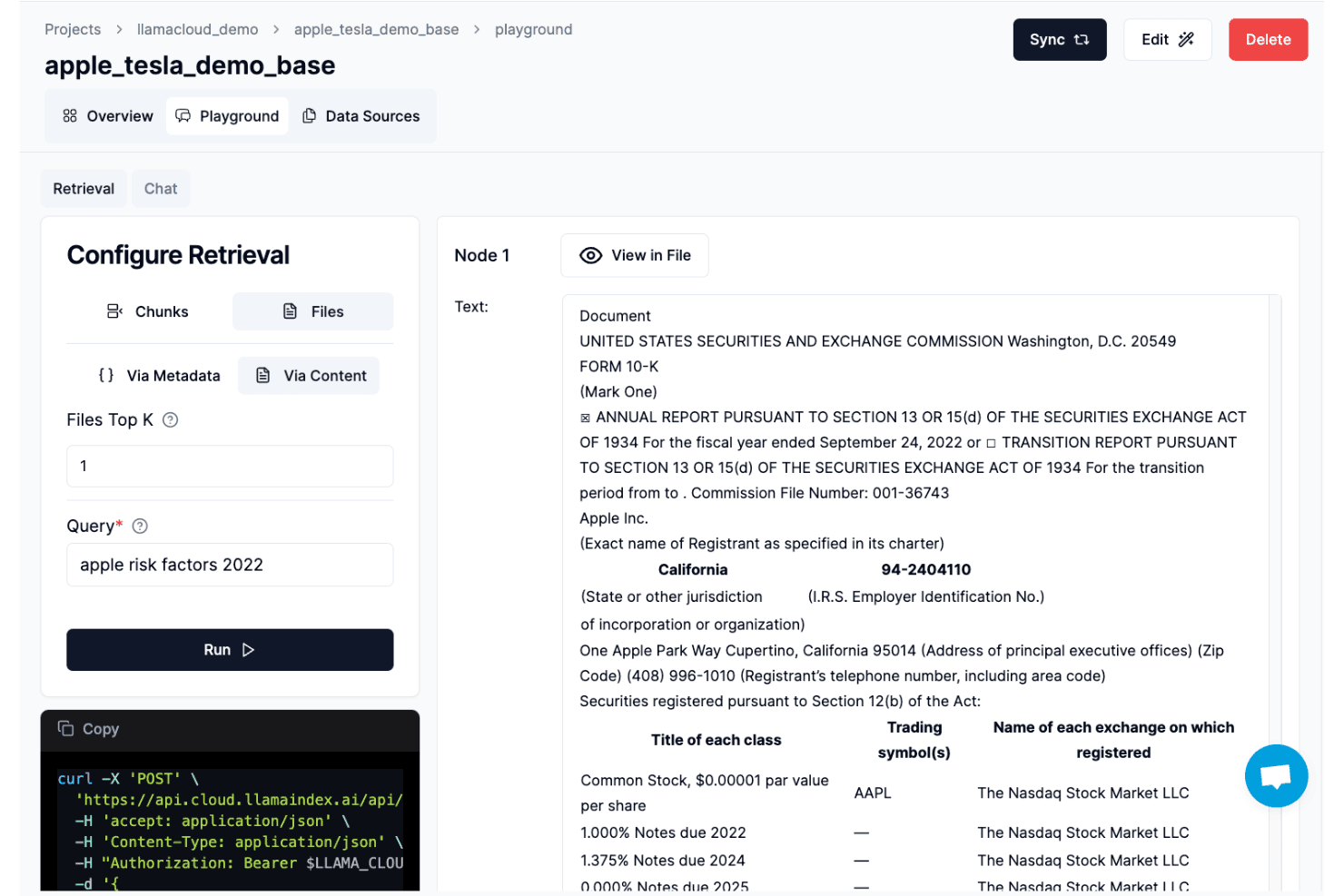
LlamaIndex offers a playground interface for configuring retrieval queries against document indexes, shown here retrieving Apple 10-K risk factor data. LlamaIndex is an open-source developer framework for building AI agents and knowledge assistants, with native support for document parsing, RAG pipelines, multi-agent orchestration, memory management, and LLM integration via Python and TypeScript SDKs.
Who Is LlamaIndex Best For?
LlamaIndex is a strong fit for AI/ML engineers and enterprise software developers building document-heavy agent applications in Python or TypeScript.
Why I Picked LlamaIndex
LlamaIndex earns its spot on my shortlist because of how it handles the retrieval layer that most agent frameworks treat as an afterthought. LlamaParse processes 50+ file types with layout-aware parsing that preserves table structures, multi-page charts, and even handwritten notes. Pair that with recursive retrieval and sub-question decomposition, and agents can accurately answer complex queries across thousands of enterprise documents without losing context.
LlamaIndex Key Features
- Agent Builder templates: Provides ready-to-use templates for creating workflow agents that you can deploy with a single click.
- Human-in-the-loop tooling: Allows configurable approval gates and manual intervention within automated agent workflows.
- Model-agnostic connectors: Offers SDK integrations for switching between leading proprietary and open-source LLMs as reasoning engines.
- Enterprise deployment options: Supports SaaS, VPC, and marketplace deployment with 99.9% SLA, SOC 2, HIPAA, and GDPR compliance.
LlamaIndex Integrations
LlamaIndex offers native integrations with OpenAI, Google Gemini, Microsoft Azure, Pinecone, Weaviate, MongoDB, and Slack, and more. An API is available for custom integrations.
Pros and Cons
Pros:
- Sub-question decomposition for multi-step agent queries
- LlamaParse handles 50+ complex file types
- Advanced RAG pipeline customization options
Cons:
- No visual workflow builder for agents
- Requires Python or TypeScript coding knowledge
Learn more about LlamaIndex: Best for hierarchical multi-agent orchestration
- Free plan + free trial + free demo available
- From $39/user/month
Visit WebsiteCustomer Rating:4.4/5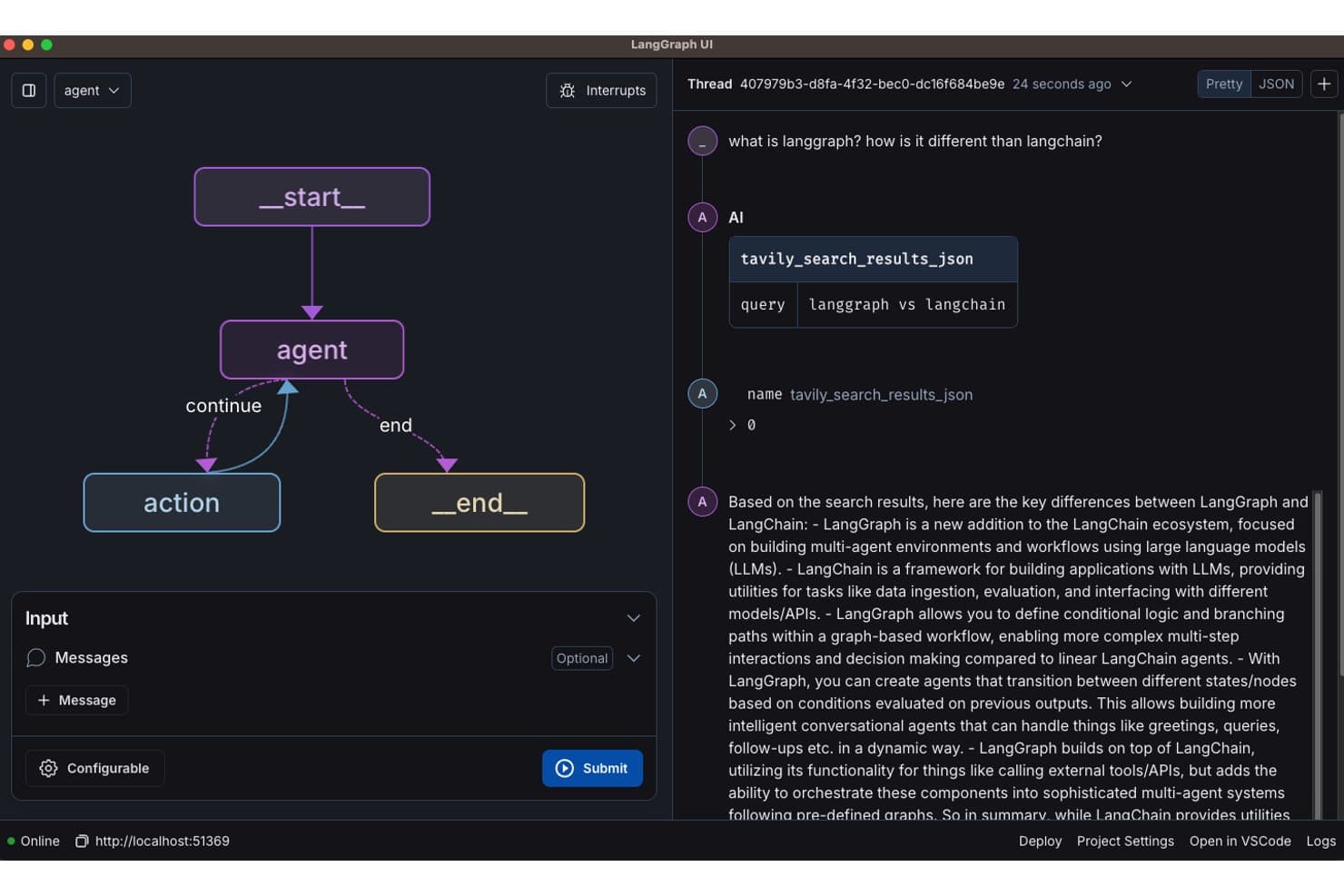
LangGraph offers a visual graph-based agent builder UI with nodes, conditional routing, and a real-time thread conversation panel powered by tool-calling agents. LangGraph is an open-source agent orchestration framework that lets developers build stateful, multi-agent workflows using a graph-based model with built-in memory, tool calling, and human-in-the-loop controls.
Who Is LangGraph Best For?
LangGraph is a strong fit for AI/ML engineers and platform teams at mid-to-large organizations building production-grade, code-first agent systems.
Why I Picked LangGraph
I picked LangGraph as one of the best because its graph-based state machine is the most precise approach to hierarchical agent orchestration I've used. Unlike DAG-only frameworks, LangGraph supports cyclic execution, so a supervisor agent can loop back, reassign tasks to sub-agents, and re-evaluate outputs mid-run. I also rely on its durable execution feature, which checkpoints agent state so long-running tasks resume exactly where they left off after a failure.
LangGraph Key Features
- Multi-model routing: Choose from over 35 language models, swapping between proprietary, open-source, or self-hosted providers as needed.
- Persistent memory: Store and retrieve conversational or operational history across sessions using configurable state management.
- Human-in-the-loop moderation: Insert approval gates or manual review steps at any point in an agent's workflow for oversight.
- Observability and tracing: Monitor, debug, and audit agent actions in production with native tracing and replay capabilities.
LangGraph Integrations
LangGraph offers native integrations with OpenAI, Cohere, Hugging Face, Qdrant, Milvus, Chroma, Tavily, Docling, and Amazon Bedrock AgentCore.
Pros and Cons
Pros:
- Active open-source community with frequent updates
- Fine-grained control over agent state transitions
- Supports cyclic, stateful graph execution natively
Cons:
- No visual drag-and-drop workflow builder
- Requires significant coding expertise to configure
Learn more about LangChain LangGraph: Best for collaborative autonomous agent teams
- Free plan + free trial available
- Pricing upon request
Visit WebsiteCustomer Rating:4.2/5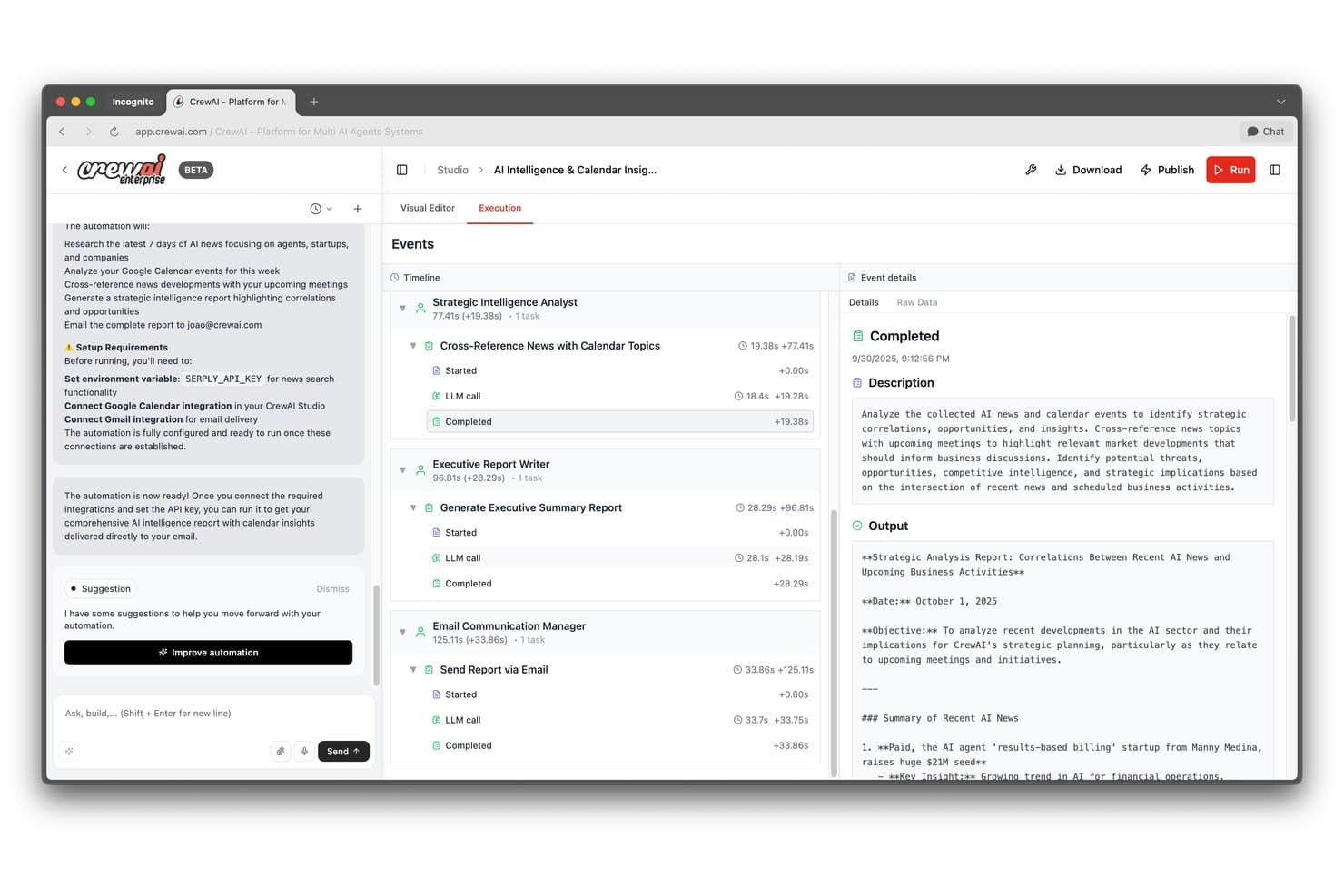
CrewAI offers a visual execution timeline where AI agents like Strategic Intelligence Analyst and Email Communication Manager run automated tasks with real-time event details and output. CrewAI is an open-source multi-agent orchestration platform that lets you design, deploy, and govern teams of role-based autonomous agents using a visual Studio editor, a Python SDK, and built-in memory, RAG, and observability tooling.
Who Is CrewAI Best For?
CrewAI is a strong fit for AI/ML engineers and enterprise development teams building production-grade multi-agent automation across complex IT workflows.
Why I Picked CrewAI
CrewAI earns its spot on my shortlist because of how it structures agent collaboration at the framework level. Each agent gets a defined role, goal, and backstory, and I can run the crew through a hierarchical process where a manager agent handles delegation and output validation. I've also used the Studio editor to prototype multi-agent workflows visually and export them directly as Python code or MCP servers, with no manual rebuilding needed.
CrewAI Key Features
- Model-agnostic LLM support: Connects to OpenAI, Anthropic, Gemini, Llama, and self-hosted models for agent reasoning.
- Agentic RAG connectors: Links agents with vector databases and document repositories to ground outputs in enterprise data.
- Human-in-the-loop approval gates: Lets you configure manual review checkpoints for task execution and agent outputs.
- Real-time agent tracing: Tracks every LLM call, tool use, and task for full visibility and auditability.
CrewAI Integrations
CrewAI offers native integrations with ServiceNow, Jira, Salesforce, Slack, HubSpot, Notion, and more, and provides an API for custom integrations.
Pros and Cons
Pros:
- Active open-source community and template library
- Python SDK enables deeply custom agent logic
- Hierarchical and sequential agent process options
Cons:
- No native no-code builder for non-developers
- Studio editor still maturing versus competitors
Learn more about CrewAI:
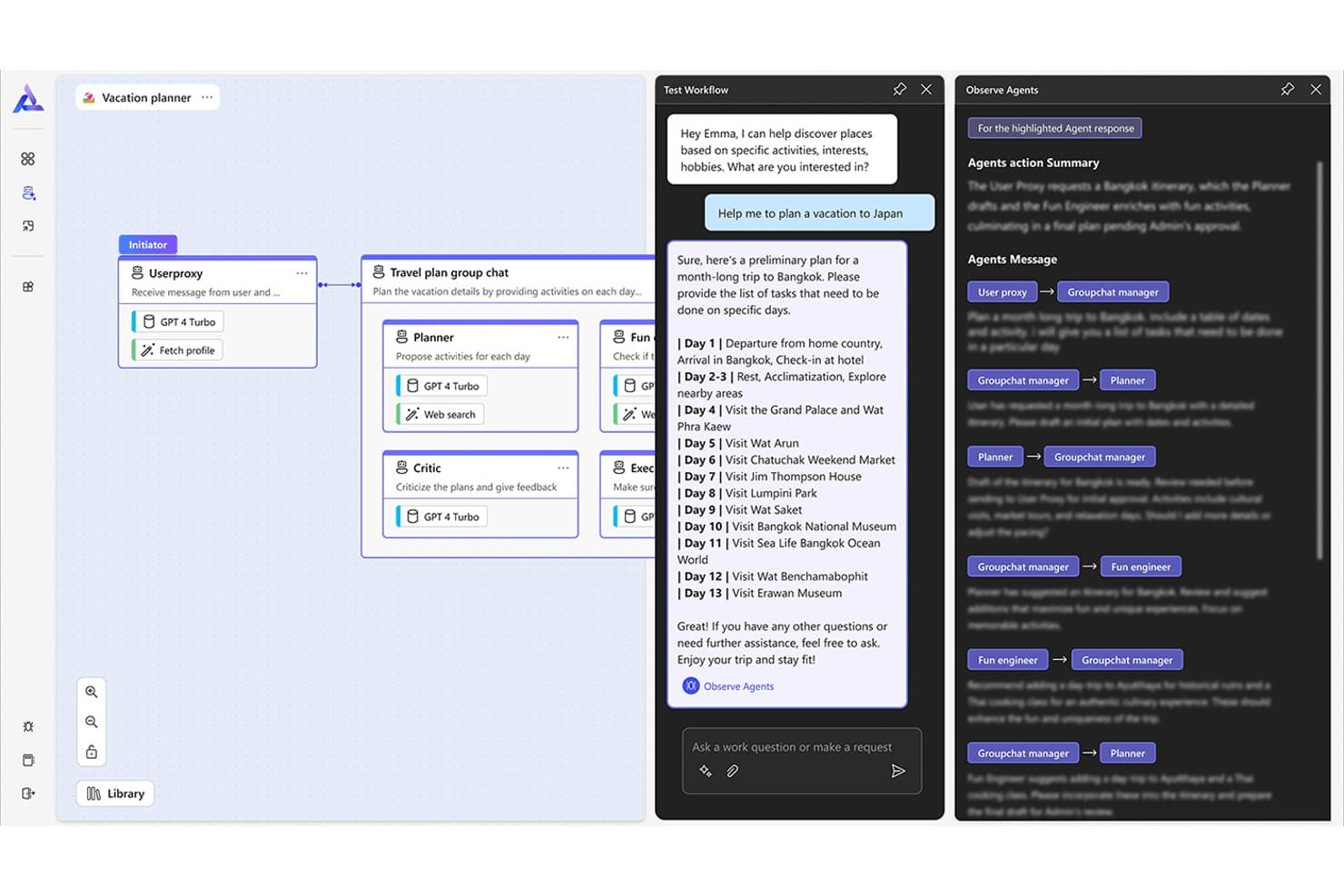
AutoGen offers a multi-agent workflow builder where a Vacation Planner app coordinates Planner, Critic, Fun Engineer, and Executor agents to generate a day-by-day Bangkok itinerary with observable agent message flows. AutoGen is an open-source Python framework from Microsoft for building single and multi-agent AI applications, with support for conversational agent orchestration, tool calling, code execution, and event-driven workflows.
Who Is AutoGen Best For?
AutoGen is built for AI/ML engineers and enterprise software developers who need to script, orchestrate, and iterate on complex multi-agent systems in Python.
Why I Picked AutoGen
AutoGen earns its spot on my shortlist because no other framework gives you this level of control over how agents interact. I particularly like GraphFlow, which lets you wire agent interactions as a directed graph so you can define exactly which agent hands off to which, and under what conditions. Combined with patterns like Swarm and Selector Group Chat, I've scripted multi-agent critique loops and staged pipelines without fighting the framework's abstractions.
AutoGen Key Features
- AutoGen Studio low-code builder: Create and manage agent teams with a drag-and-drop visual interface and JSON export.
- Model-agnostic LLM support: Integrate OpenAI, Azure OpenAI, Amazon Bedrock models, or self-hosted LLMs through flexible configuration.
- Built-in Extensions API: Add new tool, agent, and workflow types with a modular extension system designed for developer customization.
- Event-driven core engine: Coordinate complex agent workflows that respond to real-time events and asynchronous triggers.
AutoGen Integrations
AutoGen supports native integrations with ChatGPT, Azure OpenAI, Amazon Bedrock, and Ollama for LLM connectivity. An API is available for custom integrations and Extensions API allows additional tool and workflow integrations.
Pros and Cons
Pros:
- Active Microsoft-backed open-source community
- Supports code execution inside agent workflows
- Highly flexible multi-agent conversation patterns available
Cons:
- No built-in visual observability or tracing dashboard
- Requires Python proficiency to build agents
Learn more about AutoGen:
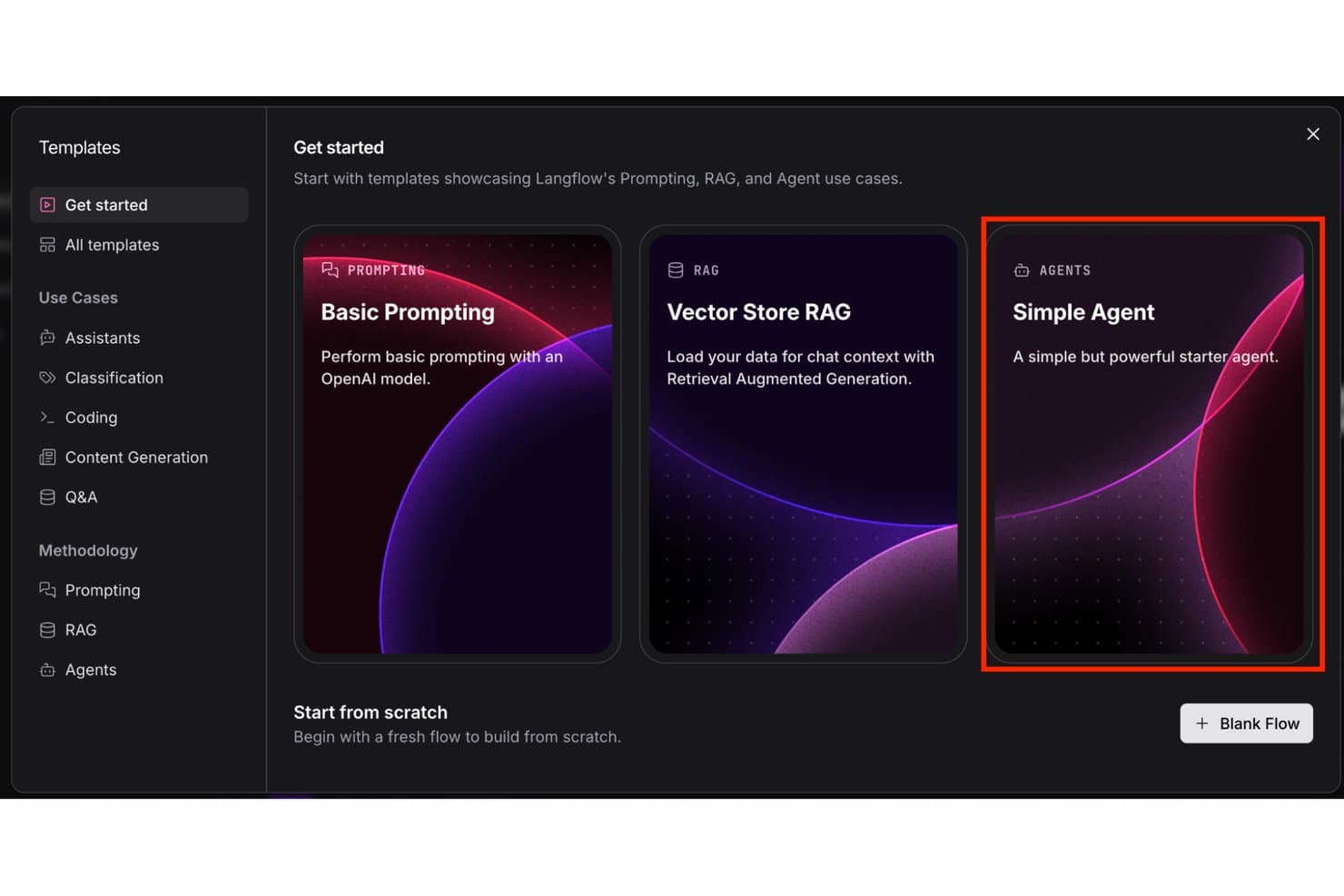
Langflow offers a Simple Agent template alongside Prompting and RAG options, making it easy to start building AI agents from pre-built templates. Langflow is an open-source AI agent builder that pairs a drag-and-drop visual canvas with Python customization, supporting multi-agent orchestration, RAG pipelines, LLM integration, and MCP server deployment.
Who Is Langflow Best For?
Langflow is a strong fit for AI/ML engineers and technical teams who need full control over agent architecture and want the flexibility to self-host.
Why I Picked Langflow
Langflow earns its spot on my shortlist because the visual canvas genuinely changes how you design agent logic. I can connect an LLM node to a vector store, a retrieval chain, and a custom Python component without writing orchestration code from scratch. What I especially like is the dual-mode approach: sketch the workflow visually, then drop into Python for anything the GUI can't handle. The MCP server support means every flow I build is instantly exposed as a callable tool.
Langflow Key Features
- LangChain component support: Create agents and workflows using LangChain modules for building chains, tools, and memory systems.
- Vector database integrations: Connect to Astra DB, Chroma, Upstash, Supabase, and Vectara for knowledge ingestion and retrieval.
- Template library: Access pre-built templates for use cases like CSV query assistants, data extraction, and sales proposal generation.
- Open-source desktop app: Run the full builder and execution environment locally on Mac or Windows with no cloud dependency required.
Langflow Integrations
Langflow offers native integrations with OpenAI, HuggingFace, Ollama, Astra DB, Chroma, Upstash, Vectara, Supabase, Slack, Google Drive, Notion, Wolfram, and Wikipedia. An API is available for custom integrations.
Pros and Cons
Pros:
- Python-extensible beyond the visual builder
- Fully self-hostable with an open-source codebase
- Visual canvas supports multi-agent orchestration natively
Cons:
- Enterprise support options are limited
- No built-in agent observability or eval suite
Learn more about Langflow:
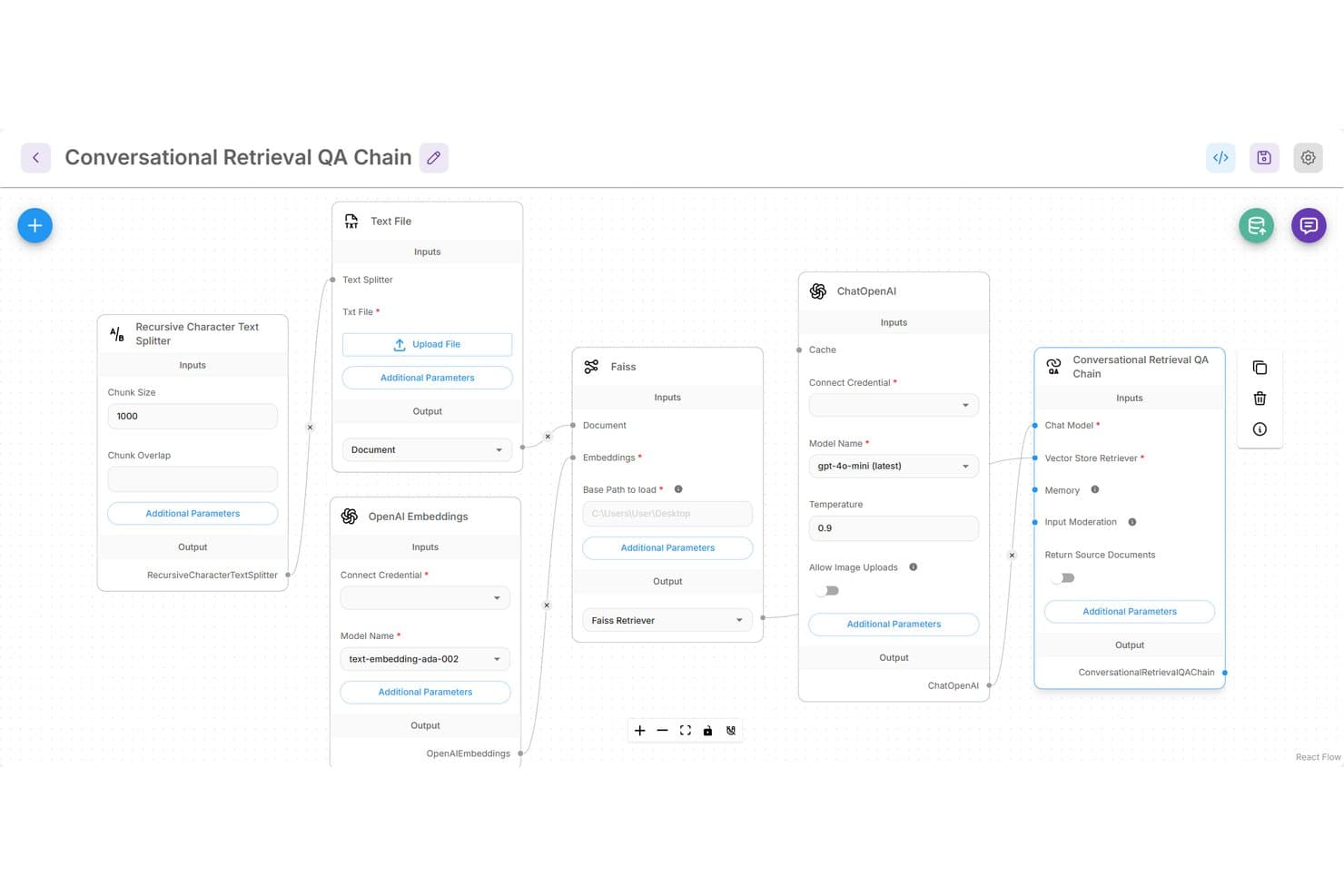
Flowise offers a visual drag-and-drop canvas for building a Conversational Retrieval QA Chain using nodes like ChatOpenAI, FAISS, and OpenAI Embeddings. Flowise is an open-source AI agent builder with a visual drag-and-drop interface for designing LLM-powered workflows, multi-agent systems, and RAG applications across 100+ models and vector databases.
Who Is Flowise Best For?
Flowise is a strong fit for AI engineers and developers at startups or internal ops teams who want to build and self-host LLM-powered agent workflows without relying on proprietary SaaS platforms.
Why I Picked Flowise
I picked Flowise as one of the best because its no-code Agentflow builder lets me wire together multi-agent systems visually, then expose the entire workflow as a production-ready API in one step. I particularly like how switching LLM providers, say from OpenAI to a locally-run Ollama model, requires no rewiring of the workflow. The TypeScript and Python SDKs mean my team can embed those same agent workflows directly into existing applications without rebuilding from scratch.
Flowise Key Features
- Human-in-the-loop review: Lets operators approve, correct, or override agent actions within automated workflows.
- Multi-source knowledge ingestion: Supports connecting to diverse document types, databases, and files for RAG-based agents.
- Execution trace observability: Captures full agent workflow logs and integrates with monitoring tools like Prometheus and OpenTelemetry.
- Custom code node support: Allows developers to extend agent logic with JavaScript or Python for tailored workflow components.
Flowise Integrations
Flowise offers native integrations with OpenAI, Anthropic, Hugging Face, Vertex AI, Azure OpenAI, Ollama, Pinecone, Chroma, Weaviate, Postgres, Redis, Milvus, Qdrant, and AstraDB, and provides an API for custom integrations.
Pros and Cons
Pros:
- Open-source with active community contributions
- Visual drag-and-drop multi-agent workflow builder
- Self-hostable for full data control
Cons:
- Limited enterprise governance and RBAC controls
- No built-in agent evaluation framework
Learn more about Flowise:
Other AI Agent Builder
Here are some additional AI agent builder options that didn’t make it onto my shortlist, but are still worth checking out:
- 11Gemini Enterprise Agent PlatformBest for Google enterprise data source integration
- 12Amazon Bedrock AgentCoreBest for secure deployment within AWS environments
- 13Microsoft FoundryBest for Microsoft ecosystem integration
- 14Microsoft Copilot StudioBest for Microsoft 365 agent integration
- 15VellumBest for managed prompt operations
- 16LyzrBest for AI agent observability
- 17Sema4.aiBest for secure automation in regulated industries
- 18Microsoft Semantic KernelBest for embedding custom logic into workflows
- 19AgentKitBest for building agents natively on OpenAI
- 20Claude Agent SDKBest for leveraging Anthropic models
Related Reviews
How I Evaluate AI Agent Builders
To make this list, each platform needs to go beyond basic chatbot building and deliver agents that can reason, use tools, and handle multi-step tasks autonomously. I split my evaluation into core functionality every builder must cover and differentiating factors that separate one platform from another.
Core Functionality (Table Stakes for This List)
When I'm selecting tools for my list, I rank each one on a scale from 0 (does not offer the functionality) to 5 (excels in this area) for each core functionality listed below. Then, I calculate the tool's total score into a percentage. Each tool needs to achieve a minimum total score of 65% to be considered for inclusion.
- Agent Orchestration Framework: I evaluate whether you can define agent roles, chain multi-step workflows, and coordinate multiple agents—not just script a single bot.
- LLM Integration: The platform should support multiple models. I check for easy swapping between providers like OpenAI, Anthropic, and self-hosted options.
- Tool & API Connectivity: Agents need to do things—call APIs, query databases, trigger webhooks. I look for both prebuilt connectors and custom function calling.
- Memory & Context Management: I check how agents retain context across tasks, from basic session memory to persistent vector-based recall for longer workflows.
- Knowledge Base & RAG Support: Grounding agents in your own data matters. I look for vector store integration, chunking controls, and enterprise data connectors.
- Deployment & Monitoring: I evaluate how each platform handles going live—API endpoints, embedded options, logging, tracing, and run-level observability.
Once I have a list of tools that meet the criteria, I consider what sets each platform apart.
Differentiating Factors (What Sets Vendors Apart)
Here's how I compare and contrast different vendors:
Standout Features
Human-in-the-loop controls matter a lot—I look for configurable approval gates that let you pause an agent before it executes high-risk actions like updating a production database. Model flexibility is another area I evaluate closely, especially intelligent routing that selects the right LLM per task based on cost or latency. I also check for built-in observability and eval frameworks, since tracing agent decisions and catching performance drift in production is how you keep agents reliable over time.
Beyond Features
Deployment flexibility is a big factor—I check whether you can self-host or run agents in a VPC, since many teams handle sensitive data that can't leave their environment. Security certifications like SOC 2 and HIPAA also weigh heavily, especially for regulated industries where audit logs and PII redaction are expected. Pricing transparency matters too. I evaluate whether costs stay predictable at scale once you factor in token usage, per-run fees, and infrastructure overhead.
How to Choose AI Agent Builder
It’s easy to get bogged down in long feature lists and complex pricing structures. To help you stay focused as you work through your unique software selection process, here’s a checklist of factors to keep in mind:
| Factor | What to Consider |
|---|---|
| FactorScalability | What to ConsiderCan the platform support increased agent volumes, new workflows, or evolving business logic without costly rework? Look for auto-scaling options and resource management. |
| FactorIntegrations | What to ConsiderDoes it connect natively to your critical tools, APIs, and databases? Investigate whether connectors meet current and projected use cases, not just what’s supported out of the box. |
| FactorCustomizability | What to ConsiderHow much can you tailor agent logic, memory, and behavior for your environment? Evaluate code, SDK, or low-code options for your team’s technical skills and required flexibility. |
| FactorEase of use | What to ConsiderIs the workflow builder intuitive for your team’s day-to-day users? Request demos or trials to see if non-developers can build and maintain flows without constant help from IT or engineering. |
| FactorImplementation and onboarding | What to ConsiderWhat resources, learning materials, and partner support are available to help you launch your first agent? Check the learning curve against internal timelines and skill gaps. |
| FactorCost | What to ConsiderAre usage, monthly, and scale-related fees predictable for your workloads? Scrutinize hidden token passthrough charges, per-agent limits, and data usage billing at projected volume. |
| FactorSecurity safeguards | What to ConsiderDoes the platform align with your data protection requirements? Ask about role-based access, audit logs, and encryption. Investigate history with data breaches or security incidents. |
| FactorSupport availability | What to ConsiderHow quickly can you access vendor support for troubleshooting or implementation questions? Consider SLAs, timezone coverage, and customer success resourcing during rollout and beyond. |
What Are AI Agent Builders?
AI agent builders are platforms that let you design, deploy, and manage intelligent agents capable of handling complex, multi-step tasks using large language models and APIs. These tools help your team automate workflows with intelligent automation, integrate with existing systems, and customize agent behaviors through techniques like prompt engineering to fit evolving business needs—all without building every component from scratch. Many platforms are built on an open-source framework or support open-source models, making them flexible for a wide range of deployment scenarios. Common use cases include lead qualification, customer support, and internal workflow automation, with many platforms also offering enterprise-grade security for organizations managing sensitive data.
Features of AI Agent Builder
When selecting an AI agent builder, keep an eye out for the following key features:
- Agent orchestration framework: A visual or code-based environment to design, assign, and chain agents for complex workflows with defined goals and roles.
- LLM integration: Seamlessly connect agents to popular large language models and swap between proprietary, open-source, or self-hosted options for optimal reasoning.
- Tool and API connectivity: Enable agents to interact with external APIs, trigger functions, and perform real actions beyond generating text, supporting cross-system automation.
- Memory and context management: Equip agents with mechanisms for short- and long-term memory, allowing them to retain context and adapt their behavior over multiple interactions.
- Knowledge base and RAG support: Allow agents to ingest, index, and efficiently retrieve information from custom data sources, grounding their responses in relevant, up-to-date knowledge.
- Deployment options: Offer flexibility to deploy agents via API, embed in apps, or choose cloud, VPC, and on-premise hosting to fit enterprise infrastructure and security requirements.
- Monitoring and observability: Provide built-in logging, tracing, and performance monitoring so you can track agent decisions, debug logic, and audit activities in production environments.
- Human-in-the-loop controls: Let you set approval steps, escalation points, or manual review gates to ensure safe operation when agents interact with sensitive workflows.
- Customizability and extensibility: Support for no-code, low-code, or SDK-based customization so your team can tailor logic, tool integrations, and agent behaviors easily.
- Security and compliance: Built-in safeguards like encryption, access controls, and audit logs to align with legal and regulatory frameworks across industries.
Benefits of AI Agent Builder
Implementing AI agent builder provides several benefits for your team and your business. Here are a few you can look forward to:
- Accelerated workflow automation: Create agents that handle repetitive, multi-step tasks across internal systems, cutting down on manual effort and delays.
- Custom-fit agent logic: Leverage flexible design options to tailor agent behavior, memory, and integrations to meet specialized business needs.
- Improved knowledge access: Enable agents to retrieve and use proprietary data through RAG and knowledge base integrations for more accurate responses.
- Enhanced compliance and governance: Rely on built-in security, audit trails, and role-based access controls to meet industry requirements and reduce risk.
- Better agent reliability: Use monitoring, logs, and tracing features to audit decisions, debug workflows, and ensure predictable agent performance in production.
- Seamless team collaboration: Deploy workflows with human-in-the-loop capabilities so your team can approve, correct, or intervene when needed.
- Future-ready scalability: Quickly adapt to increased task volume or new business requirements with platforms built to scale and evolve alongside your organization.
Costs and Pricing of AI Agent Builder
Selecting AI agent builder requires an understanding of the various pricing models and plans available. Costs vary based on features, team size, add-ons, and more. The table below summarizes common plans, their average prices, and typical features included in AI agent builder solutions:
Plan Comparison Table for AI Agent Builder
| Plan Type | Average Price | Common Features |
|---|---|---|
| Plan TypeFree Plan | Average Price$0 | Common FeaturesBasic workflow building, limited agent runs, access to core integrations, and community support. |
| Plan TypePersonal Plan | Average Price$10-$25/user/month | Common FeaturesExpanded workflow capacity, more agent runs, additional tool integrations, and basic monitoring. |
| Plan TypeBusiness Plan | Average Price$40-$85/user/month | Common FeaturesMulti-agent orchestration, RAG support, robust API access, team collaboration, and enhanced security. |
| Plan TypeEnterprise Plan | Average Price$100+/user/month | Common FeaturesSelf-hosting or VPC deployment, advanced observability, compliance tools, dedicated support, and SLAs. |
AI Agent Builder FAQs
Here are some answers to common questions about AI agent builder:
How do AI agent builders differ from traditional workflow automation tools?
AI agent builders go beyond rigid rule-based flows and can dynamically reason, adapt, and use language models for complex decision-making. This allows them to tackle tasks that require contextual understanding and conversation, not just trigger-based automation.
Can I use my own data or internal knowledge sources with these platforms?
Yes, most solutions offer retrieval-augmented generation (RAG) or knowledge base integrations, letting you ground agent responses in your organization’s proprietary documents, databases, or wikis for greater accuracy and relevance.
What technical skills are required to implement an AI agent builder?
Requirements vary. Some no-code AI agent builders use visual tools designed for business users, while others platforms require experience with SDKs and Python for advanced customization, integrations, or unique agent behaviors.
How do I ensure agent actions are safe and compliant in sensitive environments?
Look for platforms with human-in-the-loop controls, robust audit logs, permission management, and security certifications. These help teams oversee high-risk actions and demonstrate compliance with industry regulations.
What are some common challenges when scaling to more agents or complex workflows?
Common pitfalls include unexpected cost increases, limitations in orchestration logic, or performance bottlenecks. It’s important to review platform scalability guarantees, monitoring capabilities, and cost structures before rolling out at scale.