

Alegerea instrumentelor DevSecOps potrivite poate îmbunătăți semnificativ integrarea securității în ciclul de viață al dezvoltării software și poate spori conformitatea, gestionarea riscurilor și viteza de implementare – indiferent dacă aveți nevoie să automatizați verificările de securitate, să impuneți politici sau să reduceți vulnerabilitățile încă din primele etape ale dezvoltării.
Totuși, găsirea celor mai potrivite poate părea copleșitoare, având în vedere numărul mare de opțiuni disponibile – precum și provocarea de a echilibra securitatea cu eficiența dezvoltării.
În acest articol, mă bazez pe experiența mea ca specialist DevSecOps și pe testarea practică a zeci de instrumente de automatizare a securității pentru a detalia capacitățile acestora, cazurile de utilizare ideale și modul în care vă pot ajuta să obțineți livrarea software mai rapidă și mai sigură, cu perturbări minime ale fluxurilor de lucru pentru dezvoltare.
Why Trust Our Software Recommendations
6,700+
Reviews
20
Industry experts
16+
Evaluation factors
14
Years
Our team has been testing and reviewing software since 2012. As tech leaders ourselves, we know how difficult—and important—it is to choose the right software.
For this guide, we evaluated tools using hands-on testing and independent research, scoring tools using our selection criteria.
Our reviews reflect our human editorial judgment, not a sales pitch.
Expert reviewers:
- Paulo Gardini MiguelTech Director
 Tim FisherVP of AI
 Gabriel RosasTech Lead & Software Architect
 Christhian GruhnTech Lead & Platform Architect

Tabel comparativ al instrumentelor DevSecOps
Acest tabel comparativ rezumă detaliile privind prețurile pentru selecțiile mele de top de instrumente DevSecOps:
Sorted by: Default
| Tool | Starting Price | Website | |
|---|---|---|---|
Best for security fixes across the stack | 4.3 out of 5 | $300/month Free plan + free demo available | Book Demo |
Best for SCA and SAST with reachability analysis | 4.7 out of 5 | $1,000/dev/year Free demo available | Website |
Best for context-aware SAST | 4.5 out of 5 | $200/month Free plan available | Book Demo |
Best for cloud monitoring and AI insights | 4.7 out of 5 | $10/month Free plan + 30-day trial + demo available | Website |
Best for full-stack application monitoring | 4.5 out of 5 | $18/host/month Free plan + free trial available | Website |
Best for performance engineering and analysis | 4.3 out of 5 | $10/user/month Free plan + free demo available | Website |
Best for AI-driven end-to-end testing | 4.2 out of 5 | Pricing upon request 14-day free trial + free demo available | Website |
Best for creating form endpoints in minutes | 4.6 out of 5 | $10/user/month | Website |
Best for real-time observability and analytics | 4.5 out of 5 | $10/user/month | Website |
Best for observability and debugging in production systems | 4.6 out of 5 | $130/month Free plan + demo available | Website |


Recenzii ale celor mai bune instrumente DevSecOps
Mai jos sunt prezentate rezumatele mele detaliate ale celor mai bune instrumente DevSecOps care au ajuns pe lista mea scurtă. Recenziile mele oferă o perspectivă detaliată asupra caracteristicilor principale, avantajelor & dezavantajelor, integrărilor și cazurilor de utilizare ideale pentru fiecare instrument, pentru a vă ajuta să îl găsiți pe cel mai potrivit pentru dumneavoastră.
 Best for security fixes across the stack
- Free plan + free demo available
- From $300/month
Visit WebsiteCustomer Rating:4.3/5
Aikido Security surfaces CVE details and fix paths per dependency. Aikido Security is a DevSecOps platform that consolidates SAST, SCA, secrets detection, IaC scanning, container scanning, CSPM, DAST, and runtime protection into a single tool covering code, cloud, and runtime environments.
Who Is Aikido Security Best For?
Aikido Security is a strong fit for engineering teams that need to secure code, containers, and cloud infrastructure without managing a separate tool for each layer.
Why I Picked Aikido Security
I picked Aikido Security as one of the best because it's the only tool on my list that runs reachability analysis alongside CVE exploitability triage, so instead of triaging hundreds of dependency alerts, I can see exactly which vulnerable functions are actually callable from my application's entry points. AutoFix then generates reviewable PRs with the minimum version bump needed, distinguishing patch upgrades from major ones. That combination of "is this reachable?" and "here's the fix" covers the full remediation loop across code, containers, and IaC without switching tools.
Aikido Security Key Features
- Compliance reporting: Generates audit-ready reports mapped to frameworks including ISO 27001, SOC 2, PCI DSS, HIPAA, NIS2, and DORA based on active scans and findings.
- IDE plugin scanning: Surfaces SAST, secrets, and IaC findings inline as you code, with remediation details available directly in the editor.
- PR and release gating: Blocks pull requests or deployments when new issues meet or exceed a configured severity threshold across selected scan types.
- CVE exploitability analysis: Runs agent-based triage on open dependency CVEs nightly, automatically adjusting severity or snoozing findings based on exploitability evidence.
Aikido Security Integrations
Aikido Security offers 100+ integrations, including GitHub Actions, GitLab CI/CD, Jenkins, CircleCI, Azure Pipelines, AWS, Google Cloud, Azure, Jira, and Visual Studio Code. Its public REST API and webhooks support custom integrations.
Pros and Cons
Pros:
- Reviewers praise actionable triage and remediation
- AutoFix proposes reviewable cross-stack fixes
- Reachability helps prioritize exploitable dependency risks
Cons:
- Reviewers want deeper reporting detail
- Some findings still produce false positives
Learn more about Aikido Security: Best for SCA and SAST with reachability analysis
- Free demo available
- Up to $1,000/dev/year (billed annually)
Visit WebsiteCustomer Rating:4.7/5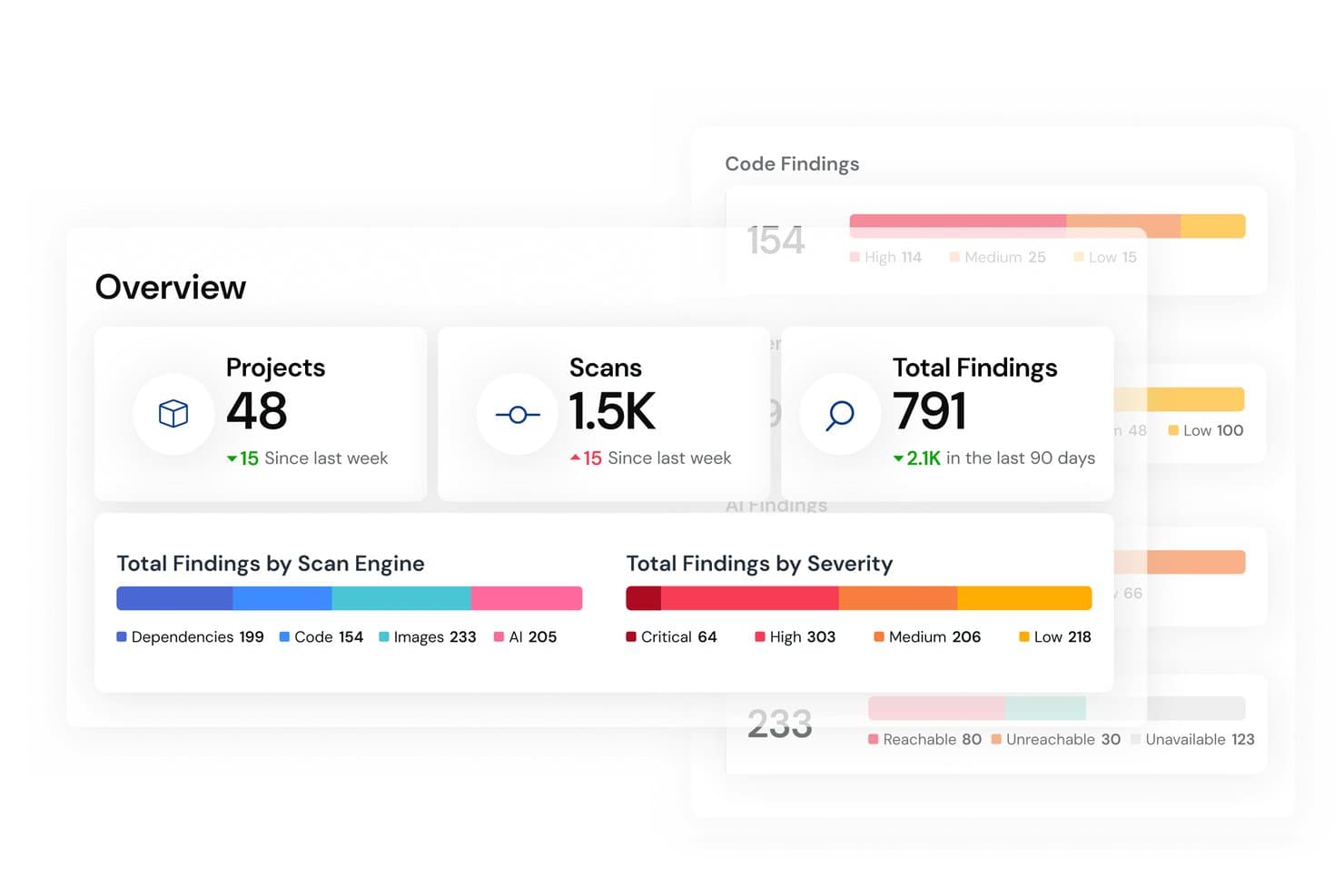
Mend.io centralizes security findings across scan engines and severity levels. Mend AppSec is a DevSecOps platform that unifies SAST, SCA, and container scanning across CI/CD pipelines, with reachability analysis, AI-assisted triage, and automated dependency-fix pull requests built into developer workflows.
Who Is Mend AppSec Best For?
Mend AppSec is a strong fit for security and engineering teams that need mature SCA and SAST coverage with reachability analysis built directly into their CI/CD pipelines.
Why I Picked Mend AppSec
I picked Mend AppSec as one of the best because its reachability analysis sets it apart from tools that simply flag every vulnerable dependency. Instead of burying your team in alerts, it traces whether your application code actually calls the vulnerable function, so you fix what matters first. I also like that AI-assisted triage classifies SAST findings as True Positive, Inconclusive, or False Positive with data-flow context, cutting the manual review cycle significantly.
Mend AppSec Key Features
- Malicious package detection: Identifies typosquats, dependency-confusion attacks, and packages containing backdoor or data-exfiltration code in your open-source dependencies.
- Unified policy engine: Applies shared severity thresholds, SLAs, and license rules across SAST, SCA, and container scans, with violations triggering alerts, pipeline failures, or pull-request blocks.
- SBOM generation and ingestion: Exports software bills of materials in SPDX and CycloneDX formats and imports third-party SBOMs, with VEX data to communicate component exploitability.
- IaC scanning: Scans Terraform, CloudFormation, Kubernetes YAML, Helm, and Dockerfiles for misconfigurations via the Mend CLI.
Mend.io Integrations
Mend.io integrates with GitHub, GitLab, Azure DevOps, Bitbucket, Jenkins, CircleCI, AWS CodeBuild, Docker, Amazon ECR, and JFrog Artifactory. Its REST API supports custom integrations.
Pros and Cons
Pros:
- Dependency-fix pull requests reduce manual remediation
- Pipeline gates enforce security policies and SLAs
- Reachability analysis helps prioritize vulnerable dependencies
Cons:
- Policy setup takes effort across large codebases
- False positives still require manual review
Learn more about Mend.io:

ZeroPath provides a unified security dashboard that highlights scan activity, vulnerability types, issue severity, and top critical findings at a glance. ZeroPath provides an AI-native application security platform designed to cater to security-conscious companies aiming to enhance their application security processes. By offering tools such as Static Application Security Testing (SAST) and Software Composition Analysis (SCA), ZeroPath intelligently identifies and auto-fixes vulnerabilities, making it particularly appealing to businesses that prioritize minimizing false positives and gaining actionable insights.
Why I Picked Zeropath
I picked ZeroPath because it brings a distinctive focus on detecting exploitable vulnerabilities (not just surface-level issues) through features like context-aware SAST with exploitability scoring, and one-click AI-generated patching that helps developers act on security findings without leaving the code flow. These align directly with what your team may struggle with—slow builds, noisy alerts, and friction between security and development—and help make security feedback feel like part of the workflow rather than an obstacle.
Zeropath Key Features
In addition to its core vulnerability remediation capabilities, Zeropath offers several other valuable features:
- Real-Time Feedback: The platform provides immediate insights to developers, helping them address security issues before code merges.
- Incremental Scanning: Analyzes only changed code paths, so PR checks complete in under 60 seconds.
- Natural-Language Policy Engine: Lets you write code-security rules in plain language and enforce them across repositories.
- Developer-Friendly Integrations and Toolchain Support: Includes VS Code plugin, CLI tools, REST API and visual application analysis for embedding security into dev workflows.
Zeropath Integrations
Integrations include GitHub, GitLab, Bitbucket, Azure DevOps, Jira, Linear, Slack and other security tools.
Pros and Cons
Pros:
- Unified dashboard and analytics gives visibility into security posture and velocity metrics
- One-click or near-automatic remediation support for many vulnerabilities
- Catches logic flaws and hidden authorization issues that many scanners miss
Cons:
- May be over-featured for small teams that only need basic vulnerability scanning
- As with any AI-powered tool, trusting the automation (patch generation, triage) requires verification
Learn more about Zeropath: Best for cloud monitoring and AI insights
- Free plan + 30-day trial + demo available
- From $10/month
Visit WebsiteCustomer Rating:4.7/5
Site24x7’s AI-powered dashboard unifies application, cloud, and network monitoring in one view. Site24x7 offers a comprehensive suite of monitoring tools tailored for DevSecOps, including website monitoring, application performance monitoring, log management, and cloud cost management. It caters to IT professionals and businesses seeking to enhance operational efficiency and security. By emphasizing proactive diagnostics and risk assessment, Site24x7 stands out as a valuable resource for organizations focused on maintaining robust and secure digital environments.
Why I Picked Site24x7
I picked Site24x7 because it excels in providing comprehensive cloud monitoring and AI-driven insights, which are crucial for DevSecOps tools. Its ability to seamlessly integrate with major cloud platforms like AWS, Azure, and GCP allows your team to monitor cloud resources effectively. The platform's AI-driven IT monitoring offers proactive diagnostics, ensuring that potential issues are identified before they impact operations. In my experience, the extensive plugin integrations further enhance its capability to manage diverse IT environments, making it a strong contender for organizations aiming to maintain security and efficiency.
Site24x7 Key Features
Aside from its cloud monitoring capabilities, I also found the following features to be particularly useful:
- Real User Monitoring: This feature helps you understand the actual user experience by tracking how real users interact with your applications.
- Synthetic Web Transaction Monitoring: It allows you to simulate user transactions to ensure that your application performs well under various conditions.
- Network Monitoring: This provides insights into your network's health, helping identify and resolve connectivity issues.
- Log Management: It enables you to collect, analyze, and manage logs from various sources, aiding in troubleshooting and security monitoring.
Site24x7 Integrations
Site24x7 offers a variety of native integrations to enhance its monitoring capabilities. Integrations include Slack, Microsoft Teams, Zoho Cliq, Discord, Telegram, Jira, ServiceDesk Plus MSP Cloud, Amazon EventBridge, and Zapier.
Pros and Cons
Pros:
- AI-driven anomaly detection
- Real and synthetic user monitoring
- Broad DevSecOps monitoring coverage
Cons:
- Alert customization can feel restrictive
- Limited deep security testing
Learn more about Site24x7: Best for full-stack application monitoring
- Free plan + free trial available
- From $18/host/month
Visit WebsiteCustomer Rating:4.5/5
A photo of the customizable dashboard made for the tool Datadog. Datadog is a powerful tool designed to provide extensive full-stack application monitoring. With its in-depth insights across your entire stack, it firmly earns the title of the best comprehensive application surveillance tool.
Why I Picked Datadog: I chose Datadog for its unmatched ability to delve deep into every layer of your applications. Its breadth of monitoring capabilities stands out, uniquely suited for teams seeking a thorough understanding of their entire stack. That's why it's the best for full-stack application monitoring.
Standout features & integrations:
Datadog offers real-time performance dashboards, extensive automation, and advanced alerting capabilities. These features empower you to stay proactive about potential issues.
On the integration front, Datadog supports many platforms, including AWS, Google Cloud, Azure, and many more, ensuring compatibility with your existing infrastructure.
Pros and Cons
Pros:
- Wide range of integrations
- Extensive automation features
- Comprehensive full-stack monitoring
Cons:
- Can be overwhelming due to the sheer volume of data
- Higher cost compared to some alternatives
- Can be complex for beginners
 Best for performance engineering and analysis
- Free plan + free demo available
- From $10/user/month
Visit WebsiteCustomer Rating:4.3/5
A screenshot displaying the APM dashboard of New Relic. New Relic is a tool that offers observability and real-time analytics to help developers and operations teams understand, debug, and improve the performance of their applications. Its strong focus on performance analysis and engineering excels at helping teams refine and maintain high-quality, high-performance applications.
Why I Picked New Relic: I picked New Relic due to its robust suite of features aimed at performance analysis, including detailed analytics and flexible data visualizations. This tool offers real-time insights for developers to quickly address performance issues, making it the top choice for performance engineering and analysis.
Standout features & integrations:
New Relic features extensive real-time analytics, distributed tracing, and error tracking, which are critical for a detailed understanding of application performance.
It also integrates with various other tools like AWS, Azure, and GCP, thus extending its functionality across multiple platforms.
Pros and Cons
Pros:
- Broad range of integrations
- Real-time insights for faster troubleshooting
- Powerful performance analytics
Cons:
- Customization can be complex
- Steep learning curve for some users
- Higher price point
Learn more about New Relic: 7Best for AI-driven end-to-end testing
Mabl
- 14-day free trial + free demo available
- Pricing upon request
Visit WebsiteCustomer Rating:4.2/5
A screenshot of the test automation elements in the tool Mabl. mabl is an intelligent end-to-end test automation platform that offers AI-driven testing capabilities. As the solution is equipped with machine learning algorithms, it proves highly effective at managing and executing complex testing scenarios, justifying its standing as the best for AI-driven end-to-end testing.
Why I Picked mabl: In my evaluation, mabl stood out for its innovative application of AI to the testing landscape. I chose mabl because it allows teams to create, execute, and maintain reliable tests quickly. What makes it unique is its use of machine learning to adapt tests as your application evolves - this feature truly justifies its place as the best for AI-driven end-to-end testing.
Standout features & integrations:
mabl's AI learning capabilities truly set it apart - it auto-heals tests, meaning they evolve with your application, saving significant time during the testing phase. Furthermore, its easy-to-read test output helps users identify issues quickly.
On the integration front, mabl plays well with others, providing integration with popular CI/CD and IDE tools such as Jenkins, Bamboo, CircleCI, and more.
Pros and Cons
Pros:
- Clear and useful test output
- Extensive integration capabilities
- Intelligent auto-healing tests
Cons:
- Limited capabilities for performance testing
- Requires learning to fully utilize AI capabilities
- Could be pricey for small teams
Learn more about Mabl:

Here's a screenshot of the form builder inside Headlessforms. Headlessforms is a specialized tool that helps developers quickly set up form endpoints. This ability to facilitate speedy form creation makes it an optimal choice for tasks requiring swift form integration, cementing its place as the best for creating form endpoints in minutes.
Why I Picked Headlessforms: When it comes to setting up forms, speed and reliability matter, that’s why I picked Headlessforms. Its emphasis on rapid-form endpoint creation makes it a standout. This tool does a specific job well, which is why it's best for anyone needing to create form endpoints in record time.
Standout features & integrations:
Headlessforms offers a streamlined form creation process that bypasses server setup, a huge timesaver. It also delivers robust spam filtering features, an essential open-source component of any form tool.
For integrations, Headlessforms shines by providing webhooks that can easily connect with any of your existing systems.
Pros and Cons
Pros:
- Versatile webhooks for integrations
- Strong spam filtering
- Swift form endpoint creation
Cons:
- Lack of advanced customization options
- Might be overkill for occasional form creators
- Limited to form-related tasks
Learn more about Headlessforms: Best for real-time observability and analytics
- From $10/user/month (billed annually)
Visit WebsiteCustomer Rating:4.5/5
A photo focused on the log search tab of the tool Edge Delta. Edge Delta is a cutting-edge DevSecOps tool with real-time observability and analytics powered by machine learning. Get immediate insights into your system's performance and security.
Why I Picked Edge Delta: Edge Delta delivers a powerful solution for observability and analytics that sets it apart. It harnesses real-time data to give you insight into your DevOps processes. I chose it for the list due to its exceptional capacity to handle massive volumes of data with minimal latency, enabling instant response to potential issues. It shines as the best for real-time observability and analytics, as its performance-focused design ensures timely and accurate insight.
Standout features & integrations:
Edge Delta boasts the ability to process and analyze data at the source, a unique feature that can drastically reduce costs and time for data transport and storage. Its autonomous monitoring capability also canenables you to pinpoint issues swiftly and reliably.
For integrations, it stands strong with major data platforms such as AWS, Azure, GCP, and more, providing a highly compatible solution that fits into diverse technological ecosystems.
Pros and Cons
Pros:
- Broad compatibility with major data platforms
- Autonomous monitoring capability
- Efficient real-time analytics
Cons:
- Customization options can be overwhelming
- The cost may be higher for smaller DevSecOps teams
- Requires a steep learning curve for new users
Learn more about Edge Delta: Best for observability and debugging in production systems
- Free plan + demo available
- From $130/month
Visit WebsiteCustomer Rating:4.6/5
A screenshot of the visualized system metrics of the tool Honeycomb. Honeycomb is a tool designed to provide insight into production systems, allowing for effective debugging and improved system health. As a platform for high cardinality data and collaborative problem solving, it's uniquely positioned to enhance observability in production environments.
Why I Picked Honeycomb: In my quest to select the ideal tool for observability and debugging, Honeycomb stood out due to its robust feature set and ability to handle complex, high-cardinality data. Honeycomb is the best tool for debugging and ensuring reliable observability in production systems because developers can ask any necessary questions to fully understand their software's behavior.
Standout features & integrations:
Honeycomb’s standout features include its dynamic sampling, which reduces noise, and its trace view, allowing for clear visibility into requests' path.
Additionally, Honeycomb's Query Builder enables complex queries, aiding in-depth debugging. Honeycomb provides vital integrations with numerous platforms like Kubernetes, AWS, and GCP and tools like Terraform, making it flexible and versatile.
Pros and Cons
Pros:
- Supports a wide range of integrations
- Robust trace view for improved observability
- Great for high cardinality data
Cons:
- UI may be overwhelming for beginners
- Has a steeper learning curve
- Starting price is higher compared to some competitors
Learn more about Honeycomb:
Alte instrumente DevSecOps
Iată câteva opțiuni suplimentare de instrumente DevSecOps care nu au ajuns pe lista mea scurtă, dar care merită totuși analizate:
- 11GitLabBest for comprehensive CI/CD in a single application
- 12VMwareBest for managing a multi-cloud environment
- 13Wiz IaC ScanningBest for identifying risks in Infrastructure as Code
- 14SysdigBest for container and Kubernetes security
- 15FlosumBest for Salesforce-specific DevOps
- 16Octopus DeployBest for automated deployments for .NET applications
- 17GitHubGood for version control and collaborative software development
- 18BitbucketGood for integrated Git code management and collaboration
- 19WrikeGood for project management and collaboration in large teams
- 20Splunk EnterpriseGood for big data analysis and operational intelligence
- 21OpsgenieGood for incident management with powerful alerting functionality
- 22Open DevOpsGood for end-to-end DevOps workflow management
- 23RollbarGood for real-time error tracking and debugging
- 24BuildkiteGood for scalable and flexible CI/CD pipelines
- 25Travis CIGood for continuous integration in software development
- 26SpiraTeamGood for integrated project management with requirements and quality assurance
- 27PyCharmGood for Python development with smart coding assistance
How I Evaluate DevSecOps Tools
I evaluate DevSecOps tools in two layers: baseline requirements like pipeline-integrated SAST, SCA, and secrets detection, and differentiators that matter when security and release velocity collide.
Core Functionality (Table Stakes For This List)
When I'm selecting tools for my list, I rank each one on a scale from 0 (does not offer the functionality) to 5 (excels in this area) for each core functionality listed below. Then, I calculate the tool's total score into a percentage. Each tool needs to achieve a minimum total score of 65% to be considered for inclusion.
- SAST & DAST Scanning: I check language coverage and false positive rates—tools that flag a SQL injection in a parameterized query waste developer time and erode trust.
- SCA & Dependency Analysis: Transitive dependency detection matters here, since a vulnerable package buried three layers deep in your supply chain is easy to miss without it.
- CI/CD Pipeline Integration: I look for native plugins across Jenkins, GitHub Actions, GitLab CI, and Azure DevOps, plus the ability to set build-fail thresholds on severity levels.
- Container & IaC Scanning: I evaluate whether the tool covers Dockerfiles, Kubernetes manifests, and Terraform templates, including misconfiguration checks beyond just CVE lookups.
- Secrets Detection: Good tools catch hardcoded API keys and credentials in both current commits and repo history, ideally before code is pushed via pre-commit hooks.
- Policy & Compliance Automation: I look for policy-as-code support and mapping to frameworks like SOC 2, PCI-DSS, and HIPAA so audit prep isn't a manual scramble every quarter.
Once I have a list of tools that meet this criteria, I consider what sets each platform apart.
Differentiating Factors (What Sets Vendors Apart)
Here's how I compare and contrast different vendors:
Standout Features
AI-powered remediation is a major differentiator—I look for tools that generate fix suggestions or auto-PRs ranked by exploitability, not just severity scores. A unified ASPM dashboard also matters when your team runs separate SAST, SCA, and container scans; consolidating findings into one risk-prioritized view cuts triage time dramatically. Developer-native workflows round this out. Tools that surface findings directly in IDE plugins or pull request comments get faster adoption than those requiring engineers to log into a separate portal.
Beyond Features
Integration ecosystem depth is one of the first things I evaluate. A DevSecOps tool needs to plug into your SCM, ticketing system, and SIEM without custom glue code. Deployment flexibility matters just as much—teams in regulated industries often need self-hosted or air-gapped options, while fast-scaling startups want SaaS they can connect in minutes. I also check pricing model transparency, since per-developer versus per-repo licensing can mean wildly different costs depending on whether your org has 50 developers or 500 working across a handful of monorepos.
Cum să alegeți instrumentele DevSecOps
Este ușor să vă pierdeți în liste lungi de caracteristici și structuri complexe de prețuri. Pentru a vă ajuta să rămâneți concentrați în timp ce parcurgeți procesul unic de selectare a software-ului, iată o listă de verificare a factorilor de care trebuie să țineți cont:
| Factor | Ce trebuie avut în vedere |
|---|---|
| FactorScalabilitate | Ce trebuie avut în vedereEste instrumentul capabil să se dezvolte împreună cu echipa dumneavoastră? Luați în considerare cât de bine poate gestiona volume mai mari de date și mai mulți utilizatori fără o scădere a performanței. |
| FactorIntegrări | Ce trebuie avut în vedereSe integrează instrumentul cu sistemele dumneavoastră actuale, precum fluxurile CI/CD? Verificați existența integrărilor native cu software precum Docker sau alternative la Docker pentru a evita lucrările de dezvoltare personalizate. |
| FactorPersonalizare | Ce trebuie avut în vederePuteți adapta instrumentul pentru a se potrivi fluxurilor dumneavoastră specifice de lucru? Căutați opțiuni pentru ajustarea caracteristicilor și setărilor în funcție de procesele dumneavoastră. |
| FactorUșurința utilizării | Ce trebuie avut în vedereCât de intuitiv este instrumentul pentru utilizatorii noi? Evitați curbele de învățare abrupte alegând instrumente cu interfețe ușor de utilizat și documentație clară. |
| FactorImplementare și integrare inițială | Ce trebuie avut în vedereCât timp este necesar pentru a începe utilizarea? Luați în considerare timpul și resursele necesare pentru configurare, precum și cât de repede poate echipa dumneavoastră să observe beneficii. |
| FactorCost | Ce trebuie avut în vedereExistă costuri ascunse pe lângă taxa de abonament? Evaluați costul total de deținere, inclusiv asistența, instruirea și eventualele taxe pentru depășirea limitelor. |
| FactorMăsuri de securitate | Ce trebuie avut în vedereExistă măsuri de securitate integrate pentru protejarea datelor dumneavoastră? Asigurați-vă că instrumentul respectă standardele din industrie și oferă funcții precum criptarea și auditul. |
| FactorCerințe de conformitate | Ce trebuie avut în vedereAcceptă instrumentul respectarea unor reglementări precum GDPR sau HIPAA? Verificați dacă îndeplinește standardele necesare, mai ales dacă gestionați date sensibile. |
Ce sunt instrumentele DevSecOps?
Instrumentele DevSecOps sunt soluții software care integrează practicile de securitate în procesul DevOps. Aceste instrumente sunt utilizate de obicei de dezvoltatori, echipele de securitate și profesioniștii din operațiunile IT pentru a îmbunătăți colaborarea și a asigura securitatea pe tot parcursul ciclului de viață al dezvoltării software. Funcțiile de testare automată a securității, monitorizarea continuă și raportarea conformității ajută echipele să detecteze din timp vulnerabilitățile și să mențină medii sigure. În general, aceste instrumente oferă o modalitate eficientă de gestionare a riscurilor de securitate, accelerând în același timp dezvoltarea.
Caracteristici
Atunci când selectați instrumente DevSecOps, acordați atenție următoarelor caracteristici esențiale:
- Testare automată a securității: instrumentele de testare DevOps integrează verificări de securitate în procesul de dezvoltare pentru a detecta vulnerabilitățile din timp, economisind timp și efort.
- Monitorizare continuă: Oferă informații în timp real despre starea sistemului, ajutând echipele să identifice și să remedieze rapid problemele potențiale.
- Raportare privind conformitatea: Oferă instrumente pentru generarea de rapoarte care asigură respectarea reglementărilor și standardelor din domeniu.
- Gestionarea mai multor clouduri: Permite gestionarea fără întreruperi a resurselor de pe diferite platforme cloud, sporind flexibilitatea.
- Controlul versiunilor: Permite urmărirea și gestionarea modificărilor aduse codului sursă, asigurând consecvența și colaborarea între membrii echipei.
- Detectarea anomaliilor: Identifică tipare neobișnuite în date care ar putea indica amenințări de securitate, contribuind la prevenirea breșelor.
- Tablouri de bord personalizabile: Oferă o interfață ușor de utilizat pentru vizualizarea datelor și monitorizarea indicatorilor-cheie de performanță.
- Capacități de integrare: Se conectează cu ușurință la alte instrumente și platforme, reducând nevoia de transferuri manuale de date.
- Informații despre amenințări: Oferă informații despre amenințările emergente, ajutând echipele să anticipeze vulnerabilitățile potențiale.
- Remediere automată: Sugerează sau implementează remedieri pentru problemele identificate, reducând volumul de muncă al echipei de securitate.
Beneficii
Implementarea instrumentelor DevSecOps oferă mai multe beneficii pentru echipa și afacerea dumneavoastră. Atunci când sunt combinate cu instrumente AI avansate pentru DevOps, aceste beneficii pot fi amplificate semnificativ. Iată câteva dintre avantajele pe care le puteți aștepta:
- Securitate îmbunătățită: Testarea automată a securității și detectarea anomaliilor ajută la identificarea timpurie a vulnerabilităților, reducând riscul de breșe.
- Conformitate îmbunătățită: Funcțiile de raportare privind conformitatea asigură faptul că procesele dumneavoastră respectă standardele din domeniu, simplificând auditurile și verificările de reglementare.
- Cicluri de dezvoltare mai rapide: Prin integrarea securității în fluxurile CI/CD, aceste instrumente permit echipelor să livreze software mai rapid, fără a compromite securitatea.
- Colaborare sporită: Controlul versiunilor și capacitățile de integrare încurajează munca în echipă, asigurând că toți membrii au aceeași perspectivă asupra modificărilor codului.
- Gestionare mai bună a resurselor: Gestionarea mai multor clouduri și tablourile de bord personalizabile oferă o imagine clară asupra utilizării resurselor, contribuind la optimizarea operațiunilor.
- Gestionarea proactivă a amenințărilor: Informațiile despre amenințări mențin echipa la curent cu riscurile emergente, permițându-vă să acționați înainte de apariția problemelor.
Costuri și prețuri
Selectarea instrumentelor DevSecOps necesită înțelegerea diferitelor modele de tarifare și planuri disponibile. Costurile variază în funcție de funcții, dimensiunea echipei, suplimente și multe altele. Tabelul de mai jos prezintă pe scurt planurile obișnuite, prețurile medii ale acestora și funcțiile incluse de regulă în soluțiile cu instrumente DevSecOps:
Tabel comparativ al planurilor pentru instrumentele DevSecOps
| Tipul planului | Preț mediu | Funcții comune |
|---|---|---|
| Tipul planuluiPlan gratuit | Preț mediu$0 | Funcții comuneTestare de bază a securității, integrări limitate și asistență din partea comunității. |
| Tipul planuluiPlan personal | Preț mediu$5-$25/utilizator/lună | Funcții comuneTestare îmbunătățită a securității, controlul versiunilor și analize de bază. |
| Tipul planuluiPlan pentru companii | Preț mediu$30-$75/utilizator/lună | Funcții comuneMonitorizare avansată, raportare privind conformitatea și gestionarea mai multor clouduri. |
| Tipul planuluiPlan pentru întreprinderi | Preț mediu$100-$200/utilizator/lună | Funcții comuneTablouri de bord personalizabile, asistență dedicată și capacități complete de integrare. |
Întrebări frecvente despre instrumentele DevSecOps
Iată câteva răspunsuri la întrebările frecvente despre instrumentele DevSecOps:
Care este scopul principal al instrumentelor DevSecOps?
Scopul principal al instrumentelor DevSecOps este integrarea practicilor de securitate în procesul DevOps. Aceste instrumente ajută echipa să identifice vulnerabilitățile din timp în ciclul de viață al dezvoltării, asigurând faptul că securitatea este o preocupare permanentă, nu un aspect luat în considerare ulterior. Prin utilizarea acestor instrumente, puteți automatiza verificările de securitate, facilita colaborarea între echipe și menține conformitatea cu standardele din industrie.
Sunt instrumentele DevSecOps potrivite pentru echipele mici?
Da, instrumentele DevSecOps pot fi potrivite pentru echipele mici. Multe instrumente oferă soluții scalabile, adaptate echipelor de diferite dimensiuni, furnizând funcții esențiale de securitate fără a copleși echipele mai mici. Căutați instrumente care oferă planuri de tarifare flexibile și interfețe ușor de utilizat, pentru a vă ajuta echipa să integreze practicile de securitate fără a avea nevoie de resurse sau expertiză extinse.
Cum îmbunătățesc instrumentele DevSecOps colaborarea în cadrul echipei?
Instrumentele DevSecOps îmbunătățesc colaborarea în cadrul echipei prin integrarea securității în fluxul de lucru al dezvoltării. Acestea oferă o platformă comună în care echipele de dezvoltare, operațiuni și securitate pot lucra împreună, soluționând problemele de securitate pe măsură ce apar. Funcții precum alertele în timp real și tablourile de bord comune îi țin pe toți la curent, promovând o cultură a transparenței și cooperării.
Pot fi integrate instrumentele DevSecOps cu sistemele existente?
Da, majoritatea instrumentelor DevSecOps pot fi integrate cu sistemele existente. De obicei, acestea oferă compatibilitate cu platforme populare precum AWS, Azure, Docker și Kubernetes. Atunci când alegeți un instrument, verificați capacitățile sale de integrare pentru a vă asigura că se potrivește perfect cu stiva tehnologică actuală, facilitând o tranziție mai ușoară și o eficiență mai bună a fluxului de lucru.