

În domeniul inteligenței artificiale întâlnim adesea o multitudine de instrumente de procesare a limbajului natural, fiecare având capacități unice. De la roboți conversaționali alimentați de modele NLP avansate până la aplicații care facilitează traducerea automată și rezumarea, aceste instrumente reprezintă baza peisajului actual al automatizării.
Bazându-mă pe experiența mea în înțelegerea limbajului natural, răspunsul la întrebări, extragerea entităților și particularitățile limbajelor de programare, am văzut cum asistenții virtuali și aplicațiile NLP au revoluționat interacțiunile. Analizarea acestor opțiuni poate elimina dificultatea de a sorta manual datele, reducând distanța dintre volumul uriaș de informații și perspectivele utile pentru acțiune.
Why Trust Our Software Recommendations
6,700+
Reviews
20
Industry experts
16+
Evaluation factors
14
Years
Our team has been testing and reviewing software since 2012. As tech leaders ourselves, we know how difficult—and important—it is to choose the right software.
For this guide, we evaluated tools using hands-on testing and independent research, scoring tools using our selection criteria.
Our reviews reflect our human editorial judgment, not a sales pitch.
Expert reviewers:
- Paulo Gardini MiguelTech Director
 Tim FisherVP of AI
 Gabriel RosasTech Lead & Software Architect
 Christhian GruhnTech Lead & Platform Architect

Tabel comparativ: programe NLP
Acest tabel comparativ rezumă detaliile privind prețurile pentru selecția mea de top de programe NLP.
Score legend (out of 5)
- Excellent4.5–5
- Good4–4.4
- Average3–3.9
- Below average2–2.9
- Poor1–1.9
Sorted by: Default
| Tool | Starting Price | Website | |||||||
|---|---|---|---|---|---|---|---|---|---|
Best for on-prem conversational NLP deployment | 3.8 out of 5 | 4 | 2 | 5 | 4 | 4 | 4 | Pricing upon request Free plan + free demo available | Website |
Best for frontier LLM access via API | 4.3 out of 5 | 5 | 5 | 4 | 5 | 4 | 3 | $20/user/month Free plan available | Website |
Best for unified text and structured data analysis | 4.3 out of 5 | 5 | 4 | 5 | 3 | 4 | 5 | Pricing upon request 14-day free trial + free demo available | Website |
Best for long-context document processing via open LLMs | 4.2 out of 5 | 5 | 4 | 5 | 4 | 5 | 2 | Pricing upon request Not available | Website |
Best for end-to-end LLM fine-tuning at scale | 4.8 out of 5 | 5 | 5 | 5 | 5 | 5 | 4 | $0.04/credit Free plan available | Website |
Best for AWS-native text insights at scale | 3.3 out of 5 | 5 | 4 | 4 | 2 | 2 | 3 | $0.0001/unit Free plan available | Website |
Best for production-ready NLP pipeline deployment | 4.0 out of 5 | 3 | 4 | 3 | 4 | 5 | 5 | Free plan available Free plan available | Website |
Best for governed NLP across hybrid cloud deployments | 5.0 out of 5 | 5 | 5 | 5 | 5 | 5 | 5 | $1,110/month Free plan available | Website |
Best for GCP-native text analysis pipelines | 3.8 out of 5 | 5 | 4 | 4 | 4 | 3 | 3 | $0.90/1,000 characters Free plan available | Website |
Best for open-source model fine-tuning at scale | 5.0 out of 5 | 5 | 5 | 5 | 5 | 5 | 5 | $9/month Free plan available | Website |





Recenzii despre cele mai bune programe NLP
 1Best for on-prem conversational NLP deployment
Rasa
- Free plan + free demo available
- Pricing upon request
Visit WebsiteCustomer Rating:4.2/5
Rasa lets users configure conversational flows with a visual flow builder. Rasa is an open-source conversational NLP framework that offers a modular NLU pipeline, custom intent classification, named entity recognition, LLM integration via its CALM architecture, and production-grade deployment options including on-premises and air-gapped environments.
Who Is Rasa Best For?
Rasa is a strong fit for ML/NLP engineers and DevOps teams in regulated industries that need full control over their conversational AI deployment environment.
Why I Picked Rasa
I've included Rasa in my top picks because it's the strongest option I've found for teams that need to deploy conversational NLP entirely on their own infrastructure. Its Kubernetes-native deployment via Helm charts, air-gapped environment support, and HashiCorp Vault secrets management make it a natural fit for regulated industries like healthcare and finance where data never leaves your perimeter. I also appreciate the CALM architecture, which separates LLM-driven language understanding from deterministic business logic, keeping agent behaviour predictable and auditable in production.
Rasa Key Features
- DIET classifier: A transformer-based model that handles intent classification and entity extraction simultaneously within a single, trainable architecture.
- Multi-LLM routing: Lets you assign different LLMs to different tasks within the same agent, giving you control over cost and latency tradeoffs.
- Enterprise RAG module: Connects to custom vector databases for real-time knowledge retrieval, grounding responses in your own data without model retraining.
- Multilingual flow reuse: Deploys the same conversation flows across multiple languages and supports mid-conversation language switching without losing context.
Rasa Integrations
Rasa documents integrations with Hugging Face Transformers, spaCy, scikit-learn, Duckling, GPT-4, Llama, Redis, Apache Kafka, HashiCorp Vault, and OpenTelemetry. REST and WebSocket APIs support custom integrations.
Pros and Cons
Pros:
- Multilingual flow reuse with context retention
- Fully open-source with customizable pipelines
- On-premises and air-gapped deployment supported
Cons:
- Open source edition is in maintenance mode
- No native sentiment analysis or summarization
Learn more about Rasa:

OpenAI's Playground lets users run code interpreter queries via assistants. OpenAI is an AI platform that gives developers API access to a broad catalogue of large language models, embedding models, and speech models for building NLP applications across tasks like text classification, entity extraction, summarization, translation, and semantic search.
Who Is OpenAI Best For?
OpenAI is a strong fit for ML engineers and development teams who need reliable, scalable API access to frontier language models without managing any underlying infrastructure.
Why I Picked OpenAI
OpenAI earns its spot on my shortlist because no other platform gives you direct API access to a broader catalogue of frontier models at this level of quality. I particularly like how the Responses API, Batch API, and embeddings models work together: you can run high-volume NER or classification jobs at 50% cost via the Batch API, then feed outputs into
text-embedding-3-largefor semantic clustering, all without managing any infrastructure. The Custom Models Program is another standout, with proven production results like Harvey's 83% accuracy gain in legal NLP.OpenAI Key Features
- Tiktoken tokenizer: An open-source BPE tokenizer that mirrors OpenAI's internal tokenization, letting you count tokens and manage context window limits before making API calls.
- Structured outputs via JSON mode: Forces model responses into a defined JSON schema, making it reliable for extracting entities or classification labels at scale.
- Embeddings API: Generates dense vector representations of text using
text-embedding-3-smallortext-embedding-3-largefor semantic search, clustering, and classification tasks. - Batch API: Processes large volumes of inference requests asynchronously at a 50% cost discount compared to synchronous API calls.
OpenAI Integrations
OpenAI integrates with LangChain, LlamaIndex, Azure OpenAI Service, Pinecone, Weaviate, Qdrant, Chroma, and Temporal. Its APIs and official SDKs support custom connections to vector databases, enterprise systems, and CI/CD workflows.
Pros and Cons
Pros:
- Fine-tuning with proven enterprise case studies
- Batch API reduces large-scale processing costs
- Frontier LLMs updated with best-in-class benchmarks
Cons:
- No classical NLP preprocessing pipeline exposed
- No on-premise or private cloud hosting
Learn more about OpenAI: Best for unified text and structured data analysis
- 14-day free trial + free demo available
- Pricing upon request

SAS Model Studio lets users organize text analytics projects in one place. SAS Visual Analytics is an enterprise analytics and NLP platform that combines visual data exploration, text analytics, topic modelling, sentiment analysis, and NER with a no-code pipeline builder and generative AI assistant.
Who Is SAS Visual Analytics Best For?
SAS Visual Analytics is a strong fit for enterprise data science teams that need to analyze structured and unstructured text data within a single governed platform.
Why I Picked SAS Visual Analytics
I picked SAS Visual Analytics because it's one of the few NLP platforms that genuinely unifies structured data analysis and text analytics without forcing you to stitch together separate tools. SAS Visual Text Analytics, which runs alongside it, handles NER, BERT-based sentiment analysis, and topic modelling within the same governed environment where your structured data already lives. I particularly like the LLM calibration feature, which lets you tune model behaviour for RAG pipelines without touching the base model itself, a real advantage when working with sensitive enterprise data.
SAS Visual Analytics Key Features
- 33-language text preprocessing: Tokenization, lemmatization, and POS tagging are available natively across 33 languages, including Arabic, Hindi, Thai, and Vietnamese.
- Hybrid NLP pipeline builder: A no-code visual interface lets you combine rule-based, ML, and deep learning nodes into a single text analytics pipeline.
- SAS Micro Analytic Score API: A stateless, memory-resident scoring API built for high-performance, real-time model inference in production environments.
- ASTORE portable model files: Trained models are exported as ASTORE binary files, enabling scoring outside the SAS environment across cloud and on-premises targets.
SAS Visual Analytics Integrations
SAS Visual Analytics has native integrations across the Microsoft ecosystem, including Microsoft 365 and Azure, plus AWS, Google Cloud Platform, and Red Hat OpenShift deployment support. SAS Viya REST APIs and SDKs support custom integrations.
Pros and Cons
Pros:
- Generative AI with built-in bias controls
- Unified platform for text and structured data
- Native multilingual support for 33 languages
Cons:
- Less flexible than open-source NLP frameworks
- Advanced NLP features require separate add-on
Learn more about SAS Visual Analytics: Best for long-context document processing via open LLMs
- Not available
- Pricing upon request

AI21 Studio lets users define explicit output requirements per API run. AI21 Studio is an LLM platform built around the Jamba family of hybrid Mamba-Transformer models, offering text generation, summarization, question answering, classification, RAG orchestration, and multi-tier fine-tuning via API, SDK, and managed cloud services.
Who Is AI21 Studio Best For?
AI21 Studio is a strong fit for ML engineers and enterprise teams building RAG pipelines or knowledge workflows on top of large, unstructured document corpora.
Why I Picked AI21 Studio
AI21 Studio earns its spot on my shortlist because of how well the Jamba model family handles genuinely large document workloads. The 256K token context window is the largest available among open-weight models, which means I can feed entire contracts, clinical trial reports, or M&A filings into a single inference call without chunking. Pair that with the Maestro RAG orchestration layer, which dynamically routes between file search, web search, and LLMs while providing a visual execution graph, and you have a strong pipeline for extracting structured insights from dense, unstructured corpora.
AI21 Studio Key Features
- Jamba hybrid architecture: Jamba models combine Mamba SSM layers with Transformer attention in a Mixture of Experts design, delivering up to 2.5× faster inference than comparably sized transformer-only models.
- Multi-tier fine-tuning API: Supports full fine-tuning, LoRA, and QLoRA via standard HuggingFace libraries, plus a managed Post-Training service for enterprise teams that want to own the resulting model.
- Intelligent Gateway: A drop-in routing layer that profiles cost per agent, compacts redundant context, and adaptively selects models per turn—currently free during beta.
- Open model weights on Hugging Face: Jamba models are publicly available under the Jamba Open Model License, letting your team self-host, inspect, or further customize without vendor lock-in.
AI21 Studio Integrations
AI21 Studio integrates with AWS, Microsoft Azure, Google Cloud, NVIDIA NIM, Hugging Face, LangChain, LlamaIndex, Pinecone, Snowflake, and Databricks. Its REST API, Python SDK, and TypeScript SDK support custom integrations and deployment workflows.
Pros and Cons
Pros:
- Open model weights for self-hosting
- Supports full, LoRA, and QLoRA fine-tuning
- Handles 256K token long document inputs
Cons:
- Lacks visual no-code NLP pipeline builder
- No dedicated NER or sentiment API
Learn more about AI21 Studio: Best for end-to-end LLM fine-tuning at scale
- Free plan available
- From $0.04/credit
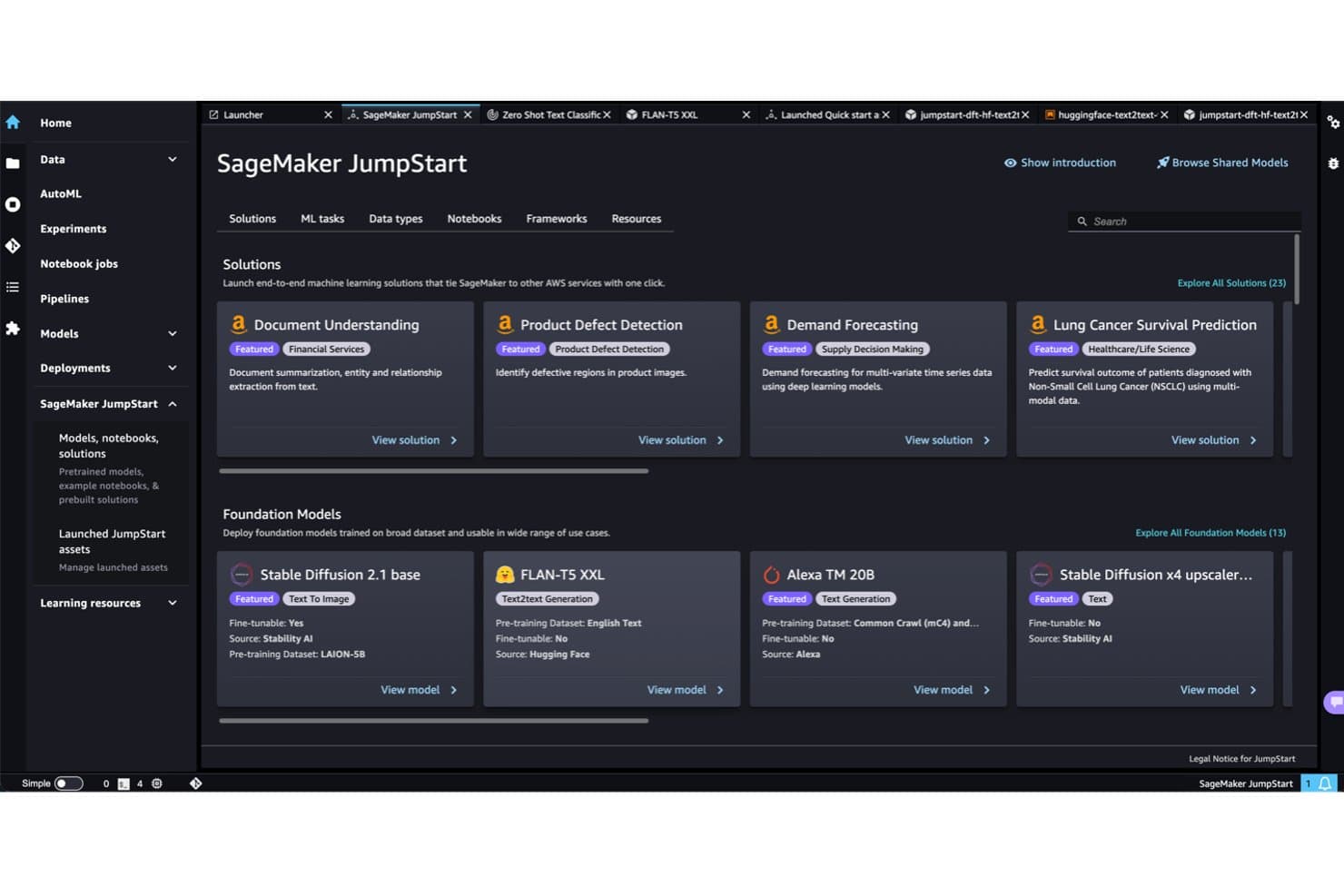
Amazon SageMaker JumpStart offers pre-built NLP models ready to deploy. Amazon SageMaker is AWS's managed ML platform that covers the full NLP model lifecycle—from data preprocessing and tokenization to training, fine-tuning, and deploying large language models at scale via tools like JumpStart, HyperPod, and Hugging Face-native integrations.
Who Is Amazon SageMaker Best For?
Amazon SageMaker is the right fit for ML engineers and MLOps teams at mid-to-large enterprises who need a single platform to take LLMs from raw data to production at scale.
Why I Picked Amazon SageMaker
Amazon SageMaker earns its spot on my shortlist because no other managed ML platform matches its depth for end-to-end LLM fine-tuning at scale. I'm particularly impressed by HyperPod, which lets you run distributed fine-tuning across hundreds of accelerators with checkpointless, elastic training that cuts training time by up to 40%. JumpStart's catalog of 1,000+ models, including Llama 4, DeepSeek R1, and John Snow Labs Medical LLMs, means I can go from selecting a domain-specific base model to fine-tuning it on custom data without leaving the platform.
Amazon SageMaker Key Features
- SageMaker Clarify: Detects bias and generates explainability reports for NLP models across training, evaluation, and post-deployment monitoring.
- SageMaker Data Wrangler: Provides a low-code interface for importing, transforming, and preparing text data before model training.
- Multi-mode inference endpoints: Supports real-time, serverless, asynchronous, and batch inference options on 70+ instance types including Inferentia and Trainium chips.
- Managed MLflow integration: Tracks experiments, compares model runs, and manages versioning across NLP workflows without requiring separate infrastructure.
Amazon SageMaker Integrations
Amazon SageMaker has native integrations with Amazon S3, Amazon Bedrock, Amazon OpenSearch Service, Amazon EKS, AWS Lambda, Amazon CloudWatch, AWS IAM, Hugging Face, and MLflow. It also offers REST APIs, SDKs, and AWS CLI access for custom integrations.
Pros and Cons
Pros:
- End-to-end lifecycle with explainability tools
- HyperPod supports massive distributed LLM training
- Largest pre-trained model catalog available
Cons:
- Vendor lock-in risk for multi-cloud shops
- Cost tracking is difficult for most teams
Learn more about Amazon SageMaker: Best for AWS-native text insights at scale
- Free plan available
- From $0.0001/unit
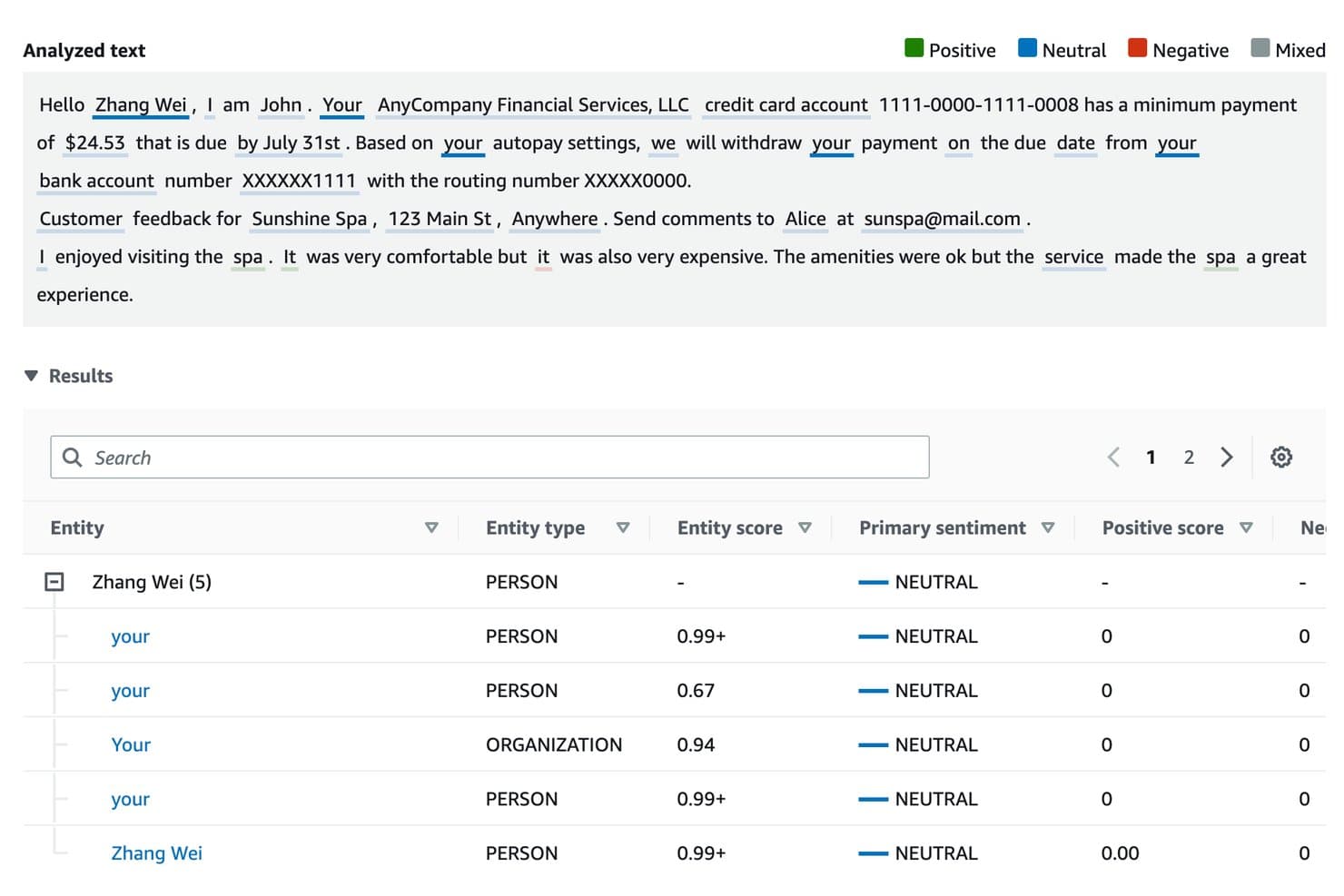
Amazon Comprehend identifies entities and sentiments in analyzed text. Amazon Comprehend is a fully managed AWS NLP service that delivers pre-built API-driven text analysis capabilities—including sentiment analysis, named entity recognition, PII detection, key phrase extraction, and custom model training via AutoML—without requiring you to manage any underlying infrastructure.
Who Is Amazon Comprehend Best For?
Amazon Comprehend is a strong fit for engineering and DevOps teams already running workloads in AWS who need production-ready NLP without managing any ML infrastructure.
Why I Picked Amazon Comprehend
Amazon Comprehend earns its spot on my shortlist because it's the most natural fit for AWS-native text analysis at scale. I like that you can run sentiment analysis, targeted entity recognition, and PII redaction directly through managed API endpoints without provisioning a single server. In practice, that means my team can process millions of customer records from S3 asynchronously, with volume-tiered pricing that actually gets cheaper the more you analyze.
Amazon Comprehend Key Features
- Custom entity recognition: Train a domain-specific entity recognizer on your own labelled examples to extract terms like policy numbers or internal codes that pre-built models won't catch.
- PII detection and redaction: Identify and automatically redact sensitive personal data—names, SSNs, credit card numbers—directly within your document processing pipeline.
- Flywheel MLOps automation: Manage the full custom model lifecycle, from data ingestion through retraining and version promotion, without building a separate MLOps layer.
- Comprehend Medical ontology linking: Map extracted clinical entities to standardized coding systems like ICD-10-CM, RxNorm, and SNOMED CT for healthcare-specific NLP workflows.
Amazon Comprehend Integrations
Amazon Comprehend has native integrations with Amazon S3, AWS Lambda, AWS KMS, AWS IAM, Amazon Kendra, Amazon Lex, Amazon Connect, AWS CloudTrail, and Amazon CloudWatch. Its REST API, AWS SDKs, AWS CLI, Step Functions, and EventBridge support custom pipelines and workflow automation.
Pros and Cons
Pros:
- Built-in PII detection and redaction
- Healthcare NLP with clinical ontology mapping
- Native fit for AWS-centric NLP workflows
Cons:
- Limited fine-tuning beyond basic AutoML
- No access to model internals
Learn more about Amazon Comprehend: Best for production-ready NLP pipeline deployment
- Free plan available
- Free plan available
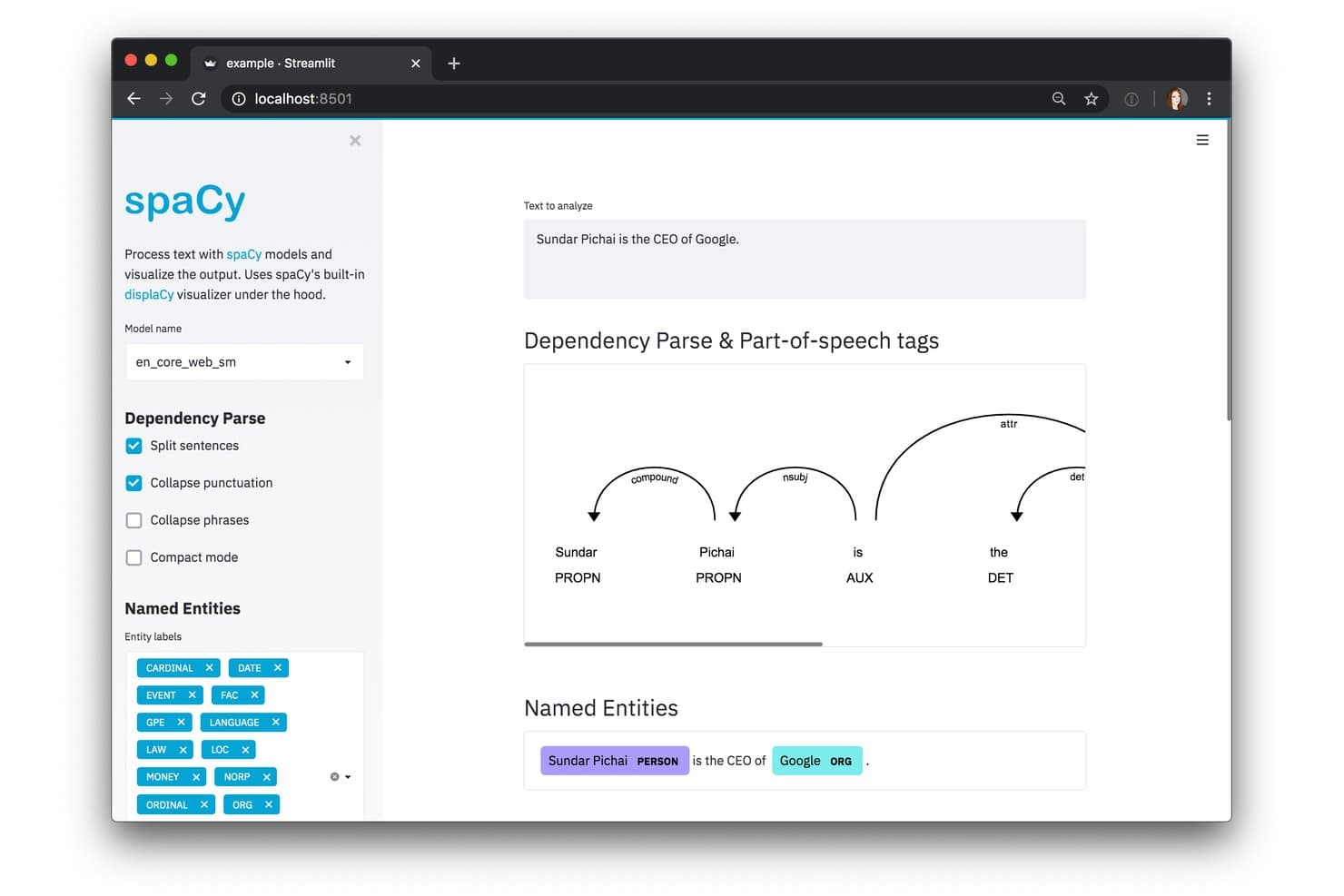
spaCy visualizes dependency parsing and named entities interactively. spaCy is an open-source Python NLP library that covers tokenization, named entity recognition, dependency parsing, text classification, and transformer-based model training across 75+ languages.
Who Is spaCy Best For?
spaCy is a strong fit for ML engineers and data scientists who need to build, train, and ship NLP pipelines in Python without relying on a managed platform.
Why I Picked spaCy
spaCy earns its spot on my shortlist because it's built from the ground up for production, not just experimentation. I love how trained pipelines package as installable Python modules, which means deploying a custom NER model to a Docker container or AWS Lambda layer is a repeatable, versioned process rather than a one-off scramble. The config-driven
spaCy trainsystem keeps every hyperparameter and architecture choice in a single file, so my pipelines are reproducible across environments. That combination of packaging discipline and Cython-powered batch throughput vianlp.pipe()is what makes spaCy genuinely production-ready.spaCy Key Features
- 84 pretrained pipelines: Download and run pretrained pipelines across 25 languages, ranging from compact CPU-optimized models to full transformer-based variants built on RoBERTa and BERT.
spaCy-LLMintegration: Connect spaCy pipelines directly to hosted LLM APIs (OpenAI, Anthropic, Cohere) or open-source models to run NLP tasks without requiring labelled training data.- displaCy visualizer: Render named entity annotations and dependency parse trees in the browser using spaCy's built-in visualization component.
- Domain-specific pipeline ecosystem: Access ready-to-use community pipelines for healthcare (medspaCy) and legal text (Blackstone) through the spaCy Universe library.
spaCy Integrations
spaCy integrates with Hugging Face Transformers, PyTorch, TensorFlow, OpenAI, Anthropic, Cohere, LangChain, Prodigy, DVC, Prefect, and Ray. Its Python API supports custom integrations, but it doesn’t include a native REST API.
Pros and Cons
Pros:
- Packaging enables reproducible, versioned model deployments
- Offers domain-specific pipelines for healthcare and legal
- Runs entirely on your own infrastructure
Cons:
- No no-code or visual workflow interface
- No built-in REST API for serving
Learn more about spaCy: Best for governed NLP across hybrid cloud deployments
- Free plan available
- From $1,110/month

IBM watsonx.ai extracts structured facts from SEC 10-K filings using few-shot prompts. IBM watsonx.ai is an enterprise AI platform that combines a multi-vendor foundation model catalogue, the Watson NLP library, LoRA/QLoRA fine-tuning, AutoML, and flexible SaaS, on-premises, and hybrid cloud deployment options for building and scaling NLP workloads.
Who Is IBM watsonx.ai Best For?
IBM watsonx.ai is a strong fit for enterprise IT and data science teams that need to build, fine-tune, and deploy NLP workloads across on-premises, hybrid, and cloud environments with strict governance and compliance requirements.
Why I Picked IBM watsonx.ai
IBM watsonx.ai earns its spot on my shortlist because of how well it handles governed NLP across hybrid cloud environments, which is a real differentiator for enterprise teams with strict compliance requirements. I'm particularly impressed by the Watson NLP library, which covers NER, sentiment analysis, tone classification, and semantic role labelling across 20+ languages within a single, auditable pipeline. Pair that with CP4D on Red Hat OpenShift for on-premises or hybrid deployments and AI Factsheets for model audit trails, and you get end-to-end governance baked into every layer.
IBM watsonx.ai Key Features
- Multi-vendor foundation model catalogue: Access pre-trained models from IBM Granite, Meta Llama, Mistral, DeepSeek, and NVIDIA from a single hosted library.
- LoRA/QLoRA fine-tuning: Adapt foundation models to domain-specific NLP tasks using parameter-efficient fine-tuning on GPU-accelerated environments.
- AutoAI pipeline builder: Automatically handles data preparation, feature engineering, model selection, and hyperparameter tuning for predictive ML workflows.
- OpenAI-compatible API endpoint: Connect existing applications to watsonx.ai inference using an OpenAI-compatible REST API format alongside Python, Node.js, and Java SDKs.
IBM watsonx.ai Integrations
IBM watsonx.ai integrates with Hugging Face, Red Hat OpenShift, watsonx.data, Watson Assistant, watsonx Orchestrate, Watson Discovery, and IBM Cloud Object Storage. Its REST API, plus Python, Node.js, and Java SDKs, support custom integrations.
Pros and Cons
Pros:
- Native RAG and vector search support
- IP indemnification for enterprise IBM models
- Broad NLP task coverage in 20+ languages
Cons:
- Interface can be confusing for new users
- IBM proprietary models not available for AWS
Learn more about IBM watsonx.ai: Best for GCP-native text analysis pipelines
- Free plan available
- From $0.90/1,000 characters (billed annually)

Google Cloud Natural Language AI annotates resume entities like skills and employers. Google Cloud Natural Language AI is a managed NLP API from Google that delivers pre-trained sentiment analysis, entity recognition, syntax parsing, content classification, and text moderation via REST and gRPC interfaces with client libraries across eight programming languages.
Who Is Google Cloud Natural Language AI Best For?
Google Cloud Natural Language AI is a strong fit for engineering teams already running workloads on GCP who need production-ready NLP without managing infrastructure.
Why I Picked Google Cloud Natural Language AI
Google Cloud Natural Language AI earns its spot on my shortlist because of how naturally it fits into GCP-native text analysis pipelines. If your team is already running data through BigQuery, you can call
ML.UNDERSTAND_TEXTdirectly in SQL to run sentiment or entity analysis without ever leaving the warehouse. I also like that the v2 API uses a PaLM-based model for entity and sentiment tasks, and theannotateTextmethod lets you pull multiple NLP features in a single API call, which cuts down round-trip overhead significantly.Google Cloud Natural Language AI Key Features
- Entity sentiment analysis: Detects the sentiment associated with each named entity in a text, returning per-entity scores for English, Japanese, and Spanish.
- AutoML Natural Language: Lets you train custom text classification and entity extraction models on your own labeled datasets through a no-code visual interface via Vertex AI.
- Multi-region endpoints: Routes API requests through US or EU endpoints to keep data processed and stored within a specific region for data residency compliance.
- HIPAA-eligible API: Covered under Google Cloud's Business Associate Agreement, making it usable for workflows that handle protected health information.
Google Cloud Natural Language AI Integrations
Google Cloud Natural Language AI integrates with Vertex AI, BigQuery, Cloud Composer, Speech-to-Text, Translation API, Vision API, Dataflow, Cloud Run, and Cloud Functions. REST, gRPC, and eight client libraries support custom integrations.
Pros and Cons
Pros:
- Multilingual support for key NLP features
- Data never stored after API processing
- Pre-trained models require no training data
Cons:
- Fine-tuning only available via Vertex AI
- No model explainability or bias metrics
Learn more about Google Cloud Natural Language AI: Best for open-source model fine-tuning at scale
- Free plan available
- From $9/month

HuggingChat lets users query AI models via a web chat interface. Hugging Face is an open-source NLP platform that gives you access to over 2 million pre-trained models alongside a full suite of tools for tokenization, fine-tuning, and model deployment across cloud and on-premises environments.
Who Is Hugging Face Best For?
Hugging Face is the go-to platform for ML and NLP engineers who need direct access to open-source models and the full toolchain to fine-tune, evaluate, and deploy them at scale.
Why I Picked Hugging Face
Hugging Face earns its spot on my shortlist because no other platform comes close for open-source model fine-tuning at scale. I love that PEFT and QLoRA let you fine-tune billion-parameter LLMs like LLaMA or Mistral on a single GPU, which cuts compute costs dramatically without sacrificing quality. The TRL library adds full RLHF and DPO support on top of that, so you can align domain-specific models with minimal overhead.
Hugging Face Key Features
- Transformers Pipeline API: A single-line interface for running NLP tasks—classification, NER, summarization, translation, and QA—against any model on the Hub.
- AutoTrain: A no-code training interface where you upload a labelled dataset, select a task, and the platform handles model selection and training automatically.
- Text Embeddings Inference (TEI): A dedicated inference engine optimized for high-throughput embedding generation, supporting semantic search and RAG pipelines at scale.
- Inference Providers API: An OpenAI-compatible unified endpoint that routes requests across providers like Groq, Together AI, and Cerebras using a single Hugging Face token.
Hugging Face Integrations
Hugging Face integrates with PyTorch, TensorFlow, JAX, AWS SageMaker, Google Cloud, Azure, Weights & Biases, MLflow, and Snowflake. Its Python, JavaScript, REST, and CLI APIs support custom integrations and deployment workflows.
Pros and Cons
Pros:
- AutoTrain allows no-code model training
- Enables fine-tuning giant models on one GPU
- Unmatched selection of open-source NLP models
Cons:
- Enterprise-ready deployment requires DevOps expertise
- Community models vary in quality and security
Learn more about Hugging Face:
Alte programe NLP
Mai jos este o listă cu programe NLP suplimentare pe care le-am selectat, dar care nu au ajuns în primele 10. Merită cu siguranță să le analizați.
- 11NLP CloudBest for privacy-first NLP API deployment
- 12SnorkelBest for programmatic labeling at enterprise scale
- 13ClaudeBest for safety-first NLP across all major clouds
- 14Cohere NorthBest for air-gapped NLP model deployment
- 15Microsoft Azure AI LanguageBest for air-gapped NLP in regulated industries
- 16NLTKBest for classical NLP with zero infrastructure cost
- 17Stanford NLPBest for linguistic precision across 80+ languages
How I Evaluate NLP Software
From NER pipelines to production transformer deployments, I evaluate NLP tools in two layers: the baseline every platform must clear to make the list and the differentiators that set the best apart.
Core Functionality (Table Stakes For This List)
When I'm selecting tools for my list, I rank each one on a scale from 0 (does not offer the functionality) to 5 (excels in this area) for each core functionality listed below. Then, I calculate the tool's total score into a percentage. Each tool needs to achieve a minimum total score of 75% to be considered for inclusion.
- Text Preprocessing & Tokenization: I check whether a platform handles the full cleanup chain—tokenization, stemming, lemmatization, stopword removal—so raw text is pipeline-ready across multiple languages.
- Pre-trained Language Models: Access to current transformer architectures matters. I look for a broad, regularly updated model catalogue rather than a handful of outdated options.
- Core NLP Task Coverage: Each tool should support foundational tasks like NER, sentiment analysis, classification, and summarization—the building blocks of most production NLP workflows.
- Model Training & Fine-tuning: I evaluate whether you can bring your own dataset and fine-tune models with real hyperparameter control, not just toggle a few presets behind a wizard.
- API & SDK Access: Good NLP tools expose REST APIs and SDKs in languages like Python and Java. I look for clear documentation, versioned endpoints, and framework compatibility.
- Deployment & Scalability: I consider how each platform handles production workloads—whether it supports auto-scaling inference, batch processing, and flexible compute options like GPU or TPU provisioning.
Once I have a list of tools that meet the criteria, I consider what sets each platform apart.
Differentiating Factors (What Sets Vendors Apart)
Here's how I compare and contrast different vendors:
Standout Features
RAG frameworks and vector search support are a big differentiator right now. Teams building LLM-powered apps need native embedding generation and retrieval pipelines, not bolted-on workarounds. I also look for explainability and bias detection tools—when you're deploying sentiment models in production, stakeholders want to understand why a prediction was made. Domain-specific model zoos save real time too, especially for teams in healthcare or legal who'd otherwise spend weeks fine-tuning general-purpose models.
Beyond Features
Deployment flexibility matters when your security team mandates on-premises hosting or air-gapped environments. I evaluate whether a platform supports cloud, hybrid, and self-hosted options alongside Kubernetes orchestration. Data privacy controls are equally important—I check for SOC 2 compliance, data residency options, and zero-retention policies, especially when pipelines process sensitive text like medical records. Ecosystem fit rounds it out: a tool that plugs into your MLOps stack and data infrastructure saves months of custom integration work.
Cum să alegeți programele NLP
Este ușor să vă pierdeți în liste lungi de funcționalități și structuri complexe de prețuri. Pentru a vă ajuta să rămâneți concentrat pe parcursul procesului unic de selectare a programului, iată o listă de verificare cu factorii de care trebuie să țineți cont:
| Factor | Ce trebuie luat în considerare |
|---|---|
| FactorScalabilitate | Ce trebuie luat în considerarePoate programul să se dezvolte odată cu echipa dumneavoastră? Căutați instrumente care pot gestiona volume mai mari de date fără costuri suplimentare. Luați în considerare nevoile viitoare și posibilele extinderi. |
| FactorIntegrări | Ce trebuie luat în considerareFuncționează cu sistemele existente? Verificați compatibilitatea cu instrumentele actuale pentru a evita întreruperile fluxului de lucru. |
| FactorPosibilitate de personalizare | Ce trebuie luat în considerareÎl puteți adapta nevoilor dumneavoastră? Asigurați-vă că puteți ajusta setările sau funcționalitățile pentru a se potrivi proceselor specifice. |
| FactorUșurință în utilizare | Ce trebuie luat în considerareInterfața este ușor de utilizat? Instrumentele complexe pot încetini adoptarea. Căutați designuri intuitive care necesită instruire minimă. |
| FactorImplementare și integrare inițială | Ce trebuie luat în considerareCât timp va dura să începeți? Evaluați timpul necesar pentru configurare și instruire. Integrarea inițială rapidă poate economisi timp și resurse. |
| FactorCost | Ce trebuie luat în considerareSe încadrează în bugetul dumneavoastră? Comparați planurile tarifare și fiți atenți la taxele ascunse. Luați în considerare costul total de proprietate, nu doar prețul inițial. |
| FactorMăsuri de securitate | Ce trebuie luat în considerareSunt protejate datele dumneavoastră? Asigurați respectarea standardelor privind confidențialitatea datelor și căutați funcții de criptare și alte funcții de securitate. |
| FactorDisponibilitatea asistenței | Ce trebuie luat în considerareSunt serviciile de asistență accesibile atunci când este necesar? Evaluați disponibilitatea și calitatea canalelor de asistență pentru clienți, precum chatul, e-mailul sau telefonul. |
Ce sunt programele NLP?
Programele NLP sunt instrumente care procesează și analizează datele din limbajul uman. Profesioniști precum cercetătorii de date, specialiștii în marketing și echipele de servicii pentru clienți folosesc aceste instrumente pentru a extrage perspective utile și a îmbunătăți comunicarea. Funcționalitățile de analiză a textului, analiză a sentimentelor și traducere automată ajută la înțelegerea și satisfacerea nevoilor utilizatorilor.
În general, aceste instrumente, inclusiv software-ul de inteligență conversațională, îmbunătățesc procesul decizional și eficiența în sarcinile legate de limbaj.
Funcționalități
Atunci când selectați programe NLP, urmăriți următoarele funcționalități esențiale:
- Analiza textului: Procesează volume mari de date textuale pentru a extrage informații relevante, ajutând echipele să înțeleagă tendințele și tiparele.
- Analiza sentimentului: Identifică și clasifică opiniile exprimate în texte pentru a evalua atitudinile clienților și a îmbunătăți strategiile de implicare.
- Traducerea limbilor: Convertește textul dintr-o limbă în alta, facilitând comunicarea globală și accesibilitatea.
- Software de recunoaștere vocală: Transcrie limbajul vorbit în text, permițând introducerea vocală și îmbunătățind accesibilitatea.
- Recunoașterea entităților: Identifică și clasifică elementele-cheie din texte, precum nume și date, pentru o organizare mai bună a datelor.
- Asistență multilingvă: Oferă funcționalități în mai multe limbi, permițând o aplicare mai extinsă în regiuni diverse.
- Modele personalizabile: Permite utilizatorilor să adapteze algoritmii la nevoi specifice, îmbunătățind relevanța și acuratețea rezultatelor.
- Procesare în timp real: Oferă analiză și feedback imediate, esențiale pentru aplicațiile și procesul decizional sensibile la timp.
- Setări de confidențialitate a datelor: Asigură conformitatea cu reglementările privind protecția datelor, protejând informațiile sensibile.
- Integrare în cloud: Permite colaborarea și accesul fără întreruperi la date pe diverse platforme și dispozitive.
Beneficii
Implementarea software-ului NLP oferă mai multe beneficii pentru echipa și compania dumneavoastră. Iată câteva dintre acestea:
- Comunicare îmbunătățită: Software-ul de generare a limbajului natural și recunoașterea vocală facilitează comunicarea globală și accesibilă.
- Îmbunătățirea procesului decizional: Analiza textului și analiza sentimentului oferă informații care fundamentează strategiile și acțiunile.
- Economie de timp: Procesarea în timp real oferă feedback rapid, permițând răspunsuri și acțiuni mai rapide.
- Eficiență din punct de vedere al costurilor: Automatizarea unor sarcini precum recunoașterea entităților reduce nevoia de gestionare manuală a datelor, economisind resurse.
- Acuratețe sporită: Modelele personalizabile asigură adaptarea rezultatelor la nevoi specifice, îmbunătățind precizia rezultatelor.
- Securitatea datelor: Setările de confidențialitate a datelor contribuie la păstrarea în siguranță a informațiilor sensibile și la respectarea reglementărilor.
- Scalabilitate: Asistența multilingvă și integrarea în cloud permit dezvoltarea și adaptarea pe diverse piețe.
Costuri și prețuri
Alegerea software-ului NLP necesită înțelegerea diferitelor modele și planuri tarifare disponibile. Costurile variază în funcție de caracteristici, dimensiunea echipei, suplimente și alți factori. Tabelul de mai jos prezintă pe scurt planurile uzuale, prețurile medii ale acestora și funcționalitățile incluse de obicei în soluțiile software NLP:
Tabel comparativ al planurilor pentru software NLP
| Tipul planului | Preț mediu | Funcționalități comune |
|---|---|---|
| Tipul planuluiPlan gratuit | Preț mediu$0 | Funcționalități comuneAnaliză de bază a textului, asistență lingvistică limitată și asistență din partea comunității. |
| Tipul planuluiPlan personal | Preț mediu$10-$30/utilizator/lună | Funcționalități comuneAnaliza sentimentului, traducerea limbilor și asistență prin e-mail. |
| Tipul planuluiPlan pentru companii | Preț mediu$40-$100/utilizator/lună | Funcționalități comuneRecunoaștere vocală, recunoașterea entităților și asistență telefonică. |
| Tipul planuluiPlan pentru întreprinderi | Preț mediu$150+/utilizator/lună | Funcționalități comuneModele personalizabile, procesare în timp real și gestionarea dedicată a contului. |
Întrebări frecvente despre software-ul NLP
Iată câteva răspunsuri la întrebările frecvente despre software-ul NLP:
Se poate integra software-ul NLP cu instrumentele mele existente?
Majoritatea soluțiilor software NLP oferă posibilități de integrare cu platforme populare, precum sistemele CRM și instrumentele de analiză a datelor. Verificați compatibilitatea cu stiva tehnologică actuală pentru a asigura un flux de lucru și un schimb de date fără probleme. Unele soluții pot necesita dezvoltarea unor API-uri personalizate pentru integrare.
Cât de sigur este software-ul NLP?
Funcțiile de securitate diferă în funcție de furnizor, însă căutați criptarea datelor, conformitatea cu reglementările privind protecția datelor și actualizări regulate de securitate. Asigurați-vă că software-ul respectă standardele din industria dumneavoastră privind confidențialitatea și protecția datelor, în special dacă gestionează informații sensibile.
Este posibilă personalizarea software-ului NLP?
Multe instrumente NLP oferă opțiuni de personalizare pentru adaptarea funcțiilor și modelelor la nevoile dumneavoastră. Aceasta poate include ajustarea algoritmilor sau crearea unor fluxuri de lucru specifice pentru procesarea datelor. Totuși, nivelul de personalizare poate varia, așadar verificați capacitățile înainte de a alege o soluție.
Ce tip de asistență este disponibil pentru utilizatorii software-ului NLP?
Serviciile de asistență variază de la resurse online, precum întrebări frecvente și tutoriale, până la asistență live pentru clienți prin chat, e-mail sau telefon. Evaluați disponibilitatea și promptitudinea acestor servicii și luați în considerare importanța unei asistențe dedicate, în special în timpul implementării.
Este NLP același lucru cu inteligența artificială?
NLP este un subdomeniu al inteligenței artificiale. În timp ce software-ul de inteligență artificială acoperă o gamă largă de capacități, NLP se ocupă în mod specific de procesarea limbajului uman.
Poate software-ul NLP să înțeleagă argoul sau limbajul informal?
Unele instrumente NLP sunt instruite să recunoască limbajul informal, argoul sau expresiile regionale, însă precizia poate varia în funcție de datele utilizate pentru instruirea modelului.