

Programele de gestionare a patch-urilor pentru întreprinderi vă permit să identificați, să implementați și să monitorizați actualizările pe sute sau mii de dispozitive de pe o singură platformă. Dacă sunteți în căutarea celor mai bune instrumente, probabil aveți nevoie de aplicarea automată a patch-urilor, raportare clară și conformitate impecabilă, fără riscul întreruperilor în medii de întreprindere complexe.
Această listă vă oferă informații practice despre cele mai bune instrumente de gestionare a patch-urilor, astfel încât să puteți corela funcțiile cu nevoile dumneavoastră și să vă mențineți sistemele securizate și actualizate în 2026.
Why Trust Our Software Recommendations
6,700+
Reviews
20
Industry experts
16+
Evaluation factors
14
Years
Our team has been testing and reviewing software since 2012. As tech leaders ourselves, we know how difficult—and important—it is to choose the right software.
For this guide, we evaluated tools using hands-on testing and independent research, scoring tools using our selection criteria.
Our reviews reflect our human editorial judgment, not a sales pitch.
Expert reviewers:
- Paulo Gardini MiguelTech Director
 Tim FisherVP of AI
 Gabriel RosasTech Lead & Software Architect
 Christhian GruhnTech Lead & Platform Architect

Tabel comparativ al programelor de gestionare a patch-urilor pentru întreprinderi
Acest tabel comparativ rezumă detaliile de preț pentru selecția mea de programe de gestionare a patch-urilor pentru întreprinderi:
Sorted by: Default
| Tool | Starting Price | Website | |
|---|---|---|---|
Best for unified risk and compliance remediation | 4.5 out of 5 | Pricing upon request 30-day free trial + free demo available | Website |
Best for patch automation for remote devices | 4.9 out of 5 | Pricing upon request Free plan + free demo available | Website |
Best for Microsoft 365 ecosystem integration | 4.7 out of 5 | $60/user/month 90-day free trial | Website |
Best for custom patch workflows with automation | 4.6 out of 5 | Pricing upon request Free trial available | Website |
Best for large-scale environment control | 4.5 out of 5 | Pricing upon request Free demo available | Website |
Best for cloud-native OS and third-party patching | 4.7 out of 5 | $1/endpoint/month 15-day free trial + free demo available | Website |
Best for real-time patch visibility dashboards | 4.4 out of 5 | Pricing upon request 30-day free trial + free demo | Website |
Best for multi-platform coverage | Not rated | Pricing upon request Not available | Website |
Best for automated patching across endpoints | 5.0 out of 5 | $3.75/month 14-day free trial + free demo available | Website |
Best for risk-based prioritization for remediation | Not rated | Pricing upon request Free demo available | Website |


Recenzii ale celor mai bune programe de gestionare a patch-urilor pentru întreprinderi
Mai jos sunt rezumatele mele detaliate ale celor mai bune programe de gestionare a patch-urilor pentru întreprinderi care au ajuns pe lista mea scurtă. Recenziile mele oferă o analiză detaliată a funcțiilor, capacităților și integrărilor fiecărei platforme, pentru a vă ajuta să o găsiți pe cea mai potrivită pentru dumneavoastră.
 Best for unified risk and compliance remediation
- 30-day free trial + free demo available
- Pricing upon request
Visit WebsiteCustomer Rating:4.5/5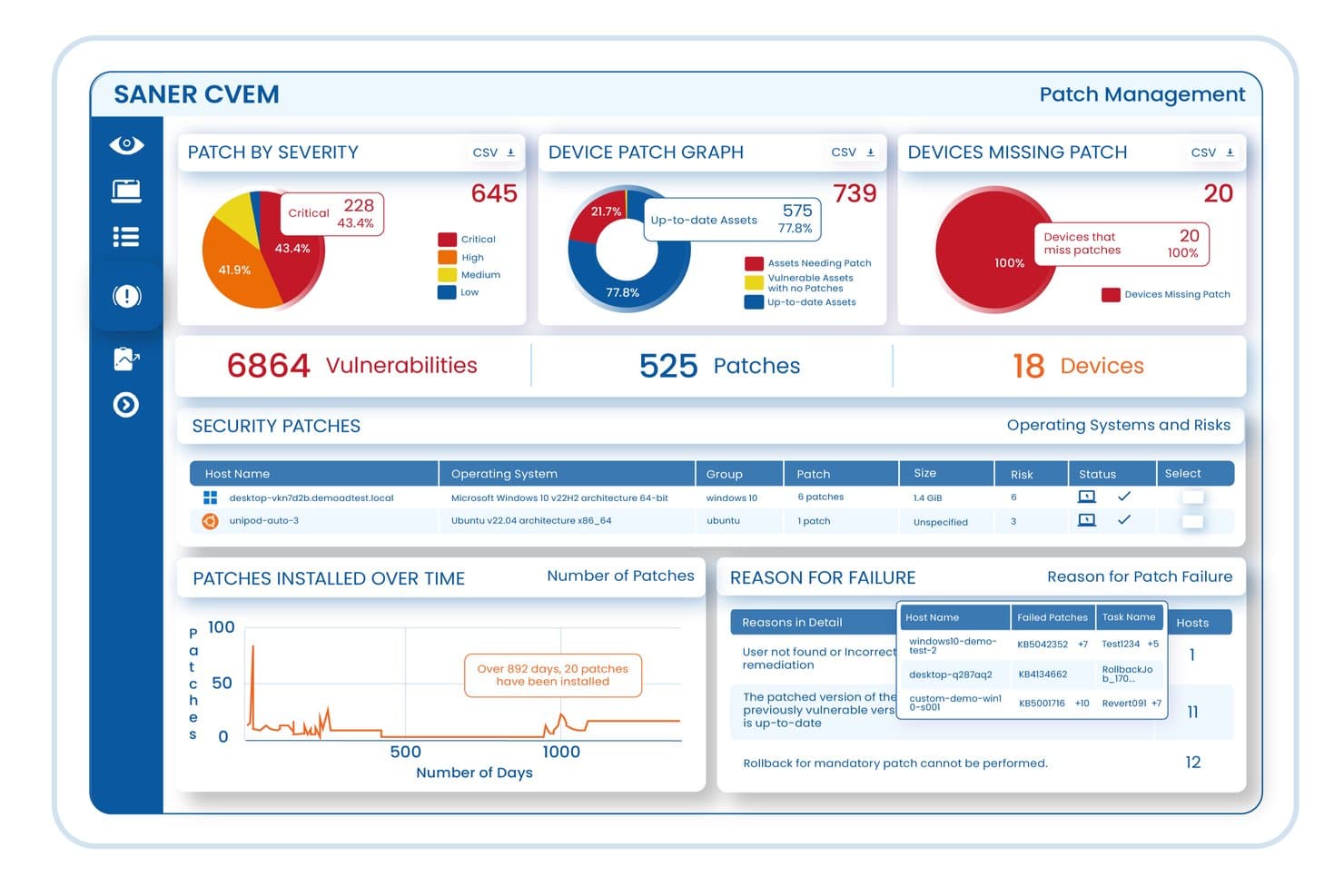
SecPod (Saner Platform) offers a detailed patch remediation job status view showing host names, device status, patch details, and overall remediation outcomes across multiple devices. SecPod's Saner Platform is a continuous vulnerability and exposure management solution that combines automated patch deployment, vulnerability scanning, and compliance remediation across Windows, macOS, Linux, and 550+ third-party applications.
Who Is SecPod (Saner Platform) Best For?
SecPod suits enterprise IT security teams managing distributed endpoint fleets across hybrid environments where compliance with frameworks like HIPAA, PCI-DSS, or NIST is a core operational requirement.
Why I Picked SecPod (Saner Platform)
I picked SecPod (Saner Platform) as one of the best because it's one of the few patch management platforms that fully integrates vulnerability assessment and remediation into a single automated workflow, eliminating the manual correlation between detected risks and available patches. I also like that it scans beyond standard CVEs, identifying misconfigurations and security anomalies via its 190,000+ SCAP vulnerability checks. That detection breadth maps directly to compliance frameworks including HIPAA, NIST CSF, and PCI DSS, making patch audit trails genuinely traceable to specific risk findings.
SecPod (Saner Platform) Key Features
- Third-party patch catalog: Supports patching for over 550 non-OS applications across browsers, productivity tools, and security software.
- Firmware and configuration remediation: Addresses hardware-level vulnerabilities and configuration deviations in addition to software updates.
- Custom compliance dashboards: Provides pre-built and customizable reporting mapped to frameworks like HIPAA, PCI, and NIST.
- API-first integration: Connects with ITSM, SIEM, and DevOps platforms using REST APIs for automated workflows and real-time data sync.
SecPod (Saner Platform) Integrations
SecPod (Saner Platform) offers native integrations with ServiceNow, Splunk, Jira, AWS, Azure DevOps, and Qualys, and provides an API for custom integrations.
Pros and Cons
Pros:
- Covers 550+ third-party applications natively
- Deep SCAP-based compliance checks built in
- Unified vulnerability scanning and patch remediation
Cons:
- Initial agent deployment is time-consuming
- Reporting interface can feel dated
Learn more about SecPod (Saner Platform): Best for patch automation for remote devices
- Free plan + free demo available
- Pricing upon request
Visit WebsiteCustomer Rating:4.9/5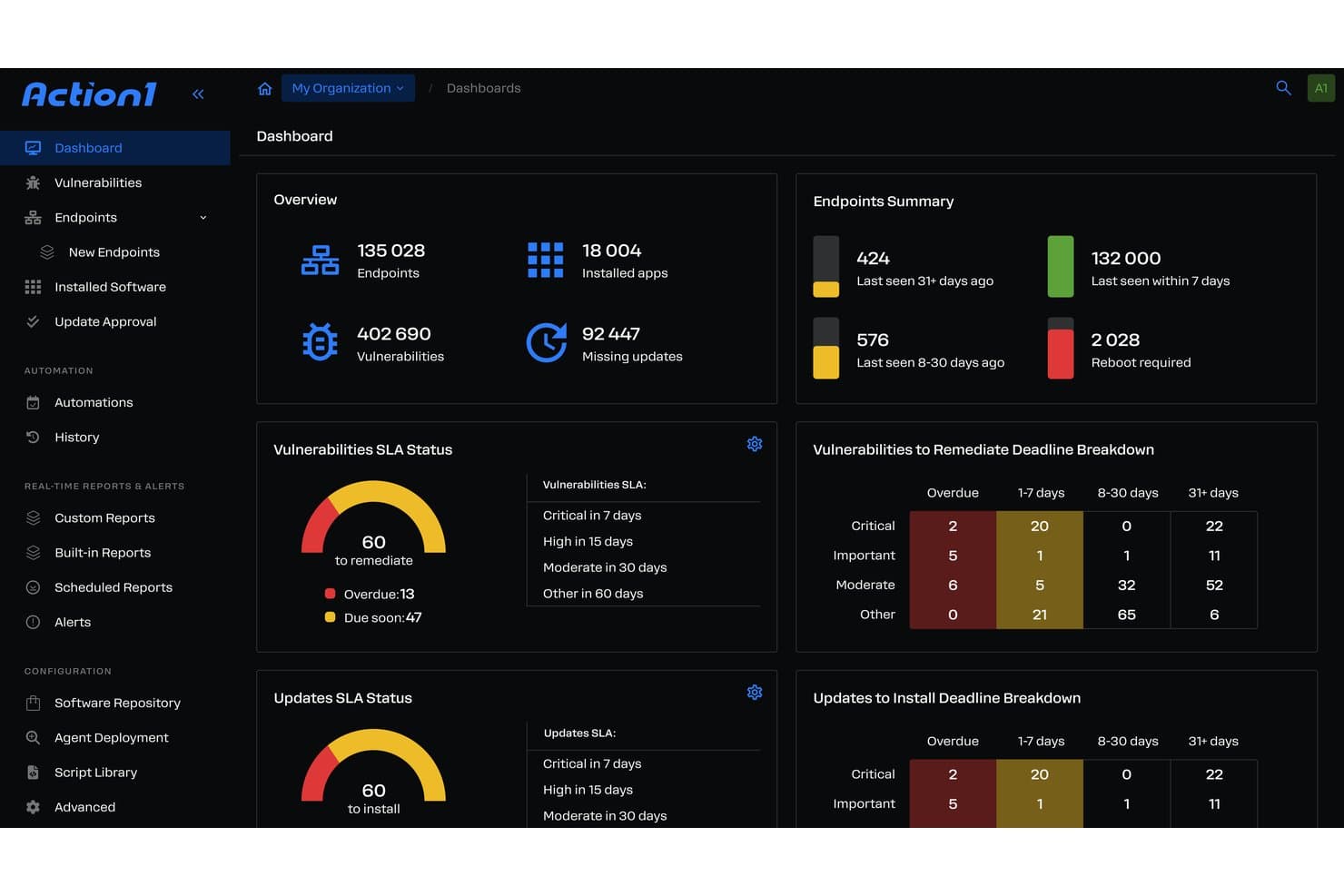
Action1 offers a comprehensive patch management dashboard displaying endpoint summaries, vulnerability SLA status, and remediation deadline breakdowns for enterprise environments. Action1 is a cloud-native autonomous endpoint management platform that combines OS and third-party application patching, vulnerability assessment, risk-based prioritization, and compliance reporting across distributed enterprise environments.
Who Is Action1 Best For?
Action1 is a strong fit for IT teams managing distributed endpoint fleets across remote, hybrid, or multi-site environments where VPN-free patching coverage is a priority.
Why I Picked Action1
Action1 earns its spot as one of the best on my shortlist because of how it handles remote endpoint patching without a VPN dependency. The cloud-native agent reaches devices wherever they are, and the update rings feature lets me configure phased, autonomous rollouts with automatic rollback built in. I also like that offline endpoints get patched the moment they reconnect, so remote workers who miss a maintenance window don't stay vulnerable.
Action1 Key Features
- Third-party application patching: Patch over 600 supported non-OS applications from a single dashboard.
- Risk-based vulnerability prioritization: Prioritize patch deployment based on CVSS scores and real-time threat data.
- Compliance dashboards and audit reporting: Generate exportable reports mapped to frameworks like SOC 2, HIPAA, and PCI DSS.
- PowerShell and RESTful API automation: Automate custom workflows and integrate with other IT systems using built-in scripting and API capabilities.
Action1 Integrations
Action1 offers native integrations with Microsoft Azure, Zendesk, Bitdefender, Slack, Microsoft Teams, PayPal, Amazon Web Services, and Zapier. An API is available for custom integrations.
Pros and Cons
Pros:
- SOC 2 and HIPAA compliance reporting included
- Automated CVE detection and risk-based prioritization
- Patching works for offline and remote endpoints
Cons:
- Lacks native mobile app patch catalog
- No support for mobile device patching
Learn more about Action1: Best for Microsoft 365 ecosystem integration
- 90-day free trial
- From $60/user/month (billed annually)
Visit WebsiteCustomer Rating:4.7/5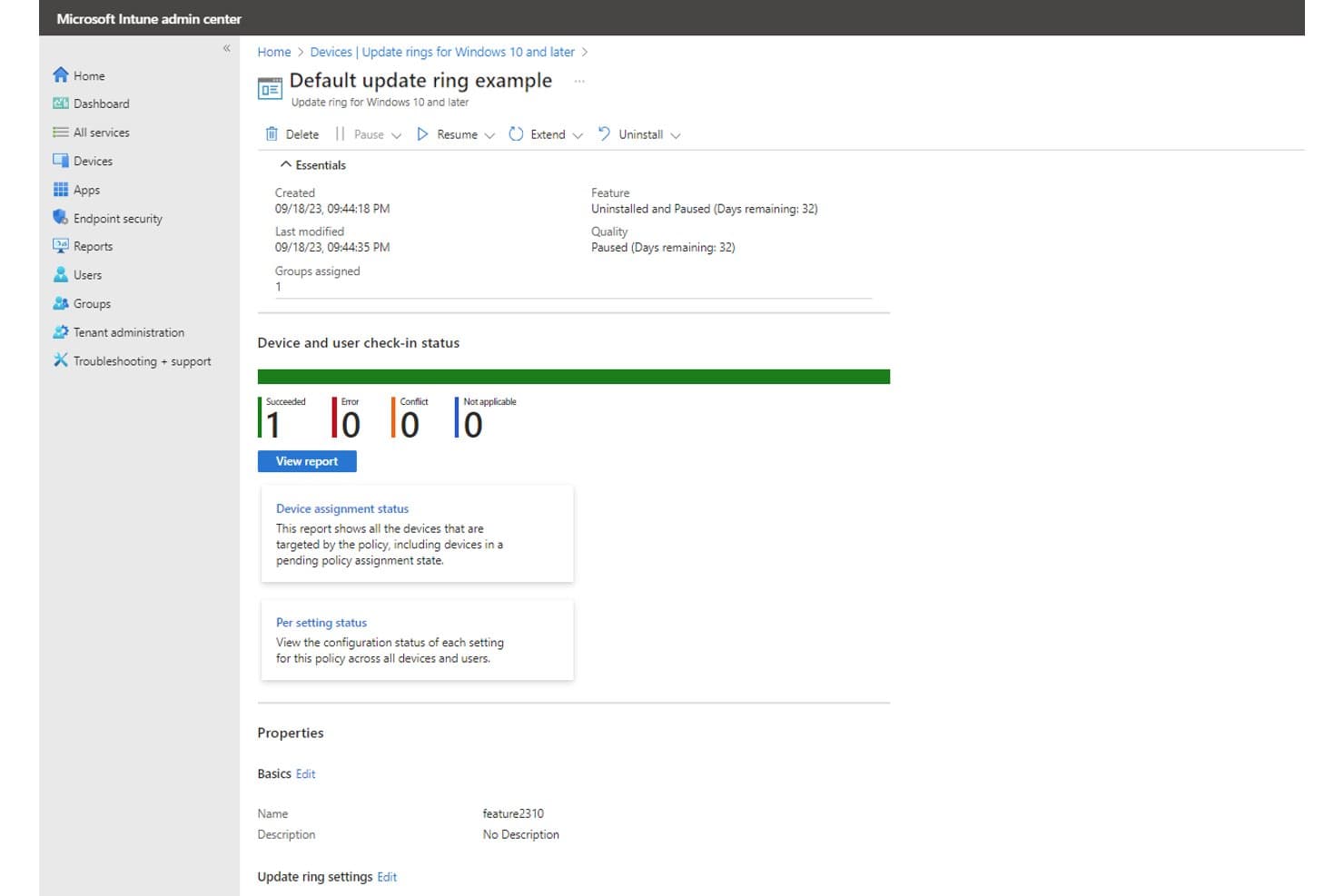
Microsoft Intune offers update ring management with real-time device check-in status, pause/resume controls, and feature and quality update tracking for enterprise patch management. Microsoft Intune is a cloud-native unified endpoint management platform that handles OS patch deployment, update ring configuration, driver and firmware updates, and device compliance policy enforcement across Windows, macOS, iOS, and Android endpoints.
Who Is Microsoft Intune Best For?
Microsoft Intune is a strong fit for enterprise IT teams already running Microsoft 365 or Azure who need cloud-native endpoint management without adding a separate patching tool.
Why I Picked Microsoft Intune
I picked Microsoft Intune as one of the best because it's built directly into the Microsoft 365 E3 and E5 licensing stack, meaning there's no separate agent or infrastructure to stand up. Windows Autopatch manages OS update rings natively, and Hotpatch pushes monthly security fixes without requiring a device reboot. I also like how Intune compliance policies connect to Microsoft Entra ID, feeding patch status directly into conditional access rules automatically.
Microsoft Intune Key Features
- Update rings configuration: Group endpoints for phased rollout of Windows feature and quality updates.
- Expedite update policies: Push critical security patches immediately, bypassing standard update deferral rules.
- Driver and firmware update management: Deploy approved driver and firmware updates to specific device groups.
- Remote management for cross-platform endpoints: Manage patch deployment on Windows, macOS, iOS, and Android devices from a cloud console.
Microsoft Intune Integrations
Microsoft Intune has native integrations across the Microsoft ecosystem, including Microsoft 365, Microsoft Entra ID, and Microsoft Defender for Endpoint. It supports third-party patching through integrations with Patch My PC, Ivanti Neurons, and Action1. An API is available for custom integrations.
Pros and Cons
Pros:
- Centralized cloud-based management for remote devices
- Native support for Windows Autopatch and Hotpatch
- Deep integration with Microsoft 365 environment
Cons:
- macOS and Linux patch management lacks parity
- Limited native third-party patching support
Learn more about Microsoft Intune: Best for custom patch workflows with automation
- Free trial available
- Pricing upon request
Visit WebsiteCustomer Rating:4.6/5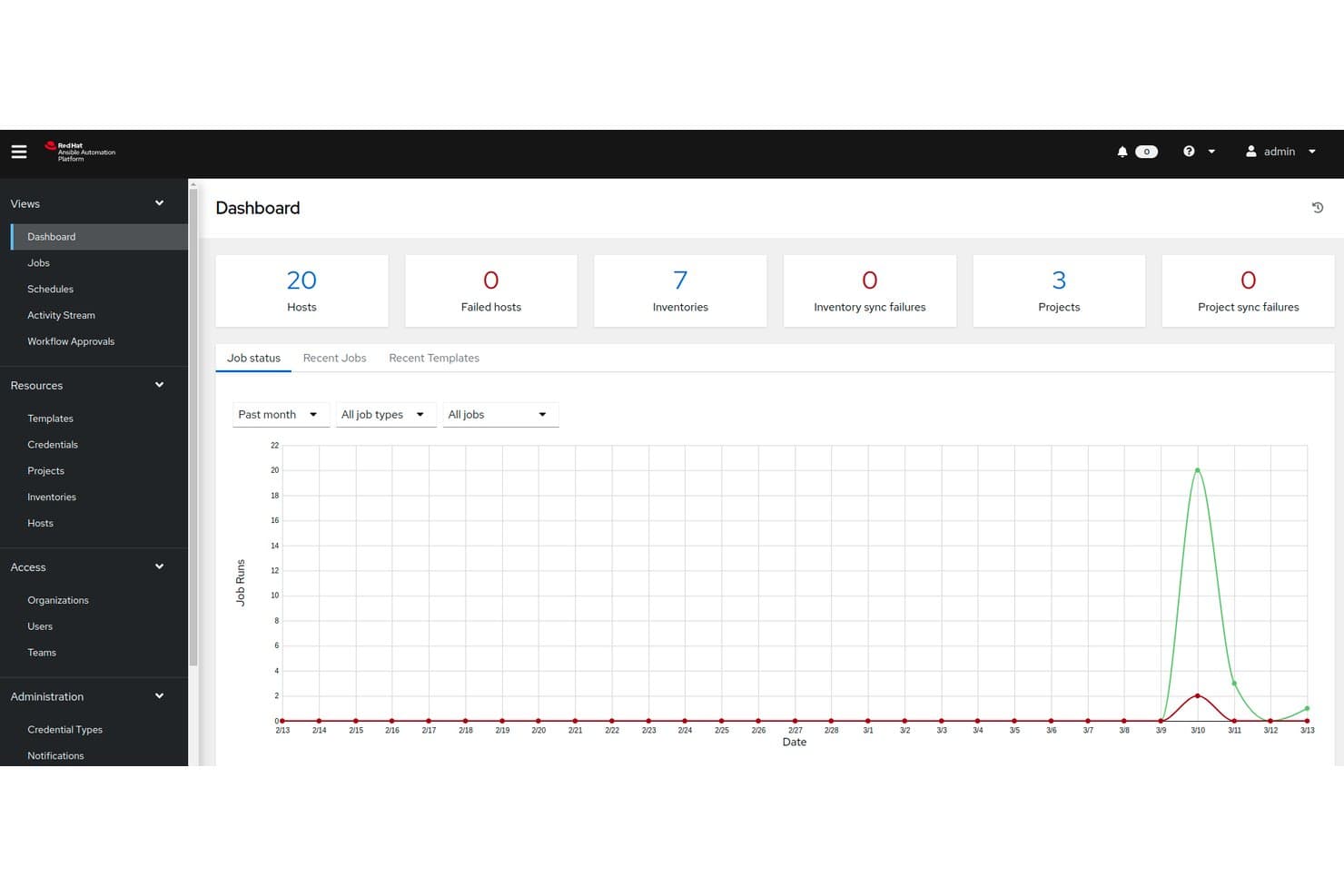
Red Hat Ansible Automation Platform offers a centralized dashboard displaying job status, host counts, inventories, and project sync metrics essential for enterprise patch management oversight. Red Hat Ansible Automation Platform is an agentless IT automation platform that lets enterprises build, run, and scale custom patch workflows across on-prem, cloud, and hybrid infrastructure using YAML-based playbooks and event-driven automation.
Who Is Red Hat Ansible Automation Platform Best For?
It's a strong fit for enterprise infrastructure and systems engineering teams that need to build fully custom patching pipelines across large, complex, multi-OS environments.
Why I Picked Red Hat Ansible Automation Platform
I picked Red Hat Ansible Automation Platform as one of the best because no other tool gives you this level of control over patch workflow logic. With YAML playbooks, you define exactly which hosts get patched, in what order, and what happens on failure. Event-Driven Ansible closes the loop by triggering those playbooks automatically when a connected security tool flags a new CVE, so patch jobs fire without anyone touching a keyboard.
Red Hat Ansible Automation Platform Key Features
- Automation controller: Central management UI for organizing, running, and monitoring patch jobs across all inventory.
- Automation mesh: Supports orchestrating patch tasks across distributed networks and network zones.
- Self-service automation portal: Allows non-technical users to launch pre-approved patching jobs securely.
- Ansible content collections: Provides certified, pre-built automation content for common IT platforms and software.
Red Hat Ansible Automation Platform Integrations
Red Hat Ansible Automation Platform offers a range of native integrations including ServiceNow, Splunk, VMware, AWS, Microsoft Azure, Google Cloud, Palo Alto Networks, CyberArk, and Cisco. An API is available for custom integrations.
Pros and Cons
Pros:
- Agentless approach covers most major OSes
- Supports event-driven and scheduled patching
- Full control of patch workflow logic
Cons:
- Requires custom playbooks for every app
- No built-in patch content catalog
Learn more about Red Hat Ansible Automation Platform: Best for large-scale environment control
- Free demo available
- Pricing upon request
Visit WebsiteCustomer Rating:4.5/5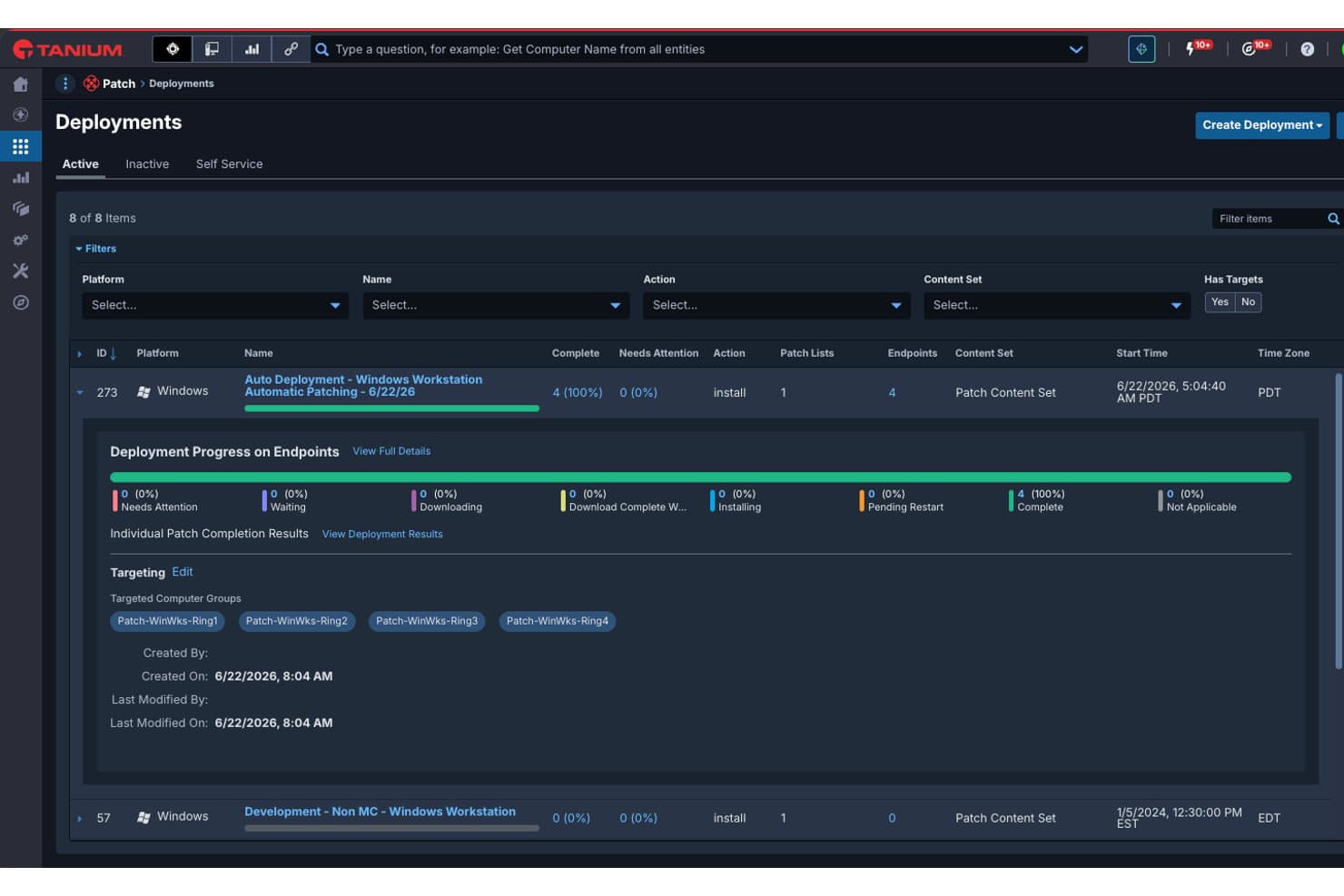
Tanium offers a Patch Deployments dashboard that displays active deployment progress, endpoint targeting, and patch completion status across Windows workstation ring groups. Tanium Patch is an enterprise patch management platform that combines real-time endpoint visibility with automated patch deployment across Windows, Linux, macOS, and third-party applications in on-prem, cloud, and hybrid environments.
Who Is Tanium Best For?
Tanium Patch is a strong fit for large enterprises with distributed endpoint fleets that need IT operations and security teams working from a single, unified platform.
Why I Picked Tanium
I picked Tanium as one of the best because no other tool I've tested matches its ability to query thousands of endpoints in real-time and act on what it finds instantly. I run concurrent patching campaigns across Windows, Linux, and macOS fleets from a single console, with safe deployment rings that let me test patches on a subset of devices before rolling out broadly. The automatic rollback capability means I'm not flying blind if something breaks mid-deployment.
Tanium Key Features
- Third-party application patching: Patch hundreds of supported software titles beyond operating systems.
- Real-time endpoint inventory: Instantly discover, track, and categorize assets across your environment.
- Custom compliance reporting: Generate dashboards and audit logs aligned with major regulatory frameworks.
- ServiceNow integration: Automate patch orchestration directly from ServiceNow IT operations workflows.
Tanium Integrations
Tanium Patch offers native integrations with Microsoft, ServiceNow, ScreenMeet, and more. An API is available for custom integrations.
Pros and Cons
Pros:
- Policy-based deployments with rollback support
- Linear chain architecture saves internal bandwidth
- Real-time endpoint visibility at enterprise scale
Cons:
- Module-based licensing can be complex
- Requires significant initial setup and tuning
Learn more about Tanium: Best for cloud-native OS and third-party patching
- 15-day free trial + free demo available
- From $1/endpoint/month (billed annually)
Visit WebsiteCustomer Rating:4.7/5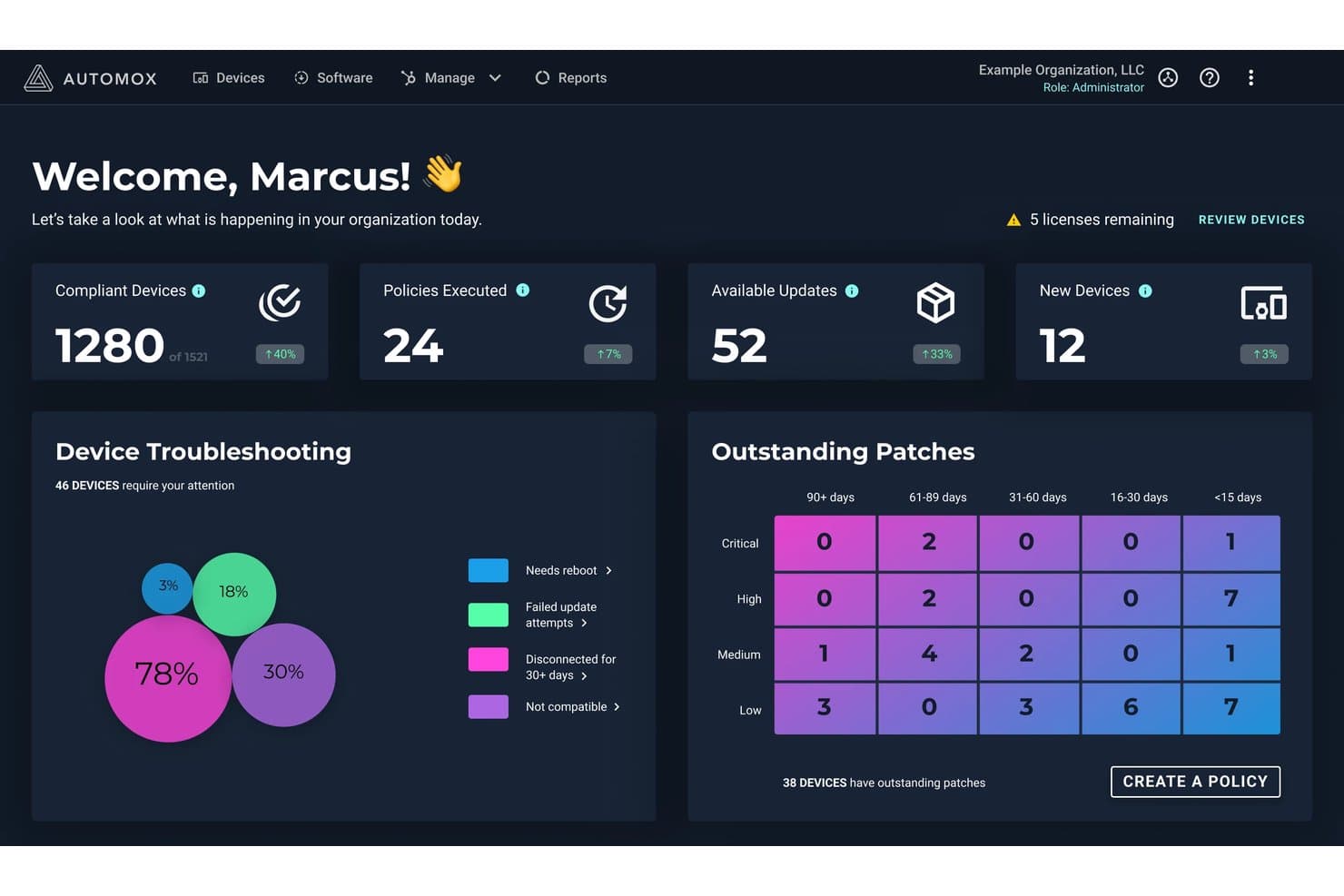
Automox offers an enterprise patch management dashboard displaying compliant devices, outstanding patches by severity and age, and device troubleshooting insights. Automox is a cloud-native autonomous endpoint management platform that handles OS patching across Windows, macOS, and Linux, third-party application patching for 630+ titles, software deployment, and device configuration—all without on-prem infrastructure.
Who Is Automox Best For?
Automox is a strong fit for IT and security teams managing distributed or remote endpoint fleets who need cross-platform patching without on-prem infrastructure.
Why I Picked Automox
Automox earns its spot on my shortlist because of how it handles third-party patching at scale. With 630+ supported titles, I can patch Chrome, Adobe, Java, and dozens of other apps using the same policy engine I use for OS updates. The Worklets library (432+ pre-built automation scripts) lets my team push custom remediation without spinning up additional infrastructure, and FixNow means I can execute patches immediately when a zero-day drops.
Automox Key Features
- Policy-driven automation: Set up rules for patching, software deployment, and configuration management across device groups.
- Multi-OS support: Manage patching for Windows, macOS, and Linux devices from a single cloud console.
- Role-based access control (RBAC): Assign permissions based on user roles to control who manages and approves patch jobs.
- Compliance reporting dashboard: Access built-in dashboards and exportable reports for audit trails and regulatory tracking.
Automox Integrations
Automox offers native integrations with ServiceNow, CrowdStrike, Splunk, SentinelOne, Zendesk, Freshworks, Microsoft Intune, among others, and provides an API for custom integrations.
Pros and Cons
Pros:
- Extensive macOS and Linux support
- No on-prem infrastructure required
- Fast patch deployment for zero-day threats
Cons:
- Executive summary views lack granular filters
- No support for air-gapped environments
 Best for real-time patch visibility dashboards
- 30-day free trial + free demo
- Pricing upon request
Visit WebsiteCustomer Rating:4.4/5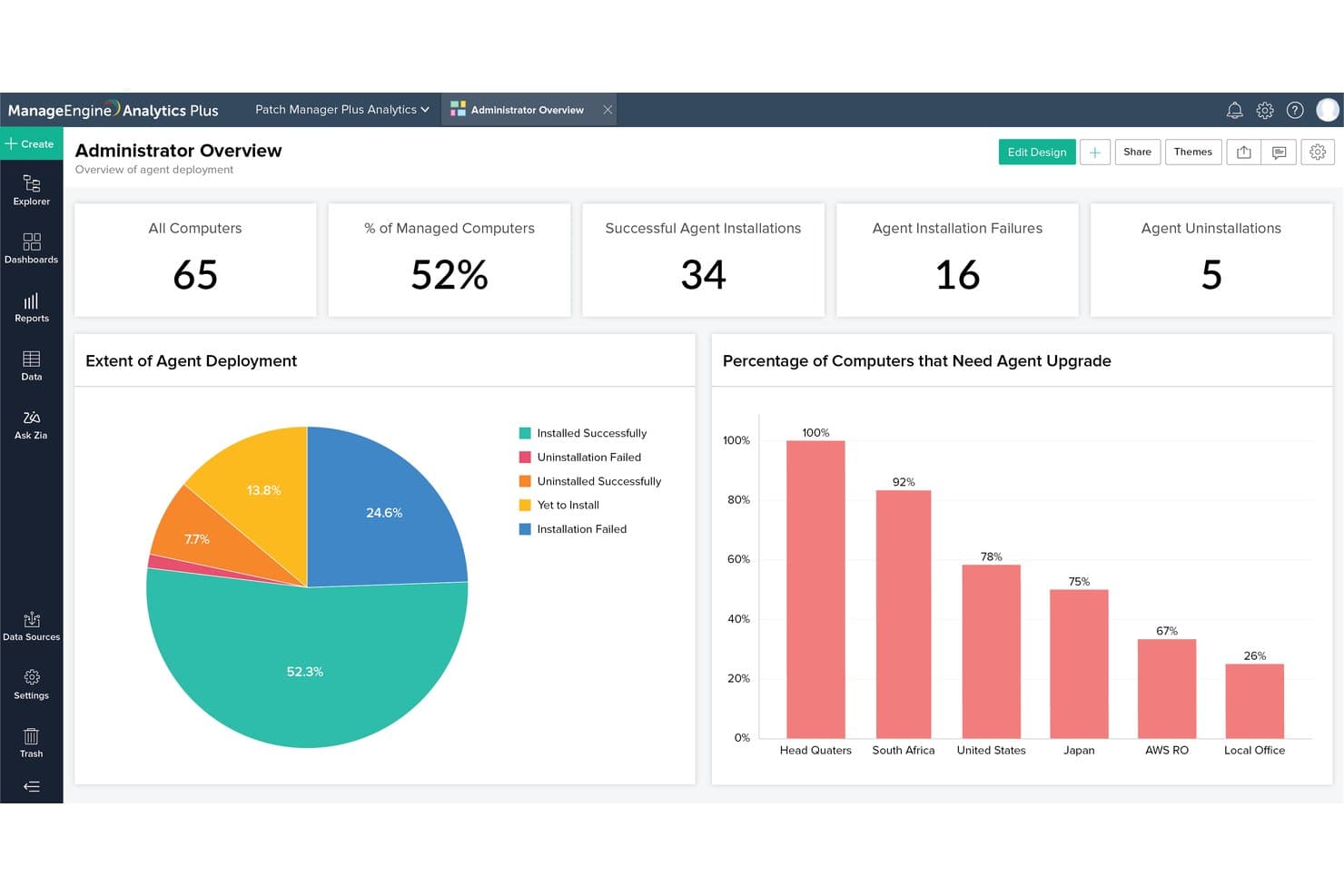
ManageEngine Patch Manager Plus offers an Administrator Overview analytics dashboard displaying agent deployment metrics, installation success rates, and upgrade needs by location. ManageEngine Patch Manager Plus is an enterprise patch management platform that automates OS and third-party application patching across Windows, macOS, and Linux endpoints, including remote, cloud-hosted, and DMZ-connected devices.
Who Is ManageEngine Patch Manager Plus Best For?
It's a strong fit for systems administrators and IT operations teams managing large, distributed endpoint fleets to ensure strict patch compliance across hybrid enterprise environments.
Why I Picked ManageEngine Patch Manager Plus
Patch Manager Plus earns its spot on my shortlist because the real-time patch visibility it provides is genuinely useful when managing large, distributed fleets. The centralized dashboard surfaces missing patches, deployment status, and compliance posture across all endpoints at once. I particularly like the granular audit reports, which give me a timestamped record of every patch action across Windows, macOS, and Linux devices.
ManageEngine Patch Manager Plus Key Features
- Automated third-party application patching: Supports patching for 850+ non-OS apps including browsers, Java, Adobe, and Zoom.
- Cross-platform OS support: Manages patch deployment for Windows, macOS, and Linux devices in one platform.
- Patch testing and approval workflows: Lets you create test groups and automate approvals before patches reach production machines.
- Bandwidth optimization for remote sites: Limits network usage by distributing patches efficiently to remote or distributed offices.
ManageEngine Patch Manager Plus Integrations
Patch Manager Plus offers native integrations with ServiceNow, ServiceDesk Plus, Rapid7, CrowdStrike, Tenable.io, and Tenable.sc. An API is available for building custom integrations.
Pros and Cons
Pros:
- Automated third-party application patching
- Bandwidth optimization throttles remote WAN downloads
- Real-time patch status visibility dashboard
Cons:
- Custom report builder requires steep learning
- Functional UI, but visually behind modern SaaS
Learn more about ManageEngine Patch Manager Plus:
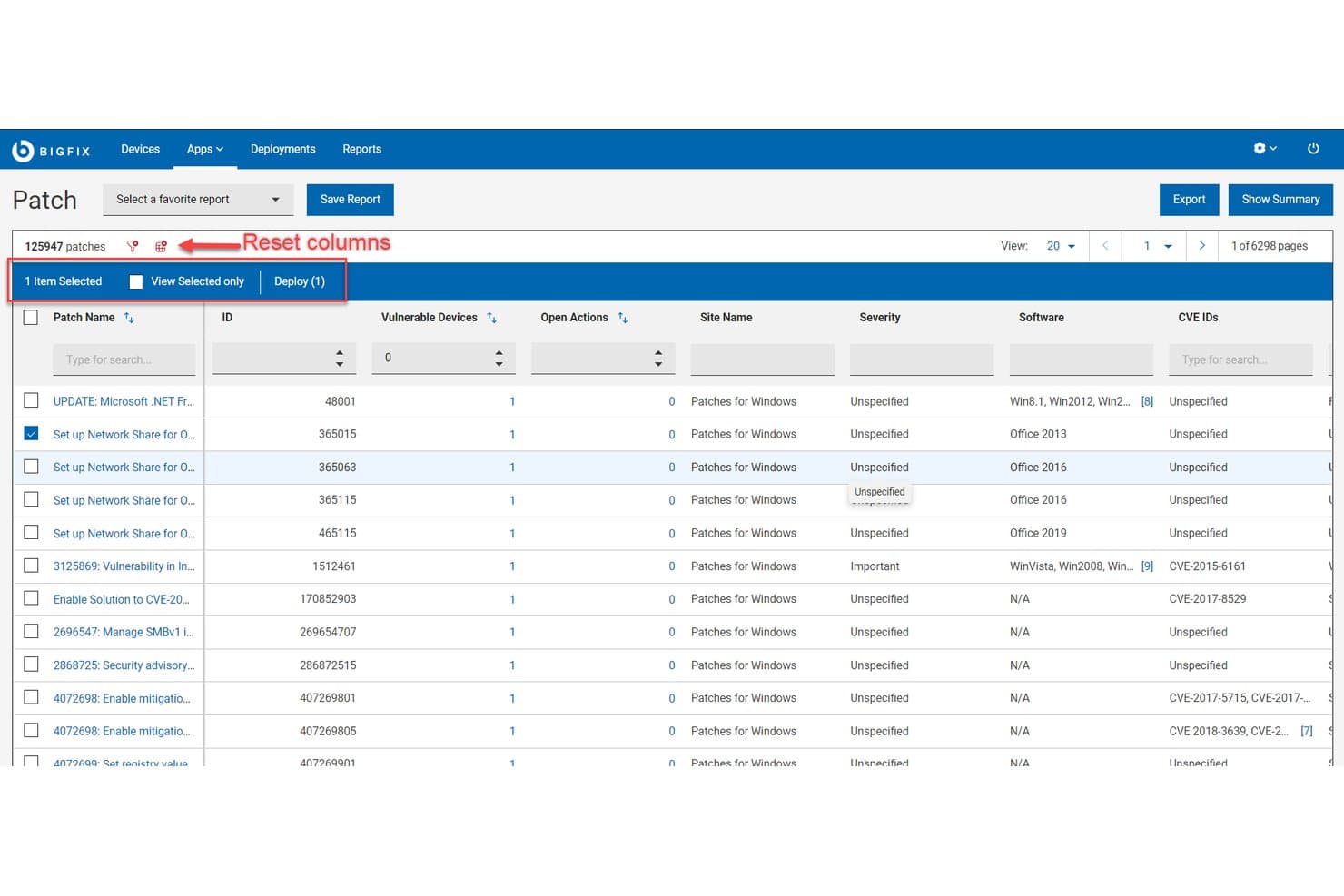
HCL BigFix offers a patch management list view displaying 125,947 patches with CVE IDs, severity levels, vulnerable devices, and one-click deployment capabilities. HCL BigFix is an enterprise endpoint management and patch automation platform that centralizes vulnerability remediation, compliance monitoring, and software distribution across on-premises, cloud, and hybrid environments.
Who Is HCL BigFix Best For?
HCL BigFix is a strong fit for large enterprises with IT and security operations teams managing heterogeneous endpoint fleets across distributed, mixed-OS environments.
Why I Picked HCL BigFix
HCL BigFix earns its spot on my shortlist because no other patch management tool I've used handles OS diversity at this scale. My team can patch Windows Servers, Ubuntu desktops, and legacy AIX boxes from a single console without separate agents or platform-specific workflows. The 120+ OS variant coverage, paired with a >98% first-pass patch success rate, means I'm not chasing failed deployments across disconnected tools when a zero-day hits a mixed-OS fleet.
HCL BigFix Key Features
- Patch Workbench: Centralizes and automates patch management actions with integrated ServiceNow synchronization for change control.
- Vulnerability remediation integrations: Natively connects with Tenable, Rapid7, and Qualys to close vulnerabilities identified in external scans.
- Custom fixlet authoring: Lets you create and deploy custom remediation jobs using BigFix's scripting and automation engine.
- Relays infrastructure: Distributes patch content efficiently across WAN links to thousands of endpoints without saturating the network.
HCL BigFix Integrations
HCL BigFix offers native integrations with Tenable, Rapid7, Qualys, Google Cloud, Nutanix Beam, ServiceNow, Forescout, AWS, Azure, and more. An API is also available for custom integrations.
Pros and Cons
Pros:
- Supports patch automation at thousands-of-endpoints scale
- Remediates vulnerabilities across disconnected endpoints
- Patches over 100 OS and device types
Cons:
- Setup complexity is high for smaller teams
- Executive reporting requires customization and expertise
Learn more about HCL BigFix: Best for automated patching across endpoints
- 14-day free trial + free demo available
- From $3.75/month
Visit WebsiteCustomer Rating:5/5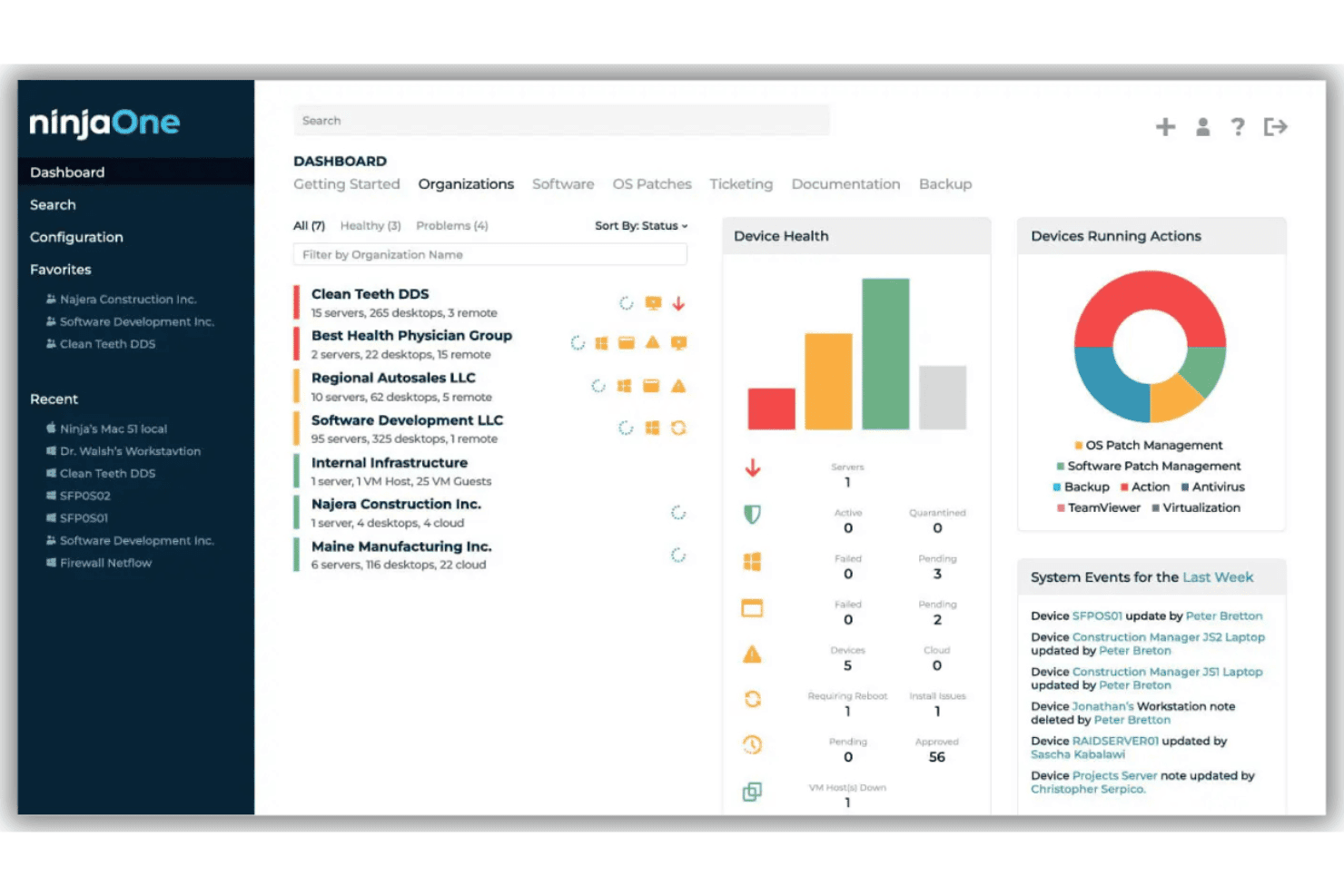
NinjaOne offers a centralized dashboard for monitoring device health, managing organizations, and tracking system events across multiple clients. NinjaOne is a unified IT operations platform with autonomous patch management at its core, supporting OS and third-party application patching across Windows, macOS, Linux, and mobile endpoints from a single cloud-based console.
Who Is NinjaOne Best For?
NinjaOne fits IT teams and managed service providers managing distributed endpoint fleets across mid-market and enterprise environments.
Why I Picked NinjaOne
NinjaOne earns its spot on my shortlist because of its Patch Intelligence AI, which analyzes deployment signals and community telemetry to automatically pause risky patches before they reach production. I also rely on patch caching, which lets my team push updates to bandwidth-limited remote sites without a VPN. Add in support for 6,000+ third-party applications, and I'm not managing a separate tool just to cover browsers and productivity apps.
NinjaOne Key Features
- Multi-OS patch management: Centrally patch Windows, macOS, Linux, and mobile devices from a single console.
- Preemptive patch approval policies: Approve or block specific KBs or update categories before release.
- Automated vulnerability data imports: Bring in vulnerability data to inform patch prioritization workflows.
- Compliance and audit-ready reporting: Generate detailed reports mapped to frameworks like SOC 2, HIPAA, and ISO 27001.
NinjaOne Integrations
NinjaOne offers native integrations with Splashtop, Zendesk, Okta, ConnectWise, Microsoft Azure/Intune, Slack, ServiceNow, DeskDay, and more, and provides an API for custom integrations.
Pros and Cons
Pros:
- Built-in compliance reporting for multiple frameworks
- Supports remote endpoints without VPN dependency
- Automated patch rollback on failed deployments
Cons:
- No native Unix (AIX, Solaris) support
- Custom metric export options remain basic
Learn more about NinjaOne: Best for risk-based prioritization for remediation
- Free demo available
- Pricing upon request
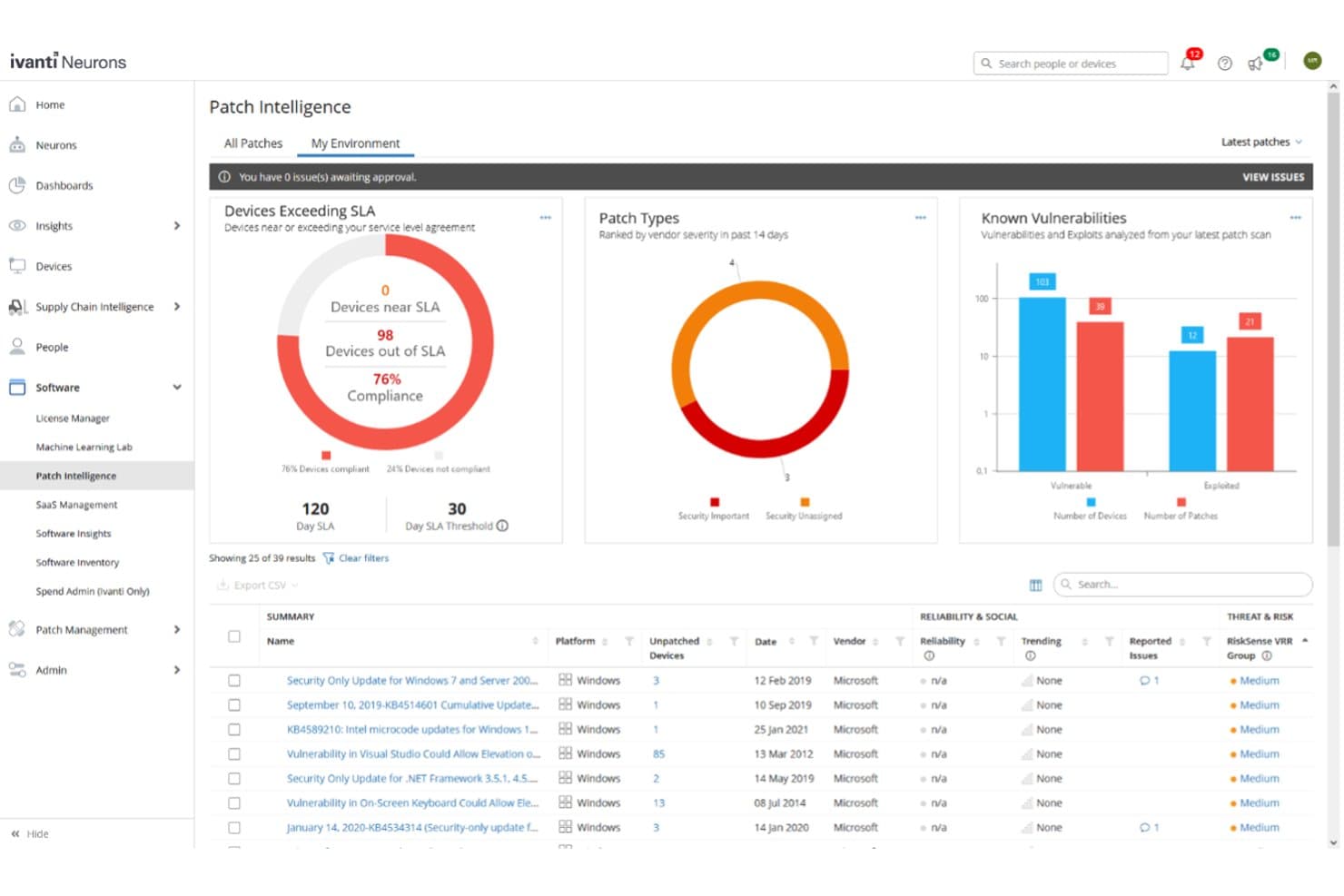
Ivanti Neurons for Patch Management offers a Patch Intelligence dashboard displaying device compliance, patch types, known vulnerabilities, and a detailed list of unpatched security updates. Ivanti Neurons for Patch Management is a cloud-native patch management platform that automates vulnerability discovery, risk-based prioritization, and patch deployment across Windows, macOS, Linux, and 800+ third-party applications in hybrid enterprise environments.
Who Is Ivanti Neurons for Patch Management Best For?
It's a strong fit for security-focused enterprise IT teams that need to prioritize remediation by actual exploit risk rather than raw CVE scores.
Why I Picked Ivanti Neurons for Patch Management
I picked Ivanti Neurons for Patch Management because its Vulnerability Risk Rating (VRR) goes beyond CVSS scores, pulling in threat intelligence from 100+ sources, dark web feeds, and human-validated exploit data to rank what actually needs patching first. My team uses deploy-by-risk automation to push the highest-priority patches before exploits hit. The ring deployment feature, which includes user sentiment surveys, catches stability issues before a patch rolls out fleet-wide.
Ivanti Neurons for Patch Management Key Features
- Patch reliability insights: Aggregates anonymized deployment data and user sentiment to flag patches that may trigger issues.
- Compliance reporting dashboard: Provides status, history, and SLA tracking for audits across your full environment.
- Third-party patch catalog: Maintains over 800 supported applications with regular updates from a central feed.
- Ring deployment configuration: Lets you define phased rollouts with configurable groups and pre-built policies.
Ivanti Neurons for Patch Management Integrations
Ivanti Neurons for Patch Management offers native integrations with Jira, CrowdStrike, AWS, Rapid7, ServiceNow, Tenable, Wiz, Synopsis, Splunk, and more. An API is available for custom integrations.
Pros and Cons
Pros:
- Covers Windows, macOS, Linux, and 800+ apps
- Automated ring deployment with user sentiment analysis
- Risk prioritization uses threat and exploit intelligence
Cons:
- Custom patch uploads limited to sideload solution
- Compliance reporting lacks detailed export templates
Learn more about Ivanti Neurons for Patch Management:
Alte programe de gestionare a patch-urilor pentru întreprinderi
Iată câteva opțiuni suplimentare de programe de gestionare a patch-urilor pentru întreprinderi care nu au ajuns pe lista mea scurtă, dar care merită totuși analizate:
- 11SolarWinds Patch ManagerBest for third-party patch catalog support
- 12Kaseya VSABest for unified IT management and automation
- 13Qualys Patch ManagementBest for built-in vulnerability assessment
- 14AteraBest for patching with remote monitoring
- 15PDQ ConnectBest for zero-touch patching for distributed teams
- 16GFI LanguardBest for vulnerability and patch scanning
- 17HeimdalBest for automated patching with compliance
- 18N-able N-central RMMBest for role-based patch controls for IT teams
- 19SyxsenseBest for real-time patch deployment visibility
- 20Patch My PCBest for rapid third-party patch catalog updates
How I Evaluate Enterprise Patch Management Software
I evaluate enterprise patch management tools on two levels: baseline requirements like cross-platform deployment and audit reporting, and differentiators like risk-based prioritization and rollback.
Core Functionality (Table Stakes for This List)
When I'm selecting tools for my list, I rank each one on a scale from 0 (does not offer the functionality) to 5 (excels in this area) for each core functionality listed below. Then, I calculate the tool's total score into a percentage. Each tool needs to achieve a minimum total score of 65% to be considered for inclusion.
- Automated Patch Deployment: I check whether a tool can handle policy-based scheduling, phased rollouts, and automatic rollback so a failed update doesn't take down a production server at 2 a.m.
- Cross-Platform OS Support: Enterprise environments rarely run one OS. I look for full patching parity across Windows, macOS, and major Linux distributions like RHEL, Ubuntu, and SUSE.
- Third-Party App Patching: Most exploited vulnerabilities live in apps like browsers, Java, and Zoom. I evaluate how many third-party titles each platform covers and how fast new patches hit the catalog.
- Vulnerability Assessment & Prioritization: I look for CVE-based scanning paired with risk scoring, so your team patches the actively exploited flaw before the low-severity cosmetic fix.
- Compliance Reporting & Audit Trails: Auditors want proof, not promises. I evaluate whether each tool offers pre-built reports mapped to frameworks like PCI-DSS, HIPAA, and ISO 27001 with exportable audit logs.
- Distributed Endpoint Management: I look at how each platform reaches remote laptops, cloud instances, and on-prem servers without forcing traffic through a VPN or requiring constant network connectivity.
Once I have a list of tools that meet the criteria, I consider what sets each platform apart.
Differentiating Factors (What Sets Vendors Apart)
Here's how I compare and contrast different vendors:
Standout Features
Risk-based prioritization is a major differentiator. I look for tools that pull in threat intelligence like CISA KEV to rank patches by active exploitation, not just CVSS severity. Automated testing and rollback matter just as much—pilot-ring deployment lets you validate a patch on a small group before it hits production. Bandwidth optimization also separates vendors, especially for distributed teams where peer-to-peer distribution and delta patching keep deployments from choking the network.
Beyond Features
Deployment architecture matters. I evaluate whether a vendor offers SaaS, on-premise, and hybrid options, since regulated industries often need air-gapped environments. Integration depth is equally important; I check for bi-directional connectors to ITSM tools like ServiceNow and Jira so patch deployments auto-generate change tickets. I also consider how quickly a vendor publishes new patch content after a CVE drops, because a delay of even a day or two can leave thousands of endpoints exposed.
Cum să alegeți un program de gestionare a patch-urilor pentru întreprinderi
Este ușor să vă pierdeți în liste lungi de funcții și structuri complexe de prețuri. Pentru a vă ajuta să rămâneți concentrați în timp ce parcurgeți procesul unic de selectare a programului, iată o listă de verificare a factorilor de care trebuie să țineți cont:
| Factor | Aspecte de luat în considerare |
|---|---|
| FactorScalabilitate | Aspecte de luat în considerareVa putea programul să gestioneze toate punctele finale actuale și preconizate, din mai multe sedii sau unități de afaceri, fără întârzieri sau supraîncărcarea agenților? |
| FactorIntegrări | Aspecte de luat în considerareSe conectează instrumentul cu ușurință la scanerele de vulnerabilități, fluxurile de lucru ITSM și instrumentele de alertare? Verificați existența integrărilor native sau a unor API-uri fiabile. |
| FactorPosibilitatea de personalizare | Aspecte de luat în considerarePuteți adapta politicile de aplicare a patch-urilor, ferestrele de mentenanță, accesul și raportarea pentru a corespunde cerințelor de conformitate sau proceselor de afaceri? |
| FactorUșurința de utilizare | Aspecte de luat în considerareEste consola intuitivă pentru administratorii de zi cu zi sau vă veți baza pe competențe specializate și instruire constantă pentru operare și depanare? |
| FactorImplementare și integrare inițială | Aspecte de luat în considerareCât timp va dura implementarea agenților, configurarea setărilor și instruirea personalului? Căutați cerințe neașteptate privind infrastructura, politicile sau gestionarea schimbărilor. |
| FactorCost | Aspecte de luat în considerareStructurile de preț se bazează pe punct final, utilizator sau funcții? Verificați costurile ascunse, cum ar fi modulele suplimentare, extensiile pentru integrări sau nivelurile de conformitate/raportare. |
| FactorMăsuri de protecție a securității | Aspecte de luat în considerareOferă platforma RBAC, înregistrarea de audit și criptarea datelor? Întrebați-vă cum se aliniază aceste controale la nivelul de risc al organizației dumneavoastră. |
| FactorDisponibilitatea asistenței | Aspecte de luat în considerareCât de rapid și de fiabil puteți primi ajutor în timpul incidentelor sau al actualizărilor? Luați în considerare SLA-urile, programul de asistență și canalele de acces înainte de a lua o decizie. |
Ce este un program de gestionare a patch-urilor pentru întreprinderi?
Programele de gestionare a patch-urilor pentru întreprinderi sunt platforme esențiale de securitate a punctelor finale, care automatizează identificarea, implementarea și monitorizarea actualizărilor software în medii IT mari și diverse. Acestea gestionează actualizările sistemelor de operare și ale aplicațiilor terțe, contribuie la menținerea conformității cu reglementările și reduc vulnerabilitățile de securitate. Aceste instrumente sunt concepute pentru a accepta mii de puncte finale, a eficientiza aplicarea patch-urilor în sedii distribuite și a furniza raportarea solidă necesară operațiunilor la nivel de întreprindere.
Funcții
Când selectați un program de gestionare a patch-urilor pentru întreprinderi, urmăriți următoarele funcții esențiale:
- Implementarea automatizată a patch-urilor: Utilizează fluxuri de lucru automatizate pentru a coordona lansările programate sau declanșate pe toate punctele finale, reducând efortul manual și minimizând întârzierile aplicării patch-urilor.
- Compatibilitate cu sistemele de operare multiplatformă: Gestionează actualizările pentru Windows, macOS și principalele distribuții Linux dintr-o singură consolă, asigurând acoperirea diverselor flote de dispozitive.
- Aplicarea patch-urilor pentru aplicații terțe: Livrează actualizări pentru aplicații care nu fac parte din sistemul de operare, precum browserele, suitele de productivitate și instrumentele de colaborare, reducând riscurile generate de software-ul terț neactualizat.
- Evaluarea vulnerabilităților: Integrează gestionarea vulnerabilităților prin scanarea actualizărilor lipsă și identificarea vulnerabilităților prioritare pe baza severității CVE și a fluxurilor de informații despre amenințări în timp real.
- Capacități de revenire: Permite echipelor IT să inverseze sau să elimine patch-urile problematice, minimizând timpul de nefuncționare dacă o actualizare provoacă probleme în producție.
- Raportarea conformității: Generează rapoarte pentru pistele de audit și cadrele de reglementare, facilitând demonstrarea stării patch-urilor în timpul evaluărilor de securitate.
- Gestionarea de la distanță a punctelor finale: Permite livrarea patch-urilor către dispozitive aflate în afara rețelei corporative, fiind utilă în mediile de lucru la distanță sau hibride.
- Optimizarea lățimii de bandă: Utilizează distribuția de la egal la egal, limitarea vitezei sau aplicarea diferențială a patch-urilor pentru a minimiza impactul asupra rețelei și a accelera implementările de amploare.
- Programarea ferestrelor de mentenanță: Vă permite să definiți anumite intervale pentru aplicarea patch-urilor și reporniri, aliniind actualizările la SLA-urile și nevoile operaționale ale companiei.
- Controlul accesului bazat pe roluri: Se conectează la furnizori de identitate precum Active Directory pentru a acorda permisiuni granulare, asigurându-se că numai utilizatorii autorizați pot gestiona fluxurile de lucru critice pentru aplicarea patch-urilor.
Beneficii
Implementarea unui software pentru gestionarea patch-urilor la nivel de întreprindere oferă mai multe beneficii pentru echipa și compania dumneavoastră. Iată câteva dintre acestea:
- Reducerea riscurilor de securitate: Aplicarea regulată și automatizată a patch-urilor remediază rapid vulnerabilitățile software cunoscute, contribuind la protejarea organizației împotriva programelor malware, ransomware-ului și amenințărilor cibernetice în continuă evoluție.
- Îmbunătățirea conformității: Raportarea integrată a conformității și pistele de audit facilitează demonstrarea respectării unor standarde precum PCI-DSS, HIPAA sau ISO 27001.
- Economii de timp pentru departamentul IT: Automatizarea și coordonarea centralizată a patch-urilor eliberează echipele IT de actualizările manuale, permițându-le să se concentreze asupra inițiativelor cu prioritate mai ridicată.
- Implementarea consecventă a actualizărilor: Compatibilitatea multiplatformă asigură faptul că toate punctele finale — locale, la distanță și bazate pe cloud — primesc patch-uri la timp și în mod consecvent.
- Reducerea întreruperilor activității: Funcții precum revenirea, ferestrele de mentenanță și optimizarea lățimii de bandă păstrează stabilitatea sistemelor și reduc timpul de nefuncționare în timpul actualizărilor.
- Vizibilitate și control sporite: Tablourile de bord în timp real, alertele personalizabile și permisiunile granulare vă permit să monitorizați, să analizați și să gestionați progresul aplicării patch-urilor în întreaga flotă.
- Gestionarea simplificată de la distanță: Posibilitatea de a aplica patch-uri punctelor finale distribuite sau aflate în afara rețelei înseamnă că poziția de securitate rămâne solidă chiar și atunci când echipele lucrează din locații diferite.
Costuri și prețuri
Selectarea unui software pentru gestionarea patch-urilor la nivel de întreprindere necesită înțelegerea diverselor modele și planuri de tarifare disponibile. Costurile variază în funcție de funcții, dimensiunea echipei, suplimente și alți factori. Tabelul de mai jos prezintă pe scurt planurile comune, prețurile medii ale acestora și funcțiile incluse de obicei în soluțiile software pentru gestionarea patch-urilor la nivel de întreprindere:
Tabel comparativ al planurilor pentru software-ul de gestionare a patch-urilor la nivel de întreprindere
| Tipul planului | Preț mediu | Funcții comune |
|---|---|---|
| Tipul planuluiPlan gratuit | Preț mediu$0 | Funcții comuneImplementarea de bază a patch-urilor pentru un număr limitat de dispozitive, programare manuală și asistență din partea comunității. |
| Tipul planuluiPlan personal | Preț mediu$5-$15/utilizator/lună | Funcții comuneAplicarea patch-urilor pentru un singur utilizator, actualizări automatizate pentru un sistem de operare, raportare de bază și asistență tehnică standard. |
| Tipul planuluiPlan pentru companii | Preț mediu$20-$40/utilizator/lună | Funcții comuneAsistență pentru mai mulți utilizatori, aplicarea patch-urilor pe mai multe platforme, actualizări pentru aplicații terțe, raportarea conformității și permisiuni bazate pe roluri. |
| Tipul planuluiPlan pentru întreprinderi | Preț mediu$40-$80/utilizator/lună | Funcții comuneAutomatizare completă, opțiuni de implementare hibridă, integrări personalizate, asistență susținută de SLA și capacități avansate de audit. |
Întrebări frecvente despre software-ul de gestionare a patch-urilor pentru întreprinderi
Iată câteva răspunsuri la întrebările frecvente despre software-ul de gestionare a patch-urilor pentru întreprinderi:
Cum ajută software-ul de gestionare a patch-urilor pentru întreprinderi la auditurile de conformitate?
Software-ul de gestionare a patch-urilor pentru întreprinderi automatizează raportarea conformității și păstrează piste de audit detaliate. Astfel, puteți demonstra rapid starea patch-urilor, dovada remedierii și respectarea unor reglementări precum PCI-DSS sau HIPAA în timpul auditurilor interne sau externe.
Poate software-ul de gestionare a patch-urilor pentru întreprinderi să aplice patch-uri dispozitivelor care nu sunt conectate la rețea?
Da, majoritatea soluțiilor moderne acceptă aplicarea de patch-uri de la distanță pentru dispozitivele din afara rețelei corporative. Astfel, punctele finale rămân securizate și actualizate, chiar și atunci când utilizatorii călătoresc sau lucrează de acasă.
Ce aplicații terțe sunt acceptate de obicei pentru aplicarea patch-urilor?
Soluțiile pentru întreprinderi acoperă de obicei o gamă largă de aplicații terțe, precum browsere web, clienți de e-mail, Java, Zoom și suite de productivitate. Ar trebui să verificați catalogul furnizorului pentru actualizările relevante pentru mediul dumneavoastră.
Cum reduce automatizarea riscurile în comparație cu aplicarea manuală a patch-urilor?
Automatizarea reduce erorile umane, impune politici consecvente și permite implementarea rapidă a actualizărilor de securitate în întreaga infrastructură. Acest lucru contribuie la minimizarea intervalului de aplicare a patch-urilor și reduce probabilitatea ca amenințările să exploateze vulnerabilități necorectate.
Ce ar trebui să iau în considerare atunci când compar costul total de proprietate?
Ar trebui să luați în calcul licențierea, modificările infrastructurii, serviciile profesionale, nivelurile de asistență și timpul necesar pentru implementare și gestionarea continuă. Atenție la costurile suplimentare ascunse pentru funcții esențiale precum conformitatea, integrările sau raportarea avansată.