

Cele mai bune instrumente de testare API îi ajută pe dezvoltatori și pe echipele de asigurare a calității să verifice punctele finale, să detecteze problemele de integrare și să se asigure că API-urile funcționează fiabil în diferite medii. Acestea facilitează automatizarea testării, validarea încărcăturilor utile și monitorizarea timpilor de răspuns, astfel încât echipele să poată identifica problemele înainte ca acestea să afecteze sistemele de producție.
Echipele încep de obicei să caute un software mai bun pentru testarea API-urilor atunci când depanează coduri de răspuns neclare, investighează erori intermitente sau gestionează mai multe medii fără o acoperire consecventă a testelor. Testarea manuală sau automatizarea incompletă duc adesea la defecte omise și la bucle lungi de feedback între dezvoltare și asigurarea calității.
Am lucrat cu echipe de inginerie care au implementat cadre pentru testarea API-urilor în arhitecturi REST și GraphQL, evaluând modul în care diferite instrumente gestionează automatizarea, raportarea și integrarea CI/CD atât în configurații agile, cât și în cele pentru întreprinderi.
În acest ghid, vei afla care instrumente de testare API te ajută cu adevărat să reduci munca manuală, să îmbunătățești fiabilitatea între versiuni și să obții o perspectivă mai clară asupra performanței API-ului tău.
Why Trust Our Software Recommendations
6,700+
Reviews
20
Industry experts
16+
Evaluation factors
14
Years
Our team has been testing and reviewing software since 2012. As tech leaders ourselves, we know how difficult—and important—it is to choose the right software.
For this guide, we evaluated tools using hands-on testing and independent research, scoring tools using our selection criteria.
Our reviews reflect our human editorial judgment, not a sales pitch.
Expert reviewers:
- Paulo Gardini MiguelTech Director
 Tim FisherVP of AI
 Gabriel RosasTech Lead & Software Architect
 Christhian GruhnTech Lead & Platform Architect

Tabel comparativ al instrumentelor de testare API
Acest tabel comparativ prezintă pe scurt detaliile de preț pentru selecția mea de top de instrumente de testare API:
Sorted by: Default
| Tool | Starting Price | Website | |
|---|---|---|---|
Best for orchestrating existing test suites | 4.9 out of 5 | $17/month Free plan + free demo available | Book Demo |
Best for dynamic application security testing | 4.3 out of 5 | $300/month Free plan + free demo available | Book Demo |
Best for enterprise codeless test automation | 4.8 out of 5 | Pricing upon request 14-day free trial | Website |
Best with end-to-end testing workflows | Not rated | Pricing upon request Free demo available | Website |
Best for continuous security testing | 4.6 out of 5 | Pricing upon request Free demo available | Website |
Best for AI-driven test creation | 4.5 out of 5 | Pricing upon request Free trial available + free demo | Website |
Best for beginners in testing | 4.4 out of 5 | $180/seat/month Free plan + 30-day free trial + free demo available | Website |
Best for cloud-based testing | 4.3 out of 5 | $39/month 28-day free trial + free demo available | Website |
Best for cross-platform support | 2.0 out of 5 | Pricing upon request Free trial available | Website |
Best for detecting vulnerabilities | 4.2 out of 5 | Pricing upon request Free demo available | Website |


Recenzii ale celor mai bune instrumente de testare API
Mai jos sunt rezumatele mele detaliate ale celor mai bune instrumente de testare API care au ajuns pe lista mea scurtă. Recenziile mele oferă o perspectivă detaliată asupra funcțiilor principale, avantajelor & dezavantajelor, integrărilor și cazurilor de utilizare ideale ale fiecărui instrument, pentru a te ajuta să îl găsești pe cel mai potrivit pentru tine.
 Best for orchestrating existing test suites
- Free plan + free demo available
- From $17/month (billed annually)
Visit WebsiteCustomer Rating:4.9/5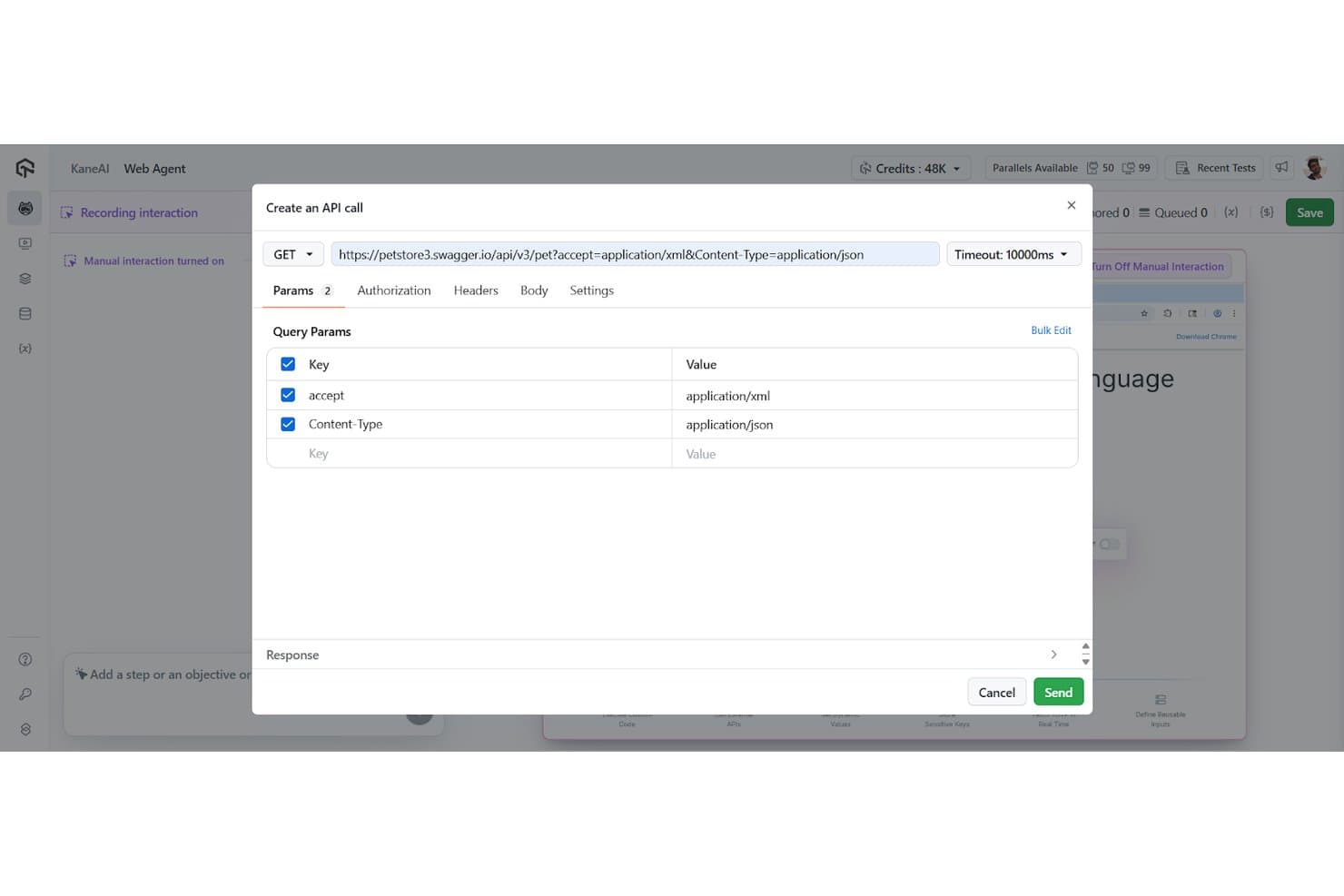
KaneAI lets users configure GET API calls with query params. TestMu AI is an AI-native test orchestration platform that runs API tests—using frameworks like REST Assured and Karate—alongside broader automated test suites, with parallel execution, CI/CD pipeline integration, and JMeter-based performance testing built in.
Who Is TestMu AI Best For?
TestMu AI's HyperExecute is a strong fit for QA engineers and DevOps teams that already have automated test suites built on frameworks like REST Assured, Karate, or JMeter and need to scale execution across parallel environments in CI/CD pipelines.
Why I Picked TestMu AI
I picked TestMu AI as one of the best because it's built specifically for teams that already have test suites in REST Assured, Karate, or JMeter and need to run them faster at scale. HyperExecute's YAML-driven orchestration distributes discovered tests across parallel VMs automatically, so a regression suite that previously blocked a release for hours can run in a fraction of the time. I also like that JMeter and Gatling performance tests run on the same platform, with regional load generation and response-time metrics built in.
TestMu AI Key Features
- AI root cause analysis: Analyzes test logs and the job's Git diff to identify likely failure causes and suggest resolution steps.
- Flaky test detection: Scores tests based on how often their results change across runs to surface unreliable tests in your suite.
- Job secrets vault: Stores credentials and API keys in a write-only vault, making them available only to the specific job execution.
- Private cloud and on-premises deployment: Runs your test infrastructure in your own cloud account (AWS, Azure, or Google Cloud on request) or behind your firewall.
TestMu AI Integrations
HyperExecute integrates with Azure Test Plan, Katalon, qTest, Slack, Testim, Testsigma, Tosca, Zephyr, GitHub, Bamboo, and Travis. It also supports CI/CD workflows through its CLI and YAML configuration, plus a REST API for custom integrations.
Pros and Cons
Pros:
- JMeter and Gatling load tests share orchestration
- Reviewers report faster parallel regression cycles
- Parallelizes REST Assured and Karate suites
Cons:
- No continuous production uptime monitoring
- No documented SOAP or GraphQL testing
Learn more about TestMu AI: Best for dynamic application security testing
- Free plan + free demo available
- From $300/month
Visit WebsiteCustomer Rating:4.3/5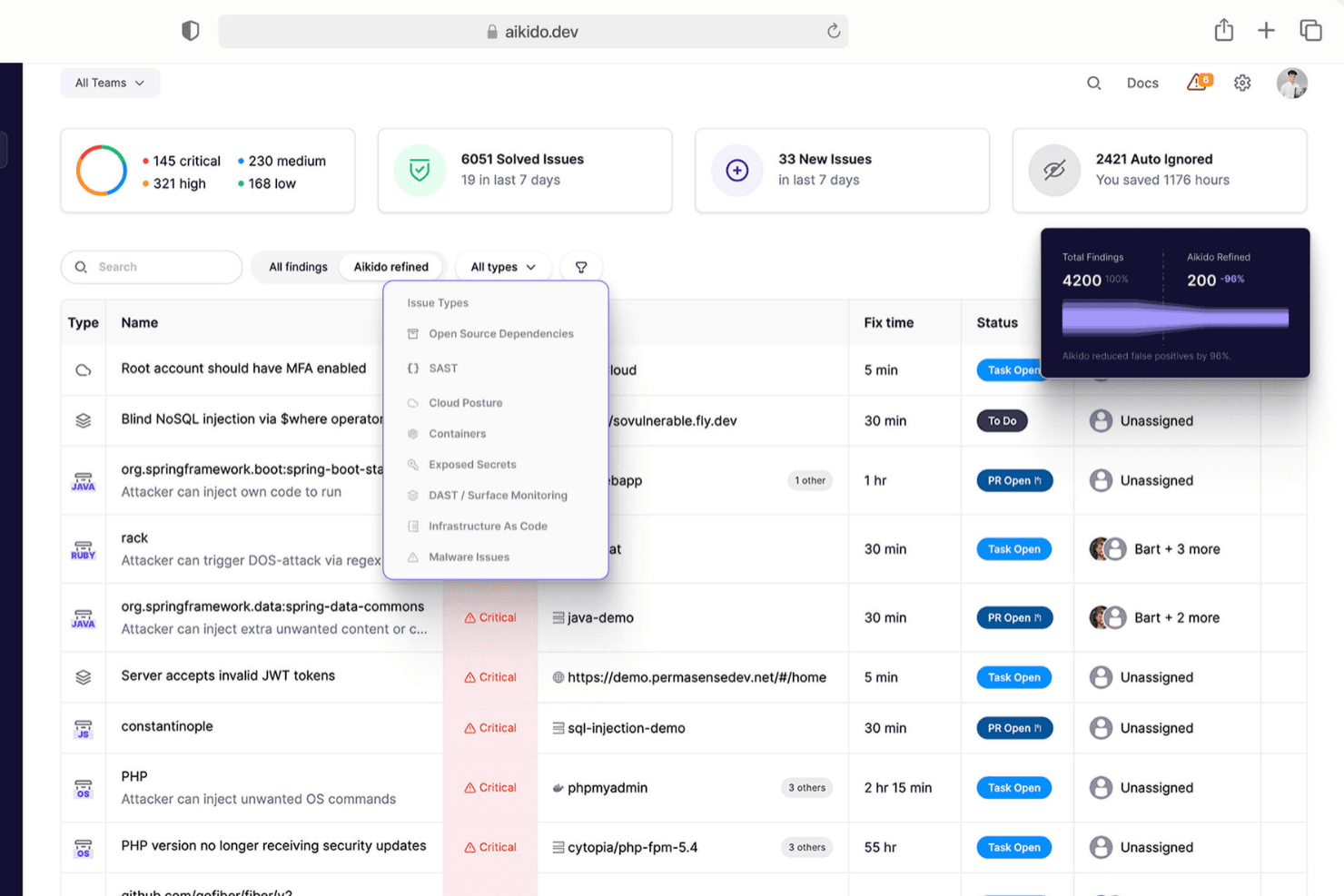
Aikido Security provides a unified dashboard to triage and filter issues by type, severity, and scan source. Aikido Security is a platform designed to protect your code, cloud, and runtime environments with its suite of security features. It offers tools for dynamic application security testing (DAST), API scanning, and other measures to safeguard your applications against vulnerabilities.
Why I Picked Aikido Security: I picked Aikido Security for API testing because of its dynamic application security testing, API scanning, and AI-driven AutoFix feature, which automatically generates pull requests to fix vulnerabilities. This automation saves time and keeps security measures up to date. Aikido also supports custom rule creation, allowing you to filter non-essential paths and focus on critical vulnerabilities, helping you prioritize and secure your API endpoints effectively.
Standout features & integrations:
Features include bulk fix, which allows you to create multiple ready-to-merge pull requests with a single action, streamlining the resolution process. TL;DR summaries provide concise overviews and ticket creation options for complex issues, enhancing management efficiency. Aikido also prioritizes data security through read-only access to repositories, short-lived access tokens, and separate Docker containers for each scan.
Integrations include VSCode, Azure Pipelines, BitBucket Pipes, GitHub, GitLab, Jira, Asana, Monday, ClickUp, YouTrack, Drata, and Vanta.
Pros and Cons
Pros:
- User-friendly interface
- Provides actionable insights
- Offers a comprehensive dashboard and customizable reports
Cons:
- Custom SAST rules must be enabled by Aikido
- Unfixed vulnerabilities excluded by default in ephemeral scans
Learn more about Aikido Security: Best for enterprise codeless test automation
- 14-day free trial
- Pricing upon request
Visit WebsiteCustomer Rating:4.8/5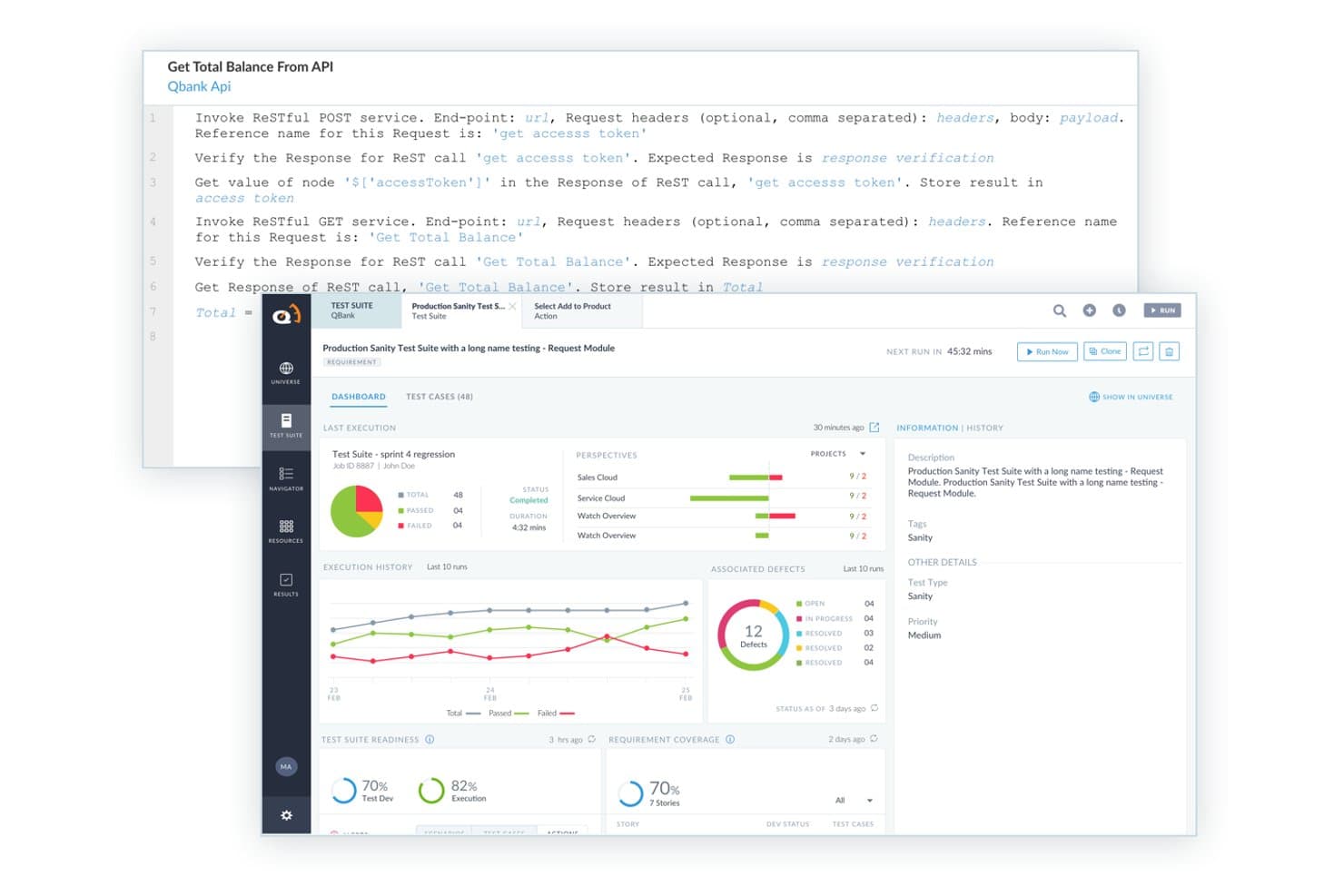
ACCELQ offers a codeless API testing interface with RESTful service invocation, test suite dashboards, execution history, and defect tracking built in. ACCELQ is a cloud-native test automation platform that covers API, web, mobile, and backend testing across REST, SOAP, GraphQL, and messaging protocols using a codeless, AI-assisted authoring environment.
Who Is ACCELQ Best For?
ACCELQ is a strong fit for enterprise QA teams that need to scale test automation across complex application stacks without relying on developer resources.
Why I Picked ACCELQ
I picked ACCELQ as one of the best because its codeless API test authoring genuinely removes the bottleneck of needing developer involvement to build test suites. Using the Business Process Scenario Builder, my team can chain API and UI calls into end-to-end flows without writing a single line of code. I also like the AI-powered self-healing, which automatically updates tests when endpoints change, cutting maintenance time on large regression suites significantly.
ACCELQ Key Features
- Multi-protocol API coverage: Test REST, SOAP, GraphQL, Kafka, MQ, and microservices endpoints from a single interface.
- Environment and variable management: Set up reusable variables, environment-specific configs, and secure authentication for accurate multi-stage testing.
- Service virtualization: Simulate unavailable or evolving APIs with built-in API virtualization for reliable test runs.
- Native CI/CD integrations: Connect directly to Jenkins, Azure DevOps, Bamboo, and TeamCity to automate API tests in every build.
ACCELQ Integrations
ACCELQ offers native integrations with Jenkins, Jira, ClickUp, Bamboo, TeamCity, Slack, and Microsoft Teams, and provides an API for custom integrations.
Pros and Cons
Pros:
- Built-in service virtualization for end-to-end tests
- AI-driven self-healing of test scenarios
- Codeless automation for UI, API, and mobile
Cons:
- Advanced reporting can require additional customization
- No documented support for gRPC or WebSockets
Learn more about ACCELQ: Best with end-to-end testing workflows
- Free demo available
- Pricing upon request

Centralize, connect, and govern your entire API estate with DigitalAPI. DigitalAPI is a flexible platform for teams that need a complete solution for API management and testing. It’s well-suited to industries like healthcare, banking, and insurance, where reliable API operations are essential. With tools for API discovery, governance, and lifecycle management, DigitalAPI supports more consistent workflows and better productivity. Whether the goal is improving API quality or ensuring reliable integrations, the platform is built to address those needs.
Why I Picked DigitalAPI
I chose DigitalAPI for its AI-driven automated test generation, which reduces manual testing work and shortens deployment timelines. The platform offers a solid testing environment that includes load testing and end-to-end testing, helping teams validate API performance under different conditions. Its real-time analytics also allow teams to identify and resolve issues early, making it a strong option for developers and QA teams focused on maintaining API quality.
DigitalAPI Key Features
In addition to its AI-driven test generation, I also found several other features valuable for API testing:
- Load Testing: Simulates peak traffic to identify performance issues and scalability challenges.
- End-to-End Testing: Ensures API functionality within the entire application workflow.
- Security Assessments: Conducts thorough checks to validate API security and data protection.
- Automated Documentation: Streamlines the documentation process, making it easier to maintain and share API specifications.
DigitalAPI Integrations
Native integrations are not currently listed by DigitalAPI.
Pros and Cons
Pros:
- Centralized governance across multiple gateways
- Detailed analytics for API performance
- Helix Gateway supports full lifecycle
Cons:
- No listed native integrations
- Pricing details not publicly available
Learn more about DigitalAPI: Best for continuous security testing
- Free demo available
- Pricing upon request
Visit WebsiteCustomer Rating:4.6/5
Invicti's dashboard shows various metrics and statuses of API tests. Invicti is a comprehensive API security tool tailored for developers and security teams. It automates vulnerability detection and integrates into CI/CD pipelines to enhance security workflows.
Why I picked Invicti: It offers real-time vulnerability detection and zero false positives, which aligns with its USP of continuous security testing. The tool's advanced scanning technology supports REST, SOAP, and GraphQL APIs. Invicti's DAST + IAST approach increases accuracy and identifies more vulnerabilities. It also provides visibility into exposed assets, helping teams manage risks effectively.
Standout features & integrations:
Features include advanced scanning technology for multiple API types, real-time vulnerability detection, and zero false positives. The platform promotes proactive security by helping developers write secure code. Its automation capabilities enhance the software development lifecycle.
Integrations include Jenkins, JIRA, GitHub, Azure DevOps, Bamboo, Bitbucket, GitLab, Slack, ServiceNow, and Microsoft Teams.
Pros and Cons
Pros:
- Automates vulnerability detection
- Supports multiple API types
- Proactive security measures
Cons:
- Pricing not readily available
- May require technical expertise
Learn more about Invicti: Best for AI-driven test creation
- Free trial available + free demo
- Pricing upon request
Visit WebsiteCustomer Rating:4.5/5
Testim validates and protects numerous endpoints to safeguard web services. Tricentis Testim is an AI-powered test automation tool tailored for web, mobile, and Salesforce applications. It's designed for development teams looking to improve testing efficiency and reduce maintenance efforts.
Why I picked Tricentis Testim: This tool focuses on AI-driven test creation with its low-code test authoring and self-healing AI locators. Testim Copilot uses generative AI to speed up test creation and debugging, aligning with its USP of being best for AI-driven test creation. The platform's integrated TestOps feature aids in managing tests effectively, and Testim Mobile provides comprehensive mobile app testing.
Standout features & integrations:
Features include low-code test authoring, self-healing AI locators, and Testim Copilot for faster test creation and debugging. Testim Mobile supports extensive mobile app testing, and Testim Salesforce simplifies testing for Salesforce applications.
Integrations include Jenkins, JIRA, GitHub, Slack, GitLab, Bitbucket, Azure DevOps, CircleCI, Bamboo, and TeamCity.
Pros and Cons
Pros:
- AI-driven test creation
- Low-code authoring
- Self-healing locators
Cons:
- May require technical knowledge
- Steep learning curve
Learn more about Tricentis Testim: Best for beginners in testing
- Free plan + 30-day free trial + free demo available
- From $180/seat/month
Visit WebsiteCustomer Rating:4.4/5
Katalon Studio integrates API test solutions across various test suites and accounts for effective test environments. Katalon Studio is a test automation tool designed for testers and developers. It offers a comprehensive solution for web, API, mobile, and desktop app testing, making it ideal for teams looking to streamline their testing processes.
Why I picked Katalon Studio: It's beginner-friendly, providing an intuitive user interface that simplifies test automation. The tool supports both scriptless and scripting modes, catering to users with varying levels of coding experience. With built-in keywords and templates, it reduces the learning curve for new testers. Additionally, its extensive documentation and community support make it accessible for beginners.
Standout features & integrations:
Features include scriptless test creation, which allows you to build tests without coding. The tool also offers built-in keywords and templates to simplify the process. You can switch between scripting and scriptless modes, giving flexibility to your testing approach.
Integrations include Jenkins, JIRA, Git, TestRail, Slack, qTest, Kobiton, Azure DevOps, Sauce Labs, and BrowserStack.
Pros and Cons
Pros:
- Beginner-friendly interface
- Supports scriptless test creation
- Extensive community support
Cons:
- Limited advanced features
- May require initial setup time
Learn more about Katalon Studio: Best for cloud-based testing
- 28-day free trial + free demo available
- From $39/month (billed annually)
Visit WebsiteCustomer Rating:4.3/5
Use Sauce Labs’s recorder to capture your test efforts. Sauce Labs is a cloud-based testing platform tailored for developers and QA teams. It provides automated testing solutions for web, mobile, and API applications, enabling teams to test across multiple browsers and devices.
Why I picked Sauce Labs: It offers a cloud-based infrastructure, allowing you to run tests without maintaining an in-house setup. This makes it ideal for teams looking to scale testing efforts efficiently. You can perform automated testing across a wide array of devices and browsers, ensuring comprehensive coverage. Sauce Labs real-time analytics and reporting features help your team quickly identify and resolve issues.
Standout features & integrations:
Features include real-time analytics that give you insights into test results. The platform supports a wide variety of browsers and devices, enhancing your testing coverage. Additionally, it offers instant access to a vast infrastructure, eliminating the need for in-house maintenance.
Integrations include Jenkins, JIRA, GitHub, CircleCI, Slack, Bamboo, Travis CI, Bitbucket, TeamCity, and Azure DevOps.
Pros and Cons
Pros:
- Cloud-based infrastructure
- Supports multiple devices
- Real-time analytics
Cons:
- May require advanced technical skills
- Can be costly for small teams
Learn more about Sauce Labs: Best for cross-platform support
- Free trial available
- Pricing upon request
Visit WebsiteCustomer Rating:2/5
Smartbear provides functional, security, and load testing of RESTful, SOAP, and GraphQL web services. SmartBear is a versatile testing tool designed for QA teams and developers. It provides comprehensive testing solutions for web, mobile, and API applications, making it ideal for teams needing cross-platform support.
Why I picked SmartBear: It offers extensive cross-platform compatibility, allowing your team to test on various environments without hassle. The tool supports automated testing for web, mobile, and desktop applications, aligning with its USP of cross-platform support. SmartBear robust reporting features provide insights into your testing efforts. Additionally, SmartBear's flexible scripting options cater to both beginners and experienced testers.
Standout features & integrations:
Features include robust reporting capabilities that offer insights into test results. The tool provides flexible scripting options, catering to testers with different skill levels. Its support for automated testing across web, mobile, and desktop applications enhances your testing coverage.
Integrations include Jenkins, JIRA, GitHub, Azure DevOps, Slack, Bitbucket, TeamCity, Bamboo, qTest, TestRail, and Confluence.
Pros and Cons
Pros:
- Extensive cross-platform compatibility
- Flexible scripting options
- Comprehensive reporting features
Cons:
- Pricing not transparent
- Limited offline support
Learn more about SmartBear: 10Best for detecting vulnerabilities
Acunetix
- Free demo available
- Pricing upon request
Visit WebsiteCustomer Rating:4.2/5
Acunetix's vulnerability scanner dashboard provides an overview of the scan results and detected vulnerabilities. Acunetix is a web application security scanner designed for security teams and developers. It focuses on detecting vulnerabilities in web applications to enhance your security posture.
Why I picked Acunetix: It excels in vulnerability detection with its ability to identify over 7,000 vulnerabilities, which aligns with its USP of being best for detecting vulnerabilities. The tool integrates dynamic and static analysis to cover a wide range of security issues. Acunetix's scanning engine is fast and accurate, providing comprehensive security assessments. It also supports a wide range of technologies, making it versatile for different environments.
Standout features & integrations:
Features include advanced scanning for over 7,000 vulnerabilities, fast and accurate scanning engine, and comprehensive security assessments. The tool supports various technologies, enhancing its versatility. It also provides detailed reports to help you understand and address security issues.
Integrations include Jenkins, JIRA, GitHub, GitLab, Azure DevOps, TFS, Bugzilla, Mantis, ServiceNow, and Slack.
Pros and Cons
Pros:
- Detects over 7,000 vulnerabilities
- Fast scanning engine
- Supports various technologies
Cons:
- Requires technical expertise
- Initial setup complexity
Learn more about Acunetix:
Alte instrumente de testare API
Iată câteva opțiuni suplimentare de instrumente de testare API care nu au ajuns pe lista mea scurtă, dar care merită totuși verificate:
- 11Astra API SecurityBest for AI-powered vulnerability scanning
- 12SoapUIBest for open-source testing
- 13Apigee EdgeBest for API management
- 14HoppscotchBest for quick API requests
- 15Subject7Best for codeless automation
- 16QA WolfBest for fast test creation
- 17ReflectBest for no-code test automation
- 18Apache JMeterBest for load testing
- 19Parasoft SOAtestBest for service virtualization
- 20SmartBear ReadyAPIBest for end-to-end testing
- 21PostmanBest for collaboration features
- 22TricentisBest for continuous testing
- 23Karate DSLBest for BDD testing
- 24Rest AssuredBest for Java developers
How I Evaluate API Testing Tools
My evaluation has two layers: the baseline a tool must clear to qualify, and differentiators I look for when teams need contract testing, mock servers, or CI/CD-native automation coverage.
Core Functionality (Table Stakes For This List)
When I'm selecting tools for my list, I rank each one on a scale from 0 (does not offer the functionality) to 5 (excels in this area) for each core functionality listed below. Then, I calculate the tool's total score into a percentage. Each tool needs to achieve a minimum total score of 75% to be considered for inclusion.
- Multi-Protocol API Support: I check whether a tool handles REST, SOAP, GraphQL, and newer protocols like gRPC or WebSockets so teams aren't juggling separate tools per service.
- Automated Test Creation & Execution: Tools should support scripted assertions, parameterized runs, and data-driven test suites—think validating a payments endpoint across hundreds of currency inputs.
- CI/CD Integration: I look for native hooks into pipelines like Jenkins, GitHub Actions, or GitLab CI so API tests run automatically on every commit or deploy.
- Environment & Variable Management: Switching between dev, staging, and production configs with reusable tokens and secrets matters, especially when teams share collections across projects.
- Reporting & Analytics: Clear pass/fail results, response validation details, and exportable reports help QA leads and engineering managers track test coverage without digging through logs.
- Mocking & Virtualization: I evaluate whether the tool offers mock servers or service virtualization so teams can test against dependencies that are unstable, rate-limited, or still in development.
Once I have a list of tools that meet the criteria, I consider what sets each platform apart.
Differentiating Factors (What Sets Vendors Apart)
Here's how I compare and contrast different vendors:
Standout Features
Contract and schema testing is a major differentiator—tools that validate endpoints against OpenAPI or AsyncAPI specs catch breaking changes before they hit production. AI-powered test generation also matters here, since auto-generating assertions from an API spec cuts the time it takes to build coverage across large endpoint sets. I look for integrated security scanning that flags OWASP API Top 10 vulnerabilities within existing test runs rather than requiring a separate tool. Performance and load testing built into the same platform rounds things out for teams who want one place to run functional and scalability checks.
Beyond Features
Ecosystem and integration depth matters a lot—I evaluate whether a tool connects natively with source control, CI/CD platforms, and issue trackers like Jira so test results feed into existing workflows. Pricing models also deserve attention, since per-user costs can spike fast when QA, dev, and DevOps teams all need access. I also consider the learning curve: tools like Postman and Insomnia offer large community libraries and public collections that help new team members ramp up quickly, while code-first platforms like Karate or REST Assured assume stronger developer fluency from day one.
Cum alegi instrumentele de testare API
Este ușor să te pierzi în liste lungi de funcții și structuri complexe de prețuri. Pentru a te ajuta să rămâi concentrat pe parcursul procesului tău unic de selectare a software-ului, iată o listă de factori de care trebuie să ții cont:
| Factor | Ce trebuie luat în considerare |
| Scalabilitate | Asigură-te că instrumentul poate face față unor cerințe de testare mai mari pe măsură ce echipa sau proiectul tău se dezvoltă. Caută soluții care acceptă mai mulți utilizatori și testarea la scară largă fără probleme de performanță. |
| Integrări | Verifică dacă instrumentul se integrează cu stiva ta software existentă, cum ar fi fluxurile CI/CD, sistemele de control al versiunilor și instrumentele de colaborare. Acest lucru poate îmbunătăți eficiența fluxului de lucru și reduce eforturile manuale. |
| Posibilități de personalizare | Caută instrumente care îți permit să adaptezi procesele de testare la nevoile specifice ale echipei tale. Panourile de control și configurațiile de testare personalizabile pot îmbunătăți productivitatea și relevanța. |
| Ușurință în utilizare | Evaluează interfața cu utilizatorul și experiența generală. Un instrument ușor de navigat, care necesită instruire minimă, va economisi timpul echipei tale și îi va ajuta pe membrii acesteia să se concentreze asupra testării, nu asupra învățării software-ului. |
| Buget | Ia în considerare costul total de proprietate, inclusiv licențierea, asistența și eventualele suplimente. Asigură-te că instrumentul se încadrează în bugetul tău și răspunde în același timp nevoilor echipei tale. |
| Măsuri de securitate | Asigură-te că instrumentul oferă măsuri de securitate adecvate pentru protejarea datelor sensibile și a rezultatelor testelor. Funcții precum criptarea datelor, controalele de acces și conformitatea cu standardele din industrie sunt esențiale. |
| Asistență și resurse | Ia în considerare disponibilitatea asistenței pentru clienți, a documentației și a forumurilor comunității. O asistență de încredere poate fi neprețuită în timpul implementării și depanării. |
| Performanță | Evaluează viteza și fiabilitatea instrumentului în executarea testelor. Un instrument performant va oferi feedback mai rapid și îți va permite să identifici prompt problemele. |
Tendințe în instrumentele de testare API
În cercetarea mea, am colectat nenumărate actualizări de produse, comunicate de presă și jurnale de lansare de la diferiți furnizori de instrumente pentru testarea API-urilor. Iată câteva dintre tendințele emergente pe care le urmăresc:
- Testare bazată pe inteligență artificială: Inteligența artificială este utilizată din ce în ce mai mult pentru a crea procese de testare mai inteligente. Instrumentele folosesc inteligența artificială pentru analize predictive și generarea automată a cazurilor de testare, făcând testarea mai eficientă. Unii furnizori integrează inteligența artificială pentru a identifica erorile potențiale înainte ca acestea să apară.
- Testare deplasată spre stânga: Această tendință presupune efectuarea testării mai devreme în procesul de dezvoltare. Prin identificarea problemelor într-un stadiu incipient, echipele pot reduce costurile și îmbunătăți calitatea software-ului. Furnizorii își îmbunătățesc instrumentele pentru a sprijini această abordare, integrându-le cu mediile de dezvoltare pentru a facilita testarea timpurie.
- Testarea securității API-urilor: Pe măsură ce securitatea devine tot mai importantă, instrumentele se concentrează pe identificarea vulnerabilităților din API-uri. Sunt integrate funcții avansate de testare a securității pentru a proteja datele și a asigura conformitatea cu standardele. Această tendință răspunde preocupărilor tot mai mari legate de breșele de securitate a datelor.
- Suport pentru microservicii: Odată cu dezvoltarea arhitecturii bazate pe microservicii, instrumentele se adaptează pentru a testa eficient aceste sisteme distribuite. Acest lucru presupune gestionarea dependențelor complexe și asigurarea unei comunicări fiabile între servicii. Furnizorii își adaptează instrumentele pentru a sprijini aceste arhitecturi.
- Accent pe experiența utilizatorului: Se observă o orientare către îmbunătățirea interfeței și a experienței de utilizare a instrumentelor de testare. Interfețele simplificate și îndrumarea mai bună a utilizatorilor fac instrumentele mai accesibile pentru persoanele fără cunoștințe tehnice. Furnizorii investesc în actualizări de design pentru a-și face produsele mai intuitive.
Ce sunt instrumentele pentru testarea API-urilor?
Instrumentele pentru testarea API-urilor sunt aplicații software care îi ajută pe dezvoltatori și pe echipele de asigurare a calității să testeze, să valideze și să monitorizeze funcționalitatea și performanța API-urilor. Acestea sunt utilizate în mod obișnuit de ingineri software, testeri și profesioniști DevOps pentru a se asigura că API-urile funcționează corect, gestionează cazurile-limită și comunică adecvat între sisteme.
Funcții precum scripturile de testare automatizate, gestionarea mediilor și raportarea detaliată contribuie la depanarea mai rapidă, testarea mai ușoară a integrării și o acuratețe mai bună în diferite medii. În general, aceste instrumente facilitează menținerea unor API-uri fiabile și de înaltă calitate, care susțin livrarea stabilă a software-ului.
Funcțiile instrumentelor pentru testarea API-urilor
Atunci când selectați instrumente de monitorizare a API-urilor, urmăriți următoarele funcții principale:
- Posibilități de automatizare: Automatizați testele repetitive pentru a economisi timp și a reduce efortul manual, sporind eficiența procesului de testare.
- Testarea securității: Identificați vulnerabilitățile din API-uri pentru a proteja datele și a asigura conformitatea cu standardele de securitate.
- Scalabilitate: Gestionați eficient cerințele crescute de testare pe măsură ce echipa sau proiectul se dezvoltă, asigurând menținerea unei performanțe constante.
- Interfață ușor de utilizat: Simplificați navigarea și reduceți curba de învățare, făcând instrumentul accesibil atât utilizatorilor tehnici, cât și celor fără cunoștințe tehnice.
- Posibilități de personalizare: Adaptați procesele de testare și tablourile de bord la nevoile specifice ale echipei, îmbunătățind relevanța și productivitatea.
- Analize în timp real: Oferiți informații despre performanța și utilizarea API-urilor, permițând identificarea și rezolvarea rapidă a problemelor.
- Suport pentru integrări: Instrumentele de integrare API se conectează la stivele software existente, precum conductele CI/CD și sistemele de control al versiunilor, pentru a îmbunătăți eficiența fluxului de lucru.
- Suport pentru microservicii: Testați eficient sistemele distribuite, asigurând comunicarea fiabilă între servicii și gestionând dependențele complexe.
Beneficiile instrumentelor pentru testarea API-urilor
Implementarea instrumentelor pentru testarea API-urilor oferă mai multe beneficii echipei și companiei dumneavoastră. Iată câteva dintre acestea:
- Eficiență îmbunătățită: Posibilitățile de automatizare reduc eforturile de testare manuală, permițând echipei să se concentreze asupra sarcinilor mai complexe și accelerând procesul de dezvoltare.
- Securitate îmbunătățită: Funcțiile de testare a securității ajută la identificarea timpurie a vulnerabilităților, protejând datele sensibile și asigurând conformitatea cu standardele din industrie.
- Fiabilitate mai bună: Suportul pentru integrări asigură funcționarea fără probleme a API-urilor împreună cu alte componente software, reducând riscul de erori și perioade de nefuncționare.
- Scalabilitate: Capacitatea de a gestiona cerințe crescute de testare înseamnă că puteți menține performanța pe măsură ce echipa sau proiectul se dezvoltă.
- Identificarea rapidă a problemelor: Analizele în timp real oferă informații despre performanța API-urilor, permițând echipei să detecteze și să rezolve rapid problemele.
- Opțiuni de personalizare: Adaptarea proceselor de testare la nevoile specifice ale echipei îmbunătățește productivitatea și relevanța.
- Experiență de utilizare simplificată: O interfață ușor de utilizat facilitează navigarea în instrument atât pentru utilizatorii tehnici, cât și pentru cei fără cunoștințe tehnice, reducând curba de învățare.
Costurile și prețurile instrumentelor pentru testarea API-urilor
Selectarea instrumentelor de testare a API-urilor necesită înțelegerea diferitelor modele și planuri de preț disponibile. Costurile variază în funcție de funcții, dimensiunea echipei, suplimente și alți factori. Tabelul de mai jos rezumă planurile comune, prețurile medii ale acestora și funcțiile incluse de obicei în soluțiile pentru instrumente de testare a API-urilor:
Tabel comparativ al planurilor pentru instrumentele de testare a API-urilor
| Tip de plan | Preț mediu | Funcții comune |
| Plan gratuit | $0 | Capacități de testare de bază, asistență limitată și acces la comunitate. |
| Plan personal | $10-$30 /utilizator /lună | Capacități de automatizare, integrări de bază și asistență prin e-mail. |
| Plan pentru companii | $50-$100 /utilizator /lună | Integrări avansate, testarea securității și asistență prioritară. |
| Plan pentru întreprinderi | $150-$300/utilizator /lună | Funcții personalizabile, manager de cont dedicat și analize avansate. |
Întrebări frecvente despre instrumentele de testare API
Iată câteva răspunsuri la întrebările frecvente despre instrumentele API:
Ce instrument este folosit cel mai frecvent pentru testarea API-urilor?
Postman este unul dintre cele mai utilizate instrumente pentru testarea API-urilor. Este preferat datorită interfeței sale ușor de utilizat și funcțiilor extinse, precum testarea automatizată și colaborarea. Echipa dvs. poate crea, partaja și testa cu ușurință API-uri, ceea ce îl transformă într-o alegere populară printre dezvoltatori și testeri.
Care sunt principalele provocări întâmpinate în testarea API-urilor?
O provocare majoră este asigurarea securității, în special atunci când se gestionează date sensibile. O alta este menținerea consecvenței datelor între diferite versiuni ale API-ului. Echipa dvs. s-ar putea confrunta, de asemenea, cu probleme legate de scalarea testelor și gestionarea formatelor de date complexe. Depășirea acestor provocări necesită o planificare atentă și instrumentele potrivite.
Ce trebuie verificat la efectuarea testării API-urilor?
La efectuarea testării API-urilor, verificați funcționalitatea punctului final pentru a vă asigura că acesta funcționează conform așteptărilor. Verificați acuratețea răspunsului și capacitățile de gestionare a erorilor. De asemenea, este important să testați formatul datelor, precum JSON sau XML, și să vă asigurați că API-ul funcționează bine în condiții de încărcare diferite.
Care sunt cele trei tipuri de testare în cazul API-urilor?
Cele trei tipuri principale de testare a API-urilor sunt testarea funcțională, testarea performanței și testarea securității. Testarea funcțională asigură faptul că API-ul se comportă conform așteptărilor, testarea performanței măsoară viteza și gestionarea încărcării, iar testarea securității verifică existența vulnerabilităților. Fiecare tip contribuie la menținerea fiabilității și siguranței API-ului.
Cum pot îmbunătăți eficiența testelor API?
Pentru a îmbunătăți eficiența, utilizați automatizarea pentru a reduce eforturile de testare manuală. Concentrați-vă pe reutilizare prin crearea unor cazuri de testare modulare, care pot fi utilizate în diferite scenarii. De asemenea, integrați instrumentele de testare în conducta dvs. CI/CD pentru a simplifica procesul de testare și a obține feedback mai rapid.
De ce este important să testați API-urile încă de la începutul procesului de dezvoltare?
Testarea API-urilor într-o etapă timpurie ajută la identificarea problemelor înainte ca acestea să se agraveze, economisind timp și resurse. Echipa dvs. poate remedia erorile atunci când costurile de rezolvare sunt mai mici. Testarea timpurie îmbunătățește, de asemenea, calitatea generală a software-ului, conducând la o aplicație mai fiabilă și mai robustă.