

Cele mai bune software-uri de gestionare a aplicațiilor mobile ajută echipele să securizeze aplicațiile mobile, să controleze accesul și să mențină performanța constantă pe dispozitivele angajaților. Aceste instrumente facilitează gestionarea implementărilor aplicațiilor, aplicarea politicilor de utilizare și protejarea datelor sensibile fără a întrerupe fluxurile de lucru zilnice.
Atunci când configurările incorecte cauzează probleme de acces, procesele manuale încetinesc actualizările aplicațiilor sau lacunele de securitate trec neobservate pe dispozitive, organizațiile se confruntă cu riscuri sporite și productivitate redusă. Aceste provocări complică depanarea, creează neconcordanțe în modul de utilizare a aplicațiilor și îngreunează colaborarea dintre departamentele IT, de securitate și utilizatorii finali.
Cu peste 20 de ani de experiență în industrie în calitate de director tehnologic, am testat și analizat zeci de platforme software de gestionare a aplicațiilor mobile în medii reale, pentru a le evalua eficiența, calitatea integrării și ușurința în utilizare. Acest ghid prezintă cele mai bune software-uri de gestionare a aplicațiilor mobile. Fiecare recenzie acoperă funcționalități, avantaje și dezavantaje, precum și cazuri de utilizare ideale, pentru a te ajuta să alegi instrumentul potrivit.
Why Trust Our Software Recommendations
6,700+
Reviews
20
Industry experts
16+
Evaluation factors
14
Years
Our team has been testing and reviewing software since 2012. As tech leaders ourselves, we know how difficult—and important—it is to choose the right software.
For this guide, we evaluated tools using hands-on testing and independent research, scoring tools using our selection criteria.
Our reviews reflect our human editorial judgment, not a sales pitch.
Expert reviewers:
- Paulo Gardini MiguelTech Director
 Tim FisherVP of AI
 Gabriel RosasTech Lead & Software Architect
 Christhian GruhnTech Lead & Platform Architect

Tabel comparativ al software-urilor de gestionare a aplicațiilor mobile
Acest tabel comparativ rezumă detaliile de preț pentru selecțiile mele de top de software-uri de gestionare a aplicațiilor mobile.
Sorted by: Default
| Tool | Starting Price | Website | |
|---|---|---|---|
Best for mobile app management globally | 4.7 out of 5 | $49/user/month Free demo available | Website |
Best for Android-only app deployment | 4.7 out of 5 | $2.40/device/year 30-day free trial | Website |
Best for real-time monitoring | 4.7 out of 5 | $10/month Free plan + 30-day trial + demo available | Website |
Best for cross-platform support | 4.8 out of 5 | Pricing upon request Free demo available | Website |
Best for identity management | 4.6 out of 5 | Pricing upon request Free trial + free demo available | Website |
Best for secure access | Not rated | Pricing upon request Free demo available | Website |
Best for unified endpoint management | Not rated | $3/device/month | Website |
Best for application control | Not rated | Pricing upon request Free demo available | Website |
Best for secure messaging | Not rated | Pricing upon request Free demo available | Website |
Best for Apple device management | Not rated | $4/device/month 14-day free trial + free demo available | Website |


Recenzie a celor mai bune software-uri de gestionare a aplicațiilor mobile
Mai jos sunt rezumatele mele detaliate ale celor mai bune software-uri de gestionare a aplicațiilor mobile care au ajuns pe lista mea scurtă. Recenziile mele oferă o analiză detaliată a principalelor funcționalități, avantajelor și dezavantajelor, integrărilor și cazurilor de utilizare ideale ale fiecărui instrument, pentru a te ajuta să îl găsești pe cel mai potrivit pentru tine.
 Best for mobile app management globally
- Free demo available
- From $49/user/month
Visit WebsiteCustomer Rating:4.7/5
Deel lets you track company devices and maintain control over apps to reduce unauthorized access. Deel is a mobile application management software designed for global teams. It primarily serves businesses looking to manage IT operations across multiple countries, focusing on compliance and automation.
Why I picked Deel: Deel excels in managing IT operations in over 130 countries, making it ideal for global compliance. It automates the entire worker lifecycle, from procurement to offboarding, ensuring you don't have to worry about manual processes. Its features include remote device configuration and automated asset tracking, which are crucial for managing a dispersed workforce. Deel's system also supports secure data recovery, adding an extra layer of security to your operations.
Standout features & integrations:
Features include automated lifecycle management, which covers every stage from procurement to offboarding, ensuring your team is equipped from day one. It supports remote device configuration, allowing you to manage devices without physical presence. Automated asset tracking keeps you informed about device status and usage, helping you maintain control over your resources.
Integrations include popular platforms like BambooHR, Workday, SAP SuccessFactors, Greenhouse, Lever, ADP, Namely, Gusto, Zenefits, and Rippling.
Pros and Cons
Pros:
- Supports over 130 countries
- Strong automation features
- Extensive global reach
Cons:
- Requires a better intuitive design
- Complicated navigation system
Learn more about Deel IT: Best for Android-only app deployment
- 30-day free trial
- From $2.40/device/year (billed annually)
Visit WebsiteCustomer Rating:4.7/5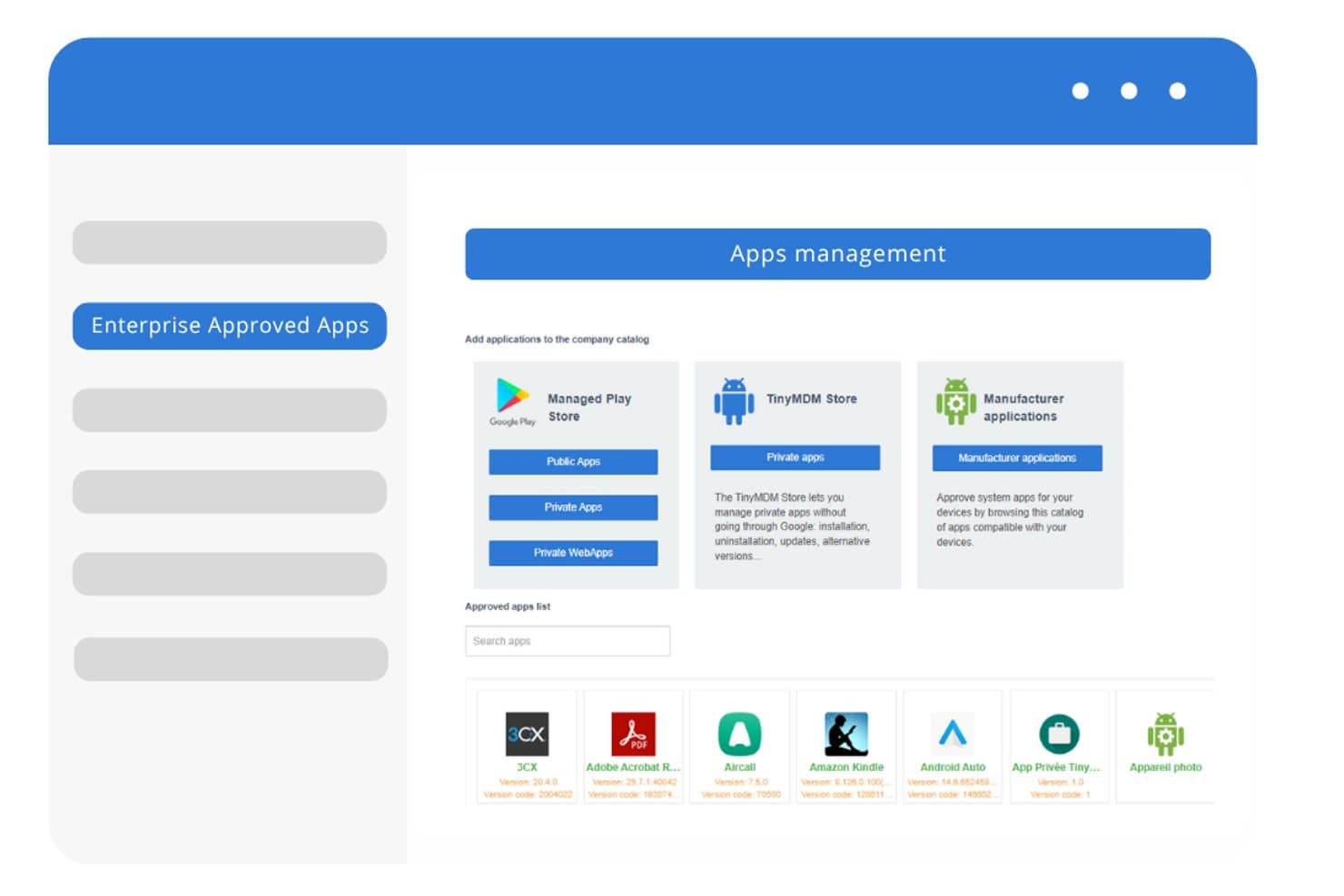
TinyMDM lets users manage and approve enterprise apps from one dashboard. TinyMDM is an Android-only MDM platform that covers app deployment, device policy management, kiosk mode, Work Profile-based containerization, and private app distribution through both Managed Google Play and its own built-in app store.
Who Is TinyMDM Best For?
TinyMDM is a strong fit for small IT teams managing Android-only fleets who need fast, no-fuss app deployment without the overhead of a full enterprise MDM platform.
Why I Picked TinyMDM
I picked TinyMDM as one of the best because it goes all-in on Android app deployment in a way that broader MDM platforms simply don't. I love that you can push private APKs through either Managed Google Play or TinyMDM's own built-in store, so apps that violate Play Store rules or exceed size limits still reach devices. Policy-targeted installs mean different device groups get different app sets automatically, and zero-touch enrollment through ZTE or Samsung KME means new devices pick up their apps at first boot.
TinyMDM Key Features
- Android Work Profile containerization: Separates work apps and data from personal content on BYOD devices, with a distinct password, encrypted storage, and employee-controlled profile pausing.
- Managed configuration deployment: Pre-sets app-level settings and permissions, such as login credentials or camera access, before apps reach the device.
- Microsoft Entra ID sync: Syncs users and contacts from Entra ID and supports admin SSO, so device management stays connected to your existing identity infrastructure.
- Kiosk mode with per-app controls: Locks devices to a defined set of apps, with options for per-app passwords, hidden apps, and an auto-launch default app.
TinyMDM Integrations
TinyMDM integrates with Google Android Enterprise, Managed Google Play, Android Zero-Touch, Samsung Knox Mobile Enrollment, Microsoft Entra ID, Google SSO, and Knox Service Plugin. Its REST API supports custom integrations.
Pros and Cons
Pros:
- Work profiles protect personal data
- Policy-targeted installs reach device groups
- Private APK distribution bypasses Play restrictions
Cons:
- No conditional access or app DLP
- Android-only excludes mixed-device fleets
Learn more about TinyMDM: Best for real-time monitoring
- Free plan + 30-day trial + demo available
- From $10/month
Visit WebsiteCustomer Rating:4.7/5
Site24x7's application performance monitoring (APM) summary can be used to gain insights into the performance metrics of mobile applications. Site24x7 is a monitoring solution tailored for businesses needing real-time insights into website, server, cloud, and application performance. It's particularly useful for IT teams seeking to ensure optimal uptime and service quality.
Why I picked Site24x7: This tool excels in providing real-time monitoring across multiple platforms, which is crucial for maintaining service quality. Its real user monitoring (RUM) feature lets you analyze user experiences directly, offering insights into customer interactions. Synthetic web transaction monitoring simulates user actions, helping identify potential issues before they affect real users. Network monitoring ensures that critical devices are always performing well, providing peace of mind for your IT team.
Standout features & integrations:
Features include log management for troubleshooting, allowing you to analyze logs from different sources. IT monitoring powered by AIOps helps detect anomalies, so you can address issues proactively. Cloud cost management gives you insights into your cloud spending, helping your team optimize resources.
Integrations include Jira, Slack, Microsoft Teams, Zapier, ServiceNow, PagerDuty, Trello, Zoho CRM, Zendesk, and Opsgenie.
Pros and Cons
Pros:
- Easy setup process
- Extensive monitoring features
- Real-time insights
Cons:
- Requires constant updates
- It can be overwhelming for beginners
Learn more about Site24x7: Best for cross-platform support
- Free demo available
- Pricing upon request
Visit WebsiteCustomer Rating:4.8/5
SOTI MobiControl securely manages any device or endpoint with any form factor and any operating system throughout its entire lifecycle. SOTI MobiControl is a device management solution designed for businesses needing to manage diverse device types. It's suitable for IT teams that require control over various operating systems and platforms.
Why I picked SOTI MobiControl: It excels in cross-platform support, allowing you to manage a wide range of devices from one platform. The remote control feature provides your team with real-time access to devices, enhancing troubleshooting capabilities. SOTI MobiControl's geofencing capabilities let you set virtual boundaries, adding a layer of security to your operations. Additionally, its app management functionality ensures that your applications are up-to-date and secure.
Standout features & integrations:
Features include advanced diagnostics, which help you identify and resolve device issues quickly. Content management allows you to distribute and manage content across devices, ensuring your team has access to the necessary resources. The software also offers custom reports, providing insights into device usage and performance.
Integrations include Microsoft Azure, Google Workspace, Cisco Meraki, VMware, ServiceNow, IBM MaaS360, Salesforce, SAP, Okta, and Splunk.
Pros and Cons
Pros:
- Supports geofencing for security
- Strong cross-platform capabilities
- Effective remote control features
Cons:
- Complex interface for new users
- Requires technical expertise
Learn more about SOTI MobiControl: Best for identity management
- Free trial + free demo available
- Pricing upon request
Visit WebsiteCustomer Rating:4.6/5
Take a look at Cyber Ark's version 10 interface which focuses on seamless workflows and easy access to your most important information. Cyberark is a security-focused mobile application management software aimed at enterprises needing strong identity management solutions. It's ideal for IT teams that prioritize safeguarding sensitive information and managing user access effectively.
Why I picked Cyberark: The tool offers advanced identity management features, crucial for businesses handling sensitive data. Its privileged access management controls who can access critical systems, ensuring your data remains secure. Threat detection and response capabilities help identify and mitigate risks before they become problems. Multi-factor authentication adds an extra layer of security, making it a reliable choice for protecting your organization's assets.
Standout features & integrations:
Features include session monitoring that records and monitors user activities, providing insights into access patterns. Compliance management helps you meet regulatory requirements, reducing the risk of non-compliance penalties. Automated password management simplifies credential handling, ensuring your team doesn't have to worry about password security.
Integrations include ServiceNow, Splunk, SailPoint, Palo Alto Networks, AWS, Microsoft Azure, Google Cloud, Okta, VMware, and IBM Security.
Pros and Cons
Pros:
- Supports multi-factor authentication
- Advanced threat detection
- Strong identity management
Cons:
- Limited customization options
- High learning curve
Learn more about Cyberark:

Take a look at Mobile Iron's way of applying the VPN configuration to a label. MobileIron is a mobile device management solution designed for enterprises focused on providing secure access to corporate data. It's ideal for IT teams looking to manage and secure endpoints across various devices and platforms.
Why I picked MobileIron: The tool provides secure access to corporate resources, which is essential for businesses managing sensitive data. Its zero-trust security framework ensures that only authorized users can access company information. MobileIron's device management capabilities allow you to control and secure devices remotely, enhancing your team's ability to maintain security. The software also offers threat detection features to identify and mitigate potential security risks.
Standout features & integrations:
Features include app management, which lets you deploy and manage applications across devices. Conditional access policies help ensure that only compliant devices can access corporate resources. MobileIron also offers remote wipe capabilities, allowing you to erase data from lost or stolen devices to protect sensitive information.
Integrations include Microsoft Azure, Cisco, Splunk, ServiceNow, Okta, Palo Alto Networks, Zscaler, Aruba, Ping Identity, and Salesforce.
Pros and Cons
Pros:
- Remote wipe capabilities
- Strong security framework
- Effective threat detection
Cons:
- Requires technical knowledge
- Can be resource-intensive
Learn more about MobileIron: Best for unified endpoint management
- From $3/device/month (billed annually)

This is a view of the user workspace delivered by Workspace ONE Access. VMware Workspace ONE is a unified endpoint management solution designed for businesses looking to manage all devices from a single platform. It serves IT teams that need comprehensive control over both mobile and desktop environments.
Why I picked VMware Workspace ONE: It offers unified endpoint management, allowing you to manage all your devices from a single console, a feature critical for maintaining consistency across platforms. The software provides conditional access policies to ensure that only compliant devices can access your network. Its digital workspace feature lets your team access applications and resources securely from anywhere. Additionally, Workspace ONE's automation capabilities simplify repetitive tasks, freeing up your IT resources.
Standout features & integrations:
Features include remote management, which allows you to troubleshoot and resolve issues without being physically present. The software also offers comprehensive compliance reporting, helping you track and meet regulatory requirements. Customizable dashboards give you a quick overview of device status and alerts, keeping your team informed and proactive.
Integrations include Microsoft Office 365, ServiceNow, Salesforce, SAP, Google Workspace, Cisco, Okta, Zoom, Slack, and IBM Security.
Pros and Cons
Pros:
- Customizable dashboards
- Strong unified management capabilities
- Effective automation features
Cons:
- Requires technical expertise
- High resource consumption
Learn more about VMware Workspace ONE:

Checkpoint's mobile application management software dashboard that controls apps and sites. Check Point is a security solution designed for enterprises needing detailed control over applications. It caters to IT teams who want to protect their networks by managing which applications can operate within their environment.
Why I picked Check Point: This tool provides granular application control, which is essential for organizations wanting to safeguard their networks. The software lets you set policies that determine how applications can be used, enhancing security. Real-time monitoring provides insights into application usage, helping your team identify potential threats. Additionally, Check Point's threat prevention features work to block malicious traffic before it reaches your network.
Standout features & integrations:
Features include detailed logging, which records application activity for further analysis. The software offers automated updates to keep your security measures current without manual intervention. Customizable alerts notify your team of unusual activity, allowing for quick responses to potential threats.
Integrations include Microsoft Azure, AWS, Google Cloud Platform, VMware, Cisco, IBM Security, Splunk, ServiceNow, Palo Alto Networks, and Fortinet.
Pros and Cons
Pros:
- Granular application control
- Real-time monitoring capabilities
- Strong threat prevention features
Cons:
- Complex initial configuration
- Limited customization for policies
Learn more about Check Point:

Blackberry UEM solutions will allow you to deploy mobile device management (MDM) securely, and in a manner that suits your business needs. BlackBerry UEM is an enterprise mobility management solution geared towards organizations that prioritize secure communication. It's perfect for businesses needing to protect sensitive information across mobile devices.
Why I picked BlackBerry UEM: It offers secure messaging capabilities, which are vital for organizations focused on safeguarding communication. The platform provides end-to-end encryption, ensuring your team's messages stay private. Its containerization feature separates work data from personal data, enhancing security. Additionally, BlackBerry UEM supports a wide range of devices, allowing you to manage them all from a single console.
Standout features & integrations:
Features include policy management, enabling you to enforce security policies across devices easily. The software offers advanced threat protection to help safeguard against potential cyber threats. Application management lets you control app deployment and updates, ensuring your team uses the most secure versions.
Integrations include Microsoft Office 365, Microsoft Teams, IBM MaaS360, ServiceNow, Splunk, Salesforce, SAP, Cisco Webex, Zoom, and Google Workspace.
Pros and Cons
Pros:
- Comprehensive policy management
- Strong encryption for messaging
- Supports a wide range of devices
Cons:
- Complex setup process
- Requires regular updates
Learn more about BlackBerry UEM: 10Best for Apple device management
Jamf Pro
- 14-day free trial + free demo available
- From $4/device/month

Here is a view of Jamf Pro dashboard where you can see display real-time information about your smart groups, policies, configuration profiles, patch reports, licensed software, and more. Jamf Pro is a mobile device management solution tailored for organizations relying heavily on Apple devices. It's ideal for IT teams that need to manage and secure a fleet of Macs, iPads, and iPhones effectively.
Why I picked Jamf Pro: Jamf Pro specializes in managing Apple devices, making it a perfect fit for teams using Apple's ecosystem. Its device enrollment program streamlines the onboarding of new devices, ensuring they're ready for use with minimal effort. Configuration profiles allow you to set up devices with the necessary settings and restrictions. The self-service app empowers users to install apps and resources without needing IT assistance, enhancing productivity.
Standout features & integrations:
Features include automated patch management, which helps keep your software up-to-date by automatically applying updates. Smart targeting allows you to deploy configurations and apps based on specific criteria, ensuring the right resources reach the right devices. Inventory management gives you a comprehensive view of all your Apple devices, helping you maintain control over your fleet.
Integrations include Microsoft Azure, Google Workspace, Cisco Meraki, ServiceNow, Splunk, Okta, VMware, SAP, AWS, and IBM Security.
Pros and Cons
Pros:
- Strong configuration options
- Easy device enrollment
- Excellent Apple ecosystem support
Cons:
- Complex for new users
- Requires Apple expertise
Learn more about Jamf Pro:
Alte software-uri de gestionare a aplicațiilor mobile
Iată câteva opțiuni suplimentare de software pentru gestionarea aplicațiilor mobile care nu au ajuns pe lista mea scurtă, dar merită totuși verificate:
- 11Rippling ITBest for secure app access
- 12EsperBest for Android deployments
- 13Microsoft IntuneBest for Windows integration
- 14HexnodeBest for cross-platform support
- 15ManageEngineBest for IT service management
- 16Digital.aiBest for DevOps integration
- 17IBM Security MaaS360Best for AI-driven insights
- 18Citrix Endpoint ManagementBest for smooth app and device integration
- 1942GearsBest for small business needs
- 20MerakiBest for cloud-based management
- 21AirdroidBest for remote device access
- 22AppliveryBest for app distribution
- 23AppaloosaBest for app security
- 24PolicyPakBest for policy management
- 25WizyEMMBest for enterprise mobility
- 26SquareStackBest for SaaS management
How I Evaluate Mobile Application Management Software
I split my evaluation into two layers: the baseline every MAM tool must offer—like app distribution and selective wipe—and the differentiators that set the best platforms apart.
Core Functionality (Table Stakes For This List)
When I'm selecting tools for my list, I rank each one on a scale from 0 (does not offer the functionality) to 5 (excels in this area) for each core functionality listed below. Then, I calculate the tool's total score into a percentage. Each tool needs to achieve a minimum total score of 65% to be considered for inclusion.
- App Distribution & Deployment: I check whether the platform supports an enterprise app catalog across iOS and Android, including silent installs, staged rollouts, and the ability to push both public store and custom in-house apps.
- App-Level Security Policies: I look for granular DLP controls like copy/paste restrictions and save-as blocking on managed apps, plus conditional access rules that gate entry based on device compliance.
- App Configuration Management: I evaluate how well the tool handles remote app setup via AppConfig or equivalent standards, so admins can push server URLs, certificates, and VPN profiles without end-user involvement.
- Selective App Wipe: The platform should let admins remove corporate apps and data from a departing employee's personal phone while leaving personal content untouched, a core requirement for any BYOD program.
- App Containerization & Data Separation: I look at how the tool isolates work data from personal data, whether through Android work profiles, managed app protection on iOS, or encrypted containers that prevent data leakage between apps.
- App Inventory & Compliance Reporting: Visibility matters, so I evaluate whether the platform provides real-time dashboards showing installed app versions, compliance status, and usage trends across the managed fleet.
Once I have a list of tools that meet the criteria, I consider what sets each platform apart.
Differentiating Factors (What Sets Vendors Apart)
Here's how I compare and contrast different vendors:
Standout Features
Zero-trust conditional access is a major differentiator. I look for platforms that evaluate device posture and user risk before granting app access, which matters when contractors need temporary entry to a single internal app. Per-app VPN is another feature I weigh heavily, since routing only managed app traffic through an encrypted tunnel keeps corporate data secure without slowing down personal browsing. I also consider app wrapping, which lets teams inject security policies into custom apps without modifying source code.
Beyond Features
I evaluate identity and ecosystem integrations closely, since a MAM tool that connects natively with your IdP (like Okta or Azure AD) and ITSM platforms like ServiceNow reduces manual provisioning overhead. Compliance certifications also matter. Healthcare teams need HITRUST-ready vendors, while public sector buyers should look for FedRAMP authorization. Licensing structure is worth scrutinizing too. Some vendors bundle MAM into a broader UEM suite, while others offer standalone MAM plans that make more sense for BYOD-only environments with no device management needs.
Cum să alegi un software de gestionare a aplicațiilor mobile
Este ușor să te pierzi în liste lungi de funcționalități și structuri complexe de prețuri. Pentru a te ajuta să rămâi concentrat în timp ce parcurgi procesul tău unic de selectare a software-ului, iată o listă de verificare cu factorii de care trebuie să ții cont:
| Factor | Ce trebuie luat în considerare |
| Scalabilitate | Asigură-te că software-ul poate crește odată cu echipa ta. Caută soluții care pot gestiona un număr tot mai mare de dispozitive și utilizatori fără a sacrifica performanța sau funcționalitățile. |
| Integrări | Verifică dacă software-ul se integrează cu instrumentele tale existente, precum platformele de e-mail, sistemele CRM și soluțiile de securitate, pentru a eficientiza fluxurile de lucru și a spori productivitatea. |
| Posibilitatea de personalizare | Alege un software care îți permite să adaptezi funcționalitățile și setările la nevoile specifice ale organizației tale, asigurându-te că se aliniază proceselor de afaceri. |
| Ușurință în utilizare | Caută interfețe intuitive care necesită instruire minimă. Echipa ta ar trebui să poată naviga cu ușurință în sistem și să efectueze sarcini fără asistență constantă. |
| Buget | Ia în considerare costul total de deținere, inclusiv taxele de licențiere, costurile de implementare și întreținerea continuă. Asigură-te că soluția se încadrează în limitele tale financiare. |
| Măsuri de protecție a securității | Acordă prioritate software-urilor cu funcționalități solide de securitate, precum criptarea și autentificarea multifactorială, pentru a proteja datele sensibile și a respecta reglementările. |
| Asistență | Evaluează calitatea și disponibilitatea serviciului de asistență pentru clienți. Canalele de asistență de încredere pot face diferența atunci când trebuie să rezolvi rapid problemele. |
| Opțiuni de implementare | Analizează dacă ai nevoie de o soluție bazată pe cloud, instalată local sau de o implementare hibridă, în funcție de infrastructura și cerințele tale de securitate. |
Tendințe în software-ul de gestionare a aplicațiilor mobile
În cercetarea mea, am colectat nenumărate actualizări de produse, comunicate de presă și jurnale de lansare de la diferiți furnizori de software pentru gestionarea aplicațiilor mobile, inclusiv software MBaaS de top. Iată câteva dintre tendințele emergente pe care le urmăresc:
- Informații bazate pe inteligență artificială: Tot mai mulți furnizori folosesc inteligența artificială pentru a oferi analize predictive și informații despre performanța dispozitivelor și amenințările de securitate. Acest lucru ajută echipele IT să anticipeze problemele înainte ca acestea să apară, permițând o gestionare proactivă și îmbunătățirea procesului decizional.
- Protocoale de securitate îmbunătățite: Odată cu intensificarea amenințărilor cibernetice, furnizorii se concentrează pe măsuri de securitate avansate, precum arhitectura zero-trust și autentificarea biometrică. Aceste funcții se asigură că numai utilizatorii autorizați accesează datele sensibile, protejând companiile împotriva breșelor de securitate.
- Gestionarea unificată a punctelor finale: Combinarea gestionării dispozitivelor mobile și desktop într-o singură platformă devine tot mai populară. Această tendință simplifică operațiunile, permițând echipelor IT să gestioneze toate dispozitivele dintr-o singură consolă, îmbunătățind eficiența și vizibilitatea.
- Accent pe experiența utilizatorului: Furnizorii acordă prioritate designului centrat pe utilizator pentru a face interfețele mai intuitive. Tablourile de bord simplificate și vizualizările personalizabile îmbunătățesc ușurința în utilizare, asigurându-se că echipele pot efectua cu ușurință sarcinile fără instruire extinsă.
- Funcții de sustenabilitate: Se pune tot mai mult accent pe practicile ecologice, prin funcții care promovează eficiența energetică și prelungirea duratei de viață a dispozitivelor. Furnizorii integrează instrumente pentru monitorizarea și reducerea impactului asupra mediului al utilizării dispozitivelor.
Ce este software-ul pentru gestionarea aplicațiilor mobile?
Software-ul pentru gestionarea aplicațiilor mobile ajută organizațiile să gestioneze și să securizeze aplicațiile mobile de pe dispozitivele utilizate de angajați. Profesioniștii IT și administratorii folosesc în principal aceste instrumente pentru a se asigura că aplicațiile sunt implementate, actualizate și securizate în mod eficient.
Înregistrarea dispozitivelor, aplicarea politicilor de securitate, software-ul de geofencing și funcțiile de ștergere de la distanță a dispozitivelor sprijină gestionarea eficientă și protejarea datelor companiei. În general, aceste instrumente oferă companiilor controlul necesar pentru a menține securitatea și productivitatea unei forțe de muncă mobile.
Funcțiile software-ului pentru gestionarea aplicațiilor mobile
Atunci când selectați un software pentru gestionarea aplicațiilor mobile, urmăriți următoarele funcții esențiale:
- Înregistrarea dispozitivelor: Automatizează procesul de adăugare a dispozitivelor noi în sistemul de gestionare, economisind timp și asigurând consecvența.
- Aplicarea politicilor de securitate: Aplică reguli de securitate pe toate dispozitivele pentru a proteja datele sensibile și a menține conformitatea.
- Implementarea aplicațiilor: Facilitează distribuirea și actualizarea aplicațiilor pe dispozitivele gestionate, asigurându-se că utilizatorii au cele mai recente versiuni. Un MAM bine dezvoltat va asigura, de asemenea, actualizările corespunzătoare pentru emulatoarele Android pe dispozitive Mac.
- Ștergerea de la distanță a dispozitivelor: Permite administratorilor să șteargă datele de pe dispozitivele pierdute sau furate, protejând informațiile companiei.
- Monitorizarea conformității: Urmărește conformitatea dispozitivelor și aplicațiilor cu standardele de reglementare, ajutând la evitarea penalităților.
- Funcții de geofencing: Stabilește limite virtuale pentru dispozitive, îmbunătățind securitatea prin controlarea accesului în funcție de locație.
- Detectarea amenințărilor: Identifică în timp real potențialele amenințări de securitate, permițând luarea rapidă a măsurilor pentru reducerea riscurilor.
- Accent pe experiența utilizatorului: Oferă o interfață intuitivă care simplifică navigarea și reduce necesitatea unei instruiri extinse.
- Tablouri de bord personalizabile: Oferă vizualizări adaptate ale datelor și alertelor dispozitivelor, ajutând administratorii să se concentreze asupra informațiilor esențiale.
- Raportare avansată: Generează rapoarte detaliate despre utilizarea și conformitatea dispozitivelor, sprijinind luarea deciziilor informate.
Beneficiile software-ului pentru gestionarea aplicațiilor mobile
Implementarea unui software pentru gestionarea aplicațiilor mobile oferă mai multe beneficii echipei și companiei dumneavoastră, în special atunci când este asociat cu un software complet de analiză mobilă pentru informații mai aprofundate. Iată câteva beneficii de care vă puteți bucura:
- Securitate îmbunătățită: Prin aplicarea politicilor de securitate și oferirea funcțiilor de ștergere de la distanță, protejează datele sensibile împotriva accesului neautorizat.
- Eficiență sporită: Înregistrarea automată a dispozitivelor și implementarea aplicațiilor economisesc timp, permițând echipei IT să se concentreze asupra altor sarcini.
- Conformitate îmbunătățită: Monitorizarea conformității asigură că dispozitivele și aplicațiile respectă standardele de reglementare, reducând riscul penalităților.
- Control mai bun: Geofencing-ul și detectarea amenințărilor oferă control asupra accesului la dispozitive și asupra amenințărilor de securitate, menținând rețeaua în siguranță.
- Autonomizarea utilizatorilor: Cu interfețe ușor de utilizat și tablouri de bord personalizabile, echipa dumneavoastră poate naviga și gestiona dispozitivele cu ușurință.
- Decizii bazate pe date: Raportarea avansată oferă informații despre utilizarea și conformitatea dispozitivelor, sprijinind luarea deciziilor informate.
- Flexibilitate: Compatibilitatea cu mai multe platforme vă permite să gestionați diverse tipuri de dispozitive de pe o singură platformă, simplificând operațiunile.
Costurile și prețurile software-ului pentru gestionarea aplicațiilor mobile
Selectarea unui software pentru gestionarea aplicațiilor mobile necesită înțelegerea diferitelor modele și planuri de tarifare disponibile. Costurile variază în funcție de funcții, dimensiunea echipei, suplimente și alți factori. Tabelul de mai jos rezumă planurile comune, prețurile medii ale acestora și funcțiile incluse de obicei în soluțiile software pentru gestionarea aplicațiilor mobile:
Tabel comparativ al planurilor pentru software-ul de gestionare a aplicațiilor mobile
| Tipul planului | Preț mediu | Funcționalități comune |
| Plan gratuit | $0 | Gestionarea de bază a dispozitivelor, funcționalități de securitate limitate și raportare de bază. |
| Plan personal | $5-$15 /utilizator /lună | Înrolarea dispozitivelor, implementarea aplicațiilor, aplicarea politicilor de securitate și asistență. |
| Plan pentru companii | $20-$40 /utilizator /lună | Funcționalități avansate de securitate, monitorizarea conformității, ștergerea de la distanță și delimitare geografică. |
| Plan pentru întreprinderi | $50-$100 /utilizator /lună | Tablouri de bord personalizabile, raportare avansată, asistență dedicată și integrare completă. |
Întrebări frecvente despre software-ul de gestionare a aplicațiilor mobile
Iată câteva răspunsuri la întrebările frecvente despre software-ul de gestionare a aplicațiilor mobile:
MAM necesită înregistrarea dispozitivului?
Gestionarea aplicațiilor mobile (MAM) nu necesită întotdeauna înregistrarea dispozitivului. Este utilizată frecvent pentru gestionarea aplicațiilor de pe dispozitive personale, fără înrolarea acestora într-un sistem de gestionare a dispozitivelor. Astfel, utilizatorii pot accesa resursele organizației, precum e-mailul și întâlnirile, păstrându-și în același timp confidențialitatea personală.
Cum funcționează gestionarea aplicațiilor mobile?
Software-ul MAM securizează aplicațiile organizației și oferă echipei IT control asupra acestora, atât pe dispozitivele companiei, cât și pe cele personale. Acesta permite administratorilor IT să aplice politicile companiei asupra aplicațiilor și să limiteze partajarea datelor. Astfel, datele companiei rămân securizate în timp ce angajații își folosesc propriile dispozitive.
Care este diferența dintre politica de protecție a aplicațiilor și MDM?
Politicile de protecție a aplicațiilor se concentrează pe securizarea aplicațiilor și a datelor, în timp ce gestionarea dispozitivelor mobile (MDM) securizează întregul dispozitiv. Software-ul MDM poate aplica politici la nivelul întregului dispozitiv, precum impunerea unui PIN, în timp ce politicile de protecție a aplicațiilor protejează datele din anumite aplicații, chiar și pe dispozitivele personale.
Poate fi utilizat MAM pe dispozitive personale?
Da, MAM poate fi implementat pe dispozitive personale pentru a gestiona și securiza aplicațiile companiei, fără a afecta datele personale. Această abordare sprijină politicile BYOD (Adu-ți propriul dispozitiv), permițând angajaților să își folosească propriile dispozitive în siguranță în scopuri profesionale.
Ce platforme acceptă MAM?
MAM este acceptat de obicei pe platforme importante precum Android și iOS/iPadOS. Astfel, organizațiile pot gestiona aplicații pe o gamă largă de dispozitive, asigurând compatibilitatea cu cele mai comune sisteme de operare mobile utilizate în companii în prezent.
Cum îmbunătățește MAM securitatea?
MAM îmbunătățește securitatea permițând echipelor IT să aplice politici la nivelul aplicațiilor, precum impunerea criptării și restricționarea partajării datelor. Astfel, informațiile sensibile rămân protejate chiar și pe dispozitive care nu sunt gestionate complet de departamentul IT al organizației.