

Cele mai bune alternative la Jira Service Management ajută echipele IT să ofere asistență mai rapidă, să se alinieze la procesele ITIL și să gestioneze solicitările de servicii fără a se lovi de limitele platformei în ceea ce privește personalizarea și integrările. Aceste instrumente oferă organizațiilor mai multă flexibilitate în cadrul fluxurilor de lucru, opțiuni mai bune de automatizare și capacități mai solide de raportare, pentru a răspunde nevoilor atât ale echipelor tehnice, cât și ale celor non-tehnice.
Multe organizații încep să caute alternative la Jira Service Management după ce se confruntă cu probleme precum configurații rigide care încetinesc modificarea proceselor, gestionarea unor integrări care nu se conectează corespunzător sau alocarea unui timp prea mare pentru întreținerea unor configurații complexe, în loc să se concentreze pe soluționarea tichetelor. Aceste probleme duc adesea la întârzieri, utilizatori frustrați și costuri mai mari pentru asistență.
Am testat instrumente de gestionare a serviciilor IT în medii de producție reale, am lucrat cu echipe care migrau de la sisteme vechi și am evaluat modul în care funcționează platformele în ecosisteme SaaS și de întreprindere. Aceste experiențe mi-au arătat ce soluții îmbunătățesc cu adevărat furnizarea serviciilor și care introduc noi ineficiențe.
În acest ghid, vei afla care alternative la Jira Service Management oferă cele mai simple configurații, o aliniere mai bună la ITIL și cele mai utile funcții de automatizare, pentru a-ți ajuta echipa să soluționeze solicitările mai rapid și cu mai puțin efort.
Ce este Jira Service Management?
Jira Service Management este un software de gestionare a serviciilor, conceput pentru a ajuta echipele să gestioneze și să ofere experiențe excelente de servicii. Este utilizat în mod obișnuit de profesioniști IT, echipe de asistență pentru clienți și manageri de proiect care au nevoie de instrumente eficiente pentru gestionarea solicitărilor de servicii și a incidentelor.
Funcțiile de gestionare a tichetelor, automatizare a fluxurilor de lucru și raportare ajută la organizarea sarcinilor, prioritizarea solicitărilor și obținerea de informații despre performanța serviciilor. În general, Jira Service Management oferă o abordare structurată pentru gestionarea operațiunilor de servicii, ajutându-ți echipa să ofere servicii de calitate în mod eficient.
Why Trust Our Software Recommendations
6,700+
Reviews
20
Industry experts
16+
Evaluation factors
14
Years
Our team has been testing and reviewing software since 2012. As tech leaders ourselves, we know how difficult—and important—it is to choose the right software.
For this guide, we evaluated tools using hands-on testing and independent research, scoring tools using our selection criteria.
Our reviews reflect our human editorial judgment, not a sales pitch.
Expert reviewers:
- Paulo Gardini MiguelTech Director
 Tim FisherVP of AI
 Gabriel RosasTech Lead & Software Architect
 Christhian GruhnTech Lead & Platform Architect

Tabel comparativ al alternativelor la Jira Service Management
Acest tabel comparativ rezumă detaliile privind prețurile pentru principalele mele alternative la Jira Service Management:
Score legend (out of 5)
- Excellent4.5–5
- Good4–4.4
- Average3–3.9
- Below average2–2.9
- Poor1–1.9
Sorted by: Default
| Tool | Starting Price | Website | |||||||
|---|---|---|---|---|---|---|---|---|---|
Best for quick ITSM adoption | 3.5 out of 5 | 3 | 4 | 3 | 3 | 4 | 4 | $19/user/month 14-day free trial | Book Demo |
Best for ITIL-aligned service operations | 3.7 out of 5 | 4 | 3 | 3 | 4 | 4 | 4 | $59/user/month Free trial + free demo available | Book Demo |
Best for native AI-powered ticket handling | 3.8 out of 5 | 4 | 3 | 4 | 4 | 4 | 4 | Pricing upon request Free demo available | Website |
Best for user-friendly customization | 3.7 out of 5 | 3 | 4 | 4 | 3 | 4 | 4 | £66/user/month Free plan + 30-day trial + demo available | Website |
Best for guided Jira Service Management moves | 3.8 out of 5 | 4 | 4 | 3 | 4 | 4 | 4 | $49/user/month Free demo available | Website |
Best for local support with on-prem hosting | 3.3 out of 5 | 3 | 3 | 2 | 4 | 4 | 4 | £51/user/month Not available | Website |
Best for endpoint automation | 3.7 out of 5 | 3 | 4 | 3 | 4 | 4 | 4 | Pricing upon request Not available | Website |
Best for keeping Jira for development | 3.7 out of 5 | 3 | 3 | 4 | 4 | 4 | 4 | $59/user/month Not available | Website |
Best for self-service capabilities | 3.7 out of 5 | 4 | 3 | 3 | 4 | 4 | 4 | Pricing upon request Free demo available | Website |
Best for seamless system integration | 3.2 out of 5 | 3 | 3 | 3 | 3 | 4 | 3 | Pricing upon request Free demo available | Website |


Why Trust Our Software Recommendations
6,700+
Reviews
20
Industry experts
16+
Evaluation factors
14
Years
Our team has been testing and reviewing software since 2012. As tech leaders ourselves, we know how difficult—and important—it is to choose the right software.
For this guide, we evaluated tools using hands-on testing and independent research, scoring tools using our selection criteria.
Our reviews reflect our human editorial judgment, not a sales pitch.
Expert reviewers:
- Paulo Gardini MiguelTech Director
- Tim FisherVP of AI
- Gabriel RosasTech Lead & Software Architect
- Christhian GruhnTech Lead & Platform Architect
Recenzii ale celor mai bune alternative la Jira Service Management
Mai jos sunt rezumatele mele detaliate ale celor mai bune alternative la Jira Service Management care au ajuns pe lista mea scurtă. Recenziile mele oferă o analiză detaliată a funcțiilor principale, avantajelor și dezavantajelor, integrărilor și cazurilor de utilizare ideale pentru fiecare instrument, pentru a te ajuta să îl găsești pe cel mai potrivit pentru tine.
 Best for quick ITSM adoption
- 14-day free trial
- From $19/user/month (billed annually)
Visit WebsiteCustomer Rating:4.6/5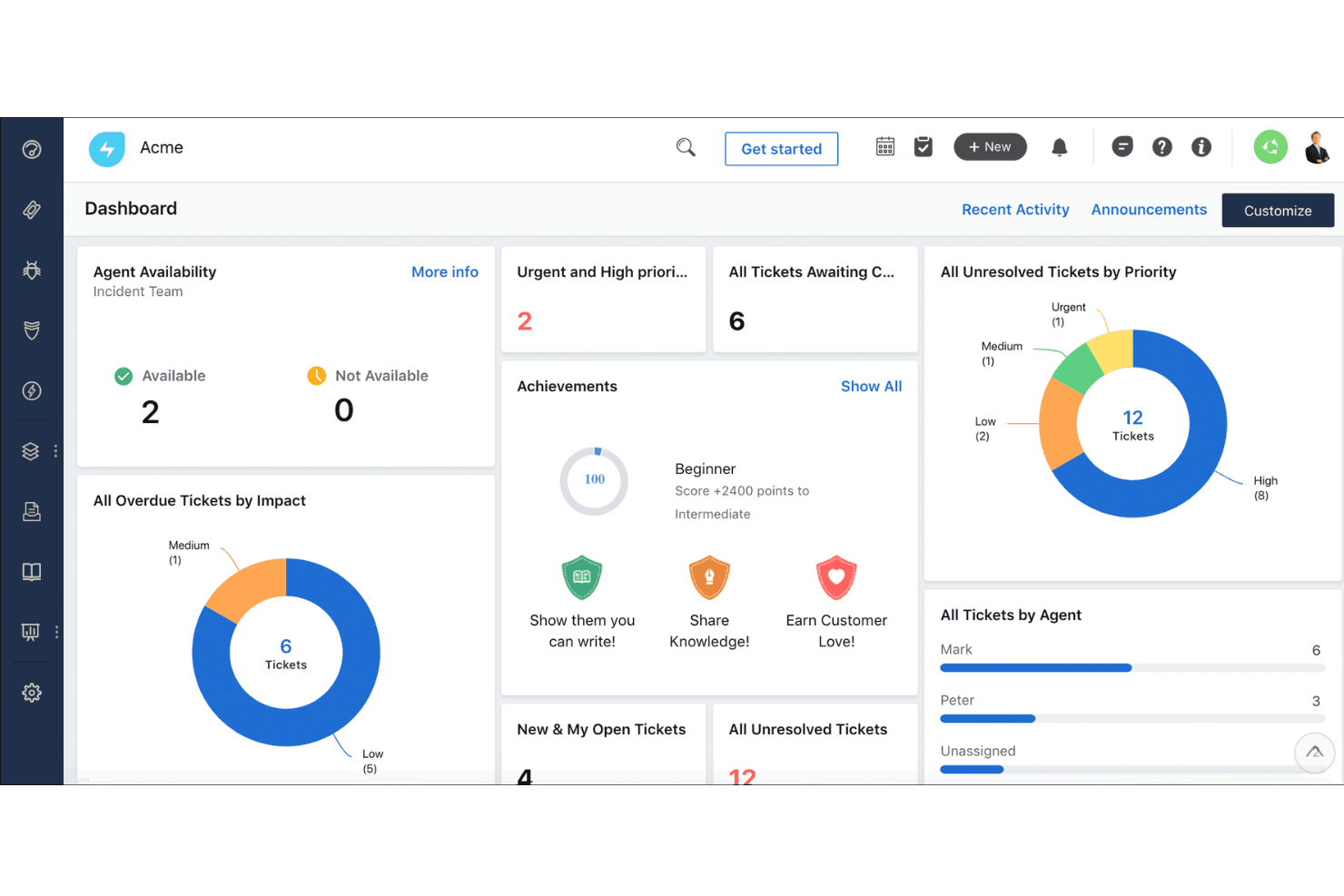
Freshservice gives agents a real-time overview of tickets and team availability. Freshservice is an AI-powered ITSM platform from Freshworks that brings incident management, asset tracking, CMDB, and no-code workflow automation together in one place for IT teams that want ITIL-aligned service management without the configuration overhead of developer-centric tools.
Who Is Freshservice Best For?
Freshservice is a strong fit for IT teams that need a structured, ITIL-aligned service desk they can get running quickly—without heavy developer involvement or lengthy configuration cycles.
Why I Picked Freshservice
I've included Freshservice in my top picks because it's one of the fastest ITSM platforms to get running in a production environment, with ITIL-aligned incident, problem, and change management available out of the box and no developer configuration required. I appreciate that the no-code Workflow Automator lets you build multi-stage approval chains and ticket-routing rules on day one, without writing a single line of code. The Freddy AI Agent handles employee requests across Slack, Teams, and your support portal automatically, so your team starts deflecting tickets almost immediately after go-live.
Freshservice Key Features
- Major incident management: Coordinates high-severity incident responses with structured escalation workflows, responder groups, and a status page for stakeholder updates.
- SLA and OLA tracking: Defines response and resolution targets by priority using business or calendar hours, with internal operational-level agreements for problem, change, and release tasks.
- CMDB with dependency mapping: Maintains relationships between assets, applications, and services in a continuously updated configuration database with visual dependency mapping.
- Freddy AI Copilot: Generates ticket replies and summaries, suggests ticket-field values, and assists agents with knowledge article creation directly within the service desk.
Freshservice Integrations
Freshservice offers 1,000+ Marketplace integrations, including Jira, Slack, Microsoft Teams, TeamViewer, and Azure AD, plus a REST API. Its Jira connector syncs comments, attachments, and status changes, while DevOps recipes link Jira work items with Freshservice incidents and changes.
Pros and Cons
Pros:
- Approval workflows are approachable to configure
- Portal supports consistent employee service requests
- Ticket automation helps organize support operations
Cons:
- Forwarded tickets may not reset SLA timers
- Complex workflows can require workarounds
Learn more about Freshservice: Best for ITIL-aligned service operations
- Free trial + free demo available
- From $59/user/month (billed annually)
Visit WebsiteCustomer Rating:4.5/5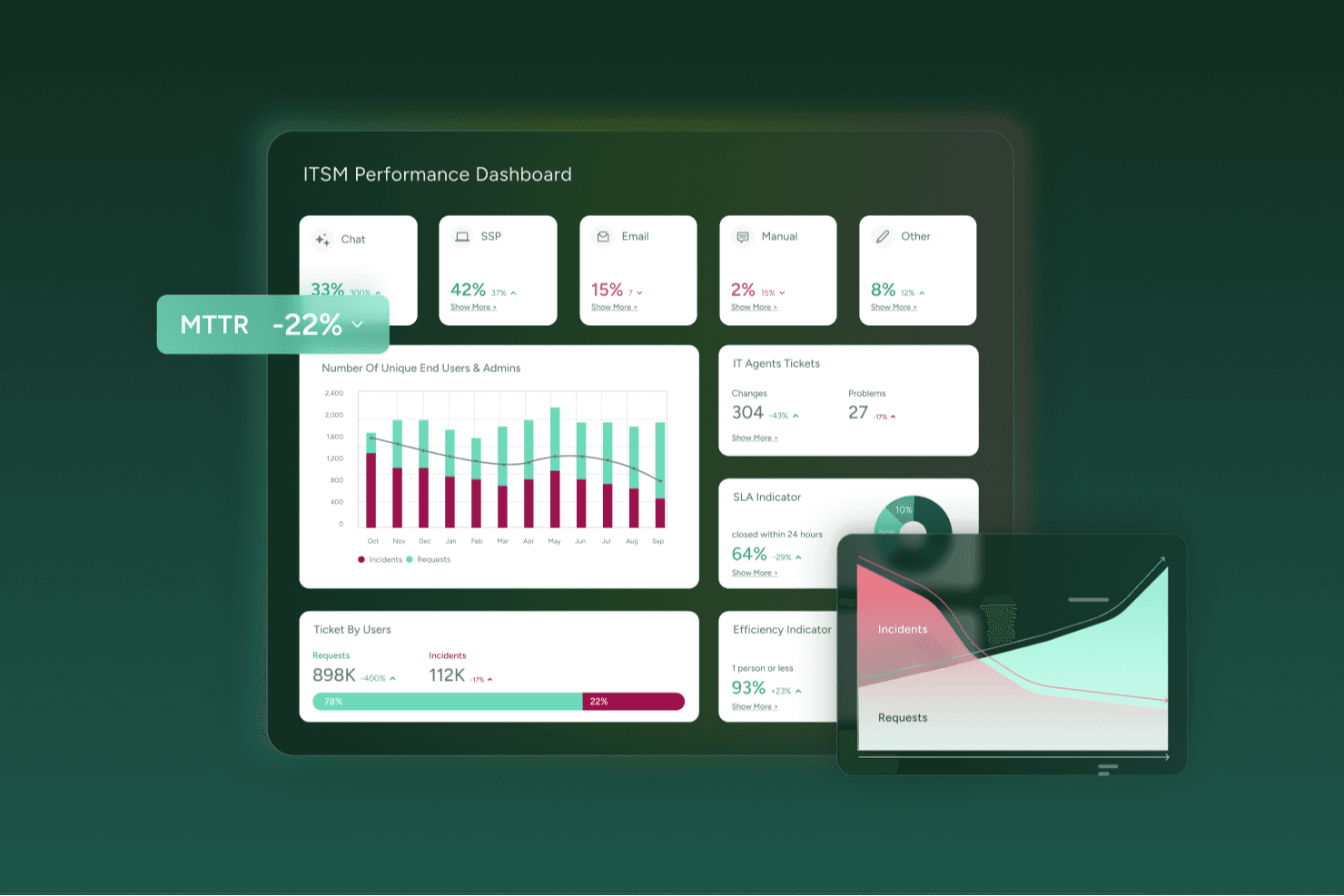
SysAid surfaces ITSM performance metrics in a unified dashboard. SysAid is an AI-first ITSM platform built for IT teams that need structured, ITIL-aligned workflows for incident, request, change, and problem management alongside integrated asset tracking and intelligent self-service.
Who Is SysAid Best For?
SysAid is a strong fit for IT teams that need structured, ITIL-compliant workflows for incident, change, and problem management without piecing together separate tools.
Why I Picked SysAid
I picked SysAid because it's one of the few platforms that ships genuine ITIL process structure out of the box, not as a configuration project. Change management uses templated phases with assigned action items and approval gates, while problem management gives you a structured path from incident correlation to root-cause investigation. I also appreciate that SysAid Copilot sits directly in the agent's service desk view, drafting replies and surfacing context without requiring agents to leave the ticket.
SysAid Key Features
- SLA management: Configures agreement-based routing, priority, due dates, escalation rules, and conformance analytics across service tiers.
- Self-service portal: Lets employees submit requests in natural language through a branded portal, Microsoft Teams, or email.
- Workflow Designer: A drag-and-drop builder for creating and connecting workflow steps across incident, request, change, and problem processes.
- Asset management: Maintains a hardware, software, cloud, and IoT asset inventory with asset data linked directly to service tickets.
SysAid Integrations
SysAid Connect lists 1,111 integrations, including native integrations with Jira Software Cloud, Azure DevOps, Microsoft Teams, Slack, Google Chat, and Microsoft Intune. It also supports Workato connectors and REST and GraphQL APIs for custom integrations.
Pros and Cons
Pros:
- AI triage reduces repetitive first-line support
- Asset records stay linked to service tickets
- Structured incident, problem, and change workflows
Cons:
- Ticket email threads can feel cumbersome
- Advanced reports can be tedious to tailor
 Best for native AI-powered ticket handling
- Free demo available
- Pricing upon request
Visit WebsiteCustomer Rating:4.5/5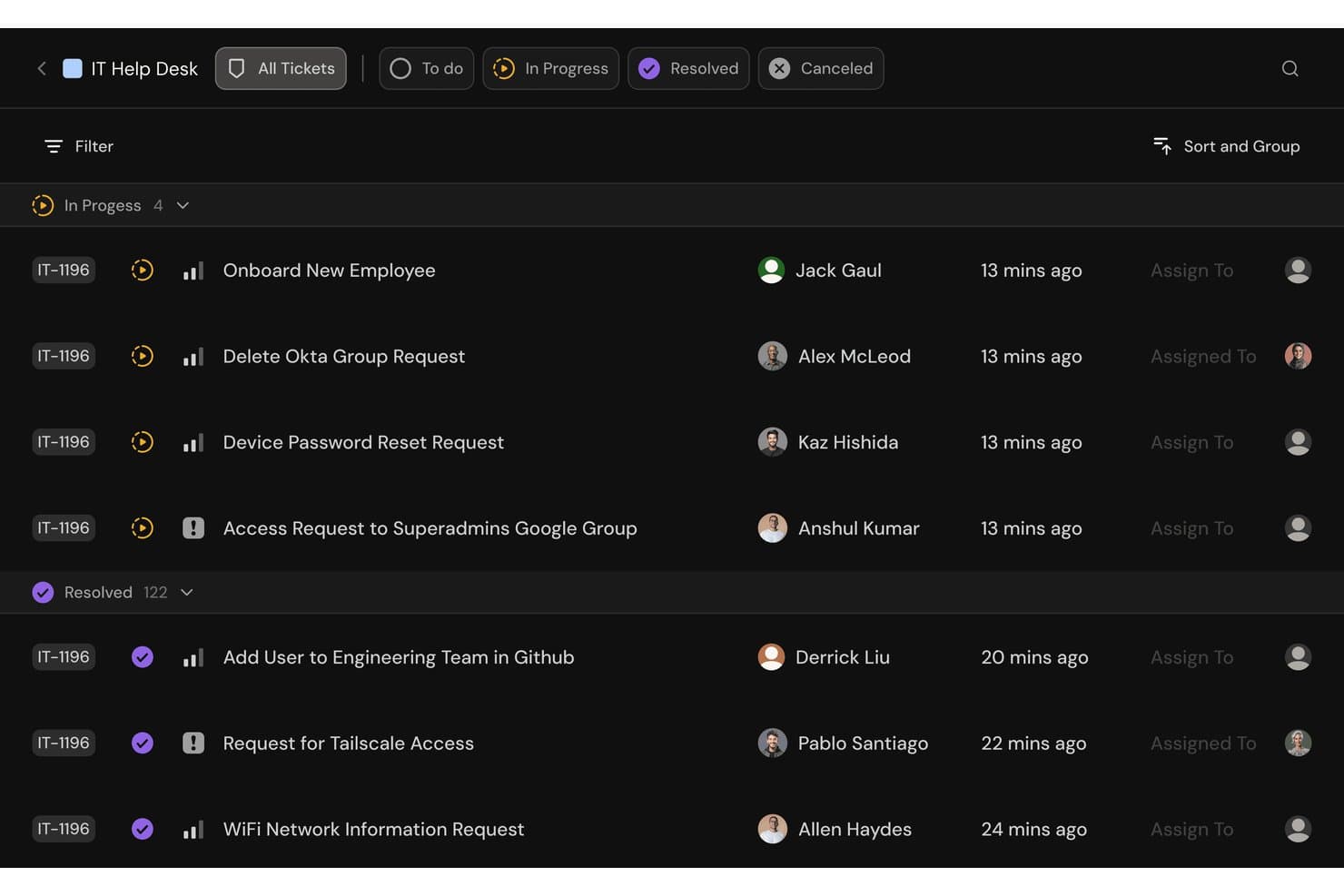
Serval offers an IT Help Desk ticket management interface with grouped ticket statuses, assignee tracking, and priority indicators for managing IT requests. Serval is an AI-native enterprise service management platform that handles employee requests, incidents, and IT workflows through AI agents—making it a strong fit for IT teams that want to reduce repetitive ticket volume and automate support without heavily manual configuration.
Who Is Serval Best For?
Serval is a strong fit for IT service desk teams that want AI to handle routine ticket resolution automatically, not just route requests to agents.
Why I Picked Serval
I picked Serval as one of the best because its Help Desk Agent doesn't just log tickets—it resolves them. When an employee submits a password reset or access request through Slack or Teams, the agent infers the ticket type, runs the relevant workflow, and closes the loop without a human ever touching it. I also appreciate that Catalyst can analyze manually resolved tickets and draft new automation skills from them, so the system gets sharper over time without requiring you to build every workflow from scratch.
Serval Key Features
- Multi-channel ticket intake: Employees can submit requests through Slack, Microsoft Teams, email, phone, or the Serval web portal, with all channels feeding into the same ticketing system.
- Change management with CAB and ECAB approvals: Normal, standard, and emergency changes each follow structured approval workflows, including change advisory board and emergency CAB sign-off gates.
- SLA policy management: Configurable SLA policies track time to resolution or first human response, with pause conditions, on-track/at-risk/breached status indicators, and business-hours scheduling.
- Two-way ticket sync with Jira Service Management: Ticket changes, comments, attachments, status updates, and custom fields mirror bidirectionally between Serval and Jira Service Management in real time.
Serval Integrations
Serval claims hundreds of native integrations, including Jira Service Management, Freshservice, Linear, GitHub, Slack, Microsoft Teams, Confluence, and ServiceNow. Its HTTPS API supports custom application integrations and workflow calls.
Pros and Cons
Pros:
- Links related incidents for coordinated updates
- Drafts automations from resolved ticket patterns
- Resolves routine requests before agent handoff
Cons:
- No automated network discovery for asset tracking
- AI can make inaccurate ticket assumptions
Learn more about Serval: 4Best for user-friendly customization
Halo
- Free plan + 30-day trial + demo available
- From £66/user/month (billed annually)
Visit WebsiteCustomer Rating:4.7/5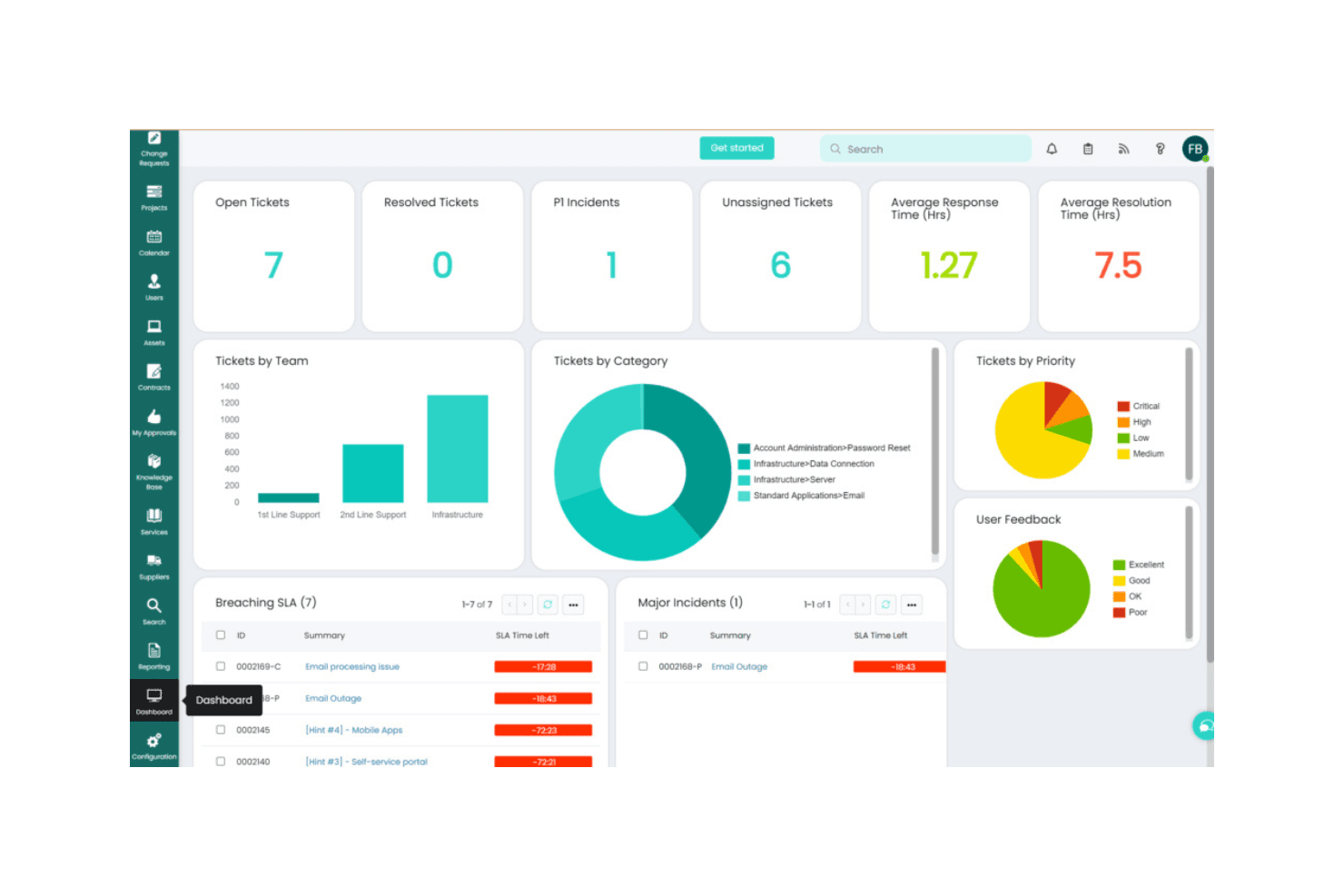
HaloITSM centralizes ticket tracking, SLA alerts, and team performance metrics. Halo is a fully ITIL 4-aligned ITSM platform that bundles incident, change, problem, and asset management into one configurable system—making it a strong fit for IT teams that need deep workflow flexibility without paying extra for individual modules.
Who Is Halo Best For?
Halo is a strong fit for IT teams that want deep workflow customization across ITIL-aligned processes without paying extra for individual modules.
Why I Picked Halo
I picked Halo as one of the best because its no-code workflow builder lets you reshape incident, change, and problem processes to match exactly how your team works, without filing a support ticket or waiting on a developer. I love that every workflow can branch on conditions, trigger automations and run approval chains, all from a visual flow chart. That level of customization across every ITIL 4 process, with nothing locked behind a higher tier, is what earns it a spot here.
Halo Key Features
- Multi-channel incident intake: Agents can receive and log incidents from email, Microsoft Teams, phone, API integrations, and monitoring alerts within a single system.
- Change Advisory Board (CAB) review workflow: Change requests route to CAB members for review, with agendas, votes, and decisions recorded directly in the change record.
- CMDB relationship mapping: The configuration management database maps relationships between configuration items, services, and users to support impact analysis during incidents and changes.
- Cross-instance ticket synchronization: Halo can sync tickets and updates between separate Halo instances, letting teams collaborate on a shared ticket while end users stay in their original portal.
Halo Integrations
Halo offers 200+ native integrations, including Jira Service Management, Azure DevOps, Microsoft Teams, Slack, Microsoft Azure, Datadog, and Lansweeper. It also provides a REST API for custom integrations and bidirectional ticket synchronization with Jira Service Management and Azure DevOps.
Pros and Cons
Pros:
- Consolidates ticket and asset visibility across teams
- Users praise quick, helpful support
- Tailors incident and change workflows without code
Cons:
- Some ticket actions take extra clicks
- Complex setup can require specialist onboarding
Learn more about Halo: Best for guided Jira Service Management moves
- Free demo available
- From $49/user/month (billed annually)
Visit WebsiteCustomer Rating:4.3/5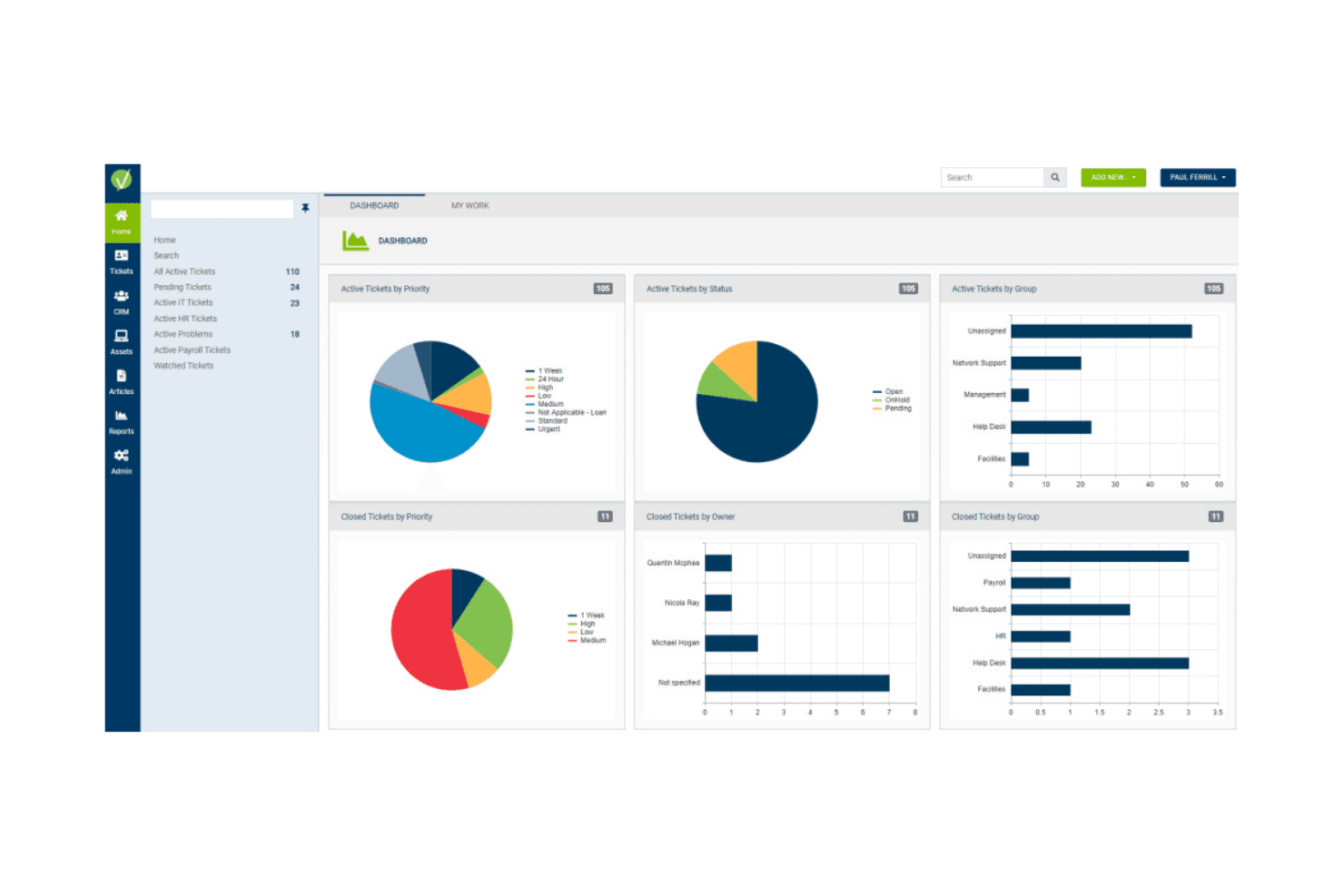
Vivantio's dashboard gives teams a real-time view of ticket activity. Vivantio is a fully ITIL-aligned service management platform suited to mid-size and enterprise IT teams that need configurable incident, problem, change, and asset management workflows without the complexity overhead of a developer-first tool.
Who Is Vivantio Best For?
Vivantio is a strong fit for mid-size to enterprise IT teams that need fully ITIL-aligned workflows and deeply configurable service portals without relying on developer resources to build them.
Why I Picked Vivantio
I picked Vivantio because its service portal customization goes deeper than most ITSM tools allow without developer involvement. I can configure branded portals per team or department, build audience-specific service catalogue forms, and set each form to trigger its own approval and fulfilment workflow, all through a no-code admin interface. That means an HR request and a network incident can follow completely separate paths from the same portal, without any overlap or confusion.
Vivantio Key Features
- ITIL-aligned change management: Supports standard, normal, and emergency change workflows with CAB approvals, risk and impact assessment, a change calendar, and freeze-period management.
- Automated asset discovery: Scans configured IP ranges and subnets on a schedule or on demand to identify devices and populate or refresh CMDB records.
- No-code automation rules: Triggers actions from field changes, status transitions, or scheduled dates using nested AND/OR logic, with rules chainable into multi-step workflows.
- Multi-department service delivery: Extends IT service management to teams like HR, Facilities, and Finance on the same platform, each with structured intake, SLA tracking, and approval workflows.
Vivantio Integrations
Vivantio offers 600+ built-in integrations, including Jira Software, Azure DevOps, Microsoft Teams, Slack, PagerDuty, and Azure Active Directory. It also provides full API access and FLEXBridge connectivity for tools that support webhooks or an API.
Pros and Cons
Pros:
- Assets link directly to incidents and changes
- Reviewers praise configurable ticket queues and processes
- Department-specific portals trigger tailored workflows
Cons:
- Report creation and editing can be complex
- Reviewers describe the interface as dated
Learn more about Vivantio: Best for local support with on-prem hosting
- Not available
- From £51/user/month
Visit WebsiteCustomer Rating:4.3/5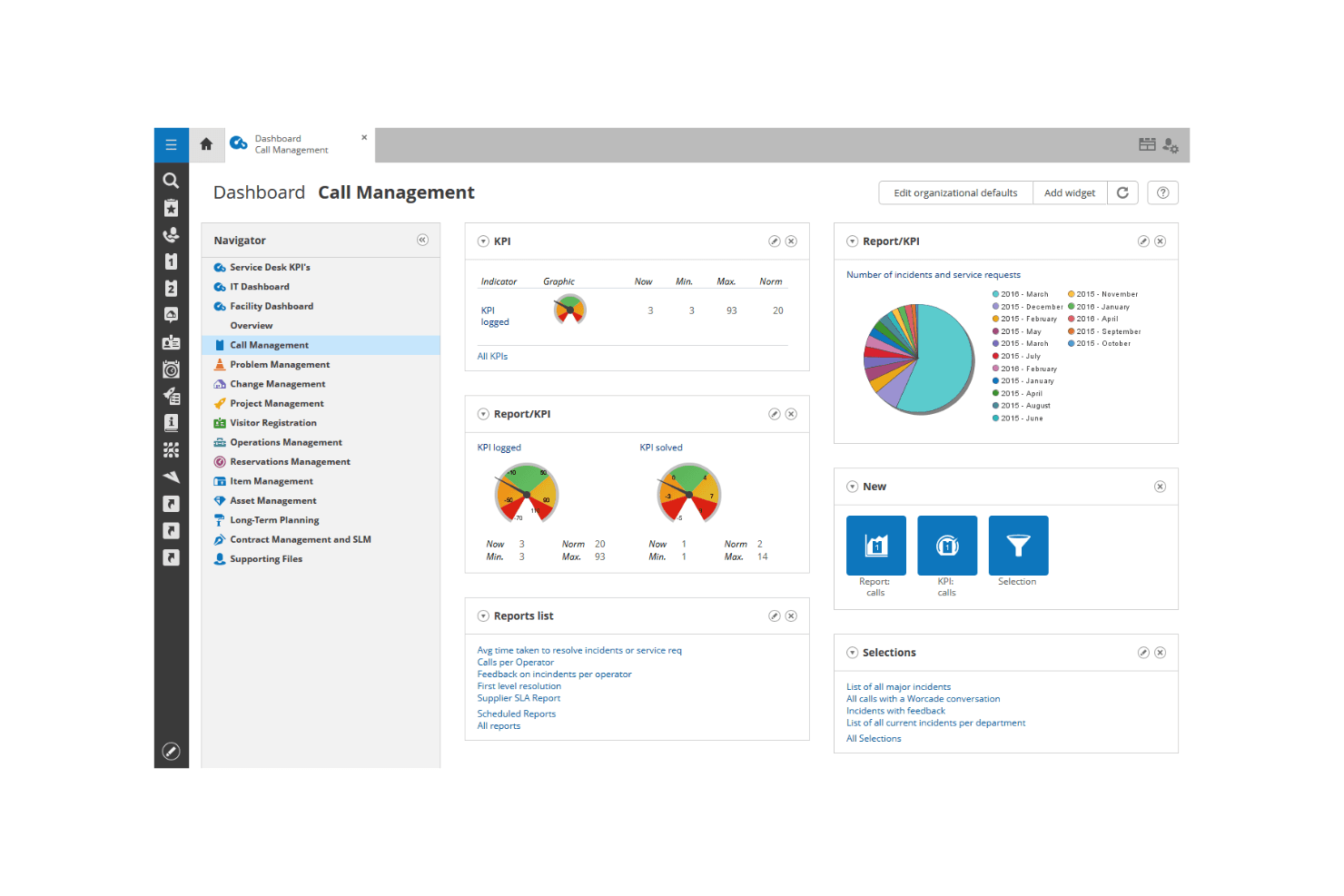
TOPdesk centralizes call management KPIs and reports in one dashboard. TOPdesk is an ITIL-aligned service management platform that consolidates incident ticketing, asset management, and a self-service knowledge base into one tool, making it a strong fit for IT teams looking to reduce repetitive support requests without heavy configuration overhead.
Who Is TOPdesk Best For?
TOPdesk is a strong fit for mid-sized IT teams that want ITIL-aligned service management without the configuration complexity of a developer-first tool.
Why I Picked TOPdesk
I picked TOPdesk as one of the best because its self-service capabilities genuinely stand out: the Robin AI assistant pulls from your published knowledge base to answer staff questions, ask clarifying follow-ups, and draft a fallback ticket when it can't resolve something, all without agent involvement. Paired with predictive portal search that surfaces knowledge articles, service flows, and catalogue items after just a few keystrokes, it's built to absorb repetitive requests before they become tickets.
TOPdesk Key Features
- ITIL-aligned incident management: Agents can categorize, prioritize, route, and track tickets with linked relationships to assets, problems, and knowledge articles across the full incident lifecycle.
- Change and problem management: Engaged and Excellent plans include structured change workflows with multi-level approvals, change calendars, problem records, and known error documentation.
- CMDB with impact analysis: A graphical configuration management database maps asset relationships and supports impact analysis, with assets linkable to users, locations, tickets, and changes.
- Action sequences and automated actions: A library of plug-and-play action sequences lets administrators define event-triggered or manual actions, including automatic mail import, alerts, and customizable webhooks.
TOPdesk Integrations
TOPdesk lists 100+ marketplace integrations, including Jira, Azure DevOps, Microsoft Teams, Microsoft Intune, and Zabbix. It also provides REST and OData APIs plus webhooks for custom connectivity.
Pros and Cons
Pros:
- Reviewers praise configurable workflows and asset records
- ITIL workflows connect incidents, problems, and changes
- Robin answers from published knowledge articles
Cons:
- Dated interface complicates ticket handoffs
- Workflow email alerts took weeks to configure
Learn more about TOPdesk:
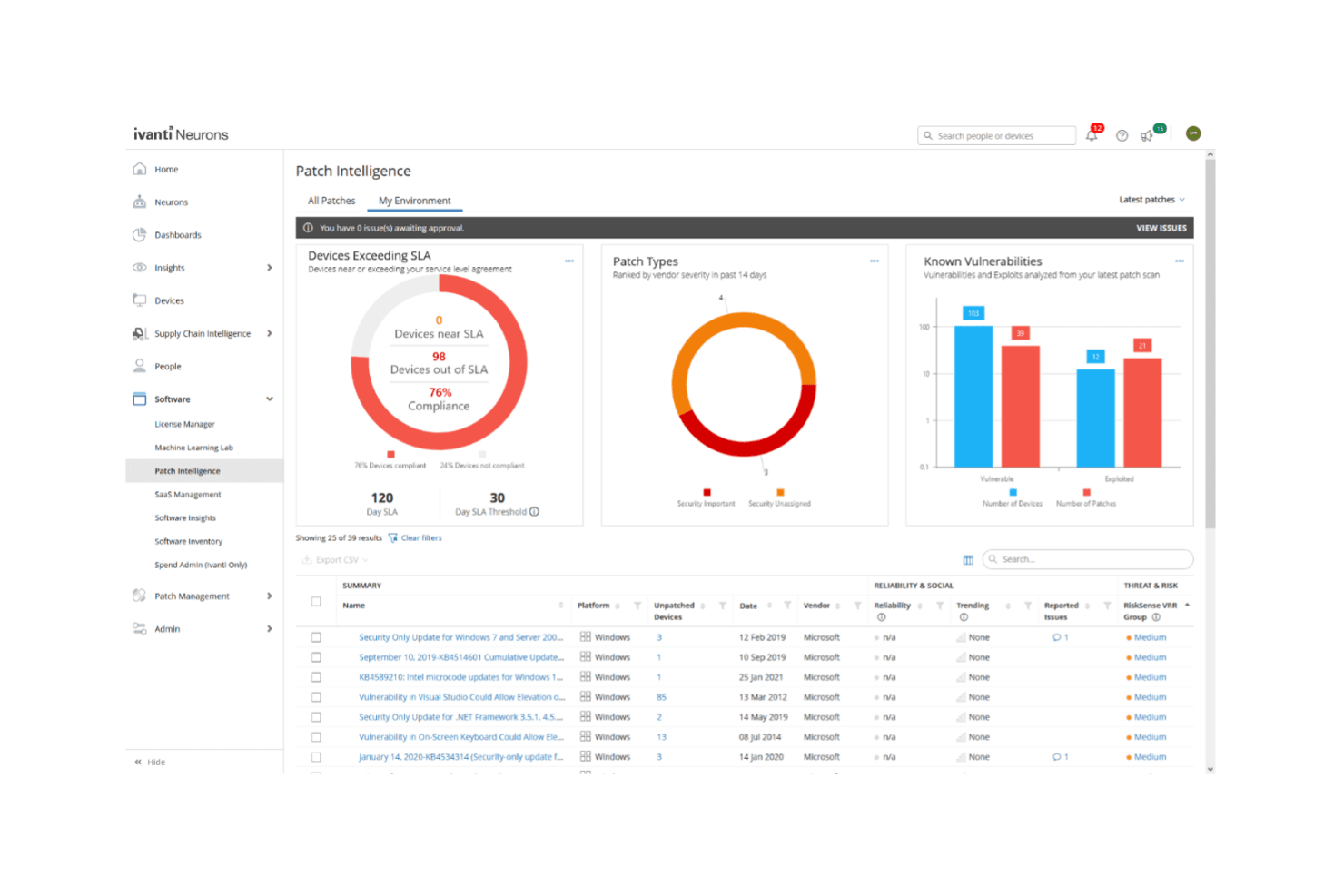
Ivanti Neurons tracks patch compliance and vulnerabilities in one dashboard. Ivanti ITSM is an enterprise service management platform that connects ticketing, asset management, and ITIL-aligned workflows in one place, making it a strong fit for IT teams that need device-aware incident response and deep configuration flexibility.
Who Is Ivanti Neurons Best For?
Ivanti ITSM is a strong fit for enterprise IT teams that need service management tightly connected to endpoint, asset, and security context in a single platform.
Why I Picked Ivanti Neurons
I picked Ivanti Neurons as one of the best because it connects service management directly to endpoint and device context in a way Jira Service Management simply doesn't. When an incident comes in, I can pull up the CI map to see exactly which devices are affected, their upstream dependencies, and any linked problems or changes. The Neurons discovery integration also feeds real device data into ITSM automatically, so my asset records stay current without manual updates.
Ivanti Neurons Key Features
- AI ticket classification: Automatically categorizes and routes incoming tickets to the appropriate team based on content.
- PinkVERIFY-certified ITIL 4 workflows: Supports 14 certified ITIL 4 processes, including change, problem, release, and service-level management.
- Self-service portal with chatbot: Lets employees submit requests, check ticket status, and search knowledge articles without contacting the service desk.
- Microsoft Teams integration: Allows users to create incidents, submit service requests, and get KB suggestions directly within Teams.
Ivanti Neurons Integrations
Ivanti ITSM offers integrations with GitHub Actions, Jira for Neurons Security Operations Management, and Microsoft Teams, plus 1,000+ IT-specific connectors through Ivanti iPaaS. A REST API supports custom integrations.
Pros and Cons
Pros:
- Automated ticket classification and summaries
- Flexible ITIL workflow design
- Device-linked incident impact analysis
Cons:
- Clunky navigation can slow agent work
- Workflow execution can queue for 20 minutes
Learn more about Ivanti Neurons: Best for keeping Jira for development
- Not available
- From $59/user/month (billed annually)
Visit WebsiteCustomer Rating:1/5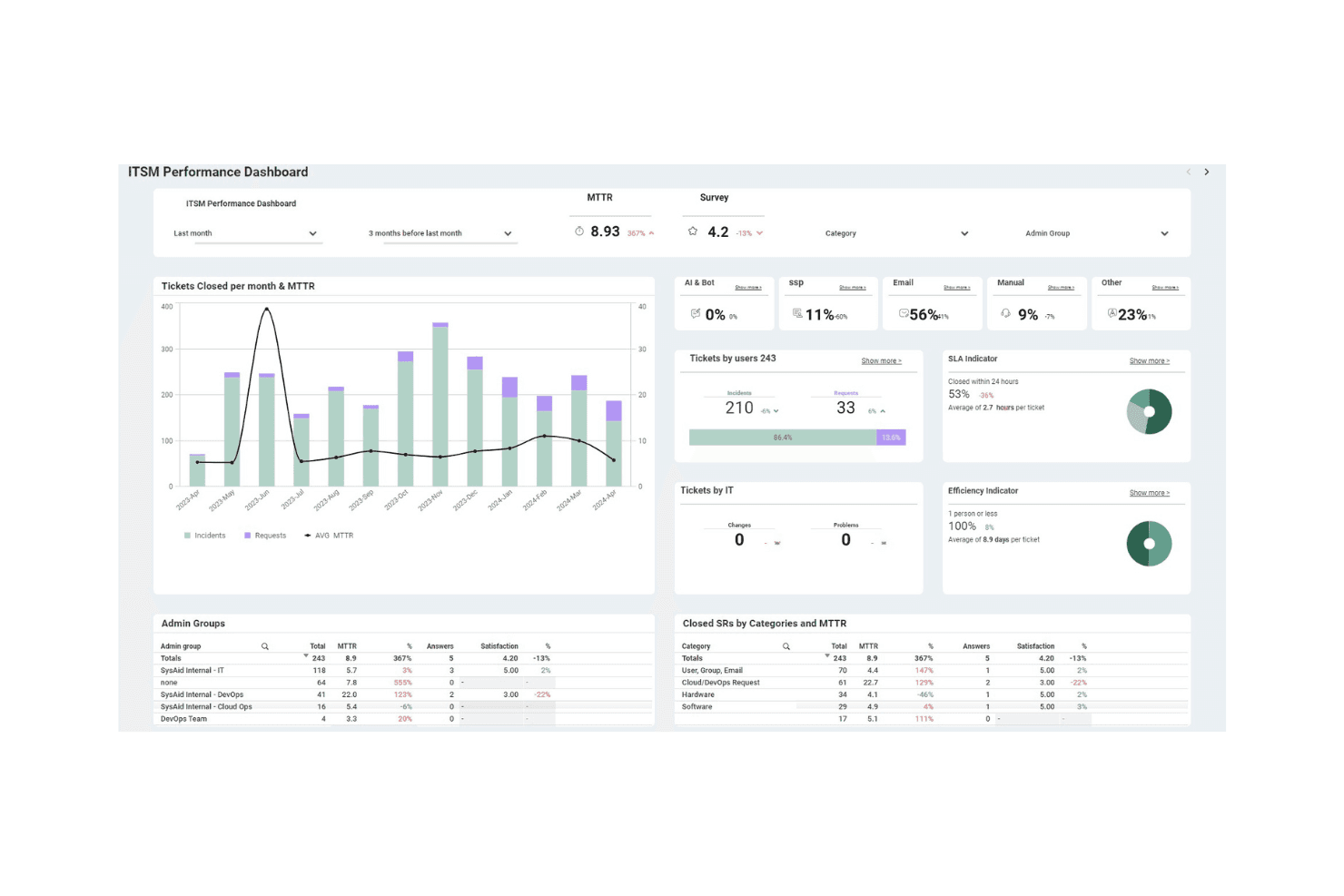
SysAid displays ITSM performance metrics across tickets, SLA, and admin groups. SysAid is an ITIL-aligned IT service management platform built for IT teams that need incident, problem, change, and request management alongside asset tracking, AI-powered self-service, and native integrations with tools like Jira and Microsoft Teams.
Who Is SysAid Best For?
SysAid is a strong fit for mid-sized IT teams that need a fully ITIL-aligned service desk with built-in asset management and AI-powered self-service in one platform.
Why I Picked SysAid
I picked SysAid as one of the best Jira Service Management alternatives because of how much control it gives you over your service portal experience. Its no-code Workflow Designer lets you visually build and connect ticket flows, while the AI Automation Studio converts a plain-language rule description into working triggers and actions. I've seen teams configure department-specific service spaces, each with its own forms, SLAs, and self-service portal, without touching a line of code.
SysAid Key Features
- ITIL-aligned incident and problem management: SysAid supports structured incident, problem, change, and request workflows that follow ITIL processes out of the box.
- Jira Software bidirectional sync: The native Jira integration links SysAid service records to Jira issues, mapping fields, statuses, and syncing comments in both directions.
- Department-specific ESM service spaces: Each department gets its own service portal, forms, SLAs, workflows, and AI data pool, all managed from a single platform.
- AI Copilot for agents: Copilot surfaces recommended next steps within a ticket, drawing on knowledge-base articles, historical service records, and admin-approved content sources.
SysAid Integrations
SysAid lists 1,111 integrations, including native Jira Software, Microsoft Teams, Slack, Azure, Microsoft Intune, Lansweeper, Splashtop, and Power BI integrations. It also lists 600+ Workato connectors and provides a REST API for custom integrations.
Pros and Cons
Pros:
- Asset context sits alongside ticket records
- Portal and knowledge base can deflect tickets
- Structured workflows cover incident and change management
Cons:
- Reporting customization frustrates some teams
- Advanced workflow setup can take time
Learn more about SysAid:
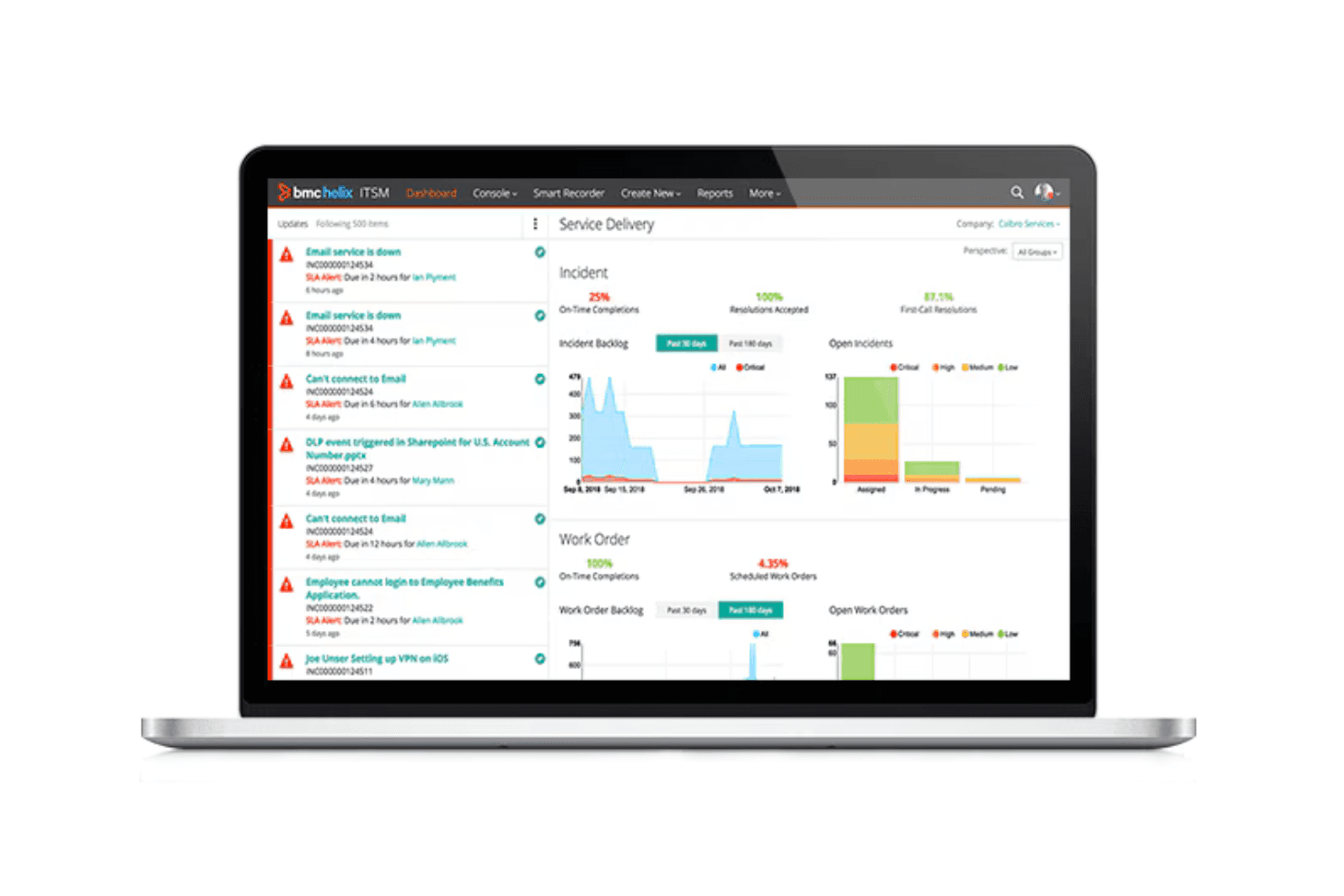
BMC Helix tracks incidents and work orders in a live service dashboard. BMC Helix ITSM is an enterprise-grade service management platform built for large IT organizations that need ITIL-aligned incident, problem, and change workflows alongside AI-driven automation for faster resolution and smarter incident triage.
Who Is BMC Helix Best For?
BMC Helix ITSM is a strong fit for large enterprise IT organizations that need deep ITIL process alignment and AI-driven automation across incident, problem, and change management.
Why I Picked BMC Helix
BMC Helix earns its spot on my shortlist because its self-service capabilities go well beyond a basic portal. I particularly like the AI-powered Digital Workplace, which lets employees find answers, request services, and resolve issues through conversational AI before a ticket even reaches the queue. The knowledge search also spans articles, known errors, and past incidents, so agents and end users are pulling from the same pool of resolved work.
BMC Helix Key Features
- AI-driven incident clustering: Automatically groups related incidents to surface potential major incidents and underlying problems before they escalate.
- ITIL-aligned change risk analysis: Assesses change risk using AI to flag potential failures before changes are deployed across hybrid and multi-cloud environments.
- Microsoft Teams ChatOps swarming: Lets cross-functional teams collaborate on live incidents inside Teams, with an Ops Swarmer chat that tracks status, SLA misses, and root cause in real time.
- Automated SLA escalation notifications: Triggers configurable notifications for incident assignment, resolution milestones, and SLA breaches based on user and system-level event preferences.
BMC Helix Integrations
BMC Helix ITSM offers marketplace integrations with Jira Service Management, Jira, Azure DevOps, Jenkins, Microsoft Teams, and Slack. It also provides REST APIs for custom integrations, while the Jira Service Management connector requires BMC Helix iPaaS powered by Jitterbit.
Pros and Cons
Pros:
- Automated escalations reduce manual ticket follow-up
- ITIL workflows connect root-cause analysis with changes
- AI-assisted self-service searches across incidents and articles
Cons:
- Workflow changes can demand specialist support
- Crowded screens make ticket details harder to find
Learn more about BMC Helix:
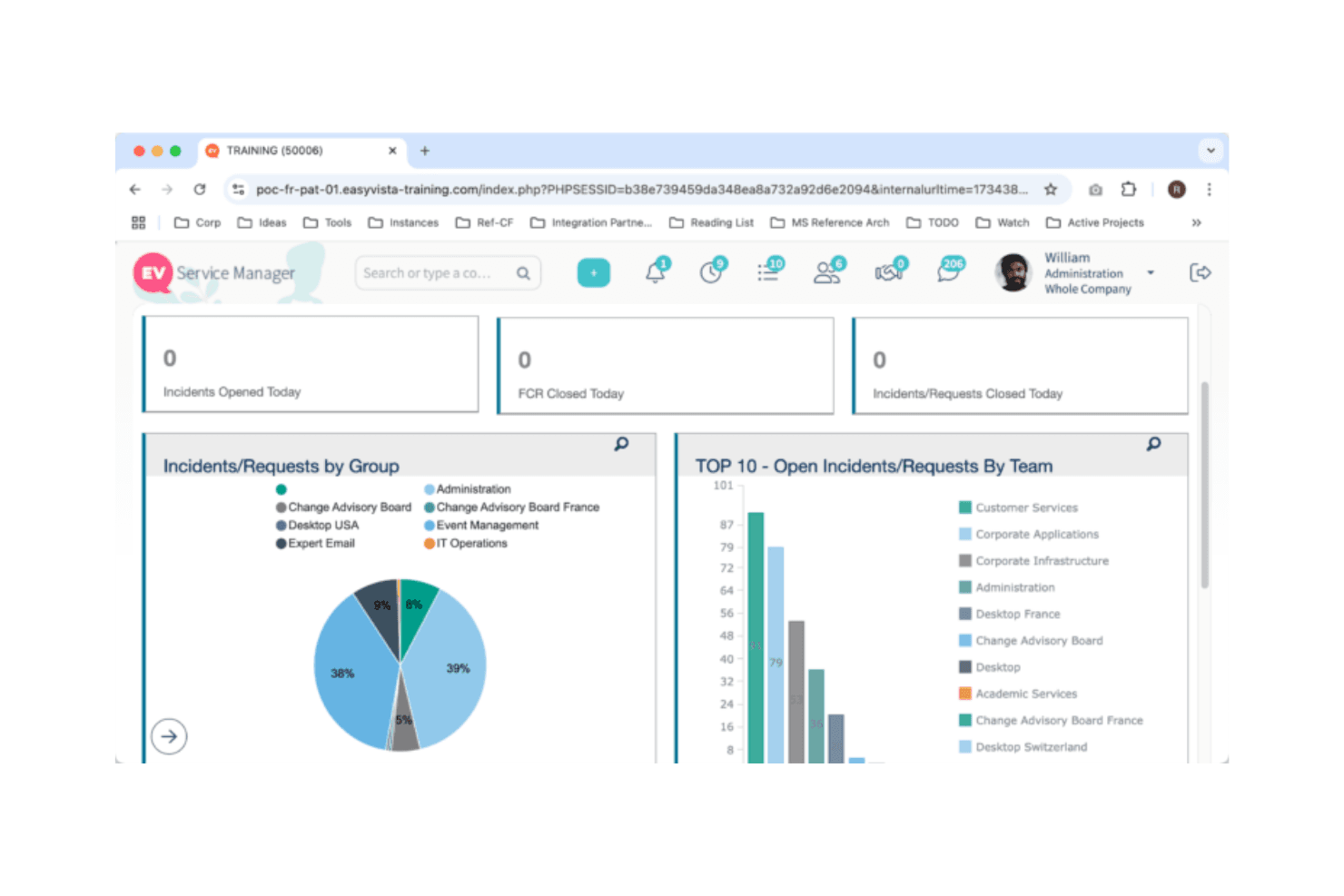
EasyVista displays live incident and request metrics on its dashboard. EV Service Manager by EasyVista is an ITIL-aligned ITSM platform that connects service desk and operations teams through unified incident, problem, change, and asset management—with no-code workflow configuration built in.
Who Is EasyVista Best For?
EasyVista suits mid-to-large IT organizations that need ITIL-aligned service management with built-in asset, knowledge, and workflow capabilities across a unified platform.
Why I Picked EasyVista
I've included EasyVista in my top picks because its no-code Design Studio and Connect Studio let my team wire ITIL-aligned incident, problem, change, and asset workflows into a single execution layer without touching a line of code. What I appreciate most is how EV Service Manager's shared data backbone keeps service records, asset context, and operations data connected, so when an incident fires, the relevant CI history and linked tickets are already there.
EasyVista Key Features
- Service Level Management: Tracks and enforces service level targets across incident, request, and change processes in all three editions.
- Self Help Studio: A rich-content editor that lets your team design and publish self-help knowledge processes using predefined responsive web templates.
- Active Directory integration: Syncs and manages Active Directory accounts, groups, and passwords directly within the service management platform.
- Service Bots: Virtual agents with a built-in natural language processing engine that handle end-user requests and run self-help procedures automatically.
EasyVista Integrations
EasyVista offers integrations with GitHub, GitLab, Azure DevOps, Jenkins, Bitbucket, Microsoft Teams, and Jira Service Management, with the Jira connection using Microsoft Power Automate to create Jira issues from Service Manager tickets.
Pros and Cons
Pros:
- Reviewers praise configurable rules and automated assignment
- Tickets show related asset and user history
- ITIL workflows connect incidents, changes, and requests
Cons:
- Reporting can require extra configuration or Power BI
- Reviewers describe dated interfaces and confusing navigation
Learn more about EasyVista:
Alte alternative la Jira Service Management
Iată câteva alternative suplimentare la Jira Service Management care nu au ajuns pe lista mea scurtă, dar merită totuși analizate:
- 11SymphonyAIBest for AI-driven automation
- 12XurrentBest for structured workflows
- 13INFRAON ITSMBest for unified IT and business services
- 14C2-ITSMBest for no-code workflow automation
- 15TeamDynamixBest for customizable service portals
- 16SolarWinds Service DeskBest for cloud-based service desks
- 17ManageEngine ServiceDesk PlusBest for IT asset management
- 18Freshservice by FreshworksBest for AI-driven service automation
- 19ServiceNow IT Service Management (ITSM)Best for global enterprise IT teams
- 20OpenText Service ManagementBest for enterprise-grade compliance
- 21Efecte Service ManagementBest for European data hosting
How I Evaluate Jira Service Management Alternatives
I split my evaluation into baseline criteria—incident management, SLA automation, ITIL workflows—and differentiators like pricing and DevOps toolchain fit that set the best options apart.
Core Functionality (Table Stakes For This List)
When I'm selecting tools for my list, I rank each one on a scale from 0 (does not offer the functionality) to 5 (excels in this area) for each core functionality listed below. Then, I calculate the tool's total score into a percentage. Each tool needs to achieve a minimum total score of 65% to be considered for inclusion.
- Ticketing & Incident Management: I evaluate how each tool handles multi-channel ticket intake, routing rules, and major incident workflows—like linking child tickets to a parent during an outage.
- Self-Service Portal & Knowledge Base: Each platform's portal should let end users browse a service catalog, submit requests, and search KB articles before opening a ticket.
- ITIL Process Support: I check whether the tool covers incident, problem, change, and release management as distinct modules rather than lumping everything into a single ticket queue.
- SLA & Workflow Automation: Configurable SLA policies with escalation triggers matter here—I look at whether you can set separate SLA clocks for response vs. resolution by priority tier.
- Asset Management & CMDB: I look for native asset tracking and configuration item mapping so teams can link incidents to affected services and trace root cause across dependencies.
- Integrations & API Ecosystem: The tool should connect with monitoring, DevOps, and collaboration platforms your team already uses—think PagerDuty alerts creating tickets or Slack threads syncing to updates.
Once I have a list of tools that meet this criteria, I consider what sets each platform apart.
Differentiating Factors (What Sets Vendors Apart)
Here's how I compare and contrast different vendors:
Standout Features
AI-driven features like virtual agents and auto-categorization can dramatically cut L1 ticket volume. I look at how well each tool deflects routine requests like password resets before they reach an agent. Native ChatOps integration also matters; teams that live in Slack or Microsoft Teams benefit when they can create and update tickets without switching apps. I also evaluate no-code workflow builders, since IT admins who can modify approval chains or onboarding flows without scripting get faster time-to-value.
Beyond Features
Pricing structure is one of the first things I evaluate. Some platforms charge per agent while others offer unlimited-agent plans, and hidden costs for modules like change or asset management can inflate the total cost fast. DevOps toolchain fit is equally important—I check whether the tool connects natively with CI/CD pipelines and monitoring stacks so incidents from production alerts flow directly into tickets. Implementation speed also shapes my recommendations. Prebuilt ITIL templates and guided setup wizards help IT teams go live in days rather than months.
De ce să cauți o alternativă la Jira Service Management?
Deși Jira Service Management este o alegere bună pentru gestionarea serviciilor, există mai multe motive pentru care unii utilizatori caută soluții alternative. Poate că ești în căutarea unei alternative la Jira Service Management din următoarele motive:
- Este prea complex pentru echipele mici
- Ai nevoie de mai multe opțiuni de personalizare
- Îi lipsesc anumite funcții specifice industriei
- Cauți un acces mobil mai bun
- Ai nevoie de o opțiune mai accesibilă
- Nu acceptă limba regiunii tale
Dacă te regăsești în oricare dintre aceste situații, ai ajuns în locul potrivit. Lista mea conține mai multe opțiuni de software pentru gestionarea serviciilor, mai potrivite pentru echipele care se confruntă cu aceste probleme în Jira Service Management și caută soluții alternative.
Funcțiile principale ale Jira Service Management
Iată câteva dintre funcțiile principale ale Jira Service Management, care te vor ajuta să compari și să evaluezi ce oferă soluțiile alternative:
- Gestionarea incidentelor: Permite echipei dvs. să urmărească și să rezolve eficient incidentele, asigurând perturbări minime.
- Gestionarea schimbărilor: Vă ajută să gestionați schimbările aduse infrastructurii IT, reducând riscurile și îmbunătățind calitatea serviciilor.
- Gestionarea activelor: Permite urmărirea și gestionarea activelor IT, oferind vizibilitate asupra resurselor dvs.
- Onorarea solicitărilor de servicii: Permite utilizatorilor să trimită solicitări și să le urmărească starea, îmbunătățind furnizarea serviciilor.
- Gestionarea problemelor: Ajută la identificarea și rezolvarea cauzelor principale ale incidentelor, prevenind problemele viitoare.
- Portal de autoservire: Le permite utilizatorilor să găsească soluții și să trimită solicitări în mod independent, reducând volumul de muncă al echipei IT.
- Reguli de automatizare: Vă permit să automatizați sarcinile repetitive, economisind timp și sporind eficiența.
- Rapoarte și analize: Oferă informații despre performanța serviciilor, ajutându-vă să luați decizii bine fundamentate.
- Gestionarea cunoștințelor: Stochează și organizează informațiile, facilitând accesul echipei dvs. la cunoștințe și partajarea acestora.
- Fluxuri de lucru personalizabile: Vă permit să adaptați procesele la nevoile specifice ale echipei dvs., sporind productivitatea.