

Cele mai bune instrumente IAC ajută echipele să automatizeze furnizarea infrastructurii, să mențină mediile consecvente și să reducă erorile de configurare în toate etapele implementării. Acestea facilitează lansarea modificărilor, urmărirea actualizărilor și menținerea unor sisteme previzibile pe măsură ce infrastructura se extinde.
Atunci când configurările greșite provoacă întreruperi, furnizarea manuală încetinește lansările sau scripturile se îndepărtează în timp de configurația inițială, fiabilitatea și eficiența scad. Aceste probleme cresc efortul necesar pentru depanare și îngreunează colaborarea dintre echipele de inginerie și operațiuni.
Având peste 20 de ani de experiență în industrie ca director de tehnologie, am testat și analizat zeci de instrumente IAC pentru a le evalua performanța, integrările și ușurința în utilizare. Acest ghid evidențiază cele mai bune opțiuni care ajută echipele să gestioneze infrastructura cu încredere. Fiecare recenzie acoperă funcțiile, avantajele și dezavantajele, precum și cazurile de utilizare ideale, astfel încât să poți alege instrumentul potrivit.
Why Trust Our Software Recommendations
6,700+
Reviews
20
Industry experts
16+
Evaluation factors
14
Years
Our team has been testing and reviewing software since 2012. As tech leaders ourselves, we know how difficult—and important—it is to choose the right software.
For this guide, we evaluated tools using hands-on testing and independent research, scoring tools using our selection criteria.
Our reviews reflect our human editorial judgment, not a sales pitch.
Expert reviewers:
- Paulo Gardini MiguelTech Director
 Tim FisherVP of AI
 Gabriel RosasTech Lead & Software Architect
 Christhian GruhnTech Lead & Platform Architect

Tabel comparativ al instrumentelor IAC
Acest tabel comparativ sintetizează detaliile de preț pentru selecțiile mele de top de instrumente IAC:
Sorted by: Default
| Tool | Starting Price | Website | |
|---|---|---|---|
Best for security scanning | 4.3 out of 5 | $300/month Free plan + free demo available | Book Demo |
Best for containerization | 4.6 out of 5 | $9/user/month Free plan available | Website |
Best for multi-cloud support | 4.7 out of 5 | Pricing upon request Free plan available | Website |
Best for agentless architecture | 4.6 out of 5 | Pricing upon request 60-day free trial | Website |
Best for container orchestration | 4.6 out of 5 | No licensing cost Free to use | Website |
Best for virtualized development | 4.6 out of 5 | Pricing upon request Free plan available | Website |
Best for configuration automation | 4.3 out of 5 | $59/node/month Free trial + free demo available | Website |
Best for continuous integration | 4.4 out of 5 | Pricing upon request Not available | Website |
Best for large-scale deployments | 4.2 out of 5 | Pricing upon request Free plan + free demo available | Website |
Best for integrated DevOps lifecycle | Not rated | $29/user/month Free plan available | Website |


Recenzii ale celor mai bune instrumente IAC
Mai jos sunt rezumatele mele detaliate ale celor mai bune instrumente IAC incluse în lista mea scurtă. Recenziile mele oferă o perspectivă detaliată asupra funcțiilor principale, avantajelor și dezavantajelor, integrărilor și cazurilor de utilizare ideale ale fiecărui instrument, pentru a te ajuta să îl găsești pe cel mai potrivit pentru tine.
 Best for security scanning
- Free plan + free demo available
- From $300/month
Visit WebsiteCustomer Rating:4.3/5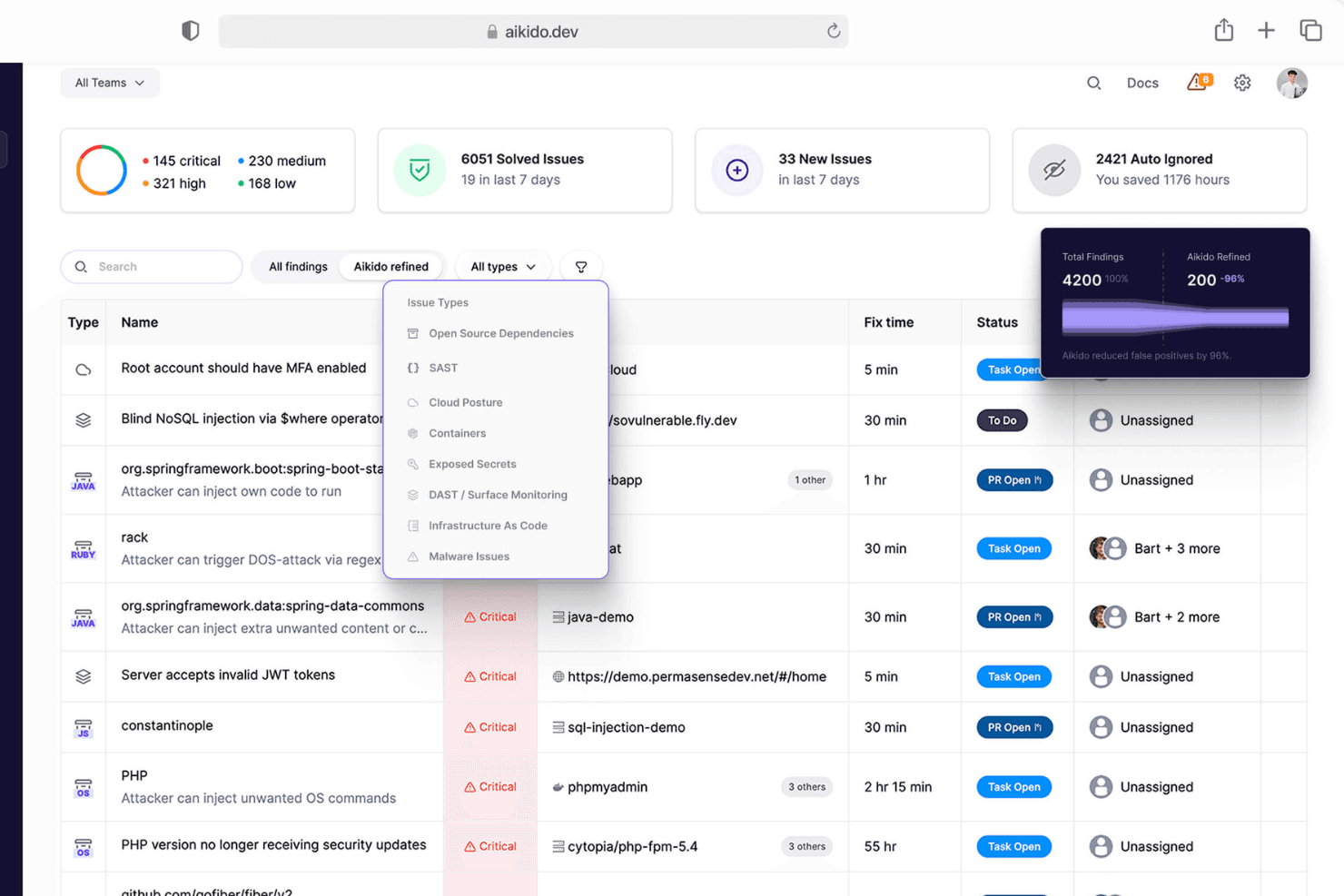
Aikido Security protects code, cloud, and runtime environments. Aikido Security is a centralized platform designed for securing code, cloud, and runtime environments. It performs security functions such as IaC scanning and malware detection.
Why I picked Aikido Security: It excels in providing security scanning through features like open-source risk prevention and secrets detection. Aikido's static code analysis and container image security set it apart from other tools. Its AI capabilities for automated fixes ensure that security vulnerabilities are managed efficiently. You can rely on it to focus on significant issues without overwhelming alerts.
Standout features & integrations:
Features include IaC scanning that identifies misconfigurations early, static code analysis for thorough vulnerability checks, and secrets detection to prevent unauthorized access. These capabilities ensure your environment remains secure throughout the development process.
Integrations include cloud providers, Git systems, compliance tools, messaging apps, task managers, and CI/CD systems.
Pros and Cons
Pros:
- Centralized security management
- AI-driven automated fixes
- Focused on significant security issues
Cons:
- Custom IaC rules must be enabled by Aikido
- Alert volume can run high before triage tuning
Learn more about Aikido Security: Best for containerization
- Free plan available
- From $9/user/month (billed annually)
Visit WebsiteCustomer Rating:4.6/5
Docker lets developers build, share, and run apps in containers. Docker is a containerization platform that enables developers to build, share, and run applications efficiently across various environments. Its main users are developers and organizations looking to streamline application development and deployment processes.
Why I picked Docker: It facilitates containerization through features like rapid environment setup and integration with popular development tools. Docker Build Cloud reduces build times, while Docker Hub manages container images for collaboration. Security is enhanced with Docker Scout, providing insights for compliance and security issues. These features make Docker ideal for containerization needs.
Standout features & integrations:
Features include rapid environment setup, allowing quick creation and containerization of applications. Image management through Docker Hub facilitates collaboration among teams. Security insights are provided by Docker Scout to help manage compliance issues.
Integrations include VS Code, CircleCI, GitHub, Azure, Google Cloud Platform, Amazon Web Services, Jenkins, Kubernetes, Bitbucket, and GitLab.
Pros and Cons
Pros:
- Strong community support
- Rapid container setup
- Extensive image library
Cons:
- Requires Docker-specific skills
- Limited to containerized apps
 Best for multi-cloud support
- Free plan available
- Pricing upon request
Visit WebsiteCustomer Rating:4.7/5
Terraform manages and versions infrastructure across cloud platforms. Terraform is an open-source infrastructure as code tool that enables you to build, change, and version infrastructure safely and efficiently. It's mainly used by DevOps engineers and IT professionals who need to manage infrastructure across multiple cloud providers.
Why I picked Terraform: It offers multi-cloud support, allowing you to manage resources across different cloud platforms with a single workflow. Features like infrastructure as code and state management ensure that your configurations are consistent. Terraform's modular architecture allows you to reuse code, making it flexible for complex deployments. Its ability to handle dependencies simplifies resource management.
Standout features & integrations:
Features include infrastructure as code, which allows you to define your infrastructure using a high-level configuration language. State management helps track your infrastructure's current status and changes. Terraform's modular architecture lets you create reusable configurations for different environments.
Integrations include AWS, Microsoft Azure, Google Cloud Platform, VMware, Kubernetes, DigitalOcean, Oracle Cloud, OpenStack, GitHub, and GitLab.
Pros and Cons
Pros:
- Consistent infrastructure management
- Supports multiple cloud providers
- Reusable modular configurations
Cons:
- Limited GUI options
- Manual state management needed
 Best for agentless architecture
- 60-day free trial
- Pricing upon request
Visit WebsiteCustomer Rating:4.6/5
Ansible automates config management, deployment, and IT tasks. Ansible is an open-source automation tool used for configuration management, application deployment, and task automation. It's favored by IT professionals and DevOps teams who need a simple yet effective solution for managing IT infrastructure.
Why I picked Ansible: It operates with an agentless architecture, which simplifies deployment and reduces overhead. With YAML-based playbooks, you can automate tasks without learning a complex language. Ansible's modular design allows you to customize automation workflows to fit your needs. Its ability to manage both cloud and on-premises environments makes it versatile for various infrastructures.
Standout features & integrations:
Features include simple automation through YAML-based playbooks, which are easy to write and read. Ansible's modular design lets you create custom workflows tailored to your requirements. It also supports managing both cloud and on-premises environments, providing flexibility for diverse infrastructures.
Integrations include AWS, Microsoft Azure, Google Cloud Platform, VMware, Docker, Kubernetes, GitHub, GitLab, Jenkins, and Red Hat OpenShift.
Pros and Cons
Pros:
- Flexible modular design
- Easy-to-read YAML playbooks
- Supports cloud and on-premises
Cons:
- Limited GUI options
- Can be slow for large tasks
Learn more about Ansible:

Kubernetes automates deployment and scaling of containerized apps. Kubernetes is an open-source platform designed for automating the deployment, scaling, and operation of application containers. It's mainly used by IT teams and developers who need to manage containerized applications across a cluster of machines.
Why I picked Kubernetes: It provides effective container orchestration with features like automated scheduling and self-healing. You can automatically scale your applications based on demand, which is crucial for handling traffic spikes. Kubernetes' ability to roll out updates with zero downtime makes it reliable for production environments. Its extensive support for various configurations adds flexibility to your team's workflow.
Standout features & integrations:
Features include automated scheduling that optimizes resource use across a cluster. Self-healing capabilities automatically restart failed containers to maintain application health. Kubernetes also supports rolling updates, allowing you to deploy changes without downtime.
Integrations include Docker, Prometheus, Grafana, Helm, Istio, Jenkins, GitLab, Fluentd, Elastic Stack, and Linkerd.
Pros and Cons
Pros:
- Extensive configuration options
- Handles traffic spikes efficiently
- Supports zero downtime updates
Cons:
- Requires containerization knowledge
- Complex setup process
 Best for virtualized development
- Free plan available
- Pricing upon request
Visit WebsiteCustomer Rating:4.6/5
Vagrant manages consistent virtual dev environments across platforms. Vagrant is a tool used for building and managing virtualized development environments. It's popular among developers and IT professionals who need consistent development setups across multiple platforms.
Why I picked Vagrant: It provides virtualized development environments that help eliminate the "works on my machine" problem. With features like easy box management and multi-machine setups, Vagrant supports the creation of complex environments. You can automate the setup of development environments with simple configuration files. This makes Vagrant a go-to choice for teams needing reliable and repeatable development environments.
Standout features & integrations:
Features include the ability to create and manage environments with simple configuration files. Vagrant supports multi-machine setups, allowing you to simulate complex infrastructure. It also offers a wide range of pre-configured environments to get your team started quickly.
Integrations include VirtualBox, VMware, Docker, Hyper-V, AWS, Google Cloud, Azure, Libvirt, Parallels, and DigitalOcean.
Pros and Cons
Pros:
- Simple configuration files
- Consistent development environments
- Supports multiple virtualization providers
Cons:
- Requires understanding of virtualization
- Can be resource-intensive
Learn more about Vagrant: 7Best for configuration automation
Chef
- Free trial + free demo available
- From $59/node/month (billed annually)
Visit WebsiteCustomer Rating:4.3/5
Chef automates config, app delivery, and compliance tasks. Chef is a DevOps automation platform that focuses on configuration management, application delivery, and security compliance. It's used by IT teams and enterprises that need to automate infrastructure management and maintain compliance across cloud environments.
Why I picked Chef: It excels in configuration automation with features like Chef Infrastructure Management and Chef App Delivery. Chef's focus on security compliance and a DevSecOps approach helps you manage risks effectively. The tool also offers edge management capabilities for diverse environments. These features make Chef suitable for organizations seeking comprehensive configuration automation.
Standout features & integrations:
Features include configuration management that automates infrastructure setup and maintenance. Chef App Delivery streamlines the application deployment process across various environments. Security compliance features ensure that your systems adhere to necessary standards and reduce vulnerabilities.
Integrations include AWS, Microsoft Azure, Google Cloud Platform, VMware, Red Hat, Slack, Splunk, Datadog, ServiceNow, and Okta.
Pros and Cons
Pros:
- Supports diverse environments
- Comprehensive configuration management
- Strong security compliance focus
Cons:
- Requires DevOps expertise
- Limited out-of-the-box features
Learn more about Chef:

Jenkins automates CI/CD for building, testing, and deploying apps. Jenkins is an open-source automation server designed to facilitate continuous integration and delivery for software development. It's widely used by developers and DevOps teams to automate the building, testing, and deployment of applications.
Why I picked Jenkins: It provides continuous integration capabilities that help automate repetitive tasks in the software development lifecycle. The extensive plugin ecosystem allows you to customize Jenkins according to your needs. Its easy setup and configuration make it user-friendly for teams of all sizes. Jenkins supports distributed builds, which enhance performance by using multiple machines.
Standout features & integrations:
Features include a vast plugin ecosystem that offers customization to fit your development needs. Jenkins supports distributed builds, allowing you to use multiple machines to speed up your build process. Its easy setup and configuration make it accessible for teams of various sizes.
Integrations include GitHub, GitLab, Bitbucket, Docker, Maven, Gradle, Slack, JIRA, AWS, and Azure.
Pros and Cons
Pros:
- Customizable build processes
- Supports distributed builds
- Extensive plugin ecosystem
Cons:
- Limited UI customization
- Requires maintenance and updates
 Best for large-scale deployments
- Free plan + free demo available
- Pricing upon request
Visit WebsiteCustomer Rating:4.2/5
Puppet automates infrastructure deployment and server management. Puppet is a configuration management tool designed to automate the deployment and management of infrastructure. It's primarily used by system administrators and IT professionals in organizations that need to manage large-scale server environments.
Why I picked Puppet: It excels in handling large-scale deployments with features like desired state configuration and automated enforcement. You can manage thousands of nodes with ease, ensuring consistency across your infrastructure. Puppet's robust reporting helps you track changes and compliance. Its declarative language simplifies the configuration process, making it easier to maintain systems over time.
Standout features & integrations:
Features include desired state configuration, which ensures that your systems remain consistent. Automated enforcement helps you maintain compliance by automatically correcting any deviations. Puppet's robust reporting tools provide insights into your infrastructure's state and changes over time.
Integrations include AWS, Microsoft Azure, Google Cloud Platform, VMware, Red Hat, ServiceNow, Splunk, Slack, GitHub, and GitLab.
Pros and Cons
Pros:
- Declarative language for configuration
- Handles large-scale deployments efficiently
- Strong compliance enforcement
Cons:
- Requires infrastructure knowledge
- Limited flexibility in configurations
Learn more about Puppet: 10Best for integrated DevOps lifecycle
GitLab
- Free plan available
- From $29/user/month (billed annually)

GitLab unifies version control, CI/CD, and project tracking tools. GitLab is a single application for the entire DevOps lifecycle. It provides a unified experience for various activities involved in software development, such as version control, issue tracking, continuous integration, and deployment. The fact that it serves as an all-in-one package for multiple aspects of a project lifecycle positions it well for the 'best for' statement.
Why I Picked GitLab:
I chose GitLab for its comprehensive suite of tools that support all stages of the DevOps lifecycle. Its uniqueness lies in its ability to offer features like issue tracking, CI/CD pipelines, and more within a single application. This makes it stand out amongst other tools. Furthermore, my judgment of GitLab as the best tool for a comprehensive package of features is derived from its holistic approach to project management.
Standout features and integrations:
GitLab's standout features include built-in continuous integration and continuous deployment, auto DevOps to automate the entire DevOps lifecycle, and comprehensive issue tracking and project management tools.
GitLab integrates seamlessly with a multitude of tools, such as Kubernetes, Jira, Slack, and more. These integrations enhance its capabilities and offer extended versatility.
Pros and Cons
Pros:
- Offers a wide range of integrations
- Provides robust CI/CD capabilities
- All-in-one tool for the entire DevOps lifecycle
Cons:
- User interface could be more intuitive
- Can be overwhelming for beginners due to its comprehensive features
Learn more about GitLab:
Alte instrumente IAC
Iată câteva opțiuni suplimentare de instrumente IAC care nu au fost incluse în lista mea scurtă, dar merită totuși analizate:
- 11CloudFormation (AWS)Best for AWS integration
- 12Google Cloud Deployment Manager (GCP)Best for GCP resource management
- 13Octopus DeployBest for automated deployments
- 14AWS Elastic BeanstalkBest for AWS application hosting
- 15CloudifyBest for cloud orchestration
- 16CFengineBest for lightweight configuration management
- 17SpinnakerBest for multi-cloud delivery
- 18PulumiBest for modern infrastructure as code
- 19JujuBest for application modeling
- 20Serverless FrameworkBest for serverless application development
- 21BOSHBest for release engineering
- 22Heat (OpenStack)Best for OpenStack orchestration
- 23HashiCorp NomadBest for workload orchestration
How I Evaluate IaC Tools
I look at IaC tools across two layers: baseline requirements for making my list—state management, multi-cloud support, modularity—and differentiators that matter between strong options.
Core Functionality (Table Stakes For This List)
When I'm selecting tools for my list, I rank each one on a scale from 0 (does not offer the functionality) to 5 (excels in this area) for each core functionality listed below. Then, I calculate the tool's total score into a percentage. Each tool needs to achieve a minimum total score of 65% to be considered for inclusion.
- Declarative Configuration Language: I evaluate the expressiveness of each tool's DSL—whether it supports variables, conditionals, loops, and type validation the way HCL, YAML, or Pulumi's SDK-based approach does.
- Multi-Cloud & Provider Support: Each tool should provision resources across major clouds like AWS, Azure, and GCP, and I check whether provider coverage extends to Kubernetes, SaaS platforms, and on-prem targets.
- State Management: I look at how each tool tracks deployed infrastructure—whether it offers remote state backends, locking to prevent concurrent edits, and drift detection to flag changes made outside of code.
- Automated Provisioning & Orchestration: The tool should support plan-and-apply workflows with CI/CD integration, so teams can preview changes, approve them through gates, and execute deployments without manual steps.
- Version Control & Collaboration: I check for native Git integration that supports PR-based review workflows, letting teams comment on proposed infrastructure changes before they hit production environments.
- Modularity & Reusability: Teams managing dozens of services need shared modules or templates with versioning—like Terraform's module registry or Pulumi's component resources—to standardize patterns across projects.
Once I have a list of tools that meet this criteria, I consider what sets each platform apart.
Differentiating Factors (What Sets Vendors Apart)
Here's how I compare and contrast different vendors:
Standout Features
Policy as code is a big one—I look for tools that let teams enforce guardrails (like blocking public S3 buckets or oversized instances) before changes are applied, not after. Cost estimation during the plan phase is equally valuable, since it lets you catch budget surprises before provisioning. I also evaluate drift detection capabilities, especially whether a tool can flag and remediate out-of-band changes automatically rather than waiting for the next manual run.
Beyond Features
Deployment model and licensing matter a lot here. Some teams need air-gapped or self-hosted options for regulated environments, while others prefer SaaS—and recent license changes across the IaC space make it worth checking terms carefully. I also evaluate ecosystem depth, particularly the breadth of community-maintained providers and modules available in public registries. Scalability is another factor I consider, especially whether a tool handles thousands of resources and concurrent runs across isolated workspaces without performance degradation.
Cum să alegi instrumentele IAC
Este ușor să te pierzi în liste lungi de funcții și structuri complexe de prețuri. Pentru a te ajuta să rămâi concentrat în timp ce parcurgi procesul unic de selectare a software-ului, iată o listă de factori de care trebuie să ții cont:
| Factor | Ce trebuie să iei în considerare |
| Scalabilitate | Poate instrumentul să gestioneze creșterea estimată? Ia în considerare dimensiunea viitoare a infrastructurii și capacitatea de extindere fără pierderi semnificative de performanță. |
| Integrări | Se integrează instrumentul cu sistemele existente? Verifică compatibilitatea cu furnizorii tăi de servicii cloud, instrumentele CI/CD și sistemele de control al versiunilor. |
| Posibilități de personalizare | Cât de flexibil este instrumentul pentru a răspunde nevoilor tale specifice? Caută opțiuni de personalizare care se aliniază fluxului tău de lucru și cerințelor infrastructurii. |
| Ușurință în utilizare | Este instrumentul intuitiv pentru echipa ta? Evaluează curba de învățare și dacă interfața permite navigarea și finalizarea eficientă a sarcinilor. |
| Implementare și integrare inițială | Ce resurse sunt disponibile pentru configurare și instruire? Ia în considerare disponibilitatea tutorialelor, a asistenței și a forumurilor comunității pentru a facilita tranziția. |
| Cost | Se încadrează prețul în bugetul tău? Compară costul cu funcțiile oferite și ia în considerare valoarea pe termen lung, nu doar cheltuiala inițială. |
| Măsuri de securitate | Cum îți protejează instrumentul datele și infrastructura? Caută criptare, conformitate cu standardele din industrie și actualizări regulate de securitate. |
| Disponibilitatea asistenței | Ce nivel de asistență oferă furnizorul? Asigură-te că există servicii fiabile pentru clienți, cu opțiuni precum asistență prin chat, e-mail sau telefon pentru rezolvarea rapidă a problemelor. |
Ce sunt instrumentele IAC?
Instrumentele IAC automatizează gestionarea și furnizarea infrastructurii prin intermediul codului. Acestea sunt utilizate în general de profesioniști IT, ingineri DevOps și administratori de sisteme pentru a asigura o gestionare consecventă și eficientă a infrastructurii.
Funcțiile de automatizare, gestionare a configurației și scalabilitate contribuie la reducerea erorilor, accelerarea implementării prin intermediul instrumentelor de orchestrare a lansărilor și menținerea consecvenței. În general, aceste instrumente simplifică gestionarea infrastructurii și sporesc productivitatea.
Funcțiile instrumentelor IAC
Atunci când alegi instrumente IAC, urmărește următoarele funcții esențiale:
- Automatizare: Automatizează furnizarea și gestionarea infrastructurii, reducând erorile manuale și economisind timp.
- Gestionarea configurațiilor: Asigură setări consecvente în toate mediile, contribuind la menținerea stabilității și performanței.
- Scalabilitate: Permite infrastructurii să se dezvolte odată cu nevoile dumneavoastră, adaptându-se la creșterea cererii fără pierderi de performanță.
- Capacități de integrare: Se conectează la sistemele existente, precum furnizorii de servicii cloud, software-ul de orchestrare a containerelor și instrumentele CI/CD, asigurând fluxuri de lucru fluide.
- Controlul versiunilor: Urmărește modificările aduse configurațiilor infrastructurii, permițând revenirea la stările anterioare atunci când este necesar.
- Măsuri de securitate: Oferă criptare și conformitate cu standardele din industrie pentru protejarea datelor și a infrastructurii.
- Design modular: Oferă componente reutilizabile pentru diferite medii, promovând flexibilitatea și utilizarea eficientă a resurselor.
- Gestionarea stării: Ține evidența stării infrastructurii, asigurând aplicarea exactă și consecventă a modificărilor.
- Arhitectură fără agenți: Simplifică implementarea prin eliminarea necesității de a instala agenți pe fiecare nod gestionat.
- Interfață ușor de utilizat: Facilitează navigarea și finalizarea sarcinilor, reducând curba de învățare pentru utilizatorii noi.
Beneficiile instrumentelor IAC
Implementarea instrumentelor IAC oferă mai multe beneficii pentru echipa și compania dumneavoastră. Iată câteva dintre avantajele de care vă puteți bucura:
- Consecvență: Menține setări uniforme ale infrastructurii în toate mediile, reducând discrepanțele și erorile.
- Eficiență: Accelerează procesele de implementare prin automatizare, eliberând timpul echipei dumneavoastră pentru alte sarcini.
- Scalabilitate: Permite infrastructurii să se dezvolte odată cu nevoile companiei dumneavoastră, adaptându-se fără probleme la creșterea cererii.
- Securitate: Oferă funcții de securitate integrate și măsuri de conformitate pentru protejarea datelor și sistemelor dumneavoastră.
- Flexibilitate: Oferă componente modulare și capacități de integrare, permițând personalizarea pentru a se potrivi fluxurilor dumneavoastră de lucru unice.
- Eficiență din punctul de vedere al costurilor: Reduce costurile operaționale prin automatizarea sarcinilor repetitive și minimizarea intervențiilor manuale.
- Vizibilitate: Îmbunătățește înțelegerea modificărilor și stării infrastructurii prin funcții de gestionare a stării și raportare.
Costurile și prețurile instrumentelor IAC
Selectarea instrumentelor IAC necesită înțelegerea diferitelor modele și planuri de tarifare disponibile. Costurile variază în funcție de funcții, dimensiunea echipei, suplimente și alți factori. Tabelul de mai jos prezintă planurile comune, prețurile medii ale acestora și funcțiile incluse de obicei în soluțiile cu instrumente IAC:
Tabel comparativ al planurilor pentru instrumentele IAC
| Tipul planului | Preț mediu | Funcții comune |
| Plan gratuit | $0 | Automatizare de bază, configurații limitate și asistență din partea comunității. |
| Plan personal | $5-$25/utilizator/lună | Automatizare, gestionarea configurațiilor, integrări de bază și asistență prin e-mail. |
| Plan pentru companii | $50-$100/utilizator/lună | Automatizare avansată, asistență pentru mai multe servicii cloud, securitate îmbunătățită și asistență telefonică. |
| Plan pentru întreprinderi | $100-$500/utilizator/lună | Personalizare completă, asistență prioritară, manager de cont dedicat și securitate de nivel pentru întreprinderi. |
Instrumente IAC: Întrebări frecvente
Iată câteva răspunsuri la întrebările frecvente despre instrumentele IAC:
Care sunt instrumentele dumneavoastră preferate pentru IaC?
Alegerea instrumentelor IAC depinde de nevoile dumneavoastră specifice, precum furnizorul de cloud utilizat și complexitatea infrastructurii. Printre opțiunile populare se numără Terraform pentru medii multi-cloud, AWS CloudFormation pentru integrarea perfectă cu AWS și Azure Resource Manager pentru Microsoft Azure. Fiecare instrument oferă funcționalități unice pentru gestionarea și securizarea eficientă a infrastructurii cloud.
Ce abordare este cea mai eficientă pentru gestionarea secretelor utilizate în instrumentele IaC pentru infrastructură ca cod?
Gestionarea secretelor în instrumentele IAC necesită o planificare atentă. Utilizați controale de acces pentru a limita persoanele care pot vizualiza și edita secretele. Evitați codificarea secretelor direct în cod și utilizați, în schimb, soluții de stocare securizate. Rotiți periodic secretele și monitorizați jurnalele pentru a detecta accesul neautorizat și a menține securitatea.
Cum mă asigur că respect cerințele de conformitate folosind instrumentele IAC?
Conformitatea în cazul instrumentelor IAC presupune utilizarea unor șabloane care respectă standardele și reglementările din domeniu. Auditurile regulate și verificările automate de conformitate pot contribui la asigurarea faptului că infrastructura dumneavoastră rămâne conformă. Este esențial să fiți la curent cu cele mai recente cerințe de conformitate și să vă ajustați configurațiile în consecință.
Cum depanez problemele din implementările IAC?
Depanarea implementărilor IAC poate implica verificarea jurnalelor pentru identificarea erorilor, examinarea fișierelor de configurare pentru depistarea greșelilor și asigurarea definirii corecte a tuturor dependențelor. Utilizați forumurile comunității și documentația pentru îndrumare. Testarea și validarea consecvente pot preveni apariția problemelor de implementare.
Cum gestionez deriva infrastructurii cu ajutorul IAC?
Deriva infrastructurii apare atunci când infrastructura activă se abate de la starea definită în cod. Utilizați funcționalitățile integrate ale instrumentelor IAC pentru a detecta și corecta deriva. Rulați periodic verificări pentru a compara infrastructura cu starea dorită și aplicați modificările necesare pentru a menține coerența.