

Cele mai bune instrumente AWS DevOps ajută echipele să automatizeze implementările, să gestioneze modificările infrastructurii, să reducă perioadele de nefuncționare și să mențină performanța constantă a aplicațiilor în AWS. Aceste instrumente susțin livrarea mai rapidă, oferind echipelor de dezvoltare și operațiuni un control mai bun asupra fluxurilor de construire, testare și lansare.
Echipele adoptă adesea instrumente AWS DevOps atunci când procesele manuale duc la lansări lente, configurările incorecte cauzează întreruperi sau vizibilitatea limitată îngreunează depanarea. Aceste probleme cresc riscul operațional, întârzie actualizările și creează fricțiuni între echipele de dezvoltare, operațiuni și securitate.
Cu peste 20 de ani de experiență în industrie ca director tehnologic, am testat și evaluat zeci de instrumente AWS DevOps în medii reale pentru a le analiza fiabilitatea, integrările și ușurința de utilizare. Acest ghid evidențiază cele mai bune instrumente AWS DevOps care îmbunătățesc consecvența implementărilor, susțin livrarea mai rapidă și ajută echipele să ruleze aplicații stabile în AWS. Fiecare recenzie acoperă funcțiile, avantajele și dezavantajele, precum și cazurile de utilizare ideale, pentru a vă ajuta să alegeți instrumentul potrivit.
Why Trust Our Software Recommendations
6,700+
Reviews
20
Industry experts
16+
Evaluation factors
14
Years
Our team has been testing and reviewing software since 2012. As tech leaders ourselves, we know how difficult—and important—it is to choose the right software.
For this guide, we evaluated tools using hands-on testing and independent research, scoring tools using our selection criteria.
Our reviews reflect our human editorial judgment, not a sales pitch.
Expert reviewers:
- Paulo Gardini MiguelTech Director
 Tim FisherVP of AI
 Gabriel RosasTech Lead & Software Architect
 Christhian GruhnTech Lead & Platform Architect

Tabel comparativ al instrumentelor AWS DevOps
Tabelul de mai jos compară detaliile de tarifare pentru selecția mea de top de instrumente AWS DevOps.
Sorted by: Default
| Tool | Starting Price | Website | |
|---|---|---|---|
Best for unified ingress across cloud and local | 3.8 out of 5 | $8/month Free plan available | Website |
Best for approval-gated AI operations | Not rated | $3,500/month Free demo available | Website |
Best for code collaboration | 4.5 out of 5 | $3.65/user/month Free plan available | Website |
Best for infrastructure as code | 4.7 out of 5 | Pricing upon request Free plan available | Website |
Best for project tracking | 4.4 out of 5 | $8.48/user/month Free plan + 7-day free trial available | Website |
Best for open-source flexibility | 4.4 out of 5 | Pricing upon request Not available | Website |
Best for infrastructure automation | 4.2 out of 5 | Pricing upon request Free plan + free demo available | Website |
Best for quick deployment | Not rated | $15/month Free plan + free demo available | Website |
Best for container management | Not rated | Pricing upon request Free plan available | Website |
Best for service discovery | Not rated | $3.40/user/month Free demo available | Website |


Recenzii ale celor mai bune instrumente AWS DevOps
Mai jos sunt rezumatele mele detaliate ale celor mai bune instrumente AWS DevOps din selecția mea. Recenziile mele analizează în profunzime funcțiile esențiale, avantajele și dezavantajele, integrările și cazurile ideale de utilizare ale fiecărui instrument, pentru a vă ajuta să îl găsiți pe cel mai potrivit pentru dumneavoastră.
 Best for unified ingress across cloud and local
- Free plan available
- From $8/month (billed annually)
Visit WebsiteCustomer Rating:3.8/5
ngrok local agent interface displaying uptime metrics, traffic inspector, endpoint management, and secure AWS-ready development tunnels. ngrok is an ingress as a service platform for devops teams working with AWS, offering secure tunnels, programmable access, and traffic management for APIs and cloud apps.
Who Is ngrok Best For?
ngrok is a strong fit for DevOps and platform engineering teams that need to expose and manage services across local, cloud, and hybrid AWS environments.
Why I Picked ngrok
ngrok earns its spot on my shortlist because it gives my team a single plane for managing ingress across both local dev environments and AWS-hosted services. I especially like the global load balancer and elastic IPs, which let us route traffic consistently whether we're testing locally or running in production on AWS. The traffic policy engine also lets us apply the same rules across all environments without managing separate configs.
ngrok Key Features
- Kubernetes operator: Deploy and manage ngrok ingress directly within Kubernetes clusters using native manifests.
- OIDC and OAuth support: Enforce identity-based access control on any endpoint without modifying application code.
- Secure tunnels: Expose any local or cloud service over HTTPS with end-to-end encryption using a single agent command.
- Traffic inspection dashboard: Replay and inspect live HTTP requests through a built-in web UI for real-time debugging.
ngrok Integrations
ngrok offers native integrations with GitHub, Slack, and AWS, and provides an API for custom integrations.
Pros and Cons
Pros:
- Custom traffic policies and access controls available
- Circuit breaker support for endpoint reliability
- No VPN needed for private network access
Cons:
- No built-in support for SAML SSO
- IP allowlists only in higher tiers
Learn more about ngrok:
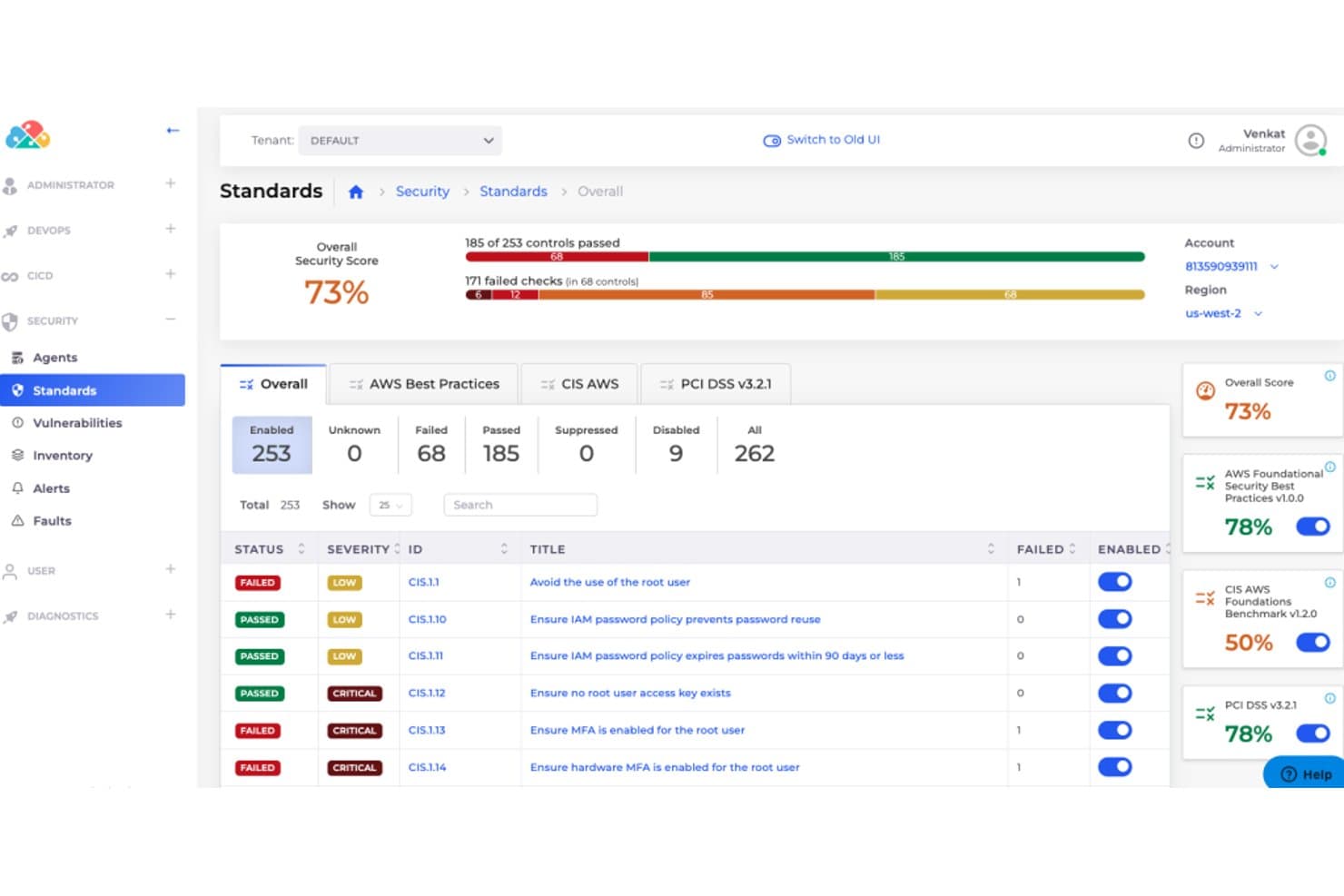
DuploCloud tracks AWS security compliance across CIS, PCI DSS, and best practices. DuploCloud is an agentic DevOps platform that automates AWS infrastructure provisioning, Kubernetes operations, CI/CD deployments, observability, and security and compliance workflows through a combination of pre-built AI agents and a no-code interface.
Who Is DuploCloud Best For?
DuploCloud is a strong fit for engineering teams that need AI-driven infrastructure automation with built-in human approval gates before any changes reach production.
Why I Picked DuploCloud
I picked DuploCloud as one of the best because of how it handles the gap between AI-driven automation and production safety. Its AI Guardrails enforce read-only agent access by default, and any infrastructure remediation requires explicit human approval before a change goes through. I also like that agent credentials are scoped JIT tokens that expire when the ticket closes, so there's no lingering access after a task completes.
DuploCloud Key Features
- Terraform provider with managed state backend: A dedicated Terraform provider connects Git repositories and manages AWS state in S3 with DynamoDB locking, scoped per portal.
- Multi-interface access: Teams can interact with the platform through a web browser, Slack, Microsoft Teams, CLI, API, or MCP, depending on the plan tier.
- Advanced Observability Suite: An OpenTelemetry-based monitoring add-on that delivers real-time metrics, traces, logs, anomaly detection, and root-cause analysis across AWS environments.
- Tenant-based environment modeling: Each tenant maps to an application lifecycle stage—development, staging, or production—with environment-specific RBAC scopes and isolated Terraform state.
DuploCloud Integrations
DuploCloud documents integrations with AWS, Terraform, GitHub, Jenkins, GitHub Actions, CircleCI, GitLab, Kubernetes, Datadog, and Prometheus. It also provides a REST API for custom integrations and supports CI/CD workflows through external pipelines.
Pros and Cons
Pros:
- Tenant-level logs and drift visibility
- Self-service Terraform reduces infrastructure ticket queues
- Human approval gates risky AI remediation
Cons:
- Each portal handles only one AWS account
- Image builds and tests stay external
Learn more about DuploCloud: Best for code collaboration
- Free plan available
- From $3.65/user/month
Visit WebsiteCustomer Rating:4.5/5
Bitbucket simplifies code collaboration and integrates CI/CD pipelines. Bitbucket is a Git-based code hosting and collaboration tool built for development teams. It helps users manage repositories, track changes, and collaborate on real time projects within an integrated platform.
Why I Picked Bitbucket:
It supports private repositories, letting your team securely manage and share code. You can set up pull requests with inline discussions to streamline code reviews and ensure quality. Its integration with Jira makes it easy to connect commits to issues, giving your team better visibility into project progress. Bitbucket Pipelines allows you to automate your CI/CD workflows directly in the platform without additional tools.
Standout Features & Integrations:
Features include built-in code snippets to share reusable code across your team. It offers branch permissions to control who can push changes to specific branches, ensuring better code quality. You can also use the diff view to quickly compare changes and identify issues before merging.
Integrations include Jira, Trello, Slack, Microsoft Teams, AWS, Google Cloud, Bamboo, Jenkins, Kubernetes, and PagerDuty.
Pros and Cons
Pros:
- Supports unlimited private repositories for teams
- Includes built-in CI/CD with Pipelines
- Offers smart mirroring for faster repository access
Cons:
- Advanced features depend on paid plans
- Onboarding may be challenging for non-technical users
Learn more about Bitbucket: Best for infrastructure as code
- Free plan available
- Pricing upon request
Visit WebsiteCustomer Rating:4.7/5
Terraform provisions and manages infrastructure with reusable configurations. Terraform is an open-source tool that lets teams define and manage their infrastructure using configuration files. It helps users automate infrastructure provisioning, updates, and scaling across different environments.
Why I Picked Terraform:
It supports a declarative approach, allowing you to define the desired state of your infrastructure and letting Terraform handle the rest. You can manage resources across multiple cloud providers from a single tool, avoiding vendor lock-in. Its modular structure lets you reuse and share configurations to save time. Terraform’s state management ensures consistency and helps you track infrastructure changes over time. These features make it a reliable option for automating and scaling your infrastructure.
Standout Features & Integrations:
Features include resource graphing, which helps you visualize dependencies and understand infrastructure relationships. You can use the plan command to preview changes before applying them, reducing the risk of errors. Terraform also supports drift detection, letting you identify and fix differences between your infrastructure and configuration files.
Integrations include AWS, Azure, Google Cloud, Kubernetes, GitHub, GitLab, VMware, Slack, PagerDuty, and Splunk.
Pros and Cons
Pros:
- Supports multi-cloud infrastructure management
- Allows reusable and modular configurations
- Visualizes resource dependencies with graphs
Cons:
- Steep learning curve for beginners
- Debugging issues can take significant time
 5Best for project tracking
Jira
- Free plan + 7-day free trial available
- From $8.48/user/month
Visit WebsiteCustomer Rating:4.4/5
Jira organizes tasks and tracks project progress for development teams. Jira is a project management tool designed to help teams plan, track, and manage their work. It provides features that enable users to organize tasks, monitor progress, and collaborate effectively across projects.
Why I Picked Jira:
It allows you to create customizable workflows that align with your team’s processes. You can visualize tasks using boards like Kanban or Scrum to track progress in real-time. Jira's reporting and dashboard features help you easily monitor team performance and project timelines. It integrates well with development tools, enabling your team to connect code changes to tasks. These features make it a reliable choice for managing complex projects efficiently.
Standout Features & Integrations:
Features include advanced issue tracking that lets your team prioritize and resolve tasks efficiently. You can use roadmap views to plan projects and align work across multiple teams. It also provides automation rules to eliminate repetitive tasks and improve productivity.
Integrations include Bitbucket, Confluence, Slack, Microsoft Teams, GitHub, GitLab, Trello, AWS, Azure, and Google Drive.
Pros and Cons
Pros:
- Customizable workflows for team processes
- Handles large, complex projects well
- Strong reporting tools for agile teams
Cons:
- Training needed for advanced features
- Slows down with large datasets


Jenkins provides flexible automation for building and deploying software. Jenkins is an open-source automation server that enables teams to build, deploy, and automate their software development workflows. It is widely used by developers and organizations to set up continuous integration and delivery pipelines.
Why I Picked Jenkins:
Its vast library of plugins offers unmatched flexibility, letting you customize your automation workflows to suit your team’s needs. Using its intuitive pipeline-as-code feature, you can automate everything from simple builds to complex multi-stage pipelines. Jenkins supports a wide range of languages, tools, and environments, giving your team the freedom to work with their preferred tech stack. With community support and open-source access, you can adapt and extend Jenkins to fit unique requirements.
Standout Features & Integrations:
Features include support for distributed builds, which lets you run jobs across multiple machines to speed up processing. It provides real-time build progress updates so your team can monitor pipelines as they run. You can also create reusable pipeline templates to standardize workflows across your projects.
Integrations include GitHub, Bitbucket, GitLab, Docker, Kubernetes, AWS, Azure, Slack, Jira, and Terraform.
Pros and Cons
Pros:
- Supports endless customizations through plugins
- Handles distributed builds for large-scale projects
- Works across multiple operating systems
Cons:
- Lacks modern UI compared to newer tools
- Debugging pipelines can be time-consuming
 Best for infrastructure automation
- Free plan + free demo available
- Pricing upon request
Visit WebsiteCustomer Rating:4.2/5
Puppet automates infrastructure configuration and enforces desired states. Puppet is a configuration management tool designed to help IT teams automate infrastructure provisioning, management, and scaling. It simplifies complex tasks by enabling users to define their infrastructure as code, making systems more predictable and easier to manage.
Why I Picked Puppet:
It allows you to define and enforce desired states for your infrastructure, ensuring system consistency. You can use its declarative language to describe configurations and automate tasks like software deployment and patching. Puppet provides detailed reporting to help you track changes and ensure compliance. It works across various operating systems, giving your team flexibility in managing diverse environments.
Standout Features & Integrations:
Features include task automation to simplify repetitive processes and free up your team’s time. It provides role-based access control to manage user permissions and ensure security. You can also use pre-built modules to speed up the deployment of standard configurations.
Integrations include AWS, Azure, Google Cloud, Docker, Kubernetes, VMware, GitHub, GitLab, Splunk, and ServiceNow.
Pros and Cons
Pros:
- Automates complex multi-cloud environments
- Offers pre-built modules to simplify configuration
- Provides detailed reporting for compliance tracking
Cons:
- Requires dedicated expertise for optimal implementation
- Limited support for certain niche operating systems
Learn more about Puppet:

CircleCI customizes CI/CD pipelines for efficient software delivery. CircleCI is a continuous integration and delivery platform designed to help development teams automate their build, test, and deployment processes. It enables users to create efficient pipelines that ensure reliable and consistent application releases.
Why I Picked CircleCI:
It provides flexible workflows to customize your pipeline steps to match your team's needs. You can set up parallel builds to reduce testing time and speed up deployment. The platform supports containerized environments so that you can run your jobs in Docker images or custom virtual machines. With automatic triggers for commits and pull requests, your team can stay focused on writing code while CircleCI handles the testing and delivery. This ensures faster and smoother deployments for your projects.
Standout Features & Integrations:
Features include support for configuration-as-code using YAML files, allowing you to version control your pipelines. It provides detailed analytics to help you track your build performance and optimize workflows. You can also use conditional workflows to define when specific jobs or steps should run, giving your team better control over the process.
Integrations include GitHub, Bitbucket, GitLab, Docker, Slack, AWS, Azure, PagerDuty, Jira, and Terraform.
Pros and Cons
Pros:
- Supports parallelism to speed up build times
- Offers detailed job-specific performance insights
- Flexible with containerized and virtual machine builds
Cons:
- Can be challenging to debug complex pipelines
- Dependency caching inconsistencies may slow some builds
Learn more about CircleCI:

Podman supports daemonless containers and improves developers' security. Podman is a container management tool for developers and teams working with containerized applications. It allows users to build, manage, and run containers without requiring a daemon, making it lightweight and efficient.
Why I Picked Podman:
It offers a daemonless architecture, which means you don’t need to rely on a background service to manage your containers. You can quickly run containers as non-root, improving security and flexibility for your team. The tool supports Kubernetes YAML for generating and deploying containers. It’s compatible with Docker commands, so you can transition or work across tools with little friction. With Podman, you also get built-in functionality for pod management, making it easier to group and manage containers.
Standout Features & Integrations:
Features include support for rootless containers, which enhances security and lets you run containers without administrative privileges. You can also manage pods, grouping multiple containers for easy orchestration. It provides an interactive command-line interface for building, running, and troubleshooting containers.
Integrations include Kubernetes, Docker, Buildah, Skopeo, CRI-O, OpenShift, Ansible, Helm, Terraform, and Jenkins.
Pros and Cons
Pros:
- Compatible with Docker commands and images
- Supports managing groups of containers as pods
- Integrates well with Kubernetes workflows
Cons:
- May require a deeper understanding of Linux systems
- Networking features are still under development
Learn more about Podman:

Consul manages service discovery and secure communication between services. Consul is a networking tool designed to help teams connect, secure, and manage services across different environments. It enables dynamic service discovery, configuration management, and health monitoring for distributed systems.
Why I Picked Consul:
It allows you to register and discover services dynamically, making it easy to manage complex infrastructures. You can define service health checks to monitor availability and performance. Consul’s built-in key-value store helps your team centrally manage application configuration. Its service mesh capabilities provide secure service-to-service communication with automated TLS encryption.
Standout Features & Integrations:
Features include multi-datacenter support, allowing your team to connect services across multiple regions. It provides an API-first approach, letting you automate workflows and customize configurations easily. Consul also includes network segmentation to enhance security between services using service intentions.
Integrations include Kubernetes, Docker, AWS, Azure, Google Cloud, Splunk, Prometheus, Grafana, PagerDuty, and Slack.
Pros and Cons
Pros:
- Discovers services dynamically
- Simplifies network segmentation
- Supports multi-datacenter setups
Cons:
- Complex for beginners
- Resource-heavy for large setups
Learn more about Consul:
Alte instrumente AWS DevOps
Iată câteva opțiuni suplimentare de instrumente AWS DevOps care nu au intrat în selecția mea, dar merită totuși analizate.
- 11Travis CIBest for continuous integration
- 12VaultBest for secure secrets management
- 13ChefBest for infrastructure compliance
- 14AnsibleBest for simple automation tasks
- 15GitLabBest for integrated DevOps workflows
- 16AWS CodeCommitBest for secure Git hosting
- 17AWS AmplifyBest for rapid web app deployment
- 18AWS CodeBuildBest for automatic code tests
- 19AWS FargateBest for serverless container management
- 20AWS CodePipelineBest for continuous delivery setup
How I Evaluate AWS DevOps Tools
I split my evaluation into baseline criteria—things like AWS-native integration and CI/CD pipeline support—and differentiators that separate one tool from another for specific teams.
Core Functionality (Table Stakes For This List)
When I'm selecting tools for my list, I rank each one on a scale from 0 (does not offer the functionality) to 5 (excels in this area) for each core functionality listed below. Then, I calculate the tool's total score into a percentage. Each tool needs to achieve a minimum total score of 65% to be considered for inclusion.
- AWS Native Integration: I check how deeply each tool connects with core AWS services like EC2, S3, Lambda, and IAM—not just whether it can talk to AWS, but whether it feels built for it.
- CI/CD Pipeline Automation: Each tool should let you automate builds, tests, and deployments to AWS targets, whether you're pushing to ECS clusters or updating Lambda functions.
- Infrastructure as Code Support: I look for compatibility with IaC frameworks like CloudFormation, Terraform, or CDK so teams can version, review, and reproduce their AWS environments from code.
- Monitoring & Observability: The tool should surface metrics, logs, or traces tied to AWS resources, giving your team real visibility when a production deployment causes latency spikes.
- Container & Orchestration Support: I evaluate whether a tool handles containerized workloads on ECS, EKS, or Fargate, including deployment workflows and scaling configuration.
- Security & Access Management: Each tool should integrate with AWS IAM for role-based access and support secrets management, so credentials aren't hardcoded into pipeline configs.
Once I have a list of tools that meet this criteria, I consider what sets each platform apart.
Differentiating Factors (What Sets Vendors Apart)
Here's how I compare and contrast different vendors:
Standout Features
GitOps workflow support matters a lot to me—teams managing dozens of microservices on EKS benefit from Git-driven deployments where every change is versioned and auditable. I also evaluate multi-account management, since enterprise teams often run separate AWS accounts for dev, staging, and production, and a tool that handles cross-account deployments saves real headaches. Serverless-first tooling is another differentiator, especially for teams building event-driven architectures on Lambda who need specialized debugging and observability.
Beyond Features
Compliance and security standards carry real weight—I check whether a tool supports frameworks like SOC 2, HIPAA, or PCI-DSS, because regulated industries need that coverage baked in. Ecosystem integrations also shape my evaluation; a tool that connects with GitHub, Jira, and your existing ITSM platform fits into workflows your team already uses. I also look at implementation quality, including documentation, reference architectures, and active community forums, since a tool with poor onboarding resources creates friction that slows adoption across engineering teams.
Cum să alegeți instrumentele AWS DevOps
Este ușor să vă pierdeți în liste lungi de funcții și structuri complexe de tarifare. Iată o listă de verificare cu factori de care trebuie să țineți cont, pentru a vă ajuta să rămâneți concentrați în timp ce parcurgeți procesul unic de selecție a software-ului DevOps pentru Amazon Web Services.
| Factor | Ce trebuie luat în considerare |
| Scalabilitate | Asigurați-vă că instrumentul poate evolua odată cu proiectele dumneavoastră. Luați în considerare modul în care gestionează sarcinile de lucru crescute. |
| Integrări | Verificați dacă se integrează cu instrumentele DevOps pentru Salesforce existente în echipa dumneavoastră sau cu alte software-uri CRM. |
| Posibilitate de personalizare | Căutați opțiuni pentru a adapta instrumentul la fluxurile de lucru și preferințele echipei dumneavoastră. |
| Ușurință în utilizare | Echipa dumneavoastră ar trebui să se adapteze rapid la instrument. Căutați interfețe intuitive și asistență. |
| Buget | Corelați costul cu limitele dumneavoastră financiare. Luați în considerare atât cheltuielile inițiale, cât și pe cele recurente. |
| Măsuri de protecție a securității | Asigurați-vă că îndeplinește cerințele dumneavoastră de protecție a datelor prin criptare și conformitate. |
| Asistență | Asistența fiabilă pentru clienți poate economisi timp. Verificați disponibilitatea și promptitudinea. |
| Performanță | Instrumentul ar trebui să fie rapid și fiabil. Luați în considerare garanțiile privind disponibilitatea și recenziile utilizatorilor. |
Tendințe în instrumentele AWS DevOps
În cercetarea mea, am consultat nenumărate actualizări de produse, comunicate de presă și jurnale de lansare de la diferiți furnizori de instrumente AWS DevOps. Iată câteva dintre tendințele emergente pe care le urmăresc.
- Arhitectură fără server: Mai multe instrumente acceptă computarea fără server, permițând dezvoltatorilor să creeze și să ruleze aplicații fără să gestioneze infrastructura. Această tendință reduce costurile administrative și îmbunătățește scalabilitatea, AWS Lambda fiind un exemplu popular.
- Informații bazate pe IA: Furnizorii integrează IA pentru a oferi analize predictive și informații despre performanță. Acest lucru ajută echipele să anticipeze problemele înainte ca acestea să apară, optimizând strategiile de implementare. De exemplu, unele instrumente oferă acum detectarea anomaliilor bazată pe IA.
- Funcții de securitate îmbunătățite: Securitatea rămâne o prioritate majoră, iar instrumentele adaugă funcții precum scanarea automată a vulnerabilităților și modelele de securitate bazate pe principiul încrederii zero. Aceste completări ajută companiile să protejeze datele și să mențină conformitatea, ceea ce este esențial în mediile actuale.
- Sisteme cu autoreparare: Instrumentele evoluează pentru a include funcții de autoreparare, remediind automat problemele fără intervenția umană. Acest lucru minimizează perioadele de nefuncționare și asigură continuitatea operațiunilor. Unii furnizori implementează deja funcții de revenire automată pentru implementările defectuoase.
- Infrastructură ca cod (IaC): Adoptarea IaC este în creștere, permițând echipelor să gestioneze și să furnizeze resurse folosind cod. Această tendință îmbunătățește consecvența și reduce erorile, Terraform fiind o opțiune populară pentru gestionarea infrastructurii în mai multe medii cloud.
Ce sunt instrumentele AWS DevOps?
Instrumentele AWS DevOps ajută echipele să creeze, să implementeze și să gestioneze aplicații pe AWS cu mai multă automatizare și mai mult control. Dezvoltatorii, echipele de operațiuni și inginerii de fiabilitate a site-urilor folosesc aceste instrumente pentru a accelera lansările și a reduce erorile în mediile de calcul în cloud.
Conductele CI/CD, automatizarea infrastructurii și funcțiile de monitorizare ajută la implementarea consecventă a modificărilor, la gestionarea resurselor și la identificarea timpurie a problemelor. În general, aceste instrumente ajută echipele să livreze aplicații pe AWS mai fiabil și cu mai puțin efort manual.
Funcțiile instrumentelor AWS DevOps
Atunci când selectați instrumente AWS DevOps, căutați următoarele funcții esențiale.
- Integrare continuă: Automatizează procesul de integrare a modificărilor de cod, asigurând feedback rapid și reducerea erorilor.
- Infrastructură ca cod (IaC): Vă permite să gestionați și să furnizați infrastructura folosind cod, asigurând consecvență și reducând erorile de configurare.
- Testare automată: Rulează automat teste pentru codul nou, pentru a detecta erorile din timp și a îmbunătăți calitatea implementărilor.
- Suport pentru arhitectura fără server: Permite dezvoltarea și execuția aplicațiilor fără gestionarea infrastructurii, reducând efortul administrativ.
- Gestionarea dinamică a secretelor: Oferă generarea și gestionarea securizată a datelor de autentificare, sporind securitatea.
- Sisteme cu autoreparare: Detectează și remediază automat problemele, minimizând timpul de nefuncționare și asigurând continuitatea operațiunilor.
- Informații bazate pe inteligență artificială: Utilizează inteligența artificială pentru a oferi analize predictive și informații despre performanță, optimizând strategiile de implementare.
- Funcții avansate de securitate: Include scanarea automată a vulnerabilităților și modele de încredere zero pentru a proteja datele și a menține conformitatea.
- Tablouri de bord personalizabile: Oferă vizualizări personalizate ale indicatorilor și performanței, ajutând echipele să își monitorizeze și să își gestioneze eficient proiectele.
- Integrarea cu cloudul AWS: Se integrează perfect cu ecosistemul AWS, permițând accesul la servicii pentru simplificarea fluxurilor de lucru DevOps.
- Optimizarea procesului de lansare : Sprijină întregul ciclu de dezvoltare, de la compilare până la implementare, oferind urmărirea versiunilor, opțiuni de revenire și monitorizarea stării lansărilor.
- Șabloane AWS CloudFormation : Permite definirea și furnizarea infrastructurii folosind șabloane IaC reutilizabile, asigurând implementări consecvente.
- Suport pentru limbaje de dezvoltare: Acceptă mai multe limbaje de programare, precum Java, Python și Node.js, fiind versatil pentru echipele de dezvoltare.
- Gestionarea codului sursă: Oferă depozite Git securizate prin AWS CodeCommit, integrate cu fluxurile CI/CD pentru simplificarea operațiunilor de trimitere, îmbinare și revizuire a codului.
- Compatibilitate cu infrastructura locală: Permite implementări hibride cu instrumente precum AWS CodeDeploy și OpsWorks, facilitând integrarea cu serverele locale.
- Scalare automată și autoreparare: Ajustează dinamic resursele de calcul în funcție de cerere și recuperează instanțele defecte pentru a asigura disponibilitate ridicată și toleranță la erori.
- Integrarea serverelor de compilare: Oferă servere de compilare complet gestionate prin AWS CodeBuild pentru a compila codul, a rula teste și a crea automat artefacte.
- AWS CDK (kitul de dezvoltare cloud): Permite definirea infrastructurii cloud folosind limbaje de programare, simplificând IaC în comparație cu configurațiile JSON/YAML.
- Eficiența calculului în cloud: Utilizează resurse cloud la cerere pentru a scala mediile după necesități, asigurând alocarea eficientă a resurselor și reducerea costurilor.
- Integrare continuă și livrare (CI/CD): Implementează fluxuri CI/CD complete pentru automatizarea compilărilor, testelor și implementărilor.
- Ecosistemul AWS DevOps : Se integrează cu instrumente terțe precum Jenkins, GitHub și Terraform, creând un ecosistem DevOps cuprinzător și extensibil.
- Furnizarea la cerere a resurselor: Oferă acces la cerere la instanțe de calcul, spațiu de stocare și baze de date, permițând echipelor să scaleze dinamic resursele în perioadele de utilizare intensă.
- Lansarea simplificată a software-ului: Automatizează procesul de lansare a software-ului, oferind feedback detaliat și jurnale de implementare pentru a asigura vizibilitatea în fiecare etapă.
- Personalizarea interfeței utilizatorului: Oferă tablouri de bord personalizabile pentru monitorizarea indicatorilor-cheie de performanță, facilitând urmărirea implementărilor și depanarea problemelor.
Avantajele instrumentelor AWS DevOps
Implementarea instrumentelor AWS DevOps oferă mai multe avantaje pentru echipa și afacerea dumneavoastră. Iată câteva dintre beneficiile de care vă puteți bucura.
- Implementare mai rapidă: Integrarea continuă și testarea automată vă ajută să lansați rapid actualizări și funcții noi.
- Colaborare îmbunătățită: Integrarea codului și gestionarea infrastructurii ca cod îmbunătățesc lucrul în echipă și reduc neînțelegerile.
- Securitate sporită: Funcții precum gestionarea dinamică a secretelor și protocoalele avansate de securitate vă protejează datele.
- Timp redus de nefuncționare: Sistemele cu autoreparare și rezolvarea automată a problemelor mențin aplicațiile în funcțiune fără întreruperi.
- Eficiență a costurilor: Suportul pentru arhitectura fără server reduce costurile de gestionare a infrastructurii.
- Luarea unor decizii mai bune: Informațiile bazate pe inteligență artificială oferă date valoroase pentru optimizarea performanței și a utilizării resurselor.
Costurile și prețurile instrumentelor AWS DevOps
Selectarea instrumentelor DevOps AWS necesită înțelegerea diferitelor modele de preț și a planurilor disponibile. Costurile variază în funcție de funcții, dimensiunea echipei, suplimente și alți factori. Tabelul de mai jos rezumă planurile standard, prețurile medii și funcțiile tipice ale soluțiilor de instrumente AWS DevOps.
Tabel comparativ al planurilor pentru instrumentele AWS DevOps
| Tip de plan | Preț mediu | Funcții comune |
| Plan gratuit | $0 | Instrumente CI/CD de bază, spațiu de stocare limitat și asistență din partea comunității. |
| Plan personal | $5-$20 /utilizator /lună | Fluxuri CI/CD avansate, integrări de bază și asistență prin e-mail. |
| Plan pentru companii | $25-$50 /utilizator /lună | Fluxuri personalizate, asistență prioritară și funcții de securitate îmbunătățite. |
| Plan pentru întreprinderi | $75+ /utilizator /lună | Infrastructură scalabilă, integrări premium și asistență dedicată. |
Întrebări frecvente despre instrumentele DevOps AWS
Iată câteva răspunsuri la întrebările frecvente despre instrumentele DevOps AWS.
Cum ajută instrumentele DevOps AWS la CI/CD?
Instrumentele DevOps AWS automatizează fluxurile CI/CD, astfel încât să poți implementa codul mai rapid și mai fiabil. Instrumente precum CodePipeline și CodeBuild îți permit să integrezi codul, să îl testezi și să implementezi actualizări în diferite medii, cu intervenție manuală minimă. Echipa ta poate, de asemenea, să urmărească modificările și să revină la implementările anterioare dacă ceva nu funcționează corect.
Pot folosi instrumentele DevOps AWS împreună cu alți furnizori de servicii cloud?
Da, instrumentele DevOps AWS precum Terraform, Jenkins sau alte alternative pentru gestionarea serviciilor Jira se pot integra cu alți furnizori de servicii cloud, precum Azure și Google Cloud. Această flexibilitate este utilă dacă rulezi un mediu multi-cloud sau hibrid. Va trebui să configurezi accesul și permisiunile pentru fiecare furnizor pentru a asigura compatibilitatea.
Pot fi folosite instrumentele DevOps AWS pentru gestionarea infrastructurii?
Instrumentele DevOps AWS oferă funcții de securitate precum permisiuni IAM, criptare și jurnale de audit. De exemplu, poți restricționa persoanele care pot modifica fluxurile sau implementa schimbări. Dacă folosești instrumente precum Vault împreună cu serviciile AWS, poți proteja suplimentar acreditările și secretele sensibile.
Acceptă instrumentele DevOps AWS aplicații containerizate?
Instrumente precum ECS, EKS și CodeBuild funcționează bine pentru aplicații containerizate. Poți crea și implementa containere Docker sau poți gestiona direct clustere Kubernetes în AWS. Astfel, gestionarea sarcinilor de lucru containerizate la scară largă, integrând în același timp fluxurile CI/CD, devine simplă.
Cum monitorizez și depanez fluxurile atunci când folosesc instrumentele DevOps AWS?
Instrumentele DevOps AWS sunt servicii și platforme care ajută echipele să creeze, să implementeze și să gestioneze aplicații în AWS cu mai multă automatizare și control. Dezvoltatorii, echipele de operațiuni și inginerii pentru fiabilitatea site-urilor folosesc aceste instrumente pentru a accelera lansările și a reduce erorile în mediile cloud. Fluxurile CI/CD, automatizarea infrastructurii și funcțiile de monitorizare ajută la implementarea consecventă a modificărilor, gestionarea resurselor și identificarea timpurie a problemelor. În general, aceste instrumente ajută echipele să livreze aplicații în AWS mai fiabil și cu mai puțin efort manual. Instrumentele AWS precum CloudWatch și CloudTrail îți permit să monitorizezi fluxurile. Poți urmări jurnalele, valorile și apelurile API pentru a diagnostica problemele. În plus, CodePipeline oferă funcții de înregistrare integrate care te ajută să identifici și să remediezi erorile din timpul implementărilor.