

Asigurarea funcționării impecabile a software-ului este o provocare constantă. Erorile și defecțiunile vă pot încetini, vă pot frustra echipa și pot afecta experiența utilizatorilor. Aici intervin instrumentele de testare SaaS. Acestea vă ajută să identificați problemele din timp, să economisiți timp și să îmbunătățiți calitatea software-ului.
Am petrecut ani de zile aprofundând industria SaaS și evaluând instrumente care fac cu adevărat diferența. În acest articol, voi prezenta alegerile mele de top pentru cele mai bune instrumente de testare SaaS disponibile pe piață. Veți găsi informații despre funcțiile lor unice și despre modul în care pot fi utile echipei dumneavoastră. Scopul meu este să vă ofer o recenzie imparțială, astfel încât să puteți lua o decizie informată.
Why Trust Our Software Recommendations
6,700+
Reviews
20
Industry experts
16+
Evaluation factors
14
Years
Our team has been testing and reviewing software since 2012. As tech leaders ourselves, we know how difficult—and important—it is to choose the right software.
For this guide, we evaluated tools using hands-on testing and independent research, scoring tools using our selection criteria.
Our reviews reflect our human editorial judgment, not a sales pitch.
Expert reviewers:
- Paulo Gardini MiguelTech Director
 Tim FisherVP of AI
 Gabriel RosasTech Lead & Software Architect
 Christhian GruhnTech Lead & Platform Architect

Tabel comparativ al instrumentelor de testare SaaS
Tabelul de mai jos compară detaliile de preț pentru instrumentele mele de top de testare SaaS.
Sorted by: Default
| Tool | Starting Price | Website | |
|---|---|---|---|
Best for business process-centric automation | 4.8 out of 5 | Pricing upon request 14-day free trial | Website |
Best for generating tests from pull requests | 4.9 out of 5 | $17/month Free plan + free demo available | Book Demo |
Best for checklist-based manual testing | 4.1 out of 5 | $49/month Free trial available | Website |
Best for SaaS release cycles | 4.8 out of 5 | Pricing upon request Free demo available | Website |
Best for AI-powered test case creation | 4.6 out of 5 | $9/user/month Free plan available | Website |
Best for end-to-end testing | 4.6 out of 5 | $13/user/month Free trial available | Website |
Best for cross-platform testing | 4.9 out of 5 | $199/month/year Free trial available | Website |
Best for fast test creation | 4.9 out of 5 | From 1¢/AI credit Free demo available | Website |
Best for real device testing | 4.5 out of 5 | $29/month Free trial available | Website |
Best for large enterprise teams | 4.6 out of 5 | Pricing upon request | Website |


Recenzii ale celor mai bune instrumente de testare SaaS
Mai jos sunt rezumatele mele detaliate ale celor mai bune instrumente de testare SaaS care au ajuns pe lista mea scurtă. Recenziile mele oferă o privire detaliată asupra funcțiilor principale, avantajelor & dezavantajelor, integrărilor și cazurilor ideale de utilizare ale fiecărui instrument, pentru a vă ajuta să îl găsiți pe cel mai potrivit pentru dumneavoastră.
 Best for business process-centric automation
- 14-day free trial
- Pricing upon request
Visit WebsiteCustomer Rating:4.8/5
ACCELQ offers a detailed test step execution interface with scenario tracking, pass/fail results, and live test run logs for SaaS-based automated testing. ACCELQ is a cloud-native, codeless test automation platform that spans web, mobile, API, desktop, and packaged app testing, with AI-assisted test generation and self-healing script capabilities built in.
Who Is ACCELQ Best For?
ACCELQ is a strong fit for QA teams at mid-market and enterprise companies that test packaged cloud apps like Salesforce, Workday, or MS Dynamics.
Why I Picked ACCELQ
I picked ACCELQ as one of the best because its approach to automation is built around business processes, not just UI actions. When I'm testing a Salesforce workflow or a Workday approval chain, ACCELQ maps the test logic to the underlying business process, so self-healing scripts adapt when the UI changes without requiring a full rewrite. The Autopilot AI layer also generates test cases directly from process flows, which cuts the time my team spends on initial test authoring significantly.
ACCELQ Key Features
- Unified platform automation: Centralizes testing for web, mobile, API, desktop, and mainframe applications from a single interface.
- ACCELQ Manual module: Lets teams manage manual test cases with traceability and integration to automation workflows.
- Native CI/CD integrations: Connects directly with Jenkins, Bamboo, TeamCity, and Azure DevOps for automated pipeline testing.
- Cloud-based device lab: Provides access to real browsers and mobile devices for cross-browser and cross-device test execution.
ACCELQ Integrations
ACCELQ offers native integrations with Jenkins, Jira, ClickUp, Bamboo, TeamCity, Slack, and Microsoft Teams, and provides an API for custom integrations.
Pros and Cons
Pros:
- Codeless automation for business process flows
- Specialized testing support for Salesforce and Workday
- AI-powered self-healing for test maintenance
Cons:
- Some users report confusing reporting dashboards
- Limited built-in performance testing capabilities
Learn more about ACCELQ: Best for generating tests from pull requests
- Free plan + free demo available
- From $17/month (billed annually)
Visit WebsiteCustomer Rating:4.9/5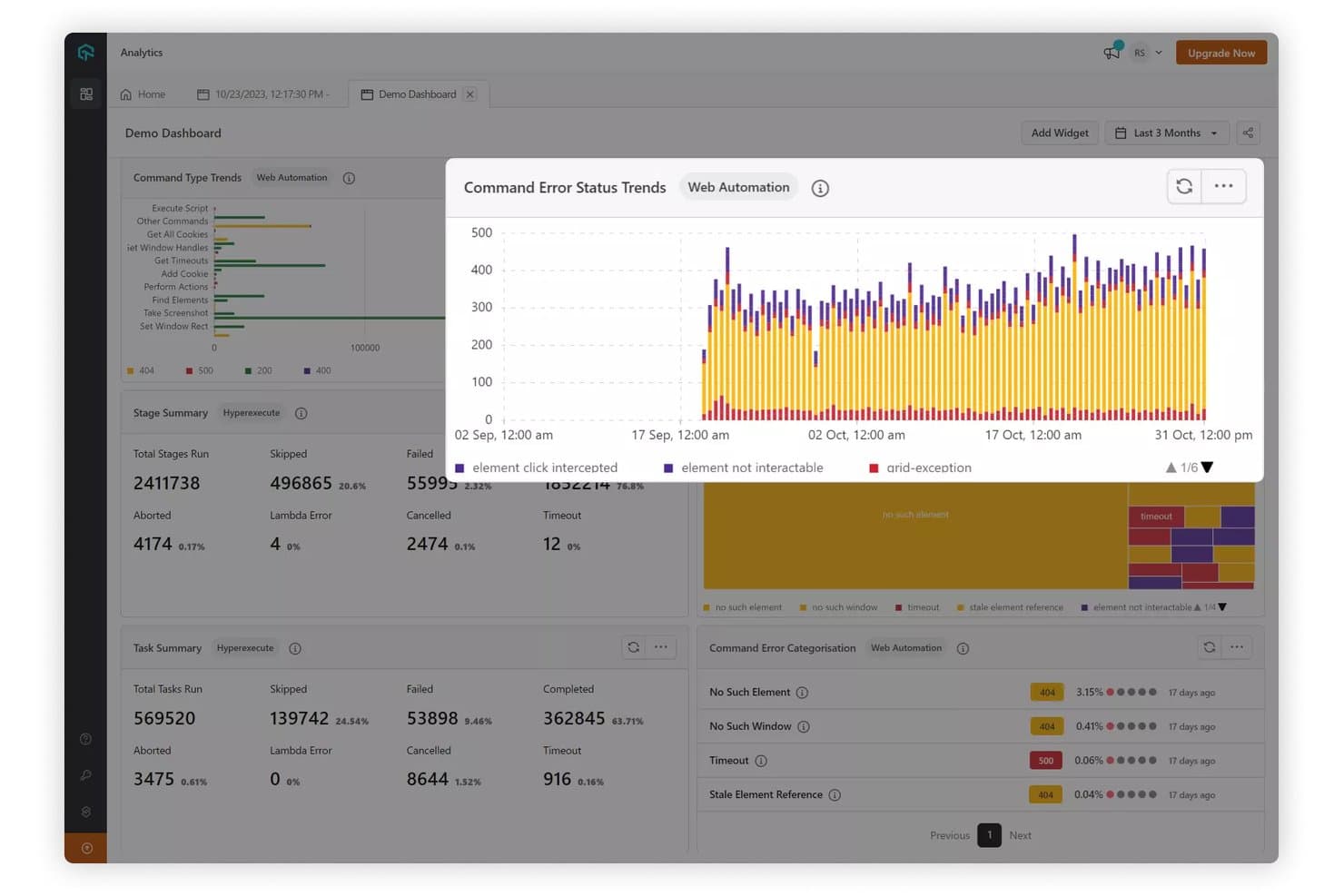
TestMu AI tracks command error trends via an analytics dashboard. KaneAI is an AI-native end-to-end testing agent from TestMu AI that authors, runs, and evolves tests from natural-language instructions across web and mobile apps, with cross-browser execution, visual regression checks, and self-healing test maintenance built in.
Who Is KaneAI Best For?
KaneAI is a strong fit for development teams that want to trigger AI-generated test coverage directly from pull requests without leaving their GitHub workflow.
Why I Picked KaneAI
I picked KaneAI as one of the best because it generates tests directly from pull requests, which is something I haven't seen executed this cleanly elsewhere. When I comment
@TestMuAI Validate this PR, it reads the diff, generates scenarios, runs them in parallel on HyperExecute, and posts a coverage and success-rate summary with an approval recommendation back in the PR thread, all within minutes. I also like that it combines newly generated cases with semantically similar existing ones from Test Manager, so you're not duplicating coverage you've already built.KaneAI Key Features
- Natural-language test authoring: Write test instructions in plain English and KaneAI generates, runs, and evolves executable tests across web and mobile apps.
- Self-healing tests: KaneAI detects UI and locator changes, updates affected test steps automatically, and surfaces those changes for your review.
- Visual regression testing: KaneAI captures a screenshot baseline on the first run and compares later captures, flagging visual differences across viewport and full-page web screenshots.
- Kane CLI: Run natural-language tests locally or in CI against a local Chrome browser, iOS Simulator, or Android Emulator, with typed exit codes and optional Playwright code export.
KaneAI Integrations
KaneAI offers native integrations with Jira, Azure DevOps, and GitHub. Its GitHub App validates pull requests, runs generated tests, and posts results directly in the PR thread.
Pros and Cons
Pros:
- Failure traces expose DOM and network clues
- Natural-language tests reduce scripting effort
- Parallel regression runs shorten test cycles
Cons:
- Cloud device sessions can lag or disconnect
- Generated cases need edits for complex workflows
Learn more about TestMu AI: Best for checklist-based manual testing
- Free trial available
- From $49/month (billed annually)
Visit WebsiteCustomer Rating:4.1/5
Testpad provides a lightweight, browser-based testing platform for SaaS teams, enabling structured test scripts, shared execution, and centralized reporting without complex setup. Testpad is a manual test management tool designed for QA teams, product managers, and developers who want a simple, collaborative way to organize, execute, and track manual software tests without the complexity of traditional test case management systems.
Who Is Testpad Best For?
QA leads and product teams at startups and SMBs who want a straightforward approach to managing manual software testing.
Why I Picked Testpad
I picked Testpad as one of the best because its checklist-based manual testing approach fits how my team likes to organize exploratory and regression tests. I use its drag-and-drop test plan editor to quickly build and update test checklists for each release. The ability to mark off steps as we go keeps everyone aligned on test progress.
Testpad Key Features
- Guest tester access: Invite external testers to participate without requiring them to create accounts.
- Real-time progress tracking: See live updates as tests are completed across your team.
- Bulk import and export: Quickly move test plans and results in and out using csv files.
- Customizable tags: Organize and filter tests with tags for easy management and reporting.
Testpad Integrations
Integrations include GitHub, and an API is available for custom integrations.
Pros and Cons
Pros:
- CSV import/export for test data migration
- Real-time progress tracking for test runs
- Bulk editing for fast test plan updates
Cons:
- No mobile app for on-the-go testing
- No requirements traceability features
Learn more about Testpad: Best for SaaS release cycles
- Free demo available
- Pricing upon request
Visit WebsiteCustomer Rating:4.8/5
QA.tech coverage dashboard showing overall coverage metrics and app-level breakdowns. QA.tech offers an AI testing platform built for teams developing SaaS applications. It solves common QA challenges like flaky tests and the burden of maintaining a growing test suite. By automating testing with QA agents that deliver immediate feedback, QA.tech lets teams spend more time improving product quality while reducing the risk of defects that affect the user experience.
Why I Picked QA.tech
I picked QA.tech because it automates end-to-end testing with autonomous QA agents, which works well for SaaS products that ship frequent updates. Instead of relying on rigid scripts, QA.tech focuses on the user’s end goal. If the UI or path changes but the goal is still achievable, tests adapt rather than break. This eliminates flaky tests and the maintenance burden common in traditional automation tools.
QA.tech Key Features
In addition to its AI-driven testing capabilities, QA.tech offers several features that enhance its utility for SaaS testing:
- GitHub Integration: QA.tech provides feedback directly inside pull requests, showing developers how code changes impact real user flows before merging.
- Dynamic Navigation: Tests automatically adapt to UI and product changes using semantic understanding, which can reduce manual test maintenance.
- Complex User Journey Testing: Validate real SaaS workflows that span web apps, mobile apps, SMS, and APIs, all within a single end-to-end test flow.
- Context and Logs: Every test run includes a recorded video, step-by-step context, and detailed logs, helping developers quickly understand what failed and why.
QA.tech Integrations
Integrations include Slack, Microsoft Teams, GitHub, Jira, GitLab, Bitbucket, Jenkins, CircleCI, Travis CI, and Bamboo.
Pros and Cons
Pros:
- Autonomous AI test case generation
- CI/CD and collaboration integrations supported
- Real-time defect feedback and reports
Cons:
- Pricing available upon request only
- AI may miss edge cases
Learn more about QA.tech: Best for AI-powered test case creation
- Free plan available
- From $9/user/month (billed annually)
Visit WebsiteCustomer Rating:4.6/5
Kualitee’s Build Traceability Report visualizes links between requirements, test scenarios, test cases, and defects across a selected sprint. Kualitee is a test management platform designed to help QA and development teams plan, execute, and monitor their testing efforts. It supports both manual and automated testing, offering flexibility to accommodate different testing methodologies.
Why I picked Kualitee: Kualitee stands out as a SaaS testing tool thanks to its AI-powered test case generation, which helps your team quickly create accurate test scenarios with minimal manual effort. It also includes built-in defect management, so you can track and resolve bugs without switching tools. Together, these features help keep your QA process efficient and focused.
Standout features & integrations:
Features include the ability to execute test cases directly from the Test Cases screen without creating a cycle, which can be particularly useful for quick validations or ad-hoc testing scenarios. Kualitee also offers customizable reporting, allowing you to create reports that fit your team's specific needs, save templates, and schedule reports for regular updates.
Integrations include Bitbucket, CircleCI, ClickUp, GitHub, GitLab, JIRA, Jenkins, Linear, Redmine, Selenium, Slack, and Trello.
Pros and Cons
Pros:
- Offers requirement traceability to ensure alignment with project objectives
- Reusable test repositories facilitate efficient test management
- AI-powered test case generation
Cons:
- Customization options, while available, may require additional setup time
- Limited integration options with some development tools
Learn more about Kualitee: Best for end-to-end testing
- Free trial available
- From $13/user/month
Visit WebsiteCustomer Rating:4.6/5
TestMonitor allows users to execute and monitor test runs easily, regardless of their experience level. TestMonitor is a comprehensive testing platform designed for teams seeking end-to-end testing solutions. It caters to QA teams and project managers by offering test management, execution, and reporting capabilities. The platform ensures thorough coverage and detailed insights into testing activities.
Why I picked TestMonitor: TestMonitor is ideal for end-to-end testing with its structured test management approach. Your team can manage test cases, plan test cycles, and track issues all in one place. The platform's detailed reporting provides insights into test progress and outcomes. With TestMonitor, you have a centralized hub for managing your testing activities effectively.
Standout features & integrations:
Features include customizable test plans that adapt to your specific needs. The platform offers issue tracking to ensure no bugs slip through the cracks. It provides detailed analytics to help your team understand testing trends and outcomes.
Integrations include Jira, Azure DevOps, Slack, GitHub, Trello, Asana, Monday.com, TestRail, Bugzilla, and Microsoft Teams.
Pros and Cons
Pros:
- Detailed analytics available
- Customizable test plans
- Comprehensive test management
Cons:
- Requires consistent internet access
- Limited offline capabilities
Learn more about TestMonitor: Best for cross-platform testing
- Free trial available
- From $199/month/year (minimum of 4 seats)
Visit WebsiteCustomer Rating:4.9/5
The TestGrid dashboard provides an overview of testing activities and results, critical for monitoring and management of test executions. TestGrid is a versatile testing platform designed for teams needing cross-platform testing capabilities. It serves developers and QA teams by facilitating testing on multiple devices and browsers. The platform supports both web and mobile app testing, ensuring comprehensive coverage.
Why I picked TestGrid: TestGrid excels with its cross-platform testing capabilities. It offers codeless automation, allowing you to create tests without scripting. You can test on real devices, which ensures accuracy in real-world scenarios. Its support for over 1000 browsers and operating systems helps your team cover a wide range of environments.
Standout features & integrations:
Features include codeless automation for easy test creation, mobile app testing on real devices, and cross-browser testing on over 1000 browsers. It also offers performance testing to ensure app reliability and API testing for comprehensive coverage.
Integrations include Jenkins, Jira, Slack, GitHub, Bitbucket, GitLab, Azure DevOps, Bamboo, CircleCI, and Travis CI.
Pros and Cons
Pros:
- Extensive browser coverage
- Real device testing supported
- Codeless automation available
Cons:
- Occasional integration glitches
- Limited customer support hours
Learn more about TestGrid:

QA Wolf's team helps create, run, and maintain tests, with results and reports accessible through the platform's dashboard. QA Wolf is a testing platform aimed at teams requiring quick and efficient test creation. It's designed for developers and QA professionals who need to automate testing without extensive coding. The platform focuses on speeding up the testing process and ensuring reliability.
Why I picked QA Wolf: QA Wolf offers rapid test creation with its easy-to-use interface. The platform provides a 100% parallel testing feature, allowing your team to run multiple tests simultaneously. Its video recording functionality captures each test run, making it easier to diagnose issues. With cloud-based testing, you can access tests from anywhere, supporting fast test creation and execution.
Standout features & integrations:
Features include video recording of test sessions for easy debugging, cloud-based access to run tests from anywhere, and a collaborative environment that allows your team to work together efficiently. It also provides CI/CD pipeline integration for continuous testing.
Integrations include GitHub, Slack, Jira, CircleCI, Bitbucket, GitLab, Travis CI, Azure DevOps, Jenkins, and AWS.
Pros and Cons
Pros:
- Supports CI/CD integration
- Cloud-based access
- Fast test creation process
Cons:
- Some features need technical setup
- Limited offline features
Learn more about QA Wolf: Best for real device testing
- Free trial available
- From $29/month (billed annually)
Visit WebsiteCustomer Rating:4.5/5
Software testing platform for app and browser testing BrowserStack is a cloud-based testing platform catering to developers and QA teams needing real device testing environments. It enables testing across a wide range of devices and browsers to ensure comprehensive software quality. The platform focuses on providing accurate results by testing on actual devices.
Why I picked BrowserStack: BrowserStack offers access to a vast array of real devices for testing, ensuring your team gets accurate results. It supports instant access to a variety of browser and OS combinations, helping you cover a broad testing spectrum. The platform's live testing feature allows you to interact with your application in real-time. With BrowserStack, you can ensure your application performs consistently across different environments.
Standout features & integrations:
Features include live testing, which lets you interact with your application in real-time. The platform offers automated testing to speed up the QA process. It also provides visual testing tools that help your team catch UI inconsistencies.
Integrations include Jenkins, GitHub, Jira, Slack, Trello, Azure DevOps, Travis CI, CircleCI, Bamboo, and Bitbucket.
Pros and Cons
Pros:
- Supports real-time interaction
- Instant access to browsers
- Wide range of real devices
Cons:
- Potential for slow performance
- Some setup complexity
Learn more about BrowserStack:

Testlio's platform provides a centralized interface for managing and analyzing different test runs, showcasing real-time test results. Testlio is a testing platform tailored for large enterprise teams needing extensive test coverage and collaboration. It serves QA teams and developers by providing managed testing services and flexible testing solutions. The platform focuses on delivering high-quality testing at scale.
Why I picked Testlio: Testlio excels in supporting large enterprise teams with its managed testing services. It provides a global network of expert testers, ensuring thorough test coverage across various devices and environments. The platform's flexible testing solutions allow your team to customize testing workflows to fit specific needs. With Testlio, your team benefits from comprehensive reporting, helping you make informed decisions based on test results.
Standout features & integrations:
Features include managed testing services that provide access to expert testers worldwide. The platform offers flexible testing solutions, allowing your team to customize workflows to fit their needs. It also provides detailed reporting features that help you analyze test results effectively.
Integrations include Jira, Slack, GitHub, Azure DevOps, Trello, Asana, Jenkins, TestRail, Bugzilla, and Monday.com.
Pros and Cons
Pros:
- Detailed reporting features
- Flexible testing workflows
- Access to global testers
Cons:
- Complex setup process
- May require training
Learn more about Testlio:
Alte instrumente de testare SaaS
Iată câteva opțiuni suplimentare de instrumente de testare SaaS care nu au ajuns pe lista mea scurtă, dar merită în continuare verificate:
- 11ReflectBest for browser testing without code
- 12Katalon StudioBest for beginners in test automation
- 13New RelicBest for performance monitoring
- 14Sauce LabsBest for continuous testing
- 15Tricentis Test AutomationBest for enterprise automation
- 16AutifyBest for AI-driven test maintenance
- 17MablBest for automated regression testing
- 18ZephyrBest for test management integration
- 19SeleniumBest for open-source browser automation
- 20JiraBest for agile project management
- 21AppiumBest for mobile app testing
- 22RainforestBest for no-code test automation
- 23Ghost InspectorBest for visual testing
- 24TestFairyBest for mobile app testing insights
- 25TestRailBest for test case tracking
- 26BugBugBest for lightweight web testing
- 27OwlityBest for autonomous test generation
- 28Tricentis ToscaTest automation, test management, and performance testing solutions for developers in various industries, including Utilities, government, telecom, healthcare, and financial services
- 29Tricentis TestimTest automation solutions and Salesforce testing for engineers and agile teams
- 30CypressBrowser testing and visual debugging capabilities for developers across all industries
How I Evaluate SaaS Testing Tools
I split my evaluation into two layers: the baseline criteria every qualified vendor must meet—like test automation and CI/CD integration—and the differentiators that matter most for SaaS teams.
Core Functionality (Table Stakes For This List)
When I'm selecting tools for my list, I rank each one on a scale from 0 (does not offer the functionality) to 5 (excels in this area) for each core functionality listed below. Then, I calculate the tool's total score into a percentage. Each tool needs to achieve a minimum total score of 65% to be considered for inclusion.
- Test Automation Framework: I evaluate how well each tool supports scripted and codeless test authoring, looking at things like parallel execution, reusable test components, and script maintenance after frequent SaaS releases.
- Cross-Browser & Device Testing: Coverage across browser/OS/device combinations matters, so I check whether a platform offers real-device access or relies solely on emulators for mobile web validation.
- API & Integration Testing: SaaS products depend heavily on third-party services, so this means looking at REST/SOAP support, request chaining, and whether the tool can mock or virtualize dependent APIs.
- CI/CD Pipeline Integration: I look for native plugins or CLI support for tools like Jenkins, GitHub Actions, and GitLab CI—plus whether test runs can act as quality gates before deployment.
- Performance & Load Testing: Multi-tenant SaaS apps need to handle concurrent users, so I evaluate each tool's ability to simulate realistic load scenarios and scale virtual users on demand.
- Test Reporting & Analytics: Good dashboards and defect-tracking integrations (like Jira or Azure Boards) help QA leads communicate quality status, so I check the depth and customization of reporting outputs.
Once I have a list of tools that meet the criteria, I consider what sets each platform apart.
Differentiating Factors (What Sets Vendors Apart)
Here's how I compare and contrast different vendors:
Standout Features
AI-powered test maintenance is a major differentiator. Self-healing locators save hours of script updates when a SaaS product's UI changes between sprints. Visual regression testing is another area I evaluate closely, since it catches layout shifts and rendering bugs across browsers that functional tests miss entirely. For teams shipping multiple times a week, I also look at shift-left testing support—like PR-triggered test runs that catch defects before code reaches staging.
Beyond Features
Integration ecosystem depth matters a lot here. I check whether a tool connects natively to the issue trackers, test management platforms, and CI/CD pipelines your team already uses—swapping tools mid-workflow kills velocity. Security and compliance posture is equally important, especially for teams handling sensitive data; I look for SOC 2 Type II certification, SSO/SAML support, and audit logging. Total cost of ownership also shapes my evaluation, since licensing models vary widely—per-user, per-parallel-test, or per-execution—and hidden costs for real-device access can add up fast.
Cum să alegi un instrument de testare SaaS
Este ușor să vă împotmoliți în liste lungi de funcții și structuri complexe de prețuri. Pentru a vă ajuta să rămâneți concentrat în timp ce parcurgeți procesul unic de selectare a software-ului, iată o listă de verificare a factorilor de care trebuie să țineți cont:
| Factor | Ce trebuie avut în vedere |
| Scalabilitate | Asigurați-vă că instrumentul poate crește odată cu echipa dumneavoastră. Căutați soluții care acceptă volume tot mai mari de teste și un număr tot mai mare de utilizatori, fără scăderea performanței. |
| Integrări | Verificați dacă instrumentul se integrează cu stiva software existentă, inclusiv cu conductele CI/CD, sistemele de control al versiunilor și instrumentele de comunicare precum Slack. |
| Posibilități de personalizare | Găsiți software de testare ALM care vă permite să adaptați mediul și fluxurile de lucru pentru testare la nevoile specifice ale proiectului, sporind eficiența și capacitatea de adaptare. |
| Ușurința utilizării | Căutați interfețe intuitive și o navigare simplă. Instrumentele ar trebui să fie ușor de învățat și utilizat de către echipă, reducând la minimum necesitatea unei instruiri extinse. |
| Buget | Evaluați costul total, inclusiv taxele ascunse. Asigurați-vă că instrumentul se încadrează în bugetul dumneavoastră și oferă funcțiile necesare pentru cerințele de testare. |
| Măsuri de securitate | Asigurați-vă că instrumentul dispune de măsuri de securitate solide pentru a vă proteja datele, inclusiv criptare și conformitate cu standarde de domeniu precum GDPR sau HIPAA. |
| Asistență | Luați în considerare disponibilitatea și calitatea asistenței pentru clienți. Căutați asistență disponibilă non-stop, mai multe canale și timpi de răspuns rapizi pentru soluționarea eficientă a problemelor. |
| Performanță | Evaluați viteza și fiabilitatea instrumentului. Acesta ar trebui să gestioneze teste de amploare fără întârzieri, asigurând rezultate exacte și furnizate la timp pentru echipa dumneavoastră. |
Tendințe în instrumentele de testare SaaS
În cadrul cercetării mele, am consultat nenumărate actualizări de produse, comunicate de presă și jurnale de lansare de la diferiți furnizori de instrumente de testare SaaS și de instrumente de testare a site-urilor web. Iată câteva dintre tendințele emergente pe care le urmăresc:
- Testare bazată pe inteligență artificială: Inteligența artificială este utilizată pentru a îmbunătăți acuratețea și eficiența testării. Aceasta ajută la identificarea tiparelor și la anticiparea erorilor. Furnizori precum Mabl folosesc inteligența artificială pentru a adapta automat testele, făcând testarea mai inteligentă și mai puțin consumatoare de timp pentru echipe.
- Testare timpurie: Testarea se mută mai devreme în ciclul de dezvoltare, permițând echipelor să identifice erorile mai rapid. Această tendință ajută la reducerea costurilor și la îmbunătățirea calității produsului. Instrumentele oferă acum funcții care integrează testarea direct în etapa de dezvoltare.
- Testarea performanței ca serviciu: Tot mai mulți furnizori oferă testarea performanței în cloud, asigurând resurse scalabile fără a fi nevoie de hardware local. Această tendință permite echipelor să simuleze sarcini din lumea reală și să obțină informații fiabile despre performanță.
- Testare de regresie vizuală: Această tendință se concentrează pe detectarea modificărilor vizuale din interfața de utilizare. Devine esențială pe măsură ce interfețele de utilizare devin mai dinamice. Instrumente precum Ghost Inspector integrează testarea vizuală pentru a asigura consecvența interfeței de utilizare.
- Testare realizată de comunitate: Folosind o rețea globală de testeri, această tendință permite scenarii de testare diverse. Oferă feedback de la utilizatori din lumea reală și devine esențială pentru aplicațiile globale. Unii furnizori integrează testarea realizată de comunitate în platformele lor pentru o acoperire mai largă a testelor.
Ce sunt instrumentele de testare SaaS?
Instrumentele de testare SaaS sunt soluții bazate pe cloud care ajută echipele să testeze aplicațiile software pentru a identifica erori și probleme de performanță. Aceste instrumente sunt utilizate în mod obișnuit de dezvoltatori, testeri QA și profesioniști IT pentru a asigura calitatea și fiabilitatea software-ului. Funcțiile de testare automată, monitorizare a performanței și testare în mai multe browsere ajută la detectarea timpurie a erorilor, executarea eficientă a testelor și menținerea consecvenței interfeței de utilizare. În general, aceste instrumente oferă companiilor o modalitate de a îmbunătăți calitatea software-ului, reducând în același timp timpul de lansare pe piață.
Funcțiile instrumentelor de testare SaaS
Atunci când selectați instrumente de testare SaaS, urmăriți următoarele funcții esențiale:
- Testare automată: Permite echipei să execute rapid cazuri de testare repetitive, economisind timp și reducând erorile umane.
- Testare în mai multe browsere: Asigură funcționarea consecventă a aplicației în browsere diferite, oferind o experiență fluidă utilizatorilor.
- Testare pe dispozitive reale: Oferă rezultate exacte prin testarea pe dispozitive reale, fiind esențială pentru asigurarea calității aplicațiilor mobile.
- Monitorizarea performanței: Urmărește performanța aplicației în diverse condiții, ajutând la identificarea blocajelor și la optimizarea eficienței.
- Capacități de integrare: Se conectează la fluxurile CI/CD și la alte instrumente, simplificând fluxurile de lucru și sporind productivitatea.
- Testare vizuală: Detectează discrepanțele vizuale din interfața de utilizare, asigurând consecvența designului și calitatea interfeței de utilizare.
- Testare fără cod: Permite testerilor să creeze teste fără cunoștințe extinse de programare, făcând procesul accesibil unui număr mai mare de membri ai echipei.
- Informații bazate pe inteligență artificială: Folosește inteligența artificială pentru a anticipa erorile și a optimiza testarea, îmbunătățind acuratețea și eficiența.
- Tablouri de bord personalizabile: Permite echipei să adapteze vizualizările datelor pentru a se concentra asupra indicatorilor care contează cel mai mult pentru proiect.
- Scalabilitate: Acceptă volume tot mai mari de teste și un număr crescut de utilizatori, asigurând faptul că instrumentul poate evolua odată cu nevoile companiei.
Beneficiile instrumentelor de testare SaaS
Implementarea instrumentelor de testare SaaS, inclusiv a instrumentelor de testare în cloud, oferă mai multe beneficii echipei și companiei dumneavoastră. Iată câteva dintre acestea:
- Economie de timp: Testarea automată accelerează procesul de execuție a testelor, permițând echipei să se concentreze asupra sarcinilor mai complexe.
- Acuratețe îmbunătățită: Informațiile bazate pe inteligență artificială ajută la identificarea timpurie a potențialelor probleme, reducând riscul apariției erorilor în producție.
- Eficiență a costurilor: Soluțiile bazate pe cloud elimină nevoia de hardware costisitor, făcând testarea mai accesibilă.
- Colaborare îmbunătățită: Capacitățile de integrare se conectează la instrumentele existente, facilitând o comunicare și o muncă în echipă mai bune.
- Scalabilitate: Permite gestionarea unor cerințe de testare sporite pe măsură ce compania se dezvoltă, asigurând performanță consecventă.
- Flexibilitate: Funcțiile de testare fără cod facilitează participarea la procesul de testare a membrilor echipei cu niveluri diferite de competență.
- Calitate sporită: Monitorizarea performanței și testarea pe dispozitive reale asigură faptul că aplicațiile oferă o experiență fiabilă și consecventă utilizatorilor.
Costurile și prețurile instrumentelor de testare SaaS
Selectarea instrumentelor de testare SaaS necesită înțelegerea diferitelor modele și planuri de preț disponibile. La fel ca în cazul instrumentelor de testare a e-mailurilor, costurile variază în funcție de funcții, dimensiunea echipei, suplimente și alți factori. Tabelul de mai jos rezumă planurile comune, prețurile lor medii și funcțiile incluse de obicei în soluțiile de testare SaaS:
Tabel comparativ al planurilor pentru instrumentele de testare SaaS
| Tip de plan | Preț mediu | Funcții comune |
| Plan gratuit | $0 | Executarea de bază a testelor, asistență limitată și acces la forumurile comunității. |
| Plan personal | $5-$25/utilizator/lună | Automatizarea testării, testare între browsere, asistență prin e-mail și raportare de bază. |
| Plan pentru companii | $30-$75/utilizator/lună | Analize avansate, capacități de integrare, testare pe dispozitive reale și asistență prioritară. |
| Plan pentru întreprinderi | $100+/utilizator/lună | Panouri de control personalizabile, manager de cont dedicat, opțiuni de scalabilitate și funcții de securitate îmbunătățite. |
Instrumente de testare SaaS (Întrebări frecvente)
Iată câteva răspunsuri la întrebările frecvente despre instrumentele de testare SaaS:
Care este abordarea de testare pentru SaaS?
Testarea SaaS presupune asigurarea calității software-ului bazat pe web prin testarea securității, performanței, compatibilității între browsere, funcționalității, disponibilității și integrării datelor. Echipa dumneavoastră ar trebui să se concentreze asupra acestor domenii pentru a menține standarde de calitate ridicate și a furniza utilizatorilor software fiabil.
Câte instrumente SaaS folosesc companiile?
În medie, companiile utilizează numeroase aplicații SaaS, companiile mai mici folosind aproximativ 42 de aplicații, iar organizațiile mai mari utilizând până la 158 de soluții. Această varietate ajută companiile să răspundă diferitelor nevoi operaționale, sporind eficiența și productivitatea în toate departamentele.
Ce sunt instrumentele bazate pe SaaS?
Instrumentele bazate pe SaaS sunt aplicații cloud accesate prin internet, care le permit utilizatorilor să îndeplinească sarcini fără a instala software la nivel local. Aceste instrumente includ aplicații de e-mail, de calendar și de birou, precum Microsoft Office 365, simplificând gestionarea și accesibilitatea software-ului. Implementarea instrumentelor de testare SaaS, în special a instrumentelor de automatizare a testării bazate pe inteligență artificială, oferă mai multe beneficii echipei și companiei dumneavoastră.
Ce abordare este utilizată în mod obișnuit pentru a asigura că o aplicație SaaS poate face față unui număr crescut de utilizatori?
Testarea scalabilității este utilizată în mod obișnuit pentru a măsura capacitatea unei aplicații SaaS de a se extinde sau de a se reduce în funcție de schimbarea cerințelor. Aceasta ajută la asigurarea faptului că aplicația poate răspunde nevoilor utilizatorilor și poate oferi o experiență de înaltă calitate în perioadele de vârf sau pe măsură ce numărul utilizatorilor crește.
Cum sprijină instrumentele de testare SaaS integrarea continuă?
Instrumentele de testare SaaS se integrează cu fluxurile CI/CD pentru a automatiza procesele de testare, permițând echipei dumneavoastră să identifice problemele din primele etape ale ciclului de dezvoltare. Această integrare sprijină livrarea continuă, îmbunătățind calitatea software-ului și reducând timpul de lansare pe piață.
Ce funcții de securitate ar trebui să căutați în instrumentele de testare SaaS?
Atunci când evaluați instrumentele de testare SaaS, luați în considerare funcții precum criptarea datelor, autentificarea securizată a utilizatorilor și conformitatea cu standarde din industrie precum GDPR. Aceste funcții contribuie la protejarea datelor și asigură faptul că software-ul respectă cerințele de reglementare.