

În lumea managementului serviciilor IT, ServiceNow și-a făcut un nume datorită tablourilor de bord puternice și capacităților de urmărire a datelor în timp real. Fiind o persoană care a navigat prin vasta lume a instrumentelor ITSM, vă pot spune că ServiceNow excelează la eficientizarea proceselor de afaceri și la oferirea unor soluții adaptate organizațiilor, de la startupuri până la giganți precum IBM. În esență, ServiceNow este o platformă care automatizează procesele de afaceri IT, oferind departamentelor din cadrul unei companii posibilitatea de a-și spori eficiența.
Înțeleg că fiecare companie are nevoi unice, iar o soluție universală nu este întotdeauna cea mai potrivită. Poate că sunteți în căutarea unui instrument care pune un accent mai mare pe funcționalitatea aplicației mobile, pe șabloane mai personalizabile sau pe o aliniere mai bună cu practicile de dezvoltare software. Acest ghid vă va prezenta cele mai bune alternative la ServiceNow, concentrându-se pe punctele lor forte, astfel încât să o puteți alege pe cea care se potrivește perfect nevoilor companiei dumneavoastră.
Ce este ServiceNow?
ServiceNow este o platformă de gestionare a fluxurilor de lucru digitale care vă ajută să administrați serviciile IT, operațiunile și procesele de afaceri într-un singur loc. Este utilizată de echipele IT, departamentele de resurse umane și echipele de operațiuni ale întreprinderilor pentru a automatiza solicitările, a urmări incidentele și a îmbunătăți furnizarea serviciilor. Instrumentele de gestionare a tichetelor, portalurile de autoservire și automatizarea fluxurilor de lucru ajută la tratarea mai eficientă a problemelor, solicitărilor și aprobărilor. În general, ServiceNow vă ajută echipa să rămână organizată și să ofere asistență mai rapidă în întreaga companie.
Why Trust Our Software Recommendations
6,700+
Reviews
20
Industry experts
16+
Evaluation factors
14
Years
Our team has been testing and reviewing software since 2012. As tech leaders ourselves, we know how difficult—and important—it is to choose the right software.
For this guide, we evaluated tools using hands-on testing and independent research, scoring tools using our selection criteria.
Our reviews reflect our human editorial judgment, not a sales pitch.
Expert reviewers:
- Paulo Gardini MiguelTech Director
 Tim FisherVP of AI
 Gabriel RosasTech Lead & Software Architect
 Christhian GruhnTech Lead & Platform Architect

Tabel comparativ: concurenții ServiceNow
Acest tabel comparativ sintetizează detaliile privind prețurile pentru selecțiile mele principale de concurenți ai ServiceNow.
Score legend (out of 5)
- Excellent4.5–5
- Good4–4.4
- Average3–3.9
- Below average2–2.9
- Poor1–1.9
Sorted by: Default
| Tool | Starting Price | Website | |||||||
|---|---|---|---|---|---|---|---|---|---|
Best for managing multiple endpoints | 2.5 out of 5 | 4 | 2 | 3 | 3 | 2 | 1 | $149/user/month Free trial available | Book Demo |
Best for intuitive incident and problem management | 3.8 out of 5 | 4 | 4 | 4 | 4 | 4 | 3 | $19/user/month 14-day free trial | Book Demo |
Best for robust ITIL readiness and support | 4.0 out of 5 | 4 | 4 | 5 | 3 | 4 | 4 | $13/user/month 30-day free trial | Website |
Best for automation and AI capabilities | 3.7 out of 5 | 4 | 4 | 4 | 4 | 2 | 4 | $1,499/year 30-day free trial + free demo available | Website |
Best for seamless integration with Atlassian suite | 3.5 out of 5 | 4 | 4 | 4 | 3 | 4 | 2 | $21.50/user/month Free plan + 14-day trial available | Website |
Best for enriched IT performance analytics | 3.8 out of 5 | 3 | 4 | 4 | 4 | 4 | 4 | $59/user/month Not available | Website |
Best for excellent customer service interactions | 3.8 out of 5 | 4 | 4 | 4 | 3 | 4 | 4 | $19/user/month 14-day free trial | Website |
Best for innovative codeless configuration | 4.0 out of 5 | 3 | 4 | 5 | 4 | 4 | 4 | Pricing upon request Free demo available | Website |
Best for comprehensive IT asset management | 3.8 out of 5 | 4 | 4 | 4 | 3 | 4 | 4 | $39/user/month 30-day free trial | Website |
Best for advanced AI-powered automation | 3.7 out of 5 | 4 | 4 | 4 | 3 | 3 | 4 | Pricing upon request Not available | Website |


Recenzii ale celor mai buni concurenți ai ServiceNow
Mai jos sunt rezumatele mele detaliate ale celor mai buni concurenți ai ServiceNow care au ajuns pe lista mea scurtă. Recenziile mele oferă o analiză detaliată a principalelor funcții, avantajelor și dezavantajelor, integrărilor și cazurilor de utilizare ideale ale fiecărui instrument, pentru a vă ajuta să îl găsiți pe cel mai potrivit pentru dumneavoastră.
 Best for managing multiple endpoints
- Free trial available
- From $149/user/month (billed annually)
Visit WebsiteCustomer Rating:4.6/5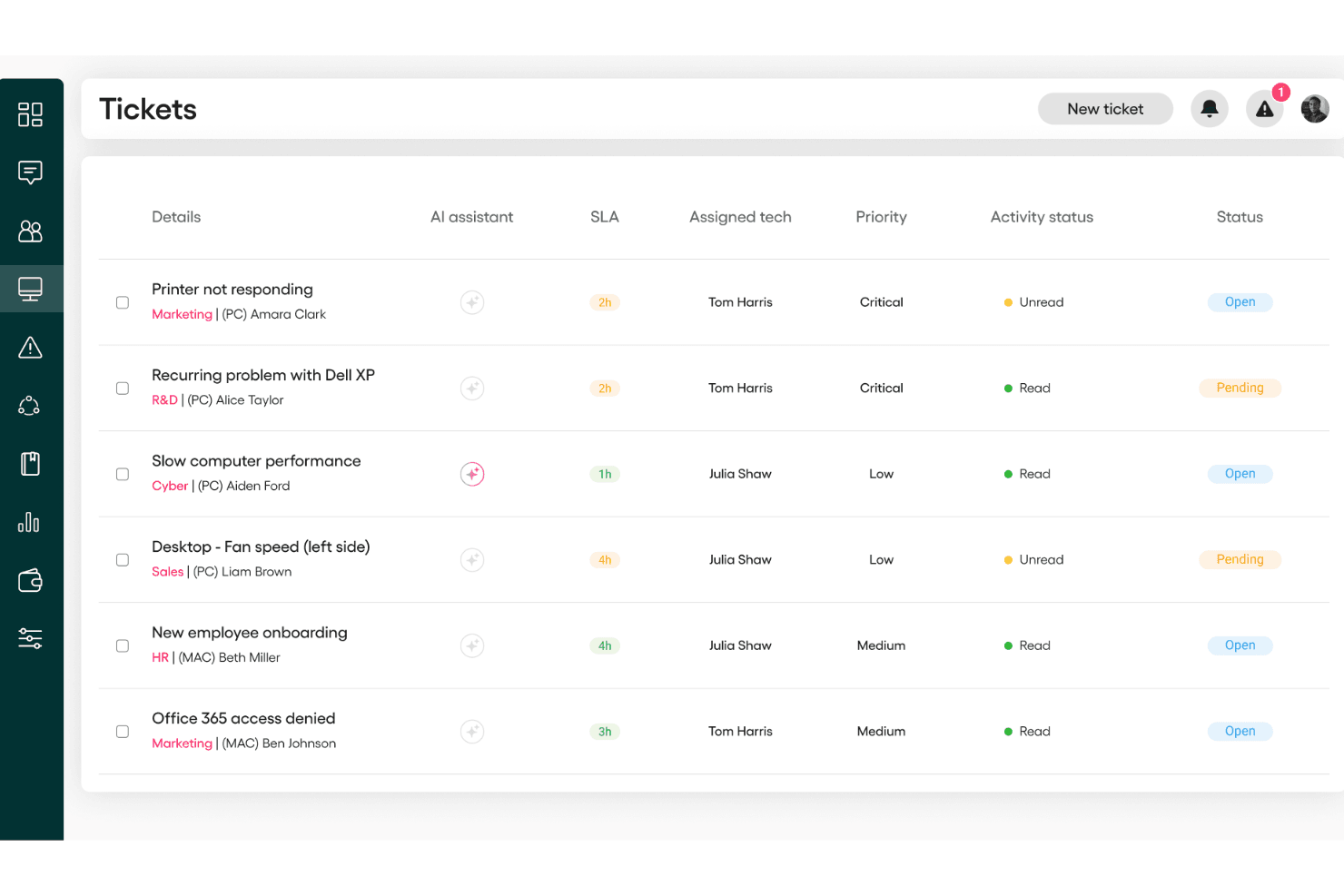
Atera organizes IT support tickets with priority, SLA, and status tracking. Atera combines IT service management with remote monitoring, automation, and help desk tools, helping IT teams and managed service providers resolve support issues and maintain distributed infrastructure.
Who Is Atera Best For?
Atera suits IT teams and managed service providers that need to monitor and support endpoints across distributed environments.
Why I Picked Atera
I picked Atera as a ServiceNow competitor because it’s built for managing multiple endpoints. I like its device monitoring, automated patch management, and remote access tools. When a remote laptop misses updates or stops responding, IT staff can identify the issue, apply patches, and troubleshoot the device from one platform.
Atera Key Features
- Ticket intake: Create tickets manually or from email, the service portal, and system alerts.
- Service portal: Let users submit requests, attach screenshots, track ticket status, and message support.
- SLA tracking: Set service-level targets and review ticket performance with real-time analytics.
- AI ticket summaries: Generate concise ticket recaps and suggested replies for support staff.
Atera Integrations
Atera lists integrations with Microsoft Teams, Slack, QuickBooks, Xero, IT Glue, Google Calendar, Splashtop, AnyDesk, and TeamViewer, and connects with Zapier. It also offers an API for custom integrations.
Pros and Cons
Pros:
- Scripts routine maintenance across managed devices
- Automates patching across Windows, macOS, and Linux
- Centralizes endpoint monitoring, ticketing, and remote support
Cons:
- Patch deployments sometimes need manual reruns
- Reporting lacks detailed filters and customization
 Best for intuitive incident and problem management
- 14-day free trial
- From $19/user/month (billed annually)
Visit WebsiteCustomer Rating:4.6/5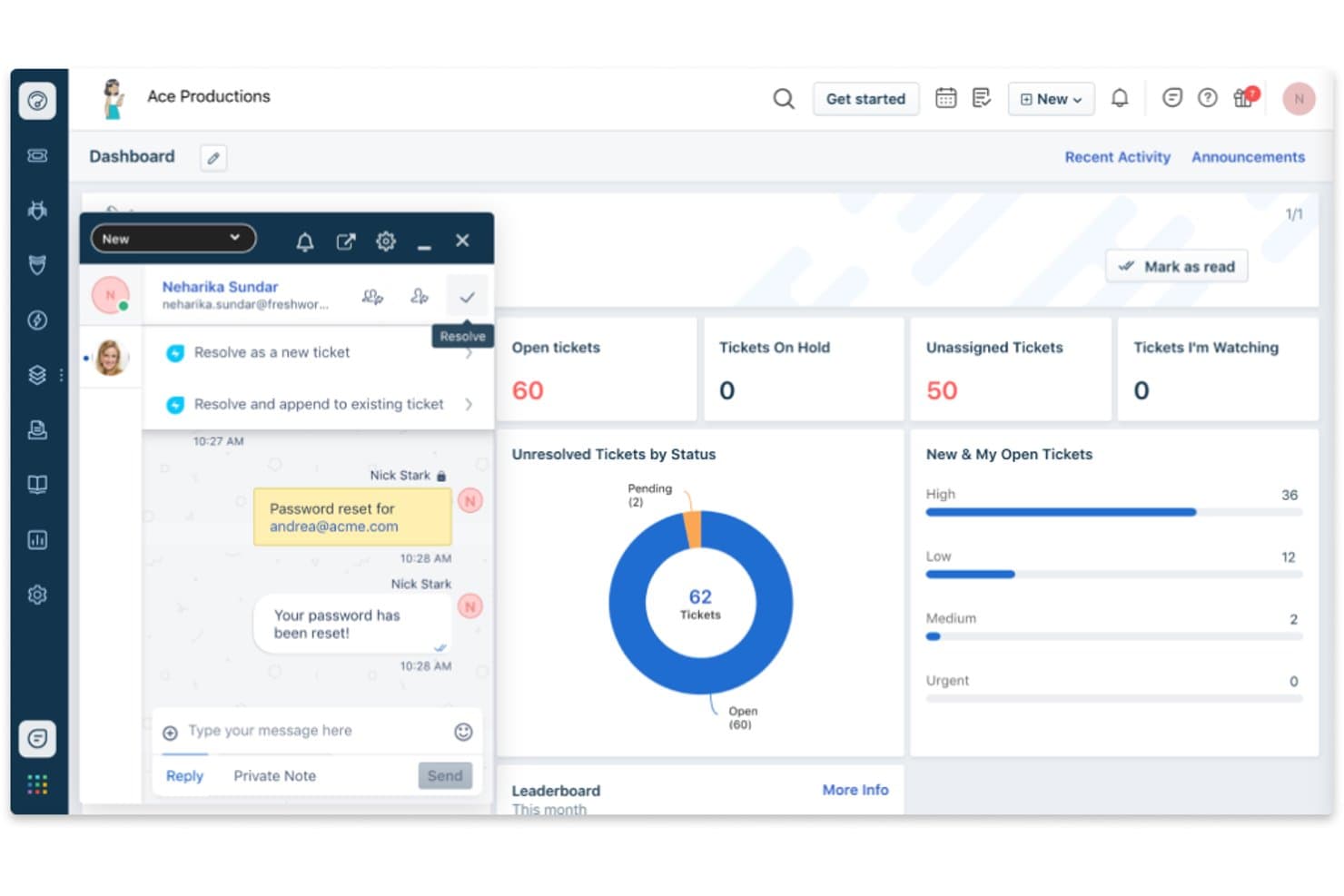
Freshservice centralizes ticket management with real-time dashboard insights. Freshservice is a cloud-based ITSM platform for IT teams that need to manage service requests, coordinate support work, and keep business technology running as their organizations grow.
Who Is Freshservice Best For?
Freshservice suits IT service desk teams at growing organizations that need a clear way to coordinate day-to-day support.
Why I Picked Freshservice
I picked Freshservice because its intuitive incident and problem management connects recurring tickets to root-cause work. I like that agents can link related incidents to a problem record, document causes and workarounds, and track corrective actions. When an access outage generates tickets across departments, my team can coordinate a fix instead of handling each report separately.
Freshservice Key Features
- Service catalog: Publish request items through a self-service portal.
- IT asset management: Track hardware, software, and related asset details.
- Workflow automation: Create rules that trigger actions across service workflows.
- Reporting and analytics: Build reports to monitor service desk metrics.
Freshservice Integrations
Freshservice offers 40+ out-of-the-box integrations, including Microsoft Teams, SecPod, Slack, TeamViewer, Jira, and Azure AD. Its marketplace provides 1,000+ ready-to-install integrations, and flexible APIs support custom integrations.
Pros and Cons
Pros:
- Quick administration suits lean IT teams
- Workflow automation cuts manual ticket routing
- Related incidents connect to root-cause records
Cons:
- Complex workflows need configuration workarounds
- Advanced reporting offers limited flexibility
Learn more about Freshservice: Best for robust ITIL readiness and support
- 30-day free trial
- From $13/user/month
Visit WebsiteCustomer Rating:4.4/5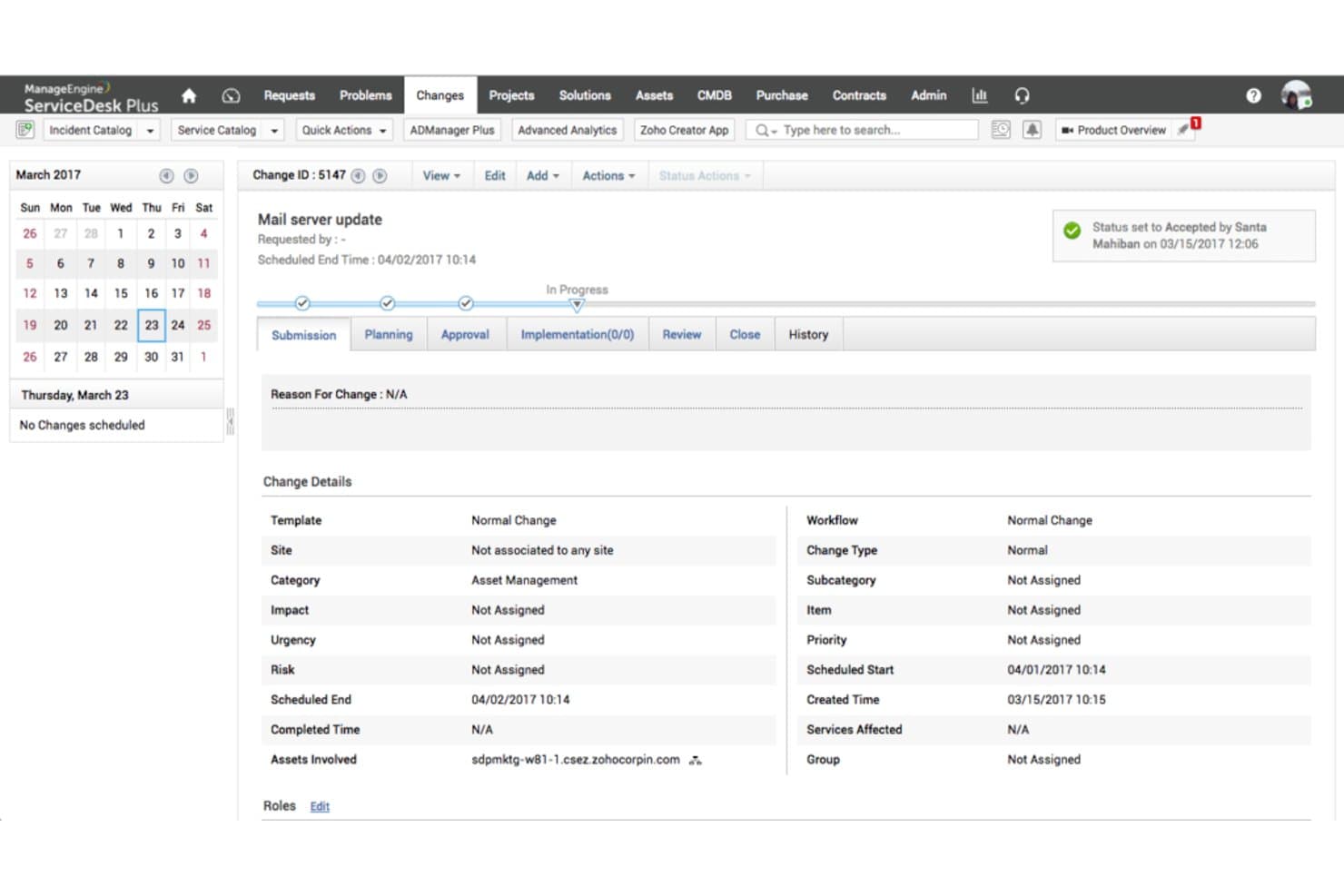
ServiceDesk Plus tracks change requests with workflow stages and details. ServiceDesk Plus is an ITSM platform for IT teams that need to manage incidents, service requests, assets, and changes as an alternative to ServiceNow.
Who Is ServiceDesk Plus Best For?
ServiceDesk Plus fits internal IT service desk teams that need to formalize support operations around ITIL practices.
Why I Picked ServiceDesk Plus
I picked ServiceDesk Plus for its ITIL-oriented incident and service-request workflows, which give analysts a consistent path from intake through resolution. I also like its change workflows with CAB approvals, helping teams review infrastructure changes before implementation. That’s why I describe it as Best for robust ITIL readiness and support.
ServiceDesk Plus Key Features
- Self-service portal: Lets users submit requests and find support resources.
- Knowledge management: Provides a knowledge base for support articles.
- IT asset management: Tracks hardware and software assets across their lifecycle.
- SLA management: Defines service targets and tracks compliance.
ServiceDesk Plus Integrations
ServiceDesk Plus documents integrations with Jira, Azure DevOps, Microsoft Teams, Slack, Microsoft Intune, Endpoint Central, and OpManager, and it connects with Zapier. It also provides REST APIs for custom integrations.
Pros and Cons
Pros:
- Automated ticket routing supports SLA accountability
- Centralized asset and CMDB service context
- ITIL incident, problem, and change workflows
Cons:
- Built-in reporting limits complex analytics
- Advanced workflow setup takes significant effort
Learn more about ServiceDesk Plus: Best for automation and AI capabilities
- 30-day free trial + free demo available
- From $1,499/year (billed annually)
Visit WebsiteCustomer Rating:4.6/5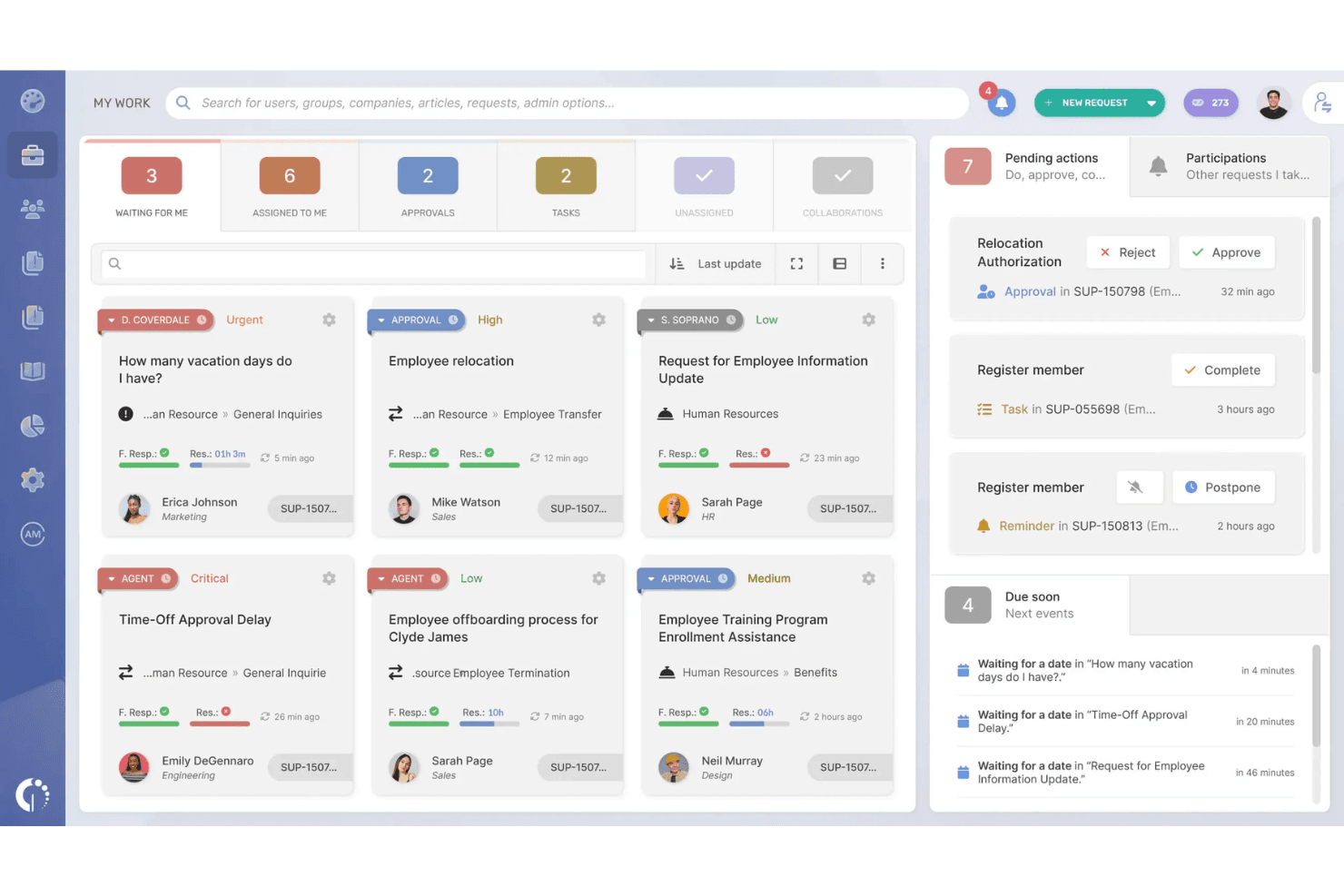
InvGate Service Management centralizes IT requests, approvals, and tasks in one dashboard. InvGate Service Management is an ITSM platform for organizations seeking an alternative to large enterprise suites, helping IT teams manage incidents, service requests, and support workflows.
Who Is InvGate Service Management Best For?
IT service desk teams that want to automate routine workflows and apply AI to support service operations are a good fit for InvGate Service Management.
Why I Picked InvGate Service Management
I picked InvGate Service Management as a ServiceNow competitor for next-generation enterprises, especially for its USP, Best for automation and AI capabilities. Its no-code rules can route tickets by urgency and agent availability, then escalate requests when SLA conditions are met. I also like that AI can draft knowledge articles from resolved incidents, helping agents document fixes for future self-service.
InvGate Service Management Key Features
- Ticket and incident management: Log and track incidents and service requests.
- Self-service portal: Let users submit requests through a self-service portal.
- Change and problem management: Manage change and problem records within the platform.
- Analytics dashboards: Build shareable dashboards with 150+ built-in metrics.
InvGate Service Management Integrations
InvGate Service Management has a native Microsoft Teams integration and built-in workflow action connectors for Entra ID, Okta, Jira, Azure DevOps, Google Workspace, and PagerDuty; it also integrates with Slack and Zapier. A REST API supports custom integrations.
Pros and Cons
Pros:
- Visual workflows cover incidents, changes, and approvals
- AI drafts knowledge articles from resolved tickets
- Rules automate ticket routing and SLA escalation
Cons:
- Advanced workflow setup can challenge new administrators
- Dashboard filters and backlog reports need work
Learn more about InvGate Service Management: Best for seamless integration with Atlassian suite
- Free plan + 14-day trial available
- From $21.50/user/month
Visit WebsiteCustomer Rating:4/5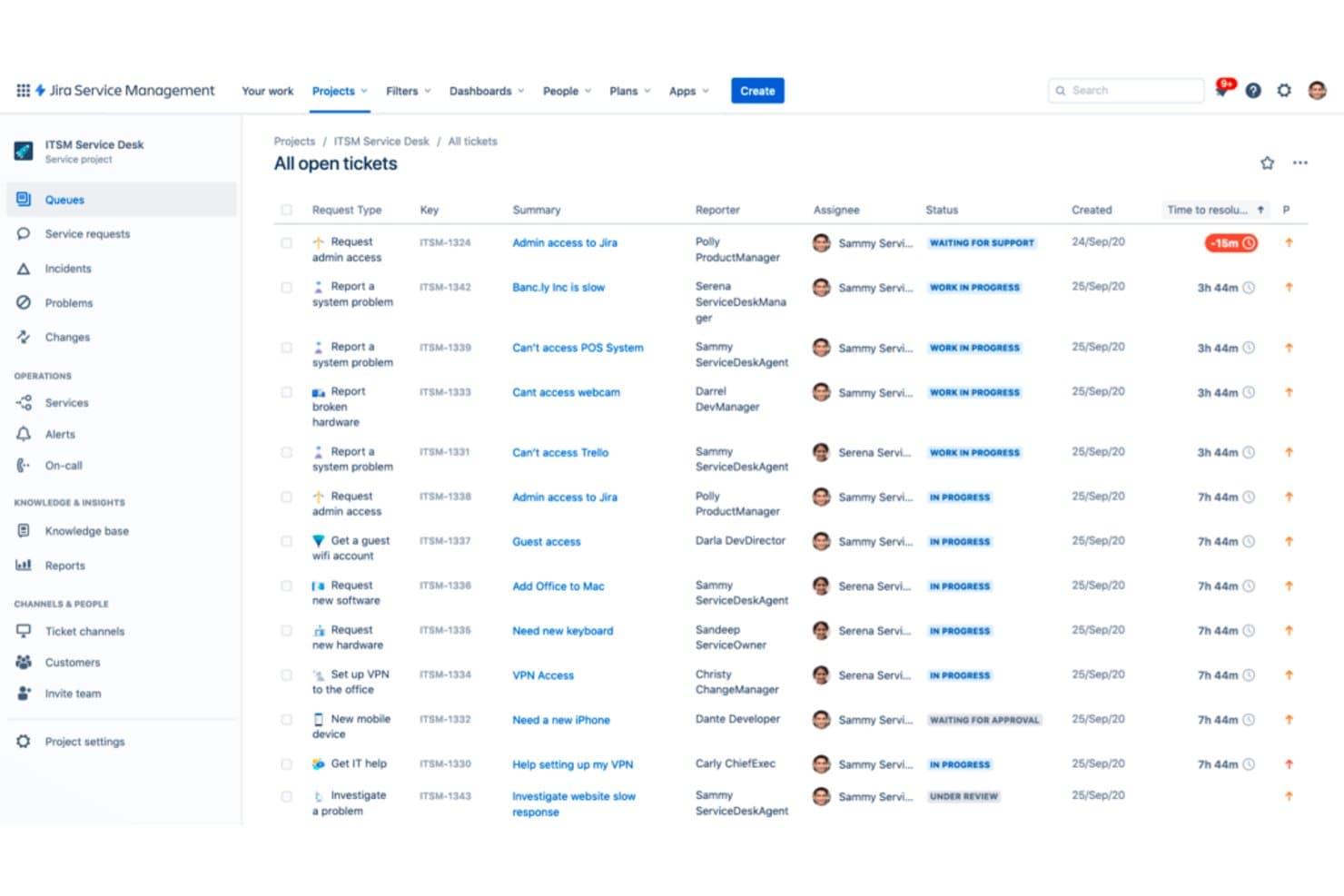
Jira Service Management centralizes open IT tickets with status and priority tracking. Jira Service Management is an ITSM platform from Atlassian for IT and operations teams, helping them manage incidents, service requests, and changes while coordinating support work with software development.
Who Is Jira Service Management Best For?
IT service teams that already use Jira or other Atlassian tools and want to coordinate support work with software development.
Why I Picked Jira Service Management
I picked Jira Service Management, labeled “Best for seamless integration with Atlassian suite,” because it connects service work with Jira development workflows. Incident records can link to Jira Software issues, helping support connect recurring outages with bugs developers need to fix. Change records and approval workflows help coordinate those fixes before release.
Jira Service Management Key Features
- Service portal: Lets employees submit service requests through configurable request forms.
- Request queues: Organize incoming requests by criteria such as status, priority, or team.
- SLA tracking: Set response and resolution targets, then monitor progress against them.
- Assets: Track hardware, software, and other configuration items in a shared repository.
Jira Service Management Integrations
Jira Service Management has native integrations with Confluence and Jira, and supports connections with Bitbucket Pipelines, Jenkins, GitLab, CircleCI, and Octopus Deploy for deployment workflows. It also integrates with Slack and Microsoft Teams for incident response and provides a JSON-over-HTTPS API for custom integrations.
Pros and Cons
Pros:
- Centralizes requests with clear status visibility
- Automates routing, escalations, and SLA tracking
- Links incidents to developer work items
Cons:
- Dashboards offer limited reporting flexibility
- Advanced workflows demand administrator configuration
Learn more about Jira Service Management: Best for enriched IT performance analytics
- Not available
- From $59/user/month (billed annually)
Visit WebsiteCustomer Rating:1/5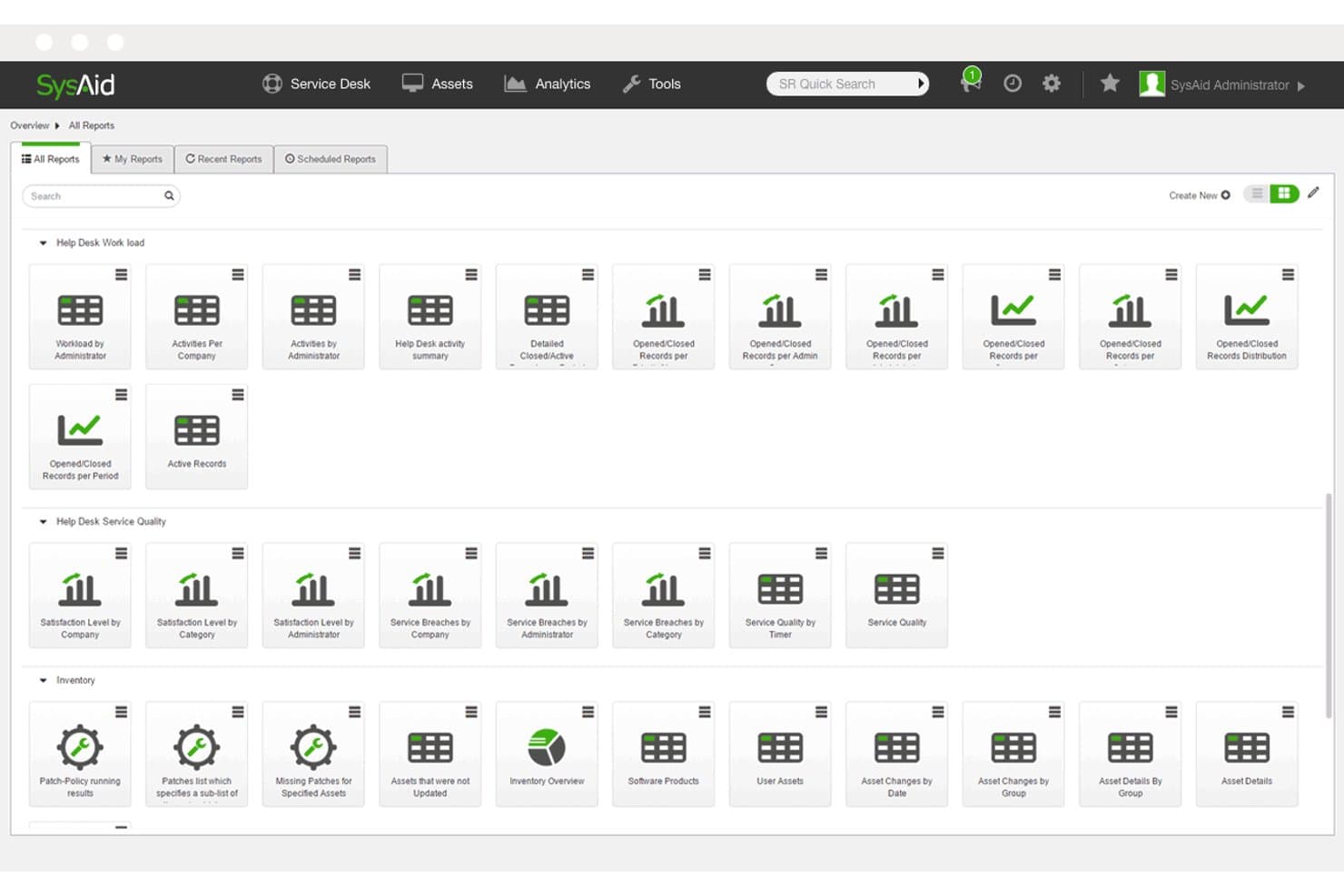
SysAid offers a broad library of built-in reports across key IT categories. SysAid combines IT service management, asset tracking, and workflow automation for IT teams that need to manage requests, incidents, and support operations as their organization grows.
Who Is SysAid Best For?
SysAid is a good fit for IT operations and service desk teams that need analytics to track support performance and identify trends.
Why I Picked SysAid
I picked SysAid as a ServiceNow competitor for next-generation enterprises because its fit is “Best for enriched IT performance analytics.” Its BI Analytics dashboards show service-record volume, SLA compliance, resolution trends, and agent handoffs, helping me find where tickets stall. I can also compare incident and request workloads to see where demand is rising.
SysAid Key Features
- Self-service portal: Employees can submit and track service requests through a central portal.
- IT asset management: Track hardware and software assets alongside service records.
- Workflow automation: Configure rules to route and process service requests.
- Knowledge base: Create articles that help employees resolve common IT issues.
SysAid Integrations
SysAid offers integrations with Jira, Lansweeper, and Microsoft Teams, plus Workato-powered connections to 1,000+ apps, including Salesforce, Azure DevOps, Slack, Zoom, Workday, and Zendesk. It also supports Zapier and provides a REST API for custom integrations.
Pros and Cons
Pros:
- Automation handles repetitive ticket routing and onboarding
- Ticket ownership and workload visibility support triage
- BI dashboards surface SLA and resolution trends
Cons:
- Workflow setup can feel rigid and complex
- Advanced reports require specialist configuration
Learn more about SysAid: Best for excellent customer service interactions
- 14-day free trial
- From $19/user/month (billed annually)
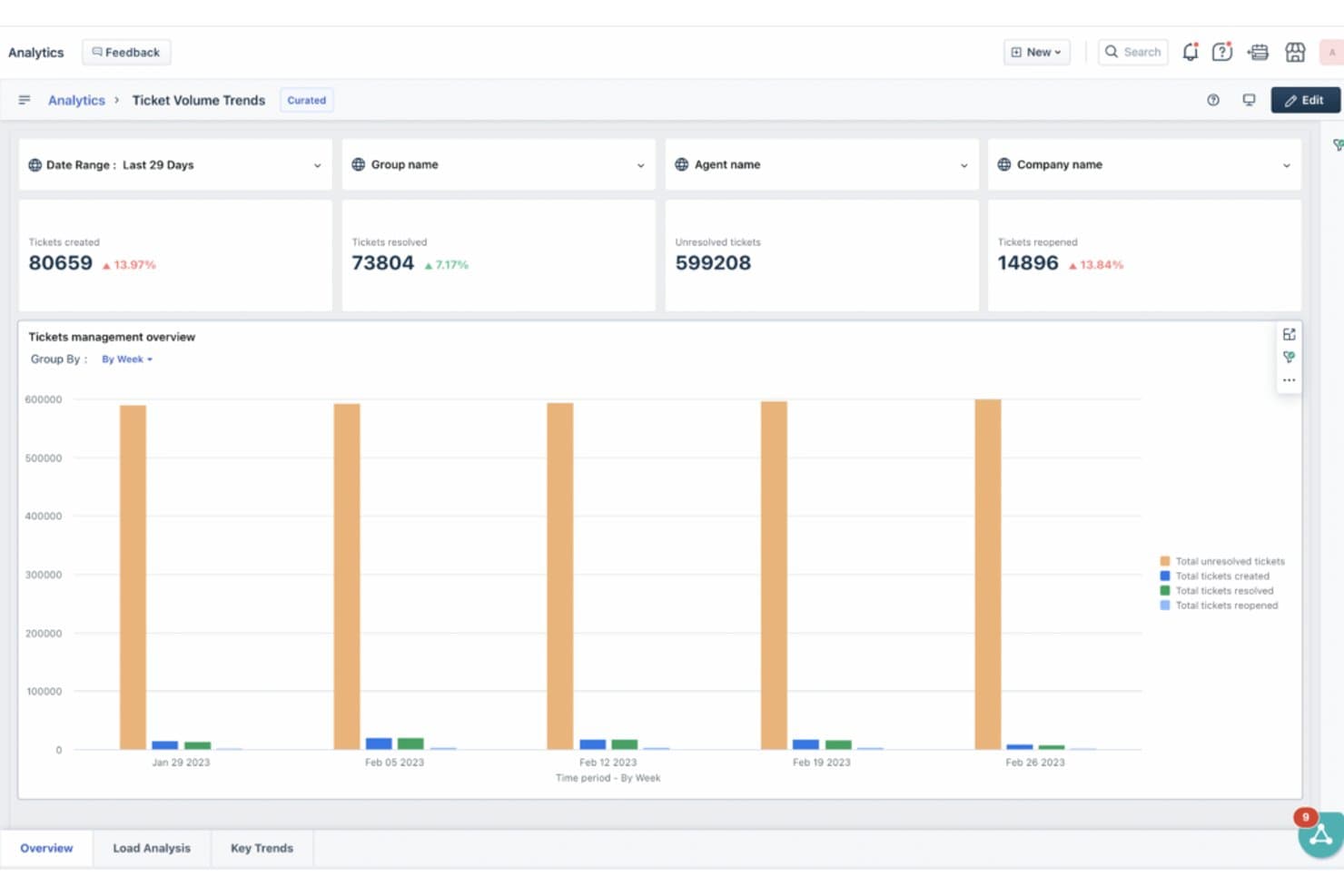
Freshdesk tracks ticket volume trends with weekly analytics charts. Freshdesk is a cloud-based help desk platform for IT and support teams that need to organize requests across channels, automate routine ticket work, and give employees and customers a clear path to resolution.
Who Is Freshdesk Best For?
Freshdesk suits customer support teams at growing businesses that need to coordinate agent responses and provide consistent service across customer conversations.
Why I Picked Freshdesk
I picked Freshdesk as a ServiceNow competitor when customer support interactions are the priority. It supports excellent customer service interactions by turning email, chat, phone, and social requests into tickets agents can track in one place. I like its routing rules and SLA management for sending urgent issues to the right queue and flagging tickets that risk missing response targets.
Freshdesk Key Features
- Knowledge base: Create and publish help articles for employees or customers.
- Canned responses: Save reusable replies for agents to insert into tickets.
- Custom ticket fields: Capture details such as affected systems, incident types, or asset IDs.
- Reports and dashboards: Track ticket volume, resolution times, and agent performance.
Freshdesk Integrations
Freshdesk offers 1,000+ ready-to-install marketplace integrations, including Slack, Microsoft Teams, Shopify, Salesforce, and Jira, and connects with Zapier. It also provides APIs and low-code connectors for custom integrations.
Pros and Cons
Pros:
- Reusable replies support consistent agent responses
- Email and social requests share ticket history
- Automated routing supports SLA response targets
Cons:
- Customer-service focus leaves ITIL workflows thinner
- Native analytics offer limited operational depth
Learn more about Freshdesk: Best for innovative codeless configuration
- Free demo available
- Pricing upon request
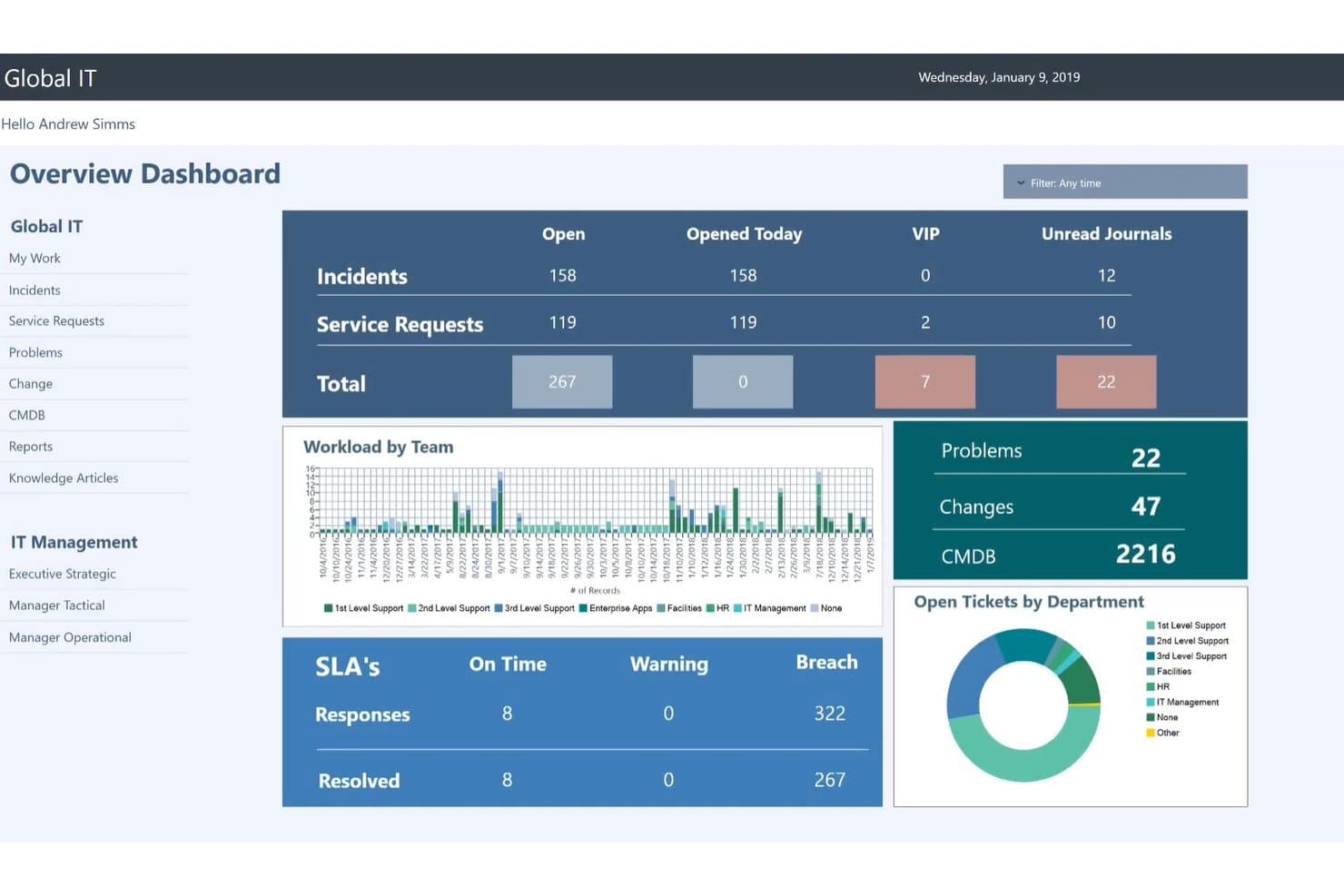
Cherwell Service Management centralizes IT incidents, SLAs, and workload data in one dashboard. For organizations seeking a ServiceNow alternative, Cherwell Service Management is an ITSM platform that helps IT teams manage incidents, service requests, changes, and support workflows across the business.
Who Is Cherwell Service Management Best For?
Cherwell Service Management suits IT service owners who need to adapt workflows and forms through codeless configuration rather than custom code.
Why I Picked Cherwell Service Management
I picked Cherwell Service Management for its innovative codeless configuration, which lets IT teams adapt workflows and forms without custom code. I like that flexibility for updating incident, service request, and change processes as business needs shift. Teams can adjust how staff submit and route work without building bespoke applications.
Cherwell Service Management Key Features
- Asset management: Track IT assets and their related service information.
- Self-service portal: Give users access to service requests and a virtual agent.
- Mobile access: Access service management tools from mobile devices.
- Dashboards and analytics: View service data through dashboards and reports.
Cherwell Service Management Integrations
Cherwell offers marketplace mApp solutions for Microsoft Azure and Tenable.io, plus a documented Microsoft Teams chat integration. Its REST API and webhooks support custom integrations.
Pros and Cons
Pros:
- Service catalog supports multi-team service tracking
- Automation reduces repetitive service-process work
- Configurable workflows adapt incident and change controls
Cons:
- Upgrades can break existing functionality
- Browser client bugs complicate portal administration
Learn more about Cherwell Service Management: Best for comprehensive IT asset management
- 30-day free trial
- From $39/user/month (billed annually)
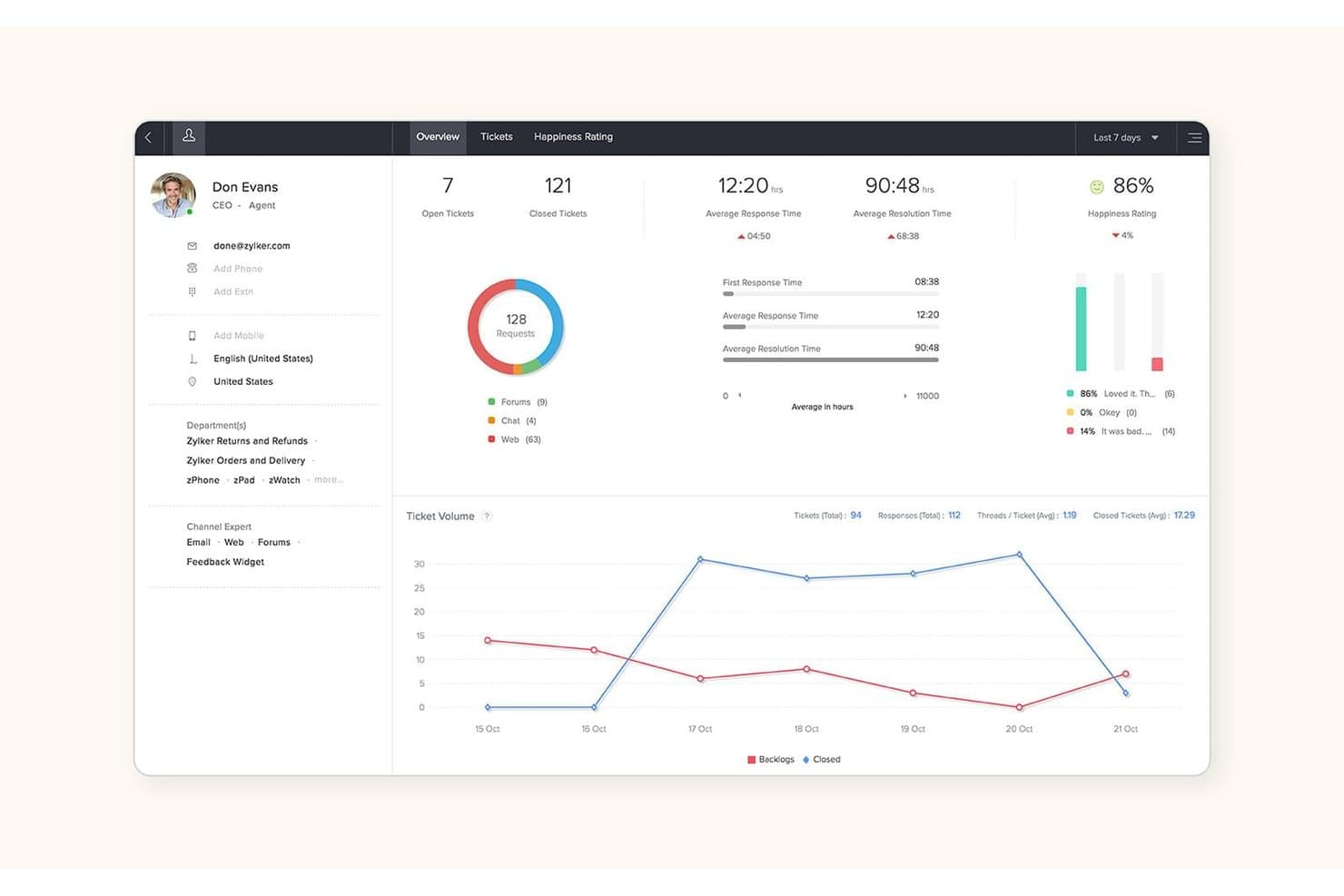
Service Desk surfaces agent performance metrics and ticket trends in one view. For IT teams seeking an alternative to ServiceNow, SolarWinds Service Desk is an ITSM platform for managing incidents, service requests, and support workflows across growing organizations.
Who Is SolarWinds Service Desk Best For?
IT operations teams that need to track technology assets alongside service requests and support workflows will find SolarWinds Service Desk a practical fit.
Why I Picked SolarWinds Service Desk
I picked SolarWinds Service Desk as a ServiceNow alternative because it’s “Best for comprehensive IT asset management.” Network scanning and device reports help me track on-premises, virtual, and cloud assets, while license usage management flags software entitlements to review. Its CMDB links assets to incidents, giving my team context for root-cause analysis.
SolarWinds Service Desk Key Features
- Dynamic request forms : Custom forms and rules collect required details when employees submit service requests.
- Knowledge base suggestions : AI recommends relevant articles to employees and agents as they search or work on tickets.
- Change templates : Reusable catalog items capture change, rollback, and test plans for standard, normal, and emergency changes.
- Multichannel support : Employees can submit and follow up on requests through web, email, Microsoft Teams, Slack, and mobile.
SolarWinds Service Desk Integrations
SolarWinds Service Desk includes hundreds of out-of-the-box integrations, including Jira, Microsoft Teams, Slack, Zendesk, Automox, and SolarWinds Observability; it also supports Zapier and an open REST API for custom integrations.
Pros and Cons
Pros:
- Change approvals and audit trails support audits
- Discovery tracks hardware, software, and cloud assets
- Asset-to-incident links speed root-cause checks
Cons:
- Intermittent asset-agent updates weaken inventory accuracy
- Limited report flexibility complicates tailored operational dashboards
Learn more about Service Desk: Best for advanced AI-powered automation
- Not available
- Pricing upon request
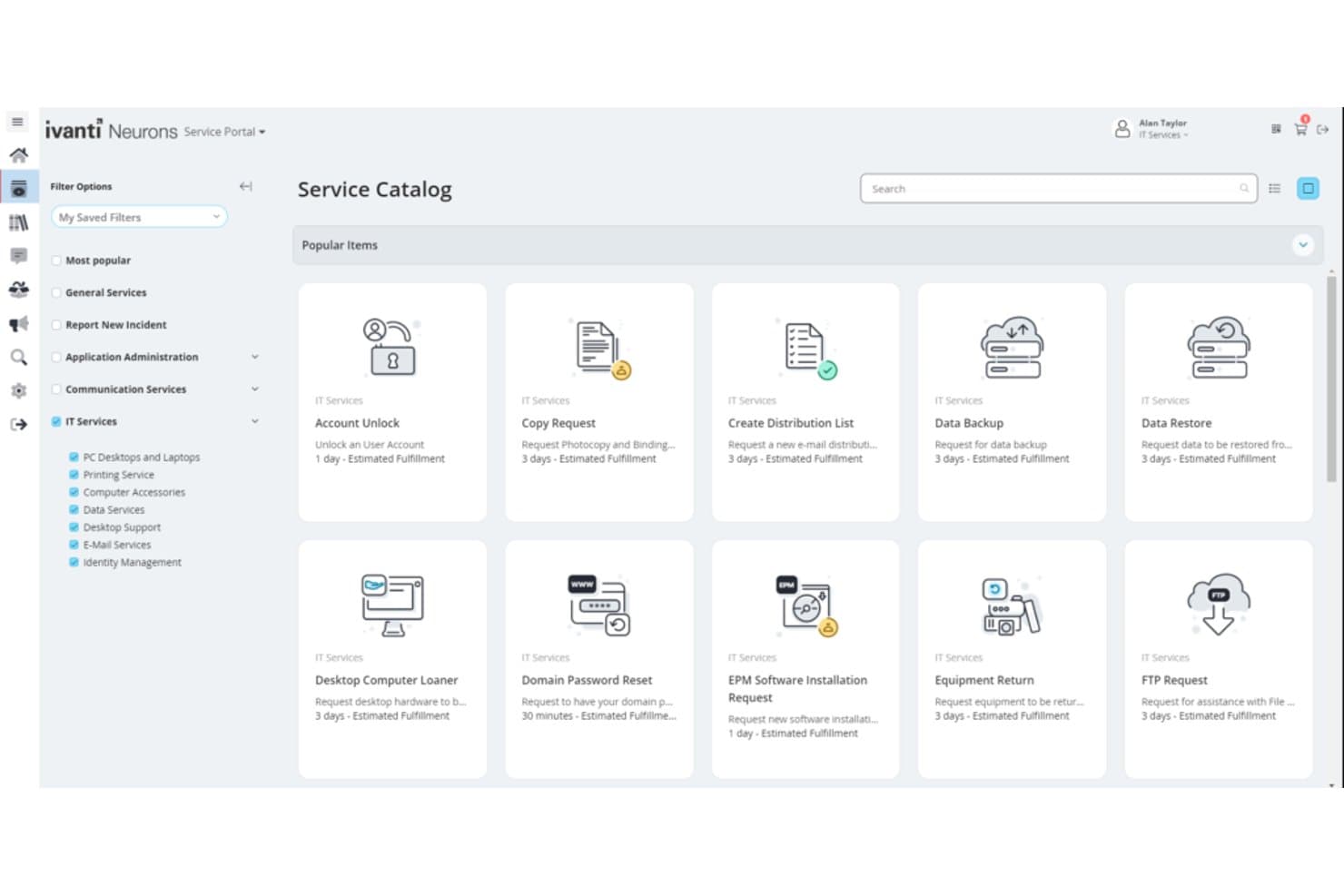
Ivanti Neurons for ITSM lets users browse and request IT services from a catalog. Ivanti Neurons for ITSM is an enterprise service management platform for IT teams that need to coordinate incidents, requests, and changes across complex environments and connect support workflows with broader business operations.
Who Is Ivanti Neurons for ITSM Best For?
IT service management leaders who want to apply AI-powered automation to support workflows will find it a good fit.
Why I Picked Ivanti Neurons for ITSM
I picked Ivanti Neurons for ITSM as a ServiceNow competitor in the “Best for advanced AI-powered automation” category. Its conversational virtual agent handles routine requests, while AI classifies and routes tickets and correlates related incidents. I value that combination when a service disruption triggers duplicate reports, helping analysts identify connected issues and focus their response.
Ivanti Neurons for ITSM Key Features
- ITIL 4 practices: Supports 14 PinkVERIFY-certified practices, including change, configuration, and service-level management.
- No-code workflow designer: Configure workflows and user interfaces with drag-and-drop tools.
- Integration connectors: Connect ITSM workflows to more than 1,000 third-party and Ivanti services.
- Role-based access controls: Set permissions for business objects, forms, fields, and automations.
Ivanti Neurons for ITSM Integrations
Ivanti Neurons for ITSM integrates with Microsoft Teams for incident creation, ticket status checks, and analyst chats. Ivanti Neurons iPaaS offers access to 1,000+ connectors, including Jira, Slack, Azure DevOps, Salesforce, SAP, and Workday; REST API support is available for custom integrations.
Pros and Cons
Pros:
- Self-healing bots address recurring endpoint incidents
- Workflow automation supports configurable ITIL processes
- AI ticket summaries reduce triage time
Cons:
- Dated admin interface and reports hinder navigation
- Complex configuration can require ITIL expertise
Learn more about Ivanti Neurons for ITSM:
Alți concurenți ai ServiceNow
Iată câțiva concurenți suplimentari ai ServiceNow care nu au ajuns pe lista mea scurtă, dar care merită totuși analizați:
- 11Micro Focus Service Management Automation X (SMAX)Best for large-scale service management and automation
- 12BMC HelixBest for cognitive service management capabilities
- 13IFS AssistBest for transformative digital service delivery
- 14NinjaOneBest for seamless network management and monitoring
- 15AgiloftGood for customizable and scalable service management
- 16TOPdeskGood for fostering seamless collaboration in service delivery
- 17DeskeraGood for integrated business management with service support
- 18ITarianGood for unified IT management and security
- 19IvantiGood for unifying IT operations and security data
- 20Alloy SoftwareGood for IT asset management and service desk operations
- 21ServiceaideGood for AI-powered service management
- 22EASYVISTAGood for mobile-first service management
- 23HornbillGood for streamlined IT service management with automated workflows
- 24AlembaGood for comprehensive asset management
- 25ProvanceGood for IT service management in Microsoft-centric organization
Alte recenzii de software
- Platforme de dezvoltare în cloud
- Furnizori IaaS
- Platforme cloud ca serviciu
- Instrumente pentru infrastructură ca cod
- Instrumente de monitorizare a bazelor de date
How I Evaluate ServiceNow Competitors
I split my evaluation into two layers: core baseline—ITIL workflows, CMDB, self-service—and the differentiators like AIOps or ESM that reveal if a tool genuinely rivals ServiceNow.
Core Functionality (Table Stakes For This List)
When I'm selecting tools for my list, I rank each one on a scale from 0 (does not offer the functionality) to 5 (excels in this area) for each core functionality listed below. Then, I calculate the tool's total score into a percentage. Each tool needs to achieve a minimum total score of 75% to be considered for inclusion.
- IT Service Management: I evaluate whether a tool covers incident, problem, change, and request management with ITIL alignment—things like CAB workflows and SLA tracking that mirror how IT teams actually run operations.
- Workflow Automation: Each platform's workflow builder matters here. I look for visual, no-code/low-code automation that handles real scenarios like employee onboarding or multi-stage change approvals across departments.
- Self-Service Portal: A good portal should include a service catalog and integrated knowledge base. I check whether end users can log requests, track status, and find answers before a ticket ever reaches an agent.
- Asset & Configuration Management: I look at how each tool handles ITAM and its CMDB—specifically, whether it maps CI relationships and dependencies so your team can trace the impact of a failed server across connected services.
- AI & Virtual Agent: This covers AI-driven ticket routing, virtual agents with NLP, and predictive capabilities. Tools like Freshservice and BMC Helix approach this differently, so I evaluate the depth and practical utility of each.
- Integrations & Extensibility: I check for open APIs and prebuilt connectors with the tools IT teams rely on daily—monitoring platforms, DevOps toolchains like Jenkins or GitHub, and collaboration apps like Slack and Microsoft Teams.
Once I have a list of tools that meet this criteria, I consider what sets each platform apart.
Differentiating Factors (What Sets Vendors Apart)
Here's how I compare and contrast different vendors:
Standout Features
Enterprise service management is a big differentiator—I look at whether a platform extends ITSM workflows to HR, facilities, and finance so your teams share one request system instead of managing separate tools. AIOps and event correlation also matter. Platforms like BMC Helix and Ivanti take different approaches to ingesting monitoring data, but I evaluate whether they actually reduce alert noise and surface root causes. I also consider low-code app builders that let you create custom apps beyond IT without heavy developer involvement.
Beyond Features
Total cost of ownership is where I spend the most time. ServiceNow's licensing complexity is often the reason teams start looking elsewhere, so I evaluate whether a competitor's pricing is transparent and predictable as you scale agents and assets. Implementation speed matters just as much—some platforms like Freshservice and Jira Service Management offer prebuilt ITIL templates that cut deployment from months to weeks. I also check security certifications like SOC 2, ISO 27001, and FedRAMP, especially for teams in regulated industries where missing credentials are a dealbreaker.
De ce să căutați un concurent pentru ServiceNow?
ServiceNow este o platformă puternică de asistență IT bazată pe cloud, care ajută companiile să gestioneze fluxurile de lucru digitale pentru operațiunile întreprinderii. Soluțiile sale, care acoperă managementul serviciilor IT (ITSM), managementul operațiunilor IT (ITOM) și managementul afacerilor IT (ITBM), eficientizează procesele și sporesc productivitatea. Platforma se adresează în principal organizațiilor mari și clienților de nivel enterprise care au nevoie de gestionarea unor fluxuri de lucru și servicii complexe.
În ciuda funcțiilor sale robuste, nevoia unor alternative la ServiceNow poate apărea din diverse motive. Acestea pot include considerente legate de costuri, deoarece ServiceNow este adesea perceput ca fiind scump, în special pentru companiile mici și mijlocii. Platforma contribuie la îmbunătățirea experienței clienților și a relațiilor cu aceștia prin soluționarea eficientă a problemelor și incidentelor de servicii.
Principalele funcții ale ServiceNow
Iată câteva dintre principalele funcții ale ServiceNow, pentru a vă ajuta să comparați și să evaluați ce oferă soluțiile alternative:
- Raportare și tablouri de bord: Vă oferă date în timp real despre volumul tichetelor, timpul de rezolvare și performanța echipei.
- Gestionarea incidentelor: Vă ajută echipa să urmărească, să prioritizeze și să rezolve mai rapid problemele IT.
- Gestionarea schimbărilor: Vă permite să planificați, să testați și să documentați modificările sistemului cu mai puține riscuri.
- Portal de autoservire: Le oferă utilizatorilor o modalitate simplă de a trimite tichete și de a găsi articole de ajutor.
- Catalog de servicii: Vă permite să oferiți servicii IT standard prin formulare de solicitare predefinite.
- Gestionarea activelor: Vă ajută să urmăriți echipamentele hardware, software-ul și activele IT asociate într-un singur loc.
- Bază de cunoștințe: Permite echipei să documenteze și să distribuie soluții pentru probleme comune.
- CMDB (Bază de date pentru gestionarea configurației): Reprezintă relațiile dintre activele IT pentru a sprijini depanarea.
- Automatizarea fluxurilor de lucru: Automatizează sarcini repetitive, precum aprobările și direcționarea tichetelor.
- Acces mobil: Vă permite să vizualizați și să gestionați tichete de pe telefon sau tabletă.
Rezumat
Pe scurt, domeniul ServiceNow și al alternativelor pentru gestionarea serviciilor Jira este divers, fiecare soluție oferind un set distinct de funcții, avantaje și structuri de prețuri. Indiferent dacă organizația dumneavoastră pune accent pe gestionarea serviciilor la scară largă, pe capacități cognitive de gestionare a serviciilor sau pe gestionarea intuitivă a incidentelor și problemelor, există o alternativă la ServiceNow care vă va răspunde nevoilor.
Idei principale
- Înțelegerea nevoilor și a cazurilor de utilizare specifice organizației dumneavoastră este esențială pentru alegerea instrumentului ITSM potrivit. Funcțiile benefice pentru o companie pot fi mai puțin importante pentru alta. Asigurați-vă că identificați clar ce aveți nevoie de la un concurent al ServiceNow înainte de a lua o decizie.
- În ceea ce privește prețurile, există o gamă largă de opțiuni printre concurenții ServiceNow. Unii oferă soluții mai accesibile, în timp ce alții furnizează servicii premium la un preț mai ridicat. Luați în considerare costul total, inclusiv eventualele taxe de configurare și costul locurilor suplimentare pe măsură ce compania dumneavoastră se dezvoltă.
- În cele din urmă, nu subestimați valoarea ușurinței de utilizare și a asistenței pentru clienți. Un instrument cu o interfață intuitivă și un serviciu de asistență pentru clienți prompt poate economisi timp prețios echipei dumneavoastră și poate contribui la evitarea frustrărilor. Acest lucru este valabil mai ales pentru instrumentele ITSM complexe, unde integrarea eficientă și asistența continuă sunt esențiale pentru maximizarea valorii.