

Gerir dados de forma eficiente é um desafio que muitos especialistas em tecnologia enfrentam. O software de bases de dados SQL pode ajudar a sua equipa a armazenar e obter dados com facilidade. Pela minha experiência, reduz muitos dos problemas relacionados com a gestão de dados.
Como alguém que testa e analisa software de forma independente, sei o que funciona e o que não funciona. Estou aqui para partilhar informações imparciais sobre as melhores soluções de bases de dados SQL disponíveis no mercado.
Encontrará uma avaliação das funcionalidades, vantagens e potenciais desvantagens de cada ferramenta. O meu objetivo é orientá-lo na escolha do software adequado às suas necessidades. Continue a ler para conhecer em profundidade os aspetos que distinguem estas soluções.
Why Trust Our Software Recommendations
6,700+
Reviews
20
Industry experts
16+
Evaluation factors
14
Years
Our team has been testing and reviewing software since 2012. As tech leaders ourselves, we know how difficult—and important—it is to choose the right software.
For this guide, we evaluated tools using hands-on testing and independent research, scoring tools using our selection criteria.
Our reviews reflect our human editorial judgment, not a sales pitch.
Expert reviewers:
- Paulo Gardini MiguelTech Director
 Tim FisherVP of AI
 Gabriel RosasTech Lead & Software Architect
 Christhian GruhnTech Lead & Platform Architect

Tabela comparativa de software de bases de dados SQL
Esta tabela comparativa resume os detalhes de preços das minhas principais escolhas de software de bases de dados SQL:
| Tool | Best For | Trial Info | Price | ||
|---|---|---|---|---|---|
| 1 | Best for visual PostgreSQL query profiling | Free plan + free trial available | From $89.95/user/year (billed annually) | Website | |
| 2 | Best for multiple database environments | 21-day free trial | From $199/user/year (billed annually) | Website | |
| 3 | Best for MySQL compatibility with enterprise features | No | Pricing upon request | Website | |
| 4 | Best for low-latency data management | Free plan available | From $0.15/hr per node | Website | |
| 5 | Best for handling dynamic workloads | Free trial available | From $0.44/hr | Website | |
| 6 | Best for column-oriented analytics | Free trial available | From $0.03/hour | Website | |
| 7 | Best for Oracle database development and management | Free to use | Website | ||
| 8 | Best for open-source object-relational functionality | Free download available | Free (open source) | Website | |
| 9 | Best for embedded and lightweight applications | Free to use | Website | ||
| 10 | Best for document-oriented storage flexibility | Free version available | From $57/month or serverless from $0.10/million reads | Website |


Análises do melhor software de bases de dados SQL
Abaixo encontram-se os meus resumos detalhados do melhor software de bases de dados SQL que entrou na minha lista restrita. As minhas análises apresentam uma visão detalhada das principais funcionalidades, vantagens & desvantagens, integrações e casos de utilização ideais de cada ferramenta, para o ajudar a encontrar a melhor opção para si.
 Best for visual PostgreSQL query profiling
- Free plan + free trial available
- From $89.95/user/year (billed annually)
Visit WebsiteCustomer Rating:4.7/5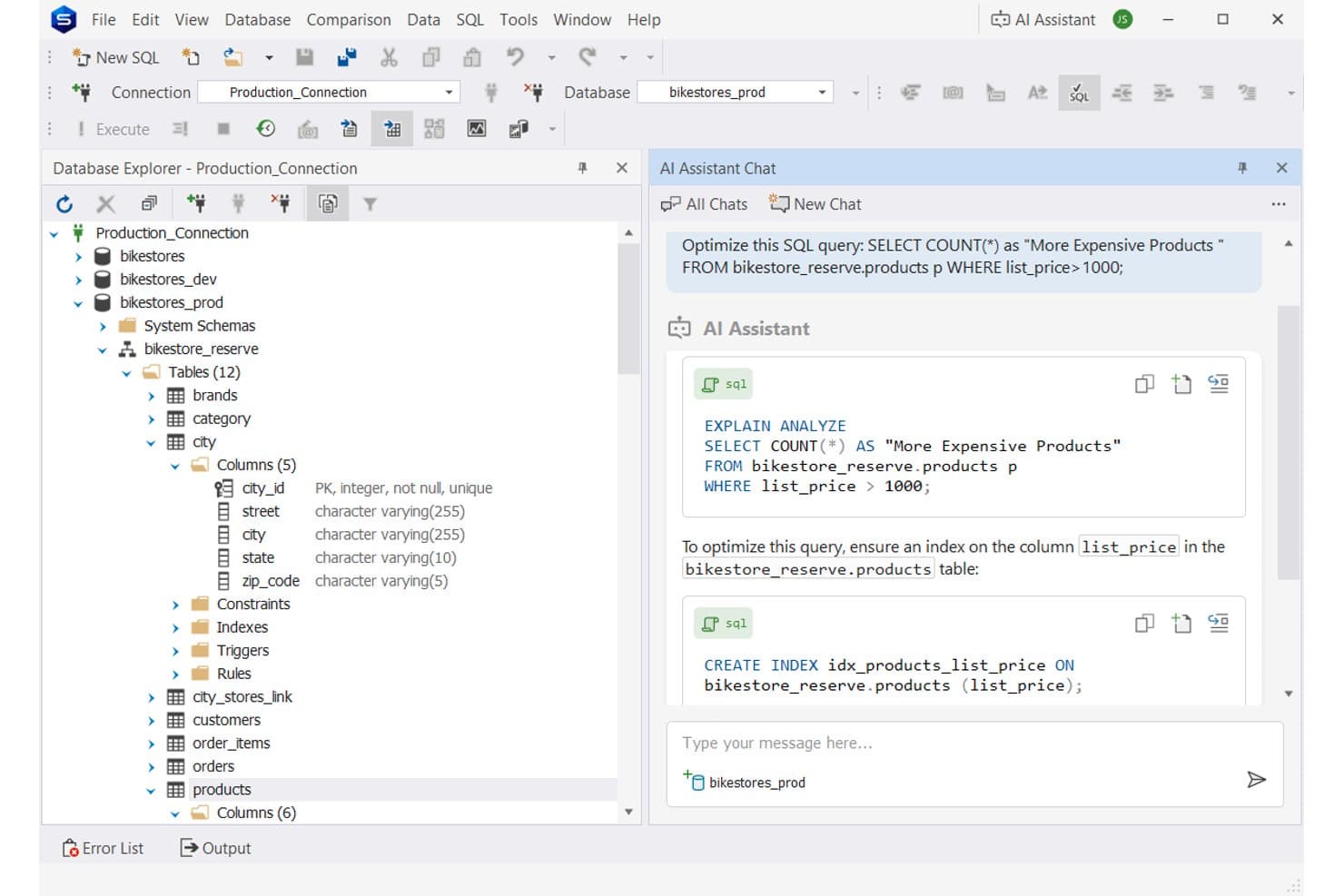
dbForge Studio for PostgreSQL uses AI to suggest query optimizations. dbForge Studio for PostgreSQL is a Windows-based IDE from Devart designed for PostgreSQL database development and management, offering a SQL editor, visual Query Builder, Query Profiler, schema and data comparison, a step-through debugger, and multi-format data import and export.
Who Is dbForge Studio for PostgreSQL Best For?
DBAs and backend developers who spend most of their day writing and tuning PostgreSQL queries will get the most out of this tool.
Why I Picked dbForge Studio for PostgreSQL
I picked dbForge Studio for PostgreSQL as one of the best because its Query Profiler gives you a genuinely visual window into what your queries are actually doing, showing operation costs as percentages of total batch cost in a plan tree rather than a wall of raw text. I've used it to catch exactly which node in a complex join is consuming the most resources, then watched query execution time drop sharply after adding the right index. The visual Query Builder also lets you construct SELECT statements, joins, and nested subqueries through a drag-and-drop interface, with the SQL panel updating in sync.
dbForge Studio for PostgreSQL Key Features
- SQL code snippets: A library of reusable code blocks you can insert directly from context-based suggestions in the SQL editor.
- PostgreSQL Debugger: A step-through debugger that lets you pause execution inside functions, procedures, and triggers to inspect parameter values at each step.
- Schema Compare and Sync: A tool that compares PostgreSQL schema structures across databases, highlights differences, and generates synchronization scripts.
- Data Generator: A built-in generator that creates realistic test data using predefined, configurable generators across your target tables.
dbForge Studio for PostgreSQL Integrations
dbForge Studio for PostgreSQL offers native integrations with PostgreSQL, Amazon RDS, Amazon Aurora, Google Cloud SQL for PostgreSQL, Supabase, and Azure Database for PostgreSQL, among 25+ listed compatible services. It also supports SSH, SSL, and Google Sheets imports; no API is documented.
Pros and Cons
Pros:
- Editing and comparison keep database work together
- Code completion and snippets speed SQL authoring
- Visual query plans reveal costly operations
Cons:
- Reviewers report missing backup and restore GUI
- Role administration requires SQL or third-party tools
Learn more about dbForge Studio for PostgreSQL: Best for multiple database environments
- 21-day free trial
- From $199/user/year (billed annually)
Visit WebsiteCustomer Rating:4.7/5
DbVisualizer unifies your SQL work by supporting multiple database systems. For professionals seeking a reliable SQL database software solution, DbVisualizer is a strong option. Built for developers, analysts, and administrators, it stands out by supporting multiple database environments in a single workspace. Whether you're working in tech-heavy industries or managing data-centric projects, DbVisualizer helps simplify database management with its user-friendly interface and comprehensive feature set.
Why I Picked DbVisualizer
I picked DbVisualizer for its outstanding ability to cater to multiple database environments, a crucial feature for teams managing diverse database systems. Its intelligent SQL editor stands out, offering features like autocomplete and syntax highlighting that make writing queries more intuitive. The visual query builder is another highlight, enabling users to build complex queries without delving into raw SQL. These features collectively ease the workload of database professionals, allowing them to focus on strategic tasks rather than getting bogged down by technical complexities.
DbVisualizer Key Features
In addition to multiple database environments, DbVisualizer offers:
- Inline Data Editing: Modify data directly within the result set, simplifying record updates without separate SQL commands.
- Export Options: Export result sets in various formats, including CSV, Excel, and XML, facilitating data sharing and reporting.
- Version Control: Manage SQL scripts collaboratively with version control integration, ensuring team alignment and preventing conflicts.
- Command-Line Interface: Execute scripts and automate tasks using a command-line interface, integrating DbVisualizer into broader workflows.
DbVisualizer Integrations
Integrations include Oracle, MySQL, Microsoft SQL Server, PostgreSQL, MongoDB, DB2, MariaDB, SQLite, Sybase, and Amazon Redshift.
Pros and Cons
Pros:
- The SQL editor includes autocomplete and syntax highlighting
- Export options include CSV, Excel, and XML formats
- Reduces tool-switching by managing all DBs in one interface
Cons:
- Can feel heavy when connected to many databases at once
- Tab management issues noted by users
Learn more about DbVisualizer: Best for MySQL compatibility with enterprise features
- No
- Pricing upon request
Visit WebsiteCustomer Rating:4.8/5
A photo displaying the home page of Percona Server for MySQL. Percona Server for MySQL is an open-source relational database that builds upon the capabilities of MySQL by adding enterprise-grade features. It maintains full compatibility with MySQL while enhancing performance, scalability, and security, hence justifying its position as the best choice for MySQL compatibility with added enterprise features.
Why I Picked Percona Server for MySQL: I chose Percona Server for MySQL after determining that it bridges the gap between standard MySQL and the demands of enterprise-level usage. Its compatibility with MySQL, paired with added features like advanced security and performance optimizations, makes it stand out in a crowded field. Its capability to extend MySQL functionalities while retaining compatibility substantiates why it's "Best for MySQL compatibility with enterprise features."
Standout features & integrations:
Percona Server for MySQL offers enhanced performance and scalability by providing features like the TokuDB storage engine and Percona Thread Pool. It also has improved security features, such as data-at-rest encryption and audit logging. For integrations, Percona Server for MySQL can be used with Percona Monitoring and Management, and it also supports integration with various backup tools, cloud providers, and containerization technologies.
Pros and Cons
Pros:
- Robust security measures including data encryption
- Performance and scalability enhancements
- Full MySQL compatibility with added enterprise features
Cons:
- Potential complexities in migrating from existing MySQL installations
- Certain features might be overkill for small-scale applications
- May require expertise for optimal configuration
Learn more about Percona Server For MySQL: Best for low-latency data management
- Free plan available
- From $0.15/hr per node
Visit WebsiteCustomer Rating:4.3/5
A photo focused on the queries portion of the tool Couchbase. Couchbase is a multi-model NoSQL database that thrives in handling low-latency data management. Designed with an in-memory-first architecture, Couchbase provides quick data retrieval and processing, making it an optimal solution for real-time applications. Its low-latency design is what makes Couchbase best suited for projects requiring fast and consistent data responses.
Why I Picked Couchbase: I chose Couchbase for its exceptional low-latency capabilities. When selecting databases, I paid close attention to response time and data handling efficiency, and Couchbase stood out with its in-memory architecture. Its ability to provide quick data retrieval and processing set it apart from others, affirming that it's "Best for low-latency data management,", particularly for applications that demand real-time interaction and responsiveness.
Standout features & integrations:
Couchbase offers memory-centric data management with features such as Multi-Dimensional Scaling, providing optimal performance and resource utilization. Its N1QL query language allows for SQL-like querying in a NoSQL environment, offering familiarity with powerful capabilities. Couchbase integrates with popular platforms and frameworks like Spring, Kafka, Hadoop, and Elasticsearch, providing a robust and agile environment for various applications.
Pros and Cons
Pros:
- Familiar SQL-like querying with N1QL
- Scalable architecture suitable for growing demands
- Excellent low-latency data retrieval
Cons:
- Potential complexity in configuration and setup
- The learning curve for new NoSQL users
- Requires careful tuning and maintenance for optimal performance
Learn more about Couchbase: 5Best for handling dynamic workloads
TiDB
- Free trial available
- From $0.44/hr
Visit WebsiteCustomer Rating:4.5/5
TiDB visualizes SQL execution plans in detail, showing estimated vs. actual rows, costs, and task distribution across components. TiDB is a distributed SQL database that supports hybrid transactional and analytical processing in a single system. It's open source, cloud-native, and MySQL-compatible, making it easy to adopt while supporting advanced scalability and performance needs.
Why I Picked TiDB: I picked TiDB because of how well it handles dynamic workloads, including transactional, analytical, and AI workloads using standard SQL syntax. With TiDB, your team can run OLTP and OLAP queries directly on the same database without manual sharding or syncing to a separate data warehouse. It’s built to scale horizontally with automatic data distribution and strong ACID consistency. This makes it a great match for high-volume applications and data-rich platforms that rely on SQL.
Standout features & integrations:
Other features include vector search for similarity queries, allowing you to run AI-related searches with SQL. Additionally, TiDB Cloud Serverless supports SQL API endpoints so your applications can query the database directly via HTTP without managing backend infrastructure. Some integrations include Kubernetes, Spark, Kafka, Flink, Terraform, Vercel, Bytebase, Netlify, Zapier, Confluent Cloud, and Snowflake.
Pros and Cons
Pros:
- Offers various deployment options
- ACID-compliant transactions, ensuring reliable processing
- Scales horizontally, allowing for increased data loads without downtime
Cons:
- Complex to tune for mixed workloads
- May be too comprehensive for smaller deployments
- Some users find TiDB to be resource-intensive
Learn more about TiDB: Best for column-oriented analytics
- Free trial available
- From $0.03/hour
Visit WebsiteCustomer Rating:4.3/5
ClickHouse offers a layered DWH architecture connecting multiple data sources through S3 raw storage into ClickHouse Cloud with RAW, MART, and Sandbox layers for BI reporting. ClickHouse is a column-oriented SQL database management system built for OLAP workloads, offering real-time query execution, vectorized processing, materialized views, and petabyte-scale data ingestion across distributed or single-node deployments.
Who Is ClickHouse Best For?
ClickHouse is a strong fit for data engineers and analytics teams at mid-to-large organizations that run high-volume, time-sensitive queries on event, log, or telemetry data.
Why I Picked ClickHouse
ClickHouse is one of my top picks because I love how its column-oriented storage engine directly changes what's possible with SQL analytics. When I run aggregate queries across billions of rows of event or clickstream data, ClickHouse reads only the columns the query touches, not the full row. That translates to real query times in the milliseconds. On top of that, its vectorized query execution uses all available CPU resources in parallel, so there's no sitting around waiting on results even at serious scale.
ClickHouse Key Features
- MergeTree table engine: ClickHouse's primary storage engine that sorts data by a primary key and enables range-based queries with minimal I/O.
- Materialized views: Pre-aggregate query results automatically on ingestion, so recurring analytical queries hit pre-computed data instead of raw tables.
- Data skipping indexes: Secondary indexes that allow ClickHouse to skip entire data granules that don't match a query's filter conditions.
- Window functions: Full support for SQL window functions, including ranking, running totals, and lag/lead calculations across ordered partitions.
ClickHouse Integrations
ClickHouse offers over 100 integrations across categories like language clients, data ingestion, SQL clients, and data visualization. These include Kafka, PostgreSQL, MySQL, MongoDB, Grafana, Apache Airflow, dbt, Tableau, Apache Flink, and Metabase. ClickPipes is an integration engine that makes ingesting massive volumes of data from a diverse set of sources like Amazon S3, Confluent Cloud, and Azure Event Hubs. Zapier support is not clearly documented as a native integration. An API is available for custom integrations.
Pros and Cons
Pros:
- Vectorized query execution on all CPU cores
- Open-source with free self-hosting option
- Sub-second aggregation across billions of rows
Cons:
- Joins across large tables perform poorly
- No ACID transactions or rollback support
Learn more about ClickHouse:

A screenshot focused on the welcome page of Oracle SQL Developer. Oracle SQL Developer is a free, integrated development environment that simplifies the development and management of Oracle Database. It provides tools for database development, querying, data modeling, and administration, making it an ideal choice for those who are specifically working with Oracle databases and seeking streamlined management.
Why I Picked Oracle SQL Developer: I chose Oracle SQL Developer for this list because of its specialization in Oracle database development and management. By comparing and judging its features tailored to Oracle's environment, I found it different from other generic database tools. Given its comprehensive suite of features designed to work with Oracle's products, I believe it stands out as the "Best for Oracle database development and management," offering specialized functionality for those working within the Oracle ecosystem.
Standout features & integrations:
Oracle SQL Developer offers features like PL/SQL coding assistance, debugging, and data modeling tools that are essential for Oracle database development. It supports importing from and exporting to various data formats, providing flexibility in handling data. Integrations are mostly aligned with Oracle products, allowing for a cohesive working environment with Oracle Cloud, Oracle Autonomous Database, and other Oracle technologies.
Pros and Cons
Pros:
- Extensive integration with various Oracle technologies
- Free to use, which can be advantageous for small teams or individual developers
- Comprehensive development tools tailored to Oracle databases
Cons:
- The need for specific licenses for commercial use may add complexity to its deployment
- May require some learning curve for those new to Oracle's ecosystem
- Specific to Oracle databases, limiting its usability with other database systems
Learn more about Oracle SQL Developer: Best for open-source object-relational functionality
- Free download available
- Free (open source)

A photo focused on the dashboard of the tool PostgreSQL. PostgreSQL is a powerful, open-source object-relational database system that offers advanced data management capabilities. Known for its object-relational functionality, PostgreSQL can handle large amounts of data and complex queries efficiently. This unique feature aligns with its reputation as the best tool for open-source object-relational functionality, offering a robust solution for developers and businesses in need of this specific use case.
Why I Picked PostgreSQL: I chose PostgreSQL because of its outstanding ability to blend traditional relational database features with object-oriented principles. It's widely recognized for its reliability, robustness, and performance. What makes it stand out is its commitment to standards compliance and extensibility, making it a prime choice for complex applications. The reason I found it to be "Best for open-source object-relational functionality" lies in its powerful features and flexibility that address the specific needs of managing object-relational data structures.
Standout features & integrations:
PostgreSQL offers a plethora of unique features, including support for JSON and JSONB data types, foreign data wrappers, and native partitioning. Its support for various indexing techniques, such as B-tree and hash indexes, enhances query performance. Integrations with languages like Python, Java, C++, and more make it a versatile choice for different development environments. Additionally, its compatibility with various operating systems and cloud services extends its reach across different platforms.
Pros and Cons
Pros:
- Compliance with SQL standards
- Active community support
- Highly customizable and extensible
Cons:
- Lack of official support for some commercial needs
- Resource-intensive for small applications
- Can be complex to set up
Learn more about PostgreSQL:

A screenshot of the website made for the tool SQLite. SQLite is a C library that provides a lightweight, disk-based database that doesn't require a separate server process. It's especially popular in embedded devices and small applications where a full-fledged database might be overkill. This unique, self-contained approach makes SQLite the best for embedded and lightweight applications.
Why I Picked SQLite: I picked SQLite for this list after carefully judging its ability to handle database needs without the overhead and complexity associated with larger database systems. Its small footprint and serverless, self-contained architecture make it different from other databases. These very aspects define why I see SQLite as the "Best for embedded and lightweight applications."
Standout features & integrations:
SQLite offers a serverless, zero-configuration design that simplifies deployment and management. Its features, like transactions, subqueries, triggers, and views, make it a comprehensive tool despite its small size. Integrations with various programming languages like Python, Java, C#, and more make it a versatile tool for different kinds of development environments.
Pros and Cons
Pros:
- No need for separate server management
- Wide support for various programming languages
- Lightweight and easy to integrate into applications
Cons:
- Lacks some advanced features found in full-scale databases
- Not suitable for large-scale applications
- Limited concurrency support
Learn more about SQLite: 10Best for document-oriented storage flexibility
MongoDB
- Free version available
- From $57/month or serverless from $0.10/million reads

A screenshot focused on the additional information provided by the tool MongoDB. MongoDB is a popular NoSQL database known for its document-oriented storage flexibility. It provides a way to organize and store data in BSON format (a binary JSON variant), enabling a more versatile and dynamic schema design. This focus on document-oriented storage makes MongoDB the best choice for projects that require a flexible data structure be it for varied or hierarchical data relationships.
Why I Picked MongoDB: I chose MongoDB for its exceptional capacity to manage document-oriented data. Its flexibility in storing unstructured data sets it apart from traditional relational databases. Having compared various databases, I determined that MongoDB is the "Best for document-oriented storage flexibility" due to its ability to accommodate a wide variety of data formats without the constraint of a fixed schema, offering developers a more dynamic approach to data handling.
Standout features & integrations:
MongoDB offers features like sharding, replication, and an expressive query language, allowing for rich and varied data modeling. Its document-oriented nature supports embedding, linking, and more. Integrations with programming languages like Java, Python, and Node.js and support for frameworks like Hadoop and various cloud platforms amplify its adaptability in diverse development environments.
Pros and Cons
Pros:
- Rich ecosystem with extensive community support
- Robust scalability and high performance
- Flexible document-oriented design
Cons:
- Limited support for querying complex relationships between documents
- May not be suitable for applications requiring ACID transactions
- Can be complex for those new to NoSQL
Learn more about MongoDB:
Outro software de bases de dados SQL
Eis algumas opções adicionais de software de bases de dados SQL que não entraram na minha lista restrita, mas que ainda vale a pena conhecer:
- 11SAP HANA CloudBest for real-time data processing and analytics
- 12MySQLBest for widespread community support and extensive ecosystem
- 13Google Cloud SQLBest for integration with Google Cloud Platform services
- 14Microsoft Azure SQL DatabaseBest for fully managed SQL service in Microsoft's Azure cloud
- 15IBM InformixBest for IoT data management and low-latency processing
- 16Apache CouchDBBest for NoSQL and horizontal scalability
- 17Amazon RDSBest for managed relational database service on AWS
- 18Microsoft SQL ServerBest for scalable data platform with strong analytics
- 19IBM Db2Good for enterprise-level data management and analytics
- 20TeradataGood for large-scale data warehousing and analytics
- 21MariaDBGood for open-source database solutions with MySQL compatibility
- 22OrientDBGood for multi-model database management with graph capabilities
- 23Amazon AuroraGood for scalable and cost-effective cloud database solutions
- 24FirebirdGood for lightweight embedded database systems
- 25VoltDBGood for high-velocity data and real-time analytics
How I Evaluate SQL Database Software
I evaluate in two layers: the baseline every tool must clear—ACID compliance, indexing, RBAC—and differentiators that matter when scaling a high-traffic app or migrating a production database.
Core Functionality (Table Stakes For This List)
When I'm selecting tools for my list, I rank each one on a scale from 0 (does not offer the functionality) to 5 (excels in this area) for each core functionality listed below. Then, I calculate the tool's total score into a percentage. Each tool needs to achieve a minimum total score of 75% to be considered for inclusion.
- SQL Query Execution: I check for full ANSI SQL support, including CTEs, window functions, and stored procedures—the kind of operations you rely on when writing complex reporting queries or migrating between platforms like PostgreSQL and MySQL.
- Relational Data Modeling: Every tool I evaluate should enforce primary keys, foreign keys, and referential integrity so your schema reflects real entity relationships, not just loosely connected tables.
- ACID Transaction Support: I look at isolation levels and MVCC implementation, since a checkout flow or banking ledger that loses data mid-transaction is a dealbreaker in any production environment.
- Indexing & Query Optimization: A cost-based query optimizer and support for multiple index types (B-tree, hash, GIN) matter when you're tuning a slow-running join across millions of rows.
- Access Control & Security: Role-based permissions, encryption at rest and in transit, and row-level security are what I evaluate—especially for teams managing multi-tenant applications or sensitive customer data.
- Backup, Replication & Recovery: I look for automated backups, point-in-time recovery, and replication options that let you restore a production database to the exact moment before an accidental table drop.
Once I have a list of tools that meet this criteria, I consider what sets each platform apart.
Differentiating Factors (What Sets Vendors Apart)
Here's how I compare and contrast different vendors:
Standout Features
Horizontal scalability is a major differentiator. I evaluate whether a database can shard or distribute writes across nodes, which matters when your application outgrows a single server. JSON and semi-structured data support is another factor I consider, since modern apps often need to store flexible payloads alongside relational tables. For teams running reporting queries without a separate data warehouse, in-database analytics with columnar storage or hybrid HTAP processing can save real infrastructure overhead.
Beyond Features
Deployment flexibility is one of the first things I evaluate. Whether your team needs a fully managed cloud instance, an on-premise installation for air-gapped environments, or Kubernetes operators for containerized workflows shapes which databases are even viable. Licensing matters too—open-source options like PostgreSQL and MySQL carry different long-term cost implications than commercial engines. I also look at ecosystem depth, including driver support for your language stack and compatibility with the BI, ETL, and observability tools your team already relies on.
Como escolher software de bases de dados SQL
É fácil ficar perdido entre longas listas de funcionalidades e estruturas de preços complexas. Para o ajudar a manter-se concentrado enquanto percorre o seu processo único de seleção de software, eis uma lista de verificação dos fatores a ter em conta:
| Fator | O que considerar |
|---|---|
| FatorEscalabilidade | O que considerarO software consegue acompanhar o crescimento das suas necessidades de dados? Considere o crescimento futuro e se a ferramenta processa um volume de dados superior sem problemas de desempenho. |
| FatorIntegrações | O que considerarEstabelece ligação com os seus sistemas atuais? Verifique a compatibilidade com as outras ferramentas utilizadas pela sua equipa para evitar silos de dados e interrupções nos fluxos de trabalho. |
| FatorPersonalização | O que considerarPode adaptar o software aos seus processos? Avalie o grau de flexibilidade da ferramenta para se adaptar aos requisitos específicos da sua empresa. |
| FatorFacilidade de utilização | O que considerarA interface é intuitiva para a sua equipa? Procure uma navegação simples e necessidades mínimas de formação para garantir uma adoção rápida pelos utilizadores. |
| FatorImplementação e integração inicial | O que considerarA transição para esta ferramenta é simples? Avalie o apoio à migração de dados, os recursos de formação e o tempo necessário para começar a trabalhar. |
| FatorCusto | O que considerarOs preços estão de acordo com o seu orçamento? Compare os modelos de subscrição e o custo total de propriedade, tendo em conta custos ocultos, como complementos ou atualizações. |
| FatorMedidas de segurança | O que considerarEstão implementadas medidas de proteção de dados? Garanta a conformidade com as normas do setor e verifique funcionalidades como a encriptação e os controlos de acesso. |
O que é o software de bases de dados SQL?
O software de bases de dados SQL é uma ferramenta utilizada para armazenar, gerir e obter dados através da linguagem de consulta estruturada (SQL). É habitualmente utilizado por administradores de bases de dados, programadores e analistas de dados que precisam de organizar e aceder eficazmente a grandes volumes de dados. Funcionalidades como a escalabilidade dos dados, o controlo do acesso dos utilizadores e o desempenho das consultas ajudam a gerir conjuntos de dados complexos e a garantir a integridade dos dados. De um modo geral, estas ferramentas simplificam a gestão de dados e melhoram a tomada de decisões.
Funcionalidades
Eis as principais funcionalidades que qualquer excelente software de bases de dados SQL deve ter:
- Armazenamento e obtenção de dados: Permite armazenar eficazmente grandes volumes de dados e aceder-lhes rapidamente quando necessário.
- Suporte para consultas SQL: Permite executar consultas estruturadas para manipular e obter dados de forma eficaz.
- Escalabilidade dos dados: Garante que o sistema consegue lidar com o crescimento do volume de dados sem degradação do desempenho.
- Controlo do acesso dos utilizadores: Proporciona segurança ao gerir quem pode aceder ou modificar os dados.
- Integridade dos dados: Mantém a exatidão e a consistência dos dados através de restrições e regras de validação.
- Capacidades de integração: Permite uma ligação simples a outros softwares e sistemas que utiliza.
- Interface de utilizador personalizável: Permite adaptar a interface às necessidades específicas do seu fluxo de trabalho.
- Cópia de segurança automatizada dos dados: Protege os seus dados ao guardar regularmente cópias para evitar perdas.
- Analítica em tempo real: Fornece informações ao processar os dados à medida que são introduzidos, permitindo uma tomada de decisões rápida.
- Medidas de segurança: Implementa encriptação e controlos de acesso para proteger informações sensíveis.
Benefícios
A implementação de software de bases de dados SQL proporciona vários benefícios à sua equipa e à sua empresa. Eis alguns dos benefícios que pode esperar:
- Melhor gestão de dados: Organize e aceda eficazmente a grandes conjuntos de dados utilizando consultas SQL e capacidades de armazenamento.
- Tomada de decisões melhorada: A analítica em tempo real fornece informações que ajudam a tomar rapidamente decisões empresariais fundamentadas.
- Software de segurança de bases de dados: As funcionalidades de controlo do acesso dos utilizadores e de encriptação protegem os dados sensíveis contra acessos não autorizados.
- Suporte à escalabilidade: Lide com volumes de dados crescentes sem comprometer o desempenho, graças a uma infraestrutura escalável.
- Garantia da integridade dos dados: Mantenha dados exatos e consistentes com regras de validação e restrições integradas.
- Integração simples: Ligue-se a outras ferramentas utilizadas pela sua equipa para criar um fluxo de trabalho unificado e evitar silos de dados.
- Interfaces personalizáveis: Adapte a interface de utilizador às suas necessidades específicas, melhorando a experiência e a eficiência dos utilizadores.
Custos e preços
A seleção de software de bases de dados SQL requer uma compreensão dos vários modelos de preços e planos disponibilizados pelos fornecedores de bases de dados como serviço. Os custos variam consoante as funcionalidades, a dimensão da equipa, os complementos, entre outros fatores. A tabela abaixo resume os planos mais comuns, os respetivos preços médios e as funcionalidades normalmente incluídas nas soluções de software de bases de dados SQL:
Tabela de comparação de planos de software de bases de dados SQL
| Tipo de plano | Preço médio | Funcionalidades comuns |
|---|---|---|
| Tipo de planoPlano gratuito | Preço médio$0 | Funcionalidades comunsArmazenamento básico de dados, suporte para consultas SQL e acesso limitado dos utilizadores. |
| Tipo de planoPlano pessoal | Preço médio$5-$25/utilizador/mês | Funcionalidades comunsArmazenamento avançado de dados, controlo do acesso dos utilizadores e capacidades de integração. |
| Tipo de planoPlano empresarial | Preço médio$30-$100/utilizador/mês | Funcionalidades comunsSegurança melhorada, analítica em tempo real e interfaces personalizáveis. |
| Tipo de planoPlano empresarial avançado | Preço médio$100+/utilizador/mês | Funcionalidades comunsIntegração abrangente, cópia de segurança automatizada dos dados e suporte dedicado. |
Perguntas frequentes
Aqui ficam algumas respostas a perguntas comuns sobre software de bases de dados SQL:
Quais são as limitações das bases de dados SQL?
As bases de dados SQL podem ter dificuldades com grandes volumes de dados, o que as torna menos eficientes para aplicações que processam grandes volumes de dados. Podem não escalar bem horizontalmente, o que é uma preocupação para empresas em rápido crescimento. Além disso, a complexidade do SQL pode constituir um obstáculo para principiantes, exigindo mais conhecimentos especializados para a gestão.
As bases de dados SQL conseguem processar dados não estruturados?
As bases de dados SQL foram concebidas principalmente para dados estruturados, utilizando tabelas com esquemas predefinidos. Embora possam armazenar dados não estruturados, não estão otimizadas para esse fim. Para processar dados não estruturados, considere utilizar bases de dados NoSQL, que são mais adequadas para modelos de dados flexíveis e dinâmicos.
Como é que as bases de dados SQL suportam transações?
As bases de dados SQL suportam transações utilizando as propriedades ACID: Atomicidade, Consistência, Isolamento e Durabilidade. Estas propriedades garantem que as transações da base de dados são processadas de forma fiável, mesmo em caso de erros ou falhas do sistema, mantendo a integridade dos dados durante todo o processo.
O software de bases de dados SQL baseado na nuvem é melhor do que o software instalado localmente?
Tanto o software de bases de dados SQL baseado na nuvem como o instalado localmente têm vantagens e desvantagens. As soluções baseadas na nuvem oferecem flexibilidade e, frequentemente, uma configuração e manutenção mais fáceis, mas podem implicar custos de subscrição contínuos. As soluções instaladas localmente podem proporcionar um maior controlo e personalização, mas podem exigir mais conhecimentos técnicos e um investimento inicial maior.
O software de bases de dados SQL pode integrar-se com outras ferramentas e plataformas?
Sim, muitas ferramentas de software de bases de dados SQL oferecem capacidades de integração com várias outras plataformas, incluindo ferramentas de inteligência empresarial, sistemas CRM, entre outras. Estas integrações podem ajudar a simplificar os fluxos de trabalho e a melhorar a colaboração entre diferentes departamentos de uma organização.