

No mundo digital atual, manter os seus dados seguros é uma prioridade máxima. A perda de dados pode ser um pesadelo para si e para a sua equipa, resultando em perda de tempo, dinheiro e confiança. É aqui que entra o software de prevenção contra a perda de dados — ajuda a proteger informações sensíveis e a garantir a conformidade com os regulamentos.
Testo e avalio software de forma independente, concentrando-me no que realmente importa para especialistas em tecnologia como si. Na minha experiência, encontrar as ferramentas certas de prevenção contra a perda de dados pode fazer toda a diferença na proteção da sua empresa.
Neste artigo, partilharei as minhas principais escolhas de software de prevenção contra a perda de dados. Terá uma visão imparcial das funcionalidades, vantagens e desvantagens, e de como estas ferramentas podem aliviar os seus desafios. Vamos começar e encontrar a opção mais adequada às suas necessidades.
Why Trust Our Software Recommendations
6,700+
Reviews
20
Industry experts
16+
Evaluation factors
14
Years
Our team has been testing and reviewing software since 2012. As tech leaders ourselves, we know how difficult—and important—it is to choose the right software.
For this guide, we evaluated tools using hands-on testing and independent research, scoring tools using our selection criteria.
Our reviews reflect our human editorial judgment, not a sales pitch.
Expert reviewers:
- Paulo Gardini MiguelTech Director
 Tim FisherVP of AI
 Gabriel RosasTech Lead & Software Architect
 Christhian GruhnTech Lead & Platform Architect

Tabela de comparação de software de prevenção contra a perda de dados
A tabela abaixo compara os detalhes de preços das minhas principais escolhas de software de prevenção contra a perda de dados.
| Tool | Best For | Trial Info | Price | ||
|---|---|---|---|---|---|
| 1 | Best for SaaS and GenAI data exfiltration control | Free demo available | Pricing upon request | Website | |
| 2 | Best for insider threat detection | Free demo available | Pricing upon request | Website | |
| 3 | Best for threat detection and response | From $15/user/month (billed annually) | Website | ||
| 4 | Best for large-scale enterprise data protection | Customized price upon request | Website | ||
| 5 | Best for holistic data protection across hybrid cloud environments | Pricing upon request | Website | ||
| 6 | Best for database security and compliance | 30-day free trial available | Pricing upon request | Website | |
| 7 | Best for advanced machine learning-based protection | Pricing upon request | Website | ||
| 8 | Best for context-aware data security | From $10/user/month (billed annually) | Website | ||
| 9 | Best for integrated endpoint and network security | From $15/user/month | Website | ||
| 10 | Best for cloud-native environments | From $10/user/month (billed annually) | Website |


Avaliações do melhor software de prevenção contra a perda de dados
 Best for SaaS and GenAI data exfiltration control
- Free demo available
- Pricing upon request
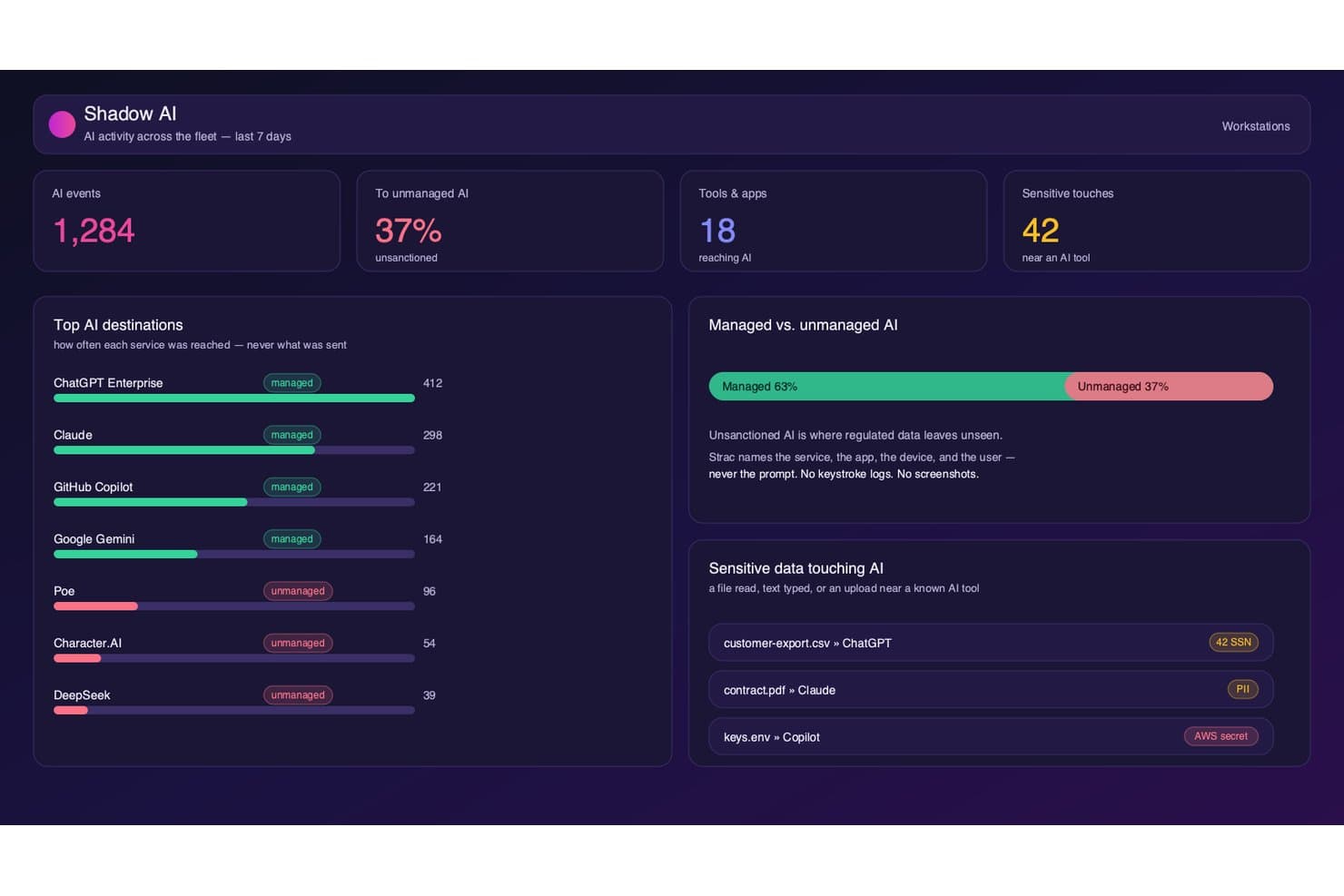
Strac tracks shadow AI usage and flags sensitive data near AI tools. Strac is a DLP platform that monitors and enforces data protection policies across SaaS apps, cloud storage, endpoints, browsers, and generative AI tools using ML-based classification and OCR.
Who Is Strac Best For?
Strac is a strong fit for security teams managing sensitive data across sprawling SaaS environments and organizations actively adopting generative AI tools that need to control what data employees submit to AI models.
Why I Picked Strac
I picked Strac as one of the best because it's one of the few DLP platforms that treats generative AI as a first-class exfiltration channel. It monitors and blocks sensitive data submitted to ChatGPT, Claude, Gemini, and Copilot at the prompt level, and extends that coverage to MCP agent workflows. I also like that its ML plus OCR engine catches sensitive data embedded in images and scanned PDFs before they leave the environment.
Strac Key Features
- Compliance policy templates: Prebuilt templates mapped to HIPAA, PCI DSS, SOC 2, GDPR, CCPA, CPRA, ISO 27001, and ISO 27701 for out-of-the-box regulatory coverage.
- Removable media and print control: Endpoint agents for Windows, macOS, and Linux enforce USB, clipboard, and print restrictions in real time.
- On-premises self-hosted deployment: Strac can run entirely within your own AWS VPC with zero data egress, supporting strict data residency and FedRAMP requirements.
- User coaching nudges: At the moment of a potential policy violation, Strac delivers inline nudges that educate employees rather than silently blocking them.
Strac Integrations
Strac offers 50+ native integrations, including Slack, Google Workspace, Microsoft 365, Salesforce, Jira, AWS, Snowflake, PostgreSQL, ChatGPT, Claude, and Gemini. It also provides API documentation for custom integrations and supports SIEM connections with Splunk, Sumo Logic, and Microsoft Sentinel.
Pros and Cons
Pros:
- Performs OCR-based detection for images and PDFs
- Provides real-time remediation at data source
- Enforces DLP on generative AI tools
Cons:
- No network-layer inline proxy DLP
- Lacks standalone UEBA for insider threat
Learn more about Strac: Best for insider threat detection
- Free demo available
- Pricing upon request
Visit WebsiteCustomer Rating:4.5/5
Teramind displays analytics showing top employees, departments, and app usage to help detect data activity patterns that could signal potential data loss risks. Teramind lands on my shortlist because of how well it covers insider threat detection in real time. I suggest it when you need to monitor risky user behaviors that slip past traditional DLP controls.
What I like is its strong user activity monitoring and automated risk scoring. In practice, teams can pinpoint unusual actions—like mass file movement or unauthorized access—before data actually leaves the environment.
Teramind’s Best For
- Security teams monitoring insider threats and risky users
- Organizations needing granular user activity tracking
Teramind’s Not Great For
- Companies wanting lightweight, hands-off DLP solutions
- Teams focused solely on automated data classification
What Sets Teramind Apart
Teramind focuses on close monitoring of user behavior, treating every action—like file transfers and application usage—as a potential risk indicator you need to track. Unlike most DLP tools that center on content scanning or data tagging, Teramind assumes your biggest threats move through people inside your network. In practice, this works well when you care more about activity patterns than just blocking known data types.
Tradeoffs with Teramind
Teramind optimizes for hands-on monitoring and behavioral data, but this brings more setup, ongoing analysis, and noise. If you want automated DLP with minimal tuning, this approach is a heavier lift.
Pros and Cons
Pros:
- Blocks data leaks proactively, not just detect after
- Granular risk scoring helps reduce false positives
- Catches insider threats missed by rule-only systems
Cons:
- Requires endpoint agent installation on every device
- No database fingerprinting of structured data
Learn more about Teramind: Best for threat detection and response
- From $15/user/month (billed annually)

Here's Proofpoint's analytics feature. Proofpoint Enterprise Data Loss Prevention earns a spot because it consistently catches threats other tools miss, especially across email, cloud, and endpoint channels. I've seen it pinpoint exfiltration attempts and insider risk by combining behavioral analytics and content inspection in one workflow.
What sets it apart for me is the threat correlation engine. You get actionable alerts and a response workflow that covers everything from real-time blocking to incident review in a single dashboard.
Proofpoint DLP’s Best For
- Large enterprises needing threat protection across email, cloud, and endpoints
- Security teams focused on insider and exfiltration risks
Proofpoint DLP’s Not Great For
- Small businesses with minimal IT security resources
- Organizations wanting lightweight or basic DLP solutions
What sets Proofpoint DLP apart
Proofpoint DLP puts threat detection at the center, focusing on behavioral signals before digging into content and policies. Unlike traditional DLP tools that flag based mostly on keywords or patterns, Proofpoint leans into context and real-time activity—flagging risky behavior across email and cloud first. I see this work best in organizations with a mix of insider and external threat concerns, where you want to connect early warning signs with data movement.
Tradeoffs with Proofpoint DLP
By optimizing for advanced detection, Proofpoint adds complexity and a steeper learning curve. For teams wanting something simpler or lighter-touch, that extra depth can translate into more work up front and slower onboarding.
Pros and Cons
Pros:
- Provides comprehensive visibility into data security.
- Integrates with other Proofpoint solutions.
- Exceptional threat detection and response capabilities.
Cons:
- May be complex for small businesses to deploy and manage.
- Extra costs may apply for advanced features.
- Higher starting price compared to other DLP solutions.
Learn more about Proofpoint Enterprise Data Loss Prevention: Best for large-scale enterprise data protection
- Customized price upon request

Here's the policy management feature in Symantec Data Loss Prevention. Symantec Data Loss Prevention is on my list because it handles some of the largest, most complex data protection needs I’ve come across. When I’m working with enterprises where confidential data moves across cloud, endpoint, and on-prem systems, Symantec’s unified policy management and automated data discovery really stand out.
What I like most is how you can customize policies to address regional compliance, insider threats, and third-party risk at scale.
Symantec DLP’s Best For
- Large enterprises with diverse and complex data environments
- Organizations needing granular control over sensitive data movement
Symantec DLP’s Not Great For
- Small businesses with simple data protection needs
- Teams looking for fast, lightweight deployments
What sets Symantec DLP apart
Symantec DLP is designed for organizations that need to govern sensitive data moving between endpoints, cloud, and on-prem systems, all under one roof. Unlike simpler tools like Microsoft Purview, which fit smaller or mostly Microsoft-based environments, Symantec expects you to centralize policies and reporting for highly diverse infrastructure.
In practice, this works well for security teams that need to coordinate risk controls across global operations, regulatory obligations, and mixed platforms.
Tradeoffs with Symantec DLP
Symantec DLP optimizes for control over scale and complexity, but onboarding and tuning it takes time and specialized skill. Smaller teams end up with more maintenance than they want.
Pros and Cons
Pros:
- Integrates deeply with other Symantec products.
- Offers unified policy management.
- Can handle large-scale enterprise requirements.
Cons:
- Setup and management could be time-consuming.
- It might be too complex for smaller organizations.
- Pricing information is not readily available.
Learn more about Symantec Data Loss Prevention: Best for holistic data protection across hybrid cloud environments
- Pricing upon request

Here's the IBM Data Security active threat analytics. IBM Data Security lands on my list because it brings data loss prevention and encryption together for hybrid and multi-cloud environments. I find the way it automates policy enforcement across Kubernetes, databases, and filesystems saves significant manual effort as environments scale.In testing, what stood out is how precise the policies and monitoring are, without introducing noticeable friction for end users. This is especially valuable in large organizations where the same data needs consistent protection and policy enforcement across on-prem systems, cloud platforms, and containerized workloads.IBM Data Security’s Best For
- Enterprises with complex hybrid or multi-cloud data environments
- Security teams needing centralized policy and compliance automation
IBM Data Security’s Not Great For
- Small organizations with simple, on-premise data storage
- Teams needing lightweight, plug-and-play DLP tools
What Sets IBM Data Security Apart
IBM Data Security stands out by prioritizing unified policy enforcement and monitoring across cloud and on-prem data sources. Instead of layering DLP tools for each environment, you set policies once and apply them everywhere.
This works best for organizations juggling sensitive data in both public cloud and local data centers. Compared to something like Symantec DLP, which often assumes more standardized infrastructure, IBM focuses on cross-environment consistency.
Tradeoffs with IBM Data Security
It optimizes for broad, centralized control, but that can mean slower rollouts and extra configuration when you only need basic, targeted DLP protection for a single system.
Pros and Cons
Pros:
- Wide range of compatible integrations.
- Offers a unified platform for all data security needs.
- Comprehensive solution for data protection in hybrid cloud environments.
Cons:
- Potential learning curve due to its wide array of features.
- It may be too complex for small businesses.
- Pricing information is not readily available.
Learn more about IBM Data Security: Best for database security and compliance
- 30-day free trial available
- Pricing upon request

Here's Imperva's cloud data security dashboard overview. Imperva is here because its approach to database security and compliance solves a problem I see often: patchy visibility into where sensitive data lives and how it’s being accessed. When I evaluate data loss prevention options, Imperva stands out for its agentless activity monitoring and ability to enforce granular policies directly at the data store.In testing, what stood out is how easily you can set real-time alerts for risky data access while still meeting compliance audit requirements. If you’ve ever had to trace who touched sensitive records or pull logs under pressure, this kind of visibility makes a real difference—without having to stitch together multiple tools.Imperva’s Best For
- Regulated industries with complex database compliance needs
- Security teams needing real-time monitoring of sensitive data
Imperva’s Not Great For
- Organizations focused on endpoint-based data loss prevention
- Teams with small-scale or file storage-only environments
What sets Imperva apart
Imperva is designed around the idea that database security needs to be granular, continuous, and independent of where your data lives. Unlike traditional DLP solutions that focus on endpoints or network traffic, Imperva assumes your most valuable data lives inside databases and cloud stores—and that’s where it monitors and enforces controls.
I could see how this works well when you need tight policies for regulated workloads or database environments. It takes the view that data-centric controls should drive your security approach, not just network perimeters or endpoints.
Tradeoffs with Imperva
Imperva optimizes for database and cloud data protection, but that focus means you lose full visibility into file and endpoint risks. Teams with data spread across many systems may need another DLP tool for broader coverage.
Pros and Cons
Pros:
- Integrates with other security tools for comprehensive protection.
- Helps in achieving compliance with regulatory standards.
- Strong focus on database security.
Cons:
- Depending on the size of the database, system performance may be affected.
- Customization options may be complex for beginners.
- Pricing might be high for small businesses.
Learn more about Imperva: Best for advanced machine learning-based protection
- Pricing upon request

Here's the analytics dashboard in Forcepoint Data Loss Prevention. Forcepoint Data Loss Prevention earns its place on my list for its advanced machine learning approach to data loss risks. I’ve seen how the tool identifies nuanced patterns in user behavior that many traditional rules-based systems miss. I like the precision of its automated policy enforcement, especially in complex and heavily regulated environments.
This is a go-to when your team deals with large volumes of sensitive data and you need deeper, contextual insight to stop leaks before they happen.
Forcepoint DLP's Best For
- Enterprises with complex data flows and strict compliance needs
- Security teams demanding contextual, ML-driven data protection
Forcepoint DLP's Not Great For
- Small organizations needing simple, out-of-the-box DLP
- Teams without resources for ongoing tuning and management
What sets Forcepoint DLP apart
Forcepoint DLP is built for organizations that need more than simple content rules. In practice, it expects you to set up policies that consider user context and behavior, not just file types or keywords. Unlike tools such as Symantec DLP, which rely heavily on static patterns, Forcepoint pushes you toward risk-adaptive workflows that change based on what users actually do over time.
You end up working with alerts and controls that adapt to your environment—not just block the same violations over and over.
Tradeoffs with Forcepoint DLP
By focusing on risk-adaptive protection, Forcepoint adds more setup and calibration work upfront, so you give up the easy onboarding you’d get with a basic DLP tool.
Pros and Cons
Pros:
- Provides integrations with other Forcepoint solutions.
- Offers a comprehensive suite of features.
- Utilizes advanced machine learning for protection.
Cons:
- Machine learning models may require time for optimal calibration.
- It might be overly complex for smaller businesses.
- Pricing is not transparent and requires direct contact.
Learn more about Forcepoint Data Loss Prevention: Best for context-aware data security
- From $10/user/month (billed annually)

Here's the automated and easy-to-deploy security feature in Egress Data Loss Prevention. Egress Data Loss Prevention makes my shortlist for the way it applies contextual awareness to email data security. What stands out is how it analyzes message content and recipient context in real time, flagging or blocking risky data events before they happen.
I like how teams can set policy so sensitive information gets handled differently based on content, recipient, or user action—especially in financial or legal settings where context matters most.
Egress’s Best For
- Organizations sending confidential data by email
- Teams needing policy-driven, context-aware data controls
Egress’s Not Great For
- Companies looking for non-email DLP coverage
- Small businesses with straightforward, low-volume email needs
What sets Egress apart
Egress stands out by building email security around context, not just basic content detection. Instead of tagging keywords or blocking attachments like some DLP tools, it analyzes both the message and its recipients before taking action. For organizations where sensitive details might change meaning depending on who sends it, or where mistakes with outbound data are common, this tool is a solid choice.
Tradeoffs with Egress
Egress optimizes for nuanced, policy-driven controls on email, but that comes at the cost of limited coverage for non-email channels. If you need to monitor data in cloud drives or chat, you’ll need a second tool.
Pros and Cons
Pros:
- Utilizes advanced machine learning for threat detection.
- Integrates well with Microsoft 365 and Google Workspace.
- Offers context-aware data security.
Cons:
- The setup might require a learning curve.
- It may be overwhelming for small businesses.
- Advanced features might result in extra costs.
Learn more about Egress Data Loss Prevention: Best for integrated endpoint and network security
- From $15/user/month

Here's the endpoint security feature in Trellix Data Loss Prevention. Trellix Data Loss Prevention lands on my list for how it unifies endpoint and network security into a coordinated system. I’ve worked with teams who want to catch both accidental data leaks and serious insider threats without jumping between separate tools, and this fits that use case well.
What I like is the way Trellix combines real-time content inspection with automated policy enforcement across devices and network layers. You can define and apply consistent controls in one place, making gaps between endpoint and network less likely.
Trellix’s Best For
- Organizations needing unified endpoint and network data protection
- Teams with strict regulatory or insider threat monitoring needs
Trellix’s Not Great For
- Small businesses without dedicated security staff
- Teams wanting lightweight or plug-and-play DLP solutions
What sets Trellix apart
Trellix takes a coordinated approach by managing data loss prevention at both endpoints and the network. This is different from tools like Symantec DLP, which often keep those layers siloed. In practice, I see Trellix expecting you to design policies that track sensitive data moving across your whole environment, including endpoints, network traffic, and cloud channels.
This works well if you want consistent controls and unified incident response, but you do need to plan for policy alignment across multiple surfaces.
Tradeoffs with Trellix
Trellix optimizes for deep policy control across endpoints and networks, but that complexity slows down deployment and requires ongoing admin effort. If you want something quick to set up with minimal tuning, this isn’t a good fit.
Pros and Cons
Pros:
- Easy integration with other security and IT platforms.
- Real-time visibility into data movement.
- Provides both endpoint and network security.
Cons:
- The interface may require help to navigate for beginners.
- Requires time for setup and policy configuration.
- It might be pricey for smaller businesses.
Learn more about Trellix Data Loss Prevention:

Here's the file and folder permissions feature in Nightfall DLP. Nightfall DLP makes the cut for how thoroughly it addresses cloud-native data protection. When I tested its automated detection, content inspection works right inside tools like Google Drive, Slack, and Jira, flagging sensitive data with minimal setup.
What I appreciate here is the prebuilt detection pack for common data types. It’s a smart way to handle data loss risk without manual tuning, especially as your team scales cloud adoption.
Nightfall DLP's Best For
- Security teams protecting sensitive data in cloud apps
- Organizations needing automated compliance and data classification
Nightfall DLP's Not Great For
- Companies with mostly on-prem or legacy infrastructure
- Small teams that need basic endpoint DLP only
What sets Nightfall DLP apart
Nightfall DLP stands out because it’s built with cloud platforms like Google Workspace, Slack, and Jira in mind, not as an afterthought. While legacy DLP tools lean on endpoint or network controls, Nightfall expects you to work across SaaS apps and APIs directly. In practice, this is a good fit when you need continuous scanning inside the tools your teams already use.
Tradeoffs with Nightfall DLP
Nightfall optimizes for cloud-first environments, but you lose direct support for controlling on-prem data channels, which makes it less helpful if your data still lives mainly on local endpoints or file servers.
Pros and Cons
Pros:
- Extensive cloud platform integrations.
- Machine learning-enhanced detection.
- Excellent cloud-native environment protection.
Cons:
- The user interface may take time to master.
- Some advanced features might come with extra costs.
- It might be over-specialized for non-cloud-native businesses.
Learn more about Nightfall DLP:
Outro software de prevenção contra a perda de dados
Segue-se uma lista de software adicional de prevenção contra a perda de dados que selecionei, mas que não chegou aos 10 primeiros. Vale definitivamente a pena consultá-los.
- 11Endpoint Protector Data Loss Prevention (DLP) SoftwareBest for USB and peripheral device control
- 12Safetica ONEBest for data leak prevention via behavioral analysis
- 132B Advice PrIMEBest for privacy and compliance management
- 14GTT DLPBest for comprehensive data visibility
- 15LastPassGood for password management in businesses of all sizes
- 16NordLayerGood for advanced network security with threat prevention
- 17Varonis Data Security PlatformGood for extensive data security and threat detection
- 18SpirionGood for businesses needing precise personal data discovery and protection
- 19TessianGood for preventing data loss through emails and human interactions
- 20CoveGood for reliable data backup and recovery solutions
- 21GTB Data Loss PreventionGood for comprehensive data loss protection across various platforms
- 22Clearswift Data Loss PreventionGood for adaptable and dynamic data loss prevention
- 23Digital Guardian DLPGood for businesses requiring context-aware data loss prevention
- 24Teramind DLPGood for user-focused data loss prevention and user behavior analytics
- 25Fidelis NetworkGood for organizations looking for network traffic analysis and data leakage prevention
- 26LaminarGood for businesses seeking automated threat detection and response
Avaliações relacionadas
How I Evaluate Data Loss Prevention Software
I split my evaluation into two layers: baseline capabilities every DLP tool must have—like data classification and multi-channel policy enforcement—and differentiators that set the strongest options apart.
Core Functionality (Table Stakes For This List)
When I'm selecting tools for my list, I rank each one on a scale from 0 (does not offer the functionality) to 5 (excels in this area) for each core functionality listed below. Then, I calculate the tool's total score into a percentage. Each tool needs to achieve a minimum total score of 75% to be considered for inclusion.
- Data Discovery & Classification: I check whether a tool can automatically scan and categorize sensitive data—like PII in cloud storage or financial records across databases—without relying on manual tagging.
- Multi-Channel Policy Enforcement: Each tool should enforce policies across endpoints, email, web, cloud apps, and removable media so a single rule set covers all the ways data leaves your environment.
- Content Inspection & Context Analysis: Beyond basic keyword matching, I evaluate whether the tool supports fingerprinting, exact data matching, and contextual analysis to reduce false positives on real documents.
- Incident Detection & Response: Real-time alerting matters, but I also look for automated response actions like blocking a file transfer or encrypting an attachment before it reaches an external recipient.
- Compliance Reporting & Audit Logs: Prebuilt report templates mapped to regulations like GDPR, HIPAA, and PCI-DSS save significant time when preparing for audits or demonstrating compliance to stakeholders.
- User Activity & Insider Threat Monitoring: Behavioral analytics and risk scoring help surface anomalous patterns—such as a user downloading unusual volumes of files—before a breach occurs.
Once I have a list of tools that meet this criteria, I consider what sets each platform apart.
Differentiating Factors (What Sets Vendors Apart)
Here's how I compare and contrast different vendors:
Standout Features
AI/ML-powered risk scoring is a big differentiator—it helps analysts focus on high-severity incidents instead of wading through hundreds of low-priority alerts. OCR capability matters too, since sensitive data often hides in scanned documents, screenshots, or image-based PDFs that basic content inspection misses entirely. I also evaluate whether a tool offers native CASB integration to extend DLP policies into SaaS apps like Microsoft 365 and Google Workspace, where most data movement happens today.
Beyond Features
Integration ecosystem is something I evaluate closely—DLP tools need to feed alerts into your existing SIEM or SOAR platform, and connect with your identity provider for context-aware policies. Deployment flexibility also matters. Some teams need a cloud-native option, while others in regulated industries require on-premise or hybrid models. I also look at pricing structure, specifically whether licensing is modular enough to let you start with endpoint DLP and add network or cloud modules as your program matures, rather than paying for capabilities you don't need yet.
Como escolher software de prevenção contra a perda de dados
É fácil ficar preso a longas listas de funcionalidades e estruturas de preços complexas. Para o ajudar a manter-se concentrado enquanto analisa o seu processo único de seleção de software, segue-se uma lista de fatores a ter em conta:
| Fator | O que deve considerar |
|---|---|
| FatorEscalabilidade | O que deve considerarO software acompanhará o crescimento da sua empresa? Considere os limites de utilizadores, a capacidade de dados e a facilidade de atualizar ou expandir as funcionalidades à medida que as suas necessidades evoluem. |
| FatorIntegrações | O que deve considerarFunciona com as suas ferramentas existentes? Verifique a compatibilidade com os seus sistemas atuais e com qualquer tecnologia futura que planeie implementar. |
| FatorPossibilidade de personalização | O que deve considerarPode adaptá-lo aos seus processos? Procure opções para ajustar definições, fluxos de trabalho e relatórios de acordo com as necessidades específicas da sua equipa. |
| FatorFacilidade de utilização | O que deve considerarA interface é fácil de utilizar? Certifique-se de que a sua equipa consegue navegar no software sem formação extensa. Teste o design e a funcionalidade intuitivos. |
| FatorImplementação e integração inicial | O que deve considerarQuão rápida é a configuração? Avalie o tempo e os recursos necessários para começar, incluindo materiais de formação e apoio durante a fase inicial. |
| FatorCusto | O que deve considerarEnquadra-se no seu orçamento? Compare modelos de preços, como subscrições e tarifas únicas, e considere quaisquer custos ocultos, como complementos ou atualizações. |
| FatorMedidas de proteção de segurança | O que deve considerarComo protege os seus dados? Avalie as normas de encriptação, as opções de cópia de segurança dos dados e os controlos de acesso para garantir medidas de segurança robustas. |
| FatorRequisitos de conformidade | O que deve considerarCumpre as normas do setor? Verifique se o software está em conformidade com os regulamentos relevantes para o seu setor, como o GDPR ou a HIPAA. |
O que é o software de prevenção contra a perda de dados?
O software de prevenção da perda de dados é uma ferramenta concebida para proteger dados sensíveis contra perda, roubo ou acesso por utilizadores não autorizados. Os profissionais de TI, os responsáveis pela conformidade e as equipas de segurança de dados utilizam geralmente estas ferramentas para proteger informações e garantir a conformidade regulamentar.
As funcionalidades de monitorização, encriptação de dados e controlo de acesso ajudam a prevenir violações de dados e a manter a integridade dos dados. Quando ocorrem incidentes, o software de investigação forense digital pode ajudar a investigar e analisar a violação. De um modo geral, estas ferramentas proporcionam tranquilidade ao proteger informações valiosas e apoiar os esforços de conformidade.
Funcionalidades
Ao selecionar software de prevenção da perda de dados, tenha em atenção as seguintes funcionalidades principais:
- Monitorização de dados: Acompanha a movimentação e o acesso aos dados para identificar atividades invulgares e impedir acessos não autorizados.
- Encriptação: Protege informações sensíveis convertendo-as em código ilegível, garantindo a segurança dos dados mesmo quando são acedidos.
- Controlo de acesso: Limita quem pode visualizar ou editar dados, reduzindo o risco de violações internas e externas.
- Gestão da conformidade: Ajuda a garantir o cumprimento de regulamentações do setor, como o RGPD ou a HIPAA, evitando multas e penalizações dispendiosas.
- Alertas em tempo real: Notifica imediatamente os utilizadores sobre potenciais violações de dados ou infrações às políticas, permitindo uma resposta rápida.
- Capacidades de integração: Funciona perfeitamente com sistemas e software existentes, reforçando a infraestrutura geral de segurança.
- Classificação de dados: Categoriza os dados com base na sua sensibilidade, ajudando a priorizar eficazmente os esforços de proteção.
- Políticas personalizáveis: Permite adaptar as medidas de segurança às necessidades e aos fluxos de trabalho específicos da organização.
- Registos de auditoria: Fornece registos detalhados dos acessos e das alterações aos dados, auxiliando a análise forense e a responsabilização.
- Apoio à formação dos utilizadores: Disponibiliza recursos e ferramentas para instruir os colaboradores sobre as práticas de proteção de dados, reduzindo o erro humano.
Benefícios
A implementação de software de prevenção da perda de dados proporciona vários benefícios à sua equipa e à sua empresa. Eis alguns dos benefícios que pode esperar:
- Segurança reforçada: Protege informações sensíveis através de encriptação e controlos de acesso, reduzindo o risco de violações de dados.
- Conformidade regulamentar: Ajuda a sua organização a cumprir normas do setor, como o RGPD ou a HIPAA, evitando multas e penalizações dispendiosas.
- Resposta em tempo real: Envia alertas instantâneos sobre atividades suspeitas, permitindo que a sua equipa atue rapidamente e minimize potenciais ameaças.
- Visibilidade dos dados: Fornece informações sobre a movimentação e o acesso aos dados, ajudando a monitorizar e gerir eficazmente as informações.
- Poupança de custos: Previne violações de dados e os custos associados, mantendo a integridade dos dados e protegendo contra acessos não autorizados.
- Proteção adaptada: Disponibiliza políticas personalizáveis para responder às necessidades específicas da sua empresa, garantindo medidas de segurança de dados direcionadas e eficientes.
- Responsabilização dos utilizadores: Acompanha os acessos e as alterações aos dados através de registos de auditoria, promovendo uma cultura de responsabilidade e transparência na sua equipa.
Custos e preços
A seleção de software de prevenção da perda de dados exige uma compreensão dos vários modelos de preços e planos disponíveis. Os custos variam consoante as funcionalidades, a dimensão da equipa, os complementos e outros fatores. A tabela abaixo resume os planos comuns, os respetivos preços médios e as funcionalidades normalmente incluídas nas soluções de software de prevenção da perda de dados:
Tabela de comparação de planos para software de prevenção da perda de dados
| Tipo de plano | Preço médio | Funcionalidades comuns |
|---|---|---|
| Tipo de planoPlano gratuito | Preço médio$0 | Funcionalidades comunsMonitorização básica, proteção de dados limitada e relatórios básicos. |
| Tipo de planoPlano pessoal | Preço médio$5-$25/utilizador/mês | Funcionalidades comunsEncriptação reforçada, controlos de acesso e ferramentas de conformidade padrão. |
| Tipo de planoPlano empresarial | Preço médio$30-$75/utilizador/mês | Funcionalidades comunsAnálises avançadas, políticas personalizáveis e capacidades de integração. |
| Tipo de planoPlano empresarial de grande dimensão | Preço médio$100-$200/utilizador/mês | Funcionalidades comunsAlertas em tempo real, registos de auditoria abrangentes e apoio dedicado. |
Perguntas mais frequentes sobre software de prevenção contra a perda de dados (FAQs)
Como funcionam as políticas de DLP?
As políticas de DLP definem regras e ações para proteger os dados contra acessos não autorizados ou fugas de informação. Monitorizam a atividade dos dados, detetam violações e aplicam medidas corretivas, como bloquear ou emitir alertas. Estas políticas são essenciais para manter a segurança dos dados e prevenir violações de segurança.
Quais são os quatro tipos de DLP?
Os quatro principais tipos de DLP são de rede, de endpoint, de nuvem e de aplicação. O DLP de rede monitoriza os dados em trânsito, o DLP de endpoint protege os dados nos dispositivos, o DLP de nuvem protege os dados armazenados na nuvem e o DLP de aplicação centra-se na proteção dos dados no interior de aplicações específicas.
Como implementar software de DLP?
A implementação de software de DLP envolve avaliar as suas necessidades de proteção de dados, selecionar uma solução adequada e configurar políticas para resolver vulnerabilidades. Forme a sua equipa sobre a utilização do sistema e monitorize-o regularmente para garantir que protege eficazmente as informações sensíveis.
O que são as diretrizes de DLP?
As diretrizes de DLP ajudam a identificar, monitorizar e proteger dados sensíveis em repouso, em movimento e em utilização. Determinam como os dados são tratados em várias localizações e através de diferentes métodos de transmissão. A implementação destas diretrizes garante que as informações sensíveis permanecem seguras e em conformidade com os regulamentos.