

Verktøy for API-overvåking hjelper deg med å følge med på ytelsen og helsetilstanden til API-ene dine, slik at du kan oppdage problemer tidlig og holde tjenestene dine i stabil drift.
Mange team begynner å se etter slike verktøy når de støter på problemer som nedetid de ikke oppdaget tidsnok, feil forårsaket av endringer i eksterne API-er eller manglende overvåking på tvers av miljøer. Uten den rette løsningen er det lett å overse varselsignaler helt til brukerne klager.
Jeg har testet disse verktøyene i både lokale og skybaserte oppsett, med særlig fokus på hvor godt de håndterer trafikk og varsler fra den virkelige verden. I denne veiledningen deler jeg hva som utmerket seg, hva som ikke holdt mål, og hvordan du finner et verktøy som passer til teknologistakken og arbeidsflyten din.
Why Trust Our Software Recommendations
6,700+
Reviews
20
Industry experts
16+
Evaluation factors
14
Years
Our team has been testing and reviewing software since 2012. As tech leaders ourselves, we know how difficult—and important—it is to choose the right software.
For this guide, we evaluated tools using hands-on testing and independent research, scoring tools using our selection criteria.
Our reviews reflect our human editorial judgment, not a sales pitch.
Expert reviewers:
- Paulo Gardini MiguelTech Director
 Tim FisherVP of AI
 Gabriel RosasTech Lead & Software Architect
 Christhian GruhnTech Lead & Platform Architect

Sammenligningstabell for verktøy for API-overvåking
| Tool | Best For | Trial Info | Price | ||
|---|---|---|---|---|---|
| 1 | Best for AI-driven anomaly detection for APIs | 30-day free trial + free plan available | From $200/month (billed annually) | Website | |
| 2 | Best for multi-gateway API monitoring | Free demo available | Pricing upon request | Website | |
| 3 | Best for multi-step transaction monitoring | 30-day free trial | From $3/device/month | Website | |
| 4 | Best for uptime monitoring and detailed reports | 30-day free trial + demo available | From $10/month | Website | |
| 5 | Best for cloud-scale synthetic monitoring | Free plan available | From $15/month (billed annually) | Website | |
| 6 | Best for actionable insights with intelligent alerting | Free trial available | Pricing upon request | Website | |
| 7 | Best for real-time API performance insights | Free plan available | From $77/month (billed annually) | Website | |
| 8 | Best for enterprise-grade API lifecycle management | 30-day free trial + free demo available | Pricing upon request | Website | |
| 9 | Best for real-time data visualization and search capabilities | 7-day free trial available | Pricing upon request | Website | |
| 10 | Best for developer-friendly API testing and monitoring | Free plan available | From $9/month (billed annually) | Website |


Anmeldelser av de beste verktøyene for API-overvåking
 Best for AI-driven anomaly detection for APIs
- 30-day free trial + free plan available
- From $200/month (billed annually)
Visit WebsiteCustomer Rating:4.6/5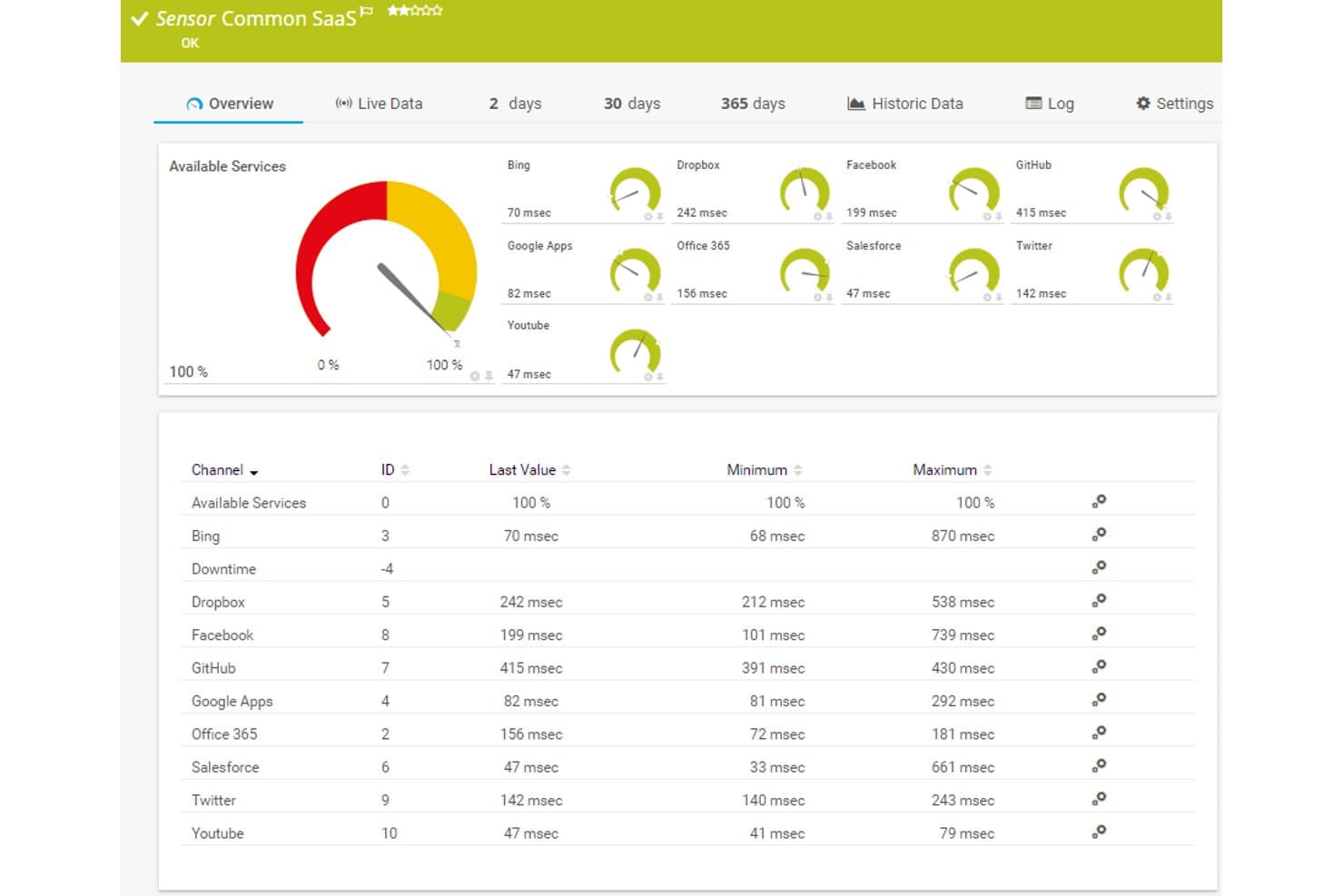
Paessler PRTG offers a Common SaaS sensor dashboard displaying real-time response times and availability for cloud services like Dropbox, Office 365, Salesforce, and GitHub. Paessler PRTG is a unified IT infrastructure monitoring platform that tracks API endpoints, network devices, servers, and applications using sensors for REST APIs, SNMP, WMI, and HTTP protocols.
Who Is Paessler PRTG Best For?
PRTG is a strong fit for infrastructure and IT operations teams in mid-to-large enterprises that need to monitor APIs alongside broader network and server environments.
Why I Picked Paessler PRTG
I picked Paessler PRTG because its AI-driven anomaly detection goes beyond static thresholds. The platform learns baseline behavior for each API sensor, so when response times or error rates deviate from normal patterns, PRTG flags it automatically. I particularly like how the REST Custom v2 sensor maps JSON response values to individual channels, giving that anomaly detection engine granular, per-metric data to analyze rather than treating an entire API call as a single data point.
Paessler PRTG Key Features
- REST Custom v2 sensor: Monitors any REST API endpoint and maps returned JSON or XML fields as custom monitoring channels.
- Custom alerting rules: Triggers notifications via email, SMS, or push based on fully configurable sensor states and thresholds.
- Flexible deployment options: Offers SaaS (PRTG Hosted Monitor), on-premise, and hybrid installation for enterprise and security-sensitive environments.
- Extensive protocol support: Supports SNMP, WMI, NetFlow, MQTT, OPC UA, and more to monitor a broad range of IT and OT endpoints.
Paessler PRTG Integrations
Paessler PRTG offers native integrations with PagerDuty, Opsgenie, AWS CloudWatch, Azure Monitor, and has an API for custom integrations.
Pros and Cons
Pros:
- Per-channel JSON mapping gives granular API insights
- Supports on-premise deployment for air-gapped environments
- AI anomaly detection without manual threshold configuration
Cons:
- Sensor-based setup takes manual configuration time
- Weak native synthetic multi-step API workflow testing
Learn more about Paessler PRTG: Best for multi-gateway API monitoring
- Free demo available
- Pricing upon request

DigitalAPI provides visibility into API quality, usage, and gateway performance across your API estate. DigitalAPI provides a versatile platform for businesses that want to improve how they manage APIs, covering everything from discovery to monetization. Built with regulated industries like healthcare and banking in mind, it offers a unified control system and a developer portal that simplifies API deployment. This makes it a solid option for enterprises that need strong governance and security across their API operations.
Why I Picked DigitalAPI
I chose DigitalAPI for its centralized API governance and detailed analytics, both of which are essential for effective monitoring. The unified control system lets you manage APIs across multiple gateways while maintaining consistency and security. Its analytics provide clear visibility into API performance, making it easier to spot and resolve issues quickly. Together, these capabilities make DigitalAPI a strong choice for teams focused on improving API monitoring.
DigitalAPI Key Features
In addition to its governance and analytics capabilities, I also found several other features beneficial for API monitoring:
- API Marketplace: Enables API monetization through an external platform, helping expand revenue opportunities.
- Developer Portal: Offers a central hub where developers can access APIs, making integration and management more straightforward.
- One-Click Deployment: Streamlines API deployment across multiple gateways, reducing time and operational effort.
- AI Integration: Adds artificial intelligence capabilities to APIs, supporting advanced functionality and automation.
DigitalAPI Integrations
Native integrations are not currently listed by DigitalAPI.
Pros and Cons
Pros:
- Helix Gateway supports full lifecycle
- Detailed analytics for API performance
- Centralized governance across multiple gateways
Cons:
- Pricing details not publicly available
- No listed native integrations
Learn more about DigitalAPI: Best for multi-step transaction monitoring
- 30-day free trial
- From $3/device/month
Visit WebsiteCustomer Rating:4.7/5
Site24x7 tracks multi-step API transactions to monitor response time and errors. Site24x7 is an ideal solution for businesses seeking to ensure their APIs run smoothly and reliably, with support for multi-step transaction monitoring to track API workflows more effectively. If you're in an industry where consistent application performance is important, Site24x7's API monitoring tools help you observe and troubleshoot API behavior in real time, addressing issues before they affect users. By using its capabilities, you can maintain service availability and keep your team focused on delivering reliable digital experiences.
Why I Picked Site24x7
I picked Site24x7 for its multi-step transaction monitoring, which helps track API workflows across sequential requests. The platform also supports monitoring REST, SOAP, gRPC, and WebSocket APIs, allowing you to observe response times and error rates. Its alerting system notifies you when performance issues occur, helping teams address problems early. These capabilities make Site24x7 useful for businesses that depend on stable API integrations.
Site24x7 Key Features
In addition to multi-step transaction monitoring, Site24x7 offers:
- Global Monitoring Locations: With over 130 locations worldwide, you can ensure your APIs perform optimally for users worldwide.
- Content Validation: Site24x7 checks if the API response contains the expected content, ensuring data integrity.
- Instant Notifications: Get immediate alerts for any API performance issues, allowing you to respond swiftly and maintain service quality.
Site24x7 Integrations
Integrations include ServiceNow, PagerDuty, Jira, Slack, Microsoft Teams, AWS, Azure, Kubernetes, and more.
Pros and Cons
Pros:
- Quick setup process covers websites and cloud resource monitoring
- AI-powered full-stack monitoring supports multicloud infrastructure management
- Flexible monitoring integrates easily with multiple infrastructure components
Cons:
- Complex configuration slows initial setup and platform understanding
- Alert bugs cause issues when adding new monitoring configurations
Learn more about Site24x7: Best for uptime monitoring and detailed reports
- 30-day free trial + demo available
- From $10/month
Visit WebsiteCustomer Rating:4.5/5
Pingdom API monitoring tool uptime tracking Pingdom is primarily recognized for its prowess in uptime monitoring, ensuring that APIs and websites remain operational. Paired with this is its capability to generate in-depth reports, providing users with a detailed understanding of their API's performance.
Why I Picked Pingdom: In my quest for reliable monitoring tools, Pingdom's dedication to uptime monitoring, complemented by its detailed reporting, was undeniable. I appreciated its straightforward approach to delivering timely insights about any downtimes. For teams that prioritize constant uptime and comprehensive reporting, Pingdom is clearly the go-to tool.
Standout Features & Integrations:
Pingdom excels with its real-time monitoring that instantly notifies users of downtimes. Its root cause analysis helps in troubleshooting issues swiftly.
Integration-wise, Pingdom collaborates with platforms such as Slack, Opsgenie, and PagerDuty.
Pros and Cons
Pros:
- Flexible alerting system
- Detailed root cause analysis
- Accurate real-time uptime monitoring
Cons:
- Historical data retention varies with pricing tiers
- Advanced features limited to higher-tier plans
- Mobile apps can sometimes lag
Learn more about Pingdom: Best for cloud-scale synthetic monitoring
- Free plan available
- From $15/month (billed annually)
Visit WebsiteCustomer Rating:4.5/5
Global performance dashboard of Datadog API monitoring tool Datadog offers an impressive platform primarily centered around cloud monitoring. Its synthetic monitoring feature stands out, helping businesses to simulate user interactions and track application and API performance at a cloud scale.
Why I Picked Datadog: In my search for cloud-focused monitoring solutions, Datadog's capabilities were hard to overlook. Its emphasis on cloud-scale synthetic monitoring and the breadth of its feature set made it a clear choice. It is my opinion that Datadog is the top choice for businesses needing to simulate and monitor performance in cloud environments.
Standout Features & Integrations:
Datadog’s synthetic monitoring can simulate interactions from global locations, ensuring performance consistency worldwide. The tool’s visualizations, including flame graphs, provide deep insights into application performance.
Integration-wise, Datadog supports a myriad of platforms including AWS, Azure, Google Cloud, and numerous third-party integrations.
Pros and Cons
Pros:
- Powerful visualization tools for performance analysis
- Wide range of cloud integrations
- Advanced synthetic monitoring capabilities
Cons:
- Some configurations can require advanced technical know-how
- The vastness of features might be daunting for beginners
- Can be pricey for smaller organizations
 Best for actionable insights with intelligent alerting
- Free trial available
- Pricing upon request
Visit WebsiteCustomer Rating:2/5
Smartbear's dashboard Smartbear has cemented its position in the API world as a sophisticated tool that offers in-depth analytics combined with sharp alerting mechanisms. Converging advanced monitoring with intelligent alerts, aids teams in not just identifying but also acting upon issues efficiently.
Why I Picked Smartbear: In my pursuit of the best monitoring tools, Smartbear's capability to offer actionable insights caught my eye. When choosing, I appreciated its robust alerting system that goes beyond the ordinary, making it a cut above the rest. It's clear to me that Smartbear is the optimal choice for those teams that prioritize actionable insights complemented by intelligent alerting.
Standout Features & Integrations:
Smartbear brings to the table advanced performance monitoring, which includes API uptime, functionality, and data validation checks. Additionally, its synthetic monitoring can simulate complex user scenarios across various endpoints.
For integrations, Smartbear connects effectively with platforms like Slack, JIRA, and PagerDuty.
Pros and Cons
Pros:
- Simulates complex user journeys with ease
- Robust and timely alerting mechanisms
- Deep analytical insights
Cons:
- Some users might find the UI less intuitive
- Limited features in the base plan
- Slightly steep learning curve for beginners
Learn more about SmartBear: Best for real-time API performance insights
- Free plan available
- From $77/month (billed annually)
Visit WebsiteCustomer Rating:4.5/5
Users can view real-time API insights directly within Treblle's dashboard. Treblle is an end-to-end APIOps platform designed to assist engineering and product teams in managing their REST APIs efficiently. It provides comprehensive tools for API observability, governance, analytics, and security.
Why I Picked Treblle: It offers real-time API monitoring, which provides insights into API performance and activity. This allows teams to quickly identify and address issues as they arise, minimizing downtime and ensuring a smooth user experience. Treblle's detailed logging and error-tracking capabilities further enhance its monitoring by capturing and alerting teams to code-based errors.
Standout Features & Integrations:
Key features include the ability to analyze over 40 API-specific data points for every request and collaboration tools like request tracing, tagging, and commenting for effective teamwork and streamlined debugging processes. Additionally, the automated API development feature ensures that documentation and endpoint data are always current.
Integrations include PHP, Laravel, Lumen, Symfony, JavaScript, Node.js, Express, Fastify, Koa, AdonisJS, NestJS, Strapi, .NET, Python, Django, Flask, Ruby, Java, and Spring.
Pros and Cons
Pros:
- Automates the documentation process
- Has a detailed and comprehensive dashboard
- Provides real-time monitoring capabilities
Cons:
- Could offer better alerting integrations
- Limited customization options for certain features
Learn more about Treblle: Best for enterprise-grade API lifecycle management
- 30-day free trial + free demo available
- Pricing upon request

IBM API Connect's dashboard IBM API Connect is a comprehensive solution tailored for businesses that demand enterprise-level management of their API lifecycle. It facilitates the creation, deployment, management, and monitoring of APIs, with a clear focus on catering to large-scale enterprise needs.
Why I Picked IBM API Connect: When evaluating tools for API lifecycle management, IBM API Connect was an evident standout due to its robust features tailored for large-scale operations. My decision was swayed by its reputation for being a trusted choice for enterprises. In my judgment, for businesses that require end-to-end control over their API lifecycle with enterprise-grade robustness, IBM API Connect excels.
Standout Features & Integrations:
IBM API Connect offers a unified dashboard that provides insights into API health, usage, and overall performance. Its in-built developer portal promotes API adoption and collaboration.
For integrations, it supports connectivity with IBM Cloud services, Watson AI, and enterprise databases.
Pros and Cons
Pros:
- Robust analytics and monitoring tools
- Integrated developer portal for increased collaboration
- Comprehensive API lifecycle management
Cons:
- Initial setup and integration can be time-consuming
- The pricing structure can be complex for some users
- Might be overwhelming for small-scale operations
Learn more about IBM API Connect: Best for real-time data visualization and search capabilities
- 7-day free trial available
- Pricing upon request

Kibana's overview dashboard for the monitoring tab Kibana, a brainchild of the Elastic Stack, plays a crucial role in visualizing Elasticsearch data. Its prowess in real-time data visualization, paired with superior search capabilities, helps tech teams delve deeper into their data than ever.
Why I Picked Kibana: Navigating through the sea of API monitoring tools, Kibana caught my attention due to its intuitive and dynamic visualizations. I selected this tool based on its unique strength in helping users understand and act on their data.
When weighing its merits, it became clear that Kibana is genuinely best for those who value real-time data visualization and potent search mechanisms.
Standout Features & Integrations:
Kibana's dashboard offers a customizable workspace to visualize, navigate, and dissect complex data. Its Lens feature brings drag-and-drop capabilities to data visualization. Moreover, Kibana integrates with Elasticsearch, Logstash, and Beats, enhancing its utility manifold.
Pros and Cons
Pros:
- Powerful search across vast datasets
- Deep integration with the Elastic Stack
- Dynamic real-time data visualization
Cons:
- Advanced features demand a steeper learning curve
- Requires an Elastic Stack setup for maximum benefit
- Might feel overwhelming for beginners
Learn more about Kibana: 10Best for developer-friendly API testing and monitoring
Postman
- Free plan available
- From $9/month (billed annually)

Postman API monitoring tool reporting dashboard Postman has etched its name in the tech industry as a developer's trusted companion for API testing. With its intuitive design, it facilitates both testing and monitoring, ensuring APIs function as intended.
Why I Picked Postman: Selecting tools for this list demanded a keen eye for utility, and Postman's developer-centric approach was hard to overlook. I chose it because of its user-friendly design that simplifies the complex realm of API testing. My judgment is that for those seeking a blend of simplicity and efficacy in API testing and monitoring, Postman remains a frontrunner.
Standout Features & Integrations:
Postman's collection runs enable automated testing, while its mock servers simulate API responses without any backend. The tool also integrates well with popular CI/CD platforms, ensuring testing in development pipelines. Key integrations include platforms like Jenkins, Travis CI, and CircleCI.
Pros and Cons
Pros:
- Robust integration with CI/CD platforms
- Comprehensive testing tools including mock servers
- Developer-friendly interface
Cons:
- Advanced features may require a learning curve
- Large collections can slow down the app
- Monitoring features can be basically compared to specialized tools
Learn more about Postman:
Andre verktøy for API-overvåking
Nedenfor finner du en liste over flere verktøy for API-overvåking som jeg satte på kortlisten, men som ikke kom med blant de ti beste. De er absolutt verdt å sjekke ut.
- 11CatchpointBest for application experience insights
- 12MoesifBest for behavior analytics on API usage
- 13AsteraBest for holistic API management and integration
- 14APImetricsBest for comprehensive API performance insights
- 15UptrendsBest for global perspective with multiple checkpoint locations
- 16Dotcom MonitorBest for multi-step API monitoring
- 17AppDynamicsGood for deep dive diagnostics in real-time
- 18New RelicGood for application health visualizations
- 19SplunkGood for extensive log analysis capabilities
- 20SensuGood for event monitoring in dynamic environments
- 21Ghost InspectorGood for automated UI testing and monitoring
- 22Grafana CloudGood for customizable monitoring dashboards
- 23OpenNMSGood for network fault and performance management
- 24ApicaGood for large-scale load testing scenarios
- 253ScaleGood for API traffic control and security
- 26RunscopeGood for API data validation tests
- 27Rapid APIGood for vast API marketplace connections
- 28LoadViewGood for dynamic API load testing
- 29StatusCake APIGood for comprehensive uptime checks
- 30APIMaticGood for SDK generation from API definitions
How I Evaluate API Monitoring Tools
I split my evaluation into two layers: baseline capabilities every tool must cover—like multi-region checks, latency tracking, and assertions—and the differentiators that set the best options apart.
Core Functionality (Table Stakes For This List)
When I'm selecting tools for my list, I rank each one on a scale from 0 (does not offer the functionality) to 5 (excels in this area) for each core functionality listed below. Then, I calculate the tool's total score into a percentage. Each tool needs to achieve a minimum total score of 65% to be considered for inclusion.
- Uptime & Availability Monitoring: I check whether the tool runs HTTP/HTTPS checks from multiple global regions, since a single checkpoint won't catch regional outages or CDN failures.
- Performance & Latency Tracking: Beyond raw response times, I look for waterfall breakdowns (DNS, TLS, TTFB) and historical trend data that help you spot slow degradation before users notice.
- Synthetic API Testing: I evaluate support for all standard HTTP methods, custom headers, authentication flows, and scheduled intervals—think OAuth token refreshes or POST calls with dynamic payloads.
- Multi-Step Workflow Monitoring: Chaining requests matters. I look for the ability to pass variables between steps, like extracting a session token from a login call and injecting it into subsequent requests.
- Alerting & Notifications: I consider channel variety (email, Slack, SMS, PagerDuty, webhooks) and whether the tool supports escalation policies so the right on-call engineer gets paged first.
- Response Validation & Assertions: I look for assertion depth—status codes are table stakes, but JSON path matching, regex checks, and schema validation catch the subtle payload issues that break integrations.
Once I have a list of tools that meet this criteria, I consider what sets each platform apart.
Differentiating Factors (What Sets Vendors Apart)
Here's how I compare and contrast different vendors:
Standout Features
Tools that can import OpenAPI specs or Postman collections save hours of manual monitor setup, especially when you're covering dozens of endpoints. I also look for native CI/CD plugins—running API checks inside a GitHub Actions or GitLab pipeline means you catch breaking changes before they hit production. Distributed tracing integration is another differentiator worth evaluating, since linking a failed monitor to a specific trace across microservices turns a vague alert into an actionable root cause.
Beyond Features
Deployment flexibility matters—if your team monitors internal APIs behind a firewall, you need private agent support, not just cloud-hosted checks. I also evaluate how well each tool fits into existing observability stacks, checking for native integrations with platforms like Datadog, Grafana, and PagerDuty. Security posture is another factor I consider, especially RBAC, encrypted credential storage, and SOC 2 compliance, since API monitors often handle production tokens and sensitive auth flows.
Slik velger du verktøy for API-overvåking
Det er lett å gå seg vill i lange funksjonslister og kompliserte prismodeller. For å hjelpe deg med å holde fokus mens du går gjennom den unike prosessen din for programvarevalg, får du her en sjekkliste over faktorer du bør ha i tankene:
| Faktor | Dette bør du vurdere |
|---|---|
| FaktorSkalerbarhet | Dette bør du vurdereKan verktøyet håndtere den forventede veksten i API-kall og brukere? Se etter en skalerbar arkitektur for å unngå flaskehalser når behovene dine øker. |
| FaktorIntegrasjoner | Dette bør du vurdereKan det enkelt integreres med eksisterende systemer som CI/CD-rørledning eller varslingsverktøy? Kontroller at det er kompatibelt med teknologistakken din. |
| FaktorTilpasningsmuligheter | Dette bør du vurdereKan du tilpasse verktøyet til spesifikke overvåkingsbehov eller arbeidsflyter? Se etter instrumentpaneler og varsler som kan tilpasses kravene dine. |
| FaktorBrukervennlighet | Dette bør du vurdereEr grensesnittet brukervennlig for teamet ditt? En bratt læringskurve kan forsinke innføringen, så prioriter intuitiv utforming og tydelig navigering. |
| FaktorImplementering og introduksjon | Dette bør du vurdereHvor raskt kan teamet ditt komme i gang med verktøyet? Vurder hvor tilgjengelige opplæringsressurser og hvilken støtte som tilbys under oppsettet. |
| FaktorKostnad | Dette bør du vurderePasser prisen budsjettet ditt? Sammenlign abonnementsplaner og se etter skjulte gebyrer. Se etter gratis prøveperioder, slik at du kan teste før du bestemmer deg. |
| FaktorSikkerhetstiltak | Dette bør du vurdereTilbyr det kryptering og samsvar med sikkerhetsstandarder? Sørg for at verktøyet beskytter sensitive data og oppfyller sikkerhetskravene dine. |
Hva er verktøy for API-overvåking?
Verktøy for API-overvåking er programvare som følger med på ytelsen, oppetiden og helsetilstanden til API-er. De brukes av utviklere, DevOps-ingeniører og QA-team for å sikre at API-ene fungerer som forventet, og for å oppdage problemer før brukerne merker dem.
Varsler, logger og rapporteringsfunksjoner bidrar til å oppdage driftsstans, feilsøke trege svar og bekrefte at SLA-er overholdes. Disse verktøyene gjør det enklere å vedlikeholde pålitelige tjenester og unngå problemer som skader brukeropplevelsen.
Funksjoner
Når du velger verktøy for API-overvåking, bør du se etter følgende viktige funksjoner:
- Oppetidsovervåking: Sporer tilgjengeligheten til API-er for å sikre at de er tilgjengelige og fungerer som de skal.
- Sporing av svartid: Måler hvor raskt API-er svarer på forespørsler, og bidrar til å identifisere ytelsesflaskehalser.
- Varsler: Sender varsler når problemer oppdages, slik at du kan reagere umiddelbart på potensielle problemer.
- Tilpassbare dashbord: Gir tilpassede visninger av ytelsesmålinger for API-er, tilpasset spesifikke overvåkingsbehov.
- Integrasjonsmuligheter: Kobles enkelt til eksisterende systemer som CI/CD-pipelines og varslingsverktøy for sømløs integrasjon i arbeidsflyten.
- Sikkerhetssamsvar: Sikrer databeskyttelse ved å følge bransjestandarder for sikkerhet og krypteringsprotokoller.
- Sanntidsanalyse: Gir umiddelbar innsikt i API-ytelsen, slik at du kan håndtere ytelsen proaktivt.
- Testing i flere regioner: Simulerer API-forespørsler fra ulike steder for å vurdere global ytelse og forsinkelse.
- KI-drevet innsikt: Bruker kunstig intelligens til å oppdage avvik og forutsi potensielle problemer før de oppstår.
Fordeler
Implementering av verktøy for API-overvåking gir flere fordeler for teamet og virksomheten din. Her er noen av fordelene du kan se frem til:
- Forbedret pålitelighet: Ved å overvåke oppetid bidrar disse verktøyene til å sikre at API-er er konsekvent tilgjengelige og pålitelige.
- Raskere problemløsning: Varsler gjør det mulig for teamet å håndtere problemer raskt, noe som minimerer driftsstans og tjenesteforstyrrelser.
- Forbedret ytelse: Sporing av svartid bidrar til å identifisere og løse ytelsesflaskehalser, slik at API-operasjonene blir effektive.
- Bedre beslutningsgrunnlag: Sanntidsanalyse gir innsikt i API-bruk og ytelse, og støtter datadrevne beslutninger.
- Økt sikkerhet: Samsvar med sikkerhetsstandarder bidrar til å beskytte sensitive data og opprettholde brukernes tillit.
- Vurdering av global rekkevidde: Testing i flere regioner gjør det mulig for teamet å evaluere API-ytelsen på tvers av ulike geografiske steder.
- Proaktiv håndtering: KI-drevet innsikt bidrar til å forutsi og håndtere potensielle problemer før de påvirker brukerne.
Kostnader og priser
Valg av verktøy for API-overvåking krever en forståelse av de ulike prismodellene og abonnementene som er tilgjengelige. Kostnadene varierer basert på funksjoner, teamstørrelse, tillegg og mer. Tabellen nedenfor oppsummerer vanlige abonnementer, gjennomsnittsprisene deres og typiske funksjoner som er inkludert i løsninger for API-overvåking:
Sammenligningstabell for verktøy for API-overvåking
| Abonnementstype | Gjennomsnittspris | Vanlige funksjoner |
|---|---|---|
| AbonnementstypeGratisabonnement | Gjennomsnittspris$0 | Vanlige funksjonerGrunnleggende oppetidsovervåking, begrensede varsler og grunnleggende analyse. |
| AbonnementstypePersonlig abonnement | Gjennomsnittspris$5-$25/bruker/måned | Vanlige funksjonerSporing av oppetid og svartid, tilpassbare dashbord og e-postvarsler. |
| AbonnementstypeForretningsabonnement | Gjennomsnittspris$50-$150/bruker/måned | Vanlige funksjonerTesting i flere regioner, integrasjonsmuligheter, sanntidsanalyse og avanserte varsler. |
| AbonnementstypeEnterprise-abonnement | Gjennomsnittspris$200+/bruker/måned | Vanlige funksjonerKI-drevet innsikt, avansert sikkerhetssamsvar, dedikert kundestøtte og full tilpasningsmulighet. |
Vanlige spørsmål om verktøy for API-overvåking
Her finner du svar på vanlige spørsmål om verktøy for API-overvåking:
Hvordan overvåker man API-bruk?
API-bruk overvåkes vanligvis ved å spore oppetid, som måles som en prosentandel av tiden API-et er tilgjengelig. De fleste sikter mot en oppetid på 99,9 % eller høyere. Overvåkingsverktøy kan varsle deg om eventuell nedetid, slik at du raskt kan løse problemer.
Hvilke aspekter ved et API bør overvåkes?
Viktige aspekter som bør overvåkes, omfatter administrasjon av tilgangskontroll, sikkerhetstjenester og sikkerhet i nettverksbrannmurer. Verktøyene bør også spore SSL/TLS-orkestrering og tilby funksjoner for samlet administrasjon for å sikre omfattende oversikt over API-ets ytelse og sikkerhet.
Hvor ofte bør du teste API-ene dine?
Regelmessig testing er avgjørende, og mange verktøy tilbyr kontroller hvert minutt. Hyppige tester bidrar til å oppdage problemer tidlig og opprettholde påliteligheten. Vurder å konfigurere overvåkingssystemet til å teste hvert API minst hvert par minutter for å sikre jevn ytelse.
Hvorfor er varslingsmeldinger viktige ved API-overvåking?
Varslingsmeldinger er avgjørende fordi de umiddelbart informerer deg om eventuelle problemer, slik at de kan løses raskt. Uten tidsriktige varsler kan problemer forbli uoppdaget, noe som kan føre til langvarig nedetid og potensielt påvirke brukeropplevelsen.
Hvorfor varierer prisene så mye mellom ulike verktøy?
Kostnaden for et API-overvåkingsverktøy påvirkes av ulike faktorer: funksjonenes omfang og dybde, målgruppen, skalerbarhet, merkevarens omdømme og nivået på kundestøtten som tilbys.