

Det kan føles som en krevende oppgave å overvåke nettverket ditt. Du trenger verktøy som dekker de spesifikke behovene dine uten å sprenge budsjettet. Verktøy med åpen kildekode for nettverksovervåking tilbyr en fleksibel og tilpasningsbar løsning.
Etter min erfaring kan disse verktøyene hjelpe deg med å holde et våkent øye med systemene dine og sørge for at alt fungerer problemfritt. De passer godt for team i alle størrelser og gir innsikt som kan forhindre nedetid og gjøre det raskere å feilsøke problemer.
I denne artikkelen deler jeg mine beste anbefalinger for verktøy med åpen kildekode for nettverksovervåking. Du får objektive vurderinger og innsikt som hjelper deg med å velge det som passer best for teamet ditt. La oss utforske hvordan disse verktøyene kan gjøre jobben enklere og nettverket mer pålitelig.
Why Trust Our Software Recommendations
6,700+
Reviews
20
Industry experts
16+
Evaluation factors
14
Years
Our team has been testing and reviewing software since 2012. As tech leaders ourselves, we know how difficult—and important—it is to choose the right software.
For this guide, we evaluated tools using hands-on testing and independent research, scoring tools using our selection criteria.
Our reviews reflect our human editorial judgment, not a sales pitch.
Expert reviewers:
- Paulo Gardini MiguelTech Director
 Tim FisherVP of AI
 Gabriel RosasTech Lead & Software Architect
 Christhian GruhnTech Lead & Platform Architect

Sammenligningstabell for verktøy med åpen kildekode for nettverksovervåking
Denne sammenligningstabellen oppsummerer prisopplysningene for mine beste utvalgte verktøy med åpen kildekode for nettverksovervåking:
| Tool | Best For | Trial Info | Price | ||
|---|---|---|---|---|---|
| 1 | Best for flexible configuration | Free plan available | Pricing upon request | Website | |
| 2 | Best for real-time performance | 14-day free trial + free plan + free demo available | From $4.50/node/month (billed annually) | Website | |
| 3 | Best for extensive plugin support | Free plan and free demo available | From $2,595 (perpetual license for 100 nodes) | Website | |
| 4 | Best for real-time monitoring | Free download available | From $325/month (billed annually) | Website | |
| 5 | Best for pull-based metrics | Free to use | No licensing cost | Website | |
| 6 | Best for visual data representation | Free to download | Free to use | Website | |
| 7 | Best for network security analysis | Free plan available | From $9/user/month (billed annually) | Website | |
| 8 | Best for enterprise scalability | Free consultation available | Pricing upon request | Website | |
| 9 | Best for auto-discovery | Free demo available | Free to use | Website | |
| 10 | Best for traffic analysis | Free plan available | From €99.95/per license | Website |


Vurderinger av de beste verktøyene med åpen kildekode for nettverksovervåking
Nedenfor finner du mine detaljerte sammendrag av de beste verktøyene med åpen kildekode for nettverksovervåking som står på kortlisten. Vurderingene mine gir en detaljert gjennomgang av de viktigste funksjonene, fordelene og ulempene, integrasjonene og ideelle bruksområdene for hvert verktøy, slik at du kan finne det beste alternativet for deg.
 Best for flexible configuration
- Free plan available
- Pricing upon request
Visit WebsiteCustomer Rating:4.7/5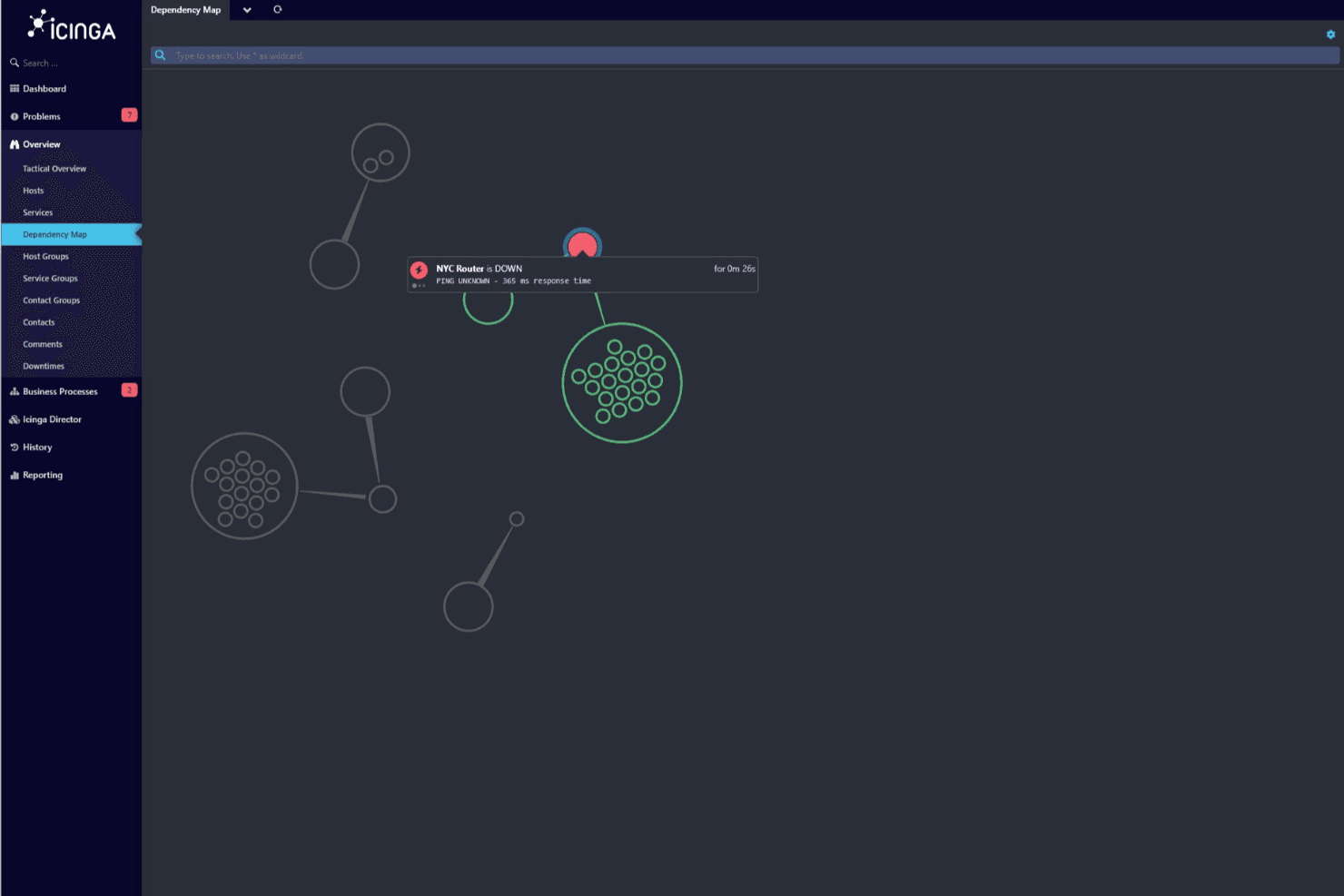
Icinga’s dependency map helps you visualize network relationships and quickly identify the root cause of outages across interconnected systems. Icinga is an open-source network monitoring tool designed for system administrators and IT management. It helps monitor network resources, alerting you to any issues that may arise.
Why I picked Icinga: Icinga offers flexible configuration options, allowing you to tailor the monitoring to your specific needs. It provides detailed monitoring of network resources across Linux or Windows operating systems, with load average metrics, performance graphs over time, and status indicators for tracked services and hosts, ensuring you catch issues before they escalate. Furthermore, its alerting system ensures you're always informed about your network's status.
Standout features and integrations:
Features include a modular architecture that allows for easy expansion as your network grows. It also offers a powerful alerting system to keep you informed. Additionally, Icinga provides detailed monitoring for complete network oversight.
Integrations include Grafana, Elasticsearch, InfluxDB, Ansible, Puppet, Chef, AWS, Opsgenie, and more.
Pros and Cons
Pros:
- Powerful alerting system
- Detailed monitoring capabilities
- Modular architecture
Cons:
- May need additional customization
- Initial setup can be complex
Learn more about Icinga: Best for real-time performance
- 14-day free trial + free plan + free demo available
- From $4.50/node/month (billed annually)
Visit WebsiteCustomer Rating:4.8/5
Netdata offers real-time CPU utilization monitoring Netdata is an open-source, real-time IT infrastructure monitoring platform designed for sysadmins and DevOps professionals. It provides continuous monitoring of system performance and health metrics, offering immediate insights into network activities.
Why I picked Netdata: It delivers real-time performance data, which is important for immediate troubleshooting. Netdata's multi-dimensional visualization dashboards, historical comparisons across custom timeframes, and granular metrics tracking across nodes and instances make it easy to spot trends and issues as they occur.
It also supports a wide array of metrics, allowing you to monitor various aspects of system health. The tool's lightweight architecture ensures minimal impact on system resources while providing global monitoring.
Standout features and integrations:
Features include customizable dashboards that let you tailor the monitoring experience to your needs. It provides detailed visualizations for in-depth analysis of performance metrics. Additionally, Netdata's lightweight architecture ensures efficient resource usage.
Integrations include Prometheus, Grafana, InfluxDB, Elasticsearch, AWS, Google Cloud, Slack, PagerDuty, Microsoft Teams, Opsgenie, and more.
Pros and Cons
Pros:
- Immediate troubleshooting insights
- Lightweight architecture
- Continuous application monitoring
Cons:
- May need additional customization
- Limited out-of-the-box features
Learn more about Netdata: Best for extensive plugin support
- Free plan and free demo available
- From $2,595 (perpetual license for 100 nodes)
Visit WebsiteCustomer Rating:4.6/5
Nagios offers customizable dashboards with graphs, summaries, and analytics Nagios is an open-source software widely used by IT professionals and system administrators. It helps monitor network activity, server performance, and application status to ensure everything runs smoothly.
Why I picked Nagios: Nagios offers extensive plugin support, making it adaptable to various environments. It allows you to monitor a wide range of metrics with its flexible plugin architecture.
The tool provides detailed status reports and alerts to keep your team informed. Its ability to integrate with numerous plugins significantly enhances its monitoring capabilities.
Standout features and integrations:
Features include customizable alerting, which allows you to set specific thresholds. It also offers versatile reporting tools to analyze network and application performance, such as CPU usage graphs, host and service status summaries, top alert producers tracking, and real-time network monitoring analytics. Additionally, Nagios supports distributed SNMP monitoring to manage large-scale networks efficiently.
Integrations include Zenduty, PagerDuty, TaskCall, Jira, SysAid, Dynatrace, Datadog, Nagios Log Server, Nagios Fusion, Nagios Network Analyzer, Nagios Core, SNMP, NSClient++, Mod-Gearman, and more.
Pros and Cons
Pros:
- Supports distributed monitoring
- Customizable alert thresholds
- Extensive plugin support
Cons:
- Limited out-of-the-box features
- Requires technical knowledge
Learn more about Nagios: Best for real-time monitoring
- Free download available
- From $325/month (billed annually)
Visit WebsiteCustomer Rating:4.4/5
Zabbix offers customizable dashboards for global infrastructure tracking Zabbix is an enterprise-class open-source observability solution used by businesses of all sizes. It offers real-time monitoring, alerting, and data visualization to help manage network performance across on-site and cloud environments.
Why I picked Zabbix: Zabbix offers continuous monitoring, making it ideal for businesses needing constant network oversight. It provides customizable alerting to catch issues immediately.
The free version includes powerful features that support clear data visualization through its intuitive dashboard. Its scalability also supports growing networks without compromising performance.
Standout features and integrations:
Features include automated discovery, which simplifies the process of identifying network devices. Zabbix's other helpful features are its network topology maps, bandwidth monitoring, problem severity analytics, and real-time graphing. It also offers trend prediction to help anticipate potential issues. Additionally, it supports high availability for uninterrupted monitoring.
Integrations include Grafana, Slack, VMware, AWS, Azure, Docker, Kubernetes, SNMP, MySQL, PostgreSQL, and more.
Pros and Cons
Pros:
- Clear data visualization
- Customizable alerting options
- Real-time monitoring capabilities
Cons:
- May need additional customization
- Documentation can be overwhelming


Prometheus collects time-series metrics for system performance insights Prometheus is an open-source monitoring tool designed for systems and service monitoring. It's primarily used by developers and IT teams to collect and store metrics as time-series data, providing valuable insights into system performance.
Why I picked Prometheus: Prometheus specializes in handling time-series data, which is important for performance monitoring. It uses a powerful query language called PromQL.
The tool's efficient data model allows for high dimensionality, making it adaptable to various monitoring needs. Its alerting system is flexible, enabling you to set thresholds that suit your environment.
Standout features and integrations:
Features include a multi-dimensional data model that supports high dimensionality. Its flexible query language, PromQL, extracts precise metrics. Additionally, Prometheus provides an efficient alerting mechanism through Alertmanager to notify you of any issues.
Integrations include Grafana, Kubernetes, Docker, Splunk, Consul, OpenShift, Marathon, Google Cloud, and more.
Pros and Cons
Pros:
- Specializes in time-series data
- Efficient alerting mechanism
- Flexible query language
Cons:
- May need additional configuration
- Limited built-in visualization
Learn more about Prometheus:

Cacti’s management interface displays network devices with real-time metrics Cacti is an open-source network monitoring system used by IT teams to visualize network data. It helps in tracking network performance through detailed graphs and charts.
Why I picked Cacti: Cacti focuses on visual data representation, making it easier to understand network performance at a glance. It provides customizable graph templates, allowing you to tailor visuals to your needs.
The software’s polling system efficiently captures network data, ensuring accurate monitoring. Cacti displays metrics such as uptime, polling times, availability percentages, and customizable filtering options. The tool's interface is user-friendly, which simplifies the process of setting up and accessing data.
Standout features and integrations:
Features include a flexible graphing system that allows you to create custom visualizations. It also has a powerful data collection method to ensure accurate monitoring. Additionally, Cacti offers user-friendly templates for quick setup and data access.
Integrations include Datadog, SNMP, Apache, Net-SNMP, Nagios, and more.
Pros and Cons
Pros:
- Extensible graphing system
- Detailed visual representations
- Efficient data polling system
Cons:
- Limited scalability options
- Requires technical setup
Learn more about Cacti:

Zeek analyzes network traffic to detect security threats Zeek is an open-source network monitoring tool designed for security monitoring and network analysis. Many security teams use it to detect and analyze network traffic for potential threats.
Why I picked Zeek: Zeek is tailored for network security analysis, making it invaluable for detecting threats. It provides detailed logs of network activity, which helps identify anomalies.
The platform also supports custom scripting, allowing you to tailor its monitoring capabilities to your needs. The tool's ability to analyze traffic at a granular level enhances its effectiveness in security contexts.
Standout features and integrations:
Features include global logging, which offers detailed insights into network activity. Its custom scripting also extends its functionality. Additionally, Zeek provides a powerful traffic analysis engine to identify patterns and anomalies.
Integrations include Elasticsearch, Logstash, Kibana, Splunk, Security Onion, Kafka, Metron, Graylog, Arkime, and more.
Pros and Cons
Pros:
- Granular-level traffic analysis
- Thorough activity logs
- Supports custom scripting
Cons:
- May need additional customization
- Initial setup can be complex
Learn more about Zeek:

OpenNMS offers a customizable dashboard that displays pending problems and outages OpenNMS is an open-source network monitoring tool designed for distributed networks. It's mainly used by enterprises for network monitoring, traffic analysis, and alerting.
Why I picked OpenNMS: OpenNMS offers dynamic scalability, making it ideal for enterprise environments. It supports large-scale deployments with features such as Meridian, which provides a stable version for enterprises.
The platform supports customizable monitoring solutions for complex network structures. Its alerting capabilities help you stay on top of network issues efficiently.
Standout features and integrations:
Features include advanced traffic analysis, customizable alerting, quick search functionality for network monitoring, and dynamic scalability. Real-time node status and availability metrics across service categories improve network visibility. It also offers a stable enterprise version through Meridian, which ensures reliability. Additionally, the tool's support and training services further its usability for large teams.
Integrations include Grafana, Jira, TSRM, Slack, Cisco, and more.
Pros and Cons
Pros:
- Effective alerting capabilities
- Extensive support services
- Customizable monitoring solutions
Cons:
- Time-consuming initial configuration
- Limited third-party integrations
Learn more about OpenNMS:

LibreNMS shows multiple network traffic graphs with time-series visualization LibreNMS is an open-source network monitoring tool designed for IT administrators and network managers. It helps monitor network devices and performance, providing valuable insights for maintaining network health.
Why I picked LibreNMS: LibreNMS offers auto-discovery capabilities, simplifying the process of managing network devices. It automatically detects devices such as routers, servers, switches, firewalls, and others on your network, reducing setup time and effort.
The tool provides detailed performance monitoring, including bandwidth utilization across different network interfaces and servers, to keep your network running efficiently. Its customizable alerting system ensures you're notified of any issues promptly.
Standout features and integrations:
Features include a customizable time-series visualization system. It also offers a detailed performance monitoring dashboard for real-time insights. Additionally, LibreNMS supports a wide range of device types.
Integrations include Slack, RANCID, Oxidized, SmokePing, collectd, NfSen, Telegraf, InfluxDB, Elasticsearch, MySQL, and more.
Pros and Cons
Pros:
- Detailed performance monitoring
- Supports various device types
- Customizable alerting system
Cons:
- May need additional customization
- Initial configuration can be complex
Learn more about LibreNMS:

ntop offers customizable dashboards with real-time network traffic graphs ntop is an open-source network monitoring tool focused on traffic analysis. It's popular among network administrators for monitoring and analyzing network traffic in real-time.
Why I picked ntop: Its strong traffic analysis provides detailed insights into network usage. ntop also offers continuous monitoring, which helps you identify traffic patterns and potential bottlenecks.
Its web-based interface makes accessing and analyzing data straightforward. The tool also supports various network protocols, enhancing its traffic analysis capabilities.
Standout features and integrations:
Features include ongoing network traffic monitoring, ensuring you catch issues as they occur. It also displays top active ASN data and detailed autonomous system monitoring. Additionally, ntop's web interface enables easy access to data and visualization tools.
Integrations include Elasticsearch, Kafka, InfluxDB, Grafana, Nagios, Prometheus, Zabbix, NetFlow, sFlow, JSON, and more.
Pros and Cons
Pros:
- Easy data visualization
- Web-based data access
- Supports various network protocols
Cons:
- Limited out-of-the-box features
- High learning curve
Learn more about Ntop:
Andre verktøy med åpen kildekode for nettverksovervåking
Her er noen flere alternativer for verktøy med åpen kildekode for nettverksovervåking som ikke kom med på kortlisten, men som likevel er verdt å undersøke:
- 11GraphiteBest for graphing capabilities
- 12LansweeperBest for asset discovery
- 13InfluxDBBest for time-series data storage
- 14UptraceBest for distributed tracing
- 15VictoriaMetricsBest for high-performance data storage
- 16ThanosBest for global query view
How I Evaluate Open Source Network Monitoring Tools
I split my evaluation into two layers: the baseline every tool must clear—SNMP polling, device discovery, and alerting—and the differentiators that set the best tools apart.
Core Functionality (Table Stakes For This List)
When I'm selecting tools for my list, I rank each one on a scale from 0 (does not offer the functionality) to 5 (excels in this area) for each core functionality listed below. Then, I calculate the tool's total score into a percentage. Each tool needs to achieve a minimum total score of 65% to be considered for inclusion.
- Open Source Licensing: I check that each tool is distributed under a recognized open source license with publicly available source code you can fork, modify, and self-host.
- Network Device Discovery: Whether a tool can auto-discover routers, switches, and endpoints across subnets matters—manual-only inventory doesn't scale past a few racks.
- Real-Time Device Monitoring: I evaluate what polling protocols are supported (SNMP, ICMP, WMI, agents) and how granular the intervals are for tracking uptime and performance.
- Alerting & Notifications: I look at how each tool handles threshold-based alerts—things like multi-channel delivery to Slack or PagerDuty and escalation chains for on-call rotations.
- Traffic & Bandwidth Analysis: Flow protocol support like NetFlow, sFlow, or IPFIX is what I look for here, since interface counters alone won't help you diagnose congestion sources.
- Dashboards & Visualization: I evaluate whether you can build custom dashboards and topology maps—tools like Zabbix and Checkmk offer built-in options, while others lean on Grafana.
Once I have a list of tools that meet this criteria, I consider what sets each platform apart.
Differentiating Factors (What Sets Vendors Apart)
Here's how I compare and contrast different vendors:
Standout Features
Distributed monitoring support is a big differentiator when your infrastructure spans multiple sites. Tools like Zabbix and Checkmk handle this with remote proxies, while Prometheus uses a federation model. I also look for configuration-as-code—defining hosts and alert rules in YAML or via API means your monitoring setup can live in Git alongside your infrastructure code. A healthy plugin ecosystem rounds things out, letting you extend coverage to niche hardware or cloud services without waiting on the core project.
Beyond Features
Community health is one of the first things I evaluate. A project with frequent commits, active forums, and thorough docs—like you'll find with Nagios Core, Zabbix, and LibreNMS—signals long-term viability. Integration compatibility matters just as much; I check for native connectors to tools like PagerDuty, ServiceNow, and Grafana so the monitoring tool fits into your existing incident and observability workflows. Security controls like RBAC, LDAP/SAML authentication, and TLS-encrypted polling also weigh heavily, especially for teams in regulated industries.
Slik velger du et verktøy med åpen kildekode for nettverksovervåking
Det er lett å gå seg vill i lange funksjonslister og kompliserte prismodeller. For å hjelpe deg med å holde fokus mens du går gjennom den unike prosessen med å velge programvare, finner du her en sjekkliste over faktorer du bør ha i mente:
| Faktor | Hva du bør vurdere |
|---|---|
| FaktorSkalerbarhet | Hva du bør vurdereKan verktøyet vokse sammen med nettverket ditt? Ta hensyn til dagens størrelse og fremtidig utvidelse. Se etter verktøy som kan håndtere mer data og flere brukere uten redusert ytelse. |
| FaktorIntegrasjoner | Hva du bør vurdereFungerer det med de eksisterende systemene dine? Kontroller kompatibiliteten med annen programvare, for eksempel CRM-systemer, databaser og skytjenester du allerede bruker. |
| FaktorTilpasningsmuligheter | Hva du bør vurdereKan du tilpasse verktøyet etter behovene dine? Vurder hvor mye du kan justere innstillinger, oversikter og rapporter slik at de passer arbeidsflyten din. |
| FaktorBrukervennlighet | Hva du bør vurdereHvor intuitivt er verktøyet for teamet ditt? Ta hensyn til læringskurven og om det krever spesialisert opplæring for å kunne brukes effektivt. |
| FaktorImplementering og oppstart | Hva du bør vurdereHvor raskt kan du komme i gang? Vurder tiden det tar å sette opp verktøyet, samt tilgjengelige ressurser som veiledninger eller opplæringsprogrammer, som kan hjelpe deg med å komme i gang. |
| FaktorKostnad | Hva du bør vurdereLigger prisen innenfor budsjettet ditt? Sammenlign de totale eierkostnadene, inkludert eventuelle skjulte gebyrer eller nødvendige tillegg, med de økonomiske rammene dine. |
| FaktorSikkerhetstiltak | Hva du bør vurdereBeskytter verktøyet dataene dine? Se etter funksjoner som kryptering og tilgangskontroller for å sikre at nettverkssikkerheten opprettholdes. |
Hva er verktøy for nettverksovervåking med åpen kildekode?
Verktøy for nettverksovervåking med åpen kildekode er programvareløsninger som hjelper med å spore og analysere nettverksytelse og -tilstand. IT-fagfolk og nettverksadministratorer bruker vanligvis disse verktøyene for å sikre at systemene fungerer problemfritt og effektivt.
Funksjoner som sanntidsovervåking, tilpassbare varsler og datavisualisering gjør det enklere å identifisere problemer raskt og optimalisere nettverksytelsen. Disse verktøyene gir verdifull innsikt som bidrar til å opprettholde nettverksstabilitet og -sikkerhet.
Funksjoner
Når du velger verktøy for nettverksovervåking med åpen kildekode, bør du se etter følgende viktige funksjoner:
- Sanntidsovervåking: Gir umiddelbar innsikt i nettverksytelsen, slik at du kan oppdage og håndtere problemer etter hvert som de oppstår.
- Tilpassbare varsler: Lar deg angi bestemte terskler for varslinger, slik at du blir informert om kritiske endringer.
- Datavisualisering: Gir tydelige og detaljerte grafer og diagrammer som hjelper deg med å forstå nettverkstrender og -ytelse.
- Skalerbarhet: Sikrer at verktøyet kan vokse med nettverket ditt og håndtere økt datamengde og brukerbelastning uten redusert ytelse.
- Integrasjonsmuligheter: Fungerer problemfritt med andre systemer og annen programvare, noe som forbedrer den generelle effektiviteten og funksjonaliteten.
- Automatisk oppdagelse: Oppdager og overvåker nettverksenheter automatisk, noe som reduserer tiden og innsatsen som kreves for oppsett.
- Lagring av tidsseriedata: Lagrer og administrerer historiske data effektivt for langsiktig sporing og analyse av ytelsen.
- Sikkerhetstiltak: Omfatter funksjoner som kryptering for å beskytte sensitive data og opprettholde nettverkssikkerheten.
- Tilpassbare dashbord: Lar deg tilpasse brukergrensesnittet slik at den mest relevante informasjonen for dine behov vises.
- Avansert rapportering: Gir grundige rapporter med verdifull innsikt i nettverkets tilstand og aktivitet.
Fordeler
Implementering av verktøy for nettverksovervåking med åpen kildekode gir flere fordeler for teamet og virksomheten din. Her er noen av fordelene du kan se frem til:
- Kostnadseffektivitet: Løsninger med åpen kildekode har ofte lavere kostnader enn proprietær programvare, slik at du kan bruke ressursene på andre områder.
- Fleksibilitet: Tilpassbare funksjoner lar deg tilpasse verktøyet til de spesifikke nettverksbehovene og arbeidsflytene dine.
- Bedre oversikt over nettverket: Sanntidsovervåking og datavisualisering gir tydelig innsikt i nettverksytelsen og mulige problemer.
- Forbedret sikkerhet: Funksjoner som tilpassbare varsler og sikkerhetstiltak bidrar til å beskytte nettverket mot trusler og uautorisert tilgang.
- Skalerbarhet: Muligheten til å vokse med nettverket sikrer at verktøyet forblir effektivt etter hvert som virksomheten utvides.
- Støtte fra fellesskapet: Tilgang til et fellesskap av brukere og utviklere kan gi verdifull innsikt og løsninger på vanlige utfordringer.
- Rask problemløsning: Med automatisk oppdagelse og sanntidsvarsler kan du raskt identifisere og håndtere nettverksproblemer før de eskalerer.
Kostnader og priser
Valg av verktøy for nettverksovervåking med åpen kildekode krever en forståelse av de ulike prismodellene og abonnementene som er tilgjengelige. Mange plattformer tilbyr gratis alternativer for nettverksovervåking, med betalte abonnementer tilgjengelig for team som trenger mer. Kostnadene varierer basert på funksjoner, teamstørrelse, tillegg og mer.
Tabellen nedenfor oppsummerer vanlige abonnementer, gjennomsnittsprisene deres og typiske funksjoner som er inkludert i verktøy for nettverksovervåking med åpen kildekode:
Sammenligningstabell for abonnementer for verktøy for nettverksovervåking med åpen kildekode
| Abonnementstype | Gjennomsnittspris | Vanlige funksjoner |
|---|---|---|
| AbonnementstypeGratis abonnement | Gjennomsnittspris$0 | Vanlige funksjonerGrunnleggende overvåking, støtte fra fellesskapet og begrensede tilpasningsmuligheter. |
| AbonnementstypePersonlig abonnement | Gjennomsnittspris$5-$25 per bruker per måned | Vanlige funksjonerForbedret overvåking, datavisualisering og e-postvarsler. |
| AbonnementstypeVirksomhetsabonnement | Gjennomsnittspris$25-$100 per bruker per måned | Vanlige funksjonerAvansert rapportering, API-tilgang og økt lagringskapasitet. |
| AbonnementstypeForetaksabonnement | Gjennomsnittspris$100+ per bruker per måned | Vanlige funksjonerFull skalerbarhet, førsteklasses kundestøtte og tilpassede integrasjonsmuligheter. |