

Programvare for oppdateringshåndtering i virksomheter lar deg identifisere, distribuere og overvåke oppdateringer på tvers av hundrevis eller tusenvis av enheter fra én enkelt plattform. Hvis du ser etter de beste verktøyene, trenger du sannsynligvis automatisert oppdateringshåndtering, tydelig rapportering og bunnsolid samsvar uten risiko for driftsstans i komplekse virksomhetsmiljøer.
Denne listen gir deg praktisk innsikt i de beste verktøyene for oppdateringshåndtering, slik at du kan tilpasse funksjonene til behovene dine og holde systemene sikre og oppdaterte i 2026.
Why Trust Our Software Recommendations
6,700+
Reviews
20
Industry experts
16+
Evaluation factors
14
Years
Our team has been testing and reviewing software since 2012. As tech leaders ourselves, we know how difficult—and important—it is to choose the right software.
For this guide, we evaluated tools using hands-on testing and independent research, scoring tools using our selection criteria.
Our reviews reflect our human editorial judgment, not a sales pitch.
Expert reviewers:
- Paulo Gardini MiguelTech Director
 Tim FisherVP of AI
 Gabriel RosasTech Lead & Software Architect
 Christhian GruhnTech Lead & Platform Architect

Sammenligningstabell for programvare for oppdateringshåndtering i virksomheter
Denne sammenligningstabellen oppsummerer prisdetaljene for mine beste utvalgte programmer for oppdateringshåndtering i virksomheter:
| Tool | Best For | Trial Info | Price | ||
|---|---|---|---|---|---|
| 1 | Best for unified risk and compliance remediation | 30-day free trial + free demo available | Pricing upon request | Website | |
| 2 | Best for patch automation for remote devices | Free plan + free demo available | Pricing upon request | Website | |
| 3 | Best for custom patch workflows with automation | Free trial available | Pricing upon request | Website | |
| 4 | Best for large-scale environment control | Free demo available | Pricing upon request | Website | |
| 5 | Best for Microsoft 365 ecosystem integration | Free trial available | From $60/user/month (billed annually) | Website | |
| 6 | Best for cloud-native OS and third-party patching | 15-day free trial + free demo available | From $1/endpoint/month (billed annually) | Website | |
| 7 | Best for real-time patch visibility dashboards | 30-day free trial + free demo | Pricing upon request | Website | |
| 8 | Best for multi-platform coverage | Not available | Pricing upon request | Website | |
| 9 | Best for automated patching across endpoints | Free trial + free demo available | Pricing upon request | Website | |
| 10 | Best for risk-based prioritization for remediation | Free demo available | Pricing upon request | Website |


Anmeldelser av den beste programvaren for oppdateringshåndtering i virksomheter
Nedenfor finner du mine detaljerte sammendrag av den beste programvaren for oppdateringshåndtering i virksomheter som kom med på kortlisten min. Anmeldelsene mine gir en detaljert gjennomgang av funksjonene, egenskapene og integrasjonene til hver plattform for å hjelpe deg med å finne den beste løsningen for deg.
 Best for unified risk and compliance remediation
- 30-day free trial + free demo available
- Pricing upon request
Visit WebsiteCustomer Rating:4.5/5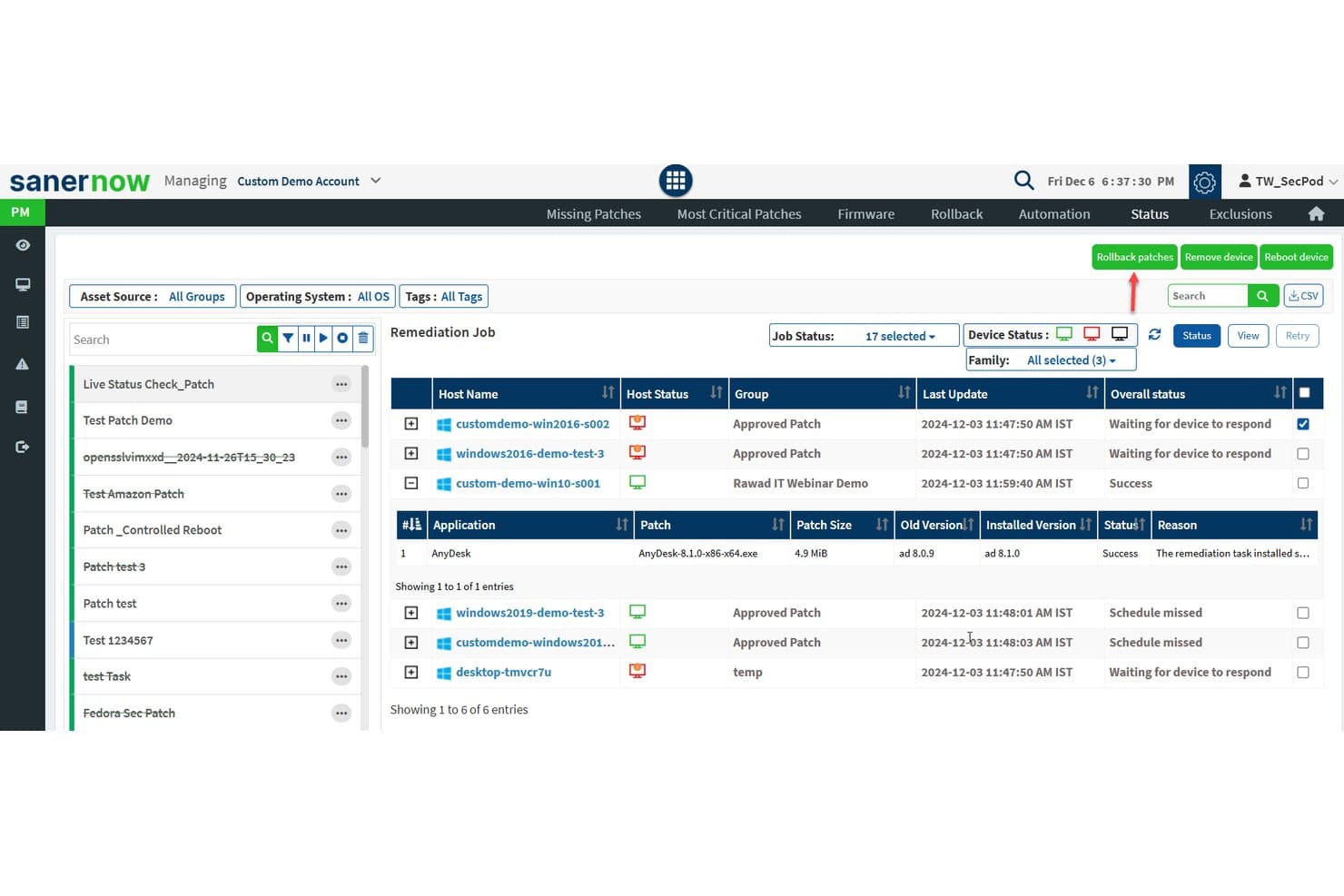
SecPod (Saner Platform) offers a detailed patch remediation job status view showing host names, device status, patch details, and overall remediation outcomes across multiple devices. SecPod's Saner Platform is a continuous vulnerability and exposure management solution that combines automated patch deployment, vulnerability scanning, and compliance remediation across Windows, macOS, Linux, and 550+ third-party applications.
Who Is SecPod (Saner Platform) Best For?
SecPod suits enterprise IT security teams managing distributed endpoint fleets across hybrid environments where compliance with frameworks like HIPAA, PCI-DSS, or NIST is a core operational requirement.
Why I Picked SecPod (Saner Platform)
I picked SecPod (Saner Platform) as one of the best because it's one of the few patch management platforms that fully integrates vulnerability assessment and remediation into a single automated workflow, eliminating the manual correlation between detected risks and available patches. I also like that it scans beyond standard CVEs, identifying misconfigurations and security anomalies via its 190,000+ SCAP vulnerability checks. That detection breadth maps directly to compliance frameworks including HIPAA, NIST CSF, and PCI DSS, making patch audit trails genuinely traceable to specific risk findings.
SecPod (Saner Platform) Key Features
- Third-party patch catalog: Supports patching for over 550 non-OS applications across browsers, productivity tools, and security software.
- Firmware and configuration remediation: Addresses hardware-level vulnerabilities and configuration deviations in addition to software updates.
- Custom compliance dashboards: Provides pre-built and customizable reporting mapped to frameworks like HIPAA, PCI, and NIST.
- API-first integration: Connects with ITSM, SIEM, and DevOps platforms using REST APIs for automated workflows and real-time data sync.
SecPod (Saner Platform) Integrations
SecPod (Saner Platform) offers native integrations with ServiceNow, Splunk, Jira, AWS, Azure DevOps, and Qualys, and provides an API for custom integrations.
Pros and Cons
Pros:
- Covers 550+ third-party applications natively
- Deep SCAP-based compliance checks built in
- Unified vulnerability scanning and patch remediation
Cons:
- Initial agent deployment is time-consuming
- Reporting interface can feel dated
Learn more about SecPod (Saner Platform): Best for patch automation for remote devices
- Free plan + free demo available
- Pricing upon request
Visit WebsiteCustomer Rating:4.9/5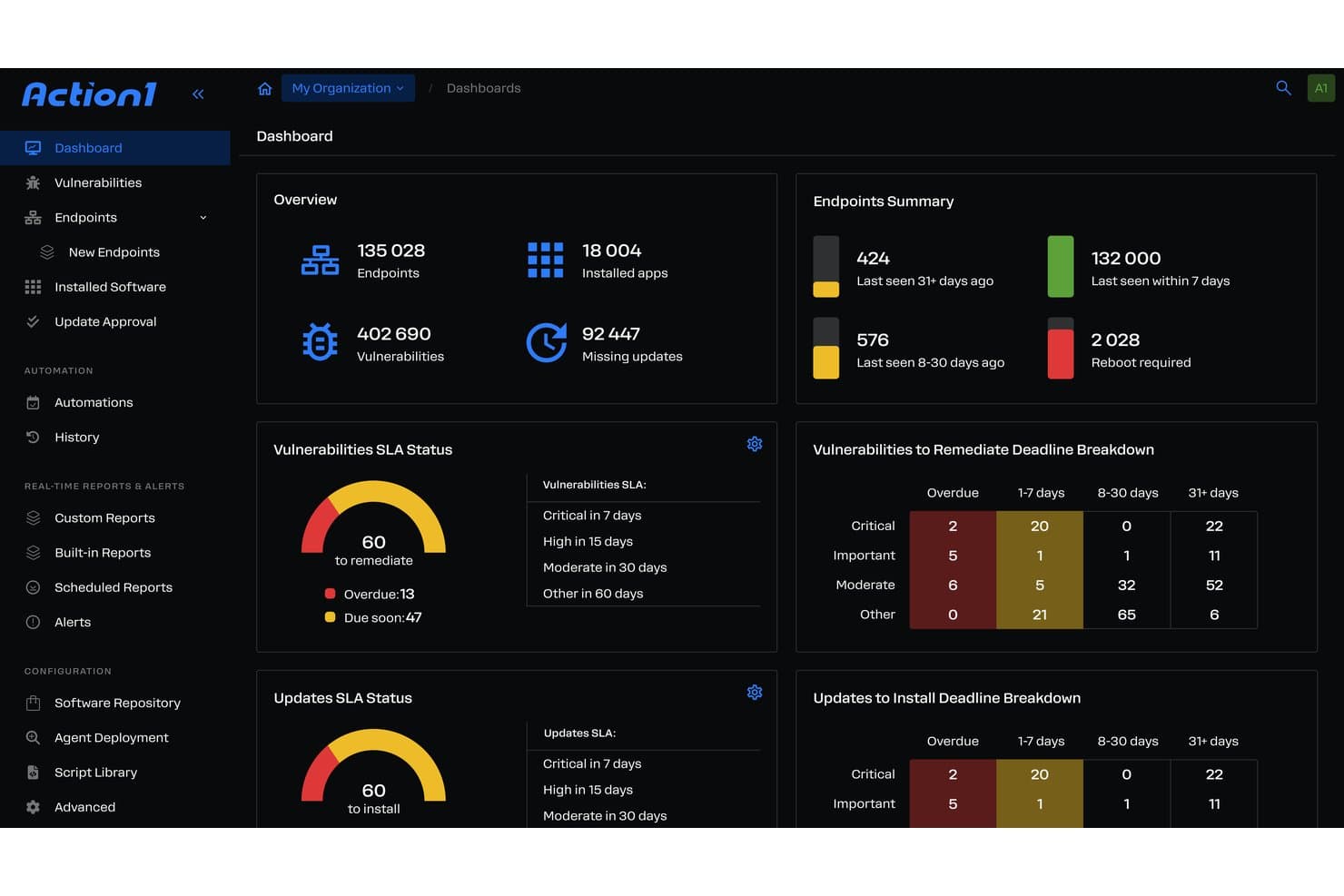
Action1 offers a comprehensive patch management dashboard displaying endpoint summaries, vulnerability SLA status, and remediation deadline breakdowns for enterprise environments. Action1 is a cloud-native autonomous endpoint management platform that combines OS and third-party application patching, vulnerability assessment, risk-based prioritization, and compliance reporting across distributed enterprise environments.
Who Is Action1 Best For?
Action1 is a strong fit for IT teams managing distributed endpoint fleets across remote, hybrid, or multi-site environments where VPN-free patching coverage is a priority.
Why I Picked Action1
Action1 earns its spot as one of the best on my shortlist because of how it handles remote endpoint patching without a VPN dependency. The cloud-native agent reaches devices wherever they are, and the update rings feature lets me configure phased, autonomous rollouts with automatic rollback built in. I also like that offline endpoints get patched the moment they reconnect, so remote workers who miss a maintenance window don't stay vulnerable.
Action1 Key Features
- Third-party application patching: Patch over 600 supported non-OS applications from a single dashboard.
- Risk-based vulnerability prioritization: Prioritize patch deployment based on CVSS scores and real-time threat data.
- Compliance dashboards and audit reporting: Generate exportable reports mapped to frameworks like SOC 2, HIPAA, and PCI DSS.
- PowerShell and RESTful API automation: Automate custom workflows and integrate with other IT systems using built-in scripting and API capabilities.
Action1 Integrations
Action1 offers native integrations with Microsoft Azure, Zendesk, Bitdefender, Slack, Microsoft Teams, PayPal, Amazon Web Services, and Zapier. An API is available for custom integrations.
Pros and Cons
Pros:
- SOC 2 and HIPAA compliance reporting included
- Automated CVE detection and risk-based prioritization
- Patching works for offline and remote endpoints
Cons:
- Lacks native mobile app patch catalog
- No support for mobile device patching
Learn more about Action1: Best for custom patch workflows with automation
- Free trial available
- Pricing upon request
Visit WebsiteCustomer Rating:4.6/5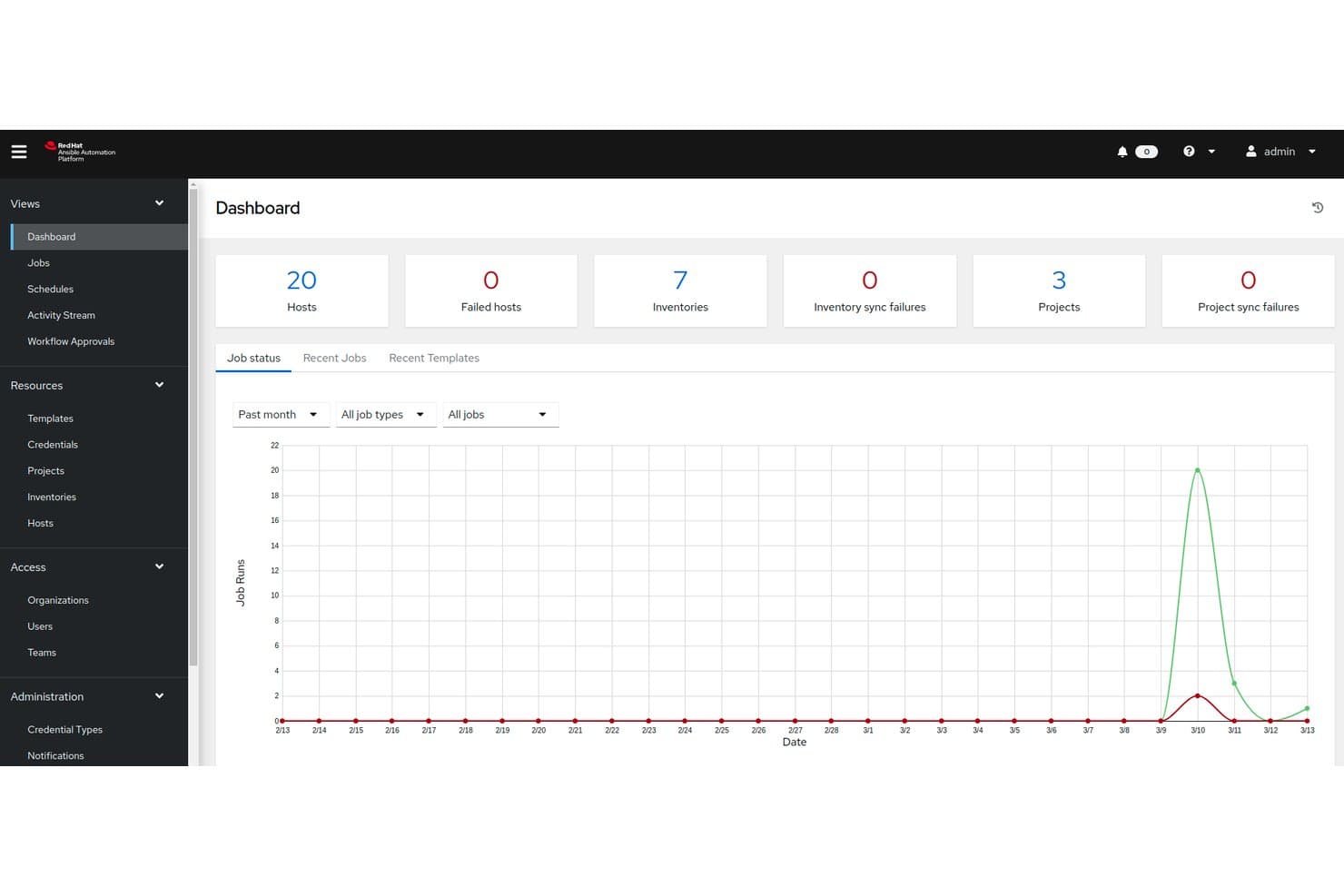
Red Hat Ansible Automation Platform offers a centralized dashboard displaying job status, host counts, inventories, and project sync metrics essential for enterprise patch management oversight. Red Hat Ansible Automation Platform is an agentless IT automation platform that lets enterprises build, run, and scale custom patch workflows across on-prem, cloud, and hybrid infrastructure using YAML-based playbooks and event-driven automation.
Who Is Red Hat Ansible Automation Platform Best For?
It's a strong fit for enterprise infrastructure and systems engineering teams that need to build fully custom patching pipelines across large, complex, multi-OS environments.
Why I Picked Red Hat Ansible Automation Platform
I picked Red Hat Ansible Automation Platform as one of the best because no other tool gives you this level of control over patch workflow logic. With YAML playbooks, you define exactly which hosts get patched, in what order, and what happens on failure. Event-Driven Ansible closes the loop by triggering those playbooks automatically when a connected security tool flags a new CVE, so patch jobs fire without anyone touching a keyboard.
Red Hat Ansible Automation Platform Key Features
- Automation controller: Central management UI for organizing, running, and monitoring patch jobs across all inventory.
- Automation mesh: Supports orchestrating patch tasks across distributed networks and network zones.
- Self-service automation portal: Allows non-technical users to launch pre-approved patching jobs securely.
- Ansible content collections: Provides certified, pre-built automation content for common IT platforms and software.
Red Hat Ansible Automation Platform Integrations
Red Hat Ansible Automation Platform offers a range of native integrations including ServiceNow, Splunk, VMware, AWS, Microsoft Azure, Google Cloud, Palo Alto Networks, CyberArk, and Cisco. An API is available for custom integrations.
Pros and Cons
Pros:
- Agentless approach covers most major OSes
- Supports event-driven and scheduled patching
- Full control of patch workflow logic
Cons:
- Requires custom playbooks for every app
- No built-in patch content catalog
Learn more about Red Hat Ansible Automation Platform: Best for large-scale environment control
- Free demo available
- Pricing upon request
Visit WebsiteCustomer Rating:4.5/5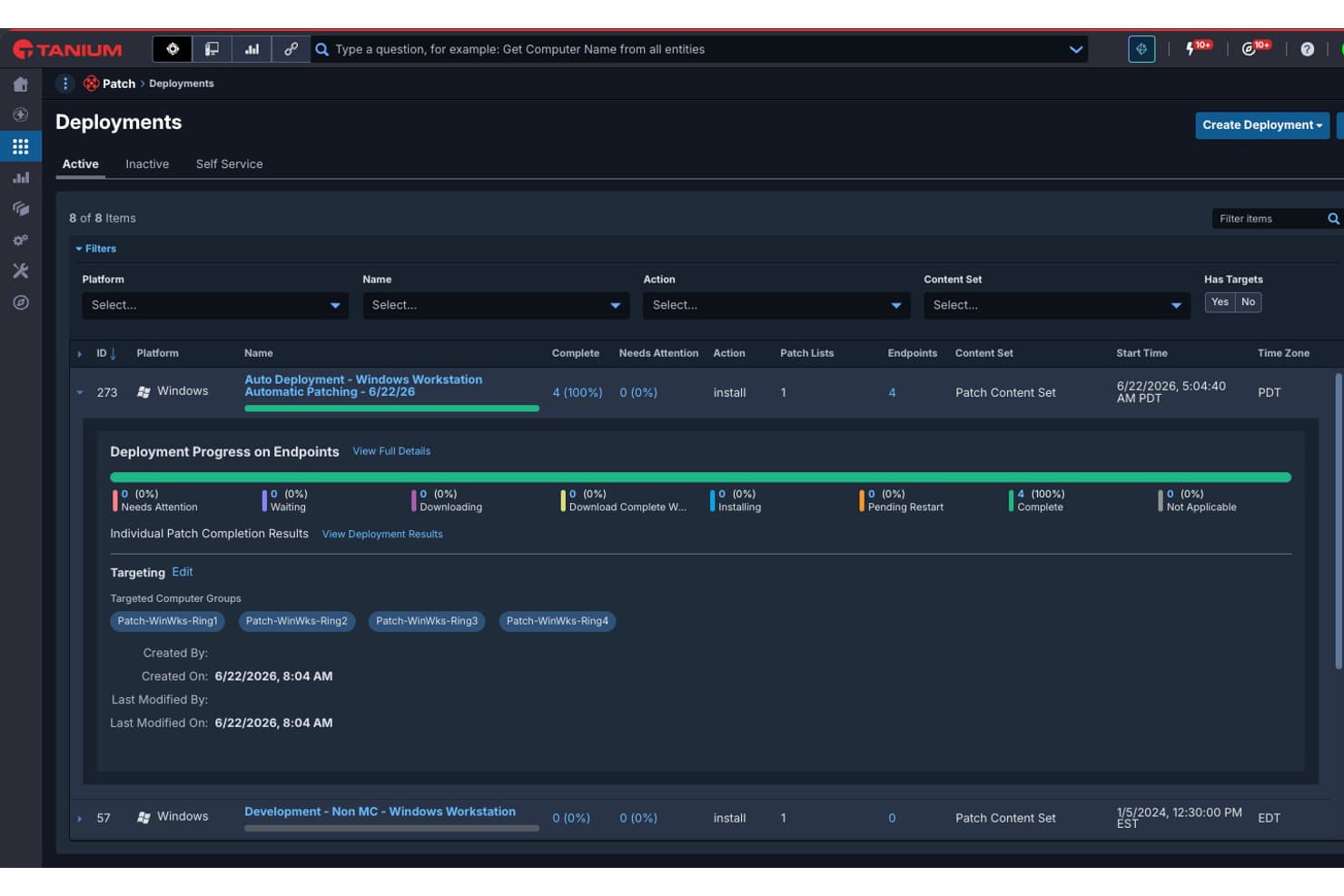
Tanium offers a Patch Deployments dashboard that displays active deployment progress, endpoint targeting, and patch completion status across Windows workstation ring groups. Tanium Patch is an enterprise patch management platform that combines real-time endpoint visibility with automated patch deployment across Windows, Linux, macOS, and third-party applications in on-prem, cloud, and hybrid environments.
Who Is Tanium Best For?
Tanium Patch is a strong fit for large enterprises with distributed endpoint fleets that need IT operations and security teams working from a single, unified platform.
Why I Picked Tanium
I picked Tanium as one of the best because no other tool I've tested matches its ability to query thousands of endpoints in real-time and act on what it finds instantly. I run concurrent patching campaigns across Windows, Linux, and macOS fleets from a single console, with safe deployment rings that let me test patches on a subset of devices before rolling out broadly. The automatic rollback capability means I'm not flying blind if something breaks mid-deployment.
Tanium Key Features
- Third-party application patching: Patch hundreds of supported software titles beyond operating systems.
- Real-time endpoint inventory: Instantly discover, track, and categorize assets across your environment.
- Custom compliance reporting: Generate dashboards and audit logs aligned with major regulatory frameworks.
- ServiceNow integration: Automate patch orchestration directly from ServiceNow IT operations workflows.
Tanium Integrations
Tanium Patch offers native integrations with Microsoft, ServiceNow, ScreenMeet, and more. An API is available for custom integrations.
Pros and Cons
Pros:
- Policy-based deployments with rollback support
- Linear chain architecture saves internal bandwidth
- Real-time endpoint visibility at enterprise scale
Cons:
- Module-based licensing can be complex
- Requires significant initial setup and tuning
Learn more about Tanium: Best for Microsoft 365 ecosystem integration
- Free trial available
- From $60/user/month (billed annually)
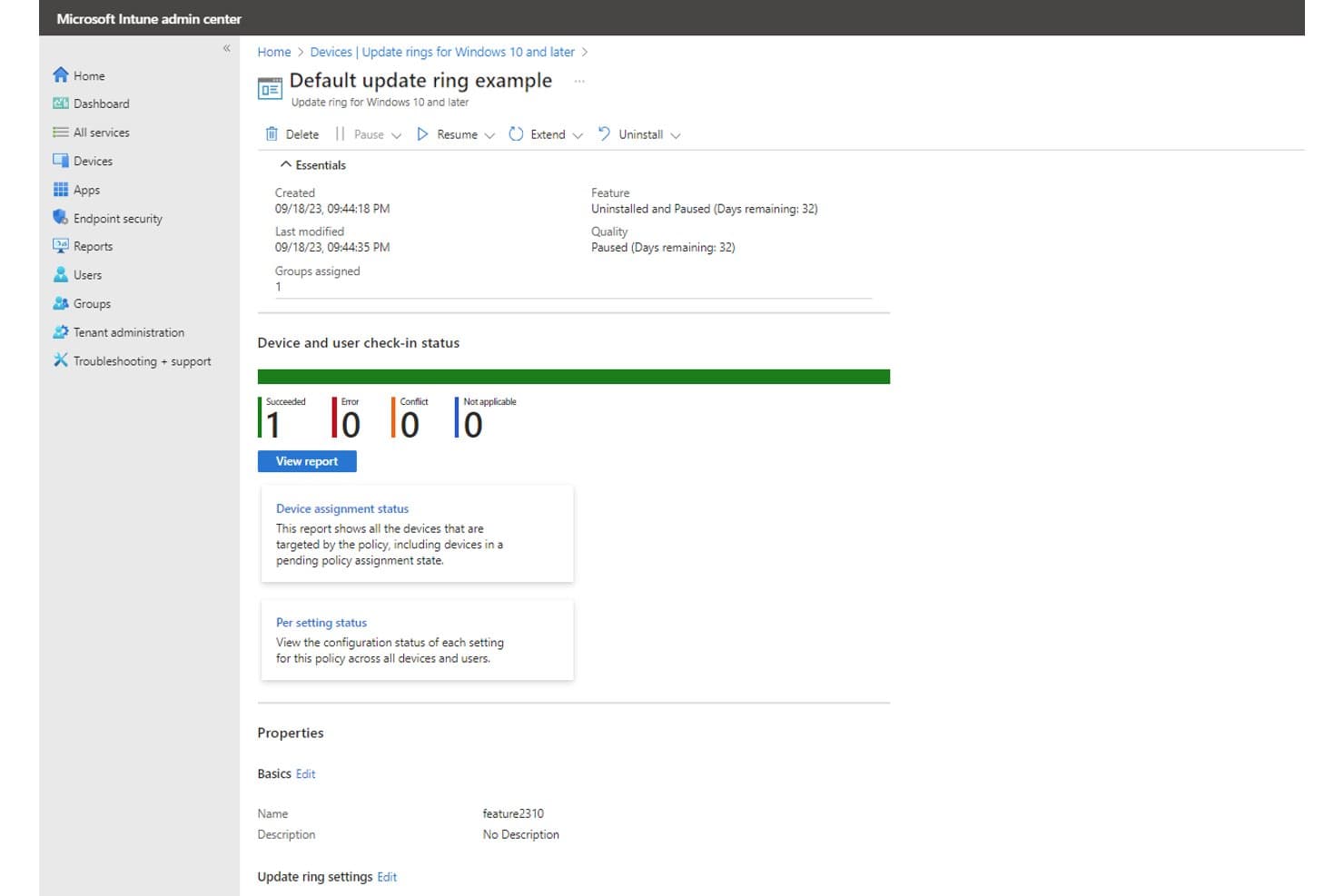
Microsoft Intune offers update ring management with real-time device check-in status, pause/resume controls, and feature and quality update tracking for enterprise patch management. Microsoft Intune is a cloud-native unified endpoint management platform that handles OS patch deployment, update ring configuration, driver and firmware updates, and device compliance policy enforcement across Windows, macOS, iOS, and Android endpoints.
Who Is Microsoft Intune Best For?
Microsoft Intune is a strong fit for enterprise IT teams already running Microsoft 365 or Azure who need cloud-native endpoint management without adding a separate patching tool.
Why I Picked Microsoft Intune
I picked Microsoft Intune as one of the best because it's built directly into the Microsoft 365 E3 and E5 licensing stack, meaning there's no separate agent or infrastructure to stand up. Windows Autopatch manages OS update rings natively, and Hotpatch pushes monthly security fixes without requiring a device reboot. I also like how Intune compliance policies connect to Microsoft Entra ID, feeding patch status directly into conditional access rules automatically.
Microsoft Intune Key Features
- Update rings configuration: Group endpoints for phased rollout of Windows feature and quality updates.
- Expedite update policies: Push critical security patches immediately, bypassing standard update deferral rules.
- Driver and firmware update management: Deploy approved driver and firmware updates to specific device groups.
- Remote management for cross-platform endpoints: Manage patch deployment on Windows, macOS, iOS, and Android devices from a cloud console.
Microsoft Intune Integrations
Microsoft Intune has native integrations across the Microsoft ecosystem, including Microsoft 365, Microsoft Entra ID, and Microsoft Defender for Endpoint. It supports third-party patching through integrations with Patch My PC, Ivanti Neurons, and Action1. An API is available for custom integrations.
Pros and Cons
Pros:
- Centralized cloud-based management for remote devices
- Native support for Windows Autopatch and Hotpatch
- Deep integration with Microsoft 365 environment
Cons:
- macOS and Linux patch management lacks parity
- Limited native third-party patching support
Learn more about Microsoft Intune: Best for cloud-native OS and third-party patching
- 15-day free trial + free demo available
- From $1/endpoint/month (billed annually)
Visit WebsiteCustomer Rating:4.7/5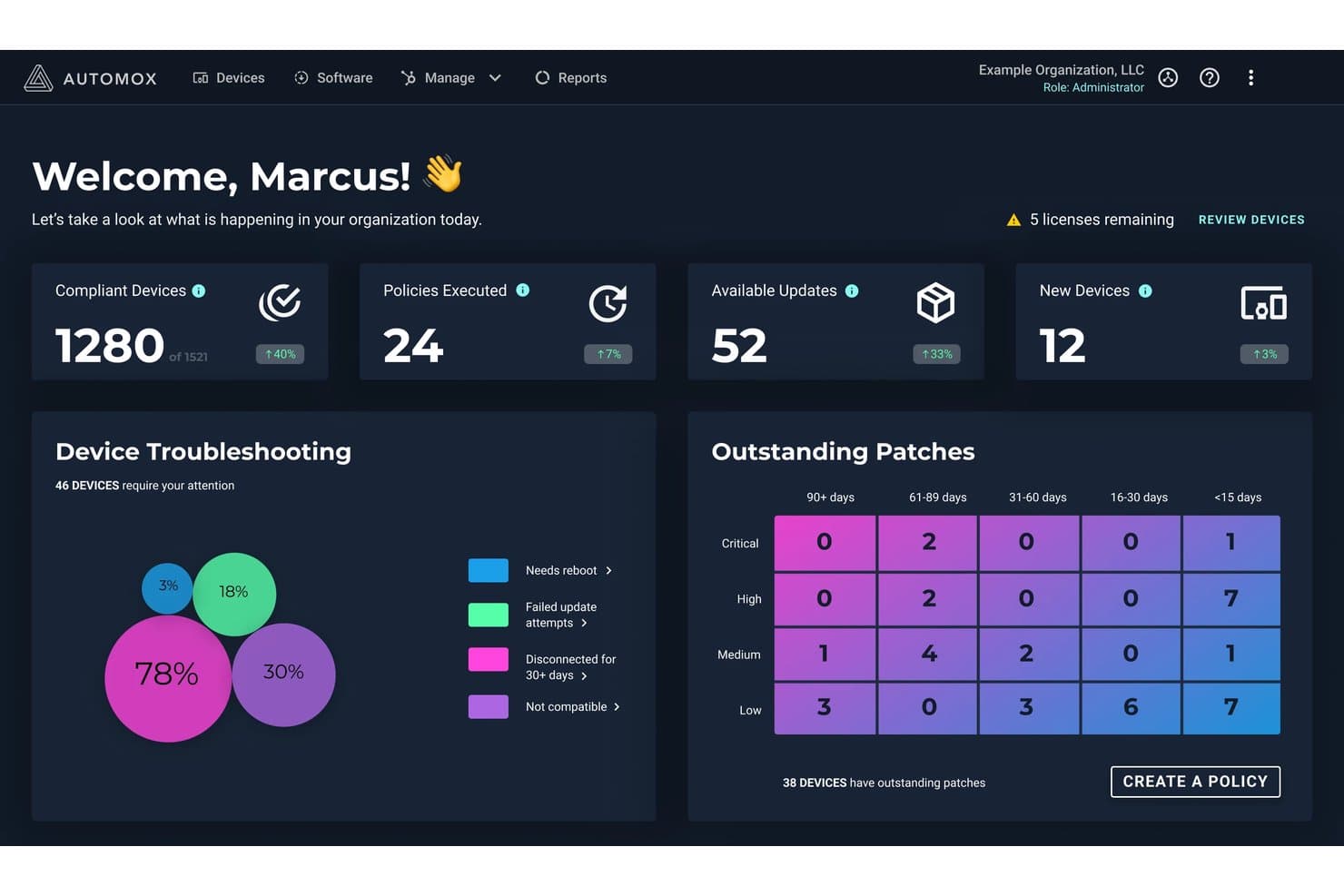
Automox offers an enterprise patch management dashboard displaying compliant devices, outstanding patches by severity and age, and device troubleshooting insights. Automox is a cloud-native autonomous endpoint management platform that handles OS patching across Windows, macOS, and Linux, third-party application patching for 630+ titles, software deployment, and device configuration—all without on-prem infrastructure.
Who Is Automox Best For?
Automox is a strong fit for IT and security teams managing distributed or remote endpoint fleets who need cross-platform patching without on-prem infrastructure.
Why I Picked Automox
Automox earns its spot on my shortlist because of how it handles third-party patching at scale. With 630+ supported titles, I can patch Chrome, Adobe, Java, and dozens of other apps using the same policy engine I use for OS updates. The Worklets library (432+ pre-built automation scripts) lets my team push custom remediation without spinning up additional infrastructure, and FixNow means I can execute patches immediately when a zero-day drops.
Automox Key Features
- Policy-driven automation: Set up rules for patching, software deployment, and configuration management across device groups.
- Multi-OS support: Manage patching for Windows, macOS, and Linux devices from a single cloud console.
- Role-based access control (RBAC): Assign permissions based on user roles to control who manages and approves patch jobs.
- Compliance reporting dashboard: Access built-in dashboards and exportable reports for audit trails and regulatory tracking.
Automox Integrations
Automox offers native integrations with ServiceNow, CrowdStrike, Splunk, SentinelOne, Zendesk, Freshworks, Microsoft Intune, among others, and provides an API for custom integrations.
Pros and Cons
Pros:
- Extensive macOS and Linux support
- No on-prem infrastructure required
- Fast patch deployment for zero-day threats
Cons:
- Executive summary views lack granular filters
- No support for air-gapped environments
 Best for real-time patch visibility dashboards
- 30-day free trial + free demo
- Pricing upon request
Visit WebsiteCustomer Rating:4.4/5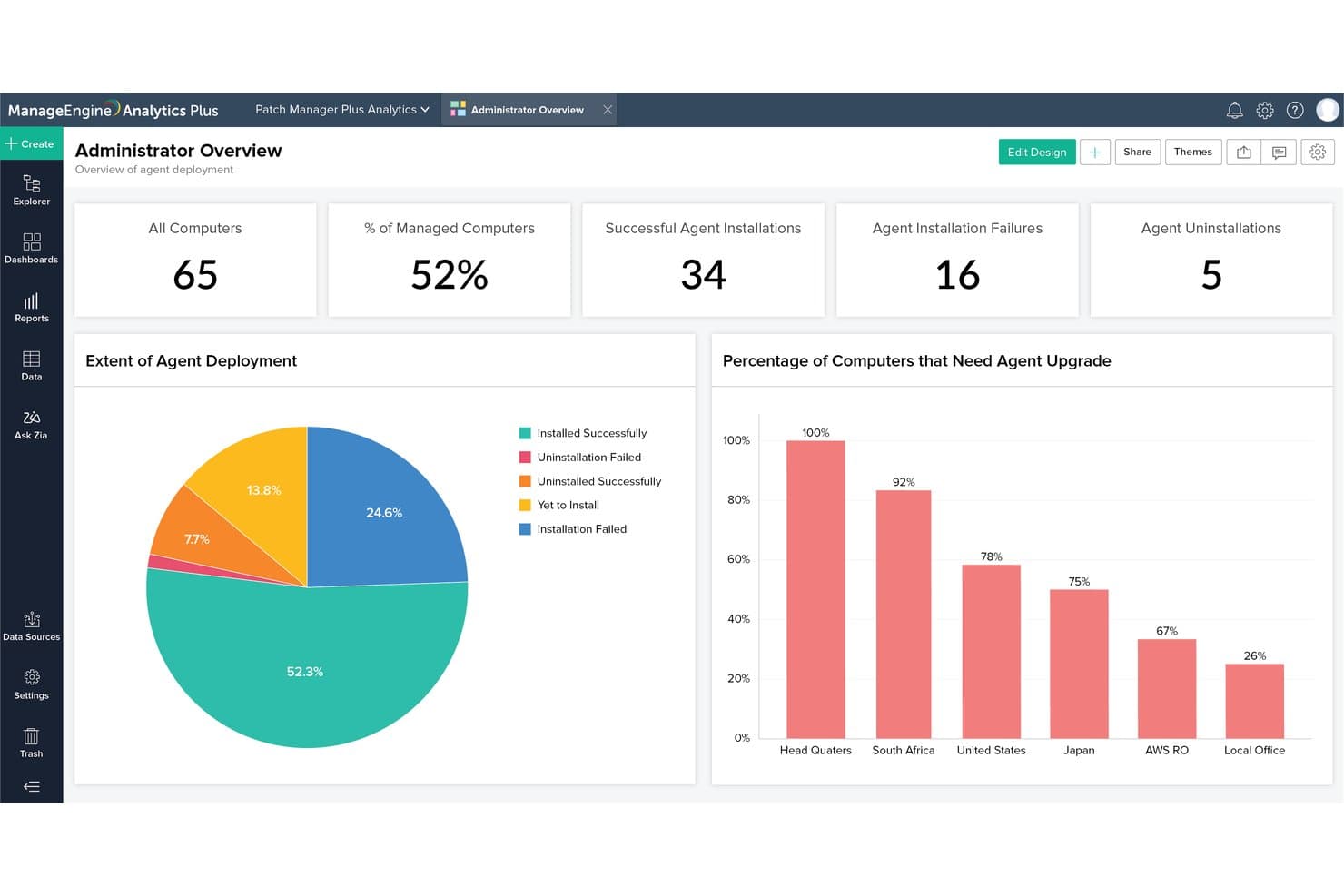
ManageEngine Patch Manager Plus offers an Administrator Overview analytics dashboard displaying agent deployment metrics, installation success rates, and upgrade needs by location. ManageEngine Patch Manager Plus is an enterprise patch management platform that automates OS and third-party application patching across Windows, macOS, and Linux endpoints, including remote, cloud-hosted, and DMZ-connected devices.
Who Is ManageEngine Patch Manager Plus Best For?
It's a strong fit for systems administrators and IT operations teams managing large, distributed endpoint fleets to ensure strict patch compliance across hybrid enterprise environments.
Why I Picked ManageEngine Patch Manager Plus
Patch Manager Plus earns its spot on my shortlist because the real-time patch visibility it provides is genuinely useful when managing large, distributed fleets. The centralized dashboard surfaces missing patches, deployment status, and compliance posture across all endpoints at once. I particularly like the granular audit reports, which give me a timestamped record of every patch action across Windows, macOS, and Linux devices.
ManageEngine Patch Manager Plus Key Features
- Automated third-party application patching: Supports patching for 850+ non-OS apps including browsers, Java, Adobe, and Zoom.
- Cross-platform OS support: Manages patch deployment for Windows, macOS, and Linux devices in one platform.
- Patch testing and approval workflows: Lets you create test groups and automate approvals before patches reach production machines.
- Bandwidth optimization for remote sites: Limits network usage by distributing patches efficiently to remote or distributed offices.
ManageEngine Patch Manager Plus Integrations
Patch Manager Plus offers native integrations with ServiceNow, ServiceDesk Plus, Rapid7, CrowdStrike, Tenable.io, and Tenable.sc. An API is available for building custom integrations.
Pros and Cons
Pros:
- Automated third-party application patching
- Bandwidth optimization throttles remote WAN downloads
- Real-time patch status visibility dashboard
Cons:
- Custom report builder requires steep learning
- Functional UI, but visually behind modern SaaS
Learn more about ManageEngine Patch Manager Plus:
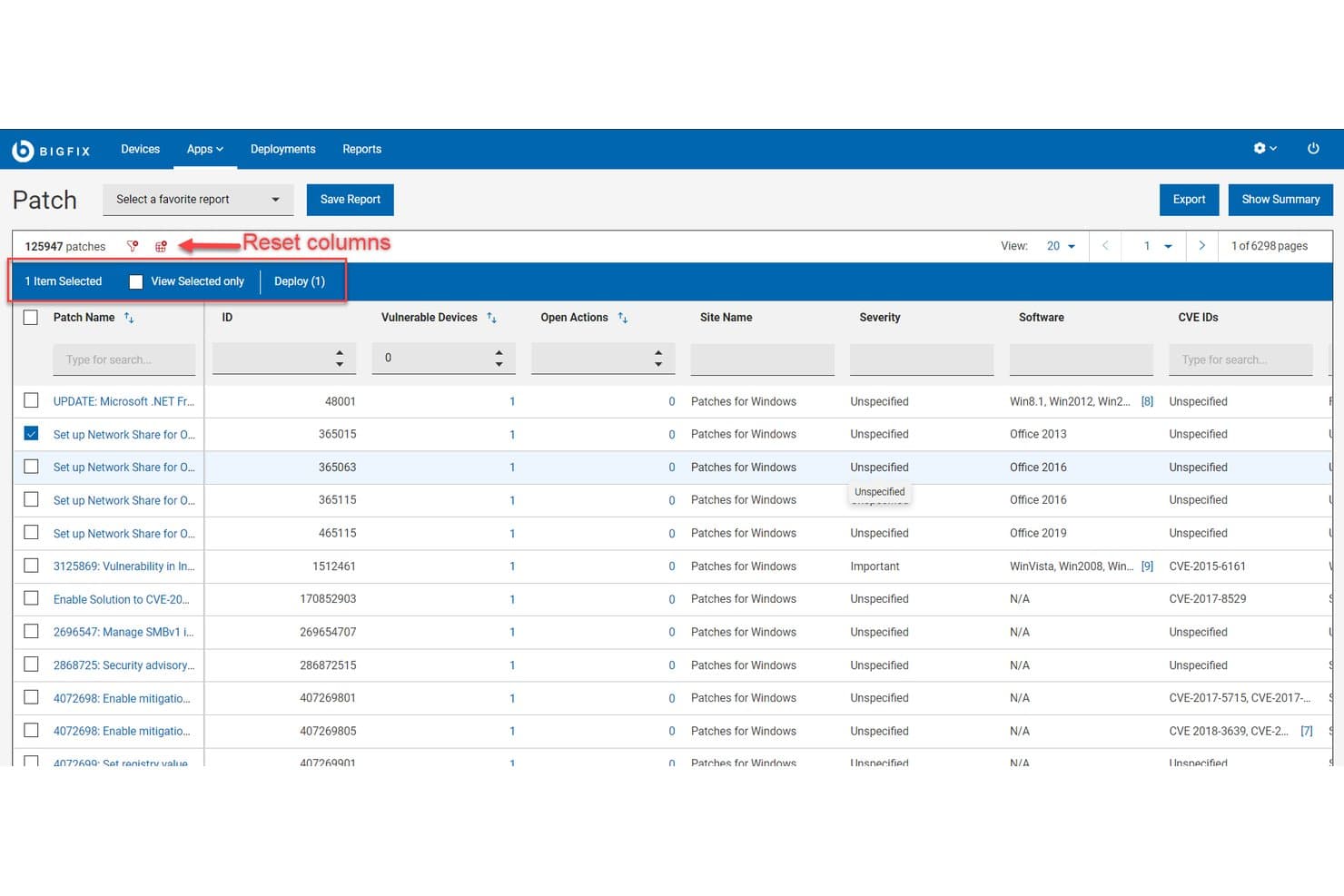
HCL BigFix offers a patch management list view displaying 125,947 patches with CVE IDs, severity levels, vulnerable devices, and one-click deployment capabilities. HCL BigFix is an enterprise endpoint management and patch automation platform that centralizes vulnerability remediation, compliance monitoring, and software distribution across on-premises, cloud, and hybrid environments.
Who Is HCL BigFix Best For?
HCL BigFix is a strong fit for large enterprises with IT and security operations teams managing heterogeneous endpoint fleets across distributed, mixed-OS environments.
Why I Picked HCL BigFix
HCL BigFix earns its spot on my shortlist because no other patch management tool I've used handles OS diversity at this scale. My team can patch Windows Servers, Ubuntu desktops, and legacy AIX boxes from a single console without separate agents or platform-specific workflows. The 120+ OS variant coverage, paired with a >98% first-pass patch success rate, means I'm not chasing failed deployments across disconnected tools when a zero-day hits a mixed-OS fleet.
HCL BigFix Key Features
- Patch Workbench: Centralizes and automates patch management actions with integrated ServiceNow synchronization for change control.
- Vulnerability remediation integrations: Natively connects with Tenable, Rapid7, and Qualys to close vulnerabilities identified in external scans.
- Custom fixlet authoring: Lets you create and deploy custom remediation jobs using BigFix's scripting and automation engine.
- Relays infrastructure: Distributes patch content efficiently across WAN links to thousands of endpoints without saturating the network.
HCL BigFix Integrations
HCL BigFix offers native integrations with Tenable, Rapid7, Qualys, Google Cloud, Nutanix Beam, ServiceNow, Forescout, AWS, Azure, and more. An API is also available for custom integrations.
Pros and Cons
Pros:
- Supports patch automation at thousands-of-endpoints scale
- Remediates vulnerabilities across disconnected endpoints
- Patches over 100 OS and device types
Cons:
- Setup complexity is high for smaller teams
- Executive reporting requires customization and expertise
Learn more about HCL BigFix: Best for automated patching across endpoints
- Free trial + free demo available
- Pricing upon request
Visit WebsiteCustomer Rating:5/5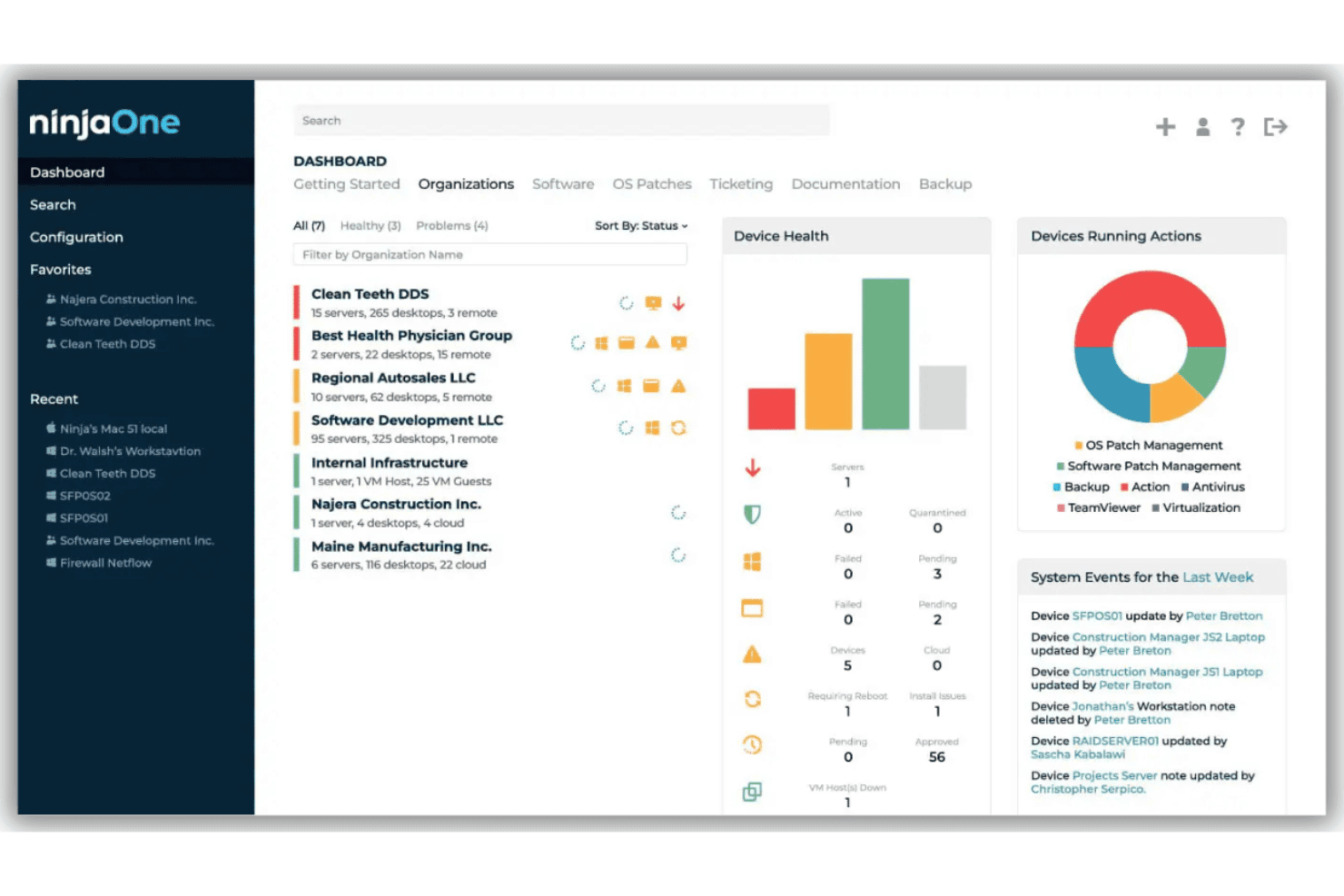
NinjaOne offers a centralized dashboard for monitoring device health, managing organizations, and tracking system events across multiple clients. NinjaOne is a unified IT operations platform with autonomous patch management at its core, supporting OS and third-party application patching across Windows, macOS, Linux, and mobile endpoints from a single cloud-based console.
Who Is NinjaOne Best For?
NinjaOne fits IT teams and managed service providers managing distributed endpoint fleets across mid-market and enterprise environments.
Why I Picked NinjaOne
NinjaOne earns its spot on my shortlist because of its Patch Intelligence AI, which analyzes deployment signals and community telemetry to automatically pause risky patches before they reach production. I also rely on patch caching, which lets my team push updates to bandwidth-limited remote sites without a VPN. Add in support for 6,000+ third-party applications, and I'm not managing a separate tool just to cover browsers and productivity apps.
NinjaOne Key Features
- Multi-OS patch management: Centrally patch Windows, macOS, Linux, and mobile devices from a single console.
- Preemptive patch approval policies: Approve or block specific KBs or update categories before release.
- Automated vulnerability data imports: Bring in vulnerability data to inform patch prioritization workflows.
- Compliance and audit-ready reporting: Generate detailed reports mapped to frameworks like SOC 2, HIPAA, and ISO 27001.
NinjaOne Integrations
NinjaOne offers native integrations with Splashtop, Zendesk, Okta, ConnectWise, Microsoft Azure/Intune, Slack, ServiceNow, DeskDay, and more, and provides an API for custom integrations.
Pros and Cons
Pros:
- Built-in compliance reporting for multiple frameworks
- Supports remote endpoints without VPN dependency
- Automated patch rollback on failed deployments
Cons:
- No native Unix (AIX, Solaris) support
- Custom metric export options remain basic
Learn more about NinjaOne: Best for risk-based prioritization for remediation
- Free demo available
- Pricing upon request
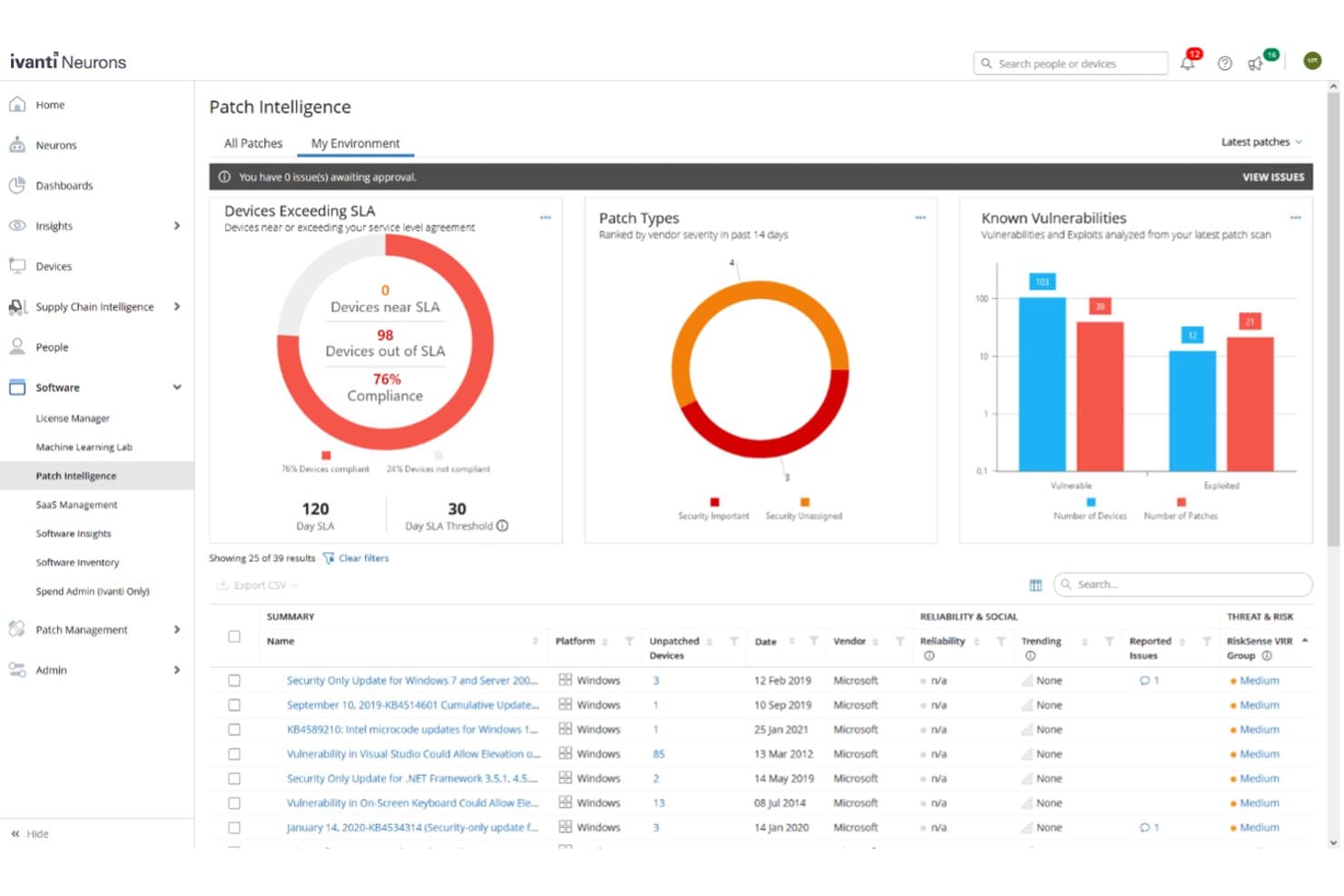
Ivanti Neurons for Patch Management offers a Patch Intelligence dashboard displaying device compliance, patch types, known vulnerabilities, and a detailed list of unpatched security updates. Ivanti Neurons for Patch Management is a cloud-native patch management platform that automates vulnerability discovery, risk-based prioritization, and patch deployment across Windows, macOS, Linux, and 800+ third-party applications in hybrid enterprise environments.
Who Is Ivanti Neurons for Patch Management Best For?
It's a strong fit for security-focused enterprise IT teams that need to prioritize remediation by actual exploit risk rather than raw CVE scores.
Why I Picked Ivanti Neurons for Patch Management
I picked Ivanti Neurons for Patch Management because its Vulnerability Risk Rating (VRR) goes beyond CVSS scores, pulling in threat intelligence from 100+ sources, dark web feeds, and human-validated exploit data to rank what actually needs patching first. My team uses deploy-by-risk automation to push the highest-priority patches before exploits hit. The ring deployment feature, which includes user sentiment surveys, catches stability issues before a patch rolls out fleet-wide.
Ivanti Neurons for Patch Management Key Features
- Patch reliability insights: Aggregates anonymized deployment data and user sentiment to flag patches that may trigger issues.
- Compliance reporting dashboard: Provides status, history, and SLA tracking for audits across your full environment.
- Third-party patch catalog: Maintains over 800 supported applications with regular updates from a central feed.
- Ring deployment configuration: Lets you define phased rollouts with configurable groups and pre-built policies.
Ivanti Neurons for Patch Management Integrations
Ivanti Neurons for Patch Management offers native integrations with Jira, CrowdStrike, AWS, Rapid7, ServiceNow, Tenable, Wiz, Synopsis, Splunk, and more. An API is available for custom integrations.
Pros and Cons
Pros:
- Covers Windows, macOS, Linux, and 800+ apps
- Automated ring deployment with user sentiment analysis
- Risk prioritization uses threat and exploit intelligence
Cons:
- Custom patch uploads limited to sideload solution
- Compliance reporting lacks detailed export templates
Learn more about Ivanti Neurons for Patch Management:
Annen programvare for oppdateringshåndtering i virksomheter
Her er noen flere alternativer for programvare for oppdateringshåndtering i virksomheter som ikke kom med på kortlisten min, men som likevel er verdt å undersøke:
- 11SolarWinds Patch ManagerBest for third-party patch catalog support
- 12Kaseya VSABest for unified IT management and automation
- 13Qualys Patch ManagementBest for built-in vulnerability assessment
- 14AteraBest for patching with remote monitoring
- 15PDQ ConnectBest for zero-touch patching for distributed teams
- 16GFI LanguardBest for vulnerability and patch scanning
- 17HeimdalBest for automated patching with compliance
- 18N-able N-central RMMBest for role-based patch controls for IT teams
- 19SyxsenseBest for real-time patch deployment visibility
- 20Patch My PCBest for rapid third-party patch catalog updates
How I Evaluate Enterprise Patch Management Software
I evaluate enterprise patch management tools on two levels: baseline requirements like cross-platform deployment and audit reporting, and differentiators like risk-based prioritization and rollback.
Core Functionality (Table Stakes for This List)
When I'm selecting tools for my list, I rank each one on a scale from 0 (does not offer the functionality) to 5 (excels in this area) for each core functionality listed below. Then, I calculate the tool's total score into a percentage. Each tool needs to achieve a minimum total score of 65% to be considered for inclusion.
- Automated Patch Deployment: I check whether a tool can handle policy-based scheduling, phased rollouts, and automatic rollback so a failed update doesn't take down a production server at 2 a.m.
- Cross-Platform OS Support: Enterprise environments rarely run one OS. I look for full patching parity across Windows, macOS, and major Linux distributions like RHEL, Ubuntu, and SUSE.
- Third-Party App Patching: Most exploited vulnerabilities live in apps like browsers, Java, and Zoom. I evaluate how many third-party titles each platform covers and how fast new patches hit the catalog.
- Vulnerability Assessment & Prioritization: I look for CVE-based scanning paired with risk scoring, so your team patches the actively exploited flaw before the low-severity cosmetic fix.
- Compliance Reporting & Audit Trails: Auditors want proof, not promises. I evaluate whether each tool offers pre-built reports mapped to frameworks like PCI-DSS, HIPAA, and ISO 27001 with exportable audit logs.
- Distributed Endpoint Management: I look at how each platform reaches remote laptops, cloud instances, and on-prem servers without forcing traffic through a VPN or requiring constant network connectivity.
Once I have a list of tools that meet the criteria, I consider what sets each platform apart.
Differentiating Factors (What Sets Vendors Apart)
Here's how I compare and contrast different vendors:
Standout Features
Risk-based prioritization is a major differentiator. I look for tools that pull in threat intelligence like CISA KEV to rank patches by active exploitation, not just CVSS severity. Automated testing and rollback matter just as much—pilot-ring deployment lets you validate a patch on a small group before it hits production. Bandwidth optimization also separates vendors, especially for distributed teams where peer-to-peer distribution and delta patching keep deployments from choking the network.
Beyond Features
Deployment architecture matters. I evaluate whether a vendor offers SaaS, on-premise, and hybrid options, since regulated industries often need air-gapped environments. Integration depth is equally important; I check for bi-directional connectors to ITSM tools like ServiceNow and Jira so patch deployments auto-generate change tickets. I also consider how quickly a vendor publishes new patch content after a CVE drops, because a delay of even a day or two can leave thousands of endpoints exposed.
Slik velger du programvare for oppdateringshåndtering i virksomheter
Det er lett å gå seg vill i lange funksjonslister og komplekse prisstrukturer. For å hjelpe deg med å holde fokus mens du går gjennom den unike prosessen med å velge programvare, har jeg laget en sjekkliste over faktorer du bør ha i tankene:
| Faktor | Hva du bør vurdere |
|---|---|
| FaktorSkalerbarhet | Hva du bør vurdereVil programvaren håndtere alle nåværende og forventede endepunkter på tvers av flere nettsteder eller forretningsenheter uten forsinkelser eller overbelastning av agenter? |
| FaktorIntegrasjoner | Hva du bør vurdereKan verktøyet enkelt kobles til sårbarhetsskannerne, ITSM-arbeidsflytene og varslingsverktøyene dine? Se etter innebygd integrasjon eller pålitelige API-er. |
| FaktorTilpasningsmuligheter | Hva du bør vurdereKan du tilpasse oppdateringspolicyer, vedlikeholdsvinduer, tilgang og rapportering slik at de samsvarer med kravene til samsvar eller forretningsprosessene dine? |
| FaktorBrukervennlighet | Hva du bør vurdereEr konsollen intuitiv for daglig administrasjon, eller vil du være avhengig av spesialkompetanse og kontinuerlig opplæring for å drifte og feilsøke? |
| FaktorImplementering og innføring | Hva du bør vurdereHvor lang tid vil det ta å distribuere agenter, konfigurere innstillinger og lære opp ansatte? Se etter uventede krav til infrastruktur, policyer eller endringshåndtering. |
| FaktorKostnad | Hva du bør vurdereEr prisstrukturene basert på endepunkt, bruker eller funksjoner? Se etter skjulte kostnader som ekstra moduler, integrasjonstillegg eller nivåer for samsvar og rapportering. |
| FaktorSikkerhetstiltak | Hva du bør vurdereTilbyr plattformen RBAC, revisjonslogging og datakryptering? Spør deg selv hvordan disse kontrollene samsvarer med virksomhetens risikoprofil. |
| FaktorTilgjengelig kundestøtte | Hva du bør vurdereHvor raskt og pålitelig kan du få hjelp under hendelser eller oppgraderinger? Vurder SLA-er, åpningstider for kundestøtte og tilgjengelige kontaktkanaler før du bestemmer deg. |
Hva er programvare for oppdateringshåndtering i virksomheter?
Programvare for oppdateringshåndtering i virksomheter er en viktig plattform for endepunktsikkerhet som automatiserer identifisering, distribusjon og overvåking av programvareoppdateringer på tvers av store og varierte IT-miljøer. Den håndterer oppdateringer for operativsystemer og tredjepartsapplikasjoner, bidrar til å opprettholde forskriftsmessig samsvar og reduserer sikkerhetssårbarheter. Disse verktøyene er utviklet for å støtte tusenvis av endepunkter, effektivisere oppdateringshåndteringen på tvers av distribuerte nettsteder og tilby robust rapportering som kreves for drift i virksomheter.
Funksjoner
Når du velger programvare for administrasjon av sikkerhetsoppdateringer i virksomheten, bør du se etter følgende viktige funksjoner:
- Automatisert distribusjon av sikkerhetsoppdateringer: Bruker automatiserte arbeidsflyter til å koordinere planlagte eller utløste utrullinger på tvers av endepunkter, noe som reduserer manuelt arbeid og minimerer forsinkelser i oppdateringen.
- Støtte for operativsystemer på tvers av plattformer: Administrerer oppdateringer for Windows, macOS og større Linux-distribusjoner fra én konsoll, slik at ulike enhetsparker dekkes.
- Oppdatering av tredjepartsprogrammer: Leverer oppdateringer for apper som ikke er en del av operativsystemet, for eksempel nettlesere, produktivitetspakker og samarbeidsverktøy, og reduserer risikoen fra tredjepartsprogramvare som ikke er oppdatert.
- Sårbarhetsvurdering: Integrerer sårbarhetsadministrasjon ved å søke etter manglende oppdateringer og identifisere prioriterte sårbarheter ved hjelp av CVE-alvorlighetsgrad og sanntidsbaserte kilder for trusselintelligens.
- Mulighet for tilbakeføring: Gjør det mulig for IT-team å tilbakestille eller fjerne problematiske oppdateringer, slik at nedetiden begrenses hvis en oppdatering skaper problemer i produksjonsmiljøet.
- Rapportering av samsvar: Genererer rapporter for revisjonsspor og regelverksrammeverk, noe som gjør det enklere å dokumentere oppdateringsstatus under sikkerhetsgjennomganger.
- Fjernadministrasjon av endepunkter: Støtter levering av oppdateringer til enheter utenfor bedriftsnettverket, noe som er nyttig i miljøer med fjernarbeid eller hybridarbeid.
- Optimalisering av båndbredde: Bruker node-til-node-distribusjon, begrensning av overføringshastighet eller differensiell oppdatering for å minimere belastningen på nettverket og fremskynde store utrullinger.
- Planlegging av vedlikeholdsvinduer: Lar deg definere bestemte tidspunkter for oppdateringer og omstarter, slik at oppdateringene tilpasses virksomhetens SLA-er og operative behov.
- Rollebasert tilgangskontroll: Kobler seg til identitetsleverandører som Active Directory for å gi detaljerte tillatelser og sikre at bare autoriserte brukere kan administrere kritiske arbeidsflyter for oppdatering.
Fordeler
Implementering av programvare for administrasjon av sikkerhetsoppdateringer i virksomheten gir flere fordeler for teamet og virksomheten din. Her er noen av fordelene du kan se frem til:
- Redusert sikkerhetsrisiko: Regelmessige, automatiserte oppdateringer lukker kjente programvaresårbarheter raskt og bidrar til å beskytte organisasjonen mot skadevare, løsepengevirus og nye cybertrusler.
- Forbedret samsvar: Innebygd rapportering av samsvar og revisjonsspor gjør det enklere å dokumentere overholdelse av standarder som PCI-DSS, HIPAA eller ISO 27001.
- Tidsbesparelser for IT: Automatisering og sentralisert koordinering av oppdateringer frigjør IT-team fra manuelle oppdateringer, slik at de kan konsentrere seg om initiativer med høyere prioritet.
- Ensartet distribusjon av oppdateringer: Støtte på tvers av plattformer sikrer at alle endepunkter – lokale, eksterne og skybaserte – mottar oppdateringer i tide og på en ensartet måte.
- Mindre forstyrrelse av virksomheten: Funksjoner som tilbakeføring, vedlikeholdsvinduer og optimalisering av båndbredde opprettholder systemstabiliteten og reduserer nedetid under oppdateringer.
- Bedre oversikt og kontroll: Sanntidsdashbord, tilpassbare varsler og detaljerte tillatelser lar deg overvåke, analysere og administrere fremdriften for oppdateringer på tvers av enhetsparken.
- Forenklet fjernadministrasjon: Muligheten til å oppdatere distribuerte endepunkter eller endepunkter utenfor nettverket betyr at sikkerhetsnivået forblir høyt selv når team arbeider fra ulike steder.
Kostnader og priser
Valg av programvare for administrasjon av sikkerhetsoppdateringer i virksomheten krever en forståelse av de ulike prismodellene og abonnementene som er tilgjengelige. Kostnadene varierer basert på funksjoner, teamstørrelse, tillegg og mer. Tabellen nedenfor oppsummerer vanlige abonnementer, gjennomsnittsprisene deres og typiske funksjoner som er inkludert i programvareløsninger for administrasjon av sikkerhetsoppdateringer i virksomheten:
Sammenligningstabell for programvare for administrasjon av sikkerhetsoppdateringer i virksomheten
| Abonnementstype | Gjennomsnittspris | Vanlige funksjoner |
|---|---|---|
| AbonnementstypeGratisabonnement | Gjennomsnittspris$0 | Vanlige funksjonerGrunnleggende distribusjon av sikkerhetsoppdateringer for et begrenset antall enheter, manuell planlegging og brukerstøtte fra fellesskapet. |
| AbonnementstypePersonlig abonnement | Gjennomsnittspris$5-$15/user/month | Vanlige funksjonerOppdatering for én bruker, automatiserte oppdateringer for ett operativsystem, grunnleggende rapportering og standard teknisk brukerstøtte. |
| AbonnementstypeBedriftsabonnement | Gjennomsnittspris$20-$40/user/month | Vanlige funksjonerStøtte for flere brukere, oppdatering på tvers av plattformer, oppdateringer av tredjepartsapper, rapportering av samsvar og rollebaserte tillatelser. |
| AbonnementstypeVirksomhetsabonnement | Gjennomsnittspris$40-$80/user/month | Vanlige funksjonerFull automatisering, alternativer for hybrid distribusjon, tilpassede integrasjoner, SLA-basert brukerstøtte og avanserte revisjonsfunksjoner. |
Vanlige spørsmål om programvare for administrasjon av virksomhetens sikkerhetsoppdateringer
Her er svar på vanlige spørsmål om programvare for administrasjon av virksomhetens sikkerhetsoppdateringer:
Hvordan hjelper programvare for administrasjon av virksomhetens sikkerhetsoppdateringer med samsvarsrevisjoner?
Programvare for administrasjon av virksomhetens sikkerhetsoppdateringer automatiserer samsvarsrapportering og opprettholder detaljerte revisjonsspor. På denne måten kan du raskt dokumentere status for sikkerhetsoppdateringer, bevis på utbedring og overholdelse av regelverk som PCI-DSS eller HIPAA under interne eller eksterne revisjoner.
Kan programvare for administrasjon av virksomhetens sikkerhetsoppdateringer oppdatere enheter som er utenfor nettverket?
Ja, de fleste moderne løsninger støtter ekstern oppdatering av enheter utenfor virksomhetens nettverk. Dette holder endepunktene sikre og oppdaterte, selv når brukerne er på reise eller arbeider hjemmefra.
Hvilke tredjepartsprogrammer støttes vanligvis for oppdatering?
Virksomhetsløsninger dekker vanligvis et bredt utvalg av tredjepartsprogrammer, for eksempel nettlesere, e-postklienter, Java, Zoom og produktivitetspakker. Du bør undersøke leverandørens katalog for oppdateringer som er relevante for miljøet ditt.
Hvordan reduserer automatisering risikoen sammenlignet med manuell oppdatering?
Automatisering reduserer menneskelige feil, håndhever konsekvent policy og muliggjør rask utrulling av sikkerhetsoppdateringer på tvers av hele enhetsparken. Dette bidrar til å minimere oppdateringsvinduet og reduserer sannsynligheten for at trusler utnytter sårbarheter som ikke er utbedret.
Hva bør jeg vurdere når jeg sammenligner totale eierkostnader?
Du bør ta med lisensiering, endringer i infrastrukturen, profesjonelle tjenester, støttenivåer og tiden som kreves for utrulling og løpende administrasjon. Vær oppmerksom på skjulte tilleggskostnader for viktige funksjoner som samsvar, integrasjoner eller avansert rapportering.