

CMDB-programvare (database for konfigurasjonsstyring) sporer konfigurasjonselementer (CI-er), attributtene deres og relasjonene mellom dem på tvers av IT-miljøet ditt. De beste CMDB-verktøyene automatiserer oppdagelse, avhengighetskartlegging, endringssporing og ITSM-integrasjon for å bidra til å forhindre blinde flekker i konfigurasjonen og nedetid.
I denne veiledningen sammenligner jeg den beste CMDB-programvaren for hybrid infrastruktur, skymiljøer, samsvarsbehov og andre komplekse IT-bruksområder.
Why Trust Our Software Recommendations
6,700+
Reviews
20
Industry experts
16+
Evaluation factors
14
Years
Our team has been testing and reviewing software since 2012. As tech leaders ourselves, we know how difficult—and important—it is to choose the right software.
For this guide, we evaluated tools using hands-on testing and independent research, scoring tools using our selection criteria.
Our reviews reflect our human editorial judgment, not a sales pitch.
Expert reviewers:
- Paulo Gardini MiguelTech Director
 Tim FisherVP of AI
 Gabriel RosasTech Lead & Software Architect
 Christhian GruhnTech Lead & Platform Architect

Sammenligningstabell for CMDB-programvare
Denne sammenligningstabellen oppsummerer prisdetaljene for mine beste utvalgte CMDB-programmer:
| Tool | Best For | Trial Info | Price | ||
|---|---|---|---|---|---|
| 1 | Best for CMDB tied to native ITSM workflows | Free demo available | Pricing upon request | Website | |
| 2 | Best for CMDB-driven change control | Free demo available | Pricing upon request | Website | |
| 3 | Best for customizable open-source CMDB | Free plan available | Pricing upon request | Website | |
| 4 | Best for visual change impact mapping | Free trial available | From $10,000/year (billed annually) | Website | |
| 5 | Best for multi-cloud asset discovery | 30-day free trial | From $67/month | Website | |
| 6 | Best for application dependency mapping | Free trial + free demo available | Pricing upon request | Website | |
| 7 | Best for CMDB auto-mapping suggestions | Free demo + 30-day free trial available | From $1,499/year | Website | |
| 8 | Best for large-scale hybrid IT discovery | Free demo available | Pricing upon request | Website | |
| 9 | Best for CMDB with service mapping | Free demo available | Pricing upon request | Website | |
| 10 | Best for federated configuration data | Free demo available | Pricing upon request | Website |





Anmeldelser av CMDB-programvare
Nedenfor finner du mine detaljerte sammendrag av den beste CMDB-programvaren som kom med på kortlisten min. Anmeldelsene mine gir en detaljert gjennomgang av funksjonene, egenskapene og integrasjonene til hver plattform for å hjelpe deg med å finne den beste løsningen for deg.
 Best for CMDB tied to native ITSM workflows
- Free demo available
- Pricing upon request
Visit WebsiteCustomer Rating:4.4/5
ServiceNow's CMDB Workspace centralizes IT asset health and task management. ServiceNow CMDB is an enterprise-grade configuration management database built on the Now Platform, offering CI discovery, dependency mapping, data reconciliation via IRE, and native integration with the full ServiceNow ITSM suite.
Who Is ServiceNow Best For?
ServiceNow CMDB is a strong fit for large enterprises that are already running—or planning to run—ServiceNow ITSM and want their configuration data and service workflows on a single, unified platform.
Why I Picked ServiceNow
ServiceNow CMDB earns its spot on my shortlist because the CMDB isn't bolted onto the ITSM layer—it is the ITSM layer. I love that when an incident opens, the relevant CI data surfaces automatically, with no API calls or sync delays. Service Mapping traces how a business application connects to its underlying infrastructure, so when a CI changes, you can see blast radius before approving the change, right inside the Change Management workflow.
ServiceNow Key Features
- CMDB Health Dashboard: Tracks data quality across completeness, correctness, and compliance dimensions to surface gaps in your CI records.
- Identification and Reconciliation Engine (IRE): Applies priority-based source ranking and deduplication rules to normalize CI data ingested from multiple simultaneous feeds.
- Service Graph Connectors: Pre-built, certified integrations for AWS, Azure, GCP, Kubernetes, Dynatrace, and Datadog pull CI data directly into the CMDB on a continuous basis.
- AIOps event correlation: ML-based alert grouping and anomaly detection surface configuration-related incidents before they escalate into service disruptions.
ServiceNow Integrations
ServiceNow CMDB offers 40+ certified Service Graph Connectors, including AWS, Microsoft Azure, Google Cloud Platform, Kubernetes, Dynatrace, Datadog, SCCM, and VMware, alongside native integrations across the ServiceNow ITSM suite (Incident, Problem, Change, Request). A REST API and the ServiceNow Store marketplace are available for custom and partner-built integrations.
Pros and Cons
Pros:
- Identification Engine prevents duplicate configuration items
- Service Graph Connectors cover all major clouds
- Native ITSM workflows surface CI data instantly
Cons:
- Dedicated admins needed for ongoing data quality
- Custom pricing requires negotiation with sales


USU tracks software recognition, OS usage, and license demand in one dashboard. USU is an ITSM platform with a natively embedded CMDB that unifies configuration item tracking, automated discovery, dependency mapping, and change management within a single, ITIL 4-certified suite.
Who Is USU Best For?
USU is a strong fit for enterprise IT teams that need CMDB and ITAM managed within a single, ITIL 4-certified platform.
Why I Picked USU
USU earns its spot on my shortlist because its CMDB is built directly into a full ITIL 4-certified ITSM suite, not bolted on as an afterthought. What makes it genuinely useful for change control is AI-based change risk calculation and collision detection, which flag conflicting changes before they cause incidents. I also like the change validation feature, which automatically compares CMDB records against live inventory scanner data and triggers correction workflows when mismatches appear.
USU Key Features
- Federated data integration: Pull CI data from external sources into the CMDB without duplicating records across your environment.
- ITIL 4-certified change workflows: Run standard, normal, and emergency change processes that are natively tied to CMDB records and fully certified across 19 ITIL 4 practices.
- Audit-compliant CI change logging: Maintain a complete, lifecycle-spanning log of every change made to each CI for compliance with DORA, NIS-2, and ISO 27001.
- ITAM-CMDB convergence: Hardware and software asset data from the ITAM module automatically populate and enrich CI records in the CMDB.
USU Integrations
USU offers 50+ built-in connectors for CMDB and asset data, including ServiceNow, Microsoft SCCM, IBM ILMT, AWS, Azure, Google Cloud, Active Directory, Microsoft Exchange, Okta, and Oracle, plus 400+ SaaS app integrations within its SaaS Management module. Open APIs are available for custom integrations.
Pros and Cons
Pros:
- AI-driven change risk and collision detection
- ITIL 4 certification across 19 practices
- Natively embedded within full ITSM suite
Cons:
- Reporting customization is limited and rigid
- Configuration is complex and resource intensive
Learn more about USU: 3Best for customizable open-source CMDB
iTop
- Free plan available
- Pricing upon request
Visit WebsiteCustomer Rating:4.3/5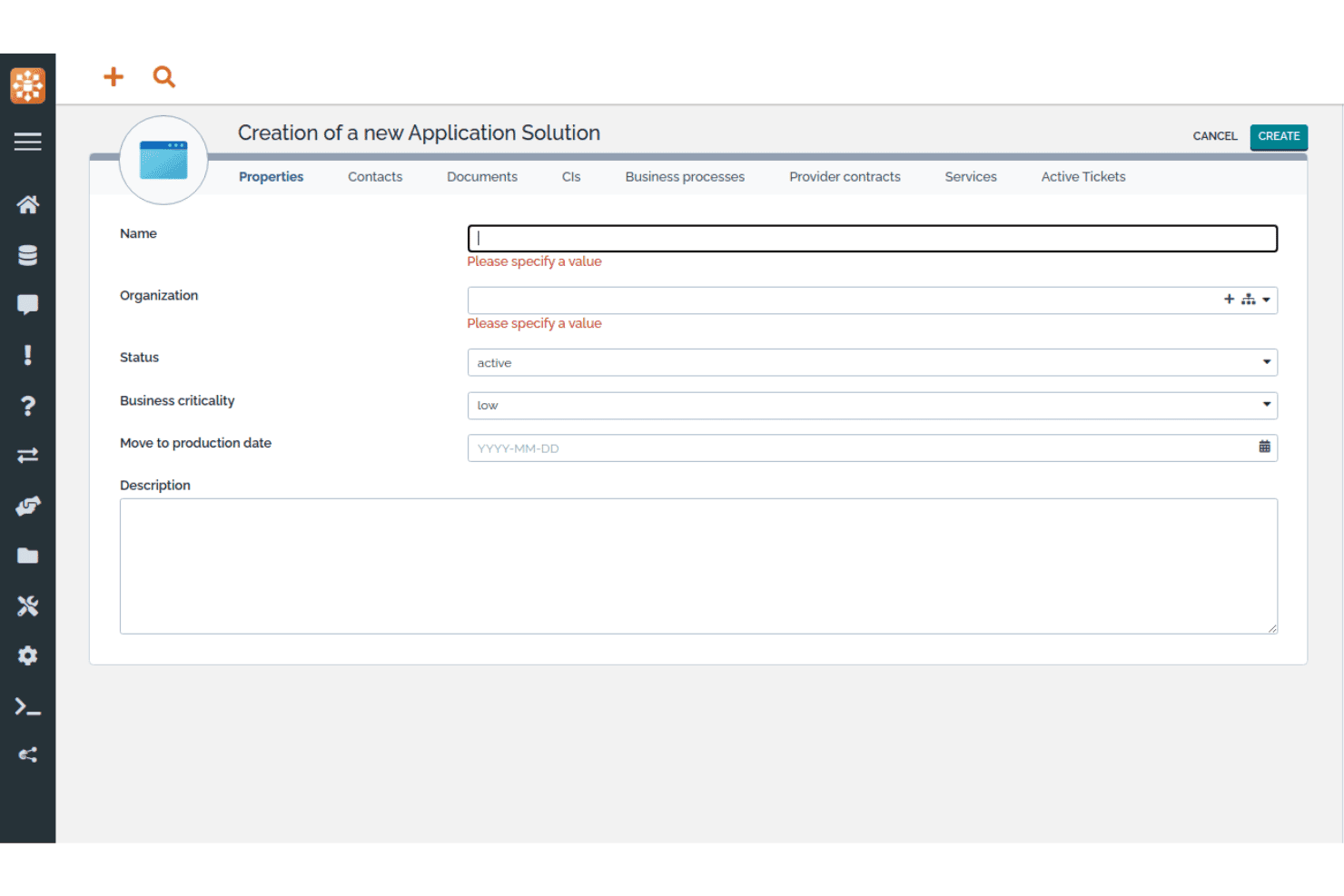
iTop lets users register new application solutions with key properties. iTop is an open-source CMDB and ITSM platform that combines a customizable CI repository, dependency mapping, impact analysis, and native IT service management processes in a single self-hosted or SaaS deployment.
Who Is iTop Best For?
iTop is a strong fit for IT teams that want a fully customizable, open-source CMDB without paying per-seat or per-CI licensing fees.
Why I Picked iTop
iTop earns its spot on my shortlist because the iTop Designer lets you build entirely new CI classes, custom attributes, and relationship types without writing raw code, which is rare in open-source CMDB tools. I also like that impact analysis is baked directly into the core platform: link a CI to an incident, and iTop immediately surfaces every dependent service or contract affected. The Community edition gives you all of this with no CI caps and no licensing fees.
iTop Key Features
- Data synchronization engine: Pull CI data from multiple external sources simultaneously, with configurable reconciliation rules per source and per CI class.
- Multi-organization support: Manage CIs, teams, contacts, and service relationships across separate organizational units within a single iTop instance.
- REST/JSON API: Run full CRUD operations on all objects, including custom CI classes, to connect iTop with external tools and automation workflows.
- Role-based access control: Define granular user profiles via the Designer, with SSO (SAML, OAuth, OpenID Connect) and MFA (TOTP, hardware keys) built in.
iTop Integrations
iTop offers native integrations with Microsoft Azure, VMware vSphere, Microsoft InTune, Proxmox, OCS Inventory NG, Ansible, LDAP/Active Directory, Slack, and Microsoft Teams (via webhooks), plus TeemIP for IP address management. A REST/JSON API is available for custom integrations, and Case Exchange supports ticket sync with third-party ITSM tools in higher tiers.
Pros and Cons
Pros:
- Low-code interface for custom CI classes
- Native ITSM and CMDB integration throughout platform
- Unlimited CIs in the free community edition
Cons:
- UI feels dated compared to competitors
- No native AWS or GCP discovery support
Learn more about iTop: Best for visual change impact mapping
- Free trial available
- From $10,000/year (billed annually)

Virima provides a unified dashboard for IT infrastructure visibility. Virima is a CMDB and IT asset management platform that combines multi-method automated discovery, dependency mapping, and bi-directional ITSM integrations into a single, all-inclusive solution.
Who Is Virima Best For?
Virima is a strong fit for mid-market IT teams that need a full-suite CMDB with visual dependency mapping, without paying separately for each module.
Why I Picked Virima
I picked Virima as one of the best because its ViVID™ engine does something most CMDBs can't: it renders live, interactive service dependency maps with blast-radius analysis before a change is approved, so your CAB reviewers can see exactly which CIs are at risk. Active incidents, open change requests, and CVE flags all overlay directly onto the same map. I also like that CMDB health scoring tracks data quality per CI across completeness, freshness, and consistency, and can block changes on low-confidence records.
Virima Key Features
- Multi-method automated discovery: Runs agent-based, agentless (140+ probes), and API-based discovery across on-prem, AWS, Azure, VMware, Hyper-V, and Kubernetes environments simultaneously.
- CMDB health scoring: Tracks data quality per CI across completeness, freshness, and consistency dimensions, and can trigger rescans or block changes on low-confidence records.
- Bi-directional ITSM integrations: Syncs CI data natively with ServiceNow, Jira Service Management, Ivanti, HaloITSM, Xurrent, Hornbill, and TeamDynamix—included in every plan at no extra cost.
- Software usage metering: Monitors actual application usage via the Windows Discovery Agent to identify unused licenses and support reclamation decisions.
Virima Integrations
Virima offers bi-directional native integrations with ServiceNow, Jira Service Management, Ivanti, HaloITSM, Xurrent, Hornbill, and TeamDynamix for ITSM workflows, plus API-based connectors for AWS, Azure, VMware, Hyper-V, Kubernetes, LogicMonitor, SolarWinds, Okta, Microsoft SCCM, and the NIST National Vulnerability Database. A full REST API is included in every plan for custom integrations.
Pros and Cons
Pros:
- CMDB health scoring blocks risky changes
- Multi-method automated IT asset discovery
- Visual change impact mapping with live data
Cons:
- Form editor lacks drag-and-drop interface
- No Google Cloud discovery connector available
Learn more about Virima:

CloudAware lets users filter and manage all IT assets in one inventory view. CloudAware is a Salesforce-native CMDB platform that combines agentless multi-cloud asset discovery, dependency mapping, IT asset management, compliance-as-code, and integrated FinOps and security posture management across cloud and hybrid environments.
Who Is CloudAware Best For?
CloudAware is a strong fit for enterprise IT and cloud operations teams managing assets across two or more cloud providers who need unified visibility without deploying agents.
Why I Picked CloudAware
I've included CloudAware in my top picks because its agentless, API-based discovery spans AWS, Azure, GCP, Oracle Cloud, and Alibaba Cloud simultaneously, giving you a unified CMDB across every cloud you run without deploying a single agent. I especially like that it builds a complete asset inventory within a day using read-only credentials. Its Tag Analyzer then normalizes tags across all providers, so your CI records stay consistent regardless of which team provisioned the resource.
CloudAware Key Features
- Compliance-as-code: Author compliance policies in a custom DSL, version-control them in Git, and run pull request reviews and unit tests before deploying.
- Flow Builder automation: Use a drag-and-drop, no-code interface to build and orchestrate automated workflows across your cloud and on-premises environments.
- FinOps module: Track reserved instance utilization, generate chargeback reports, and get rightsizing recommendations across multi-cloud billing sources.
- Vulnerability management: Group and prioritize vulnerabilities using CMDB asset ownership and environment context to rank and remediate findings at scale.
CloudAware Integrations
CloudAware offers 60+ native integrations, including AWS, Microsoft Azure, Google Cloud Platform, ServiceNow, Jira, PagerDuty, Datadog, CrowdStrike, Splunk, and Terraform. It also provides a REST API, Bulk API, and CLI for custom integrations.
Pros and Cons
Pros:
- Automated compliance-as-code for policy enforcement
- Salesforce-native CMDB with granular access controls
- Unified multi-cloud asset discovery and mapping
Cons:
- UI performance can lag with large environments
- ITSM workflows depend on external platforms
Learn more about CloudAware: Best for application dependency mapping
- Free trial + free demo available
- Pricing upon request
Visit WebsiteCustomer Rating:4.8/5
Device42 maps cloud resource dependencies visually in real time. Device42 is a CMDB platform that combines automated agentless discovery, application dependency mapping, IT asset management, and data normalization across physical, virtual, cloud, and container environments.
Who Is Device42 Best For?
Device42 is a strong fit for mid-to-large IT teams managing hybrid environments who need accurate application dependency maps to support cloud migrations and change impact analysis.
Why I Picked Device42
I picked Device42 as one of the best because its Application Dependency Mapping automatically generates service-to-service dependency visuals without agents, which matters when you're planning a cloud migration and need to know exactly what breaks if you move one component. I also like that Application Impact Lists let you assess blast radius before making changes, and Affinity Group discovery surfaces logically related resources you might otherwise miss.
Device42 Key Features
- EnrichAI data normalization: Automatically standardizes OS names, vendor names, and software titles across discovery sources, and appends EOL/EOS lifecycle data from major software vendors.
- Agentless multi-cloud discovery: Discovers assets across AWS, Azure, GCP, Oracle Cloud, and Alibaba Cloud using native cloud APIs, with no agents required on target systems.
- Software license management: Compares installed software counts against purchased licenses, flags prohibited software, and tracks license agreement expiration dates.
- InsightsAI natural language querying: Converts plain-English questions into SQL queries against the CI database, returning custom reports without requiring query expertise.
Device42 Integrations
Device42 offers 40+ native integrations, including Freshservice, ServiceNow, Jira Service Management, Zendesk, Ansible, Puppet, Chef, Jenkins, Splunk, and PagerDuty. It also provides a RESTful API and webhooks for custom integrations.
Pros and Cons
Pros:
- Compliance dashboards support multiple frameworks
- EnrichAI auto-normalizes vendor and OS names
- Agents not required for dependency mapping
Cons:
- Discovery can slow under heavy load
- Initial setup feels overwhelming for small teams
Learn more about Device42: Best for CMDB auto-mapping suggestions
- Free demo + 30-day free trial available
- From $1,499/year
Visit WebsiteCustomer Rating:4.6/5
InvGate Asset Management maps CI relationships in a visual diagram view. InvGate Asset Management is a CMDB and IT asset management platform that combines automated multi-source discovery, visual dependency mapping, AI-powered relationship suggestions, and native ITSM integration.
Who Is InvGate Asset Management Best For?
IT teams managing hybrid environments who want AI-assisted CMDB relationship mapping without the complexity of enterprise-grade platforms.
Why I Picked InvGate Asset Management
I've included InvGate Asset Management in my top picks because the CMDB Auto-Mapping feature genuinely changes how teams build and maintain relationship data. Instead of manually tracing dependencies, the AI engine detects critical asset relationships across on-prem and cloud environments and queues them as accept-or-reject suggestions. I also like that Atlas enriches CI records with end-of-life and version status automatically, so your CMDB reflects real-world asset health without constant manual updates.
InvGate Asset Management Key Features
- Multi-source automated discovery: Scans on-premises, cloud (AWS, Azure, GCP), and hybrid environments using both agent-based and agentless methods across 11+ protocols.
- Health rules: Define custom conditions to flag CIs as healthy, at risk, or critical, keeping CI data quality in check across your CMDB.
- Atlas asset enrichment: Automatically populates CI records with end-of-life dates, version status, and lifecycle alerts pulled from a universal IT database.
- Granular RBAC: Scopes access permissions by location, asset type, and tags so different teams only see and manage the CIs relevant to their role.
InvGate Asset Management Integrations
InvGate Asset Management offers native integrations with InvGate Service Management, ServiceNow CMDB, Jira, Zendesk, Microsoft Intune, Jamf, AWS, Azure, Google Cloud Platform, and VMware, plus connectivity across the Microsoft ecosystem including Microsoft 365 and Entra ID. A REST API is available for custom integrations, and Zapier support is offered as a paid add-on through InvGate Service Management.
Pros and Cons
Pros:
- Visual dependency and topology mapping
- Multi-source automated discovery, including MDM
- AI-powered CMDB auto-mapping suggestions
Cons:
- Reporting and dashboard customization is limited
- Auto-mapping feature in early access
Learn more about InvGate Asset Management: Best for large-scale hybrid IT discovery
- Free demo available
- Pricing upon request
Visit WebsiteCustomer Rating:4.2/5
OpenText centralizes sales data, contracts, and orders in one dashboard. OpenText Universal Discovery and CMDB is an enterprise-grade CMDB platform built for large-scale hybrid IT environments, covering automated discovery, dependency mapping, service modeling, and CI data normalization across on-premises, multicloud, and containerized infrastructure.
Who Is OpenText Best For?
OpenText Universal Discovery and CMDB is built for large enterprises with mature IT teams managing complex, multi-layered infrastructure across on-premises, cloud, and hybrid environments.
Why I Picked OpenText
I picked OpenText Universal Discovery and CMDB because it's built to handle discovery at a scale most tools simply can't match. The platform covers 3,500+ network device types and 250+ vendors, and its Automated Service Modeling continuously rebuilds living dependency maps as infrastructure changes, without manual intervention. I also find the Last Login Discovery feature genuinely useful for catching inactive accounts and reclaiming licenses across massive environments.
OpenText Key Features
- Dynamic software discovery: Scans your environment against a library of 140,000+ software titles, including end-of-life status flags, to surface compliance and security gaps.
- Topology Query Language (TQL): Lets you write custom queries to extract specific CI relationships and dependencies directly from the CMDB data model.
- Role-based access control (RBAC): Restricts CI data access by user role, supporting audit requirements for SOX, HIPAA, and ISO 27001 compliance.
- Remote probe management: Lets you push hotfix updates across all discovery probes simultaneously from the UI, without needing direct access to each probe.
OpenText Integrations
OpenText Universal Discovery and CMDB offers native integrations with ServiceNow (certified app), BMC, Jira Service Management, CrowdStrike Falcon, Infoblox, and Oracle LMS, along with deep connections across the OpenText ecosystem including SMAX, Network Operations Management, Cloud Management, AI Operations Management, and Asset Management. It also supports Topology Query Language (TQL) and an extensible API for custom integrations and CI data extraction.
Pros and Cons
Pros:
- Handles environments with 200 million CIs
- Supports living service maps with auto-updates
- Discovers 3,500+ network device types
Cons:
- UI feels outdated compared to newer platforms
- Requires specialized expertise for reliable setup
Learn more about OpenText: Best for CMDB with service mapping
- Free demo available
- Pricing upon request
Visit WebsiteCustomer Rating:4/5
Ivanti Neurons surfaces endpoint vulnerability risks across all devices. Ivanti Neurons is a CMDB and IT asset management platform that combines continuous multi-environment discovery, service dependency mapping, and a unified CI repository with native ITSM integration.
Who Is Ivanti Neurons Best For?
Ivanti Neurons is a strong fit for enterprise IT teams that need a single platform managing both asset records and configuration relationships across complex, multi-environment infrastructures.
Why I Picked Ivanti Neurons
I picked Ivanti Neurons as one of the best because its service mapping capability genuinely sets it apart from standalone CMDB tools. The platform auto-generates dynamic dependency maps directly from discovery data, then overlays open incidents and pending changes so you can see blast-radius impact before you approve anything. I also like that ITAM and CMDB records stay synchronized in one unified model, so your CI data already carries lifecycle and ownership context without any manual cross-referencing.
Ivanti Neurons Key Features
- Continuous multi-environment discovery: Automatically scans on-premises, cloud (AWS, Azure), SaaS, OT/IoT, and legacy environments using both active and passive methods to keep CI records current.
- Configuration drift detection: Monitors CIs for deviations from their expected state and flags changes, giving you an ongoing audit trail per configuration item.
- Reconciliation and normalization engine: Automatically deduplicates and consolidates asset data from UEM, cloud platforms, vulnerability scanners, and ITSM sources into a single authoritative record.
- Role-based access control with SSO and MFA: Manages user permissions at a granular level with centralized authentication, single sign-on support, and multi-factor authentication enforced by default.
Ivanti Neurons Integrations
Ivanti Neurons offers native integrations with ServiceNow, BMC, Jamf, CrowdStrike, Wiz, Tenable, Rapid7, Qualys, Okta, and Zscaler, plus native connectivity across the Microsoft ecosystem including Azure, Azure AD, and Azure DevOps (via the Ivanti Neurons iPaaS). It also connects with AWS, Google Chrome Enterprise, and Cisco, and provides open REST APIs through the Ivanti Developer Hub for custom integrations, with additional pre-built connectors available on the Ivanti Marketplace.
Pros and Cons
Pros:
- Blast-radius analysis for impending changes
- Unified platform for ITAM and CMDB
- Auto-generates dynamic service dependency maps
Cons:
- Implementation can require significant configuration effort
- No self-serve free trial available
Learn more about Ivanti Neurons: Best for federated configuration data
- Free demo available
- Pricing upon request

BMC Helix CMDB monitors data integrity and completeness across IT assets. BMC Helix CMDB is an enterprise-grade configuration management database that combines a federated CI repository, agentless multi-cloud discovery, dependency mapping, and a built-in reconciliation and normalization engine.
Who Is BMC Helix Best For?
BMC Helix CMDB is a strong fit for large enterprises managing complex, multi-source IT environments where data accuracy across discovery tools, cloud platforms, and ITSM workflows is non-negotiable.
Why I Picked BMC Helix
BMC Helix CMDB earns its spot on my shortlist because its federated data architecture lets you pull CI data from multiple authoritative sources, like BMC Helix Discovery, SCCM, and cloud connectors, into a single reference database without flattening everything into one opinionated data model. I particularly like the Reconciliation Engine, which lets you define per-attribute data precedence rules so that the right source wins for each field when records conflict. Pair that with the Normalization Engine's rule-based deduplication across datasets and CI classes, and you get a CMDB that stays accurate even as your discovery sources multiply.
BMC Helix Key Features
- Agentless multi-cloud discovery: BMC Helix Discovery scans AWS, Azure, GCP, and OCI environments without requiring installed agents, using an Outpost-based architecture.
- HelixGPT generative AI assistant: An embedded AI tool that produces natural language summaries, dashboard narratives, and workflow automation across the platform.
- Kubernetes and container discovery: The platform maps container-to-container links, pod-to-deployment correlations, and external software dependencies across containerized environments.
- PinkVerify-certified ITSM workflows: CI data flows directly into incident, problem, change, and asset management records within the BMC Helix ITSM suite, certified across 18 ITIL practices.
BMC Helix Integrations
BMC Helix CMDB offers native integrations across the BMC Helix ecosystem (Helix ITSM, Helix Discovery, Helix Operations Management, and Atrium Integrator), along with Microsoft SCCM, Active Directory, Microsoft Teams, ServiceNow CMDB, CyberArk, and ARCON PAM, plus cloud connectors for AWS, Azure, GCP, and OCI. REST APIs are available for custom integrations, and Kubernetes and mainframe environments are supported through dedicated discovery providers.
Pros and Cons
Pros:
- Mature normalization and reconciliation engines
- Agentless multi-cloud and container discovery
- Handles hundreds of millions of CIs
Cons:
- Backend deduplication lacks granularity
- Impact analysis can be slow
Learn more about BMC Helix:
Annen CMDB-programvare
Her er noen flere CMDB-programmer som ikke kom med på kortlisten min, men som likevel er verdt å undersøke:
- 11Xurrent ITSMBest for unified CI and asset records
- 12FreshserviceBest for mid-market ITSM and CMDB in one
- 13LansweeperBest for discovery-first CMDB feeding
- 14ServiceDesk PlusBest for unified CMDB and ITSM workflows
- 15HaloBest for ITSM-native CI tracking
- 16Jira Service ManagementBest for ITSM teams linking CIs to every ticket
- 17Flexera OneBest for normalized technology intelligence
- 18AtomicworkBest for AI-native CMDB and ITSM in one
- 19AxoniusBest for CMDB data quality and enrichment
- 20ServiceNow CMDBBest for enterprise service graph data
How I Evaluate CMDB Software
I split my evaluation into baseline capabilities every tool must meet and the differentiators that separate a solid CMDB from one that holds up when a misconfigured CI cascades into a P1 incident.
Core Functionality (Table Stakes for This List)
When I'm selecting tools for my list, I rank each one on a scale from 0 (does not offer the functionality) to 5 (excels in this area) for each core functionality listed below. I then calculate the tool's total score into a percentage, using 75% as a benchmark to help assess its overall fit for the list.
- CI Repository & Data Model: I evaluate how flexible the data model is—whether you can define custom CI classes, attributes, and hierarchies or you're stuck with a rigid flat list.
- Automated Discovery: The tool should detect assets across on-prem, cloud, and containerized environments without relying on manual CSV imports or single-environment agents.
- Dependency & Relationship Mapping: I look for dynamic topology views and impact analysis, not just static parent/child links—think blast-radius visibility before pushing a change.
- ITSM Integration: Bi-directional CI context in incident, problem, and change tickets matters here. Tools like ServiceNow and BMC Helix handle this natively, while others rely on connectors.
- Reconciliation & Normalization: Multiple discovery sources mean duplicates and conflicts. I check for rule-based reconciliation engines that deduplicate and score data quality automatically.
- Access Control & Audit Logging: Granular RBAC and a full audit trail for every CI change are what I look for, especially for teams that need to demonstrate compliance during audits.
Once I have a list of tools that meet the criteria, I consider what sets each platform apart.
Differentiating Factors (What Sets Vendors Apart)
Here's how I compare and contrast different vendors:
Standout Features
I look for service graph visualization that maps application-to-infrastructure dependencies in real time—before a change window, I want to trace the blast radius across hybrid environments, not guess at it. Business service mapping is equally important because it ties CIs to revenue-generating applications and SLAs, letting you prioritize a P1 by business impact. I also evaluate multi-cloud discovery connectors, checking whether a tool covers AWS, Azure, GCP, and Kubernetes out of the box with drift detection built in.
Beyond Features
I evaluate deployment flexibility first—whether a vendor offers SaaS, self-hosted, and air-gapped options matters when your security posture rules out multi-tenant cloud. Compliance certifications like SOC 2 Type II and ISO 27001 are equally important, especially if you need to generate audit evidence for PCI-DSS or SOX without stitching reports together manually. I also check total cost of ownership: some vendors bundle discovery and service mapping in base pricing, while others charge per module, which can double your spend as CI counts grow.
Slik velger du CMDB-programvare
Valget av riktig CMDB-programvare avhenger av hva teamet ditt trenger for å holde konfigurasjonsdata nøyaktige, tilgjengelige og handlingsrettede i stor skala:
| Hvis prioriteten din er ... | Se etter ... |
| Støtte for multisky-miljøer | Innebygde oppdagelseskoblinger for AWS, Azure, GCP og Kubernetes |
| Redusere manuelle oppdateringer av ressurser | Automatisert oppdagelse av ressurser og avhengigheter på tvers av lokale miljøer og skyen |
| Integrasjon med hendelsesarbeidsflyter | Integrert eller toveis ITSM-integrasjon med servicedesken din |
| Dokumentere revisjonsberedskap | Konfigurerbar RBAC, revisjonsspor og eksporterbare samsvarsrapporter |
| Tilpasse seg kompleks infrastruktur | Fleksible datamodeller med egendefinerte CI-klasser og attributter |
Slik vurderer du kortlisten din
- Test automatisert oppdagelse: Kjør en femdagers prøveperiode for å registrere ressurser i skyen, lokale miljøer og containere uten å importere CSV-filer.
- Bekreft dybden i tjenestekartleggingen: Kartlegg applikasjonsavhengigheter og kontroller at visualiseringene oppdateres i sanntid etter at du har gjort en endring.
- Valider ITSM-integrasjonen: Opprett en endringssak og kontroller om CI-detaljer og endringspåvirkning automatisk synkroniseres med ITSM-plattformen din.
- Gå gjennom samsvarsartefakter: Be om et eksempel på en revisjonslogg, og se etter detaljerte, tidsstemplede CI-endringer med angivelse av bruker.
- Bestem deg for åpen kildekode eller enterprise: Vurder utvidelsesmuligheter og kostnadsbesparelser opp mot administrert brukerstøtte og sikkerhetssertifiseringer.
Hva er CMDB-programvare?
CMDB står for database for konfigurasjonsstyring. CMDB-programvare er et verktøy som samler inn, lagrer og administrerer data om konfigurasjonselementer (CI-er) på tvers av IT-miljøet ditt. Den kartlegger relasjoner mellom ressurser, sporer endringer og vedlikeholder en detaljert oversikt over infrastrukturelementer. Ved å bruke en CMDB kan teamet ditt opprettholde datanøyaktigheten, spore avhengigheter og støtte prosesser for hendelser og samsvar ved å sørge for at alle CI-er og forbindelsene deres alltid er synlige og oppdaterte.
Funksjoner i CMDB-programvare
Når du velger CMDB-programvare, bør du se etter følgende viktige funksjoner:
- CI-register og datamodellering: Opprett, kategoriser og administrer konfigurasjonselementer (CI-er), inkludert egendefinerte klasser, attributter og relasjoner.
- Automatisert ressursoppdagelse: Finn og registrer ressurser på tvers av lokale, skybaserte og hybride miljøer med minimal manuell innsats.
- Kartlegging av avhengigheter og relasjoner: Kartlegger dynamisk avhengigheter mellom applikasjoner, tjenester, servere og nettverksenheter. Dette gir teamet ditt visuell innsikt i hvordan komponentene samhandler, og bidrar til å vurdere konsekvensene av endringer og hendelser.
- Sporing av endringer og revisjoner: Overvåker konfigurasjonsendringer i individuelle CI-er, registrerer brukerhandlinger og logger øyeblikksbilder for tilbakerulling. Dette revisjonssporet er verdifullt for feilsøking, samsvar og forståelse av historiske konfigurasjonstilstander.
- Tilgangskontroll og tillatelser: Denne funksjonen gir rollebaserte kontroller for ulike brukergrupper, slik at bare autorisert personell kan se eller endre bestemte poster. Dette beskytter sensitive konfigurasjonsdata og støtter arbeidsdeling.
- Integrasjon med ITSM-verktøy: Kobler CMDB-en til arbeidsflyter for hendelses-, problem- og endringshåndtering. Dette sikrer at brukerstøtteagenter har riktig kontekst og kan koble saker direkte til CI-er og relasjonene deres.
- Avstemming og normalisering: Løser datakonflikter fra flere oppdagelseskilder, fjerner duplikater av ressurser og standardiserer postformater. Dette holder databasen ryddig og pålitelig, spesielt i større miljøer.
- Tjeneste- og virksomhetskartlegging: Kobler IT-ressurser til virksomhetens tjenester og prosesser, noe som gjør det enklere å prioritere problemer etter den mulige innvirkningen på kjernevirksomheten eller inntektsgenererende applikasjoner.
- Dashbord og rapportering: Tilbyr ferdiglagde og tilpassbare dashbord for å visualisere beholdningsnøyaktighet, nylige endringer, ressursenes tilstand og samsvarsstatus. Team bruker disse til å overvåke miljøet og dele innsikt med interessenter.
- Samsvars- og eksportfunksjoner: Tilbyr konfigurerbar rapportering for å støtte revisjoner, med eksport av logger og CI-data etter behov for regulatoriske formål eller deling på tvers av team. Dette er spesielt viktig for organisasjoner som er underlagt standarder som SOC 2 eller ISO 27001.
Vanlige AI-funksjoner i CMDB-programvare
I tillegg til de vanlige funksjonene i CMDB-programvare som er nevnt ovenfor, tar mange av disse løsningene i bruk AI med funksjoner som:
- Automatisert avviksdeteksjon: Bruker AI-algoritmer til å overvåke konfigurasjonsdata og endringer i ressurser, og markerer uvanlige mønstre eller avvik som kan tyde på feilkonfigurasjoner, sikkerhetsrisikoer eller samsvarsproblemer. Dette hjelper teamet ditt med å oppdage problemer tidlig, selv i komplekse miljøer.
- Prediktiv konsekvensanalyse: Bruker maskinlæring på historiske data om hendelser og endringer for å forutsi den mulige innvirkningen foreslåtte endringer kan ha på relaterte systemer og tjenester. Dette gir deg dermed en tydeligere forståelse av risikoen før du gjør oppdateringer.
- Intelligent ressursklassifisering: Utnytter AI til automatisk å kategorisere nye eller ukjente ressurser basert på observert atferd, metadata og nettverksaktivitet. Dette reduserer manuell datainntasting og holder CMDB-en organisert etter hvert som miljøet utvikler seg.
- Naturlig språksøk og innsikt: Gjør det mulig for brukere å søke i CMDB ved hjelp av naturlig språk, der AI tolker hensikten og finner relevante konfigurasjonselementer, relasjoner eller revisjonslogger. Dette gjør det enklere for ikke-spesialister å finne informasjonen de trenger.
- Automatisert rotårsaksanalyse: Bruker AI til å sammenstille hendelser, endringer og konfigurasjonsdata, slik at teamet raskt kan identifisere den underliggende årsaken til driftsavbrudd eller ytelsesproblemer. Dette forkorter undersøkelsestiden og bidrar til raskere løsning.
Fordeler med CMDB-programvare
Implementering av CMDB-programvare gir flere fordeler for teamet og virksomheten din. Her er noen av fordelene du kan se frem til:
- Nøyaktig aktivainventar: Oppretthold en samlet database i sanntid over alle konfigurasjonselementer (CI-er) ved hjelp av automatisert oppdagelse og fleksibel datamodellering.
- Tydelig avhengighetskartlegging: Visualiser relasjoner og avhengigheter på tvers av infrastruktur, applikasjoner og forretningstjenester for å støtte bedre endringsvurderinger og hendelsesprioritering.
- Støtte for revisjon og samsvar: Få tilgang til detaljerte revisjonsspor, endringslogger knyttet til brukere og eksporterbare samsvarsrapporter for å oppfylle regulatoriske standarder og interne retningslinjer.
- Raskere løsning av hendelser: Knytt hendelser, problemer og endringer direkte til relevante CI-er og relasjonene deres, slik at teamene får umiddelbar kontekst for å løse problemer.
- Mindre manuelt arbeid: Oppdag, avstem og normaliser automatisk aktivadata fra flere kilder, slik at behovet for manuelle oppdateringer av poster reduseres.
- Rollebasert datastyring: Begrens tilgangen til bestemte CMDB-poster med detaljerte roller og tillatelser.
- AI-assistert innsikt: Oppdag avvik, klassifiser aktiva og vurder mulige konsekvenser av endringer ved hjelp av AI-drevet analyse.
Kostnader og priser
Ved valg av CMDB-programvare er det nødvendig å forstå de ulike prismodellene og planene som er tilgjengelige. Kostnadene varierer basert på funksjoner, teamstørrelse, tillegg og mer. Tabellen nedenfor oppsummerer vanlige planer, gjennomsnittsprisene deres og typiske funksjoner som er inkludert i CMDB-programvareløsninger:
Sammenligningstabell for CMDB-programvare
| Plantype | Gjennomsnittspris | Vanlige funksjoner |
|---|---|---|
| PlantypeGratisplan | Gjennomsnittspris$0 | Vanlige funksjonerGrunnleggende CI-register, begrenset aktivafunn, grunnleggende rapportering og brukerstøtte fra fellesskapet. |
| PlantypePersonlig plan | Gjennomsnittspris$10–$25/bruker/måned | Vanlige funksjonerTilpassede CI-klasser, automatisert aktivafunn, grunnleggende relasjonskartlegging og begrensede integrasjoner. |
| PlantypeForretningsplan | Gjennomsnittspris$25–$60/bruker/måned | Vanlige funksjonerAvansert avhengighetskartlegging, ITSM-integrasjoner, avstemming og normalisering samt revisjonslogging. |
| PlantypeVirksomhetsplan | Gjennomsnittspris$60–$150/bruker/måned | Vanlige funksjonerTjeneste- og forretningskartlegging, API-tilgang, avansert RBAC, samsvarseksport og prioritert brukerstøtte. |