

Verktøy for nettskraping er applikasjoner som automatiserer uthenting av data fra nettsteder, slik at det blir enkelt å samle inn informasjon uten manuell kopiering og innliming. Hvis du leter etter de beste verktøyene for nettskraping, trenger du sannsynligvis å samle inn store mengder nettdata på en pålitelig måte – uten å møte hindringer som antibot-beskyttelse eller endringer i nettstedets struktur.
Med så mange alternativer på markedet er det vanskelig å vite hvilket verktøy som faktisk passer til teknologistakken din, håndterer nettstedene du vil hente data fra, og skalerer i takt med behovene dine. Denne veiledningen gjennomgår de beste verktøyene, slik at du kan sammenligne funksjoner og metoder og finne det som fungerer best for IT-prosjektene dine.
Hvorfor du kan stole på våre programvareanbefalinger
6,700+
Reviews
20
Industry experts
16+
Evaluation factors
14
Years
Teamet vårt har testet og anmeldt programvare siden 2012. Vi er selv teknologiledere, så vi vet hvor vanskelig og hvor viktig det er å velge riktig programvare.
I denne guiden har vi vurdert verktøyene gjennom praktisk testing og uavhengig research og gitt dem poeng ut fra våre utvelgelseskriterier.
Anmeldelsene våre bygger på vår egen redaksjonelle vurdering. De er ikke et salgsargument.
Ekspertanmeldere:
- Paulo Gardini MiguelTech Director
 Tim FisherVP of AI
 Gabriel RosasTech Lead & Software Architect
 Christhian GruhnTech Lead & Platform Architect

Sammenligningstabell: Verktøy for nettskraping
Denne sammenligningstabellen oppsummerer prisopplysningene for mine beste utvalgte verktøy for nettskraping.
| Tool | Best For | Trial Info | Price | ||
|---|---|---|---|---|---|
| 1 | Best for built-in headless browser control | Free plan available | From $30/month | Website | |
| 2 | Best for stealth scraping and bypassing detection | 14-day free trial | From $69/month | Website | |
| 3 | Best for handling dynamic JavaScript websites | Free plan available | From $189/month | Website | |
| 4 | Best for direct pipeline integration | 30-day free trial | From $199/month (billed annually) | Website | |
| 5 | Best for prebuilt robot automation templates | Free plan available | From $19/month (billed annually) | Website | |
| 6 | Best for point-and-click interface users | Free plan available | From $69/month (billed annually) | Website | |
| 7 | Best for managed anti-bot data collection | Free trial available | From $0.5/1,000 records | Website | |
| 8 | Best for enterprise-scale proxy infrastructure | Free plan available | From $1.5/1,000 records/month | Website | |
| 9 | Best for automatic data schema detection | 30-day free trial | From $0.13/1,000 requests | Website | |
| 10 | Best for simple API-driven scraping workflows | Free plan available | From $49/month | Website |


Anmeldelser av de beste verktøyene for nettskraping
Nedenfor finner du mine detaljerte oppsummeringer av de beste verktøyene for nettskraping som kom med på kortlisten min. Anmeldelsene mine gir en grundig gjennomgang av funksjonene, integrasjonene og de beste bruksområdene for hvert verktøy, slik at du kan finne det beste alternativet for deg.
 Best for built-in headless browser control
- Free plan available
- From $30/month
Visit WebsiteCustomer Rating:4.9/5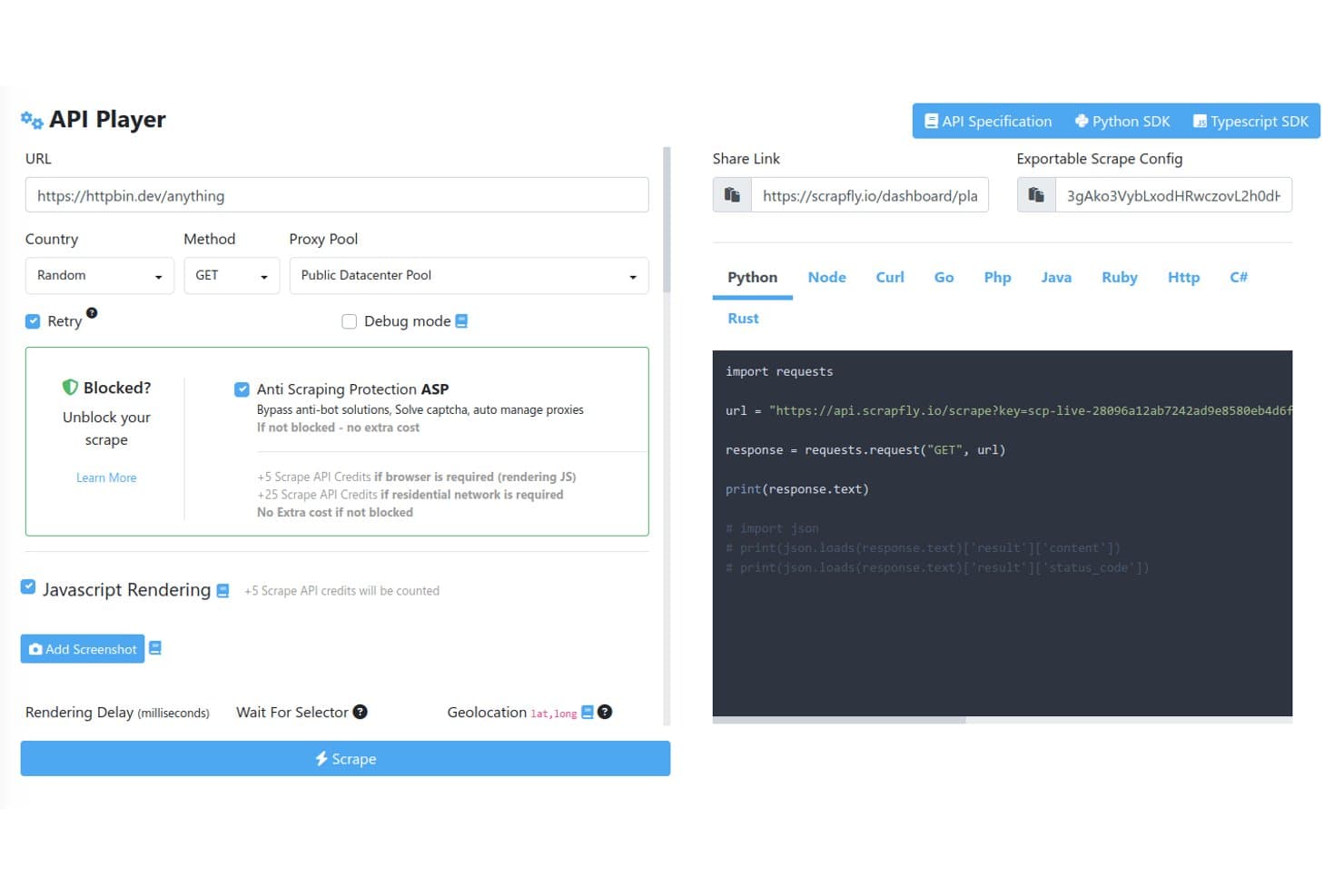
Scrapfly offers an interactive API Player with configurable scraping options including proxy pools, anti-scraping protection bypass, JavaScript rendering, and auto-generated code snippets in multiple languages. Scrapfly is a web scraping API that combines proxy rotation, anti-bot bypass, headless browser rendering, site crawling, screenshot capture, and LLM-powered data extraction under a single API key.
Who Is Scrapfly Best For?
Scrapfly is a strong fit for developers and data engineers who want a code-first scraping API with SDKs in Python, TypeScript, Go, and Rust.
Why I Picked Scrapfly
I picked Scrapfly because its dual-engine browser architecture is unlike anything else I've tested. Curlium handles byte-perfect Chrome JA4 fingerprinting for speed, while Scrapium runs stealth Chromium over CDP with matching fingerprints so sessions can swap mid-crawl without triggering detection. I also like that Scrapium is fully compatible with Playwright and Puppeteer, meaning I can write custom JS Scenarios and wait-for rules without touching my existing browser automation code.
Scrapfly Key Features
- Multi-method extraction API: Extracts structured data using CSS, XPath, regex, JSON schema, and LLM-powered templates.
- Integrated proxy pools: Provides managed datacenter and residential proxies with geo-targeting and BYO proxy support.
- Crawler API: Traverses entire sites with control over crawl depth, rate limits, and project partitioning.
- Native scheduling integrations: Supports Zapier, Make, and n8n for automated workflows, recurring jobs, and webhook triggers.
Scrapfly Integrations
Scrapfly offers native integrations with Zapier, Make, n8n, LlamaIndex, LangChain, CrewAI, and OpenClaw. It also provides SDKs for Python, TypeScript, Go, and Rust. An API is available for custom integrations.
Pros and Cons
Pros:
- Extraction templates for common site types
- Bypasses Cloudflare, DataDome, and Imperva
- Dual stealth browser engines
Cons:
- Not suited for non-technical users
- No native in-product job scheduler
Learn more about Scrapfly: Best for stealth scraping and bypassing detection
- 14-day free trial
- From $69/month
Visit WebsiteCustomer Rating:4.7/5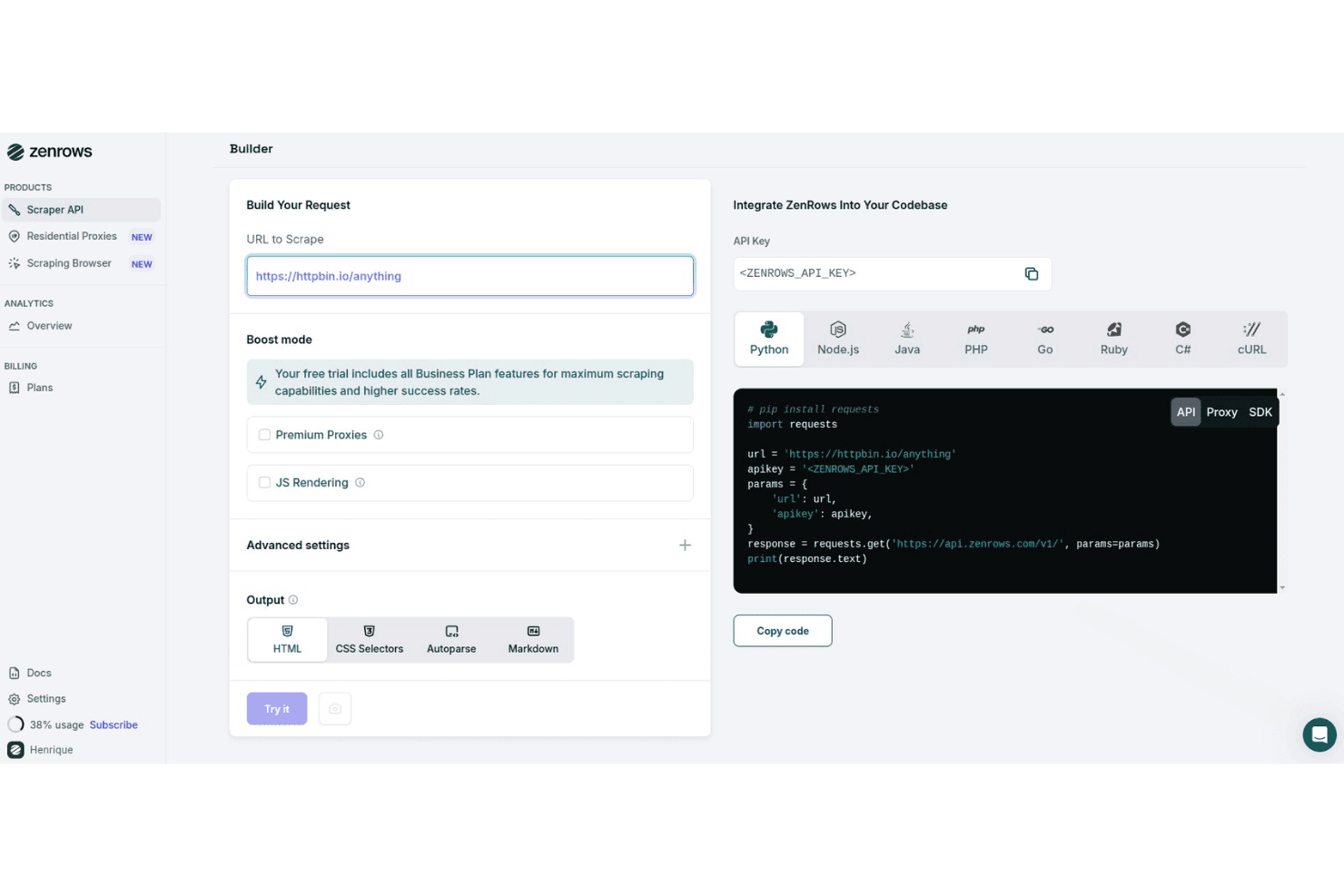
ZenRows offers a visual request builder with multi-language code generation, boost mode options, and output format selection for web scraping. ZenRows is a web scraping API and cloud browser platform that combines anti-bot bypass, residential proxy rotation, JavaScript rendering, and structured data extraction into a single developer-facing toolkit.
Who Is ZenRows Best For?
ZenRows is a strong fit for developers and data engineers who need to scrape sites with aggressive anti-bot protection at scale.
Why I Picked ZenRows
ZenRows earns its spot on my shortlist because of how it handles anti-bot protection. I've scraped Cloudflare-protected sites where standard tools consistently fail, and ZenRows gets through using fingerprinting bypass and automatic CAPTCHA solving without any manual configuration. The Scraping Browser goes further, running full Chromium sessions with stealth headers that closely mimic real user behavior to avoid detection on sites using DataDome or PerimeterX.
ZenRows Key Features
- Universal Scraper API: Make requests using a single endpoint that adapts to different site structures and scraping requirements.
- Residential proxy infrastructure: Choose from a pool of over 55 million residential IPs across 185+ countries for geo-targeted crawling.
- Auto-parsing for structured output: Extract and receive data in JSON, HTML, or Markdown automatically with built-in parsing for popular sites.
- Multi-language SDKs: Access official SDKs for Python, Node.js, Go, PHP, Ruby, Java, and C# to integrate with development workflows.
ZenRows Integrations
ZenRows offers native integrations with Playwright, Puppeteer, n8n, Make, Clay, and Zapier. An API is available for custom integrations.
Pros and Cons
Pros:
- Full headless browser sessions with stealth mode
- High success rate on protected pages
- Bypasses Cloudflare and DataDome reliably
Cons:
- Costs escalate quickly at high request volumes
- No native scheduling or job orchestration
Learn more about ZenRows: Best for handling dynamic JavaScript websites
- Free plan available
- From $189/month
Visit WebsiteCustomer Rating:4.4/5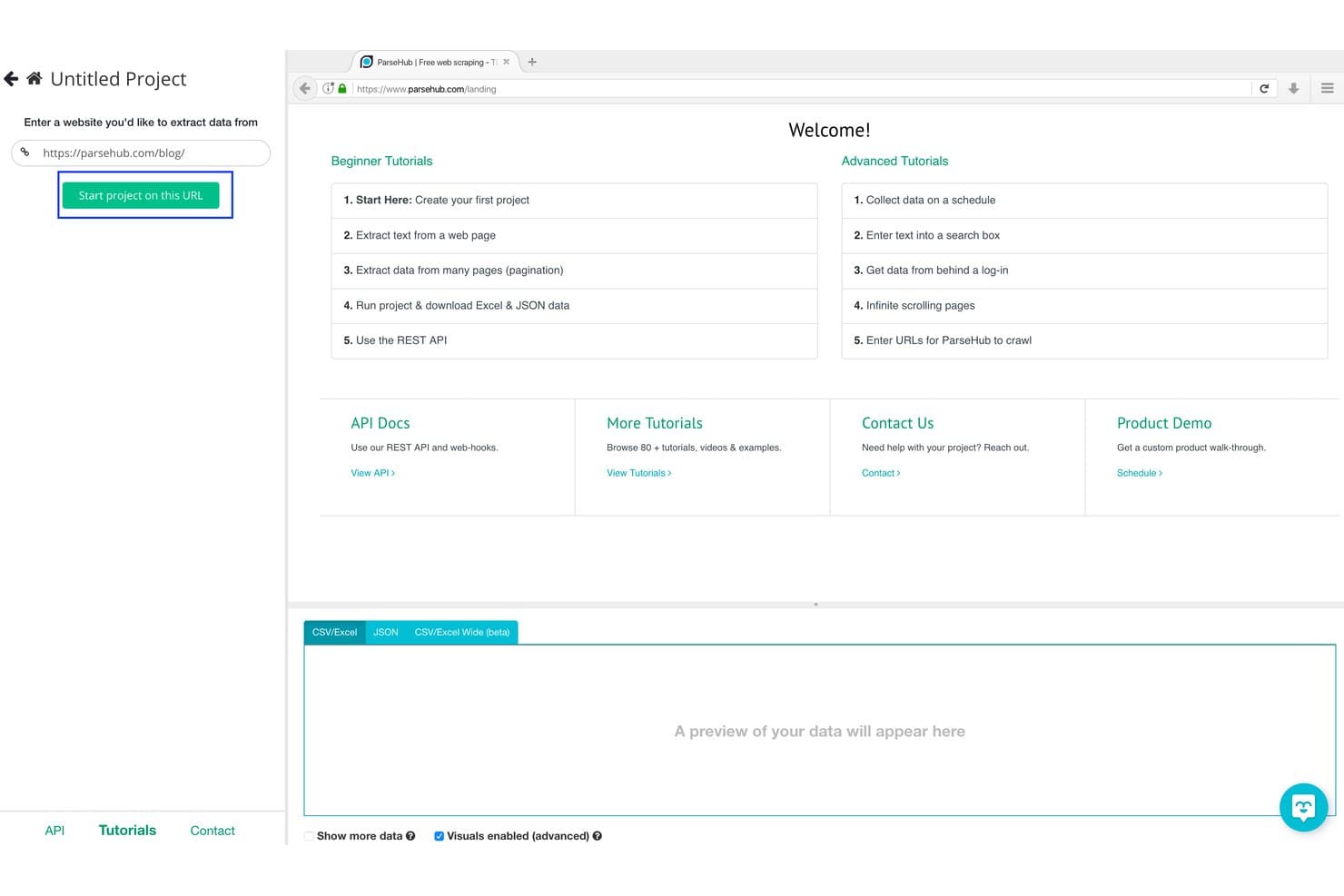
ParseHub offers a visual project setup interface where users enter a URL and click 'Start project on this URL' to begin scraping data from websites. ParseHub is a visual web scraping tool that extracts data from dynamic websites using a click-based interface, with support for JavaScript, AJAX, infinite scroll, form inputs, and scheduled cloud-based runs.
Who Is ParseHub Best For?
ParseHub is a good fit for competitive intelligence analysts and non-technical researchers who need to collect data from JavaScript-heavy sites without writing code.
Why I Picked ParseHub
ParseHub earns its spot as one of the best on my shortlist because it handles the JavaScript rendering challenges that break most no-code scrapers. I've used it to extract data from pages with infinite scroll and dropdown-triggered content, where static HTML scrapers return empty results. Its machine learning engine detects page structure automatically, which means I can build a working scraper for an AJAX-heavy product catalog without writing a single line of XPath.
ParseHub Key Features
- Point-and-click visual builder: Select and extract page elements without manual selector coding.
- Cloud-based scheduling: Schedule recurring scraping tasks on ParseHub's cloud infrastructure.
- REST API access: Manage, trigger, and download scrape results programmatically using the API.
- Automatic IP rotation: Reduce blocking by rotating outbound IPs on cloud-based runs.
ParseHub Integrations
ParseHub offers native integrations with Google Sheets, Tableau, Dropbox, and AWS S3. An API is available for custom integrations and workflow automation.
Pros and Cons
Pros:
- Scrapes run automatically on cloud infrastructure
- Visual builder requires no selector coding
- Handles JavaScript, AJAX, and infinite scroll natively
Cons:
- No built-in CAPTCHA solving
- Caps out on large concurrent scraping jobs
Learn more about ParseHub: Best for direct pipeline integration
- 30-day free trial
- From $199/month (billed annually)
Visit WebsiteCustomer Rating:4.2/5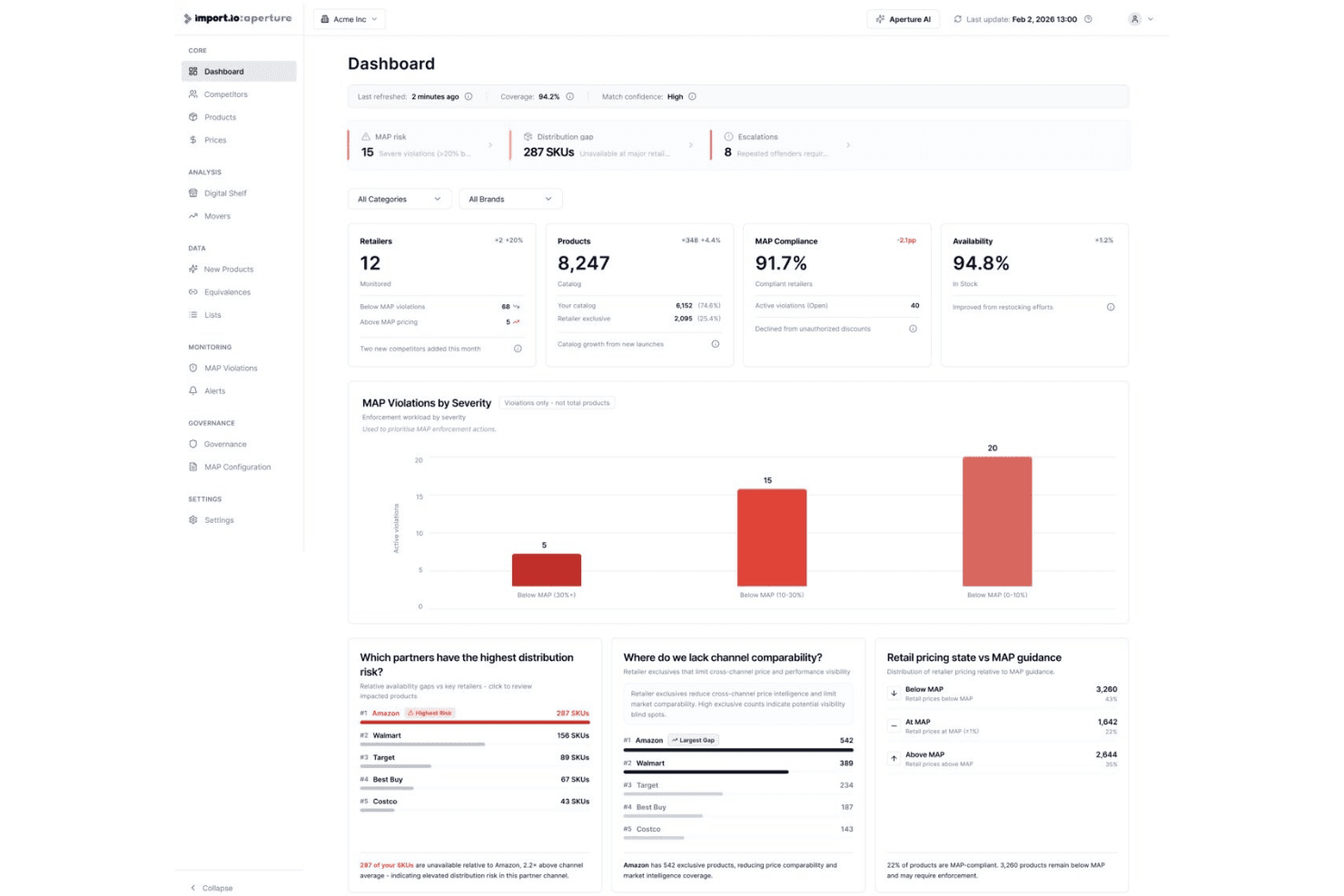
Import.io's Aperture platform offers a dashboard displaying MAP compliance, product availability, retailer distribution gaps, and pricing violations. Import.io is an AI-native, managed web scraping platform that extracts structured data from websites at enterprise scale, handling JavaScript-rendered pages, protected sources, and direct delivery into data pipelines and analytics systems.
Who Is Import.io Best For?
Import.io suits data engineering and competitive intelligence teams at mid-to-large enterprises that need maintained data pipelines without building or managing scrapers in-house.
Why I Picked Import.io
Import.io earns its spot on my shortlist because structured data moves directly from the web into your warehouse, dashboard, or API endpoint without a manual export step in between. I like that webhooks and API delivery are native to the platform, not an afterthought. What I find most valuable are the self-healing pipelines: they automatically adapt when target sites restructure, so I don't have to rebuild extractors every time a retailer updates their page layout.
Import.io Key Features
- AI-assisted extraction models: Automatically detect page structures and adapt schema as websites change.
- Enterprise proxy management: Supports premium and residential proxies for scraping protected or geo-restricted sites.
- Point-and-click visual builder: Select and extract data from complex web pages without writing code.
- Automatic PII masking: Identifies and removes personally identifiable information within scraped datasets for compliance.
Import.io Integrations
Import.io offers native integrations with Google Sheets, Power BI, Tableau, and Excel, and provides an API for custom integrations and webhooks into other systems.
Pros and Cons
Pros:
- Managed extraction reduces in-house engineering workload
- Handles heavily protected and login-walled sites
- Self-healing pipelines auto-adapt to site changes
Cons:
- Limited suitability for small-scale scraping tasks
- Limited transparency on underlying scraping infrastructure
Learn more about Import.io: Best for prebuilt robot automation templates
- Free plan available
- From $19/month (billed annually)
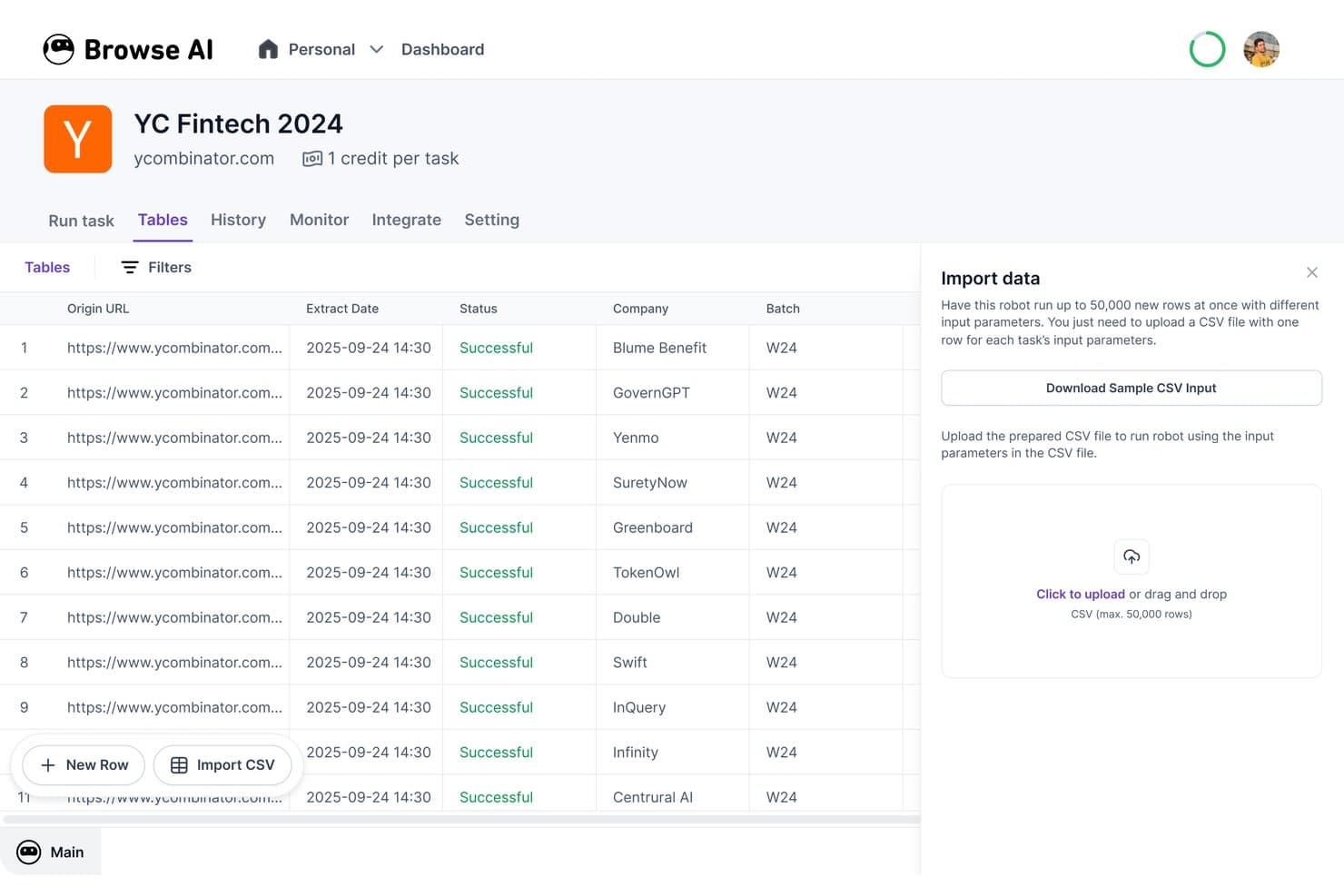
Browse AI offers a no-code web scraping dashboard where users can extract structured data from websites like Y Combinator and export results as CSV files. Browse AI is a no-code web scraping and website monitoring platform that combines a visual point-and-click data extractor with 250+ prebuilt robot templates for automated, scheduled data collection from websites.
Who Is Browse AI Best For?
Browse AI is a strong fit for competitive intelligence analysts and non-technical teams who need to collect structured web data without writing code.
Why I Picked Browse AI
Browse AI earns its spot on my shortlist because of how far ahead its prebuilt robot library is. I can pull structured listings from Amazon, Google Maps, or Indeed without building a scraper from scratch, and each robot already handles pagination and dynamic content for that specific site. What I also appreciate is the AI-powered layout adaptation, which automatically updates a robot when a target site changes its page structure, so scrapes don't silently break mid-pipeline.
Browse AI Key Features
- JavaScript rendering: Automates extraction from modern, JavaScript-heavy websites and single-page applications.
- Residential proxy support: Rotates residential IPs automatically to bypass anti-bot systems without manual proxy setup.
- Webhooks and API access: Allows programmatic submission of scraping tasks and retrieval of data for integration with internal systems.
- Automated change detection: Monitors websites for visual or content changes and sends alerts when updates are detected.
Browse AI Integrations
Browse AI offers native integrations with Google Sheets, Airtable, AWS S3, Zapier, and Make.com. API and webhook access are available for custom integrations.
Pros and Cons
Pros:
- Handles CAPTCHAs and dynamic pages natively
- Auto-adapts when target site layouts change
- 250+ prebuilt robots ready to deploy
Cons:
- Credit costs scale quickly at high volume
- Limited selector-level control for developers
Learn more about Browse AI: Best for point-and-click interface users
- Free plan available
- From $69/month (billed annually)
Visit WebsiteCustomer Rating:4.7/5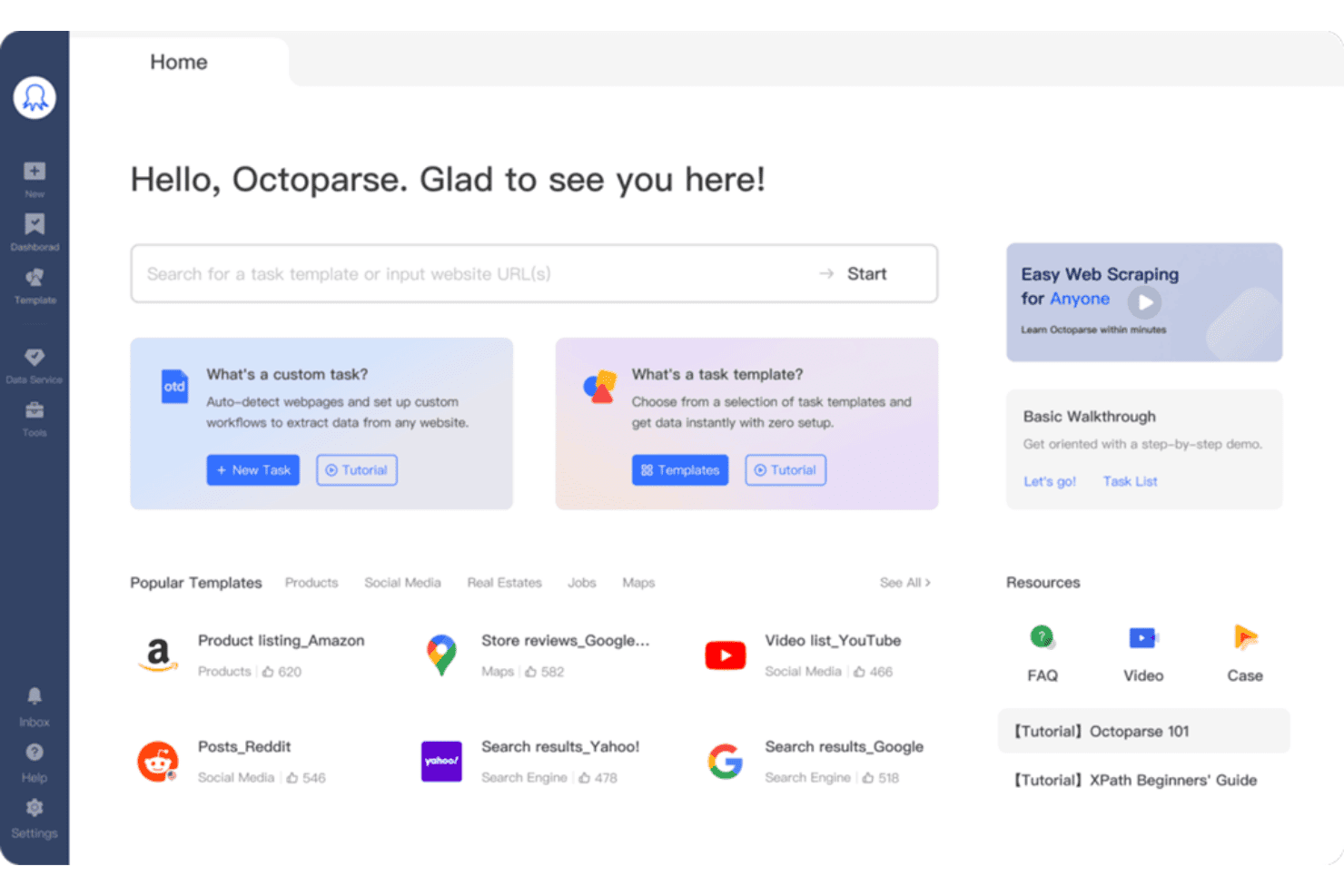
Octoparse offers a home dashboard with popular scraping templates, custom task creation, and quick-start resources for web data extraction. Octoparse is a no-code web scraping tool that combines a visual workflow builder, AI-powered auto-detection, cloud-based extraction, and support for JavaScript-rendered pages to collect structured data from websites.
Who Is Octoparse Best For?
Octoparse is a strong fit for competitive intelligence analysts and business users who need to collect web data regularly but don't have a coding background.
Why I Picked Octoparse
Octoparse earns its spot on my shortlist because the point-and-click workflow builder genuinely removes the technical barrier to web scraping. I like that the AI Auto-detect feature drafts a full extraction workflow by analyzing the target page automatically, so I'm not manually mapping selectors from scratch. The 500+ preset templates for sites like Amazon or Google Maps mean I can get a working scraper running in minutes on the most common targets.
Octoparse Key Features
- Cloud-based concurrent runs: Execute up to 20 scraping tasks in parallel using Octoparse’s cloud engine for faster data collection.
- IP rotation and residential proxies: Rotate IP addresses automatically and access residential proxies to reduce blocking and bypass anti-bot measures.
- Database and cloud exports: Export extracted data directly to MySQL, SQL Server, PostgreSQL, Oracle, Google Sheets, Dropbox, Amazon S3, or via API.
- Automatic CAPTCHA solving: Solve common CAPTCHAs during scraping tasks to maintain scraping continuity and minimize manual intervention.
Octoparse Integrations
Octoparse offers native integrations with Google Sheets, Google Drive, Dropbox, Amazon S3, MySQL, SQL Server, PostgreSQL, and Oracle. It also connects with Zapier and provides an API for custom integrations.
Pros and Cons
Pros:
- Handles infinite scroll, Ajax, and dynamic pages
- AI auto-detects and extracts drafts
- 500+ pre-built templates for common websites
Cons:
- Capped at 20 concurrent cloud processes
- Desktop client runs on Windows only
Learn more about Octoparse: Best for managed anti-bot data collection
- Free trial available
- From $0.5/1,000 records
Visit WebsiteCustomer Rating:4.5/5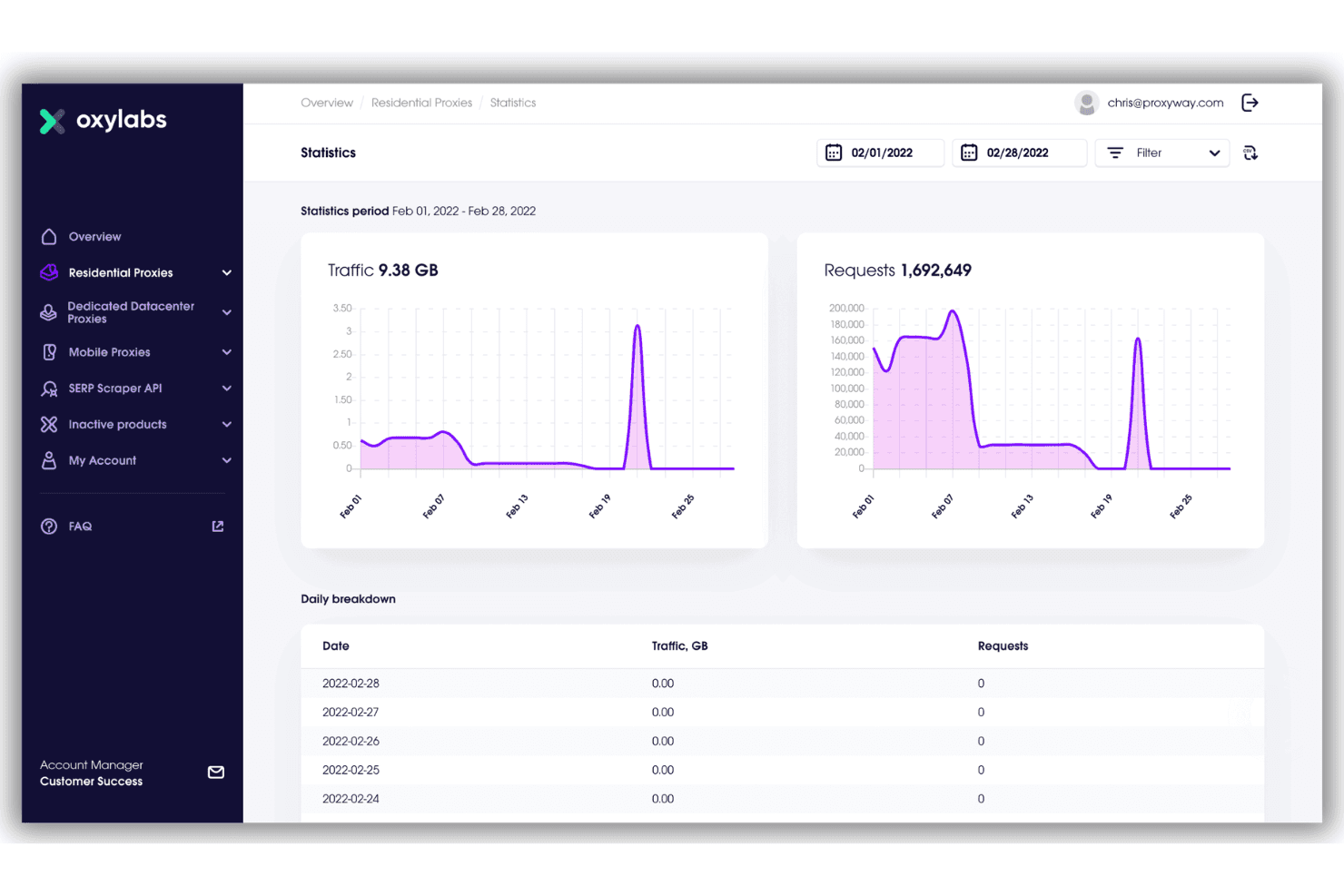
Oxylabs offers a detailed statistics dashboard for residential proxies, showing traffic and request metrics over a selected date range in February 2022. Oxylabs is a web scraper API that handles proxy management, CAPTCHA solving, JavaScript rendering, and structured data extraction across 50+ pre-configured website targets.
Who Is Oxylabs Best For?
Data engineers and backend developers running large-scale, mission-critical scraping pipelines who need enterprise-grade infrastructure and anti-bot reliability.
Why I Picked Oxylabs
Oxylabs earns its spot on my shortlist because of how it handles the hardest part of web scraping: getting past bot detection without managing it yourself. The API handles CAPTCHA solving, proxy rotation across 177M+ residential IPs, and automatic retries without any custom error-handling logic on my end. I also like the success-based pricing model, where only 2xx and 4xx responses count against your quota, so system-side failures don't burn through your results.
Oxylabs Key Features
- Custom parser: Define CSS or XPath selectors to extract precisely structured data from page content.
- OxyCopilot AI assistant: Generate scraping instructions and parse logic using natural language prompts.
- Pre-built target connectors: Use dedicated endpoints for Amazon, Google, eBay, Walmart, Zillow, and other major sites.
- Cloud storage integrations: Export results directly to AWS S3 and Google Cloud Storage for use in data pipelines.
Oxylabs Integrations
Oxylabs offers native integrations with AWS S3, Google Cloud Storage, LangChain, LlamaIndex, CrewAI, n8n, Make.com, and Zapier. An API and SDKs for Python and Go are available for custom integrations.
Pros and Cons
Pros:
- Pre-built endpoints for 50+ major sites
- Success-based pricing avoids wasted request quota
- 177M+ residential IPs across 195 countries
Cons:
- No visual, no-code scraper interface available
- Higher cost than self-managed scraping tools
Learn more about Oxylabs: Best for enterprise-scale proxy infrastructure
- Free plan available
- From $1.5/1,000 records/month
Visit WebsiteCustomer Rating:4.7/5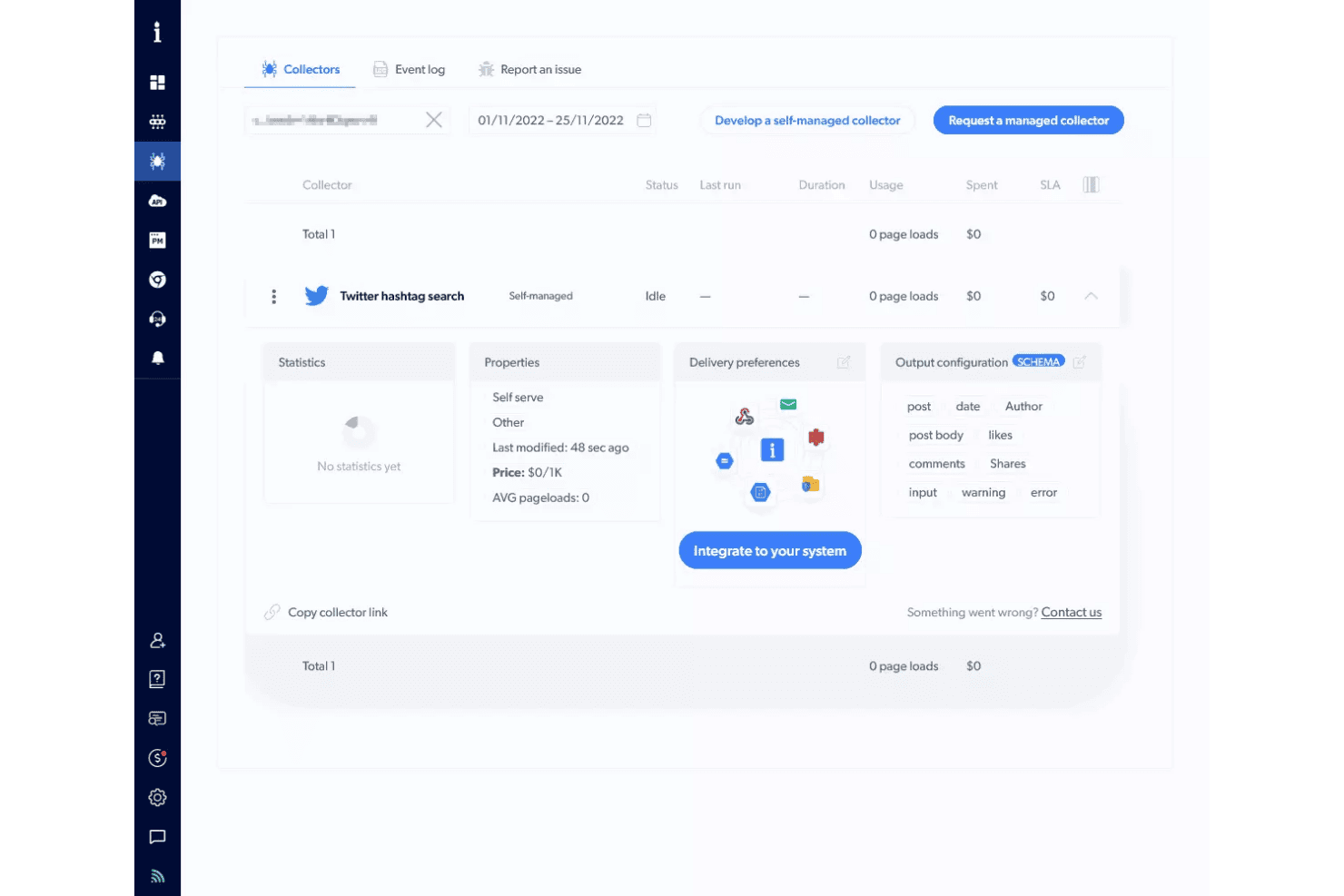
Bright Data's Collectors dashboard offers a Twitter hashtag search collector with self-managed status, output configuration, and system integration options. Bright Data is a web scraping API and no-code scraper platform that combines proxy management, JavaScript rendering, CAPTCHA solving, and structured data delivery across 1,278+ pre-built scrapers for popular websites.
Who Is Bright Data Best For?
Data engineers and backend developers at mid-to-large organizations who need to collect structured web data at scale without managing proxy infrastructure themselves.
Why I Picked Bright Data
Bright Data earns its spot on my shortlist because of the sheer scale of its proxy network: 400M+ residential IPs across 195 countries, with automatic rotation, CAPTCHA solving, and Web Unlocker built to defeat Cloudflare, Akamai, and DataDome without any configuration. I've scraped LinkedIn Sales Navigator and Amazon at volume using Bright Data and hit zero blocks across thousands of requests. The AI Scraper Studio also lets me generate a working scraper API for any new domain in minutes.
Bright Data Key Features
- Pre-built scraper templates: Over 1,200 ready-made scrapers are available for quick deployment across major platforms like LinkedIn, Amazon, and YouTube.
- AI-powered schema detection: AI Scraper Studio generates custom output schemas and automates data mapping from new domains.
- Job management APIs: Provides batch scheduling, recurring runs, and webhook triggers for integrating with workflow automation tools.
- Direct data delivery: Supports exporting data to JSON, NDJSON, CSV, XLSX, or directly pushing to S3, Snowflake, GCS, PubSub, or SFTP.
Bright Data Integrations
Bright Data offers native integrations with Amazon S3, Google Cloud Storage, Azure Blob Storage, Snowflake, and Pub/Sub, and provides an API for custom integrations.
Pros and Cons
Pros:
- Web Unlocker bypasses Cloudflare and DataDome
- Pre-built scrapers for 1,200+ popular websites
- 400M+ residential IPs across 195 countries
Cons:
- Overly complex for non-developer buyers
- Users report billing disputes on failed scrapes
Learn more about Bright Data: Best for automatic data schema detection
- 30-day free trial
- From $0.13/1,000 requests
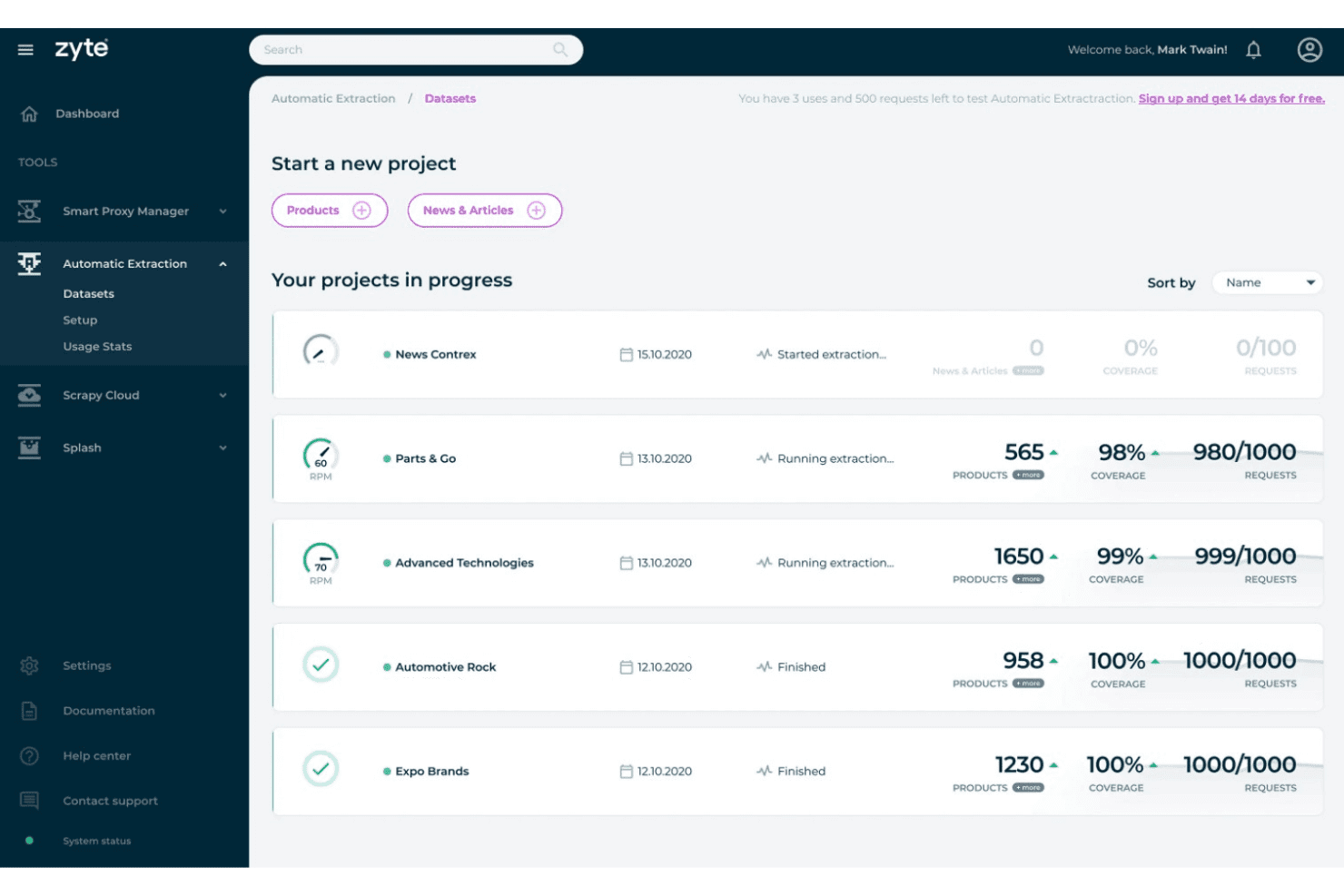
Zyte's Automatic Extraction feature offers ongoing and completed data extraction projects with coverage, product counts, and request usage metrics. Zyte API is a web scraping API that combines headless browser rendering, automatic proxy rotation, CAPTCHA solving, and AI-powered data extraction into a single endpoint.
Who Is Zyte API Best For?
Zyte API is a strong fit for data engineers and Python developers building production-scale scraping pipelines that feed ML models or analytics systems.
Why I Picked Zyte API
Zyte API earns its spot on my shortlist because of how it handles automatic schema detection. Point it at a product page or article, and its LLM-powered extraction layer returns typed, structured JSON without a single CSS selector or XPath expression on my end. When a site updates its layout, the AI adapts, which means I'm not constantly patching parsers every time a competitor redesigns their catalog page.
Zyte API Key Features
- Instant browser rendering: Zyte API spins up pre-warmed headless browsers to load dynamic sites on demand.
- Full proxy infrastructure: Rotates residential, datacenter, and mobile IP addresses automatically with every request.
- Session management: Maintains persistent cookies and user sessions for workflows that require authentication or multi-step actions.
- Cloud delivery integrations: Pushes scraped data directly to destinations like AWS S3, Google Cloud, or Azure for further processing.
Zyte API Integrations
Zyte API offers native integrations with Scrapy, Scrapy Cloud, and Python SDKs, and provides an API for custom integrations. It also supports cloud delivery to AWS S3, Google Cloud, and Azure.
Pros and Cons
Pros:
- Pre-warmed browsers eliminate cold start delays
- Bypasses anti-bot protections without extra configuration
- AI auto-detects schemas without manual selectors
Cons:
- Requires coding knowledge to implement
- Recurring job scheduling needs external tooling
Learn more about Zyte API: Best for simple API-driven scraping workflows
- Free plan available
- From $49/month
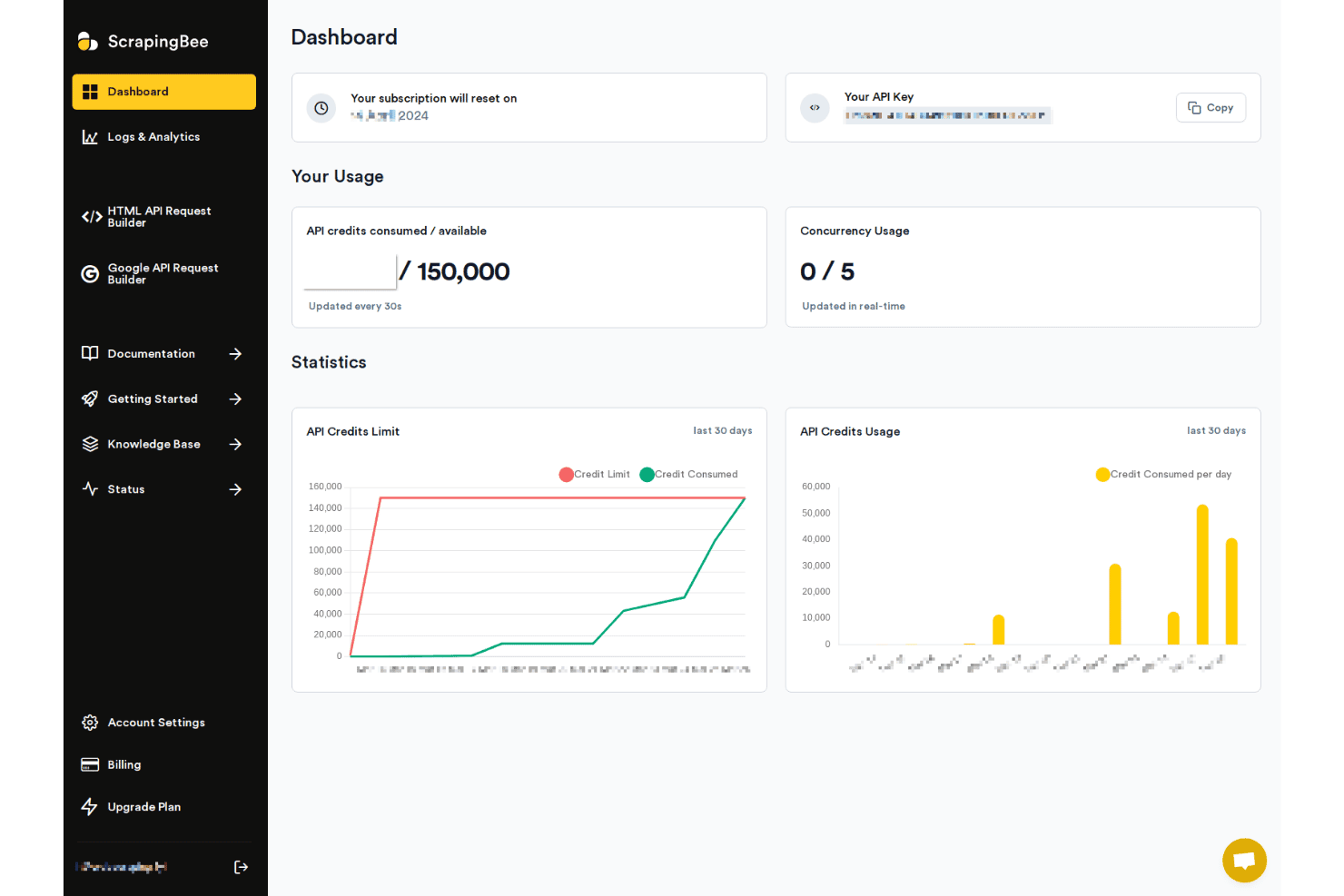
ScrapingBee offers a dashboard with API credit usage, concurrency stats, and 30-day usage charts for monitoring scraping activity. ScrapingBee is a web scraping API that handles headless Chrome rendering, proxy rotation, and anti-bot bypassing, with dedicated extraction APIs for platforms like Google, Amazon, and Walmart.
Who Is ScrapingBee Best For?
ScrapingBee is a strong fit for developers and data engineers who need a reliable, code-first API for extracting web data without building proxy or browser infrastructure from scratch.
Why I Picked ScrapingBee
ScrapingBee earns its spot on my shortlist because of how cleanly its API abstracts away the complexity of modern web scraping. A single request handles headless Chrome rendering, stealth proxy rotation, and JavaScript execution, so I'm not writing browser management code or configuring proxy pools separately. I also like the AI Query feature, which lets me describe what to extract in plain language rather than writing CSS or XPath selectors for every new site I target.
ScrapingBee Key Features
- Dedicated scraping APIs: Choose pre-built endpoints for platforms like Amazon, Walmart, and Google Search to simplify common data collection tasks.
- AI Query extraction: Describe what data to extract in plain language and generate structured results automatically.
- Markdown scraper: Convert any webpage into Markdown or plain text for fast ingestion by downstream AI models or databases.
- No-code integrations: Connect with Make, n8n, and Zapier to automate workflows without writing custom scheduling scripts.
ScrapingBee Integrations
ScrapingBee offers native integrations with Make, n8n, and Zapier, and provides an API for custom integrations.
Pros and Cons
Pros:
- Dedicated APIs for Amazon and Google
- Handles headless Chrome without extra setup
- Only charges for successful requests
Cons:
- Credit costs rise fast at scale
- No native built-in job scheduler
Learn more about ScrapingBee:
Andre verktøy for nettskraping
Her er noen flere alternativer for verktøy til nettskraping som ikke kom med på kortlisten min, men som fortsatt er verdt å se nærmere på:
- 11ScraperAPIBest for hassle-free IP rotation at scale
- 12CrawlbaseBest for API access to global data sources
- 13ScrapyBest for customizable Python scraping frameworks
- 14ScrapingdogBest for rapid deployment with minimal setup
How I Evaluate Web Scraping Tools
I split my evaluation into two layers: the baseline a tool needs to handle real-world scraping—JS rendering, proxy rotation, scheduled jobs—and the differentiators that set the best options apart.
Core Functionality (Table Stakes For This List)
When I'm selecting tools for my list, I rank each one on a scale from 0 (does not offer the functionality) to 5 (excels in this area) for each core functionality listed below. Then, I calculate the tool's total score into a percentage. Each tool needs to achieve a minimum total score of 65% to be considered for inclusion.
- Data Extraction Engine: I evaluate whether a tool supports multiple selector methods like CSS, XPath, and regex, or offers a visual builder for teams that prefer point-and-click setup.
- JavaScript Rendering: Sites built on React, Vue, or Angular need headless browser support. I check for reliable rendering with configurable wait conditions.
- Proxy & Anti-Bot Handling: I look for built-in proxy rotation, CAPTCHA solving, and bypass mechanisms that handle protections like Cloudflare or DataDome without extra setup.
- Scheduling & Automation: Recurring scrapes should run unattended. I evaluate whether the tool supports cron-style scheduling, webhook triggers, and failure retry logic.
- Structured Data Export: I check what output formats are available and whether the tool can push data directly to destinations like S3, Google Sheets, databases, or APIs.
- Scalability & Concurrency: Large jobs across thousands of pages need parallel requests. I look at concurrency limits and whether the tool supports distributed crawling.
Once I have a list of tools that meet the criteria, I consider what sets each platform apart.
Differentiating Factors (What Sets Vendors Apart)
Here's how I compare and contrast different vendors:
Standout Features
Anti-bot bypass is where I see the biggest gap between tools. I look for built-in CAPTCHA solving and browser fingerprinting that handles protections like Cloudflare or DataDome without requiring you to source third-party proxy services. Auto-detection templates also matter a lot—tools like Bright Data and Zyte offer prebuilt scrapers for common targets like Amazon or Google SERPs, which saves hours of manual selector configuration. I also evaluate scheduling and monitoring capabilities, especially failure alerts and automatic retries that keep data pipelines running when target sites change their layouts overnight.
Beyond Features
Pricing models vary widely in this space—some vendors bill per API request, others by bandwidth or successful pages returned. I evaluate whether costs stay predictable when you scale into millions of pages per month. Proxy infrastructure is another key differentiator. I check whether a tool includes residential and datacenter proxy pools with city-level geo-targeting built in, since sourcing separate proxy contracts adds cost and complexity. Compliance posture also matters, especially for teams scraping in regulated industries where GDPR and robots.txt handling need to be clearly documented.
Slik velger du verktøy for nettskraping
Det er lett å gå seg vill i lange funksjonslister og komplekse prismodeller. For å hjelpe deg med å holde fokus mens du går gjennom den unike prosessen med å velge programvare, får du her en sjekkliste over faktorer du bør ha i tankene:
| Faktor | Hva du bør vurdere |
|---|---|
| FaktorSkalerbarhet | Hva du bør vurdereKan verktøyet håndtere forventede økninger i datamengden og parallelle gjennomganger uten store kostnadsøkninger eller hastighetsbegrensninger? |
| FaktorIntegrasjoner | Hva du bør vurdereLeverer verktøyet data direkte til målsystemene dine (skylagring, databaser, arbeidsflyter), eller kreves det manuelle trinn? |
| FaktorTilpasningsmuligheter | Hva du bør vurdereKan du tilpasse uthentingslogikken til unike nettstedsstrukturer, eller er du begrenset til forhåndsdefinerte maler og regler? |
| FaktorBrukervennlighet | Hva du bør vurdereKan både tekniske og ikke-tekniske brukere administrere skrapinger, eller trenger du løpende involvering fra utviklere for å gjøre endringer? |
| FaktorImplementering og oppstart | Hva du bør vurdereHvor raskt kan teamet ditt sette opp en første datapipeline, og hvilken støtte eller dokumentasjon er tilgjengelig hvis du står fast? |
| FaktorKostnad | Hva du bør vurdereEr prisen forutsigbar når bruken øker? Vær realistisk med tanke på belastningstopper, logikk for nye forsøk og falske positiver i arbeidsbelastningen din. |
| FaktorSikkerhetstiltak | Hva du bør vurdereUtssetter verktøyet virksomheten eller arbeidsflyten din for risiko knyttet til samsvar, datalekkasje eller uautoriserte tilgangspunkter? |
| FaktorKrav til samsvar | Hva du bør vurdereEr leverandørens fremgangsmåte i tråd med interne og regionale regler (f.eks. GDPR, overholdelse av robots.txt og håndtering av PII)? |
Hva er verktøy for nettskraping?
Verktøy for nettskraping er programvareplattformer som automatiserer innhenting og uthenting av strukturerte data fra nettsteder. Med disse verktøyene kan du hente informasjon fra sider – inkludert dynamisk innhold og innhold som genereres av JavaScript – til bruk i analyse, rapportering eller integrering med interne databaser. De fleste tilbyr alternativer for konfigurering av uthentingsregler og eksport av data i utviklervennlige formater.
Funksjoner i verktøy for nettskraping
Når du velger verktøy for nettskraping, bør du se etter følgende viktige funksjoner:
- Motor for datauthenting: Lar deg definere hvordan innhold samles inn fra nettsteder ved hjelp av CSS-selektorer, XPath eller pek-og-klikk-grensesnitt for strukturerte resultater.
- JavaScript-gjengivelse: Laster inn dynamiske apper eller enkeltsideapplikasjoner ved å kjøre JavaScript, slik at data som ikke vises i den statiske HTML-koden, blir hentet inn.
- Proxy-administrasjon: Roterer IP-adresser, ofte ved hjelp av proxy-tjenester for private IP-adresser, for å omgå geografiske blokkeringer, hastighetsbegrensninger eller bot-beskyttelse, slik at du kan skrape nettsteder pålitelig i stor skala.
- CAPTCHA-håndtering: Oppdager og løser eller omgår CAPTCHA-utfordringer automatisk, slik at datapipelines fortsetter å kjøre når tiltak mot boter utløses.
- Planlegging og automatisering: Angir gjentakende skrapinger eller utløser jobber basert på bestemte intervaller, slik at løsningen kan kjøre uten tilsyn og integreres i datapipelines.
- Eksport av strukturerte data: Støtter eksport til JSON, CSV og XML eller direkte levering til skylagring, API-er eller databaser, slik at manuelle konverterings- og opplastingssteg unngås.
- Endringsdeteksjon og varsler: Overvåker målrettede nettsteder for innholdsoppdateringer, prisendringer eller nye oppføringer og varsler deg hvis resultatene avviker fra tidligere kjøringer.
- Kontroll av samtidighet: Håndterer flere forespørsler parallelt for raskere skrapeøkter og støtter storskala crawlerjobber på tvers av tusenvis av sider.
- Feilhåndtering og logging: Registrerer mislykkede uthentinger, forbindelsesbrudd eller endringer på nettsteder og gir detaljerte feillogger, slik at problemer med nettskrapingen raskt kan diagnostiseres og løses.
- Kontroller for brukertilgang: Begrens hvem som kan redigere prosjekter, administrere jobber eller se eksporter, for å opprettholde sikkerheten og forhindre utilsiktede eller uautoriserte endringer.
Vanlige AI-funksjoner i verktøy for nettskraping
I tillegg til standardfunksjonene i verktøy for nettskraping som er nevnt ovenfor, tar mange av disse løsningene i bruk AI med funksjoner som:
- Automatisk oppdaging av datafelter: Bruker AI til automatisk å identifisere og kartlegge relevante datafelter på komplekse eller ukjente nettsider, noe som reduserer behovet for manuelt oppsett av selektorer.
- Adaptiv gjenkjenning av nettstedstruktur: Lærer og tilpasser seg endringer i nettsteders layout, noe som minimerer nedetid og vedlikehold når målrettede nettsteder oppdaterer utformingen.
- Intelligent omgåelse av bot-beskyttelse: Bruker AI til å etterligne menneskelige nettlesermønstre og tilpasse skrapestrategier i sanntid, noe som bidrar til å omgå avanserte systemer for bot-gjenkjenning.
- Innholdstolkning med naturlig språk: Bruker AI til å hente ut, oppsummere eller kategorisere ustrukturert tekst, slik at det blir enklere å analysere anmeldelser, artikler eller foruminnlegg.
- Automatisk generering av maler: Bygger gjenbrukbare skrapemaler for lignende nettsteder ved å analysere sidestruktur og innholdsmønstre med maskinlæring.
- Smart feilretting: Oppdager og løser vanlige uthentingsfeil eller avvik ved hjelp av AI-baserte diagnoser, slik at behovet for manuell feilsøking reduseres.
Fordeler med verktøy for nettskraping
Implementering av verktøy for nettskraping gir flere fordeler for teamet og virksomheten din. Her er noen av fordelene du kan se frem til:
- Datainnsamling i stor skala: Automatiser uthenting av informasjon fra mange nettsteder og sider, slik at store datasett blir tilgjengelige for analyse eller maskinlæring.
- Markedsinnsikt i sanntid: Overvåk konkurrentenes priser, produktkataloger og endringer på nettsteder umiddelbart med funksjoner for planlegging, endringsdeteksjon og varsler.
- Effektiv ressursbruk: Planlegg og automatiser jobber, slik at den manuelle innsatsen reduseres og utviklere kan konsentrere seg om prosjekter med høyere verdi.
- Ensartet datakvalitet: Eksporter strukturerte data i pålitelige formater som JSON eller CSV, slik at tidkrevende datarensing og integrasjonsarbeid reduseres.
- Omgå hindringer fra bot-beskyttelse: Bruk innebygd proxy-rotasjon eller eksterne roterende proxy-tjenester, sammen med CAPTCHA-håndtering og omgåelse av bot-beskyttelse, for å få tilgang til innhold som andre løsninger ikke kan nå.
- Tilpasning til endringer på nettsteder: Stol på smart feilhåndtering og (for AI-aktiverte verktøy) automatisk tilpasset uthenting når nettsteders layout eller struktur endres.
- Sikker tilgang og samsvar: Beskytt datapipelines med brukertillatelser, revisjonslogging og samsvar med rammeverk for etterlevelse eller personvernregler.
Kostnader og priser for verktøy for nettskraping
Valg av verktøy for webskraping krever en forståelse av de ulike prismodellene og abonnementene som er tilgjengelige. Kostnadene varierer basert på funksjoner, teamstørrelse, tillegg og mer. Tabellen nedenfor oppsummerer vanlige abonnementer, gjennomsnittsprisene deres og typiske funksjoner som er inkludert i løsninger for webskraping:
Sammenligningstabell for verktøy for webskraping
| Abonnementstype | Gjennomsnittspris | Vanlige funksjoner |
|---|---|---|
| AbonnementstypeGratisabonnement | Gjennomsnittspris$0-$10/måned | Vanlige funksjonerBegrensede uttakskjøringer, grunnleggende planlegging, støtte fra fellesskapet og grunnleggende dataeksportformater. |
| AbonnementstypePersonlig abonnement | Gjennomsnittspris$15-$40/måned | Vanlige funksjonerFlere uttakskreditter, JavaScript-gjengivelse, API-tilgang og grunnleggende feilhåndtering. |
| AbonnementstypeForretningsabonnement | Gjennomsnittspris$55-$150/måned | Vanlige funksjonerHøyere samtidighet, proxy-rotasjon, avansert planlegging, verktøy for teamsamarbeid og prioritert støtte. |
| AbonnementstypeVirksomhetsabonnement | Gjennomsnittspris$250+/måned | Vanlige funksjonerTilpassede integrasjoner, SLA-garantier, geografisk målrettede proxyer, administrert oppstart og dedikert kontoadministrasjon. |
Vanlige spørsmål om verktøy for webskraping
Her er noen svar på vanlige spørsmål om verktøy for webskraping:
Trenger jeg kodeferdigheter for å bruke verktøy for webskraping?
Nei, du trenger ikke nødvendigvis programmeringskunnskaper. Mange visuelle verktøy tilbyr en løsning uten kode, for eksempel en Chrome-utvidelse med pek-og-klikk-funksjon, som lar ikke-tekniske brukere bygge uttaksrutiner visuelt og navigere gjennom nettstedets nettstedskart for å samle inn poster til oppgaver som generering av potensielle kunder.\r\nDet er imidlertid vanlig at tilpasset logikk, komplekse datapipelines eller skraping i stort volum er basert på programmeringsverktøy:\r\n\u003cul\u003e\r\n \t\u003cli\u003ePython: Et tradisjonelt Python-bibliotek som BeautifulSoup er ideelt for ren parsing av statiske HTML-dokumenter.\u003c/li\u003e\r\n \t\u003cli\u003eJavaScript: Et spesialisert Node.js-bibliotek (for eksempel Puppeteer eller Playwright) lar utviklere samhandle programmatisk med dynamiske webelementer.\u003c/li\u003e\r\n\u003c/ul\u003e
Kan verktøy for webskraping håndtere dynamiske og JavaScript-tunge nettsteder?
Ja, de fleste moderne verktøy tilbyr JavaScript-gjengivelsesmotorer for å skrape dynamisk innhold fra enkeltsideapplikasjoner (SPAs) og interaktive nettsteder.
Hvordan håndterer verktøy for webskraping nettsteders tiltak mot roboter?
For å omgå beskyttelse mot roboter benytter avanserte verktøy flere strategier for å unngå oppdagelse:\r\n\u003cul\u003e\r\n \t\u003cli\u003eRoterende proxyer: Fordeling av forespørsler på tvers av store IP-pooler (datasenter- og bolig-IP-er) for å unngå hastighetsbegrensninger eller IP-blokkeringer.\u003c/li\u003e\r\n \t\u003cli\u003eAutomatiserte CAPTCHA-løsere: Løsing eller omgåelse av visuelle og atferdsbaserte utfordringer.\u003c/li\u003e\r\n \t\u003cli\u003eMaskering av nettleseravtrykk: Endring av nettleserhoder, canvas-avtrykk og brukeragenter i motorer (som WebKit eller Chromium) for å etterligne menneskelig samhandling på tvers av vanlige nettlesere som Firefox eller Chrome.\u003c/li\u003e\r\n\u003c/ul\u003e
Er webskraping lovlig?
Lovligheten av webskraping avhenger av hvilke data du samler inn, hvordan du bruker dem og nettstedets tjenestevilkår. Gå alltid gjennom juridiske retningslinjer og krav til etterlevelse før du fortsetter.
Hvordan mottar og lagrer jeg de skrapede dataene?
Du kan vanligvis eksportere data til formater som CSV, JSON og Excel, eller sende dem direkte til skylagring, webhooks eller databaser, avhengig av verktøyets integrasjonsalternativer.