

Med så mange ulike verktøy for kontinuerlig testing tilgjengelig er det vanskelig å finne ut hvilket som passer for deg. Du vet at du ønsker å automatisere kjøringen av tester i alle utviklingsfaser, men må finne ut hvilket verktøy som er best. Jeg hjelper deg! I dette innlegget skal jeg gjøre valget enklere ved å dele mine egne erfaringer med å bruke dusinvis av ulike programmer for kontinuerlig testing i en rekke team og prosjekter, sammen med mine anbefalinger av de beste verktøyene for kontinuerlig testing.
Why Trust Our Software Recommendations
6,700+
Reviews
20
Industry experts
16+
Evaluation factors
14
Years
Our team has been testing and reviewing software since 2012. As tech leaders ourselves, we know how difficult—and important—it is to choose the right software.
For this guide, we evaluated tools using hands-on testing and independent research, scoring tools using our selection criteria.
Our reviews reflect our human editorial judgment, not a sales pitch.
Expert reviewers:
- Paulo Gardini MiguelTech Director
 Tim FisherVP of AI
 Gabriel RosasTech Lead & Software Architect
 Christhian GruhnTech Lead & Platform Architect

Sammenligningstabell for verktøy for kontinuerlig testing
Denne sammenligningstabellen oppsummerer prisopplysningene for mine beste utvalgte verktøy for kontinuerlig testing:
| Tool | Best For | Trial Info | Price | ||
|---|---|---|---|---|---|
| 1 | Best codeless continuous testing software | Free plan available | From $15/month (billed annually) | Website | |
| 2 | Best for agentic SDLC testing with coding agent handoff | Free plan + free trial available | From $20/month | Website | |
| 3 | Best for AI-augmented production release insights | Free demo available | Pricing upon request | Website | |
| 4 | Best for automated UI testing across desktop and web | 14-day free trial + free demo available | From $3,598/year (billed annually) | Website | |
| 5 | Best for testing hardened, production-ready mobile apps | Free demo available | Pricing upon request | Website | |
| 6 | Best for cross-browser and real device at scale | Free trial available | From $29/user/month (billed annually) | Website | |
| 7 | Best for self-healing tests with production insights | Free plan + 30-day free trial + free demo available | From $180/seat/month | Website | |
| 8 | Best for parallel execution on varied OS versions | 28-day free trial + free demo available | From $39/month (billed annually) | Website | |
| 9 | Best automated software testing tool for Salesforce | 14-day free trial + free demo available | Pricing upon request | Website | |
| 10 | Best for highly secure enterprise device clouds | Free demo available | Pricing upon request | Website |


Anmeldelser av de beste verktøyene for kontinuerlig testing
Her er en kort beskrivelse av hvert program for kontinuerlig testing, med informasjon om verktøyets beste bruksområde, bemerkelsesverdige funksjoner samt noen fordeler og ulemper. Jeg har også tatt med skjermbilder for å gi deg et innblikk i brukergrensesnittet.
 Best codeless continuous testing software
- Free plan available
- From $15/month (billed annually)
Visit WebsiteCustomer Rating:4.5/5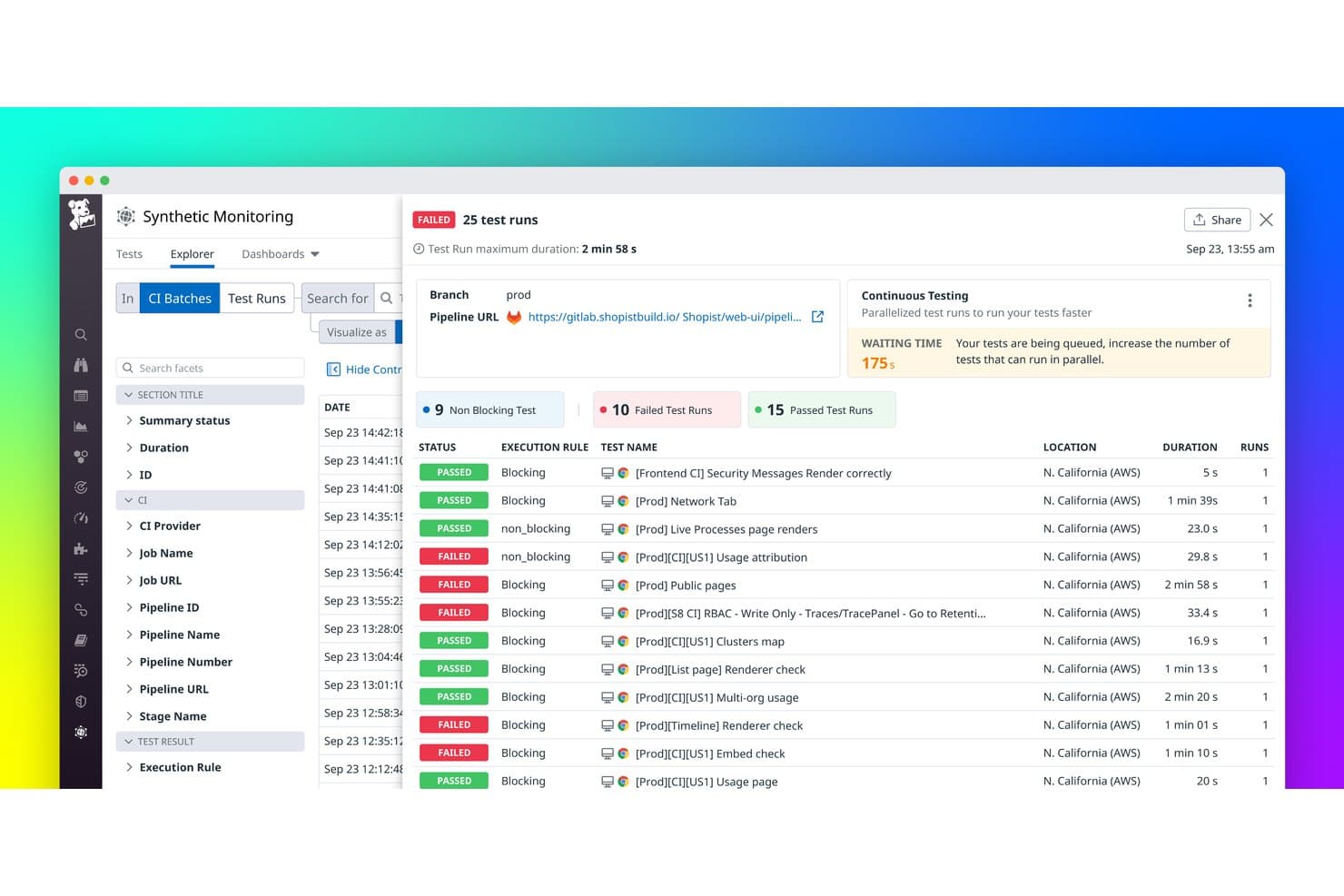
Datadog tracks CI batch test runs with pass/fail status in real time. Datadog is a continuous testing platform that combines codeless browser, API, and mobile app test creation with CI/CD pipeline integration, parallel test execution, and full-stack observability correlation across APM, logs, and infrastructure metrics.
Who Is Datadog Best For?
Datadog is a strong fit for DevOps and SRE teams that already use Datadog for observability and want to bring continuous testing into the same platform without managing a separate toolchain.
Why I Picked Datadog
Datadog earns its spot as one of the best on my shortlist because its codeless browser and mobile test recorder lets you build and run real end-to-end tests without writing a single line of script. I love that self-healing tests automatically adapt to UI changes, so a relocated button doesn't break your entire test suite overnight. The AI-powered flaky test fix via Bits Code goes further, generating a merge-ready pull request after analyzing failure patterns across historical runs.
Datadog Key Features
- Test Impact Analysis: Analyzes recent code changes to automatically skip tests unrelated to the current commit, reducing CI pipeline execution time.
- Private Locations: Self-hosted agents let you run tests against internal or firewalled applications without exposing your infrastructure publicly.
- Quality Gates: Blocks faulty or slow code from merging by enforcing test result thresholds directly within your CI/CD workflow.
- Full-stack observability correlation: Links failed test results to APM traces, logs, and infrastructure metrics within the same platform for faster root cause analysis.
Datadog Integrations
Datadog offers native integrations with six CI/CD platforms, including GitHub Actions, GitLab CI/CD, Jenkins, CircleCI, Azure DevOps, and Bitrise. Its REST API,
datadog-ciCLI, and Terraform provider support custom test orchestration and version-controlled configuration.Pros and Cons
Pros:
- Full-stack observability correlation for root cause
- AI-powered flaky test auto-fixing with PRs
- Codeless test recorder for browser and mobile
Cons:
- No native support for open-source test frameworks
- Complex consumption-based pricing adds up fast
 Best for agentic SDLC testing with coding agent handoff
- Free plan + free trial available
- From $20/month
Visit WebsiteCustomer Rating:4.7/5
Functionize lets users run and review tests across browsers and devices. Functionize is an AI-native continuous testing platform that autonomously creates, executes, maintains, and diagnoses tests across web UI, API, database, visual, and enterprise application workflows.
Who Is Functionize Best For?
Functionize is a strong fit for QA and DevOps teams working in AI-native development environments where coding agents like Cursor or Claude Code are already part of the workflow.
Why I Picked Functionize
Functionize earns its spot on my shortlist because of how it fits into agentic SDLC workflows, specifically the MCP server that lets coding agents like Cursor or Claude Code hand off directly to Functionize Studio the moment they finish generating code. I also rely on the Diagnose Agent, which performs automated root cause analysis and distinguishes real defects from test flakiness without requiring manual triage. The Create Agent rounds this out by converting plain-language user stories into executable test cases automatically.
Functionize Key Features
- Cross-protocol API testing: Run tests across REST, SOAP, GraphQL, gRPC, WebSockets, Kafka, and MQ from a single platform.
- SmartFix self-healing: Automatically detects and repairs broken test steps when UI changes occur, cutting maintenance effort by up to 90%.
- Data-driven testing: Upload a CSV file and Studio loops through each row, mapping data columns directly to test steps.
- QuickConnect secure tunnelling: Opens per-session tunnels to internal or private applications without requiring a VPN or open inbound ports.
Functionize Integrations
Functionize offers documented integrations with GitHub, Jenkins, Azure DevOps, CircleCI, AWS CodePipeline, Spinnaker, Jira, TestRail, Xray, and Zephyr Squad. It also supports webhook and API triggers, plus MCP handoffs with Cursor, Windsurf, and Claude Code.
Pros and Cons
Pros:
- Coverage includes web, API, voice, database
- Deep support for agentic SDLC workflows
- AI agents auto-generate and self-heal tests
Cons:
- Integrations documentation marked as coming soon
- Limited native mobile app testing support
Learn more about Functionize: Best for AI-augmented production release insights
- Free demo available
- Pricing upon request
Visit WebsiteCustomer Rating:4.4/5
Testsigma uses AI to auto-generate and execute test cases continuously. Testsigma is an AI-native continuous testing platform that covers web, mobile, API, Salesforce, and desktop testing through a codeless NLP interface backed by Selenium and Appium.
Who Is Testsigma Best For?
Testsigma is a strong fit for release and QA teams that need AI-driven test generation, self-healing execution, and release confidence scoring in a single codeless platform.
Why I Picked Testsigma
Testsigma earns its spot on my shortlist because of how it handles release confidence scoring, a feature that converts test results into a quantified go/no-go signal before any deployment moves forward. I like that the Atto Analyzer Agent doesn't just surface failures; it classifies them as real defects, UI drift, or flaky tests, so your team isn't chasing noise before a release. Paired with the Healer Agent's real-time locator repair, Testsigma keeps test suites stable without manual intervention between sprints.
Testsigma Key Features
- Codeless NLP test authoring: Write test cases in plain English without any programming knowledge, using a natural language interface built on Selenium and Appium.
- Real device cloud: Run tests across 3,000+ real browsers, OS combinations, and mobile devices, including 800+ iOS and Android devices.
- CI/CD pipeline integration: Connect natively to Jenkins, GitHub Actions, Azure DevOps, CircleCI, and five other CI/CD platforms with event-driven test triggers.
- AI-native test management: Manage manual and automated test cases in one module, with two-way Jira sync, requirements traceability, and test versioning.
Testsigma Integrations
Testsigma offers 30+ native integrations on Pro and 40+ on Enterprise, including Jenkins, GitHub Actions, Azure DevOps, CircleCI, Jira, Linear, Slack, Microsoft Teams, BrowserStack, and Sauce Labs. It also provides APIs for custom CI/CD integrations.
Pros and Cons
Pros:
- Unified codeless platform for all test types
- AI-powered test authoring and maintenance agents
- Release confidence scoring for go/no-go decisions
Cons:
- Auto-generated locators can be unreliable
- No Cypress or Playwright native support
Learn more about Testsigma: Best for automated UI testing across desktop and web
- 14-day free trial + free demo available
- From $3,598/year (billed annually)

TestComplete lets users insert and manage test operations via context menus. TestComplete is a UI test automation platform from SmartBear that supports scripted, keyword-driven, and codeless testing across desktop, web, and mobile applications, with built-in AI-powered self-healing and cross-environment parallel execution.
Who Is TestComplete Best For?
TestComplete is a strong fit for QA automation engineers at large enterprises who need to test complex desktop and web UIs across legacy and modern application types.
Why I Picked TestComplete
TestComplete earns its spot on my shortlist because it handles automated UI testing across desktop, web, and mobile with a depth that's hard to match when you're dealing with both legacy and modern app stacks simultaneously. I'm particularly impressed by its AI-powered self-healing tests, which automatically detect and fix broken object references when UI elements change, reporting a 95% success rate. I also like that its object recognition supports an unusually wide range of UI frameworks, from Oracle Forms and SAP to React and Electron, so you're not forced to maintain separate tools for different application types.
TestComplete Key Features
- BDD/Cucumber support: Write test scenarios in Gherkin syntax natively, without additional plugins, to align test cases with business requirements.
- Data-driven testing: Run the same test logic across multiple data sets automatically, covering a wider range of input scenarios without duplicating test scripts.
- Network Suite for distributed execution: Coordinate and run tests across multiple remote machines simultaneously, reducing overall test execution time across large suites.
- LoadNinja integration: Convert existing functional UI tests into load tests within a single workflow, without building separate load testing scripts from scratch.
TestComplete Integrations
TestComplete offers native integrations with Jenkins, Azure DevOps, GitHub Actions, GitLab, TeamCity, Bamboo, Jira, Bitbucket, Zephyr Enterprise, and BitBar. Its CLI, REST API, and open plugin architecture support custom CI/CD workflows.
Pros and Cons
Pros:
- Codeless and scripted test creation supported
- AI-powered self-healing identifies UI changes
- Handles legacy and modern application testing
Cons:
- Lacks built-in end-to-end test management
- Requires Windows for all test execution
Learn more about TestComplete: Best for testing hardened, production-ready mobile apps
- Free demo available
- Pricing upon request

Digital.ai Continuous Testing offers embedded analytics dashboards for test insights. Digital.ai Continuous Testing is a mobile and web testing platform that supports functional, performance, and accessibility testing across real devices, virtual devices, and cloud browsers, with AI-powered test authoring, self-healing tests, and broad framework support including Appium, Espresso, XCUITest, Playwright, and Cypress.
Who Is Digital.ai Continuous Testing Best For?
Digital.ai Continuous Testing is a strong fit for enterprise mobile QA and DevOps teams that need to test security-hardened, production-ready apps at scale across real devices.
Why I Picked Digital.ai Continuous Testing
Digital.ai Continuous Testing earns its spot on my shortlist because it's the only testing platform that lets you run automated tests directly on production-hardened apps, those protected by obfuscation, RASP, and binary hardening via its Arxan integration, without maintaining a separate unprotected build. I also like that functional, performance, and accessibility testing all run in a single pass with unified reporting. That three-in-one execution model cuts regression cycles from days to hours across real and virtual devices simultaneously.
Digital.ai Continuous Testing Key Features
- Self-healing tests: Tests automatically update when UI elements change, reducing the time your team spends on test maintenance after each app release.
- Smart Agent quality gates: An automated agent embeds directly in your CI/CD pipeline to trigger test execution on code commits and block deployments when tests fail.
- Real device cloud with network simulation: Run tests on real iOS and Android devices across 7 global data centers, with support for 3G, 4G, 5G, and offline network throttling conditions.
- Mobile Studio script generation: A UI-based tool that auto-generates automation code from recorded interactions, letting non-engineers create test scripts without writing code manually.
Digital.ai Continuous Testing Integrations
Digital.ai Continuous Testing integrates with Jenkins, GitHub Actions, GitLab CI, Azure DevOps, Bitbucket, TeamCity, CircleCI, Jira, Microsoft Teams, Slack, Dynatrace, and Datadog. Smart Agent supports CI/CD quality gates, while MCP integrations connect AI coding agents.
Pros and Cons
Pros:
- Functional, performance, and accessibility tested together
- Parallel testing slashes regression cycle time
- Tests hardened, production-ready mobile apps directly
Cons:
- Interface can feel cluttered after updates
- Device queue delays reported during peak times
Learn more about Digital.ai Continuous Testing: Best for cross-browser and real device at scale
- Free trial available
- From $29/user/month (billed annually)
Visit WebsiteCustomer Rating:4.5/5
BrowserStack highlights build optimisation to save ~1h per test run. BrowserStack is a cloud-based continuous testing platform that covers automated cross-browser testing, real device mobile testing, visual regression, accessibility, and load testing across thousands of browser, OS, and device combinations.
Who Is BrowserStack Best For?
BrowserStack is a strong fit for enterprise QA and DevOps teams running high-volume test suites across a wide range of browsers, operating systems, and real mobile devices.
Why I Picked BrowserStack
BrowserStack earns its spot on my shortlist because no other platform matches its scale for cross-browser and real device testing. I'm talking about 3,500+ browser and OS combinations alongside 35,000+ real physical devices, not emulators. Its Test Selection Agent runs only the tests impacted by a given code change, which keeps pipeline times tight even as your suite grows. The Self-Healing Agent automatically fixes broken locators at runtime, so large parallel runs don't stall over minor DOM shifts.
BrowserStack Key Features
- AI-powered failure analysis: Test Observability automatically classifies failures into product defects, automation issues, and environment issues to cut triage time by up to 95%.
- Test Companion IDE plugin: A VS Code-integrated AI tool that lets you author, execute, debug, and maintain tests directly in your IDE using natural language.
- Low Code Automation: An AI-driven recorder that lets non-technical testers build and run automated tests on real browsers and devices in minutes.
- Quality gates: Configurable pass/fail thresholds that automatically block or approve PR merges based on test stability, failure rates, and flakiness scores.
BrowserStack Integrations
BrowserStack offers 18+ native CI/CD integrations, including Jenkins, GitHub Actions, GitLab CI/CD, Azure Pipelines, CircleCI, Bitbucket Pipelines, and Buildkite. It also integrates with GitHub, GitLab, Bitbucket, Jira, Slack, and Microsoft Teams, with REST API and webhooks for custom connectivity.
Pros and Cons
Pros:
- Extensive support for all major test frameworks
- AI agents accelerate test triage and authoring
- Runs tests on 35,000+ real devices
Cons:
- Automated testing costs scale quickly with usage
- Real device sessions sometimes experience lag
Learn more about BrowserStack: Best for self-healing tests with production insights
- Free plan + 30-day free trial + free demo available
- From $180/seat/month
Visit WebsiteCustomer Rating:4.4/5
Katalon Studio lets users insert Web UI keywords via right-click context menu. Katalon Studio is a continuous testing platform that spans web, mobile, API, and desktop test automation, combining AI-powered test authoring, self-healing locators, cloud execution, and production traffic analysis in one unified toolset.
Who Is Katalon Studio Best For?
Katalon Studio is a strong fit for QA teams that need a single platform covering test authoring, execution, management, and production traffic analysis without stitching together multiple tools.
Why I Picked Katalon Studio
Katalon Studio earns its spot on my shortlist because it's the only tool I've seen that closes the loop between production traffic and regression coverage. TrueTest ingests real user journeys from production, maps them against your existing test suite, and auto-generates executable tests for any uncovered paths. Pair that with AI self-healing locators for both web and mobile, and your tests stop breaking every time a locator shifts.
Katalon Studio Key Features
- StudioAssist AI coding assistant: An AI assistant embedded in the script editor that generates test scripts, explains code, and suggests fixes using your choice of LLM provider (OpenAI, Gemini, Claude, and others).
- TestCloud real device cloud: Runs tests on real iOS and Android devices with support for network throttling, GPS simulation, biometric simulation, and camera injection without maintaining a physical device lab.
- Katalon Runtime Engine (KRE): A headless CLI execution engine that lets you trigger test runs directly from CI/CD pipelines across Jenkins, GitHub Actions, Azure DevOps, CircleCI, and 7+ other platforms.
- Flaky test detection: TestOps automatically identifies tests with inconsistent pass/fail results across runs and surfaces them in dashboards so your team can prioritize fixes.
Katalon Studio Integrations
Katalon Studio offers native integrations with Jenkins, GitHub Actions, GitLab CI, Azure DevOps, Jira, TestRail, Xray, Zephyr, BrowserStack, and Sauce Labs. It also supports integrations with additional CI/CD, ALM, device cloud, and testing platforms.
Pros and Cons
Pros:
- Real device cloud and browser parallelization
- Production coverage analysis with TrueTest insights
- AI self-healing locators for web and mobile
Cons:
- Large test suites may cause performance issues
- CI/CD execution locked behind paid add-on
Learn more about Katalon Studio: Best for parallel execution on varied OS versions
- 28-day free trial + free demo available
- From $39/month (billed annually)
Visit WebsiteCustomer Rating:4.3/5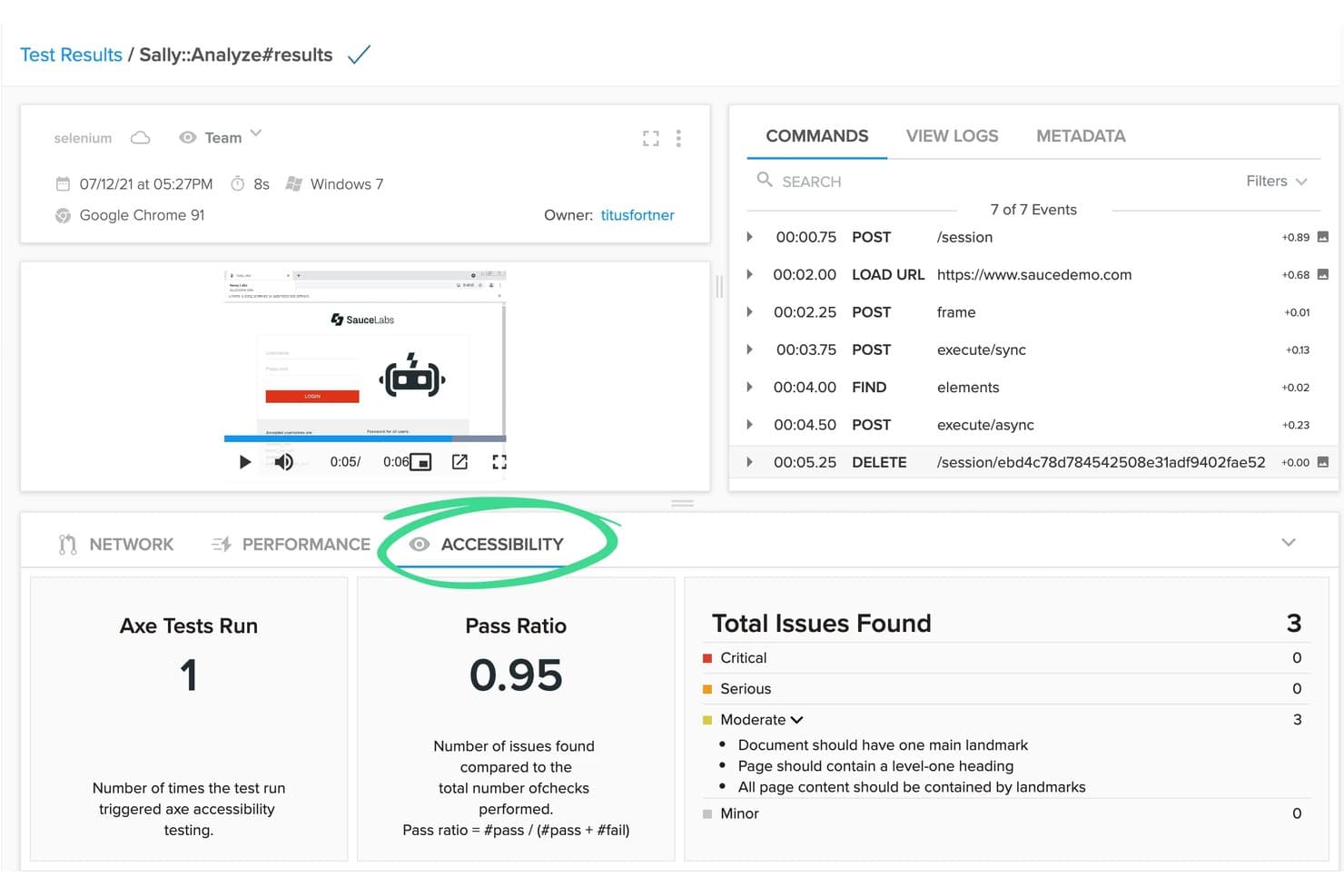
Sauce Labs surfaces accessibility test results alongside automated test runs. Sauce Labs is a continuous testing platform built on the AURA framework that supports automated, visual, API, and mobile test execution across real devices, emulators, and browser/OS environments.
Who Is Sauce Labs Best For?
Sauce Labs is a strong fit for QA and DevOps teams at mid-to-large enterprises that need to run automated tests across a wide range of real devices, browsers, and operating systems simultaneously.
Why I Picked Sauce Labs
Sauce Labs earns its spot on my shortlist because of the sheer scale of its parallel execution capabilities across real devices and OS environments. I'm talking about 10,000+ real devices and 8,000+ browser/OS combinations running concurrently, which means a test suite that would take hours sequentially can finish in minutes. I also like the AURA platform's AI self-healing tests, which automatically adapt to UI changes so your parallel runs don't collapse the moment a selector shifts.
Sauce Labs Key Features
- Sauce Error Reporting: Real-time crash detection and deduplication tool that tracks errors across the full SDLC and surfaces actionable diagnostics for faster resolution.
- Sauce VisualCatch: Visual regression testing that catches unintended UI changes early by comparing screenshots across builds before they reach production.
- Sauce Connect Proxy: A secure tunnelling solution that lets you run automated tests against apps hosted behind firewalls without exposing internal infrastructure.
- saucectl CLI: A command-line test runner that integrates directly with CI/CD pipelines to trigger and orchestrate test runs across Sauce Labs environments on every commit or build event.
Sauce Labs Integrations
Sauce Labs offers native integrations with 11+ CI/CD platforms, including GitHub Actions, GitLab, Jenkins, Azure DevOps, CircleCI, Bitbucket, Codefresh, TeamCity, and Harness. REST APIs, webhooks, and Sauce Connect Proxy support custom integrations and secure pipeline connectivity.
Pros and Cons
Pros:
- Proven support for complex enterprise needs
- AI-powered test authoring and self-healing
- Runs parallel tests on thousands of devices
Cons:
- Test session delays outside US and EU
- Advanced AI features gated to enterprise
Learn more about Sauce Labs: Best automated software testing tool for Salesforce
- 14-day free trial + free demo available
- Pricing upon request

Tricentis Tosca automates test creation and tracks continuous test run results. Tricentis Tosca is a model-based continuous testing platform that automates functional, regression, API, UI, and mobile testing across 160+ technologies, with codeless test creation and an AI-powered test generation engine.
Who Is Tricentis Tosca Best For?
Tosca is a strong fit for enterprise QA teams testing Salesforce, SAP, or Oracle environments who need codeless automation without sacrificing coverage depth.
Why I Picked Tricentis Tosca
Tricentis Tosca earns its spot on my shortlist because no other continuous testing tool matches its depth for Salesforce environments. The proprietary Salesforce Scan feature builds a complete automation model of a Salesforce org in under 60 seconds, which is genuinely hard to replicate with general-purpose frameworks. I also rely on its Agentic AI to generate full end-to-end test cases from plain-language descriptions, letting non-coders contribute to test coverage without writing a single line of script.
Tricentis Tosca Key Features
- Elastic Execution Grid: Provisions on-demand cloud and on-premises agents to run thousands of concurrent tests across all major browsers, iOS, and Android simultaneously.
- API simulation via virtual services: Replaces unavailable microservices across HTTP, Kafka, RabbitMQ, and MQ protocols so teams can test without live dependencies.
- Risk-Based Intelligence: Prioritizes test execution against business-critical functions and surfaces change impact data to support go/no-go release decisions.
- Test Data Management: Automatically creates and provisions on-demand stateful test data using synthetic, masked, or imported datasets directly within the cloud platform.
Tricentis Tosca Integrations
Tricentis Tosca offers integrations with Jenkins, Azure DevOps, GitHub Actions, GitLab, Jira, qTest, NeoLoad, and LiveCompare. Its API, CLI, and Tosca Execution Client support custom CI/CD workflows.
Pros and Cons
Pros:
- Simulates unavailable APIs and microservices
- Deep Salesforce and SAP automation coverage
- Generates end-to-end tests from plain language
Cons:
- Open-source tool integration is limited
- Poor fit for code-driven development teams
Learn more about Tricentis Tosca: Best for highly secure enterprise device clouds
- Free demo available
- Pricing upon request

Perforce Perfecto tracks test pass, fail, and block rates across history. Perfecto is a continuous testing platform from Perforce that combines real device cloud testing, AI-powered test authoring and self-healing, parallel cross-browser and cross-device execution, and deep CI/CD pipeline integration for web, mobile, and desktop applications.
Who Is Perfecto Best For?
Perfecto is a strong fit for enterprise QA and DevOps teams in regulated industries that need a secure, scalable real device cloud with deep CI/CD integration.
Why I Picked Perfecto
Perfecto earns its spot on my shortlist because of the scale and security of its real device cloud, which is genuinely difficult to match in the enterprise space. I'm talking about 10,000+ real physical devices across 11 global data centers, all backed by a 99.999% uptime SLA and certified under SOC 2, ISO 27001, and PCI standards. For regulated industries where you can't cut corners on data handling, the private cloud deployment option keeps sensitive test data fully isolated. The AI self-healing and Root Cause Analysis on top of that infrastructure means less time chasing flaky tests and more time shipping.
Perfecto Key Features
- AI root cause analysis: Automatically classifies test failures across UI, API, data, and device layers by comparing failed runs against last-good runs to group related issues.
- Scriptless test authoring: Lets you create tests using plain-English natural language through the Quantum framework, with no code, locators, or framework knowledge required.
- Bursting capacity: Temporarily scales parallel execution capacity beyond your base license during peak release windows without requiring a permanent plan upgrade.
- Accessibility testing: Built-in checks for WCAG, Section 508, and ADA compliance across web and mobile apps, including iOS VoiceOver and Android TalkBack validation.
Perforce Perfecto Integrations
Perfecto offers 50+ integrations, including Jenkins, GitHub Actions, GitLab CI/CD, Azure DevOps, CircleCI, TeamCity, Jira, Xray, Helix ALM, and Slack. REST APIs support custom test triggers, reporting, and CI/CD workflows.
Pros and Cons
Pros:
- Parallel testing across browsers, devices, platforms
- AI test authoring and automatic self-healing
- Real device cloud with global data centers
Cons:
- Wait times for popular shared cloud devices
- No native security testing features
Learn more about Perforce Perfecto:
Andre verktøy for kontinuerlig testing
Her er noen flere gode alternativer som ikke kom med på listen over de beste verktøyene for kontinuerlig testing:
- 11ApplitoolsBest for visual AI-powered cross-browser regression
- 12OpenText Functional TestingBest for SAP, Oracle, and mainframe test automation
- 13testRigorBest for plain-English test authoring in CI/CD
- 14MablBest for AI-native test failure analysis
- 15QA WolfBest for 24-hour human-verified bug monitoring
- 16ACCELQBest for codeless full-stack test automation
- 17BlazeMeterBest for open-source framework-agnostic load testing
- 18LeapworkBest for enterprise app stack test automation
- 19SeleniumBest for automating web browsers across any language
How I Evaluate Continuous Testing Tools
I split my evaluation into two layers—core requirements a tool must meet to qualify, and the differentiators that separate great from good when tests are blocking a midnight deploy.
Core Functionality (Table Stakes For This List)
When I'm selecting tools for my list, I rank each one on a scale from 0 (does not offer the functionality) to 5 (excels in this area) for each core functionality listed below. Then, I calculate the tool's total score into a percentage. Each tool needs to achieve a minimum total score of 75% to be considered for inclusion.
- CI/CD Pipeline Integration: I check for native plugins or connectors to tools like Jenkins, GitLab CI, GitHub Actions, and Azure DevOps so tests trigger automatically on each commit.
- Automated Test Execution: Each tool should run functional, regression, API, and UI tests on build events without manual steps—covering the full scope of a typical release pipeline.
- Parallel & Cross-Environment Testing: I evaluate whether you can run suites concurrently across browsers, OS versions, and devices to shrink feedback loops during sprint cycles.
- Test Reporting & Analytics: Real-time dashboards, failure logs, and trend analysis matter here—I look for the kind of detail that helps a QA lead pinpoint a flaky test at 2 a.m.
- Multi-Framework & Language Support: Tools should work with widely adopted frameworks like Selenium, Cypress, Playwright, and Appium across languages your dev team already uses.
- Version Control & Test Management: I look at how tightly testing aligns with Git workflows—branch-aware execution, test case versioning, and traceability back to specific code changes.
Once I have a list of tools that meet this criteria, I consider what sets each platform apart.
Differentiating Factors (What Sets Vendors Apart)
Here's how I compare and contrast different vendors:
Standout Features
AI-powered test authoring is a major differentiator. Tools that auto-heal locators when a UI changes save hours of script maintenance after every sprint. I also evaluate real device cloud access, which matters when your mobile app needs to work across hundreds of device and OS combinations without a physical lab. Predictive test impact analysis is another feature I look for. It uses code-change data to run only the relevant tests, which can cut pipeline time dramatically on a large monorepo.
Beyond Features
Scalability is one of the first things I evaluate. A tool that handles 50 parallel tests today needs to auto-scale when your team doubles and release cadence accelerates. Security and compliance posture also matters—I check for SOC 2, SSO/SAML, and role-based access controls, especially for teams in regulated industries like fintech or healthcare. Finally, I consider ecosystem depth. A tool that connects to your issue tracker, APM platform, and chat tools keeps test results visible across the entire release workflow.
Slik velger du et verktøy for kontinuerlig testing
Det er lett å gå seg vill i lange funksjonslister og komplekse prismodeller. For å hjelpe deg med å holde fokus mens du går gjennom din unike prosess for valg av programvare, får du her en sjekkliste over faktorer du bør ha i mente:
| Faktor | Hva du bør vurdere |
|---|---|
| FaktorSkalerbarhet | Hva du bør vurdereKan verktøyet vokse sammen med teamet ditt? Vurder hvor mange brukere og testtilfeller det kan håndtere. Se etter alternativer som tilbyr enkel skalering uten betydelige kostnadsøkninger. |
| FaktorIntegrasjoner | Hva du bør vurdereFungerer det med de eksisterende verktøyene dine? Kontroller kompatibiliteten med CI/CD-pipelineene, versjonskontrollsystemene og annen viktig programvare for å unngå avbrudd i arbeidsflyten. |
| FaktorTilpasningsmuligheter | Hva du bør vurdereKan du tilpasse det til prosessene dine? Se etter alternativer som lar deg justere innstillinger, arbeidsflyter og rapporter slik at de samsvarer med teamets behov. |
| FaktorBrukervennlighet | Hva du bør vurdereEr grensesnittet enkelt å forstå? Sørg for at teammedlemmene kan bruke det uten omfattende opplæring. Et komplisert verktøy kan hindre utbredelse og produktivitet. |
| FaktorImplementering og innføring | Hva du bør vurdereHvor raskt kan du komme i gang? Vurder ressursene som kreves for oppsettet, inkludert tid, opplæring og støtte. Rask innføring betyr raskere avkastning på investeringen. |
| FaktorKostnad | Hva du bør vurderePasser det inn i budsjettet ditt? Sammenlign abonnementsmodeller og skjulte gebyrer. Vei kostnadene opp mot funksjonene og skalerbarheten du trenger. |
| FaktorSikkerhetstiltak | Hva du bør vurdereHvordan beskytter det dataene dine? Vurder krypteringsstandarder, tilgangskontroller og samsvar med personvernforordninger. |
| FaktorTilgjengelig kundestøtte | Hva du bør vurdereEr det enkelt å få hjelp? Se etter leverandører som tilbyr støtte døgnet rundt gjennom flere kanaler. Rask og effektiv støtte kan spare deg for tid og frustrasjon. |
Hva er verktøy for kontinuerlig testing?
Verktøy for kontinuerlig testing er programvareløsninger som automatiserer gjennomføringen av tester i programvareutviklingsprosessen. Utviklere, QA-ingeniører og DevOps-fagfolk bruker vanligvis disse verktøyene for å oppdage feil tidlig og sikre kvaliteten i prosjektene sine.
Automatisering, integrasjon med CI/CD-pipelines og sanntidsbaserte skytestingsverktøy hjelper team med å opprettholde effektiviteten og forbedre programvarekvaliteten. Alt i alt sparer disse verktøyene tid og reduserer feil ved kontinuerlig å validere kodeendringer.
Funksjoner
Når du velger verktøy for kontinuerlig testing, bør du se etter følgende viktige funksjoner:
- Automatisering: Automatiserer repetitive oppgaver, reduserer manuelt arbeid og gjør testprosessen raskere.
- CI/CD-integrasjon: Kobles sømløst til eksisterende pipelines for å sikre kontinuerlige kvalitetssjekker ved hver kodeendring.
- Sanntidsrapportering: Gir umiddelbar tilbakemelding på testresultater, slik at team raskt kan identifisere og håndtere problemer.
- Håndtering av testmiljøer: Forenkler oppsett og håndtering av testmiljøer og sikrer konsistens mellom testkjøringer.
- Støtte for flere plattformer: Gjør det mulig å teste på ulike plattformer og enheter, noe som sikrer bred kompatibilitet og dekning.
- Tilpassbare arbeidsflyter: Lar team tilpasse prosesser og rapporter etter sine spesifikke behov og arbeidsflyter.
- Innsikt drevet av kunstig intelligens: Bruker kunstig intelligens til å analysere testdata og gi handlingsrettet innsikt for forbedring.
- Sikkerhetsfunksjoner: Sikrer databeskyttelse gjennom kryptering og samsvar med personvern- og databeskyttelsesregler.
- Brukervennlig grensesnitt: Tilbyr et intuitivt design som gjør det enkelt for brukere å navigere i og betjene verktøyet effektivt.
- Skalerbarhet: Støtter veksten til teamet og prosjektene dine og håndterer et økende antall brukere og testtilfeller.
Fordeler
Implementering av verktøy for kontinuerlig testing gir flere fordeler for teamet og virksomheten din. Her er noen av fordelene du kan se frem til:
- Tidlig oppdagelse av feil: Identifiserer problemer tidlig i utviklingsprosessen og reduserer kostnadene og innsatsen som kreves for å løse dem senere.
- Raskere lanseringssykluser: Automatiserer testprosesser, slik at teamet kan lansere oppdateringer og nye funksjoner raskere.
- Forbedret programvarekvalitet: Sikrer grundig testdekning, noe som fører til mer pålitelige og stabile programvareprodukter.
- Bedre teamsamarbeid: Integreres med eksisterende arbeidsflyter, slik at utviklere, testere og driftspersonell lettere kan samarbeide effektivt.
- Effektiv ressursbruk: Reduserer den manuelle arbeidsbelastningen for teamet, slik at medlemmene kan fokusere på mer strategiske oppgaver og innovasjon.
- Støtte for skalerbarhet: Tilpasser seg økende prosjektbehov og håndterer større arbeidsmengder uten at det går på bekostning av ytelsen.
- Bedre beslutningsgrunnlag: Gir detaljerte rapporter og innsikt, slik at teamet kan ta datadrevne beslutninger og prioritere effektivt.
Kostnader & priser
Ved valg av verktøy for kontinuerlig testing er det nødvendig å forstå de ulike prismodellene og abonnementene som er tilgjengelige. Kostnadene varierer basert på funksjoner, teamstørrelse, tillegg og mer. Tabellen nedenfor oppsummerer vanlige abonnementer, gjennomsnittsprisene deres og typiske funksjoner som er inkludert i løsninger for kontinuerlig testing:
Sammenligningstabell for abonnementer for kontinuerlig testing
| Abonnementstype | Gjennomsnittspris | Vanlige funksjoner |
|---|---|---|
| AbonnementstypeGratisabonnement | Gjennomsnittspris$0 | Vanlige funksjonerGrunnleggende testautomatisering, begrensede integrasjonsmuligheter og brukerstøtte fra fellesskapet. |
| AbonnementstypePersonlig abonnement | Gjennomsnittspris$10-$30/bruker/måned | Vanlige funksjonerForbedrede funksjoner for automatisering, grunnleggende rapporteringsverktøy og brukerstøtte via e-post. |
| AbonnementstypeBedriftsabonnement | Gjennomsnittspris$40-$80/bruker/måned | Vanlige funksjonerAvansert rapportering, CI/CD-integrasjon, mobiltesting og prioritert brukerstøtte. |
| AbonnementstypeVirksomhetsabonnement | Gjennomsnittspris$100+/bruker/måned | Vanlige funksjonerTilpassbare løsninger, dedikert kontoadministrasjon, full integrasjonsfunksjonalitet og brukerstøtte døgnet rundt, alle dager. |
Vanlige spørsmål om verktøy for kontinuerlig testing
Her er noen svar på vanlige spørsmål om verktøy for kontinuerlig testing:
Hvem bruker verktøy for kontinuerlig testing?
Programvaretestere, kvalitetssikringsteam og DevOps-team bruker løsninger for kontinuerlig testing til å håndtere programvaretestprosessene sine og fremskynde leveringsprosessen.
Hvilke typer tester støtter disse verktøyene?
De fleste \u003ca href=\u0022https://thectoclub.com/tools/best-devops-testing-tools/\u0022\u003eDevOps-testverktøy\u003c/a\u003e støtter enhets-, integrasjons- og regresjonstesting som standard. Noen inkluderer også funksjoner for ende-til-ende-testing, funksjonell testing eller API-testing. Utvalget av testtyper som støttes, avhenger ofte av verktøyets arkitektur og hvordan det passer inn i utviklingsarbeidsflyten deres.
Fungerer de med CI/CD-plattformer?
Ja, de fleste verktøy for kontinuerlig testing er utviklet for å integreres sømløst med CI/CD-plattformer som Jenkins, GitHub Actions eller GitLab. Noen verktøy tilbyr innebygde programtillegg for rask konfigurering og automatisering. Andre kan kreve manuell konfigurering eller API-basert integrasjon, avhengig av leveringspipen deres.
Er disse verktøyene skybaserte eller lokale?
Det varierer fra verktøy til verktøy. Noen er fullstendig skybaserte og tilbyr nettleserbasert tilgang med minimalt oppsett, mens andre er utviklet for lokale eller hybride distribusjoner. Det riktige alternativet avhenger ofte av infrastrukturbehovene deres og hvor mye kontroll eller tilpasning teamet trenger.
Kan disse verktøyene kjøre i flere miljøer?
Ja, de fleste verktøy kan kjøre tester på tvers av flere miljøer, for eksempel utvikling, staging og kvalitetssikring. Dette gjør det mulig for team å validere endringer før de sendes til produksjon. Dere må sannsynligvis konfigurere miljøspesifikke innstillinger, for eksempel variabler eller avhengigheter.
Hva slags rapportering tilbyr disse verktøyene?
Verktøyene genererer vanligvis logger, detaljerte testresultater og ytelsesdashbord. Innsiktsnivået og eksportalternativene varierer – noen gir rådata, mens andre tilbyr visuelle sammendrag og trendrapporter.