

Plattformer for samarbeidende koding hjelper utviklere med å arbeide på den samme koden i sanntid, enten de sitter på andre siden av bordet eller på andre siden av verden.
Disse verktøyene blir nødvendige når skjermdeling ikke er nok, versjonskontrollen blir rotete, eller du mister tid på å prøve å feilsøke problemer i chat. Redigering i sanntid, delte terminaler og samarbeid i nettleseren gjør det enklere å løse problemer sammen uten konstant veksling mellom kontekster eller forvirring.
Jeg har jobbet med team som bruker disse verktøyene til alt fra fagfellevurderinger og introduksjon av nye medarbeidere til feilsøkingsøkter på tvers av hele stakken. Denne veiledningen er basert på den erfaringen og skal hjelpe deg med å velge en plattform som passer til hvordan teamet ditt skriver og leverer kode.
Why Trust Our Software Recommendations
6,700+
Reviews
20
Industry experts
16+
Evaluation factors
14
Years
Our team has been testing and reviewing software since 2012. As tech leaders ourselves, we know how difficult—and important—it is to choose the right software.
For this guide, we evaluated tools using hands-on testing and independent research, scoring tools using our selection criteria.
Our reviews reflect our human editorial judgment, not a sales pitch.
Expert reviewers:
- Paulo Gardini MiguelTech Director
 Tim FisherVP of AI
 Gabriel RosasTech Lead & Software Architect
 Christhian GruhnTech Lead & Platform Architect

Sammenligningstabell for plattformer for samarbeidende koding
Denne sammenligningstabellen oppsummerer prisdetaljene for mine beste utvalgte plattformer for samarbeidende koding:
| Tool | Best For | Trial Info | Price | ||
|---|---|---|---|---|---|
| 1 | Best for remote team task management | Free plan available | From $10.99/user/month (billed annually) | Website | |
| 2 | Best for secure file sharing and storage | 14-day free trial | From CAD$21/user/month (billed annually) | Website | |
| 3 | Best for centralized team knowledge sharing | Free plan available | From $5.78/user/month | Website | |
| 4 | Best for code skill assessments and training | Free trial available | From $199/user/month | Website | |
| 5 | Best for integrating code documentation with coding tasks | Free demo available | Pricing upon request | Website | |
| 6 | Best for internal technical knowledge base | From $10/user/month | Website | ||
| 7 | Best for live collaborative coding sessions | From $9.90/user/month (billed annually) | Website | ||
| 8 | Best for visual brainstorming and idea mapping | Free plan + 14-day free trial available | From $8/user/month (billed annually) | Website | |
| 9 | Best for AI project planning and resourcing | Free plan available; 14-day free trial | From $9/user/month (billed annually) | Website | |
| 10 | Best for seamless team communication and collaboration | Free demo available | From $15/user/month (billed annually) | Website |


Anmeldelser av de beste plattformene for samarbeidende koding
 Best for remote team task management
- Free plan available
- From $10.99/user/month (billed annually)
Visit WebsiteCustomer Rating:4.4/5
Asana's my tasks is your one-stop-shop for viewing and prioritizing all of the work assigned to you. Asana is a task and project management tool that helps teams organize, track, and manage their work. It's instrumental in remote work settings, where coordinating tasks and maintaining project visibility can also be very challenging.
Why I Picked Asana:
Asana's prowess in facilitating remote team task management quickly emerged when considering various tools. Its comprehensive feature set, coupled with an intuitive interface, helps it outshine competitors. I chose Asana because it bridges the gap in communication and project oversight often experienced in remote teams, making it the best for this use case.
Standout features and integrations:
Asana offers various features, including timeline views, task dependencies, and custom fields to add project-specific details. Additionally, it provides Kanban boards for visual project management. Asana integrates well with numerous third-party applications such as Slack, Google Drive, and Zoom, enhancing its utility in a typical remote work setup.
Pros and Cons
Pros:
- A broad range of third-party integrations
- Versatile view options, including lists, boards, and timelines
- Advanced task management with features like dependencies and custom fields
Cons:
- Advanced features like workload and goals are only available in the business plan.
- Limited functionality in the free plan
- It can be overwhelming for new users due to its numerous features.
Learn more about Asana: 2Best for secure file sharing and storage
Box
- 14-day free trial
- From CAD$21/user/month (billed annually)
Visit WebsiteCustomer Rating:4.3/5
Stay proactive with Box's shield machine learning and the ability to set policies that detect threats. Keep your files safe with cloud-native security and compliance capabilities like granular access controls, watermarking, and classification. The box is a cloud-based storage and collaboration tool that allows users to securely store, share, and access files online. Its robust security features make it an ideal choice for businesses seeking to securely share sensitive files and data, making it particularly suitable for secure file sharing and storage.
Why I Picked Box:
During my selection process, I chose Box because of its dedication to data security and ease of use. It's an essential storage solution and a comprehensive platform offering robust data encryption and detailed access controls. The box is the best for secure file sharing and storage due to its steadfast commitment to data protection.
Standout features and integrations:
Box offers real-time collaboration, automatic file sync, and version history. But what makes it truly stand out is its security features, including granular access controls, advanced encryption, and compliance with various global privacy standards. Box also integrates well with many business apps, including Office 365, G Suite, Salesforce, and Slack.
Pros and Cons
Pros:
- Real-time collaboration on documents
- Integrates with a wide range of third-party applications
- Robust security features offer strong data protection.
Cons:
- The search functionality could be improved for ease of use.
- The file size limit in the basic plan
- The user interface can be confusing for first-time users.
Learn more about Box: Best for centralized team knowledge sharing
- Free plan available
- From $5.78/user/month
Visit WebsiteCustomer Rating:4.3/5
With Confluence you can create anything from project plans and marketing campaigns to product requirements, and more. Confluence is a robust collaborative software platform designed to centralize team knowledge sharing. It's a digital workspace where teams can also create, share, and collaborate on projects in one accessible location.
Why I Picked Confluence:
Confluence's ability to foster a unified knowledge-sharing space caught my attention in assessing multiple collaborative platforms. It's not just about creating and editing documents, but it's the way Confluence makes knowledge accessible and organized for every team member. The platform's distinctiveness lies in its ability to bridge information gaps within a team, which justifies why I consider it the best for centralized team knowledge sharing.
Standout features and integrations:
Confluence's page and space structure help teams effectively organize their work and knowledge. The platform also offers powerful search functionality, ensuring critical information is always available. On the integration side, Confluence works well with tools such as Jira, Trello, Slack, and many other tools, facilitating a smooth work process with your existing toolset.
Pros and Cons
Pros:
- Excellent integration with other Atlassian products and a host of external tools
- Robust search functionality for quick access to information
- Provides a centralized platform for team knowledge sharing
Cons:
- Customization options may seem limited for complex project needs.
- The user interface could benefit from a design overhaul.
- The learning curve might be steep for non-technical users.
 Best for code skill assessments and training
- Free trial available
- From $199/user/month
Visit WebsiteCustomer Rating:4.4/5
Coderbyte's assessment builder makes it easy for non-technical users to create a relevant assessment Coderbyte is a web-based platform aimed at helping individuals improve their coding skills through practice and testing. With an extensive collection of coding challenges and preparatory courses for coding interviews, it is particularly beneficial for skills assessment and training.
Why I Picked Coderbyte:
When it came to picking a platform for coding skills assessments and training, Coderbyte seemed a natural choice. Additionally, its comprehensive library of coding challenges for various difficulty levels makes it stand out. The fact that these challenges cater to different programming languages strengthens my judgment that Coderbyte is the best platform for code skill assessments and training.
Standout features and integrations:
Critical features of Coderbyte include a diverse set of coding challenges, an in-built code editor for practice, and solutions provided by the community. It also offers official solutions and a video walkthrough for some of its challenges, facilitating better understanding. Though direct integrations are limited, it supports various programming languages, allowing users to practice and learn in the language of their preference.
Pros and Cons
Pros:
- Community solutions and video walkthroughs are available
- Supports multiple programming languages
- Wide range of coding challenges
Cons:
- The interface could be improved for a better user experience.
- High starting price for individual users
- Limited direct integrations
Learn more about Coderbyte: Best for integrating code documentation with coding tasks
- Free demo available
- Pricing upon request
Visit WebsiteCustomer Rating:4.4/5
Using Swimm, document complex flows spanning multiple files and repos with rich content that interacts directly with the code and automatically updates as your code changes. Swimm is a tool that ensures documentation stays synced with your codebase. It provides an environment for writing and managing documents and allows developers to link parts of their papers to relevant code snippets. This unique feature positions Swimm as a fantastic tool for integrating code documentation with coding tasks.
Why I Picked Swimm:
Swimm stood out in selecting tools for this list for its innovative approach to keeping code documentation up-to-date, a frequent challenge in dynamic development environments. Also, i appreciate how Swimm creates a symbiosis between code and documentation, making it the ideal choice for integrating code documentation with coding tasks.
Standout features and integrations:
Critical features of Swimm also include its automated syncing between documentation and codebase, the ability to write unit tests in documentation, and the creation of interactive learning materials. As for integrations, Swimm works well with Github, allowing for seamless connection with your repositories.
Pros and Cons
Pros:
- Supports the creation of interactive learning materials
- The ability to write unit tests in documentation
- Code and documentation stay in sync.
Cons:
- A limited number of direct integrations
- A bit of a learning curve for non-technical team members
- Higher starting price point compared to some competitors
Learn more about Swimm:

Using Stack Overflow for Teams, Slack integration is possible. Stack Internal is an internal knowledge-sharing and collaboration platform primarily targeting technical teams. It thrives as a private, secure space where couples can ask questions and get answers, making it an ideal tool for creating an internal technical knowledge base.
Why I Picked Stack Internal:
I chose Stack Internal for this list due to its strong reputation for facilitating efficient knowledge sharing within technical teams. Also, what makes it different is its familiar Q&A format that so many developers and technical staff are accustomed to, which increases adoption and utilization rates. For these reasons, I determined Stack Internal to be the best tool for creating an internal technical knowledge base.
Standout features and integrations:
Stack Internal provides features like tagging, instant search, and an integrated interface, making knowledge accumulation and retrieval swift and efficient. Its integrations with everyday tools such as Slack and Microsoft Teams ensure that essential updates and discussions are noticed.
Pros and Cons
Pros:
- Valuable integrations with tools like Slack and Microsoft Teams
- Efficient search and tagging system for ease of information retrieval
- Familiar Q&A format that's easy to adopt
Cons:
- No option for a single-user plan
- Less suited for non-technical teams
- The cost might be prohibitive for smaller teams.
Learn more about Stack Internal: Best for live collaborative coding sessions
- From $9.90/user/month (billed annually)

Run tests and debug with the integrated GUI test runner and debugger, and use the embedded terminal as Code With Me acts as a full-fledged JetBrains IDE for your remote projects. Code With Me is a service by JetBrains that enables developers to share the project in their IDE with others, facilitating real-time, joint coding. It stands out for its live coding sessions, where multiple participants can simultaneously observe and adjust the code.
Why I Picked Code With Me:
Code With Me stood out in selecting tools for this list because it takes coding collaboration to the next level with its live coding sessions. The ability to share a project from one's IDE in real time sets it apart from other collaboration tools. Given these unique characteristics, I've determined Code With Me to be the top choice for live collaborative coding sessions.
Standout features and integrations:
Critical features of Code With Me include its simultaneous collaborative editing as well as its integrated voice and video chat, and a follow-participant feature that allows you to view someone else's actions in real time. Integration with popular IDEs like IntelliJ IDEA, PyCharm, WebStorm, and others is a significant advantage, allowing developers to work in an environment they are comfortable with.
Pros and Cons
Pros:
- Integration with popular JetBrains IDEs
- Integrated voice and video chat for better communication
- Real-time collaborative coding is possible.
Cons:
- Pricing could be a barrier for smaller teams.
- Some learning curves to use efficiently.
- It might be overkill for simple collaborative tasks.
Learn more about Code With Me: 8Best for visual brainstorming and idea mapping
Miro
- Free plan + 14-day free trial available
- From $8/user/month (billed annually)
Visit WebsiteCustomer Rating:4.8/5
With Miro it can explain complex processes and systems with visual mapping and diagramming. Miro is an interactive online whiteboard platform that boosts team collaboration and creativity. It's a digital canvas where teams can brainstorm, map out ideas, and turn them into tangible actions.
Why I Picked Miro:
Miro's capacity to encourage visual brainstorming and idea mapping stood out in my selection process. Also, its ability to foster creativity and collaboration in a virtual environment makes it unique in a pool of similar tools. Miro is particularly adept at transforming abstract concepts into explicit visual representations, leading me to deem it as the best for visual brainstorming and idea mapping.
Standout features and integrations:
Miro offers numerous templates, such as brainstorming, flowcharts, and mind maps, facilitating efficient idea generation. The infinite canvas can accommodate expansive ideas without restrictions. Miro also integrates well with applications like Google Drive, Dropbox, Slack, and even more specialized tools like Jira and Sketch, allowing for a cohesive workflow.
Pros and Cons
Pros:
- Seamless integrations with various productivity tools
- Extensive selection of templates for different use cases
- Infinite canvas for unrestricted idea generation and mapping
Cons:
- Advanced features are locked behind higher-tier plans
- Real-time collaboration can be laggy with a large number of participants.
- The interface might feel overwhelming to new users.
Learn more about Miro: Best for AI project planning and resourcing
- Free plan available; 14-day free trial
- From $9/user/month (billed annually)
Visit WebsiteCustomer Rating:4.6/5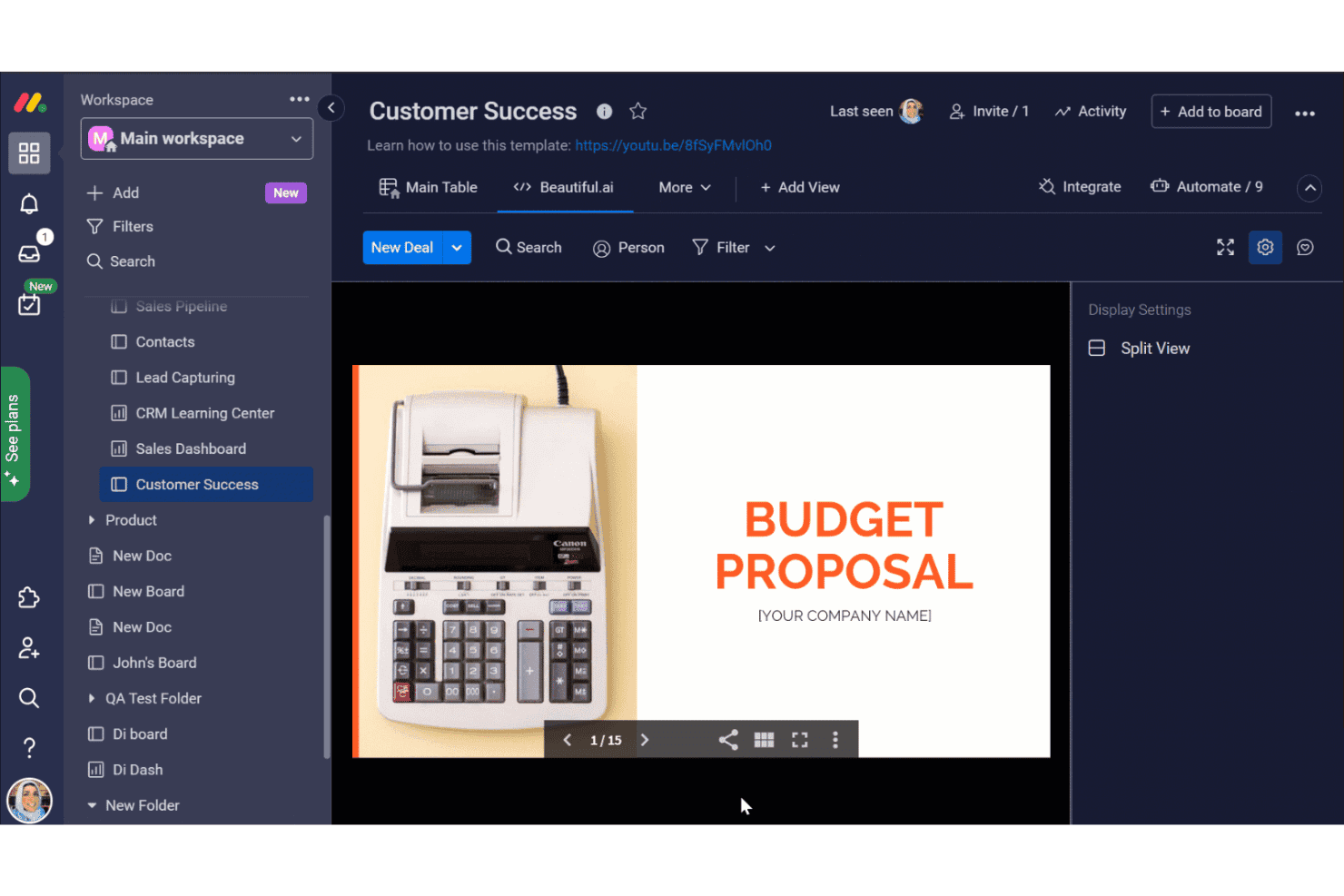
monday.com offers a Beautiful.ai integration within its Customer Success board, allowing users to embed and view Budget Proposal presentations directly in the workspace. Monday AI Workspace is an AI-powered work management platform that combines project planning, sprint tracking, resource assignment, and dev toolchain integrations—including GitHub and GitLab—into a unified workspace for engineering and cross-functional teams.
Who Is Monday AI Workspace Best For?
It's a strong fit for mid-size to enterprise engineering teams that need AI-assisted sprint planning and cross-functional project visibility alongside their existing dev tooling.
Why I Picked Monday AI Workspace
Monday AI Workspace earns its spot on my shortlist because I love how its AI handles sprint planning and resource load-balancing without manual intervention. When I assign a sprint, the AI surfaces capacity conflicts and recommends reassignments based on historical velocity data. I also find the AI-spotted risk detection genuinely useful: it flags dependency bottlenecks before they derail a release cycle.
Monday AI Workspace Key Features
- GitHub and GitLab integration: Link pull requests, commits, and repo details directly to project boards for workflow visibility.
- Sprint management boards: Organize, prioritize, and track sprint tasks with customizable agile board views.
- Custom automation builder: Set up workflow automations that trigger updates, notifications, or reminders based on board activity.
- Dependency mapping: Visualize and manage task dependencies to identify blockers and sequence work efficiently.
Monday AI Workspace Integrations
Monday AI Workspace offers hundreds of native integrations through its built-in integrations and marketplace, including GitHub, GitLab, Jira, Slack, Microsoft Teams, Google Workspace, Salesforce, and Zapier. An API is available for custom integrations.
Pros and Cons
Pros:
- Real-time workload visibility across engineering teams
- Native sprint planning views built into boards
- AI assigns tasks based on team capacity
Cons:
- No built-in code execution or terminal
- Not built for real-time code editing
Learn more about monday AI Workspace: 10Best for seamless team communication and collaboration
Nextiva
- Free demo available
- From $15/user/month (billed annually)
Visit WebsiteCustomer Rating:4.5/5
Users can easily manage their sales pipeline and track deals, using Nextiva's pipeline view feature. Import contacts easily. Log information after every interaction. Nextiva is a unified communications platform that combines VoIP phone services, team messaging, video conferencing, and customer management tools. Given its comprehensive communication suite that facilitates smooth collaboration among team members, it aligns perfectly with the need for team communication and collaboration.
Why I Picked Nextiva:
I picked Nextiva as a part of this list due to its versatile functionality that spans various aspects of business communication. It has a broad range of features contributing to its distinction, from cloud phone service to team chat to customer service tools. Because of this extensive range of communication and collaboration capabilities, I see Nextiva as an ideal team communication tool.
Standout features and integrations:
Some critical elements of Nextiva include VoIP phone services, team messaging, video conferencing, and customer relationship management tools. Its advanced analytics and reporting further enhance its utility for businesses. Nextiva integrates well with commonly used business tools such as Microsoft Teams, Google Workspace, Salesforce, and Zendesk.
Pros and Cons
Pros:
- Smooth integration with many third-party business applications
- Advanced analytics and reporting
- A comprehensive suite of communication tools
Cons:
- Setup can be somewhat complicated for non-technical users.
- Requires high-speed internet for optimal performance
- The pricing structure can be complex for new users.
Learn more about Nextiva:
Andre plattformer for samarbeidende koding
Nedenfor finner du en liste over flere plattformer for samarbeidende koding som jeg satte opp på kortlisten, men som ikke nådde topp 10. Det er verdt å ta en titt på dem.
- 11LucidsparkBest for real-time collaborative brainstorming
- 12Zoho ProjectsBest for large-scale project management
- 13WrikeGood for customizable project management needs
- 14TrelloGood for visually organizing project workflows
- 15BacklogGood for comprehensive project and code management
- 16KontentinoGood for managing and approving social media content
- 17ReviewStudioGood for collaborative creative project reviews
- 18EliumGood for knowledge sharing and collaboration within teams
- 19ZiflowGood for automating creative content review and approval processes
- 20ConnecteamGood for managing and engaging with non-desk teams
- 21Project.coGood for coordinating and tracking project communications
- 22ZulipGood for organized, topic-based team communication
- 23ConnectWise ScreenConnectGood for secure remote control solutions
- 24YouTrackGood for Agile project management and issue tracking
- 25Birdview PSAGood for streamlining project, service, and client management
- 26Visual PlanningGood for streamlining resource scheduling
- 27LedgerGood for managing projects, resources, and finances in one platform
- 28BOASTGood for all-in-one business operations and project management
- 29RealityMAXGood for remote work and training via virtual reality
- 30TrackfrontGood for managing vendor and purchase order processes
- 31StartMeetingGood for affordable video and audio conferencing
- 32Pexip Secure CollaborationGood for video conferencing with a focus on security
Anmeldelser av andre plattformer for samarbeidende koding
- Programvare for nettstedutvikling
- Programvare for apputvikling
- Programvare for utvikling av mobilapper
- Plattformer for skyutvikling
How I Evaluate Collaborative Coding Platforms
Whether I'm evaluating tools for pair programming sessions or live technical interviews, I split my assessment into baseline requirements and the differentiators that actually set platforms apart.
Core Functionality (Table Stakes For This List)
When I'm selecting tools for my list, I rank each one on a scale from 0 (does not offer the functionality) to 5 (excels in this area) for each core functionality listed below. Then, I calculate the tool's total score into a percentage. Each tool needs to achieve a minimum total score of 65% to be considered for inclusion.
- Real-Time Co-Editing: I look for smooth multi-cursor editing where two or more developers can type in the same file simultaneously, like during a live pair programming session with a remote teammate.
- Multi-Language Support: The platform should handle syntax highlighting and execution for languages my team actually uses, from Python and JavaScript to Go or Rust.
- Integrated Code Execution: I check whether developers can run and test code directly inside the session, so a team debugging a failing unit test doesn't need to context-switch to a local terminal.
- Shared Development Environment: A cloud-based workspace with a file system and terminal matters here, especially for onboarding new hires who need a ready-to-go project environment on day one.
- Version Control Integration: I evaluate how each platform connects with Git providers like GitHub, GitLab, or Bitbucket for committing, branching, and pushing changes from within the editor.
- In-Session Communication: Built-in chat, voice, or video keeps collaborators in the same window, which I find essential when walking a colleague through a complex merge conflict.
Once I have a list of tools that meet this criteria, I consider what sets each platform apart.
Differentiating Factors (What Sets Vendors Apart)
Here's how I compare and contrast different vendors:
Standout Features
AI coding assistance is a big differentiator. I look for platforms where inline suggestions and error explanations speed up collaborative debugging without breaking the session's flow. Session recording also matters, especially for engineering managers who want to review how a mob programming session unfolded or replay a technical interview for a hiring panel. For teams running live coding assessments, built-in interview tools like candidate scoring and question banks save the hassle of stitching together separate platforms.
Beyond Features
Security and compliance top my list here. I check for SOC 2, SSO/SAML support, and audit logs, since enterprise procurement teams will block adoption without them. Ecosystem fit also weighs heavily. A platform that plugs into your existing stack—think GitHub for version control, Slack for notifications, Jira for ticket linking—cuts down on workflow friction. I also evaluate pricing flexibility, particularly whether a vendor offers separate tiers for interview-only use versus full team collaboration, so you're not overpaying for capabilities you don't need.
Slik velger du en plattform for samarbeidende koding
Det er lett å gå seg vill i lange funksjonslister og kompliserte prismodeller. For å hjelpe deg med å holde fokus mens du går gjennom den unike prosessen med å velge programvare, får du her en sjekkliste over faktorer du bør ha i tankene:
| Faktor | Hva du bør vurdere |
|---|---|
| FaktorSkalerbarhet | Hva du bør vurdereKan plattformen vokse sammen med teamet ditt? Vurder om den støtter et økende antall brukere og prosjekter uten ytelsesproblemer. |
| FaktorIntegrasjoner | Hva du bør vurdereKan den kobles sammen med andre verktøy du bruker? Kontroller at den er kompatibel med den eksisterende programvarestakken din, for eksempel verktøy for prosjektstyring eller CI/CD. |
| FaktorTilpasningsmuligheter | Hva du bør vurdereKan du tilpasse den til arbeidsflytene dine? Se etter plattformer som tillater justeringer for å passe teamets spesifikke kodingspraksis og preferanser. |
| FaktorBrukervennlighet | Hva du bør vurdereEr plattformen intuitiv? Sørg for at den har et brukervennlig grensesnitt som reduserer opplæringstiden og holder teamet produktivt. |
| FaktorImplementering og introduksjon | Hva du bør vurdereHvor smidig er overgangen? Vurder hvilke ressurser som er tilgjengelige for introduksjon, for eksempel opplæringsmateriell og kundestøtte under oppsettet. |
| FaktorKostnad | Hva du bør vurderePasser den inn i budsjettet ditt? Sammenlign prisplaner, ta hensyn til tilleggskostnader, og se etter en løsning som gir best mulig verdi for investeringen din. |
| FaktorSikkerhetstiltak | Hva du bør vurdereEr prosjektene dine beskyttet? Kontroller plattformens sikkerhetstiltak, inkludert datakryptering og tilgangskontroller, for å holde koden din trygg. |
Hva er en samarbeidsplattform for programmering?
En samarbeidsplattform for programmering er et verktøy som lar flere utviklere skrive, redigere og feilsøke kode sammen i sanntid. Den brukes av programvareingeniører, eksterne team og programmeringsinstruktører som trenger å samarbeide uten å være på samme sted.
Funksjoner som delte terminaler, direkte koderedigering og innebygd chat gjør det enklere å løse feil raskere, gjennomgå kode som en gruppe og holde seg oppdatert. Disse verktøyene gjør det enklere å skrive kode sammen uten å forsinke hverandre.
Funksjoner
Når du velger en samarbeidsplattform for programmering, bør du se etter følgende viktige funksjoner:
- Samarbeid i sanntid: Gjør det mulig for flere utviklere å arbeide med den samme kodebasen samtidig, noe som forbedrer kommunikasjonen og effektiviteten i teamet.
- Integrasjon med versjonskontroll: Kobler seg til versjonskontrollsystemer som Git, slik at det blir enkelt å spore kodeendringer og historikk.
- Kodegjennomgang: Tilrettelegger for fagfellevurdering av kode og sikrer kvalitet og konsistens i kodebasen før distribusjon.
- Støtte for flere språk: Gir kompatibilitet med ulike programmeringsspråk, noe som gjør plattformen allsidig for forskjellige prosjekter og team.
- Funksjoner for integrert utviklingsmiljø (IDE): Tilbyr innebygde programmeringsverktøy og redigeringsprogrammer som effektiviserer utviklingsprosessen.
- AI-assistert programmering: Foreslår kodefullføringer og optimaliseringer, slik at utviklere kan skrive kode raskere og med færre feil.
- Tilpassbare arbeidsflyter: Lar team tilpasse plattformen til sine spesifikke programmeringsmetoder og prosjektbehov.
- Mulighet for frakoblet redigering: Gjør det mulig for utviklere å arbeide med kode uten internettilkobling, slik at produktiviteten opprettholdes i alle situasjoner.
- Avanserte sikkerhetstiltak: Beskytter kode og data med kryptering og tilgangskontroller, slik at prosjektet er trygt.
- Interaktive produktomvisninger: Gir nye brukere veiledede gjennomganger, forenkler innføringsprosessen og reduserer tiden det tar å lære plattformen.
Fordeler
Implementering av en samarbeidsplattform for programmering gir flere fordeler for teamet og virksomheten din. Her er noen av fordelene du kan se frem til:
- Bedre samarbeid: Funksjoner for samarbeid i sanntid gjør det mulig for teamet å arbeide mer effektivt sammen, noe som reduserer misforståelser og øker produktiviteten.
- Bedre kodekvalitet: Kodegjennomganger sikrer at all kode kontrolleres for feil og konsistens, noe som gir bedre kvalitet og mer pålitelig programvare.
- Større fleksibilitet: Støtte for flere språk gjør det mulig for teamet å arbeide med ulike prosjekter uten å være begrenset av programmeringsspråk.
- Effektiviserte arbeidsflyter: Tilpassbare arbeidsflyter lar teamet tilpasse plattformen til spesifikke behov, noe som forbedrer den samlede effektiviteten i prosjektstyringen.
- Raskere utvikling: AI-assistert programmering fremskynder programmeringsprosessen ved å gi forslag og automatisere repetitive oppgaver, slik at teamet kan fokusere på innovasjon.
- Bedre sikkerhet: Avanserte sikkerhetstiltak beskytter kode og data, slik at du kan føle deg trygg på at prosjektet er sikkert.
- Enkel innføring: Interaktive produktomvisninger og ressurser hjelper nye brukere med å komme raskt i gang, reduserer nedetid og øker teamets produktivitet.
Kostnader og priser
Valg av en samarbeidsplattform for programmering krever en forståelse av de ulike prismodellene og abonnementene som er tilgjengelige. Kostnadene varierer basert på funksjoner, teamstørrelse, tillegg og mer. Tabellen nedenfor oppsummerer vanlige abonnementer, gjennomsnittsprisene deres og typiske funksjoner som er inkludert i løsninger for samarbeidsplattformer for programmering:
Sammenligningstabell for samarbeidsplattform for programmering
| Abonnementstype | Gjennomsnittspris | Vanlige funksjoner |
|---|---|---|
| AbonnementstypeGratisabonnement | Gjennomsnittspris$0 | Vanlige funksjonerGrunnleggende samarbeid, begrenset lagringsplass og brukerstøtte fra fellesskapet. |
| AbonnementstypePersonlig abonnement | Gjennomsnittspris$5-$25/user/month | Vanlige funksjonerForbedrede samarbeidsverktøy, mer lagringsplass og grunnleggende integrasjoner. |
| AbonnementstypeForretningsabonnement | Gjennomsnittspris$25-$50/user/month | Vanlige funksjonerAvanserte integrasjoner, utvidede sikkerhetsfunksjoner og prioritert brukerstøtte. |
| AbonnementstypeVirksomhetsabonnement | Gjennomsnittspris$50-$100/user/month | Vanlige funksjonerTilpassbare løsninger, dedikert kontoadministrasjon og brukerstøtte for virksomheter. |
Vanligste spørsmål om samarbeidsplattform for koding (FAQs)
Kan du beskrive erfaringen din med samarbeidsmiljøer for koding eller gruppeprosjekter?
I samarbeidsprosjekter innen koding bidrar teammedlemmene til å utvikle og gjennomgå kode. Arbeid i par eller team resulterer vanligvis i færre feil, høyere kodekvalitet og raskere prosjektgjennomføring. Denne tilnærmingen utnytter ulike ferdigheter og perspektiver og forbedrer den overordnede utviklingsprosessen.
Hvordan håndterer du konflikter i samarbeid om koding?
Håndtering av konflikter krever effektiv versjonskontroll og tydelig kommunikasjon. Verktøy som Git er til hjelp ved at de lar teammedlemmer slå sammen endringer og løse konflikter på en systematisk måte. Regelmessige teammøter og tydelig dokumentasjon spiller også en viktig rolle i å minimere misforståelser.
Hvorfor er versjonskontroll viktig i samarbeid om koding?
Versjonskontroll er avgjørende fordi den sporer endringer, opprettholder prosjektloggen og lar flere teammedlemmer arbeide på samme kodebase uten å overskrive hverandres arbeid. Den sikrer at tidligere versjoner kan gjenopprettes ved behov, og gir utviklingsteam et sikkerhetsnett.