

Det er ikke alltid problemfritt å teste Android-apper på en Mac. Du kan støte på treg ytelse, begrenset støtte for enheter eller verktøy som rett og slett ikke er utviklet med utviklere i tankene. Enten du feilsøker en app, sidelaster APK-er eller bare prøver å gjenskape opplevelsen av en ekte enhet, kan emulatoren du velger ha stor innvirkning på arbeidsflyten din.
De siste årene har jeg testet et bredt utvalg av Android-emulatorer mens jeg har jobbet med plattformuavhengige prosjekter og samarbeidet med utviklingsteam som bruker macOS. Jeg har selv sett hvilke som er pålitelige, utviklervennlige og faktisk leverer det de lover.
I denne veiledningen går jeg gjennom de beste Android-emulatorene for Mac – basert på testing i praksis, ikke bare spesifikasjoner eller funksjonslister. Enten du trenger noe lett for rask testing eller en mer omfattende virtuell enhet, hjelper jeg deg med å finne det som passer best.
Why Trust Our Software Recommendations
6,700+
Reviews
20
Industry experts
16+
Evaluation factors
14
Years
Our team has been testing and reviewing software since 2012. As tech leaders ourselves, we know how difficult—and important—it is to choose the right software.
For this guide, we evaluated tools using hands-on testing and independent research, scoring tools using our selection criteria.
Our reviews reflect our human editorial judgment, not a sales pitch.
Expert reviewers:
- Paulo Gardini MiguelTech Director
 Tim FisherVP of AI
 Gabriel RosasTech Lead & Software Architect
 Christhian GruhnTech Lead & Platform Architect

Sammenligningstabell for Android-emulatorer til Mac
Denne sammenligningstabellen oppsummerer prisdetaljene for utvalget mitt av de beste Android-emulatorene til Mac:
| Tool | Best For | Trial Info | Price | ||
|---|---|---|---|---|---|
| 1 | Best for CI/CD-scale Android test coverage | 28-day free trial + free demo available | From $39/month (billed annually) | Website | |
| 2 | Best for CI/CD-driven mobile QA teams | Free trial + free demo available | From $83/month | Website | |
| 3 | Best with dedicated private device lab options | Free plan available | From $250/month | Website | |
| 4 | Best for emulating game experience | Free plan available | Free plan available | Website | |
| 5 | Best for browser-based CI/CD pipeline testing | Free plan + free demo available | From $59/month (billed annually) | Website | |
| 6 | Best for cross-browser testing | Free plan + free demo available | From $15/month (billed annually) | Website | |
| 7 | Best with 150+ third-party tool integrations | Free trial available | From $29/user/month (billed annually) | Website | |
| 8 | Best for app development | Free plan available | Free plan available | Website | |
| 9 | Best for cloud-scale Android device fleet testing | Free plan available | From $239.99/computer/year | Website | |
| 10 | Best for Apple Silicon Android gaming on Mac | Free plan available | Free plan available | Website |


Anmeldelser av de beste Android-emulatorene for Mac
Nedenfor finner du mine detaljerte sammendrag av de beste Android-emulatorene for Mac som kom med på kortlisten. Anmeldelsene mine gir en detaljert gjennomgang av de viktigste funksjonene, fordelene og ulempene, integrasjonene og de ideelle bruksområdene for hvert verktøy, slik at du kan finne det beste alternativet for deg.
 Best for CI/CD-scale Android test coverage
- 28-day free trial + free demo available
- From $39/month (billed annually)
Visit WebsiteCustomer Rating:4.3/5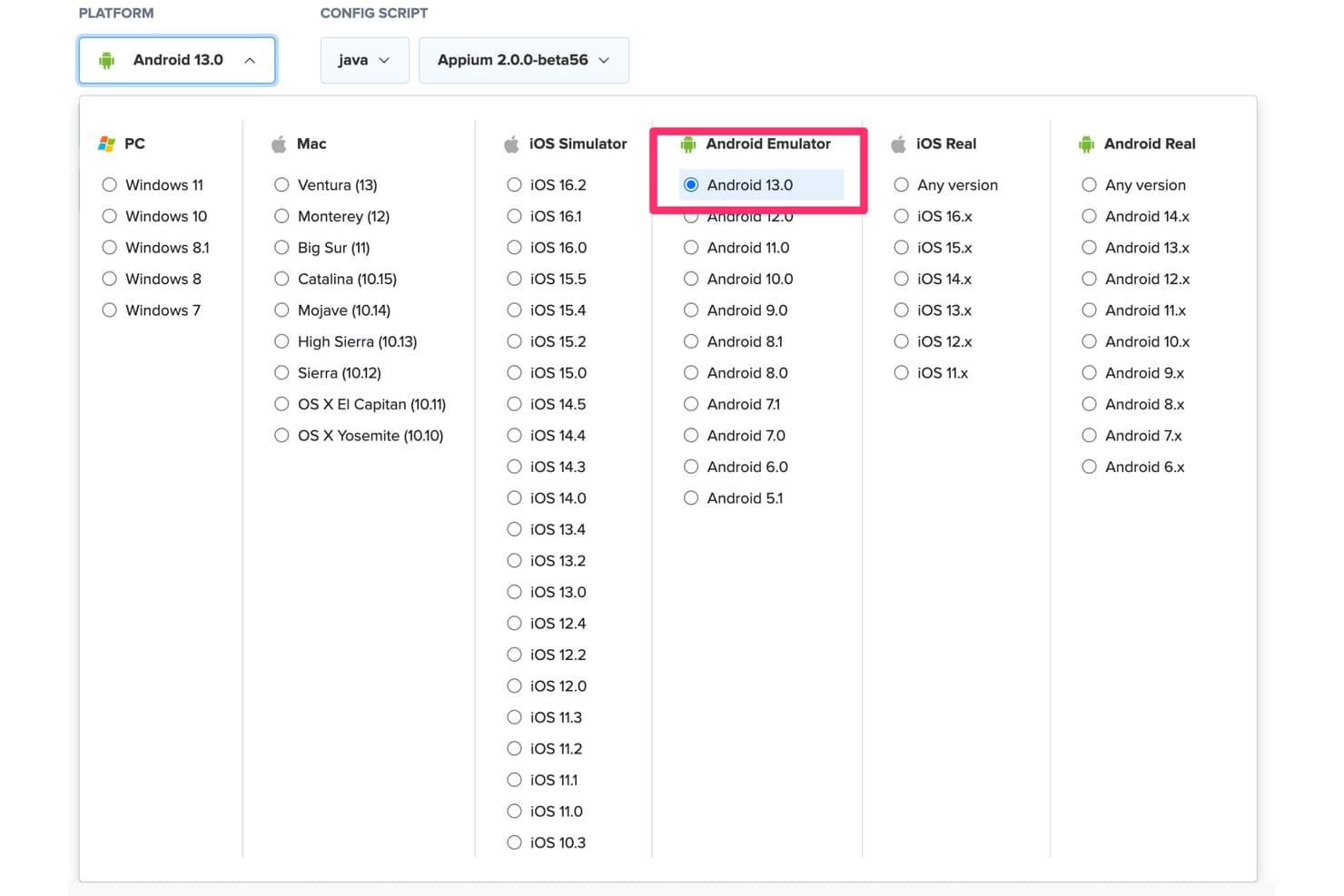
Sauce Labs supports Android Emulator testing on Android 13.0 via Java and Appium. Sauce Labs is a cloud-based Android testing platform that gives you on-demand access to 1,700+ virtual Android emulators spanning Android 5.0 through 16.x, with ARM-native execution, parallel test runs, and deep integration with Appium, Espresso, and major CI/CD pipelines.
Who Is Sauce Labs Best For?
Sauce Labs is a strong fit for QA engineers and DevOps teams that need to run Android tests at CI/CD scale without managing local emulator infrastructure.
Why I Picked Sauce Labs
I picked Sauce Labs as one of the best because it's the only platform I know of that delivers ARM-native Android execution at CI/CD scale, which directly solves the flakiness and slowness that plague x86-based cloud emulators. Session start times drop from ~90 seconds to ~20 seconds on the Android Premium Cloud, and I've seen teams run across 24+ concurrent Android versions without touching a local emulator setup. If your Mac-based QA pipeline is the bottleneck, Sauce Labs removes it entirely.
Sauce Labs Key Features
- ARM-native Android execution: The Android Premium Cloud runs virtual Android devices on ARM hardware, eliminating the x86 binary translation layer that causes test flakiness and slow session starts.
- Parallel test concurrency: Plans support up to 24+ simultaneous Android emulator sessions, letting your team run full device-version matrices in a single pipeline trigger.
- saucectl CLI: A command-line tool that handles APK/AAB uploads and Espresso test execution directly from your terminal, fitting naturally into scripted build workflows.
- Single-use VM sessions: Each emulator session spins up on a fresh virtual machine and is wiped after the session ends, giving every test run a clean, isolated environment.
Sauce Labs Integrations
Sauce Labs offers native plugins for Jenkins, Bitbucket, and TeamCity, plus documented integrations with GitHub Actions, GitLab, CircleCI, and Azure DevOps. Appium, Espresso, the
saucectlCLI, and REST API support custom CI/CD workflows from a Mac.Pros and Cons
Pros:
- Supports massive parallel version concurrency
- Runs ARM-native Android sessions in cloud
- No local Mac setup required for testing
Cons:
- Real-time app interactions limited by network latency
- Does not run natively on macOS
Learn more about Sauce Labs: Best for CI/CD-driven mobile QA teams
- Free trial + free demo available
- From $83/month
Visit WebsiteCustomer Rating:4.3/5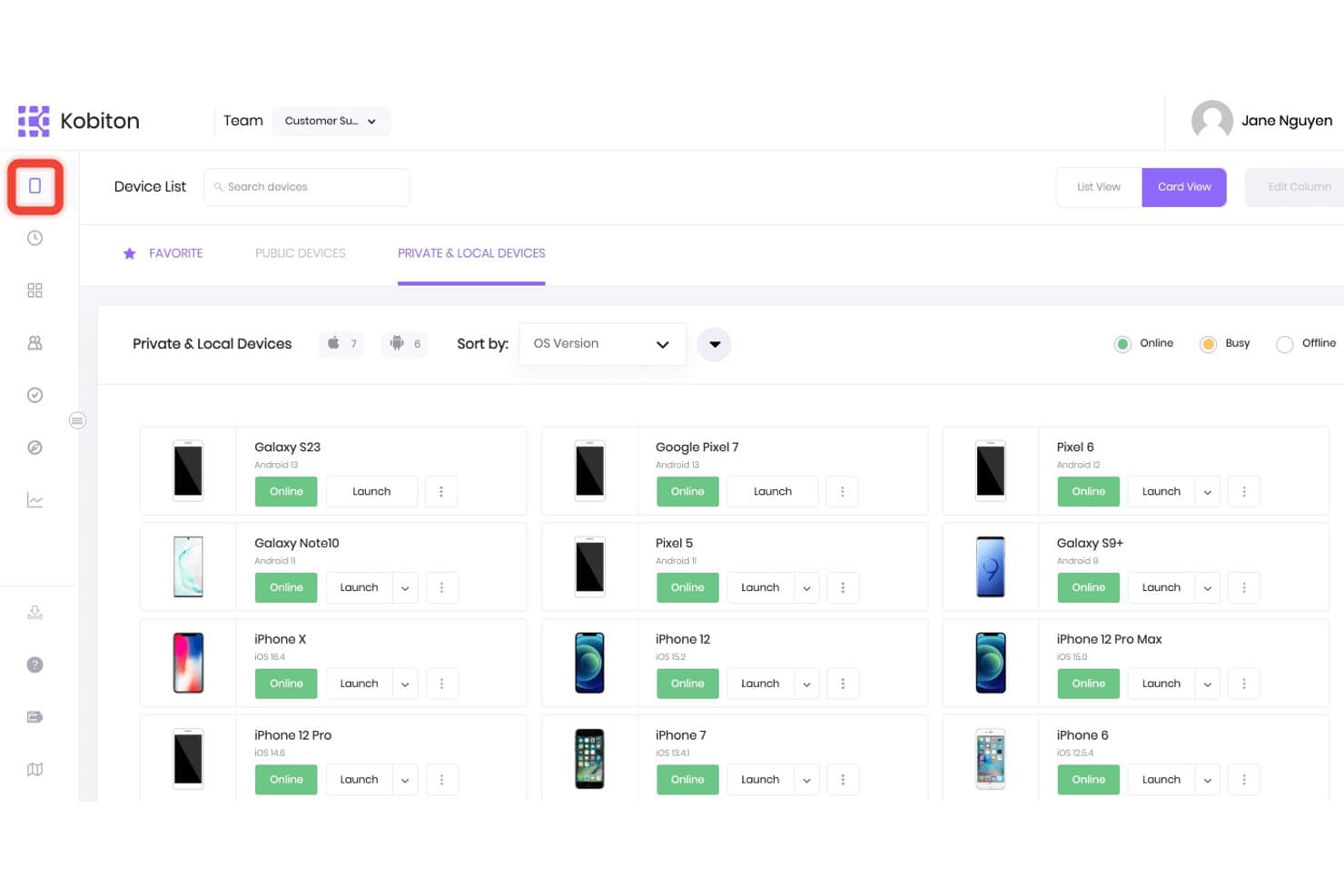
Kobiton lets users browse and launch private and local devices. Kobiton is a cloud-based mobile testing platform that gives teams browser-accessible Android device testing—combining real device access, virtual emulators, and AI-assisted test automation across a wide range of OS versions and manufacturers.
Who Is Kobiton Best For?
Kobiton is a strong fit for QA and DevOps engineers who need cloud-based Android testing woven directly into automated CI/CD pipelines.
Why I Picked Kobiton
I've included Kobiton in my top picks because it's the strongest option for QA and DevOps teams who need Android testing built directly into a CI/CD pipeline. Where local emulators fall short in automation depth, Kobiton fills the gap with scriptless test recording that auto-generates Appium scripts and self-healing script execution that adapts when UI elements change. Its Session Explorer lets you replay test sessions, inspect screen load times, and file bugs to Jira without leaving the platform.
Kobiton Key Features
- Parallel device execution: Run test sessions across multiple Android OS versions and device profiles simultaneously within a single pipeline run.
- Camera image injection: Replace a device's live camera feed with custom images or video to test barcode scanning, OCR, and augmented reality workflows.
- GPS location mocking: Set virtual GPS coordinates on cloud-hosted Android devices to validate geofencing and location-dependent app behavior.
- Air-gapped deployment support: Deploy Kobiton entirely on-premises or in a fully isolated environment for teams with strict data governance or compliance requirements.
Kobiton Integrations
Kobiton integrates with Jenkins, GitHub Actions, CircleCI, Bitrise, Azure DevOps, TeamCity, Buildkite, Jira, Appium, Espresso, and XCUITest. Its API supports custom CI/CD workflows and automated mobile testing.
Pros and Cons
Pros:
- Parallel test execution across multiple devices
- Strong CI/CD pipeline and automation features
- Access to real devices and emulators remotely
Cons:
- Requires stable internet for all device sessions
- No native emulator runs on Mac locally
Learn more about Kobiton: Best with dedicated private device lab options
- Free plan available
- From $250/month
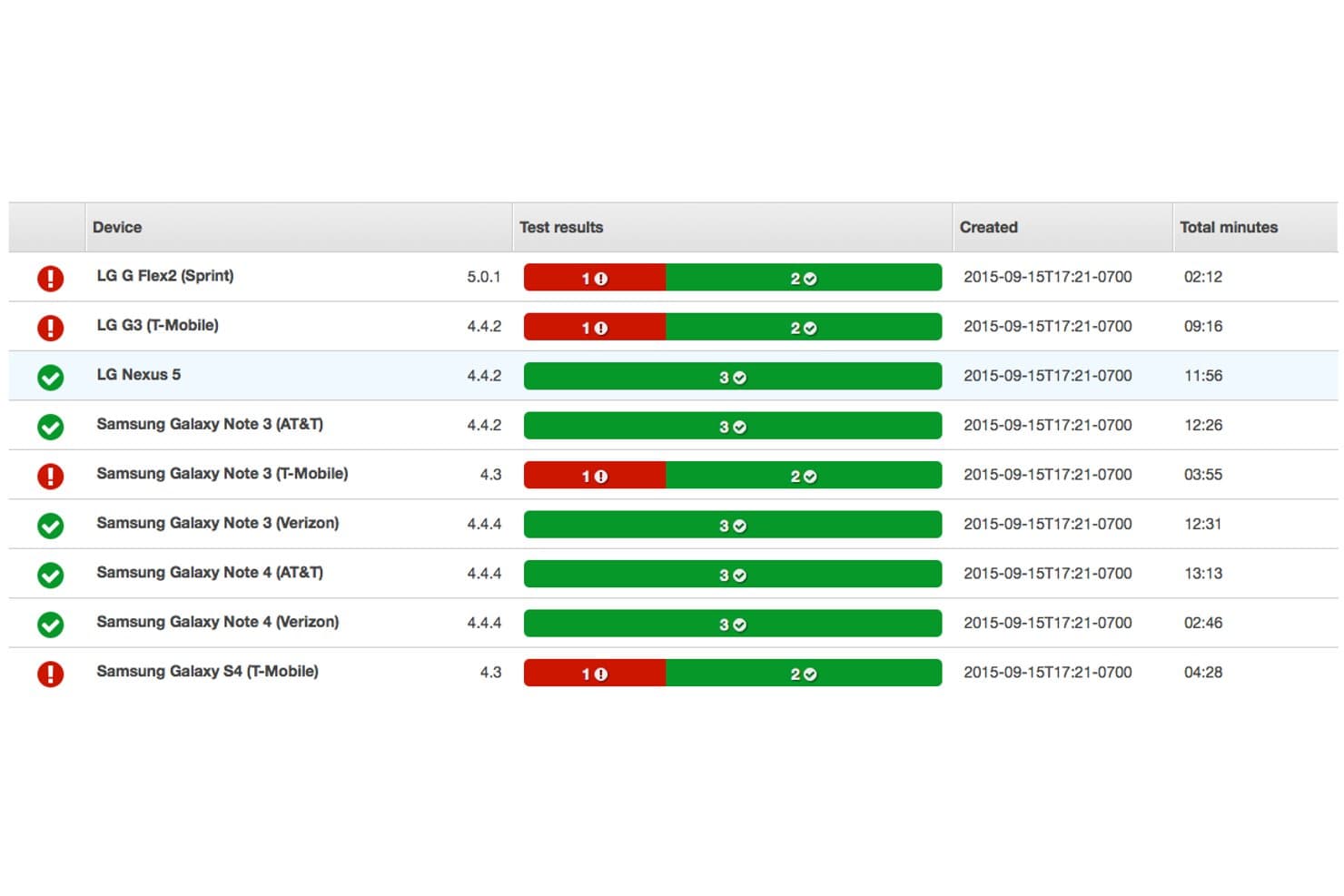
AWS Device Farm displays real Android device test results with pass/fail statuses, OS versions, and total test duration per device. AWS Device Farm is a cloud-based device testing platform designed for developers who need to run Android apps on real devices and browsers from their Mac.
Who Is AWS Device Farm Best For?
Mobile QA teams and developers at technology companies that need access to a wide range of real Android devices for thorough app testing at scale.
Why I Picked AWS Device Farm
I picked AWS Device Farm as one of the best because I can reserve private Android devices in a cloud lab, ensure sensitive apps never share hardware with competitors, and run parallel, automated tests on real hardware from my Mac.
AWS Device Farm Key Features
- Automated test suite support: Run tests using frameworks like Appium, Espresso, Calabash, and XCTest.
- Live device access: Interact with real Android devices for manual testing directly from your Mac.
- Deep diagnostic logs: Capture video, screenshots, and performance data from each test session.
- Device state configuration: Change settings like location, language, or network to simulate real-world conditions.
AWS Device Farm Integrations
AWS Device Farm offers native integrations with Jenkins, Android Studio, and the broader AWS ecosystem, including CodePipeline and S3. An API is available for custom integrations and test automation workflows.
Pros and Cons
Pros:
- Offers device state and environment configuration
- Supports both manual and automated testing
- Access to a wide real device library
Cons:
- Not suitable for offline or local-only testing
- Queues can delay access to popular devices
Learn more about AWS Device Farm:
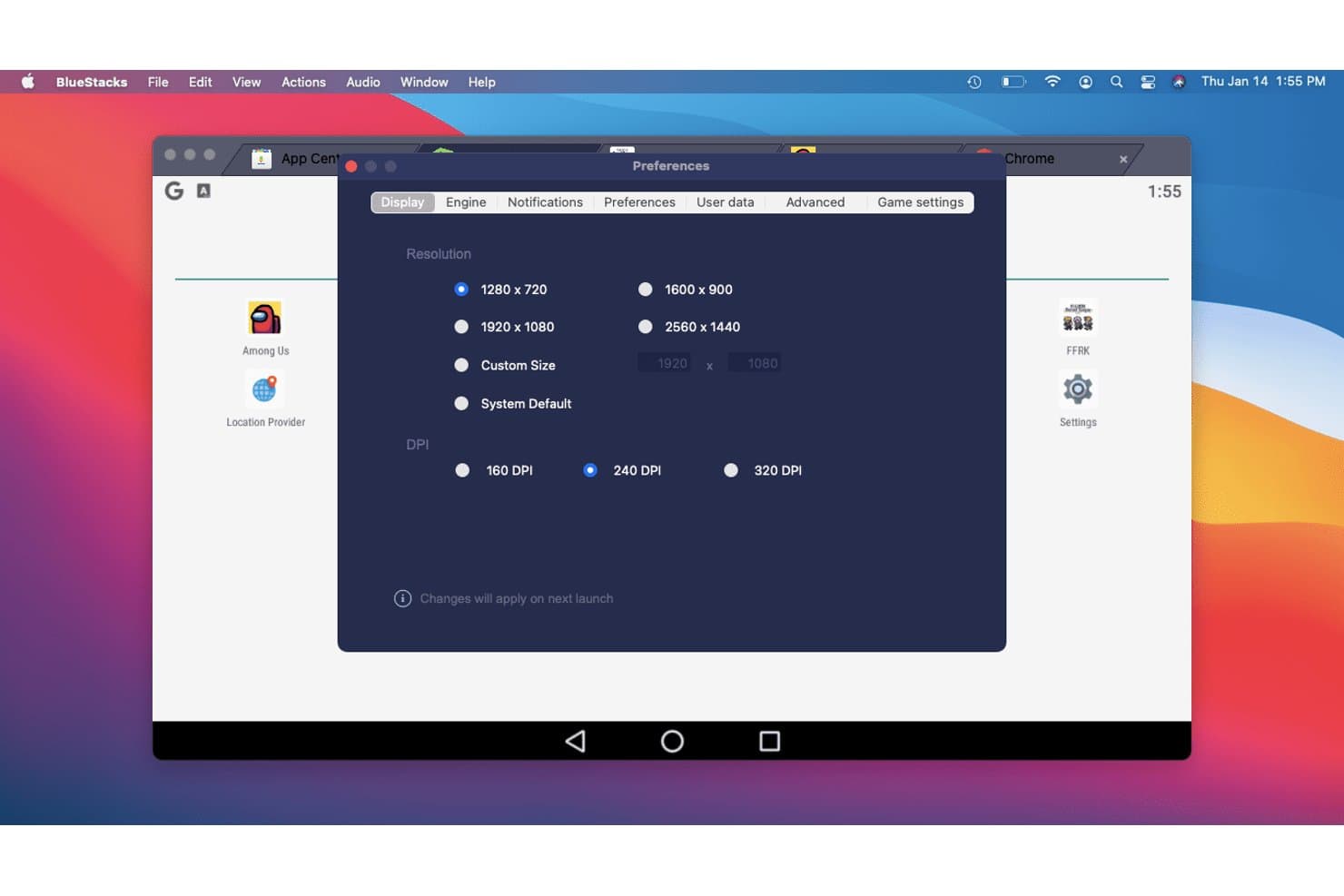
BlueStacks lets users customize display resolution and DPI settings. BlueStacks Air is a native ARM64 Android emulator for Apple Silicon Macs that runs Android 13 apps and games through a fully integrated Google Play Store, multi-instance manager, and Vulkan-accelerated graphics engine.
Who Is BlueStacks Best For?
BlueStacks Air is the go-to pick for casual gamers and mobile gaming enthusiasts who want to play Android games on an Apple Silicon Mac without any technical setup.
Why I Picked BlueStacks
BlueStacks Air earns its spot on my list because no other Mac Android emulator comes close for gaming. It's a native ARM64 build with Vulkan-accelerated graphics and up to 240 FPS support, so titles like Genshin Impact and Call of Duty: Mobile run with real fluidity on Apple Silicon. The Multi-Instance Manager lets you run several game accounts simultaneously, each with its own CPU and RAM allocation.
BlueStacks Key Features
- Google Play Store integration: Access the full Play Store with your Google account, including in-app purchases and cloud sync, without sideloading APKs.
- Multi-Instance Manager: Run multiple independent Android sessions simultaneously, each with its own CPU, RAM, and resolution settings.
- BlueStacks AI (BlueAI): An AI layer that performs in-app actions automatically, with support for third-party LLM providers via your own API key.
- Eco Mode: Reduces CPU and GPU usage for background instances so your Mac stays responsive while multiple sessions run.
BlueStacks Integrations
BlueStacks has native Google Play Store integration and supports ADB connections through port 5555. BlueAI connects with OpenAI and Anthropic through your API key, while macOS integration supports Mission Control, full-screen mode, keyboard shortcuts, and multiple monitors.
Pros and Cons
Pros:
- Multi-instance manager for parallel sessions
- Smooth gameplay with up to 240 FPS
- Native support for Apple Silicon Macs
Cons:
- Only emulates Android 13 version
- No support for Intel-based Macs
Learn more about BlueStacks: Best for browser-based CI/CD pipeline testing
- Free plan + free demo available
- From $59/month (billed annually)
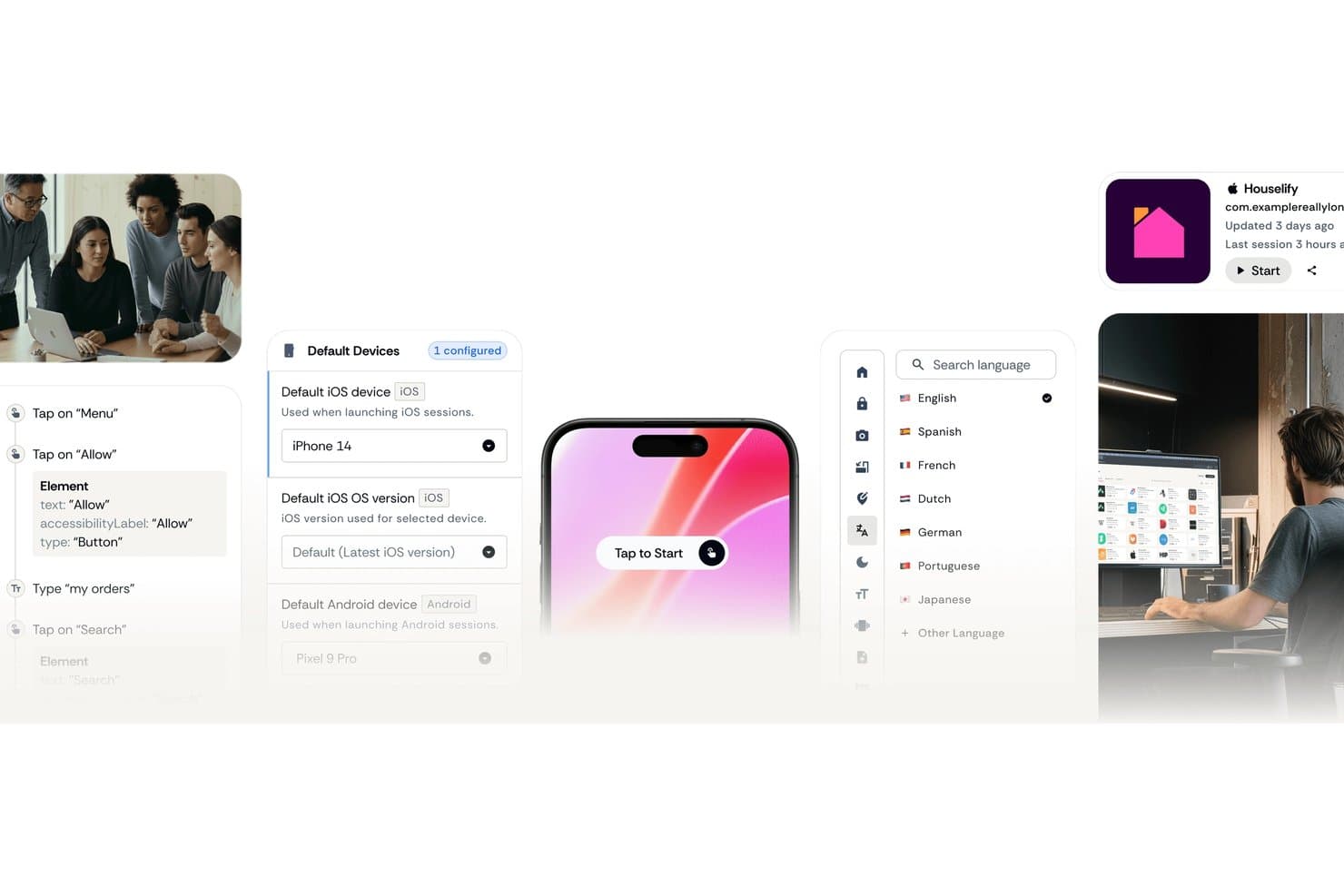
Appetize.io lets users configure default iOS and Android devices for testing. Appetize.io is a cloud-based Android emulator that runs entirely in your browser, offering APK upload and playback, multi-version device profiles spanning Android 8.1 through 16, ADB tunnel access, a JavaScript SDK, and native Playwright integration for automated testing.
Who Is Appetize.io Best For?
Appetize.io is a strong fit for QA engineers and DevOps teams who need scalable, browser-based Android testing wired directly into their CI/CD pipelines.
Why I Picked Appetize.io
I've included Appetize.io in my top picks because it's the only tool on this list that runs entirely in your browser, making Apple Silicon compatibility a non-issue. I particularly like its native Playwright integration with AppRecorder, which lets you record and replay test sessions without writing automation scripts from scratch. Pair that with documented CI/CD support for Bitrise, FastLane, GitHub, and GitLab, and you get a cloud Android environment that slots directly into an existing pipeline.
Appetize.io Key Features
- ADB tunnel access: Creates an SSH tunnel into a live cloud emulator session, letting you connect Android Studio or standard ADB commands directly to a remote device.
- Network traffic monitor: Captures all app network traffic via a built-in intercept proxy, with logs viewable in-session or downloadable as a HAR file.
- Mock location simulation: Sets device GPS coordinates via URL parameters or the JavaScript SDK
setLocation()method to test location-dependent app behaviour. - Media injection: Uploads images or video files (up to 50 MB) directly to a running emulator session for testing camera, OCR, or AR features.
Appetize.io Integrations
Appetize.io offers documented integrations with Bitrise, FastLane, GitHub, GitLab, Playwright, Android Studio via ADB tunnel, and Okta SSO. Its REST API and JavaScript SDK support custom CI/CD orchestration and embedded workflows.
Pros and Cons
Pros:
- Supports Playwright-native test automation workflows
- Connects Android Studio via ADB tunnel
- Runs Android emulation fully in browser
Cons:
- Lacks Google Play Store access
- Requires consistent internet for use
Learn more about Appetize.io: Best for cross-browser testing
- Free plan + free demo available
- From $15/month (billed annually)
Visit WebsiteCustomer Rating:4.9/5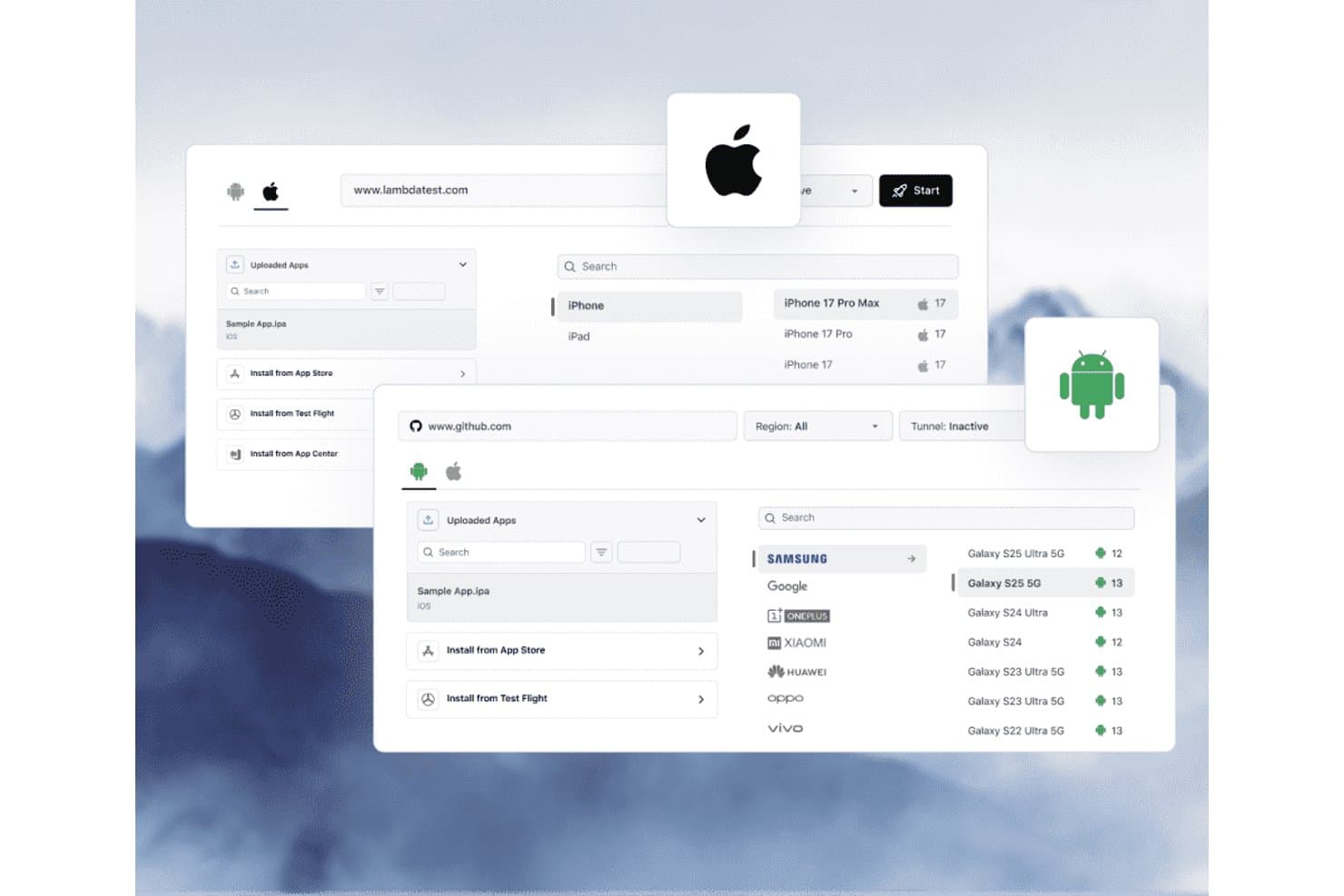
TestMu AI lets users test apps on real iOS and Android devices in the cloud. TestMu AI is a cloud-based Android testing platform that gives you access to 170+ emulator profiles and 10,000+ real devices directly from your browser, with built-in support for Appium, Espresso, Detox, and CI/CD pipeline integrations.
Who Is TestMu AI Best For?
TestMu AI is a strong fit for QA engineers and DevOps teams who need to test Android apps across a wide range of OS versions and real devices without managing local infrastructure.
Why I Picked TestMu AI
I picked TestMu AI as one of the best because it gives you access to 170+ Android emulator profiles and 10,000+ real devices directly from your browser, covering Android 4.1 through 16 without touching your Mac's local setup. Cross-browser testing is where it genuinely shines: you can run the same test session across multiple device and OS configurations simultaneously using HyperExecute, catching rendering and behaviour differences that single-device runs miss. I also like that KaneAI lets you author those tests in plain English, so spinning up a cross-device matrix doesn't require deep Appium scripting every time.
TestMu AI Key Features
- Real device cloud access: Connect to 10,000+ physical Android and iOS devices from your browser, with full hardware fidelity including real sensors and network conditions.
- CI/CD pipeline integrations: Connect directly to Jenkins, GitHub Actions, GitLab, CircleCI, Azure DevOps, and Bitbucket via a native Appium hub endpoint.
- Network condition simulation: Toggle between 3G, 4G, 5G, offline, and custom latency profiles within any test session to validate app behaviour under real-world network constraints.
- Session logging and diagnostics: Capture device logs, app crash reports, and network traffic automatically for every test session, accessible from the cloud dashboard after the run.
TestMu AI Integrations
TestMu AI supports 120+ integrations, including Jenkins, GitHub Actions, GitLab, Azure DevOps, CircleCI, Bitbucket, Appium, Espresso, Detox, and Maestro. Its Appium hub, REST APIs, and KaneAI CLI support custom CI/CD workflows.
Pros and Cons
Pros:
- Simultaneous testing across multiple configurations
- Huge range of Android versions and devices
- Runs on any Mac, no installation needed
Cons:
- Cannot run Android natively on Mac
- Requires constant internet connection to use
Learn more about TestMu AI: Best with 150+ third-party tool integrations
- Free trial available
- From $29/user/month (billed annually)
Visit WebsiteCustomer Rating:4.5/5
BrowserStack offers parallel testing across four Android devices simultaneously, displaying the Wikipedia app on Google Pixel 9, Samsung Galaxy S25, Google Pixel 9 Pro XL, and Samsung Galaxy S25 Ultra. BrowserStack is a cloud-based testing platform that gives Mac users access to thousands of real Android devices and browsers for both manual and automated app testing.
Who Is BrowserStack Best For?
QA teams and developers at medium to large companies who need real-device Android app testing without maintaining in-house device labs.
Why I Picked BrowserStack
I picked BrowserStack because my team is able to test Android apps on real devices directly from a Mac browser and instantly switch between models, OS versions, and network settings. The 150+ third-party tool integrations let us plug device testing into our CI/CD and reporting tools.
BrowserStack Key Features
- AI-powered test agents: Access automated test authoring, analysis, and failure debugging powered by built-in AI tools.
- Visual regression testing: Run automated screenshots and visual diffs across Android devices to catch layout bugs.
- Accessibility scanning: Test app accessibility on real Android phones with detailed reports on accessibility issues.
- Device geolocation simulator: Simulate different geographic locations for apps to test region-specific features and content.
BrowserStack Integrations
BrowserStack offers over 150 native integrations, including Jenkins, Jira, GitHub, GitLab, Slack, Bitbucket, Azure DevOps, CircleCI, Appium, and Selenium. An API is also available for custom integrations.
Pros and Cons
Pros:
- No local installation required for device testing
- Wide OS and device model coverage
- Real Android devices available instantly on Mac
Cons:
- Advanced device features require higher-tier plans
- Can experience lag during peak hours
Learn more about BrowserStack:
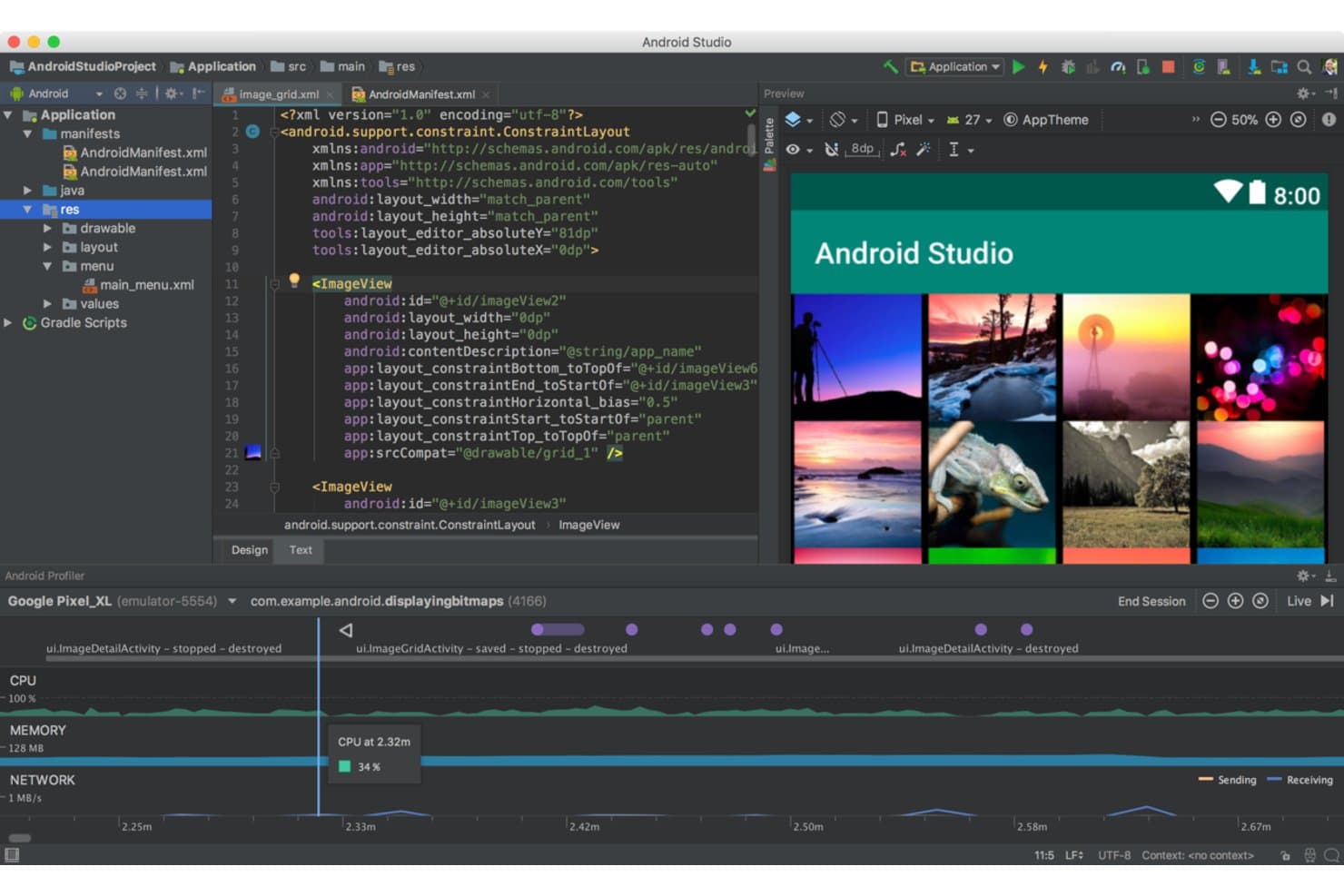
Android Studio lets users build and preview grid layouts with real-time profiling. Android Studio is Google's official Android IDE and emulator, built around the Android Virtual Device (AVD) Manager, with native Apple Silicon support, full sensor simulation, and deep integration with ADB, Gradle, Espresso, and CI/CD pipelines.
Who Is Android Studio Best For?
Android Studio is the go-to choice for Android app developers and QA engineers who need a full-featured, official development environment with deep toolchain integration.
Why I Picked Android Studio
I picked Android Studio as one of the best because it's Google's official Android IDE, which means it gets first-class support for every new Android API and device profile before any other emulator does. The AVD Manager ships with profiles covering Pixel 10 series, foldables, Wear OS, and Android Automotive, and you can swap API levels on the fly. I especially like the Extended Controls panel, which lets you script GPS routes, simulate 5G network conditions, and inject fingerprint events during active test runs.
Android Studio Key Features
- Quick Boot snapshots: Save and reload emulator states instantly, cutting subsequent launch times by up to 10x compared to a cold boot.
- Multi-instance networking: Run multiple AVDs simultaneously with a networking stack that lets emulators communicate directly, without manual port forwarding.
- Headless emulator mode: Launch and control the emulator from the command line without a GUI, making it compatible with automated CI/CD pipelines.
- Telnet and gRPC console: Connect to a running emulator via telnet or gRPC to inject commands, simulate events, and control device behavior programmatically.
Android Studio Integrations
Android Studio integrates with Gradle, Espresso, UI Automator, Firebase Test Lab, GitHub Actions, Jenkins, and Appium through ADB. It also provides gRPC and telnet interfaces for custom emulator automation.
Pros and Cons
Pros:
- Massive device and API version library
- Deep sensor and hardware simulation tools
- Native Apple Silicon and Intel Mac support
Cons:
- Not suitable for gaming or casual use
- High RAM and CPU usage on Mac
Learn more about Android Studio: Best for cloud-scale Android device fleet testing
- Free plan available
- From $239.99/computer/year
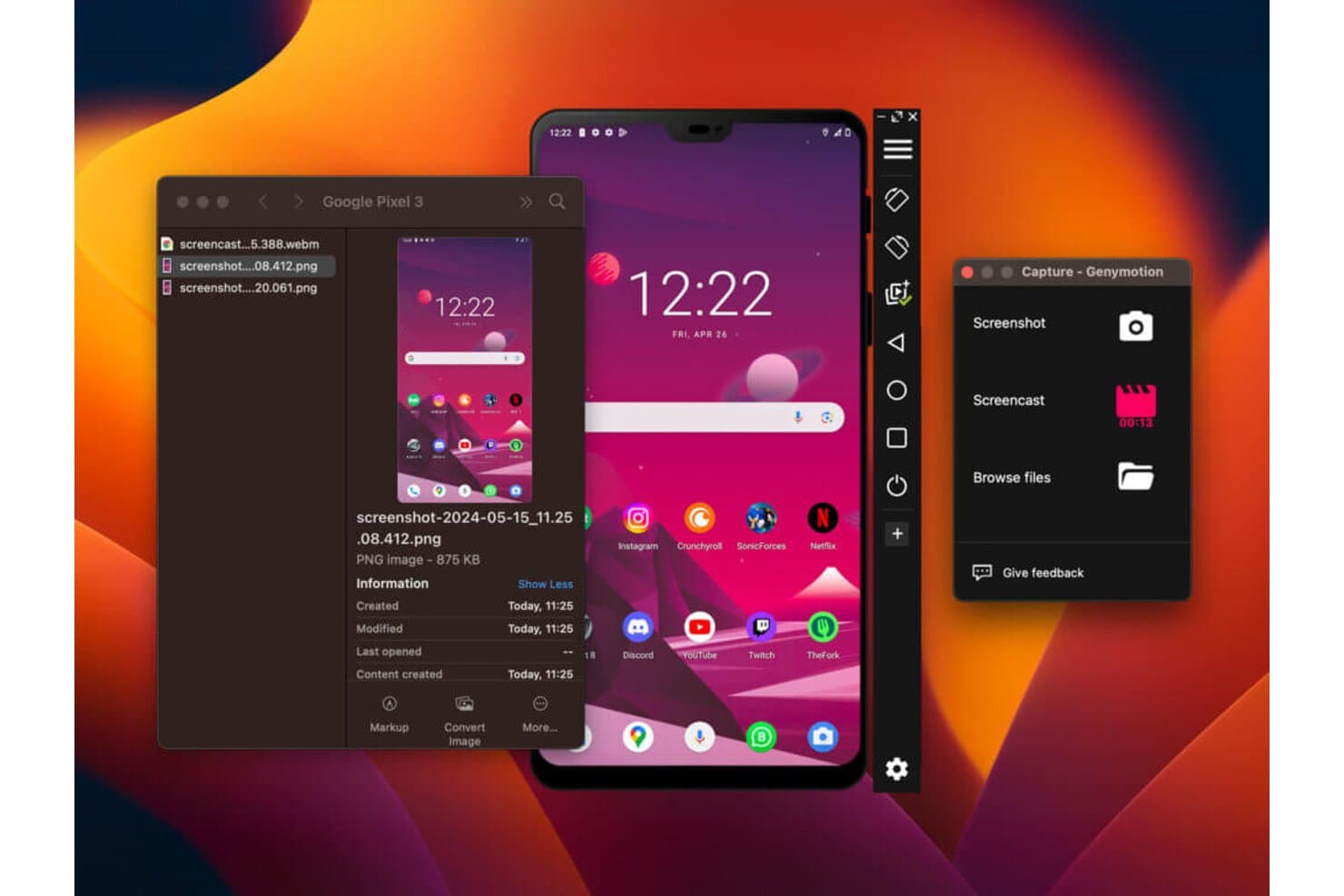
Genymotion lets users capture screenshots and screencasts of emulated Android devices on Mac. Genymotion is an Android emulator for Mac that supports local desktop, cloud-hosted (SaaS), and on-premises deployment, with multi-instance emulation, customizable device profiles, and deep CI/CD pipeline integration across Jenkins, Bitrise, CircleCI, and GitHub Actions.
Who Is Genymotion Best For?
Genymotion is a strong fit for mobile QA and DevOps teams that need to run large-scale, automated Android test suites across cloud-hosted device fleets.
Why I Picked Genymotion
I've included Genymotion in my top picks because it's the only Android emulator on this list that scales from a single local instance to a fleet of cloud-hosted virtual devices across AWS, GCP, and Azure. I like that the
gmsaasCLI lets you spin up, connect, and tear down devices programmatically inside Jenkins or GitHub Actions pipelines without any manual setup. PeerSpot users report running 100 to 200+ parallel instances, cutting test cycle times dramatically.Genymotion Key Features
- Custom device profiles: Configure screen resolution, DPI, CPU cores, RAM, and system fingerprint to replicate specific Android device models.
- Sensor simulation widgets: Simulate GPS routes via KML files, camera/media injection, battery state, biometrics, and network conditions from 2G through 5G.
- Android Studio plugin: Create, start, and deploy apps to Genymotion virtual devices directly from Android Studio via the official JetBrains Marketplace plugin.
- Multi-instance emulation: Run multiple Android virtual device instances simultaneously, with clone functionality available via the
gmtool admin clonecommand.
Genymotion Integrations
Genymotion has documented integrations with Android Studio, Jenkins, Bitrise, CircleCI, and GitHub Actions, plus Espresso, Appium, and Detox support. Its
gmsaasCLI and REST API support custom CI/CD automation across SaaS devices.Pros and Cons
Pros:
- Broad hardware and sensor simulation options
- Multi-instance emulation and quick device cloning
- Scales to large cloud device fleets
Cons:
- Motion sensor simulation unavailable in cloud mode
- No Google Play Services pre-installed
Learn more about Genymotion: Best for Apple Silicon Android gaming on Mac
- Free plan available
- Free plan available
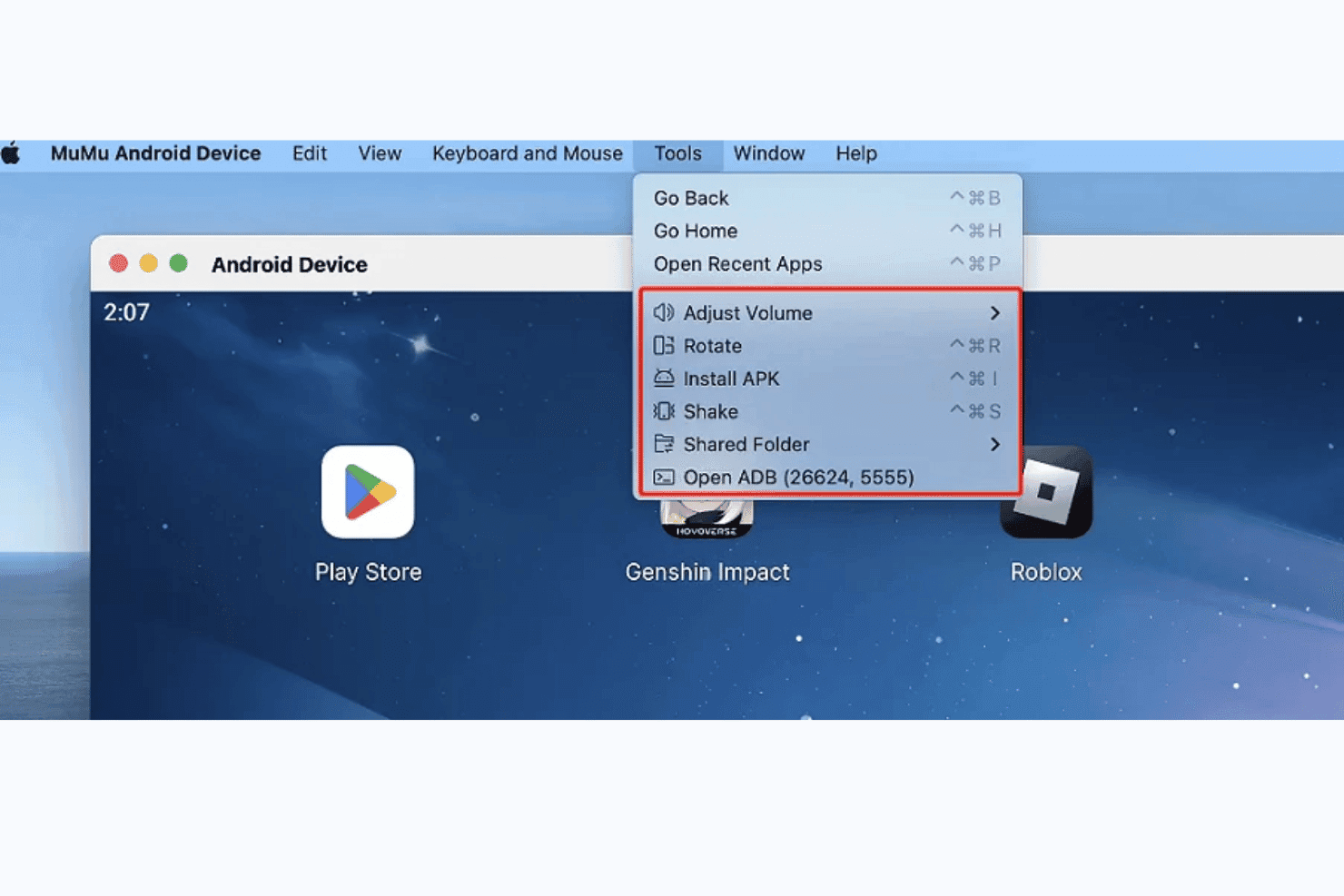
MuMuPlayer lets users access ADB, install APKs, and manage device tools on Mac. MuMuPlayer Pro is a native Apple Silicon Android emulator for Mac that runs Android 12, supports multi-instance device management, and includes ADB connectivity, a proprietary CLI, and customizable device profiles for gaming and app testing.
Who Is MuMuPlayer Best For?
MuMuPlayer Pro is a strong pick for Mac gamers and indie developers on Apple Silicon who want to run Android titles or test apps without a Windows machine.
Why I Picked MuMuPlayer
MuMuPlayer Pro earns its spot on my shortlist because it's one of the only Android emulators built natively for Apple Silicon, running as a true ARM64 app with no Rosetta overhead. I've run Genshin Impact and Honkai: Star Rail on it at high FPS without the stuttering I've seen from Rosetta-dependent alternatives. The
mumutoolCLI also lets me script device creation and APK installs, which saves real time when spinning up multiple test instances across different device profiles.MuMuPlayer Key Features
- Device profile customization: Configure each virtual device's model, resolution, DPI, GPU profile, RAM, CPU cores, and notch type per instance.
mumutoolCLI: A proprietary command-line tool for scripting device creation, APK installs, settings changes, and app lifecycle management.- Multi-instance orchestration: Create, clone, and run multiple virtual Android devices simultaneously, each with independent hardware configurations.
- ADB connectivity: Each running instance exposes a unique ADB port, letting you connect any ADB-compatible tooling or the Android Studio debugger directly.
MuMuPlayer Integrations
MuMuPlayer has native integrations with Android Studio and Android Debug Bridge (ADB), with a unique ADB port for each running device. Its proprietary
mumutoolCLI supports custom device, APK, settings, and app-management scripts; no CI/CD integrations or public API are documented.Pros and Cons
Pros:
- Customizable key mapping for games
- True multi-instance with custom device profiles
- Runs natively on Apple Silicon Macs
Cons:
- Only runs Android 12 on Mac
- No support for Intel-based Macs
Learn more about MuMuPlayer:
How I Evaluate Android Emulators for Mac
I split my evaluation into baseline requirements—like Apple Silicon stability and APK management—and differentiators like CI/CD fit, snapshot handling, and multi-instance support.
Core Functionality (Table Stakes For This List)
When I'm selecting tools for my list, I rank each one on a scale from 0 (does not offer the functionality) to 5 (excels in this area) for each core functionality listed below. I then calculate the tool's total score into a percentage, using 65% as a benchmark to help assess its overall fit for the list.
- macOS Compatibility: I check whether the emulator runs natively on both Intel and Apple Silicon Macs, since M-series chips need ARM64 builds to avoid Rosetta 2 overhead.
- Android OS Emulation: The range of supported Android versions matters. I look for tools that let you install APKs and access Google Play services across multiple OS releases.
- Virtual Device Configuration: I evaluate how much control you get over device profiles, including RAM allocation, screen resolution, DPI, and CPU cores—similar to the AVD manager in Android Studio.
- Input & Peripheral Mapping: Touch-based apps need reliable keyboard and mouse mapping on a desktop. I look for custom keybinding support and gamepad compatibility for game testing.
- Performance & Hardware Acceleration: I check for Hypervisor.framework support and GPU passthrough, because software-only rendering makes even simple apps sluggish on modern hardware.
- File & APK Management: Drag-and-drop APK installs, shared folders, and ADB access are what I evaluate here. These features determine how quickly you can push builds and pull logs during a test cycle.
Once I have a list of tools that meet the criteria, I consider what sets each platform apart.
Differentiating Factors (What Sets Vendors Apart)
Here's how I compare and contrast different vendors:
Standout Features
I look for snapshot and state management first. Being able to save a fully configured device state—apps installed, accounts logged in, sensor values set—and restore it in seconds cuts hours off regression testing. Scriptable automation hooks matter just as much, because headless CLI launches and gRPC control let you drive emulators from CI pipelines without manual intervention. I also evaluate network condition simulation, since throttling bandwidth or injecting latency inside the emulator is the fastest way to catch connectivity bugs before users do.
Beyond Features
Apple Silicon performance is the first thing I check. A native ARM64 build on an M-series Mac boots faster, runs cooler, and avoids the frame drops you get with x86 translation through Rosetta 2. I also evaluate CI/CD ecosystem fit—whether a tool ships Docker images, GitHub Actions workflows, or Jenkins plugins determines how quickly your DevOps team can wire it into existing pipelines. Licensing matters too, since scaling from one developer seat to a parallel test fleet can shift costs dramatically between open-source and commercial options.
Slik velger du en Android-emulator for Mac
Det er lett å gå seg vill i lange funksjonslister og kompliserte prismodeller. For å hjelpe deg med å holde fokus mens du går gjennom den unike prosessen din for valg av programvare, får du her en sjekkliste over faktorer du bør ha i bakhodet:
| Faktor | Hva du bør vurdere |
| Skalerbarhet | Forsikre deg om at emulatoren kan håndtere veksten i prosjektene dine uten at ytelsen forringes. Se etter løsninger som enkelt kan støtte flere brukere eller mer krevende apper. |
| Integrasjoner | Kontroller om emulatoren støtter integrasjon med de eksisterende utviklingsverktøyene dine, for eksempel Android Studio eller IntelliJ IDEA, slik at arbeidsflyten blir mest mulig effektiv. |
| Tilpasningsmuligheter | Teamet ditt kan ha behov for å justere emulatorens innstillinger for bestemte testscenarioer. Velg en emulator som gjør det mulig å tilpasse konfigurasjonene til prosjektene dine. |
| Brukervennlighet | Velg en emulator med et brukervennlig grensesnitt som ikke krever omfattende opplæring. Dette hjelper teamet med å konsentrere seg om utvikling i stedet for feilsøking. |
| Budsjett | Sammenlign prismodeller og sørg for at emulatoren passer innenfor teamets budsjett. Se etter en balanse mellom kostnad og funksjoner for å unngå overforbruk. |
| Sikkerhetstiltak | Vurder sikkerhetstiltakene som er på plass, for eksempel datakryptering og sikre tilkoblingsprotokoller, for å beskytte utviklingsmiljøet og sensitive data. |
Trender innen Android-emulatorer
I researchen min fant jeg utallige produktoppdateringer, pressemeldinger og utgivelseslogger fra ulike leverandører av iOS-emulatorer og Android-emulatorer. Her er noen av de fremvoksende trendene jeg følger med på:
- Kompatibilitet på tvers av plattformer: Flere emulatorer fokuserer på å tilby kompatibilitet ikke bare med Mac, men også med andre operativsystemer. Dette gjør det enklere for utviklere og brukere å bytte mellom ulike miljøer uten å miste funksjonalitet. Genymotion tilbyr for eksempel støtte på tvers av flere plattformer.
- Ytelsesoptimalisering: Emulatorer er i økende grad rettet mot å forbedre hastigheten og redusere forsinkelser. Leverandører som BlueStacks videreutvikler kontinuerlig arkitekturen sin for å sikre bedre brukeropplevelser, særlig for ressurskrevende applikasjoner som spill.
- Avansert grafikkstøtte: Forbedret grafikkgjengivelse har blitt et viktig fokusområde, særlig for spillapplikasjoner. Emulatorer som LDPlayer integrerer avanserte grafikkmotorer for å støtte grafikk i høy oppløsning og komplekse animasjoner.
- Integrasjon med utviklingsverktøy: Økt kompatibilitet med utviklingsmiljøer som Android Studio blir stadig vanligere. Dette gjør det mulig for utviklere å teste og distribuere applikasjoner mer effektivt uten å måtte ha separate oppsett.
- Tilpasning av brukergrensesnittet: Det er en økende trend mot å la brukere tilpasse emulatorens grensesnitt slik at det passer bedre til deres preferanser og arbeidsflyter. Leverandører tilbyr mer fleksible innstillinger for brukergrensesnittet, som vinduer med justerbar størrelse og kontroller som kan tilpasses.
Hva er en Android-emulator for Mac?
En Android-emulator for Mac er et verktøy som lar brukere kjøre Android-applikasjoner på macOS-enheter. Utviklere, spillere og testere bruker vanligvis disse verktøyene for å få tilgang til Android-apper, teste appytelse eller spille mobilspill på en større skjerm. Tilpassede kontroller, støtte for flere instanser og kompatibilitet med ulike Android-versjoner hjelper brukerne med å teste, spille og arbeide mer effektivt. Alt i alt gir disse verktøyene en praktisk måte å ta Android-funksjonalitet til macOS på.
Funksjoner i Android-emulatorer for Mac
Når du velger en Android-emulator for Mac, bør du se etter følgende viktige funksjoner:
- Installer med dra og slipp: Denne funksjonen gjør det enkelt for brukere å installere apper ved å dra APK-filer direkte inn i emulatoren, noe som forenkler installasjonsprosessen.
- Skjermopptak: Emulatorer med denne funksjonen gjør det mulig for brukere å ta opp aktiviteter på skjermen, noe som er nyttig for å lage veiledninger eller ta opp spilling.
- Simulering av maskinvarekonfigurasjon: Denne funksjonen gjør det mulig for emulatorer å etterligne ulike maskinvareoppsett, for eksempel forskjellige skjermstørrelser og oppløsninger, noe som hjelper utviklere med å teste appenes responsivitet.
- Støtte for flere instanser: Dette gjør det mulig for brukere å kjøre flere instanser av emulatoren samtidig, noe som er nyttig for å teste apper under ulike forhold eller gjøre flere ting samtidig.
- Tilpassbare kontroller: Brukere kan tilordne tastatur- og musinput for å etterligne berøringskontroller, noe som gir en bedre opplevelse ved spilling eller apptesting.
- Ytelsesinnstillinger: Emulatorer tilbyr ofte alternativer for å justere CPU- og minnebruk, slik at brukerne kan optimalisere ytelsen basert på systemets kapasitet.
- Kompatibilitet med utviklingsverktøy: Problemfri integrasjon med Android-utviklingsmiljøer som Android Studio hjelper utviklere med å teste og feilsøke apper effektivt.
- Støtte på tvers av plattformer: Noen emulatorer kan kjøres på ulike operativsystemer, noe som gjør dem allsidige for brukere som arbeider på tvers av forskjellige plattformer.
- Skybasert synkronisering: Denne funksjonen gjør det mulig for brukere å synkronisere emulatorinnstillinger og data på tvers av enheter, noe som gir kontinuitet og bekvemmelighet.
- Avansert nettverkskonfigurasjon: Gjør det mulig for emulatoren å simulere ulike nettverksforhold, slik at utviklere kan teste appenes funksjonalitet under varierende tilkoblingsforhold.
Fordeler med Android-emulatorer for Mac
Implementering av Android-emulatorer for Mac gir flere fordeler for teamet og virksomheten din. Her er noen av fordelene du kan se frem til:
- Kompatibilitet på tvers av plattformer: Lar deg kjøre Android-apper på macOS-enheter for bedre tilgjengelighet.
- Tilpassede kontroller: Gir deg muligheten til å tilordne tastatur- og musinnstillinger for å forbedre spillingen eller bruken av apper.
- Støtte for flere instanser: Lar deg kjøre flere apper eller spill samtidig for testing eller fleroppgavekjøring.
- Fleksibilitet ved apptesting: Hjelper utviklere og testere med å simulere ulike Android-enheter og versjoner av operativsystemet.
- Forbedret appytelse: Tilbyr alternativer for å justere CPU, RAM og oppløsning for å optimalisere hvordan apper kjører.
- Praktisk for spilling: Gir mobilspill en større skjerm med bedre kontroller og jevnere grafikk.
- Kostnadseffektiv testing: Reduserer behovet for fysiske Android-enheter ved å tilby virtuelle miljøer.
Kostnader og priser for Android-emulatorer for Mac
Å velge en Android-emulator for Mac krever en forståelse av de ulike prismodellene og abonnementene som er tilgjengelige. Kostnadene varierer basert på funksjoner, teamstørrelse, tillegg og mer. Tabellen nedenfor oppsummerer vanlige abonnementer, gjennomsnittsprisene deres og typiske funksjoner som er inkludert i Android-emulatorløsninger for Mac:
Sammenligningstabell for abonnementer for Android-emulatorer
| Abonnementstype | Gjennomsnittspris | Vanlige funksjoner |
| Gratisabonnement | $0 | Grunnleggende emulering, begrenset brukerstøtte og redusert ytelse. |
| Personlig abonnement | $5-$20 /bruker /måned | Standard emulering, moderat brukerstøtte, begrensede tilpasningsmuligheter og tilgang til fellesskapet. |
| Bedriftsabonnement | $25-$50 /bruker /måned | Forbedret ytelse, prioritert brukerstøtte, støtte for flere instanser og avanserte integrasjoner. |
| Virksomhetsabonnement | $60-$100 /bruker /måned | Full tilpasning, dedikert brukerstøtte, sikkerhet på bedriftsnivå og omfattende analysefunksjoner. |
Vanlige spørsmål om Android-emulatorer for Mac
Her er noen svar på vanlige spørsmål om Android-emulatorer for Mac:
Hvordan kan du kjøre en Android-emulator på en Mac?
For å kjøre en Android-emulator på Mac-en kan du bruke programvare som Android Studio, som inkluderer emuleringsverktøyet. Begynn med å laste ned og installere Android Studio, og opprett deretter en virtuell Android-enhet (AVD) gjennom AVD Manager. Start emulatoren for å simulere ulike Android-enheter uten behov for fysisk maskinvare.
Er det mulig å bruke en Android-emulator på en Mac med en M1-brikke?
Ja, du kan bruke en Android-emulator på en Mac med en M1-brikke. Noen emulatorer, som Genymotion og de nyeste versjonene av Android Studios emulator, er optimalisert for Apples M1-silisium og tilbyr bedre kompatibilitet og ytelse. Sørg for at du laster ned riktig versjon som støtter Apples silisium.
Hva er trinnene for å forbedre ytelsen til en Android-emulator på Mac?
For å forbedre ytelsen til en Android-emulator på Mac kan du tildele mer RAM og CPU-ressurser i AVD-innstillingene. Aktivering av maskinvareakselerasjon, for eksempel Intel HAXM, kan også forbedre ytelsen. Vurder å kjøre emulatoren i et mindre vindu for å redusere belastningen på systemet.
Kan du teste Android-apper på en Mac uten å bruke Android Studio?
Ja, du kan teste Android-apper på en Mac uten å bruke Android Studio ved å benytte frittstående emulatoralternativer som Genymotion eller BlueStacks. Disse emulatorene lar deg kjøre og teste Android-apper uavhengig, selv om de kan kreve ytterligere konfigurasjon for å etterligne bestemte enhetsinnstillinger.
Hvordan feilsøker du vanlige problemer med Android-emulatorer på Mac?
Når du feilsøker problemer med Android-emulatorer på Mac, bør du kontrollere at systemet er kompatibelt med emulatorens krav. Sørg for at virtualisering er aktivert i Mac-ens BIOS-innstillinger. Oppdatering av emulatoren og SDK-verktøyene kan løse feil, og du kan finne løsninger på spesifikke problemer i nettfora.