

I 10 migliori software di gestione dello storage per i team IT nel 2026

10 Elenco dei migliori software per la gestione dell'archiviazione


Gestire i dati in modo efficiente può essere un vero grattacapo. Devi mantenere tutto organizzato e sicuro, assicurandoti al contempo che il tuo team possa accedervi facilmente. È qui che entra in gioco il software per la gestione dell'archiviazione. Ti aiuta ad affrontare questi problemi, riducendo lo stress e facendoti risparmiare tempo.
Ho trascorso innumerevoli ore a testare e recensire software per trovare le soluzioni migliori per te. Il mio obiettivo è offrirti una recensione imparziale e basata su ricerche approfondite dei migliori strumenti per la gestione dell'archiviazione. Troverai informazioni sulle loro caratteristiche distintive e sui vantaggi che possono offrire al tuo team.
In questo articolo ti guiderò tra le migliori opzioni disponibili, aiutandoti a prendere una decisione informata e adatta alle tue esigenze. Iniziamo e troviamo la soluzione perfetta per le tue necessità di gestione dell'archiviazione.
Perché fidarsi dei nostri consigli sui software
Il nostro team testa e recensisce software dal 2012. In quanto leader tecnologici noi stessi, sappiamo quanto sia difficile — e importante — scegliere il software giusto.
Per questa guida, abbiamo valutato gli strumenti attraverso test praticie ricerche indipendenti, assegnando un punteggio agli strumenti in base ai nostri criteri di selezione.
Le nostre recensioni riflettono il nostro giudizio editoriale umano, non un discorso di vendita.
Revisori esperti:
Riepilogo dei migliori software per la gestione dell'archiviazione
| Tool | Best For | Trial Info | Price | ||
|---|---|---|---|---|---|
| 1 | Ideale per la compatibilità nativa con le API S3 | Demo gratuita disponibile | Prezzo su richiesta | Website | |
| 2 | Ideale per la gestione dello storage nel computing unificato | Not available | Prezzo su richiesta | Website | |
| 3 | Ideale per la gestione unificata dei dati nel cloud | Not available | Prezzo su richiesta | Website | |
| 4 | Ideale per una gestione dello storage approfondita basata sull'IA | Not available | Prezzo su richiesta | Website | |
| 5 | Ideale per lo storage flash predittivo nei data center | Not available | Prezzo su richiesta | Website | |
| 6 | Ideale per funzionalità complete di storage software-defined | Not available | Prezzo su richiesta | Website | |
| 7 | Ideale per il backup e la replica completa delle VM | Not available | Prezzo su richiesta | Website | |
| 8 | Ideale per operazioni multi-cloud ad alta efficienza | Not available | Prezzo su richiesta | Website | |
| 9 | Ideale per la gestione dei dati in cloud ibrido | Not available | Prezzo su richiesta | Website | |
| 10 | Ideale per backup e ripristino di livello enterprise | Not available | Prezzo su richiesta | Website |
Recensioni dei migliori software per la gestione dell'archiviazione

Ideale per la compatibilità nativa con le API S3

Cloudian HyperStore è una piattaforma di storage a oggetti software-defined che gestisce dati non strutturati su ambienti on-premise, multi-sito e cloud ibrido utilizzando un'architettura nativa compatibile S3.
Per chi è ideale Cloudian HyperStore?
Cloudian HyperStore è particolarmente indicato per i team IT aziendali e i provider di servizi gestiti che devono gestire grandi volumi di dati non strutturati su ambienti on-premise, multi-sito o cloud ibrido.
Perché ho scelto Cloudian HyperStore
Ho scelto Cloudian HyperStore per la sua compatibilità nativa con le API S3. In pratica, questo significa che il tuo team può collegare applicazioni compatibili S3, strumenti di backup e piattaforme di analisi direttamente a HyperStore senza la necessità di sviluppare connettori personalizzati. Apprezzo anche il supporto di funzionalità come upload multi-parte, versioning degli oggetti, policy sui bucket e controlli IAM, che semplificano la migrazione e l'esecuzione dei carichi di lavoro esistenti.
Funzionalità principali di Cloudian HyperStore
- Coding di cancellazione: Distribuisce i frammenti di dati tra nodi, rack o siti per garantire la piena recuperabilità anche in caso di guasto simultaneo di più componenti.
- Tiering cloud ibrido: Sposta automaticamente i dati tra storage on-premise e AWS, Azure o GCP in base a policy di ciclo di vita configurabili.
- Console di gestione Cloudian: Un dashboard centralizzato per monitorare lo stato del cluster, gestire i tenant, impostare i controlli QoS e visualizzare l'utilizzo dello storage su tutti i nodi.
- Servizi file HyperStore: Supporta l'accesso ai file tramite SMB, NFS e POSIX, insieme allo storage a oggetti, con integrazione Active Directory e LDAP per la gestione delle identità.
Integrazioni Cloudian HyperStore
Le integrazioni comprendono Veeam, Commvault, Rubrik, Veritas, VMware, NVIDIA, Teradata, Vertica, Kasten by Veeam, AWS, Microsoft Azure e Google Cloud Platform (GCP). Cloudian HyperStore offre inoltre un'API compatibile S3 per integrazioni personalizzate con applicazioni che supportano il protocollo S3.
Pros and Cons
Pros:
- Il blocco oggetti immutabile impedisce modifiche non autorizzate
- Compatibilità nativa con le API S3 per lo storage on-premise
- Supporta lo storage su larga scala a costi contenuti
Cons:
- È necessaria pianificazione dell'infrastruttura per grandi implementazioni
- Supporto limitato per applicazioni mobile

Ideale per la gestione dello storage nel computing unificato
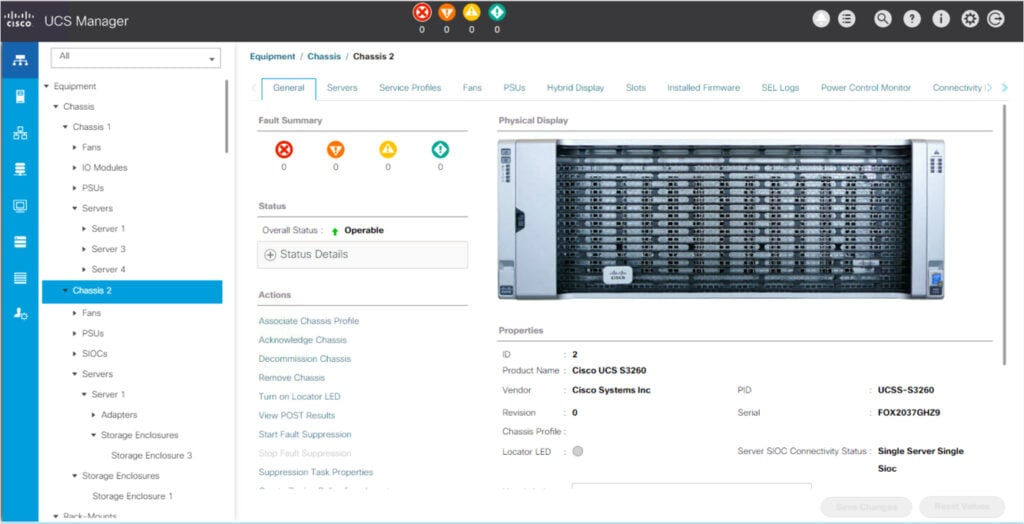
Cisco UCS Manager è uno strumento di gestione dello storage che consente l'amministrazione senza interruzioni dei componenti dell'infrastruttura. Il suo approccio unificato facilita il controllo completo su diversi ambienti di storage, rendendolo il miglior strumento per la gestione dello storage nel computing unificato.
Perché ho scelto Cisco UCS Manager: Ho scelto Cisco UCS Manager per il suo approccio unico alla gestione unificata dello storage. Integrando risorse di calcolo, storage e rete, offre una visione olistica dell'infrastruttura di un'organizzazione.
Confrontandolo con altri strumenti, è risultato evidente che UCS Manager si distingue per le capacità di gestione centralizzata e integrata. Pertanto, ho stabilito che è il migliore per la gestione dello storage nei sistemi di computing unificato, poiché consente alle organizzazioni di avere una conoscenza e un controllo completi dei propri ambienti di storage.
Caratteristiche principali e integrazioni:
Cisco UCS Manager offre gestione centralizzata di risorse di calcolo, rete, software e storage. Dispone inoltre di una gestione basata su policy per operazioni efficienti e coerenti.
Inoltre, si integra perfettamente con la suite di prodotti e servizi Cisco, come Cisco Intersight, offrendo soluzioni più complete per la gestione di storage e computing.
Pros and Cons
Pros:
- Gestione centralizzata di varie risorse offre una visione e un controllo completi
- La gestione basata su policy garantisce operazioni coerenti
- Integrazione fluida con altri servizi Cisco
Cons:
- Le informazioni sui prezzi non sono prontamente disponibili
- Curva di apprendimento legata alla complessità della gestione unificata
- Dipende da altri prodotti Cisco per sfruttare tutte le funzionalità

Cohesity
Ideale per la gestione unificata dei dati nel cloud

Cohesity è una piattaforma unificata e scalabile via web progettata per consolidare i dati secondari e le applicazioni. Offre soluzioni per la protezione dei dati, servizi file e oggetti, ambienti di test/sviluppo e analisi su un'unica piattaforma nativa per il cloud, rendendola la scelta migliore per la gestione dei dati su diversi ambienti cloud.
Perché ho scelto Cohesity: Durante la compilazione di questo elenco, volevo includere uno strumento specializzato nell'unificazione della gestione dei dati nel cloud. Cohesity ha attirato la mia attenzione per la sua piattaforma innovativa in grado di consolidare dati secondari e applicazioni che tradizionalmente risiedono in silos. Ritengo sia la migliore soluzione per la gestione dei dati nel cloud grazie alla sua struttura dati multi-cloud che consente accesso immediato ai dati ovunque.
Funzionalità e integrazioni principali:
Le caratteristiche notevoli di Cohesity includono la capacità di ripristino di massa istantaneo, deduplicazione globale, clonazione a costo zero e una rigorosa protezione contro i ransomware. Dispone inoltre di una potente funzione di ricerca e analisi che consente una gestione intelligente dei dati basata su policy.
Si integra con ambienti virtuali popolari come VMware, Hyper-V e Nutanix AHV, e con servizi cloud pubblici come AWS, Google Cloud e Azure, potenziando la sua capacità di gestione unificata dei dati.
Pros and Cons
Pros:
- Soluzione completa per la gestione dei dati, in grado di gestire dati e applicazioni secondari
- Protezione avanzata contro i ransomware per la sicurezza dei dati
- Integrazione fluida con diversi ambienti virtuali e servizi cloud pubblici
Cons:
- Potrebbe risultare eccessivo per le organizzazioni più piccole a causa dell'ampia gamma di funzionalità
- Potrebbe essere necessario del tempo per sfruttare appieno tutte le funzionalità
- Il costo può essere proibitivo per alcuni utenti, in quanto il prezzo è fornito solo su richiesta

Ideale per una gestione dello storage approfondita basata sull'IA
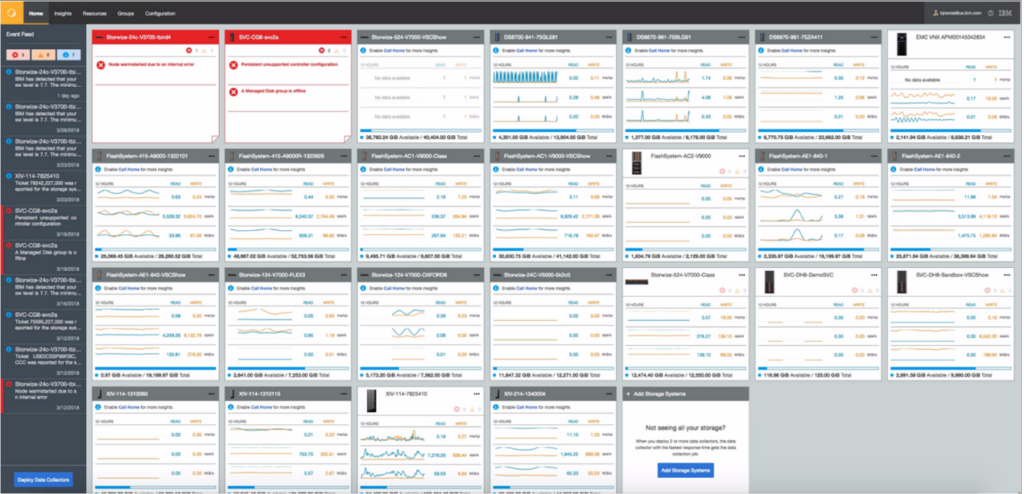
IBM Storage Insights è uno strumento basato sull'IA che aiuta le organizzazioni a monitorare, gestire e ottimizzare i loro ambienti di storage. Si distingue per l'uso dell'intelligenza artificiale che fornisce approfondimenti e raccomandazioni per la gestione dei dati, rendendolo ideale per una gestione dello storage basata su informazioni intelligenti.
Perché ho scelto IBM Storage Insights: Ho selezionato IBM Storage Insights per il suo utilizzo dell'intelligenza artificiale nell'ottimizzazione della gestione dello storage. Il suo aspetto distintivo è la capacità di analisi predittiva guidata dall'IA, in grado di offrire preziose informazioni per prevenire potenziali problemi di storage prima che si aggravino.
Questo strumento è, a mio giudizio, particolarmente adatto a chi cerca una gestione dello storage basata sull'IA, poiché identifica e risolve in modo intelligente i problemi in modo proattivo.
Funzionalità e integrazioni principali:
IBM Storage Insights offre una gamma di funzionalità, tra cui analisi predittiva basata sull'IA, gestione semplificata dello storage e notifiche automatiche. Si integra con una serie di altri prodotti IBM, come IBM Spectrum Control e IBM Spectrum Protect, fornendo funzionalità estese di storage e protezione dei dati.
Pros and Cons
Pros:
- L'analisi predittiva basata sull'IA aiuta a identificare e risolvere i problemi in modo proattivo
- Semplifica la gestione dello storage con controlli intuitivi e automatizzati
- Si integra bene con altri prodotti IBM per funzionalità estese
Cons:
- Le informazioni sui prezzi non sono immediatamente disponibili
- Le numerose funzionalità potrebbero presentare una curva di apprendimento per i nuovi utenti
- Dipendenza da altri prodotti IBM per ottenere il massimo delle funzionalità


La piattaforma HPE Nimble Storage è progettata per ottimizzare l'archiviazione flash grazie alle sue analisi predittive. Questo strumento offre un accesso rapido e affidabile ai dati ed è ideale per i data center che richiedono un'archiviazione efficiente e ad alte prestazioni.
Perché ho scelto HPE Nimble Storage: Scegliendo HPE Nimble Storage, sono rimasto colpito dalle sue capacità predittive e dal design ottimizzato per il flash. Queste caratteristiche lo rendono perfetto per i data center in cui l'accesso tempestivo ai dati è fondamentale. L'attenzione dello strumento agli insight proattivi sulla salute dell'archivio assicura che i potenziali problemi vengano affrontati prima che diventino criticità, rendendolo il migliore per lo storage predittivo flash nei data center.
Caratteristiche principali e integrazioni:
HPE Nimble Storage offre analisi predittive che aiutano nella gestione della salute e delle prestazioni dello storage. Garantisce un livello di disponibilità 'sei nove', assicurando che i dati siano sempre a portata di mano. In termini di integrazioni, HPE Nimble Storage supporta ambienti IT diversificati, integrandosi con varie piattaforme di virtualizzazione come VMware, Hyper-V e Citrix; inoltre, ha solide connessioni con piattaforme cloud quali Microsoft Azure e AWS.
Pros and Cons
Pros:
- Analisi predittive per una gestione proattiva dello storage
- Alta disponibilità per un accesso ai dati affidabile
- Integra con successo sia piattaforme di virtualizzazione sia cloud
Cons:
- Le informazioni sui prezzi non sono facilmente reperibili
- Potrebbe non essere adatto a organizzazioni più piccole con necessità di storage limitate
- Le sue numerose funzionalità potrebbero risultare complesse per aziende con esigenze più semplici

Ideale per funzionalità complete di storage software-defined

IBM Spectrum Storage Suite è una suite completa di funzionalità di storage software-defined. Offre un'ampia gamma di servizi, tra cui protezione dei dati, disponibilità e riduzione dei dati. Data la sua robustezza, la ritengo la scelta ideale per le organizzazioni che cercano una soluzione di storage software-defined a 360 gradi.
Perché ho scelto IBM Spectrum Storage Suite: Ho scelto IBM Spectrum Storage Suite per l'ampiezza delle sue caratteristiche software-defined, che la rendono una soluzione completa per le esigenze di archiviazione dei dati. La sua caratteristica distintiva è la possibilità di fornire un framework di gestione unificato, consentendo un funzionamento fluido su vari tipi di storage.
Questo la rende la soluzione migliore per funzionalità complete di storage software-defined, offrendo solidi servizi di protezione dei dati e disponibilità.
Funzionalità e integrazioni principali:
IBM Spectrum Storage Suite offre una moltitudine di funzionalità avanzate, come il tiering automatico dei dati, il thin provisioning e la riduzione dei dati. La Suite si integra perfettamente con la famiglia di prodotti IBM, garantendo interoperabilità con IBM Spectrum Protect, IBM Spectrum Archive e IBM Spectrum Control, tra gli altri.
Pros and Cons
Pros:
- Suite completa di funzionalità software-defined per lo storage
- Il framework di gestione unificato permette un uso agevole su diversi tipi di storage
- Eccellente interoperabilità con altri prodotti IBM
Cons:
- Le informazioni sui prezzi non sono prontamente disponibili
- Potrebbe risultare troppo complesso per le piccole imprese
- Alcune funzionalità specifiche potrebbero non essere utilizzate a seconda delle esigenze dell'organizzazione

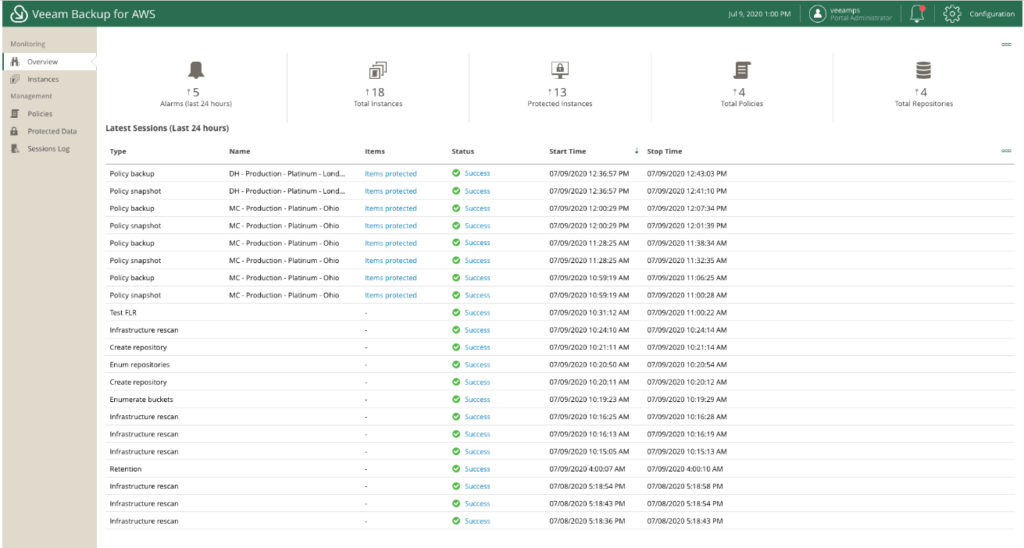
Veeam Backup & Replication è uno strumento potente progettato per garantire la disponibilità delle tue applicazioni virtualizzate. Consente di eseguire backup, ripristino e replica affidabili delle tue macchine virtuali, rendendolo quindi la scelta migliore per il backup e la replica completa delle VM.
Perché ho scelto Veeam Backup & Replication: Nella selezione degli strumenti per questa lista, ho dato priorità a Veeam Backup & Replication per il suo servizio mirato e affidabile nell’ambito del backup e della replica. Si distingue per l’approccio orientato alle applicazioni volto a garantire la disponibilità delle applicazioni virtualizzate, rendendolo una scelta ottimale per la protezione delle VM.
L’ho considerato il migliore per il backup e la replica delle VM grazie alle sue vaste capacità in quest’area, tra cui Instant VM Recovery e SureBackup.
Caratteristiche e integrazioni distintive:
Veeam Backup & Replication offre funzionalità come Instant VM Recovery, che aiuta a ridurre al minimo i tempi di inattività, e SureBackup, che verifica la recuperabilità di ogni backup. Supporta inoltre bassi RPO e accelerazione WAN integrata per backup e repliche off-site.
Il software si integra perfettamente con le principali piattaforme di virtualizzazione come VMware vSphere e Microsoft Hyper-V e con fornitori di storage leader come Dell EMC, HPE e NetApp.
Pros and Cons
Pros:
- Concentrato nel garantire la disponibilità delle applicazioni virtualizzate
- Offre Instant VM Recovery per ridurre i tempi di inattività
- Integrazione senza soluzione di continuità con le principali piattaforme di virtualizzazione
Cons:
- Assenza di informazioni di pricing trasparenti
- Potrebbe presentare una curva di apprendimento per chi non ha familiarità con il backup e la replica delle VM
- Le funzionalità più avanzate possono risultare superflue per ambienti VM di piccole dimensioni

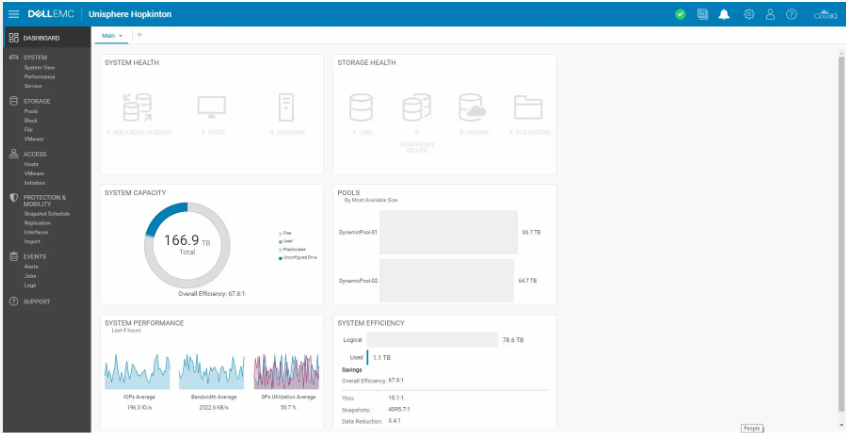
Dell Unity XT Storage è una soluzione di storage All-Flash e ibrida progettata per supportare le operazioni multi-cloud. Offrendo velocità ed efficienza di storage unificato e riducendo l'ingombro, è una scelta perfetta per le operazioni che richiedono elevata efficienza in un ambiente multi-cloud.
Perché ho scelto Dell Unity XT Storage: Ho scelto Dell Unity XT Storage per la sua potenza nel supportare ambienti multi-cloud e l'eccellente efficienza. La sua capacità di gestire carichi di lavoro con elevati IOPS e bassa latenza lo distingue dagli altri, rendendolo una scelta eccezionale. Ho anche riscontrato che l'architettura a doppio controller attivo contribuisce in modo significativo a renderlo il migliore per le operazioni multi-cloud ad alta efficienza.
Caratteristiche principali & integrazioni:
Dell Unity XT Storage offre una gamma di funzionalità preziose, come l'architettura a doppio controller attivo e il design NVMe-ready, che garantiscono un accesso ai dati ad alte prestazioni. Inoltre, include la riduzione dei dati inline per i pool all-flash e CloudIQ, una piattaforma di analisi dello storage basata su cloud senza costi aggiuntivi.
Le integrazioni importanti per Dell Unity XT Storage comprendono il supporto per VMware, Microsoft e vari ambienti Linux, e si integra perfettamente nella strategia Dell Technologies Cloud.
Pros and Cons
Pros:
- Accesso ai dati ad alte prestazioni con architettura a doppio controller attivo
- Supporto per operazioni multi-cloud
- Compatibilità con una varietà di ambienti, compresi VMware e Microsoft
Cons:
- Le informazioni sui prezzi non sono prontamente disponibili
- La complessità della configurazione può richiedere competenze tecniche
- Dipendenza dall'ecosistema Dell per massimizzare i benefici


Il software di gestione dei dati ONTAP offre una piattaforma unificata e scalabile che consolida la gestione dei dati nel cloud ibrido. È progettato per semplificare e automatizzare il controllo dei dati, rendendolo una scelta ottimale per la gestione dei dati in ambienti cloud ibridi.
Perché ho scelto il software di gestione dei dati ONTAP: Ho selezionato il software di gestione dei dati ONTAP per il suo approccio solido e unificato alla gestione dei dati su più ambienti cloud. La sua caratteristica distintiva è la capacità di ottimizzare le operazioni tra storage on-premises e cloud. Pertanto, lo considero la scelta migliore per la gestione dei dati in cloud ibrido in quanto offre un eccellente equilibrio tra controllo, accessibilità e automazione.
Funzionalità principali e integrazioni:
Le funzionalità principali di ONTAP includono la sincronizzazione dei dati, che assicura la coerenza tra ambienti diversi, e servizi per l'efficienza dello storage che massimizzano il valore delle risorse di archiviazione. Il software si integra efficacemente con vari fornitori di servizi cloud, come AWS, Google Cloud e Azure, consentendo un controllo e una gestione dei dati senza interruzioni su diverse piattaforme.
Pros and Cons
Pros:
- Gestione efficace dei dati in più ambienti cloud
- Offre servizi di efficienza dello storage
- Eccellenti integrazioni con i più diffusi provider di servizi cloud
Cons:
- Le informazioni sui prezzi non sono disponibili direttamente
- Potrebbe essere complesso per le piccole imprese
- Può risultare eccessivo per aziende con un solo ambiente cloud

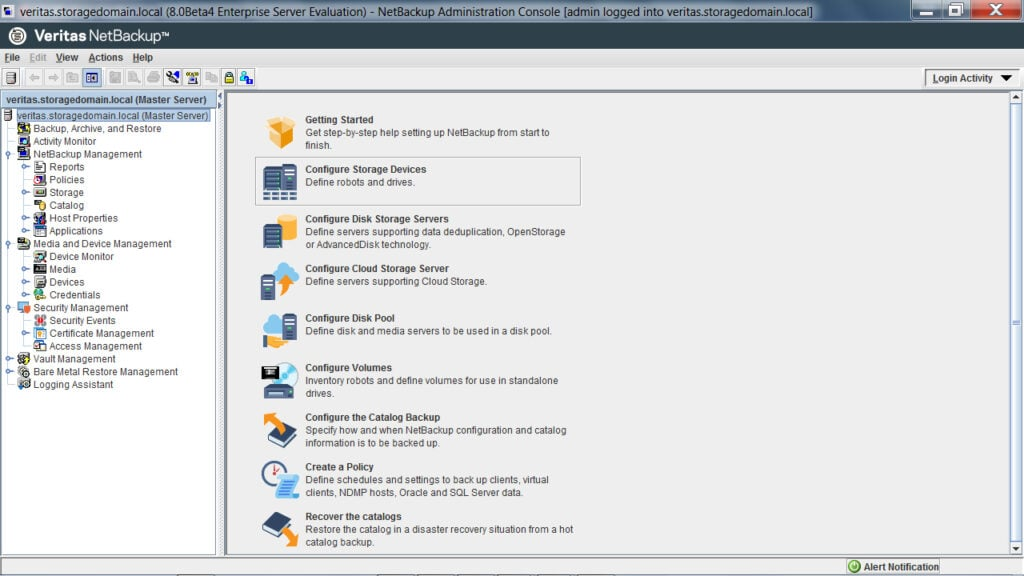
NetBackup di Veritas è un software completo e ad alte prestazioni progettato per proteggere i dati a livello aziendale. Garantisce una protezione robusta su varie piattaforme e ambienti, rendendolo ideale per backup e ripristino di livello enterprise.
Perché ho scelto NetBackup: NetBackup si è guadagnato un posto in questa lista grazie alle sue capacità complete e alle prestazioni comprovate in scenari aziendali. La sua flessibilità nell'adattarsi sia ad ambienti virtuali che fisici e la sua capacità di proteggere una vasta gamma di tipi di dati lo distinguono dalla concorrenza.
Lo ritengo il migliore per backup e ripristino di livello enterprise grazie alla gestione senza interruzioni di ambienti dati ampi e complessi e opzioni di recupero solide.
Funzionalità e integrazioni principali:
NetBackup si distingue per funzionalità come backup automatici, ripristino istantaneo per VMware e Hyper-V, e capacità di deduplicazione. Inoltre, la protezione specifica per carichi di lavoro e le soluzioni di ripristino ad alta velocità offrono un supporto essenziale alle aziende. NetBackup si integra con una vasta gamma di applicazioni, database e sistemi, tra cui, ma non solo, Oracle, SAP, Microsoft SQL Server e Microsoft Exchange.
Pros and Cons
Pros:
- Fornisce una protezione dati completa in ambienti diversi
- Offre ripristino istantaneo per VMware e Hyper-V
- Supporta una vasta gamma di integrazioni con applicazioni, database e sistemi
Cons:
- Non offre prezzi trasparenti e dichiarati in anticipo
- L'ampia gamma di funzioni può risultare complessa per le piccole imprese
- L'interfaccia può sembrare datata rispetto a soluzioni più moderne
Altri software per la gestione dell'archiviazione
Di seguito è riportato un elenco di ulteriori software per la gestione dell’archiviazione che ho selezionato, ma che non sono rientrati tra i primi 12. Vale sicuramente la pena dare loro un’occhiata.
- Hitachi Virtual Storage Platform E Series
Ideale per l'archiviazione a blocchi ad alte prestazioni
- AWS Storage Gateway
Ideale per il servizio di storage ibrido che collega ambienti locali con AWS
- ManageEngine OpManager
Ideale per il monitoraggio in tempo reale di rete e storage


Altre recensioni correlate sui software di archiviazione
- Software per l'archiviazione cloud
- Fornitori di cloud privato
- Software per la gestione del trasferimento dei file
Come Valuto i Software di Gestione dello Storage
Sudo la mia valutazione in due livelli: la funzionalità di base—come il supporto multi-piattaforma e il monitoraggio della capacità—e gli elementi differenzianti che distinguono una piattaforma dall'altra.
Funzionalità Principali (Requisiti Essenziali per Questa Lista)
Quando seleziono gli strumenti per la mia lista, valuto ciascuno su una scala da 0 (non offre la funzionalità) a 5 (eccelle in quest'area) per ogni funzionalità principale elencata di seguito. Successivamente, calcolo il punteggio totale dello strumento in percentuale. Ogni strumento deve ottenere un punteggio minimo totale del 75% per essere preso in considerazione per l'inclusione.
- Monitoraggio e Reportistica della Capacità: Cerco dashboard in tempo reale che mostrino l'utilizzo tra array e volumi, oltre a previsioni di crescita che aiutano a pianificare le espansioni prima di esaurire lo spazio.
- Provisioning e Allocazione: Ogni strumento dovrebbe permetterti di creare, ridimensionare e recuperare volumi o LUN senza dover passare tra console specifiche del fornitore per ciascun sistema di storage presente nel tuo ambiente.
- Supporto Multi-Piattaforma: Che il tuo ambiente includa SAN, NAS, oggetti o storage cloud da fornitori come NetApp, Dell EMC o Pure Storage, verifico che lo strumento gestisca tutto da un'unica interfaccia.
- Funzionalità di Protezione dei Dati: Pianificazione degli snapshot, policy di replica e orchestrazione dei backup sono tutte importanti qui—specialmente per i team che devono rispettare obiettivi di tempo di ripristino durante i guasti.
- Monitoraggio e Ottimizzazione delle Prestazioni: Valuto quanto bene lo strumento evidenzia metriche come IOPS, latenza e throughput con alert che individuano i colli di bottiglia prima che compromettano la performance delle applicazioni.
- Automazione e Gestione delle Policy: Le migliori soluzioni in questa lista supportano l'automazione basata su regole per attività come il tiering dei dati, i workflow di migrazione e la gestione del ciclo di vita, anziché richiedere interventi manuali.
Una volta che ho una lista di strumenti che soddisfano questi criteri, considero ciò che distingue ciascuna piattaforma.
Fattori di Differenziazione (Cosa Distingue i Fornitori)
Ecco come confronto e metto a confronto i diversi fornitori:
Funzionalità Distintive
Le analisi guidate dall’AI distinguono alcune piattaforme—cerco strumenti che rilevano anomalie come improvvisi picchi di IOPS e consigliano azioni prima che la performance peggiori. Anche il rilevamento del ransomware è importante, soprattutto per i team che gestiscono storage di produzione dove snapshot immutabili e workflow di recupero rapido possono fare la differenza tra ore e giorni di inattività. Per gli ambienti ibridi, valuto anche funzionalità di ottimizzazione dei costi multi-cloud che mettono in evidenza volumi sottoutilizzati e suggeriscono aggiustamenti di tiering tra provider come AWS, Azure e GCP.
Oltre le Funzionalità
Le integrazioni sono molto importanti qui—verifico se uno strumento si connette con hypervisor come VMware e Hyper-V, piattaforme container come Kubernetes, e strumenti IaC come Terraform. Anche la flessibilità di distribuzione è fondamentale, poiché alcuni team necessitano di soluzioni SaaS senza agent mentre altri richiedono installazioni on-premise su siti distribuiti. Certificazioni di sicurezza e conformità come SOC 2 e HIPAA meritano una valutazione preliminare, specialmente se il tuo ambiente di storage gestisce dati regolamentati e i tuoi revisori richiedono controlli di accesso documentati e standard di crittografia.
Come Valuto i Software di Gestione dello Storage
Sudo la mia valutazione in due livelli: la funzionalità di base—come il supporto multi-piattaforma e il monitoraggio della capacità—e gli elementi differenzianti che distinguono una piattaforma dall'altra.
Funzionalità Principali (Requisiti Essenziali per Questa Lista)
Quando seleziono gli strumenti per la mia lista, valuto ciascuno su una scala da 0 (non offre la funzionalità) a 5 (eccelle in quest'area) per ogni funzionalità principale elencata di seguito. Successivamente, calcolo il punteggio totale dello strumento in percentuale. Ogni strumento deve ottenere un punteggio minimo totale del 75% per essere preso in considerazione per l'inclusione.
- Monitoraggio e Reportistica della Capacità: Cerco dashboard in tempo reale che mostrino l'utilizzo tra array e volumi, oltre a previsioni di crescita che aiutano a pianificare le espansioni prima di esaurire lo spazio.
- Provisioning e Allocazione: Ogni strumento dovrebbe permetterti di creare, ridimensionare e recuperare volumi o LUN senza dover passare tra console specifiche del fornitore per ciascun sistema di storage presente nel tuo ambiente.
- Supporto Multi-Piattaforma: Che il tuo ambiente includa SAN, NAS, oggetti o storage cloud da fornitori come NetApp, Dell EMC o Pure Storage, verifico che lo strumento gestisca tutto da un'unica interfaccia.
- Funzionalità di Protezione dei Dati: Pianificazione degli snapshot, policy di replica e orchestrazione dei backup sono tutte importanti qui—specialmente per i team che devono rispettare obiettivi di tempo di ripristino durante i guasti.
- Monitoraggio e Ottimizzazione delle Prestazioni: Valuto quanto bene lo strumento evidenzia metriche come IOPS, latenza e throughput con alert che individuano i colli di bottiglia prima che compromettano la performance delle applicazioni.
- Automazione e Gestione delle Policy: Le migliori soluzioni in questa lista supportano l'automazione basata su regole per attività come il tiering dei dati, i workflow di migrazione e la gestione del ciclo di vita, anziché richiedere interventi manuali.
Una volta che ho una lista di strumenti che soddisfano questi criteri, considero ciò che distingue ciascuna piattaforma.
Fattori di Differenziazione (Cosa Distingue i Fornitori)
Ecco come confronto e metto a confronto i diversi fornitori:
Funzionalità Distintive
Le analisi guidate dall’AI distinguono alcune piattaforme—cerco strumenti che rilevano anomalie come improvvisi picchi di IOPS e consigliano azioni prima che la performance peggiori. Anche il rilevamento del ransomware è importante, soprattutto per i team che gestiscono storage di produzione dove snapshot immutabili e workflow di recupero rapido possono fare la differenza tra ore e giorni di inattività. Per gli ambienti ibridi, valuto anche funzionalità di ottimizzazione dei costi multi-cloud che mettono in evidenza volumi sottoutilizzati e suggeriscono aggiustamenti di tiering tra provider come AWS, Azure e GCP.
Oltre le Funzionalità
Le integrazioni sono molto importanti qui—verifico se uno strumento si connette con hypervisor come VMware e Hyper-V, piattaforme container come Kubernetes, e strumenti IaC come Terraform. Anche la flessibilità di distribuzione è fondamentale, poiché alcuni team necessitano di soluzioni SaaS senza agent mentre altri richiedono installazioni on-premise su siti distribuiti. Certificazioni di sicurezza e conformità come SOC 2 e HIPAA meritano una valutazione preliminare, specialmente se il tuo ambiente di storage gestisce dati regolamentati e i tuoi revisori richiedono controlli di accesso documentati e standard di crittografia.
Come scegliere il software per la gestione dell'archiviazione
È facile perdersi in lunghi elenchi di funzionalità e strutture di prezzo complesse. Per aiutarti a rimanere concentrato mentre affronti il tuo processo di selezione del software, ecco una lista di fattori da tenere a mente:
| Fattore | Cosa considerare |
|---|---|
| Scalabilità | Il software può crescere insieme alle tue esigenze? Considera la crescita futura dei dati e se lo strumento è in grado di gestire maggiori esigenze di archiviazione senza costi o problemi di prestazioni significativi. |
| Integrazioni | Funziona con i tuoi sistemi attuali? Verifica la compatibilità con l'infrastruttura IT esistente e con gli altri strumenti su cui il tuo team fa affidamento ogni giorno. |
| Personalizzazione | Puoi adattare lo strumento ai tuoi flussi di lavoro? Cerca opzioni per modificare pannelli di controllo, report e flussi di lavoro in modo che corrispondano alle esigenze specifiche del tuo team. |
| Facilità d'uso | Il tuo team lo adotterà facilmente? Valuta la curva di apprendimento e se l'interfaccia è intuitiva. Uno strumento complesso potrebbe ostacolare la produttività. |
| Implementazione e avviamento | Quanto velocemente puoi iniziare a utilizzarlo? Valuta il processo di configurazione, la disponibilità di risorse formative e il supporto durante la distribuzione iniziale. |
| Costo | Rientra nel tuo budget? Confronta i modelli di prezzo e considera i costi nascosti, come manutenzione, aggiornamenti e tariffe aggiuntive per gli utenti. |
| Misure di sicurezza | Protegge i tuoi dati? Assicurati che il software offra crittografia, controlli degli accessi e conformità agli standard di protezione dei dati pertinenti al tuo settore. |
Che cos'è il software di gestione dello storage?
Il software di gestione dello storage è uno strumento che aiuta le aziende a organizzare, proteggere e gestire in modo efficiente le proprie risorse di archiviazione dei dati. I professionisti IT e gli amministratori dello storage utilizzano in genere questi strumenti per garantire la disponibilità e la sicurezza dei dati.
Le funzionalità di backup dei dati, pianificazione della capacità e sicurezza contribuiscono a ottimizzare l'utilizzo dello storage, proteggere i dati e garantire operazioni fluide. Il software di storage a oggetti è particolarmente efficace per gestire grandi volumi di dati non strutturati. Nel complesso, questi strumenti forniscono un supporto essenziale per gestire la crescita dei dati e mantenere le prestazioni del sistema.
Funzionalità
Quando selezioni un software di gestione dello storage, presta attenzione alle seguenti funzionalità principali:
- Backup e ripristino dei dati: Esegue automaticamente il backup dei dati e li ripristina quando necessario, garantendo la prevenzione della perdita dei dati.
- Gestione della capacità: Monitora e ottimizza l'utilizzo dello storage per prevenire l'allocazione eccessiva e gestire efficacemente la crescita dei dati.
- Sicurezza e crittografia: Protegge i dati attraverso la crittografia e i controlli degli accessi, per soddisfare i requisiti di conformità e tutelarsi dalle violazioni.
- Monitoraggio delle prestazioni: Monitora le prestazioni del sistema di storage per identificare i colli di bottiglia e mantenere un funzionamento ottimale.
- Replica dei dati: Duplica i dati in più posizioni per garantire la ridondanza e la preparazione al ripristino in caso di emergenze.
- Classificazione automatica: Sposta i dati tra diversi livelli di storage in base ai modelli di utilizzo, per ottimizzare costi e prestazioni.
- Analisi predittiva: Utilizza le informazioni ricavate dai dati per prevedere le esigenze di storage e ottimizzare l'allocazione delle risorse.
- Dashboard personalizzabili: Consente agli utenti di adattare l'interfaccia per una migliore visibilità e un maggiore controllo sulle operazioni di storage.
- Funzionalità di integrazione: Si connette senza problemi all'infrastruttura IT esistente e ad altri strumenti aziendali essenziali.
- Gestione centralizzata: Fornisce un'unica piattaforma per supervisionare tutte le risorse di storage, semplificando amministrazione e controllo.
Vantaggi
L'implementazione di un software di gestione dello storage offre diversi vantaggi al tuo team e alla tua azienda, soprattutto se abbinata a un efficace software per la pulizia del disco. Ecco alcuni dei vantaggi che puoi aspettarti:
- Maggiore sicurezza dei dati: La crittografia e i controlli degli accessi proteggono le informazioni sensibili dagli accessi non autorizzati e dalle violazioni dei dati.
- Utilizzo efficiente delle risorse: La classificazione automatica e la gestione della capacità ottimizzano l'utilizzo dello storage, riducendo i costi e prevenendo lo spreco di risorse.
- Maggiore disponibilità dei dati: Il backup e il ripristino dei dati garantiscono che le informazioni critiche siano sempre accessibili, riducendo al minimo i tempi di inattività.
- Migliore monitoraggio delle prestazioni: Il monitoraggio delle metriche del sistema aiuta a identificare tempestivamente i problemi, mantenendo operazioni fluide e prevenendo i colli di bottiglia.
- Scalabilità: L'analisi predittiva e la gestione centralizzata consentono all'infrastruttura di storage di crescere insieme alle esigenze della tua azienda.
- Amministrazione semplificata: Le dashboard personalizzabili e il controllo centralizzato rendono la gestione delle risorse di storage più semplice ed efficiente.
- Preparazione al ripristino in caso di emergenze: La replica dei dati in più siti garantisce la ridondanza dei dati, fornendo una rete di sicurezza in caso di guasti.
Costi e prezzi
La scelta di un software di gestione dello storage richiede una conoscenza dei vari modelli e piani tariffari disponibili. I costi variano in base alle funzionalità, alle dimensioni del team, ai componenti aggiuntivi e ad altri fattori. La tabella seguente riassume i piani più comuni, i relativi prezzi medi e le funzionalità generalmente incluse nelle soluzioni software di gestione dello storage:
Tabella comparativa dei piani per il software di gestione dello storage
| Tipo di piano | Prezzo medio | Funzionalità comuni |
|---|---|---|
| Piano gratuito | $0 | Backup di base dei dati, capacità di storage limitata e supporto della community. |
| Piano personale | $5-$25/utente/mese | Backup e ripristino dei dati, monitoraggio di base delle prestazioni e assistenza clienti limitata. |
| Piano aziendale | $30-$75/utente/mese | Funzionalità di sicurezza avanzate, replica dei dati, gestione della capacità e supporto via e-mail. |
| Piano per grandi aziende | $100-$250/utente/mese | Monitoraggio completo delle prestazioni, classificazione automatica, analisi predittiva, account manager dedicato e supporto prioritario. |
Domande frequenti sul software di gestione dello spazio di archiviazione
Qual è lo scopo del software di gestione dello spazio di archiviazione?
Il software di gestione dello spazio di archiviazione aiuta le organizzazioni a mantenere il controllo e la visibilità su dove e come vengono archiviati i dati. Garantisce che i dati siano organizzati e accessibili correttamente, riducendo al contempo i rischi di perdita o disorganizzazione dei dati con la crescita dei sistemi.
Chi utilizza generalmente il software di gestione dello spazio di archiviazione?
Gli amministratori IT, gli ingegneri di sistema e i responsabili dei dati utilizzano questo tipo di software per monitorare lo stato dello spazio di archiviazione, gestire i backup e garantire la conformità. È inoltre prezioso per i team che gestiscono grandi quantità di file digitali o necessitano di una supervisione affidabile dei dati.
Le piccole imprese possono utilizzare il software di gestione dello spazio di archiviazione?
Sì. Sebbene sia stato originariamente progettato per le grandi aziende, molte soluzioni moderne per lo spazio di archiviazione sono ora adatte anche alle imprese più piccole. I sistemi basati sul cloud rendono più semplice ed economico per i team di piccole dimensioni gestire e proteggere i propri dati in modo efficiente.
In che modo il software di gestione dello spazio di archiviazione gestisce gli aggiornamenti o le modifiche al sistema?
La maggior parte delle piattaforme si adatta automaticamente ai nuovi dispositivi di archiviazione, alle connessioni cloud o agli aggiornamenti dell’infrastruttura. Gli amministratori possono monitorare le modifiche in tempo reale, garantendo la coerenza anche quando gli ambienti di archiviazione evolvono.
Il software di gestione dello spazio di archiviazione richiede un monitoraggio costante?
Non necessariamente. Molti sistemi forniscono avvisi e report che evidenziano problemi o attività insolite, quindi i team devono intervenire solo quando richiesto. Tuttavia, i controlli di routine aiutano a mantenere le prestazioni e l’affidabilità.
È possibile migrare i dati da un sistema di archiviazione a un altro utilizzando questo software?
Sì. La maggior parte degli strumenti supporta la migrazione sicura dei dati tra sistemi o ambienti senza interrompere le operazioni. Questa funzionalità è particolarmente utile quando si aggiorna l’hardware o si passa all’archiviazione cloud.
Cosa succede ora:
Se stai cercando un software di gestione dello spazio di archiviazione, contatta gratuitamente un consulente SoftwareSelect per ricevere consigli.
Compili un modulo e fai una breve conversazione durante la quale il consulente approfondirà le tue esigenze specifiche. In seguito riceverai un elenco ristretto di software da valutare. Ti assisteranno persino durante l'intero processo di acquisto, comprese le negoziazioni sul prezzo.