

Muovendomi nel complesso mondo dell'autenticazione degli utenti, ho imparato ad apprezzare i software di autenticazione a più fattori. Con l'aumento delle violazioni dei dati, è essenziale proteggere gli account online andando oltre le semplici password. Questo va oltre la tradizionale combinazione di nome utente e password e può includere qualcosa che l'utente conosce, qualcosa che possiede o qualcosa che lo caratterizza.
Questi strumenti non solo garantiscono agli utenti finali un accesso sicuro tramite codici di accesso e configurazione autonoma, ma migliorano anche l'accesso remoto, collegando in modo più sicuro le identità degli utenti basate sul web. I punti critici? Gestire più autenticazioni degli utenti, la gestione delle identità e degli accessi (IAM) e garantire l'accesso remoto senza compromettere la sicurezza. Con il software giusto, però, questi aspetti vengono gestiti, rafforzando la protezione dei tuoi account contro le violazioni.
Perché fidarsi dei nostri consigli sui software
6,700+
Reviews
20
Industry experts
16+
Evaluation factors
14
Years
Il nostro team testa e recensisce software dal 2012. In quanto leader tecnologici noi stessi, sappiamo quanto sia difficile — e importante — scegliere il software giusto.
Per questa guida, abbiamo valutato gli strumenti attraverso test praticie ricerche indipendenti, assegnando un punteggio agli strumenti in base ai nostri criteri di selezione.
Le nostre recensioni riflettono il nostro giudizio editoriale umano, non un discorso di vendita.
Revisori esperti:
- Paulo Gardini MiguelDirettore tecnico
 Tim FisherVP dell'IA
 Gabriel RosasTech Lead e architetto software
 Christhian GruhnTech Lead e architetto della piattaforma

Tabella comparativa dei software di autenticazione a più fattori
Questa tabella comparativa riassume i dettagli dei prezzi dei miei migliori software MFA selezionati:
| Tool | Best For | Trial Info | Price | ||
|---|---|---|---|---|---|
| 1 | Ideale per i criteri MFA e l'attendibilità dei dispositivi basati sulle risorse umane | Demo gratuita disponibile | A partire da 8 $/utente/mese (più un canone mensile di base) | Website | |
| 2 | Ideale per MFA adattiva con molteplici fattori di autenticazione | Versione gratuita disponibile (fino a 50 utenti di dominio) | Da $595 (500 utenti di dominio) | Website | |
| 3 | Ideale con controlli di accesso privilegiato al momento necessario | Prova gratuita di 14 giorni | Prezzi su richiesta | Website | |
| 4 | Ideale per combinare gestione password e MFA | Prova gratuita di 30 giorni + piano gratuito disponibile | Da $3/utente/mese (fatturato annualmente) | Website | |
| 5 | Ideale per aziende SaaS che hanno bisogno di un'integrazione rapida | 30 giorni di prova gratuita | Prezzi su richiesta | Website | |
| 6 | Ideale per l'autenticazione adattiva a più fattori | Prova gratuita di 30 giorni disponibile | A partire da $2/utente/mese | Website | |
| 7 | Ideale per ottenere l'autenticazione senza password | Prova gratuita di 14 giorni | A partire da $8/utente/mese (fatturazione annuale) | Website | |
| 8 | Ideale per la verifica tramite SMS e chiamate | Da $15/utente/mese | Website | ||
| 9 | Ideale per l'autenticazione aziendale scalabile | Prova gratuita disponibile | A partire da $23/utente/mese (fatturato annualmente) | Website | |
| 10 | Ideale per chi già utilizza l’ambiente Salesforce | Piano gratuito disponibile | A partire da $25/utente/mese (fatturato annualmente) | Website |


Recensioni dei migliori software di autenticazione a più fattori
Di seguito trovi i miei riepiloghi dettagliati dei migliori software di autenticazione a più fattori inclusi nella mia selezione. Le mie recensioni offrono uno sguardo approfondito alle funzionalità principali, ai pro e contro, alle integrazioni e ai casi d’uso ideali di ogni strumento, per aiutarti a trovare quello più adatto a te.
 Ideale per i criteri MFA e l'attendibilità dei dispositivi basati sulle risorse umane
- Demo gratuita disponibile
- A partire da 8 $/utente/mese (più un canone mensile di base)
Visit WebsiteCustomer Rating:4.8/5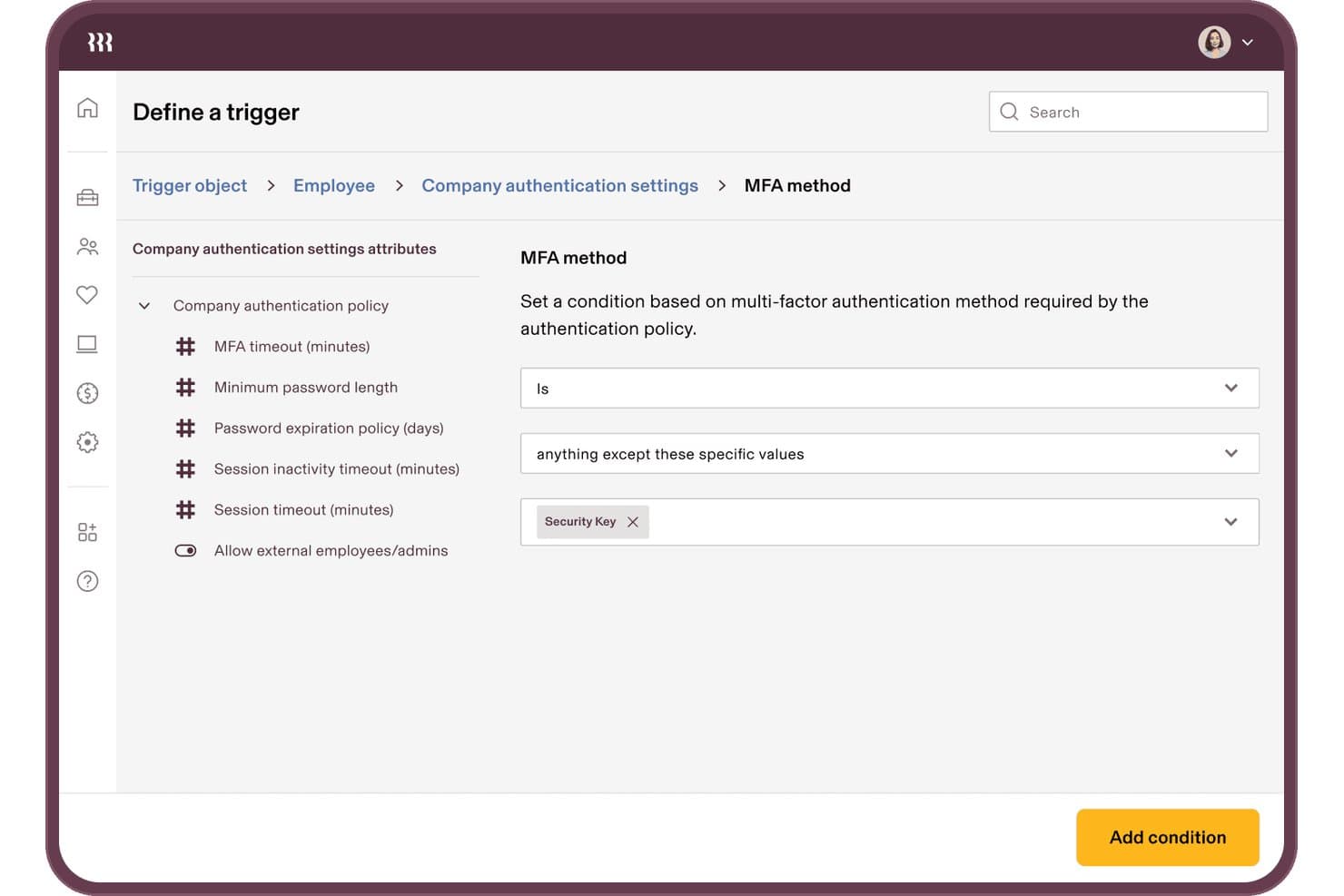
Rippling IT consente agli utenti di impostare condizioni sul metodo MFA per i trigger di autenticazione. Rippling IT è una piattaforma di gestione delle identità e degli accessi basata sulle risorse umane che riunisce MFA, SSO, attendibilità dei dispositivi e provisioning del ciclo di vita in un unico sistema collegato direttamente ai dati delle risorse umane.
Per chi è più adatto Rippling IT?
Rippling IT è adatto alle aziende del mercato medio che desiderano gestire MFA, attendibilità dei dispositivi e ciclo di vita degli accessi da un'unica piattaforma collegata alle risorse umane.
Perché ho scelto Rippling IT
Ho scelto Rippling IT perché è l'unica soluzione MFA di questo elenco che collega direttamente i criteri di autenticazione ai dati delle risorse umane. Quando qualcuno cambia reparto o viene escluso dall'organizzazione, la registrazione MFA e i diritti di accesso si aggiornano automaticamente, senza alcun intervento manuale. Apprezzo anche il fatto che l'attendibilità dei dispositivi sia integrata nativamente: Rippling emette i propri certificati per i dispositivi e verifica la postura al momento dell'accesso, impedendo così l'autenticazione a un portatile privo di crittografia BitLocker.
Funzionalità principali di Rippling IT
- Applicazione mirata dei criteri con Supergroups: I gruppi dinamici creati in base ad attributi delle risorse umane come reparto, sede e ruolo consentono di applicare i criteri MFA esattamente agli utenti corretti.
- Ordinazione e assegnazione di YubiKey: Ordina, spedisci e assegna le chiavi hardware ai dipendenti direttamente dalla console di Rippling, con avvisi automatici se una chiave consegnata non viene utilizzata.
- RADIUS ospitato nel cloud: I dipendenti si autenticano alle VPN e alle reti Wi-Fi utilizzando le proprie credenziali Rippling tramite un server RADIUS ospitato nel cloud.
- Automazione con Workflow Studio: Un generatore di automazioni senza codice consente di monitorare la registrazione MFA, attivare azioni dei criteri e gestire le modifiche agli accessi senza scrivere script personalizzati.
Integrazioni di Rippling IT
Rippling IT si integra con Active Directory, Microsoft Entra ID, Google Workspace, Okta e Duo, oltre che con 600–800 app SaaS disponibili nell'elenco. Supporta SAML, OIDC, SCIM, LDAP e RADIUS, con un'API pubblica per le integrazioni personalizzate.
Pros and Cons
Pros:
- La gestione delle uscite basata sulle risorse umane aggiorna automaticamente la MFA
- L'attendibilità dei dispositivi blocca gli endpoint non conformi
- I Supergroups applicano i criteri in base agli attributi dei dipendenti
Cons:
- La MFA dipende dall'adozione della piattaforma Rippling
- La configurazione avanzata dei criteri richiede un impegno considerevole
Learn more about Rippling IT: Ideale per MFA adattiva con molteplici fattori di autenticazione
- Versione gratuita disponibile (fino a 50 utenti di dominio)
- Da $595 (500 utenti di dominio)
Visit WebsiteCustomer Rating:4.4/5
Gli utenti hanno a disposizione molteplici opzioni di configurazione per impostare i metodi di autenticazione su ManageEngine ADSelfService Plus. ManageEngine ADSelfService Plus è una soluzione completa per la gestione autonoma delle password e il Single Sign-On (SSO), progettata per semplificare le operazioni IT e aumentare la sicurezza. Si rivolge ad amministratori IT e utenti finali fornendo funzionalità come la gestione autonoma delle password, l'autenticazione multi-fattore (MFA) e la sicurezza degli endpoint.
Perché ho scelto ManageEngine ADSelfService Plus: ADSelfService Plus supporta varie tecniche di autenticazione come biometria, codici TOTP, notifiche push e chiavi di sicurezza, che rafforzano il sistema con più livelli di verifica oltre al classico nome utente e password. Questa adattabilità nei metodi di autenticazione assicura che le organizzazioni possano personalizzare i loro protocolli di sicurezza per soddisfare esigenze e requisiti di conformità specifici. Inoltre, la funzionalità MFA adattiva regola dinamicamente i requisiti di autenticazione in base a fattori di rischio come posizione dell'utente e tipo di dispositivo, offrendo un controllo di sicurezza dettagliato e contestuale.
Funzionalità e integrazioni principali:
Altre funzionalità includono il Single Sign-On (SSO), che si integra senza problemi sia con applicazioni on-premise che cloud, offrendo un'esperienza di accesso unificata e sicura su diversi ambienti. Lo strumento include anche la gestione autonoma delle password, permettendo agli utenti di reimpostare le password e sbloccare autonomamente i propri account. Le integrazioni includono Zendesk, Freshdesk, Splunk, syslog e altre applicazioni ManageEngine come ManageEngine ADManager Plus e AD360.
Pros and Cons
Pros:
- Reset autonomo della password
- Varie opzioni di MFA
- Ampie funzionalità di reportistica per audit e conformità
Cons:
- Può essere costoso per le organizzazioni più piccole
- La versione gratuita ha funzionalità limitate
Learn more about ManageEngine ADSelfService Plus: Ideale con controlli di accesso privilegiato al momento necessario
- Prova gratuita di 14 giorni
- Prezzi su richiesta
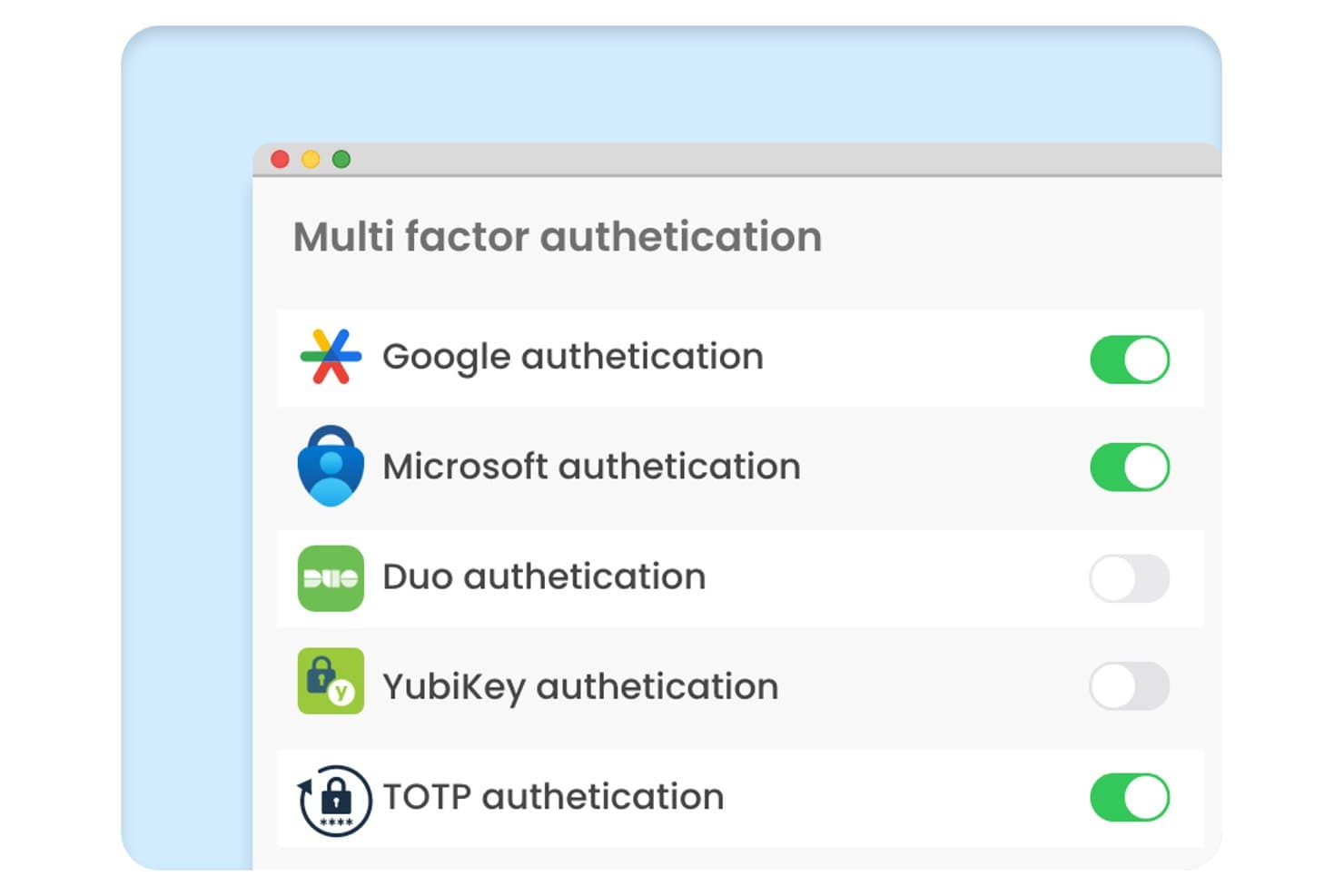
Securden Unified PAM offre un pannello delle impostazioni dell'autenticazione a più fattori con interruttori per i metodi di autenticazione Google, Microsoft, Duo, YubiKey e TOTP. Securden Unified PAM è una piattaforma di gestione degli accessi privilegiati che applica l'MFA agli account privilegiati, alle sessioni remote e agli endpoint tramite la gestione sicura delle credenziali, la registrazione delle sessioni e i controlli di accesso al momento necessario.
Per chi è più indicato Securden Unified PAM?
I team di sicurezza IT e IAM delle organizzazioni di medie e grandi dimensioni che necessitano di un'applicazione rigorosa dell'MFA in particolare per gli account privilegiati, le credenziali degli amministratori e gli accessi dei fornitori.
Perché ho scelto Securden Unified PAM
Ho scelto Securden Unified PAM perché il suo modello di accesso al momento necessario collega l'applicazione dell'MFA direttamente all'istante in cui viene richiesta una sessione privilegiata, non solo al momento dell'accesso. Apprezzo anche il modo in cui l'MFA adattiva si attiva in base alle anomalie comportamentali, così un amministratore di sistema che si connette a un server di produzione a un'ora insolita attiva automaticamente l'autenticazione aggiuntiva. Inoltre, la piattaforma genera direttamente i TOTP per gli account gestiti, colmando la lacuna dell'MFA sulle credenziali condivise che in genere restano senza protezione.
Funzionalità principali di Securden Unified PAM
- Individuazione centralizzata degli account privilegiati: esegue automaticamente la scansione dell'ambiente per identificare credenziali e account privilegiati non gestiti.
- Controllo degli accessi basato sui ruoli: consente di assegnare autorizzazioni granulari utilizzando ruoli utente personalizzati e gruppi di sicurezza.
- Registrazione delle sessioni privilegiate: registra tutte le sessioni privilegiate per gli audit forensi e la conformità normativa.
- Integrazioni con SIEM e ITSM: si connette a piattaforme come Splunk, IBM QRadar e ServiceNow per un monitoraggio unificato e la risposta agli incidenti.
Integrazioni di Securden Unified PAM
Securden Unified PAM offre integrazioni native con Active Directory, Microsoft Entra ID, Okta, OneLogin, Ping Identity, Splunk, IBM QRadar e ServiceNow. È disponibile un'API per le integrazioni personalizzate.
Pros and Cons
Pros:
- L'accesso al momento necessario riduce l'esposizione ai privilegi permanenti
- MFA applicata nativamente alle credenziali condivise degli amministratori
- Il rilevamento delle anomalie comportamentali attiva l'autenticazione aggiuntiva
Cons:
- La complessità della configurazione aumenta per le implementazioni su larga scala
- I pannelli di reportistica offrono poche opzioni di personalizzazione visiva
Learn more about Securden Unified PAM: Ideale per combinare gestione password e MFA
- Prova gratuita di 30 giorni + piano gratuito disponibile
- Da $3/utente/mese (fatturato annualmente)
Visit WebsiteCustomer Rating:4.6/5
Immagine 10: Interfaccia di autenticazione senza password di LastPass LastPass funziona come uno strumento completo progettato sia per gestire le password in modo sicuro che per offrire l'autenticazione a più fattori (MFA). Ha unito in modo intelligente queste due funzioni essenziali, rendendolo una scelta ideale per chi dà priorità sia alla gestione delle password che a un'autenticazione rafforzata.
Perché ho scelto LastPass: Durante il mio processo di selezione, LastPass si è distinto chiaramente per la sua doppia capacità: gestire le password offrendo anche la MFA. Confrontandolo con altri strumenti, l'approccio completo alla sicurezza è ciò che ho trovato unico. Penso che per privati o aziende che vedono il valore di unire la gestione delle password alla MFA, LastPass sia una scelta adatta.
Caratteristiche principali & integrazioni:
LastPass offre una cassaforte sicura per archiviare password, note e altre credenziali, tutte criptate localmente sul dispositivo dell’utente. Inoltre, la funzionalità MFA è robusta, grazie all'integrazione di fattori biometrici e contestuali per una maggiore sicurezza. Lato integrazioni, LastPass può essere abbinato a numerosi browser web e piattaforme e dispone di estensioni che ne garantiscono la fruibilità su vari dispositivi.
Pros and Cons
Pros:
- Unifica gestione password e MFA in un'unica piattaforma
- La crittografia locale garantisce la privacy dei dati utente
- Ampia gamma di integrazioni tra browser e piattaforme
Cons:
- La fatturazione annuale potrebbe non piacere a tutti
- L'interfaccia utente può risultare complessa per chi non ha competenze tecniche
- Alcune funzionalità avanzate sono disponibili solo nei piani di fascia più alta
Learn more about LastPass: Ideale per aziende SaaS che hanno bisogno di un'integrazione rapida
- 30 giorni di prova gratuita
- Prezzi su richiesta
Visit WebsiteCustomer Rating:4.8/5
Immagine 6: panoramica dello stile del builder di autenticazione di Frontegg Frontegg è una piattaforma progettata per potenziare le aziende SaaS con funzionalità predefinite e completamente personalizzabili per migliorare le proprie applicazioni. Questo approccio accelera notevolmente i processi di integrazione, risultando particolarmente vantaggioso per le aziende SaaS che mirano a incorporare rapidamente funzionalità essenziali.
Perché ho scelto Frontegg: Nel processo di individuazione degli strumenti più validi per questa lista, Frontegg ha attirato la mia attenzione grazie al suo approccio mirato ai servizi per le aziende SaaS. La sua capacità di offrire integrazioni rapide lo distingue veramente da altre piattaforme. Ho ritenuto che Frontegg sia davvero la scelta migliore per le realtà SaaS che necessitano di integrare rapidamente nuove funzionalità.
Funzionalità principali e integrazioni:
Frontegg offre una suite di funzionalità SaaS preconfigurate, che vanno dalla gestione degli utenti, alle notifiche, fino a capacità di sicurezza e audit. Il loro approccio permette alle aziende di saltare lunghi processi di sviluppo e accedere subito a funzionalità collaudate. Inoltre, le integrazioni di Frontegg con piattaforme popolari come Slack, Azure e AWS assicurano che le sue funzionalità possano facilmente integrarsi negli stack tecnologici già esistenti.
Pros and Cons
Pros:
- Soluzioni su misura specifiche per le aziende SaaS
- Le funzionalità preconfigurate eliminano lunghi tempi di sviluppo
- Ampie opzioni di integrazione con le principali piattaforme
Cons:
- Potrebbe non essere adatto per aziende non SaaS
- La personalizzazione potrebbe richiedere una curva di apprendimento per alcuni
- La trasparenza sui prezzi potrebbe essere migliorata
Learn more about Frontegg: Ideale per l'autenticazione adattiva a più fattori
- Prova gratuita di 30 giorni disponibile
- A partire da $2/utente/mese
Visit WebsiteCustomer Rating:4.5/5
Dashboard miniOrange IDP che mostra la gestione centralizzata dell'identità, la configurazione SSO e la configurazione dell'autenticazione a più fattori da un'unica console di amministrazione. Per chi cerca una soluzione di autenticazione a più fattori che unisca sicurezza e facilità d'uso, miniOrange IDP rappresenta una scelta interessante. Si rivolge alle aziende di vari settori che desiderano rafforzare le proprie misure di sicurezza senza complicare l'accesso degli utenti. Integrando metodi di verifica aggiuntivi, miniOrange IDP aiuta le organizzazioni a proteggere le informazioni sensibili mantenendo al tempo stesso un'esperienza di accesso intuitiva per gli utenti.
Perché ho scelto miniOrange IDP
Ho scelto miniOrange IDP per la sua autenticazione adattiva a più fattori, che regola in modo intelligente le misure di sicurezza in base al comportamento dell'utente e ai livelli di rischio. Questa funzione garantisce che il tuo team rimanga sicuro senza interruzioni inutili. Inoltre, le ampie capacità di integrazione della piattaforma con oltre 6000 applicazioni la rendono una scelta versatile per le aziende che vogliono semplificare la gestione degli accessi. La dashboard centralizzata di miniOrange IDP consente agli amministratori di gestire in modo efficiente gli accessi degli utenti e monitorare le politiche di sicurezza, risolvendo le problematiche comuni nella gestione di ambienti utenti diversificati.
Funzionalità principali di miniOrange IDP
Oltre all'autenticazione adattiva e alle possibilità di integrazione, ho trovato utili anche le seguenti funzioni:
- Molteplici metodi MFA: Supporta notifiche push, OTP via SMS ed email, Google Authenticator, token hardware, dati biometrici e domande di sicurezza.
- Autenticazione senza password: Permette l'accesso senza password utilizzando FIDO2, dati biometrici e metodi di autenticazione tramite push.
- Politiche di accesso condizionale: Applica requisiti di autenticazione in base al comportamento dell'utente, al dispositivo, alla posizione e al livello di rischio.
- Opzioni self-service: Consente agli utenti di reimpostare le password e configurare autonomamente i propri metodi MFA, aiutando a ridurre le richieste di supporto IT.
- Protezione endpoint e VPN: Protegge l'accesso VPN così come gli accessi a Windows, macOS e Linux.
Integrazioni di miniOrange IDP
Le integrazioni includono Microsoft 365, Google Workspace, AWS, Salesforce, Slack, Zoom, ServiceNow, Atlassian, GitHub, Dropbox e WordPress. La piattaforma supporta l'integrazione con oltre 6.000 applicazioni cloud, on-premise e legacy. È disponibile anche un'API per integrazioni con applicazioni personalizzate o proprietarie.
Pros and Cons
Pros:
- Funzionalità MFA adattiva e di sicurezza robuste
- Dashboard centralizzata per la gestione di utenti e politiche
- Supporta login personalizzati e brandizzati
Cons:
- Politiche di rimborso restrittive
- La configurazione iniziale può risultare complessa, soprattutto per le piccole organizzazioni
Learn more about miniOrange: Ideale per ottenere l'autenticazione senza password
- Prova gratuita di 14 giorni
- A partire da $8/utente/mese (fatturazione annuale)
Visit WebsiteCustomer Rating:4.4/5
Immagine 4: Anteprima della dashboard di Uniqkey Uniqkey è una soluzione di autenticazione robusta progettata per offrire agli utenti la comodità e la sicurezza dell'autenticazione senza password. Uniqkey si presenta come un'opzione formidabile per colmare questa transizione, in particolare per chi dà priorità alle soluzioni senza password.
Perché ho scelto Uniqkey: Nel processo di selezione dei migliori strumenti per questa lista, Uniqkey ha attirato la mia attenzione per il suo impegno verso un ambiente privo di password. Il suo focus su un'area così specifica e critica della cybersicurezza l'ha resa diversa da molte altre soluzioni che ho confrontato. L'ho valutata come la soluzione migliore per chi desidera ottenere un'autenticazione senza password, grazie al suo approccio specializzato e all'efficacia dimostrata in questo campo.
Caratteristiche principali & integrazioni:
Il punto di forza principale di Uniqkey è la sua autenticazione adattiva che analizza i fattori di rischio in tempo reale per determinare il livello necessario di verifica. Inoltre, offre opzioni di verifica biometrica e una cassaforte sicura per le password per quegli utenti che hanno ancora alcune credenziali da gestire. Per quanto riguarda le integrazioni, Uniqkey è compatibile con una vasta gamma di sistemi aziendali, garantendo alle imprese di poterlo integrare senza causare interruzioni ai flussi di lavoro esistenti.
Pros and Cons
Pros:
- Dedicato a un ambiente senza password
- Autenticazione adattiva basata su rischi in tempo reale
- Cassaforte sicura per le password residue
Cons:
- Potrebbe avere una curva di apprendimento per chi è nuovo ai sistemi senza password
- Limitato a determinate piattaforme e dispositivi
- Relativamente nuovo sul mercato, il che può preoccupare alcuni utenti che cercano marchi affermati
Learn more about Uniqkey:

Immagine 2: Esempio di dashboard RingCaptcha RingCaptcha si distingue come uno strumento specializzato volto a garantire una verifica affidabile degli utenti tramite SMS e chiamate vocali. Poiché oggi le aziende cercano misure di sicurezza più rigorose, soprattutto durante l'onboarding degli utenti, RingCaptcha emerge come leader grazie al suo focus sulla verifica mobile, che lo rende perfettamente allineato al titolo di migliore nella verifica tramite SMS e chiamate.
Perché ho scelto RingCaptcha: Nel processo di selezione dei migliori strumenti per questa lista, RingCaptcha ha attirato la mia attenzione per la sua specificità e competenza nella verifica basata su dispositivi mobili. La specializzazione di RingCaptcha nella verifica tramite SMS e chiamate lo rende unico. Questa dedizione alla verifica mobile è la ragione per cui l'ho ritenuto il migliore per le aziende che fanno grande affidamento su questi metodi.
Funzionalità principali & integrazioni:
Il punto di forza di RingCaptcha risiede nella rapida consegna degli SMS, nella verifica robusta tramite chiamata vocale e in una dashboard intuitiva per monitorare e gestire le verifiche. Per quanto riguarda l'integrazione, RingCaptcha è versatile, integrandosi senza problemi con piattaforme come Shopify, WordPress e WooCommerce, garantendo una maggiore diffusione e applicabilità su diversi modelli di business.
Pros and Cons
Pros:
- Specializzato nella verifica tramite SMS e chiamate vocali
- Meccanismo di consegna SMS rapidissimo
- Dashboard orientata all'utente per il monitoraggio
Cons:
- Potrebbe essere troppo specifico per aziende che necessitano di metodi di verifica differenti
- Prezzo più alto rispetto ad alcuni concorrenti
- Funzionalità limitate oltre la verifica mobile
Learn more about RingCaptcha: Ideale per l'autenticazione aziendale scalabile
- Prova gratuita disponibile
- A partire da $23/utente/mese (fatturato annualmente)

Immagine 1: Software di autenticazione multifattore Auth0 Auth0 è una delle principali piattaforme di gestione delle identità progettata per semplificare autenticazione e autorizzazione per aziende di ogni dimensione. Pensata soprattutto per le imprese, garantisce che, con la crescita dell'azienda, anche le misure di sicurezza crescano di pari passo, rendendola una delle migliori soluzioni per l'autenticazione aziendale scalabile.
Perché ho scelto Auth0: Quando cercavo uno strumento di autenticazione, Auth0 si è imposto costantemente tra le opzioni disponibili. La sua reputazione di robustezza e adattabilità nel campo della gestione delle identità la distingue dai concorrenti. Nel confronto con altri strumenti, la sua scalabilità, soprattutto per le grandi aziende, ne ha consolidato la posizione come migliore scelta per l'autenticazione aziendale scalabile secondo la mia opinione.
Caratteristiche distintive e integrazioni:
Tra le sue numerose funzionalità, il Single Sign-On di Auth0, l'autenticazione multifattore adattiva e la dashboard di amministrazione intuitiva sono particolarmente degne di nota. Per quanto riguarda le integrazioni, Auth0 eccelle grazie alla sua compatibilità con una vasta gamma di piattaforme come AWS, Slack, Salesforce e Zendesk, garantendo alle aziende un flusso di lavoro integrato e coeso.
Pros and Cons
Pros:
- Adattabile a varie dimensioni aziendali
- Ampia gamma di integrazioni di terze parti
- Strumenti di sicurezza completi
Cons:
- Potenziale complessità per le aziende più piccole
- Alcune personalizzazioni possono richiedere competenze tecniche
- Il prezzo iniziale potrebbe essere elevato per alcuni budget
Learn more about Auth0: Ideale per chi già utilizza l’ambiente Salesforce
- Piano gratuito disponibile
- A partire da $25/utente/mese (fatturato annualmente)

Immagine 5: Assistente Autenticazione a Più Fattori Salesforce Platform La Salesforce Platform offre una vasta suite di strumenti e servizi progettati per consentire alle aziende di creare e scalare applicazioni rapidamente. È particolarmente adatta per le aziende e i team già fortemente inseriti nell’ecosistema Salesforce.
Perché ho scelto Salesforce Platform: Nel selezionare gli strumenti per questa lista, sono stato attratto dalla Salesforce Platform per le sue capacità di integrazione profonda e le soluzioni complete che offre. Questa piattaforma rappresenta l’approccio più allineato e sinergico. Ecco perché credo sia la scelta migliore per chi già utilizza Salesforce.
Caratteristiche e integrazioni principali:
La Salesforce Platform si distingue per le sue funzionalità di sviluppo low-code, che permettono alle aziende di creare applicazioni rapidamente. Vanta inoltre analisi potenziate dall’IA e un modello di sicurezza robusto per proteggere i dati sensibili. In termini di integrazione, la piattaforma si integra perfettamente con altri prodotti Salesforce come Sales Cloud, Service Cloud e Marketing Cloud, garantendo un’esperienza utente coerente.
Pros and Cons
Pros:
- Integrazione profonda con altri prodotti Salesforce
- Lo sviluppo low-code accelera la creazione delle applicazioni
- Funzionalità di sicurezza avanzate
Cons:
- Può risultare complesso per i nuovi utenti di Salesforce
- Il prezzo può aumentare con l’aggiunta di più funzionalità
- Richiede investimenti in formazione e apprendimento per un utilizzo ottimale
Learn more about Salesforce Platform:
Altri software di autenticazione a più fattori
Di seguito trovi un elenco di altri software di autenticazione a più fattori che ho selezionato, ma che non sono rientrati tra i primi 12. Vale sicuramente la pena provarli.
- 11IBM Security VerifyIdeale per le aziende che operano in scenari di cloud ibrido
- 12Microsoft AuthenticatorIdeale per gli utenti all'interno dell'ecosistema Microsoft
- 13Google AuthenticatorIdeale per gli utenti della suite di servizi Google
- 14Twilio Verify APIIdeale per sviluppatori che necessitano di processi di verifica personalizzabili
- 15WatchGuard AuthPointIdeale per garantire la sicurezza sui dispositivi mobili
- 16ManageEngine ADManager PlusIdeale per metodi di autenticazione diversificati
Come Valuto i Software di Autenticazione Multi-Fattore
Suddivido la mia valutazione in due livelli: le capacità di base che ogni strumento deve offrire, come il supporto multi-fattore e l'integrazione con IdP, e i fattori distintivi che contano per ambienti IT specifici e necessità di conformità.
Funzionalità di Base (Requisiti Minimi per Questa Lista)
Quando seleziono gli strumenti per la mia lista, valuto ciascuno su una scala da 0 (non offre la funzionalità) a 5 (eccelle in quest'area) per ogni funzionalità di base elencata di seguito. Poi, calcolo il punteggio totale dello strumento in percentuale. Ogni strumento deve raggiungere un punteggio minimo totale del 75% per essere considerato per l'inclusione.
- Fattori di Autenticazione Multipli: Verifico se uno strumento supporta un'ampia gamma di secondi fattori—notifiche push, TOTP, chiavi FIDO2, dati biometrici e SMS—così che i team possano abbinare i tipi di fattore ai livelli di rischio.
- Integrazione Directory & IdP: Ogni strumento dovrebbe connettersi a fonti di identità come Active Directory, Entra ID, Okta e Google Workspace, così che l'iscrizione e la deprovisioning restino legate al ciclo di vita utenti esistente.
- Copertura Applicazioni & Protocolli: Valuto quante applicazioni e protocolli vengono protetti da uno strumento, dalle app SaaS tramite SAML/OIDC fino a VPN, sessioni RDP e SSH su RADIUS o connettori nativi.
- Policy Adattive & Basate sul Rischio: Le regole contestuali sono importanti—cerco strumenti che regolano le richieste di autenticazione in base alla postura del dispositivo, alla posizione di rete o al comportamento di accesso invece che applicare richieste standard a tutti.
- Gestione delle Policy Amministrative: Una console centralizzata dove è possibile stabilire policy per gruppo utente, applicazione o tipo di dispositivo rende molto più facile la gestione operativa su larga scala.
- Audit Logging & Reporting: Cerco log di autenticazione esportabili e report di conformità predefiniti che si riferiscano a framework come SOC 2, PCI-DSS o HIPAA, oltre all'inoltro verso SIEM per una visibilità in tempo reale.
Una volta che ho una lista di strumenti che soddisfano i criteri, considero ciò che distingue ciascuna piattaforma.
Fattori Distintivi (Cosa Distingue i Fornitori)
Ecco come confronto e differenzio i vari fornitori:
Caratteristiche Eccezionali
L'accesso senza password tramite FIDO2 o biometria è un grande elemento distintivo—elimina il rischio di phishing e riduce i ticket di reset password per il supporto tecnico. Valuto anche le capacità di verifica dei dispositivi, dove lo strumento controlla lo stato di salute dell’endpoint come la presenza di cifratura o di un EDR prima di concedere l'accesso. Per i team DevOps, è importante la disponibilità di API e SDK. Integrare l’MFA in app personalizzate o pipeline CI/CD richiede endpoint REST ben documentati e librerie client, offerte da strumenti come Duo e Okta.
Oltre le Funzionalità
Certificazioni di conformità come SOC 2 Type II e FedRAMP mi dicono che un fornitore prende seriamente la propria sicurezza—questo conta quando lo strumento è il custode dell’accesso al tuo ambiente. La flessibilità di distribuzione è un altro fattore che considero, poiché i team in settori regolamentati spesso necessitano opzioni on-premise o air-gapped oltre all'hosting cloud. Valuto anche la profondità dell’ecosistema, verificando la presenza di integrazioni preconfigurate con strumenti SIEM come Splunk, MDM come Jamf e PAM come CyberArk, perché l’MFA raramente lavora isolato dal resto dello stack di sicurezza.
Come scegliere un software di autenticazione a più fattori
È facile perdersi in lunghi elenchi di funzionalità e strutture tariffarie complesse. Per aiutarti a rimanere concentrato mentre affronti il tuo processo di scelta del software, unico per le tue esigenze, ecco un elenco dei fattori da tenere a mente:
| Fattore | Cosa considerare |
|---|---|
| FattoreScalabilità | Cosa considerareIl software crescerà insieme al tuo team? Considera i limiti relativi agli utenti e le possibilità di espansione. Assicurati che possa supportare la crescita futura senza richiedere una revisione completa o costosi aggiornamenti. |
| FattoreIntegrazioni | Cosa considerareFunziona con gli strumenti che già utilizzi? Verifica la compatibilità con i sistemi attuali, come CRM, client di posta elettronica o servizi cloud, per evitare interruzioni del flusso di lavoro. |
| FattorePersonalizzazione | Cosa considerarePuoi adattarlo alle tue esigenze? Cerca opzioni per modificare impostazioni, criteri e interfacce utente in base ai tuoi requisiti specifici. Evita soluzioni rigide che ti costringono ad adottare un approccio uguale per tutti. |
| FattoreSemplicità d'uso | Cosa considerareIl tuo team riuscirà a utilizzarlo rapidamente? Valuta il design dell'interfaccia e l'esperienza utente. Un sistema complicato potrebbe rallentare l'adozione e frustrare gli utenti. |
| FattoreImplementazione e inserimento iniziale | Cosa considerareQuanto sarà fluida la transizione? Esamina il supporto disponibile per la configurazione, come guide, risorse formative e assistenza dedicata per l'inserimento iniziale, per garantire un passaggio senza problemi dal sistema attuale. |
| FattoreCosto | Cosa considerareRientra nel tuo budget? Valuta il modello di prezzo, comprese le commissioni nascoste, le funzionalità aggiuntive e i costi a lungo termine. Confrontalo con i limiti del tuo budget per trovare il giusto equilibrio tra costi e funzionalità. |
| FattoreMisure di sicurezza | Cosa considerareI tuoi dati e le identità degli utenti sono protetti? Verifica gli standard di crittografia, le pratiche di archiviazione dei dati e la conformità ai protocolli di sicurezza come GDPR o HIPAA. |
| FattoreRequisiti di conformità | Cosa considerareRispetta gli standard del settore? Assicurati che il software sia conforme ai requisiti legali e normativi pertinenti al tuo settore, come PCI-DSS per l'elaborazione dei pagamenti. |
Che cos'è il software di autenticazione a più fattori?
Il software di autenticazione a più fattori fornisce un ulteriore livello di sicurezza richiedendo agli utenti di fornire due o più metodi di verifica prima di concedere l'accesso a un account o a un sistema. Questo software offre diversi fattori di autenticazione, dagli OTP per Windows, Linux e MAC/macOS all'autenticazione biometrica per le app mobili su Android e Apple iOS. Questi strumenti offrono notifiche push, app di autenticazione e token software che funzionano facilmente con Active Directory.
Le organizzazioni e i singoli utenti sfruttano questi strumenti per rafforzare la sicurezza, soprattutto in un'epoca in cui le minacce informatiche sono diffuse. Questo approccio riduce al minimo il rischio di accessi non autorizzati, anche se soggetti malintenzionati entrano in possesso della password di un utente, garantendo la protezione dei dati e dei sistemi sensibili.
Funzionalità
Ecco le funzionalità principali che ogni ottimo software MFA dovrebbe offrire:
- Autenticazione a due fattori: fornisce un ulteriore livello di sicurezza richiedendo una seconda forma di verifica, come un messaggio di testo o un codice inviato tramite e-mail.
- Capacità di integrazione: consente una connessione fluida con i sistemi esistenti, come CRM e client di posta elettronica, per evitare interruzioni del flusso di lavoro.
- Autenticazione biometrica: utilizza le impronte digitali o il riconoscimento facciale per verificare l'identità, offrendo un'esperienza utente più sicura e comoda.
- Autenticazione basata sul rischio: adatta le misure di sicurezza in base al comportamento e alla posizione dell'utente per aumentare la protezione senza compromettere la facilità d'uso.
- Autenticazione senza password: elimina la necessità delle password, riducendo il rischio di violazioni dovute a credenziali deboli o rubate.
- Criteri utente personalizzabili: consentono la creazione di protocolli di sicurezza personalizzati per soddisfare esigenze organizzative e requisiti di conformità specifici.
- Monitoraggio in tempo reale: fornisce avvisi immediati e informazioni dettagliate sui tentativi di accesso non autorizzati, consentendo di rispondere rapidamente alle potenziali minacce.
- Monitoraggio della geolocalizzazione: controlla la posizione degli utenti per impedire l'accesso da regioni sospette o non autorizzate.
- Interfaccia intuitiva: garantisce la facilità d'uso grazie a un design intuitivo, riducendo i tempi di formazione e migliorando l'adozione da parte degli utenti.
- Supporto alla conformità: è conforme agli standard del settore, come GDPR e HIPAA, garantendo il rispetto dei requisiti legali e normativi.
Vantaggi
L'implementazione di un software MFA offre diversi vantaggi al tuo team e alla tua azienda. Eccone alcuni che puoi aspettarti:
- Sicurezza avanzata: Fornisce livelli aggiuntivi di protezione attraverso funzionalità come l'autenticazione a due fattori e quella biometrica, per ridurre gli accessi non autorizzati.
- Riduzione del rischio di violazioni: Riduce al minimo la possibilità di violazioni dei dati utilizzando l'autenticazione senza password e il monitoraggio in tempo reale per rilevare attività sospette.
- Conformità migliorata: Aiuta a soddisfare le normative di settore grazie al supporto alla conformità, garantendo che l'organizzazione rispetti gli standard legali.
- Maggiore fiducia degli utenti: Rafforza la fiducia degli utenti proteggendo le informazioni sensibili e i dati personali.
- Gestione flessibile degli accessi: Offre criteri utente personalizzabili, consentendo di adattare le misure di sicurezza alle proprie esigenze specifiche.
- Risposta efficiente alle minacce: Consente di intervenire rapidamente sulle potenziali minacce grazie agli avvisi istantanei e al tracciamento della posizione geografica.
- Esperienza utente semplificata: Garantisce facilità d'uso grazie a un'interfaccia intuitiva, rendendo più semplice per il team adottare e utilizzare il software in modo efficace.
Costi e prezzi
La scelta di un software per l'autenticazione a più fattori richiede la comprensione dei vari modelli e piani tariffari disponibili. I costi variano in base alle funzionalità, alle dimensioni del team, ai componenti aggiuntivi e ad altri fattori. La tabella seguente riassume i piani più comuni, i relativi prezzi medi e le funzionalità tipicamente incluse nelle soluzioni MFA:
Tabella di confronto dei piani per software di autenticazione a più fattori
| Tipo di piano | Prezzo medio | Funzionalità comuni |
|---|---|---|
| Tipo di pianoPiano gratuito | Prezzo medio$0 | Funzionalità comuniAutenticazione a due fattori di base, integrazioni limitate e supporto della comunità. |
| Tipo di pianoPiano personale | Prezzo medio$5-$10/utente/mese | Funzionalità comuniAutenticazione a due fattori, supporto via e-mail e integrazioni di base con le app. |
| Tipo di pianoPiano aziendale | Prezzo medio$15-$25/utente/mese | Funzionalità comuniSupporto per più dispositivi, integrazioni avanzate, autenticazione basata sul rischio e supporto prioritario. |
| Tipo di pianoPiano per grandi aziende | Prezzo medio$30-$50/utente/mese | Funzionalità comuniCriteri personalizzabili, autenticazione biometrica, responsabile account dedicato e supporto alla conformità. |
Domande frequenti
Ecco alcune risposte alle domande comuni sul software MFA:
È possibile utilizzare il software per l'autenticazione a più fattori con token hardware?
Sì, molte soluzioni per l’autenticazione a più fattori supportano i token hardware come ulteriore livello di sicurezza. Questa funzionalità è utile se il team preferisce i dispositivi fisici ai metodi digitali. Assicurati che il software preso in considerazione sia compatibile con i token che intendi utilizzare.
Cosa devo fare se non ricevo i codici di verifica?
Se non ricevi i codici di verifica tramite SMS, il problema potrebbe dipendere dall’operatore o dalle app di sicurezza. Passare a un’app di autenticazione può migliorare l’affidabilità. Verifica se il software offre metodi di verifica alternativi per evitare interruzioni dell’accesso.
I dati degli utenti vengono archiviati nel cloud?
La gestione dei dati degli utenti varia a seconda del fornitore. Alcune soluzioni archiviano i dati in locale, mentre altre utilizzano il cloud. È importante capire dove vengono archiviati i dati e come vengono protetti. Cerca un software che offra comunicazioni sicure per le richieste di autenticazione.
Quali opzioni di supporto sono disponibili per la risoluzione dei problemi?
La maggior parte dei fornitori offre diverse opzioni di supporto, tra cui procedure per la risoluzione dei problemi comuni e assistenza diretta. Cerca un software che fornisca documentazione dettagliata, forum per gli utenti e canali di supporto diretto come chat o telefono per ricevere aiuto rapidamente.
Quale software è noto per essere il più conveniente?
Sebbene i prezzi esatti possano cambiare, OneLogin e Azure Multi-Factor Authentication sono storicamente tra le opzioni più convenienti sul mercato.
Quale software tende a essere il più costoso?
Le soluzioni premium come CyberArk Identity e Thales SafeNet Trusted Access hanno spesso un prezzo più elevato grazie alle loro funzionalità avanzate e alle capacità di livello aziendale avanzato.